

International tax software helps your team manage cross-border tax compliance, automate filings, and track global tax obligations in one place. If you’re searching for the best international tax software, you’re likely facing complex reporting requirements, shifting regulations, and the need to support business growth across multiple countries. This guide highlights expert-reviewed tools designed to help you stay compliant, reduce manual work, and keep pace with evolving international tax rules—so you can focus on accurate reporting and strategic decision-making. Here’s what you need to know to choose the right solution for your business.
Why Trust Our Software Recommendations
6,700+
Reviews
20
Industry experts
16+
Evaluation factors
14
Years
Our team has been testing and reviewing software since 2012. As finance leaders ourselves, we know how difficult—and important—it is to choose the right software.
For this guide, we evaluated tools using hands-on testing and independent research, scoring tools using our selection criteria.
Our reviews reflect our human editorial judgment, not a sales pitch.
International Tax Software Comparison Table
This comparison table summarizes pricing details for my top international tax software selections:
| Tool | Best For | Trial Info | Price | ||
|---|---|---|---|---|---|
| 1 | Best for indirect VAT and e-invoicing at scale | Free demo available | Pricing upon request | Website | |
| 2 | Best for automated VAT calculations | Free demo available | Pricing upon request | Website | |
| 3 | Best for digital sales tax automation | 7-day free trial available | From $29/month | Website | |
| 4 | Best for Pillar Two compliance at scale | Free demo available | Pricing upon request | Website | |
| 5 | Best with global tax research tools | Free demo available | Pricing upon request | Website | |
| 6 | Best with real-time regulatory updates | Free demo available | Pricing upon request | Website | |
| 7 | Best with ERP system compatibility | Free demo available | Pricing upon request | Website | |
| 8 | Best for SaaS revenue tax management | Free demo available | From $100/month | Website | |
| 9 | Best for cross-border compliance support | Free demo available | Pricing upon request | Website | |
| 10 | Best for multinational entity reporting | Free demo available | Pricing upon request | Website |


Best International Tax Software Reviews
Below are my detailed summaries of the international tax software that made it onto my shortlist. My reviews offer a detailed look at the features, best use cases, and integrations of each software to help you find the best one for you.
 Best for indirect VAT and e-invoicing at scale
- Free demo available
- Pricing upon request
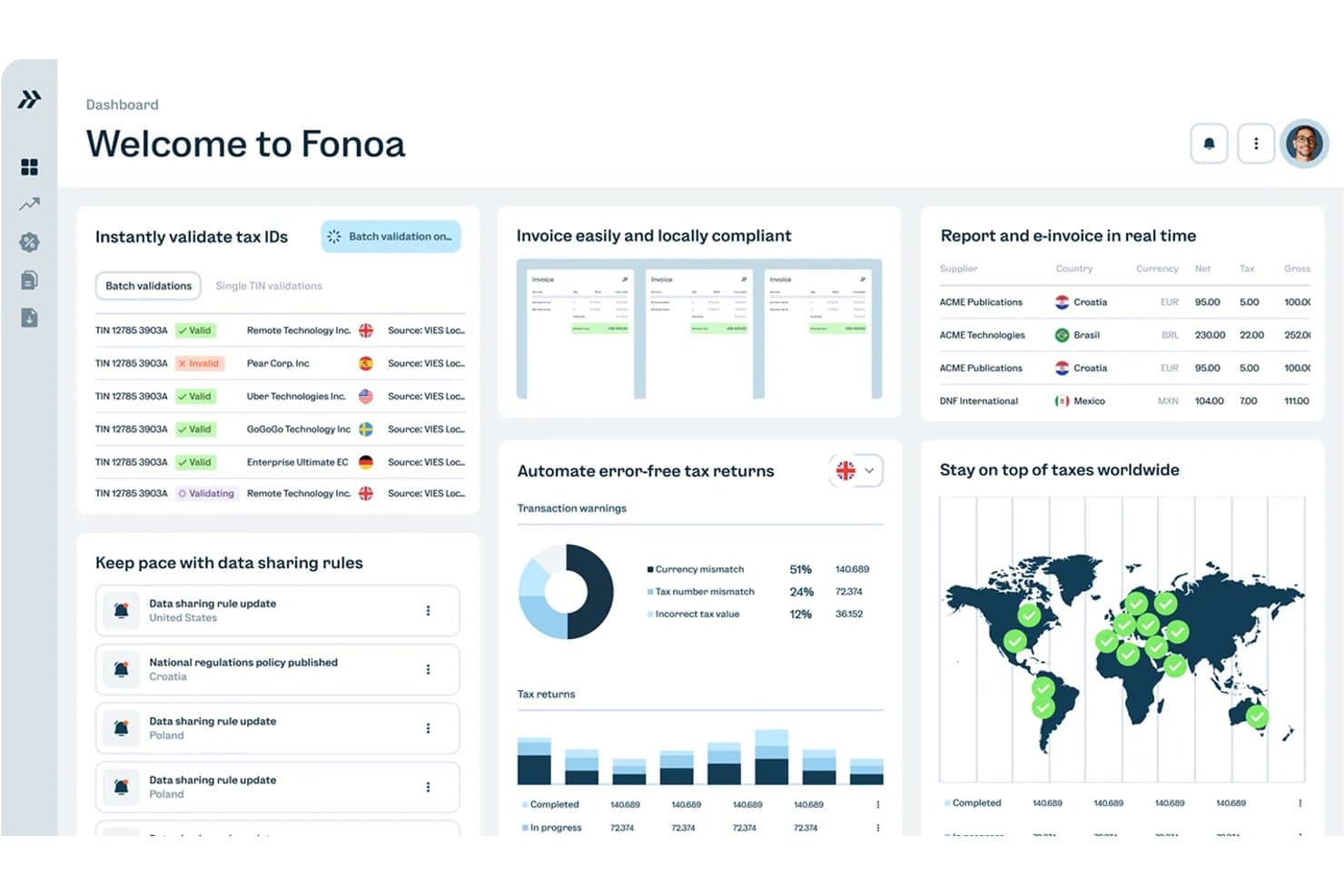
Fonoa centralizes tax validation, invoicing, and returns in one dashboard. Fonoa is an API-first indirect tax automation platform that handles VAT, GST, and sales tax across the full compliance lifecycle—covering tax ID validation, real-time calculation, e-invoicing, and return filing across 100+ jurisdictions.
Who Is Fonoa Best For?
Fonoa is a strong fit for finance and tax teams at high-volume digital businesses—SaaS companies, marketplaces, and platforms—that need to automate VAT, GST, and e-invoicing across dozens of jurisdictions without building compliance infrastructure from scratch.
Why I Picked Fonoa
I've included Fonoa in my top picks because it handles the full indirect tax lifecycle—validation, calculation, e-invoicing, and return filing—through a single data model, which is rare at this scale. I love that the Tax Engine processes each transaction in real time (under 200ms) and automatically updates rules across 100+ jurisdictions, so your team isn't manually maintaining rate tables. The E-Invoicing module connects directly to tax authorities via accredited API connections, covering both outgoing and incoming invoices across 50+ countries.
Fonoa Key Features
- Tax ID validation: Checks tax IDs in real time against live government registries across 120+ countries, with fuzzy matching to correct bad data and batch processing of up to 50,000 records.
- Audit trail automation: Compiles every tax determination, override, and approval by jurisdiction and period into versioned, tamper-proof evidence to support SOX and SOC 2 governance.
- Regulatory alerts: Delivers compliance alerts tailored to your company's profile, ranked by materiality and linked directly to the tax platform so rule changes can be deployed immediately.
- AP and AR tax coverage: Applies the same calculation logic to both sales and purchase transactions, giving your team consistent indirect tax treatment across accounts receivable and accounts payable.
Fonoa Integrations
Fonoa integrations include SAP, Oracle Fusion Cloud, and NetSuite, although connection depth isn’t publicly detailed. Its API supports custom connections to checkout, billing, invoicing, and AP/AR systems.
Pros and Cons
Pros:
- Strong support for high-volume transactions
- Audit trails support SOX and SOC 2
- Real-time VAT/GST coverage across jurisdictions
Cons:
- No tax provision or entity consolidation
- No transfer pricing or treaty logic
Learn more about Fonoa: Best for automated VAT calculations
- Free demo available
- Pricing upon request
Visit WebsiteCustomer Rating:4/5
Avalara automates tax calculations and compliance across regions. Avalara offers automated VAT calculation and compliance tools for businesses selling across borders. The platform is especially useful for ecommerce companies, finance teams, and tax professionals who need to manage complex, multi-country VAT rules. Its real-time tax determination and filing features help reduce manual errors and keep international transactions compliant.
Why I Picked Avalara
When it comes to handling automated VAT calculations, Avalara offers a level of precision and coverage that’s hard to match. The platform automatically applies the correct VAT rates and rules for each transaction, even as regulations change across countries. I appreciate that Avalara also supports VAT registration and digital filing, which helps businesses stay compliant without manual intervention. These features make it a strong choice for companies managing high volumes of cross-border sales and complex VAT obligations.
Avalara Key Features
Some other features that make Avalara stand out include:
- Cross-border tax determination: Calculate taxes for international transactions based on real-time location and product data.
- Returns preparation and filing: Generate and submit VAT returns to tax authorities in multiple countries.
- Document management: Store and retrieve tax documents, certificates, and compliance records in a centralized portal.
- Tax exemption certificate management: Collect, validate, and manage exemption certificates for eligible customers.
Avalara Integrations
Integrations include Shopify, NetSuite, QuickBooks, Magento, Salesforce, Epicor, Sage, and Microsoft Dynamics.
Pros and Cons
Pros:
- Built-in HS code mapping
- Real-time rate calculation
- Massive integration library
Cons:
- Setup can be complicated
- Focuses only on indirect
Learn more about Avalara: Best for digital sales tax automation
- 7-day free trial available
- From $29/month
Visit WebsiteCustomer Rating:4.8/5
Quaderno automates sales tax, VAT, and GST compliance for sellers. Quaderno is built for digital businesses and SaaS companies that need to automate sales tax compliance across global markets. The platform tracks tax thresholds, applies the correct rates, and generates tax-compliant invoices for every sale. This makes it especially useful for online sellers managing VAT, GST, and US sales tax in multiple countries.
Why I Picked Quaderno
For digital-first businesses, Quaderno stands out for its ability to automate sales tax compliance across borders. The platform automatically detects when you cross tax thresholds in different countries and applies the correct VAT, GST, or US sales tax rates to each transaction. I appreciate how Quaderno generates tax-compliant invoices and keeps detailed records for every sale, which is especially important for SaaS and ecommerce companies selling internationally. This focus on digital sales tax automation makes it a strong choice for teams that need to stay compliant without manual intervention.
Quaderno Key Features
Some other Quaderno features that international sellers may find valuable include:
- Multi-currency support: Issue invoices and process payments in multiple currencies for global customers.
- Automated credit note generation: Create and send credit notes automatically when refunds or adjustments are needed.
- Customizable invoice templates: Design and brand invoices to meet local and business requirements.
- Real-time tax reports: Access up-to-date tax summaries and export data for filings at any time.
Quaderno Integrations
Integrations include Stripe, PayPal, Shopify, WooCommerce, Amazon, Zapier, Xero, and QuickBooks Online.
Pros and Cons
Pros:
- Sends compliant receipts
- Easy Stripe integration
- Beautiful user interface
Cons:
- No transfer pricing tools
- Lacks deep ERP syncing
Learn more about Quaderno: Best for Pillar Two compliance at scale
- Free demo available
- Pricing upon request
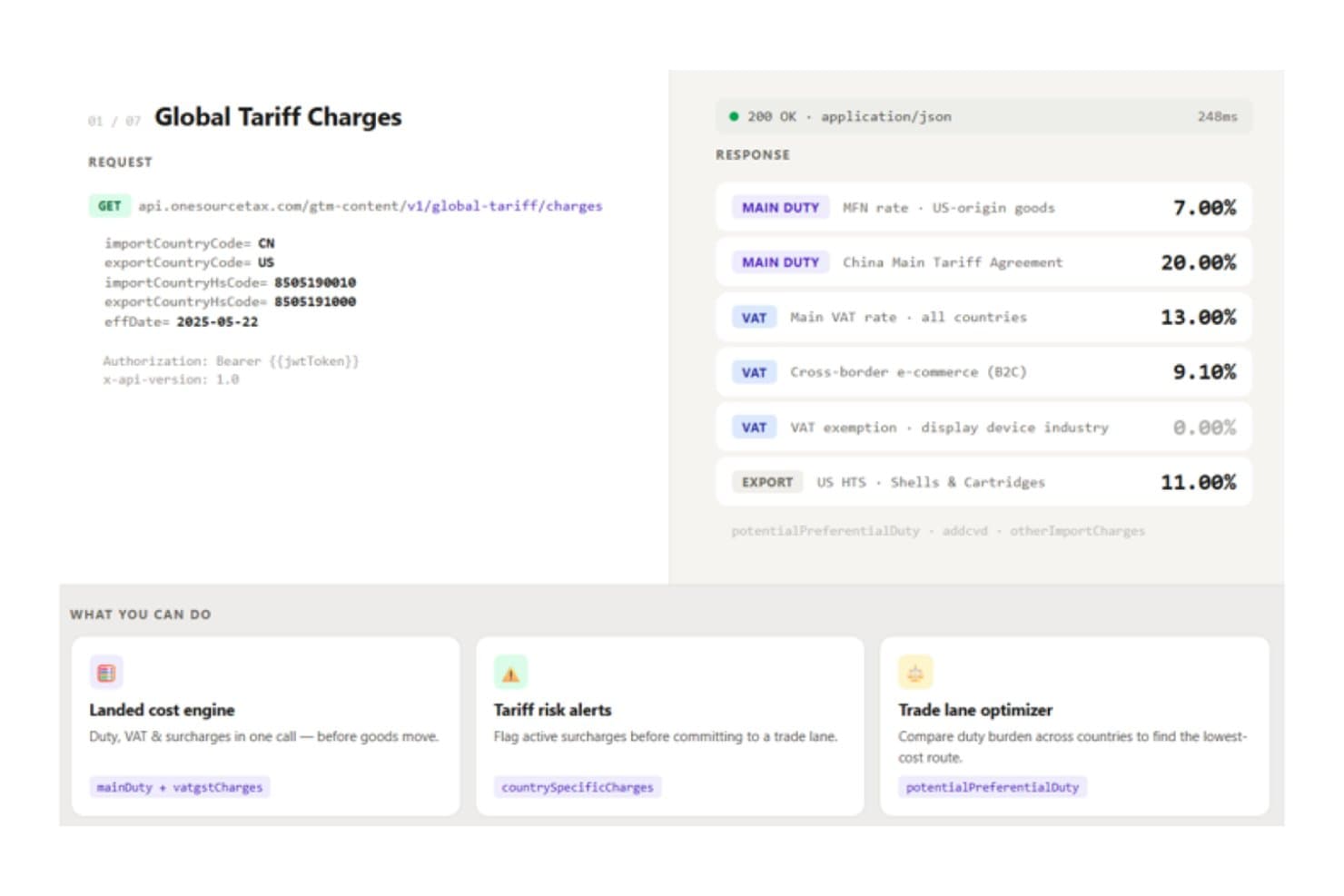
ONESOURCE delivers real-time global tariff rates via API for trade compliance. ONESOURCE is a modular enterprise tax suite from Thomson Reuters that covers direct tax compliance, tax provision, indirect tax calculation and reporting, e-invoicing, statutory reporting, and Pillar Two (GloBE) compliance across multinational entities.
Who Is ONESOURCE Best For?
ONESOURCE is a strong fit for multinational tax teams that need to manage Pillar Two compliance, indirect tax automation, and multi-entity provision under a single enterprise vendor.
Why I Picked ONESOURCE
I've included ONESOURCE in my top picks because its Pillar Two compliance depth is unlike anything else I've seen at enterprise scale. The Orbitax Global Minimum Tax integration automates GloBE calculations and safe-harbor analysis across 190+ countries, and it connects directly to Tax Provision so your existing data mappings carry over. I also like that the tool logged 1,700+ GloBE Information Return filings across 34 jurisdictions in under a year, which tells me this isn't theoretical coverage.
ONESOURCE Key Features
- Indirect tax determination: Calculates sales tax, VAT, GST, and excise in real time across 205+ countries and 60,000+ jurisdictions, processing up to 10M transactions per hour.
- Statutory reporting: Generates statutory financial statements in 45+ jurisdictions using local-language templates, with audit trails and one-click machine translation.
- VAT return automation: Prepares and reconciles VAT/GST returns, SAF-T/SII digital reports, and prefilled-return comparisons across 38+ countries through Indirect Compliance.
- E-invoicing compliance: Supports e-invoicing requirements in 80–85+ countries via the integrated Pagero network, with line-level matching of e-invoices to returns.
ONESOURCE Integrations
ONESOURCE has 12 SAP integrations, including SAP ERP, S/4HANA, and Ariba, plus certified connectors for Oracle ERP Cloud, Oracle Cloud Infrastructure, and Microsoft Dynamics 365 F&O. Determination offers 60+ prebuilt integrations, while REST APIs, OData, and SFTP support custom data connections.
Pros and Cons
Pros:
- Multi-entity provision supports global reporting
- Frequent tax-content updates across jurisdictions
- Pillar Two automation across 190+ countries
Cons:
- Non-U.S. income-tax filing remains unclear
- Transfer pricing documentation requires another vendor
Learn more about ONESOURCE: Best with global tax research tools
- Free demo available
- Pricing upon request

Bloomberg Tax helps enterprises manage global tax compliance and planning. With Bloomberg Tax, tax professionals and multinational finance teams get access to a deep library of global tax research tools. The platform is designed for those who need to navigate complex international tax regulations and stay current with evolving compliance standards. Its unique strength lies in delivering expert analysis, country-by-country guides, and up-to-date legislative tracking for cross-border operations.
Why I Picked Bloomberg Tax
What sets Bloomberg Tax apart for me is its unmatched suite of global tax research tools, which are essential for professionals handling international tax matters. The platform offers detailed country-by-country tax guides and expert commentary, helping users interpret complex regulations in multiple jurisdictions. I appreciate the real-time legislative tracking and analysis, which keeps your team informed about changes that could impact cross-border compliance. These research-focused features make Bloomberg Tax a strong choice for organizations that need authoritative, up-to-date tax intelligence on a global scale.
Bloomberg Tax Key Features
Some other features that stood out to me include:
- Tax treaty comparison tool: Compare provisions across multiple international tax treaties in a single view.
- Interactive tax charts: Visualize key tax rates and rules for different countries.
- Document management system: Organize, store, and retrieve research and compliance documents securely.
- Personalized news alerts: Receive updates on tax developments tailored to your selected jurisdictions and topics.
Bloomberg Tax Integrations
Integrations include Advantax, Vertex, Avalara, and various ERP systems through Advantage Fixed Assets.
Pros and Cons
Pros:
- Strong planning tools
- Highly trusted data source
- Tracks treaty networks
Cons:
- Overkill for small firms
- Focuses mostly on research
Learn more about Bloomberg Tax:

Sovos automates VAT compliance for businesses across regions. Sovos is designed for finance teams and tax professionals who need to keep pace with constantly changing global tax regulations. The platform specializes in delivering real-time regulatory updates and automating compliance across multiple jurisdictions. This makes it especially useful for multinational businesses facing frequent changes in tax rules and reporting requirements.
Why I Picked Sovos
What sets Sovos apart is its focus on real-time regulatory updates, which is essential for businesses operating in multiple countries. The platform monitors global tax law changes and automatically updates compliance processes, so your team can respond quickly to new requirements. I like that Sovos also provides automated reporting and e-invoicing features that help you stay ahead of shifting international tax obligations. This makes it a strong fit for organizations that need to minimize compliance risk in a fast-changing regulatory environment.
Sovos Key Features
Some other Sovos features that international tax teams may find useful include:
- Multi-jurisdiction tax determination: Calculate taxes for transactions across different countries and regions in real time.
- Automated VAT return preparation: Generate VAT returns for multiple jurisdictions within the platform.
- Audit trail and compliance documentation: Maintain detailed records of tax calculations and filings for audit support.
- Tax data analytics dashboard: Visualize and analyze tax data trends across your global operations.
Sovos Integrations
Integrations include SAP, NetSuite, Microsoft Dynamics, Magento, QuickBooks, Shopify, and Oracle.
Pros and Cons
Pros:
- High volume processing
- Good for enterprise scale
- Real-time regulatory sync
Cons:
- Slow customer service
- Lacks direct tax features
Learn more about Sovos:

Vertex automates tax calculation and compliance for large enterprises. Vertex is designed for organizations that need to manage complex tax requirements across multiple countries and business systems. The platform stands out for its deep compatibility with leading ERP systems, making it a strong fit for enterprises with integrated finance and operations. This helps tax teams automate calculations, maintain compliance, and adapt quickly to changing international tax regulations.
Why I Picked Vertex
For businesses that rely on ERP systems to manage global operations, Vertex offers a level of compatibility that’s hard to match in the international tax software space. I picked Vertex because it integrates directly with major ERP platforms, allowing tax calculations and compliance processes to run within your existing financial workflows. The platform supports real-time tax determination and automated updates for changing tax rules across multiple jurisdictions. This makes it especially valuable for organizations that need to keep tax processes tightly aligned with their broader finance and operations infrastructure.
Vertex Key Features
Some other features that make Vertex a strong choice for international tax management include:
- Global content database: Provides up-to-date tax rates and rules for over 19,000 jurisdictions worldwide.
- Tax data analytics dashboard: Offers visualizations and reporting tools for monitoring tax exposure and compliance.
- Automated exemption certificate management: Tracks, stores, and validates exemption certificates for sales and use tax.
- Batch processing capabilities: Handles large volumes of transactions for bulk tax calculations and filings.
Vertex Integrations
Integrations include SAP, Oracle, NetSuite, Microsoft Dynamics, Salesforce, and Workday.
Pros and Cons
Pros:
- Highly customizable rules
- Handles massive data loads
- Accurate VAT/GST rules
Cons:
- Expensive maintenance
- Requires IT support
Learn more about Vertex:

Anrok automates sales tax compliance for SaaS businesses. Anrok is purpose-built for SaaS companies that need to manage tax compliance on recurring software revenue across global markets. It’s especially relevant for finance and operations teams navigating complex digital tax rules, such as VAT, GST, and US sales tax. The platform automates tax calculations, registration, and filings for SaaS revenue, helping you keep pace with evolving international requirements.
Why I Picked Anrok
For SaaS companies dealing with recurring revenue, Anrok addresses the unique tax challenges that come with digital product sales across borders. I picked Anrok because it specializes in automating tax calculations and filings for subscription-based software, which is often subject to complex and shifting international tax rules. The platform tracks tax thresholds, manages registrations in multiple jurisdictions, and generates compliant invoices tailored to SaaS billing models. These features make Anrok a strong fit for finance teams that need to stay compliant as they scale their software business globally.
Anrok Key Features
Some other features that make Anrok useful for SaaS tax management include:
- Real-time tax liability dashboard: Gives you a live view of tax obligations across all jurisdictions.
- Automated exemption certificate management: Collects, validates, and stores customer exemption certificates.
- Audit-ready reporting tools: Prepares detailed reports to support audits and regulatory reviews.
- Multi-currency support: Handles tax calculations and invoicing in different currencies for global customers.
Anrok Integrations
Integrations include Stripe, Chargebee, Recurly, Zuora, NetSuite, and QuickBooks Online.
Pros and Cons
Pros:
- Clean and modern interface
- Easy global threshold alerts
- Syncs with billing systems
Cons:
- Narrow global use case
- No employee tax features
Learn more about Anrok: Best for cross-border compliance support
- Free demo available
- Pricing upon request

Forte International Tax supports global payroll and tax compliance needs. Forte International Tax offers tailored solutions for businesses navigating complex cross-border tax compliance. It’s especially relevant for multinational corporations, finance teams, and tax professionals managing multi-jurisdictional reporting and regulatory requirements. The platform stands out for its focus on proactive compliance management and support for evolving international tax laws.
Why I Picked Forte International Tax
What drew me to Forte International Tax is its specialized focus on cross-border compliance support, which is a major concern for organizations operating in multiple countries. The platform provides in-depth guidance on international tax regulations and helps users manage compliance with country-specific rules and deadlines. I appreciate that Forte International Tax offers ongoing monitoring of regulatory changes, so your team can stay ahead of evolving requirements. These features make it a strong choice for businesses that need to reduce risk and maintain compliance across different jurisdictions.
Forte International Tax Key Features
In addition to its compliance monitoring and regulatory guidance, I also found these features worth noting:
- Customizable reporting templates: Generate country-specific tax reports tailored to your organization’s needs.
- Secure document management: Store, organize, and retrieve sensitive tax documents within a protected environment.
- Multi-entity management: Oversee tax compliance for several subsidiaries or business units from a single dashboard.
- Direct access to tax advisors: Connect with international tax experts for case-specific questions and support.
Forte International Tax Integrations
Integrations include Oracle, SAP, Microsoft Dynamics 365, and Corptax.
Pros and Cons
Pros:
- Tracks foreign tax credits
- Good for mid-market firms
- Handles transfer pricing
Cons:
- Implementation takes time
- Interface can feel dated
Learn more about Forte International Tax:

Orbitax supports global tax planning and compliance for businesses. Orbitax is designed for finance teams and tax professionals managing multinational entity reporting and compliance. The platform specializes in automating global tax calculations, documentation, and data collection across jurisdictions. Its unique approach helps organizations centralize complex reporting requirements and reduce manual effort in cross-border tax management.
Why I Picked Orbitax
For organizations juggling multinational entity reporting, Orbitax stands out for its specialized automation and data management capabilities. The platform centralizes global tax data, making it easier to prepare and file reports across multiple jurisdictions. I like that Orbitax offers automated country-by-country reporting and document management, which helps reduce manual errors and streamline compliance. These features make it a strong fit for finance teams that need to coordinate complex reporting requirements for entities operating in several countries.
Orbitax Key Features
Some other features that caught my attention include:
- Global tax rate database: Access up-to-date tax rates for multiple countries in one place.
- Transfer pricing documentation generator: Create compliant transfer pricing reports tailored to local regulations.
- Tax calendar management: Track important filing deadlines and compliance dates across jurisdictions.
- Audit trail functionality: Maintain a detailed record of changes and user actions for compliance and review purposes.
Orbitax Integrations
Integrations include SAP, Oracle, Microsoft Dynamics 365, Workday, NetSuite, Thomson Reuters ONESOURCE, Wolters Kluwer CCH, Vertex, Avalara, and Xero.
Pros and Cons
Pros:
- Good API capabilities
- Built for global tax teams
- Excellent visual trackers
Cons:
- Can be overwhelming to use
- Not for small businesses
Learn more about Orbitax:
Other International Tax Software
Here are some additional international tax software options that didn’t make it onto my shortlist, but are still worth checking out:
- 11PwC SightlineBest for enterprise-scale integrations
- 12CCH IntegratorBest for group tax provisioning and Pillar Two filing
- 13SAP Tax ComplianceBest for SAP-native tax compliance workflows
- 14Longview TaxBest for provision-led CbCR and Pillar Two reporting
- 15CCH TagetikBest for group tax provision and close on one platform
- 16CSC CorptaxBest for consolidated global tax data
- 17TaxuallyBest for VAT and e-invoicing firm white-labeling
How I Evaluate International Tax Software
I split my evaluation into three parts, weighting core functionality most: calculate and report cross-border tax across entities, currencies, and jurisdictions. Next, I look for ERP integrations and scenario modeling, such as testing a treaty election. Finally, I consider onboarding, support, security, and pricing value.
Core Functionality (Table Stakes For This List)
When I'm selecting tools for my list, I score each one on a scale from 0 (does not offer the functionality) to 5 (excels in this area) for each core functionality listed below. I then convert the total into a percentage to help assess each tool's overall fit, with extra weight on any functionalities I’ve deemed essential.
- Global Tax Compliance (Essential): I look for country-level calculations, reporting, filings, forms, and support for entities operating across multiple jurisdictions.
- Cross-Border Tax Engine (Essential): I assess treaty applications, withholding rules, intercompany transactions, and tax calculations across currencies and jurisdictions.
- Regulatory Updates: I check how quickly tools update rates, rules, filing requirements, and guidance when tax regulations change.
- Indirect Tax Management: I evaluate VAT and GST calculations, validation, reporting, and filing-ready outputs for digital and physical transactions.
- Transfer Pricing Support: I look for intercompany documentation, pricing methods, benchmarking support, and audit-ready records across related entities.
- Entity And Currency Consolidation: I assess consolidated tax reporting across legal entities, currencies, revenue streams, and organizational structures.
Once I have a list of tools that meet the criteria, I consider what sets each platform apart.
Differentiating Factors (What Sets Vendors Apart)
Here's how I compare and contrast different vendors:
Standout Features
I look for scenario modeling that lets tax teams simulate restructurings or treaty elections before committing, since catching a Pillar Two exposure in a forecast beats discovering it at filing. Audit trail automation matters just as much—I check whether workpapers generate automatically with defensible detail, because responding to a tax authority inquiry shouldn't mean rebuilding a spreadsheet from scratch. I also evaluate API-driven extensibility, especially for organizations that need to push tax data into internal data warehouses or BI tools sitting outside the vendor's ecosystem.
Beyond Features
I evaluate how each platform handles entity restructurings and new market entries, since adding a subsidiary after an acquisition shouldn't force a re-implementation. Licensing models matter here too—I check whether costs scale predictably as jurisdictions and entities grow. I also look at vendor regulatory depth: whether a provider maintains in-house tax research teams or partners with firms like IBFD for content accuracy, because stale or shallow coverage across less common jurisdictions creates real compliance exposure.
How to Choose International Tax Software
It’s easy to get bogged down in long feature lists and complex pricing structures. To help you stay focused as you work through your unique software selection process, here’s a checklist of factors to keep in mind:
| Factor | What to Consider |
|---|---|
| FactorScalability | What to ConsiderWill the software handle your current and projected transaction volumes, entity growth, and new markets without major upgrades? |
| FactorIntegrations | What to ConsiderDoes the tool connect natively to your ERP, billing, and accounting systems, or will you need custom development or middleware? |
| FactorCustomizability | What to ConsiderCan you tailor tax rules, reporting formats, and workflows to your business model and compliance needs, or are you limited to presets? |
| FactorEase of use | What to ConsiderWill your finance team and non-technical users be able to navigate, update, and troubleshoot the system without ongoing IT support? |
| FactorImplementation and onboarding | What to ConsiderHow long will it take to get up and running, and what resources (internal or vendor-provided) are required for data migration and training? |
| FactorCost | What to ConsiderAre all necessary modules included in the quoted price, or are there extra fees for additional countries, users, or filings? |
| FactorSecurity safeguards | What to ConsiderDoes the vendor meet your organization’s data privacy, encryption, and access control standards, especially for sensitive tax data? |
| FactorCompliance requirements | What to ConsiderDoes the software support the specific jurisdictions, tax types, and reporting standards your business must comply with now and in the future? |
What Is International Tax Software?
International tax software is a digital solution that helps businesses manage, calculate, and report taxes across multiple countries and jurisdictions. It automates complex tasks like VAT, GST, and sales tax calculations, tracks compliance requirements, and generates audit-ready reports. Finance teams use these tools to reduce manual errors, keep up with changing regulations, and ensure accurate filings for cross-border transactions.
Features
Here are the core features any great international tax software should have:
- Automated tax calculation: Calculates VAT, GST, and sales tax for each transaction based on the latest rules in every relevant jurisdiction, reducing manual work and errors.
- Multi-jurisdiction support: Manages tax compliance across multiple countries, states, or provinces, allowing you to handle global operations from a single platform.
- Threshold tracking: Monitors sales and transaction volumes to alert you when you approach or exceed tax registration thresholds in different regions.
- Tax filing automation: Prepares and submits tax returns electronically to the appropriate authorities, helping you meet deadlines and reduce compliance risk.
- Audit-ready reporting: Generates detailed, exportable reports that support audits and internal reviews, with clear records of calculations and filings.
- Exemption certificate management: Collects, validates, and stores customer exemption certificates, ensuring you apply the correct tax rates and remain compliant.
- Real-time dashboards: Provides live visibility into tax liabilities, filings, and compliance status across all jurisdictions.
- Multi-currency support: Handles transactions, invoicing, and reporting in various currencies, which is essential for businesses with international customers.
- Integration capabilities: Connects directly with your ERP, accounting, and billing systems to sync transaction data and streamline workflows.
- Regulatory updates: Automatically incorporates changes in tax laws and rates, so your calculations and filings stay accurate as regulations evolve.
Benefits
Implementing international tax software provides several benefits for your team and your business. Here are a few you can look forward to:
- Reduced compliance risk: Automated calculations and up-to-date regulatory changes help you avoid costly errors and penalties in multiple jurisdictions.
- Time savings: Automated tax filings, reporting, and threshold tracking free up your team from manual, repetitive tasks.
- Improved accuracy: Real-time dashboards and audit-ready reports ensure your tax data is precise and easy to verify.
- Scalable global operations: Multi-jurisdiction and multi-currency support make it easier to expand into new markets without overhauling your tax processes.
- Centralized tax management: Integration with your ERP, accounting, and billing systems lets you manage all tax obligations from a single platform.
- Better audit preparedness: Detailed recordkeeping and exemption certificate management simplify responding to audits and regulatory reviews.
- Enhanced visibility: Live insights into tax liabilities and compliance status help you make informed decisions and plan proactively.
Costs and Pricing
Selecting international tax software requires an understanding of the various pricing models and plans available. Costs vary based on features, team size, add-ons, and more. The table below summarizes common plans, their average prices, and typical features included in international tax software solutions:
Plan Comparison Table for International Tax Software
| Plan Type | Average Price | Common Features |
|---|---|---|
| Plan TypeFree Plan | Average Price$0 | Common FeaturesBasic tax calculation, limited jurisdiction support, manual data entry, and basic reporting. |
| Plan TypePersonal Plan | Average Price$30-$100/user/month | Common FeaturesAutomated tax calculation, single-user access, basic compliance tools, and standard support. |
| Plan TypeBusiness Plan | Average Price$150-$1500/month | Common FeaturesMulti-user access, multi-jurisdiction support, automated filings, integration options, and audit reports. |
| Plan TypeEnterprise Plan | Average Price$2,000+/month | Common FeaturesAdvanced compliance management, custom integrations, dedicated account support, advanced analytics, and onboarding assistance. |
FAQs
Here are some answers to common questions about international tax software:
How does international tax software handle changing tax regulations?
International tax software updates tax rates and rules automatically as regulations change. This helps your team stay compliant without manual research or updates, reducing the risk of errors and missed deadlines.
Can international tax software integrate with my existing accounting or ERP systems?
Yes, most international tax software offers integrations with popular accounting, ERP, and billing platforms. This allows you to sync transaction data, automate workflows, and avoid duplicate data entry.
What should I consider when evaluating international tax software for a growing business?
Look for scalability, multi-jurisdiction support, and flexible pricing. Make sure the software can handle increased transaction volumes, new markets, and additional users as your business expands.
Is onboarding and training typically included with international tax software?
Most vendors provide onboarding resources such as setup guides, training videos, and live support. Some offer interactive product tours or webinars to help your team get started quickly and confidently.
How does international tax software support audit readiness?
International tax software generates detailed, exportable reports and maintains clear records of calculations, filings, and exemption certificates. This documentation makes it easier to respond to audits and regulatory reviews.