

Los presupuestos de base cero pueden ayudarte a recuperar el control sobre cada dólar de tu presupuesto, pero gestionarlos manualmente es lento y propenso a errores. Ahí es donde entra en juego el software de presupuestos de base cero.
Como responsable de control financiero, me he enfrentado a los mismos quebraderos de cabeza: hojas de cálculo desordenadas, cifras poco claras y demasiadas idas y venidas, por eso he elaborado esta lista.
Gracias a mis conocimientos sobre operaciones financieras, probé y revisé personalmente estas herramientas para ayudarte a evitar el proceso de prueba y error y encontrar una solución que realmente funcione. Empecemos.
Por qué confiar en nuestras recomendaciones de software
6,700+
Reviews
20
Industry experts
16+
Evaluation factors
14
Years
Nuestras reseñas reflejan nuestro criterio independiente, no un discurso de ventas. Descubra cómo mantenemos la transparencia.
Para esta guía, evaluamos las herramientas mediante pruebas prácticas e investigación independiente, puntuando las herramientas según nuestros criterios de selección.
Nuestras reseñas reflejan nuestro criterio editorial humano, no un discurso de ventas.
Tabla comparativa de programas de presupuestos de base cero
Esta tabla comparativa resume los detalles de precios de mis principales selecciones de programas de presupuestos de base cero:
| Tool | Best For | Trial Info | Price | ||
|---|---|---|---|---|---|
| 1 | Mejor para la escalabilidad de grandes empresas | Demostración gratuita disponible | Precio a consultar | Website | |
| 2 | Ideal para información presupuestaria potenciada por IA | Demo gratuita disponible | Precios a consultar | Website | |
| 3 | Ideal para informes financieros integrados | Demo gratuita disponible | Precio a consultar | Website | |
| 4 | Ideal para la planificación de la plantilla | Demostración gratuita disponible | Precio bajo solicitud | Website | |
| 5 | Ideal para procesos de planificación continua | Demostración gratuita disponible | Precios bajo consulta | Website | |
| 6 | Mejor integración con hojas de cálculo | Demostración gratuita disponible | Precio bajo solicitud | Website | |
| 7 | Ideal para presupuestos en la nube | Demostración gratuita disponible | Precios a consultar | Website | |
| 8 | Mejor por su interfaz de usuario intuitiva | Demostración gratuita disponible | Precios bajo solicitud | Website | |
| 9 | La mejor opción para la planificación basada en Excel | Demostración gratuita disponible | Precios disponibles previa solicitud | Website | |
| 10 | Ideal para capacidades de visualización de datos | Demostración gratuita disponible | Precio a consultar | Website |


Análisis de los mejores programas de presupuestos de base cero
A continuación encontrarás mis resúmenes detallados de los mejores programas de presupuestos de base cero que llegaron a mi lista. Mis análisis ofrecen una visión profunda de las características principales, ventajas e inconvenientes, integraciones y casos de uso ideales de cada herramienta para ayudarte a encontrar la mejor opción para ti.
 Mejor para la escalabilidad de grandes empresas
- Demostración gratuita disponible
- Precio a consultar
Visit WebsiteCustomer Rating:4.5/5
Anaplan permite la planificación empresarial con modelos dinámicos de presupuestación base cero. Anaplan es una plataforma de planificación en la nube diseñada para grandes empresas que necesitan gestionar procesos complejos de planificación financiera, presupuestación y previsión. Está dirigida a equipos financieros que buscan una solución escalable para manejar procesos de negocio intrincados.
Por qué elegí Anaplan: Anaplan es ideal si trabajas con operaciones complejas o de gran escala. Facilita la creación y ajuste de modelos financieros para que realmente reflejen el funcionamiento de tu empresa y te ayuden a controlar tus finanzas. Las actualizaciones de datos en tiempo real también significan que tu equipo no tiene que esperar; puedes tomar decisiones informadas rápidamente a medida que cambian las circunstancias. Y como se escala fácilmente, crece junto con tu negocio, lo que lo convierte en una opción sólida para equipos grandes o empresas.
Características destacadas e integraciones:
Características incluyen planificación avanzada de escenarios para ayudarte a explorar distintos resultados empresariales. La plataforma también ofrece herramientas de colaboración en tiempo real para mejorar la comunicación del equipo. Además, proporciona análisis detallados para obtener perspectivas más profundas de los datos financieros.
Integraciones incluyen Salesforce, Workday, Microsoft Azure, SAP, Oracle, Slack, Tableau, Docusign, ServiceNow y Google Workspace.
Pros and Cons
Pros:
- Procesamiento de datos en tiempo real
- Soporta operaciones a gran escala
- Capacidades flexibles de modelado
Cons:
- Requiere conocimientos técnicos
- Curva de aprendizaje pronunciada
Learn more about Anaplan: Ideal para información presupuestaria potenciada por IA
- Demo gratuita disponible
- Precios a consultar
Visit WebsiteCustomer Rating:4.8/5
Drivetrain alinea los planes con la estrategia utilizando herramientas de modelado financiero en tiempo real. Drivetrain es una plataforma de finanzas estratégicas dirigida a empresas modernas, enfocada en mejorar la planificación y el análisis financiero. Está orientada a equipos financieros que buscan automatizar flujos de trabajo clave y mejorar la toma de decisiones estratégicas.
Por qué elegí Drivetrain: Drivetrain utiliza IA para eliminar el trabajo pesado de la planificación y el análisis financiero. Te ayuda a crear previsiones de flujo de caja y planes de ingresos sólidos rápidamente, sin perderte en hojas de cálculo complejas. Pero lo que realmente destaca es cómo incorpora datos en tiempo real para mantener tus previsiones siempre actualizadas. A medida que las situaciones cambian, tus planes pueden cambiar también, haciendo de Drivetrain una herramienta inteligente para mantenerte alineado con la estrategia.
Funciones e integraciones destacadas:
Funciones incluyen consolidación financiera para una visión unificada de las finanzas. Su previsión de flujo de caja también ayuda a tu equipo a gestionar la liquidez de manera efectiva. Además, la planificación de personal del software garantiza que puedas planificar las necesidades de personal con precisión.
Las integraciones incluyen NetSuite, QuickBooks, Salesforce, Xero, SAP, Microsoft Dynamics, Workday, Slack y Google Workspace.
Pros and Cons
Pros:
- Informes personalizables
- Acceso a datos en tiempo real
- Información obtenida mediante IA
Cons:
- Pocas plantillas específicas por sector
- Proceso de configuración complejo
Learn more about Drivetrain: Ideal para informes financieros integrados
- Demo gratuita disponible
- Precio a consultar
Visit WebsiteCustomer Rating:4.5/5
Prophix automatiza la presupuestación base cero con herramientas de flujo de trabajo y aprobación. Prophix es una herramienta de gestión del rendimiento corporativo diseñada para empresas medianas y grandes. Ayuda a los equipos financieros con la elaboración de presupuestos, planificación e informes financieros integrados.
Por qué elegí Prophix: Prophix hace un gran trabajo reuniendo todos tus informes financieros en un solo lugar. Cuenta con funciones útiles como informes automatizados y paneles de control personalizables, para que tu equipo pueda crear reportes claros y detallados sin tanto trabajo manual. Si buscas una herramienta que lo unifique todo y te dé una visión completa de tus finanzas, Prophix definitivamente merece una oportunidad.
Funciones destacadas e integraciones:
Funciones incluyen flujos de trabajo integrados para agilizar las aprobaciones y mantener en orden los procesos presupuestarios. Sus herramientas de planificación de escenarios también te permiten probar diferentes resultados financieros para que puedas anticiparte con confianza.
Integraciones incluyen Microsoft Dynamics, Sage, NetSuite, SAP, QuickBooks, Salesforce, Workday, Google Workspace y Microsoft Office 365.
Pros and Cons
Pros:
- Reduce la entrada manual de datos
- Soporta planificación colaborativa
- Informes financieros integrados
Cons:
- Acceso móvil limitado
- Implementación inicial compleja
Learn more about Prophix: Ideal para la planificación de la plantilla
- Demostración gratuita disponible
- Precio bajo solicitud
Visit WebsiteCustomer Rating:4.4/5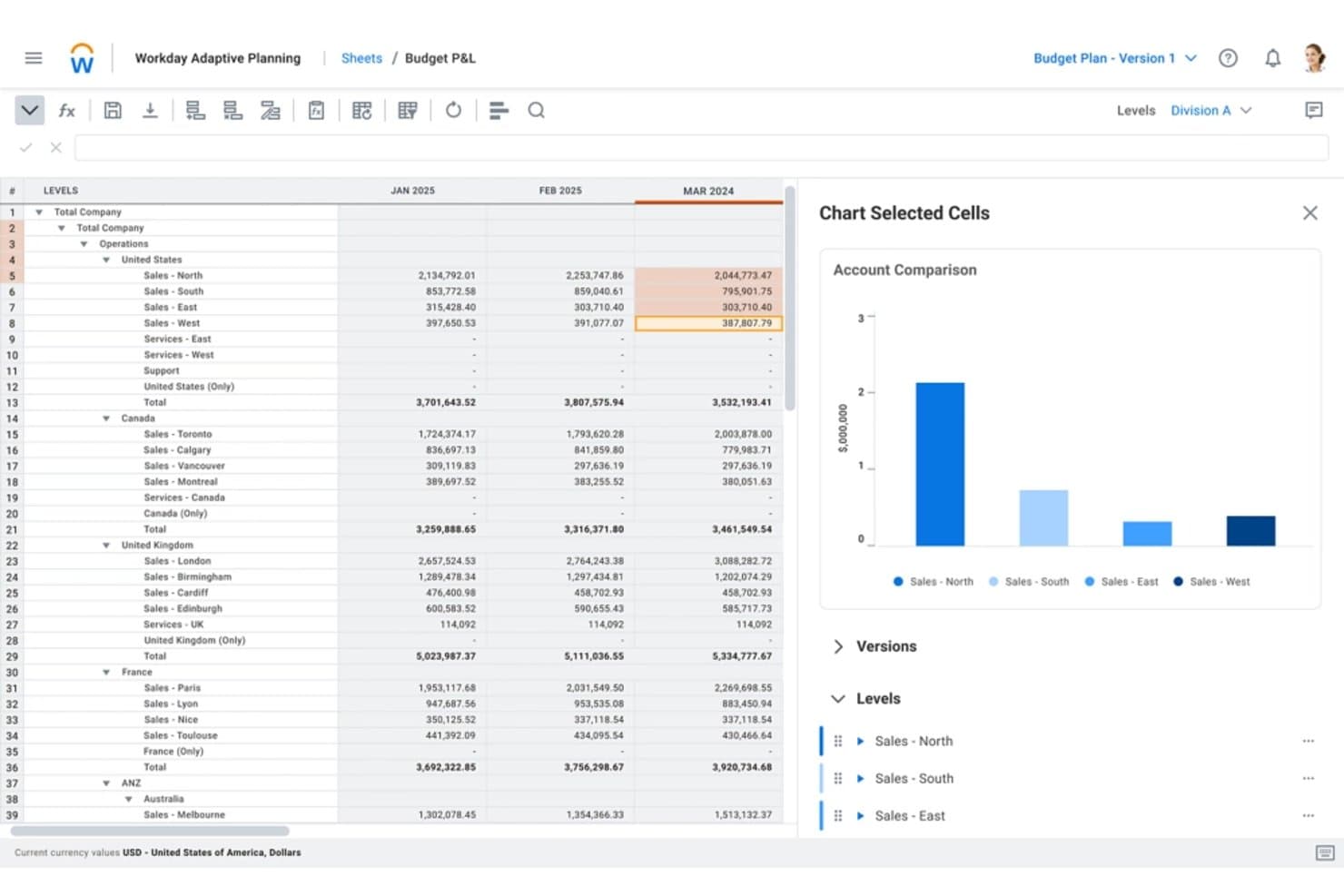
Workday Adaptive Planning realiza el seguimiento de los presupuestos de ventas regionales entre departamentos por período. Workday Adaptive Planning es una plataforma empresarial de FP&A y EPM que admite presupuestos de base cero y basados en controladores, planificación de la plantilla, modelado de escenarios y colaboración presupuestaria interdepartamental.
¿Para quién es más adecuado Workday Adaptive Planning?
Workday Adaptive Planning es una opción sólida para los equipos de FP&A de empresas medianas y grandes que necesitan conectar la planificación financiera y de la plantilla en una sola plataforma.
Por qué elegí Workday Adaptive Planning
Workday Adaptive Planning está en mi lista de opciones principales porque su módulo de planificación de la plantilla hace algo que la mayoría de las herramientas de FP&A no puede hacer: vincula directamente las decisiones sobre el número de empleados con su impacto en los costes en tiempo real. Cuando elaboro un presupuesto de base cero, puedo modelar supuestos de contratación basados en controladores por centro de costes y ver al instante cómo afecta cada decisión al resultado final. Además, Adaptive Decision Intelligence muestra automáticamente explicaciones de las variaciones, por lo que puedo identificar exactamente dónde se desvía el gasto y por qué.
Características principales de Workday Adaptive Planning
- Planificación de gastos basada en controladores: Crea planes de gastos vinculados a controladores empresariales específicos, con reglas integradas para las asignaciones entre centros de costes.
- Escenarios ilimitados de tipo «qué pasaría si»: Crea y comparte un número ilimitado de modelos de escenarios para comparar los resultados presupuestarios con los objetivos estratégicos.
- Exploración de datos en lenguaje natural: Consulta los datos del plan y los informes mediante preguntas en lenguaje sencillo a través de la capa Adaptive Decision Intelligence.
- Presupuestación descendente y ascendente: Establece objetivos ejecutivos en el nivel superior mientras recopilas simultáneamente las aportaciones operativas de los responsables de los centros de costes.
Integraciones de Workday Adaptive Planning
Workday Adaptive Planning admite más de 4.000 integraciones con más de 350 sistemas de origen, incluidos Oracle, SAP, NetSuite, Microsoft Dynamics, Sage Intacct, QuickBooks, Xero, Deltek, Epicor y Workday HCM. Su Integration Cloud permite el intercambio de datos de ERP y HRIS para la planificación presupuestaria.
Pros and Cons
Pros:
- Modela en tiempo real el impacto de los costes de la plantilla
- Compara un número ilimitado de escenarios con los objetivos estratégicos
- Admite la colaboración presupuestaria descendente y ascendente
Cons:
- Carece de flujos de trabajo estructurados para justificar partidas
- Requiere asistencia de un administrador para las configuraciones complejas
Learn more about Workday Adaptive Planning: Ideal para procesos de planificación continua
- Demostración gratuita disponible
- Precios bajo consulta
Visit WebsiteCustomer Rating:4.2/5
Planful permite presupuestación detallada con planificación de escenarios y automatización. Planful es una plataforma de planificación y análisis financiero diseñada para empresas de todos los tamaños. Ayuda a los equipos financieros con la elaboración de presupuestos, proyecciones y planificación continua para mejorar el rendimiento financiero.
Por qué elegí Planful: Planful facilita mantener tus presupuestos y pronósticos actualizados con cambios en tiempo real. Puedes ajustar planes rápidamente, ejecutar diferentes escenarios y anticiparte a lo que venga. Esto, combinado con la interfaz limpia y fácil de usar de la plataforma, ayuda a que incluso las tareas y metas financieras más complejas sean menos abrumadoras.
Funciones e integraciones destacadas:
Funciones incluye informes dinámicos que proporcionan información financiera actualizada. También ofrece herramientas de colaboración integradas que facilitan que los equipos entre departamentos contribuyan a los presupuestos y las previsiones.
Integraciones incluyen NetSuite, QuickBooks, Salesforce, Workday, Microsoft Dynamics, SAP, Google Workspace, Microsoft Office 365 y Dropbox.
Pros and Cons
Pros:
- Ajustes de presupuesto en tiempo real
- Estrategias financieras flexibles
- Admite planificación continua
Cons:
- Pocas plantillas específicas por sector
- Opciones de personalización limitadas
Learn more about Planful: 6Mejor integración con hojas de cálculo
Cube
- Demostración gratuita disponible
- Precio bajo solicitud
Visit WebsiteCustomer Rating:4.6/5
Cube conecta hojas de cálculo con sistemas financieros para una creación ágil de presupuestos. Cube es una herramienta de planificación y análisis financiero diseñada para empresas que dependen en gran medida de hojas de cálculo. Ayuda a los equipos financieros a optimizar los procesos de presupuesto, previsión e informes.
Por qué elegí Cube: Cube sigue pareciendo una hoja de cálculo, solo que más inteligente. Se integra directamente en tu configuración actual, por lo que puedes mantener tus flujos de trabajo y datos tal como te gustan. El software también te brinda una visibilidad clara de cada dólar, lo que te permite construir tu presupuesto desde cero, rastrear el gasto en tiempo real y ajustarte rápidamente, todo sin tener que reiniciar tus iniciativas.
Funciones destacadas e integraciones:
Funciones incluyen sincronización automática de datos que garantiza que tus hojas de cálculo siempre estén actualizadas. Su control de versiones también te ayuda a rastrear los cambios y mantener la integridad de los datos, mientras que sus capacidades de informes mejorados brindan información sobre el rendimiento financiero.
Integraciones incluyen Microsoft Excel, Google Sheets, NetSuite, QuickBooks, Xero, Salesforce, SAP, Workday y Microsoft Dynamics.
Pros and Cons
Pros:
- Capacidades avanzadas de informes
- Sincronización automática de datos
- Integración fluida con hojas de cálculo
Cons:
- Acceso móvil limitado
- Proceso de configuración complejo
Learn more about Cube: Ideal para presupuestos en la nube
- Demostración gratuita disponible
- Precios a consultar

Solver crea presupuestos detallados y específicos para cada departamento con integraciones de datos. Solver es una herramienta de gestión del rendimiento corporativo basada en la nube, diseñada para empresas que buscan mejorar sus capacidades de presupuestación, informes y análisis. Sirve a los equipos financieros proporcionando una plataforma avanzada para gestionar los procesos financieros.
Por qué elegí Solver: Solver ofrece acceso en la nube para tu equipo desde cualquier lugar—ya no más estar atado a una computadora u oficina. Está repleto de funciones útiles como informes automatizados y análisis detallados, para que tomes decisiones más inteligentes sin tener que bucear entre hojas de cálculo. También, la configuración en la nube permite que todo tu equipo colabore en tiempo real, estén donde estén. Si buscas una herramienta moderna y flexible para gestionar el proceso de presupuestación base cero de manera más eficiente, Solver es una opción sólida.
Características destacadas e integraciones:
Características incluyen presupuestación basada en impulsores, que te permite planificar en función de métricas clave de negocio en lugar de sólo datos históricos. También puedes crear flujos de trabajo personalizados para agilizar las aprobaciones y mantener el proceso de presupuestación en movimiento.
Integraciones incluyen Microsoft Dynamics 365, Sage, NetSuite, SAP, QuickBooks, Xero, Acumatica, Salesforce, Workday y Google Workspace.
Pros and Cons
Pros:
- Gestión financiera flexible
- Funciones de informes automatizadas
- Acceso basado en la nube
Cons:
- Curva de aprendizaje alta para nuevos usuarios
- Requiere conocimientos técnicos
Learn more about Solver: Mejor por su interfaz de usuario intuitiva
- Demostración gratuita disponible
- Precios bajo solicitud

Pigment admite la planificación basada en impulsores con modelos de presupuesto colaborativos. Pigment es una herramienta de planificación y previsión empresarial dirigida a empresas que buscan capacidades intuitivas de visualización y planificación de datos. Sirve a los equipos financieros al simplificar datos financieros complejos y mejorar los procesos de toma de decisiones.
Por qué elegí Pigment: Pigment destaca por lo fácil que es de usar: es muy intuitivo, así que tu equipo puede comenzar a utilizarlo sin una gran curva de aprendizaje. Obtienes colaboración en tiempo real y paneles interactivos que hacen que la planificación y el análisis se sientan mucho menos abrumadores. Además, el software puede ayudarte a crear modelos financieros detallados para cada cuenta bancaria con facilidad, lo que lo convierte en una excelente herramienta para presupuestación base cero.
Características e integraciones destacadas:
Características incluyen paneles interactivos que te permiten personalizar y visualizar los datos claramente. La plataforma también ofrece herramientas de planificación de escenarios para explorar diversos resultados empresariales.
Integraciones incluyen Salesforce, NetSuite, QuickBooks, Xero, SAP, Google Workspace, Microsoft Excel, Slack y Workday.
Pros and Cons
Pros:
- Admite la planificación de escenarios
- Paneles interactivos
- Colaboración en tiempo real
Cons:
- Requiere tiempo de configuración inicial
- Análisis avanzados limitados
Learn more about Pigment: 9La mejor opción para la planificación basada en Excel
Vena
- Demostración gratuita disponible
- Precios disponibles previa solicitud
Visit WebsiteCustomer Rating:4.5/5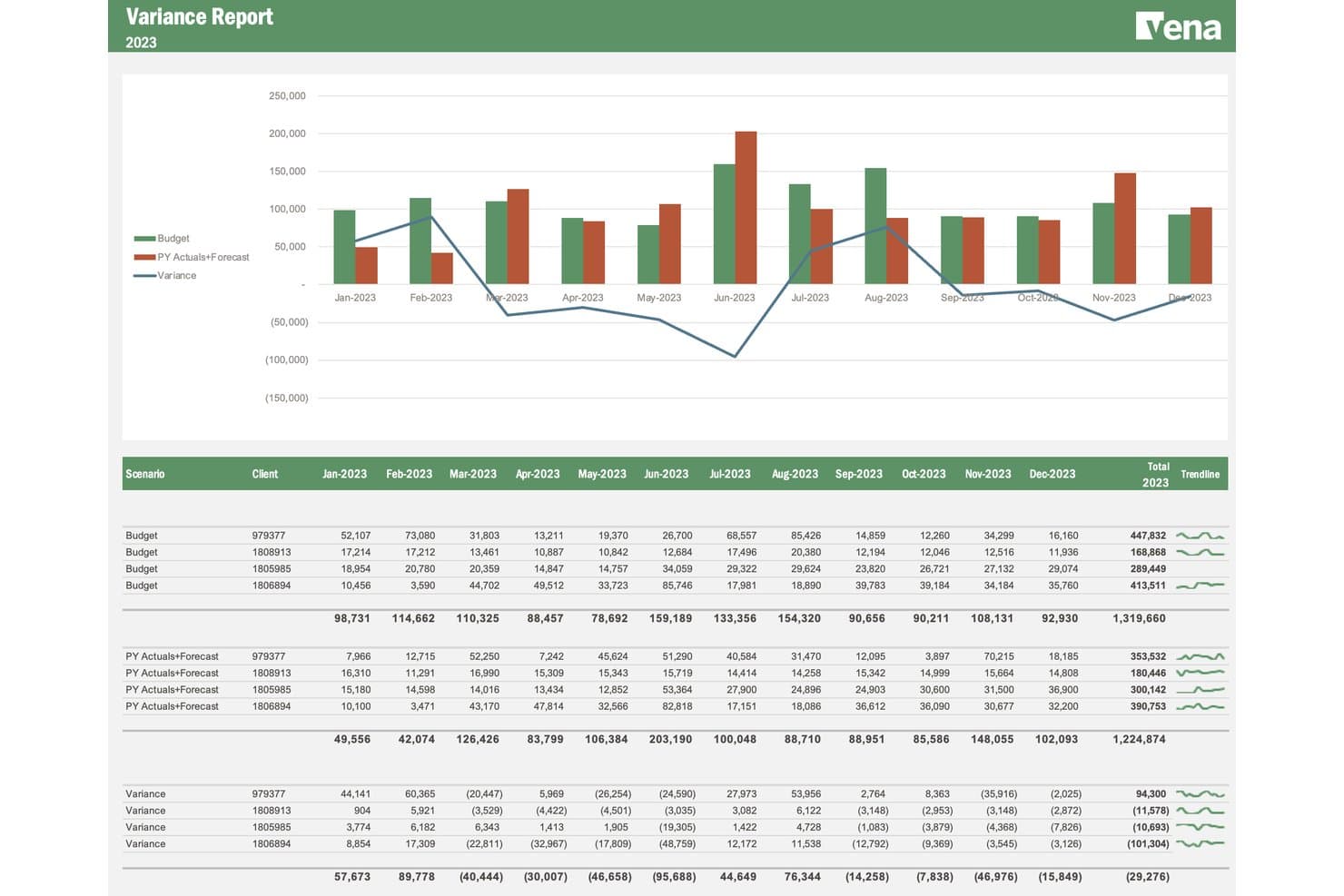
Vena realiza un seguimiento de la variación entre el presupuesto y los datos reales por cliente a lo largo de varios meses. Vena es una plataforma de FP&A nativa de Excel que admite la presupuestación de base cero mediante la planificación basada en impulsores, plantillas de presupuesto colaborativas, planificación de la plantilla y modelado de escenarios, todo ello en torno a una interfaz de Excel activa.
¿Para quién es más adecuada Vena?
Vena es una opción sólida para los equipos de FP&A que ya trabajan principalmente en Excel y quieren añadir estructura, flujos de trabajo y modelos basados en impulsores sin abandonar el entorno de hojas de cálculo.
Por qué elegí Vena
Elegí Vena como una de las mejores opciones porque mantiene a tu equipo dentro de Excel y, al mismo tiempo, añade la estructura que realmente necesita la presupuestación de base cero. Me gusta que su planificación basada en impulsores permita vincular cada partida de costes a un dato real, como el número de empleados o el volumen de unidades, para construir desde los principios fundamentales en lugar de copiar las cifras del año anterior. El módulo de planificación de la plantilla profundiza en este aspecto, ya que modela los salarios, los impuestos y los aumentos por mérito a nivel de empleado, de modo que los costes de personal se reconstruyen desde cero en cada ciclo.
Características principales de Vena
- Modelado de escenarios: Crea y compara un número ilimitado de escenarios hipotéticos en paralelo, poniendo a prueba los supuestos relacionados con los plazos, la demanda, la contratación y las variables de gasto.
- Tipo de licencia de colaborador: Asigna a los responsables de presupuesto de cada departamento un rol específico de Colaborador para que puedan enviar datos de costes y recorrer los flujos de trabajo de aprobación dentro de sus propios centros de costes.
- Agente de planificación de IA de Vena: Utiliza lenguaje natural dentro de Excel para generar planes y presupuestos basados en impulsores sin crear fórmulas manualmente.
- Conectores ERP y HRIS: Extrae datos reales y de plantilla directamente de sistemas como NetSuite, Workday y ADP para fundamentar cada ciclo presupuestario en datos de origen activos.
Integraciones de Vena
Vena ofrece integraciones nativas con NetSuite, SAP, Sage Intacct, Microsoft Dynamics 365, Workday, ADP, Salesforce, SharePoint, Snowflake y Google BigQuery. Las API bidireccionales, la automatización de archivos planos y los conectores de Microsoft Fabric permiten flujos de datos personalizados.
Pros and Cons
Pros:
- La reconstrucción de presupuestos nativa de Excel se adapta a los equipos financieros
- El modelado de la plantilla basado en impulsores reconstruye los costes de personal
- Los flujos de trabajo de colaboradores recopilan datos de los departamentos desde la base
Cons:
- Las implementaciones pueden prolongarse más allá de las estimaciones iniciales
- No existe un flujo de trabajo específico para justificar gastos
Learn more about Vena: 10Ideal para capacidades de visualización de datos
Phocas
- Demostración gratuita disponible
- Precio a consultar
Visit WebsiteCustomer Rating:4.6/5
Phocas crea presupuestos detallados utilizando datos comerciales históricos y en tiempo real. Phocas es una herramienta de inteligencia de negocios y análisis de datos diseñada para empresas que buscan mejorar su toma de decisiones basada en datos. Ayuda a los equipos a visualizar datos y rastrear indicadores clave de rendimiento en tiempo real.
Por qué elegí Phocas: Phocas facilita convertir datos financieros complejos en información comprensible de un vistazo. Sus paneles personalizables y sencillas herramientas de generación de reportes permiten que tu equipo cree informes visuales y claros sin necesidad de soporte de TI. La interfaz también es muy fácil de usar, por lo que puedes encontrar rápidamente lo que necesitas y profundizar en los números durante tu ciclo presupuestario.
Características destacadas e integraciones:
Características incluyen seguimiento de KPI en tiempo real para mantener a tu equipo actualizado sobre los indicadores financieros. La plataforma también ofrece herramientas de reporte detalladas para respaldar la toma de decisiones informadas.
Integraciones incluyen Microsoft Dynamics, Sage, Xero, MYOB, NetSuite, SAP, Epicor, QuickBooks, Salesforce y Google Sheets.
Pros and Cons
Pros:
- Herramientas de generación de informes intuitivas
- Seguimiento de KPI en tiempo real
- Potente visualización de datos
Cons:
- Funcionalidad móvil limitada
- Análisis avanzado limitado
Learn more about Phocas:
Otros programas de presupuestos de base cero
Estas son algunas opciones adicionales de programas de presupuestos de base cero que no llegaron a mi lista, pero que aún merece la pena consultar:
- 11FarseerIdeal para la planificación de escenarios financieros
- 12TeamworkLa mejor para herramientas financieras basadas en proyectos
- 13MosaicMejor para organizaciones startups
- 14NetSuite Cloud AccountingMejor para integración con ERP
- 15MoneyPatrolLa mejor para el seguimiento de finanzas personales
Cómo evalúo el software de presupuestación base cero
Divido mi evaluación en dos niveles: la base específica de ZBB que toda herramienta debe cumplir—piense en flujos de trabajo base cero y justificación de gastos—y los diferenciadores que separan lo bueno de lo excelente.
Funcionalidad Básica (Requisitos imprescindibles para esta lista)
Cuando selecciono herramientas para mi lista, clasifico cada una en una escala del 0 (no ofrece la funcionalidad) al 5 (sobresale en esta área) para cada funcionalidad básica enumerada a continuación. Luego, calculo el puntaje total de la herramienta en un porcentaje. Cada herramienta necesita alcanzar una puntuación total mínima del 65% para ser considerada para su inclusión.
- Construcción del Presupuesto Base Cero: Busco un flujo de trabajo dedicado a ZBB que obligue a cada centro de costos a construir desde cero en cada ciclo, no solo un enfoque de copiar y ajustar que se arrastra del año anterior.
- Modelado de Impulsores de Costos: Cada herramienta debe permitir que los responsables de presupuesto vinculen partidas a impulsores reales del negocio como el número de empleados, volúmenes de transacciones o unidades producidas, en lugar de simples montos en dólares.
- Flujo de Justificación de Gastos: Evalúo si la plataforma ofrece campos estructurados de justificación y un enrutamiento de aprobaciones para que los líderes financieros revisen los casos de negocio partida por partida durante la elaboración.
- Propiedad Colaborativa del Presupuesto: Los jefes de departamento necesitan enviar y defender sus propios presupuestos, así que verifico el acceso basado en roles, control de versiones y transferencias claras del envío a la aprobación.
- Análisis de Escenarios y Variaciones: La comparación paralela de escenarios es importante aquí: analizo qué tan bien permite cada herramienta modelar alternativas y luego rastrear el gasto real frente al plan base cero aprobado.
- Integración de Datos ERP/GL: Importar cifras reales, estructuras de planes contables y datos de personal desde sistemas como NetSuite, SAP o Sage Intacct es fundamental para reconstruir el presupuesto desde cero en cada período.
Una vez que cuento con una lista de herramientas que cumplen estos criterios, considero qué diferencia a cada plataforma del resto.
Factores Diferenciadores (Qué distingue a los proveedores)
Así es como comparo y contrasto diferentes proveedores:
Características Destacadas
La clasificación de iniciativas es clave: busco herramientas que puntúen actividades propuestas según ROI o alineación estratégica para que el equipo de finanzas pueda financiar lo más relevante. También destaco la integración con pronósticos continuos, ya que un plan base cero pierde vigencia rápidamente si no puede evolucionar a mitad de año. Evalúo la profundidad de la planificación de la fuerza laboral, especialmente si la herramienta conecta datos de personal y compensación a nivel de puesto directamente en la construcción base cero.
Más allá de las características
Los plazos de implementación son muy importantes en este ámbito. ZBB requiere una configuración metodológica significativa, por lo que evalúo si los proveedores ofrecen incorporación guiada, plantillas predefinidas o consultores FP&A dedicados para acortar el tiempo hasta obtener valor. También considero la adecuación al tamaño de la empresa: un equipo mediano con cinco centros de costos tiene necesidades muy diferentes a una empresa con múltiples entidades y decenas de centros en varias regiones. Por último, la seguridad y el cumplimiento cierran la lista; reviso la certificación SOC 2, controles de acceso por roles y registros de auditoría que permitan flujos de trabajo compatibles con SOX.
Cómo elegir un programa de presupuestos de base cero
Es fácil perderse entre largas listas de características y complejas estructuras de precios. Para ayudarte a mantener la concentración mientras avanzas en tu singular proceso de selección de software, aquí tienes una lista de factores que debes tener en cuenta:
| Factor | Qué debes tener en cuenta |
| Escalabilidad | Asegúrate de que el software pueda crecer junto con tu equipo. Comprueba si admite un aumento del volumen de datos y del número de usuarios a medida que crece tu empresa. |
| Integraciones | Busca una integración fluida con herramientas existentes, como programas de contabilidad, CRM y sistemas ERP, para agilizar el flujo de datos y reducir la introducción manual. |
| Personalización | Comprueba si la herramienta te permite personalizar paneles, informes y flujos de trabajo para adaptarlos a tus procesos y preferencias presupuestarias específicos. |
| Facilidad de uso | Evalúa la interfaz de usuario y la navegación. Tu equipo debería poder aprender a utilizar el software sin necesidad de una formación exhaustiva. |
| Presupuesto | Compara los planes de precios y asegúrate de que se ajustan a tus limitaciones financieras. Ten en cuenta el coste total de propiedad, incluidas las posibles tarifas ocultas. |
| Medidas de seguridad | Confirma que el software ofrece medidas de seguridad sólidas, como el cifrado de datos y controles de acceso de usuarios, para proteger la información financiera confidencial. |
| Asistencia | Evalúa la disponibilidad y la calidad de la atención al cliente, incluido el chat en directo, la asistencia telefónica y los recursos en línea, para ayudar a tu equipo cuando lo necesite. |
| Informes | Busca funciones avanzadas de elaboración de informes que te permitan generar informes financieros detallados y obtener información sobre el rendimiento del presupuesto. |
Tendencias en los programas de presupuestos de base cero
Durante mi investigación, recopilé innumerables actualizaciones de productos, comunicados de prensa y registros de versiones de distintos proveedores de programas de presupuestos de base cero. Estas son algunas de las tendencias emergentes que estoy siguiendo:
- Información basada en IA: Cada vez más herramientas utilizan la IA para proporcionar análisis predictivos e información que ayuden a los equipos a anticipar las necesidades presupuestarias y tomar decisiones fundamentadas. Por ejemplo, proveedores como Drivetrain están incorporando la IA para mejorar las previsiones financieras.
- Presupuestación colaborativa: Las herramientas se centran cada vez más en las funciones de colaboración, lo que permite que varios usuarios trabajen simultáneamente en presupuestos empresariales. Esto es fundamental para los equipos distribuidos en distintas ubicaciones, ya que garantiza que todos estén alineados con los métodos de presupuestación.
- Actualizaciones de datos en tiempo real: Los usuarios esperan ahora datos en tiempo real para realizar ajustes presupuestarios ágiles. Esta tendencia favorece los entornos empresariales dinámicos en los que es necesario tomar decisiones financieras rápidas para alcanzar los objetivos de ahorro. También puede ayudar en la previsión del flujo de caja y mucho más.
- Planificación de escenarios: Cada vez más programas ofrecen planificación de escenarios para ayudar a los equipos a visualizar distintos resultados financieros. Esta función permite a las empresas prepararse para diversas situaciones potenciales, mejorando la planificación estratégica.
- Diseño centrado en el usuario: Se hace cada vez más hincapié en las interfaces intuitivas que priorizan la experiencia del usuario, y los proveedores se centran ahora en hacer que sus herramientas sean más accesibles y fáciles de usar. En última instancia, esto reduce la curva de aprendizaje general, capacita a los usuarios e impulsa la productividad.
¿Qué es el software de presupuestación de base cero?
El software de presupuestación de base cero es una herramienta diseñada para ayudar a las empresas a asignar su presupuesto desde cero en cada periodo, garantizando que todos los gastos estén justificados. Estas herramientas suelen ser utilizadas por profesionales financieros y responsables de presupuestos para obtener un mayor control sobre sus finanzas y optimizar el gasto.
El software de presupuestación de base cero suele incluir funciones clave como información basada en IA, actualizaciones de datos en tiempo real y planificación de escenarios para ayudar a realizar previsiones y tomar decisiones precisas. En general, ofrece a las empresas una forma estructurada de gestionar sus finanzas y mejorar la eficiencia de costes.
Funciones
Estas son las funciones esenciales que debería tener cualquier buen software de presupuestación de base cero:
- Actualizaciones de datos en tiempo real: Proporciona acceso inmediato a los datos financieros de las cuentas corrientes y los fondos de emergencia, lo que permite realizar ajustes presupuestarios rápidos y tomar decisiones fundamentadas.
- Planificación de escenarios: Permite a los usuarios visualizar distintos resultados financieros, ayudando a las empresas a prepararse para diversas situaciones potenciales en las distintas categorías de gasto.
- Información basada en IA: Ofrece análisis predictivos para anticipar las necesidades presupuestarias y mejorar las previsiones financieras.
- Presupuestación colaborativa: Permite que varios usuarios trabajen simultáneamente en los presupuestos, garantizando la coordinación y la eficiencia del equipo.
- Paneles personalizables: Permite a los usuarios adaptar su interfaz para centrarse en las métricas y los informes financieros más relevantes.
- Seguimiento de gastos: Supervisa el gasto en relación con el presupuesto para evitar gastos excesivos e identificar oportunidades de ahorro.
- Capacidades de integración: Se conecta con las herramientas financieras existentes para agilizar el flujo de datos y reducir la introducción manual.
- Interfaz fácil de usar: Simplifica la navegación y reduce la curva de aprendizaje, impulsando la productividad y la satisfacción del usuario.
- Informes automatizados: Genera informes financieros detallados con un esfuerzo manual mínimo, ahorrando tiempo y reduciendo los errores.
- Medidas de seguridad: Protege la información financiera confidencial mediante el cifrado de datos y controles de acceso.
Ventajas
La implementación de un software de presupuestación de base cero ofrece varias ventajas para tu equipo y tu empresa. Estas son algunas de las que puedes esperar:
- Mejor control de costes: Al asignar los presupuestos desde cero, garantizas que todos los gastos estén justificados y evitas gastos innecesarios.
- Mayor información financiera: Los análisis basados en IA y las actualizaciones de datos en tiempo real proporcionan información valiosa para tomar mejores decisiones.
- Mayor colaboración: Las funciones de presupuestación colaborativa permiten a los miembros del equipo trabajar juntos, garantizando que todos estén alineados.
- Flexibilidad en la planificación: La planificación de escenarios te ayuda a adaptarte a los cambios en las condiciones financieras preparándote para distintos resultados.
- Ahorro de tiempo: Los informes automatizados reducen el tiempo dedicado a generar informes manualmente, lo que permite a tu equipo centrarse en tareas estratégicas.
- Personalización según las necesidades: Los paneles personalizables te permiten adaptar tu vista para centrarte en la información financiera más relevante.
- Seguridad de los datos: Las medidas de seguridad protegen tus datos financieros y te proporcionan tranquilidad respecto a la información confidencial.
Costes y precios
Seleccionar un software de presupuestación de base cero requiere comprender los diversos modelos de precios y planes disponibles. Los costes varían según las funciones, el tamaño del equipo, los complementos y otros factores. La tabla siguiente resume los planes habituales, sus precios medios y las funciones que suelen incluir las soluciones de software de presupuestación de base cero:
Tabla comparativa de planes de software de presupuestación de base cero
| Tipo de plan | Precio medio | Funciones habituales |
| Plan gratuito | $0/usuario/mes | Herramientas básicas de presupuestación, informes limitados y asistencia básica. |
| Plan personal | $5-$25/usuario/mes | Presupuestación personal, seguimiento de gastos, paneles personalizables y asistencia por correo electrónico. |
| Plan empresarial | $30-$60/usuario/mes | Informes avanzados, herramientas de colaboración, actualizaciones en tiempo real y asistencia por chat. |
| Plan corporativo | $70-$150/usuario/mes | Personalización completa, capacidades de integración, información basada en IA y asistencia especializada. |
Preguntas frecuentes
Estas son algunas respuestas a preguntas frecuentes sobre el software de presupuestación de base cero:
¿Cuáles son las limitaciones de la presupuestación de base cero?
La presupuestación de base cero puede llevar mucho tiempo, ya que requiere empezar desde cero en cada periodo. Este proceso exige una gran cantidad de personal para justificar cada gasto. Aunque proporciona un control detallado, el esfuerzo y los recursos necesarios pueden resultar difíciles de gestionar para algunos equipos.
¿Qué eficacia tiene la presupuestación de base cero?
La presupuestación de base cero es eficaz para mantener los gastos bajo control. Al empezar de nuevo en cada periodo, garantiza que todos los costes sean necesarios y estén justificados. Este enfoque proporciona a los responsables una mayor supervisión, pero requiere diligencia para mantener y revisar los presupuestos periódicamente.
¿Qué requiere la presupuestación de base cero?
La presupuestación de base cero requiere una justificación exhaustiva de todos los gastos, tanto antiguos como nuevos. A diferencia de los métodos tradicionales, este enfoque implica examinar minuciosamente los gastos recurrentes y los nuevos. Los responsables deben justificar cada coste, asegurándose de que solo se aprueben los gastos esenciales.
¿Cómo ayuda el software de presupuestación de base cero en la elaboración de presupuestos?
El software de presupuestación de base cero simplifica el proceso al automatizar las tareas repetitivas y proporcionar herramientas para la justificación y el análisis. Ayuda a los usuarios a realizar un seguimiento eficiente de los gastos, garantizando que cada dólar esté contabilizado. El software también ofrece información y análisis para tomar mejores decisiones.
¿Puede el software de presupuestación de base cero integrarse con otras herramientas financieras?
Sí, muchas soluciones de software de presupuestación de base cero ofrecen capacidades de integración con las herramientas financieras existentes. Esto permite un flujo de datos fluido y reduce la introducción manual de datos, lo que hace que el proceso de elaboración de presupuestos sea más eficiente y preciso para el equipo.
¿Es la presupuestación de base cero adecuada para todo tipo de empresas?
Aunque la presupuestación de base cero ofrece un control financiero detallado, puede no ser adecuada para todas las empresas debido a su naturaleza intensiva en tiempo. Funciona mejor en organizaciones que necesitan una supervisión presupuestaria estricta y disponen de los recursos necesarios para gestionar el proceso detallado.