

Utdatert regnskapsprogramvare for regnskapsførere gjør jobben din vanskeligere enn den trenger å være. Trege rapporter, endeløs dataregistrering og klønete grensesnitt gjør enkle oppgaver til hodebry. I stedet for å hjelpe deg bidrar programvaren til kaoset og sluker tiden du ikke har.
Som ekspert på digital programvare har jeg sett alt – det gode, det dårlige og det smertefullt utdaterte. Jeg vet hva som faktisk gjør en forskjell i det daglige arbeidet ditt, og hva som bare kommer i veien. Målet mitt? Å hjelpe deg med å finne et verktøy som fungerer for virksomhetens spesifikke behov.
Jeg testet og vurderte disse verktøyene med dette i tankene. Enten du trenger automatisering, bedre rapportering eller smidigere integrasjoner, finnes det noe her som kan gjøre hverdagen enklere. La oss finne din neste regnskapsprogramvare for regnskapsførere.
Hvorfor du kan stole på våre programvareanbefalinger
6,700+
Reviews
20
Industry experts
16+
Evaluation factors
14
Years
Teamet vårt har testet og anmeldt programvare siden 2012. Vi er selv økonomiledere, så vi vet hvor vanskelig og hvor viktig det er å velge riktig programvare.
I denne guiden har vi vurdert verktøyene gjennom praktisk testing og uavhengig research og gitt dem poeng ut fra våre utvelgelseskriterier.
Anmeldelsene våre bygger på vår egen redaksjonelle vurdering. De er ikke et salgsargument.
Sammenligningstabell for regnskapsprogramvare for regnskapsførere
Jeg har brutt ned prisdetaljene slik at du raskt kan sammenligne alternativene og finne det som passer best for dine behov.
| Tool | Best For | Trial Info | Price | ||
|---|---|---|---|---|---|
| 1 | Best for automated document data extraction | Free trial available | From $25.21/month (billed annually) | Website | |
| 2 | Best for PCAOB compliance tools | Free demo available | Pricing upon request | Website | |
| 3 | Best with dedicated accountant support programs | Free plan available | From $49/user/month | Website | |
| 4 | Best for free and unlimited accounting | Free trial available | From $59/user/month | Website | |
| 5 | Best for dedicated bookkeeping services | Free trial available | From $249/month (billed annually) | Website | |
| 6 | Best for live expert assistance | 30-day free trial | From $38/month | Website | |
| 7 | Best for seamless app integrations | Not available | From $27/month | Website | |
| 8 | Best for smart insights and reports | Free plan available | From $15/month | Website | |
| 9 | Best for comprehensive business management | 14-day free trial | From $15/month (billed annually) | Website | |
| 10 | Best for automated accounting | 14-day free trial | Pricing upon request | Website |


Anmeldelser av den beste regnskapsprogramvaren for regnskapsførere
Valg av riktig regnskapsprogramvare kan gjøre jobben enklere, men med så mange alternativer er det vanskelig å vite hvilken som faktisk leverer. Nedenfor har jeg beskrevet hvert av mine beste valg av regnskapsprogramvare for regnskapsførere, med vekt på fordeler og ulemper, priser og mer, slik at du kan finne et pålitelig verktøy som passer behovene dine.
 1Best for automated document data extraction
Dext
- Free trial available
- From $25.21/month (billed annually)
Visit WebsiteCustomer Rating:4.5/5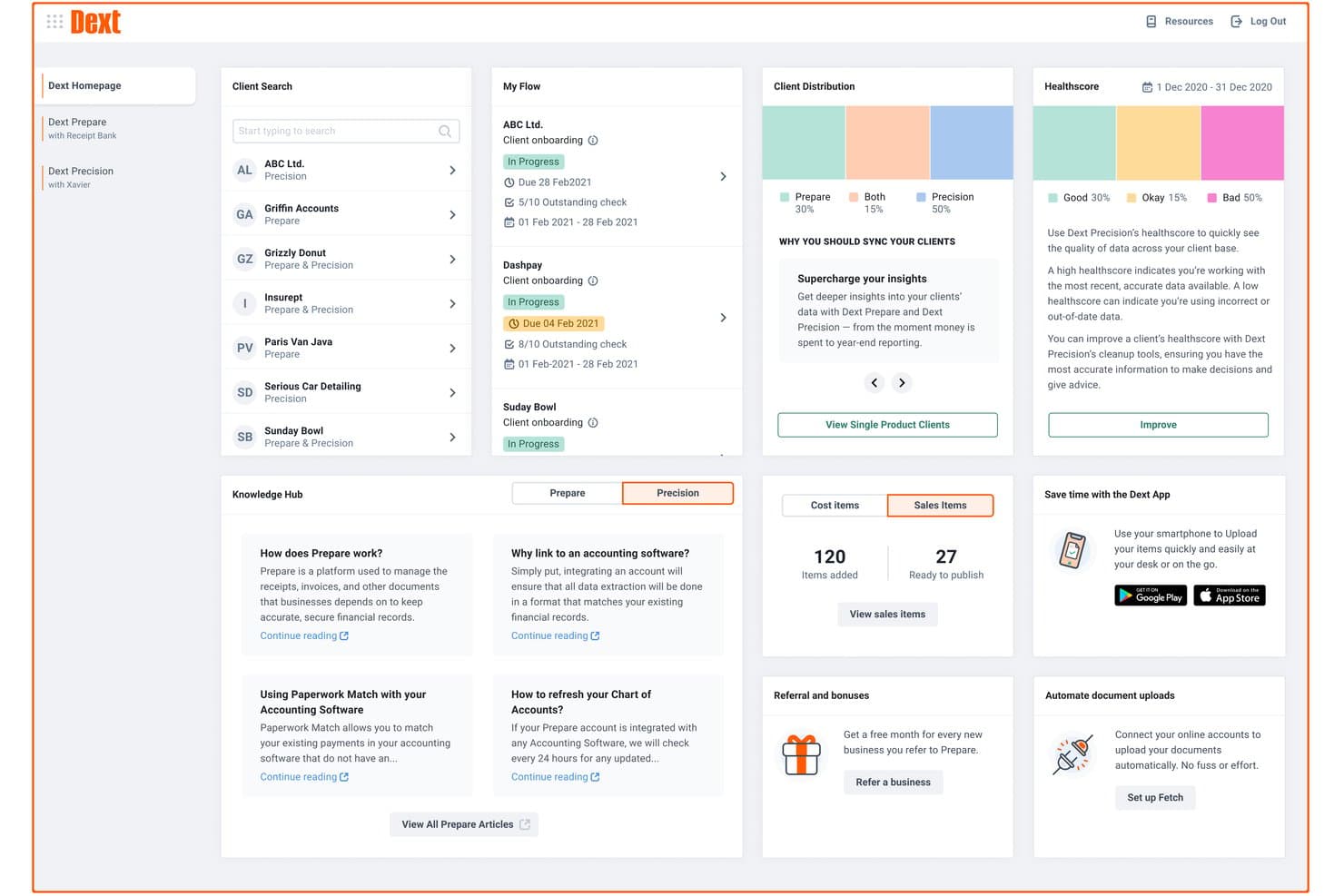
Dext offers a comprehensive dashboard with client management, health scores, document flow tracking, and knowledge hub resources for accountants. Dext is a document capture and data extraction platform that automates the collection, processing, and categorization of receipts, invoices, and bank statements for accounting firms and bookkeepers.
Who Is Dext Best For?
Dext is a strong fit for bookkeepers and accounting firms that handle high volumes of client documents and want to cut down on manual data entry.
Why I Picked Dext
I've included Dext in my top picks because its AI-powered extraction accuracy, claimed at 99.9%, genuinely holds up when you're processing hundreds of client documents per month. I like how it pulls line-item detail from invoices automatically, not just totals, which cuts the back-and-forth with clients considerably. The supplier rules engine also learns from past categorizations, so repeat vendors get coded correctly without manual input each time.
Dext Key Features
- Multi-client dashboard: Manage all client entities and their documents from a single, centralized workspace.
- Vault secure document storage: Store and access compliance documents and statements securely for up to 10 years.
- Practice productivity tools: Use client deadline dashboards, smart workflows, and advanced client management designed for accounting teams.
- Commerce Lite integration: Import online sales data from platforms like Shopify and WooCommerce directly into the system.
Dext Integrations
Dext offers native integrations with Xero, QuickBooks Online, Sage Accounting, FreeAgent, and more.
Pros and Cons
Pros:
- Dedicated firm-side dashboard for multi-client management
- Supplier rules auto-categorize repeat client vendors
- High-accuracy extraction across hundreds of documents
Cons:
- Mobile app reliability is weak
- Not a standalone full accounting solution
Learn more about Dext: Best for PCAOB compliance tools
- Free demo available
- Pricing upon request
Visit WebsiteCustomer Rating:4.9/5
DualEntry gives your team a real-time financial snapshot across revenue, expenses, cash flow, and operational insights—all in one dashboard. DualEntry is an AI-native ERP built around a full accounting suite, covering general ledger, multi-entity management, accounts payable, accounts receivable, revenue recognition, and close management.
Who Is DualEntry Best For?
DualEntry is a good fit for finance teams at mid-market and growth-stage companies that need a modern, AI-native accounting system with strong controls and audit support.
Why I Picked DualEntry
I've included DualEntry in my top picks because its audit automation features align with PCAOB requirements for controls and documentation. The journal entry testing tools let your team verify accounting records in bulk, with AI that flags suspicious patterns and anomalies. DualEntry's version history and PBC (provided by client) checklist management keep evidence collection organized, giving auditors a clean, timestamped audit trail and ready access to supporting documents.
DualEntry Key Features
- Multi-entity consolidation: Manage unlimited subsidiaries with automated intercompany eliminations, currency translations, and CTA postings across entities.
- Revenue recognition: Automate revenue schedules across contract types in compliance with ASC 606 and IFRS 15, with AI-assisted calculations.
- Flux analysis: Generate custom flux reports with AI-driven variance commentary to explain period-over-period changes in account balances.
- Approval workflows: Configure multi-step approval chains for journal entries, invoices, and purchase orders to enforce internal controls across your team.
Pros and Cons
Pros:
- Automated revenue recognition ensures compliance with standards
- Supports multi-entity and multi-currency operations
- Advanced AI features help with complex accounting tasks
Cons:
- As an ERP, it may offer more features than needed for simpler accounting needs
- Customization options require careful setup
Learn more about DualEntry: 3Best with dedicated accountant support programs
BILL
- Free plan available
- From $49/user/month
Visit WebsiteCustomer Rating:4.5/5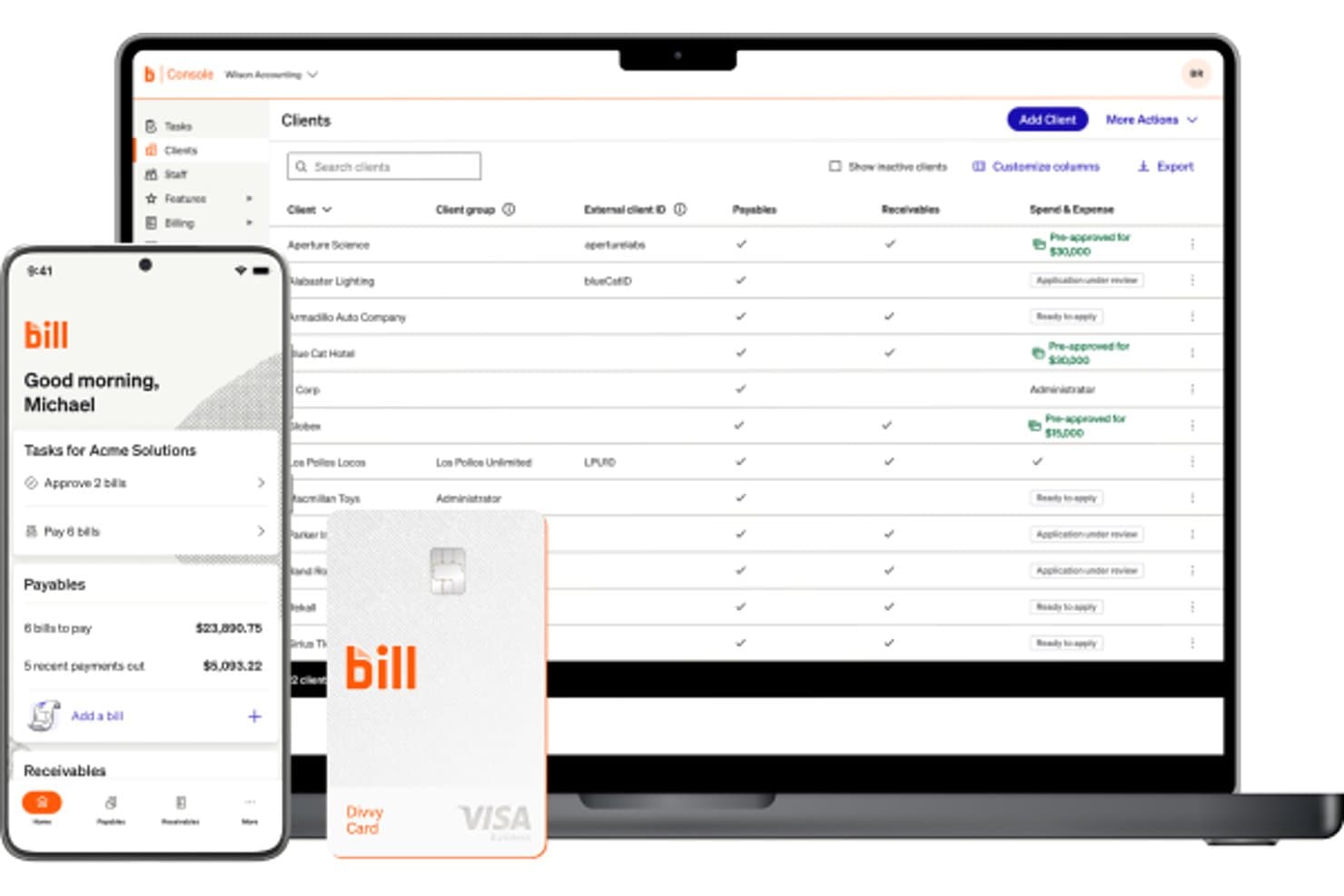
BILL offers an accounting console dashboard displaying a client list with payables, receivables, and spend & expense statuses, alongside a mobile app and Divvy card. BILL is a financial operations platform for accounting firms that centralizes accounts payable, accounts receivable, and spend management across multiple client entities from a single console.
Who Is BILL Best For?
BILL is a strong fit for accounting firms that manage AP and AR workflows on behalf of multiple small to midsize business clients.
Why I Picked BILL
I picked BILL as one of the best because its Accountant Partner Program is built around firm success, not just product access. I like that the tiered structure (Bronze through Platinum) scales real benefits like dedicated account management, co-marketing funds, and Premium Care support. The Accountant Console manages all client entities from one place, and 100+ hours of NASBA-accredited CPE training keeps my team sharp without hunting down external resources.
BILL Key Features
- Automated AP workflows: Streamlines bill capture, approvals, payments, and audit trails for every client entity.
- Custom user roles and permissions: Lets firms control access for approvers, staff, and clients across multiple accounts.
- W-9 Agent for compliance: Collects and verifies W-9s automatically with built-in e-filing of IRS 1099s.
- Integration with leading accounting software: Syncs AP and AR transactions directly with QuickBooks, Xero, NetSuite, and Sage Intacct.
BILL Integrations
BILL offers native integrations with QuickBooks Online, Xero, Sage Intacct, and NetSuite. An API is available for custom integrations.
Pros and Cons
Pros:
- NASBA-accredited CPE training included for partner firms
- Centralized multi-client AP and AR management
- Dedicated partner program supports accounting firm growth
Cons:
- Limited tax preparation and filing features
- Not a full general ledger solution
Learn more about BILL: Best for free and unlimited accounting
- Free trial available
- From $59/user/month
Visit WebsiteCustomer Rating:4.7/5
Manager.io is an accounting software for accountants that provides a free, open-source solution for managing invoices, accounting, and financial reports. Manager.io is a double-entry accounting software that covers the full accounting cycle—from general ledger and journal entries to invoicing, bank reconciliation, payroll, fixed assets, and multi-currency financial reporting.
Who Is Manager.io Best For?
Manager.io is a good fit for freelancers, small business owners, and independent accountants who need full-featured accounting software without a subscription cost.
Why I Picked Manager.io
I picked Manager.io as one of the best because its desktop edition is genuinely free—no trial periods, no feature gates, no ads, and no usage limits. I can manage the full chart of accounts, run bank reconciliations, track fixed assets, and process payroll without ever hitting a paywall. What I find rare here is that the free version doesn't strip out core accounting modules the way most tools do. It covers the complete accounting cycle at zero cost, which is a real differentiator in a market dominated by subscription-first software.
Manager.io Key Features
- Multi-currency accounting: Record transactions in multiple currencies with automatic exchange rate tracking and foreign currency gain/loss calculations.
- Tax code management: Assign VAT, GST, or sales tax codes to transactions and generate tax liability reports directly from the platform.
- Comparative financial reporting: Generate profit & loss statements, balance sheets, and trial balances with side-by-side period comparisons.
- Project accounting: Track income and expenses against specific projects to monitor profitability at the project level.
Pros and Cons
Pros:
- Multi-currency and payroll support
- Unlimited accounting features
- Completely free for the desktop version
Cons:
- User interface may feel outdated
- Desktop version lacks cloud accessibility
- Limited integrations with third-party apps
Learn more about Manager.io: Best for dedicated bookkeeping services
- Free trial available
- From $249/month (billed annually)
Visit WebsiteCustomer Rating:4.5/5
Bench is an accounting software for accountants that combines software with bookkeeping services to manage financial records and provide financial reporting. Bench is a small business bookkeeping service that pairs proprietary software with a dedicated team of human bookkeepers to handle monthly bookkeeping, tax filing, and financial reporting.
Who Is Bench Best For?
Bench is a good fit for small business owners who want to hand off their bookkeeping entirely rather than manage it themselves.
Why I Picked Bench
I've included Bench in my top picks because it takes a fundamentally different approach to bookkeeping: instead of handing you software to figure out, it assigns you a dedicated team of bookkeepers who manage your books monthly. I like that every plan includes a real human who categorizes transactions, reconciles accounts, and delivers up-to-date financial statements. On top of that, Bench's in-app messaging lets you communicate directly with your bookkeeping team without jumping between email threads or scheduling calls.
Bench Key Features
- Real-time financial reporting: Access and download an up-to-date income statement or balance sheet at any time directly from the Bench platform.
- Document management: Upload, organize, and retrieve financial documents from a central location within your Bench account.
- Tax filing and advisory: Bench handles small business tax preparation and filing, with year-round income tax advisory included on higher-tier plans.
- Notification center: Get reminders for upcoming financial tasks and deadlines so nothing falls through the cracks between monthly close cycles.
Pros and Cons
Pros:
- Easy communication with bookkeepers
- Monthly financial statements provided
- Dedicated bookkeeping service
Cons:
- No real-time customization options
- Limited to U.S.-based businesses
- Higher cost than DIY software
Learn more about Bench:

QuickBooks is an accounting software for accountants that simplifies bookkeeping, payroll, and tax preparation for small and medium-sized businesses. QuickBooks is a cloud-based accounting platform that combines AI-powered bookkeeping, financial reporting, invoicing, bill management, payroll, and cash flow forecasting for businesses and accounting professionals.
Who Is QuickBooks Best For?
QuickBooks is a strong fit for small to mid-sized businesses and accounting firms that manage client books, payroll, and financial reporting in one place.
Why I Picked QuickBooks
QuickBooks is one of my top picks because I love how it pairs live expert access directly into the accounting workflow. The Expert Assisted plan gives you on-demand access to QuickBooks-certified bookkeepers who can walk you through categorization, reconciliation, and report interpretation in real time. If you need more hands-on support, Expert Full Service Bookkeeping assigns you a dedicated bookkeeper who closes your books monthly and delivers profit and loss statements and balance sheets. That combination of AI-driven automation and human oversight is something you won't find in most accounting tools.
QuickBooks Key Features
- Cash flow forecasting: View a 90-day cash flow projection that pulls from your bank accounts, invoices, and bills in real time.
- Automated sales tax tracking: Calculate, track, and categorize sales tax across multiple rates and jurisdictions automatically.
- Custom financial reporting: Build and filter reports by class, location, or custom fields to match your reporting structure.
- Multi-user access controls: Assign role-based permissions to up to 25 users, with dedicated accountant access built in.
Pros and Cons
Pros:
- Strong integration capabilities
- Extensive financial reporting tools
- Live expert assistance available
Cons:
- Learning curve for new users
- Limited customization for reports
- Higher price point
 7Best for seamless app integrations
Xero
- Not available
- From $27/month
Visit WebsiteCustomer Rating:4.4/5
Xero is an accounting software for accountants offering cloud-based solutions for managing invoicing, bank reconciliation, and financial reporting. Xero is a cloud-based accounting platform built for accountants and small businesses, covering bank reconciliation, invoicing, payroll, expense tracking, and financial reporting alongside a dedicated suite of practice management tools.
Who Is Xero Best For?
Xero is a strong fit for small to mid-sized accounting firms and independent accountants who manage multiple clients across industries.
Why I Picked Xero
I picked Xero because its app ecosystem is among the deepest in accounting software. The Xero App Store connects to over 1,000 third-party tools for payroll, payments, reporting, and ecommerce. I particularly like that integrations like Shopify sync sales, fees, refunds, and payouts in real time, while Dext pushes captured receipts and expenses directly into Xero without any manual entry. For accountants managing clients across different industries, that kind of plug-and-play connectivity means you're not forcing every client into the same tech stack.
Xero Key Features
- Bank reconciliation: Automatically imports and categorizes bank transactions daily, letting you match and reconcile across multiple accounts from a single view.
- Xero HQ: A practice dashboard where you can monitor client financial health, manage staff assignments, and track client activity across your entire portfolio.
- Multi-currency support: Record transactions, send invoices, and reconcile in over 160 currencies with live exchange rates.
- Fixed asset manager: Track, depreciate, and dispose of client assets with automated depreciation schedules built directly into the platform.
Pros and Cons
Pros:
- User-friendly interface
- Real-time financial data syncing
- Extensive app integration options
Cons:
- Steeper learning curve for beginners
- Higher pricing for advanced features
- Limited customer support
Learn more about Xero: Best for smart insights and reports
- Free plan available
- From $15/month
Visit WebsiteCustomer Rating:4.6/5
ZipBooks is an accounting software for accountants that offers smart bookkeeping, invoicing, and expense tracking with built-in business intelligence features. ZipBooks is cloud-based accounting software with invoicing, expense tracking, bank reconciliation, financial reporting, and an intelligence layer that generates business health scores and auto-categorizes transactions.
Who Is ZipBooks Best For?
ZipBooks is a good fit for freelancers, small business owners, and independent accountants managing a lean client book who need solid core accounting without enterprise complexity.
Why I Picked ZipBooks
ZipBooks is one of my top picks because I love how its Intelligence layer goes beyond standard financial reports. The Business Health Score benchmarks your financials against competitors, while the Invoice Quality Score flags specific invoice elements that slow down payment. I also find the machine learning auto-categorization genuinely useful day-to-day—it cuts down the manual work of tagging transactions so I can focus on reviewing the numbers rather than entering them.
ZipBooks Key Features
- Bank reconciliation: Connect bank accounts and match transactions against your records to reconcile balances directly in ZipBooks.
- Cash and accrual reporting: Toggle between cash and accrual basis on financial statements like the income statement and balance sheet.
- Time tracking: Log billable hours across clients and convert tracked time directly into invoices.
- Multi-client accountant dashboard: Manage multiple client accounts from a single login with cobranding and bulk transaction editing.
Pros and Cons
Pros:
- Affordable pricing for small businesses
- Real-time business health score
- Smart financial insights and reports
Cons:
- Customer support response can vary
- Fewer integrations than competitors
- Limited advanced features
Learn more about ZipBooks: Best for comprehensive business management
- 14-day free trial
- From $15/month (billed annually)
Visit WebsiteCustomer Rating:4.3/5
Zoho Books is an accounting software for accountants that provides end-to-end accounting solutions including inventory management, invoicing, and tax compliance. Zoho Books is a cloud-based accounting platform that covers invoicing, expense tracking, bank reconciliation, inventory management, project billing, and financial reporting—all built to support both business owners and the accountants who manage their books.
Who Is Zoho Books Best For?
Zoho Books is a good fit for small to mid-sized businesses that want an accounting solution that connects with a broader suite of business tools.
Why I Picked Zoho Books
I picked Zoho Books as one of the best because it covers far more ground than most accounting tools. I like that inventory management, project billing with timesheets, and a built-in client portal all come natively—not as separate add-ons. Workflow automation also handles recurring tasks like payment reminders and approval routing, which keeps financial operations moving without manual follow-up on every step.
Zoho Books Key Features
- Bank reconciliation: Match imported bank transactions against recorded entries and flag discrepancies directly within the platform.
- Financial reporting: Generate over 70 reports including profit and loss, balance sheet, cash flow statements, and aged receivables.
- Sales tax tracking: Configure tax rules, track liabilities by jurisdiction, and manage 1099/W-9 compliance across vendors.
- Audit trail: View a full, timestamped log of every transaction change, including who made the edit and when.
Pros and Cons
Pros:
- Customizable workflows
- Strong integration with other Zoho apps
- Comprehensive suite of business management tools
Cons:
- Higher cost for advanced features
- Limited third-party integrations outside Zoho
- Learning curve for new users
 10Best for automated accounting
Kashoo
- 14-day free trial
- Pricing upon request
Visit WebsiteCustomer Rating:4.5/5
Kashoo is an accounting software for accountants providing simple, cloud-based bookkeeping, invoicing, and expense tracking tools for small businesses. Kashoo is a cloud-based accounting platform for small businesses that covers income and expense tracking, invoicing, bank reconciliation, and financial reporting with AI-driven transaction categorization at its core.
Who Is Kashoo Best For?
Kashoo suits small business owners and freelancers who want to handle their own books without needing an accountant or advanced financial expertise.
Why I Picked Kashoo
Kashoo earned a place on my shortlist because it automates much of the accounting busywork. It connects to 5,000+ banks and credit unions in real time, pulling transactions into the ledger without manual imports. AI-driven categorization sorts those transactions, so reconciliation takes minutes rather than hours. It also auto-tracks income and expenses using a double-entry ledger in the background.
Kashoo Key Features
- Multi-currency invoicing: Create and send invoices in multiple currencies, with automatic exchange rate conversion applied to each transaction.
- Sales tax tracking: Set up and apply sales tax rates to invoices and expenses, with totals calculated automatically at the transaction level.
- Financial reporting: Generate profit and loss statements and balance sheets directly from your ledger data at any time.
- Unlimited users: Add your accountant, bookkeeper, or business partners to your account at no extra cost.
Pros and Cons
Pros:
- Real-time expense categorization
- Simple and intuitive interface
- Strong automation capabilities
Cons:
- Higher cost for basic features
- Fewer integration options than competitors
- Limited advanced features
Learn more about Kashoo:
Annen regnskapsprogramvare for regnskapsførere
Nedenfor finner du en liste over ytterligere regnskapsprogramvare for regnskapsførere som vi hadde på kortlisten, men som ikke kom med på topplisten. Det er absolutt verdt å ta en titt på dem.
- 11ZarMoneyBest for inventory management
- 12JoiinBest for multi-entity reporting
- 13HighRadiusBest for audit-readiness
- 14MYOBBest for scalable business solutions
- 15PuzzleBest for real-time error detection
- 16WaveBest for free accounting features
- 17AccountEdgeBest for advanced data management
- 18HeardBest for tax and payroll automation for therapists
- 19AcumaticaBest for multi-entity accounting
- 20FreeAgentBest for freelancer and small business support
- 21Clear BooksBest for cloud-based accounting
- 22Patriot AccountingBest for payroll integration
- 23Busy Accounting SoftwareBest for inventory management tools
- 24IntappBest compliance and risk management
How I Evaluate Accounting Software for Accountants
I evaluate tools across two layers: the baseline capabilities—like multi-client GL and reconciliation workflows—every accountant platform must have, and the differentiators that set the best apart.
Core Functionality (Table Stakes For This List)
When I'm selecting tools for my list, I rank each one on a scale from 0 (does not offer the functionality) to 5 (excels in this area) for each core functionality listed below. Then, I calculate the tool's total score into a percentage. Each tool needs to achieve a minimum total score of 65% to be considered for inclusion.
- Multi-Client Management: I look for a centralized dashboard where you can jump between client entities, check statuses, and run batch tasks without logging in and out of separate accounts.
- Double-Entry General Ledger: A full GL with customizable chart of accounts, adjusting journal entries, and trial balance generation is the foundation I evaluate every platform against.
- Bank Reconciliation: I check whether each tool supports live bank feeds and auto-matching rules, since manually importing CSVs for dozens of clients each month is a dealbreaker for most firms.
- Financial Reporting: Each platform should produce P&L, balance sheet, and cash flow reports that you can customize, compare across periods, and export as client-ready deliverables.
- Tax & Compliance Support: I evaluate whether the tool provides tax-ready outputs, supports relevant standards like GAAP or IFRS, and maintains a reliable audit trail for workpaper preparation.
- Accountant Collaboration Tools: Role-based permissions, client portals for document exchange, and task-level workflows matter here—especially for firms juggling advisory and compliance work simultaneously.
Once I have a list of tools that meet this criteria, I consider what sets each platform apart.
Differentiating Factors (What Sets Vendors Apart)
Here's how I compare and contrast different vendors:
Standout Features
I pay close attention to AI-powered automation—tools that auto-categorize transactions and flag anomalies can save hours during busy season across a high-volume client book. Client portals also make a real difference. I look for platforms where clients can upload documents and respond to requests on their own, cutting down on email chains. Advisory dashboards round out the picture, giving accountants real-time KPIs and benchmarking data to move beyond compliance into strategic conversations with clients.
Beyond Features
Integration ecosystem matters a lot here. I check whether a platform connects natively to the tax prep and payroll tools your firm already relies on, since re-keying data between disconnected systems eats into margins fast. Pricing structure is another factor I evaluate closely—wholesale or per-client models make a big difference for firms managing dozens of entities. I also consider onboarding support, especially data migration tools for moving historical client books off legacy systems without losing transaction history.
Slik velger du regnskapsprogramvare for regnskapsførere
Det kan være overveldende å gå gjennom endeløse funksjoner og priser. Denne sjekklisten hjelper deg med å holde fokus på det som virkelig betyr noe når du skal velge regnskapsprogramvare for regnskapsførere.
| Faktor | Hva du bør vurdere |
|---|---|
| FaktorSkalerbarhet | Hva du bør vurdereSørg for at programvaren kan vokse sammen med praksisen din. Se etter funksjoner som støtter flere brukere og klienter uten betydelige kostnadsøkninger. |
| FaktorIntegrasjoner | Hva du bør vurdereKontroller kompatibiliteten med andre verktøy du bruker, for eksempel CRM-systemer eller lønnsprogramvare, for å effektivisere arbeidsflytene og redusere manuell dataregistrering. |
| FaktorTilpasningsmuligheter | Hva du bør vurdereVelg programvare som lar deg tilpasse funksjoner og rapporter slik at de passer til regnskapspraksisen din og klientenes behov. |
| FaktorBrukervennlighet | Hva du bør vurdereVelg intuitive grensesnitt som krever minimal opplæring, slik at teamet raskt kan tilpasse seg og opprettholde produktiviteten. |
| FaktorBudsjett | Hva du bør vurdereTa ikke bare hensyn til startkostnaden, men også løpende avgifter og eventuelle tilleggskostnader for ekstra funksjoner eller brukere. Sørg for at det passer innenfor budsjettet ditt. |
| FaktorSikkerhetstiltak | Hva du bør vurderePrioriter programvare med robuste sikkerhetstiltak, som kryptering og tofaktorautentisering, for å beskytte sensitive økonomiske data. |
| FaktorRapporteringsfunksjoner | Hva du bør vurdereSe etter omfattende rapporteringsverktøy som gir innsikt i den økonomiske helsen, slik at du kan ta veloverveide beslutninger for klientene dine. |
| FaktorKundestøtte | Hva du bør vurderePålitelig kundestøtte kan være avgjørende når problemer oppstår. Vurder tilgjengeligheten og kvaliteten på kundeservicen, inkludert responstider og støttekanaler. |
Trender innen regnskapsprogramvare for regnskapsførere
Jeg har gått gjennom mengder av produktoppdateringer, pressemeldinger og lanseringslogger fra leverandører av regnskapsprogramvare. Her er de viktigste trendene jeg følger med på:
- KI-drevet analyse: Kunstig intelligens integreres i stadig større grad for å tilby prediktiv analyse og innsikt, slik at regnskapsførere kan ta datadrevne beslutninger. Xero og QuickBooks går foran ved å tilby KI-verktøy som analyserer økonomiske data for å forutsi trender og identifisere avvik.
- Integrasjon av blokkjede: Noen regnskapsprogrammer utforsker blokkjede for økt sikkerhet og åpenhet i økonomiske transaksjoner. Leverandører som Oracle eksperimenterer med blokkjede for å opprette uforanderlige registre, noe som kan være spesielt nyttig ved revisjoner.
- Verktøy for samarbeid i sanntid: Flere plattformer innlemmer funksjoner som lar flere brukere arbeide med økonomiske data samtidig. FreshBooks, en nettbasert regnskapsprogramvare, har lansert funksjoner for samarbeid i sanntid som gjør det mulig for regnskapsførere og kunder å samhandle i programvaren, noe som forbedrer kommunikasjon og effektivitet.
- Skybaserte løsninger: Overgangen til skybaserte plattformer fortsetter å vokse ettersom virksomheter ønsker fleksibilitet og tilgjengelighet. Sage Intacct tilbyr omfattende skyløsninger som gjør det mulig for regnskapsførere å få tilgang til økonomiske data fra hvor som helst, og støtter dermed trenden med fjernarbeid. Dette er spesielt nyttig hvis du jobber for et selskap med internasjonale lokasjoner.
- Tilpassbar rapportering: Etterspørselen etter tilpassbare og dynamiske rapporteringsverktøy øker. Zoho Books tilbyr avanserte rapporteringsfunksjoner som lar brukerne opprette skreddersydde økonomiske rapporter for å dekke bestemte forretningsbehov, noe som gir en mer personlig opplevelse.
Hva er regnskapsprogramvare for regnskapsførere?
Regnskapsprogramvare for regnskapsførere er et spesialisert verktøy utviklet for å administrere og effektivisere økonomiske prosesser som bokføring, fakturering, lønn og skatteforberedelser.
Et regnskapssystem brukes av regnskapstjenester og regnskapsbyråer for å sikre nøyaktig føring av økonomiske poster, overholdelse av regelverk og effektiv økonomisk rapportering. Denne programvaren er avgjørende for regnskapsførere i store virksomheter som må håndtere komplekse økonomiske data, automatisere rutineoppgaver og generere detaljerte rapporter for kunder eller intern bruk i virksomheten.
Funksjoner i regnskapsprogramvare for regnskapsførere
Når jeg vurderer SaaS-regnskapsprogramvare for regnskapsførere, ser jeg etter funksjoner som faktisk hjelper med økonomistyring og rapportering. Dette er funksjonene jeg mener er uunnværlige:
- Håndtering av hovedbok: Sentraliserer økonomiske data for nøyaktig sporing av alle transaksjoner.
- Leverandør- og kundereskontro: Håndterer inn- og utbetalinger effektivt.
- Lønnsbehandling: Automatiserer lønnsberegninger, skattetrekk og utbetalinger til ansatte.
- Overholdelse av skatteregler: Sikrer at lokale, regionale og nasjonale skatteregler følges.
- Økonomisk rapportering: Genererer detaljerte rapporter for økonomisk analyse og beslutningstaking.
- Bankavstemming: Avstemmer transaksjoner mot kontoutskrifter for å sikre nøyaktighet.
- Utgiftssporing: Overvåker og kategoriserer virksomhetens utgifter automatisk.
- Lagerstyring: Følger lagernivåer og integreres med regnskapsopplysninger.
- Støtte for flere valutaer: Håndterer transaksjoner i ulike valutaer med omregning i sanntid.
- Revisjonsspor: Gir en detaljert logg over all økonomisk aktivitet for å sikre ansvarlighet. Dette er spesielt nyttig hvis du er regnskapsfører og administrerer klientmidler.
Fordeler med regnskapsprogramvare for regnskapsførere
Regnskapsprogramvare hjelper regnskapsførere og virksomheter med å arbeide smartere ved å forenkle økonomistyringen og forbedre nøyaktigheten. Her er de viktigste fordelene for deg:
- Økt effektivitet: Automatiserer rutinemessige økonomioppgaver, sparer tid og reduserer sannsynligheten for manuelle feil. Dette er svært verdifullt hvis du jobber for en organisasjon med flere selskaper og trenger en løsning for å administrere økonomien på tvers av flere lokasjoner.
- Forbedret nøyaktighet: Gir presise beregninger og konsistente data, noe som bidrar til å unngå kostbare feil i økonomiske registreringer.
- Bedre økonomisk innsikt: Genererer detaljerte rapporter og analyser, slik at du kan ta bedre informerte beslutninger basert på økonomiske data i sanntid.
- Forbedret regelverksetterlevelse: Holder tritt med endringer i regelverket og sørger for at økonomipraksisen følger lokale, regionale og nasjonale lover. Dette blir stadig mer komplekst for mellomstore virksomheter og større selskaper.
- Skalerbarhet: Støtter virksomheter i vekst ved å håndtere mer komplekse økonomiske transaksjoner og økende datamengder uten at det går på bekostning av ytelsen.
Kostnader og priser for regnskapsprogramvare for regnskapsførere
Det er viktig å vite hvor mye regnskapsprogramvare koster, og hva du faktisk betaler for, for å finne den løsningen som passer best for virksomheten din. Prisene kan variere basert på funksjoner, brukertilgang og hvilken type støtte du får. For å gjøre det enklere har jeg delt opp de vanligste prisplanene, slik at du kan velge den som passer best til behovene og budsjettet ditt.
| Plantype | Gjennomsnittspris | Vanlige funksjoner |
| Gratisplan | $0 | Enkel fakturering, utgiftssporing, begrenset rapportering, støtte for én bruker |
| Grunnplan | $10-$25/bruker/måned | Fakturering, leverandørgjeld og kundefordringer, grunnleggende rapportering, e-poststøtte |
| Standardplan | $30-$50/bruker/måned | Lønnskjøring, avansert rapportering, tilgang for flere brukere, integrasjoner |
| Premiumplan | $60-$100/bruker/måned | Støtte for flere valutaer, lagerstyring, omfattende rapportering, prioritert støtte |
| Virksomhetsplan | $150+/bruker/måned | Tilpassede funksjoner, ubegrenset antall brukere, dedikert kundeansvarlig, full API-tilgang |
Vanlige spørsmål om regnskapsprogramvare for regnskapsførere
Er skybasert regnskapsprogramvare sikkert?
Ja, anerkjent skybasert regnskapsprogramvare bruker kryptering og andre sikkerhetstiltak for å beskytte dataene dine. Regelmessige sikkerhetskopier og oppdateringer sørger for datasikkerhet og samsvar med bransjestandarder. Kontroller alltid sikkerhetsfunksjonene hos programvareleverandøren, og bruk sterke og unike passord.
Kan regnskapsprogramvare håndtere flere valutaer?
Mange regnskapsprogrammer tilbyr støtte for flere valutaer, noe som er avgjørende for virksomheter som gjennomfører internasjonale transaksjoner. Denne funksjonen konverterer og sporer automatisk transaksjoner i ulike valutaer. Sørg for at programvaren du velger, støtter valutaene du bruker ofte.
Hva er forskjellen mellom fakturerings- og regnskapsprogramvare?
Faktureringsprogramvare fokuserer hovedsakelig på å opprette og administrere fakturaer. Regnskapsprogramvare tilbyr derimot et bredere utvalg av verktøy for økonomistyring, blant annet fakturering, kostnadsoppfølging, lønn og økonomirapportering. Regnskapsprogramvare gir en mer omfattende løsning for styring av virksomhetens økonomi.
Kan jeg integrere regnskapsprogramvare med andre virksomhetsverktøy?
Ja, de fleste regnskapsprogrammer kan integreres med ulike andre verktøy, for eksempel CRM-systemer, e-handelsplattformer og betalingsløsninger. Disse integrasjonene effektiviserer arbeidsflyten og reduserer behovet for manuell registrering av data. Se etter spesifikke integrasjoner som passer med de eksisterende virksomhetsverktøyene dine.
Er det vanskelig å bytte fra én regnskapsprogramvare til en annen?
Migrering kan være utfordrende, men mange leverandører av regnskapsprogramvare tilbyr verktøy og støtte for å gjøre overgangen enklere. Før du bytter, bør du sikkerhetskopiere dataene dine og kontrollere at den nye programvaren kan importere de eksisterende dataformatene dine. Vurder profesjonell hjelp ved komplekse migreringer.
Hvor ofte bør jeg oppdatere regnskapsprogramvaren?
Regelmessige oppdateringer er avgjørende for å holde programvaren sikker og i samsvar med de nyeste økonomiske forskriftene. De fleste skybaserte programmer oppdateres automatisk, slik at du alltid har de nyeste funksjonene og sikkerhetsoppdateringene. Hvis du bruker skrivebordsprogramvare, bør du se etter oppdateringer regelmessig og installere dem etter behov.