

Lei av programvare for kontoavstemming som gjør arbeidet tregere? Manuell matching, feilsporing og tungvinte systemer sløser bort verdifull tid. Som økonomimedarbeider trenger du en løsning som automatiserer avstemmingen, reduserer risikoen og holder regnskapet nøyaktig – uten bryderiet.
Med mange års erfaring innen økonomiprogramvare vet jeg hva som fungerer. Jeg har analysert de beste verktøyene for å finne dem som faktisk sparer tid, forbedrer nøyaktigheten og integreres sømløst med systemene dine.
For å gjøre søket enklere har jeg testet og vurdert de beste alternativene for programvare for kontoavstemming. Enten du trenger automatisering, bedre rapportering eller smidigere integrasjoner, finner du det du trenger i denne listen. La oss sette i gang.
Hvorfor du kan stole på våre programvareanbefalinger
6,700+
Reviews
20
Industry experts
16+
Evaluation factors
14
Years
Teamet vårt har testet og anmeldt programvare siden 2012. Vi er selv økonomiledere, så vi vet hvor vanskelig og hvor viktig det er å velge riktig programvare.
I denne guiden har vi vurdert verktøyene gjennom praktisk testing og uavhengig research og gitt dem poeng ut fra våre utvelgelseskriterier.
Anmeldelsene våre bygger på vår egen redaksjonelle vurdering. De er ikke et salgsargument.
Sammenligningstabell for programvare for kontoavstemming
Denne sammenligningstabellen oppsummerer prisopplysningene for mine beste utvalg av programvare for kontoavstemming:
| Tool | Best For | Trial Info | Price | ||
|---|---|---|---|---|---|
| 1 | Best with multi-entity financial management | Free demo available | Pricing upon request | Website | |
| 2 | Best for real-time close in complex organizations | Free demo available | Pricing upon request | Website | |
| 3 | Best for spreadsheet integration | Free demo available | Pricing upon request | Website | |
| 4 | Best for real-time visibility | Free demo available | Pricing upon request | Website | |
| 5 | Best for AI-driven insights | Free demo available | Pricing upon request | Website | |
| 6 | Best for accounting transformation | Free demo available | Pricing upon request | Website | |
| 7 | Best for unified business data visibility | Free demo available | Pricing upon request | Website | |
| 8 | Best for reducing audit and compliance risk | Free demo available | Pricing upon request | Website | |
| 9 | Best for automatically matching transactions | Free demo available | Pricing upon request | Website | |
| 10 | Best for AI-driven transaction matching | Free demo available | Piricing upon request | Website |


Vurderinger av den beste programvaren for kontoavstemming
Her er min kortliste over den beste programvaren for kontoavstemming som finnes. Jeg har gått gjennom de viktigste funksjonene, fordelene og ulempene, integrasjonene og de beste bruksområdene for hvert verktøy, slik at du raskt kan finne det som passer best for teamet ditt.
 Best with multi-entity financial management
- Free demo available
- Pricing upon request
Visit WebsiteCustomer Rating:4.8/5
DOKKA improves financial accuracy and efficiency by automating invoice capture, coding, and reconciliation in one platform. DOKKA is an automation-driven account reconciliation platform designed for finance teams and accountants who need to simplify document collection, data extraction, and reconciliation across complex business structures.
Who Is DOKKA Best For?
DOKKA is a strong fit for finance teams at multi-entity organizations that need to automate reconciliation and document workflows.
Why I Picked DOKKA
I picked DOKKA as one of the best because my team can manage reconciliations across multiple entities without juggling separate systems. I like that DOKKA lets us centralize documents and automate intercompany reconciliations, even when we’re dealing with different currencies and tax rules. The platform’s entity-level controls and consolidated reporting help us keep oversight tight across our group structure.
DOKKA Key Features
- Automated document capture: Upload, scan, or email documents directly into DOKKA for instant processing.
- AI-powered data extraction: Extracts key financial data from invoices, receipts, and statements with minimal manual input.
- Approval workflow management: Set up custom approval flows for reconciliations and document reviews.
- Audit trail tracking: Maintains a detailed log of all actions and changes for compliance and transparency.
DOKKA Integrations
DOKKA offers native integrations with SAP, NetSuite, QuickBooks, Priority, Sage, and Zapier. An API is also available for custom integrations.
Pros and Cons
Pros:
- Bulk processing for high transaction volumes
- Built-in audit trail and version control
- Multi-entity management for group reconciliations
Cons:
- Fewer analytics features than some competitors
- Occasional sync delays with some ERP systems
Learn more about DOKKA: Best for real-time close in complex organizations
- Free demo available
- Pricing upon request
Visit WebsiteCustomer Rating:4.9/5
LiveFlow offers a financial reporting dashboard with cash flow, net income, and expense analytics. LiveFlow is an AI-native accounting and FP&A platform that combines a real-time ERP (Flow) with a consolidation, reporting, and budgeting layer (LiveFlow FP&A) built for multi-entity and multi-location businesses.
Who Is LiveFlow Best For?
Finance teams in multi-location industries like construction, healthcare, and food and beverage will get the most out of LiveFlow.
Why I Picked LiveFlow
LiveFlow earns its spot on my shortlist because its AI Reconciliation Agent matches bank transactions automatically and catches mismatches before they reach the close—not after. I also like that the month-end close checklist ties directly to your actual transaction data, so your team can see exactly what's done across every entity in real time. That combination of automated matching and a live close tracker is what makes it genuinely built for real-time close in complex organizations.
LiveFlow Key Features
- Bookkeeping agent: Automatically categorizes and books transactions across accounts, reducing manual data entry during close.
- Intercompany eliminations: Manages intercompany workflows and shared account balances across all entities from a single system.
- AI rules engine: Lets you set up transaction categorization rules once, then applies them automatically to matching transactions going forward.
- Audit-ready documentation: Logs all agent activity and decisions against reconciled transactions so your books are traceable for auditors.
LiveFlow Integrations
LiveFlow offers native integrations with Ramp, BuilderTrend, Procore, BILL, Toast, Square, ADP, Gusto, Rippling, and Deel, among other payroll, POS, and spend management tools. The LiveFlow FP&A product also connects to QuickBooks Online, Xero, NetSuite, Google Sheets, and Microsoft Excel for reporting and consolidation workflows.
Pros and Cons
Pros:
- One-click monthly account consolidation
- Account mapping across multiple ledger systems
- Real-time data sync from accounting platforms
Cons:
- Notes disappear after report refresh
- Xero integration lacks transaction-level detail
Learn more about LiveFlow: 3Best for spreadsheet integration
Cube
- Free demo available
- Pricing upon request
Visit WebsiteCustomer Rating:4.5/5
Cube automates financial planning, enhancing efficiency in reporting and analysis. Cube is a flexible FP&A platform designed to streamline financial planning and analysis by integrating with existing spreadsheets and automating data processes. It serves finance teams across various industries, addressing inefficiencies in planning and reporting.
Why I picked Cube: Cube lets you maintain your spreadsheets while reducing manual work, enabling faster and more accurate planning and reporting. The software's real-time performance tracking helps you stay on top of your financial data, while its predictive forecasting using AI provides deeper insights into future trends. Plus, its data integration capabilities ensure that all financial data is unified and easily accessible.
Standout features & integrations:
Features include real-time performance tracking, AI-driven predictive forecasting, and robust data integration. You can maintain your existing spreadsheets while automating data processes. This makes financial planning and analysis more efficient and accurate.
Integrations include NetSuite, QuickBooks, Sage Intacct, Xero, Microsoft Dynamics, Salesforce, Google Sheets, Excel, Workday, and Anaplan.
Pros and Cons
Pros:
- Adaptable across industries
- Real-time performance tracking
- Flexible spreadsheet integration
Cons:
- Dependence on Internet connectivity
- Limited customization options
Learn more about Cube: Best for real-time visibility
- Free demo available
- Pricing upon request
Visit WebsiteCustomer Rating:4.5/5
Prophix automates financial close with real-time matching and customizable workflows. Prophix provides automated account reconciliation software designed to streamline the financial close process for finance teams. Its primary functions include real-time transaction matching, customizable workflows, and centralizing documentation for better audit readiness.
Why I picked Prophix: Prophix offers features that enhance the accuracy and efficiency of your financial close process. Its automated transaction matching reduces errors, while customizable workflows help you identify and address bottlenecks. Additionally, Prophix's real-time reporting gives your team immediate insights into reconciliation progress, and centralized documentation makes responding to auditor requests easier.
Standout features & integrations:
Features include automated transaction matching, customizable workflows, and real-time reporting. These features help your team enhance accuracy, reduce errors, and gain immediate insights into the financial close process, while its centralized documentation improves audit readiness and governance.
Integrations include SAP, Oracle, Microsoft Dynamics, Sage, QuickBooks, Infor, BlackLine, and Xero.
Pros and Cons
Pros:
- Real-time reporting
- Customizable workflows
- Automated transaction matching
Cons:
- Limited mobile access
- Initial setup complexity
Learn more about Prophix: Best for AI-driven insights
- Free demo available
- Pricing upon request
Visit WebsiteCustomer Rating:4.2/5
Planful automates financial close and supports GAAP and IFRS compliance for teams. Planful is a financial performance management platform designed for finance and accounting teams. It automates financial close processes, integrates various data sources, and supports compliance with GAAP and IFRS standards.
Why I picked Planful: Planful automates the financial close process, reducing the time and risks involved in reporting. The software's data integration features allow connections to GLs, ERPs, and other systems. Additionally, it offers compliance with multiple accounting standards ensures data integrity and transparency. Alongside these features, Planful's collaboration tools facilitate teamwork with a unified data set, enhancing efficiency in financial reporting.
Standout features & integrations:
Features include data integration, compliance with GAAP and IFRS, automation of financial close processes, collaboration tools, and custom reporting capabilities. These features help your team reduce close times, ensure data accuracy, and focus on strategic decision-making.
Integrations include Workday, Oracle, SAP, QuickBooks, Xero, ADP, Salesforce, Microsoft Dynamics, and Sage.
Pros and Cons
Pros:
- Custom reporting
- Enhances collaboration
- Reduces close times
Cons:
- Limited customization options
- Steep learning curve
Learn more about Planful: Best for accounting transformation
- Free demo available
- Pricing upon request
Visit WebsiteCustomer Rating:4.6/5
FloQast optimizes accounting workflows, focusing on close management and compliance. FloQast is an accounting transformation platform designed for accountants to optimize workflows and manage the close process. Its primary user base comprises accounting teams across various industries, focusing on close management, reconciliation, and compliance functions.
Why I picked FloQast: The platform automates many manual accounting processes, making your team's work more efficient. You can track progress, collaborate easily across teams, and ensure compliance with audit standards. Its design means you won't need IT support to get started, and it integrates smoothly with your existing tech stack.
Standout features & integrations:
Features include automated reconciliations, real-time progress tracking, and compliance tools. You can also shift roles from preparers to reviewers using AI, making your close process faster.
Integrations include NetSuite, Sage Intacct, Oracle, QuickBooks, Xero, Workday, BlackLine, and Microsoft Dynamics 365.
Pros and Cons
Pros:
- Professional development resources
- Enhances remote work
- Easy integration
Cons:
- Dependence on AI
- Limited customization
Learn more about FloQast: Best for unified business data visibility
- Free demo available
- Pricing upon request
Visit WebsiteCustomer Rating:4/5
Oracle NetSuite centralizes reconciliation, compliance tracking, and flux analysis in one platform. NetSuite is a cloud-based ERP platform that handles account reconciliation, financial close, and financial reporting alongside core business functions like order management, inventory, and CRM in a single system.
Who Is NetSuite Best For?
NetSuite is a strong fit for growing mid-market companies that need reconciliation and financial close to run inside the same system as their operations, revenue, and inventory data.
Why I Picked NetSuite
NetSuite earns its spot on my shortlist because reconciliation data lives inside the same system as your GL, AR, AP, inventory, and order records—so there's no exporting to a separate tool or reconciling across disconnected data sets. I particularly like the operational and compliance dashboards, which show every reconciliation's status, responsible party, variance details, and commentary in one view. That level of cross-functional visibility is hard to get from a point solution. The built-in flux analysis also lets my team explain balance changes month-over-month, quarter-over-quarter, or year-over-year without leaving the platform.
NetSuite Key Features
- Bank statement matching: Automatically matches imported bank transactions against GL entries to flag cleared and outstanding items.
- Period close checklist: Assigns close tasks to team members with due dates and tracks completion status in one view.
- Role-based approval workflows: Routes completed reconciliations through configurable sign-off chains before a period locks.
- Custom report builder: Creates reconciliation reports using any combination of GL fields, dimensions, and date filters.
NetSuite Integrations
NetSuite Connector provides prebuilt integrations for Shopify, BigCommerce, Adobe Commerce, WooCommerce, Amazon Seller Central, Amazon Vendor Central, eBay, Walmart, Salesforce, ShipStation, and Square. The SuiteCloud platform also offers REST and SOAP APIs for custom integrations, and NetSuite connects with Zapier.
Pros and Cons
Pros:
- Built-in SOX compliance and audit trails
- AI-assisted transaction matching reduces manual review
- GL data flows directly into reconciliations
Cons:
- Reconciliation is a paid add-on module
- Bank feed connections can break unexpectedly
 Best for reducing audit and compliance risk
- Free demo available
- Pricing upon request
Visit WebsiteCustomer Rating:4.5/5
BlackLine offers an analytics dashboard with reconciliation status, adjustment tracking, and account insights. BlackLine is a financial close and accounts receivable platform that automates reconciliations, journal entries, intercompany transactions, and invoice-to-cash processes using AI.
Who Is BlackLine Best For?
BlackLine is a strong fit for enterprise finance and accounting teams in large, publicly traded companies with complex close and compliance requirements.
Why I Picked BlackLine
BlackLine earns its spot as one of the best on my shortlist because of how it handles audit and compliance risk at the account level. I particularly like its risk-based reconciliation approach, which lets my team focus attention on high-risk accounts while low-risk, rules-driven reconciliations are automatically certified without manual intervention. For audit prep, read-only access can be granted directly to auditors, letting them view completed reconciliations and access supporting documents on their own. BlackLine also automatically enforces segregation of duties, so the same person cannot both prepare and approve a reconciliation.
BlackLine Key Features
- Standardized reconciliation templates: Use pre-built, configurable templates to apply consistent formatting and structure across all account reconciliations.
- Transaction matching: Automatically ingest and compare high volumes of transaction-level data from ERPs, banks, and third-party systems to detect discrepancies.
- High-frequency reconciliations: Reconcile accounts daily or on-demand, grouping transactions within a defined timeframe into a single, actionable view.
- Real-time reconciliation dashboards: Monitor reconciliation status, timeliness, and quality across your entire team from a centralized live dashboard.
BlackLine Integrations
BlackLine is ERP-agnostic and integrates with SAP (including S/4HANA and ECC), Oracle (EBS and Fusion), Microsoft Dynamics 365, Microsoft Great Plains, Sage Intacct, and Acumatica through pre-built ERP connectors. It also integrates with Microsoft Teams for real-time workflow notifications. An open API platform is available for custom integrations with additional systems.
Pros and Cons
Pros:
- Handles multi-entity GL reconciliations well
- Auto-certifies low-risk account reconciliations
- Built-in audit trail with auditor access
Cons:
- Implementation timelines often run long
- ERP data sync delays during close
Learn more about BlackLine: Best for automatically matching transactions
- Free demo available
- Pricing upon request
Visit WebsiteCustomer Rating:4.3/5
HighRadius Financial Close & Reconciliation Software features a close checklist for managing tasks. HighRadius Financial Close & Reconciliation Software is built to automate and accelerate the financial close process. As an account reconciliation solution, it helps finance teams reduce manual workloads, identify discrepancies faster, and ensure balance sheet integrity across complex financial environments.
Why I picked HighRadius: I picked HighRadius because it uses AI and automation to simplify your reconciliation workflows. With over 100 pre-built LiveCube apps, the software can automatically match transactions, detect anomalies, and highlight inconsistencies before they impact reporting. You can handle multiple reconciliation types in one place, including balance sheet, daily revenue, and intercompany reconciliations, helping your team maintain accuracy and control throughout every close cycle.
Standout features & integrations:
Features include AI-driven anomaly detection, automated reconciliation, and intercompany management to improve accuracy across entities.
Integrations include key ERP and financial systems such as SAP, Microsoft Dynamics 365, Oracle, NetSuite, and Workday, as well as tools for accounts receivable, accounts payable, and treasury management.
Pros and Cons
Pros:
- Features AI-driven anomaly detection
- Integrates seamlessly with major ERP
- Automates complex reconciliation tasks efficiently
Cons:
- Requires significant initial user training
- Pricing transparency remains notably limited
Learn more about HighRadius:

Trintech offers a transactions dashboard with matched entries, risk ratings, and reconciliation tracking. Trintech is an AI financial close platform with dedicated modules for transaction matching, account reconciliation, journal entry management, close task management, and intercompany and consolidation workflows.
Who Is Trintech Best For?
Trintech is built for mid-to-large enterprise finance and accounting teams that process high transaction volumes across multiple entities, systems, or geographies.
Why I Picked Trintech
I've included Trintech in my top picks because its AI-driven matching goes far beyond basic one-to-one pairing. It natively supports one-to-one, one-to-many, many-to-one, and many-to-many matching rules—capabilities that most competing tools lack. Its machine learning models identify patterns over time and suggest matches for exceptions your rules miss, reducing the need for manual reviews at month-end. Customers report auto-match rates as high as 95%, significantly shrinking the exception queue.
Trintech Key Features
- Multi-currency and multi-entity reconciliation: Configure exchange rate rules and localization settings to reconcile accounts across currencies and legal entities in a single workspace.
- Automated open item aging: Surfaces outstanding ERP transactions—payables, receivables, and clearing accounts—and tracks their age to drive timely resolution before month-end.
- Prepayments and accruals roll-forward: Automatically reconciles and rolls forward prepayments and accruals period over period to keep balance sheet accounts accurate.
- Continuous close data ingestion: Pulls GL balances, subledger data, and bank transactions into a centralized workspace daily, so reconciliations run throughout the month rather than piling up at close.
Trintech Integrations
Trintech offers certified ERP connectors for SAP (including S/4HANA and ECC), Oracle, and NetSuite, as well as integrations with Microsoft Dynamics 365, Workday, Planful, and ServiceNow.
Pros and Cons
Pros:
- Risk-based workflows with automatic audit trails
- Dynamic account maintenance adjusts reconciliation frequency by risk
- Supports multi-way transaction matching natively
Cons:
- Interface feels dated and unintuitive
- Reporting customization options are limited
Learn more about Trintech:
Annen programvare for kontoavstemming
Her er noen flere alternativer for programvare for kontoavstemming som ikke kom med på kortlisten min, men som likevel er verdt å sjekke ut.
- 11Sage IntacctBest for multi-entity management
- 12SlashBest for integration with existing systems
- 13NumericBest for automated variance analysis
- 14SolveXiaBest for flexible integration with source systems
- 15ReconArtBest for user privacy and security
- 16LedgeBest for Excel-based workflow automation
- 17ARTBest for real-time tracking
- 18VenaBest for Excel sheet integration
- 19XeroBest for small businesses
- 20Sage IntacctBest for global standard compliance
- 21OneStreamBest for financial reconciliation integration
- 22QuickBooksBest for live bookkeeping assistance
- 23XeroBest for automating data capture from bills and receipts
- 24Oracle Fusion CloudBest for internal controls
- 25Energent.aiBest for analyzing large quantities of unstructured data
- 26IBM Cognos ControllerBest for financial automation
How I Evaluate Account Reconciliation Software
I evaluate in two layers: the baseline requirements—like transaction matching and audit trails—and the differentiators that separate a tool for small teams from one managing a 50-entity close.
Core Functionality (Table Stakes For This List)
When I'm selecting tools for my list, I rank each one on a scale from 0 (does not offer the functionality) to 5 (excels in this area) for each core functionality listed below. Then, I calculate the tool's total score into a percentage. Each tool needs to achieve a minimum total score of 65% to be considered for inclusion.
- Automated Transaction Matching: I check whether a tool can match GL entries against bank statements, sub-ledgers, and credit card feeds using configurable rules—not just simple 1:1 exact matches.
- Reconciliation Workflow Management: Each tool should support preparer/reviewer/approver routing with task assignments and due dates, so a controller can track who owns each reconciliation during the close.
- GL & Bank/ERP Integrations: I look for prebuilt connectors to ERPs like NetSuite, SAP, and Sage Intacct, plus direct bank feeds, since manual CSV imports defeat the purpose of automation.
- Exception & Discrepancy Management: The platform should flag unmatched items and variances with tools to investigate and resolve them—like tagging root causes or creating adjusting journal entries in place.
- Audit Trail & Compliance Controls: I evaluate whether the system logs every action, enforces segregation of duties, and stores supporting documents so your team is prepared when auditors request reconciliation evidence.
- Reconciliation Dashboards & Reporting: Real-time visibility into close progress matters, so I look for dashboards that show reconciliation status, open item aging, and risk indicators across accounts and entities.
Once I have a list of tools that meet this criteria, I consider what sets each platform apart.
Differentiating Factors (What Sets Vendors Apart)
Here's how I compare and contrast different vendors:
Standout Features
Multi-entity and multi-currency support is a major differentiator, especially for teams reconciling intercompany accounts across subsidiaries with FX translations built in. I also evaluate certification and risk scoring—tools that auto-certify low-risk accounts like petty cash free up reviewers to focus on high-materiality balance sheet items. Close task orchestration matters too, since tying reconciliations to journal entries and flux analysis in a single close calendar keeps the entire process connected.
Beyond Features
ERP and banking ecosystem fit is one of the first things I check—a tool that connects natively to your ERP and bank feeds eliminates the manual data prep that slows down every close. Implementation timeline matters just as much, since migrating hundreds of reconciliations off spreadsheets can take months with the wrong vendor. I also look at pricing structure, because per-account vs. per-user licensing can dramatically shift total cost depending on whether your team is small but reconciles thousands of accounts.
Slik velger du programvare for kontoavstemming
Det kan være overveldende å gå gjennom endeløse funksjonslister og forvirrende prisplaner. For å gjøre det enkelt får du her en praktisk sjekkliste som hjelper deg med å holde oversikten og finne riktig programvare for behovene dine.
| Faktor | Hva du bør vurdere |
| Skalerbarhet | Vil programvaren vokse sammen med virksomheten din? |
| Integrasjoner | Integreres den med de eksisterende systemene dine (ERP-systemer, CRM-systemer osv.)? |
| Tilpasningsmuligheter | Kan du tilpasse den etter teamets behov? |
| Brukervennlighet | Er programvaren brukervennlig? |
| Budsjett | Holder den seg innenfor de økonomiske rammene dine? |
| Sikkerhetstiltak | Er dataene og transaksjonene dine sikre? |
Trender innen programvare for kontoavstemming
Jeg har gått gjennom mengder av produktoppdateringer, pressemeldinger og lanseringslogger fra ulike leverandører av programvare for kontoavstemming, slik at du slipper. Her er noen spennende trender som former fremtiden for avstemming!
- Integrasjon av AI og maskinlæring: AI og ML brukes til å automatisere komplekse manuelle oppgaver, noe som reduserer den manuelle arbeidsinnsatsen.
- Databehandling i sanntid: Dataoppdateringer i sanntid muliggjør raskere og mer nøyaktige prosesser for kontoavstemming.
- Forbedret risikostyring: Funksjoner for avansert risikostyring blir stadig vanligere, slik at selskaper proaktivt kan identifisere og redusere risikoer knyttet til finansiell konsolidering.
- Prediktiv analyse: Prediktiv analyse forutser potensielle tidkrevende avvik og økonomiske problemer før de oppstår.
- Brukersentrerte grensesnitt: Det er en utvikling mot mer intuitive og brukervennlige grensesnitt, noe som gjør det enklere for ansatte uten økonomibakgrunn å bruke disse verktøyene.
Hva er programvare for kontoavstemming?
Programvare for kontoavstemming er utviklet for å automatisere og administrere avstemming av finansielle kontoer. Regnskapsførere, finansanalytikere og fagfolk innen bokføring bruker vanligvis disse verktøyene for å sikre nøyaktighet i finansregnskapet og oppdage avvik i leverandørgjeld og kundefordringer.
Disse verktøyene har vanligvis funksjoner for automatisk matching, kategorisering av transaksjoner og validering av data i sanntid, noe som bidrar til å opprettholde nøyaktige registre og spare tid. Samlet sett gjør programvare for kontoavstemming det mulig for virksomheter å opprettholde økonomisk nøyaktighet og etterlevelse gjennom prosessen for økonomistyring.
Funksjoner
Her er de viktigste funksjonene all god programvare for kontoavstemming bør ha:
- Automatisert avstemming: Automatiserer avstemming av kontoer, reduserer behovet for manuell inngripen og sparer tid.
- Matching av transaksjoner: Matcher automatisk transaksjoner med høyt volum fra ulike kilder for å sikre konsistens og nøyaktighet.
- Håndtering av avvik: Identifiserer og fremhever avvik eller feil i avstemminger, slik at brukerne raskt kan håndtere problemene.
- Etterlevelsesstyring: Sikrer at avstemmingsprosessene følger regulatoriske krav og interne retningslinjer.
- Dashbord og rapportering: Gir innsikt i sanntid og visuelle fremstillinger av avstemmingsstatus og resultatmålinger.
- Arbeidsflytautomatisering: Effektiviserer godkjennings- og gjennomgangsprosessene ved å automatisere skybaserte arbeidsflyter og oppgavetildelinger.
- Revisjonsspor: Opprettholder en detaljert logg over alle økonomiske aktiviteter, gir åpenhet og tilbyr støttedokumentasjon til revisjoner.
- Støtte for flere valutaer: Håndterer avstemminger som omfatter flere valutaformater, noe som er avgjørende for internasjonale interessenter i virksomheten.
- Integrasjonsmuligheter: Kobler seg til andre økonomisystemer og verktøy for å hente inn transaksjonsdata og effektivisere avstemmingsprosessen.
- Brukertilgangskontroller: Administrerer brukertillatelser og tilgangsnivåer for å sikre datasikkerhet og dataintegritet.
Fordeler
Implementering av programvare for kontoavstemming gir flere fordeler for teamet og virksomheten. Her er noen av fordelene du kan se frem til.
- Tidsbesparelser: Automatiserer repetitive oppgaver og reduserer tiden de ansatte bruker på manuelle avstemminger.
- Færre feil: Minimerer menneskelige feil ved å matche transaksjoner automatisk og flagge avvik.
- Forbedret nøyaktighet: Sikrer nøyaktige økonomiske registre ved å oppdatere og validere data jevnlig.
- Bedre oversikt: Gir sanntidsvisning av kontostatus og fremdrift i avstemmingen gjennom dashbord og rapporter.
- Revisjonsberedskap: Oppbevarer et detaljert og tilgjengelig revisjonsspor, noe som gjør det enklere å forberede seg til og bestå revisjoner.
- Støtte for etterlevelse: Bidrar til å oppfylle regulatoriske krav ved å opprettholde nøyaktige og oppdaterte økonomiske registre.
- Arbeidsflytstyring: Legger til rette for bedre oppgavetildeling og -oppfølging med innebygde arbeidsflytverktøy.
Kostnader og priser
Å velge riktig programvare for kontoavstemming innebærer å vite hva du betaler for. Prisen avhenger av funksjonene, teamets størrelse og eventuelle tillegg du måtte trenge. For å gjøre det enklere får du her en rask oversikt over vanlige abonnementer, gjennomsnittlige kostnader og viktige funksjoner som kan hjelpe deg med å sammenligne alternativene.
Sammenligningstabell for planer for programvare for kontoavstemming
| Plantype | Gjennomsnittlig pris | Vanlige funksjoner |
| Gratisplan | $0 | Grunnleggende avstemming, begrenset antall transaksjoner, grunnleggende rapportering og kundestøtte via e-post. |
| Privatplan | $10-$25/bruker/måned | Standard avstemming, ubegrenset antall transaksjoner, avansert rapportering og kundestøtte via chat. |
| Forretningsplan | $30-$60/bruker/måned | Automatisert avstemming, tilgang for flere brukere, detaljerte analyser og prioritert kundestøtte. |
| Enterprise-plan | $70-$150/bruker/måned | Tilpassede arbeidsflyter for avstemming, integrasjon med ERP-systemer, dedikert kundeansvarlig og kundestøtte døgnet rundt, 7 dager i uken. |
En oversikt over plantyper for programvare for kontoavstemming, samt kostnadene og funksjonene deres.
Nye og bemerkelsesverdige produktoppdateringer i 2025
Den beste programvaren for kontoavstemming fortsetter å utvikle seg for å møte behovene til økonomiteam. Nedenfor har jeg samlet de nyeste produktoppdateringene fra mine anbefalte programmer for kontoavstemming. Finn ut hva som er nytt, hva som fortjener oppmerksomheten din, og hvordan disse endringene kan påvirke økonomidriften din.
Oppdateringer av programvare for kontoavstemming i første kvartal 2025
Notater om produktoppdateringer for Planful
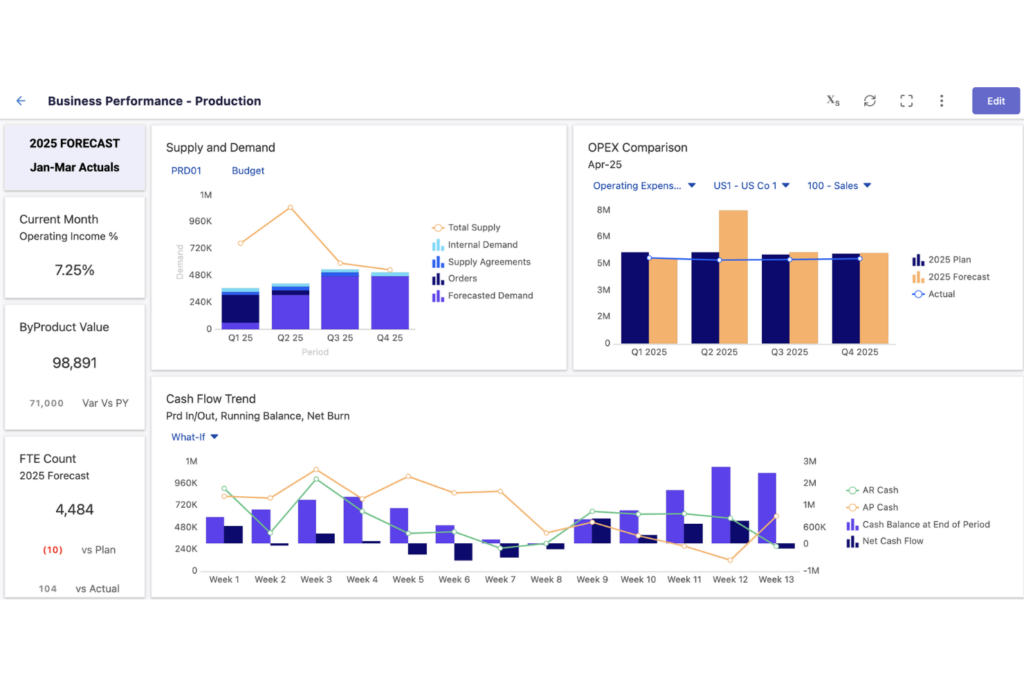
I mars 2025 introduserte Planful flere oppdateringer for å forbedre arbeidsflyteffektivitet, åpenhet og automatisering i plattformen. Disse forbedringene fokuserer på bedre oppfølging av oppgaver, forbedrede revisjonslogger og en mer strukturert prosessflyt for økonomiteam.
Viktige oppdateringer:
• Følg fullførte oppgaver med flere detaljer: Den nye fanen Fullførte handlingspunkter i Budsjettbehandling gir en tydelig historikk over fullførte oppgaver, inkludert malnavn, scenarioer, delingsdatoer og brukerhandlinger.
• Forbedrede revisjons- og feillogger for konsolidering: Forbedrede logger registrerer nå flere detaljer om valuta- og beregningsunntak, mens forbedrede feillogger gjør det enklere å diagnostisere mislykkede importer av omklassifiseringer.
• Mer automatisering i arbeidsflytstyringen: Scenarioer videresendes nå automatisk når de opprettes, og fanen Prosessflytoppgaver viser oppgaver i utførelsesrekkefølge for bedre prosessoppfølging.
Vurdering: Disse oppdateringene finjusterer arbeidsflyter, øker åpenheten og reduserer manuelt arbeid. Selv om de ikke er revolusjonerende, gir de meningsfulle forbedringer for økonomiteam som ønsker større effektivitet.
Notater om produktoppdateringer for SolveXia

I mars 2025 lanserte SolveXia versjon 6.2.0, som introduserte AI-drevne forbedringer for å styrke automatisering, kontroll og sikkerhet i plattformen.
Viktige oppdateringer:
• DocumentAI-trinn: Denne nye funksjonen gjør det mulig for brukere å effektivisere arbeidsflyter ved å hente ut innsikt fra ulike dokumenter – for eksempel sjekker, kontrakter og saksnotater – og forbedrer dermed funksjonene for databehandling.
• Forbedrede API-endepunkter: Brukerne har nå større kontroll og fleksibilitet med nye API-endepunkter som gjør det mulig å kontrollere trinnstatus i prosesskjøringer og starte prosesser på nytt fra et hvilket som helst trinn.
• Forenklet brukeradministrasjon: Administratorer kan enkelt opprette brukere, mens systemet automatisk håndterer resten av oppsettet, noe som reduserer den administrative arbeidsmengden.
• Styrkede sikkerhetstiltak: Plattformen håndhever nå strengere passordkrav og avanserte kontroller i tråd med de nyeste sikkerhetsstandardene for å sikre bedre databeskyttelse.
Vurdering: Disse oppdateringene forbedrer SolveXias automatiseringsfunksjoner, brukerkontroll og sikkerhetstiltak betydelig, og gir omfattende forbedringer for virksomheter som ønsker effektive og sikre løsninger for databehandling.
Notater om produktoppdateringer for Fiserv

I første kvartal 2025 introduserte Fiserv flere oppdateringer for å forbedre plattformens funksjonalitet, sikkerhet og brukeropplevelse.
Viktige oppdateringer:
• Forbedrede API-funksjoner: Nye API-endepunkter gir utviklere større fleksibilitet og kontroll, og muliggjør sømløs integrasjon med Fiservs tjenester.
• Forbedrede sikkerhetstiltak: Styrkede sikkerhetsprotokoller sikrer databeskyttelse og samsvar med de nyeste bransjestandardene.
• Forbedringer av brukeropplevelsen: Oppdateringer av brukergrensesnittet og navigasjonen forbedrer tilgjengeligheten og effektiviserer arbeidsflytene for brukerne.
Vurdering: Disse oppdateringene gir verdifulle forbedringer som styrker integrasjonsmulighetene, sikkerheten og brukeropplevelsen. Selv om de ikke er banebrytende, bidrar de positivt til den samlede funksjonaliteten i Fiservs plattform.
Ofte stilte spørsmål
Her finner du svar på noen vanlige spørsmål om programvare for kontoavstemming.
Hvordan integreres programvare for kontoavstemming med ERP-systemer?
Programvare for kontoavstemming integreres ofte sømløst med ERP-systemer, slik at økonomiske data kan importeres automatisk. Dette bidrar til å unngå manuell dataregistrering og reduserer feil. De fleste programvareløsninger tilbyr API-er eller innebygde koblinger for å forenkle denne integrasjonen.
Kan programvare for kontoavstemming håndtere flere valutaer?
Ja, mange programvareløsninger for kontoavstemming støtter flere valutaer. Denne funksjonen er avgjørende for virksomheter som opererer internasjonalt, ettersom den gjør det mulig for teamet ditt å avstemme kontoer i forskjellige valutaer uten behov for separate programvareverktøy.
Hvor sikker er programvare for kontoavstemming?
Programvare for kontoavstemming inneholder vanligvis robuste sikkerhetstiltak som datakryptering, brukerautentisering og rollebaserte tilgangskontroller. Disse funksjonene sørger for at sensitive økonomiske data beskyttes mot uautorisert tilgang og datainnbrudd.
Hvordan håndterer programvare for kontoavstemming avvik eller feil?
Programvaren flagger vanligvis avvik eller feil under avstemmingsprosessen. Den gir detaljerte rapporter som hjelper deg med å identifisere og løse disse problemene raskt. Noen løsninger tilbyr også automatiserte arbeidsflyter for effektiv håndtering og korrigering av avvik.