

Skatteprogramvare er en digital løsning som er utviklet for å automatisere, administrere og effektivisere skatteforberedelser og -rapportering på tvers av jurisdiksjoner. For økonomidirektører og skatteeksperter handler det om mer enn å krysse av for at kravene er oppfylt: Den riktige løsningen reduserer risiko, fremskynder arbeidsflyter og sikrer at hver beregning er i samsvar med gjeldende regelverk.
Som ekspert på digital programvare, med bakgrunn innen økonomistyring, har jeg hjulpet team innen økonomi, helsevesen og andre regulerte sektorer med å finne verktøy som balanserer kontroll, samsvar og effektivitet. Jeg vet hvor viktig det er å holde seg oppdatert på endringer i skattelovgivningen, men jeg forstår også behovet for å forenkle interne prosesser. Det er ingen liten oppgave å finne programvare som gjør begge deler uten å tilføre kompleksitet.
Derfor har jeg brukt flere timer på å teste de beste skatteprogrammene, gjennomgå tilbakemeldinger fra brukere og sammenligne funksjoner som betyr mest. Verktøyene nedenfor er de jeg vil anbefale til enhver økonomidirektør som ser etter automatisering, nøyaktighet og større trygghet.
Hvorfor du kan stole på våre programvareanbefalinger
6,700+
Reviews
20
Industry experts
16+
Evaluation factors
14
Years
Teamet vårt har testet og anmeldt programvare siden 2012. Vi er selv økonomiledere, så vi vet hvor vanskelig og hvor viktig det er å velge riktig programvare.
I denne guiden har vi vurdert verktøyene gjennom praktisk testing og uavhengig research og gitt dem poeng ut fra våre utvelgelseskriterier.
Anmeldelsene våre bygger på vår egen redaksjonelle vurdering. De er ikke et salgsargument.
Sammenligningstabell for skatteprogramvare
Denne sammenligningstabellen oppsummerer prisopplysningene for mine beste utvalgte skatteprogrammer.
| Tool | Best For | Trial Info | Price | ||
|---|---|---|---|---|---|
| 1 | Best for indirect tax across 190+ jurisdictions | Free demo available | Pricing upon request | Website | |
| 2 | Best for global payout automation | Free plan available | Pricing upon request | Website | |
| 3 | Best for real-time data synchronization | Not available | From $27/month | Website | |
| 4 | Best for comprehensive tax preparers | Free trial available | From $359.99/month | Website | |
| 5 | Best for Salesforce ERP integration | Free demo available | Pricing upon request | Website | |
| 6 | Best for sales tax automation | Free demo available | Pricing upon request | Website | |
| 7 | Best for tax provision alignment | Free demo available | Pricing upon request | Website | |
| 8 | Best for guided business tax filing | Free plan available | From $99/filing | Website | |
| 9 | Best for complex tax scenarios | Free demo available | From $479/year (billed annually) | Website | |
| 10 | Best for corporate tax filing | Pricing upon request | Website |


Anmeldelser av de beste skatteprogrammene
Se mine grundige vurderinger og sammendrag av de beste skatteprogrammene. Hver anmeldelse veileder deg gjennom fordelene, ulempene, funksjonene og de ideelle bruksscenarioene.
 Best for indirect tax across 190+ jurisdictions
- Free demo available
- Pricing upon request
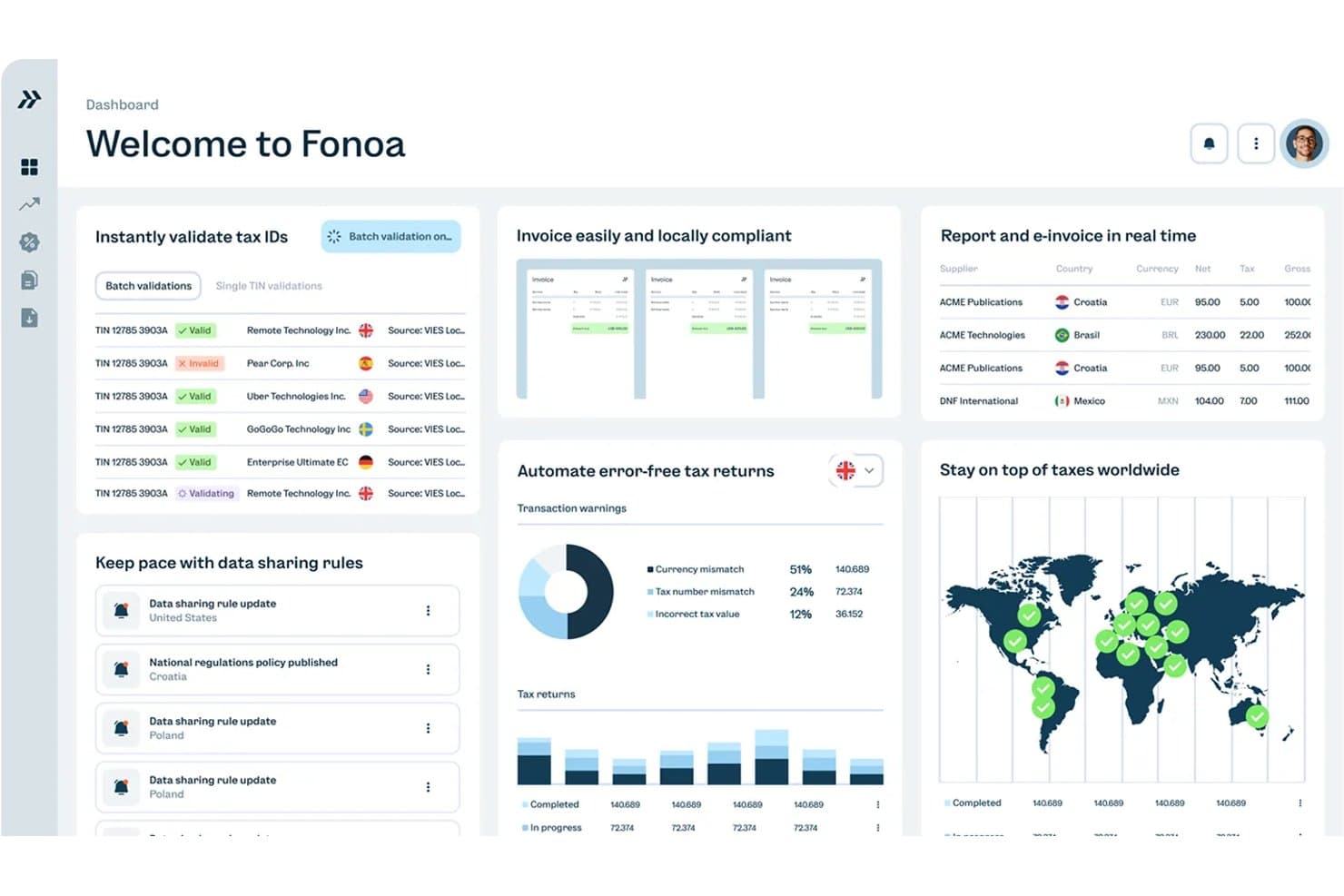
Fonoa centralizes tax ID validation, invoicing, and global tax compliance. Fonoa is an indirect tax compliance platform that automates VAT, GST, and sales tax calculation, e-invoicing, tax ID validation, return filing, and audit trail management across 190+ jurisdictions via an API-first architecture.
Who Is Fonoa Best For?
Fonoa is built for enterprise finance and tax teams at high-volume digital businesses managing indirect tax obligations across multiple countries.
Why I Picked Fonoa
I picked Fonoa as one of the best because no other platform on this list handles indirect tax at this geographic scale: real-time VAT, GST, and sales tax calculation across 190+ jurisdictions via a single API. What I find genuinely impressive is the Tax Engine's sub-200ms response time paired with automatic rule updates, so your calculations stay compliant without anyone manually tracking regulatory changes. The Audit module adds another layer I value, assembling a complete, queryable audit trail instantly when a tax authority comes knocking.
Fonoa Key Features
- Tax ID validation: Verifies supplier and customer tax IDs against live government registries across 120+ countries, with batch processing of up to 50,000 records at a time.
- E-invoicing API: Sends and receives compliant e-invoices across 50+ countries through a single API with automatic format conversion to local jurisdiction requirements.
- Multi-country return preparation: Auto-populates VAT, GST, and sales tax return forms from transaction data, with built-in validation checks before submission.
- Real-time regulatory alerts: Delivers personalized, materiality-ranked alerts when tax laws change, with plain-language explanations and role-based routing to the right team members.
Fonoa Integrations
Fonoa connects with SAP S/4HANA, Oracle Fusion Cloud, NetSuite, and billing platforms through its open REST API. It offers no clearly documented native or marketplace integrations, so custom engineering is required.
Pros and Cons
Pros:
- Maintains tax rules automatically across regions
- Provides instant, queryable audit trails
- Handles indirect tax in 190+ jurisdictions
Cons:
- Requires technical setup and API integration
- Supports indirect tax, not income tax
Learn more about Fonoa: Best for global payout automation
- Free plan available
- Pricing upon request
Visit WebsiteCustomer Rating:4.5/5
Payouts helps teams adhere to various tax regulations around the world with ease. Payouts makes my shortlist because it handles the complexity of multi-country payout workflows for teams managing global contractors or vendors. It automates things like currency conversion, compliance checks, and bulk scheduling—so you’re not validating requirements or calculating payouts country by country.What stands out is how it reduces the operational risk around payouts. Instead of payments getting delayed due to missing tax forms, incorrect details, or timing mismatches, you can see issues upfront—like incomplete documentation or compliance gaps—before funds are sent.Payouts' Best For
- Finance teams handling global payouts and multi-currency payments
- Organizations needing automated tax compliance for international contractors
Payouts' Not Great For
- Businesses focused only on domestic tax filings
- Teams wanting built-in tax calculation or preparation tools
What sets Payouts apart
Payouts stands out for how it approaches global mass payments. Unlike platforms like QuickBooks that focus on accounting first, Payouts is designed for organizations routinely moving funds to contractors and vendors in many countries. In practice, payment and compliance workflows are front and center, minimizing manual steps when dealing with a wide mix of countries.
Instead of trying to serve as a full-featured tax solution, it streamlines cross-border payouts and keeps payout data accessible for external tax software.
Tradeoffs with Payouts
Payouts optimizes for payments and compliance, but you lose out on integrated tax calculation features, so you’ll need a separate tool to handle tax prep and filings.
Pros and Cons
Pros:
- Offers a variety of payment methods, including cryptocurrencies
- Customizable workflows that adapt to specific business needs
- Supports multiple currencies
Cons:
- Potential delayed transactions and payment processing
- Poor mobile compatibility affects on-the-go management
Learn more about Payouts: 3Best for real-time data synchronization
Xero
- Not available
- From $27/month
Visit WebsiteCustomer Rating:4.4/5
Xero lets you automatically compute sales tax on transactions and generate reports for tax returns. Xero makes my shortlist because it's the best I've found for syncing real-time tax and financial data across multiple systems. I see Xero work best for finance teams juggling transactions from various banks, payment processors, and sales channels who need everything up to date for tax season.
What stands out is its configurable workflow engine, which lets you assign review steps, track approval status, and manage audit trails in one place—so teams aren’t coordinating audits through email threads or spreadsheets.
Xero’s Best For
- Multinational businesses syncing real-time tax and financial data
- Teams handling frequent VAT, GST, and sales tax calculations
Xero’s Not Great For
- Organizations needing advanced U.S. income tax features
- Firms seeking highly customized tax workflow automation
What sets Xero apart
Xero is built for people who need financial and tax data that matches their actual business activity without manual tweaks. It expects you to manage day-to-day entries as they happen (bank feeds, expense claims, online invoices) so your tax report is never out of sync with reality. Unlike QuickBooks, which leans more into customizable accounting, Xero pushes for always-up-to-date records rather than lots of end-of-month adjustment.
Tradeoffs with Xero
By focusing on live data and automation, you lose access to some of the advanced tax preparation and filing workflows that full-featured U.S. tax tools offer.
Pros and Cons
Pros:
- Cloud-based accessibility
- Good reporting features
- User-friendly interface
Cons:
- Mobile app is not as robust as desktop version
- May not be suitable for large enterprises
Learn more about Xero: Best for comprehensive tax preparers
- Free trial available
- From $359.99/month
Visit WebsiteCustomer Rating:4.6/5
Drake Tax offers in-depth tax preparation, e-filing, and planning solutions for accountants and tax professionals. Drake Tax makes my shortlist because it consistently handles high-volume, complex tax preparation work at scale. I recommend it for tax professionals who manage various federal, state, and local filings under tight deadlines.
What I really value about Drake Tax is its comprehensive e-filing support, advanced error checking, and built-in form coverage for virtually every client scenario. It’s a go-to when you need deep coverage for detailed preparer workflows, including advanced client management and bulk return processing.
Drake Tax's Best For
- High-volume tax professionals handling diverse client returns
- Firms that require advanced compliance and bulk e-filing tools
Drake Tax's Not Great For
- Sole proprietors with basic tax needs
- Users looking for a lightweight or DIY tax tool
What sets Drake Tax apart
Drake Tax expects tax professionals to manage complex, high-volume returns efficiently. Instead of the simplified interface you see in something like TurboTax, Drake Tax is built around workflows that handle multiple clients, specialized forms, and detailed compliance tasks at once.
In practice, this works best for tax practices that prioritize breadth of tax coverage and deep control over client returns.
Tradeoffs with Drake Tax
Drake Tax optimizes for handling complex, professional tax scenarios, which means you sacrifice simplicity for speed on basic returns. If you want an easy, self-serve setup, the learning curve and feature set can feel excessive.
Pros and Cons
Pros:
- Offers secure file exchange and payment option solutions
- Available on both desktop and cloud platforms
- Manages all types of tax returns
Cons:
- Outdated and less user-friendly interface
- Cloud hosting requires an additional monthly fee
Learn more about Drake Tax: Best for Salesforce ERP integration
- Free demo available
- Pricing upon request
Visit WebsiteCustomer Rating:4/5
Certinia is a robust tax software offering streamlined tax compliance, reporting, and management solutions for businesses and enterprises. Certinia earns its place on my shortlist for how directly it links Salesforce data to tax and accounting workflows. I recommend it when you want tax processes to live where your CRM and ERP data already reside, especially for teams committed to the Salesforce platform.
I like that you can use tax calculation, revenue recognition, and audit trails right inside Salesforce, keeping everything connected and up to date. When I tested its reporting, seeing real-time financial and tax positions using Salesforce-native tools really stood out.
Certinia’s Best For
- Finance teams using Salesforce as their main ERP system
- Organizations needing unified tax, accounting, and CRM data
Certinia’s Not Great For
- Companies not invested in the Salesforce ecosystem
- Small businesses with simple tax management needs
What sets Certinia apart
Certinia is designed for organizations that already run their operations in Salesforce and want tax processes to follow the same workflows as their sales, finance, and service teams. Unlike standalone tax engines or traditional accounting systems, Certinia expects you to use Salesforce as your central hub. In practice, this tends to work best for businesses aiming to have a single source of financial truth without moving between multiple platforms.
Tradeoffs with Certinia
Certinia optimizes for a unified Salesforce experience, but that focus means you lose flexibility if you use other core platforms. You end up tied to the Salesforce ecosystem, which can be limiting if your business relies on a mix of ERP and CRM systems.
Pros and Cons
Pros:
- Focus on improving cash flow, project profitability, and employee utilization
- Comprehensive feature set for managing all aspects of service operations
- Deep integration with Salesforce for a unified business management experience
Cons:
- Limited customization options for specific business processes and reporting needs
- Requires a minimum number of users, which may not be suitable for very small businesses
Learn more about Certinia: Best for sales tax automation
- Free demo available
- Pricing upon request
Visit WebsiteCustomer Rating:4/5
Avalara is a tax automation software providing scalable solutions for tax compliance, calculation, and reporting for businesses of all sizes. Avalara ends up on my shortlist because it automates sales tax calculations and filings across jurisdictions, letting you avoid manual rate updates and compliance headaches. When multistate reporting gets messy or teams are managing hundreds of tax codes, this tool removes a lot of friction.
What stands out is its real-time tax calculation and filing support across the US and internationally. In practice, it calculates the correct tax at checkout based on location and product type, applies exemption certificates automatically, and tracks transactions in one place—so you’re not maintaining tax tables or reconciling data across spreadsheets. It also generates filing-ready reports, which cuts down the manual work of preparing returns across multiple jurisdictions.
Avalara’s Best For
- Companies handling sales tax in multiple US states
- Teams seeking automation for tax calculation and filing
Avalara’s Not Great For
- Businesses with only simple, single-state tax needs
- Users needing full corporate or income tax solutions
What sets Avalara apart
Avalara builds automation into the handling of sales tax compliance, letting you hand off rate calculations and filings instead of tracking them by spreadsheet. I notice it expects you to structure your tax processes around automation and integration with sales or finance platforms. Compared to something like QuickBooks, which assumes you’ll manage more tax work manually, Avalara is designed for volume and complexity.
Tradeoffs with Avalara
Avalara optimizes for automating sales tax, but you give up flexibility in handling unique, one-off tax scenarios or customizing beyond its automation framework. If you only file in a single state or need to handle less common tax types, it can end up feeling too heavy.
Pros and Cons
Pros:
- Offers solutions for both domestic and international sales tax compliance
- Integrates with over 1,200 business applications
- Detailed tax compliance features for various tax types
Cons:
- Complex and potentially time-consuming setup and integration
- Cost may vary significantly based on business size and transaction volume
 Best for tax provision alignment
- Free demo available
- Pricing upon request

Oracle Cloud EPM Tax Reporting includes features for Pillar Two compliance management. Oracle Cloud EPM Tax Reporting belongs on this list because it brings tax provision processes in line with your broader financial reporting, using the same data core for both. I tend to recommend it to finance teams where tax and financial reporting need to stay tightly in sync, especially for global or multi-entity groups.
What stands out to me is the real-time data flow between tax and financial close, plus strong scenario modeling for provision and compliance work. I appreciate how quickly you can identify mismatches and make adjustments without reworking your whole process.
Oracle Cloud EPM Tax Reporting’s Best For
- Multinational groups aligning tax and financial reporting
- Teams managing complex tax provision and compliance cycles
Oracle Cloud EPM Tax Reporting’s Not Great For
- Small businesses with basic tax prep needs
- Firms wanting standalone tax-only solutions without financial close integration
What sets Oracle Cloud EPM Tax Reporting apart
Oracle Cloud EPM Tax Reporting is designed so your tax workflows use the same data foundation and logic as your financial close processes. Instead of working like a standalone tax engine (like CCH Axcess Tax), Oracle assumes you want tax and accounting to move in parallel. I find this fits best when you need tax teams to pull directly from the same live financial data as reporting and compliance.
Tradeoffs with Oracle Cloud EPM Tax Reporting
Optimizing for alignment with your financial close means you lose some flexibility and simplicity compared to traditional, tax-focused prep systems. If your work is strictly tax-only, the unified approach is likely overkill.
Pros and Cons
Pros:
- Deep integration with Oracle ecosystem
- Robust global compliance capabilities
- Aligns with US GAAP and IFRS
Cons:
- Limited flexibility beyond Oracle stack
- Best suited for large enterprises
Learn more about Oracle Cloud EPM Tax Reporting:

TurboTax Business is a comprehensive tax software providing specialized tools for accurate and efficient tax preparation for businesses and corporations. TurboTax earns its spot for automating the most tedious parts of guided business tax filing, especially when schedules and forms start to stack up. I find its interview-style workflows and real-time error checks take out a lot of guesswork, especially for S corporations and LLCs.
I like how it spots possible IRS audit triggers and gives you a straightforward review summary before you file. This is usually when I see business owners breathe easier about missing deductions or handling multistate returns.
TurboTax’s Best For
- Small business owners needing guided federal and state filing
- S corporations or LLCs with straightforward reporting
TurboTax’s Not Great For
- Enterprise tax teams with complex, custom requirements
- Companies with extensive international tax exposure
What sets TurboTax apart
TurboTax stands out by fully guiding you through business tax filing, breaking the process into clear, question-based steps. Unlike something like QuickBooks, which assumes you already understand tax workflows, TurboTax keeps things structured and reduces the learning curve. You work through document uploads and compliance checks on rails, following the order it sets. This tends to suit small businesses who want hands-on guidance rather than control over the process.
Tradeoffs with TurboTax
TurboTax prioritizes guided workflows and structure, but that means you lose flexibility to tweak complex business tax scenarios on your terms. For companies that need bespoke adjustments or manage lots of irregular tax cases, this can be limiting.
Pros and Cons
Pros:
- User-friendly interface for easy tax filing
- Audit Defense included without extra charge
- Access to tax experts for personalized guidance
Cons:
- May not cater to all types of business entities or complex tax situations
- Additional fees for state filing and other services
Learn more about TurboTax: Best for complex tax scenarios
- Free demo available
- From $479/year (billed annually)

Lacerte Tax is a professional tax software providing advanced features for accurate and efficient tax preparation for accountants and tax experts. Lacerte Tax stands out for handling highly specialized and challenging tax situations that many platforms just don’t cover well. I recommend it when you’re juggling multi-state returns, trusts, estates, or complex partnership filings and don’t want to hit limitations halfway through busy season.
What I like here is the breadth of advanced forms and diagnostic tools aimed at catching errors and prepping nuanced filings. In practice, accountants working with high-net-worth clients or unique entity structures routinely lean on these features to avoid bottlenecks and last-minute surprises.
Lacerte Tax's Best For
- Accountants who handle multi-state or complex entity returns
- Firms specializing in trusts, estates, and high-net-worth clients
Lacerte Tax's Not Great For
- Solo preparers with only basic personal tax clients
- Small practices seeking a simplified, question-based workflow
What sets Lacerte Tax apart
Lacerte Tax is built to handle complex tax needs, not just simple returns. In practice, it expects you to bring deep tax knowledge and handle details that tools like TurboTax or Drake might simplify or automate. I see accountants using it for situations with complicated entity structures, dense state regulations, or special scenarios like trusts and estates where out-of-the-box forms aren’t enough.
Unlike generalist tax software, it leans into customization, form depth, and diagnostic guides for those who need more than a basic Q&A workflow.
Tradeoffs with Lacerte Tax
Lacerte Tax optimizes for detail and technical depth, but you sacrifice speed and simplicity when you only need to complete straightforward tax prep. For mostly standard personal returns, the extra options make setup and navigation slower than lighter tools.
Pros and Cons
Pros:
- Integrates with QuickBooks and other key software
- Over 25,000 diagnostic checks to spot errors
- Extensive form library with over 5,700 forms
Cons:
- Lack of flexibility and customization
- Higher cost relative to some other tax software
Learn more about Lacerte Tax:

Thomson Reuters tax software offers advanced tax compliance, planning, and reporting solutions for tax professionals and businesses worldwide. Thomson Reuters GoSystem Tax RS earns a spot here for how it handles complex corporate tax filings at large scale. I see accounting teams at enterprise groups lean on its secure cloud architecture for preparing, reviewing, and e-filing federal and state returns.
What sets it apart for me is its capacity for handling tricky consolidated returns, automated workpaper organization, and review workflows built for distributed teams. I like how you can manage high-volume returns with controls around collaboration and compliance.
GoSystem Tax RS’s Best For
- Enterprise tax teams filing complex corporate returns
- Firms handling high-volume, multi-entity tax preparation
GoSystem Tax RS’s Not Great For
- Small businesses with basic tax needs
- Users who want fast setup without training
What sets GoSystem Tax RS apart
GoSystem Tax RS is designed for high-stakes environments where tax compliance and collaboration need enterprise-level control. Unlike something like ProSeries that caters to smaller firms, this tool puts structure first: organizing multi-entity workflows, user permissions, and review layers around tight deadlines and regulatory standards. In practice, this feels closer to using a compliance-focused ERP than a consumer tax solution.
Tradeoffs with GoSystem Tax RS
GoSystem Tax RS optimizes for control and compliance, but you lose speed and simplicity, which means onboarding is slow and routine changes take more effort.
Pros and Cons
Pros:
- Integrates with other Thomson Reuters applications and third-party software
- Cloud-based platform for real-time collaboration
- Handles complex corporate tax returns efficiently
Cons:
- Requires internet connectivity for full functionality
- Not ideal for firms primarily preparing individual or simple returns
Learn more about Thomson Reuters GoSystem Tax RS:
Annen skatteprogramvare
Nedenfor finner du en liste over ytterligere skatteprogrammer som jeg har valgt ut. Selv om de ikke kom med blant topp 10, er de fortsatt verdifulle og verdt å undersøke nærmere.
- 11Cash App TaxesBest for free tax filing service
- 12Bloomberg TaxBest for tax issue analysis
- 13Longview TaxBest for large-scale tax data management
- 14TaxAct BusinessBest for DIY business tax preparation
- 15SovosBest for global tax compliance
- 16VertexBest for real-time tax determination
- 17IrisBest for UK tax compliance
- 18Jackson HewittBest for Lifetime Accuracy Guarantee
- 19TrolleyBest for global payment tax compliance
- 20TaxWise OnlineBest for remote tax professionals
- 21TaxCalcBest for diverse tax return needs
- 22H&R Block Premium & BusinessBest for small businesses
Relaterte anmeldelser av skatteprogramvare
Hvis du fortsatt ikke har funnet det du leter etter her, kan du se nærmere på disse verktøyene som er nært knyttet til skatteprogramvare, og som vi har testet og vurdert.
- Regnskapsprogramvare
- Kassasystemer
- Faktureringsprogramvare
- Lønnstjenester
- Tjenester for brukerstedskontoer
How I Evaluate Tax Software
I evaluate tax software in two layers: baseline requirements like multi-jurisdiction e-filing and compliance updates, then differentiators that separate a CPA tool from an enterprise solution.
Core Functionality (Table Stakes For This List)
When I'm selecting tools for my list, I rank each one on a scale from 0 (does not offer the functionality) to 5 (excels in this area) for each core functionality listed below. Then, I calculate the tool's total score into a percentage. Each tool needs to achieve a minimum total score of 75% to be considered for inclusion.
- Tax Return Preparation: I check whether a platform covers the return types your team actually files—individual, partnership, S-corp, trust—not just a single basic form.
- E-Filing Capabilities: Each tool should support direct e-filing to federal and state agencies with submission tracking, not just generate forms you print and mail.
- Tax Calculation Engine: I evaluate how well the engine handles multi-jurisdiction scenarios, like a business with nexus in several states that needs accurate withholding and credit calculations.
- Compliance & Regulatory Updates: Tax rules shift constantly, so I look for platforms that push automatic form and rate updates rather than requiring you to download patches manually.
- Accounting & Financial Data Integration: Whether it's pulling GL data from QuickBooks, syncing payroll from ADP, or importing 1099s, I look at how smoothly each tool connects to your existing stack.
- Audit Trail & Reporting: I evaluate whether the platform logs preparer activity, tracks return versions, and generates supporting schedules you can hand to an auditor without scrambling.
Once I have a list of tools that meet this criteria, I consider what sets each platform apart.
Differentiating Factors (What Sets Vendors Apart)
Here's how I compare and contrast different vendors:
Standout Features
Multi-entity management matters if your firm handles filings for subsidiaries or multiple client accounts—I look for platforms that let you switch between entities without logging in and out. A secure client portal also makes a big difference during filing season, replacing email chains with organized document requests and e-signatures. I evaluate scenario planning tools too, particularly ones that model projected liabilities to help corporate tax managers advise leadership on the impact of restructuring or expansion decisions.
Beyond Features
Security is a major consideration—I check for SOC 2 Type II compliance and multi-factor authentication, since tax platforms handle sensitive financial data year-round. I also evaluate support availability during peak filing periods, when a delayed response can mean missed deadlines. Pricing transparency rounds out my review. I look at how each vendor structures costs per return, per user, or per entity to understand total cost as your filing volume grows.
Slik velger du skatteprogramvare
Det er lett å gå seg vill i lange funksjonslister og komplekse prisstrukturer. For å hjelpe deg med å holde fokus mens du arbeider deg gjennom din unike prosess for valg av programvare, får du her en sjekkliste over faktorer du bør ha i tankene:
| Faktor | Hva bør vurderes |
|---|---|
| FaktorSkalerbarhet | Hva bør vurderesVil programvaren tilpasse seg veksten din? Sørg for at den kan håndtere økte datamengder og flere brukere. Se etter fleksible prismodeller som kan skaleres etter behovene dine. |
| FaktorIntegrasjoner | Hva bør vurderesKan den kobles til de eksisterende verktøyene dine? Kontroller kompatibiliteten med regnskapsprogramvare og andre viktige systemer for å unngå manuell dataregistrering. |
| FaktorTilpasningsmuligheter | Hva bør vurderesKan du tilpasse den til prosessene dine? Se etter alternativer for å endre arbeidsflyter og rapporter slik at de samsvarer med dine spesifikke krav. |
| FaktorBrukervennlighet | Hva bør vurderesEr den brukervennlig for teamet ditt? Ta læringskurven i betraktning, og se etter intuitive grensesnitt som minimerer opplæringstiden. |
| FaktorImplementering og innføring | Hva bør vurderesHvor smidig er oppsettet? Vurder leverandørens støtte under utrullingen. Rask innføring kan spare tid og redusere forstyrrelser. |
| FaktorKostnad | Hva bør vurderesPasser det inn i budsjettet ditt? Sammenlign de totale eierkostnadene, inkludert skjulte gebyrer, for å sikre at løsningen er overkommelig på lang sikt. |
| FaktorSikkerhetstiltak | Hva bør vurderesEr dataene dine beskyttet? Se etter robust kryptering, samsvar med standarder som GDPR og regelmessige sikkerhetsoppdateringer. |
| FaktorEtterlevelseskrav | Hva bør vurderesOppfyller det regulatoriske behov? Bekreft at programvaren støtter bransjespesifikke krav til skatteetterlevelse for å unngå bøter. |
Trender innen skatteprogramvare
Jeg har lagt merke til at skatteprogramvare stadig utvikler seg – takket være rask teknologisk innovasjon og endrede reguleringer.
Da jeg undersøkte og vurderte dagens beste løsninger, skilte noen viktige trender seg ut: automatiseringen blir smartere, mobiltilgangen utvides, og kunstig intelligens begynner å spille en større rolle i skatteforberedelsene.
Her er det jeg ellers fant:
- Integrasjon med regnskapsplattformer: Skatteprogramvare forbedrer kompatibiliteten med regnskapsplattformer, noe som muliggjør skatterapportering i sanntid og forenklet etterlevelse. Denne utviklingen forenkler økonomistyringen for virksomheter ved å synkronisere skatte- og regnskapsdata sømløst.
- Skatteprognoser drevet av kunstig intelligens: Kunstig intelligens brukes til å forutsi skatteforpliktelser og analysere økonomiske data for å anslå fremtidige betalinger. Denne trenden er interessant fordi den bidrar til økonomisk planlegging og risikostyring.
- Forbedrede datasikkerhetstiltak: Skatteprogramvare prioriterer avanserte sikkerhetstiltak, inkludert kryptering og flerfaktorautentisering, for å beskytte sensitive skatterelaterte data. Dette økte fokuset er avgjørende på grunn av den konfidensielle karakteren til økonomisk informasjon.
- Brukervennlige mobilapplikasjoner: Mobilapplikasjoner for skatteprogramvare blir mer brukervennlige og gir brukerne en praktisk måte å håndtere skatter på når de er på farten. Denne trenden er betydningsfull fordi den gjenspeiler den økende mobilbruken i virksomhetenes drift.
- Skybaserte skatteløsninger: Skybaserte skatteløsninger blir stadig mer utbredt fordi de tilbyr skalerbarhet og ekstern tilgang til skattedata. Dette er viktig for virksomheter som ønsker fleksibilitet og effektivitet i skattehåndteringen.
Hva er skatteprogramvare?
Skatteprogramvare er et digitalt verktøy som hjelper privatpersoner og virksomheter med å forberede, levere og håndtere skattemeldinger effektivt. Den automatiserer beregninger, sikrer samsvar med gjeldende skattelovgivning og reduserer menneskelige feil.
Skatteprogramvare er utviklet for alle, fra frilansere til store selskaper og selskapsstrukturer, og sparer tid, reduserer risikoen for bokettersyn og identifiserer ofte fradrag brukerne kan overse manuelt. Enten du leverer en enkel skattemelding eller håndterer kompliserte bedriftsskatter, forenkler denne programvaren prosessen og bidrar til å sikre nøyaktighet.
Funksjoner i skatteprogramvare
Når du velger skatteprogramvare, bør du se etter følgende viktige funksjoner:
- Brukervennlig grensesnitt: Programvaren bør ha et tydelig og intuitivt oppsett som veileder deg trinn for trinn gjennom utfyllingen av skattemeldingen. Et enkelt grensesnitt kan spare deg for tid og gjøre en stressende oppgave langt mer håndterlig.
- Automatiske beregninger: Skatteprogramvare gjør beregningene automatisk for deg, noe som reduserer risikoen for feil og hjelper deg med å unngå feil som kan koste deg penger eller utløse en kontroll.
- Veiledning om fradrag og skattefradrag: Se etter en plattform som viser deg aktuelle fradrag og skattefradrag basert på dine personlige og økonomiske opplysninger. Denne funksjonen hjelper deg med å maksimere skatteoppgjøret (og hindrer deg i å gå glipp av penger).
- Mulighet for elektronisk innlevering: Dette lar deg sende inn skattemeldingen elektronisk direkte fra programvaren. Elektronisk innlevering går raskere, er sikrere og gir deg vanligvis skatteoppgjøret raskere enn om du sender inn papirskjemaer.
- Import av økonomiske opplysninger: Skatteprogramvare lar deg ofte importere W-2-skjemaer, 1099-skjemaer eller til og med fjorårets skattemelding fra arbeidsgiveren, banken eller tidligere programvare. Denne funksjonen reduserer behovet for manuell registrering, slik at du sparer tid og unngår skrivefeil.
- Støtte ved kontroll: Hvis du er så uheldig å bli kontrollert, tilbyr enkelte skatteprogrammer ressurser, verktøy eller eksperthjelp som veileder deg gjennom prosessen. Dette kan gi deg trygghet hvis IRS tar kontakt.
- Innlevering av delstatsskatt: Mange produkter lar deg håndtere både føderale skattemeldinger og delstatsskattemeldinger i én og samme løsning, noe som forenkler prosessen og hjelper deg med å holde orden.
- Datasikkerhet: Skatteprogramvare bør beskytte sensitive opplysninger med sterk kryptering og sikkerhetstiltak. Dette holder økonomiske opplysninger dine trygge for nysgjerrige blikk.
Vanlige AI-funksjoner i skatteprogramvare
I tillegg til standardfunksjonene i skatteprogramvaren som er nevnt ovenfor, integrerer mange av disse løsningene AI med funksjoner som:
- Smart dokumentgjenkjenning: AI skanner og gjenkjenner ulike skattedokumenter (som W-2-skjemaer eller 1099-skjemaer), henter ut relevante opplysninger og fyller ut skjemaene automatisk. Dette sparer deg for tid og reduserer antall feil.
- Personlige forslag til fradrag: Ved å analysere økonomiske opplysninger kan AI anbefale fradrag og skattefradrag som passer din unike situasjon, slik at du kan optimalisere skatteresultatet.
- Oppdagelse og korrigering av feil: AI-algoritmer oppdager uoverensstemmelser eller vanlige feil i skattemeldingen og foreslår korrigeringer før du sender den inn, slik at du unngår pinlige feil og mulige gebyrer.
- Chattehjelp i sanntid: AI-drevne chatboter gir svar på skattespørsmål og hjelp med feilsøking døgnet rundt, slik at du får umiddelbar støtte når du støter på en forvirrende del av skattemeldingen.
- Forutsigende beregning av skatteoppgjøret: AI kan gi deg et oppdatert estimat på forventet skatteoppgjør eller skyldig beløp mens du legger inn opplysninger, slik at du kan planlegge på forhånd og gjøre nødvendige justeringer.
Fordeler med skatteprogramvare
Ved å automatisere komplekse prosesser og sikre samsvar med skattelovgivningen gir skatteprogramvare en rekke fordeler, blant annet:
- Nøyaktighet og færre feil: Skatteprogramvare minimerer menneskelige feil i beregningene. Ved å automatisere beregningsprosessen sørger programvaren for at alle oppføringer er korrekte, noe som reduserer sannsynligheten for feil som kan føre til gebyrer eller kontroller.
- Tidsbesparelse: Brukere kan spare betydelig med tid ved å bruke skatteprogramvare, ettersom den automatiserer mange av de gjentakende oppgavene som inngår i skattearbeidet, slik at skattemeldingen kan ferdigstilles raskere.
- Oppdatert samsvar med skattelovgivningen: Skatteprogramvare oppdateres regelmessig for å gjenspeile de nyeste skattereglene og bestemmelsene, slik at brukerne alltid følger gjeldende lovgivning. For eksempel kan australsk skatteprogramvare hjelpe virksomheter med å holde seg oppdatert på ATO-krav og BAS/GST-forpliktelser, mens kanadisk skatteprogramvare kan støtte innlevering i samsvar med CRA-krav.
- Brukervennlighet: Med brukervennlige grensesnitt og veiledning trinn for trinn gjør skatteprogramvare det enklere for privatpersoner og virksomheter å levere skattemeldingen uten inngående skattefaglig kunnskap.
- Kostnadseffektivitet: Ved å bruke skatteprogramvare kan brukere ofte unngå de høyere kostnadene ved å engasjere skatteeksperter, noe som gjør dette til en mer kostnadseffektiv løsning for håndtering av skatteforpliktelser.
Kostnader og priser for skatteprogramvare
Når jeg velger skatteprogramvare, ser jeg alltid først på de ulike abonnementene og prisene. De fleste verktøy tilbyr alternativer i flere nivåer: grunnleggende for enkel privat skatt og avanserte alternativer for virksomheter eller komplekse skattemeldinger.
Hvert abonnement inkluderer vanligvis viktige funksjoner som elektronisk innlevering, kundestøtte og sporing av fradrag. Nedenfor finner du en rask oversikt over hva som er inkludert og hva det koster, slik at du enkelt kan finne det som passer dine behov.
Sammenligningstabell for abonnementer for skatteprogramvare
| Plantype | Gjennomsnittspris | Vanlige funksjoner |
| Gratisalternativ | $0 | Grunnleggende innlevering for enkle skattemeldinger, standardfradrag og begrenset kundestøtte. |
| Grunnleggende | $30 - $50 | Inkluderer alle funksjonene i gratisalternativet, i tillegg til flere fradrag, skattefradrag og kundestøtte. |
| Utvidet | $50 - $70 | Alle funksjonene i Grunnleggende, i tillegg til spesifiserte fradrag, boliglånsrenter og fradrag for donasjoner. |
| Premium | $70 - $100 | Alle funksjonene i Utvidet, i tillegg til rapportering av investeringsinntekter, inntekter fra utleiebolig og refinansiering. |
| Selvstendig næringsdrivende | $100 - $120 | Funksjonene i Premium, i tillegg til næringsinntekter og -utgifter, fradrag for hjemmekontor og avskrivning av eiendeler. |
| Bedrift | $120 - $170 | Utformet for eiere av små bedrifter, og inkluderer alle funksjonene for selvstendig næringsdrivende, i tillegg til arbeidsgiverskjemaer for skatt. |