
ERP business intelligence (ERP BI) combines the centralized data of enterprise resource planning systems with the analytical capabilities of business intelligence to turn raw information into actionable insights for faster, smarter decisions.
I’ve seen firsthand how ERP BI has become one of the most in-demand and talked-about tools in the executive toolkit. Here, I’ll explain what ERP BI is, outline its key benefits, share my criteria for selecting the right tools, and give you a practical framework to maximize its value in your organization.
What is ERP?
An ERP (enterprise resource planning) system is a type of software that integrates core business processes—like finance, HR, inventory, and procurement—into a unified platform.
⬇️ Here’s a quick snapshot of how different industries use ERP software:

With proper ERP integration, your team can centralize datasets, reducing painful information silos, and ultimately streamlining business processes.
But even with grand ERP implementation plans, you’re only halfway there. Enter business intelligence, the (second) key to data-driven and strategic decision making.
What is Business Intelligence?
Business intelligence (BI) refers to the tools and processes that help you see, analyze, and present business data for precise decision-making. It combines historical and real-time data with predictive analytics, making it perfect for spotting trends and planning with confidence..
BI tools—like Tableau, Power BI, and Looker—take the datasets within ERP systems and turn them into actionable insights you can use instantly. They enable smooth data visualization and provide self-service features, making analytics accessible to even the most non-technical users.
Some real examples of what BI systems offer include:
- Custom dashboards to track your team’s KPIs (order fulfillment rates, customer satisfaction scores, profitability).
- Reporting tools that highlight trends in customer behavior and market shifts.
- Smart forecasting models and budgeting tools for effective cash flow management.
Key Differences Between ERP and BI
While ERPs and BI are somewhat similar, a closer examination highlights some key differences between them, starting with their purpose:
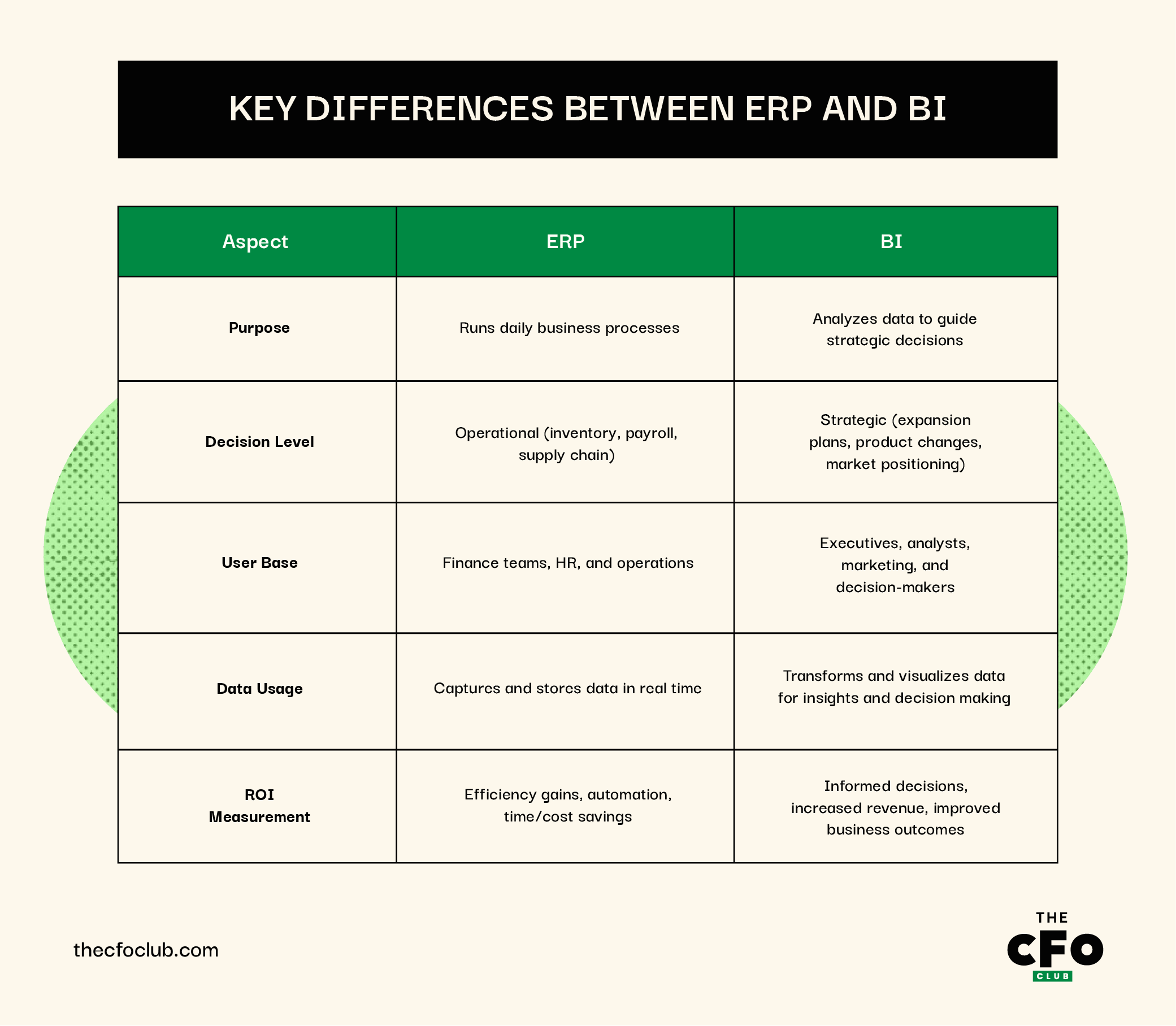
The Growth and Development of ERP Business Intelligence
Have an account? Log In
The Rise of ERP and BI
Before ERPs and BI software, businesses still had to plan, track, and manage operations, but they did so manually and often inefficiently. From complex spreadsheets to the introduction of Materials Requirements Planning (MRP) systems in manufacturing, resource management was painstaking and slow.
Thankfully, technological innovation sparked the rise of ERP solutions, with ERPs transforming from focusing only on manufacturing, to encompassing accounting, finance, and sales in the 1990s.
At this time, BI software also gained widespread adoption. Initially used mainly by analysts and executives to review historical data, BI became a critical component of ERP’s expansion into big data. Today, both ERP and BI are now embedded in the day-to-day decision-making of cross-functional teams across entire organizations.
Arriving at the Intersection of ERP and BI
While you can use ERP and BI systems separately, most modern ERPs come with built-in BI functions or allow for integration.
When you sync BI software into your ERP system, you're not just tracking your operations. Instead, you're analyzing it, learning from it, and turning raw data into decision-driving insights.
In my role as a digital software expert, I speak with CFOs and CEOs on a daily basis about different solutions. When I asked about their take on ERP BI, here are the best ERP and BI integration use cases they shared:
- Data Analysis: BI dashboards have better analytical capabilities than regular ERPs, so you can analyze large datasets across departments, without SQL queries or a data science degree.
- Reporting Tools: ERP business intelligence tools can generate reports on demand, so stakeholders don’t have to wait days for the information they need.
- Dashboard Creation: With BI software, you can create custom dashboards with live KPIs tied directly to your ERP data (inventory levels, cash flow, customer churn, order delays, and more) in one place.
- Forecasting: Plug into historical datasets and run predictive models on future sales, demand, and staffing needs using ERP and business intelligence platforms.
- Data Integration: Your centralized ERP and BI dashboard unifies complex data from cross-functional teams, enabling you to make informed business decisions on time.
💡 In summary, ERP business intelligence helps you spot business process gaps, make better decisions, and react faster to market trend changes.
How ERP Business Intelligence Can Impact Your Business
Pairing ERP with business intelligence can transform businesses across industries. Here are three clear examples from business leaders in different sectors and how ERP BI impacts their companies:
Manufacturing
Monument Tools, a UK hand-tool manufacturer, upgraded its ERP manufacturing system by integrating it with Phocas BI. This connection gave them clear, real-time dashboards for tracking inventory turnover, supply chain delays, and production costs.
And in the words of Managing Director, Jonathon Collier:
Phocas puts all the data there for you. It’s customized by product, date, costs, and margin. As long as you know what you’re looking for, it’s there.
With this ERP business integration, they improved:
- Inventory management
- Operational efficiency
- Actionable insights
SaaS
Keystone Business Services, a SaaS provider for custom ERP solutions, helps businesses implement software embedded with role-specific business intelligence. These systems empower teams, from sales to warehouse to executives, with tailored dashboards that deliver daily, real-time insights.
Using ERP and BI integration, most clients of Keystone are able to:
- Build AI-generated summaries for customer records, key trends, or transaction exception lists
- View business performance, financial insights, inventory data, and sales metrics in real-time
- Successfully scale their business
According to Founder and Owner, Eric Jozwiak, ERP and BI are inseparable:
An effective BI tool requires clean, structured data, so an effective ERP implementation is a prerequisite for a BI tool. This is becoming increasingly important, since AI is also highly dependent on clean data, which requires a well-configured ERP.
In one shared use case, he discussed his work with Meeting Tomorrow, an AV and technology partner. After the launch of their ERP system, they were able to quickly scale business processes while keeping in-house control over BI.
And when it comes to his own business? The praise only continued:
The metrics I monitor daily are for cash balance, Work in Process for the current month, AR, and AP. With these metrics, I know my cash position for the next 60 days. There’s also a Cash Forecast app that shows this graphically on a separate page in the app, but I see this every time I log in. We make an effort to practice what we preach, and it’s core to our business DNA.
Finance
Another notable implementation involves Bank of America. The company employs SAP BusinessObjects integrated with its SAP ERP system to deliver scalable analytics to tens of thousands of users across branches and functions.
Combined with ERP‑driven financial data, the BI layer allows users across global locations to access standardized, role‑based reporting in areas such as branch performance, risk, regulatory compliance, and cash flow.
This integration resulted in:
- Consistent enterprise reporting across thousands of employees
- Enhanced risk and compliance visibility
- Reduced data silos, enabling faster, more accurate insights
As Milton Jones, Finance Executive at Bank of America states:
As our company has grown, so has the size and complexity of our technology infrastructure. SAP will help streamline and simplify our financial systems, support timely analytics and provide better process insights to drive more effective business decisions.
Top 6 Benefits of ERP Business Intelligence
When ERP and BI systems are integrated properly, they do more than just improve visibility; they directly impact performance, decision-making, and business growth. Here’s how:
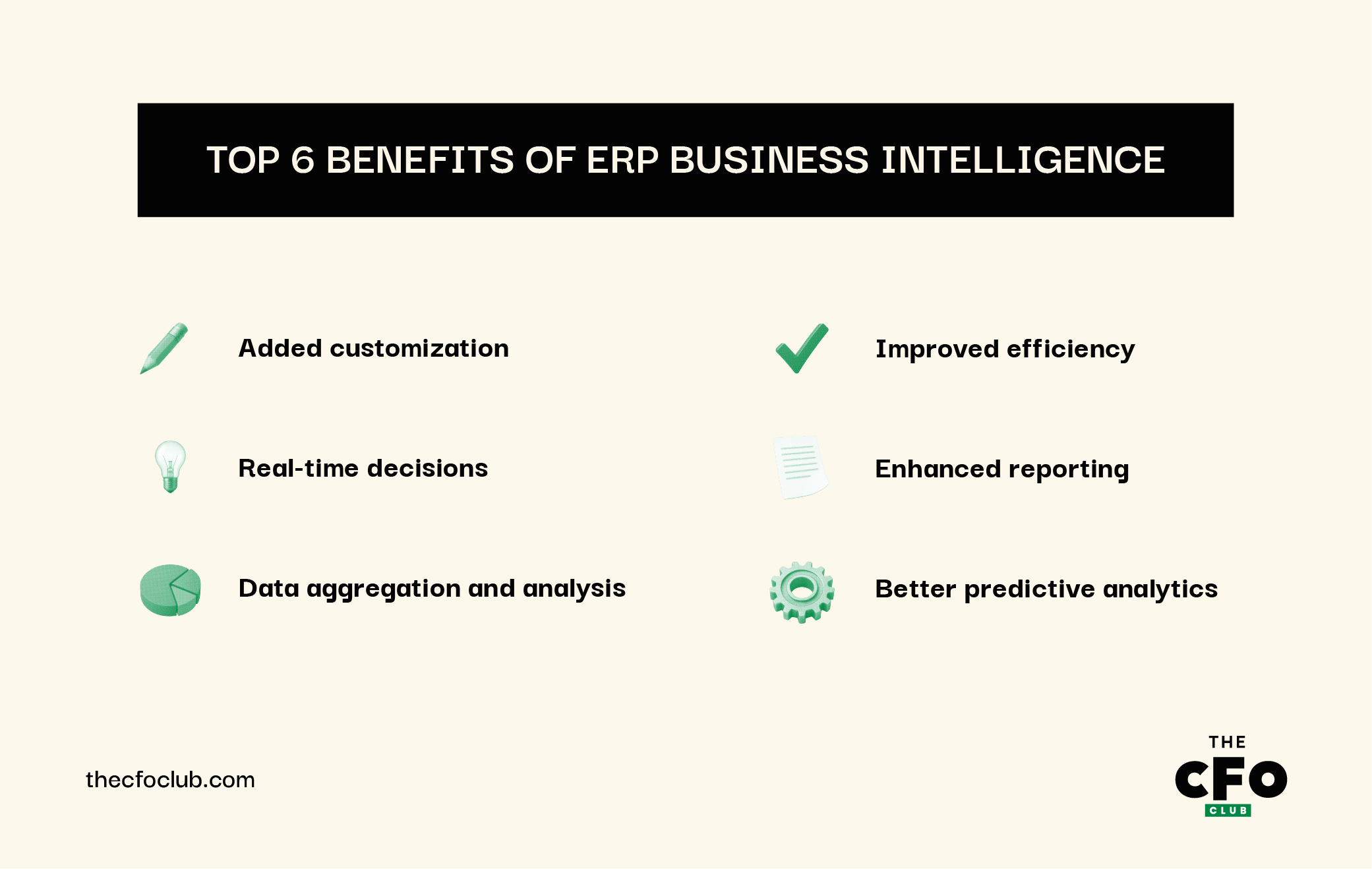
1. Added Customization
ERP systems come with different modules, but when integrated with BI software, you can customize how data is displayed, filtered, and accessed.
For instance, finance tracks cash flow, operations monitors supply chain efficiency, and HR follows workforce trends. This level of customization allows stakeholders to focus only on the metrics that matter to their function, improving clarity and decision-making.
2. Real-Time Decisions
Most ERP software collects data continuously, but BI tools make that real-time data visible and usable.
Instead of relying on monthly reports, your teams can track sales, production delays, and inventory fluctuations, and respond immediately. This reduces downtime, prevents missed sales opportunities, and supports faster, more data-driven decision-making.
3. Data Aggregation and Analysis
ERP systems store a lot of business data, financials, customer orders, HR files, and supply chain updates, but the data often sits in silos.
BI integration pulls from multiple data sources and aggregates them into one place, where you can run data analysis across the organization. You can compare historical and current performance, explore trends, and evaluate the impact of decisions using clean, centralized datasets.
4. Improved Efficiency
Without BI, analyzing ERP data usually means exporting spreadsheets, cleaning up fields, and building reports manually. BI solutions automate much of this work. You get scheduled reports, auto-refreshing dashboards, and easier collaboration.
That means less time gathering information and more time using it to optimize business processes and improve operational efficiency.
5. Enhanced Reporting
ERP systems provide built-in reports, but they’re often rigid or lack visualization. BI software allows you to create interactive, user-friendly reports with dynamic data visualization.
You can customize views for different users and share reports across departments. This makes it easier for decision-makers to access the insights they need, without relying on analysts.
The goal is to turn data into information, and information into insight.
6. Better Predictive Capabilities
BI tools use historical data from your ERP system to build forecasting and predictive analytics models.
For example, you can anticipate inventory needs based on sales patterns or forecast staffing needs based on seasonal workflows. These actionable insights help you adapt to market trends, reduce risk, and plan proactively, rather than reactively.
More Articles
Choosing the Right ERP BI Software
There are many BI tools for ERP integration on the market, but none of them are a one-size-fits-all solution. The best ERP BI software for your business depends on your workflows, data sources, user skill levels, and long-term goals.

Finding The Right ERP BI
Always keep in mind that your vendor should grow with your business needs, not limit them. If you’re a small business, start with a user-friendly, lightweight solution that integrates easily with your current ERP software. If you’re scaling quickly or managing complex data, you’ll want BI tools that can handle data warehouse connections, APIs, and advanced analytical capabilities.
There are core criteria every team should evaluate before choosing an ERP BI platform:
| Criteria | Questions to Ask |
|---|---|
| CriteriaIntegration | Questions to AskDoes the BI software integrate natively with our ERP system? Is the integration supported by both vendors? |
| CriteriaData Visualization | Questions to AskCan we customize dashboards for different users and departments? Is it easy to interpret? |
| CriteriaData Access | Questions to AskDoes the system provide real-time data updates from our ERP, or is there a time delay? |
| CriteriaEase of Use | Questions to AskCan non-technical users explore data independently (self-service)? Is the user interface intuitive? |
| CriteriaForecasting Capabilities | Questions to AskDoes it include predictive analytics and support scenario modeling? |
| CriteriaScalability | Questions to AskWill the tool support our data needs as we grow (more users, more data sources)? |
| CriteriaSecurity & Governance | Questions to AskDoes the platform offer data governance tools to protect sensitive ERP data? |
| CriteriaReporting Tools | Questions to AskAre reports customizable and shareable? Can we automate report delivery? |
| CriteriaCost and Licensing | Questions to AskWhat’s the pricing model? Are there hidden costs for modules or users? |
| CriteriaCustomer Support | Questions to AskDoes the vendor offer support during ERP implementation and BI integration? |
ERP BI and Beyond: Future Trends
So, what’s next for ERP business intelligence? From what I've seen in my own research, things are only going to get smarter and faster. Here’s exactly where I think things are headed and what you can expect:
- AI and Machine Learning: More BI solutions are incorporating machine learning to identify patterns in ERP data that you might miss manually. This includes smarter forecasting, real-time anomaly detection, and intelligent recommendations.
- Natural Language Querying: Users will increasingly be able to ask questions and receive data-driven answers immediately.
- Faster Real-Time Data Access: As cloud ERP becomes standard, expect quicker, continuous data syncing between ERP and BI tools, ideal for real-time decision-making and reducing lag in high-volume environments.
- Stronger BI Integration with External Tools: Future-ready ERP BI platforms will offer better APIs to integrate with CRM, supply chain, and customer support systems. This allows for more connected data sources and unified business dashboards.
- More Emphasis on Data Governance and Quality: As the volume of business data grows, so does the risk of errors. Expect more built-in tools to monitor data quality, reduce duplication, and enforce governance policies automatically.
Join for More Data-Driven Insights
Found this helpful and want more content like it? Then subscribe to our newsletter. We share proven financial advice, tools, and strategies for building and growing world-class businesses.