

10 Best Accounts Receivable Software for Small Businesses Reviewed in 2026

Best Accounts Receivable Software for Small Businesses Shortlist


Managing accounts receivable can be challenging for any small business. You're juggling invoices, chasing payments, and trying to keep cash flow steady. That's where the right accounts receivable software comes in. It helps you manage invoices efficiently and ensures you get paid on time.
I've tested and reviewed various software solutions, concentrating on what's best for small businesses. From user-friendly interfaces to automation features, I'll guide you through my top picks.
In this article, you'll find unbiased reviews of the best accounts receivable tools on the market. Whether you're looking to improve cash flow or reduce manual tasks, I've got you covered. Let's look at the options that can make your financial management easier.
Why Trust Our Software Recommendations
Our team has been testing and reviewing software since 2012. As finance leaders ourselves, we know how difficult—and important—it is to choose the right software.
For this guide, we evaluated tools using hands-on testing and independent research, scoring tools using our selection criteria.
Our reviews reflect our human editorial judgment, not a sales pitch.
Best Accounts Receivable Software for Small Businesses Summary
This comparison chart summarizes pricing details for my top accounts receivable software for small business selections to help you find the best one for your budget and business needs.
| Tool | Best For | Trial Info | Price | ||
|---|---|---|---|---|---|
| 1 | Best for advanced reporting in AR | Free demo available | Pricing upon request | Website | |
| 2 | Best for global businesses | Free plan + free demo available | From $15/month (billed annually) | Website | |
| 3 | Best for ERP integration | Free demo available | From $149/month | Website | |
| 4 | Best for proactive cash collection | Free plan + free demo available | From $29/month | Website | |
| 5 | Best for managing invoices and collections | Free 14-day trial | From $41/month (billed annually) | Website | |
| 6 | Best for refined manual AR tasks | Free demo available | Pricing upon request | Website | |
| 7 | Best for customer experience | Free demo available | Pricing upon request | Website | |
| 8 | Best for automating AR workflow | Free demo available | Pricing upon request | Website | |
| 9 | Best for faster payments | Free plan + free demo available | From$49/user/month | Website | |
| 10 | Best for accounting integration | Free plan + free 30-day trial available | From $25/month (billed annually) | Website |

Best Accounts Receivable Software for Small Businesses Review
Below are my detailed summaries of the best accounts receivable software for small businesses that made it onto my shortlist. My reviews offer a detailed look at the key features, pros and cons, integrations, and ideal use cases of each tool to help you find the best one for you.

Tesorio
Best for advanced reporting in AR

Tesorio is an accounts receivable automation tool aimed at larger, small, and medium-sized businesses seeking advanced reporting capabilities. It enhances cash flow management by automating collections and providing clarification on financial operations.
Why I picked Tesorio: Tesorio is designed for larger SMBs that require advanced reporting in AR automation. It offers complete analytics that provide visibility into cash flow and accounts receivable performance. The software includes features such as predictive analytics to forecast cash flow trends. With Tesorio, your team can make knowledgeable decisions based on real-time data.
Standout features and integrations:
Features include predictive analytics that help forecast cash flow and identify trends. The platform provides detailed reporting tools for in-depth financial analysis. Automated collections optimize the AR process, reducing manual tasks.
Integrations include NetSuite, QuickBooks Online, Xero, Sage Intacct, Salesforce, Workday, and more.
Pros and Cons
Pros:
- Provides real-time data
- In-depth financial analysis
- Pre-built email templates
Cons:
- Higher learning curve for new users
- Missing advanced features
Best for global businesses

Zoho Books is a cloud-based accounting solution ideal for small to medium-sized businesses seeking intuitive AR management. It refines invoicing, tracks expenses, and manages finances to enhance business operations.
Why I picked Zoho Books: Zoho Books offers intuitive AR management that simplifies financial tasks for SMBs. It features automated workflows that reduce manual data entry and errors. The software provides real-time collaboration tools, allowing your finance team to work efficiently. With its integrated dashboard, you can monitor profitability and make calculated decisions.
Standout features and integrations:
Features include automated workflows that simplify invoicing and payment processes. Real-time collaboration tools help your team work together efficiently. The integrated dashboard offers an in-depth look at your financial health.
Integrations include PayPal, Stripe, Square, Office 365, Dropbox, Slack, G Suite, Zapier, Avalara, and more.
Pros and Cons
Pros:
- Extensive financial dashboard
- Real-time collaboration tools
- Customizable invoicing options
Cons:
- Inconsistent interface
- Time-consuming learning curve for advanced features

Centime
Best for ERP integration
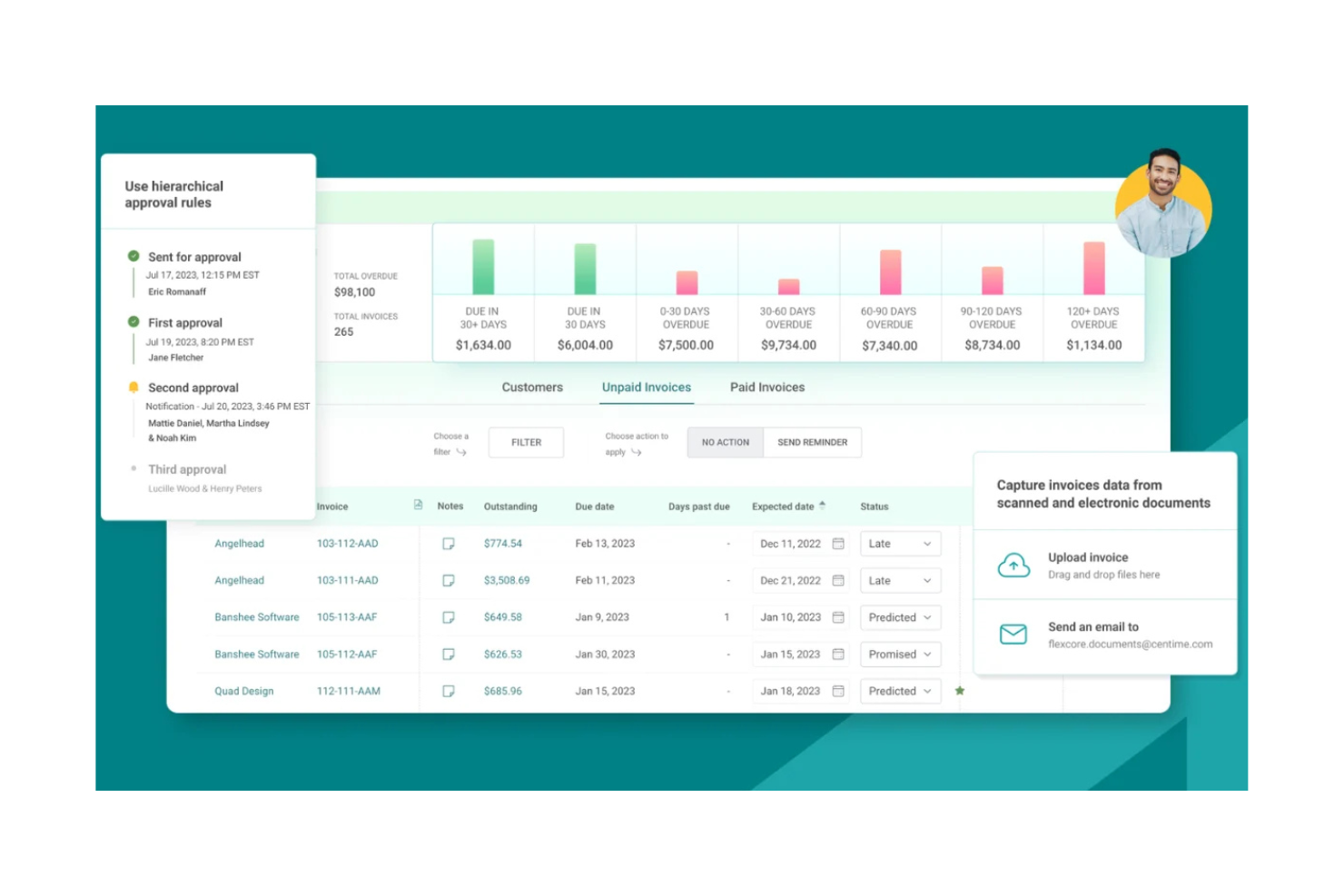
Centime is a finance automation suite tailored for small and medium-sized businesses, focusing on automating AR and AP processes inside your ERP system. It enhances cash management by organizing recurring invoice delivery, overdue invoice collections, and payments, providing a full solution for financial operations.
Why I picked Centime: Centime offers all-in-one AR and AP automation, making it ideal for SMBs looking to unify their financial processes. It features AI-powered workflows that minimize manual intervention in collections and payments. The software includes a customer payment portal to facilitate smooth transactions. With easy integration with popular ERP systems, Centime ensures efficient data synchronization and cash reconciliation.
Standout features and integrations:
Features include AI-driven workflows that automate collections and payments, reducing manual tasks. The customer payment portal supports various payment methods, increasing convenience. Automated invoice delivery ensures prompt and accurate billing.
Integrations include QuickBooks, NetSuite, Sage Intacct, and more.
Pros and Cons
Pros:
- Real-time cash management insights
- Smooth ERP system integration
- Extensive all-in-one financial automation
Cons:
- Limited advanced analytics
- Lacks pricing transparency

Upflow
Best for proactive cash collection

Upflow is accounts receivable software designed for small businesses aiming to enhance their cash collection processes and reduce DSOs. It helps users track outstanding invoices and manage late payments effectively, ensuring a steady cash flow.
Why I picked Upflow: Upflow is tailored for businesses that need proactive cash collection. It provides tools for tracking unpaid invoices and setting up automated reminders, helping you stay on top of collections. This AR software also offers customizable dunning workflows, allowing you to tailor the collection process to your business's needs. With detailed analytics, you can gain insights into your cash flow and make informed decisions.
Standout features and integrations:
Features include customizable dunning workflows that adapt to your business needs. Automated reminders ensure timely follow-up on unpaid invoices. Detailed analytics offer conclusions about your cash flow and account performance.
Integrations include QuickBooks, Xero, Stripe Billing, NetSuite, HubSpot, Chargebee, and more.
Pros and Cons
Pros:
- Detailed cash flow analytics
- Ease of use and setup
- Customizable collection workflows
Cons:
- Occasional lag with large datasets
- Limited dashboard historical data

Best for managing invoices and collections

InvoiceSherpa is an accounts receivable process tailored for small businesses, focused on managing invoices and collections efficiently. It automates the billing process and improves cash flow by reducing the time spent on manual collections.
Why I picked InvoiceSherpa: InvoiceSherpa excels in helping small businesses easily manage their invoices and collections. It offers automated payment reminders, ensuring timely follow-ups with clients. The software allows you to customize reminder schedules to fit your business needs. With its all-in-one dashboard, you can track outstanding invoices and payments in real time.
Standout features and integrations:
Features include customizable reminder schedules that help you manage client communications. The software provides a complete dashboard for tracking outstanding invoices and payments. Automated payment reminders ensure that you follow up with clients consistently.
Integrations include QuickBooks, Xero, FreshBooks, MYOB, Harvest, Stripe, PayPal, Authorize.net, and more.
Pros and Cons
Pros:
- Strong automation solutions
- Real-time invoice tracking
- Customizable reminder schedules
Cons:
- Poor customer support
- Lacks reporting for complex analysis


Billtrust is an AI-driven accounts receivable software designed to improve the order-to-cash process for small businesses. It focuses on automating invoicing, collections, and payment processing to enhance cash flow and efficiency.
Why I picked Billtrust: Billtrust excels in simplifying manual AR tasks for small businesses. Its automated invoicing reduces the need for manual data entry, saving you time. The software's predictive credit management helps manage credit risk effectively. With customizable AR rules, you can tailor the system to fit your business needs.
Standout features and integrations:
Features include predictive credit management to accurately assess credit risks. Cash application automation accelerates the reconciliation process. Real-time analytics improve cash flow forecasting and define accounts receivable performance.
Integrations include SAP, Oracle, Microsoft Dynamics, NetSuite, Salesforce, QuickBooks, Sage, Epicor, Infor, Acumatica, and more.
Pros and Cons
Pros:
- Enhances cash flow management
- Customer portal improves customer relationships
- Strong automation capabilities
Cons:
- Limited public documentation
- Delays in implementation


Invoiced is accounts receivable management software designed for small teams looking to automate AR processes easily. It simplifies invoicing and payment collection, reducing the need for manual intervention and inquiries.
Why I picked Invoiced: Invoiced is ideal for small teams needing straightforward AR automation. It offers features such as automated billing and payment reminders that cut down on manual processes. The software's user-friendly interface ensures your team can quickly adapt to its functionalities. With fewer customer inquiries, you can focus more on growing your business.
Standout features and integrations:
Features include recurring billing to automate regular payments with minimal manual intervention. Payment plans allow you to offer flexible payment options to your clients. The software also provides detailed analytics to give you a clear picture of your receivables.
Integrations include QuickBooks, Xero, NetSuite, Intacct, Salesforce, Zapier, and more.
Pros and Cons
Pros:
- Quick payment collection
- Excellent API integration
- Easy setup and implementation
Cons:
- Lack of transparency in pricing
- Limited customization for invoices


Sage AR Automation is designed for small businesses looking to automate their AR processes. It provides integrated payment acceptance, helping users manage invoicing and payments efficiently.
Why I picked Sage: Sage excels in automating AR workflows with integrated payment options. It allows you to automate invoicing tasks, reducing manual entries. The software supports multiple payment methods, making transactions smoother for your clients. With its automated reminders, you can ensure timely payments without constant follow-ups.
Standout features and integrations:
Features include recurring invoice options that simplify regular payments. Customizable invoicing templates let you tailor documents to your brand. Dashboards provide real-time insights into your receivables.
Integrations include QuickBooks, Microsoft Dynamics, Stripe, Sage Intacct, and more.
Pros and Cons
Pros:
- Native integrations with major payment processors
- Real-time financial visibility on dashboards
- Customizable invoicing templates
Cons:
- Limited mobile app functionality
- Additional costs for add-ons

BILL
Best for faster payments

BILL is accounts receivable automation software designed for small and medium-sized businesses that need to expedite payments. It offers ACH and credit card payment options to streamline financial transactions.
Why I picked BILL: BILL's accounts receivable process helps SMBs receive payments faster with ACH and credit card options. The software allows you to automate payment processing, reducing delays. Its user-friendly interface simplifies the setup of payment methods. With customizable payment terms, you can tailor the system to fit your business needs.
Standout features and integrations:
Features include automatic payment scheduling to ensure timely transactions. Invoice tracking helps you monitor payment statuses effectively. The software also offers detailed reporting to provide perspectives on your financial operations.
Integrations include QuickBooks, Xero, Sage Intacct, NetSuite, Salesforce, Microsoft Dynamics, and more.
Pros and Cons
Pros:
- Detailed electronic audit trail
- Centralized payment platform
- Fast payment processing
Cons:
- Higher cost for advanced features
- Limited customization features
New Product Updates from BILL
BILL Travel Adds Employee Booking Permissions
BILL Travel adds booking permissions that let admins and travel managers control which employees can book trips. This gives teams more flexibility over travel access and spending policies. For more information, visit BILL’s official site.

Melio
Best for accounting integration

Melio is payment automation software designed for small businesses looking to simplify their payment processes. It simplifies the way businesses handle payments, reducing the need for manual intervention and enhancing efficiency.
Why I picked Melio: Melio automates payment workflows, making it ideal for businesses that want to cut down on manual tasks. It allows you to schedule payments and automate approvals, ensuring that your payment processes are efficient. The software's user-friendly interface makes it easy to manage and track payments. With Melio, your team can focus on more strategic tasks rather than repetitive payment processes.
Standout features and integrations:
Features include the ability to schedule payments and automate approvals, which refines the payment process. The platform offers a user-friendly interface that simplifies payment tracking. You can also manage multiple payment methods in one place, increasing convenience for your business.
Integrations include QuickBooks, Xero, Gusto, Shopify, and more.
Pros and Cons
Pros:
- User-friendly interface
- Free base plan
- Flexible payment scheduling
Cons:
- Occasional delays in payment processing
- Limited international transactions


How I Evaluate Accounts Receivable Software for Small Business
I evaluate these tools in two layers: whether they cover core AR work—invoicing, online payments, aging reports—and what sets the strongest options apart for small business owners and bookkeepers.
Core Functionality (Table Stakes For This List)
When I'm selecting tools for my list, I rank each one on a scale from 0 (does not offer the functionality) to 5 (excels in this area) for each core functionality listed below. Then, I calculate the tool's total score into a percentage. Each tool needs to achieve a minimum total score of 65% to be considered for inclusion.
- Invoicing & Billing: I check whether a tool supports custom templates, recurring schedules, and batch sends—for example, a bookkeeper billing 50 retainer clients on the first of every month.
- Online Payment Acceptance: Each tool should let customers pay directly from the invoice via ACH, credit card, or digital wallet instead of mailing checks or calling in card numbers.
- Automated Payment Reminders: I look for configurable dunning sequences—like a friendly nudge at 7 days past due and a firmer follow-up at 30—so AR clerks aren't manually chasing every overdue account.
- AR Tracking & Aging Reports: Real-time aging buckets and customer-level drill-downs matter here, especially when a small business owner needs a quick snapshot of what's outstanding before month-end close.
- Accounting System Integration: The tool should sync with platforms like QuickBooks, Xero, or FreshBooks so payments and invoices flow into the ledger without duplicate data entry.
- Cash Application & Reconciliation: I evaluate how well the platform auto-matches incoming payments to open invoices, particularly for partial payments or customers paying multiple invoices in a single remittance.
Once I have a list of tools that meet this criteria, I consider what sets each platform apart.
Differentiating Factors (What Sets Vendors Apart)
Here's how I compare and contrast different vendors:
Standout Features
A customer self-service portal saves real time—when clients can pull their own invoices and update billing details, your AR clerk fields fewer calls and emails. I also look for AI-driven collections prioritization, which ranks overdue accounts by likelihood to pay so you focus effort where it matters most. Credit risk assessment is another differentiator, especially for small businesses extending net terms to new customers without a dedicated credit team to vet them.
Beyond Features
Pricing transparency matters here—I check whether payment processing fees and per-user costs are clearly disclosed, since hidden transaction charges can quietly eat into a small business's margins. Implementation speed is another big factor. A sole proprietor or two-person finance team needs to go live in days, not weeks, so I evaluate whether onboarding is self-serve with pre-built templates. I also consider scalability—whether tiered plans let a growing business unlock features like multi-entity support without migrating to a new platform.
How To Choose Accounts Receivable Software for Small Businesses
It’s easy to get bogged down in long feature lists and complex pricing structures. To help you stay focused as you work through your unique software selection process, here’s a checklist of factors to keep in mind:
| Factor | What to Consider |
|---|---|
| Scalability | Will the software grow with your business? Consider whether it can handle increased transaction volumes or additional users without a steep price increase or performance issues. |
| Integrations | Does it connect with your existing accounting systems, such as bookkeeping or CRM software? Check compatibility to avoid manual data entry and ensure smooth workflows. |
| Customizability | Can you tailor the software to fit your specific processes? Look for flexibility in creating custom fields or reports that match your business needs. |
| Ease of Use | Is the interface intuitive for your team? A complicated system can slow down adoption, so look for software with a simple, user-friendly design. |
| Implementation and Onboarding | How long will it take to get up and running? Evaluate the resources needed for setup, training, and support during the transition to the new system. |
| Cost | Are there hidden fees or tiered pricing that could increase costs? Compare the total cost of ownership, including subscription fees and any add-ons. |
| Security Safeguards | Does the software protect sensitive financial data? Ensure it complies with industry standards and offers features such as encryption and two-factor authentication. |
What Is Accounts Receivable Software for Small Businesses?
Accounts receivable software for small businesses is a tool that helps manage and track invoices and payments. Business owners, accountants, and finance professionals typically use these tools to ensure timely collections and maintain healthy cash flow.
Automated invoicing, payment reminders, and reporting features support efficient financial management and reduce manual tasks. Overall, these tools simplify the billing process and improve financial accuracy for small businesses.
Features
When selecting accounts receivable software for a small business, keep an eye out for the following key features:
- Automated invoicing: Automatically generate and send invoices to save time and reduce errors.
- Payment reminders: Send reminders to clients to ensure payments are received on time.
- Reporting and analytics: Clarify financial data to help you make strategic business decisions.
- Customizable templates: Allow customization of invoices and reports to align with your brand and business needs.
- Integration capabilities: Connect with existing systems, such as accounting software, to create a simple workflow.
- Multi-currency support: Manages transactions in different currencies to accommodate international clients.
- Customer portal: Offers clients a self-service option to view invoices and make online payments.
- Security features: Ensure financial data is protected with encryption and user authentication measures.
- Real-time collaboration: Enable team members to work together and share information efficiently.
- Predictive analytics: Forecast cash flow trends and identify potential financial issues before they arise.
Benefits
Implementing accounts receivable software for small businesses provides several benefits for your team and your business. Here are a few you can look forward to:
- Improved cash flow: Automated invoicing and payment reminders help ensure timely payments and maintain a steady cash flow.
- Time savings: Automation of manual tasks such as invoicing and collections frees up your team's time for more strategic activities.
- Increased accuracy: Customizable templates and automated processes reduce human error in invoicing and financial reporting.
- Better financial insights: Reporting and analytics features provide a clear view of your financial health and help you make data-driven decisions.
- Enhanced customer experience: Customer portals and multi-currency support offer clients convenient ways to manage payments and interact with your business.
- Stronger security: Built-in security features protect sensitive financial data and ensure compliance with industry standards.
- Scalability: The ability to integrate with other systems and customize workflows allows your software to grow with your business needs.
Costs and Pricing
Selecting accounts receivable software for a small business requires an understanding of the various pricing models and plans available. Costs vary based on features, team size, add-ons, and more. The table below summarizes common plans, their average prices, and typical features included in accounts receivable software for small business solutions:
Plan Comparison Table for Accounts Receivable Software for Small Businesses
| Plan Type | Average Price | Common Features |
|---|---|---|
| Free Plan | $0 | Basic invoicing, limited customer support, and basic reporting. |
| Personal Plan | $5-$25/user/month | Automated invoicing, payment reminders, and basic analytics. |
| Business Plan | $30-$75/user/month | Advanced reporting, multi-currency support, and integration capabilities. |
| Enterprise Plan | $100+/user/month | Customizable workflows, dedicated support, and extensive security features. |
Accounts Receivable Software for Small Business FAQs
Here are some answers to common questions about accounts receivable software for small businesses:
Can accounts receivable software for small businesses handle multiple users without slowing down our workflow?
Many buyers want to know if their team can all work in the system at the same time without conflicts. Most tools support role-based access, so employees can manage tasks without overwriting each other’s work. You should also check if the vendor limits the number of users per plan. Smooth collaboration depends on how well the platform manages permissions and shared data.
Can accounts receivable software integrate with existing systems?
Yes, most accounts receivable software can integrate with systems such as accounting and CRM platforms. These integrations allow for smooth data flow between different sections of your business, reducing manual data entry and errors. Before purchasing, check if the software supports integrations with your current systems. This compatibility ensures you can maintain existing workflows without disruption.
Is accounts receivable software customizable?
Yes, many accounts receivable solutions offer customization options. You can tailor invoices, reports, and workflows to suit your business needs. Customization helps match the software to your branding and operational processes. Before choosing software, evaluate the level of customization it offers and whether it aligns with your specific requirements. This flexibility can enhance the software’s effectiveness for your team.
How secure is accounts receivable software?
Most accounts receivable software is designed with security in mind, using encryption and authentication measures. These features protect sensitive financial data from unauthorized access. Look for software that complies with industry standards and offers features such as two-factor authentication. It’s important to regularly update passwords and monitor access to ensure ongoing security. Always assess the security features provided before making a decision.
What’s Next:
If you're in the process of researching accounts receivable software for a small business, connect with a SoftwareSelect advisor for free recommendations.
You fill out a form and have a quick chat where they get into the specifics of your needs. Then you'll get a shortlist of software to review. They'll even support you through the entire buying process, including price negotiations.