

Order-to-cash software automates and connects every step from customer orders through invoice collection, helping your team keep receivables in check and minimize manual errors. If you’re looking for order-to-cash solutions, you’re likely facing high volumes, tight deadlines, and the need to improve visibility in your AR process. Choosing the right tool matters because delays, errors, or missed payments can impact cash flow and reporting. Here, you’ll find a clear breakdown of top options, what sets each apart, and practical insights to help you pick the best fit for your order-to-cash workflow.
Why Trust Our Software Recommendations
6,700+
Reviews
20
Industry experts
16+
Evaluation factors
14
Years
Our team has been testing and reviewing software since 2012. As finance leaders ourselves, we know how difficult—and important—it is to choose the right software.
For this guide, we evaluated tools using hands-on testing and independent research, scoring tools using our selection criteria.
Our reviews reflect our human editorial judgment, not a sales pitch.
Order to Cash Software Comparison Table
This comparison table highlights pricing details for my top order to cash software selections.
| Tool | Best For | Trial Info | Price | ||
|---|---|---|---|---|---|
| 1 | Best for ERP-native AR and cash automation | Free demo available | Pricing upon request | Website | |
| 2 | Best for proactive cash flow forecasting | Free demo available | Pricing upon request | Website | |
| 3 | Best for flexible billing automation setups | Free demo available | Pricing upon request | Website | |
| 4 | Best for real-time customer collaboration | Free demo available | Pricing upon request | Website | |
| 5 | Best for unified AR and credit risk insights | Free demo available | Pricing upon request | Website | |
| 6 | Best for B2B payment portal integration | Free demo available | Pricing upon request | Website | |
| 7 | Best for end-to-end workflow automation | Free demo available | Pricing upon request | Website | |
| 8 | Best for AI-driven cash application efficiency | Free demo available | Pricing upon request | Website | |
| 9 | Best for global compliance and e-invoicing | Free demo available | Pricing upon request | Website | |
| 10 | Best for predictive analytics in receivables | Free demo available | Pricing upon request | Website |


Best Order to Cash Software Reviews
Below are my detailed summaries of the best order to cash software that made it onto my shortlist. My reviews offer a detailed look at the features, integrations, and best use cases of each platform to help you find the best one for you.
 Best for ERP-native AR and cash automation
- Free demo available
- Pricing upon request
Visit WebsiteCustomer Rating:4.5/5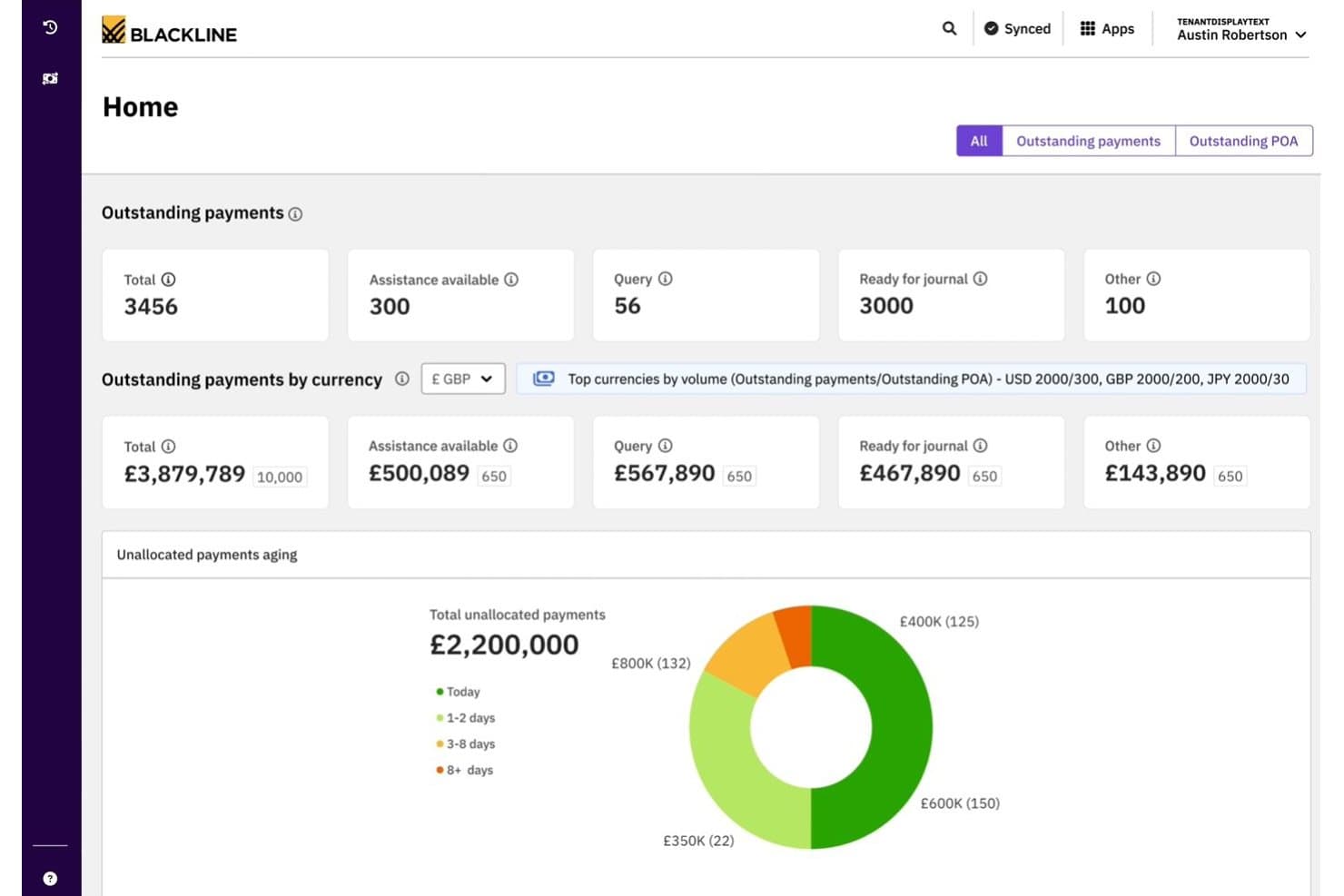
BlackLine offers a centralized cash application dashboard displaying outstanding payments, currency breakdowns, and unallocated payment aging for CFO-level visibility. BlackLine Invoice-to-Cash is an AR automation suite that covers e-invoicing, AI-powered cash application, collections management, credit and risk management, and dispute resolution across multiple ERPs and banking systems.
Who Is BlackLine Best For?
BlackLine is a strong fit for enterprise finance teams managing high-volume AR across multiple ERPs, currencies, and regions.
Why I Picked BlackLine
BlackLine earns its spot on my shortlist because of how tightly its Cash Application module connects to your existing ERP stack. Verity Remit captures remittance data across multiple formats automatically, which means unapplied cash stops accumulating at period-end close. I also like Verity Collect, which drives collection outreach based on predicted customer payment behavior, not just static aging buckets.
BlackLine Key Features
- E-invoicing and payments: Issue electronic invoices, handle compliance checks, and provide a customer self-service payments portal.
- Credit and risk management: Track customer credit using integrated third-party bureau data within a unified dashboard.
- Dispute and deduction workflows: Automate the assignment, coding, and analysis of invoice-related disputes and deductions.
- AR intelligence dashboard: Consolidate aging, forecasting, and collector workload metrics across multiple business units and regions.
BlackLine Integrations
BlackLine offers native integrations with SAP, Oracle, NetSuite, Microsoft Dynamics, Acumatica, Sage, and Workday, and provides an API for custom integrations.
Pros and Cons
Pros:
- AI-powered dispute and deduction management
- Global e-invoicing with real-time compliance checks
- ERP-native cash application and reconciliation
Cons:
- Complex implementation for non-ERP environments
- No order management or order entry features
Learn more about BlackLine: Best for proactive cash flow forecasting
- Free demo available
- Pricing upon request
Visit WebsiteCustomer Rating:4.7/5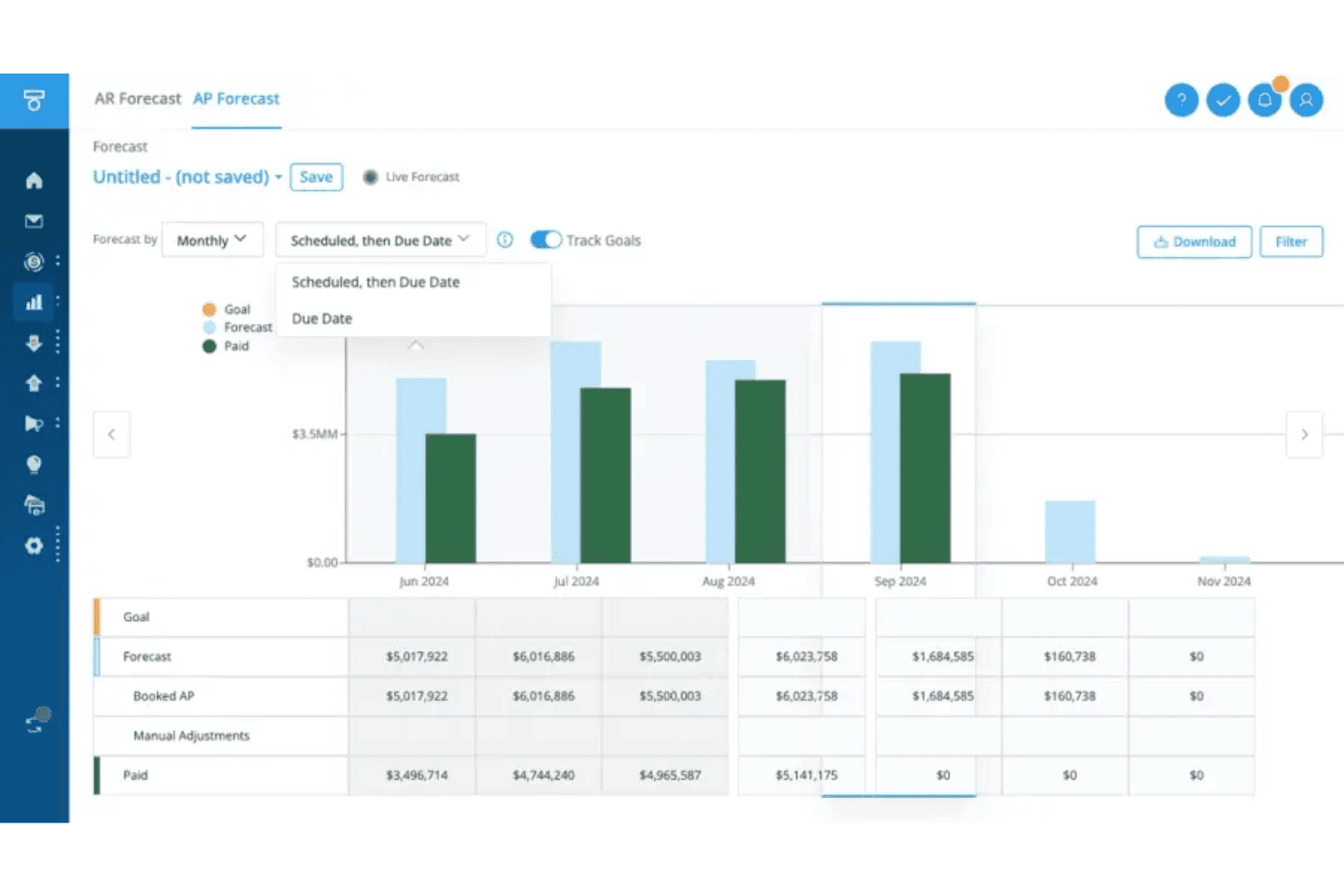
Tesorio offers an AP Forecast dashboard with monthly bar charts and detailed tables showing forecast, booked AP, and paid amounts. Tesorio is an AI-driven AR automation platform that combines collections management, automated cash application, and machine learning-based cash flow forecasting within a connected financial operations workflow.
Who Is Tesorio Best For?
Tesorio is a strong fit for mid-market and enterprise finance teams managing high-volume AR across multiple ERPs or business units.
Why I Picked Tesorio
I picked Tesorio as one of the best because its AR Forecast uses ML trained on your actual customer payment history to predict cash inflows, not generic assumptions. When combined with the Cash Application Agent's 95%+ auto-match rate, your cash position stays current and your forecasts are grounded in real payment data. I especially like how the Collections Agent extracts payment promises directly from customer email replies, feeding that commitment data back into the forecast in real time.
Tesorio Key Features
- Supplier portal agent: Submits invoices into platforms like Coupa and Ariba and tracks remittance status.
- No-code workflow automation: Lets you build custom dunning and escalation rules without developer input.
- ERP and CRM integrations: Connects directly to NetSuite, QuickBooks, Salesforce, and Sage Intacct for live AR data sync.
- Role-based controls and audit trails: Enforces SOC 1 and SOC 2 standards with granular permissions and activity logging.
Tesorio Integrations
Tesorio offers native integrations with NetSuite, Sage Intacct, QuickBooks, Workday, Zuora, Salesforce, Stripe, Plaid, Gmail, Outlook, Coupa, and Ariba. An API is also available for custom integrations.
Pros and Cons
Pros:
- Auto-matches cash receipts with high accuracy
- Collections workflow includes AI-driven email parsing
- Predictive AR forecasting based on actual payment history
Cons:
- Lacks dedicated credit or dispute modules
- No functionality for order management
Learn more about Tesorio: Best for flexible billing automation setups
- Free demo available
- Pricing upon request
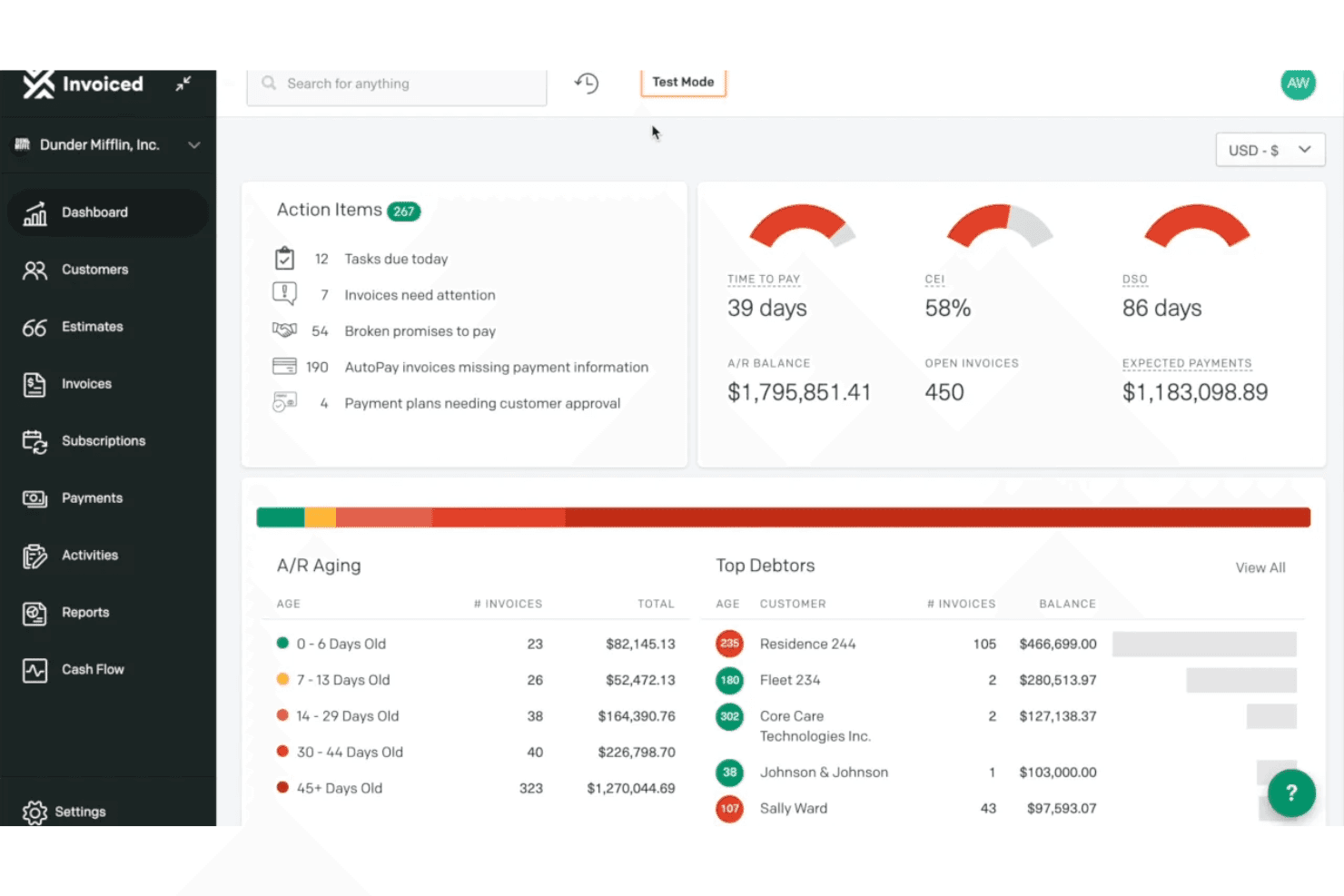
Invoiced provides an accounts receivable dashboard with action items, A/R aging breakdown, top debtors, and key metrics like DSO and CEI. Invoiced is an accounts receivable automation platform that handles invoicing, recurring billing, collections workflows, cash application, and payment processing across the invoice-to-cash cycle.
Who Is Invoiced Best For?
Invoiced suits finance teams at mid-market and enterprise companies managing high invoice volumes with complex billing models or recurring revenue structures.
Why I Picked Invoiced
I picked Invoiced as one of the best because its Automation Builder lets you design billing workflows around your actual billing logic, not a preset template. You can trigger actions based on scheduled dates or real-time events, covering everything from subscription billing to payment plan management. I particularly like how Smart Chasing lets me configure outreach cadences at the account or invoice level, so collections follow the same custom rules as the billing setup itself.
Invoiced Key Features
- A/R inbox and task management: Manage customer conversations, internal notes, and follow-up tasks in one place linked to invoices and accounts.
- Customer self-service portal: Give customers access to pay invoices, enroll in AutoPay, and download statements online.
- Multi-entity and multi-currency support: Handle billing and reporting across multiple business units and international currencies.
- Real-time analytics dashboard: Monitor invoice-to-cash KPIs, aging reports, and cash forecasting within a unified analytics suite.
Invoiced Integrations
Invoiced offers native integrations with NetSuite, Sage Intacct, QuickBooks, Microsoft Dynamics, Xero, and Salesforce. An API and ERP Connect app are available for custom integrations.
Pros and Cons
Pros:
- Multi-entity and multi-currency billing support
- Strong self-service portal for payors
- Highly customizable billing and collections workflows
Cons:
- Lacks built-in credit risk assessment tools
- No native order management functionality
Learn more about Invoiced: Best for real-time customer collaboration
- Free demo available
- Pricing upon request
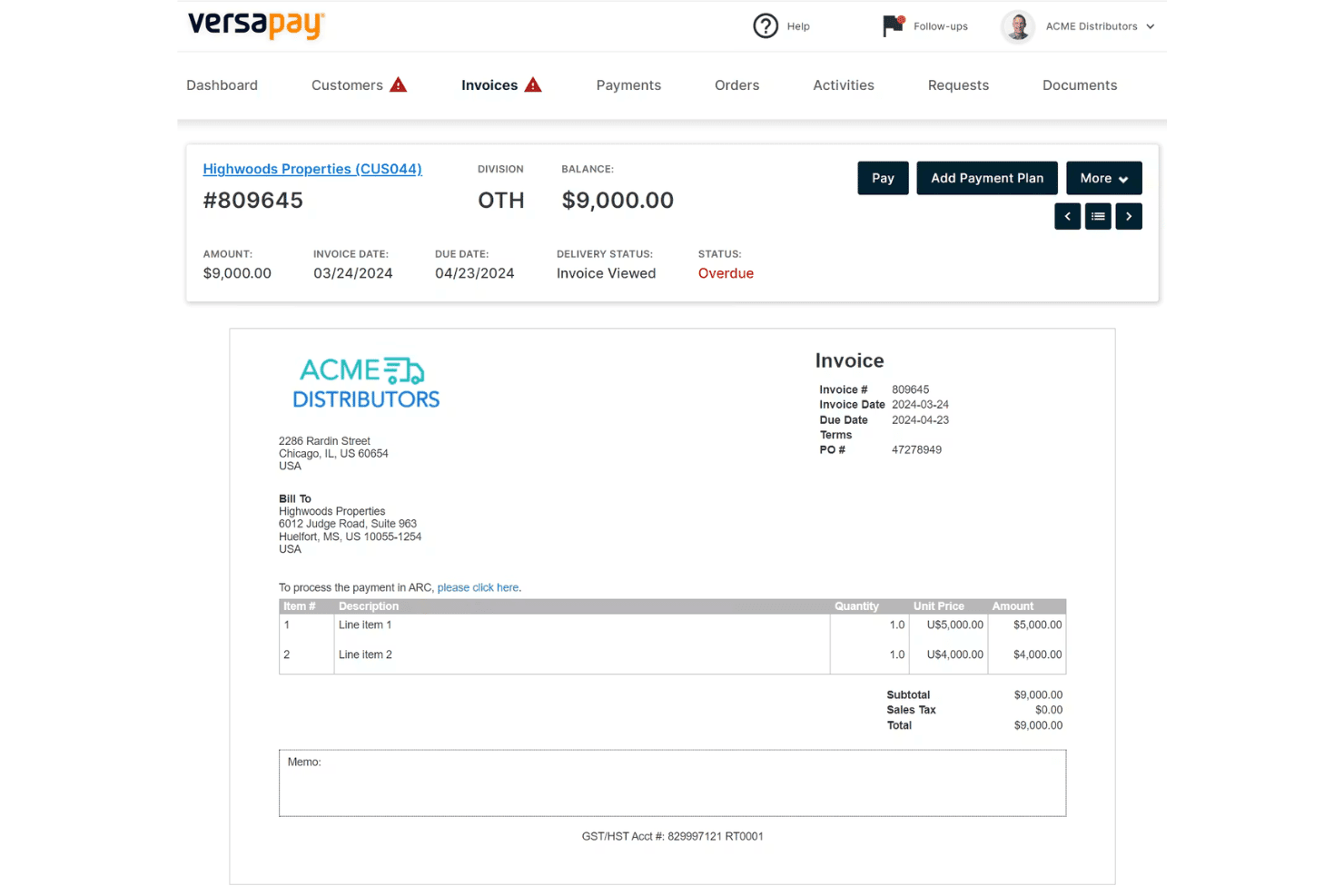
Versapay displays a detailed invoice view with payment options, line items, and overdue status tracking for accounts receivable management. Versapay is an accounts receivable automation platform that covers digital invoicing, cash application, collections management, and B2B payment processing through a collaborative customer-facing portal.
Who Is Versapay Best For?
Versapay is a strong fit for mid-market B2B finance teams whose AR departments manage high invoice volumes and need customers to self-serve on payments and disputes.
Why I Picked Versapay
Versapay earns its spot on my shortlist because of how it handles customer collaboration on live invoices. Instead of back-and-forth emails, my team can resolve disputes directly on the invoice inside the customer portal, with both sides seeing the same data in real time. I also like that customers can self-serve on payment history and raise short-pay disputes without contacting AR directly, which cuts down the manual touchpoints in the collections cycle.
Versapay Key Features
- ERP integration connectors: Pre-built integrations with leading ERPs like NetSuite, Sage Intacct, and Microsoft Dynamics 365.
- Automated invoicing: Digital invoice creation and delivery with support for multi-currency transactions.
- AR reporting dashboards: Visualize key accounts receivable metrics and payment trends for real-time portfolio tracking.
- Integrated B2B payment options: Accepts ACH, credit cards, wires, and checks through a unified payments platform.
Versapay Integrations
Versapay offers native integrations with Oracle NetSuite, Sage Intacct, Microsoft Dynamics 365 Business Central, and Microsoft Dynamics 365 Finance. An API is available for custom integrations.
Pros and Cons
Pros:
- Digital payment acceptance for B2B transactions
- Automatic cash application across multiple payment types
- Customer portal enables invoice-level communication
Cons:
- Lacks native order management capabilities
- No credit management or scoring tools
Learn more about Versapay: Best for unified AR and credit risk insights
- Free demo available
- Pricing upon request
Visit WebsiteCustomer Rating:3.5/5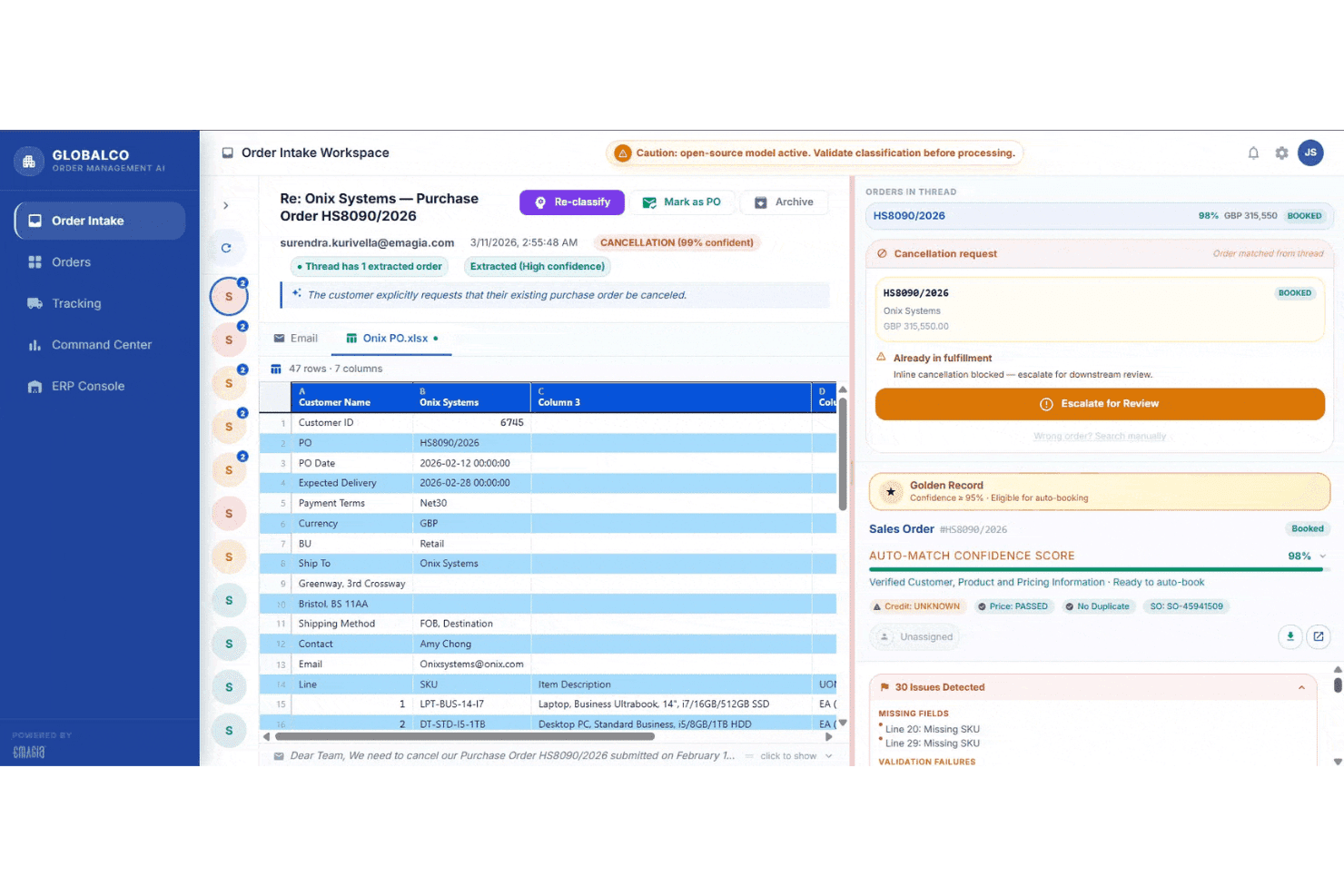
Emagia's Order Intake Workspace displays AI-powered purchase order classification, cancellation detection, and auto-match confidence scoring for streamlined order-to-cash processing. Emagia is an AI-driven order-to-cash platform that covers credit management, invoicing, collections, deductions, and cash application within a single autonomous finance suite.
Who Is Emagia Best For?
Emagia suits enterprise finance teams and global shared service centers running high-volume receivables across multiple ERPs, currencies, and geographies.
Why I Picked Emagia
I picked Emagia as one of the best because it's the only platform I've seen that puts real-time credit risk monitoring and AR performance in the same view. The Credit Agent runs continuous customer assessments and triggers order holds or releases automatically based on configurable rules, so credit decisions don't bottleneck the O2C cycle. I also like that Gia AlphaCash layers cash intelligence on top, connecting live credit exposure data directly to collections prioritization.
Emagia Key Features
- Order Agent: Automates order capture and validation with integration to major ERP systems for streamlined processing.
- Customer EIPP portal: Lets business customers view invoices, make payments, dispute charges, and access statements online.
- Deductions agent: Tracks, codes, and routes customer deduction claims through a structured, auditable workflow.
- GiaDocs AI: Extracts data from financial documents and emails to speed up dispute and remittance processing.
Emagia Integrations
Emagia offers native integrations with SAP, Oracle, JD Edwards, NetSuite, PeopleSoft, Microsoft Dynamics, and more.
Pros and Cons
Pros:
- Centralized customer portal for self-service payments
- Real-time predictive credit risk adjustments
- AI-powered order-to-cash automation suite
Cons:
- Documentation depth varies for some modules
- Limited transparency on implementation timeline
Learn more about Emagia: Best for B2B payment portal integration
- Free demo available
- Pricing upon request
Visit WebsiteCustomer Rating:4.4/5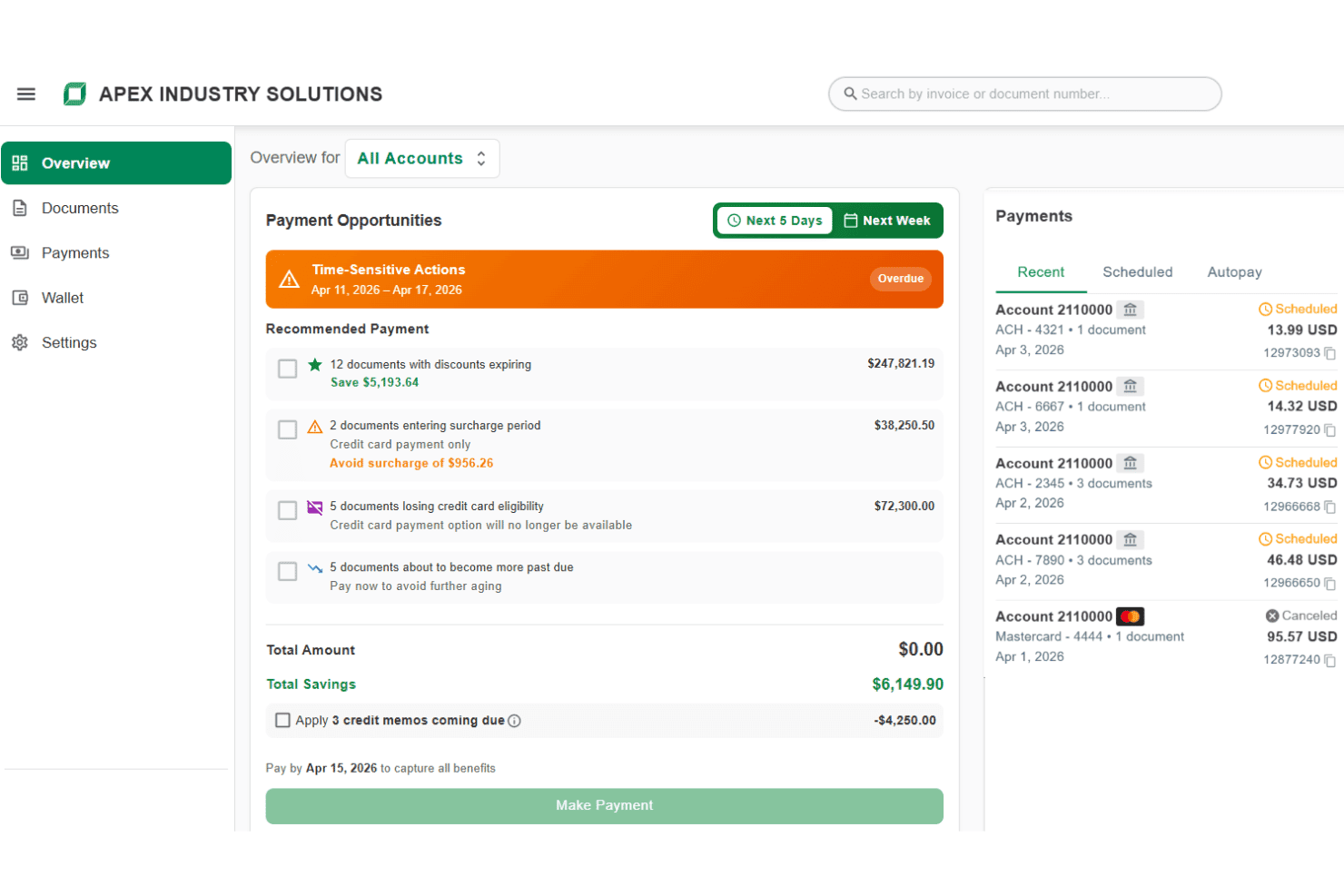
Billtrust displays a payment opportunities dashboard with time-sensitive actions, recommended payments, and recent scheduled payment history. Billtrust is a B2B order-to-cash platform that covers multi-channel invoicing, payment processing, AI-driven cash application, credit management, and collections automation.
Who Is Billtrust Best For?
It's a strong fit for mid-market and enterprise B2B suppliers managing high invoice volumes across complex payment networks.
Why I Picked Billtrust
Billtrust earns its spot as one of the best on my shortlist because of how it handles AP portal delivery at scale. I love that it connects to 260+ AP portals, including Ariba, Coupa, and Tungsten, without requiring manual uploads or logins for each one. The Digital Lockbox feature is also something I find genuinely useful: it automatically processes emailed virtual cards rather than requiring any manual handling.
Billtrust Key Features
- AI-powered credit risk monitoring: Continuously evaluates customer financial health using 80+ data points and predictive scoring.
- Automated multi-channel invoicing: Sends electronic invoices across email, print, and 260+ AP portals with full audit tracking.
- Agentic collections automation: Uses AI to prioritize delinquent accounts and streamline follow-up with automated email and VoIP tools.
- AR cash forecasting dashboard: Projects a 13-week cash flow forecast based on payment activity, invoice data, and AR balances.
Billtrust Integrations
Billtrust offers native integrations with ERPs, banks, and financial institutions, plus native connectivity to multiple AP portals including Ariba, Coupa, Tungsten, and Basware. An API is available for custom integrations.
Pros and Cons
Pros:
- Predictive credit risk analytics and monitoring
- Fast cash application with machine learning
- Handles complex AP portal invoice delivery
Cons:
- No native order entry or tracking module
- Limited deductions and dispute resolution features
Learn more about Billtrust: Best for end-to-end workflow automation
- Free demo available
- Pricing upon request
Visit WebsiteCustomer Rating:4.5/5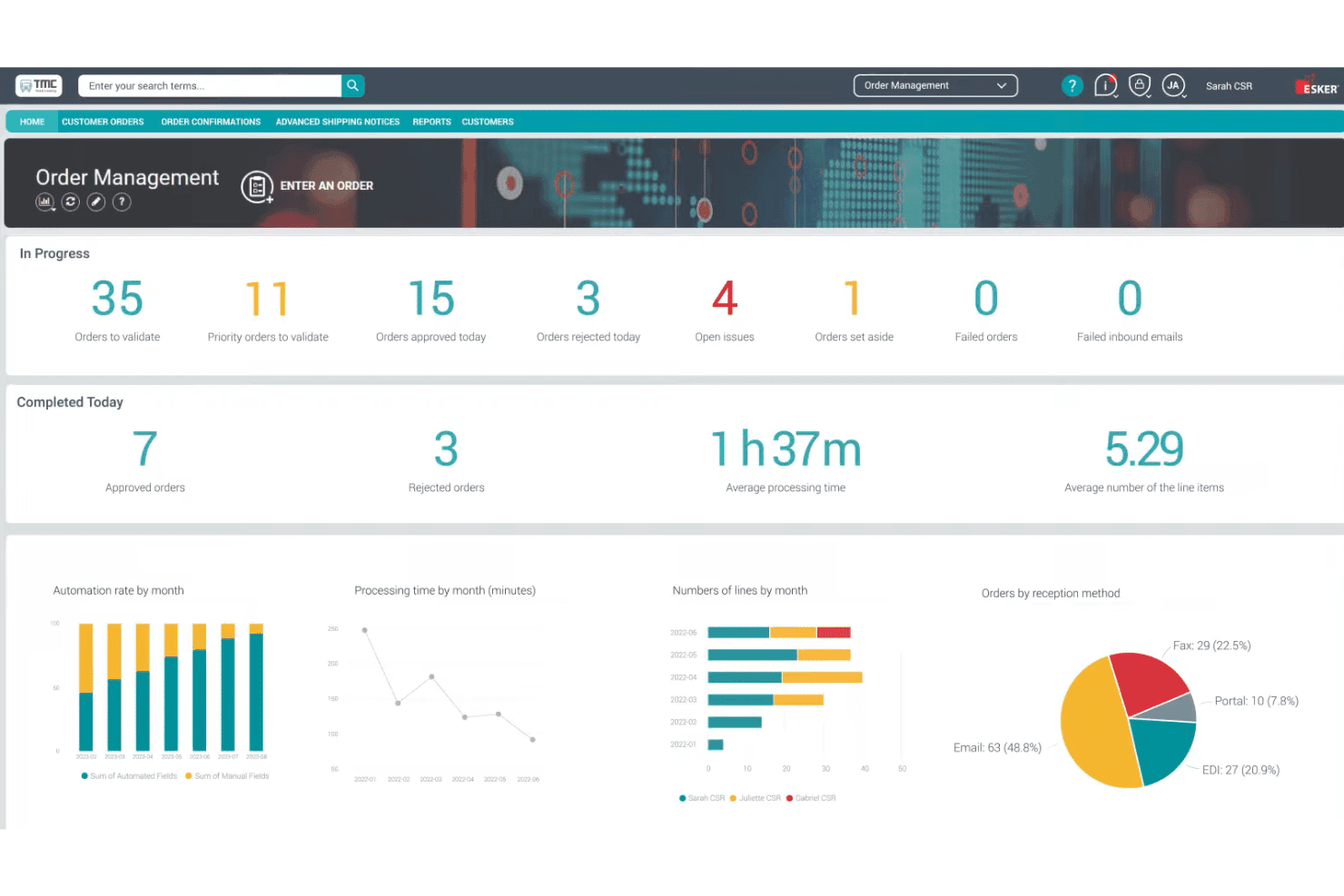
Esker's Order Management dashboard displays real-time order processing metrics, automation rates, and reception method breakdowns for CSR teams. Esker is a cloud-based order-to-cash platform that covers order management, invoice delivery, cash application, collections, credit management, and deductions management across the full customer revenue cycle.
Who Is Esker Best For?
Esker is a strong fit for mid-to-large enterprises running SAP, Oracle, or Microsoft Dynamics that need to automate the full O2C cycle under a single platform.
Why I Picked Esker
I've included Esker in my top picks because the automation runs across every stage of the O2C cycle, not just one or two modules. I love how the AI-driven order validation catches exceptions before they reach the ERP, and the cash application module uses self-learning matching to push teams toward near-touchless reconciliation. The collections layer goes further, with AI that prioritizes accounts by cash flow impact and a customer self-service portal that accepts payments directly.
Esker Key Features
- Credit management automation: Screens and monitors customer credit risk, automating reviews and approvals within a centralized workflow.
- Customer inquiry management: Triages, classifies, and routes incoming customer requests, supporting automated answers and escalation.
- ERP-native integrations: Connects directly to SAP, Oracle, and Microsoft Dynamics with native multi-ERP environment support.
- Reporting and dashboards: Delivers real-time AR aging, KPI tracking, and process analytics for finance and revenue teams.
Esker Integrations
Esker offers native integrations with SAP, Oracle, and Microsoft Dynamics, and supports multi-ERP environments. An API is available for custom integrations.
Pros and Cons
Pros:
- Multi-channel order capture and validation
- AI-driven prioritization for collections activities
- Covers full O2C cycle in one platform
Cons:
- Implementation timeline can be lengthy
- Deduction management less advanced for CPG/retail
Learn more about Esker: Best for AI-driven cash application efficiency
- Free demo available
- Pricing upon request
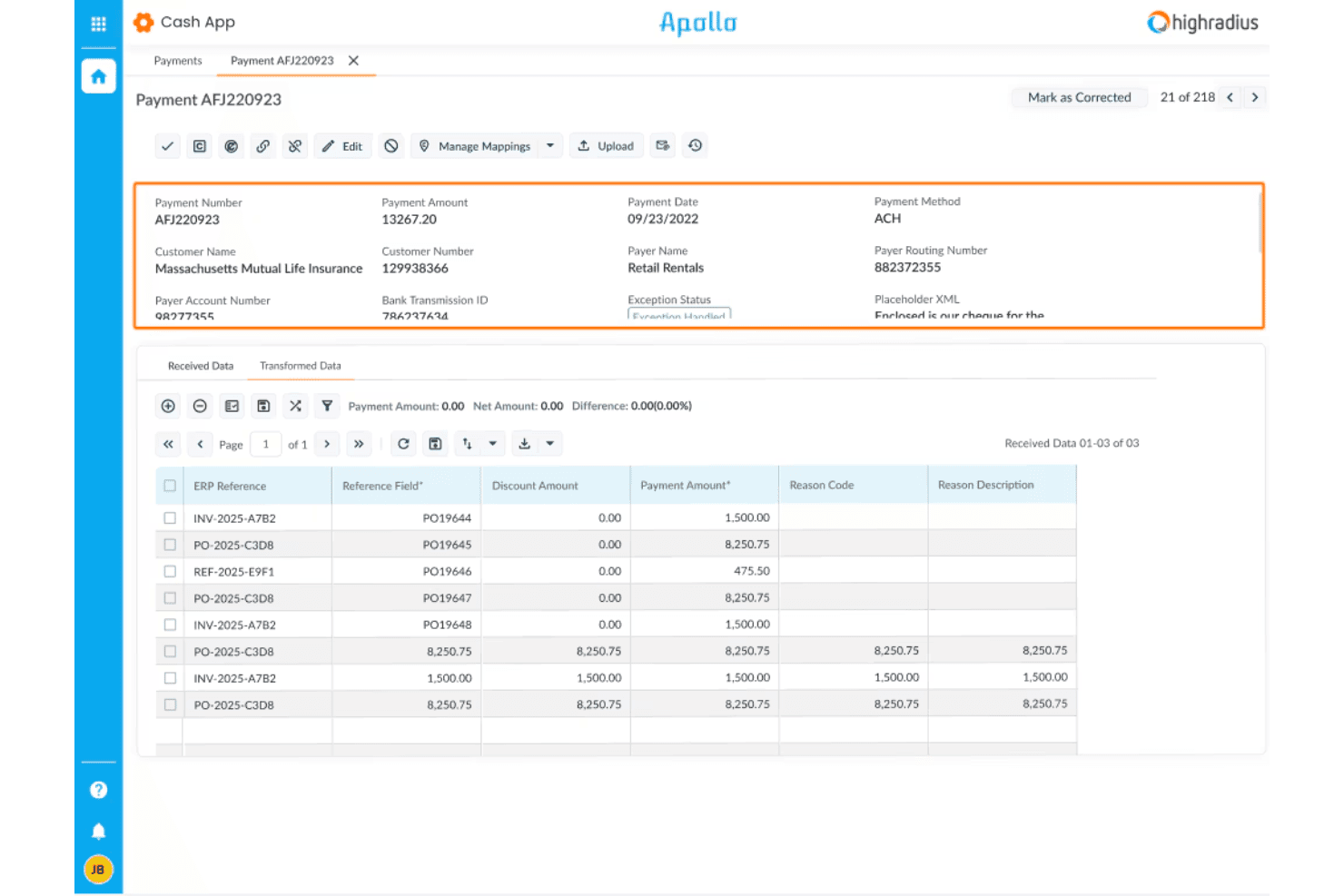
HighRadius offers a Cash App module with detailed payment processing views, including remittance data, ERP references, and exception handling for incoming ACH payments. HighRadius is an autonomous finance platform that covers the full order-to-cash cycle, including credit management, e-invoicing, AI-driven cash application, collections, and deductions management.
Who Is HighRadius Best For?
HighRadius is a strong fit for large enterprises with high transaction volumes, complex ERP environments, and dedicated AR teams managing multi-entity O2C operations.
Why I Picked HighRadius
HighRadius earns its spot on my shortlist because its Cash Application Cloud handles remittance data in a way most platforms can't match. It captures remittance from emails, AP portals, and bank files, then auto-matches at the item level with a 90%+ hit rate. I also like the 95% no-touch posting rate for checks, ACH, and wires, which means my team isn't manually reconciling high-volume payment batches line by line.
HighRadius Key Features
- Credit Cloud: Automates customer onboarding, proactive bankruptcy monitoring, and real-time credit scoring.
- Deductions Cloud: Codes deductions, aggregates backup documentation, and routes claims for fast resolution.
- dotOne Analytics: Offers AR aging reports, DSO metrics, and O2C benchmarking dashboards for finance visibility.
- ERP integration: Connects natively to systems like SAP, Oracle, and NetSuite for bi-directional order and invoice sync.
HighRadius Integrations
HighRadius offers native integrations with SAP, Oracle, Microsoft Dynamics, and NetSuite, plus connects to a wide range of banks and credit agencies. An API is available for custom integrations.
Pros and Cons
Pros:
- Automated deduction coding and claims workflow
- Enterprise-scale AR aging and DSO analytics
- Leading AI-powered remittance auto-matching performance
Cons:
- Lengthy implementation for complex ERPs
- No omnichannel native order entry module
Learn more about HighRadius: Best for global compliance and e-invoicing
- Free demo available
- Pricing upon request
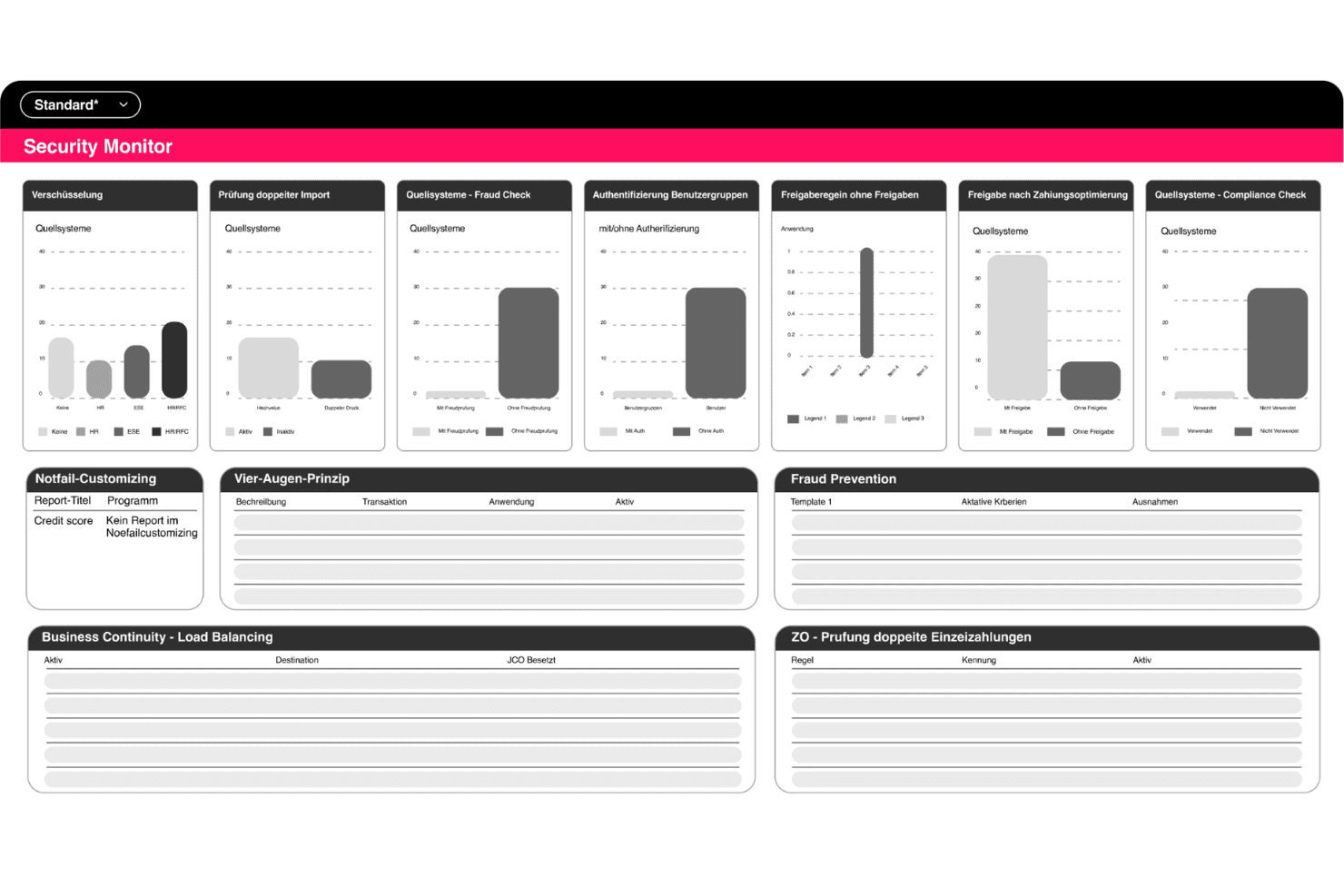
Serrala offers a Security Monitor dashboard with bar charts and data tables covering encryption, fraud checks, compliance, and payment controls. Serrala is an enterprise order-to-cash suite covering e-invoicing, cash application, credit management, collections, and dispute resolution, built around deep SAP and S/4HANA integration with compliance support across 60+ countries.
Who Is Serrala Best For?
Serrala is a strong fit for large, multinational enterprises running SAP that need to manage receivables across multiple jurisdictions and currencies.
Why I Picked Serrala
I picked Serrala as one of the best because its e-invoicing compliance covers 60+ countries, which I think is genuinely rare for a single platform. I also like the Alevate Cash Application module, which uses Agentic AI to target a 99% auto-match rate across incoming payment types. The RTP bill presentment feature goes further, pushing invoice payment links directly to customers' devices to cut the gap between invoice delivery and actual payment receipt.
Serrala Key Features
- Customer self-service portal: Lets customers view, download, and pay invoices through a secure online portal.
- Credit management module: Offers agentic AI-driven scoring, real-time limit tracking, and approval workflow support.
- Collections management workflows: Supports AI-prioritized worklists, automated dunning, and promise-to-pay tracking.
- Dispute and deduction handling: Provides workflow-based case management with assignment, categorization, and resolution tracking.
Serrala Integrations
Serrala offers native integrations with SAP, NetSuite, Microsoft Dynamics, Workday, Infor, Sage, and more, and provides an API for custom integrations.
Pros and Cons
Pros:
- AI-driven cash application and credit scoring
- Deep SAP and S/4HANA integration
- E-invoicing compliance for 60+ countries
Cons:
- Initial configuration can be complex
- No native order management functionality
Learn more about Serrala: Best for predictive analytics in receivables
- Free demo available
- Pricing upon request
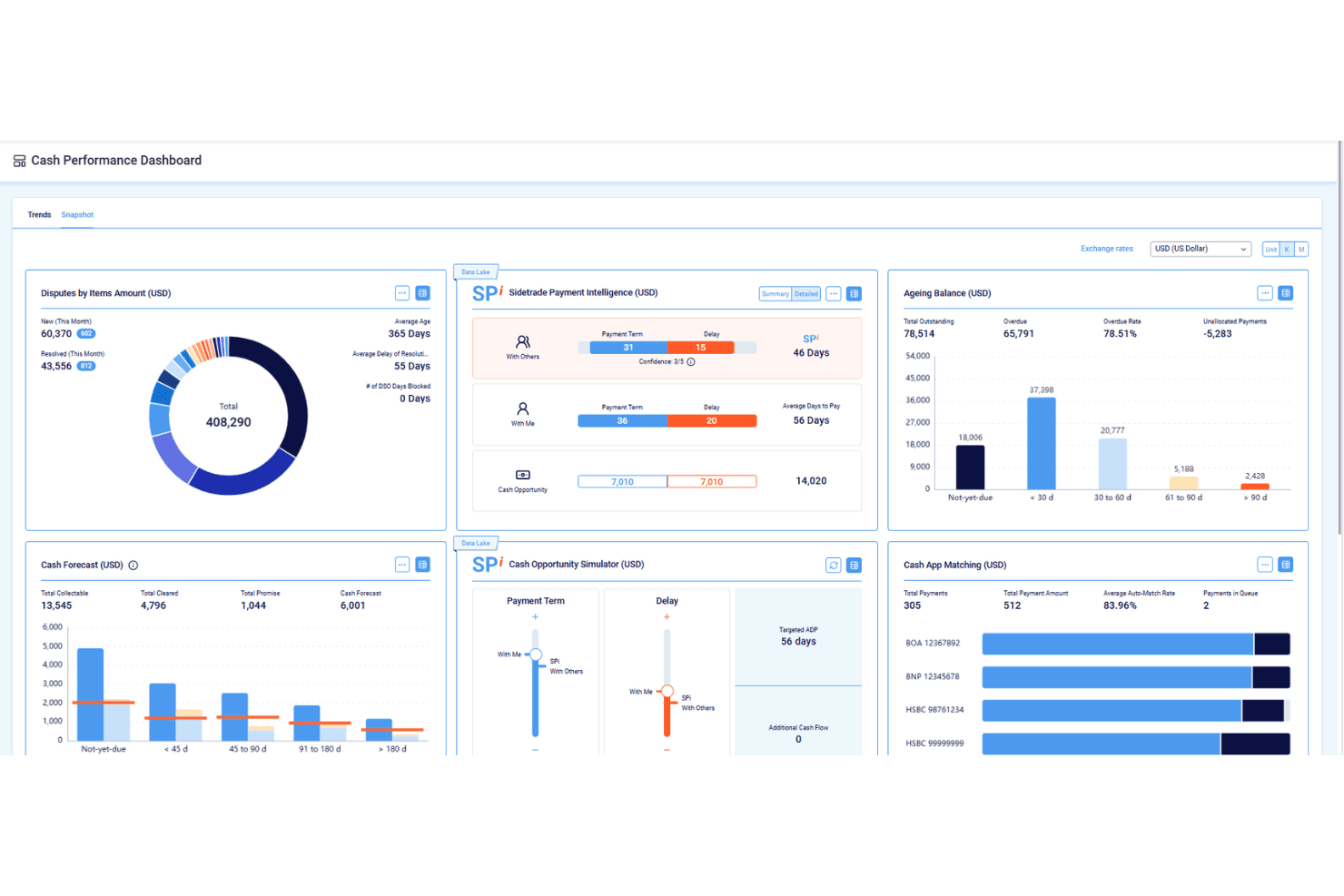
Sidetrade features a Cash Performance Dashboard with tools for tracking disputes, payment intelligence, ageing balances, cash forecasting, and cash app matching. Sidetrade is an AI-driven Order-to-Cash platform covering credit management, e-invoicing, collections, dispute resolution, and cash application, with agentic AI agents and a proprietary payment data lake at its core.
Who Is Sidetrade Best For?
Sidetrade is a strong fit for enterprise and upper mid-market finance teams running complex ERP environments like SAP, Oracle, or Microsoft Dynamics.
Why I Picked Sidetrade
I picked Sidetrade as one of the best because the predictive depth behind its Aimie AI is genuinely hard to replicate. It's built on a proprietary O2C Data Lake covering 1 billion+ payment experiences and 42 million buyers, so collection prioritization and cash application matching draw on real payment behavior, not generic rules. The autonomous Voice Collections Agent executes outbound calls in 29 languages and updates cases without human input.
Sidetrade Key Features
- E-invoicing compliance: Supports country-specific e-invoicing mandates and multi-currency invoice generation.
- DigitalCase for disputes: Centralizes dispute intake, categorization, and workflow assignment across AR teams.
- Unlimited-user licensing: Enables organization-wide access without per-seat constraints.
- ERP-native integration: Connects deeply with SAP, Oracle, and Microsoft Dynamics for synchronized data flows.
Sidetrade Integrations
Sidetrade offers native integrations with SAP, Oracle, and more. An API is available for custom integrations.
Pros and Cons
Pros:
- AI-driven cash application with high auto-match rates
- Advanced e-invoicing compliance for global operations
- Predictive collections queue based on real payment data
Cons:
- Dispute resolution features less advanced than rivals
- Limited native order management capabilities
Learn more about Sidetrade:
Other Order to Cash Software
Here are some additional order to cash software options that didn’t make it onto my shortlist, but are still worth checking out:
- 11GavitiBest for small and mid-sized collections teams
- 12Quadient Accounts Receivable AutomationBest for rapid AR process digitization
- 13MaxioBest for SaaS and usage-based revenue management
- 14ZuoraBest for subscription billing integration
- 15ChaserBest for automated invoice reminders
- 16UpflowBest for visualizing AR metrics by customer
- 17KollenoBest for unified receivables workflow management
- 18GrowfinBest for collaboration between finance and sales
- 19BilendoBest for workflow automation tailored to Germany
- 20CforiaBest for multi-entity receivables operations
How I Evaluate Order to Cash Software
I split my evaluation into baseline functionality—like cash application and collections—and the differentiators, like AI matching or ERP depth, that separate good tools from great ones.
Core Functionality (Table Stakes For This List)
When I'm selecting tools for my list, I rank each one on a scale from 0 (does not offer the functionality) to 5 (excels in this area) for each core functionality listed below. Then, I calculate the tool's total score into a percentage. Each tool needs to achieve a minimum total score of 75% to be considered for inclusion.
- Order Management: I check whether the platform captures orders across channels and syncs them to your ERP, so sales data flows into AR without rekeying.
- Invoicing & Billing: Multi-currency support and e-invoicing matter here. I look for automated delivery options and compliance with regional mandates.
- Cash Application: This is where I evaluate AI matching capabilities. The best tools auto-match remittances to open invoices across ACH, wire, and check payments.
- Collections Management: I look for prioritized worklists and automated dunning sequences that let collectors focus on high-risk accounts instead of chasing every balance.
- Credit Management: Automated scoring with bureau data pulls from providers like D&B or Experian shows maturity. I evaluate approval workflows and dynamic limit setting.
- Deductions & Disputes: Dispute categorization and routing are key. I look for tools that track root causes so your team can address recurring short-pays and chargebacks.
Once I have a list of tools that meet the criteria, I consider what sets each platform apart.
Differentiating Factors (What Sets Vendors Apart)
Here's how I compare and contrast different vendors:
Standout Features
AI-powered cash application is a big differentiator. I look for self-learning models that improve match rates over time across payment types, not just static rules. Customer self-service portals also matter because they let buyers view invoices, raise disputes, and pay online, which cuts back-and-forth emails to your AR team. Cash forecasting dashboards round out the picture. Drill-downs into DSO, aging, and collection effectiveness by customer or region give CFOs the visibility they need to act on trends early.
Beyond Features
ERP integration depth is a major differentiator. I evaluate whether a platform offers pre-built connectors to ERPs like SAP, Oracle, or NetSuite with bi-directional sync, not just flat-file imports. Scope of O2C coverage also varies widely. Some platforms handle the full cycle from order capture to deductions, while others focus on AR automation alone. For teams operating across borders, I check for compliance certifications like SOC 2 and support for regional e-invoicing mandates, since gaps here can stall a rollout.
How to Choose Order to Cash Software
It’s easy to get bogged down in long feature lists and complex pricing structures. To help you stay focused as you work through your unique software selection process, here’s a checklist of factors to keep in mind:
| Factor | What to Consider |
|---|---|
| FactorScalability | What to ConsiderWill the platform handle expected growth in transaction volume, users, or business units over time? Plan for multi-entity, multi-region futures. |
| FactorIntegrations | What to ConsiderDoes the software sync in real time with your ERP, CRM, payment, or tax engines? Prioritize direct connectors over basic exports/imports. |
| FactorCustomizability | What to ConsiderCan you tailor workflows, approval chains, and reports to match your unique internal processes and business model? |
| FactorEase of use | What to ConsiderWill your AR team, sales, and other stakeholders adapt quickly, or will clunky interfaces require extra training and slow adoption? |
| FactorImplementation and onboarding | What to ConsiderHow long does a typical rollout take, and what’s required from your team to get data, integrations, and processes live? |
| FactorCost | What to ConsiderBeyond subscriptions, what services, add-ons, or transaction fees could surface? Review the total cost of ownership across a multi-year window. |
| FactorSecurity safeguards | What to ConsiderDoes the platform offer strong user access controls, audit logs, and data protection? Validate certifications for your industry. |
| FactorCompliance requirements | What to ConsiderWill the software help you stay audit-ready and comply with electronic invoicing, data privacy, and likely regulatory changes down the road? |
What Is Order to Cash Software?
Order-to-cash automation software is a platform that automates and connects every step from customer order entry through invoicing, collections, and cash application. It helps finance teams reduce manual work, improve accuracy, and gain visibility across the entire receivables process through automated invoice processing and workflow management. By standardizing workflows and integrating with ERPs and CRMs, order-to-cash software supports faster cash flow, strengthens credit risk management, simplifies exception handling, and can connect with related business processes such as inventory management.
Features of Order to Cash Software
When selecting order-to-cash software, keep an eye out for the following key features:
- Order management: Centralizes capture, tracking, and validation of customer orders, streamlining entries across channels and integrating directly with your ERP or CRM.
- Invoicing and billing: Generates, delivers, and stores invoices in multiple formats and currencies, helping standardize billing cycles and support electronic invoicing.
- Cash application: Matches incoming payments to open invoices using remittance advice or payment references, reducing manual reconciliation and unapplied cash.
- Collections management: Structures workflows for overdue accounts, automates follow-up schedules, and supports customer communications to help reduce days sales outstanding.
- Credit management: Sets and monitors customer credit limits, performs credit assessments, and manages review and approval workflows to control exposure and support healthy cash flow.
- Deductions and dispute tracking: Logs, categorizes, and helps resolve invoice disputes and short payments, giving teams visibility and tools to address root causes.
- Customer portal: Provides a secure space for buyers to access invoices, make payments, and submit billing queries or disputes without direct AR intervention.
- Reporting and analytics: Delivers dashboards for AR aging, DSO, and payment trends, allowing finance staff to monitor performance and inform decisions.
- Multi-entity support: Handles consolidated receivables, workflows, and reporting across different regions, currencies, or legal entities in a unified environment.
Common Order to Cash Software AI Features
Beyond the standard order to cash software features listed above, many of these solutions are incorporating AI with features like:
- Predictive cash forecasting: Uses historical payment data and customer behavior to project future cash inflows, helping finance teams anticipate shortfalls or surpluses.
- Automated payment matching: Applies machine learning to match payments with open invoices, even when remittance details are incomplete or inconsistent.
- Intelligent collections prioritization: Analyzes customer risk, payment history, and outstanding balances to recommend which accounts collectors should focus on first.
- Dispute root cause analysis: Identifies patterns in deductions and disputes, surfacing underlying issues so teams can address recurring problems and reduce future disputes.
- Dynamic credit scoring: Continuously updates customer credit scores using real-time data from internal and external sources, enabling proactive credit limit adjustments.
Benefits of Order to Cash Software
Implementing order-to-cash software provides several benefits for your team and your business. Here are a few you can look forward to:
- Accelerated cash flow: Automated invoicing, collections, and cash application reduce DSO and help cash reach your accounts faster.
- Increased process efficiency: End-to-end workflows minimize manual data entry and rework, freeing finance staff for higher-value tasks.
- Improved AR visibility: Real-time dashboards, reporting, and analytics put AR aging and payment trends at your fingertips.
- Enhanced customer experience: Self-service portals and streamlined dispute management make it easier for customers to pay, view invoices, and resolve issues.
- Better credit risk control: Automated credit scoring and monitoring allow you to set smarter credit limits and reduce bad debt exposure.
- Seamless integration: Native connectors to ERPs, CRMs, and payment systems eliminate data silos and support unified operations.
- Stronger compliance and controls: Built-in audit trails, security safeguards, and compliance support help you meet regulatory requirements and reduce risk.
Costs and Pricing of Order to Cash Software
Selecting order-to-cash software requires an understanding of the various pricing models and plans available. Costs vary based on features, team size, add-ons, and more. The table below summarizes common plans, their average prices, and typical features included in order-to-cash software solutions:
Plan Comparison Table for Order to Cash Software
| Plan Type | Average Price | Common Features |
|---|---|---|
| Plan TypeFree Plan | Average Price$0 | Common FeaturesBasic order management, limited invoicing, and simple reporting. |
| Plan TypePersonal Plan | Average Price$25–$75/user/month | Common FeaturesCore invoicing, manual collections workflows, standard reporting, and limited integrations. |
| Plan TypeBusiness Plan | Average Price$75–$200/user/month | Common FeaturesAutomated cash application, customer portals, advanced analytics, ERP and CRM integrations, and user permissions. |
| Plan TypeEnterprise Plan | Average Price$200+/user/month | Common FeaturesMulti-entity support, AI features, global compliance, custom workflows, dedicated support, and data warehousing. |
Order to Cash Software FAQs
Here are some answers to common questions about order to cash software:
How does order to cash software work with my existing ERP?
Order to cash (O2C) software usually integrates directly with ERP systems through pre-built connectors or APIs. This lets you sync customer, invoice, payment, and general ledger data automatically, reducing manual entry and keeping accounting records aligned.
Can order to cash software handle multi-entity and multi-currency operations?
Yes, many solutions support multiple legal entities, currencies, and languages. This helps global businesses centralize payment collection, improve working capital, and maintain compliance with local accounting practices.
What’s the typical implementation time for order to cash software?
Implementation times vary. Cloud-based solutions can launch in a few weeks if your data is ready, while deeper customizations, ERP integrations, or enterprise rollouts may take a few months. Many vendors also use artificial intelligence to accelerate configuration and automate parts of the onboarding process.
What types of businesses benefit most from order to cash software?
Businesses with high invoice volumes, complex collections, or recurring revenue models often see the most value. These platforms can also support order fulfillment, credit checks, and revenue recognition, helping finance teams reduce manual work and improve visibility.
Does order to cash software help with electronic invoicing compliance?
Yes, many platforms offer e-invoice generation and support for mandates in various countries. This keeps your invoicing process compliant with local government and tax authority requirements. Some solutions also integrate with procure-to-pay workflows to improve financial operations across the business.