


EZO vs. UpKeep: Comparison & Expert Reviews For 2026

We review tools independently, and commissions help fund our testing. See our transparency policy, our methodology, or suggest a tool.
The asset management software market is growing as businesses desire better control over their physical assets. As you understand the operational strategy that works best for you, you might start looking into asset management systems like EZO and maintenance-focused CMMS solutions like UpKeep.
I’ve looked into the price, features, and real-world performance of each system to help you make an informed choice. EZO is a full-featured asset intelligence platform that enables organizations in many different fields keep track of and manage their inventory. On the other hand, UpKeep is a mobile CMMS that puts maintenance first in its operations. I’ll show you the key differences between these two tools, such as how they price things, how they may be integrated, and when they are best used. This will help you select the one that is ideal for your team’s requirements and goals.
Ezo
4.6/5
- 15-day free trial
- From $63.55/month (billed annually)
UpKeep
4.6/5
- 7-day free trial + free demo available
- From $24/user/month
Why Trust Our Software Recommendations
6,700+
Reviews
20
Industry experts
16+
Evaluation factors
14
Years
Our team has been testing and reviewing software since 2012. As finance leaders ourselves, we know how difficult—and important—it is to choose the right software.
For this guide, we evaluated tools using hands-on testing and independent research, scoring tools using our selection criteria.
Our reviews reflect our human editorial judgment, not a sales pitch.
| Ezo | UpKeep | |
|---|---|---|
| Free Trial | 15-day free trial | 7-day free trial + free demo available |
| Pricing | From $63.55/month (billed annually) | From $24/user/month |
EZO vs. UpKeep Hidden Costs
EZO’s prices are based on the number of assets you're tracking, not on the number of users. This means that you pay for the number of items you’re tracking, starting with tiers for varying asset counts throughout Essentials, Advanced, Premium, and Custom Enterprise plans. If preventative maintenance or equipment dispatch is important to your business, you’ll need to prepare for the costs. Standard plans don’t include help with implementation either. If you want dedicated account managers and private cloud choices at the Enterprise level, you’ll have to pay extra.
UpKeep charges on a per-user per-month basis, with its Professional and Enterprise levels offering bespoke pricing. Costs that aren’t obvious pile up quickly, with implementation packages being available for various pricing depending on basic or advanced setup that’s available for all plans. If you want automatic condition monitoring, you’ll also need to set aside money for IoT sensors. UpKeep also offers unlimited view-only users and requesters for free, but any technician who completes repair orders needs to pay for a license.
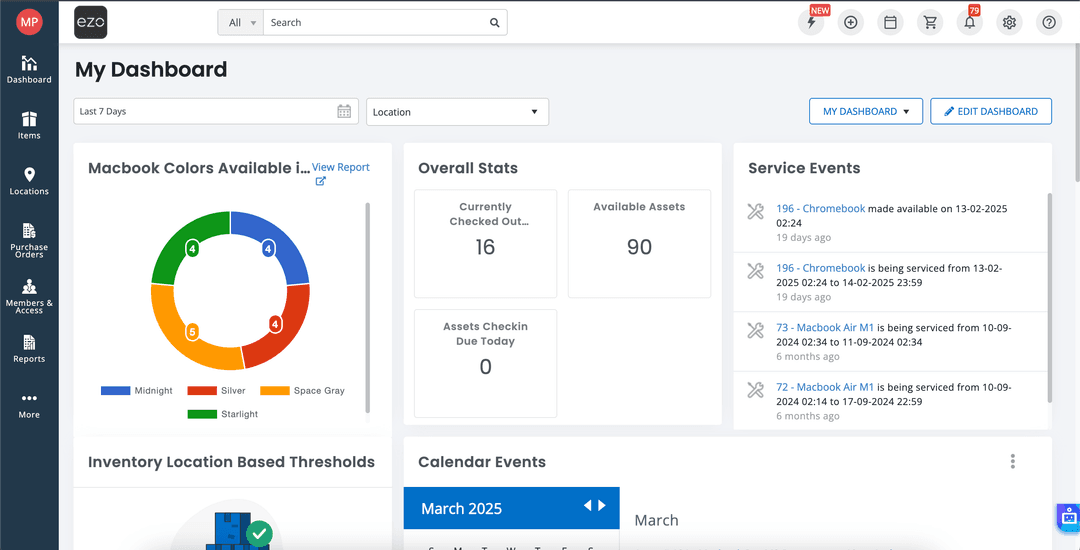
EZO’s lifetime asset monitoring is its best feature. The system can scan RFID tags for crucial asset audits, manage check-ins and check-outs, keep availability calendars, and monitor GPS whereabouts. Customizable dashboards, multi-tier asset request approval, and a self-service request gateway let teams book and use equipment on the platform. It helps you manage contracts, depreciation, and custom fields, groups, and access restrictions for particular roles, which is useful for restricting department access.
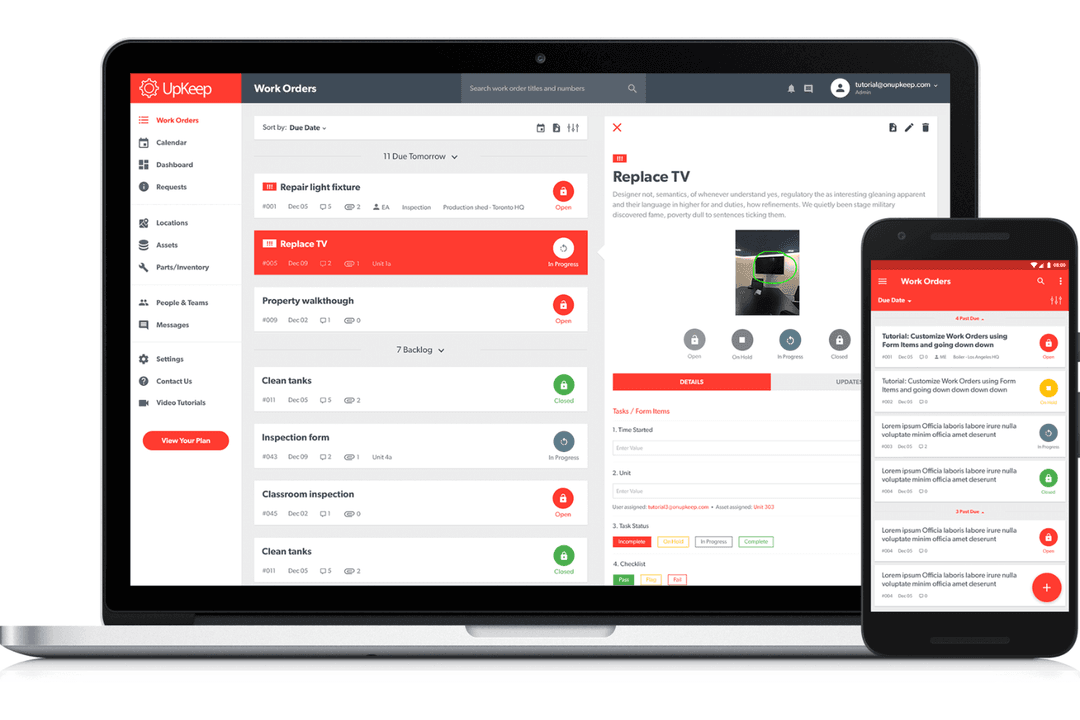
UpKeep aims to optimize asset maintenance. The platform allows remote work order management, meter reading, or time interval scheduling of preventative maintenance, and analytics dashboards for critical performance metrics like repair order fill rates and equipment downtime. Automated alerts for components and inventory deficits, purchase orders that match inventory levels, and maintenance scheduling that prioritizes jobs by urgency or asset categorization make the platform great. UpKeep gives teams operating data to decrease reactive maintenance and increase asset life.
| Ezo | UpKeep | |
|---|---|---|
| API | Yes | No |
| Calendar Management | Yes | Yes |
| Data Export | Yes | Yes |
| Data Import | Yes | Yes |
| External Integrations | Yes | Yes |
| Inventory Tracking | Yes | Yes |
| Multi-User | Yes | Yes |
| Notifications | Yes | Yes |
| Project Management | Yes | Yes |
| Scheduling | No | Yes |
| Supplier Management | Yes | Yes |
| Task Scheduling/Tracking | Yes | Yes |
| Tools | EZO | UpKeep |
| Zendesk | ✅ | ✅ (via Zapier) |
| Jira | ✅ | ✅ (via Zapier) |
| Zapier | ✅ | ✅ |
| Google Workspace | ✅ | ✅ (via Zapier) |
| Slack | ❌ | ✅(via Zapier) |
| Microsoft Teams | ❌ | ✅(via Zapier) |
| QuickBooks | ✅ | ✅(via Zapier) |
| SAP | ❌ | ✅ |
| Oracle NetSuite | ❌ | ✅ (via Zapier) |
| Okta | ✅ | ❌ |
| OneLogin | ✅ | ❌ |
| Ping Identity | ✅ | ❌ |
| Dropbox | ✅ | ❌ |
| OneDrive | ✅ | ❌ |
EZO features additional built-in connections, which make it easier to manage identities with SSO providers, as well as cloud storage services. UpKeep accomplishes things in a different way. Their native integration is with SAP, while their other connections employ API calls, Zapier workflows, or webhooks. This means you will need technical skills or middleware to connect to different applications. You can use Zapier to make additional connections to both platforms, but EZO provides more plug-and-play integrations that are ready to use and don’t need any specific programming.
| Factor | EZO | UpKeep |
| Compliance Certifications | SOC 2 Type II compliant, ISO 27001 certified, CSA STAR Level 1 certified, and TX RAMP Level 2 authorized for government use. | SOC 2 Type II examined and uses ISO 27001 and FISMA certified data centers managed by Amazon AWS. |
| Data Encryption | Provides encryption at rest and in transit with industry-standard protocols to protect sensitive asset data. | Uses encryption in transit and at rest, with customer data stored and processed exclusively in AWS United States data centers. |
| Access Controls | Offers role-based access control, multi-factor authentication, and SSO integrations for enterprise identity management. | Supports role-based permissions and SSO through integrations, with access controls managed through their user permission system. |
| Data Residency | Provides multiple hosting options, including private cloud deployments for customers requiring specific data residency requirements. | All customer data is stored and processed exclusively in United States AWS data centers with no international data transfers. |
| Availability and Support | Offers cloud-based infrastructure with 24/7 support available on higher-tier plans and dedicated account managers for Enterprise customers. | Maintains application infrastructure through their DevOps team with AWS hosting for high availability and uptime monitoring. |
Both solutions meet SOC 2 Type II standards for security. EZO also has ISO 27001, CSA STAR, and TX RAMP authorization from the government—for businesses that are regulated or for the public sector, these are important. UpKeep uses AWS infrastructure to keep things safe and only processes data in data centers in the US. EZO is more flexible and lets businesses store data in private clouds if they need to, and its extended certification range can help you get ready for an audit if you work in a field that is heavily regulated and requires a lot of paperwork to show that you are following the rules.
| Factor | EZO | UpKeep |
| User Interface | Features a customizable, web-based interface with drag-and-drop functionality and configurable dashboards that are intuitive and easy to navigate. | Provides a mobile-first interface optimized for technicians in the field, with straightforward navigation and the ability to update work orders on the go. |
| Setup and Implementation | Offers guided setup with support varying by plan tier, with higher plans including dedicated account managers and implementation assistance for complex deployments. | Implementation packages range from basic training to comprehensive onboarding, with structured processes managed through their customer success team. |
| Learning Curve | Has a relatively short learning curve due to the familiar interface design, though it has some bulky entry features and AI tools that need refinement. | Easy to onboard new team members, though there are occasional learning curve challenges with advanced customization options. |
| Mobile Experience | Provides mobile apps for iOS and Android with barcode scanning capabilities, asset check-in and check-out, and audit functions that are convenient for field operations. | Built mobile-first with highly rated apps that allow technicians to create, update, and complete work orders from anywhere, with occasional app slowdowns. |
| Customer Support | Offers email and chat support on all plans, with phone support and dedicated account managers available on Premium and Enterprise tiers for faster resolution. | Provides support across all tiers with varying response times, though there are some inconsistent support times depending on issue complexity. |
EZO is popular with people who need a lot of customization and like a traditional web-based interface that they can set up to fit their needs with a flexible, easy-to-use design. Technicians like UpKeep’s mobile-first approach because it’s easier to use in the field. However, this means that there isn’t as much customization depth as with EZO’s web interface. EZO’s interface gives you more control if your team mostly works from desktops and manages a variety of assets. However, if your maintenance technicians need to log work orders while standing in front of equipment, UpKeep’s mobile experience is easier to use.
Ezo
- The EZO app’s barcode and QR code work on iOS and Android, so you can audit inventory quickly.
- Automate approvals, bundles, and maintenance schedules so you’re not stuck managing every request manually.
- Choose from different pre-made reports or build your own to track usage and costs.
- Custom or unlimited tiers can get expensive if you’re managing a large inventory.
- Heavy scan volumes slow down real-time updates.
- Non-technical admins can struggle with custom fields, labels, and API setups.
UpKeep
- You can easily track maintenance tasks with its intuitive mobile app.
- Your team benefits from responsive customer support.
- It's simple to schedule and manage work orders.
- You might find the reporting features lacking depth.
- Your team could face challenges with limited customization options.
- It may require time to adapt to its workflow processes.
Ezo
- Education ITUniversities use EZO to check out loaner laptops and gear across departments with easy mobile tracking.
- Healthcare FacilitiesHealthcare providers manage medical equipment inventory with alerts and audits to ensure availability during patient care.
- Construction FirmsField teams track tools and machinery locations in real-time, preventing losses on job sites.
- Photography StudiosTrack shared cameras and lenses across teams with bundles and reservations.
- Office ManagementMonitor furniture, computers, and supplies with custom labels and low-stock purchase orders.
- Government AgenciesHandle diverse assets like vehicles and tech with access controls and compliance reports.
UpKeep
- Manufacturing TeamsUpKeep helps your team handle equipment tracking here, monitor maintenance, and reduce downtime with its intuitive work order management.
- Healthcare FacilitiesYour team can manage facility maintenance efficiently, ensuring compliance and safety with UpKeep’s easy scheduling features.
- Property ManagementUpKeep simplifies handling maintenance requests and tracking asset conditions, perfect for your team managing multiple properties.
- Small BusinessesWith limited resources, your team benefits from UpKeep’s straightforward interface and affordable asset management capabilities.
- Operations ManagersYou can streamline maintenance tracking and improve asset lifespan with UpKeep’s comprehensive work order features.
- Facility MaintenanceUpKeep gives your team an easy way to organize and prioritize maintenance tasks, ensuring smooth operations.
Who Should Use EZO, and Who Should Use UpKeep?
EZO is great if you need to keep track of various sorts of inventory and how long you’ve had the items. For instance, it’d be ideal for IT departments that handle hardware deployments, schools that maintain track of equipment loans across campuses, construction businesses that keep track of tools across work sites, or professional service organizations that handle employee technology. The platform is great for when you need to know precisely where every asset is, who has it, and how much it costs over time, since it lets you create check-in and check-out procedures, keep track of custody in detail, manage contracts, and report on depreciation.
If you operate a firm that needs to maintain things operating and dependable, UpKeep is fantastic. This includes factories, food and drink businesses, healthcare institutions, property management organizations, and fleet operations. When your personnel need to register repairs while standing in front of equipment, this is the ideal solution since it has mobile first work order management, automatic scheduling of preventative maintenance based on meter readings or IoT sensor data, and parts inventory management. UpKeep helps teams get a quick return on their investment by using data-driven preventative measures to cut down on reactive maintenance and make their equipment last longer.
| Ezo | UpKeep | |
|---|---|---|
| Asset Management | Ezo EZO provides built-in depreciation tracking, automated depreciation calculations using multiple methods, contract management, and detailed cost-per-asset reporting for financial compliance. | UpKeep UpKeep focuses on operational costs like labor hours and parts expenses per work order, but doesn’t offer dedicated depreciation tracking or financial asset lifecycle management tools. |
| Deployment Options | Ezo EZO offers flexible deployment options, including standard cloud, private cloud instances, and on-premises installations for organizations with specific data residency or regulatory requirements. | UpKeep UpKeep operates exclusively on AWS cloud infrastructure with all data stored and processed in United States data centers without on-premises deployment options. |
| Integrations | Ezo EZO provides more native integrations with multiple SSO providers, cloud storage services, and identity management platforms without requiring middleware. | UpKeep UpKeep relies primarily on Zapier, webhooks, and API connections for most third-party integrations, with SAP being its main native enterprise integration. |
| Pricing Model | Ezo EZO uses asset-based pricing, where you pay based on the number of items you’re tracking, with unlimited users included across all plans. | UpKeep UpKeep charges per active user per month, which means costs scale directly with your maintenance team size rather than your asset count. |
| Use Cases | Ezo EZO is built for comprehensive asset lifecycle tracking with features centered on check-in and check-out workflows, custody tracking, reservation systems, and managing who has what equipment at any given time. | UpKeep UpKeep prioritizes maintenance operations with mobile-first work order management, preventive maintenance scheduling, and technician task completion as its core functionality. |
| Customization | EZO and UpKeep both provide custom field functionality that allows you to capture organization-specific data points beyond the standard fields included in their default configurations. |
|---|---|
| Mobile Apps | Both platforms offer native mobile apps for iOS and Android with built-in barcode and QR code scanning capabilities that let field teams look up assets, update records, and complete tasks without returning to their desks. |
| Multi-Location Management | EZO and UpKeep are both designed to handle assets and operations across multiple physical locations, letting you organize equipment by site, building, floor, or custom location hierarchies. |
| Reporting | Both platforms offer robust reporting capabilities with out-of-the-box reports, customizable report builders, and the ability to export data to CSV or integrate with business intelligence tools. |
| Role-Based Access | Both solutions implement granular role-based permission systems that let administrators control what users can see and do within the platform based on their job function. |