



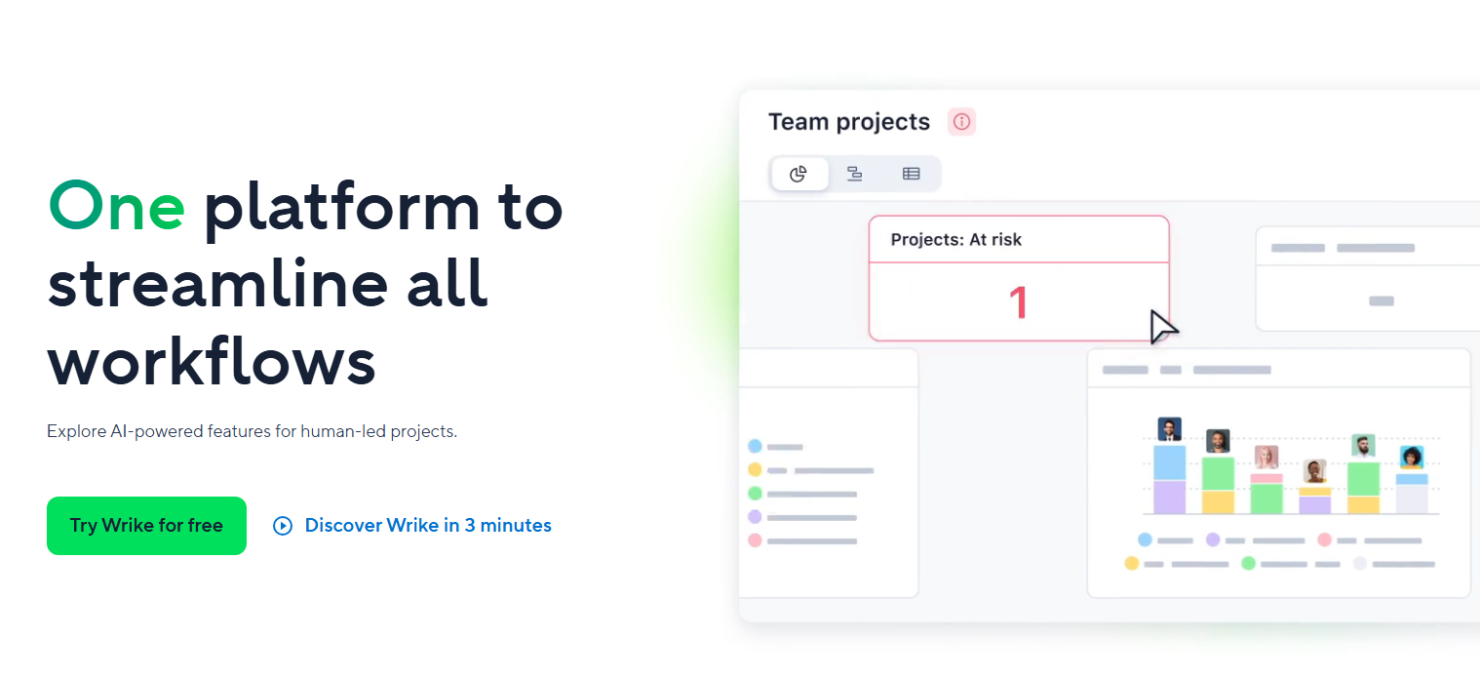
Wrike is a free ERP software that combines project management with ERP capabilities, offering tools for teams to collaborate and manage resources efficiently. Wrike best serves marketing teams, creative agencies, and project-based departments needing integration with platforms like Salesforce and Slack. Wrike offers flexible, intuitive project management and work management for teams seeking efficient collaboration.
Wrike addresses project management and resource allocation issues for marketing and creative teams. In this article, I'll cover Wrike's features, pros and cons, use cases, pricing, etc. so you can decide if this software aligns with your project management and collaboration needs and goals.
Wrike Evaluation Summary
- From $10/user/month (billed annually)
- 14-day free trial + free plan available
Why Trust Our Software Reviews
We’ve been testing and reviewing financial software since 2023. As finance specialists ourselves, we know how critical and difficult it is to make the right decision when selecting software.
We invest in deep research to help our audience make better software purchasing decisions. We’ve tested more than 2,000 tools for different finance use cases and written over 1,000 comprehensive software reviews. Learn how we stay transparent & our software review methodology.
Wrike Overview
In my opinion, Wrike offers a decent set of tools for teams needing all-in-one project management and ERP capabilities. Its integration options, like Salesforce, and customizable dashboards are appealing, but the pricing might be a hurdle for budget-conscious teams. It performs well in task and resource management but can be overwhelming for small businesses with simple needs. Compared to other free ERP software, Wrike is suitable for marketing teams and creative agencies needing detailed project tracking and collaboration features. If you’re judging software based on flexibility and integration, consider Wrike, but weigh its cost against your budget.
pros
-
You can customize dashboards to fit your team's workflow.
-
Wrike's task management tools help keep your projects organized.
-
You can easily collaborate with team members using Wrike's communication features.
cons
-
The interface can feel cluttered and overwhelming for new users.
-
It takes time to learn all of Wrike's features.
-
Your team might find the mobile app less intuitive than the desktop version.
Is Wrike Right For Your Needs?
Who Would be a Good Fit for Wrike?
Wrike is a good fit for marketing teams, creative agencies, and project-driven departments that need detailed project tracking and collaboration. If your work involves managing multiple projects with various stakeholders, Wrike's customizable dashboards and task management tools can keep everything organized. Teams that value communication will benefit from its collaboration features, which help streamline discussions and feedback. Wrike's capabilities are particularly useful for industries where project timelines and resource allocation are critical.
-
Marketing Teams
Wrike helps your team manage campaigns and track progress with its detailed task management.
-
Creative Agencies
Your agency can benefit from Wrike’s collaboration features, which facilitate feedback and revisions.
-
Project-Based Departments
Wrike's dashboards let your department manage multiple projects efficiently and keep stakeholders informed.
-
Event Planning
If your work involves complex logistics, Wrike's task tracking and communication tools keep everything on schedule.
-
Product Development
Wrike supports your team in managing timelines and resources for successful product launches.
-
Remote Teams
Wrike's communication and collaboration features help your remote team stay connected and productive.
Who Would be a Bad Fit for Wrike?
Wrike isn’t ideal for small businesses or teams with straightforward needs that don’t require complex project management. If your work involves simple tasks without the need for extensive tracking or resource management, Wrike’s features may feel excessive and overwhelming. Additionally, if your team struggles with adopting new technology, Wrike's interface might be too complex and time-consuming to learn. It's not the best fit for organizations looking for a basic, easy-to-use tool.
-
Small Businesses
If your team needs basic task management, Wrike's extensive features might overwhelm rather than help.
-
Simple Operations
Wrike's complex interface can be unnecessary for operations that don't need detailed project tracking.
-
Low-Tech Teams
Wrike's learning curve can be steep for teams not comfortable with technology.
-
Budget-Conscious Departments
If you’re focused on cost-efficiency, Wrike's advanced features may not justify its expense.
-
Single-Person Teams
For individuals, Wrike's collaboration tools won't offer much value.
-
Non-Project Roles
Roles without project management needs might find Wrike's features redundant.
How We Test & Score Tools
We’ve spent years building, refining, and improving our software testing and scoring system. The rubric is designed to capture the nuances of software selection and what makes a tool effective, focusing on critical aspects of the decision-making process.
Below, you can see exactly how our testing and scoring works across seven criteria. It allows us to provide an unbiased evaluation of the software based on core functionality, standout features, ease of use, onboarding, customer support, integrations, customer reviews, and value for money.
Core Functionality (25% of final scoring)
The starting point of our evaluation is always the core functionality of the tool. Does it have the basic features and functions that a user would expect to see? Are any of those core features locked to higher-tiered pricing plans? At its core, we expect a tool to stand up against the baseline capabilities of its competitors.
Standout Features (25% of final scoring)
Next, we evaluate uncommon standout features that go above and beyond the core functionality typically found in tools of its kind. A high score reflects specialized or unique features that make the product faster, more efficient, or offer additional value to the user.
We also evaluate how easy it is to integrate with other tools typically found in the tech stack to expand the functionality and utility of the software. Tools offering plentiful native integrations, 3rd party connections, and API access to build custom integrations score best.
Ease of Use (10% of final scoring)
We consider how quick and easy it is to execute the tasks defined in the core functionality using the tool. High scoring software is well designed, intuitive to use, offers mobile apps, provides templates, and makes relatively complex tasks seem simple.
Onboarding (10% of final scoring)
We know how important rapid team adoption is for a new platform, so we evaluate how easy it is to learn and use a tool with minimal training. We evaluate how quickly a team member can get set up and start using the tool with no experience. High scoring solutions indicate little or no support is required.
Customer Support (10% of final scoring)
We review how quick and easy it is to get unstuck and find help by phone, live chat, or knowledge base. Tools and companies that provide real-time support score best, while chatbots score worst.
Customer Reviews (10% of final scoring)
Beyond our own testing and evaluation, we consider the net promoter score from current and past customers. We review their likelihood, given the option, to choose the tool again for the core functionality. A high scoring software reflects a high net promoter score from current or past customers.
Value for Money (10% of final scoring)
Lastly, in consideration of all the other criteria, we review the average price of entry level plans against the core features and consider the value of the other evaluation criteria. Software that delivers more, for less, will score higher.
Core Features
Task Management
You can break down projects into tasks and subtasks, making it easy to assign responsibilities and track progress. Wrike’s task management helps your team stay organized and on schedule.
Time Tracking
Wrike lets you log time spent on tasks, helping you manage your team’s workload and improve productivity. This feature supports accurate billing and resource allocation.
Custom Dashboards
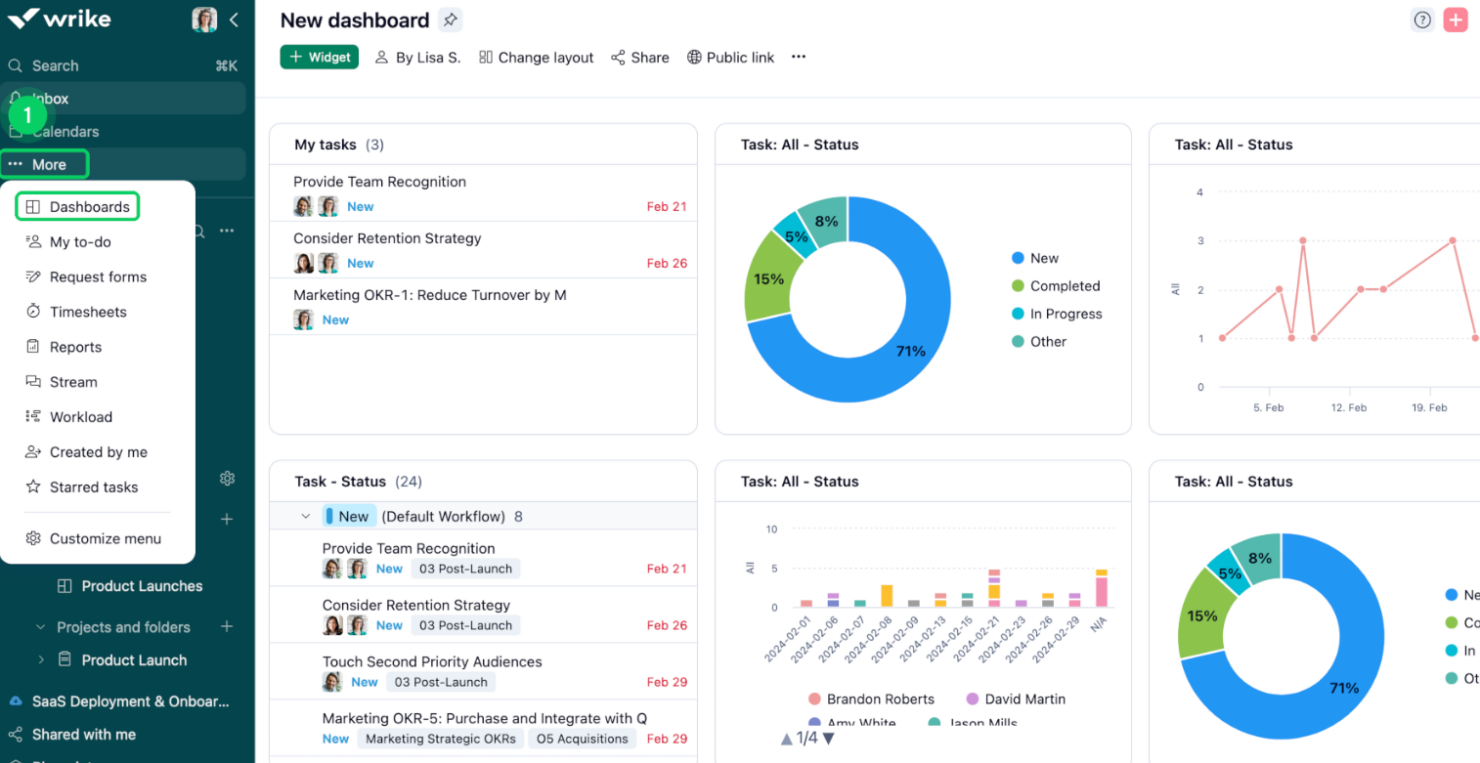
Customize your dashboard to highlight the data that matters most to your team. You can easily monitor project status, receive notifications, and prioritize tasks.
Multiple Project Views
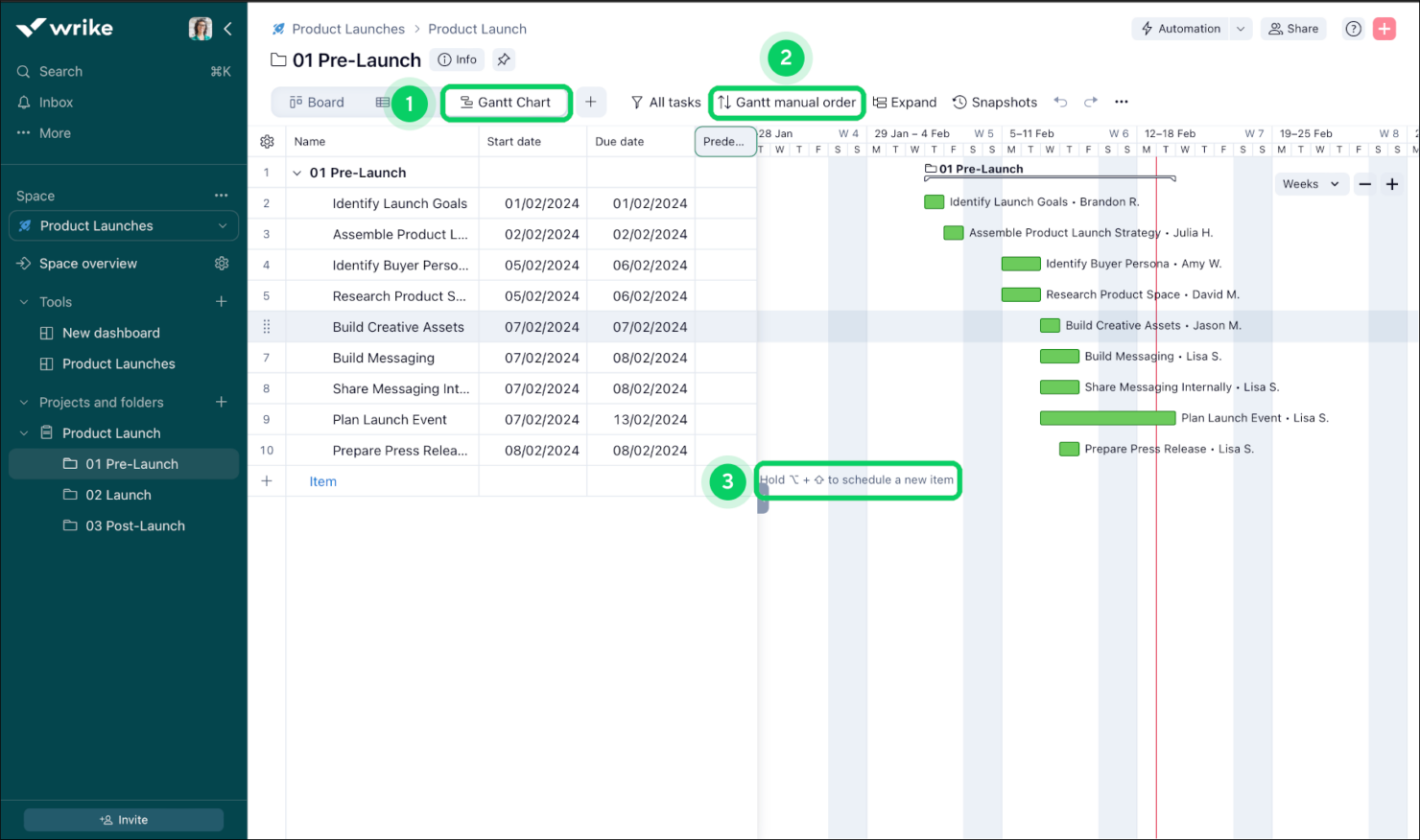
Wrike's Gantt charts and Kanban boards give you a visual timeline of your projects, helping you plan and track tasks. They’re great for seeing dependencies and deadlines at a glance.
File Sharing
You can share files directly within Wrike, making collaboration on documents seamless. This feature keeps your team’s resources centralized and accessible with role-based permissions.
Reporting
Wrike’s real-time reporting tools let you generate insights into your projects, helping you make informed decisions. You can customize reports to show key metrics and performance indicators.
Standout Features
Request Forms
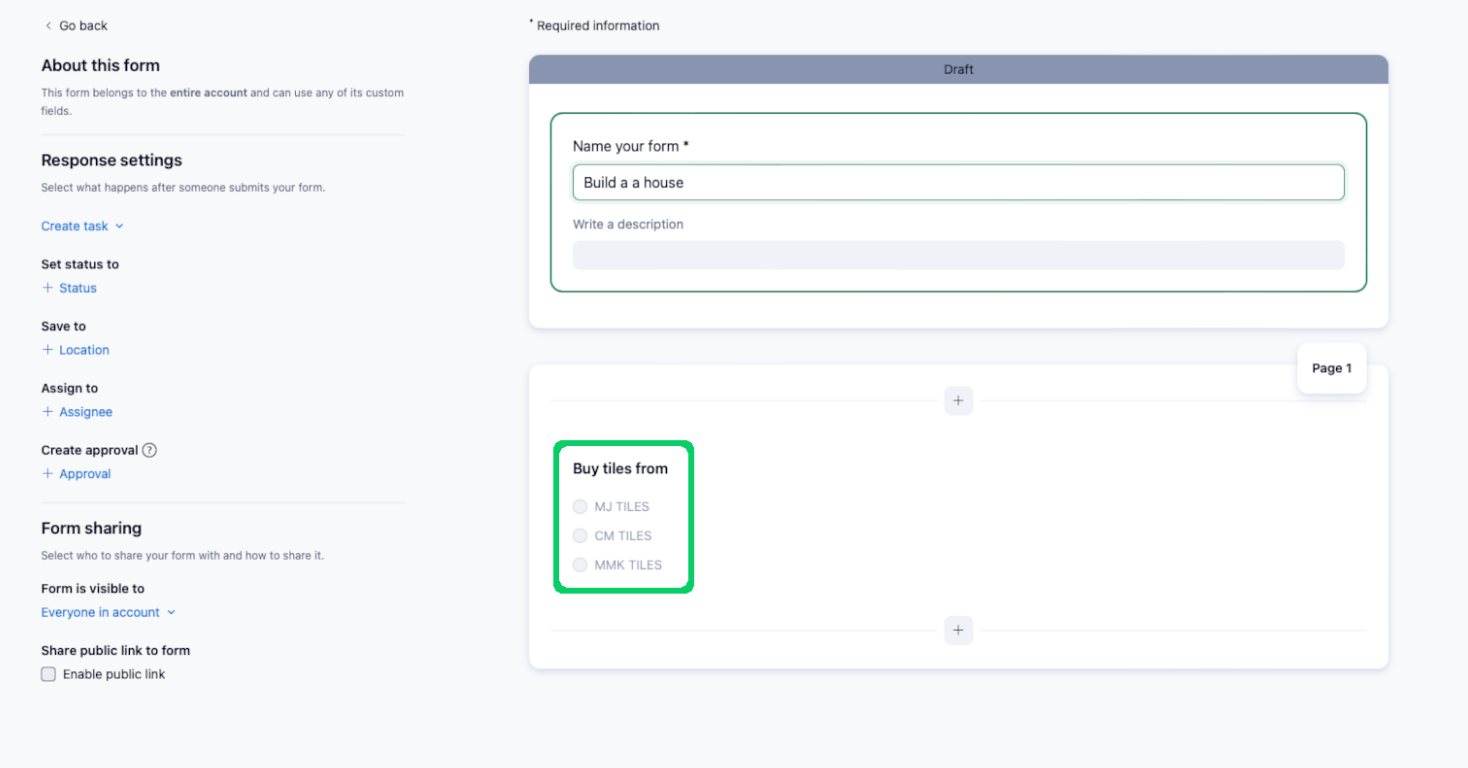
Your team can use request forms to standardize and streamline how work is requested. This feature helps you avoid miscommunication and manage incoming work efficiently.
Proofing and Approval
Wrike's proofing and approval tools let your team review and approve creative work directly within the platform. This feature speeds up feedback loops.
Ease of Use
Wrike’s interface is relatively clean and intuitive. While the customization options and drag-and-drop workflows are powerful, they might overwhelm those unfamiliar with project management tools. If your team invests time in learning its features, Wrike offers valuable tools for project tracking and collaboration. However, the initial learning curve might be steep, especially for small teams or those without dedicated IT support. Despite these challenges, once mastered, Wrike can significantly enhance your team's productivity.
Onboarding
Wrike's onboarding process can be daunting due to its complex interface and multitude of features. While Wrike offers tutorials and guides, your team might still find the initial setup challenging. The time to value can be longer compared to simpler tools, requiring patience and persistence. However, once your team gets accustomed to the system, Wrike's robust project management capabilities can significantly benefit your operations. The available support and resources are helpful, but they demand a proactive approach to learning.
Customer Support
Wrike offers decent customer support, but users might experience delays in response times. If your team needs immediate assistance, this can be frustrating. Wrike provides a range of resources like its comprehensive knowledge base, webinars, and community forums that can help resolve common issues. However, personalized support might not always be readily available. Your team should be prepared to utilize self-help resources and tutorials to navigate challenges, as direct support may not meet all expectations promptly.

Integrations
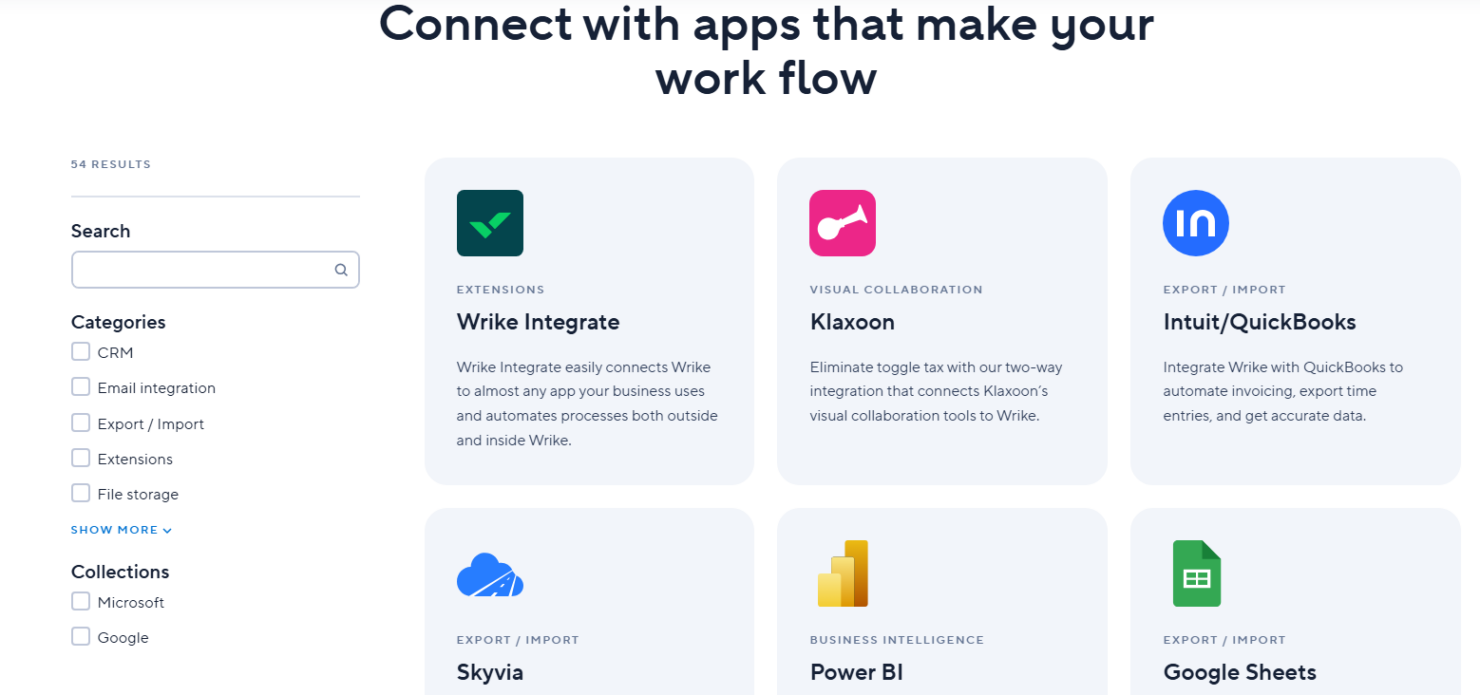
Wrike integrates with Microsoft Teams, Salesforce, Slack, Google Workspace, Dropbox, Box, OneDrive, Adobe Creative Cloud, JIRA, and QuickBooks.
Wrike also offers an API and connects with third-party integration tools to expand its functionality.
Value for Money
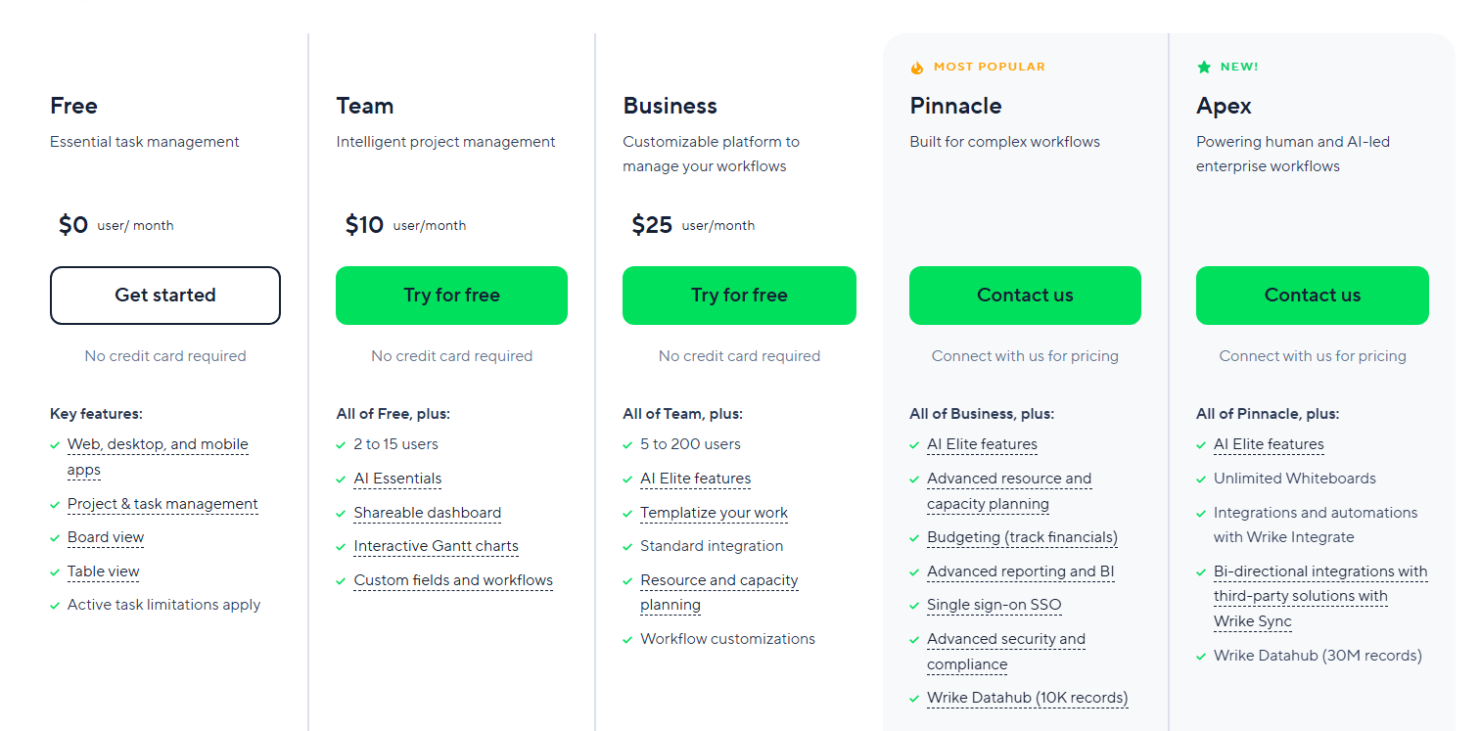
Wrike’s pricing offers strong value by letting teams start for free and scale only when they need more power. The Free plan covers essential task management, while paid tiers add automation, AI, and advanced planning tools. With plans starting at $10 per user, Wrike balances affordability with enterprise-grade capabilities, making it cost-effective for growing teams and large organizations alike.
- Free: Includes Web, desktop, and mobile apps, project & task management, and board & table views.
- Team: Adds essential AI features, shareable dashboard, and interactive Gantt charts.
- Business: Adds AI elite feature, templatization features, standard integrations, and workflow customizations.
- Pinnacle: Includes advanced reporting and BI, budgeting, advanced resource and capacity planning, and advanced security and compliance.
- Apex: Includes unlimited whiteboards, 30 million records on Wrike Datahub, and bi-directional integrations with third-party solutions.
Wrike Specs
- API
- Batch Permissions & Access
- Budgeting
- Calendar Management
- Collaboration Support
- Contact Management
- Contact Sharing
- Customer Management
- Dashboard
- Dashboards
- Data Export
- Data Import
- Data Visualization
- Dependency Tracking
- Document Sharing
- Expense Tracking
- External Integrations
- File Sharing
- Gantt Charts
- Kanban Boards
- Multi-User
- Notifications
- Project Management
- Resource Management
- Scheduling
- Task Scheduling/Tracking
- Third-Party Plugins/Add-Ons
- Time Management
- Travel Management
- Workflow Management
Wrike FAQs
How does Wrike support team collaboration?
Can Wrike handle complex project management needs?
How does Wrike ensure data security and compliance?
Is Wrike suitable for remote teams?
How customizable is Wrike?
Does Wrike offer reporting and analytics?
How does Wrike handle task prioritization?
What support resources does Wrike offer?
Wrike Company Overview & History
Wrike is a project management software company headquartered in San Jose, California, with a workforce of over 1,000 employees. The company is known for its versatile project management solutions that cater to various methodologies like Agile and waterfall. Wrike integrates with numerous third-party applications, enhancing its utility for diverse business needs. Notable clients include major corporations such as Google and Airbnb, which rely on Wrike for efficient project tracking and team collaboration.
Wrike Major Milestones
- 2006: Founded by Andrew Filev.
- 2013: Secured $10 million in Series A funding led by Bain Capital Ventures.
- 2018: Acquired by Vista Equity Partners, a significant private equity firm.
- 2021: Became part of Citrix Systems through acquisition.