

En iyi ödenecek hesaplar denetim yazılımı, ekiplerin finansal doğruluğu artırmasına, iç kontrolleri güçlendirmesine ve uyumluluğu korumasına yardımcı olur; üstelik ödenecek hesaplar ekiplerini çoğu zaman yavaşlatan manuel kontroller, gecikmiş onaylar veya hataya açık süreçler olmadan. Ancak piyasada bu kadar çok araç varken kuruluşunuz için doğru seçeneği bulmak gerçek bir zorluk olabilir.
Finans yönetimi ve dijital yazılım alanındaki 15 yılı aşkın deneyimimle, hangilerinin gerçekten sonuç verdiğini görmek için önde gelen ödenecek hesaplar denetim çözümlerini test edip karşılaştırdım. Doğru platform yalnızca hataları işaretlemekle kalmaz; iş akışlarını kolaylaştırır, görünürlüğü artırır ve yıl boyunca denetime hazır kayıtlar tutmanıza yardımcı olur.
Güvenle seçim yapmanıza yardımcı olmak için, günümüzde sunulan en güçlü ödenecek hesaplar denetim yazılımı seçenekleri hakkında ayrıntılı incelemeler derledim. Doğruluk, uyumluluk desteği ve kullanım kolaylığı açısından öne çıkan araçlar şunlardır.
Why Trust Our Software Recommendations
6,700+
Reviews
20
Industry experts
16+
Evaluation factors
14
Years
Our team has been testing and reviewing software since 2012. As finance leaders ourselves, we know how difficult—and important—it is to choose the right software.
For this guide, we evaluated tools using hands-on testing and independent research, scoring tools using our selection criteria.
Our reviews reflect our human editorial judgment, not a sales pitch.
Ödenecek Hesaplar Denetim Yazılımları Karşılaştırma Tablosu
En iyi ödenecek hesaplar denetim yazılımı seçimlerimin fiyatlandırma ayrıntılarını aşağıdaki tabloda karşılaştırın.
Sorted by: Default
| Tool | Starting Price | Website | |
|---|---|---|---|
Best for AP fraud detection | Not rated | Pricing upon request Free demo available | Website |
Best for vendor payouts | 4.5 out of 5 | Pricing upon request Free plan + free demo available | Website |
Best for AI-powered AP automation | 4.9 out of 5 | $99/month 21-day free trial available | Website |
Best for team collaboration | 4.8 out of 5 | Pricing upon request Free demo available | Website |
Best with customizable approval workflows | 4.8 out of 5 | $15/user/month Free plan available; 30-day free trial | Website |
Best for budget control | 4.8 out of 5 | Pricing upon request Free demo available | Website |
Best for document management | 4.5 out of 5 | $50/user/month Free demo available | Website |
Best for real-time tracking | 5.0 out of 5 | Pricing upon request Free demo available | Website |
Best for QuickBooks users | 4.6 out of 5 | $59/user/month Free plan available | Website |
Best for automated multi-currency compliance | 5.0 out of 5 | $25/month Free plan available | Website |


En İyi Ödenecek Hesaplar Denetim Yazılımı İncelemeleri
Kısa listeme giren en iyi ödenecek hesaplar denetim yazılımlarına ilişkin ayrıntılı özetlerimi aşağıda bulabilirsiniz. İncelemelerimde, size en uygun seçeneği bulmanıza yardımcı olmak için her aracın temel özellikleri, artıları ve eksileri, entegrasyonları ve ideal kullanım alanları kapsamlı biçimde incelenmektedir.

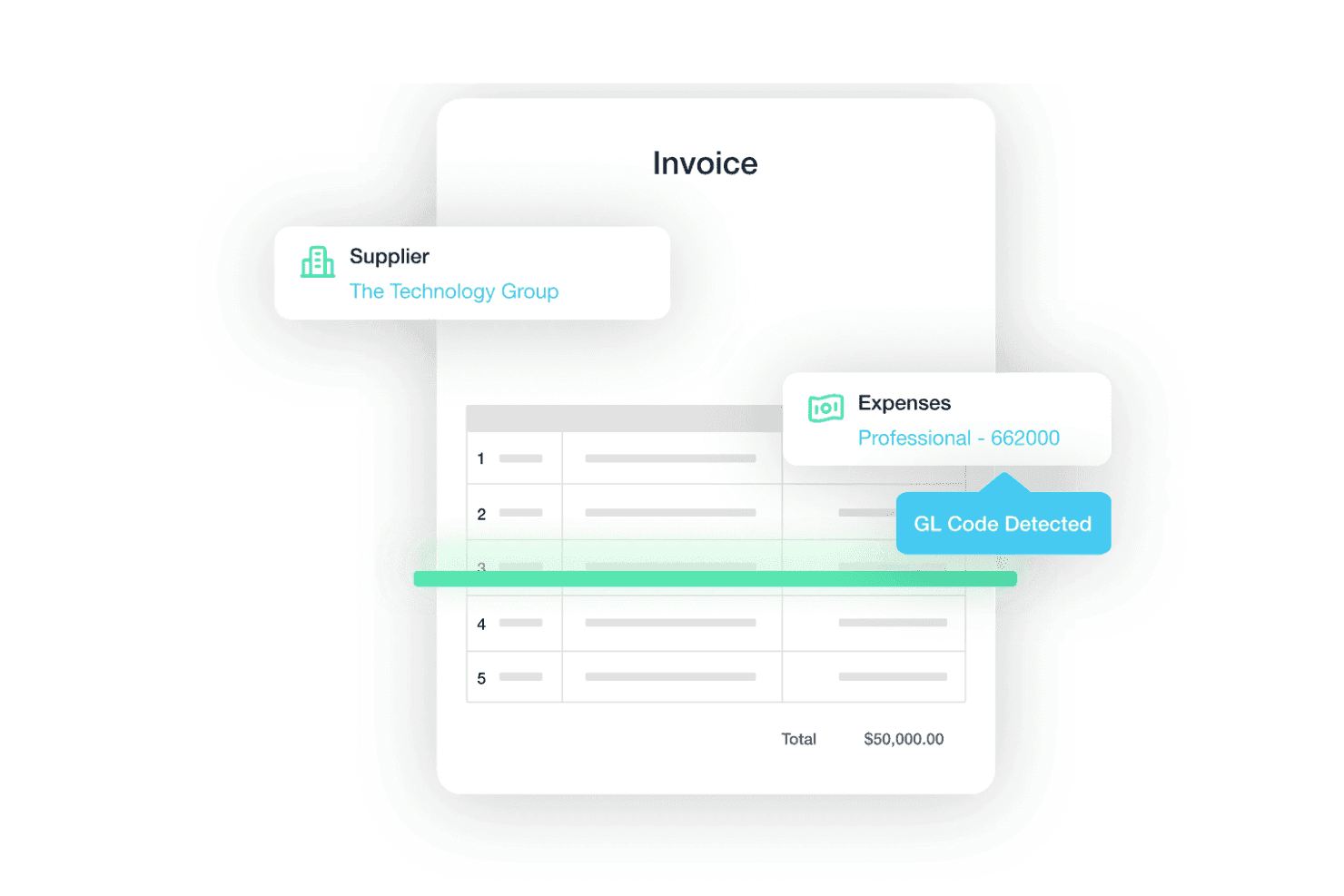
Traild uses AI to extract supplier details, expense categories, and GL codes from invoices, helping reduce manual AP processing. Traild is an AP automation platform that combines invoice processing, AI-driven error and fraud detection, vendor verification, PO matching, and approval workflows with deep, real-time integrations across major ERP and accounting systems.
Who Is Traild Best For?
Traild is a strong fit for AP managers and finance directors at mid-market companies running ERP platforms like Acumatica, Syspro, NetSuite, or SAP Business One.
Why I Picked Traild
I picked Traild as one of the best because its fraud detection runs at every stage of the AP workflow, not just at reporting. I love that it scans invoice metadata for PDF tampering and changed banking details at ingestion, before an invoice ever reaches approval. Vendor Verification adds another layer by cross-checking supplier details against behavioral data and network intelligence to flag high-risk payees in real time.
Traild Key Features
- Error and fraud detection: Always-on anomaly detection continuously monitors invoices for unusual behaviour, identifying potential errors or fraud before payments are processed.
- Vendor verification: Built-in supplier verification helps validate vendors and detect compromised payment details before funds are released.
- Unified approval workflows: Configurable approval routing presents invoice details alongside fraud insights to support informed approvals.
- Multi-level approval workflows: Routes invoices through configurable steps based on company policy and thresholds.
Traild Integrations
Traild offers native integrations with Acumatica, NetSuite, SAP Business One, Syspro, IFS, MYOB, and Xero.
Pros and Cons
Pros:
- Advanced vendor verification with network intelligence
- Automated statement reconciliation and approval workflows
- Real-time fraud detection on every invoice
Cons:
- Focused primarily on AP rather than broader finance operations
- Advanced workflows require initial setup
Learn more about Traild: Best for vendor payouts
- Free plan + free demo available
- Pricing upon request
Visit WebsiteCustomer Rating:4.5/5
Payouts' dashboard facilitates the management of pending payouts, allowing users to keep track of outstanding payments and audit cash flow effectively. Payouts is a platform that simplifies your accounts payable processes through automation. It offers tools to handle invoice management, vendor payments, and financial reporting, making it ideal for businesses in affiliate marketing, influencer networks, and the creator economy.
Why I picked Payouts: It includes payout automation, which helps businesses simplify financial workflows with real-time insights and automated processing. This reduces the manual workload and ensures compliance with financial regulations. Additionally, its vendor management capabilities, powered by an analytics-driven vendor portal, facilitate better relationships and transaction tracking with partners. The platform also offers robust invoicing tools that integrate seamlessly into existing workflows, enhancing transparency and auditability.
Standout features & integrations:
Features include optimized global payments, enabling you to pay vendors in multiple currencies and integrate with your preferred payment methods, simplifying international transactions. It also identifies early payment discount opportunities automatically.
Integrations include Everflow, CJ Affiliate, Awin, PayPal, Venmo, Payoneer, NetSuite, Priority, Workday, Skrill, and Tune.
Pros and Cons
Pros:
- Comprehensive automation of accounts payable processes
- Multiple payout methods
- Supports scaling operations
Cons:
- Potential challenges integrating with existing systems
- May require time to fully customize
Learn more about Payouts: Best for AI-powered AP automation
- 21-day free trial available
- From $99/month
Visit WebsiteCustomer Rating:4.9/5
A digital invoice from MakersHub displaying itemized purchase details, payment terms, and total amount due. MakersHub is designed for high-volume AP companies with complex workflows, regardless of industry. It uses AI to capture bills, automate approvals, and process payments—reducing manual entry and audit risk.
Why I picked MakersHub: MakersHub automates the entire AP lifecycle, including bill capture, approval routing, and payment processing. Its AI tools minimize human error and ensure accuracy, giving finance teams a more reliable audit trail. I also like that it’s tailored for diverse industries, offering tools that meet specific vertical needs.
Additionally, the customizable features and clean interface make it easy to reduce overhead while improving financial visibility and compliance.
Standout features & integrations:
Features include AI-enhanced bill capture, customizable approval workflows, automated payments, and industry-specific solutions for various fields. Users also get access to analytics and real-time status tracking, helping reduce bottlenecks and audit delays.
Integrations include QuickBooks Online and QuickBooks Desktop.
Pros and Cons
Pros:
- Integration with QuickBooks
- Multi-layered approval process
- Automation of bills and payments
Cons:
- Steep learning curve for new users
- Certain features are limited to higher-tier plans
Learn more about MakersHub: Best for team collaboration
- Free demo available
- Pricing upon request
Visit WebsiteCustomer Rating:4.8/5
Stampli centralizes invoice communication, streamlining approvals and team collaboration. Stampli boosts team collaboration by centralizing invoice communication and approvals. With its dedicated communication hubs, it reduces email chains, streamlines issue resolution, and improves efficiency in financial workflows.
Why I picked Stampli: Stampli allows communication directly within the invoice, speeding up the review and approval processes. With customizable approval workflows, you can set specific steps. The platform also provides real-time updates and a centralized view of invoice status. Its audit trail functionality records changes, giving you control over document histories.
Standout features & integrations:
Features include in-platform communication that lets your team collaborate on invoices within Stampli. The customizable approval workflows help you control the process so every invoice moves through the proper steps.
Integrations include QuickBooks, NetSuite, Sage Intacct, Microsoft Dynamics, SAP, Oracle, Xero, FreshBooks, Zoho Books, and Intuit.
Pros and Cons
Pros:
- Real-time invoice status updates
- Customizable approval workflows
- In-platform team communication
Cons:
- Limited error correction features
- Limited reporting tools
Learn more about Stampli: 5Best with customizable approval workflows
Ramp
- Free plan available; 30-day free trial
- From $15/user/month
Visit WebsiteCustomer Rating:4.8/5
Ramp dashboard displaying transaction history, payment statuses, and financial activity tracking for audit visibility. Ramp is an accounts payable audit platform that combines automated spend controls, customizable approval workflows, transaction monitoring, and policy enforcement for finance teams.
Who Is Ramp Best For?
Ramp is a good fit for finance teams at mid-sized and enterprise companies that need advanced spend controls and audit capabilities.
Why I Picked Ramp
I picked Ramp as one of the best because I can set up highly customizable approval workflows that match our internal controls for accounts payable. My team uses Ramp to create multi-level approval chains for different spend categories, so every invoice gets routed to the right people. I like that I can tailor rules for specific departments or transaction amounts, which helps us enforce compliance without slowing down our process.
Ramp Key Features
- Real-time transaction monitoring: Track every transaction as it happens for immediate visibility into spend.
- Automated receipt matching: Upload and match receipts to transactions automatically to support audit trails.
- Policy enforcement engine: Set and enforce custom spend policies directly within the platform.
- Audit-ready reporting: Generate detailed reports with full audit trails for all accounts payable activity.
Ramp Integrations
Ramp offers native integrations with NetSuite, QuickBooks Online, Sage Intacct, Xero, Slack, Google Workspace, Microsoft 365, and Expensify. It also connects with Zapier and provides an API for custom integrations.
Pros and Cons
Pros:
- Native integrations with major accounting platforms
- Real-time spend analytics and reporting tools
- Customizable approval workflows for bill payments
Cons:
- No built-in OCR for invoice data extraction
- Limited support for complex multi-entity setups


Planergy lets AP teams monitor budget usage, approvals, and real-time spending. Planergy’s centralized system allows AP teams to monitor budget usage and approvals. It identifies and manages cost-saving opportunities and tracks spending against set budgets in real time.
Why I picked Planergy: Planergy helps monitor expenses and track real time budgets to ensure all costs align with financial goals. Customizable approval workflows let you set up purchase checkpoints and reduce unauthorized spending. You’ll also find reporting options to help you analyze spending patterns and identify savings opportunities. The audit trail feature also keeps every transaction transparent for efficient verification and monitoring.
Standout features & integrations:
Features include spend analysis that helps your team identify areas for cost savings. Customizable approval workflows let you set rules that align with your financial policies. Real-time reporting offers insights into spending patterns, aiding in budget management.
Integrations include QuickBooks, NetSuite, Microsoft Dynamics, SAP, Xero, Intuit, Sage, Oracle, FreshBooks, and Zoho Books.
Pros and Cons
Pros:
- Spend analysis reports
- Detailed audit trail logs
- Custom approval workflows
Cons:
- Limited advanced analytics features
- Limited fraud detection tools
Learn more about Planergy: Best for document management
- Free demo available
- From $50/user/month
Visit WebsiteCustomer Rating:4.5/5
Square 9 digitizes AP documents, simplifying access, compliance, and tracking. Square 8 offers document management that digitally captures, categorizes, and stores invoices and other AP documents. It simplifies accessing records and tracking document histories for compliance and auditing efforts.
Why I picked Square 9: Square 9 has automated file indexing that quickly locates specific documents, a drag-and-drop functionality for uploading and managing documents, and advanced search filters. These features allow you to pull up files based on specific data and make audits faster. Square 9 is good for businesses with extensive documentation, categorization, and retrieval needs.
Standout features & integrations:
Features include advanced document capture that lets you scan, upload, and store files. Your team can benefit from customizable workflows to ensure documents follow the right path from start to finish. Plus, with version control, you’ll have an accurate history of each document, making retrieval and compliance easier.
Integrations include Microsoft Dynamics, QuickBooks, SAP, NetSuite, Sage, Oracle, Salesforce, Xero, FreshBooks, and Intuit.
Pros and Cons
Pros:
- Document annotation tools
- Automated file categorization
- Detailed version control
Cons:
- Limited error resolution tools
- Limited compliance monitoring
Learn more about Square 9:

Lightyear provides real-time AP tracking, making invoices and payments visible. Lightyear is suitable for tracking invoices and payments in real time. It offers up-to-the-minute AP process visibility, helping companies monitor their AP cycle and control their procurement processes.
Why I picked Lightyear: Lightyear provides real-time tracking for invoices and purchase orders as they progress through the system. Its automated 3-way matching feature helps ensure accuracy by cross-verifying invoices, purchase orders, and receipts. The platform also has detailed reporting tools for insights into your spending patterns and customizable approval workflows to give you control over the process.
Standout features & integrations:
Features include automated invoice processing to speed up data entry and validation, real-time invoice tracking, and easy-to-use audit trails for compliance. The platform also supports multi-currency handling and customizable approval workflows for control and accuracy.
Integrations include Xero, QuickBooks Online, Sage, MYOB, NetSuite, Microsoft Dynamics 365, Intuit, FreshBooks, Zoho Books, and Wave.
Pros and Cons
Pros:
- Multi-language document handling
- Advanced data validation
- Built-in audit trail
Cons:
- Restricted customization options
- Limited analytics tools
Learn more about Lightyear:

Fidesic is suitable for QuickBooks, automates invoice routing, and secures payments. Fidesic is optimized for QuickBooks users. It simplifies payment processing by automating invoice routing and approvals and supports secure digital payments. It simplifies AP tasks with a user-friendly interface that enhances accuracy.
Why I picked Fidesic: Fidesic offers specialized tools that make managing accounts payable directly from QuickBooks simpler and more efficient. Your team can benefit from its invoice and payment auto-matching and detailed audit trails for tracking changes and maintaining compliance. Fidesic’s dashboard provides an overview of payables, ensuring you stay on top of your financial commitments.
Standout features & integrations:
Features include automated invoice capture that minimizes manual data entry. The approval workflows help you streamline the process of getting invoices approved quickly. Payment scheduling ensures your team can manage cash flow efficiently.
Integrations include QuickBooks, Microsoft Dynamics GP, Sage Intacct, SAP, NetSuite, Xero, FreshBooks, Zoho Books, Wave, and Intuit.
Pros and Cons
Pros:
- Detailed audit trails
- Direct integration with ERP
- Automated approval workflows
Cons:
- Limited bulk invoice processing
- No predictive insights
Learn more about Fidesic: 10Best for automated multi-currency compliance
Slash
- Free plan available
- From $25/month
Visit WebsiteCustomer Rating:5/5
Slash’s analytics dashboard visualizing weekly spend across payment methods for accurate, audit-ready financial reporting. Slash is a financial management and expense automation platform that combines banking, payments, and accounts payable auditing tools in one interface. It supports both fiat and cryptocurrency transactions, allowing finance teams to track, reconcile, and report payments across currencies with complete transparency. As an accounts payable audit solution, Slash helps you maintain compliance and accuracy in complex, multi-entity environments.
Why I picked Slash: I picked Slash because it automates key audit functions like invoice matching, reconciliation, and payment scheduling while handling both traditional and digital currencies. This dual-currency flexibility means you can maintain compliant, audit-ready records across diverse payment types. I also like that Slash offers detailed reporting and real-time analytics, helping you identify discrepancies and track every payable event for complete oversight. Its automation tools cut down on manual reconciliation, reducing human error and improving control across your financial workflows.
Slash standout features and integrations:
Features include automated invoice processing for faster reconciliation, virtual accounts for detailed transaction tracking, and compliance with SOC2 Type II and PCI standards to ensure data security. The platform also provides enhanced FDIC coverage for funds and audit-ready financial reports for transparency.
Integrations include QuickBooks, Xero, Shopify, WooCommerce, BigCommerce, Adobe Commerce (Magento), PayPal, Stripe, Square, Salesforce, and HubSpot CRM.
Pros and Cons
Pros:
- Secure, audit-ready financial reports
- Real-time transaction visibility
- Handles fiat and crypto payments
Cons:
- Crypto tools may require setup
- Limited public user reviews
Learn more about Slash:
Diğer Ödenecek Hesaplar Denetim Yazılımları
Kısa listeme girmeyen ancak yine de göz atmaya değer bazı ek ödenecek hesaplar denetim yazılımı seçeneklerini burada bulabilirsiniz.
- 11QuadientBest for cloud integration
- 12MineralTree TotalAPBest for multi-entity firms
- 13Kefron APBest for data compliance
- 14DataServBest for global reach
- 15ControlPayBest for the logistics industry
- 16SymbeoBest for large enterprises
- 17DOKKABest for mid-sized teams
- 18XeroBest for cloud accounting
- 19Sage IntacctBest for financial reporting
- 20AvidXchangeBest for automating payments
How I Evaluate Accounts Payable Audit Software
I split my evaluation into baseline criteria—like duplicate payment detection and ERP integration—and differentiating factors that separate the best AP audit tools from the rest.
Core Functionality (Table Stakes For This List)
When I'm selecting tools for my list, I rank each one on a scale from 0 (does not offer the functionality) to 5 (excels in this area) for each core functionality listed below. Then, I calculate the tool's total score into a percentage. Each tool needs to achieve a minimum total score of 65% to be considered for inclusion.
- Duplicate Payment Detection: I evaluate how well each tool catches near-duplicates and fuzzy matches—like invoices with transposed digits or slightly different vendor names for the same supplier.
- Fraud & Anomaly Detection: Each tool's ability to flag suspicious patterns matters here, from shell company indicators to unusual payment spikes that fall just below approval thresholds.
- Vendor Master File Analysis: I check whether the platform can surface ghost vendors, employee-vendor address overlaps, and duplicate supplier records with missing or invalid tax IDs.
- Continuous Transaction Monitoring: Tools that audit 100% of transactions on an ongoing basis score higher than those limited to periodic batch runs or sample-based reviews.
- ERP & AP System Integration: I look for prebuilt connectors to major platforms like SAP, Oracle, NetSuite, and Workday, plus flexible import options for less common systems.
- Audit Reporting & Recovery Workflow: Strong tools let you trace each finding back to its source transaction and move it through a dispute and recovery process with clear status tracking.
Once I have a list of tools that meet this criteria, I consider what sets each platform apart.
Differentiating Factors (What Sets Vendors Apart)
Here's how I compare and contrast different vendors:
Standout Features
Contract compliance auditing is a big differentiator—I look for tools that cross-reference invoices against negotiated pricing and rebate terms to catch overbilling. Sales and use tax recovery is another area where some platforms shine, surfacing overpaid tax that most AP teams wouldn't catch manually. I also evaluate whether a tool offers root cause analytics, which helps pinpoint why errors keep recurring so your team can fix upstream process gaps instead of just recovering money after the fact.
Beyond Features
I pay close attention to the recovery service model—some vendors offer software-only access, while others pair the platform with experienced auditors who manage the recovery process on a contingency basis. That distinction matters depending on whether your team has bandwidth to run audits in-house. Security certifications like SOC 2 Type II also carry weight, especially when you're handing over years of payment data. Finally, I evaluate time-to-value: how quickly a platform can ingest historical data and surface its first batch of actionable findings.
Ödenecek Hesaplar Denetim Yazılımı Nasıl Seçilir?
Uzun özellik listeleri ve karmaşık fiyatlandırma yapıları içinde kaybolmak kolaydır. Kendinize özgü yazılım seçim sürecinizde ilerlerken odaklanmanızı korumanıza yardımcı olması için aklınızda bulundurmanız gereken faktörleri içeren bir kontrol listesi hazırladım.
| Faktör | Dikkat Edilmesi Gerekenler |
| Ölçeklenebilirlik | Yazılım işletmenizle birlikte büyüyecek mi? |
| Entegrasyonlar | Mevcut sistemlerinizle (ör. ERP sistemleri ve CRM'ler) entegre oluyor mu? |
| Özelleştirilebilirlik | Yazılımı ihtiyaçlarınıza göre uyarlayabilir misiniz? |
| Kullanım Kolaylığı | Yazılım ekibiniz için sezgisel mi? |
| Bütçe | Mali kısıtlarınızla uyumlu mu? |
| Güvenlik Önlemleri | Veri koruma ihtiyaçlarınız karşılanıyor mu? |
Ödenecek Hesaplar Denetim Yazılımlarındaki Trendler
Araştırmam sırasında farklı ödenecek hesaplar denetim yazılımı sağlayıcılarının sayısız ürün güncellemesini, basın bültenini ve sürüm günlüğünü inceledim. Takip ettiğim yeni trendlerden bazıları şunlar:
- Yapay Zekâ Destekli Analiz: Sağlayıcılar, harcama modelleri ve anormallikler hakkında daha derin içgörüler sunmak için yapay zekâyı ödenecek hesaplar otomasyon yazılımına dâhil ediyor. Bu, işletmelerin öngörücü analiz yoluyla bilinçli kararlar almasına yardımcı oluyor.
- Şeffaflık için blok zinciri: Bazı ödenecek hesaplar otomasyon çözümleri, işlem şeffaflığını ve güvenliğini artırmak için blok zinciri teknolojisini kullanıyor. İşletmeler finansal verileri doğrulamak ve denetlemek için daha güvenilir yollar aradıkça bu trend ivme kazanıyor.
- Çevre Dostu Girişimler: Daha fazla ödenecek hesaplar çözümü, şirketlerin kâğıt kullanımını azaltmasına ve karbon ayak izini takip etmesine yardımcı olan özellikler ekliyor. Bu yaklaşım, mevzuata uyum ve sürdürülebilir iş uygulamalarına yönelik artan taleple örtüşürken aynı zamanda doğru belge yönetimi sağlıyor.
- Sesle Etkinleştirilen Komutlar: Geleceği düşünen birkaç sağlayıcı, ödenecek hesaplar sistemlerine sesli komutları dâhil etmeye başladı. Bu trend, kullanıcı etkileşimini ve verimliliği artırmayı, ekiplerin görevleri ellerini kullanmadan yönetebilmesini amaçlıyor.
- Gelişmiş Veri Görselleştirme: Ödenecek hesaplar otomasyon yazılımı daha gelişmiş veri görselleştirme araçlarını bünyesine katıyor. Fatura otomasyonu gibi bu araçlar, kullanıcıların karmaşık verileri sezgisel çizelge ve grafiklerle kolayca yorumlamasına yardımcı olarak ödenecek hesaplar departmanı raporlamasını tüm ekip üyeleri için erişilebilir hâle getiriyor.
Ödenecek Hesaplar Denetim Yazılımı Nedir?
Borç hesapları denetim yazılımı, doğruluk ve uyumluluğu sağlamak için işletmelerin borç hesaplarını incelemesine, doğrulamasına ve optimize etmesine yardımcı olan bir araçtır. Faturalar, işlemler ve ödeme iş akışları üzerinde net bir denetime ihtiyaç duyan finans ekipleri, muhasebeciler ve denetçiler tarafından kullanılır. Otomatik fatura işleme, finansal verilere gerçek zamanlı erişim ve özelleştirilebilir borç hesapları iş akışları sayesinde denetim süreçlerini kolaylaştırır ve manuel hataları azaltır. Bu da daha güçlü kontroller, daha hızlı işleme ve daha verimli finansal operasyonlar sağlar.
Borç Hesapları Denetim Yazılımının Özellikleri
Borç hesapları denetim yazılımı seçerken aşağıdaki temel özellikleri arayın.
- Otomatik Fatura İşleme: Manuel veri girişi hatalarını azaltır ve fatura onaylarını hızlandırır. Bu özellik, özellikle müşteri kazanmak ve ekibini oluşturmak isteyen bir küçük işletme veya girişimseniz son derece faydalıdır.
- Gerçek Zamanlı Veri Erişimi: Ekiplerin hızlı ve bilinçli kararlar almasına yardımcı olmak için güncel finansal bilgiler sağlar.
- Özelleştirilebilir İş Akışları: İşletmelerin süreçleri kendi özel finansal ihtiyaçlarına ve uyumluluk gereksinimlerine göre uyarlamasına olanak tanır.
- Çoklu Para Birimi Desteği: Doğru finansal yönetim sağlamak için uluslararası işlemler gerçekleştiren işletmeler açısından gereklidir.
- Gelişmiş Analiz Araçları: Harcama kalıpları hakkında içgörüler sunar ve maliyet tasarrufu fırsatlarının belirlenmesine yardımcı olur.
- Merkezi Platform: Birden fazla iş birimini yönetmek için tek bir merkez sağlayarak çoklu işletme operasyonlarını destekler; bu özellik mutabakat süreci sırasında oldukça yararlı olabilir.
- Geliştirilmiş Veri Görselleştirme: Sezgisel çizelge ve grafikler kullanarak finansal verilerin yorumlanmasını kolaylaştırır.
- Uyumluluk Takibi: Tüm finansal operasyonların yerel ve uluslararası düzenlemelere uygun olmasını sağlayarak uyumsuzluk riskini azaltır.
- Çift Ödeme Tespiti: Yinelenen faturaları ve ödemeleri belirleyip ortadan kaldırarak fazla ödemeleri ve borçları önler.
- Elektronik Faturalama: Elektronik faturalama özellikleriyle fatura işleme ve alacak hesapları süreçlerini hızlandırır.
- Olası Dolandırıcılık Uyarıları: Olası işlem dolandırıcılıklarını tespit edip uyarı vererek finansal güvenliği artırır.
- Üçlü Eşleştirme: Satın alma siparişlerini, faturaları ve makbuzları eşleştirmek için otomasyon araçlarını kullanarak doğruluğu sağlar.
- Ödeme İndirimlerini Optimize Etme: Zamanında ve verimli fatura işleme sayesinde erken ödeme indirimlerinden yararlanır.
- Finansal Tahmin: Tahmin araçları ve gerçek zamanlı analizlerle finansal durum ve yükümlülükler hakkında içgörüler sağlar.
- Finans Ekibi Entegrasyonu: Finans ekipleri arasındaki iletişim için tasarlanmış özelliklerle iş birliğini geliştirir.
Borç Hesapları Denetim Yazılımının Faydaları
Borç hesapları denetim yazılımını uygulamak ekibinize ve işletmenize fayda sağlar. İşte yararlanmayı bekleyebileceğiniz birkaç fayda.
- Artan doğruluk: Otomatik fatura işleme, finansal verilerdeki insan hatalarını azaltmaya yardımcı olur.
- Zaman tasarrufu: Özelleştirilebilir iş akışları ve gerçek zamanlı veri erişimi, onay süreçlerini ve karar alma mekanizmalarını hızlandırır.
- Maliyet verimliliği: Gelişmiş analiz araçları maliyet tasarrufu sağlanabilecek alanları belirleyerek finansal yönetiminizi optimize eder.
- Geliştirilmiş uyumluluk: Uyumluluk takibi, düzenlemelere uyulmasını sağlar ve ceza riskini en aza indirir.
- Geliştirilmiş şeffaflık: Merkezi platformlar, tüm iş birimlerindeki finansal faaliyetlere ilişkin net bir görünüm sunarak raporlama ve defter oluşturma süreçlerini kolaylaştırır.
- Çevresel etki: Çevre dostu girişimler, kâğıt kullanımını azaltmaya ve şirketinizin karbon ayak izini takip etmeye yardımcı olur.
- Kullanıcı etkileşimi: Sesle etkinleştirilen komutlar ve geliştirilmiş veri görselleştirme, finansal verilerle etkileşimi sezgisel ve verimli hâle getirir.
Borç Hesapları Denetim Yazılımının Maliyetleri ve Fiyatlandırması
Borç hesapları denetim yazılımı seçmek, mevcut çeşitli fiyatlandırma modellerini ve planları anlamayı gerektirir. Maliyetler özelliklere, ekip büyüklüğüne, eklentilere ve diğer unsurlara göre değişir. Aşağıdaki tablo, borç hesapları denetim yazılımı çözümlerinin standart planlarını, ortalama fiyatlarını ve tipik özelliklerini özetlemektedir.
Borç Hesapları Denetim Yazılımı İçin Plan Karşılaştırma Tablosu
| Plan Türü | Ortalama Fiyat | Yaygın Özellikler |
| Ücretsiz Plan | $0 | Temel fatura işleme, sınırlı kullanıcı desteği ve temel raporlama araçları. |
| Bireysel Plan | $5-$25/ kullanıcı/ ay | Otomatik iş akışları, temel analizler, çoklu para birimi desteği ve e-posta desteği. |
| İşletme Planı | $30-$60/ kullanıcı/ ay | Gelişmiş analizler, özelleştirilebilir iş akışları, artırılmış güvenlik ve öncelikli destek. |
| Kurumsal Plan | $75-$150/ kullanıcı/ ay | Tam uyumluluk takibi, özel hesap yöneticisi, API erişimi ve kapsamlı entegrasyon seçenekleri. |
Borç hesapları denetim yazılımı için plan türleri, maliyetler ve özelliklerin dökümü.
Borç Hesapları Denetim Yazılımı Hakkında SSS
Borç hesapları denetim yazılımı hakkında sık sorulan bazı soruların yanıtlarını burada bulabilirsiniz.
Borç hesapları denetim yazılımı yinelenen faturaları nasıl ele alır?
Borç hesapları denetim yazılımı, aynı fatura numaralarını, tarihleri ve tutarları tarayarak yinelenen faturaların belirlenmesine yardımcı olur ve olası yinelenen faturaları incelenmek üzere işaretler. Bu, daha kolay denetim için bu yinelenen faturaları belirleyip ayırarak ekibinizin zaman kazanmasını sağlar. Yapılandırılabilir ayarlarla algılama ölçütlerini belirli gereksinimleri karşılayacak şekilde ayarlayabilirsiniz.
Borç hesapları denetim yazılımı mevcut ERP sistemimle entegre olabilir mi?
Evet, borç hesapları denetim yazılımlarının çoğu büyük ERP sistemleriyle entegre olabilir ve ekibinizin verileri sorunsuz bir şekilde tek bir yerde toplamasını sağlar. Yazılımı seçmeden önce, veri taşıma sorunlarını önlemek için ERP sisteminizle uyumluluğunu kontrol edin. Birçok sağlayıcı entegrasyon desteği sunar; uyumluluk konusunda açıklamaya ihtiyacınız varsa onlarla iletişime geçin.
Borç hesapları denetim yazılımı hangi verileri analiz eder?
Borç hesapları denetim yazılımı; fatura tutarları, tedarikçi bilgileri, ödeme koşulları ve işlem tarihleri gibi çeşitli veri noktalarını analiz eder. Bu, ekibinizin eğilimleri belirlemesine, düzensizlikleri fark etmesine ve iç ve dış politikalara uyumluluğu kontrol etmesine yardımcı olur. Ayrıntılı raporlar sunulması, borç hesapları departmanınızın genel verimliliğini izlemenize yardımcı olur.
Borç hesapları denetim yazılımı sahtekârlığın tespit edilmesine nasıl yardımcı olur?
Borç hesapları denetim yazılımı, olağandışı işlem modellerini analiz ederek, tanınmayan tedarikçileri belirleyerek ve düzensiz fatura hareketlerini kontrol ederek sahtekârlığı tespit eder. Uyarılar, potansiyel olarak sahtekârlık içeren işlemleri gerçek zamanlı olarak iç kontrol birimlerinize bildirebilir ve böylece hemen takip yapılmasını sağlar. Bu yazılım aracılığıyla düzenli büyük defter denetimleri uygulamak, mali durumunuz için ek bir koruma katmanı oluşturur.
Borç hesapları denetim yazılımı borç hesapları sürecimdeki hataları azaltabilir mi?
Evet, borç hesapları denetim yazılımı fatura doğrulamasını otomatikleştirerek ve tedarikçi faturalarındaki tutarsızlıkları işaretleyerek hataları azaltır. Bu, manuel veri girişi hatalarını ve hesaplama yanlışlarını azaltmaya, ödeme işlemlerinizin doğruluğunu artırmaya yardımcı olur. Ayrıca paydaşların hataları düzeltmek için harcadığı zamanı azaltarak daha kritik görevlere odaklanmalarını sağlar.
Borç hesapları denetim yazılımı raporlama özellikleri sunar mı?
Çoğu borç hesapları denetim yazılımı; ödeme performansı, tedarikçi faaliyetleri ve denetim geçmişi hakkında bilgi sağlayan raporlama özelliklerine sahiptir. Ekibinizin borç hesapları sürecinin verimliliğini anlamasına yardımcı olmak için bu raporları belirli ölçümleri öne çıkaracak şekilde özelleştirebilirsiniz. Bu raporlar, muhasebe sisteminizde uyumluluğu ve denetime hazırlığı da destekleyebilir.