

Struggling with messy files, lost invoices, and clunky accounting document management software? You’re not alone.
Sifting through endless options for a better solution is exhausting—some tools lack key features, while others are overloaded with things you don’t need. You just want something that works, without the hassle.
As a financial controller, I get it. I’ve dealt with the same headaches and tested plenty of tools along the way. A good system should keep things organized, save time, and make compliance easy—not the opposite.
That’s why I reviewed and tested the best options out there, so you don’t have to. Whether you need better automation, security, or simple organization, this list will help you find the right tool.
Why Trust Our Software Recommendations
6,700+
Reviews
20
Industry experts
16+
Evaluation factors
14
Years
Our team has been testing and reviewing software since 2012. As finance leaders ourselves, we know how difficult—and important—it is to choose the right software.
For this guide, we evaluated tools using hands-on testing and independent research, scoring tools using our selection criteria.
Our reviews reflect our human editorial judgment, not a sales pitch.
Accounting Document Management Software Comparison Table
This comparison table summarizes pricing details for my top accounting document management software selections.
| Tool | Best For | Trial Info | Price | ||
|---|---|---|---|---|---|
| 1 | Best for SAP-native invoice approval workflows | Free demo available | Pricing upon request | Website | |
| 2 | Best for invoicing | Free plan + 14-day free trial + free demo available | From $20/month | Website | |
| 3 | Best for cloud storage | Free demo + free trial available | From $55/user/month (billed annually) | Website | |
| 4 | Best for tax professionals | 15-day free trial | From $22/user/month | Website | |
| 5 | Best for collaboration | Free demo available | From $210/month (billed annually) | Website | |
| 6 | Best for large firms | Free demo available | Pricing upon request | Website | |
| 7 | Best for scalable solutions | Free demo available | Pricing upon request | Website | |
| 8 | Best for integration with Thomson Reuters | Free demo available | From $1,680/year + $99/user/year | Website | |
| 9 | Best for compliance focus | Free demo available | Pricing upon request | Website | |
| 10 | Best for document organization | 30-day free trial + free demo available | Pricing upon request | Website |


Best Accounting Document Management Software Review
Below are my detailed summaries of the best accounting document management software that made it onto my shortlist. My reviews offer an in-depth look at the key features, pros & cons, integrations, and ideal use cases of each tool to help you find the best one for you.
 Best for SAP-native invoice approval workflows
- Free demo available
- Pricing upon request
Visit WebsiteCustomer Rating:4.8/5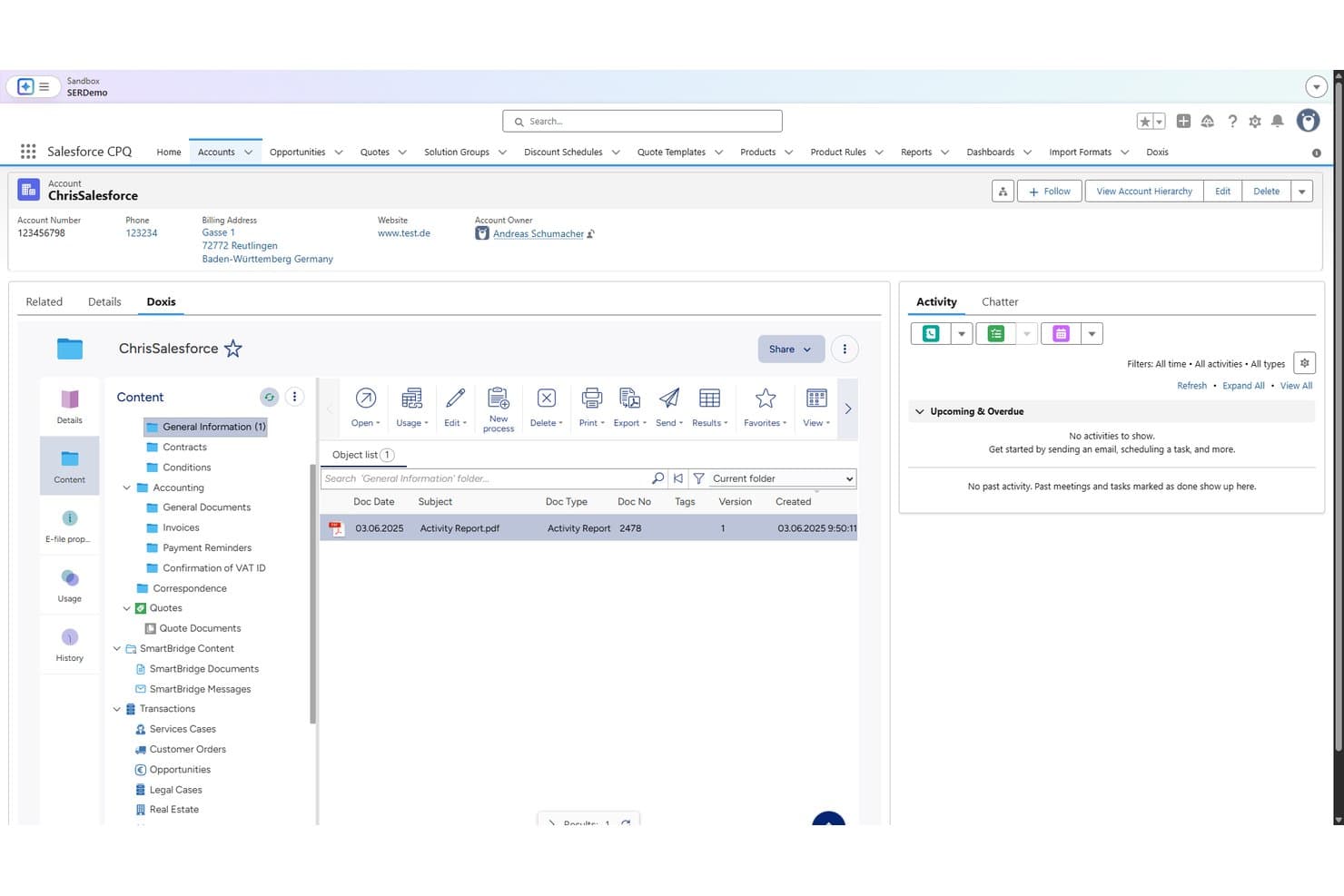
Doxis organizes accounting documents like invoices and VAT confirmations within Salesforce. Doxis is an enterprise document management platform that centralizes financial document storage, automates invoice capture and OCR extraction, and manages multi-stage approval workflows with audit-proof archiving.
Who Is Doxis Best For?
Doxis is built for enterprise finance teams—particularly controllers and finance managers at mid-to-large organizations running SAP or Microsoft Dynamics 365.
Why I Picked Doxis
I've included Doxis in my top picks because its SAP-native invoice approval workflows are genuinely hard to replicate elsewhere. More than 70% of its customers run it alongside SAP, and the certified ArchiveLink and S/4HANA Clean Core integrations mean approvals can flow through multi-stage routing, three-way PO matching, and SAP Fiori sign-off without requiring approvers to hold an SAP license.
Doxis Key Features
- AI.dp OCR extraction: Captures and extracts header and line-item data from 50+ document types, including PDFs, e-invoices, and paper, with confidence thresholds that flag uncertain documents for human review.
- Supplier 360 record: Consolidates invoices, contracts, purchase orders, delivery notes, and certificates into a single supplier file with automatic document assignment and versioning.
- Retention schedule automation: Applies retention rules, legal holds, and disposition workflows automatically to keep financial records compliant with GDPR, ISO 16175-2, and IDW PS 880.
- Ask Doxi AI search: Lets you query the document repository in natural language and returns results with cited sources, so you can locate specific financial records without building manual search filters.
Doxis Integrations
Doxis supports 200+ platform integrations, including certified SAP and Microsoft Dynamics 365 connections, plus Oracle, Sage, Infor, Salesforce, Microsoft 365, SharePoint, Workday, and ServiceNow. Its API and SDK support custom integrations, with 50+ AI.dp connections.
Pros and Cons
Pros:
- Natural-language search cites source documents
- Audit logs preserve invoice and version history
- Multi-stage invoice approvals include three-way matching
Cons:
- OCR errors and slow model training
- Recent reviewer reported large-file handling problems
Learn more about Doxis: Best for invoicing
- Free plan + 14-day free trial + free demo available
- From $20/month
Visit WebsiteCustomer Rating:4.3/5
Zoho Books includes document management with invoicing and expense tracking. Zoho Books is an online accounting platform with built-in document management that lets you store, scan, and attach financial documents—like receipts, bills, and tax forms—directly to transactions.
Who Is Zoho Books Best For?
Zoho Books is a strong fit for small to mid-sized businesses that need accounting and document management in a single, connected platform.
Why it stands out
Zoho Books stands out because its invoicing and document management features are tightly connected. I can attach supporting documents directly to an invoice—think signed contracts or delivery confirmations—so every transaction has a full paper trail in one place. I also like that the client portal lets customers view, comment on, and pay invoices while accessing shared transaction documents, cutting down on email back-and-forth entirely.
Zoho Books Key Features
- Receipt forwarding via email: Forward receipts or bills to a unique Zoho Books address, and the platform auto-uploads and extracts key transaction details.
- Role-based document access: Control which team members or accountants can view or manage stored files with user-level permissions.
- Automatic transaction matching: Scanned documents are compared against existing transactions, with suggested matches surfaced for quick review.
- Mobile receipt scanning: Capture and upload receipts from your phone, with files syncing instantly to your Zoho Books account.
Pros and Cons
Pros:
- Provides financial insights
- Automated payment reminders
- Strong invoicing capabilities
Cons:
- May need additional customization
- Learning curve for new users
 Best for cloud storage
- Free demo + free trial available
- From $55/user/month (billed annually)
Visit WebsiteCustomer Rating:4.4/5
SmartVault offers secure document storage with built-in compliance features. SmartVault is a cloud-based document management system built specifically for accounting and tax firms, with tools for client portals, secure file sharing, eSignature workflows, document collection, and tax prep automation.
Who Is SmartVault Best For?
SmartVault is a strong fit for accounting and tax firms that need a dedicated document management system with built-in client collaboration tools.
Why I Picked SmartVault
SmartVault stands out because it offers unlimited cloud storage across all plans, which is rare in accounting-specific DMS tools. SmartRouting automatically files incoming tax documents into the right client folder based on pre-set rules, eliminating manual sorting after busy tax season uploads. Its full-text OCR search pulls up any stored document in seconds, even scanned PDFs from years back.
SmartVault Key Features
- Branded client portal: Give clients a white-labeled portal to upload, download, and review documents securely without email attachments.
- Document request tracking: Send clients itemized document checklists and track which items have been submitted or are still outstanding.
- Pre-built folder templates: Set up new client folders instantly using tax-specific templates that auto-populate the right subfolder structure.
- Audit trail: View a detailed, timestamped log of every action taken on a document, including views, edits, and downloads.
Pros and Cons
Pros:
- Detailed audit trail
- Secure client portal
- Reliable cloud storage
Cons:
- May need additional customization
- Initial setup complexity
Learn more about SmartVault:

Canopy ensures secure document management for tax companies and clients. Canopy is a cloud-based accounting practice management platform with a dedicated document management module that includes unlimited storage, smart client-linked folders, eSignatures, AI-powered document organization, and a secure client portal.
Who Is Canopy Best For?
Canopy is a strong fit for tax and accounting firms that need document management built into a broader practice management workflow.
Why I Picked Canopy
I've included Canopy in my top picks because it's built document management around the tax workflow in ways that generic DMS tools simply aren't. I particularly like the AI-powered Document Request Lists, which auto-generate client intake checklists based on tax return type, so my team isn't manually tracking down W-2s and 1099s every season. The smart folder templates tied to client records also keep tax year organization consistent across every engagement.
Canopy Key Features
- Secure client portal: Clients can upload, view, and download documents through a branded portal protected by multi-factor authentication.
- Built-in eSignatures: Send documents for eSignature directly within Canopy without needing a third-party signing tool.
- Virtual Drive: Access and edit files stored in Canopy directly from your desktop without manually uploading or downloading documents.
- AI document renaming: Automatically rename uploaded files based on global naming rules your firm sets to keep document libraries consistent.
Pros and Cons
Pros:
- Customizable document templates
- Secure client portals
- Tailored for tax workflows
Cons:
- May require initial setup time
- Learning curve for new users
Learn more about Canopy: Best for collaboration
- Free demo available
- From $210/month (billed annually)
Visit WebsiteCustomer Rating:4.6/5
SuiteFiles integrates with accounting platforms for easy file management. SuiteFiles is a cloud-based document management platform built specifically for accounting firms, with tools for file storage, email management, client portals, document signing, and workflow automation.
Who Is SuiteFiles Best For?
SuiteFiles is a strong fit for small to mid-sized accounting firms that need a centralized platform for managing client documents and internal files.
Why I Picked SuiteFiles
I picked SuiteFiles as one of the best because it treats collaboration as a core function, not an add-on. The secure client portal lets your team share files for real-time review without routing documents through email chains. I also like that SuiteFiles includes a task management feature where you can share tasks with colleagues and clients, chat within the platform as work progresses, and track everything from creation to completion in one place.
SuiteFiles Key Features
- Document signing: Send documents for e-signature and track signing status directly within the platform.
- Email management: Save and file emails from Outlook directly into client folders without leaving your inbox.
- Auto-populated templates: Generate pre-filled document and email templates using stored client data.
- PDF editing tools: Annotate, merge, and edit PDFs without exporting files to a third-party tool.
Pros and Cons
Pros:
- Live document editing
- Email integration
- Automatic document backup
Cons:
- May require training
- Limited to small and medium businesses
Learn more about SuiteFiles:

iManage enhances compliance with AI-powered document organization. iManage is an AI-powered document and email management platform built for knowledge-intensive industries, with tools for document storage, security, governance, risk and compliance, knowledge search, and workflow management.
Who Is iManage Best For?
iManage is a natural fit for large accounting firms and enterprise finance teams that handle high volumes of sensitive documents and need strong security, governance, and compliance controls.
Why I Picked iManage
I've included iManage in my top picks because it's one of the few document management platforms built to operate at enterprise scale across large, multi-office accounting firms. iManage Security Policy Manager lets firms deploy information barriers at the client, department, or project level across multiple repositories through a single policy — critical when managing confidentiality between audit, tax, and advisory engagements. I also like that self-maintaining, automated workflows grant and revoke access without IT intervention, which matters when you're managing thousands of active engagements at once.
iManage Key Features
- Email filing: Capture and file emails directly to the relevant client matter from within Outlook, keeping all engagement correspondence organized alongside documents.
- Version control: Track document revisions with a full version history, so your team always works from the latest file without overwriting prior drafts.
- Secure external sharing: Share client-facing documents securely via iManage Share, with access controls and expiration settings built in.
- AI-powered search: Locate documents, emails, and matter files instantly using contextual AI search across your entire document repository.
Pros and Cons
Pros:
- Enhances document accessibility
- Supports large-scale collaboration
- Powerful search capabilities
Cons:
- Requires significant IT resources
- Complex setup process
Learn more about iManage:

CCH Axcess Document automates document handling with tax and audit tools. CCH Axcess Document is a cloud-based document management platform built for CPA and accounting firms, covering everything from tax returns and client correspondence to employee records and email in a fully digital workflow.
Who Is CCH Axcess Document Best For?
CCH Axcess Document is a natural fit for mid-to-large accounting firms that need centralized document control across multiple staff, clients, and tax workflows.
Why I Picked CCH Axcess Document
CCH Axcess Document earns its spot as one of the best on my shortlist because it's built to grow with a firm's document needs without requiring a platform change. I particularly like the multiple storage options—firms can start with cloud storage and shift to firm-hosted or third-party hosting as infrastructure needs evolve. The role-based security with special access groups also scales well, letting you add staff and assign precise file permissions without rebuilding your security structure. The open integration APIs and CCH Axcess Marketplace let your document workflows grow with your firm's tech stack.
CCH Axcess Document Key Features
- AI-enabled document categorization: Automatically classifies and tags incoming documents using AI to reduce manual sorting during ingestion.
- Check-out/check-in version control: Tracks document revisions and prevents conflicting edits when multiple staff members access the same file.
- Automated retention policies: Configures document retention and destruction schedules, including for email, based on firm-defined rules.
- Audit trail logging: Records every document action—views, edits, and deletions—giving you a full activity history for any file.
Pros and Cons
Pros:
- Scalable for growing firms
- Cloud-based document access
- Compliance features included
Cons:
- Limited offline access
- Requires significant IT resources
Learn more about CCH Axcess Document: Best for integration with Thomson Reuters
- Free demo available
- From $1,680/year + $99/user/year

Onvio Firm Management provides cloud-based storage with tax workflow integration. Onvio Firm Management is a cloud-based accounting practice management platform with modules for document management, client portals, project tracking, and time and billing.
Who Is Onvio Firm Management Best For?
Onvio Firm Management is a natural fit for accounting firms that already use Thomson Reuters tax and compliance tools and want their document workflows in the same ecosystem.
Why I Picked Onvio Firm Management
I've included Onvio Firm Management in my top picks because its direct integration with DT Max, Thomson Reuters' professional tax software, sets it apart from general-purpose document management tools. When a tax return is finalized in DT Max, the document flows straight into Onvio Documents without manual uploads. I also like that all Onvio modules share a single database, so client records, project tasks, invoices, and documents stay in sync automatically across the suite.
Onvio Firm Management Key Features
- Client Centre portal: A branded, secure portal where clients upload, download, and sign documents without needing to email files back and forth.
- eSignature: Send engagement letters and tax documents for electronic signature directly from within the platform.
- Full-text document search: Search across all stored documents by content, not just file name, to locate specific client records.
- Document activity tracking: View a detailed log of who accessed, edited, or downloaded any document and when.
Pros and Cons
Pros:
- Effective client collaboration tools
- Smooth integration with Thomson Reuters
- Cloud-based platform
Cons:
- High learning curve
- Requires significant IT resources
Learn more about Onvio Firm Management: Best for compliance focus
- Free demo available
- Pricing upon request

IRIS Document Management centralizes financial records with secure cloud storage. IRIS Document Management is a purpose-built accounting document management platform for CPA and accounting firms, combining centralized document storage, workflow management, compliance tracking, automated filing, and a secure client portal in one system.
Who Is IRIS Document Management Best For?
IRIS Document Management is a strong fit for accounting and CPA firms that need purpose-built document control with structured compliance workflows.
Why Choose IRIS Document Management
IRIS Document Management ranks highly because its compliance management features are built into the core of the product rather than bolted on. The Scan and AutoFile feature uses form recognition to generate consistent, standardized file names and place documents in the correct folders, keeping your filing structure compliant without extra admin work. Additionally, retention policy management lets your firm track statutory obligations and purge files according to litigation requirements, which is where many accounting firms run into problems with manual processes.
IRIS Document Management Key Features
- Secure client portal: Send and receive documents with clients through encrypted links without using email attachments.
- Workflow management: Track project progress, deadlines, and task assignments for your entire team from a single screen.
- Built-in PDF editor: Annotate, mark up, and edit PDFs directly in the platform without switching to a separate tool.
- Auto-routing: Set rules to automatically rename, split, publish, or email documents when they land in monitored folders.
Pros and Cons
Pros:
- Automatic document routing
- Secure client portal
- Strong compliance management
Cons:
- May need additional customization
- Limited offline features
Learn more about IRIS Document Management: Best for document organization
- 30-day free trial + free demo available
- Pricing upon request

Docsvault offers document version control and role-based access permissions. Docsvault is an on-premise document management system built around metadata-driven filing, OCR search, version control, AP invoice processing, audit trails, and workflow automation for accounting and finance teams managing sensitive records.
Who Is Docsvault Best For?
Docsvault is a strong fit for small to mid-sized businesses that need on-premise document control and want to keep sensitive financial records stored locally rather than in the cloud.
Why I Picked Docsvault
Docsvault's metadata-driven filing system is one of the most structured approaches to document organization I've seen for accounting teams. You can define custom metadata profiles by document type—so invoices, receipts, and contracts each get their own indexed attributes—which makes retrieval fast and consistent. I also like the automatic filename enforcement, which stops ad-hoc naming conventions from creating filing chaos across departments. Saved searches let my team return to frequently accessed record sets in one click instead of rerunning the same queries.
Docsvault Key Features
- Version control: Track every revision to a financial document, with the ability to view, compare, or restore previous versions directly from the document record.
- OCR full-text search: Convert scanned invoices and receipts into searchable text so you can locate any document by its content, not just its filename or metadata.
- Audit trail logging: Capture a timestamped record of every document access, edit, and download to support compliance reviews and internal controls.
- Approval workflow routing: Route documents through defined review and sign-off steps, with email notifications triggered at each stage of the process.
Pros and Cons
Pros:
- Effective version control
- Role-based access control
- Enhances document security
Cons:
- Complex setup process
- Limited offline access
Learn more about Docsvault:
Other Accounting Document Management Software
Here are some additional accounting document management software options that didn’t make it onto my shortlist, but are still worth checking out:
- 11Virtual CabinetBest for secure sharing
- 12FYIBest for integration with Microsoft 365
- 13LedgerDocsBest for small teams
- 14Box Best for secure cloud storage
- 15DropboxBest for simple file backup
- 16Google DriveBest for easy file sharing
- 17M-FilesBest for metadata-driven documentation
- 18RevverBest for document workflow automation
- 19MoxoBest for client interaction hubs
- 20KarbonBest for accounting practice administration
- 21CongaBest for contract lifecycle management
- 22MinuteBoxBest for board meeting processes
- 231040 Bridge Best for tax document sharing
How I Evaluate Accounting Document Management Software
I split my evaluation into baseline criteria—like OCR accuracy and ERP sync—and differentiators that separate a solid AP workflow tool from one built for audit-ready finance teams.
Core Functionality (Table Stakes For This List)
When I'm selecting tools for my list, I rank each one on a scale from 0 (does not offer the functionality) to 5 (excels in this area) for each core functionality listed below. Then, I calculate the tool's total score into a percentage. Each tool needs to achieve a minimum total score of 65% to be considered for inclusion.
- Accounting Document Capture & OCR: I evaluate how well each tool ingests invoices, receipts, and purchase orders—looking at whether OCR extracts key fields like vendor name, line items, and amounts without manual cleanup.
- Accounting Software Integrations: Each tool should sync with platforms like QuickBooks, Xero, or NetSuite so captured documents link directly to the right transactions and GL entries.
- Retention & Compliance Controls: I check for configurable retention policies and tamper-proof audit trails that support financial regulations, since missing records during an audit is a problem no finance team wants.
- Approval Workflow Configuration: Whether it's a three-way invoice match or a journal entry sign-off, I look for multi-step routing rules that map to real AP/AR processes your team already runs.
- Secure Access & Permissions: Role-based controls matter here—I evaluate whether you can grant an external auditor read-only access to specific folders without exposing payroll or tax documents.
- Search, Indexing & Retrieval: Finding last quarter's vendor invoice by amount or GL code in seconds is the bar I set, so I look at metadata tagging, full-text search, and accounting-specific filters.
Once I have a list of tools that meet this criteria, I consider what sets each platform apart.
Differentiating Factors (What Sets Vendors Apart)
Here's how I compare and contrast different vendors:
Standout Features
AI-powered auto-coding is a major differentiator—I look for tools that suggest GL codes and vendor matches based on historical patterns, which cuts repetitive data entry during high-volume invoice processing. Fraud and duplicate detection also matter, especially for AP teams handling hundreds of invoices monthly where a duplicate payment can easily slip through. For CPA firms, I evaluate whether a platform offers client portals that let you request, receive, and track documents without resorting to scattered email chains.
Beyond Features
Integration depth matters beyond just having a connector—I evaluate whether a tool syncs bidirectionally with your ERP so invoices and journal entries stay linked without manual re-keying. Scalability is another key factor, especially whether a platform supports multi-entity and multi-currency setups for growing organizations. I also consider audit readiness: can your controller export a complete audit trail in one click when external auditors come knocking at year-end?
How to Choose Accounting Document Management Software
It’s easy to get bogged down in long feature lists and complex pricing structures. To help you stay focused as you work through your unique software selection process, here’s a checklist of factors to keep in mind:
| Factor | What to Consider |
| Scalability | Ensure the software can grow with your business. Consider if it can handle increased document volume and user numbers as your team expands. |
| Integrations | Look for compatibility with existing tools like accounting software and email platforms. This helps streamline workflows and improves productivity. |
| Customizability | Check if you can tailor the software to fit your specific needs. Customizable workflows and templates can enhance efficiency and match your processes. |
| Ease of Use | Evaluate the user interface and navigation. A user-friendly design reduces the learning curve and helps your team get up to speed quickly. |
| Budget | Consider the total cost, including setup fees and ongoing expenses. Ensure the pricing aligns with your budget without sacrificing essential features. |
| Security Safeguards | Verify the software offers strong security measures like encryption and access controls to protect sensitive financial data. |
| Support Services | Assess the availability and quality of customer support. Responsive support can be crucial during onboarding and troubleshooting. |
| Compliance | Ensure the software meets industry regulations and standards. This is critical for maintaining legal compliance and avoiding potential fines. |
Trends in Accounting Document Management Software
In my research, I sourced countless product updates, press releases, and release logs from different accounting document management software vendors. Here are some of the emerging trends I’m keeping an eye on:
- AI-Powered Insights: Vendors are incorporating AI to provide predictive analytics and insights which helps users identify trends. Some platforms now offer AI-driven recommendations for optimizing document workflows.
- Blockchain for Security: Blockchain technology is being used to enhance document security and integrity. This trend ensures that documents are tamper-proof and traceable, providing an extra layer of trust for sensitive financial information.
- Real-Time Collaboration: More tools now offer real-time editing and collaboration features. This allows teams to work together on documents simultaneously, improving efficiency and reducing the need for back-and-forth emails.
- Eco-Friendly Practices: There's a growing focus on reducing paper usage and promoting eco-friendly practices. Digital document management helps businesses reduce their carbon footprint by minimizing paper reliance.
- User Experience Enhancements: Vendors are prioritizing UX improvements, offering cleaner interfaces and more intuitive designs. This trend focuses on making software easier to navigate, helping users find what they need faster and with less frustration.
What Is Accounting Document Management Software?
Accounting document management software is a tool designed to organize, store, and manage financial documents digitally. Accountants, bookkeepers, and financial professionals typically use these tools to enhance efficiency and maintain compliance.
These solutions generally include key features like secure document storage, real-time collaboration, and AI-powered insights to help with organizing files, improving teamwork, and making informed decisions. Overall, accounting document management software provides significant value by reducing paper usage, increasing productivity, and ensuring data security.
Features of Accounting Document Management Software
When selecting accounting document management software, keep an eye out for the following key features:
- Secure Document Storage: Safeguards sensitive financial documents with encryption and access controls, ensuring data protection.
- Version Control: Tracks changes and maintains document history, so you always have the most current version.
- Real-Time Collaboration: Allows multiple users to work on documents simultaneously, enhancing teamwork and efficiency.
- AI-Powered Insights: Provides predictive analytics to help users make informed decisions based on document data.
- Workflow Automation: Improves repetitive tasks, saving time and reducing errors in document handling.
- Compliance Features: Ensures adherence to industry regulations and standards, minimizing legal risks.
- Customizable Workflows: Lets you customize processes to fit your business needs, improving operational efficiency.
- Audit Trails: Keeps a detailed record of document interactions, enhancing transparency and accountability.
- Integration Capabilities: Connects with other tools like accounting software to create a smooth workflow across platforms.
- User-Friendly Interface: Offers an intuitive design that makes it easy for users to navigate and find what they need quickly.
Benefits of Accounting Document Management Software
Implementing accounting document management software provides several benefits for your team and your business. Here are a few you can look forward to:
- Improved Efficiency: Automates repetitive tasks, allowing your team to focus on more important work and save time.
- Enhanced Collaboration: Real-time editing and sharing features enable your team to work together effectively, regardless of location.
- Increased Security: Protects sensitive financial data with encryption and access controls, reducing the risk of data breaches.
- Better Compliance: Ensures your business adheres to industry regulations, minimizing legal risks and penalties.
- Cost Savings: Reduces paper usage and storage costs by digitizing document management processes.
- Informed Decision-Making: AI-powered insights provide valuable analytics, helping your team make data-driven decisions.
- Easy Access to Documents: Cloud storage ensures your team can access necessary documents from anywhere, supporting flexible work arrangements.
Costs and Pricing of Accounting Document Management Software
Selecting accounting document management software requires an understanding of the various pricing models and plans available. Costs vary based on features, team size, add-ons, and more. The table below summarizes common plans, their average prices, and typical features included in accounting document management software solutions:
Plan Comparison Table for Accounting Document Management Software
| Plan Type | Average Price | Common Features |
| Free Plan | $0 | Basic document storage, limited collaboration, and basic security. |
| Personal Plan | $5-$25/user/month | Enhanced storage, version control, and basic integrations. |
| Business Plan | $25-$50/user/month | Advanced collaboration, workflow automation, and compliance features. |
| Enterprise Plan | $50-$100/user/month | Customizable workflows, advanced security measures, and priority customer support. |
Accounting Document Management Software FAQs
Here are some answers to common questions about accounting document management software:
What is the function of the DMS software?
The main function of DMS software is to store, manage, and track electronic documents and images. It helps your business maintain a digital record of all files, which can be easily accessed and managed. This system reduces physical storage needs and enhances document retrieval efficiency.
What are three benefits of document management systems?
Document management systems offer benefits like reducing physical storage space, improving workflow efficiency, and enhancing document security. They also help your team maintain better version control and ensure compliance with regulatory requirements. These systems save time and money by streamlining document processes.
What are the key components of a document management system?
Key components include metadata management, document capture, indexing, and storage. They also offer retrieval and versioning capabilities. These features ensure your team can easily find and manage documents, improving overall efficiency and organization.
How do document management systems improve compliance?
These systems provide tools to ensure that your document handling complies with industry regulations. They offer audit trails, access controls, and secure storage, helping your team meet compliance standards. This reduces the risk of legal issues and fines.