

Vergi yazılımı, farklı yargı bölgelerinde vergi hazırlama ve beyan süreçlerini otomatikleştirmek, yönetmek ve kolaylaştırmak için tasarlanmış dijital bir çözümdür. CFO'lar ve vergi uzmanları için konu, yalnızca uyumluluk gerekliliklerini yerine getirmekten ibaret değildir: doğru çözüm riski azaltır, iş akışlarını hızlandırır ve her hesaplamanın güncel düzenlemelerle uyumlu olmasını sağlar.
Finansal yönetim geçmişine sahip bir dijital yazılım uzmanı olarak finans, sağlık hizmetleri ve diğer düzenlemeye tabi sektörlerdeki ekiplerin kontrol, uyumluluk ve verimliliği dengeleyen araçları bulmasına yardımcı oldum. Değişen vergi yasalarıyla uyumlu kalmanın ne kadar önemli olduğunu biliyorum; ancak kurum içi süreçleri basitleştirme ihtiyacını da anlıyorum. Karmaşıklık eklemeden her ikisini de sağlayan bir yazılım bulmak hiç de kolay değil.
Bu nedenle en iyi vergi yazılımlarını test etmek, kullanıcı geri bildirimlerini incelemek ve en önemli özellikleri karşılaştırmak için birkaç saat harcadım. Aşağıdaki araçlar; otomasyon, doğruluk ve daha fazla gönül rahatlığı arayan tüm CFO'lara önereceğim çözümler.
Why Trust Our Software Recommendations
6,700+
Reviews
20
Industry experts
16+
Evaluation factors
14
Years
Our team has been testing and reviewing software since 2012. As finance leaders ourselves, we know how difficult—and important—it is to choose the right software.
For this guide, we evaluated tools using hands-on testing and independent research, scoring tools using our selection criteria.
Our reviews reflect our human editorial judgment, not a sales pitch.
Vergi Yazılımı Karşılaştırma Tablosu
Bu karşılaştırma tablosu, en iyi vergi yazılımı seçimlerim için fiyatlandırma ayrıntılarını özetlemektedir.
Sorted by: Default
| Tool | Starting Price | Website | |
|---|---|---|---|
Best for indirect tax across 190+ jurisdictions | Not rated | Pricing upon request Free demo available | Website |
Best for global payout automation | 4.5 out of 5 | Pricing upon request Free plan + free demo available | Website |
Best for real-time data synchronization | 4.4 out of 5 | $27/month 1-month free trial available | Website |
Best for comprehensive tax preparers | 4.6 out of 5 | $359.99/month Free trial available | Website |
Best for Salesforce ERP integration | 4.0 out of 5 | Pricing upon request Free demo available | Website |
Best for sales tax automation | 4.0 out of 5 | Pricing upon request Free demo available | Website |
Best for tax provision alignment | Not rated | Pricing upon request Free demo available | Website |
Best for guided business tax filing | Not rated | $99/filing Free plan available | Website |
Best for complex tax scenarios | Not rated | $479/year Free demo available | Website |
Best for corporate tax filing | Not rated | Pricing upon request | Website |


En İyi Vergi Yazılımı İncelemeleri
En iyi vergi yazılımlarına ilişkin kapsamlı değerlendirmelerime ve özetlerime göz atın. Her inceleme; avantajlar, dezavantajlar, işlevler ve ideal kullanım senaryoları hakkında size yol gösterecek.
 Best for indirect tax across 190+ jurisdictions
- Free demo available
- Pricing upon request
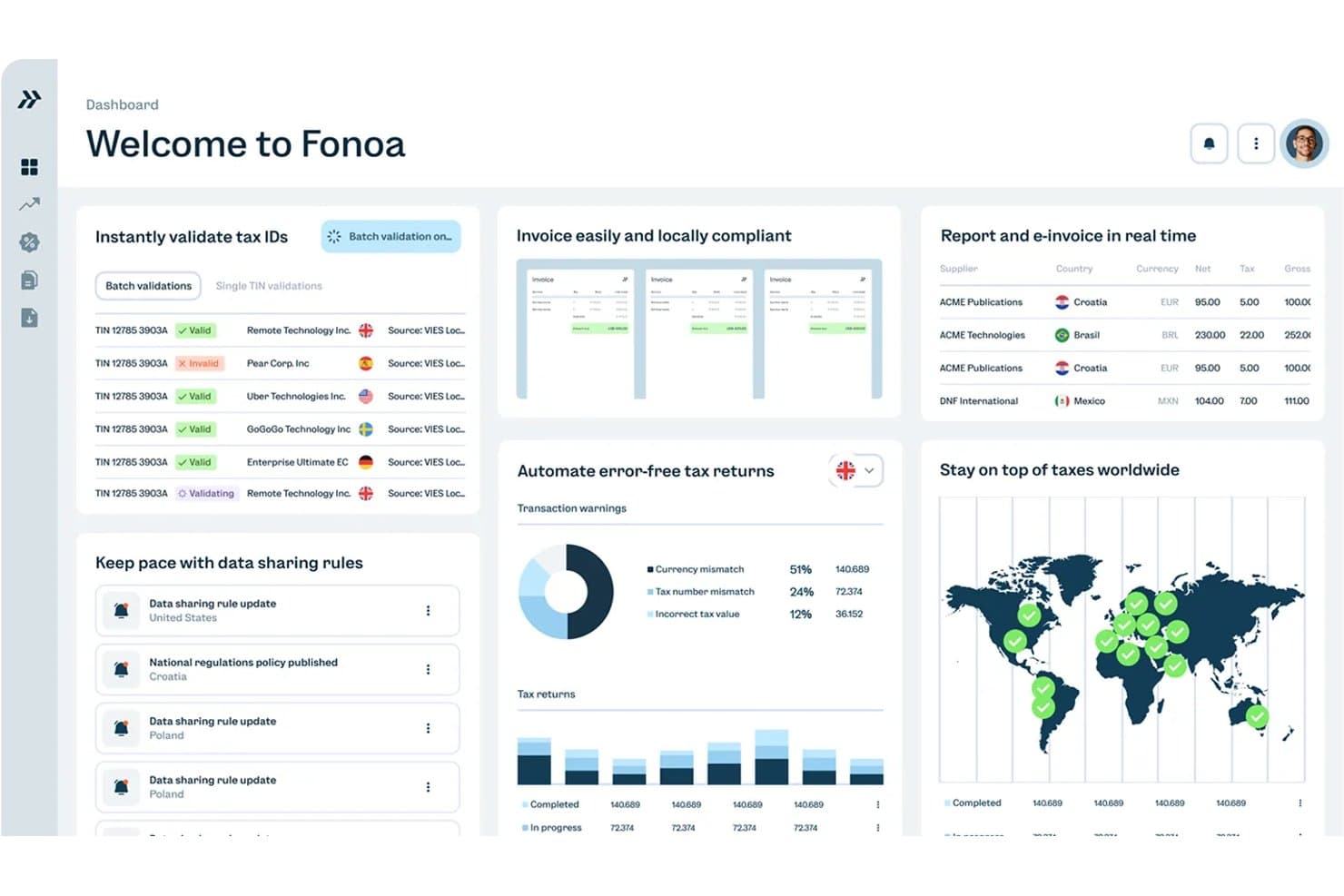
Fonoa centralizes tax ID validation, invoicing, and global tax compliance. Fonoa is an indirect tax compliance platform that automates VAT, GST, and sales tax calculation, e-invoicing, tax ID validation, return filing, and audit trail management across 190+ jurisdictions via an API-first architecture.
Who Is Fonoa Best For?
Fonoa is built for enterprise finance and tax teams at high-volume digital businesses managing indirect tax obligations across multiple countries.
Why I Picked Fonoa
I picked Fonoa as one of the best because no other platform on this list handles indirect tax at this geographic scale: real-time VAT, GST, and sales tax calculation across 190+ jurisdictions via a single API. What I find genuinely impressive is the Tax Engine's sub-200ms response time paired with automatic rule updates, so your calculations stay compliant without anyone manually tracking regulatory changes. The Audit module adds another layer I value, assembling a complete, queryable audit trail instantly when a tax authority comes knocking.
Fonoa Key Features
- Tax ID validation: Verifies supplier and customer tax IDs against live government registries across 120+ countries, with batch processing of up to 50,000 records at a time.
- E-invoicing API: Sends and receives compliant e-invoices across 50+ countries through a single API with automatic format conversion to local jurisdiction requirements.
- Multi-country return preparation: Auto-populates VAT, GST, and sales tax return forms from transaction data, with built-in validation checks before submission.
- Real-time regulatory alerts: Delivers personalized, materiality-ranked alerts when tax laws change, with plain-language explanations and role-based routing to the right team members.
Fonoa Integrations
Fonoa connects with SAP S/4HANA, Oracle Fusion Cloud, NetSuite, and billing platforms through its open REST API. It offers no clearly documented native or marketplace integrations, so custom engineering is required.
Pros and Cons
Pros:
- Maintains tax rules automatically across regions
- Provides instant, queryable audit trails
- Handles indirect tax in 190+ jurisdictions
Cons:
- Requires technical setup and API integration
- Supports indirect tax, not income tax
Learn more about Fonoa: Best for global payout automation
- Free plan + free demo available
- Pricing upon request
Visit WebsiteCustomer Rating:4.5/5
Payouts helps teams adhere to various tax regulations around the world with ease. Payouts makes my shortlist because it handles the complexity of multi-country payout workflows for teams managing global contractors or vendors. It automates things like currency conversion, compliance checks, and bulk scheduling—so you’re not validating requirements or calculating payouts country by country.What stands out is how it reduces the operational risk around payouts. Instead of payments getting delayed due to missing tax forms, incorrect details, or timing mismatches, you can see issues upfront—like incomplete documentation or compliance gaps—before funds are sent.Payouts' Best For
- Finance teams handling global payouts and multi-currency payments
- Organizations needing automated tax compliance for international contractors
Payouts' Not Great For
- Businesses focused only on domestic tax filings
- Teams wanting built-in tax calculation or preparation tools
What sets Payouts apart
Payouts stands out for how it approaches global mass payments. Unlike platforms like QuickBooks that focus on accounting first, Payouts is designed for organizations routinely moving funds to contractors and vendors in many countries. In practice, payment and compliance workflows are front and center, minimizing manual steps when dealing with a wide mix of countries.
Instead of trying to serve as a full-featured tax solution, it streamlines cross-border payouts and keeps payout data accessible for external tax software.
Tradeoffs with Payouts
Payouts optimizes for payments and compliance, but you lose out on integrated tax calculation features, so you’ll need a separate tool to handle tax prep and filings.
Pros and Cons
Pros:
- Offers a variety of payment methods, including cryptocurrencies
- Customizable workflows that adapt to specific business needs
- Supports multiple currencies
Cons:
- Potential delayed transactions and payment processing
- Poor mobile compatibility affects on-the-go management
Learn more about Payouts: 3Best for real-time data synchronization
Xero
- 1-month free trial available
- From $27/month
Visit WebsiteCustomer Rating:4.4/5
Xero lets you automatically compute sales tax on transactions and generate reports for tax returns. Xero makes my shortlist because it's the best I've found for syncing real-time tax and financial data across multiple systems. I see Xero work best for finance teams juggling transactions from various banks, payment processors, and sales channels who need everything up to date for tax season.
What stands out is its configurable workflow engine, which lets you assign review steps, track approval status, and manage audit trails in one place—so teams aren’t coordinating audits through email threads or spreadsheets.
Xero’s Best For
- Multinational businesses syncing real-time tax and financial data
- Teams handling frequent VAT, GST, and sales tax calculations
Xero’s Not Great For
- Organizations needing advanced U.S. income tax features
- Firms seeking highly customized tax workflow automation
What sets Xero apart
Xero is built for people who need financial and tax data that matches their actual business activity without manual tweaks. It expects you to manage day-to-day entries as they happen (bank feeds, expense claims, online invoices) so your tax report is never out of sync with reality. Unlike QuickBooks, which leans more into customizable accounting, Xero pushes for always-up-to-date records rather than lots of end-of-month adjustment.
Tradeoffs with Xero
By focusing on live data and automation, you lose access to some of the advanced tax preparation and filing workflows that full-featured U.S. tax tools offer.
Pros and Cons
Pros:
- Cloud-based accessibility
- Good reporting features
- User-friendly interface
Cons:
- Mobile app is not as robust as desktop version
- May not be suitable for large enterprises
Learn more about Xero: Best for comprehensive tax preparers
- Free trial available
- From $359.99/month
Visit WebsiteCustomer Rating:4.6/5
Drake Tax offers in-depth tax preparation, e-filing, and planning solutions for accountants and tax professionals. Drake Tax makes my shortlist because it consistently handles high-volume, complex tax preparation work at scale. I recommend it for tax professionals who manage various federal, state, and local filings under tight deadlines.
What I really value about Drake Tax is its comprehensive e-filing support, advanced error checking, and built-in form coverage for virtually every client scenario. It’s a go-to when you need deep coverage for detailed preparer workflows, including advanced client management and bulk return processing.
Drake Tax's Best For
- High-volume tax professionals handling diverse client returns
- Firms that require advanced compliance and bulk e-filing tools
Drake Tax's Not Great For
- Sole proprietors with basic tax needs
- Users looking for a lightweight or DIY tax tool
What sets Drake Tax apart
Drake Tax expects tax professionals to manage complex, high-volume returns efficiently. Instead of the simplified interface you see in something like TurboTax, Drake Tax is built around workflows that handle multiple clients, specialized forms, and detailed compliance tasks at once.
In practice, this works best for tax practices that prioritize breadth of tax coverage and deep control over client returns.
Tradeoffs with Drake Tax
Drake Tax optimizes for handling complex, professional tax scenarios, which means you sacrifice simplicity for speed on basic returns. If you want an easy, self-serve setup, the learning curve and feature set can feel excessive.
Pros and Cons
Pros:
- Offers secure file exchange and payment option solutions
- Available on both desktop and cloud platforms
- Manages all types of tax returns
Cons:
- Outdated and less user-friendly interface
- Cloud hosting requires an additional monthly fee
Learn more about Drake Tax: Best for Salesforce ERP integration
- Free demo available
- Pricing upon request
Visit WebsiteCustomer Rating:4/5
Certinia is a robust tax software offering streamlined tax compliance, reporting, and management solutions for businesses and enterprises. Certinia earns its place on my shortlist for how directly it links Salesforce data to tax and accounting workflows. I recommend it when you want tax processes to live where your CRM and ERP data already reside, especially for teams committed to the Salesforce platform.
I like that you can use tax calculation, revenue recognition, and audit trails right inside Salesforce, keeping everything connected and up to date. When I tested its reporting, seeing real-time financial and tax positions using Salesforce-native tools really stood out.
Certinia’s Best For
- Finance teams using Salesforce as their main ERP system
- Organizations needing unified tax, accounting, and CRM data
Certinia’s Not Great For
- Companies not invested in the Salesforce ecosystem
- Small businesses with simple tax management needs
What sets Certinia apart
Certinia is designed for organizations that already run their operations in Salesforce and want tax processes to follow the same workflows as their sales, finance, and service teams. Unlike standalone tax engines or traditional accounting systems, Certinia expects you to use Salesforce as your central hub. In practice, this tends to work best for businesses aiming to have a single source of financial truth without moving between multiple platforms.
Tradeoffs with Certinia
Certinia optimizes for a unified Salesforce experience, but that focus means you lose flexibility if you use other core platforms. You end up tied to the Salesforce ecosystem, which can be limiting if your business relies on a mix of ERP and CRM systems.
Pros and Cons
Pros:
- Focus on improving cash flow, project profitability, and employee utilization
- Comprehensive feature set for managing all aspects of service operations
- Deep integration with Salesforce for a unified business management experience
Cons:
- Limited customization options for specific business processes and reporting needs
- Requires a minimum number of users, which may not be suitable for very small businesses
Learn more about Certinia: Best for sales tax automation
- Free demo available
- Pricing upon request
Visit WebsiteCustomer Rating:4/5
Avalara is a tax automation software providing scalable solutions for tax compliance, calculation, and reporting for businesses of all sizes. Avalara ends up on my shortlist because it automates sales tax calculations and filings across jurisdictions, letting you avoid manual rate updates and compliance headaches. When multistate reporting gets messy or teams are managing hundreds of tax codes, this tool removes a lot of friction.
What stands out is its real-time tax calculation and filing support across the US and internationally. In practice, it calculates the correct tax at checkout based on location and product type, applies exemption certificates automatically, and tracks transactions in one place—so you’re not maintaining tax tables or reconciling data across spreadsheets. It also generates filing-ready reports, which cuts down the manual work of preparing returns across multiple jurisdictions.
Avalara’s Best For
- Companies handling sales tax in multiple US states
- Teams seeking automation for tax calculation and filing
Avalara’s Not Great For
- Businesses with only simple, single-state tax needs
- Users needing full corporate or income tax solutions
What sets Avalara apart
Avalara builds automation into the handling of sales tax compliance, letting you hand off rate calculations and filings instead of tracking them by spreadsheet. I notice it expects you to structure your tax processes around automation and integration with sales or finance platforms. Compared to something like QuickBooks, which assumes you’ll manage more tax work manually, Avalara is designed for volume and complexity.
Tradeoffs with Avalara
Avalara optimizes for automating sales tax, but you give up flexibility in handling unique, one-off tax scenarios or customizing beyond its automation framework. If you only file in a single state or need to handle less common tax types, it can end up feeling too heavy.
Pros and Cons
Pros:
- Offers solutions for both domestic and international sales tax compliance
- Integrates with over 1,200 business applications
- Detailed tax compliance features for various tax types
Cons:
- Complex and potentially time-consuming setup and integration
- Cost may vary significantly based on business size and transaction volume
 Best for tax provision alignment
- Free demo available
- Pricing upon request

Oracle Cloud EPM Tax Reporting includes features for Pillar Two compliance management. Oracle Cloud EPM Tax Reporting belongs on this list because it brings tax provision processes in line with your broader financial reporting, using the same data core for both. I tend to recommend it to finance teams where tax and financial reporting need to stay tightly in sync, especially for global or multi-entity groups.
What stands out to me is the real-time data flow between tax and financial close, plus strong scenario modeling for provision and compliance work. I appreciate how quickly you can identify mismatches and make adjustments without reworking your whole process.
Oracle Cloud EPM Tax Reporting’s Best For
- Multinational groups aligning tax and financial reporting
- Teams managing complex tax provision and compliance cycles
Oracle Cloud EPM Tax Reporting’s Not Great For
- Small businesses with basic tax prep needs
- Firms wanting standalone tax-only solutions without financial close integration
What sets Oracle Cloud EPM Tax Reporting apart
Oracle Cloud EPM Tax Reporting is designed so your tax workflows use the same data foundation and logic as your financial close processes. Instead of working like a standalone tax engine (like CCH Axcess Tax), Oracle assumes you want tax and accounting to move in parallel. I find this fits best when you need tax teams to pull directly from the same live financial data as reporting and compliance.
Tradeoffs with Oracle Cloud EPM Tax Reporting
Optimizing for alignment with your financial close means you lose some flexibility and simplicity compared to traditional, tax-focused prep systems. If your work is strictly tax-only, the unified approach is likely overkill.
Pros and Cons
Pros:
- Deep integration with Oracle ecosystem
- Robust global compliance capabilities
- Aligns with US GAAP and IFRS
Cons:
- Limited flexibility beyond Oracle stack
- Best suited for large enterprises
Learn more about Oracle Cloud EPM Tax Reporting:

TurboTax Business is a comprehensive tax software providing specialized tools for accurate and efficient tax preparation for businesses and corporations. TurboTax earns its spot for automating the most tedious parts of guided business tax filing, especially when schedules and forms start to stack up. I find its interview-style workflows and real-time error checks take out a lot of guesswork, especially for S corporations and LLCs.
I like how it spots possible IRS audit triggers and gives you a straightforward review summary before you file. This is usually when I see business owners breathe easier about missing deductions or handling multistate returns.
TurboTax’s Best For
- Small business owners needing guided federal and state filing
- S corporations or LLCs with straightforward reporting
TurboTax’s Not Great For
- Enterprise tax teams with complex, custom requirements
- Companies with extensive international tax exposure
What sets TurboTax apart
TurboTax stands out by fully guiding you through business tax filing, breaking the process into clear, question-based steps. Unlike something like QuickBooks, which assumes you already understand tax workflows, TurboTax keeps things structured and reduces the learning curve. You work through document uploads and compliance checks on rails, following the order it sets. This tends to suit small businesses who want hands-on guidance rather than control over the process.
Tradeoffs with TurboTax
TurboTax prioritizes guided workflows and structure, but that means you lose flexibility to tweak complex business tax scenarios on your terms. For companies that need bespoke adjustments or manage lots of irregular tax cases, this can be limiting.
Pros and Cons
Pros:
- User-friendly interface for easy tax filing
- Audit Defense included without extra charge
- Access to tax experts for personalized guidance
Cons:
- May not cater to all types of business entities or complex tax situations
- Additional fees for state filing and other services
Learn more about TurboTax: Best for complex tax scenarios
- Free demo available
- From $479/year (billed annually)

Lacerte Tax is a professional tax software providing advanced features for accurate and efficient tax preparation for accountants and tax experts. Lacerte Tax stands out for handling highly specialized and challenging tax situations that many platforms just don’t cover well. I recommend it when you’re juggling multi-state returns, trusts, estates, or complex partnership filings and don’t want to hit limitations halfway through busy season.
What I like here is the breadth of advanced forms and diagnostic tools aimed at catching errors and prepping nuanced filings. In practice, accountants working with high-net-worth clients or unique entity structures routinely lean on these features to avoid bottlenecks and last-minute surprises.
Lacerte Tax's Best For
- Accountants who handle multi-state or complex entity returns
- Firms specializing in trusts, estates, and high-net-worth clients
Lacerte Tax's Not Great For
- Solo preparers with only basic personal tax clients
- Small practices seeking a simplified, question-based workflow
What sets Lacerte Tax apart
Lacerte Tax is built to handle complex tax needs, not just simple returns. In practice, it expects you to bring deep tax knowledge and handle details that tools like TurboTax or Drake might simplify or automate. I see accountants using it for situations with complicated entity structures, dense state regulations, or special scenarios like trusts and estates where out-of-the-box forms aren’t enough.
Unlike generalist tax software, it leans into customization, form depth, and diagnostic guides for those who need more than a basic Q&A workflow.
Tradeoffs with Lacerte Tax
Lacerte Tax optimizes for detail and technical depth, but you sacrifice speed and simplicity when you only need to complete straightforward tax prep. For mostly standard personal returns, the extra options make setup and navigation slower than lighter tools.
Pros and Cons
Pros:
- Integrates with QuickBooks and other key software
- Over 25,000 diagnostic checks to spot errors
- Extensive form library with over 5,700 forms
Cons:
- Lack of flexibility and customization
- Higher cost relative to some other tax software
Learn more about Lacerte Tax:

Thomson Reuters tax software offers advanced tax compliance, planning, and reporting solutions for tax professionals and businesses worldwide. Thomson Reuters GoSystem Tax RS earns a spot here for how it handles complex corporate tax filings at large scale. I see accounting teams at enterprise groups lean on its secure cloud architecture for preparing, reviewing, and e-filing federal and state returns.
What sets it apart for me is its capacity for handling tricky consolidated returns, automated workpaper organization, and review workflows built for distributed teams. I like how you can manage high-volume returns with controls around collaboration and compliance.
GoSystem Tax RS’s Best For
- Enterprise tax teams filing complex corporate returns
- Firms handling high-volume, multi-entity tax preparation
GoSystem Tax RS’s Not Great For
- Small businesses with basic tax needs
- Users who want fast setup without training
What sets GoSystem Tax RS apart
GoSystem Tax RS is designed for high-stakes environments where tax compliance and collaboration need enterprise-level control. Unlike something like ProSeries that caters to smaller firms, this tool puts structure first: organizing multi-entity workflows, user permissions, and review layers around tight deadlines and regulatory standards. In practice, this feels closer to using a compliance-focused ERP than a consumer tax solution.
Tradeoffs with GoSystem Tax RS
GoSystem Tax RS optimizes for control and compliance, but you lose speed and simplicity, which means onboarding is slow and routine changes take more effort.
Pros and Cons
Pros:
- Integrates with other Thomson Reuters applications and third-party software
- Cloud-based platform for real-time collaboration
- Handles complex corporate tax returns efficiently
Cons:
- Requires internet connectivity for full functionality
- Not ideal for firms primarily preparing individual or simple returns
Learn more about Thomson Reuters GoSystem Tax RS:
Diğer Vergi Yazılımları
Aşağıda kısa listeme aldığım diğer vergi yazılımlarının bir listesi yer alıyor. İlk 10’a girememiş olsalar da hâlâ değerliler ve daha fazla araştırmaya değerler.
- 11Cash App TaxesBest for free tax filing service
- 12Bloomberg TaxBest for tax issue analysis
- 13Longview TaxBest for large-scale tax data management
- 14TaxAct BusinessBest for DIY business tax preparation
- 15SovosBest for global tax compliance
- 16VertexBest for real-time tax determination
- 17IrisBest for UK tax compliance
- 18Jackson HewittBest for Lifetime Accuracy Guarantee
- 19TrolleyBest for global payment tax compliance
- 20TaxWise OnlineBest for remote tax professionals
- 21TaxCalcBest for diverse tax return needs
- 22H&R Block Premium & BusinessBest for small businesses
İlgili Vergi Yazılımı İncelemeleri
Aradığınızı hâlâ burada bulamadıysanız test edip değerlendirdiğimiz, vergi yazılımlarıyla yakından ilişkili şu araçlara göz atın.
- Muhasebe Yazılımları
- POS Sistemleri
- Faturalama Yazılımları
- Bordro Hizmetleri
- Üye İşyeri Hesabı Hizmetleri
How I Evaluate Tax Software
I evaluate tax software in two layers: baseline requirements like multi-jurisdiction e-filing and compliance updates, then differentiators that separate a CPA tool from an enterprise solution.
Core Functionality (Table Stakes For This List)
When I'm selecting tools for my list, I rank each one on a scale from 0 (does not offer the functionality) to 5 (excels in this area) for each core functionality listed below. Then, I calculate the tool's total score into a percentage. Each tool needs to achieve a minimum total score of 75% to be considered for inclusion.
- Tax Return Preparation: I check whether a platform covers the return types your team actually files—individual, partnership, S-corp, trust—not just a single basic form.
- E-Filing Capabilities: Each tool should support direct e-filing to federal and state agencies with submission tracking, not just generate forms you print and mail.
- Tax Calculation Engine: I evaluate how well the engine handles multi-jurisdiction scenarios, like a business with nexus in several states that needs accurate withholding and credit calculations.
- Compliance & Regulatory Updates: Tax rules shift constantly, so I look for platforms that push automatic form and rate updates rather than requiring you to download patches manually.
- Accounting & Financial Data Integration: Whether it's pulling GL data from QuickBooks, syncing payroll from ADP, or importing 1099s, I look at how smoothly each tool connects to your existing stack.
- Audit Trail & Reporting: I evaluate whether the platform logs preparer activity, tracks return versions, and generates supporting schedules you can hand to an auditor without scrambling.
Once I have a list of tools that meet this criteria, I consider what sets each platform apart.
Differentiating Factors (What Sets Vendors Apart)
Here's how I compare and contrast different vendors:
Standout Features
Multi-entity management matters if your firm handles filings for subsidiaries or multiple client accounts—I look for platforms that let you switch between entities without logging in and out. A secure client portal also makes a big difference during filing season, replacing email chains with organized document requests and e-signatures. I evaluate scenario planning tools too, particularly ones that model projected liabilities to help corporate tax managers advise leadership on the impact of restructuring or expansion decisions.
Beyond Features
Security is a major consideration—I check for SOC 2 Type II compliance and multi-factor authentication, since tax platforms handle sensitive financial data year-round. I also evaluate support availability during peak filing periods, when a delayed response can mean missed deadlines. Pricing transparency rounds out my review. I look at how each vendor structures costs per return, per user, or per entity to understand total cost as your filing volume grows.
Vergi Yazılımı Nasıl Seçilir?
Uzun özellik listeleri ve karmaşık fiyatlandırma yapıları içinde kaybolmak kolaydır. Kendinize özgü yazılım seçim sürecinizi yürütürken odaklanmanıza yardımcı olmak için göz önünde bulundurmanız gereken faktörleri içeren bir kontrol listesi hazırladım:
| Faktör | Dikkat Edilmesi Gerekenler |
|---|---|
| FaktörÖlçeklenebilirlik | Dikkat Edilmesi GerekenlerYazılım büyümenize uyum sağlayacak mı? Artan veri ve kullanıcı sayısını yönetebildiğinden emin olun. İhtiyaçlarınıza göre ölçeklenebilen esnek fiyatlandırma modelleri arayın. |
| FaktörEntegrasyonlar | Dikkat Edilmesi GerekenlerMevcut araçlarınıza bağlanabiliyor mu? Manuel veri girişini önlemek için muhasebe yazılımları ve diğer temel sistemlerle uyumluluğunu kontrol edin. |
| FaktörÖzelleştirilebilirlik | Dikkat Edilmesi GerekenlerYazılımı süreçlerinize göre uyarlayabilir misiniz? İş akışlarını ve raporları özel gereksinimlerinize uygun şekilde değiştirme seçenekleri arayın. |
| FaktörKullanım Kolaylığı | Dikkat Edilmesi GerekenlerEkibiniz için kullanıcı dostu mu? Öğrenme eğrisini göz önünde bulundurun ve eğitim süresini en aza indiren sezgisel arayüzler arayın. |
| FaktörUygulama ve Kullanıma Alma | Dikkat Edilmesi GerekenlerKurulum süreci ne kadar sorunsuz? Kullanıma sunma sırasında sağlayıcı desteğini değerlendirin. Hızlı kullanıma alma, zaman kazandırabilir ve aksaklıkları azaltabilir. |
| FaktörMaliyet | Dikkat Edilmesi GerekenlerBütçenize uygun mu? Uzun vadede karşılanabilir olduğundan emin olmak için gizli ücretler de dâhil olmak üzere toplam sahip olma maliyetini karşılaştırın. |
| FaktörGüvenlik Önlemleri | Dikkat Edilmesi GerekenlerVerileriniz korunuyor mu? Güçlü şifreleme, GDPR gibi standartlara uyumluluk ve düzenli güvenlik güncellemeleri arayın. |
| FaktörUyumluluk Gereklilikleri | Dikkat Edilmesi GerekenlerDüzenleyici ihtiyaçları karşılıyor mu? Cezalardan kaçınmak için yazılımın sektörünüze özgü vergi uyumluluğu gerekliliklerini desteklediğini doğrulayın. |
Vergi Yazılımı Trendleri
Hızlı teknolojik yenilikler ve değişen düzenlemeler sayesinde vergi yazılımlarının gelişmeye devam ettiğini fark ettim.
Günümüzün en iyi çözümlerini araştırıp incelerken birkaç önemli trend öne çıktı: otomasyon giderek daha akıllı hâle geliyor, mobil erişim yaygınlaşıyor ve yapay zekâ vergi hazırlama süreçlerinde daha büyük bir rol oynamaya başlıyor.
Başka neler bulduğuma göz atın:
- Muhasebe Platformlarıyla Entegrasyon: Vergi yazılımı, muhasebe platformlarıyla uyumluluğunu geliştirerek gerçek zamanlı vergi raporlaması ve kolaylaştırılmış uyumluluk olanağı sağlıyor. Bu gelişme, vergi ve muhasebe verilerini sorunsuz bir şekilde senkronize ederek işletmelerin finansal yönetimini kolaylaştırıyor.
- Yapay Zekâ Destekli Vergi Tahminleri: Yapay zekâ, vergi yükümlülüklerini tahmin etmek ve gelecekteki ödemeleri öngörmek amacıyla finansal verileri analiz etmek için kullanılıyor. Bu eğilim, finansal planlama ve risk yönetimine yardımcı olması açısından dikkat çekici.
- Gelişmiş Veri Güvenliği Önlemleri: Vergi yazılımı, hassas vergiyle ilgili verileri korumak için şifreleme ve çok faktörlü kimlik doğrulama da dâhil olmak üzere gelişmiş güvenlik önlemlerine öncelik veriyor. Finansal bilgilerin gizli niteliği göz önüne alındığında bu artan odaklanma büyük önem taşıyor.
- Kullanıcı Dostu Mobil Uygulamalar: Vergi yazılımına yönelik mobil uygulamalar daha kullanıcı dostu hâle geliyor ve kullanıcılara vergilerini hareket hâlindeyken yönetme kolaylığı sunuyor. Bu eğilim, işletme faaliyetlerinde mobil kullanımın giderek arttığını göstermesi açısından önemli.
- Bulut Tabanlı Vergi Çözümleri: Bulut tabanlı vergi çözümleri, ölçeklenebilirlik ve vergi verilerine uzaktan erişim sundukları için yaygınlaşıyor. Bu durum, vergi yönetiminde esneklik ve verimlilik arayan işletmeler için önem taşıyor.
Vergi Yazılımı Nedir?
Vergi yazılımı, bireylerin ve işletmelerin vergi beyannamelerini verimli bir şekilde hazırlamasına, sunmasına ve yönetmesine yardımcı olan dijital bir araçtır. Hesaplamaları otomatikleştirir, güncel vergi yasalarına uyumu sağlar ve insan kaynaklı hataları en aza indirir.
Serbest çalışanlardan büyük işletmelere ve kurumsal yapılara kadar herkes için tasarlanan vergi yazılımı zamandan tasarruf sağlar, denetim risklerini azaltır ve çoğu zaman kullanıcıların manuel olarak gözden kaçırabileceği indirimleri tespit eder. İster basit bir beyanname sunuyor ister karmaşık işletme vergileriyle ilgileniyor olun, bu yazılım süreci basitleştirir ve doğruluğun sağlanmasına yardımcı olur.
Vergi Yazılımının Özellikleri
Vergi yazılımı seçerken aşağıdaki temel özelliklere dikkat edin:
- Kullanıcı dostu arayüz: Yazılım, vergi beyannamenizi sunma sürecinde size adım adım rehberlik eden, anlaşılır ve sezgisel bir düzene sahip olmalıdır. Sade bir arayüz zamandan tasarruf etmenizi sağlayabilir ve stresli bir görevi çok daha yönetilebilir hâle getirebilir.
- Otomatik hesaplamalar: Vergi yazılımı hesaplamaları sizin için otomatik olarak yapar; böylece hata riski azalır ve size para kaybettirebilecek veya denetimleri tetikleyebilecek yanlışlıklardan kaçınmanıza yardımcı olur.
- İndirim ve vergi kredisi rehberliği: Kişisel ve finansal bilgilerinize göre yararlanabileceğiniz indirimleri ve vergi kredilerini gösteren bir platform arayın. Bu özellik, geri ödemenizi en üst düzeye çıkarmanıza yardımcı olur (ayrıca paranızı masada bırakmanızı önler).
- Elektronik beyanname sunma olanağı: Bu özellik, vergi beyannamenizi doğrudan yazılım üzerinden elektronik olarak sunmanıza olanak tanır. Elektronik beyanname sunmak daha hızlı ve güvenlidir; ayrıca genellikle geri ödemenizi kâğıt formları postalamaya kıyasla daha çabuk almanızı sağlar.
- Finansal verileri içe aktarma: Vergi yazılımı genellikle W-2, 1099 veya geçen yıla ait beyannameleri işvereninizden, bankanızdan ya da önceki yazılımınızdan içe aktarmanıza olanak tanır. Bu özellik, manuel veri girişini azaltarak zamandan tasarruf etmenize ve yazım hatalarından kaçınmanıza yardımcı olur.
- Denetim desteği: Talihsiz bir şekilde denetime tabi tutulursanız bazı vergi yazılımları süreç boyunca size rehberlik edecek kaynaklar, araçlar veya uzman desteği sunar. IRS kapınızı çaldığında bu özellik içinizin rahat etmesini sağlayabilir.
- Eyalet vergisi beyannamesi sunma: Birçok ürün, federal ve eyalet vergi beyannamelerini tek bir deneyim üzerinden yönetmenize olanak tanır. Bu da süreci basitleştirir ve düzenli kalmanıza yardımcı olur.
- Veri güvenliği: Vergi yazılımı, hassas verilerinizi güçlü şifreleme ve güvenlik önlemleriyle korumalıdır. Bu, finansal bilgilerinizin meraklı gözlerden uzak tutulmasını sağlar.
Vergi Yazılımlarında Yaygın Yapay Zekâ Özellikleri
Yukarıda listelenen standart vergi yazılımı özelliklerinin yanı sıra bu çözümlerin birçoğu aşağıdaki gibi özelliklerle yapay zekâyı da bünyesine katıyor:
- Akıllı belge tanıma: Yapay zekâ çeşitli vergi belgelerini (W-2 veya 1099 gibi) tarayıp tanır, ilgili verileri çıkarır ve formları otomatik olarak doldurur. Böylece zamandan tasarruf etmenizi sağlar ve hataları azaltır.
- Kişiselleştirilmiş indirim önerileri: Yapay zekâ, finansal bilgilerinizi analiz ederek size özgü durumunuza uygun indirimler ve vergi kredileri önerebilir; bu da vergi sonucunu en iyi hâle getirmenize yardımcı olur.
- Hata tespiti ve düzeltme: Yapay zekâ algoritmaları beyannamenizdeki tutarsızlıkları veya yaygın hataları tespit ederek sunumdan önce düzeltme önerir. Böylece utandırıcı hatalardan ve olası cezalardan kaçınabilirsiniz.
- Gerçek zamanlı sohbet desteği: Yapay zekâ destekli sohbet robotları vergi sorularına ve sorun giderme taleplerine günün her saati yanıt vererek beyannamenizin kafanızı karıştıran bir bölümünde anında destek almanızı sağlar.
- Tahmine dayalı geri ödeme hesaplaması: Yapay zekâ, bilgileri girdikçe beklenen geri ödemeniz veya borcunuz hakkında güncel bir tahmin sunabilir. Bu da önceden plan yapmanıza ve buna göre ayarlama yapmanıza olanak tanır.
Vergi Yazılımının Faydaları
Karmaşık süreçleri otomatikleştiren ve vergi yasalarına uyumu sağlayan vergi yazılımı, aşağıdakiler de dâhil olmak üzere çeşitli avantajlar sunar:
- Doğruluk ve Hata Azaltma: Vergi yazılımı, hesaplamalardaki insan hatalarını en aza indirir. Hesaplama sürecini otomatikleştiren yazılım, tüm girişlerin doğru olmasını sağlayarak cezalara veya denetimlere yol açabilecek hata olasılığını azaltır.
- Zaman Tasarrufu: Vergi yazılımı kullanmak, vergi hazırlama sürecindeki tekrarlayan görevlerin çoğunu otomatikleştirdiği için kullanıcıların önemli ölçüde zaman kazanmasını ve vergi beyannamelerini daha hızlı tamamlamasını sağlar.
- Güncel Vergi Mevzuatına Uygunluk: Vergi yazılımı, en güncel vergi kanunlarını ve düzenlemelerini yansıtacak şekilde düzenli olarak güncellenir ve kullanıcıların yürürlükteki mevzuata her zaman uygun olmasını sağlar. Örneğin, Avustralya vergi yazılımı, işletmelerin ATO gereklilikleri ve BAS/GST yükümlülükleri konusunda güncel kalmasına yardımcı olabilirken Kanada vergi yazılımı, CRA gereklilikleri doğrultusunda beyanda bulunmayı destekleyebilir.
- Kullanım Kolaylığı: Kullanıcı dostu arayüzler ve adım adım yönlendirme sayesinde vergi yazılımı, kişilerin ve işletmelerin derinlemesine vergi bilgisine ihtiyaç duymadan vergilerini beyan etmelerini kolaylaştırır.
- Maliyet Etkinliği: Vergi yazılımı kullananlar, vergi uzmanlarını işe almanın beraberinde getirdiği daha yüksek maliyetlerden çoğu zaman kaçınabilir. Bu da yazılımı vergi yükümlülüklerini yönetmek için daha maliyet etkin bir çözüm hâline getirir.
Vergi Yazılımının Maliyetleri ve Fiyatlandırması
Vergi yazılımı seçerken her zaman önce farklı planlara ve fiyatlandırmaya bakarım. Çoğu araç, kademeli seçenekler sunar: basit kişisel vergiler için temel planlar, işletmeler veya karmaşık beyannameler içinse gelişmiş planlar.
Her plan genellikle elektronik beyan, müşteri desteği ve indirim takibi gibi temel özellikleri içerir. Aşağıda nelerin dahil olduğuna ve ne kadara mal olduğuna dair kısa bir özet yer alıyor; böylece ihtiyaçlarınıza uygun seçeneği kolayca bulabilirsiniz.
Vergi Yazılımı İçin Plan Karşılaştırma Tablosu
| Plan Türü | Ortalama Fiyat | Yaygın Özellikler |
| Ücretsiz Seçenek | $0 | Basit vergi beyannameleri için temel beyan, standart indirimler ve sınırlı müşteri desteği. |
| Temel | $30 - $50 | Ücretsiz seçenekteki tüm özelliklere ek olarak ilave indirimleri, vergi kredilerini ve müşteri desteğini içerir. |
| Deluxe | $50 - $70 | Temel plandaki tüm özelliklere ek olarak ayrıntılı indirimleri, ipotek faizini ve bağış indirimlerini içerir. |
| Premier | $70 - $100 | Deluxe plandaki tüm özelliklere ek olarak yatırım geliri bildirimini, kiralık mülk gelirini ve yeniden finansmanı içerir. |
| Serbest Çalışan | $100 - $120 | Premier özelliklerine ek olarak işletme gelirlerini ve giderlerini, ev ofisi indirimlerini ve varlık amortismanını içerir. |
| İşletme | $120 - $170 | Küçük işletme sahipleri için tasarlanmıştır; Serbest Çalışan planındaki tüm özelliklere ek olarak işveren vergi formlarını içerir. |
Vergi Yazılımı SSS'leri
Vergi yazılımı hakkında aldığım bazı yaygın soruları burada bulabilirsiniz:
Vergi yazılımı, firmamın mevcut muhasebe veya ERP sistemleriyle nasıl entegre olabilir?
Çoğu vergi yazılımı, API’ler veya yerleşik bağlayıcılar kullanarak popüler muhasebe ya da ERP platformlarıyla entegrasyon sunar. Genellikle verileri otomatik olarak senkronize edebilir, böylece manuel veri girişini ve hataları azaltabilirsiniz. Bir araç seçmeden önce, mevcut sistemlerinizle uyumluluğu sağlamak için entegrasyon kılavuzlarını kontrol edin.
Bazı sağlayıcılar, uygulamalar arasında sorunsuz veri akışı oluşturmanıza yardımcı olmak için destek veya geçiş hizmetleri de sunar.
Vergi uzmanları, vergi yazılımında hangi denetim ve uyumluluk özelliklerini aramalıdır?
Vergi uzmanları; otomatik denetim izleri, yerleşik uyumluluk kontrolleri, güvenli belge depolama ve elektronik dosyalama onayı gibi özellikleri aramalıdır. Birçok platform, gönderimden önce eksik veriler veya hatalar konusunda sizi uyarır. Güçlü uyumluluk özellikleri, denetim riskini azaltmaya ve uygulamanızın vergi mevzuatındaki güncellemelerle uyumlu kalmasına yardımcı olur.
Kayıtların müşterilerle veya IRS ile güvenli şekilde paylaşılmasını da destekleyen araçları arayın.
Vergi yazılımı en güncel vergi yasaları için güncellenir mi?
Evet, saygın vergi yazılımları yeni vergi yasalarını ve IRS kurallarını yansıtmak için düzenli olarak güncellenir. Çoğu sağlayıcı, her vergi sezonundan önce güncellemeleri yayınlayarak doğru beyannameler sunmanızı sağlar.
Firmalar ve uzmanlar için önde gelen platformlar, mevzuat yürürlüğe girdiğinde yıl ortasında yapılan değişiklikleri de sunar; böylece müşterileriniz uyumluluğunu korur. Yazılımınızın güncelleme takvimini mutlaka doğrulayın ve karmaşık beyannameler hazırlamadan önce güncelleme notlarını inceleyin.
Önde gelen vergi yazılımı çözümleri, birden fazla işletme veya konsolide vergi beyannamelerini nasıl ele alır?
Önde gelen vergi yazılımı platformları, tek bir kontrol panelinden birden fazla işletmeyi veya bağlı kuruluşu yönetmenize olanak tanıyarak birden fazla işletmeye ait beyannameleri destekler. Genellikle konsolide beyannameleri otomatikleştirir ve gerekli birleşik raporlamayı oluştururlar.
Birden fazla müşteri veya iş birimiyle çalışıyorsanız yazılımınızın işletme düzeyinde izinleri, özel raporlamayı ve verilerin güvenli şekilde ayrılmasını desteklediğinden emin olun.
Firma genelinde kullanım için masaüstü ve bulut tabanlı vergi yazılımı arasında fark var mı?
Evet, bulut tabanlı vergi yazılımı uzaktan erişim, otomatik güncellemeler ve ekipler arasında daha kolay iş birliği sunar. Masaüstü çözümleri, büyük veri kümeleri için daha fazla özelleştirme veya hız sağlayabilir; ancak gerçek zamanlı veri paylaşımından yoksundur.
Birden fazla kullanıcısı veya konumu olan firmalar için bulut seçenekleri iş akışını iyileştirir ve BT ile ilgili sorunları azaltır. Platformlardan birini seçmeden önce güvenlik protokollerini mutlaka karşılaştırın.
En iyi ücretsiz vergi yazılımı hangisidir?
TurboTax Free Edition ve Credit Karma Tax gibi çeşitli platformlar, temel kişisel vergi beyannameleri için gerçekten ücretsiz sürümler sunar. Bunlar genellikle basit W-2 ve sınırlı sayıda 1099 formunu destekler.
Daha karmaşık ihtiyaçlar veya ticari beyannameler için TaxAct ya da H&R Block gibi sağlayıcıların ücretsiz deneme sürümlerini kullanabilirsiniz; ancak ücretli sürümlere yükseltme yapmadan özellikler ve destek sınırlı olabilir.
En iyi kripto vergi yazılımı hangisidir?
Koinly, CoinTracker ve TaxBit, kripto vergi raporlamasını yönetme konusunda önde gelen çözümlerdir. Bu araçlar, sermaye kazançlarını, zararlarını ve vergilendirilebilir olayları hesaplamak için cüzdanlardan ve borsalardan işlem verilerini içe aktarır.
Birçoğu, hem itibari para hem de kripto vergilerini tek bir yerden yönetebilmeniz için yaygın vergi hazırlama yazılımlarıyla entegre olur. Kripto vergi yazılımınızın ülkeye özgü düzenlemelere göre güncel kalıp kalmadığını mutlaka kontrol edin.
Vergi yazılımı sağlayıcılarından ne tür bir destek bekleyebilirim?
Destek seçenekleri değişiklik gösterir; ancak çoğu vergi yazılımı sağlayıcısı telefon, sohbet veya e-posta yoluyla yardım sunar. Uzmanlar genellikle öncelikli destek, işe alıştırma yardımı ve daha büyük firmalar için özel hesap yöneticileri alır.
En iyi vergi yazılımlarından bazıları, sorun giderme için entegrasyon yardımı, canlı eğitim veya bilgi tabanları da sağlar. Hassas veya karmaşık beyannamelerle çalışıyorsanız vergi uzmanlarına günün her saati ya da uzmanlaşmış destek sunan sağlayıcıları arayın.