

Los sistemas ERP integran diversos procesos empresariales, como las finanzas, los recursos humanos y la cadena de suministro, en una única plataforma, lo que proporciona una mayor eficiencia y precisión de los datos. Sin embargo, encontrar la solución adecuada para tu equipo puede requerir que revises varias soluciones alternativas.
Gracias a mi experiencia combinada en software ERP y operaciones financieras, probé y comparé varias soluciones ERP para ayudar a los equipos a encontrar las mejores herramientas del mercado. Al recopilar mis resultados en reseñas detalladas, espero orientarte hacia tu próximo software, que contribuirá eficazmente al crecimiento de tu empresa y a la gestión de sus operaciones.
¿Qué es un ERP?
El software de planificación de recursos empresariales (ERP) es un tipo de software que integra diversos procesos y funciones empresariales en un único sistema. Con un ERP, las empresas pueden gestionar las finanzas, los recursos humanos, la cadena de suministro y otras actividades empresariales esenciales desde una ubicación central, aumentando la productividad y reduciendo los costes.
Por qué confiar en nuestras recomendaciones de software
6,700+
Reviews
20
Industry experts
16+
Evaluation factors
14
Years
Nuestras reseñas reflejan nuestro criterio independiente, no un discurso de ventas. Descubra cómo mantenemos la transparencia.
Para esta guía, evaluamos las herramientas mediante pruebas prácticas e investigación independiente, puntuando las herramientas según nuestros criterios de selección.
Nuestras reseñas reflejan nuestro criterio editorial humano, no un discurso de ventas.
Tabla comparativa de alternativas a ERP
Esta tabla comparativa resume los detalles de precios de mis principales alternativas a ERP seleccionadas:
| Tool | Best For | Trial Info | Price | ||
|---|---|---|---|---|---|
| 1 | Mejor para pequeños fabricantes que necesitan entregas precisas y a tiempo | Prueba gratuita de 30 días disponible | Desde $49/usuario/mes | Website | |
| 2 | Mejor para incorporación y soporte liderados por CPA | Demo gratuita disponible | Precios a consultar | Website | |
| 3 | Ideal con CRM integrado y herramientas de embudo de ventas | Prueba gratuita disponible | Desde $35/usuario/mes | Website | |
| 4 | Mejor para la gestión de recursos centrada en las personas y el ciclo de vida completo | No disponible | Precios disponibles bajo solicitud | Website | |
| 5 | Mejor con más de 1,000 conectores de aplicaciones preconstruidos | Demo gratuita disponible | Precios bajo consulta | Website | |
| 6 | Ideal para la gestión de pequeñas y medianas empresas | Demostración gratuita disponible | Precios disponibles a solicitud | Website | |
| 7 | Mejor para ERP en la nube con información en tiempo real | Demo gratuita disponible | Precio bajo demanda | Website | |
| 8 | Ideal para la gestión de finanzas y recursos humanos con recalibración continua | Demostración gratuita disponible | Precio a consultar | Website | |
| 9 | Ideal para la gestión financiera y de operaciones | Demostración gratuita disponible | Precio a consultar | Website | |
| 10 | Ideal para el rendimiento conectado del inventario con información en tiempo real | Prueba gratuita de 14 días + demostración gratis disponible | Desde $349/mes | Website |


Reseñas de las mejores alternativas a ERP
En esta sección, ofreceré un análisis y una descripción detallados de cada alternativa a ERP. Te explicaré las ventajas y desventajas de cada herramienta, sus funciones y sus casos de uso más adecuados.
 Mejor para pequeños fabricantes que necesitan entregas precisas y a tiempo
- Prueba gratuita de 30 días disponible
- Desde $49/usuario/mes
Visit WebsiteCustomer Rating:4.5/5
MRPeasy es una solución ERP fácil de usar basada en la nube, diseñada para pequeños fabricantes, que optimiza la producción, el inventario y la gestión de la cadena de suministro. MRPeasy es un software de fabricación diseñado para pequeños fabricantes. Destaca por ofrecer entregas precisas y puntuales, mejorar la satisfacción del cliente y optimizar los procesos de producción.
Por qué elegí MRPeasy: El enfoque de MRPeasy en pequeños fabricantes que necesitan entregas precisas y a tiempo lo hace destacar como una de las mejores soluciones ERP. Sus funciones avanzadas están orientadas a entornos de producción a pequeña escala, lo que lo convierte en una alternativa fiable a los sistemas ERP tradicionales.
Características destacadas e integraciones:
Características incluyen planificación de producción precisa, gestión de inventario en tiempo real, vista completa de las operaciones comerciales, gestión de listas de materiales (BOM), reprogramación por arrastrar y soltar, y trazabilidad de lotes.
Integraciones incluyen QuickBooks Online, Xero, Shopify, Magento, BigCommerce, WooCommerce, Pipedrive, ShipStation, Zapier, Ware2Go.
Pros and Cons
Pros:
- Interfaz fácil de usar
- Herramientas completas de planificación de producción
- Gestión de inventario en tiempo real
Cons:
- Funcionalidad y accesibilidad móvil limitada
- Las actualizaciones de software poco frecuentes pueden retrasar el acceso a nuevas funciones
Learn more about MRPeasy: Mejor para incorporación y soporte liderados por CPA
- Demo gratuita disponible
- Precios a consultar
Visit WebsiteCustomer Rating:4.9/5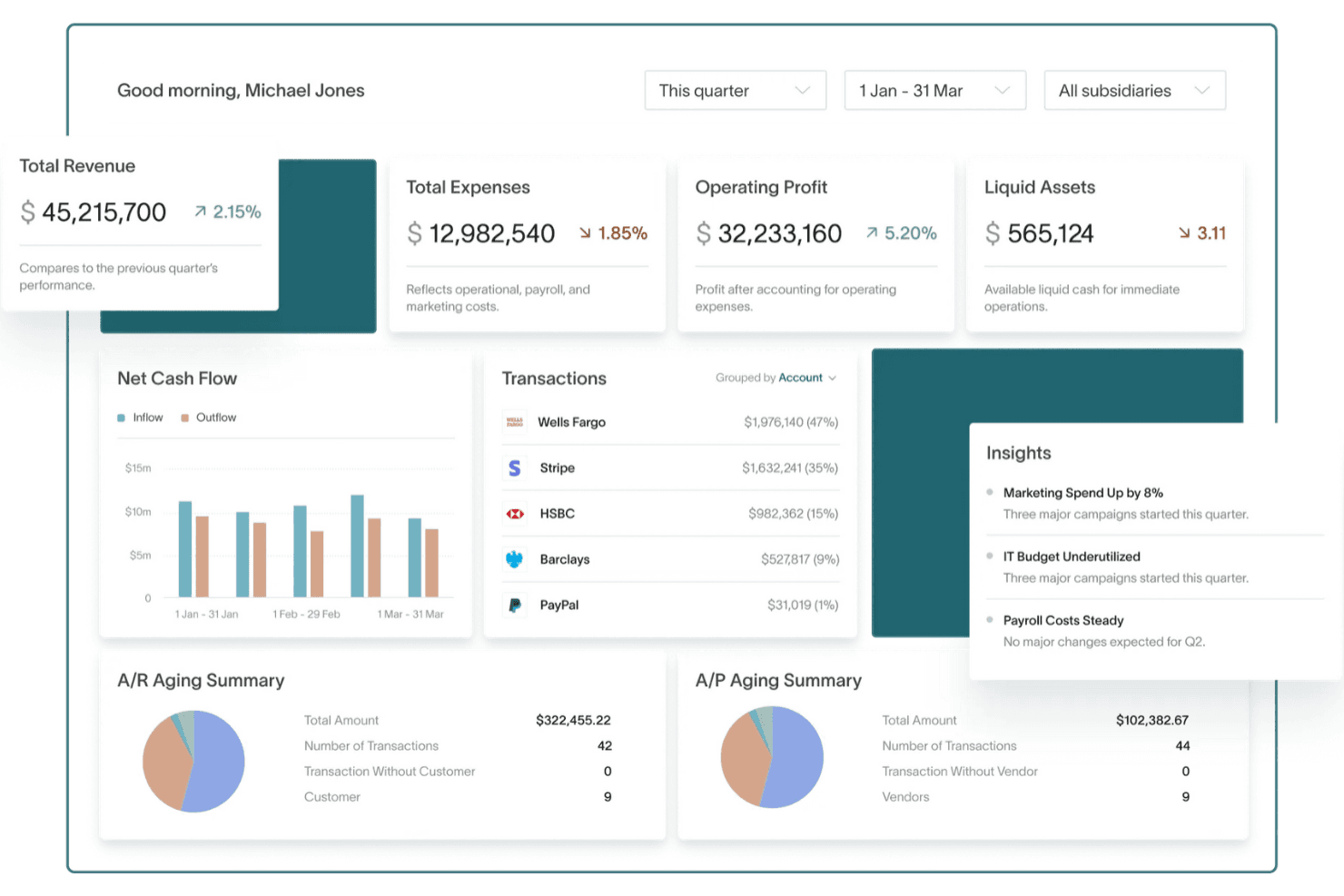
DualEntry brinda a tu equipo una visión financiera en tiempo real de los ingresos, gastos, flujo de caja y datos operativos, todo en un único panel. DualEntry es una plataforma de gestión financiera impulsada por IA que ayuda a las empresas medianas a automatizar tareas contables complejas. El software combina controles financieros, procesamiento de transacciones e informes en tiempo real para ofrecer una alternativa moderna a los ERP tradicionales.
Por qué elegí DualEntry: Elegí DualEntry por su automatización basada en IA que simplifica procesos financieros como la conciliación bancaria y la categorización de transacciones. También ofrece una incorporación y soporte liderados por contadores públicos certificados (CPA), además de una sólida gestión multiempresa y multidivisa para operaciones globales. Sus funciones de reconocimiento de ingresos y gestión fiscal pueden ayudar a mantener precisión y cumplimiento a medida que creces.
Características destacadas e integraciones:
Las características incluyen gestión de cierres para finalizar periodos financieros con precisión, preparación para auditorías con trazabilidad incorporada y gestión de activos fijos para automatizar los cronogramas de depreciación. Los paneles e informes de DualEntry también ofrecen información en vivo sobre tus datos financieros.
Las integraciones incluyen BambooHR, Bill.com, Brex, Deel, Google SSO, Gusto, HubSpot, Ramp, Rippling, Salesforce, Stripe Billing y Stripe Invoicing.
Pros and Cons
Pros:
- Las funciones avanzadas de IA ayudan con tareas contables complejas
- Admite operaciones multiempresa y multidivisa
- El reconocimiento automatizado de ingresos garantiza el cumplimiento de las normas
Cons:
- Las opciones de personalización requieren una configuración cuidadosa
- Como ERP, puede ofrecer más funciones de las necesarias para necesidades contables sencillas
Learn more about DualEntry: Ideal con CRM integrado y herramientas de embudo de ventas
- Prueba gratuita disponible
- Desde $35/usuario/mes
Visit WebsiteCustomer Rating:4.7/5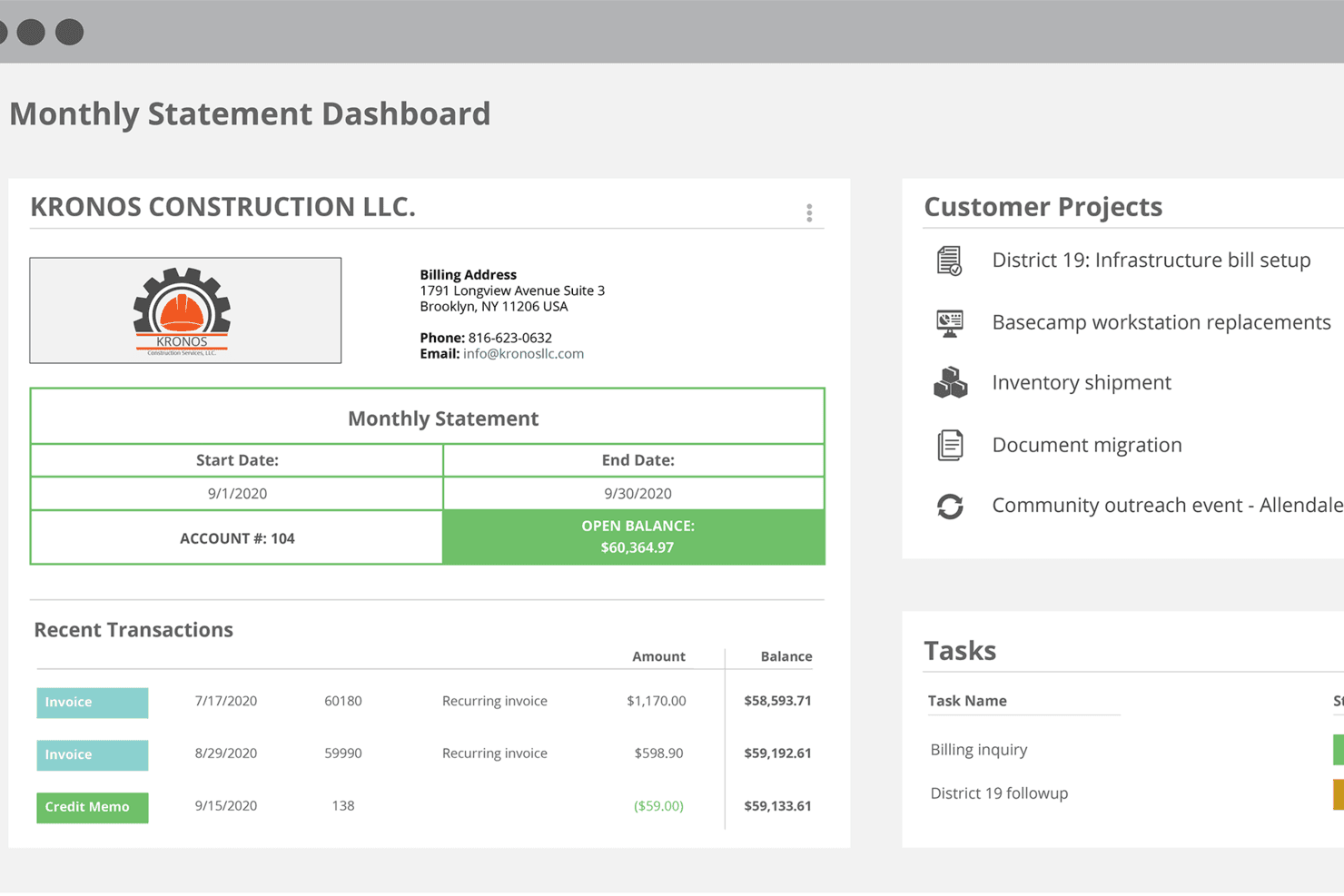
Panel de Striven que muestra la visión general del estado mensual, transacciones recientes, proyectos de clientes y gestión de tareas Striven es un software ERP todo en uno para empresas en crecimiento que reúne contabilidad, CRM, recursos humanos, gestión de proyectos, ventas e inventario en una sola plataforma en la nube.
¿Para quién es mejor Striven?
Striven es adecuado para pequeñas y medianas empresas que necesitan una plataforma única para gestionar operaciones en finanzas, ventas, proyectos y recursos humanos.
Por qué elegí Striven
Striven es una de mis principales opciones porque me encanta que su CRM esté integrado directamente en la misma plataforma que las herramientas de contabilidad y operaciones, y no añadido después como un complemento. Puedo seguir los leads a través de un embudo de ventas visual, gestionar contactos de clientes y luego ver cómo esos acuerdos pasan directamente a la creación de proyectos y facturación sin cambiar de sistema. La gestión de contactos también enlaza el historial del cliente en presupuestos, trabajos y pagos, por lo que mi equipo siempre tiene todo el contexto de una cuenta. Ese tipo de integración nativa entre ventas y operaciones administrativas es precisamente lo que hace que Striven sea una sólida alternativa de ERP.
Características clave de Striven
- Gestión contable y financiera: Administra el libro mayor, cuentas por pagar y cobrar, conciliación bancaria e informes financieros todo en un mismo lugar.
- Herramientas de gestión de proyectos: Crea y asigna tareas, sigue los hitos del proyecto, registra el tiempo y compara presupuestos con gastos reales.
- Gestión de inventario: Controla niveles de stock, gestiona órdenes de compra y vincula el inventario directamente a los flujos de venta y cumplimiento.
- Gestión de RRHH y empleados: Almacena registros de empleados, gestiona la incorporación y controla el tiempo y la asistencia de tu plantilla.
Integraciones de Striven
Striven ofrece integraciones nativas con QuickBooks, Gmail, Microsoft Outlook y Mailchimp. Hay una API disponible para integraciones personalizadas.
Pros and Cons
Pros:
- Procesamiento de nómina directo conectado a hojas de tiempo
- Incluye gestión documental y portales para clientes
- Paneles personalizables para información interdepartamental
Cons:
- Algunos usuarios informan tiempos de carga de página más lentos
- Menos plantillas específicas para industrias que ERPs más grandes
Learn more about Striven: Mejor para la gestión de recursos centrada en las personas y el ciclo de vida completo
- No disponible
- Precios disponibles bajo solicitud
Visit WebsiteCustomer Rating:4.2/5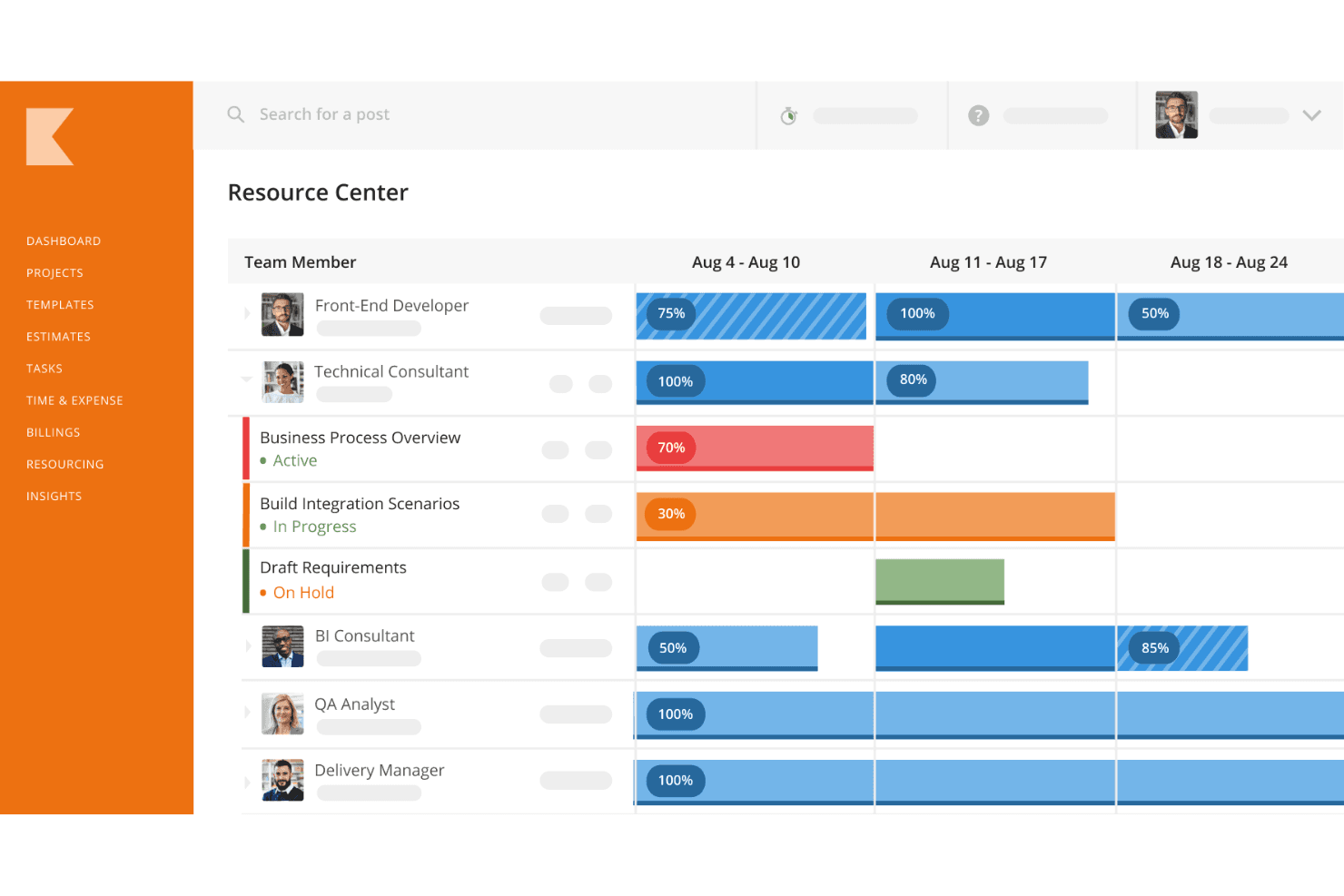
Kantata permite a los usuarios planificar proyectos con sus avanzadas capacidades de gestión de recursos. Kantata es una plataforma basada en la nube diseñada específicamente para firmas de servicios profesionales que necesitan una alternativa a un ERP adaptada a sus flujos de trabajo únicos. A diferencia de los sistemas ERP tradicionales que se centran en gran medida en las finanzas y operaciones, Kantata integra personas, proyectos y finanzas en una única solución unificada.
Por qué elegí Kantata: Lo que diferencia a Kantata es cómo combina la planificación de recursos centrada en las personas con la gestión completa del ciclo de vida de los proyectos. Sus herramientas de previsión y capacidad ayudan a alinear las habilidades y la disponibilidad con la demanda de proyectos, para que tu equipo se mantenga equilibrado y motivado. Al mismo tiempo, unifica la planificación de proyectos, la entrega, la supervisión financiera y los informes, proporcionando una única fuente de información veraz durante todo el ciclo de vida de los servicios. Esto convierte a Kantata en una excelente alternativa ERP para empresas que desean una visibilidad integral sin renunciar a un enfoque humano en la gestión de recursos.
Características e integraciones destacadas:
Características incluyen inventarios de habilidades, sugerencias automáticas de dotación de personal, presupuestos y facturación de proyectos, seguimiento de tiempo y gastos, informes de utilización y rentabilidad, y paneles personalizables para la salud del portafolio.
Integraciones incluyen NetSuite, Slack, Xero, HubSpot, Jira, Concur, Expensify, Intacct, Salesforce, Google Workspace, Microsoft 365 y QuickBooks.
Pros and Cons
Pros:
- Informes de inteligencia empresarial sólidos
- Variedad de capacidades de gestión de recursos
- Buenas opciones de integración
Cons:
- Podría ofrecer más opciones de personalización
- La configuración inicial puede requerir un tiempo de adaptación
Learn more about Kantata: Mejor con más de 1,000 conectores de aplicaciones preconstruidos
- Demo gratuita disponible
- Precios bajo consulta
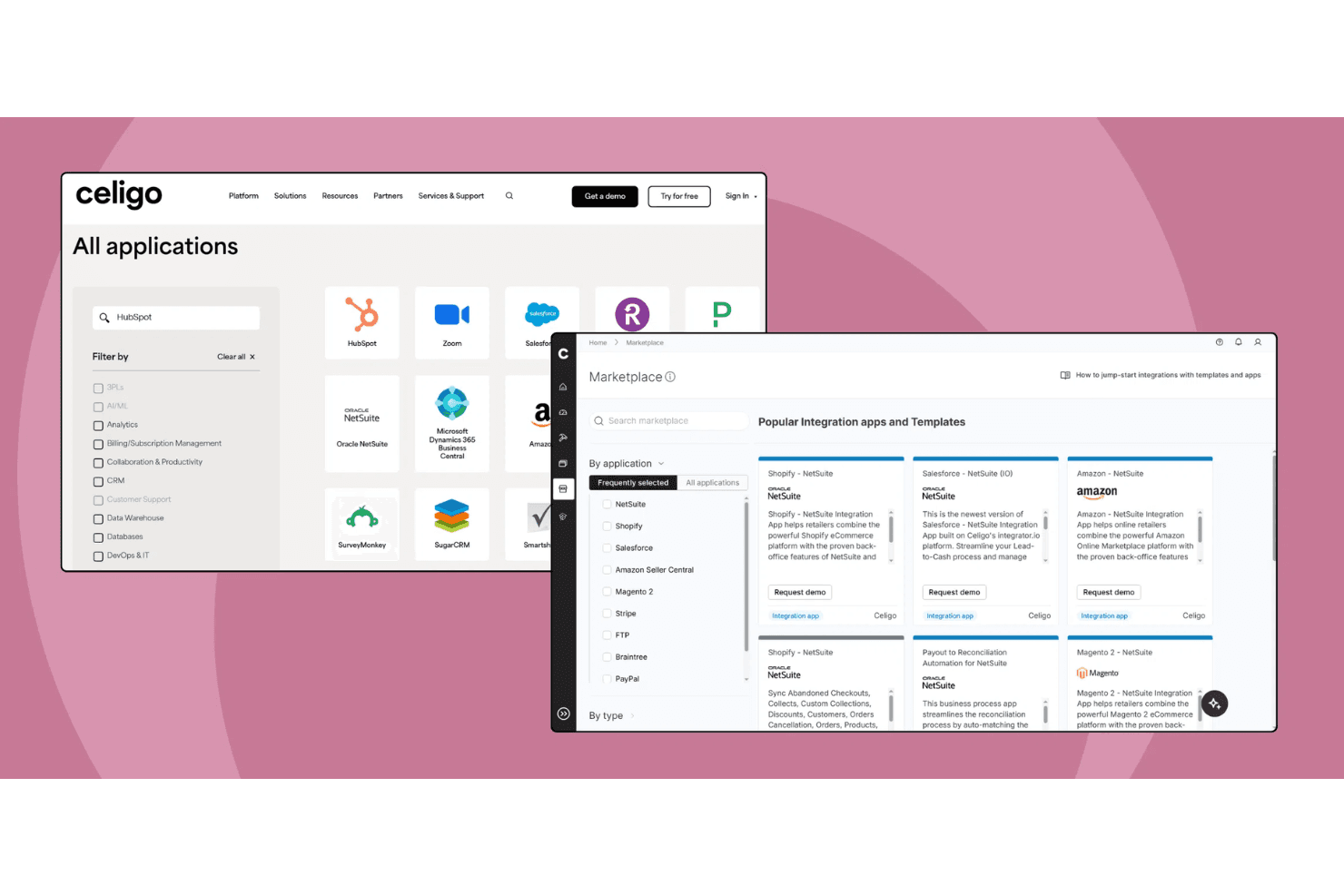
Celigo ofrece un mercado de aplicaciones de integración preconstruidas que conecta herramientas empresariales populares como NetSuite, Shopify, Salesforce y Amazon como una alternativa de plataforma de integración a los sistemas ERP tradicionales. Celigo es una plataforma de integración como servicio (iPaaS) que conecta y automatiza flujos de trabajo entre sistemas ERP, finanzas, RRHH, CRM y comercio electrónico para empresas que buscan alternativas al ERP.
¿Para quién es mejor Celigo?
Equipos de TI y operaciones en empresas medianas y grandes que necesitan conectar y automatizar múltiples aplicaciones empresariales entre departamentos.
Por qué elegí Celigo
Elegí Celigo como uno de los mejores porque su biblioteca de más de 1,000 conectores de aplicaciones preconstruidos permite que mi equipo conecte rápidamente sistemas ERP, CRM, comercio electrónico y finanzas sin desarrollo personalizado. Utilizo estos conectores para automatizar los flujos de trabajo de pedido a cobro y de compra a pago en plataformas como NetSuite, Salesforce y Shopify. Esto nos ahorra tener que construir y mantener integraciones punto a punto para cada nueva herramienta que añadimos.
Características clave de Celigo
- Constructor de flujos: Diseñe y administre flujos de integración utilizando una interfaz visual de arrastrar y soltar.
- Panel de administración de errores: Supervise, resuelva y gestione errores de integración desde un panel centralizado.
- Controles de acceso basados en roles: Establezca permisos de usuario y administre el acceso a integraciones y datos.
- Registros de auditoría: Realice un seguimiento de los cambios y supervise la actividad en todas las integraciones para garantizar el cumplimiento y la transparencia.
Integraciones de Celigo
Celigo ofrece más de 1,000 conectores nativos preconstruidos, incluidos NetSuite, Microsoft Dynamics 365, SAP, Sage Intacct, Acumatica, QuickBooks, Shopify, Salesforce, HubSpot y Snowflake. Hay una API disponible para integraciones personalizadas.
Pros and Cons
Pros:
- Admite cifrado de datos a nivel de campo y registros de auditoría
- Cumple con SOC 2 Tipo II y GDPR
- Panel visual de administración de errores para la resolución de problemas
Cons:
- Opciones limitadas de implementación offline o en las instalaciones
- Algunos conectores requieren esfuerzos adicionales de configuración
Learn more about Celigo: Ideal para la gestión de pequeñas y medianas empresas
- Demostración gratuita disponible
- Precios disponibles a solicitud
Visit WebsiteCustomer Rating:4.4/5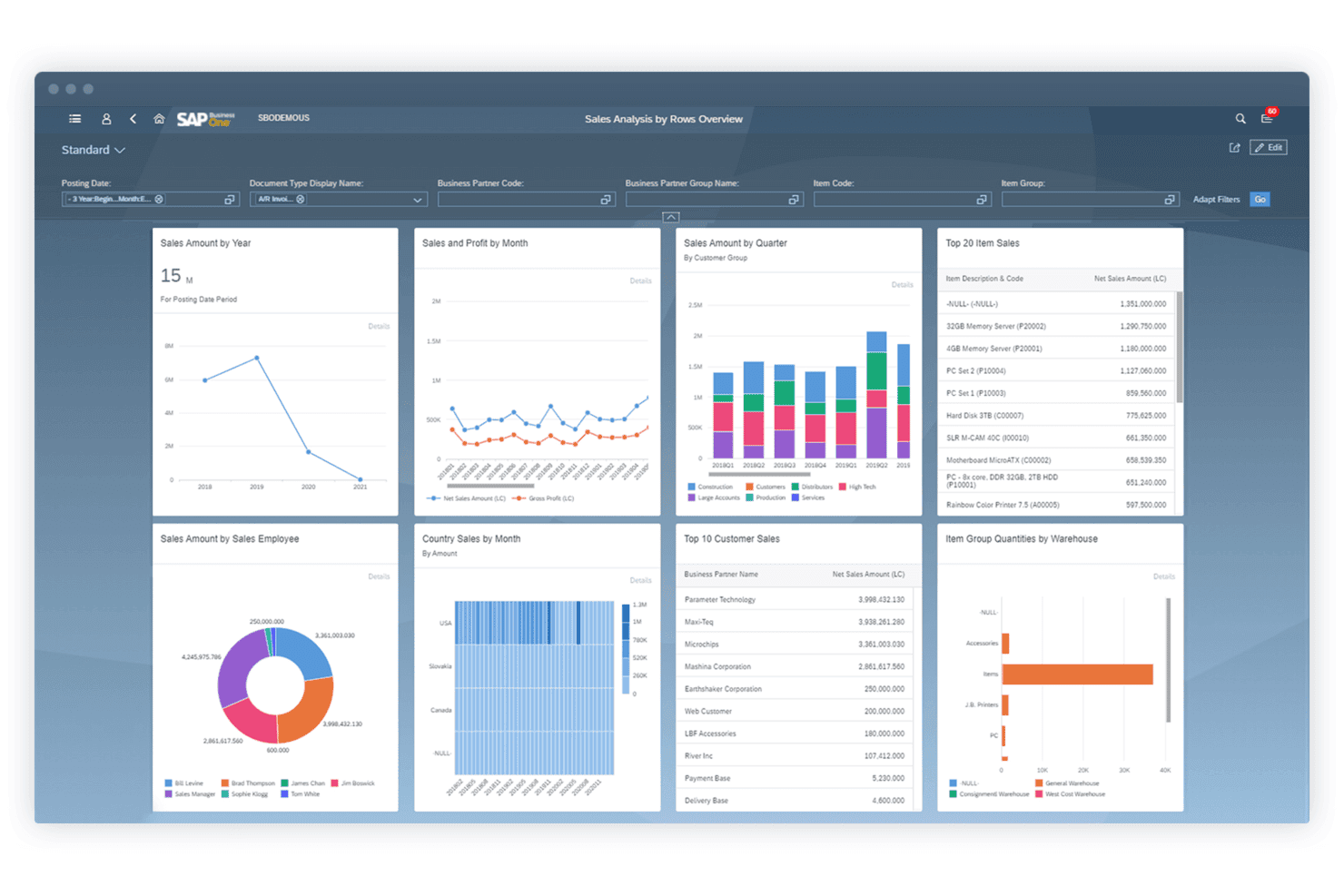
SAP Business One es una solución ERP integrada diseñada para pequeñas y medianas empresas, optimizando las operaciones y mejorando la eficiencia. SAP Business One es una solución ERP asequible diseñada para ayudar a pequeñas y medianas empresas a gestionar diversos aspectos de sus operaciones, incluyendo contabilidad, finanzas, compras, inventario, ventas y relaciones con los clientes.
Por qué elegí SAP Business One: SAP Business One ofrece un sólido conjunto de funciones específicamente adaptadas a pequeñas y medianas empresas. Su capacidad para integrar varias funciones empresariales en una sola plataforma y sus funciones de análisis en tiempo real lo convierten en una alternativa destacada para las empresas que buscan optimizar sus operaciones y mejorar la eficiencia.
Características destacadas e integraciones:
Las características incluyen implementación local o en la nube, inteligencia empresarial integrada, implementación rápida e informes y análisis en tiempo real.
Las integraciones incluyen SAP HANA, Microsoft Excel, Microsoft Outlook, Shopify, Magento, WooCommerce, QuickBooks, Salesforce, HubSpot y Mailchimp.
Pros and Cons
Pros:
- Funciones integrales de gestión empresarial
- Análisis e informes en tiempo real
- Opciones de implementación flexibles
Cons:
- Puede requerir personalización para necesidades específicas
- Limitado a pequeñas y medianas empresas
Learn more about SAP Business One: Mejor para ERP en la nube con información en tiempo real
- Demo gratuita disponible
- Precio bajo demanda
Visit WebsiteCustomer Rating:4.4/5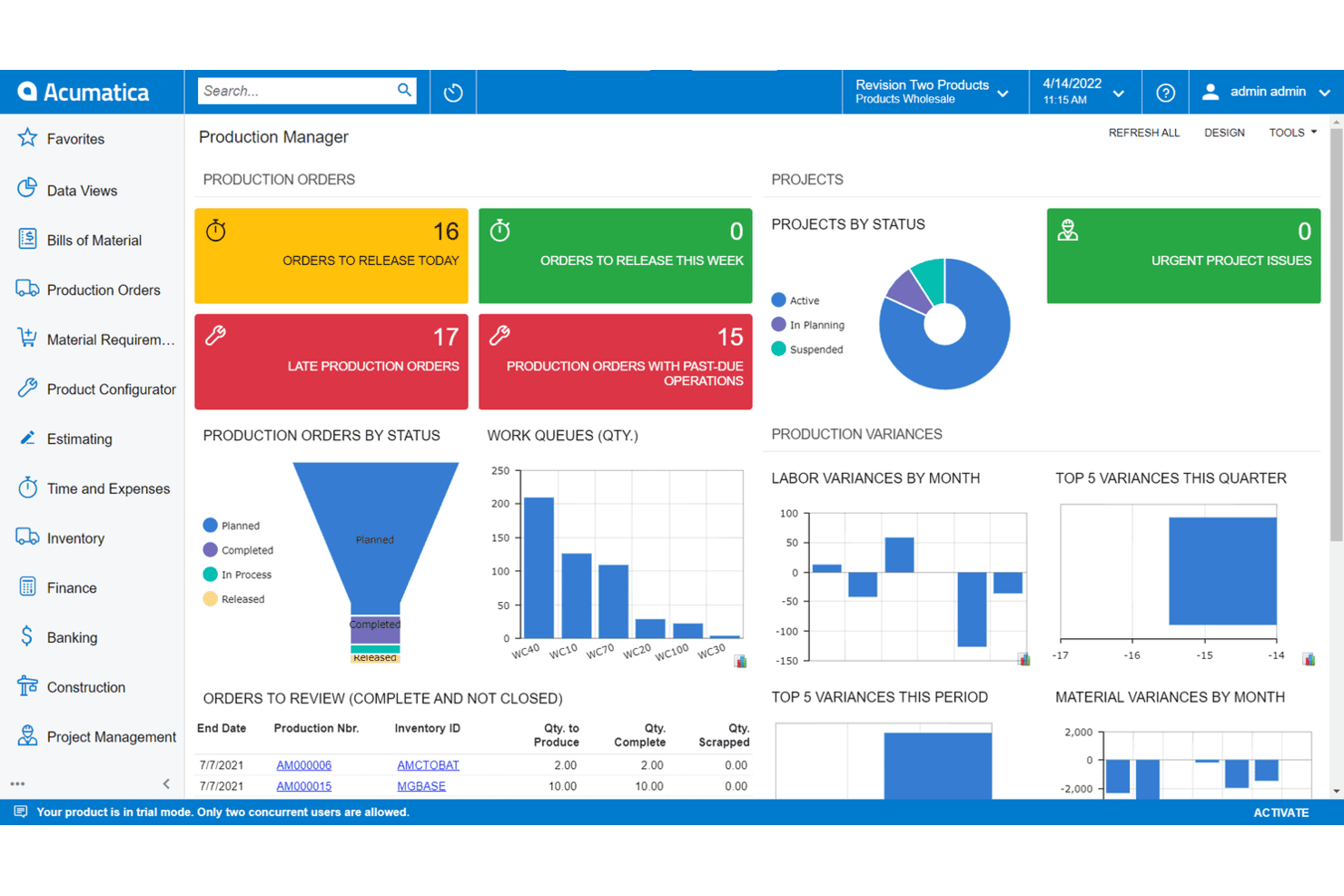
Acumatica es una solución ERP flexible y basada en la nube que ofrece sólidas herramientas de gestión empresarial para pequeñas y medianas empresas. Acumatica es una solución ERP en la nube diseñada para proporcionar información en tiempo real y capacidades avanzadas de gestión empresarial. Es ideal para empresas que buscan un sistema ERP flexible y escalable que ofrezca datos y análisis en tiempo real.
Por qué elegí Acumatica: Acumatica ofrece una sólida arquitectura basada en la nube e información en tiempo real, aspectos fundamentales para entornos empresariales dinámicos. Su modelo de precios flexible y su avanzado conjunto de funcionalidades la convierten en una opción destacada para empresas que buscan escalar de manera eficiente.
Características y conexiones destacadas:
Las características incluyen gestión financiera, contabilidad de proyectos, CRM, soluciones específicas para industrias, capacidades de datos en tiempo real y opciones de licenciamiento flexibles.
Las integraciones incluyen Amazon, BigCommerce, Shopify, Microsoft Dynamics 365, Salesforce, HubSpot, Avalara, Docusign, Adobe Sign y Magento.
Pros and Cons
Pros:
- Datos y análisis en tiempo real
- Precios flexibles según el uso
- Conjunto de funciones completo
Cons:
- Complejidad en la configuración
- Capacidades limitadas sin conexión
Learn more about Acumatica: Ideal para la gestión de finanzas y recursos humanos con recalibración continua
- Demostración gratuita disponible
- Precio a consultar
Visit WebsiteCustomer Rating:4.3/5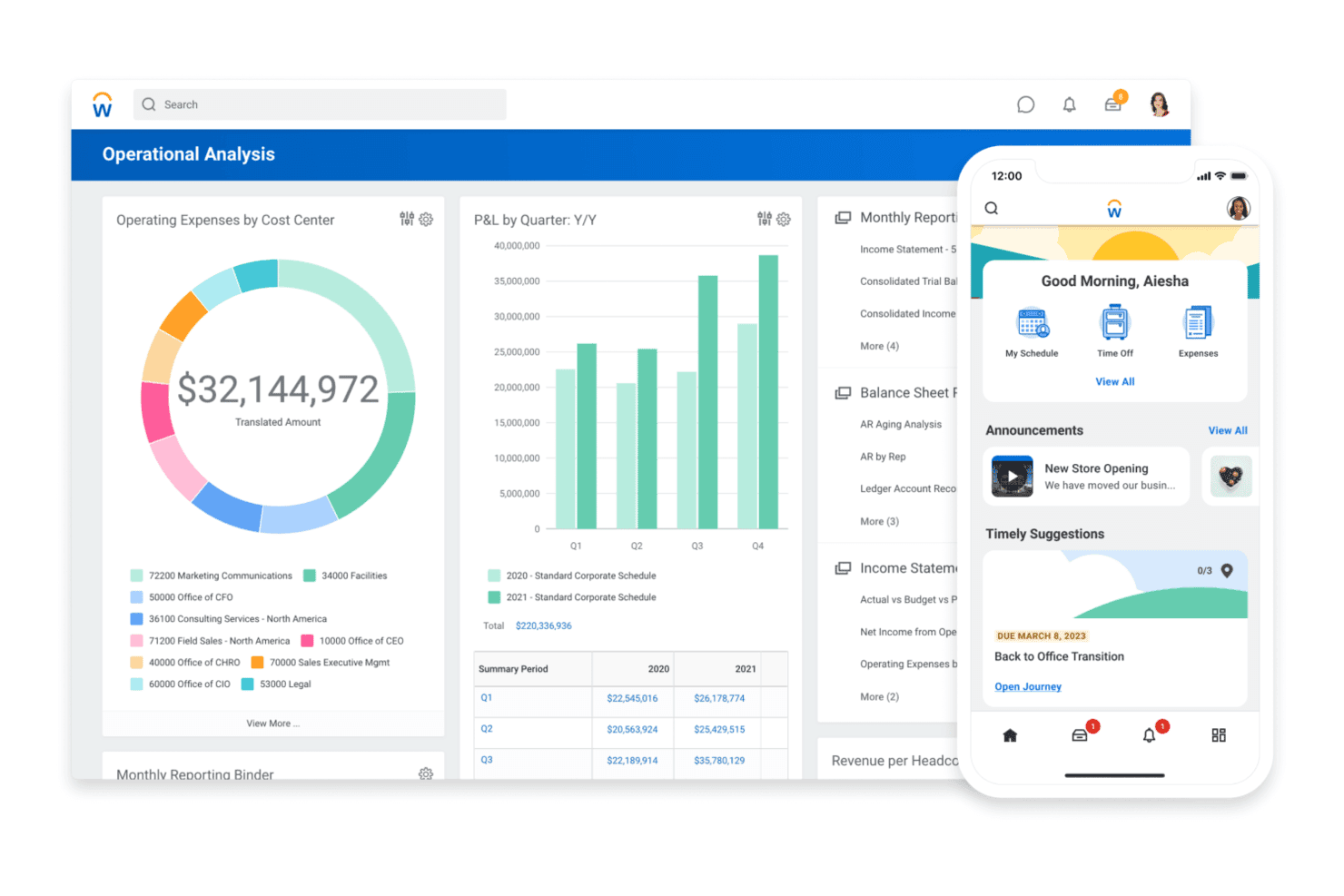
Workday es una solución ERP basada en la nube especializada en finanzas y recursos humanos, que proporciona herramientas avanzadas de gestión para grandes organizaciones. Workday es un software empresarial basado en la nube que ofrece soluciones de gestión financiera y de capital humano. Gracias a sus avanzadas capacidades de integración y a sus perspectivas en tiempo real, es ideal para grandes empresas con más de 2,000 empleados y operaciones complejas en múltiples regiones o entidades.
Por qué elegí Workday: Workday combina las funciones de finanzas y recursos humanos en una sola plataforma, lo que proporciona una solución unificada para necesidades empresariales complejas. Juzgando por sus amplias opciones de integración y herramientas impulsadas por IA, destaca como una sólida alternativa ERP, especialmente para grandes empresas que buscan optimizar y simplificar sus operaciones.
Funciones destacadas e integraciones:
Las funciones incluyen una interfaz moderna basada en la nube y amplias integraciones preconfiguradas con herramientas empresariales de terceros.
Las integraciones incluyen Salesforce, Microsoft Azure, ServiceNow, Slack, Adobe Sign, Google Workspace, Okta, Docusign, IBM y SAP.
Pros and Cons
Pros:
- Integración completa con más de 600 herramientas de terceros
- Capacidades avanzadas de informes y análisis
- Funciones unificadas de finanzas y RRHH
Cons:
- No hay botón de retroceso en las páginas
- Notificaciones persistentes
 Ideal para la gestión financiera y de operaciones
- Demostración gratuita disponible
- Precio a consultar
Visit WebsiteCustomer Rating:4.3/5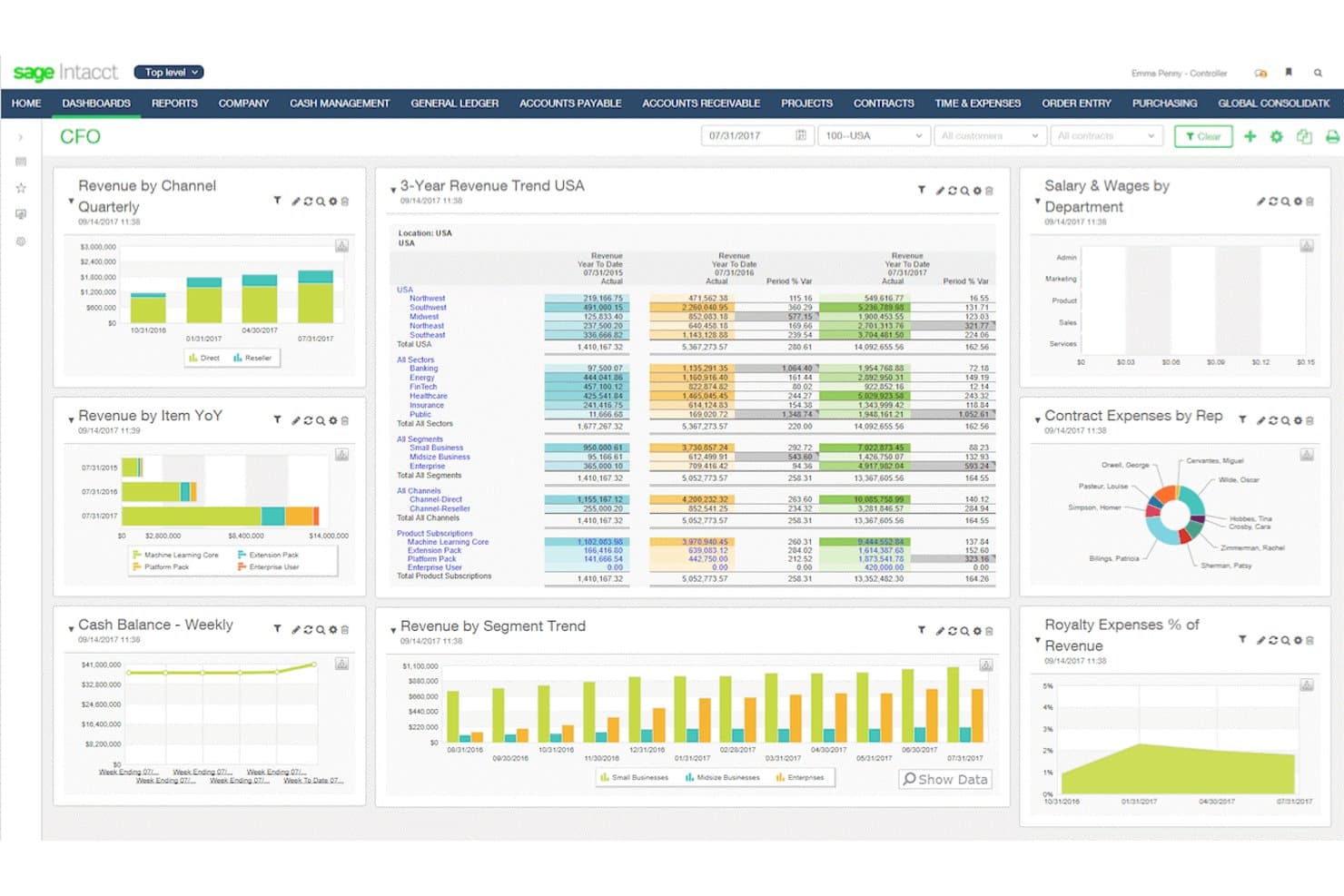
Sage Intacct es una solución ERP basada en la nube enfocada en la gestión financiera, que ofrece automatización avanzada y perspectivas para empresas en crecimiento. Sage Intacct es una solución de gestión financiera basada en la nube diseñada para empresas en crecimiento. Es ideal para las finanzas y operaciones en la nube de empresas medianas gracias a su avanzado conjunto de funciones que agilizan los procesos financieros y ofrecen información en tiempo real.
Por qué elegí Sage Intacct: Sage Intacct ofrece capacidades avanzadas de gestión financiera adaptadas a empresas medianas. Su naturaleza basada en la nube garantiza escalabilidad y flexibilidad, lo que la convierte en una opción sólida para las empresas que buscan mejorar sus operaciones financieras sin necesidad de una infraestructura de TI extensa.
Funciones y conectores destacados:
Funciones incluyen soporte multi-empresa y multimoneda, informes en tiempo real y flujos de trabajo automatizados.
Integraciones incluyen Salesforce, ADP, Expensify, Bill.com, Avalara, American Express, Stripe, PayPal, Square y Shopify.
Pros and Cons
Pros:
- Funciones integrales de gestión financiera
- Solución escalable basada en la nube
- Amplias capacidades de integración
Cons:
- Tiempos de carga lentos durante los picos de uso
- Puede requerir capacitación para un uso completo
Learn more about Sage Intacct: 10Ideal para el rendimiento conectado del inventario con información en tiempo real
Cin7
- Prueba gratuita de 14 días + demostración gratis disponible
- Desde $349/mes
Visit WebsiteCustomer Rating:4.3/5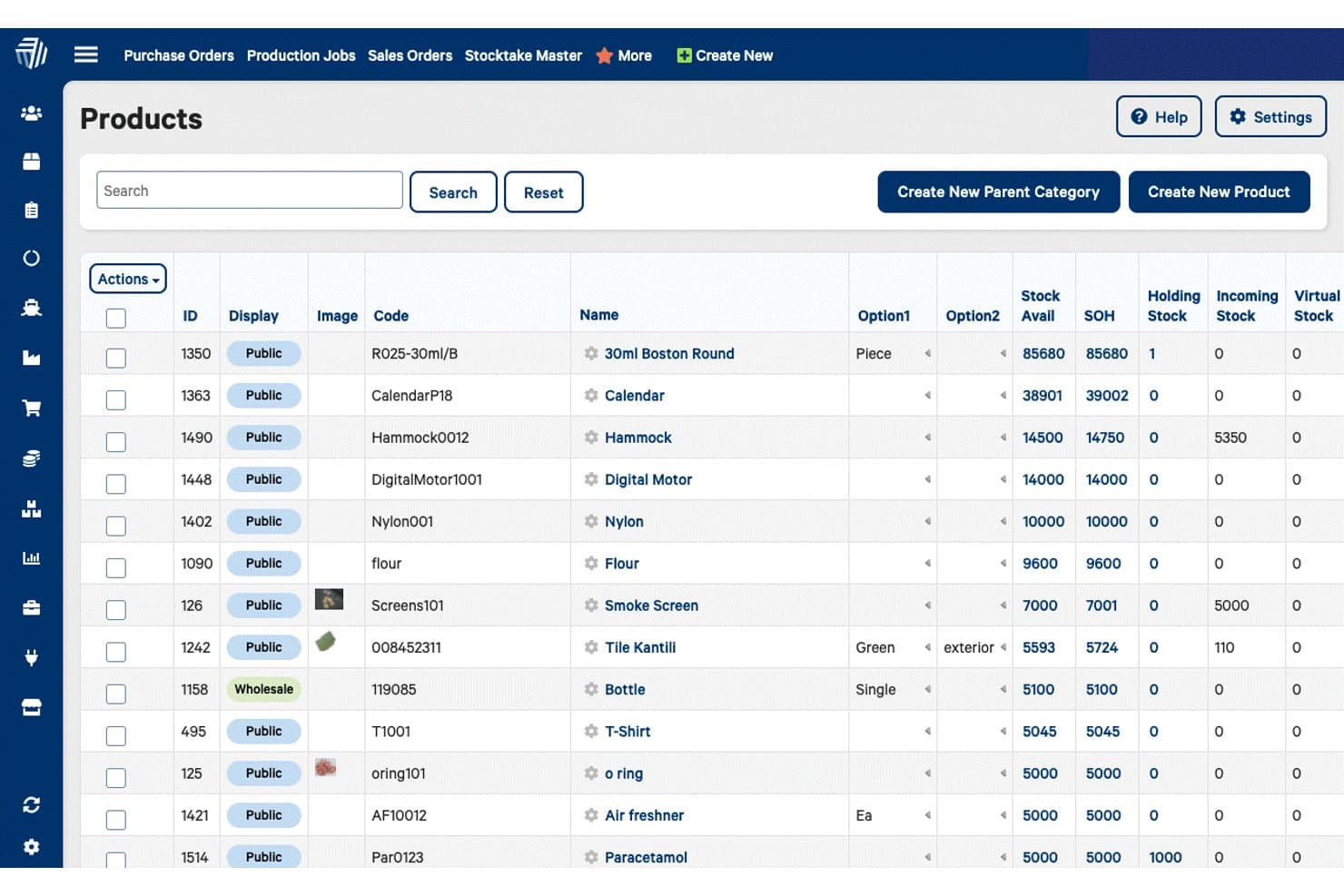
Cin7 es una solución ERP basada en la nube que integra la gestión de inventario, ventas y procesos de cadena de suministro para empresas minoristas y mayoristas. Cin7 es un software de gestión de inventario y pedidos basado en la nube, diseñado para negocios minoristas y mayoristas que operan en múltiples canales. Es ideal para empresas que buscan optimizar la gestión de inventario y mejorar las capacidades de ventas multi-canal gracias a sus avanzadas funciones de integración y herramientas de automatización.
Por qué elegí Cin7: Cin7 ofrece sólidas funcionalidades de gestión de inventario y pedidos que son fundamentales para los negocios multi-canal. En mi opinión, su extensa capacidad de integración y características de automatización lo convierten en una opción fuerte para empresas que buscan mejorar la eficiencia operativa y la escalabilidad.
Funciones destacadas e integraciones:
Funciones incluyen gestión de inventario, gestión de pedidos, sistema de punto de venta, gestión de almacenes, integración de comercio electrónico, ventas en múltiples canales, gestión de proveedores, gestión de producción, gestión de relaciones con clientes y generación de informes personalizables.
Las integraciones incluyen QuickBooks, Shopify, Power BI, SAP, Oracle, Shipcaddie, Salesforce, Microsoft Office 365, Docusign y Magento.
Pros and Cons
Pros:
- Se integra con más de 700 aplicaciones
- Automatiza la gestión de inventarios
- Admite ventas en múltiples canales
Cons:
- La configuración inicial puede ser compleja
- Errores ocasionales en las actualizaciones del sistema
Otras alternativas a ERP
A continuación se incluye una lista de alternativas adicionales a ERP que preseleccioné. Aunque no entraron en las 10 mejores, siguen siendo valiosas y merece la pena investigarlas más a fondo.
- 11EpicorIdeal para soluciones ERP sectoriales
- 12Microsoft Dynamics 365 Business CentralLa mejor opción para una integración perfecta con Microsoft 365
- 13FulfilMejor para marcas directas al consumidor
- 14QuickBooks EnterpriseIdeal para funciones avanzadas de inventario y precios
- 15InforIdeal por sus capacidades y funcionalidades en la nube
- 16NEXIdeal para gestión empresarial avanzada con soluciones modulares
Cómo evalúo las alternativas de ERP
Evalúo las alternativas de ERP en dos niveles: las capacidades básicas—como contabilidad general multi-entidad y automatización de cuentas por pagar—que califican una herramienta, y los diferenciadores que destacan a las mejores.
Funcionalidades básicas (requisitos indispensables para esta lista)
Cuando selecciono herramientas para mi lista, califico cada una en una escala del 0 (no ofrece la funcionalidad) al 5 (destaca en esta área) para cada funcionalidad básica que aparece a continuación. Luego, calculo el puntaje total de la herramienta expresado como porcentaje. Cada herramienta debe lograr una puntuación mínima total del 65% para ser considerada para su inclusión.
- Contabilidad y libro mayor básicos: Busco un libro mayor completo con gestión de cuentas por pagar, cuentas por cobrar y asientos contables—lo suficiente como para servir como sistema financiero de referencia de un equipo.
- Reportes financieros y analítica: Cada herramienta debe ofrecer estados financieros estándar, generadores de informes personalizados y tableros que permitan a los responsables financieros analizar detalles de las variaciones.
- Multi-entidad y multi-divisa: Evalúo si la plataforma gestiona consolidaciones entre subsidiarias y divisas, ya que este es un motivo clave por el que los equipos superan las herramientas contables básicas.
- Flujos financieros automatizados: Las cadenas de aprobaciones, conciliaciones bancarias y gestión de tareas de cierre están incluidas—verifico si estos procesos funcionan con la mínima intervención manual.
- Integraciones y acceso por API: La herramienta debe conectarse con CRM, nómina, facturación y sistemas bancarios, ya sea mediante conectores preconstruidos o una API abierta.
- Controles de cumplimiento y auditoría: Busco alineación con GAAP/NIIF, permisos basados en roles y pistas de auditoría detalladas que respalden los controles internos durante auditorías externas.
Una vez que tengo una lista de herramientas que cumplen con estos criterios, considero qué diferencia a cada plataforma.
Factores diferenciadores (qué distingue a los proveedores)
Así es como comparo y distingo los diferentes proveedores:
Funciones destacadas
La gestión integral de planificación y análisis financieros (FP&A) es un gran diferenciador. Herramientas como Sage Intacct y Oracle NetSuite ofrecen nativamente presupuestos, previsiones y planificación de escenarios, para que los equipos financieros eviten tener que complementar con una plataforma de planificación aparte. La arquitectura componible también importa—algunos equipos solo necesitan, por ahora, automatización de cuentas por pagar e informes, pero desean añadir consolidación a medida que crecen. También verifico las capacidades de cierre impulsadas por IA, ya que las plataformas que emparejan transacciones automáticamente y detectan anomalías pueden ahorrar días en el cierre mensual.
Más allá de las funciones
El costo total de propiedad es uno de los primeros aspectos que evalúo. Los ERPs tradicionales suelen llevar costes ocultos de consultoría y personalización, por lo que analizo si la estructura de precios de un proveedor escala de manera predecible a medida que añades entidades o usuarios. Los tiempos de implementación también tienen mucho peso—una plataforma que tarda seis meses en desplegarse puede frenar a un equipo financiero en crecimiento. Además, verifico las certificaciones SOC 1/SOC 2 e ISO 27001, ya que los auditores solicitan cada vez más pruebas de que tus sistemas financieros cumplen con esos estándares.
Por qué buscar una alternativa a ERP
A medida que tu empresa crece, es probable que pruebes varias soluciones ERP y que, en algún momento, acabes buscando un software alternativo. Estas son algunas razones habituales por las que podrías estar buscando una solución alternativa:
- Coste: Dependiendo del ERP que elijas, este tipo de software puede resultar bastante caro, especialmente si optas por complementos. Una alternativa a ERP puede tener costes más bajos que tu opción actual u ofrecer una prueba gratuita.
- Complejidad: Algunos ERP requieren una formación extensa para poder utilizar todas sus funcionalidades. Si eres una pyme o no necesitas todas las funciones avanzadas incluidas en tu ERP, una alternativa podría ser más adecuada.
- Flexibilidad: ¿Tu ERP actual se adapta a las necesidades de tu empresa? Si no es así, es posible que estés buscando una alternativa a ERP.
- Escalabilidad: Tu software siempre debe poder crecer junto con tu empresa. Por ejemplo, si eres un banco pequeño que ha adquirido recientemente muchos clientes, necesitarás un ERP más potente para gestionar las cuentas.
- Personalización: Las opciones de personalización limitadas pueden obstaculizar los procesos empresariales, pero una alternativa a ERP con mayores posibilidades de personalización, como las soluciones de código abierto, puede ayudar a que tu empresa destaque y sea memorable.
Las alternativas a ERP pueden proporcionar soluciones más asequibles, fáciles de usar y adaptables que se ajusten mejor a las necesidades específicas de la empresa y a sus requisitos de crecimiento. Al considerar distintas opciones, puedes encontrar un sistema que ofrezca una mayor flexibilidad, escalabilidad y eficiencia, mejorando en última instancia el rendimiento general y el crecimiento de tu empresa.
Características clave de las alternativas de ERP
Estas son algunas características clave del ERP que tu software alternativo debería poder replicar o mejorar para adaptarse correctamente.
- Integración: las alternativas de software ERP combinan diversos procesos empresariales en un único sistema unificado, garantizando un flujo de datos y una comunicación fluidos entre los distintos departamentos. Esta consolidación elimina los silos de datos y mejora la eficiencia operativa.
- Automatización: estos sistemas reducen las tareas manuales mediante flujos de trabajo automatizados, agilizando las operaciones y minimizando el riesgo de errores humanos. Empresas como Gusto, por ejemplo, comprenden que la automatización ahorra tiempo y permite a los empleados centrarse en actividades más estratégicas.
- Análisis de datos: las alternativas de ERP proporcionan herramientas sólidas para analizar los datos empresariales, lo que permite a las empresas tomar decisiones fundamentadas basadas en información precisa y exhaustiva. Esta capacidad respalda la planificación estratégica y la mejora del rendimiento.
- Informes en tiempo real: al ofrecer informes actualizados sobre el rendimiento empresarial, los sistemas ERP garantizan que las partes interesadas tengan acceso inmediato a información crítica.
- Escalabilidad: las soluciones ERP están diseñadas para adaptarse al crecimiento de tu empresa, admitiendo un volumen de datos cada vez mayor y la expansión de las operaciones sin comprometer el rendimiento.
- Personalización: estos sistemas permiten crear soluciones adaptadas a las necesidades específicas de la organización y ofrecen la flexibilidad necesaria para ajustar las funcionalidades a procesos empresariales únicos.
- Control de acceso de usuarios: la gestión de los permisos y niveles de acceso de los usuarios es una característica clave del software ERP, ya que garantiza la seguridad de los datos y el cumplimiento normativo. Con el control de acceso de usuarios, las empresas de sectores sensibles a los datos (por ejemplo, los sectores sanitario y de aviación) pueden proteger la información confidencial y hacer cumplir las políticas de la organización.
- Gestión de inventario: una gestión eficiente del inventario contribuye al ahorro de costes y a la satisfacción del cliente. Por ello, las principales alternativas de ERP realizan un seguimiento y gestionan los niveles de inventario con precisión, optimizando el control de existencias y reduciendo el riesgo de exceso de existencias o desabastecimiento.
- Gestión de las relaciones con los clientes: estos sistemas gestionan las interacciones y los datos de los clientes, mejorando el servicio al cliente y la gestión de las relaciones.
- Gestión financiera: una gestión financiera eficaz respalda la planificación estratégica y el cumplimiento normativo. El mejor software ERP gestiona la contabilidad, la elaboración de presupuestos, las previsiones y los informes financieros, proporcionando una visión integral de la salud financiera de la empresa.
Desde la gestión avanzada de inventario y pedidos hasta la integración integral de CRM y comercio electrónico, estas soluciones proporcionan la flexibilidad y escalabilidad necesarias para optimizar las operaciones e impulsar el crecimiento. Al explorar diversas alternativas de ERP, las empresas pueden encontrar la opción perfecta para mejorar la eficiencia y alcanzar sus objetivos estratégicos.