

Un software di contabilità obsoleto per commercialisti rende il tuo lavoro più difficile del necessario. Report lenti, inserimento interminabile dei dati e interfacce macchinose trasformano le attività semplici in un vero grattacapo. Invece di aiutarti, il software aumenta il caos e ti fa perdere tempo che non hai.
In qualità di esperto di software digitali, ne ho viste di tutti i tipi: le soluzioni valide, quelle scadenti e quelle penosamente obsolete. So cosa fa davvero la differenza nel lavoro quotidiano e cosa invece si limita a ostacolarti. Il mio obiettivo? Aiutarti a trovare uno strumento che risponda alle esigenze specifiche della tua attività.
Ho testato e recensito questi strumenti tenendo a mente proprio questo. Che tu abbia bisogno di automazione, report migliori o integrazioni più fluide, qui troverai qualcosa che ti semplificherà la vita. Troviamo il tuo prossimo software di contabilità per commercialisti.
Perché fidarsi dei nostri consigli sui software
6,700+
Reviews
20
Industry experts
16+
Evaluation factors
14
Years
Le nostre recensioni riflettono il nostro giudizio indipendente, non un discorso di vendita. Scopri come manteniamo la trasparenza.
Per questa guida, abbiamo valutato gli strumenti attraverso test pratici e ricerche indipendenti, assegnando un punteggio agli strumenti in base ai nostri criteri di selezione.
Le nostre recensioni riflettono il nostro giudizio editoriale umano, non un discorso di vendita.
Tabella comparativa dei software di contabilità per commercialisti
Ho analizzato nel dettaglio i prezzi, così puoi confrontare rapidamente le opzioni e trovare quella più adatta alle tue esigenze.
| Tool | Best For | Trial Info | Price | ||
|---|---|---|---|---|---|
| 1 | Ideale per l'estrazione automatica dei dati dai documenti | Prova gratuita di 14 giorni | Da $25,21/mese | Website | |
| 2 | Ideale per strumenti di conformità PCAOB | Demo gratuita disponibile | Prezzo su richiesta | Website | |
| 3 | Ideale per programmi di supporto dedicati ai commercialisti | Versione di prova gratuita + piano gratuito + demo gratuita disponibile | Da $49/utente/mese | Website | |
| 4 | Ideale per una contabilità gratuita e senza limiti | Prova gratuita disponibile | Da $59/utente/mese | Website | |
| 5 | Ideale per servizi di contabilità dedicati | Prova gratuita disponibile | Da $249/mese (fatturazione annuale) | Website | |
| 6 | Ideale per assistenza esperta live | Prova gratuita di 30 giorni | Da $30/mese | Website | |
| 7 | Ideale per integrazioni perfette con app | Prova gratuita di 30 giorni disponibile | A partire da $2.50/mese | Website | |
| 8 | Ideale per approfondimenti e report intelligenti | Prova gratuita di 30 giorni + piano gratuito disponibile | Da $15/mese | Website | |
| 9 | Ideale per la gestione aziendale completa | Piano gratuito + demo gratuita disponibile | Da $15/mese (fatturazione annuale) | Website | |
| 10 | Ideale per la contabilità automatizzata | Prova gratuita di 14 giorni disponibile | Da $30/mese | Website |


Recensioni dei migliori software di contabilità per commercialisti
Scegliere il software di contabilità giusto può semplificare il tuo lavoro, ma con così tante opzioni è difficile capire quale offra davvero buoni risultati. Di seguito ho illustrato le mie migliori scelte di software di contabilità per commercialisti, evidenziandone vantaggi e svantaggi, prezzi e altro ancora, per aiutarti a trovare uno strumento affidabile e adatto alle tue esigenze.
 1Ideale per l'estrazione automatica dei dati dai documenti
Dext
- Prova gratuita di 14 giorni
- Da $25,21/mese
Visit WebsiteCustomer Rating:4.5/5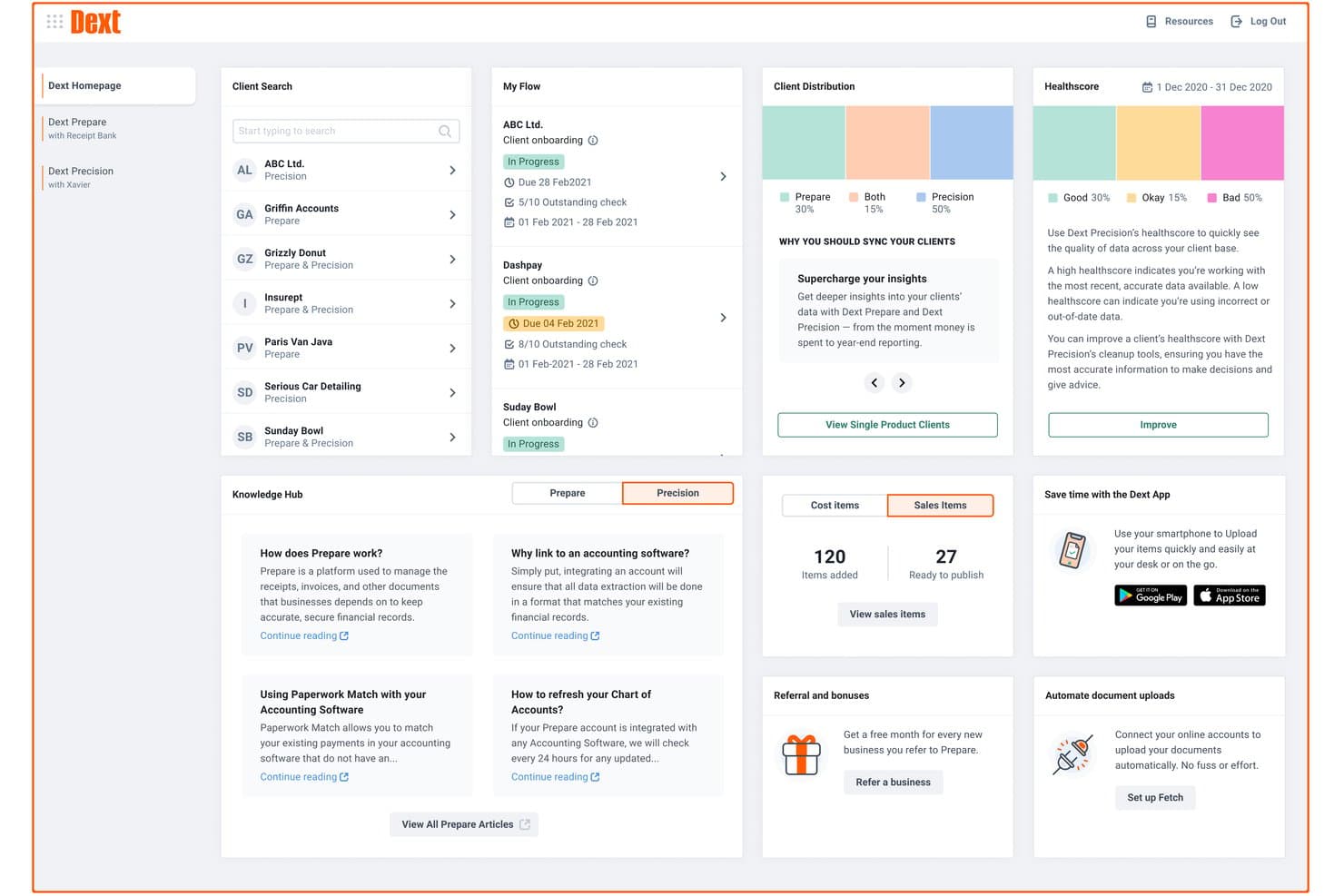
Dext offre una dashboard completa con gestione clienti, punteggi di salute, monitoraggio del flusso dei documenti e risorse del knowledge hub per commercialisti. Dext è una piattaforma per l'acquisizione e l'estrazione dei dati dai documenti, che automatizza la raccolta, l'elaborazione e la categorizzazione di ricevute, fatture ed estratti conto per studi contabili e commercialisti.
Per chi è ideale Dext?
Dext è particolarmente adatto a commercialisti e studi contabili che gestiscono grandi volumi di documenti dei clienti e desiderano ridurre l'inserimento manuale dei dati.
Perché ho scelto Dext
Ho inserito Dext tra le mie scelte migliori perché la sua accuratezza di estrazione basata sull'intelligenza artificiale, dichiarata al 99,9%, si conferma valida quando si gestiscono centinaia di documenti di clienti al mese. Mi piace che estragga automaticamente il dettaglio delle singole voci dalle fatture, non solo i totali, riducendo così notevolmente la necessità di confrontarsi con i clienti. Inoltre, il motore di regole per i fornitori apprende dalle categorizzazioni precedenti, quindi i fornitori ricorrenti vengono codificati correttamente senza bisogno di intervento manuale ogni volta.
Caratteristiche principali di Dext
- Dashboard multi-cliente: Gestisci tutte le entità clienti e i loro documenti da un'unica area di lavoro centralizzata.
- Archivio sicuro per i documenti: Conserva e consulta documenti di conformità ed estratti conto in sicurezza fino a 10 anni.
- Strumenti per la produttività dello studio: Utilizza dashboard per le scadenze dei clienti, workflow intelligenti e gestione avanzata dei clienti, pensati per i team di studio.
- Integrazione Commerce Lite: Importa dati di vendita online da piattaforme come Shopify e WooCommerce direttamente nel sistema.
Integrazioni di Dext
Dext offre integrazioni native con Xero, QuickBooks Online, Sage Accounting, FreeAgent e altre ancora.
Pros and Cons
Pros:
- Estrazione ad alta precisione su centinaia di documenti
- Le regole per i fornitori categorizzano automaticamente i fornitori ricorrenti del cliente
- Dashboard dedicata per la gestione multi-cliente
Cons:
- Non è una soluzione contabile completa e autonoma
- L'affidabilità dell'app mobile è scarsa
Learn more about Dext: Ideale per strumenti di conformità PCAOB
- Demo gratuita disponibile
- Prezzo su richiesta
Visit WebsiteCustomer Rating:4.9/5
DualEntry offre al tuo team una panoramica finanziaria in tempo reale di ricavi, spese, flussi di cassa e informazioni operative—tutto in un unico cruscotto. DualEntry è un ERP nativo per l’IA costruito attorno a una suite contabile completa, che copre libro mastro generale, gestione multi-entità, contabilità fornitori e clienti, riconoscimento dei ricavi e gestione della chiusura contabile.
Per chi è ideale DualEntry?
DualEntry è adatto ai team finanziari di aziende in fase di crescita e di medie dimensioni che necessitano di un sistema contabile moderno, nativo per l’IA, con forti controlli interni e supporto all’audit.
Perché ho scelto DualEntry
Ho incluso DualEntry tra le mie scelte principali perché le sue funzionalità di automazione dell’audit sono allineate ai requisiti PCAOB per controlli e documentazione. Gli strumenti di test delle scritture contabili permettono al tuo team di verificare grandi volumi di registrazioni contabili, con l’IA che segnala schemi o anomalie sospette. La cronologia delle versioni di DualEntry e la gestione della checklist PBC (provided by client) mantengono organizzata la raccolta delle evidenze, offrendo agli auditor una traccia di audit chiara, con data e ora, e accesso rapido ai documenti giustificativi.
Funzionalità principali di DualEntry
- Consolidamento multi-entità: Gestione illimitata di società controllate con eliminazioni intercompany automatiche, conversioni valutarie e rilevamenti CTA tra le entità.
- Riconoscimento dei ricavi: Automatizza la pianificazione dei ricavi per tutti i tipi di contratto in conformità con ASC 606 e IFRS 15, con calcoli assistiti dall’IA.
- Analisi di scostamento: Genera report personalizzati di scostamento con commenti sulle variazioni generati dall’IA per spiegare le differenze nei saldi tra i periodi.
- Workflow di approvazione: Configura catene di approvazione multi-step per scritture contabili, fatture e ordini di acquisto per rafforzare i controlli interni nel tuo team.
Pros and Cons
Pros:
- Funzionalità IA avanzate assistono in compiti contabili complessi
- Supporta operazioni multi-entità e multi-valuta
- Il riconoscimento automatico dei ricavi garantisce la conformità agli standard
Cons:
- Le opzioni di personalizzazione richiedono una configurazione attenta
- In quanto ERP, potrebbe offrire più funzionalità del necessario per esigenze contabili semplici
Learn more about DualEntry: 3Ideale per programmi di supporto dedicati ai commercialisti
BILL
- Versione di prova gratuita + piano gratuito + demo gratuita disponibile
- Da $49/utente/mese
Visit WebsiteCustomer Rating:4.5/5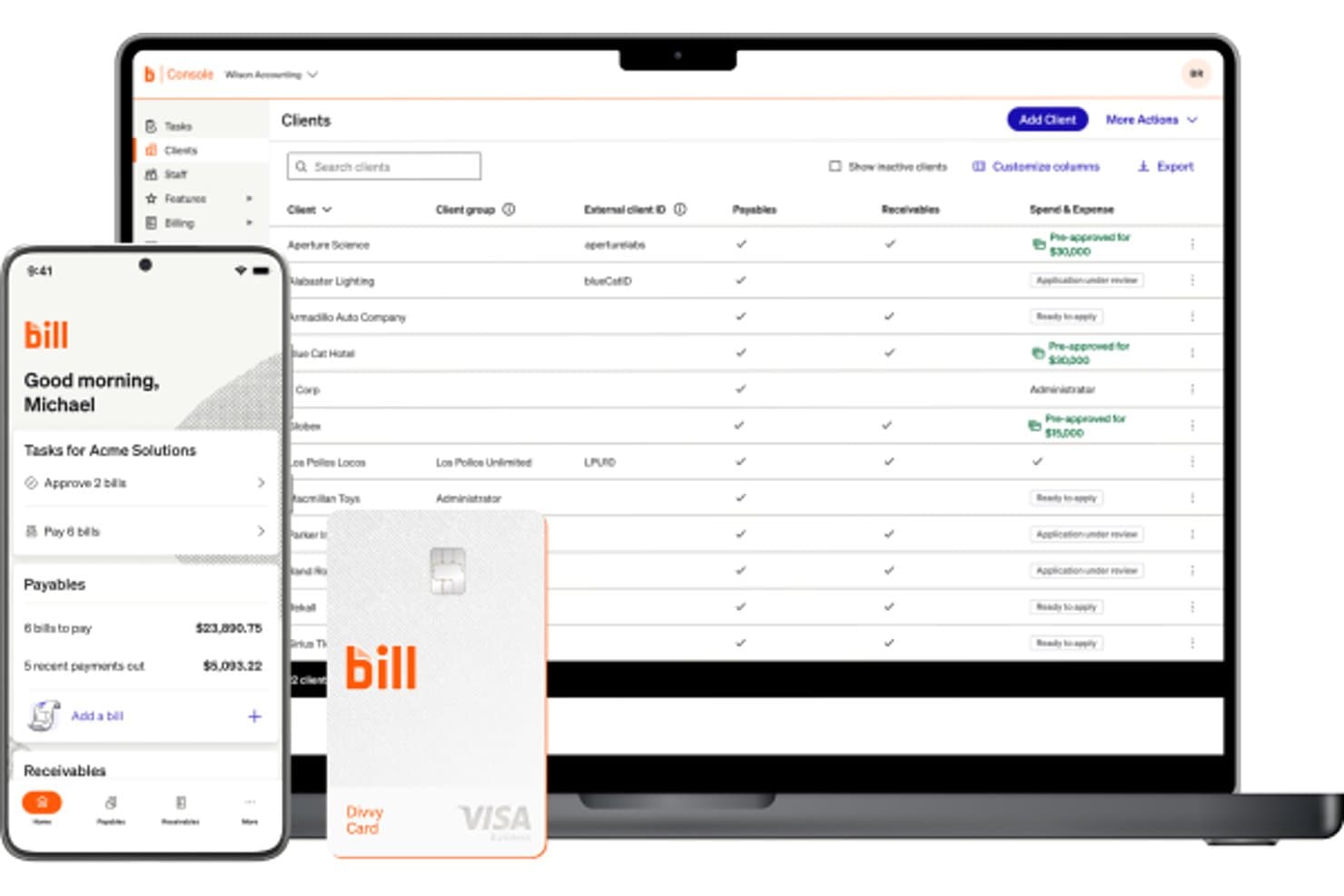
BILL offre una dashboard della console di contabilità che mostra un elenco clienti con stati di pagamenti, incassi e gestione spese, insieme a un'app mobile e una carta Divvy. BILL è una piattaforma di operazioni finanziarie per studi di contabilità che centralizza contabilità fornitori, contabilità clienti e gestione delle spese attraverso più entità di clienti da una sola console.
Per chi è più adatto BILL?
BILL è particolarmente adatto per studi di contabilità che gestiscono flussi di lavoro AP e AR per conto di diversi clienti, dalle piccole alle medie imprese.
Perché ho scelto BILL
Ho scelto BILL tra i migliori perché il suo Programma Partner per Commercialisti è pensato per il successo degli studi, non solo per l’accesso al prodotto. Mi piace che la struttura a livelli (Bronzo fino a Platino) porti vantaggi concreti come account management dedicato, fondi per co-marketing e supporto Premium Care. La Console per Commercialisti gestisce tutte le entità clienti da un unico luogo, e oltre 100 ore di formazione CPE accreditata NASBA mantengono il mio team aggiornato senza dover cercare risorse esterne.
Caratteristiche Principali di BILL
- Flussi di lavoro AP automatizzati: Semplifica acquisizione fatture, approvazioni, pagamenti e tracciabilità delle revisioni per ogni entità cliente.
- Ruoli utente e permessi personalizzati: Permette agli studi di controllare l’accesso per approvatori, staff e clienti su più account.
- Agente W-9 per la conformità: Raccoglie e verifica i W-9 automaticamente con la compilazione elettronica integrata dei 1099 IRS.
- Integrazione con software di contabilità leader di mercato: Sincronizza direttamente le transazioni AP e AR con QuickBooks, Xero, NetSuite e Sage Intacct.
Integrazioni di BILL
BILL offre integrazioni native con QuickBooks Online, Xero, Sage Intacct e NetSuite. È disponibile un’API per integrazioni personalizzate.
Pros and Cons
Pros:
- Programma partner dedicato a supporto della crescita degli studi di contabilità
- Gestione centralizzata AP e AR per più clienti
- Formazione CPE accreditata NASBA inclusa per gli studi partner
Cons:
- Non è una soluzione di contabilità generale completa
- Funzionalità limitate per preparazione e invio dichiarazioni fiscali
Learn more about BILL: Ideale per una contabilità gratuita e senza limiti
- Prova gratuita disponibile
- Da $59/utente/mese
Visit WebsiteCustomer Rating:4.7/5
Manager.io è un software di contabilità per commercialisti che offre una soluzione gratuita e open-source per gestire fatture, contabilità e bilanci finanziari. Manager.io è un software di contabilità a partita doppia che copre l'intero ciclo contabile—dal libro mastro e registrazioni contabili fino alla fatturazione, riconciliazione bancaria, gestione delle paghe, cespiti e reportistica finanziaria multicurrency.
Per chi è migliore Manager.io?
Manager.io è una scelta ideale per liberi professionisti, titolari di piccole imprese e contabili indipendenti che necessitano di un software contabile completo senza costi di abbonamento.
Perché ho scelto Manager.io
Ho scelto Manager.io come uno dei migliori perché la versione desktop è davvero gratuita—nessun periodo di prova, nessuna funzione bloccata, nessuna pubblicità e nessun limite d'uso. Posso gestire l'intero piano dei conti, effettuare riconciliazioni bancarie, monitorare i cespiti e processare le paghe senza mai incontrare un paywall. Quello che trovo raro è che la versione gratuita non elimina i moduli contabili principali come fanno la maggior parte degli altri strumenti. Copre l'intero ciclo contabile a costo zero, il che rappresenta un vero elemento distintivo in un mercato dominato da software in abbonamento.
Funzionalità principali di Manager.io
- Contabilità multicurrency: Registra le transazioni in più valute con monitoraggio automatico dei tassi di cambio e calcolo di utili/perdite su cambi.
- Gestione dei codici fiscali: Assegna codici IVA, GST o tasse sulle vendite alle transazioni e genera report sulle imposte direttamente dalla piattaforma.
- Reportistica finanziaria comparativa: Genera conti economici, bilanci e saldi di verifica con confronti tra periodi affiancati.
- Contabilità per progetti: Tieni traccia di ricavi e spese su specifici progetti per monitorarne la redditività a livello di progetto.
Pros and Cons
Pros:
- Completamente gratuito nella versione desktop
- Funzionalità contabili illimitate
- Supporto multicurrency e paghe
Cons:
- Integrazioni limitate con app di terze parti
- La versione desktop non è accessibile dal cloud
- L'interfaccia utente può sembrare datata
Learn more about Manager.io: Ideale per servizi di contabilità dedicati
- Prova gratuita disponibile
- Da $249/mese (fatturazione annuale)
Visit WebsiteCustomer Rating:4.5/5
Bench è un software di contabilità per commercialisti che combina software e servizi di contabilità per gestire i registri finanziari e fornire rendicontazioni finanziarie. Bench è un servizio di contabilità per piccole imprese che abbina un software proprietario a un team dedicato di contabili umani per gestire la contabilità mensile, la dichiarazione dei redditi e la rendicontazione finanziaria.
Per chi è consigliato Bench?
Bench è ideale per i titolari di piccole imprese che desiderano delegare completamente la propria contabilità invece di gestirla autonomamente.
Perché ho scelto Bench
Ho incluso Bench tra le mie scelte principali perché adotta un approccio fondamentalmente diverso alla contabilità: invece di fornire solo un software da imparare, ti assegna un team dedicato di contabili che gestiscono i tuoi libri contabili ogni mese. Mi piace che ogni piano includa una persona reale che categoriza le transazioni, riconcilia i conti e fornisce bilanci finanziari aggiornati. Inoltre, la messaggistica in-app di Bench consente di comunicare direttamente con il proprio team di contabili senza dover saltare tra email o organizzare telefonate.
Caratteristiche principali di Bench
- Rendicontazione finanziaria in tempo reale: Accedi e scarica in qualsiasi momento un conto economico o uno stato patrimoniale aggiornato direttamente dalla piattaforma Bench.
- Gestione dei documenti: Carica, organizza e recupera documenti finanziari da una posizione centrale all'interno del tuo account Bench.
- Dichiarazione e consulenza fiscale: Bench si occupa della preparazione e della presentazione delle dichiarazioni fiscali per le piccole imprese, con consulenza fiscale annuale inclusa nei piani di fascia superiore.
- Centro notifiche: Ricevi promemoria per le prossime attività finanziarie e le scadenze, così nulla andrà perso tra i cicli di chiusura mensile.
Pros and Cons
Pros:
- Servizio di contabilità dedicato
- Bilanci mensili forniti
- Comunicazione facile con i contabili
Cons:
- Costo superiore rispetto al software fai da te
- Limitato alle aziende con sede negli Stati Uniti
- Nessuna opzione di personalizzazione in tempo reale
Learn more about Bench: Ideale per assistenza esperta live
- Prova gratuita di 30 giorni
- Da $30/mese
Visit WebsiteCustomer Rating:4.4/5
QuickBooks è un software di contabilità per contabili che semplifica la gestione contabile, le paghe e la preparazione delle tasse per piccole e medie imprese. QuickBooks è una piattaforma di contabilità basata su cloud che combina contabilità automatizzata con l'AI, report finanziari, fatturazione, gestione delle fatture, gestione paghe e previsioni di flusso di cassa per aziende e professionisti contabili.
Per Chi È Ideale QuickBooks?
QuickBooks è particolarmente adatto per piccole e medie imprese e studi contabili che vogliono gestire la contabilità dei clienti, le paghe e i report finanziari in un'unica soluzione.
Perché Ho Scelto QuickBooks
QuickBooks è tra le mie scelte preferite perché apprezzo il modo in cui integra l'accesso diretto agli esperti all'interno del flusso di lavoro contabile. Il piano Expert Assisted offre accesso on-demand a contabili certificati QuickBooks che possono guidarti nella categorizzazione, riconciliazione e interpretazione dei report in tempo reale. Se hai bisogno di un supporto ancora più dedicato, Expert Full Service Bookkeeping ti assegna un contabile personale che chiude i tuoi libri ogni mese e ti consegna conto economico e bilancio. Questa combinazione di automazione guidata dall'intelligenza artificiale e supervisione umana è qualcosa che difficilmente troverai in altri strumenti di contabilità.
Caratteristiche Principali di QuickBooks
- Previsioni di flusso di cassa: Visualizza una proiezione del flusso di cassa a 90 giorni che si aggiorna in tempo reale attingendo da conti bancari, fatture e bollette.
- Rilevamento automatico dell’IVA sulle vendite: Calcola, traccia e suddivide automaticamente l’IVA su più aliquote e giurisdizioni.
- Report finanziari personalizzati: Crea e filtra report per classe, sede o campi personalizzati in base alla tua struttura di reporting.
- Controlli di accesso multiutente: Assegna permessi basati sui ruoli fino a 25 utenti, con accesso dedicato per il commercialista integrato.
Pros and Cons
Pros:
- Assistenza esperta live disponibile
- Strumenti di reportistica finanziaria avanzati
- Ottime capacità di integrazione
Cons:
- Prezzo più elevato
- Personalizzazione limitata dei report
- Curva di apprendimento per i nuovi utenti
 7Ideale per integrazioni perfette con app
Xero
- Prova gratuita di 30 giorni disponibile
- A partire da $2.50/mese
Visit WebsiteCustomer Rating:4.4/5
Xero è un software di contabilità per commercialisti che offre soluzioni cloud per la gestione di fatturazione, riconciliazione bancaria e reportistica finanziaria. Xero è una piattaforma di contabilità basata su cloud pensata per commercialisti e piccole imprese, che include riconciliazione bancaria, fatturazione, gestione paghe, monitoraggio delle spese e reportistica finanziaria, insieme a una suite dedicata di strumenti per la gestione dello studio professionale.
Per Chi è Ideale Xero?
Xero è particolarmente adatto a studi contabili di piccole e medie dimensioni e commercialisti indipendenti che gestiscono più clienti appartenenti a diversi settori.
Perché Ho Scelto Xero
Ho scelto Xero perché il suo ecosistema di app è tra i più vasti tra i software di contabilità. Lo Xero App Store si collega a oltre 1.000 strumenti di terze parti per paghe, pagamenti, reportistica ed ecommerce. Mi piace in particolare che integrazioni come Shopify sincronizzino vendite, commissioni, rimborsi e pagamenti in tempo reale, mentre Dext invia direttamente a Xero ricevute e spese acquisite senza alcun inserimento manuale. Per i commercialisti che gestiscono clienti in diversi settori, questo tipo di connettività plug-and-play significa che non si è costretti a imporre lo stesso stack tecnologico a tutti i clienti.
Funzionalità Principali di Xero
- Riconciliazione bancaria: Importa e categorizza automaticamente le transazioni bancarie ogni giorno, consentendo di abbinare e riconciliare più conti da un'unica schermata.
- Xero HQ: Una dashboard per lo studio dove puoi monitorare la salute finanziaria dei clienti, gestire gli incarichi del personale e tracciare le attività dei clienti sull'intero portafoglio.
- Supporto multi-valuta: Registra transazioni, invia fatture ed esegui riconciliazioni in oltre 160 valute con tassi di cambio aggiornati in tempo reale.
- Gestione cespiti: Traccia, ammortizza e dismetti i cespiti dei clienti con piani di ammortamento automatizzati integrati direttamente nella piattaforma.
Pros and Cons
Pros:
- Ampie opzioni di integrazione con app
- Sincronizzazione dei dati finanziari in tempo reale
- Interfaccia intuitiva
Cons:
- Assistenza clienti limitata
- Prezzi più alti per le funzionalità avanzate
- Curva di apprendimento più ripida per principianti
Learn more about Xero: Ideale per approfondimenti e report intelligenti
- Prova gratuita di 30 giorni + piano gratuito disponibile
- Da $15/mese
Visit WebsiteCustomer Rating:4.6/5
ZipBooks è un software di contabilità per commercialisti che offre contabilità intelligente, fatturazione e monitoraggio delle spese con funzioni di business intelligence integrate. ZipBooks è un software di contabilità basato su cloud con funzionalità di fatturazione, monitoraggio delle spese, riconciliazione bancaria, reportistica finanziaria e uno strato di intelligenza che genera punteggi sulla salute aziendale e categorizza automaticamente le transazioni.
Per chi è ideale ZipBooks?
ZipBooks è la scelta giusta per freelance, piccoli imprenditori e contabili indipendenti che gestiscono un portafoglio clienti snello e hanno bisogno di una contabilità solida senza la complessità delle soluzioni aziendali.
Perché ho scelto ZipBooks
ZipBooks è tra le mie scelte preferite perché adoro come il suo livello di intelligenza superi i classici report finanziari. Il Business Health Score confronta i tuoi dati finanziari con quelli dei concorrenti, mentre l'Invoice Quality Score segnala gli elementi delle fatture che rallentano i pagamenti. Trovo anche la categorizzazione automatica tramite machine learning davvero utile nella quotidianità: riduce il lavoro manuale di etichettatura delle transazioni, così posso concentrarmi sull’analisi dei numeri anziché sul loro inserimento.
Funzionalità principali di ZipBooks
- Riconciliazione bancaria: Collega i conti bancari e abbina le transazioni con i tuoi registri per riconciliare i saldi direttamente in ZipBooks.
- Reportistica cassa e competenza: Passa dalla contabilità per cassa a quella per competenza nei documenti finanziari come conto economico e stato patrimoniale.
- Monitoraggio del tempo: Registra le ore fatturabili tra i clienti e trasforma il tempo tracciato direttamente in fatture.
- Dashboard per commercialisti multi-cliente: Gestisci vari account clienti con un unico accesso, con cobranding e modifica in blocco delle transazioni.
Pros and Cons
Pros:
- Report e approfondimenti finanziari intelligenti
- Punteggio salute aziendale in tempo reale
- Prezzi accessibili per le piccole imprese
Cons:
- Funzionalità avanzate limitate
- Meno integrazioni rispetto alla concorrenza
- La risposta dell'assistenza clienti può variare
Learn more about ZipBooks: Ideale per la gestione aziendale completa
- Piano gratuito + demo gratuita disponibile
- Da $15/mese (fatturazione annuale)
Visit WebsiteCustomer Rating:4.3/5
Zoho Books è un software di contabilità per ragionieri che offre soluzioni contabili complete inclusa la gestione dell'inventario, la fatturazione e la conformità fiscale. Zoho Books è una piattaforma di contabilità basata su cloud che include fatturazione, monitoraggio delle spese, riconciliazione bancaria, gestione dell'inventario, fatturazione di progetti e reportistica finanziaria—tutto progettato per supportare sia i titolari d'azienda che i contabili che gestiscono la contabilità.
Per chi è più adatto Zoho Books?
Zoho Books è ideale per piccole e medie imprese che desiderano una soluzione di contabilità integrata con una più ampia suite di strumenti aziendali.
Perché ho scelto Zoho Books
Ho scelto Zoho Books come uno dei migliori perché copre molti più ambiti rispetto alla maggior parte dei software contabili. Apprezzo il fatto che la gestione dell'inventario, la fatturazione dei progetti con i fogli di presenza e il portale clienti integrato siano tutti strumenti nativi—non come componenti aggiuntivi separati. L'automazione dei flussi di lavoro gestisce anche compiti ricorrenti come i promemoria di pagamento e l'instradamento delle approvazioni, mantenendo così le operazioni finanziarie attive senza dover seguire manualmente ogni passaggio.
Funzionalità chiave di Zoho Books
- Riconciliazione bancaria: Confronta le transazioni importate dalla banca con le registrazioni in piattaforma e segnala le discrepanze.
- Reportistica finanziaria: Genera oltre 70 report tra cui conto economico, stato patrimoniale, rendiconto finanziario e scadenzario crediti.
- Gestione dell’IVA: Configura regole fiscali, monitora le passività per giurisdizione e gestisci la conformità 1099/W-9 tra i fornitori.
- Audit trail: Visualizza un registro completo e con marca temporale di ogni modifica alle transazioni, indicando chi l'ha effettuata e quando.
Pros and Cons
Pros:
- Suite completa di strumenti per la gestione aziendale
- Forte integrazione con altre app Zoho
- Flussi di lavoro personalizzabili
Cons:
- Curva di apprendimento per i nuovi utenti
- Integrazioni limitate con terze parti fuori da Zoho
- Costo più elevato per funzionalità avanzate
 10Ideale per la contabilità automatizzata
Kashoo
- Prova gratuita di 14 giorni disponibile
- Da $30/mese
Visit WebsiteCustomer Rating:4.5/5
Kashoo è un software di contabilità per contabili che offre strumenti semplici, cloud-based per la gestione di libri contabili, fatturazione e monitoraggio delle spese per le piccole imprese. Kashoo è una piattaforma di contabilità basata su cloud per piccole imprese che copre il monitoraggio di entrate e uscite, la fatturazione, la riconciliazione bancaria e la reportistica finanziaria, con la categorizzazione delle transazioni guidata dall'IA al centro.
Per chi è più indicato Kashoo?
Kashoo è adatto a titolari di piccole imprese e liberi professionisti che desiderano gestire autonomamente la propria contabilità senza bisogno di un commercialista o di competenze finanziarie avanzate.
Perché ho scelto Kashoo
Kashoo ha meritato un posto nella mia lista perché automatizza gran parte delle attività contabili più ripetitive. Si collega in tempo reale a oltre 5.000 banche e istituti di credito, importando automaticamente le transazioni nel libro mastro senza necessità di caricamenti manuali. La categorizzazione tramite IA ordina tali transazioni, permettendo così di effettuare la riconciliazione in pochi minuti invece che in ore. Tiene inoltre traccia automaticamente di entrate e uscite utilizzando un sistema di registrazione a partita doppia in background.
Funzionalità principali di Kashoo
- Fatturazione multi-valuta: Crea e invia fatture in più valute, con la conversione automatica del tasso di cambio applicata a ciascuna transazione.
- Gestione dell’IVA: Imposta e applica aliquote IVA a fatture e spese, con il totale calcolato automaticamente a livello di singola transazione.
- Reportistica finanziaria: Genera bilanci e rendiconti economici (profitto e perdita) direttamente dai dati del libro mastro in qualsiasi momento.
- Utenti illimitati: Aggiungi commercialisti, contabili o soci al tuo account senza costi aggiuntivi.
Pros and Cons
Pros:
- Importanti capacità di automazione
- Interfaccia semplice e intuitiva
- Categorizzazione delle spese in tempo reale
Cons:
- Funzionalità avanzate limitate
- Meno opzioni d’integrazione rispetto ai concorrenti
- Costo più elevato per le funzionalità di base
Learn more about Kashoo:
Altri software di contabilità per commercialisti
Di seguito trovi un elenco di altri software di contabilità per commercialisti che abbiamo selezionato, ma che non sono entrati nella lista principale. Vale sicuramente la pena dare loro un’occhiata.
- 11ZarMoneyIdeale per la gestione dell'inventario
- 12JoiinIdeale per il reporting su più entità
- 13MYOBIdeale per soluzioni aziendali scalabili
- 14HighRadiusIdeale per la preparazione agli audit
- 15PuzzleIdeale per il rilevamento degli errori in tempo reale
- 16WaveIdeale per le funzionalità di contabilità gratuite
- 17AccountEdgeIdeale per la gestione avanzata dei dati
- 18HeardIdeale per l'automazione fiscale e delle buste paga per terapisti
- 19AcumaticaIdeale per la contabilità multi-ente
Related Reviews
Wie ich Beschaffungssoftware bewerte
Ich bewerte jedes Tool auf zwei Ebenen: Grundfunktionen wie die Erstellung von Bestellungen (PO), Genehmigungsworkflows und den Drei-Wege-Abgleich sowie diejenigen Merkmale, die bestimmte Anbieter für spezifische Teams hervorheben.
Kernfunktionen (Grundvoraussetzungen für diese Liste)
Wenn ich Tools für meine Liste auswähle, bewerte ich jedes einzelne auf einer Skala von 0 (Funktion nicht vorhanden) bis 5 (hervorragend in diesem Bereich) für jede unten aufgeführte Kernfunktion. Anschließend berechne ich die Gesamtpunktzahl des Tools als Prozentsatz. Jedes Tool muss eine Mindestgesamtpunktzahl von 65% erreichen, um in Erwägung gezogen zu werden.
- PO-Erstellung & Vorlagen: Ich prüfe, wie einfach sich Bestellvorlagen mit individuellen Feldern, mehreren Positionen und firmeneigenem Layout für verschiedene Lieferantenkategorien erstellen und wiederverwenden lassen.
- Genehmigungsworkflows: An dieser Stelle spielt konfigurierbare Weiterleitung eine Rolle—ich bewerte, ob das Tool mehrstufige, rollenbasierte Genehmigungsprozesse unterstützt, die an Ausgabengrenzen oder Abteilungen gekoppelt sind.
- Drei-Wege-Abgleich: Ich prüfe, ob die Plattform Bestellungen automatisch mit Wareneingängen und Rechnungen abgleicht und wie sie Toleranzregeln sowie Ausnahmefälle kennzeichnet.
- Budget- & Ausgabenverfolgung: Echtzeit-Transparenz über zugesagte Ausgaben nach Abteilung oder Sachkonto ist entscheidend, besonders wenn Teams Überschreitungen vor Genehmigung einer Bestellung erkennen müssen.
- Lieferantenmanagement: Eine zentrale Lieferantendatenbank mit Zahlungsbedingungen, Kontaktdaten und kompletter Bestellhistorie je Anbieter erleichtert die Vorbereitung auf Audits und Lieferantenbewertungen erheblich.
- Integration in Buchhaltungssysteme: Ich bewerte die Tiefe der nativen Synchronisation mit Tools wie QuickBooks, Xero, NetSuite und Sage Intacct, mit Fokus auf Sachkontierung, Kostenstellenzuordnung und bidirektionalen Datenfluss.
Sobald ich eine Liste von Tools habe, die diese Kriterien erfüllen, schaue ich, was jede Plattform besonders auszeichnet.
Unterscheidungsmerkmale (Was Anbieter hervorhebt)
So vergleiche und unterscheide ich verschiedene Anbieter:
Herausragende Funktionen
OCR-basierte Rechnungserfassung ist ein großes Unterscheidungsmerkmal—Tools, die Lieferantenrechnungen scannen und automatisch einer offenen Bestellung zuordnen können, ersparen den Buchhaltungsteams stundenlange, manuelle Dateneingabe pro Abschlusszyklus. Ich bewerte auch die Unterstützung von Punchout-Katalogen, die es Anforderern ermöglichen, direkt in genehmigten Lieferanten-Shops einzukaufen und Artikeldetails automatisch in eine Bestellung zu übernehmen. Analyse-Dashboards für Ausgaben runden das Bild ab und bieten Kontrolleuren und Controllern Einblick in Lieferantenausgaben, Genehmigungsdurchlaufzeiten und Budgetabweichungen über die Abteilungen hinweg.
Mehr als nur Funktionen
Compliance und Auditbereitschaft spielen hier eine große Rolle. Ich achte auf SOC 2 Typ II-Konformität, rollenbasierte Zugriffskontrollen und unveränderliche Prüfpfade, die eine Aufgabentrennung bei externen Audits unterstützen. Auch das Preismodell ist ein Faktor—Modelle mit Preis pro Nutzer eignen sich für kleinere Buchhaltungsteams, während Preisgestaltung pro Bestellung oder Pauschalpreise für volumenstarke Unternehmen wirtschaftlicher sein können. Ebenfalls wichtig ist die Skalierbarkeit, denn ein Team aus zwei Buchhaltern und eine multi-gesellschaftliche Finanzabteilung haben ganz unterschiedliche Anforderungen an Nutzerplätze, Mandantenfähigkeit und Genehmigungskomplexität.
Come scegliere un software di contabilità per commercialisti
Esaminare una quantità infinita di funzionalità e prezzi può essere frustrante. Questa lista di controllo ti aiuterà a concentrarti su ciò che conta davvero quando scegli un software di contabilità per commercialisti.
| Fattore | Cosa valutare |
|---|---|
| FattoreScalabilità | Cosa valutareAssicurati che il software possa crescere insieme al tuo studio. Cerca funzionalità che supportino utenti e clienti aggiuntivi senza aumenti significativi dei costi. |
| FattoreIntegrazioni | Cosa valutareVerifica la compatibilità con gli altri strumenti che utilizzi, come i sistemi CRM o i software per le buste paga, per ottimizzare i flussi di lavoro e ridurre l'inserimento manuale dei dati. |
| FattorePersonalizzazione | Cosa valutareScegli un software che ti permetta di adattare funzionalità e report alle procedure contabili del tuo studio e alle esigenze dei clienti. |
| FattoreFacilità d'uso | Cosa valutareScegli interfacce intuitive che richiedano una formazione minima, consentendo al tuo team di adattarsi rapidamente e mantenere la produttività. |
| FattoreBudget | Cosa valutareConsidera non solo il costo iniziale, ma anche i costi ricorrenti e gli eventuali addebiti aggiuntivi per funzionalità o utenti extra. Assicurati che rientri nel tuo budget. |
| FattoreMisure di sicurezza | Cosa valutareDai priorità ai software dotati di solide misure di sicurezza, come la crittografia e l'autenticazione a due fattori, per proteggere i dati finanziari sensibili. |
| FattoreFunzionalità di reporting | Cosa valutareCerca strumenti di reporting completi che offrano informazioni sulla salute finanziaria, aiutandoti a prendere decisioni consapevoli per i tuoi clienti. |
| FattoreAssistenza clienti | Cosa valutareUn'assistenza affidabile può essere fondamentale quando si verificano problemi. Valuta la disponibilità e la qualità del servizio clienti, inclusi i tempi di risposta e i canali di assistenza. |
Tendenze nei software di contabilità per commercialisti
Ho esaminato un'enorme quantità di aggiornamenti dei prodotti, comunicati stampa e registri delle versioni dei fornitori di software di contabilità. Ecco le principali tendenze che tengo sotto osservazione:
- Analisi basate sull'intelligenza artificiale: l'intelligenza artificiale viene integrata sempre più spesso per fornire analisi predittive e approfondimenti, aiutando i contabili a prendere decisioni basate sui dati. Xero e QuickBooks sono all'avanguardia grazie agli strumenti di intelligenza artificiale che analizzano i dati finanziari per prevedere le tendenze e individuare le anomalie.
- Integrazione della blockchain: alcuni software di contabilità stanno esplorando la blockchain per migliorare la sicurezza e la trasparenza delle transazioni finanziarie. Fornitori come Oracle stanno sperimentando la blockchain per creare registri immutabili, particolarmente utili per le revisioni contabili.
- Strumenti di collaborazione in tempo reale: sempre più piattaforme includono funzionalità che consentono a più utenti di lavorare contemporaneamente sui dati finanziari. FreshBooks, un software di contabilità online, ha introdotto funzionalità di collaborazione in tempo reale che permettono a contabili e clienti di interagire all'interno del software, migliorando la comunicazione e l'efficienza.
- Soluzioni basate sul cloud: il passaggio alle piattaforme basate sul cloud continua a crescere, poiché le aziende cercano flessibilità e accessibilità. Sage Intacct offre numerose soluzioni cloud, consentendo ai contabili di accedere ai dati finanziari da qualsiasi luogo e sostenendo le tendenze del lavoro da remoto. Questo è particolarmente vantaggioso se lavori per un'azienda con sedi internazionali.
- Report personalizzabili: è in aumento la domanda di strumenti di reportistica personalizzabili e dinamici. Zoho Books offre funzionalità avanzate di reportistica che consentono agli utenti di creare report finanziari su misura per soddisfare specifiche esigenze aziendali, offrendo un'esperienza più personalizzata.
Che cos'è il software di contabilità per contabili?
Il software di contabilità per contabili è uno strumento specializzato progettato per gestire e semplificare processi finanziari come la tenuta della contabilità, la fatturazione, l'elaborazione delle buste paga e la preparazione delle dichiarazioni fiscali.
Un sistema contabile viene utilizzato dai servizi e dagli studi di contabilità per garantire una registrazione accurata dei dati finanziari, la conformità alle normative e una rendicontazione finanziaria efficiente. Questo software è essenziale per i contabili delle grandi aziende che devono gestire dati finanziari complessi, automatizzare le attività di routine e generare report dettagliati per i clienti o per uso aziendale interno.
Funzionalità dei software di contabilità per contabili
Quando valuto i software di contabilità SaaS per contabili, cerco funzionalità che aiutino concretamente nella gestione finanziaria e nella reportistica. Ecco le caratteristiche indispensabili che considero:
- Gestione del libro mastro: centralizza i dati finanziari per un monitoraggio accurato di tutte le transazioni.
- Debiti e crediti: gestisce in modo efficiente i pagamenti in entrata e in uscita.
- Elaborazione delle buste paga: automatizza i calcoli degli stipendi, le detrazioni fiscali e i pagamenti ai dipendenti.
- Conformità fiscale: garantisce il rispetto delle normative fiscali locali, regionali e nazionali.
- Reportistica finanziaria: genera report dettagliati per l'analisi finanziaria e il processo decisionale.
- Riconciliazione bancaria: confronta le transazioni con gli estratti conto bancari per garantire l'accuratezza.
- Monitoraggio delle spese: controlla e categorizza automaticamente le spese aziendali.
- Gestione dell'inventario: monitora i livelli delle scorte e si integra con i registri contabili.
- Supporto multivaluta: gestisce le transazioni in valute diverse con conversione in tempo reale.
- Tracciati di controllo: fornisce un registro dettagliato di tutte le attività finanziarie per garantire la responsabilità. Questo è particolarmente vantaggioso se sei un contabile che gestisce conti fiduciari.
Vantaggi dei software di contabilità per contabili
Il software di contabilità aiuta contabili e aziende a lavorare in modo più efficiente, semplificando la gestione finanziaria e migliorando l'accuratezza. Ecco i principali vantaggi per te:
- Maggiore efficienza: automatizza le attività finanziarie di routine, facendo risparmiare tempo e riducendo la probabilità di errori manuali. Questo è estremamente utile se lavori per un'organizzazione multisocietaria e hai bisogno di una soluzione per gestire le finanze in diverse sedi.
- Maggiore accuratezza: fornisce calcoli precisi e dati coerenti, contribuendo a evitare errori costosi nei registri finanziari.
- Migliori informazioni finanziarie: genera report e analisi dettagliati, consentendo di prendere decisioni più consapevoli sulla base di dati finanziari in tempo reale.
- Conformità rafforzata: tiene il passo con le modifiche normative e garantisce che le pratiche finanziarie rispettino le leggi locali, statali e federali. Questo diventa sempre più complesso per le aziende di medie dimensioni e per le grandi società.
- Scalabilità: supporta le aziende in crescita gestendo transazioni finanziarie più complesse e un volume maggiore di dati senza compromettere le prestazioni.
Costi e prezzi dei software di contabilità per commercialisti
Capire quanto costa un software di contabilità (e per cosa stai effettivamente pagando) è fondamentale per trovare la soluzione più adatta alla tua azienda. I prezzi possono variare in base alle funzionalità, all'accesso degli utenti e al tipo di assistenza offerta. Per semplificare le cose, ho suddiviso i piani tariffari più comuni, così puoi scegliere quello più adatto alle tue esigenze e al tuo budget.
| Tipo di piano | Prezzo medio | Funzionalità comuni |
| Piano gratuito | $0 | Fatturazione di base, monitoraggio delle spese, reportistica limitata, assistenza per un singolo utente |
| Piano base | $10-$25/utente/mese | Fatturazione, debiti e crediti, reportistica di base, assistenza via e-mail |
| Piano standard | $30-$50/utente/mese | Elaborazione delle buste paga, reportistica avanzata, accesso multiutente, integrazioni |
| Piano premium | $60-$100/utente/mese | Supporto multivaluta, gestione dell'inventario, reportistica completa, assistenza prioritaria |
| Piano aziendale | $150+/utente/mese | Funzionalità personalizzate, utenti illimitati, responsabile account dedicato, accesso completo all'API |
Domande frequenti sul software di contabilità per commercialisti
Il software di contabilità basato sul cloud è sicuro?
Sì, i software di contabilità affidabili basati sul cloud utilizzano la crittografia e altre misure di sicurezza per proteggere i dati. Backup e aggiornamenti regolari garantiscono la sicurezza dei dati e la conformità agli standard del settore. Verifica sempre le funzionalità di sicurezza del fornitore del software e utilizza password complesse e uniche.
Il software di contabilità può gestire più valute?
Molti software di contabilità offrono il supporto per più valute, una funzionalità fondamentale per le aziende che gestiscono transazioni internazionali. Questa funzione converte e monitora automaticamente le transazioni in varie valute. Assicurati che il software scelto supporti le valute utilizzate più frequentemente.
Qual è la differenza tra software di fatturazione e software di contabilità?
Il software di fatturazione si concentra principalmente sulla creazione e sulla gestione delle fatture. Il software di contabilità, invece, offre una gamma più ampia di strumenti per la gestione finanziaria, tra cui fatturazione, monitoraggio delle spese, gestione delle buste paga e report finanziari. Il software di contabilità offre una soluzione più completa per la gestione delle finanze aziendali.
Posso integrare il software di contabilità con altri strumenti aziendali?
Sì, la maggior parte dei software di contabilità si integra con diversi altri strumenti, come i sistemi CRM, le piattaforme eCommerce e i gateway di pagamento. Queste integrazioni semplificano i flussi di lavoro e riducono l’inserimento manuale dei dati. Verifica la disponibilità di integrazioni specifiche compatibili con gli strumenti aziendali già in uso.
È difficile migrare da un software di contabilità a un altro?
La migrazione può essere complessa, ma molti fornitori di software di contabilità offrono strumenti e assistenza per rendere più agevole la transizione. Prima di cambiare software, esegui un backup dei dati e assicurati che il nuovo software possa importare i formati di dati esistenti. Per le migrazioni complesse, valuta la possibilità di affidarti a un professionista.
Con quale frequenza devo aggiornare il software di contabilità?
Gli aggiornamenti regolari sono fondamentali per mantenere il software sicuro e conforme alle normative finanziarie più recenti. La maggior parte dei software basati sul cloud si aggiorna automaticamente, garantendo la disponibilità delle funzionalità più recenti e delle patch di sicurezza. Se utilizzi un software desktop, verifica regolarmente la disponibilità di aggiornamenti e installali quando necessario.