

Den beste gratis regnskapsprogramvaren hjelper oppstartsbedrifter og små virksomheter med å håndtere økonomien effektivt uten månedlige gebyrer, og forenkler bokføring, fakturering og utgiftssporing helt fra starten av.
Pålitelig regnskapsprogramvare minimerer manuell registrering, reduserer feil og fremskynder oppgaver som kontoavstemming og økonomirapportering. Når du velger riktig gratis regnskapsverktøy, blir det færre glemte betalinger, mer nøyaktige regnskaper og mer tid til å fokusere på strategisk vekst i virksomheten.
Hvorfor du kan stole på våre programvareanbefalinger
6,700+
Reviews
20
Industry experts
16+
Evaluation factors
14
Years
Teamet vårt har testet og anmeldt programvare siden 2012. Vi er selv økonomiledere, så vi vet hvor vanskelig og hvor viktig det er å velge riktig programvare.
I denne guiden har vi vurdert verktøyene gjennom praktisk testing og uavhengig research og gitt dem poeng ut fra våre utvelgelseskriterier.
Anmeldelsene våre bygger på vår egen redaksjonelle vurdering. De er ikke et salgsargument.
Sammenligningstabell for gratis regnskapsprogramvare
Denne sammenligningstabellen fremhever priser og detaljer om gratis prøveperioder for mine beste valg av gratis regnskapsprogramvare.
| Tool | Best For | Trial Info | Price | ||
|---|---|---|---|---|---|
| 1 | Best with unlimited user access on every plan | Free trial available | From $27/month | Website | |
| 2 | Best for expense tracking | Free plan available; 30-day free trial | From $15/user/month | Website | |
| 3 | Best for real-time collaboration | 14-day free trial + free plan available | From $7/user/month (billed annually) | Website | |
| 4 | Best for invoicing | Free plan available | From $15/month | Website | |
| 5 | Best for businesses using other Zoho services | 14-day free trial | From $15/month (billed annually) | Website | |
| 6 | Best for multi-entity consolidation | 14-day free trial available | From $24/month (billed annually) | Website | |
| 7 | Best for small teams | Free plan available | Pricing upon request | Website | |
| 8 | Best for sole proprietors | Free to use | Website | ||
| 9 | Best for power users | Free plan available | From $60/user/year (billed annually) | Website | |
| 10 | Best for AI-driven insights | 14-day free trial | From $30/month | Website |


Anmeldelser av den beste gratis regnskapsprogramvaren
Utforsk den beste gratis regnskapsprogramvaren i mine grundige anmeldelser. Jeg har gjennomgått viktige funksjoner, fordeler og ulemper, integrasjoner og de viktigste bruksområdene for å hjelpe deg med å finne den rette løsningen raskt.
 1Best with unlimited user access on every plan
Xero
- Free trial available
- From $27/month
Visit WebsiteCustomer Rating:4.4/5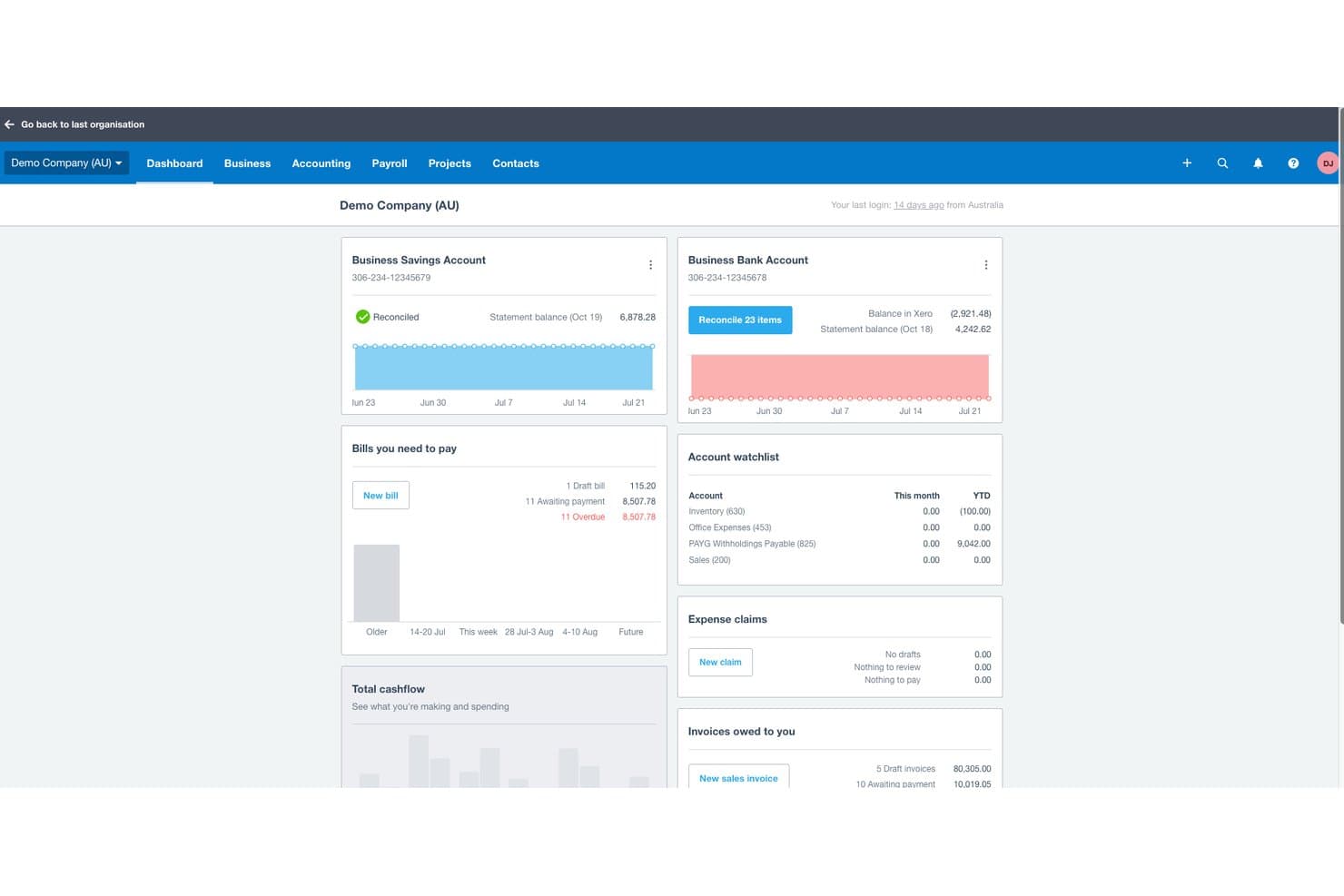
Xero offers a comprehensive dashboard displaying bank balances, bills to pay, expense claims, invoices owed, and account watchlist in one view. Xero is a cloud-based accounting platform offering invoicing, bank reconciliation, expense tracking, financial reporting, and multi-currency support for small businesses and their advisors.
Who Is Xero Best For?
Xero suits small businesses that need multiple people — owners, bookkeepers, and accountants — working in the same accounting platform without per-seat costs.
Why I Picked Xero
I've included Xero in my top picks because its unlimited user access across all plans solves a real pain point I see with competing tools. Most platforms charge per seat, so adding a bookkeeper or an external accountant drives costs up fast. With Xero, I can invite my accountant and bookkeeper into the same account without touching my plan, and features like Hubdoc document capture and AI-powered bank transaction matching stay fully accessible to every user.
Xero Key Features
- Multi-currency accounting: Track transactions and generate invoices in multiple currencies with automatic exchange rates.
- Automated sales tax calculation: Calculates and tracks sales tax, VAT, or GST on invoices and reports.
- Bank transaction feeds: Connect bank accounts for daily transaction imports and faster reconciliation.
- Mobile app access: Capture receipts, send invoices, and check cash flow from iOS and Android devices.
Xero Integrations
Xero offers native integrations with Stripe, PayPal, Square, Hubdoc, Avalara, Gusto, Receipt Bank, Shopify, WooCommerce, and Zapier. An API is available for custom integrations.
What's Free?
Xero offers a 30-day free trial with access to all features, no credit card required. There's no free-forever plan, so you'll need to choose a paid plan once the trial ends.
Pros and Cons
Pros:
- Hubdoc document capture built in
- AI-powered bank transaction matching included
- Unlimited users on every paid plan
Cons:
- Payroll requires an additional paid add-on
- No free-forever plan exists
Learn more about Xero: 2Best for expense tracking
Ramp
- Free plan available; 30-day free trial
- From $15/user/month
Visit WebsiteCustomer Rating:4.8/5
Ramp provides an automated accounting dashboard that categorizes transactions, syncs expenses, and flags missing memos for review. Ramp is a corporate expense management platform that combines physical and virtual company cards with built-in financial controls.
Why I picked Ramp: Ramp offers real-time expense recognition by texting you right after a card swipe, prompting you to upload the receipt via SMS or the app. That means you don’t have to chase paper, and it reduces missing or mismatched receipts. The platform also allows flexible control over spending limits on each virtual or physical card, so you can set monthly, per-transaction, and merchant-specific caps to prevent off-policy charges.
Standout features & integrations:
Features include machine‑learning‑based receipt matching and categorization that automatically pairs receipt images with transactions and tags expenses based on set rules. It also offers bill pay support where you can email or upload vendor invoices, set approval workflows, and pay bills via ACH, check, or card.
Integrations include NetSuite, Sage Intacct, QuickBooks, Microsoft Dynamics Business Central, Acumatica, Workday Financial Management, Uber, Lyft, Amazon Business, TravelPerk, ADP Workforce Now, and Gusto.
What's Free? Ramp includes a free plan for smaller teams looking for basic functions to simplify finances.
Pros and Cons
Pros:
- Automated expense reporting and receipt matching
- Ability to issue multiple virtual cards with customizable controls
- Combined AR, AP, and expense management in one system
Cons:
- Mobile app has fewer features than desktop version
- Could offer more advanced accounting features
 Best for real-time collaboration
- 14-day free trial + free plan available
- From $7/user/month (billed annually)
Visit WebsiteCustomer Rating:4.6/5
Google Sheets provides a simple cash flow template. Source: Google Docs For those seeking a cost-effective solution to manage financial tasks, Google Sheets offers a compelling option. This versatile tool allows you to create and collaborate on spreadsheets, making it ideal for small businesses and individuals who need to organize financial data without incurring additional costs. Whether you're tracking expenses, managing budgets, or generating reports, Google Sheets provides the essential functionalities to simplify your accounting processes.
Why I Picked Google Sheets
I picked Google Sheets for its unparalleled ability to facilitate real-time collaboration, a feature that stands out in the realm of Free Accounting Software Options. You and your team can simultaneously work on the same spreadsheet, see each other's changes instantly, and communicate via comments, which can significantly enhance teamwork and decision-making processes. The automatic saving and version history features ensure that no data is lost, and you can always revert to previous versions if needed. This collaborative environment makes Google Sheets particularly valuable for businesses and individuals who need to manage and share financial data seamlessly.
Google Sheets Key Features
In addition to its real-time collaboration capabilities, Google Sheets offers a range of features that are particularly useful for managing accounting tasks.
- Templates: Google Sheets provides pre-designed templates for tracking income, expenses, and budgets, simplifying the bookkeeping process.
- Formulas and Functions: With built-in functions like SUM, AVERAGE, and IF, you can automate calculations and analyze data efficiently.
- Data Visualization: You can create charts and graphs to visualize financial data, making it easier to interpret trends and performance.
- Advanced Functions: Features like VLOOKUP and IMPORTRANGE streamline data retrieval and synchronization across multiple sheets.
Google Sheets Integrations
Integrations include Salesforce, Intuit, Asana, BigQuery, Looker, and other tools within Google Workspace.
Pros and Cons
Pros:
- Strong data visualization tools
- Excellent real-time collaboration
- Powerful formulas and automation options
Cons:
- Requires manual setup for reports
- Limited advanced accounting functions
Learn more about Google Sheets:

ZipBooks displays your invoice stats in a simple dashboard while letting you select other key services with a single click. ZipBooks is a cloud-based tool designed to simplify financial management for a wide range of users. It's tailored especially for small businesses and freelancers, providing solutions that cover time tracking, expense management, and accounts receivable automation.
Why I picked ZipBooks: ZipBooks offers a unique combination of features that cater to small-scale financial needs without additional costs. You can track time, manage expenses, and automate accounts receivable, all while enjoying seamless bank reconciliation and multi-currency support. Additionally, ZipBooks provides dedicated customer support and allows unlimited users, which is often not seen in other free accounting solutions.
Standout features & integrations:
Features include simple invoicing tools that let you customize and send invoices quickly. You can track expenses effortlessly, giving you a clear view of your spending. It also provides smart insights to help you and your team make better financial decisions.
Integrations include PayPal, Square, Stripe, Gusto, Plaid, Slack, QuickBooks, Google Drive, Trello, and Asana.
What's Free? ZipBooks offers a free-forever plan with essential features for small businesses and freelancers. This plan includes unlimited invoicing, time tracking, and basic reporting, with no user limitations.
Pros and Cons
Pros:
- Unlimited invoices with free service
- Easily accept payments
- Free service with no limit on business size
Cons:
- Most useful features require a paid subscription
- Limited support
Learn more about ZipBooks: Best for businesses using other Zoho services
- 14-day free trial
- From $15/month (billed annually)
Visit WebsiteCustomer Rating:4.3/5
Zoho Books has a clean-looking dashboard that makes it easy to see basic details about your company and to find all of the features you need. If you’re already a Zoho customer, I’d definitely recommend looking into adding their accounting software to your current setup. Zoho Books can handle everything from expense reporting to automated follow-up on customer accounts.
Why I picked Zoho Books: Zoho Books offers seamless integration within the Zoho ecosystem, creating a unified platform for managing everything from sales and CRM to inventory and invoicing. This tight integration reduces the need for manual data entry, improves workflow efficiency, and provides real-time financial insights across departments.
Standout features & integrations:
Features include the ability to create and send professional invoices with just a few clicks, making your billing process efficient and straightforward. You can also track expenses and time, ensuring your team stays on top of all financial activities without missing a beat.
Integrations include Zoho CRM, PayPal, Stripe, Google Drive, Dropbox, Office 365, Slack, G Suite, Mailchimp, and Zendesk.
What's Free? Zoho Books offers a free-forever plan for businesses with revenue below a certain threshold, allowing one user and one accountant. While it provides essential accounting features, integrations with other applications might be limited in the free version.
Pros and Cons
Pros:
- Most important features available with free service
- Easy to use
- Test account lets you check out the service before signing up
Cons:
- Works best if you pay for additional services
- Limited support
 Best for multi-entity consolidation
- 14-day free trial available
- From $24/month (billed annually)
Visit WebsiteCustomer Rating:4.7/5
Joiin provides consolidated profit and loss reports with real-time variances across multiple entities. Joiin gives you a way to bring together financial and operational data from multiple entities — including accounting systems, spreadsheets, and non-financial sources — into a single cloud-based platform so your finance team can build consolidated reports, dashboards, and consolidated group-level views in one place. It’s especially useful if you manage more than one company, operate across different currencies, or want to replace manual spreadsheet consolidation with something more reliable and audit-ready.
Why I Picked Joiin
I picked Joiin because it excels at multi-entity consolidation — it lets you combine financial, sales, KPI, and non-financial data across different entities, currencies, and accounting systems into unified reports. Its support for inter-company eliminations, automatic currency conversion, and real-time consolidated dashboards stands out as a practical advantage when tracking group-level finances. I like that it can pull data from various sources like spreadsheets, bookkeeping tools, and ERP systems, giving you flexibility while still maintaining a clean, centralized reporting structure.
Joiin Key Features
Aside from its consolidation strength, Joiin also offers these useful features:
- Real-Time Dashboards and KPI Tracking: View live consolidated dashboards that mix financial metrics, sales, and non-financial KPIs for a holistic business view.
- Budgeting and Forecasting: Provides tools to create detailed budgets and forecasts, helping you plan your financial future with precision.
- Customizable Financial Reports: Enables you to tailor reports to fit your specific business needs, ensuring you have the most relevant data at your fingertips.
- Mobile-Ready Reports: Ensures you can access and review financial reports on the go, making it easier to manage your finances from anywhere.
Joiin Integrations
Integrations include Xero, QuickBooks, Sage, Pennylane, Excel, Puzzle, and Zapier. Joiin also provides an API for custom integrations, allowing further flexibility in connecting with other platforms.
What's Free?
While Joiin doesn't offer a free plan, it does offer a 14-day free trial of all its features.
Pros and Cons
Pros:
- Offers automated intercompany eliminations for group-level accuracy.
- Generates both standard financial statements and custom reports.
- Handles multi-entity and multi-currency consolidation reliably.
Cons:
- Less advanced forecasting and planning tools compared to full ERP modules.
- Does not fully replace core accounting functions like invoicing.
Learn more about Joiin:

GnuCash doesn’t have the friendliest or best-looking user interface, but it has more features than you’ll probably ever need. GnuCash won’t disappoint when it comes to features–everything from the most basic to the most advanced ones are completely free. But, fair warning: be ready for a bit of a learning curve.
Why I picked GnuCash: GnuCash is open source and includes features such as double-entry accounting and a checkbook-style register for transaction management for no cost. It offers advanced capabilities such as stock tracking and multi-currency handling, aligning with its focus on detailed financial management. The software also supports importing data from other financial applications, enhancing its flexibility and usability for various financial tasks.
Standout features & integrations:
Features include the ability to handle double-entry accounting, ensuring your transactions balance correctly by impacting two accounts. You can also manage your transactions with a checkbook-style register, which provides a straightforward interface for entering and viewing financial activities.
Integrations include the ability to import financial data from QIF and OFX files, support for the German HBCI protocol for banking transactions, and it works on Windows, MacOS, and Linux platforms.
What's Free? GnuCash is a free accounting software available for personal and business use, with no trial limitations. It supports an unlimited number of users and offers extensive documentation and community support.
Pros and Cons
Pros:
- Great reporting capability
- Extensive user guides and how-to documentation
- Open-source software that offers all features for free
Cons:
- No professional support
- Steep learning curve
Learn more about GnuCash:

Lendio’s accounting tool has a clean dashboard to give you a quick snapshot of what’s happening with your company. Lendio’s accounting tool, formerly known as Sunrise, is great for invoice automations. For sole proprietors and those who don’t have a dedicated accounting department, Lendio can save you a lot of time and money.
Why I picked Lendio: Lendio offers easy invoicing, includes automations, and has reasonably-priced payment acceptance. However, the software does charge a fee for payment processing (from 2.55% + $0.30 to 3.55% + $0.30 for credit card payments, 0.5% + $0.30 - 1.5% + $0.30 for ACH transactions).
Standout features & integrations:
Features include access to a wide variety of loan options tailored to your business needs. You can easily compare different lenders to find the best terms and rates. The platform also provides a simple online application process, saving you and your team valuable time.
Integrations include QuickBooks, Xero, FreshBooks, Stripe, Square, PayPal, Shopify, Amazon, and eBay.
What's Free? Lendio provides free access to its marketplace for comparing financing options. You can explore different loan products and use tools like loan calculators without any cost, but actual loan applications will depend on the terms of the lenders.
Pros and Cons
Pros:
- Easy expense tracking
- Reporting tools
- Free service that offers invoice automation
Cons:
- Provides little help with signing up
- Website and support availability are not detailed
Learn more about Lendio: Best for power users
- Free plan available
- From $60/user/year (billed annually)
Visit WebsiteCustomer Rating:4.8/5
TurboCASH may not be the best-looking option on the list, but it has all the tools you need. TurboCASH stands out as a versatile tool designed for small to medium-sized businesses seeking a cost-effective way to handle their accounting needs. With its user-friendly interface and support for multiple languages, it caters to a diverse range of users, allowing you to manage tasks such as invoicing, inventory, and financial reporting with ease. If you're aiming to refine your accounting processes without hefty expenses, TurboCASH offers a practical solution to tackle these challenges.
Why I Picked TurboCASH
I picked TurboCASH for its ability to cater to power users seeking a free accounting software option with advanced functionalities. TurboCASH stands out with its multi-workstation support, allowing simultaneous access by multiple users, which is ideal for teams managing complex financial operations. The software's Bank Import Plugin significantly enhances efficiency by automating transaction entries through direct bank statement imports. Additionally, TurboCASH's Document E-mail Pro feature, which enables the emailing of customizable documents, provides a streamlined communication process, making it a robust choice for those requiring comprehensive accounting capabilities.
TurboCASH Key Features
In addition to the advanced functionalities highlighted earlier, TurboCASH offers a variety of features that cater to diverse accounting needs.
- Invoicing Capabilities: Easily create and manage invoices, helping you keep track of payments and outstanding balances.
- Expense Tracking: Allows you to monitor expenses efficiently, ensuring accurate financial reporting.
- Inventory Management: Provides tools to manage stock levels and inventory, crucial for businesses with physical products.
- Financial Reporting: Offers comprehensive financial reporting tools to help you gain insights into your business's financial health.
TurboCASH Integrations
Integrations include QuickBooks, Xero, FreshBooks, Zoho Books, Sage, Tally, MYOB, Wave, Kashoo, and NetSuite.
Pros and Cons
Pros:
- Powerful customer tracking and reporting tools
- Multi-language support
- Truly free if you use version 4
Cons:
- Limited support
- Steep learning curve
Learn more about TurboCASH:

Puzzle.io’s Transactions dashboard helps you categorize and track expenses with clear visibility into vendors and spending categories. For those seeking an intuitive yet powerful free accounting solution, Puzzle.io stands out with its AI-driven capabilities tailored for startups and small businesses. You’ll appreciate how it automates up to 95% of transaction categorizations, drastically reducing manual bookkeeping tasks. With seamless integration with popular tools like Stripe and Brex, Puzzle.io addresses the challenge of transitioning from traditional software, offering a smoother financial reporting process.
Why I Picked Puzzle.io
I picked Puzzle.io because its AI-driven insights make it a strong choice for those seeking free accounting software options. The platform offers an AI Categorizer that automates the categorization of 90-95% of transactions, dramatically reducing manual entry and enhancing accuracy. Additionally, it provides real-time cash flow insights, allowing you to quickly assess your financial health and make informed decisions without delay. These features are particularly beneficial for startups and small businesses aiming to optimize their financial management processes efficiently.
Puzzle.io Key Features
In addition to AI-driven insights, Puzzle.io offers several key features that enhance its appeal as a free accounting software option for startups and small businesses.
- Automated Revenue Recognition: This feature is designed for Stripe users, simplifying complex calculations such as accrued and deferred revenue.
- Automated Cash Reconciliation: Puzzle.io significantly reduces month-end close times by automating the reconciliation process.
- Integration with AngelList and Brex: These integrations allow for seamless data synchronization and auto-categorization of transactions, ensuring up-to-date financial records.
- Dual Cash and Accrual Accounting Books: The platform provides the flexibility to maintain both cash and accrual accounting books, offering comprehensive financial insights.
Puzzle.io Integrations
Integrations include Stripe, Brex, Ramp, Rippling, and Gusto.
Pros and Cons
Pros:
- Real-time dashboards provide immediate financial insights
- AI-powered transaction categorization
- Automated bank reconciliations ensure accuracy
Cons:
- Free trial requires users to connect a bank account
- May not be suitable for very large enterprises
Learn more about Puzzle:
Annen gratis regnskapsprogramvare
Her er noen flere gratis alternativer for regnskapsprogramvare som ikke kom med på kortlisten min, men som likevel er verdt å sjekke ut:
- 11Express AccountsBest for financial reporting
- 12AkauntingBest for payroll
- 13Odoo ERPBest for essential accounting tasks
- 14Fiverr WorkspaceBest for invoicing and expense tracking
- 15WAVEBest for automations
- 16Money Manager EXBest for simple projects
- 17TrulySmallBest for very small businesses/freelancers
- 18BrightbookBest for remote and virtual teams
- 19AcuSheetBest for automated accounting tasks
- 20HiverBest for shared inbox management
- 21StrivenBest for a range of features
Relaterte anmeldelser
- Leverandører av nettbasert regnskapsprogramvare
- Regnskapsprogramvare for små virksomheter
- Regnskapsprogramvare for ideelle organisasjoner
- Beste regnskapsprogramvare totalt sett
- Programvare for økonomirapportering
- Programvare for leverandørgjeld
- ERP-programvare
How I Evaluate Free Accounting Software
Whether you're a freelancer sending invoices or a founder tracking cash flow, I evaluate tools on two levels: core accounting must-haves to qualify, and differentiators that separate the best.
Core Functionality (Table Stakes For This List)
When I'm selecting tools for my list, I rank each one on a scale from 0 (does not offer the functionality) to 5 (excels in this area) for each core functionality listed below. Then, I calculate the tool's total score into a percentage. Each tool needs to achieve a minimum total score of 65% to be considered for inclusion.
- General Ledger & Bookkeeping: I check whether the tool supports double-entry bookkeeping with a chart of accounts, since that's the foundation for accurate records come tax season.
- Invoicing & Billing: Every freelancer and small business owner needs to bill clients, so I look for customizable invoices with payment tracking on the free plan.
- Expense & Income Tracking: Categorizing revenue and costs across accounts matters, especially when a solopreneur needs to separate project income or sort vendor expenses.
- Financial Reporting: I evaluate whether the tool generates at least a profit & loss, balance sheet, and cash flow report you can hand to a bookkeeper or tax preparer.
- Bank Reconciliation: Matching bank transactions to your books catches errors fast, so I look for CSV imports at minimum and give higher marks for live bank feeds.
- Free Tier Availability: A time-limited trial doesn't count here. I confirm each tool offers a genuinely free plan with enough functionality to run real day-to-day accounting.
Once I have a list of tools that meet this criteria, I consider what sets each platform apart.
Differentiating Factors (What Sets Vendors Apart)
Here's how I compare and contrast different vendors:
Standout Features
Tax calculation features carry real weight when you're a freelancer juggling sales tax, VAT, or GST across client invoices. I look for tools that auto-apply the right rates and generate tax-ready reports. Multi-currency support is another separator, especially for startups billing international clients. I evaluate whether exchange rates update automatically or require manual input. Receipt scanning with OCR paired with a solid mobile app also splits the field, since solopreneurs who capture expenses from their phone save meaningful time versus manual desktop entry.
Beyond Features
Free plan caps matter a lot here. I check how many invoices, users, and transactions each tool allows before requiring an upgrade, because a growing small business can hit those limits fast. Integrations also weigh heavily—if your clients pay through Stripe or PayPal, the tool should connect to those processors without workarounds. I also evaluate whether you can invite an external bookkeeper or accountant to your account at no cost, with proper role-based permissions, so your tax preparer can pull what they need without full admin access to your books.
Slik velger du gratis regnskapsprogramvare
Et utall funksjoner og forvirrende prisnivåer kan gjøre det overveldende å velge gratis regnskapsprogramvare. For å gjøre prosessen enklere får du her en enkel sjekkliste som hjelper deg med å finne den rette løsningen med trygghet:
| Faktor | Hva du bør vurdere |
|---|---|
| FaktorSkalerbarhet | Hva du bør vurdereSørg for at programvaren kan vokse med virksomheten din. Se etter løsninger som støtter et økende antall brukere og transaksjonsvolum. |
| FaktorIntegrasjoner | Hva du bør vurdereKontroller om den kobles til eksisterende verktøy som CRM eller ERP-systemer, slik at arbeidsflyter effektiviseres og datasiloer unngås. |
| FaktorTilpasningsmuligheter | Hva du bør vurdereFinn ut om du kan tilpasse programvaren til dine spesifikke behov, for eksempel med egendefinerte rapporter eller fakturamal, slik at den passer bedre til virksomhetens prosesser. |
| FaktorBrukervennlighet | Hva du bør vurdereVurder hvor lang tid det tar for teamet å lære programvaren. Brukervennlige grensesnitt og omfattende støttemateriell reduserer opplæringstiden og øker produktiviteten. |
| FaktorBudsjett | Hva du bør vurdereSelv om programvaren er gratis, bør du vurdere eventuelle skjulte kostnader, for eksempel betalte tillegg, transaksjonsgebyrer eller alternativer for premiumstøtte, som kan påvirke budsjettet. |
| FaktorSikkerhetstiltak | Hva du bør vurdereForsikre deg om at programvaren tilbyr sterke sikkerhetsfunksjoner som datakryptering og regelmessige sikkerhetskopier for å beskytte økonomiske opplysninger. |
Trender innen gratis regnskapsprogramvare
Da jeg undersøkte gratis regnskapsprogramvare, gjennomgikk jeg produktoppdateringer, pressemeldinger og lanseringslogger fra ledende leverandører. Dette var det som skilte seg ut:
- AI-drevne innsikter: AI-funksjoner brukes til å tilby prediktive innsikter og økonomiske prognoser, slik at brukerne kan ta velinformerte beslutninger. Wave bruker for eksempel AI til å generere rapporter som hjelper virksomheter med å forstå kontantstrømmønstrene sine.
- Blokkjede for åpenhet: Enkelte leverandører utforsker blokkjedeteknologi for å øke åpenheten og sikkerheten rundt transaksjoner. Denne teknologien er spesielt nyttig for brukere som trenger etterprøvbare revisjonsspor uten involvering fra tredjeparter.
- Tilpassbare kontrollpaneler: Brukerne kan nå tilpasse kontrollpanelene sine slik at de bare viser den mest relevante informasjonen, og tilpasse grensesnittet til individuelle eller forretningsmessige behov.
- Fokus på personvern: På grunn av økende bekymring for datasikkerhet prioriterer gratis regnskapsprogramvare personvernet til brukerne ved å innføre sterkere kryptering og personverninnstillinger.
- Forbedrede samarbeidsverktøy: Samarbeidsfunksjoner integreres, slik at flere brukere kan arbeide med økonomiske dokumenter samtidig. Dette er ideelt for små team som trenger å håndtere økonomien sammen.
Hva er gratis regnskapsprogramvare?
Gratis regnskapsprogramvare er et digitalt verktøy som er utviklet for å hjelpe små virksomheter med å håndtere økonomiske oppgaver som bokføring, fakturering og kostnadssporing uten kostnad.
Den brukes hovedsakelig av oppstartsbedrifter og små virksomheter som ønsker å effektivisere økonomistyringen uten ekstra utgifter. Ved å fjerne kostnader hjelper den virksomheter med å føre nøyaktige økonomiske registre, enkelt generere rapporter og håndtere kontantstrømmen effektivt, samtidig som manuelt arbeid og potensielle feil reduseres.
Funksjoner i gratis regnskapsprogramvare
Når du velger gratis regnskapsprogramvare, bør du fokusere på verktøy som dekker viktige økonomiske oppgaver, samtidig som de tilbyr tilstrekkelig funksjonalitet til å støtte den daglige driften. Selv uten en prislapp bør programvaren bidra til å effektivisere arbeidsflyter, forbedre nøyaktigheten og gi innsikt i den økonomiske helsen din. Viktige funksjoner du bør se etter, omfatter:
- Grunnleggende fakturering: Gratis regnskapsverktøy bør la deg opprette og sende profesjonelle fakturaer, slik at du kan administrere fakturering, følge opp betalinger og sørge for at inntektene fortsetter å komme inn.
- Utgiftssporing: Muligheten til å registrere og kategorisere utgifter hjelper brukerne med å forstå forbruksmønstre og beholde kontrollen over budsjettene. Dette er spesielt verdifullt når man håndterer innkjøpsordrer og gjentakende kostnader.
- Finansiell rapportering: Se etter viktige rapporter som resultatregnskap, balanser, hovedbøker og kontantstrømoppstillinger. Denne innsikten støtter beslutningstaking og gjør økonomien i virksomheten din transparent.
- Bankavstemming: Automatisk eller delvis automatisert avstemming bidrar til å koble banktransaksjoner mot regnskapet, redusere feil og holde de økonomiske dataene nøyaktige.
- Støtte for flere valutaer: Hvis du samarbeider med internasjonale leverandører eller kunder, gjør støtte for flere valutaer det enklere å håndtere transaksjoner i utenlandsk valuta uten manuelle omregninger.
- Mobil tilgang: Mobiltilpasset programvare gjør det mulig å gjennomgå økonomiske data, registrere utgifter og administrere fakturaer hvor som helst, slik at produktiviteten opprettholdes også på farten.
- Tilgangskontroller for brukere: Rollebaserte tillatelser bidrar til å beskytte sensitiv informasjon og sikre at de rette personene får tilgang til de rette funksjonene.
- Integrasjonsmuligheter: Selv gratis programvare bør kunne kobles til verktøy som betalingsformidlere, CRM-systemer eller netthandelsplattformer for å støtte smidigere arbeidsflyter og redusere manuell registrering.
- Automatiserte sikkerhetskopier: Regelmessige sikkerhetskopier av data beskytter den økonomiske informasjonen din mot tap som følge av systemkrasj eller utilsiktet sletting.
- Kundestøtte: Veiledninger, hjelpesentre, brukerfora eller kundestøtte via e-post kan utgjøre en stor forskjell når du skal lære deg programvaren eller feilsøke problemer.
Vanlige AI-funksjoner i gratis regnskapsprogramvare
Noen gratis regnskapsverktøy eller regnskapsverktøy med gratisversjon har nå enkle AI-funksjoner som øker effektiviteten og nøyaktigheten, for eksempel:
- Automatisk kategorisering av transaksjoner: AI lærer av tidligere atferd for å klassifisere inntekter og utgifter automatisk, noe som reduserer behovet for manuell opprydding.
- Smart kvitteringsregistrering: AI henter ut viktige detaljer – som datoer, beløp og leverandører – fra opplastede kvitteringer, noe som gjør utgiftssporingen raskere.
- Varsler om avvik: Grunnleggende AI-modeller flagger uvanlige transaksjoner eller avvik, slik at brukerne kan oppdage feil tidlig.
- Prediktiv innsikt i kontantstrømmen: Noen verktøy tilbyr enkle AI-baserte prognoser basert på historiske data, slik at du kan forutse kommende likviditetsmangler eller overskudd.
- Søk med naturlig språk: Brukere kan skrive spørsmål som «Hvilke utgifter hadde jeg forrige måned?» og få raske, lettfattelige svar uten å måtte lete gjennom rapporter.
Fordeler med gratis regnskapsprogramvare
Bruk av gratis regnskapsprogramvare i virksomheten kan gi deg og teamet ditt reelle fordeler. Her er hva du kan forvente:
- Kostnadsbesparelser: Gratis regnskapsprogramvare eliminerer behovet for dyre abonnementer, slik at du kan fordele midler til andre behov i virksomheten.
- Utgiftssporing: Du kan enkelt holde oversikt over utgifter i virksomheten, noe som gjør det enklere å håndtere kontantstrømmen med innebygde sporingsfunksjoner.
- Fakturering: Programvaren inkluderer ofte faktureringsfunksjoner, noe som gjør det enkelt å fakturere kunder og administrere innbetalinger.
- Finansiell rapportering: Generer økonomiske rapporter raskt og få innsikt i virksomhetens resultater uten ekstra kostnader.
- Skatteforberedelser: Med funksjoner for organisering av skatterelaterte dokumenter kan du effektivisere prosessen med å levere skattemeldingen og redusere stresset i skatteperioden.
- Organisering av data: Programvaren hjelper med å organisere de økonomiske dataene dine, slik at de blir enklere å finne og tolke ved behov.
- Tilgjengelighet: Mange gratis regnskapsverktøy tilbyr skybasert tilgang, slik at du kan administrere økonomien fra hvor som helst med en internettilkobling.
- Effektiviser arbeidsflyter: Gratis regnskapsprogramvare kan også bidra til å effektivisere arbeidsflytene i virksomheten, slik at du får mer tid til å fokusere på viktigere oppgaver.
Kostnader og priser for gratis regnskapsprogramvare
Å velge gratis regnskapsprogramvare handler ikke bare om å unngå kostnader: Det handler om å vite nøyaktig hva du får. Noen verktøy begrenser funksjoner, brukere eller kundestøtte.
Jeg har laget denne tabellen for å fremheve de viktigste plandetaljene, mulige kostnader og hva du realistisk sett kan forvente av gratis regnskapsprogramvare:
Sammenligningstabell for gratis regnskapsprogramvare
| Plantype | Gjennomsnittlig pris | Vanlige funksjoner |
|---|---|---|
| PlantypeGratisplan | Gjennomsnittlig pris$0 | Vanlige funksjonerGrunnleggende fakturering, kostnadssporing og begrenset rapportering. |
| PlantypePersonlig plan | Gjennomsnittlig pris$5-$25 per bruker per måned | Vanlige funksjonerGrunnleggende fakturering, kostnadssporing, tidsregistrering og grunnleggende rapportering. |
| PlantypeBedriftsplan | Gjennomsnittlig pris$25-$50 per bruker per måned | Vanlige funksjonerFakturering, kostnadssporing, tidsregistrering, prosjektstyring og avansert rapportering. |
| PlantypeBedriftsplan for større virksomheter | Gjennomsnittlig prisTilpasset pris | Vanlige funksjonerAlle bedriftsfunksjoner, støtte for flere valutaer, avansert analyse og dedikert kundestøtte. |
Vanlige spørsmål om gratis regnskapsprogramvare
Nedenfor finner du svar på noen av de vanligste spørsmålene om gratis regnskapsprogramvare.
Hvorfor skulle et programvareselskap gi bort produktet sitt gratis?
Programvareselskaper tilbyr ofte gratisversjoner for å tiltrekke seg nye brukere, bygge merkevarelojalitet og senere selge oppgraderinger til betalte planer. Gratisnivået viser frem de viktigste regnskapsfunksjonene deres. Hvis du trenger mer avanserte verktøy eller kundestøtte etter hvert som virksomheten vokser, er det mer sannsynlig at du vurderer de betalte alternativene deres.
Er gratis regnskapsprogramvare sikker?
Ja, de fleste anerkjente gratis regnskapsprogrammer bruker de samme sikkerhetsprotokollene som betalte alternativer. Dette omfatter datakryptering og regelmessige sikkerhetsoppdateringer. Se alltid etter funksjoner som tofaktorautentisering og en tydelig sikkerhetspolicy for å sikre at økonomiinformasjonen din forblir trygg.
Hvordan finner jeg riktig gratis regnskapsprogramvare for meg?
Begynn med å lage en liste over funksjonene du må ha, for eksempel fakturering, kostnadssporing eller tilgang for flere brukere. Andre trinn når du ser etter den beste gratis regnskapsprogramvaren for små bedrifter, omfatter:
- Sammenlign gratis verktøy med listen din, og se etter brukervennlighet, kundestøttealternativer og muligheter for oppgradering.
- Les ekte brukeranmeldelser for å se hvordan hvert alternativ fungerer for virksomheter som din.
Hvor kan jeg laste ned regnskapsprogramvare gratis?
Du kan laste ned gratis regnskapsprogramvare for små bedrifter fra leverandørenes offisielle nettsteder eller anerkjente appbutikker som Microsoft Store eller Apple App Store. Bruk alltid den offisielle kilden for å unngå skadevare eller utdaterte versjoner.
Kan jeg bytte fra gratis regnskapsprogramvare til en betalt plan senere?
Ja, de fleste leverandører gjør det enkelt å oppgradere fra en gratis regnskapsprogramvareplan for bedrifter til en betalt plan. Dataene dine overføres vanligvis sømløst, og du får tilgang til flere funksjoner eller høyere bruksgrenser etter hvert som virksomheten vokser.
Hvilke begrensninger har gratis regnskapsprogramvare for små bedrifter?
Gratis regnskapsprogramvare begrenser ofte antallet brukere, fakturaer, kontoer eller avanserte funksjoner som lønn. Du kan også ha begrenset kundestøtte og lagringsplass. Sørg for at begrensningene ikke vil holde virksomheten tilbake før du bestemmer deg.
Kan gratis regnskapsprogramvare integreres med de andre forretningsverktøyene mine?
Noen gratis regnskapsverktøy kan kobles til populære apper som lønnssystemer, betalingsformidlere eller e-handelsplattformer, men integrasjoner kan være begrenset til betalte planer. Sjekk verktøyets side for integrasjoner eller hjelpedokumentasjon før du registrerer deg.
Hvordan håndterer gratis regnskapsverktøy sikkerhetskopiering og databeskyttelse?
Pålitelig gratis regnskapsprogramvare sikkerhetskopierer dataene dine automatisk og bruker skylagring med strenge sikkerhetsstandarder. Les likevel leverandørens retningslinjer for sikkerhetskopiering, og vurder å eksportere dataene dine regelmessig for ekstra trygghet.