

10 Best Fund Accounting Software Reviewed in 2026

Best Fund Accounting Software Shortlist


The best fund accounting software helps you manage financial operations with accuracy and control—without the clunky interfaces, reconciliation errors, or manual reporting processes that come with outdated systems. If your current software can’t deliver the flexibility, precision, or visibility your organization needs, it may be costing you more time and money than you realize.
With more than 15 years of experience in financial management and digital software, I’ve seen firsthand how challenging fund management becomes when the right tools aren’t in place. I’ve worked with a wide range of systems, learning what CFOs truly need: reliability, scalability, and streamlined workflows that never compromise on accuracy or compliance.
To help you find the right fit, I’ve tested and reviewed today’s leading fund accounting platforms. Here are the solutions that offer strong features, intuitive designs, and the scalability to support your organization as it grows—so you can focus on strategic financial leadership instead of outdated processes.
Why Trust Our Software Recommendations
Our team has been testing and reviewing software since 2012. As finance leaders ourselves, we know how difficult—and important—it is to choose the right software.
For this guide, we evaluated tools using hands-on testing and independent research, scoring tools using our selection criteria.
Our reviews reflect our human editorial judgment, not a sales pitch.
Fund Accounting Software Comparison Table
This comparison table summarizes pricing details for my top fund accounting software selections:
| Tool | Best For | Trial Info | Price | ||
|---|---|---|---|---|---|
| 1 | Best for customizable accounting rules | Free plan + free demo available | From $15/user/month | Website | |
| 2 | Best for alternative investments | Free demo available | Pricing upon request | Website | |
| 3 | Best for scalability | Free demo available | Pricing upon request | Website | |
| 4 | Best for private equity firms | Free demo available | Pricing upon request | Website | |
| 5 | Best for AI-powered accuracy monitoring | 14-day free trial | From $25/month | Website | |
| 6 | Best for user-friendly interface | Free demo + 15-day free trial available | From $79/month | Website | |
| 7 | Best for small to medium non-profits | Free plan available | From $45/month | Website | |
| 8 | Best for non-profit organizations | Free demo available | Pricing upon request | Website | |
| 9 | Best for church accounting | Free demo available | From $50/month | Website | |
| 10 | Best for not-for-profit agencies | Free demo available | Pricing upon request | Website |

Best Fund Accounting Software Reviews
The best fund accounting software helps you manage financial operations with accuracy and control—without the clunky interfaces, reconciliation errors, or manual reporting processes that come with outdated systems. If your current software can’t deliver the flexibility, precision, or visibility your organization needs, it may be costing you more time and money than you realize.
With more than 15 years of experience in financial management and digital software, I’ve seen firsthand how challenging fund management becomes when the right tools aren’t in place. I’ve worked with a wide range of systems, learning what CFOs truly need: reliability, scalability, and streamlined workflows that never compromise on accuracy or compliance.
To help you find the right fit, I’ve tested and reviewed today’s leading fund accounting platforms. Here are the solutions that offer strong features, intuitive designs, and the scalability to support your organization as it grows—so you can focus on strategic financial leadership instead of outdated processes.
Below are my detailed summaries of the best fund accounting software that made it onto my shortlist. My reviews offer an in-depth look at the key features, pros & cons, integrations, and ideal use cases of each tool to help you find the best one for you.
Ramp
Best for customizable accounting rules

Ramp is a spend management platform that combines corporate cards, accounts payable automation, and real-time expense tracking into one system. It helps finance teams control spend, automate approvals, and keep accounting accurate.
Why I picked Ramp: I picked Ramp because it offers flexible accounting rules and automated workflows that work well for fund accounting. You can categorize and code expenses with AI assistance, sync everything to your general ledger, and tailor workflows to fit complex fund requirements. The platform also centralizes approvals and helps ensure compliance with internal policies.
Standout features & integrations:
Features include customizable accounting settings, AI-powered invoice intake, and automated approval routing. Ramp supports multi-step bill pay workflows, real-time spend tracking, and built-in policy enforcement.
Integrations include NetSuite, Sage, Xero, QuickBooks, Microsoft Dynamics Business Central, Acumatica, Uber, Lyft, Okta, Google, Rippling, and Gmail.
Pros and Cons
Pros:
- Automated expense reporting and receipt matching
- Ability to issue multiple virtual cards with customizable controls
- Comprehensive reporting features
Cons:
- Could offer more advanced accounting features
- Mostly focuses on accounts payable and spend management
New Product Updates from Ramp

Ramp Adds VAT-Compliant Reimbursement Statements
Ramp added VAT and entity address details to reimbursement statements, helping teams in the EU, UK, and Canada reclaim VAT with less manual paperwork. For more information, visit Ramp’s official site.
 .
.
eFront
Best for alternative investments

eFront is a fund accounting platform designed for alternative investment managers, including private equity, real estate, and other asset classes. It provides tools for portfolio management, investor reporting, and risk management, tailored to the needs of alternative investment professionals.
Why I picked eFront: eFront specializes in alternative investments, offering features that cater to complex asset classes. You can track and manage diverse portfolios with precision, while the risk management tools help you assess and mitigate potential risks effectively. Additionally, the software’s detailed investor reporting ensures you meet the needs of stakeholders effortlessly.
Standout features & integrations:
Features include performance analytics that allows you to evaluate investment returns accurately. The platform supports scenario analysis, helping you anticipate potential market changes. It also offers compliance monitoring to ensure you meet regulatory requirements.
Integrations include Microsoft Excel, Salesforce, Bloomberg, Preqin, Intralinks, S&P Capital IQ, FactSet, Morningstar, MSCI, and Thomson Reuters.
Pros and Cons
Pros:
- Detailed investor reporting
- Effective risk management tools
- Specialized for alternative investments
Cons:
- Limited out-of-box templates
- Complex initial setup

Best for scalability
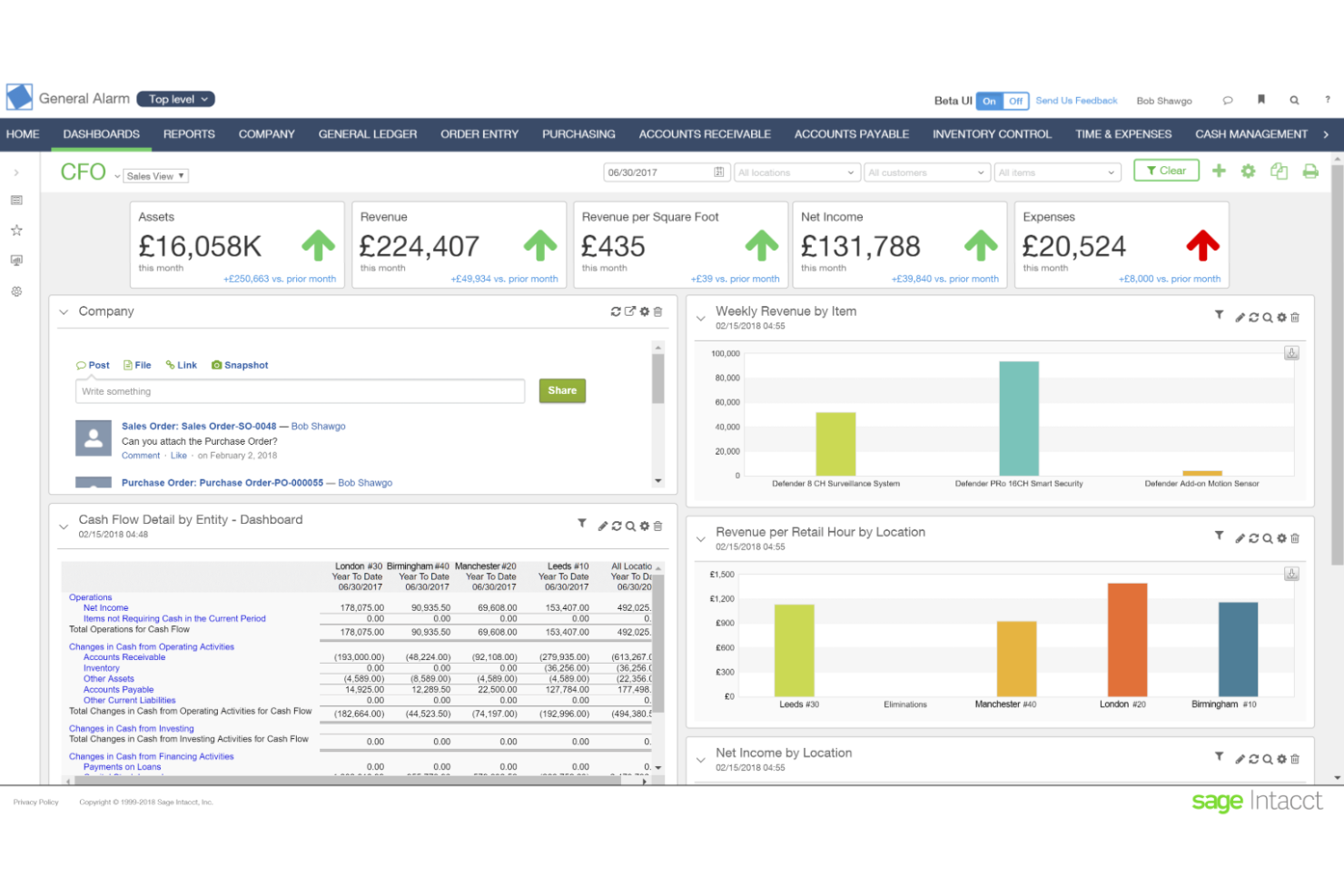
Sage Intacct is a cloud-based accounting software designed for nonprofits and other organizations needing advanced financial management. It offers tools for managing funds, budgets, and grants, making it ideal for organizations with complex financial needs.
Why I picked Sage Intacct: Sage Intacct excels in scalability, allowing you to expand its capabilities as your organization grows. The multi-entity management feature lets you consolidate finances across different locations easily. You also gain access to their real-time financial reporting, which provides insights to make informed decisions quickly.
Standout features & integrations:
Features include advanced budgeting capabilities that let you plan and forecast with accuracy. The grant tracking system helps manage funding sources effectively. Additionally, its dashboard allows you to customize views for quick access to critical data.
Integrations include Salesforce, ADP, Expensify, Bill.com, Avalara, American Express, Stripe, Square, PayPal, and Shopify.
Pros and Cons
Pros:
- Real-time financial insights
- Automates repetitive tasks
- Supports multi-entity management
Cons:
- Requires training for new users
- Complex initial setup

Dynamo
Best for private equity firms

Dynamo is a fund accounting software tailored for private equity firms and other alternative investment managers. It provides portfolio management, investor relations, and reporting capabilities.
Why I picked Dynamo: Dynamo excels in catering to private equity firms with its tailored features. Through the platform, you can track investor commitments and distributions with precision. The portfolio management module also offers you detailed insights into performance metrics, while its customizable dashboards provide a clear view of your investments.
Standout features & integrations:
Features include automated workflows that save time on repetitive tasks. The compliance tracking feature ensures you meet industry regulations. Additionally, the software’s document management system organizes and stores critical investment documents securely.
Integrations include Microsoft Excel, Salesforce, Preqin, PitchBook, Bloomberg, FactSet, Intralinks, Box, Docusign, and S&P Capital IQ.
Pros and Cons
Pros:
- Automated workflows
- Detailed performance metrics
- Tailored for private equity
Cons:
- Requires ongoing data input
- Complex setup process

Puzzle
Best for AI-powered accuracy monitoring

Puzzle.io is a modern accounting platform built for startups and small businesses that need flexible financial oversight. Its AI-native ledger handles day-to-day bookkeeping while offering specialized tools to help you manage multiple funding sources, monitor fund performance, and maintain financial accuracy.
Why I Picked Puzzle.io: I picked Puzzle.io because of its ability to handle both cash and accrual accounting simultaneously, which is essential when you're managing multiple fund types or revenue sources. The platform uses artificial intelligence (AI) to automate complex tasks like revenue recognition and prepaid expenses while performing continuous accuracy checks. This combination of automation and oversight gives you consistent, up-to-date financial data for decision-making. I also like that Puzzle.io offers built-in variance analysis so you can quickly flag and review unexpected expenses against your fund allocations.
Standout Features and Integrations:
Standout features include guided onboarding that helps you configure your account quickly, along with expert assistance from certified accountants when needed. You also get embedded collaboration tools to invite your team or external advisors directly into the platform for real-time reviews. For developers, Puzzle.io provides an open application programming interface (API) to build custom workflows or connect to internal systems.
Integrations include Mercury, Ramp, Brex, Every, Meow, Rippling, Gusto, Deel, Central, Stripe, Bill.com, Runway, and Causal.
Pros and Cons
Pros:
- Automates revenue recognition and expense categorization
- AI improves categorization accuracy over time
- Supports both cash and accrual accounting
Cons:
- Limited customization for complex workflows
- Smaller integration ecosystem compared to ERP tools


Aplos is a non-profit accounting software designed for churches and other faith-based organizations. It simplifies fund accounting, donations, and donor management, making it accessible for users without extensive accounting knowledge.
Why I picked Aplos: Aplos is known for its user-friendly interface, making it easy for anyone on your team to navigate. With it, you can manage donations effortlessly with integrated tracking features. Additionally, the software’s customizable reporting tools let you tailor reports to your organization's needs.
Standout features & integrations:
Features include a budgeting module that helps you plan and allocate funds efficiently. The donation processing system is also integrated with your accounting, reducing manual entry errors. Plus, the platform offers a communication module, allowing you to engage with donors directly.
Integrations include QuickBooks, Salesforce, PayPal, Stripe, Mailchimp, TaxBandits, Gusto, Kindful, Bloomerang, and Planning Center.
Pros and Cons
Pros:
- Streamlined budgeting features
- Direct donor communication
- Customizable reporting options
Cons:
- Basic reporting templates
- Limited advanced accounting functions


Springly is a fund accounting tool designed specifically for small to medium non-profit organizations. It helps manage finances, membership, and events, offering an advanced solution for organizational needs.
Why I picked Springly: Springly is tailored for small to medium non-profits, making it unique in its focus on community organizations. You can manage memberships and events with integrated tools that simplify coordination. The donation tracking feature also lets you easily monitor contributions. Additionally, the software offers automated financial reporting, saving you time on manual tasks.
Standout features & integrations:
Features include event management that helps streamline the planning and execution of fundraisers. The membership database keeps track of member information and engagement levels. Plus, the software’s communication tools allow you to send newsletters and updates directly from the platform.
Integrations include PayPal, Stripe, Mailchimp, Google Calendar, QuickBooks, Salesforce, Zapier, Eventbrite, Slack, and HubSpot.
Pros and Cons
Pros:
- Membership engagement tools
- Automated financial reports
- Integrated event management
Cons:
- Not ideal for larger organizations
- Limited advanced features


MIP Fund Accounting is a cloud-based solution designed for nonprofits and government entities. It helps track and manage finances from diverse revenue sources. The tool offers fund accounting, human resource management, and payroll features.
Why I picked MIP Fund Accounting: MIP Fund Accounting’s standout feature is its strong support system tailored for non-profits. It offers personalized assistance to help achieve your mission. You can also generate complex reports for various funding sources, enhancing your company’s overall financial management and compliance.
Standout features & integrations:
Features include customizable dashboards that let you view financial data in a way that suits your needs. It also provides advanced security measures to keep your data safe and compliant with standards. Additionally, the tool offers grant reporting that helps you manage and report on multiple funding streams with ease.
Integrations include Salesforce, QuickBooks, Paychex, ADP, Microsoft Excel, Intacct, Blackbaud, Sage, Abila, and Fund EZ.
Pros and Cons
Pros:
- Compliance with FASB and GASB
- Advanced reporting capabilities
- Quick onboarding process
Cons:
- Limited customization for some features
- May require training for new users

CDM+ Accounting is a specialized fund accounting solution designed for churches and faith-based organizations. It provides tools for managing contributions, budgets, and detailed financial reports.
Why I picked CDM+ Accounting: CDM+ Accounting’s tailored specifically for church accounting, offering features that address unique financial needs. You can track contributions with ease and generate reports that suit your organization’s requirements. The software’s budgeting tools also help you manage church finances effectively. Overall, its alignment with church operations makes it a valuable asset for faith-based financial management.
Standout features & integrations:
Features include a membership management system that keeps track of congregational details. The event scheduling feature helps coordinate church activities efficiently. Additionally, its customizable reporting tools allow you to focus on specific financial metrics important to your church.
Integrations include QuickBooks, PayPal, Stripe, Constant Contact, Mailchimp, Google Calendar, Planning Center, Breeze, FellowshipOne, and Vanco.
Pros and Cons
Pros:
- Detailed financial reporting
- Effective contribution tracking
- Designed for church financial needs
Cons:
- Limited advanced features
- May require initial setup guidance


Adagio is an accounting software solution tailored for not-for-profit organizations. It provides financial management tools, focusing on fund accounting, budgeting, and reporting.
Why I picked Adagio: Adagio caters specifically to not-for-profit agencies, offering features that aid in managing restricted and unrestricted funds. The reporting requirements allow you to generate detailed financial statements. You can also track budgets and expenses to ensure funds are used appropriately. Overall, the software’s flexibility in handling complex fund structures makes it a valuable tool for nonprofit financial management.
Standout features & integrations:
Features include a financial statement generator that simplifies report creation. The customizable chart of accounts lets you organize finances in a way that suits your agency. It also offers an audit trail functionality, providing a record of all transactions for compliance.
Integrations include QuickBooks, Microsoft Excel, Sage 50, Salesforce, PayPal, Stripe, WooCommerce, Shopify, Magento, and Xero.
Pros and Cons
Pros:
- Handles complex fund structures
- Detailed financial reporting
- Tailored for nonprofit fund management
Cons:
- Requires training for optimal use
- Initial setup can be complex
Other Fund Accounting Software
Here are some additional fund accounting software options that didn’t make it onto my shortlist, but are still worth checking out:
- CenterPoint Fund Accounting
For detailed reporting
- LemonEdge
For private equity markets
- Fund EZ
For budget management
- BUCS Budgetary Control System
For budgetary control
- DualEntry
For advanced fund accounting
- Blackbaud
For nonprofit financial management
- Juniper Square
For real estate investments
- FundCount
For fund administration
- Allvue
For private capital management
- Xceptor
For data automation


How I Evaluate Fund Accounting Software
I split evaluation into core requirements—like self-balancing fund ledgers and grant restriction tracking—and differentiators that tell you which tool fits your specific funding structure.
Core Functionality (Table Stakes For This List)
When I'm selecting tools for my list, I rank each one on a scale from 0 (does not offer the functionality) to 5 (excels in this area) for each core functionality listed below. Then, I calculate the tool's total score into a percentage. Each tool needs to achieve a minimum total score of 65% to be considered for inclusion.
- Fund-Based Accounting: I check whether each tool maintains true self-balancing fund ledgers or just uses tags and classes as workarounds—a big difference when you're reconciling interfund transfers at year-end.
- Grant & Restriction Tracking: Each tool should let you trace restricted dollars from receipt through release, so when a funder asks how their grant was spent, you can pull that answer in minutes.
- Compliance Reporting: I look for prebuilt statements like the Statement of Activities, Statement of Financial Position, and Form 990 schedules rather than forcing your team to build these from scratch in a report writer.
- Multi-Dimensional Chart of Accounts: The COA should support segments for fund, program, grant, department, and location so you can slice a single transaction across multiple reporting views.
- Fund-Level Budgeting: I evaluate whether you can build and track budgets at the individual fund or grant level and run variance reports—especially useful during mid-year grant reviews.
- Audit Trail & Internal Controls: Role-based permissions, segregation of duties, and immutable change logs matter here, particularly for organizations preparing for annual independent audits.
Once I have a list of tools that meet the criteria, I consider what sets each platform apart.
Differentiating Factors (What Sets Vendors Apart)
Here's how I compare and contrast different vendors:
Standout Features
Encumbrance accounting is a major differentiator for government teams and grant-funded organizations that need to reserve committed dollars before invoices arrive. I also evaluate automated cost allocations. A tool that splits facility costs or admin salaries across funds and grants without manual journal entries saves real time during close.
Board and donor dashboards round things out. When your executive director or a funder can pull up fund performance without requesting a custom report, that's a real win.
Beyond Features
Industry fit matters a lot here. A platform built for government agencies handles public sector procurement and GASB reporting differently than one designed for churches managing tithes. I also evaluate the integration ecosystem—whether the tool connects to your payroll provider, expense tools like Bill.com, and fundraising platforms without custom workarounds. Security certifications like SOC 1 and SOC 2 are worth checking too, since auditors and grantors increasingly ask for proof that your financial system meets those standards.
How to Choose Fund Accounting Software
It’s easy to get bogged down in long feature lists and complex pricing structures. To help you stay focused as you work through your unique software selection process, here’s a checklist of factors to keep in mind:
| Factor | What to Consider |
| Scalability | Ensure the software can grow with your organization, handling more users and transactions as needed without performance issues. |
| Integrations | Check if the software integrates with your existing systems, like ERP and CRM, to ensure seamless data flow across platforms. |
| Customizability | Look for options to tailor the software to fit your specific accounting processes and reporting needs, allowing you to create custom workflows and dashboards. |
| Ease of Use | Choose software with a user-friendly interface, so you and your team spend less time on training and more on managing funds effectively. |
| Budget | Consider the total cost, including subscription fees, implementation, and any hidden charges. Ensure it fits within your financial constraints. |
| Security Safeguards | Make sure the software has strong data protection measures, like encryption and regular backups, to keep your financial information secure. |
Trends In Fund Accounting Software
In my research, I sourced countless product updates, press releases, and release logs from different fund accounting software vendors. Here are some of the emerging trends I’m keeping an eye on:
- Cloud-Based Solutions: More vendors are shifting towards cloud-based platforms, allowing users to access their data from anywhere with an internet connection. This flexibility is important for organizations with remote teams or multiple locations.
- AI-Driven Analytics: AI is being integrated into analytics features, providing deeper insights into financial data. These tools help users predict trends and make informed decisions.
- Blockchain Integration: Some vendors are exploring blockchain technology to enhance transparency and security in financial transactions. This trend is gaining traction as organizations look for ways to ensure data integrity.
- Sustainability Tracking: There's a growing demand for features that help track and report on sustainability metrics. For example, more and more nonprofits and businesses alike are interested in measuring their environmental and social impact.
- Enhanced Compliance Features: As regulatory requirements evolve, software is being updated with features to ensure compliance with the latest standards. This includes automated compliance checks and reporting tools.
What Is Fund Accounting Software?
Fund accounting software is a financial management tool that helps nonprofits and government entities track and report funds with accuracy and compliance. It’s used by accountants, financial managers, and fund administrators who need to manage restricted and unrestricted funds while maintaining transparency. With features like budget management, detailed financial reporting, and compliance tracking, it streamlines complex accounting requirements. This ensures accountability and supports better financial decision-making across mission-driven organizations.
Features of Fund Accounting Software
When selecting fund accounting software, keep an eye out for the following key features:
- Budget Management: Helps you plan and allocate funds accurately, ensuring financial resources are used effectively.
- Financial Reporting: Provides detailed reports (i.e. expense reports, financial statements, balance sheets, etc.) that offer insights into financial health and aid in decision-making.
- Compliance Tracking: Ensures your organization meets regulatory standards through automated checks and reports.
- Fund Tracking: Allows you to manage restricted and unrestricted funds, maintaining transparency and accountability.
- Grant Management: Helps track spending against funding sources, ensuring that grants are utilized according to their terms.
- Audit Trail: Tracks all transactions to provide a record for compliance and accountability purposes. This is especially helpful when managing trust accounts.
- Customizable Dashboards: Lets you tailor your view of financial data, focusing on the metrics most important to your organization.
- AI-Driven Analytics: Uses AI to identify patterns and trends in financial data, aiding in predictive analysis.
- Cloud-Based Access: Enables you to access financial data from anywhere, supporting remote work and multi-location operations.
- Sustainability Tracking: Monitors and reports on environmental and social impact, helping organizations measure their sustainability efforts.
Benefits of Fund Accounting Software
Implementing a fund accounting system provides several benefits for your team and your business. Here are a few you can look forward to:
- Improved Financial Accuracy: Automated financial reporting and compliance tracking help reduce errors and ensure precise financial data.
- Enhanced Transparency: True fund accounting tracking and audit trails provide clear visibility into financial transactions, fostering accountability.
- Efficient Resource Allocation: Budget management tools allow you to allocate funds wisely, optimizing your financial resources.
- Time Savings: Automated processes and AI-driven analytics minimize manual tasks, freeing up time for strategic planning.
- Informed Decision-Making: Detailed financial reports and predictive analytics offer insights that help guide business decisions.
- Remote Accessibility: Cloud-based access ensures your team can work with financial data from anywhere, supporting flexible operations.
- Sustainability Insights: Tools for sustainability tracking help measure and report on environmental and social impact, aligning with organizational goals.
Costs and Pricing of Fund Accounting Software
Selecting fund accounting software requires an understanding of the various pricing models and plans available. Costs vary based on features, team size, add-ons, and more. The table below summarizes common plans, their average prices, and typical features included in fund accounting software solutions:
Plan Comparison Table for Fund Accounting Software
| Plan Type | Average Price | Common Features |
| Free Plan | $0 | Basic financial tracking, limited reporting, and community support. |
| Personal Plan | $10-$30/ user/month | Expense tracking, basic budgeting, and email support. |
| Business Plan | $40-$70/ user/month | Advanced reporting, fund management, and integration capabilities. |
| Enterprise Plan | $100-$150/ user/month | Customizable dashboards, compliance features, and dedicated account management. |
Fund Accounting Software FAQs
Here are some answers to common questions about fund accounting software:
What are the three types of fund accounting?
Fund accounting typically divides funds into three categories: governmental, proprietary, and fiduciary. Governmental funds are used for general government activities, proprietary funds are for business-like activities, and fiduciary funds manage assets held in trust. Each type serves a specific purpose and follows different accounting rules.
What are the methods used for fund accounting?
Fund accounting can use either the deferral or restricted fund method. The deferral method recognizes revenue when expenses are incurred, while the restricted fund method records revenue when received. This choice impacts how financial statements are prepared and how funds are managed.
What are the three principles of fund-based accounting?
Fund-based accounting principles focus on accountability, fund restrictions, and fund management. Accountability ensures transparency in financial reporting. Fund restrictions dictate how funds can be used, while fund management involves tracking and reporting on each fund separately.
What are the disadvantages of fund accounting?
Fund accounting can require additional effort and resources to manage separate funds. You’ll need detailed financial records and reports for each fund, which can be time-consuming. This complexity may necessitate specialized software to handle the workload efficiently.
How does fund accounting software ensure compliance?
Fund accounting software automates compliance checks and generates necessary reports. It helps track fund restrictions and ensures that financial activities align with regulations. This automation reduces the risk of errors and helps maintain transparency in financial reporting.
Can fund accounting software handle multi-currency transactions?
Yes, many fund accounting software solutions support multi-currency transactions. This feature allows organizations to manage international funds, ensuring accurate financial reporting across different currencies. It’s essential for nonprofits and businesses operating globally.