

O melhor software de contabilidade gratuito ajuda as startups e as pequenas empresas a gerirem as finanças de forma eficaz, sem mensalidades, simplificando a contabilidade, a faturação e o acompanhamento das despesas desde o início.
Um software de contabilidade fiável minimiza a introdução manual de dados, reduz os erros e acelera tarefas como a reconciliação de contas e os relatórios financeiros. Escolher a ferramenta de contabilidade gratuita certa significa ter menos pagamentos em falta, registos precisos e mais tempo para se concentrar no crescimento estratégico da sua empresa.
Why Trust Our Software Recommendations
6,700+
Reviews
20
Industry experts
16+
Evaluation factors
14
Years
Our team has been testing and reviewing software since 2012. As finance leaders ourselves, we know how difficult—and important—it is to choose the right software.
For this guide, we evaluated tools using hands-on testing and independent research, scoring tools using our selection criteria.
Our reviews reflect our human editorial judgment, not a sales pitch.
Tabela comparativa de software de contabilidade gratuito
Esta tabela comparativa destaca os preços e os detalhes dos períodos de teste gratuitos das minhas principais escolhas de software de contabilidade gratuito.
| Tool | Best For | Trial Info | Price | ||
|---|---|---|---|---|---|
| 1 | Best with unlimited user access on every plan | 30-day free trial available | From $78 AUD/month | Website | |
| 2 | Best for expense tracking | Free plan available; 30-day free trial | From $15/user/month | Website | |
| 3 | Best for real-time collaboration | 14-day free trial + free plan available | From $7/user/month (billed annually) | Website | |
| 4 | Best for invoicing | Free plan + free trial available | From $15/month | Website | |
| 5 | Best for businesses using other Zoho services | Free plan + 14-day trial + demo available | From $20/month | Website | |
| 6 | Best for multi-entity consolidation | 14-day free trial available | From $24/month (billed annually) | Website | |
| 7 | Best for small teams | Free plan available | Pricing upon request | Website | |
| 8 | Best for sole proprietors | Free to use | Website | ||
| 9 | Best for power users | Free plan available | From $60/user/year (billed annually) | Website | |
| 10 | Best for AI-driven insights | 14-day free trial | From $30/month | Website |


Avaliações do melhor software de contabilidade gratuito
Explore o melhor software de contabilidade gratuito nas minhas avaliações detalhadas. Analisei as principais funcionalidades, vantagens e desvantagens, integrações e principais casos de utilização para o ajudar a encontrar rapidamente a opção certa.
 1Best with unlimited user access on every plan
Xero
- 30-day free trial available
- From $78 AUD/month
Visit WebsiteCustomer Rating:4.4/5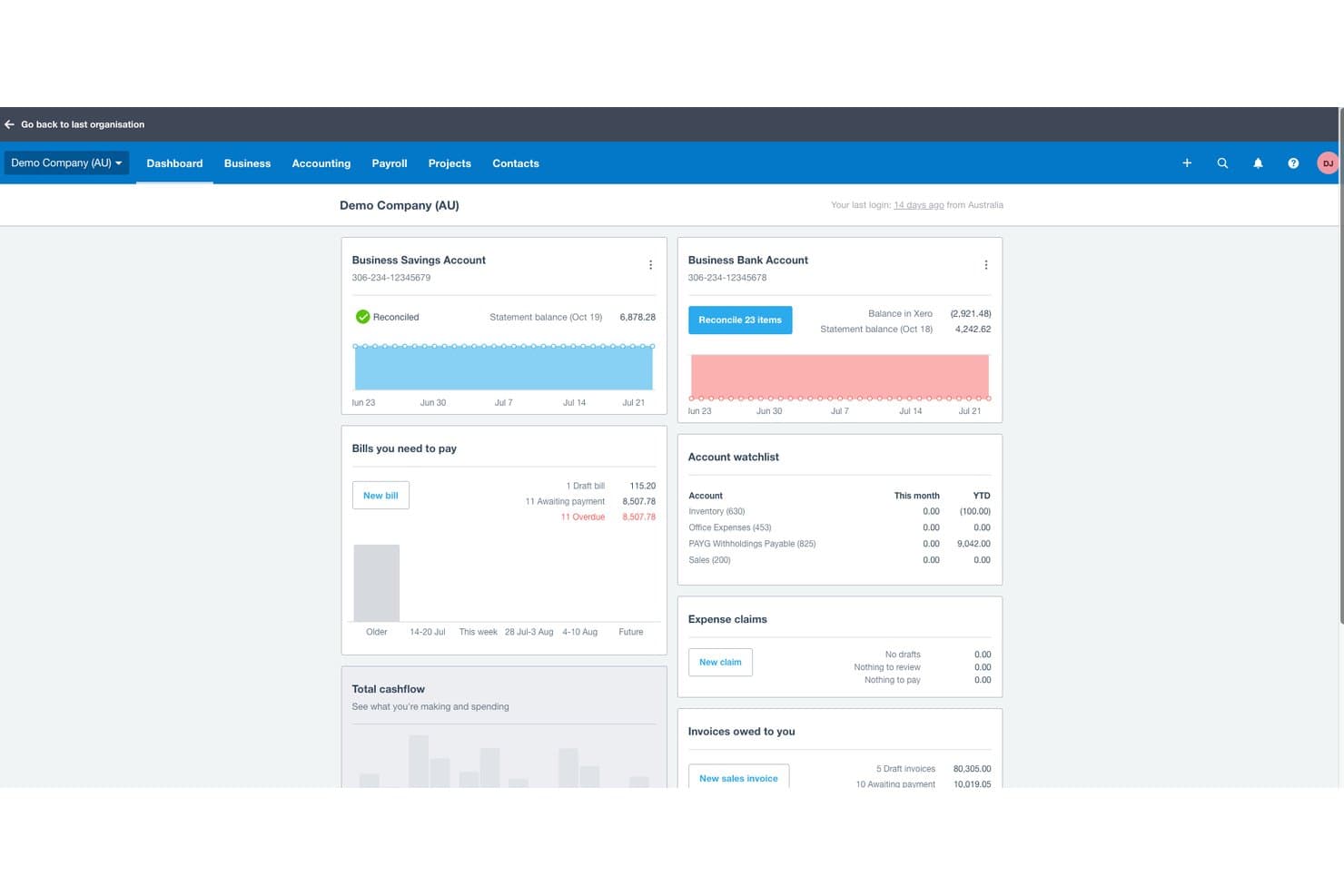
Xero offers a comprehensive dashboard displaying bank balances, bills to pay, expense claims, invoices owed, and account watchlist in one view. Xero is a cloud-based accounting platform offering invoicing, bank reconciliation, expense tracking, financial reporting, and multi-currency support for small businesses and their advisors.
Who Is Xero Best For?
Xero suits small businesses that need multiple people — owners, bookkeepers, and accountants — working in the same accounting platform without per-seat costs.
Why I Picked Xero
I've included Xero in my top picks because its unlimited user access across all plans solves a real pain point I see with competing tools. Most platforms charge per seat, so adding a bookkeeper or an external accountant drives costs up fast. With Xero, I can invite my accountant and bookkeeper into the same account without touching my plan, and features like Hubdoc document capture and AI-powered bank transaction matching stay fully accessible to every user.
Xero Key Features
- Multi-currency accounting: Track transactions and generate invoices in multiple currencies with automatic exchange rates.
- Automated sales tax calculation: Calculates and tracks sales tax, VAT, or GST on invoices and reports.
- Bank transaction feeds: Connect bank accounts for daily transaction imports and faster reconciliation.
- Mobile app access: Capture receipts, send invoices, and check cash flow from iOS and Android devices.
Xero Integrations
Xero offers native integrations with Stripe, PayPal, Square, Hubdoc, Avalara, Gusto, Receipt Bank, Shopify, WooCommerce, and Zapier. An API is available for custom integrations.
What's Free?
Xero offers a 30-day free trial with access to all features, no credit card required. There's no free-forever plan, so you'll need to choose a paid plan once the trial ends.
Pros and Cons
Pros:
- Hubdoc document capture built in
- AI-powered bank transaction matching included
- Unlimited users on every paid plan
Cons:
- Payroll requires an additional paid add-on
- No free-forever plan exists
Learn more about Xero: 2Best for expense tracking
Ramp
- Free plan available; 30-day free trial
- From $15/user/month
Visit WebsiteCustomer Rating:4.8/5
Ramp provides an automated accounting dashboard that categorizes transactions, syncs expenses, and flags missing memos for review. Ramp is a corporate expense management platform that combines physical and virtual company cards with built-in financial controls.
Why I picked Ramp: Ramp offers real-time expense recognition by texting you right after a card swipe, prompting you to upload the receipt via SMS or the app. That means you don’t have to chase paper, and it reduces missing or mismatched receipts. The platform also allows flexible control over spending limits on each virtual or physical card, so you can set monthly, per-transaction, and merchant-specific caps to prevent off-policy charges.
Standout features & integrations:
Features include machine‑learning‑based receipt matching and categorization that automatically pairs receipt images with transactions and tags expenses based on set rules. It also offers bill pay support where you can email or upload vendor invoices, set approval workflows, and pay bills via ACH, check, or card.
Integrations include NetSuite, Sage Intacct, QuickBooks, Microsoft Dynamics Business Central, Acumatica, Workday Financial Management, Uber, Lyft, Amazon Business, TravelPerk, ADP Workforce Now, and Gusto.
What's Free? Ramp includes a free plan for smaller teams looking for basic functions to simplify finances.
Pros and Cons
Pros:
- Automated expense reporting and receipt matching
- Ability to issue multiple virtual cards with customizable controls
- Combined AR, AP, and expense management in one system
Cons:
- Mobile app has fewer features than desktop version
- Could offer more advanced accounting features
 Best for real-time collaboration
- 14-day free trial + free plan available
- From $7/user/month (billed annually)
Visit WebsiteCustomer Rating:4.6/5
Google Sheets provides a simple cash flow template. Source: Google Docs For those seeking a cost-effective solution to manage financial tasks, Google Sheets offers a compelling option. This versatile tool allows you to create and collaborate on spreadsheets, making it ideal for small businesses and individuals who need to organize financial data without incurring additional costs. Whether you're tracking expenses, managing budgets, or generating reports, Google Sheets provides the essential functionalities to simplify your accounting processes.
Why I Picked Google Sheets
I picked Google Sheets for its unparalleled ability to facilitate real-time collaboration, a feature that stands out in the realm of Free Accounting Software Options. You and your team can simultaneously work on the same spreadsheet, see each other's changes instantly, and communicate via comments, which can significantly enhance teamwork and decision-making processes. The automatic saving and version history features ensure that no data is lost, and you can always revert to previous versions if needed. This collaborative environment makes Google Sheets particularly valuable for businesses and individuals who need to manage and share financial data seamlessly.
Google Sheets Key Features
In addition to its real-time collaboration capabilities, Google Sheets offers a range of features that are particularly useful for managing accounting tasks.
- Templates: Google Sheets provides pre-designed templates for tracking income, expenses, and budgets, simplifying the bookkeeping process.
- Formulas and Functions: With built-in functions like SUM, AVERAGE, and IF, you can automate calculations and analyze data efficiently.
- Data Visualization: You can create charts and graphs to visualize financial data, making it easier to interpret trends and performance.
- Advanced Functions: Features like VLOOKUP and IMPORTRANGE streamline data retrieval and synchronization across multiple sheets.
Google Sheets Integrations
Integrations include Salesforce, Intuit, Asana, BigQuery, Looker, and other tools within Google Workspace.
Pros and Cons
Pros:
- Strong data visualization tools
- Excellent real-time collaboration
- Powerful formulas and automation options
Cons:
- Requires manual setup for reports
- Limited advanced accounting functions
Learn more about Google Sheets:

ZipBooks displays your invoice stats in a simple dashboard while letting you select other key services with a single click. ZipBooks is a cloud-based tool designed to simplify financial management for a wide range of users. It's tailored especially for small businesses and freelancers, providing solutions that cover time tracking, expense management, and accounts receivable automation.
Why I picked ZipBooks: ZipBooks offers a unique combination of features that cater to small-scale financial needs without additional costs. You can track time, manage expenses, and automate accounts receivable, all while enjoying seamless bank reconciliation and multi-currency support. Additionally, ZipBooks provides dedicated customer support and allows unlimited users, which is often not seen in other free accounting solutions.
Standout features & integrations:
Features include simple invoicing tools that let you customize and send invoices quickly. You can track expenses effortlessly, giving you a clear view of your spending. It also provides smart insights to help you and your team make better financial decisions.
Integrations include PayPal, Square, Stripe, Gusto, Plaid, Slack, QuickBooks, Google Drive, Trello, and Asana.
What's Free? ZipBooks offers a free-forever plan with essential features for small businesses and freelancers. This plan includes unlimited invoicing, time tracking, and basic reporting, with no user limitations.
Pros and Cons
Pros:
- Unlimited invoices with free service
- Easily accept payments
- Free service with no limit on business size
Cons:
- Most useful features require a paid subscription
- Limited support
Learn more about ZipBooks: Best for businesses using other Zoho services
- Free plan + 14-day trial + demo available
- From $20/month
Visit WebsiteCustomer Rating:4.3/5
Zoho Books has a clean-looking dashboard that makes it easy to see basic details about your company and to find all of the features you need. If you’re already a Zoho customer, I’d definitely recommend looking into adding their accounting software to your current setup. Zoho Books can handle everything from expense reporting to automated follow-up on customer accounts.
Why I picked Zoho Books: Zoho Books offers seamless integration within the Zoho ecosystem, creating a unified platform for managing everything from sales and CRM to inventory and invoicing. This tight integration reduces the need for manual data entry, improves workflow efficiency, and provides real-time financial insights across departments.
Standout features & integrations:
Features include the ability to create and send professional invoices with just a few clicks, making your billing process efficient and straightforward. You can also track expenses and time, ensuring your team stays on top of all financial activities without missing a beat.
Integrations include Zoho CRM, PayPal, Stripe, Google Drive, Dropbox, Office 365, Slack, G Suite, Mailchimp, and Zendesk.
What's Free? Zoho Books offers a free-forever plan for businesses with revenue below a certain threshold, allowing one user and one accountant. While it provides essential accounting features, integrations with other applications might be limited in the free version.
Pros and Cons
Pros:
- Most important features available with free service
- Easy to use
- Test account lets you check out the service before signing up
Cons:
- Works best if you pay for additional services
- Limited support
 Best for multi-entity consolidation
- 14-day free trial available
- From $24/month (billed annually)
Visit WebsiteCustomer Rating:4.7/5
Joiin provides consolidated profit and loss reports with real-time variances across multiple entities. Joiin gives you a way to bring together financial and operational data from multiple entities — including accounting systems, spreadsheets, and non-financial sources — into a single cloud-based platform so your finance team can build consolidated reports, dashboards, and consolidated group-level views in one place. It’s especially useful if you manage more than one company, operate across different currencies, or want to replace manual spreadsheet consolidation with something more reliable and audit-ready.
Why I Picked Joiin
I picked Joiin because it excels at multi-entity consolidation — it lets you combine financial, sales, KPI, and non-financial data across different entities, currencies, and accounting systems into unified reports. Its support for inter-company eliminations, automatic currency conversion, and real-time consolidated dashboards stands out as a practical advantage when tracking group-level finances. I like that it can pull data from various sources like spreadsheets, bookkeeping tools, and ERP systems, giving you flexibility while still maintaining a clean, centralized reporting structure.
Joiin Key Features
Aside from its consolidation strength, Joiin also offers these useful features:
- Real-Time Dashboards and KPI Tracking: View live consolidated dashboards that mix financial metrics, sales, and non-financial KPIs for a holistic business view.
- Budgeting and Forecasting: Provides tools to create detailed budgets and forecasts, helping you plan your financial future with precision.
- Customizable Financial Reports: Enables you to tailor reports to fit your specific business needs, ensuring you have the most relevant data at your fingertips.
- Mobile-Ready Reports: Ensures you can access and review financial reports on the go, making it easier to manage your finances from anywhere.
Joiin Integrations
Integrations include Xero, QuickBooks, Sage, Pennylane, Excel, Puzzle, and Zapier. Joiin also provides an API for custom integrations, allowing further flexibility in connecting with other platforms.
What's Free?
While Joiin doesn't offer a free plan, it does offer a 14-day free trial of all its features.
Pros and Cons
Pros:
- Offers automated intercompany eliminations for group-level accuracy.
- Generates both standard financial statements and custom reports.
- Handles multi-entity and multi-currency consolidation reliably.
Cons:
- Less advanced forecasting and planning tools compared to full ERP modules.
- Does not fully replace core accounting functions like invoicing.
Learn more about Joiin:

GnuCash doesn’t have the friendliest or best-looking user interface, but it has more features than you’ll probably ever need. GnuCash won’t disappoint when it comes to features–everything from the most basic to the most advanced ones are completely free. But, fair warning: be ready for a bit of a learning curve.
Why I picked GnuCash: GnuCash is open source and includes features such as double-entry accounting and a checkbook-style register for transaction management for no cost. It offers advanced capabilities such as stock tracking and multi-currency handling, aligning with its focus on detailed financial management. The software also supports importing data from other financial applications, enhancing its flexibility and usability for various financial tasks.
Standout features & integrations:
Features include the ability to handle double-entry accounting, ensuring your transactions balance correctly by impacting two accounts. You can also manage your transactions with a checkbook-style register, which provides a straightforward interface for entering and viewing financial activities.
Integrations include the ability to import financial data from QIF and OFX files, support for the German HBCI protocol for banking transactions, and it works on Windows, MacOS, and Linux platforms.
What's Free? GnuCash is a free accounting software available for personal and business use, with no trial limitations. It supports an unlimited number of users and offers extensive documentation and community support.
Pros and Cons
Pros:
- Great reporting capability
- Extensive user guides and how-to documentation
- Open-source software that offers all features for free
Cons:
- No professional support
- Steep learning curve
Learn more about GnuCash:

Lendio’s accounting tool has a clean dashboard to give you a quick snapshot of what’s happening with your company. Lendio’s accounting tool, formerly known as Sunrise, is great for invoice automations. For sole proprietors and those who don’t have a dedicated accounting department, Lendio can save you a lot of time and money.
Why I picked Lendio: Lendio offers easy invoicing, includes automations, and has reasonably-priced payment acceptance. However, the software does charge a fee for payment processing (from 2.55% + $0.30 to 3.55% + $0.30 for credit card payments, 0.5% + $0.30 - 1.5% + $0.30 for ACH transactions).
Standout features & integrations:
Features include access to a wide variety of loan options tailored to your business needs. You can easily compare different lenders to find the best terms and rates. The platform also provides a simple online application process, saving you and your team valuable time.
Integrations include QuickBooks, Xero, FreshBooks, Stripe, Square, PayPal, Shopify, Amazon, and eBay.
What's Free? Lendio provides free access to its marketplace for comparing financing options. You can explore different loan products and use tools like loan calculators without any cost, but actual loan applications will depend on the terms of the lenders.
Pros and Cons
Pros:
- Easy expense tracking
- Reporting tools
- Free service that offers invoice automation
Cons:
- Provides little help with signing up
- Website and support availability are not detailed
Learn more about Lendio: Best for power users
- Free plan available
- From $60/user/year (billed annually)
Visit WebsiteCustomer Rating:4.8/5
TurboCASH may not be the best-looking option on the list, but it has all the tools you need. TurboCASH stands out as a versatile tool designed for small to medium-sized businesses seeking a cost-effective way to handle their accounting needs. With its user-friendly interface and support for multiple languages, it caters to a diverse range of users, allowing you to manage tasks such as invoicing, inventory, and financial reporting with ease. If you're aiming to refine your accounting processes without hefty expenses, TurboCASH offers a practical solution to tackle these challenges.
Why I Picked TurboCASH
I picked TurboCASH for its ability to cater to power users seeking a free accounting software option with advanced functionalities. TurboCASH stands out with its multi-workstation support, allowing simultaneous access by multiple users, which is ideal for teams managing complex financial operations. The software's Bank Import Plugin significantly enhances efficiency by automating transaction entries through direct bank statement imports. Additionally, TurboCASH's Document E-mail Pro feature, which enables the emailing of customizable documents, provides a streamlined communication process, making it a robust choice for those requiring comprehensive accounting capabilities.
TurboCASH Key Features
In addition to the advanced functionalities highlighted earlier, TurboCASH offers a variety of features that cater to diverse accounting needs.
- Invoicing Capabilities: Easily create and manage invoices, helping you keep track of payments and outstanding balances.
- Expense Tracking: Allows you to monitor expenses efficiently, ensuring accurate financial reporting.
- Inventory Management: Provides tools to manage stock levels and inventory, crucial for businesses with physical products.
- Financial Reporting: Offers comprehensive financial reporting tools to help you gain insights into your business's financial health.
TurboCASH Integrations
Integrations include QuickBooks, Xero, FreshBooks, Zoho Books, Sage, Tally, MYOB, Wave, Kashoo, and NetSuite.
Pros and Cons
Pros:
- Powerful customer tracking and reporting tools
- Multi-language support
- Truly free if you use version 4
Cons:
- Limited support
- Steep learning curve
Learn more about TurboCASH:

Puzzle.io’s Transactions dashboard helps you categorize and track expenses with clear visibility into vendors and spending categories. For those seeking an intuitive yet powerful free accounting solution, Puzzle.io stands out with its AI-driven capabilities tailored for startups and small businesses. You’ll appreciate how it automates up to 95% of transaction categorizations, drastically reducing manual bookkeeping tasks. With seamless integration with popular tools like Stripe and Brex, Puzzle.io addresses the challenge of transitioning from traditional software, offering a smoother financial reporting process.
Why I Picked Puzzle.io
I picked Puzzle.io because its AI-driven insights make it a strong choice for those seeking free accounting software options. The platform offers an AI Categorizer that automates the categorization of 90-95% of transactions, dramatically reducing manual entry and enhancing accuracy. Additionally, it provides real-time cash flow insights, allowing you to quickly assess your financial health and make informed decisions without delay. These features are particularly beneficial for startups and small businesses aiming to optimize their financial management processes efficiently.
Puzzle.io Key Features
In addition to AI-driven insights, Puzzle.io offers several key features that enhance its appeal as a free accounting software option for startups and small businesses.
- Automated Revenue Recognition: This feature is designed for Stripe users, simplifying complex calculations such as accrued and deferred revenue.
- Automated Cash Reconciliation: Puzzle.io significantly reduces month-end close times by automating the reconciliation process.
- Integration with AngelList and Brex: These integrations allow for seamless data synchronization and auto-categorization of transactions, ensuring up-to-date financial records.
- Dual Cash and Accrual Accounting Books: The platform provides the flexibility to maintain both cash and accrual accounting books, offering comprehensive financial insights.
Puzzle.io Integrations
Integrations include Stripe, Brex, Ramp, Rippling, and Gusto.
Pros and Cons
Pros:
- Real-time dashboards provide immediate financial insights
- AI-powered transaction categorization
- Automated bank reconciliations ensure accuracy
Cons:
- Free trial requires users to connect a bank account
- May not be suitable for very large enterprises
Learn more about Puzzle:
Outro software de contabilidade gratuito
Eis algumas opções adicionais de software de contabilidade gratuito que não entraram na minha seleção, mas que vale a pena consultar:
- 11Express AccountsBest for financial reporting
- 12AkauntingBest for payroll
- 13Odoo ERPBest for essential accounting tasks
- 14Fiverr WorkspaceBest for invoicing and expense tracking
- 15WAVEBest for automations
- 16Money Manager EXBest for simple projects
- 17TrulySmallBest for very small businesses/freelancers
- 18BrightbookBest for remote and virtual teams
- 19AcuSheetBest for automated accounting tasks
- 20HiverBest for shared inbox management
- 21StrivenBest for a range of features
Avaliações relacionadas
- Fornecedores de software de contabilidade online
- Software de contabilidade para pequenas empresas
- Software de contabilidade para organizações sem fins lucrativos
- Melhor software de contabilidade em geral
- Software de relatórios financeiros
- Software de contas a pagar
- Software de ERP
How I Evaluate Free Accounting Software
Whether you're a freelancer sending invoices or a founder tracking cash flow, I evaluate tools on two levels: core accounting must-haves to qualify, and differentiators that separate the best.
Core Functionality (Table Stakes For This List)
When I'm selecting tools for my list, I rank each one on a scale from 0 (does not offer the functionality) to 5 (excels in this area) for each core functionality listed below. Then, I calculate the tool's total score into a percentage. Each tool needs to achieve a minimum total score of 65% to be considered for inclusion.
- General Ledger & Bookkeeping: I check whether the tool supports double-entry bookkeeping with a chart of accounts, since that's the foundation for accurate records come tax season.
- Invoicing & Billing: Every freelancer and small business owner needs to bill clients, so I look for customizable invoices with payment tracking on the free plan.
- Expense & Income Tracking: Categorizing revenue and costs across accounts matters, especially when a solopreneur needs to separate project income or sort vendor expenses.
- Financial Reporting: I evaluate whether the tool generates at least a profit & loss, balance sheet, and cash flow report you can hand to a bookkeeper or tax preparer.
- Bank Reconciliation: Matching bank transactions to your books catches errors fast, so I look for CSV imports at minimum and give higher marks for live bank feeds.
- Free Tier Availability: A time-limited trial doesn't count here. I confirm each tool offers a genuinely free plan with enough functionality to run real day-to-day accounting.
Once I have a list of tools that meet this criteria, I consider what sets each platform apart.
Differentiating Factors (What Sets Vendors Apart)
Here's how I compare and contrast different vendors:
Standout Features
Tax calculation features carry real weight when you're a freelancer juggling sales tax, VAT, or GST across client invoices. I look for tools that auto-apply the right rates and generate tax-ready reports. Multi-currency support is another separator, especially for startups billing international clients. I evaluate whether exchange rates update automatically or require manual input. Receipt scanning with OCR paired with a solid mobile app also splits the field, since solopreneurs who capture expenses from their phone save meaningful time versus manual desktop entry.
Beyond Features
Free plan caps matter a lot here. I check how many invoices, users, and transactions each tool allows before requiring an upgrade, because a growing small business can hit those limits fast. Integrations also weigh heavily—if your clients pay through Stripe or PayPal, the tool should connect to those processors without workarounds. I also evaluate whether you can invite an external bookkeeper or accountant to your account at no cost, with proper role-based permissions, so your tax preparer can pull what they need without full admin access to your books.
Como escolher software de contabilidade gratuito
As inúmeras funcionalidades e os escalões de preços confusos podem tornar a escolha de software de contabilidade gratuito avassaladora. Para facilitar o processo, eis uma lista de verificação simples que o ajudará a encontrar a solução certa com confiança:
| Fator | O que considerar |
|---|---|
| FatorEscalabilidade | O que considerarCertifique-se de que o software consegue crescer com a sua empresa. Procure soluções que suportem um número crescente de utilizadores e volumes de transações maiores. |
| FatorIntegrações | O que considerarVerifique se se liga às suas ferramentas existentes, como CRM ou ERP, para simplificar os fluxos de trabalho e evitar silos de dados. |
| FatorPersonalização | O que considerarDetermine se pode adaptar o software para responder às suas necessidades específicas, como relatórios personalizados ou modelos de faturação, de modo a ajustá-lo melhor aos processos da sua empresa. |
| FatorFacilidade de utilização | O que considerarConsidere a curva de aprendizagem da sua equipa. Interfaces intuitivas e materiais de apoio abrangentes reduzem o tempo de formação e aumentam a produtividade. |
| FatorOrçamento | O que considerarEmbora seja gratuito, avalie eventuais custos ocultos, como complementos pagos, taxas de transação ou opções de suporte premium, que possam afetar o seu orçamento. |
| FatorMedidas de segurança | O que considerarCertifique-se de que o software disponibiliza funcionalidades de segurança robustas, como encriptação de dados e cópias de segurança regulares, para proteger as suas informações financeiras. |
Tendências no software de contabilidade gratuito
Durante a minha pesquisa sobre software de contabilidade gratuito, analisei atualizações de produtos, comunicados de imprensa e registos de lançamentos dos principais fornecedores. Eis o que se destacou:
- Informações baseadas em AI: As capacidades de AI estão a ser utilizadas para disponibilizar informações preditivas e previsões financeiras, ajudando os utilizadores a tomar decisões fundamentadas. A Wave, por exemplo, utiliza AI para gerar relatórios que ajudam as empresas a compreender os padrões do seu fluxo de caixa.
- Tecnologia de cadeia de blocos para transparência: Alguns fornecedores estão a explorar a tecnologia de cadeia de blocos para melhorar a transparência e a segurança das transações. Esta tecnologia é particularmente útil para os utilizadores que necessitam de registos de auditoria verificáveis sem o envolvimento de terceiros.
- Painéis personalizáveis: Os utilizadores têm agora a opção de personalizar os seus painéis para apresentarem apenas as informações mais relevantes, adaptando a interface às necessidades individuais ou empresariais.
- Foco na privacidade dos dados: Com o aumento das preocupações relacionadas com a segurança dos dados, o software de contabilidade gratuito está a dar prioridade à privacidade dos dados dos utilizadores através da implementação de encriptação e definições de privacidade mais robustas.
- Ferramentas de colaboração melhoradas: Estão a ser integradas funcionalidades colaborativas que permitem a vários utilizadores trabalhar simultaneamente em documentos financeiros. Esta solução é ideal para equipas pequenas que precisam de gerir as finanças em conjunto.
O que é um software de contabilidade gratuito?
O software de contabilidade gratuito é uma ferramenta digital concebida para ajudar as pequenas empresas a gerir tarefas financeiras, como a escrituração contabilística, a faturação e o acompanhamento de despesas, sem custos.
É utilizado principalmente por empresas emergentes e pequenas empresas que procuram simplificar a gestão financeira sem custos adicionais. Ao eliminar taxas, ajuda as empresas a manter registos financeiros rigorosos, gerar relatórios facilmente e gerir eficazmente o fluxo de caixa, minimizando simultaneamente o trabalho manual e os potenciais erros.
Funcionalidades do software de contabilidade gratuito
Ao escolher um software de contabilidade gratuito, concentre-se em ferramentas que cubram as tarefas financeiras essenciais, oferecendo simultaneamente funcionalidades suficientes para apoiar as operações diárias. Mesmo sem um preço associado, o software deve ajudar a simplificar os fluxos de trabalho, melhorar a precisão e proporcionar visibilidade sobre a sua situação financeira. Entre as principais funcionalidades a procurar estão:
- Faturação básica: As ferramentas de contabilidade gratuitas devem permitir-lhe criar e enviar faturas profissionais, para que possa gerir a faturação, acompanhar os pagamentos e manter as receitas a fluir.
- Acompanhamento de despesas: A possibilidade de registar e categorizar despesas ajuda os utilizadores a compreender os padrões de gastos e a manter o controlo dos orçamentos. Isto é especialmente útil ao gerir ordens de compra e custos recorrentes.
- Relatórios financeiros: Procure relatórios essenciais, como demonstrações de resultados, balanços, livros razão e demonstrações dos fluxos de caixa. Estas informações apoiam a tomada de decisões e mantêm as finanças da sua empresa transparentes.
- Reconciliação bancária: A reconciliação automática ou semiautomática ajuda a fazer corresponder as transações bancárias aos seus registos contabilísticos, reduzindo os erros e mantendo os seus dados financeiros exatos.
- Suporte multimoeda: Se trabalha com fornecedores ou clientes internacionais, as funcionalidades multimoeda facilitam o tratamento de transações em moeda estrangeira sem conversões manuais.
- Acesso móvel: O software compatível com dispositivos móveis permite aos utilizadores consultar dados financeiros, registar despesas e gerir faturas a partir de qualquer lugar, apoiando a produtividade em mobilidade.
- Controlos de acesso dos utilizadores: As permissões baseadas em funções ajudam a proteger informações sensíveis e garantem que as pessoas certas têm acesso às funções certas.
- Capacidades de integração: Mesmo o software gratuito deve ligar-se a ferramentas como processadores de pagamentos, sistemas de CRM ou plataformas de comércio eletrónico, para suportar fluxos de trabalho mais eficientes e reduzir a introdução manual de dados.
- Cópias de segurança automáticas: As cópias de segurança regulares dos dados protegem as suas informações financeiras contra perdas provocadas por falhas do sistema ou eliminação acidental.
- Apoio ao cliente: Os tutoriais, centros de ajuda, fóruns da comunidade ou o apoio por e-mail podem fazer uma grande diferença ao aprender a utilizar o software ou ao resolver problemas.
Funcionalidades comuns de IA do software de contabilidade gratuito
Algumas ferramentas de contabilidade gratuitas ou com modelo freemium incluem agora funcionalidades de IA simples que aumentam a eficiência e a precisão, tais como:
- Categorização automática de transações: A IA aprende com o comportamento anterior para classificar automaticamente receitas e despesas, reduzindo a necessidade de correções manuais.
- Captura inteligente de recibos: A IA extrai os principais detalhes — como datas, montantes e fornecedores — dos recibos carregados, acelerando o acompanhamento de despesas.
- Alertas de anomalias: Os modelos básicos de IA assinalam transações invulgares ou inconsistências, ajudando os utilizadores a detetar erros numa fase inicial.
- Informações preditivas sobre os fluxos de caixa: Algumas ferramentas disponibilizam projeções simples baseadas em IA e em dados históricos, para ajudar a antecipar os próximos défices ou excedentes de tesouraria.
- Pesquisa em linguagem natural: Os utilizadores podem escrever perguntas como “Quais foram as minhas despesas no mês passado?” e receber respostas rápidas e fáceis de compreender, sem terem de consultar relatórios.
Vantagens do software de contabilidade gratuito
A utilização de software de contabilidade gratuito na sua empresa pode proporcionar vantagens reais para si e para a sua equipa. Eis o que pode esperar:
- Poupança de custos: O software de contabilidade gratuito elimina a necessidade de subscrições dispendiosas, permitindo-lhe afetar fundos a outras necessidades da empresa.
- Acompanhamento de despesas: Pode acompanhar facilmente as despesas da empresa, ajudando a gerir os fluxos de caixa através de funcionalidades integradas de acompanhamento.
- Faturação: O software inclui frequentemente funcionalidades de faturação, tornando simples faturar aos clientes e gerir os pagamentos recebidos.
- Relatórios financeiros: Gere rapidamente relatórios financeiros, obtendo informações sobre o desempenho da sua empresa sem custos adicionais.
- Preparação de impostos: Com funcionalidades para organizar documentos relacionados com impostos, pode simplificar o processo de entrega da declaração de impostos e reduzir o stress durante a época fiscal.
- Organização de dados: O software ajuda a organizar os seus dados financeiros, facilitando a sua localização e interpretação quando necessário.
- Acessibilidade: Muitas ferramentas de contabilidade gratuitas oferecem acesso baseado na nuvem, para que possa gerir as finanças a partir de qualquer lugar com uma ligação à Internet.
- Simplificação dos fluxos de trabalho: O software de contabilidade gratuito também pode ajudar a simplificar os fluxos de trabalho da empresa, libertando tempo para se concentrar em tarefas mais importantes.
Custos e preços do software de contabilidade gratuito
Escolher software de contabilidade gratuito não se resume a evitar custos: trata-se de saber exatamente o que está a obter. Algumas ferramentas restringem funcionalidades, utilizadores ou apoio.
Criei esta tabela para destacar os principais detalhes dos planos, os custos possíveis e aquilo que pode realisticamente esperar de um software de contabilidade gratuito:
Tabela de comparação de planos para software de contabilidade gratuito
| Tipo de plano | Preço médio | Funcionalidades comuns |
|---|---|---|
| Tipo de planoPlano gratuito | Preço médio$0 | Funcionalidades comunsFaturação básica, acompanhamento de despesas e relatórios limitados. |
| Tipo de planoPlano pessoal | Preço médio$5-$25/utilizador/mês | Funcionalidades comunsFaturação básica, acompanhamento de despesas, registo de horas e relatórios básicos. |
| Tipo de planoPlano empresarial | Preço médio$25-$50/utilizador/mês | Funcionalidades comunsFaturação, acompanhamento de despesas, registo de horas, gestão de projetos e relatórios avançados. |
| Tipo de planoPlano empresarial de grande dimensão | Preço médioPreço personalizado | Funcionalidades comunsTodas as funcionalidades empresariais, suporte para várias moedas, análises avançadas e suporte dedicado. |
Perguntas frequentes sobre software de contabilidade gratuito
Abaixo encontram-se respostas a algumas das perguntas mais comuns sobre software de contabilidade gratuito.
Porque haveria uma empresa de software de oferecer o seu produto gratuitamente?
As empresas de software oferecem frequentemente versões gratuitas para atrair novos utilizadores, criar fidelização à marca e promover posteriormente planos pagos. O nível gratuito demonstra as suas principais funcionalidades de contabilidade. Depois, se precisar de ferramentas ou suporte mais avançados à medida que a sua empresa cresce, será mais provável que considere as opções pagas.
O software de contabilidade gratuito é seguro?
Sim, a maioria dos softwares de contabilidade gratuitos conceituados utiliza os mesmos protocolos de segurança que as alternativas pagas. Isto inclui encriptação de dados e atualizações de segurança regulares. Verifique sempre se existem funcionalidades como a autenticação de dois fatores e uma política de segurança clara, para garantir que as suas informações financeiras permanecem seguras.
Como posso encontrar o software de contabilidade gratuito certo para mim?
Comece por fazer uma lista das funcionalidades indispensáveis, como faturação, acompanhamento de despesas ou acesso por vários utilizadores. Outros passos a seguir ao analisar o melhor software de contabilidade gratuito para pequenas empresas incluem:
\u003cul\u003e
\t\u003cli\u003eComparar as ferramentas gratuitas com a sua lista e verificar a facilidade de utilização, as opções de suporte e os percursos de atualização.\u003c/li\u003e
\t\u003cli\u003eLer avaliações de utilizadores reais para perceber como cada opção funciona para empresas como a sua.\u003c/li\u003e
\u003c/ul\u003e
Onde posso descarregar software de contabilidade gratuitamente?
Pode descarregar software de contabilidade gratuito para pequenas empresas nos sites oficiais dos fornecedores ou em lojas de aplicações conceituadas, como a Microsoft Store ou a Apple App Store. Utilize sempre a fonte oficial para evitar malware ou versões desatualizadas.
Posso mudar de um software de contabilidade gratuito para um plano pago mais tarde?
Sim, a maioria dos fornecedores facilita a atualização de um plano gratuito de software de contabilidade empresarial para um plano pago. Normalmente, os seus dados são transferidos sem problemas e terá acesso a funcionalidades adicionais ou a limites de utilização superiores à medida que a sua empresa cresce.
Quais são as limitações do software de contabilidade gratuito para pequenas empresas?
O software de contabilidade gratuito limita frequentemente o número de utilizadores, faturas, contas ou funcionalidades avançadas, como o processamento salarial. Poderá também ter acesso limitado ao apoio ao cliente e ao armazenamento. Certifique-se de que as limitações não irão impedir o crescimento da sua empresa antes de se comprometer.
O software de contabilidade gratuito pode integrar-se com as minhas outras ferramentas empresariais?
Algumas ferramentas de contabilidade gratuitas ligam-se a aplicações populares, como sistemas de processamento salarial, processadores de pagamentos ou plataformas de comércio eletrónico, mas as integrações podem estar limitadas aos planos pagos. Consulte a página de integrações da ferramenta ou a documentação de ajuda antes de se registar.
Como lidam as ferramentas de contabilidade gratuitas com as cópias de segurança e a proteção de dados?
As ferramentas de contabilidade gratuitas fiáveis fazem cópias de segurança dos seus dados automaticamente e utilizam armazenamento na nuvem com padrões de segurança rigorosos. Ainda assim, leia a política de cópias de segurança do fornecedor e considere exportar os seus dados regularmente para maior tranquilidade.