

Um software de contabilidade desatualizado para contabilistas torna o seu trabalho mais difícil do que deveria ser. Relatórios lentos, introdução interminável de dados e interfaces pouco práticas transformam tarefas simples em dores de cabeça. Em vez de ajudar, o seu software aumenta o caos e consome o tempo que não tem.
Enquanto especialista em software digital, já vi de tudo — o bom, o mau e o dolorosamente desatualizado. Sei o que realmente faz a diferença no seu trabalho diário e o que apenas atrapalha. O meu objetivo? Ajudá-lo a encontrar uma ferramenta que funcione para as necessidades específicas da sua empresa.
Testei e analisei estas ferramentas com isso em mente. Quer precise de automatização, de melhores relatórios ou de integrações mais simples, encontrará aqui algo que lhe tornará a vida mais fácil. Vamos encontrar o seu próximo software de contabilidade para contabilistas.
Why Trust Our Software Recommendations
6,700+
Reviews
20
Industry experts
16+
Evaluation factors
14
Years
Our team has been testing and reviewing software since 2012. As finance leaders ourselves, we know how difficult—and important—it is to choose the right software.
For this guide, we evaluated tools using hands-on testing and independent research, scoring tools using our selection criteria.
Our reviews reflect our human editorial judgment, not a sales pitch.
Tabela comparativa de software de contabilidade para contabilistas
Analisei detalhadamente os preços para que possa comparar rapidamente as opções e encontrar a solução mais adequada às suas necessidades.
| Tool | Best For | Trial Info | Price | ||
|---|---|---|---|---|---|
| 1 | Best for automated document data extraction | Free trial available | From $25.21/month (billed annually) | Website | |
| 2 | Best for PCAOB compliance tools | Free demo available | Pricing upon request | Website | |
| 3 | Best with dedicated accountant support programs | Free plan available | From $49/user/month | Website | |
| 4 | Best for live expert assistance | 30-day free trial | From $38/month | Website | |
| 5 | Best for free and unlimited accounting | Free trial available | From $59/user/month | Website | |
| 6 | Best for dedicated bookkeeping services | Free demo available | From $199/month | Website | |
| 7 | Best for seamless app integrations | 1-month free trial available | From $27/month | Website | |
| 8 | Best for smart insights and reports | Free plan + free trial available | From $15/month | Website | |
| 9 | Best for comprehensive business management | Free plan + 14-day trial + demo available | From $20/month | Website | |
| 10 | Best for automated accounting | 14-day free trial | From $30/month | Website |


Análises do melhor software de contabilidade para contabilistas
Escolher o software de contabilidade certo pode facilitar o seu trabalho, mas, com tantas opções, é difícil saber qual oferece realmente os melhores resultados. Em seguida, apresento cada uma das minhas principais escolhas de software de contabilidade para contabilistas, destacando as vantagens e desvantagens, os preços e muito mais, para o ajudar a encontrar uma ferramenta fiável que se adeque às suas necessidades.
 1Best for automated document data extraction
Dext
- Free trial available
- From $25.21/month (billed annually)
Visit WebsiteCustomer Rating:4.5/5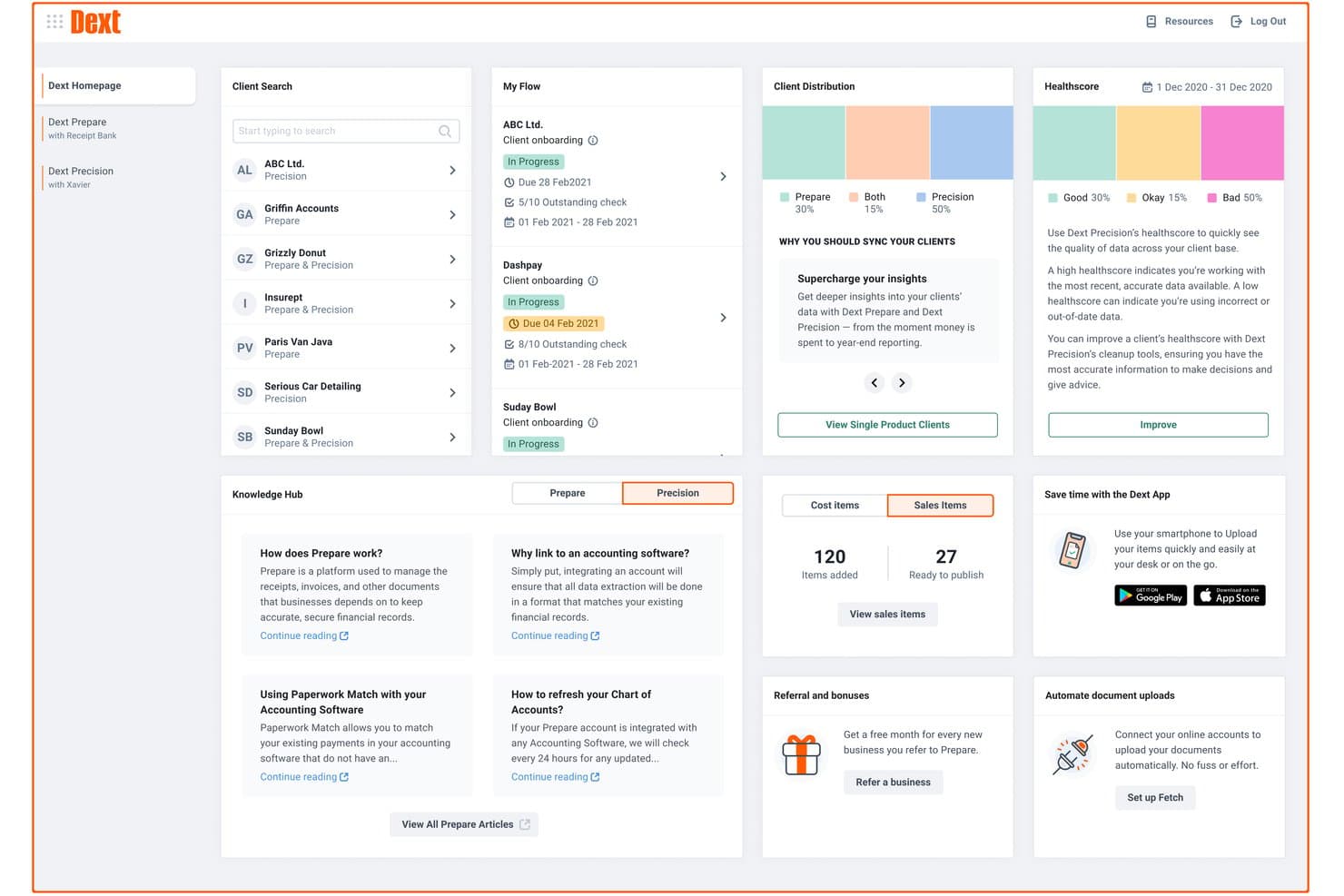
Dext offers a comprehensive dashboard with client management, health scores, document flow tracking, and knowledge hub resources for accountants. Dext is a document capture and data extraction platform that automates the collection, processing, and categorization of receipts, invoices, and bank statements for accounting firms and bookkeepers.
Who Is Dext Best For?
Dext is a strong fit for bookkeepers and accounting firms that handle high volumes of client documents and want to cut down on manual data entry.
Why I Picked Dext
I've included Dext in my top picks because its AI-powered extraction accuracy, claimed at 99.9%, genuinely holds up when you're processing hundreds of client documents per month. I like how it pulls line-item detail from invoices automatically, not just totals, which cuts the back-and-forth with clients considerably. The supplier rules engine also learns from past categorizations, so repeat vendors get coded correctly without manual input each time.
Dext Key Features
- Multi-client dashboard: Manage all client entities and their documents from a single, centralized workspace.
- Vault secure document storage: Store and access compliance documents and statements securely for up to 10 years.
- Practice productivity tools: Use client deadline dashboards, smart workflows, and advanced client management designed for accounting teams.
- Commerce Lite integration: Import online sales data from platforms like Shopify and WooCommerce directly into the system.
Dext Integrations
Dext offers native integrations with Xero, QuickBooks Online, Sage Accounting, FreeAgent, and more.
Pros and Cons
Pros:
- Dedicated firm-side dashboard for multi-client management
- Supplier rules auto-categorize repeat client vendors
- High-accuracy extraction across hundreds of documents
Cons:
- Mobile app reliability is weak
- Not a standalone full accounting solution
Learn more about Dext: Best for PCAOB compliance tools
- Free demo available
- Pricing upon request
Visit WebsiteCustomer Rating:4.9/5
DualEntry gives your team a real-time financial snapshot across revenue, expenses, cash flow, and operational insights—all in one dashboard. DualEntry is an AI-native ERP built around a full accounting suite, covering general ledger, multi-entity management, accounts payable, accounts receivable, revenue recognition, and close management.
Who Is DualEntry Best For?
DualEntry is a good fit for finance teams at mid-market and growth-stage companies that need a modern, AI-native accounting system with strong controls and audit support.
Why I Picked DualEntry
I've included DualEntry in my top picks because its audit automation features align with PCAOB requirements for controls and documentation. The journal entry testing tools let your team verify accounting records in bulk, with AI that flags suspicious patterns and anomalies. DualEntry's version history and PBC (provided by client) checklist management keep evidence collection organized, giving auditors a clean, timestamped audit trail and ready access to supporting documents.
DualEntry Key Features
- Multi-entity consolidation: Manage unlimited subsidiaries with automated intercompany eliminations, currency translations, and CTA postings across entities.
- Revenue recognition: Automate revenue schedules across contract types in compliance with ASC 606 and IFRS 15, with AI-assisted calculations.
- Flux analysis: Generate custom flux reports with AI-driven variance commentary to explain period-over-period changes in account balances.
- Approval workflows: Configure multi-step approval chains for journal entries, invoices, and purchase orders to enforce internal controls across your team.
Pros and Cons
Pros:
- Automated revenue recognition ensures compliance with standards
- Supports multi-entity and multi-currency operations
- Advanced AI features help with complex accounting tasks
Cons:
- As an ERP, it may offer more features than needed for simpler accounting needs
- Customization options require careful setup
Learn more about DualEntry: 3Best with dedicated accountant support programs
BILL
- Free plan available
- From $49/user/month
Visit WebsiteCustomer Rating:4.5/5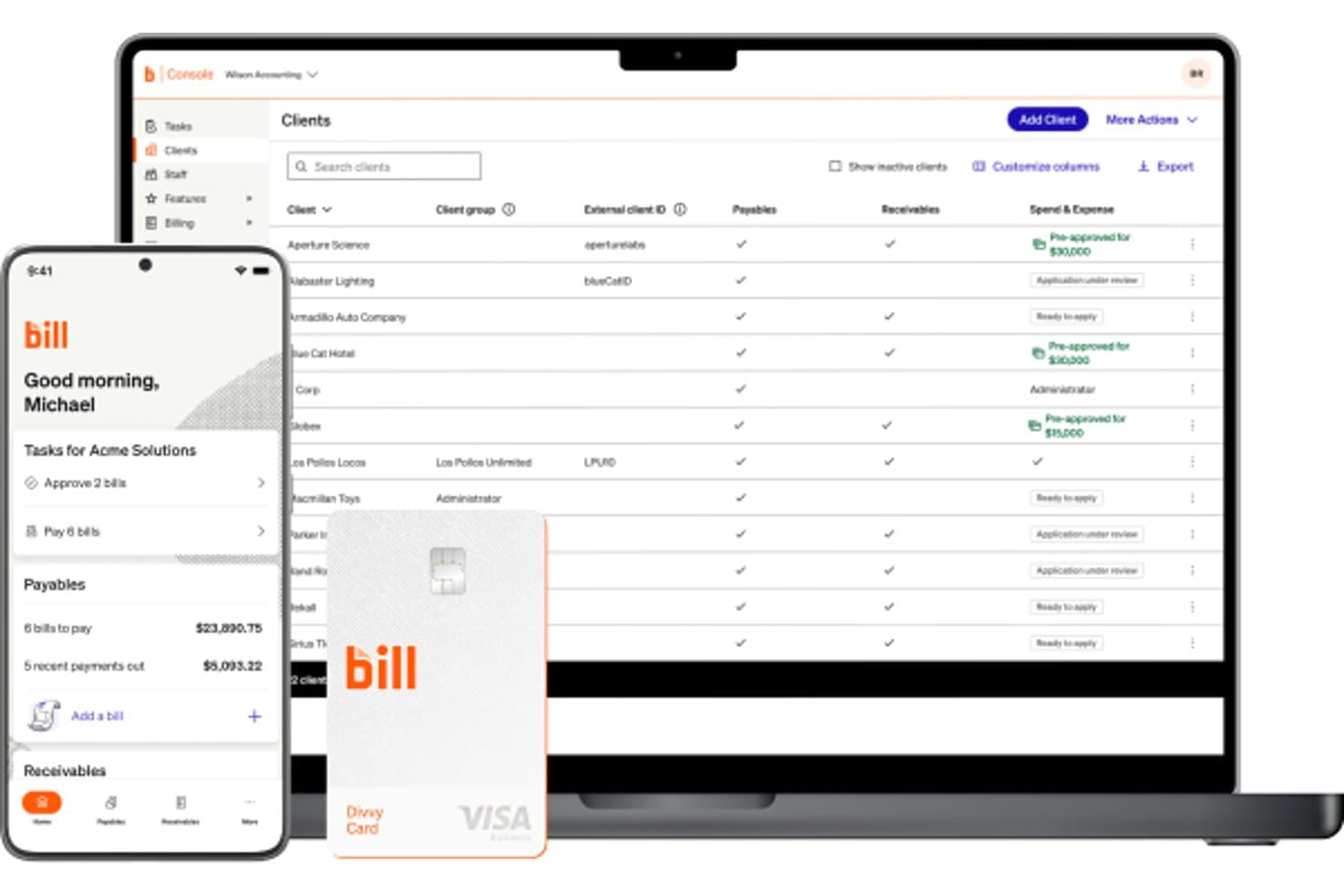
BILL offers an accounting console dashboard displaying a client list with payables, receivables, and spend & expense statuses, alongside a mobile app and Divvy card. BILL is a financial operations platform for accounting firms that centralizes accounts payable, accounts receivable, and spend management across multiple client entities from a single console.
Who Is BILL Best For?
BILL is a strong fit for accounting firms that manage AP and AR workflows on behalf of multiple small to midsize business clients.
Why I Picked BILL
I picked BILL as one of the best because its Accountant Partner Program is built around firm success, not just product access. I like that the tiered structure (Bronze through Platinum) scales real benefits like dedicated account management, co-marketing funds, and Premium Care support. The Accountant Console manages all client entities from one place, and 100+ hours of NASBA-accredited CPE training keeps my team sharp without hunting down external resources.
BILL Key Features
- Automated AP workflows: Streamlines bill capture, approvals, payments, and audit trails for every client entity.
- Custom user roles and permissions: Lets firms control access for approvers, staff, and clients across multiple accounts.
- W-9 Agent for compliance: Collects and verifies W-9s automatically with built-in e-filing of IRS 1099s.
- Integration with leading accounting software: Syncs AP and AR transactions directly with QuickBooks, Xero, NetSuite, and Sage Intacct.
BILL Integrations
BILL offers native integrations with QuickBooks Online, Xero, Sage Intacct, and NetSuite. An API is available for custom integrations.
Pros and Cons
Pros:
- NASBA-accredited CPE training included for partner firms
- Centralized multi-client AP and AR management
- Dedicated partner program supports accounting firm growth
Cons:
- Limited tax preparation and filing features
- Not a full general ledger solution
Learn more about BILL:

QuickBooks is an accounting software for accountants that simplifies bookkeeping, payroll, and tax preparation for small and medium-sized businesses. QuickBooks is a cloud-based accounting platform that combines AI-powered bookkeeping, financial reporting, invoicing, bill management, payroll, and cash flow forecasting for businesses and accounting professionals.
Who Is QuickBooks Best For?
QuickBooks is a strong fit for small to mid-sized businesses and accounting firms that manage client books, payroll, and financial reporting in one place.
Why I Picked QuickBooks
QuickBooks is one of my top picks because I love how it pairs live expert access directly into the accounting workflow. The Expert Assisted plan gives you on-demand access to QuickBooks-certified bookkeepers who can walk you through categorization, reconciliation, and report interpretation in real time. If you need more hands-on support, Expert Full Service Bookkeeping assigns you a dedicated bookkeeper who closes your books monthly and delivers profit and loss statements and balance sheets. That combination of AI-driven automation and human oversight is something you won't find in most accounting tools.
QuickBooks Key Features
- Cash flow forecasting: View a 90-day cash flow projection that pulls from your bank accounts, invoices, and bills in real time.
- Automated sales tax tracking: Calculate, track, and categorize sales tax across multiple rates and jurisdictions automatically.
- Custom financial reporting: Build and filter reports by class, location, or custom fields to match your reporting structure.
- Multi-user access controls: Assign role-based permissions to up to 25 users, with dedicated accountant access built in.
Pros and Cons
Pros:
- Strong integration capabilities
- Extensive financial reporting tools
- Live expert assistance available
Cons:
- Learning curve for new users
- Limited customization for reports
- Higher price point
 Best for free and unlimited accounting
- Free trial available
- From $59/user/month
Visit WebsiteCustomer Rating:4.7/5
Manager.io is an accounting software for accountants that provides a free, open-source solution for managing invoices, accounting, and financial reports. Manager.io is a double-entry accounting software that covers the full accounting cycle—from general ledger and journal entries to invoicing, bank reconciliation, payroll, fixed assets, and multi-currency financial reporting.
Who Is Manager.io Best For?
Manager.io is a good fit for freelancers, small business owners, and independent accountants who need full-featured accounting software without a subscription cost.
Why I Picked Manager.io
I picked Manager.io as one of the best because its desktop edition is genuinely free—no trial periods, no feature gates, no ads, and no usage limits. I can manage the full chart of accounts, run bank reconciliations, track fixed assets, and process payroll without ever hitting a paywall. What I find rare here is that the free version doesn't strip out core accounting modules the way most tools do. It covers the complete accounting cycle at zero cost, which is a real differentiator in a market dominated by subscription-first software.
Manager.io Key Features
- Multi-currency accounting: Record transactions in multiple currencies with automatic exchange rate tracking and foreign currency gain/loss calculations.
- Tax code management: Assign VAT, GST, or sales tax codes to transactions and generate tax liability reports directly from the platform.
- Comparative financial reporting: Generate profit & loss statements, balance sheets, and trial balances with side-by-side period comparisons.
- Project accounting: Track income and expenses against specific projects to monitor profitability at the project level.
Pros and Cons
Pros:
- Multi-currency and payroll support
- Unlimited accounting features
- Completely free for the desktop version
Cons:
- User interface may feel outdated
- Desktop version lacks cloud accessibility
- Limited integrations with third-party apps
Learn more about Manager.io: Best for dedicated bookkeeping services
- Free demo available
- From $199/month
Visit WebsiteCustomer Rating:4.5/5
Bench is an accounting software for accountants that combines software with bookkeeping services to manage financial records and provide financial reporting. Bench is a small business bookkeeping service that pairs proprietary software with a dedicated team of human bookkeepers to handle monthly bookkeeping, tax filing, and financial reporting.
Who Is Bench Best For?
Bench is a good fit for small business owners who want to hand off their bookkeeping entirely rather than manage it themselves.
Why I Picked Bench
I've included Bench in my top picks because it takes a fundamentally different approach to bookkeeping: instead of handing you software to figure out, it assigns you a dedicated team of bookkeepers who manage your books monthly. I like that every plan includes a real human who categorizes transactions, reconciles accounts, and delivers up-to-date financial statements. On top of that, Bench's in-app messaging lets you communicate directly with your bookkeeping team without jumping between email threads or scheduling calls.
Bench Key Features
- Real-time financial reporting: Access and download an up-to-date income statement or balance sheet at any time directly from the Bench platform.
- Document management: Upload, organize, and retrieve financial documents from a central location within your Bench account.
- Tax filing and advisory: Bench handles small business tax preparation and filing, with year-round income tax advisory included on higher-tier plans.
- Notification center: Get reminders for upcoming financial tasks and deadlines so nothing falls through the cracks between monthly close cycles.
Pros and Cons
Pros:
- Easy communication with bookkeepers
- Monthly financial statements provided
- Dedicated bookkeeping service
Cons:
- No real-time customization options
- Limited to U.S.-based businesses
- Higher cost than DIY software
Learn more about Bench: 7Best for seamless app integrations
Xero
- 1-month free trial available
- From $27/month
Visit WebsiteCustomer Rating:4.4/5
Xero is an accounting software for accountants offering cloud-based solutions for managing invoicing, bank reconciliation, and financial reporting. Xero is a cloud-based accounting platform built for accountants and small businesses, covering bank reconciliation, invoicing, payroll, expense tracking, and financial reporting alongside a dedicated suite of practice management tools.
Who Is Xero Best For?
Xero is a strong fit for small to mid-sized accounting firms and independent accountants who manage multiple clients across industries.
Why I Picked Xero
I picked Xero because its app ecosystem is among the deepest in accounting software. The Xero App Store connects to over 1,000 third-party tools for payroll, payments, reporting, and ecommerce. I particularly like that integrations like Shopify sync sales, fees, refunds, and payouts in real time, while Dext pushes captured receipts and expenses directly into Xero without any manual entry. For accountants managing clients across different industries, that kind of plug-and-play connectivity means you're not forcing every client into the same tech stack.
Xero Key Features
- Bank reconciliation: Automatically imports and categorizes bank transactions daily, letting you match and reconcile across multiple accounts from a single view.
- Xero HQ: A practice dashboard where you can monitor client financial health, manage staff assignments, and track client activity across your entire portfolio.
- Multi-currency support: Record transactions, send invoices, and reconcile in over 160 currencies with live exchange rates.
- Fixed asset manager: Track, depreciate, and dispose of client assets with automated depreciation schedules built directly into the platform.
Pros and Cons
Pros:
- User-friendly interface
- Real-time financial data syncing
- Extensive app integration options
Cons:
- Steeper learning curve for beginners
- Higher pricing for advanced features
- Limited customer support
Learn more about Xero: Best for smart insights and reports
- Free plan + free trial available
- From $15/month
Visit WebsiteCustomer Rating:4.6/5
ZipBooks is an accounting software for accountants that offers smart bookkeeping, invoicing, and expense tracking with built-in business intelligence features. ZipBooks is cloud-based accounting software with invoicing, expense tracking, bank reconciliation, financial reporting, and an intelligence layer that generates business health scores and auto-categorizes transactions.
Who Is ZipBooks Best For?
ZipBooks is a good fit for freelancers, small business owners, and independent accountants managing a lean client book who need solid core accounting without enterprise complexity.
Why I Picked ZipBooks
ZipBooks is one of my top picks because I love how its Intelligence layer goes beyond standard financial reports. The Business Health Score benchmarks your financials against competitors, while the Invoice Quality Score flags specific invoice elements that slow down payment. I also find the machine learning auto-categorization genuinely useful day-to-day—it cuts down the manual work of tagging transactions so I can focus on reviewing the numbers rather than entering them.
ZipBooks Key Features
- Bank reconciliation: Connect bank accounts and match transactions against your records to reconcile balances directly in ZipBooks.
- Cash and accrual reporting: Toggle between cash and accrual basis on financial statements like the income statement and balance sheet.
- Time tracking: Log billable hours across clients and convert tracked time directly into invoices.
- Multi-client accountant dashboard: Manage multiple client accounts from a single login with cobranding and bulk transaction editing.
Pros and Cons
Pros:
- Affordable pricing for small businesses
- Real-time business health score
- Smart financial insights and reports
Cons:
- Customer support response can vary
- Fewer integrations than competitors
- Limited advanced features
Learn more about ZipBooks: Best for comprehensive business management
- Free plan + 14-day trial + demo available
- From $20/month
Visit WebsiteCustomer Rating:4.3/5
Zoho Books is an accounting software for accountants that provides end-to-end accounting solutions including inventory management, invoicing, and tax compliance. Zoho Books is a cloud-based accounting platform that covers invoicing, expense tracking, bank reconciliation, inventory management, project billing, and financial reporting—all built to support both business owners and the accountants who manage their books.
Who Is Zoho Books Best For?
Zoho Books is a good fit for small to mid-sized businesses that want an accounting solution that connects with a broader suite of business tools.
Why I Picked Zoho Books
I picked Zoho Books as one of the best because it covers far more ground than most accounting tools. I like that inventory management, project billing with timesheets, and a built-in client portal all come natively—not as separate add-ons. Workflow automation also handles recurring tasks like payment reminders and approval routing, which keeps financial operations moving without manual follow-up on every step.
Zoho Books Key Features
- Bank reconciliation: Match imported bank transactions against recorded entries and flag discrepancies directly within the platform.
- Financial reporting: Generate over 70 reports including profit and loss, balance sheet, cash flow statements, and aged receivables.
- Sales tax tracking: Configure tax rules, track liabilities by jurisdiction, and manage 1099/W-9 compliance across vendors.
- Audit trail: View a full, timestamped log of every transaction change, including who made the edit and when.
Pros and Cons
Pros:
- Customizable workflows
- Strong integration with other Zoho apps
- Comprehensive suite of business management tools
Cons:
- Higher cost for advanced features
- Limited third-party integrations outside Zoho
- Learning curve for new users
 10Best for automated accounting
Kashoo
- 14-day free trial
- From $30/month
Visit WebsiteCustomer Rating:4.5/5
Kashoo is an accounting software for accountants providing simple, cloud-based bookkeeping, invoicing, and expense tracking tools for small businesses. Kashoo is a cloud-based accounting platform for small businesses that covers income and expense tracking, invoicing, bank reconciliation, and financial reporting with AI-driven transaction categorization at its core.
Who Is Kashoo Best For?
Kashoo suits small business owners and freelancers who want to handle their own books without needing an accountant or advanced financial expertise.
Why I Picked Kashoo
Kashoo earned a place on my shortlist because it automates much of the accounting busywork. It connects to 5,000+ banks and credit unions in real time, pulling transactions into the ledger without manual imports. AI-driven categorization sorts those transactions, so reconciliation takes minutes rather than hours. It also auto-tracks income and expenses using a double-entry ledger in the background.
Kashoo Key Features
- Multi-currency invoicing: Create and send invoices in multiple currencies, with automatic exchange rate conversion applied to each transaction.
- Sales tax tracking: Set up and apply sales tax rates to invoices and expenses, with totals calculated automatically at the transaction level.
- Financial reporting: Generate profit and loss statements and balance sheets directly from your ledger data at any time.
- Unlimited users: Add your accountant, bookkeeper, or business partners to your account at no extra cost.
Pros and Cons
Pros:
- Real-time expense categorization
- Simple and intuitive interface
- Strong automation capabilities
Cons:
- Higher cost for basic features
- Fewer integration options than competitors
- Limited advanced features
Learn more about Kashoo:
Outro software de contabilidade para contabilistas
Segue-se uma lista de software de contabilidade adicional para contabilistas que selecionámos, mas que não chegou à lista principal. Vale definitivamente a pena consultá-los.
- 11ZarMoneyBest for inventory management
- 12JoiinBest for multi-entity reporting
- 13MYOBBest for scalable business solutions
- 14HighRadiusBest for audit-readiness
- 15PuzzleBest for real-time error detection
- 16WaveBest for free accounting features
- 17AccountEdgeBest for advanced data management
- 18HeardBest for tax and payroll automation for therapists
- 19AcumaticaBest for multi-entity accounting
- 20FreeAgentBest for freelancer and small business support
- 21Clear BooksBest for cloud-based accounting
- 22Patriot AccountingBest for payroll integration
- 23Busy Accounting SoftwareBest for inventory management tools
- 24IntappBest compliance and risk management
How I Evaluate Accounting Software for Accountants
I evaluate tools across two layers: the baseline capabilities—like multi-client GL and reconciliation workflows—every accountant platform must have, and the differentiators that set the best apart.
Core Functionality (Table Stakes For This List)
When I'm selecting tools for my list, I rank each one on a scale from 0 (does not offer the functionality) to 5 (excels in this area) for each core functionality listed below. Then, I calculate the tool's total score into a percentage. Each tool needs to achieve a minimum total score of 65% to be considered for inclusion.
- Multi-Client Management: I look for a centralized dashboard where you can jump between client entities, check statuses, and run batch tasks without logging in and out of separate accounts.
- Double-Entry General Ledger: A full GL with customizable chart of accounts, adjusting journal entries, and trial balance generation is the foundation I evaluate every platform against.
- Bank Reconciliation: I check whether each tool supports live bank feeds and auto-matching rules, since manually importing CSVs for dozens of clients each month is a dealbreaker for most firms.
- Financial Reporting: Each platform should produce P&L, balance sheet, and cash flow reports that you can customize, compare across periods, and export as client-ready deliverables.
- Tax & Compliance Support: I evaluate whether the tool provides tax-ready outputs, supports relevant standards like GAAP or IFRS, and maintains a reliable audit trail for workpaper preparation.
- Accountant Collaboration Tools: Role-based permissions, client portals for document exchange, and task-level workflows matter here—especially for firms juggling advisory and compliance work simultaneously.
Once I have a list of tools that meet this criteria, I consider what sets each platform apart.
Differentiating Factors (What Sets Vendors Apart)
Here's how I compare and contrast different vendors:
Standout Features
I pay close attention to AI-powered automation—tools that auto-categorize transactions and flag anomalies can save hours during busy season across a high-volume client book. Client portals also make a real difference. I look for platforms where clients can upload documents and respond to requests on their own, cutting down on email chains. Advisory dashboards round out the picture, giving accountants real-time KPIs and benchmarking data to move beyond compliance into strategic conversations with clients.
Beyond Features
Integration ecosystem matters a lot here. I check whether a platform connects natively to the tax prep and payroll tools your firm already relies on, since re-keying data between disconnected systems eats into margins fast. Pricing structure is another factor I evaluate closely—wholesale or per-client models make a big difference for firms managing dozens of entities. I also consider onboarding support, especially data migration tools for moving historical client books off legacy systems without losing transaction history.
Como escolher software de contabilidade para contabilistas
Escolher entre funcionalidades e preços intermináveis pode ser avassalador. Esta lista de verificação ajudá-lo-á a manter o foco no que realmente importa quando se trata de escolher software de contabilidade para contabilistas.
| Fator | O que considerar |
|---|---|
| FatorEscalabilidade | O que considerarCertifique-se de que o software pode acompanhar o crescimento do seu escritório. Procure funcionalidades que suportem utilizadores e clientes adicionais sem aumentos significativos dos custos. |
| FatorIntegrações | O que considerarVerifique a compatibilidade com outras ferramentas que utiliza, como sistemas de CRM ou software de processamento salarial, para simplificar os seus fluxos de trabalho e reduzir a introdução manual de dados. |
| FatorPersonalização | O que considerarEscolha um software que lhe permita adaptar as funcionalidades e os relatórios às suas práticas contabilísticas e às necessidades dos clientes. |
| FatorFacilidade de utilização | O que considerarOpte por interfaces intuitivas que exijam formação mínima, permitindo que a sua equipa se adapte rapidamente e mantenha a produtividade. |
| FatorOrçamento | O que considerarConsidere não só o custo inicial, mas também as taxas recorrentes e quaisquer encargos adicionais por funcionalidades ou utilizadores extra. Certifique-se de que se enquadra no seu orçamento. |
| FatorMedidas de segurança | O que considerarDê prioridade a software com medidas de segurança robustas, como encriptação e autenticação de dois fatores, para proteger dados financeiros sensíveis. |
| FatorFuncionalidades de relatórios | O que considerarProcure ferramentas abrangentes de elaboração de relatórios que forneçam informações sobre a saúde financeira, ajudando-o a tomar decisões fundamentadas para os seus clientes. |
| FatorApoio ao cliente | O que considerarUm apoio fiável pode ser crucial quando surgem problemas. Avalie a disponibilidade e a qualidade do serviço de apoio ao cliente, incluindo os tempos de resposta e os canais de suporte. |
Tendências no software de contabilidade para contabilistas
Analisei uma grande quantidade de atualizações de produtos, comunicados de imprensa e registos de lançamentos de fornecedores de software de contabilidade. Eis as principais tendências que estou a acompanhar:
- Análise orientada por IA: A IA está a ser cada vez mais integrada para fornecer análises preditivas e informações úteis, ajudando os contabilistas a tomar decisões baseadas em dados. A Xero e a QuickBooks estão na vanguarda, disponibilizando ferramentas de IA que analisam dados financeiros para prever tendências e identificar anomalias.
- Integração de blockchain: Alguns softwares de contabilidade estão a explorar a blockchain para reforçar a segurança e a transparência das transações financeiras. Fornecedores como a Oracle estão a experimentar a blockchain para criar registos imutáveis, que podem ser particularmente úteis para auditorias.
- Ferramentas de colaboração em tempo real: Cada vez mais plataformas estão a incorporar funcionalidades que permitem a vários utilizadores trabalhar simultaneamente com dados financeiros. A FreshBooks, um software de contabilidade online, lançou funcionalidades de colaboração em tempo real que permitem aos contabilistas e clientes interagir dentro do software, melhorando a comunicação e a eficiência.
- Soluções baseadas na nuvem: A transição para plataformas baseadas na nuvem continua a crescer, à medida que as empresas procuram flexibilidade e acessibilidade. A Sage Intacct disponibiliza soluções abrangentes na nuvem, permitindo aos contabilistas aceder a dados financeiros a partir de qualquer lugar e apoiando as tendências de trabalho remoto. Isto é especialmente vantajoso se trabalhar para uma empresa com localizações internacionais.
- Relatórios personalizáveis: Existe uma procura crescente por ferramentas de criação de relatórios personalizáveis e dinâmicos. A Zoho Books disponibiliza funcionalidades avançadas de criação de relatórios que permitem aos utilizadores criar relatórios financeiros adaptados para responder a necessidades empresariais específicas, proporcionando uma experiência mais personalizada.
O que é um software de contabilidade para contabilistas?
O software de contabilidade para contabilistas é uma ferramenta especializada concebida para gerir e simplificar processos financeiros como a escrituração contabilística, a faturação, o processamento de salários e a preparação de impostos.
Um sistema de contabilidade é utilizado por serviços e empresas de contabilidade para garantir o registo rigoroso das informações financeiras, o cumprimento dos regulamentos e a elaboração eficiente de relatórios financeiros. Este software é essencial para contabilistas de grandes empresas que precisam de gerir dados financeiros complexos, automatizar tarefas rotineiras e gerar relatórios detalhados para clientes ou para utilização interna na empresa.
Funcionalidades do software de contabilidade para contabilistas
Ao analisar software de contabilidade SaaS para contabilistas, procuro funcionalidades que ajudem verdadeiramente na gestão financeira e na elaboração de relatórios. Eis as funcionalidades essenciais que considero:
- Gestão do razão geral: Centraliza os dados financeiros para um acompanhamento rigoroso de todas as transações.
- Contas a pagar e a receber: Gere de forma eficiente os pagamentos recebidos e efetuados.
- Processamento de salários: Automatiza o cálculo dos salários, as deduções fiscais e os pagamentos aos trabalhadores.
- Cumprimento das obrigações fiscais: Garante o cumprimento dos regulamentos fiscais locais, estaduais e federais.
- Relatórios financeiros: Gera relatórios detalhados para análise financeira e tomada de decisões.
- Reconciliação bancária: Compara as transações com os extratos bancários para garantir a sua exatidão.
- Acompanhamento de despesas: Monitoriza e categoriza automaticamente as despesas da empresa.
- Gestão de inventário: Acompanha os níveis de inventário e integra-se com os registos contabilísticos.
- Suporte para várias moedas: Processa transações em diferentes moedas com conversão em tempo real.
- Registos de auditoria: Disponibiliza um registo detalhado de todas as atividades financeiras para garantir a responsabilização. Isto é especialmente vantajoso se for um contabilista responsável pela gestão de contas fiduciárias.
Vantagens do software de contabilidade para contabilistas
O software de contabilidade ajuda os contabilistas e as empresas a trabalharem de forma mais inteligente, simplificando as finanças e melhorando a exatidão. Eis as principais vantagens para si:
- Maior eficiência: Automatiza tarefas financeiras de rotina, poupando tempo e reduzindo a probabilidade de erros manuais. Isto é extremamente valioso se trabalha para uma organização com várias empresas e precisa de uma solução para gerir as finanças em várias localizações.
- Maior precisão: Fornece cálculos precisos e dados consistentes, o que ajuda a evitar erros dispendiosos nos registos financeiros.
- Melhores informações financeiras: Gera relatórios e análises detalhados, permitindo uma tomada de decisões mais informada com base em dados financeiros em tempo real.
- Conformidade reforçada: Acompanha as alterações regulamentares e garante que as práticas financeiras cumprem as leis locais, regionais e nacionais. Isto torna-se cada vez mais complexo para empresas de média dimensão e grandes corporações.
- Escalabilidade: Apoia empresas em crescimento, processando transações financeiras mais complexas e um volume de dados crescente sem comprometer o desempenho.
Custos e preços do software de contabilidade para contabilistas
Saber quanto custa o software de contabilidade (e aquilo por que está realmente a pagar) é essencial para encontrar a solução adequada à sua empresa. Os preços podem variar consoante as funcionalidades, o acesso dos utilizadores e o tipo de apoio que recebe. Para facilitar, detalhei os planos de preços mais comuns, para que possa escolher o que melhor se adapta às suas necessidades e ao seu orçamento.
| Tipo de plano | Preço médio | Funcionalidades comuns |
| Plano gratuito | $0 | Faturação básica, acompanhamento de despesas, relatórios limitados, suporte para um único utilizador |
| Plano básico | $10-$25/utilizador/mês | Faturação, contas a pagar/receber, relatórios básicos, suporte por e-mail |
| Plano padrão | $30-$50/utilizador/mês | Processamento de salários, relatórios avançados, acesso multiutilizador, integrações |
| Plano premium | $60-$100/utilizador/mês | Suporte para várias moedas, gestão de inventário, relatórios abrangentes, suporte prioritário |
| Plano empresarial | $150+/utilizador/mês | Funcionalidades personalizadas, utilizadores ilimitados, gestor de conta dedicado, acesso completo à API |
Software de contabilidade para contabilistas: perguntas frequentes
O software de contabilidade baseado na nuvem é seguro?
Sim, um software de contabilidade baseado na nuvem de confiança utiliza encriptação e outras medidas de segurança para proteger os seus dados. As cópias de segurança e as atualizações regulares garantem a segurança dos dados e a conformidade com as normas do setor. Verifique sempre as funcionalidades de segurança do fornecedor do software e utilize palavras-passe fortes e únicas.
O software de contabilidade consegue lidar com várias moedas?
Muitas opções de software de contabilidade oferecem suporte para várias moedas, o que é crucial para empresas que realizam transações internacionais. Esta funcionalidade converte e acompanha automaticamente as transações em várias moedas. Certifique-se de que o software escolhido suporta as moedas que utiliza com frequência.
Qual é a diferença entre software de faturação e software de contabilidade?
O software de faturação centra-se principalmente na criação e gestão de faturas. O software de contabilidade, por outro lado, oferece uma gama mais ampla de ferramentas de gestão financeira, incluindo faturação, acompanhamento de despesas, processamento salarial e relatórios financeiros. O software de contabilidade proporciona uma solução mais abrangente para gerir as finanças da empresa.
Posso integrar o software de contabilidade com outras ferramentas empresariais?
Sim, a maioria dos softwares de contabilidade integra-se com várias outras ferramentas, como sistemas de CRM, plataformas de comércio eletrónico e gateways de pagamento. Estas integrações simplificam os fluxos de trabalho e reduzem a introdução manual de dados. Verifique se existem integrações específicas compatíveis com as ferramentas empresariais que já utiliza.
É difícil migrar de um software de contabilidade para outro?
A migração pode ser complexa, mas muitos fornecedores de software de contabilidade disponibilizam ferramentas e apoio para tornar a transição mais simples. Antes de mudar, faça uma cópia de segurança dos seus dados e certifique-se de que o novo software consegue importar os formatos de dados existentes. Considere recorrer a ajuda profissional no caso de migrações complexas.
Com que frequência devo atualizar o meu software de contabilidade?
As atualizações regulares são cruciais para manter o software seguro e em conformidade com os regulamentos financeiros mais recentes. A maioria dos softwares baseados na nuvem atualiza-se automaticamente, garantindo o acesso às funcionalidades mais recentes e às correções de segurança. Se utilizar software para computador, procure atualizações regularmente e instale-as conforme necessário.