

Cel mai bun software gratuit de contabilitate ajută startupurile și întreprinderile mici să își gestioneze eficient finanțele fără taxe lunare, simplificând contabilitatea, facturarea și urmărirea cheltuielilor chiar de la început.
Software-ul de contabilitate fiabil minimizează introducerea manuală a datelor, reduce erorile și accelerează activități precum reconcilierea conturilor și raportarea financiară. Alegerea instrumentului de contabilitate gratuit potrivit înseamnă mai puține plăți omise, înregistrări exacte și mai mult timp pentru a vă concentra pe dezvoltarea strategică a afacerii.
Why Trust Our Software Recommendations
6,700+
Reviews
20
Industry experts
16+
Evaluation factors
14
Years
Our team has been testing and reviewing software since 2012. As finance leaders ourselves, we know how difficult—and important—it is to choose the right software.
For this guide, we evaluated tools using hands-on testing and independent research, scoring tools using our selection criteria.
Our reviews reflect our human editorial judgment, not a sales pitch.
Tabel comparativ al software-ului gratuit de contabilitate
Acest tabel comparativ evidențiază prețurile și detaliile perioadelor de testare gratuite pentru selecțiile mele de top de software gratuit de contabilitate.
Sorted by: Default
| Tool | Starting Price | Website | |
|---|---|---|---|
Best with unlimited user access on every plan | 4.4 out of 5 | $78 AUD/month 30-day free trial available | Website |
Best for expense tracking | 4.8 out of 5 | $15/user/month Free plan available; 30-day free trial | Website |
Best for real-time collaboration | 4.6 out of 5 | $7/user/month 14-day free trial + free plan available | Website |
Best for invoicing | 4.6 out of 5 | $15/month Free plan + free trial available | Website |
Best for businesses using other Zoho services | 4.3 out of 5 | $20/month Free plan + 14-day trial + demo available | Website |
Best for multi-entity consolidation | 4.7 out of 5 | $24/month 14-day free trial available | Website |
Best for small teams | 4.4 out of 5 | Pricing upon request Free plan available | Website |
Best for sole proprietors | 4.5 out of 5 | Free to use | Website |
Best for power users | 4.8 out of 5 | $60/user/year Free plan available | Website |
Best for AI-driven insights | 5.0 out of 5 | $30/month 14-day free trial | Website |


Recenzii ale celui mai bun software gratuit de contabilitate
Descoperiți cel mai bun software gratuit de contabilitate în recenziile mele detaliate. Am analizat principalele caracteristici, avantajele și dezavantajele, integrările și cele mai importante cazuri de utilizare pentru a vă ajuta să găsiți rapid soluția potrivită.
 1Best with unlimited user access on every plan
Xero
- 30-day free trial available
- From $78 AUD/month
Visit WebsiteCustomer Rating:4.4/5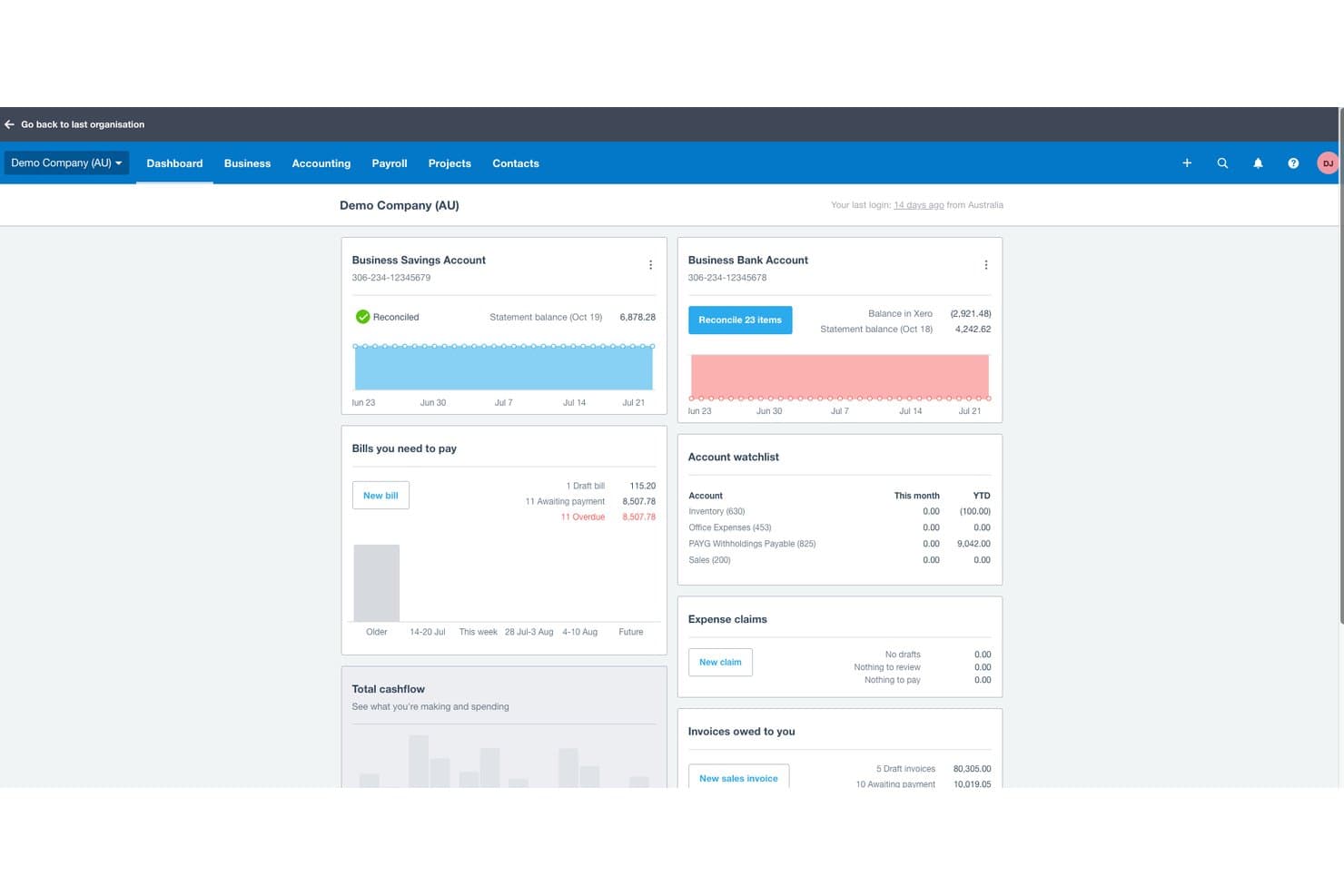
Xero offers a comprehensive dashboard displaying bank balances, bills to pay, expense claims, invoices owed, and account watchlist in one view. Xero is a cloud-based accounting platform offering invoicing, bank reconciliation, expense tracking, financial reporting, and multi-currency support for small businesses and their advisors.
Who Is Xero Best For?
Xero suits small businesses that need multiple people — owners, bookkeepers, and accountants — working in the same accounting platform without per-seat costs.
Why I Picked Xero
I've included Xero in my top picks because its unlimited user access across all plans solves a real pain point I see with competing tools. Most platforms charge per seat, so adding a bookkeeper or an external accountant drives costs up fast. With Xero, I can invite my accountant and bookkeeper into the same account without touching my plan, and features like Hubdoc document capture and AI-powered bank transaction matching stay fully accessible to every user.
Xero Key Features
- Multi-currency accounting: Track transactions and generate invoices in multiple currencies with automatic exchange rates.
- Automated sales tax calculation: Calculates and tracks sales tax, VAT, or GST on invoices and reports.
- Bank transaction feeds: Connect bank accounts for daily transaction imports and faster reconciliation.
- Mobile app access: Capture receipts, send invoices, and check cash flow from iOS and Android devices.
Xero Integrations
Xero offers native integrations with Stripe, PayPal, Square, Hubdoc, Avalara, Gusto, Receipt Bank, Shopify, WooCommerce, and Zapier. An API is available for custom integrations.
What's Free?
Xero offers a 30-day free trial with access to all features, no credit card required. There's no free-forever plan, so you'll need to choose a paid plan once the trial ends.
Pros and Cons
Pros:
- Hubdoc document capture built in
- AI-powered bank transaction matching included
- Unlimited users on every paid plan
Cons:
- Payroll requires an additional paid add-on
- No free-forever plan exists
Learn more about Xero: 2Best for expense tracking
Ramp
- Free plan available; 30-day free trial
- From $15/user/month
Visit WebsiteCustomer Rating:4.8/5
Ramp provides an automated accounting dashboard that categorizes transactions, syncs expenses, and flags missing memos for review. Ramp is a corporate expense management platform that combines physical and virtual company cards with built-in financial controls.
Why I picked Ramp: Ramp offers real-time expense recognition by texting you right after a card swipe, prompting you to upload the receipt via SMS or the app. That means you don’t have to chase paper, and it reduces missing or mismatched receipts. The platform also allows flexible control over spending limits on each virtual or physical card, so you can set monthly, per-transaction, and merchant-specific caps to prevent off-policy charges.
Standout features & integrations:
Features include machine‑learning‑based receipt matching and categorization that automatically pairs receipt images with transactions and tags expenses based on set rules. It also offers bill pay support where you can email or upload vendor invoices, set approval workflows, and pay bills via ACH, check, or card.
Integrations include NetSuite, Sage Intacct, QuickBooks, Microsoft Dynamics Business Central, Acumatica, Workday Financial Management, Uber, Lyft, Amazon Business, TravelPerk, ADP Workforce Now, and Gusto.
What's Free? Ramp includes a free plan for smaller teams looking for basic functions to simplify finances.
Pros and Cons
Pros:
- Automated expense reporting and receipt matching
- Ability to issue multiple virtual cards with customizable controls
- Combined AR, AP, and expense management in one system
Cons:
- Mobile app has fewer features than desktop version
- Could offer more advanced accounting features
 Best for real-time collaboration
- 14-day free trial + free plan available
- From $7/user/month (billed annually)
Visit WebsiteCustomer Rating:4.6/5
Google Sheets provides a simple cash flow template. Source: Google Docs For those seeking a cost-effective solution to manage financial tasks, Google Sheets offers a compelling option. This versatile tool allows you to create and collaborate on spreadsheets, making it ideal for small businesses and individuals who need to organize financial data without incurring additional costs. Whether you're tracking expenses, managing budgets, or generating reports, Google Sheets provides the essential functionalities to simplify your accounting processes.
Why I Picked Google Sheets
I picked Google Sheets for its unparalleled ability to facilitate real-time collaboration, a feature that stands out in the realm of Free Accounting Software Options. You and your team can simultaneously work on the same spreadsheet, see each other's changes instantly, and communicate via comments, which can significantly enhance teamwork and decision-making processes. The automatic saving and version history features ensure that no data is lost, and you can always revert to previous versions if needed. This collaborative environment makes Google Sheets particularly valuable for businesses and individuals who need to manage and share financial data seamlessly.
Google Sheets Key Features
In addition to its real-time collaboration capabilities, Google Sheets offers a range of features that are particularly useful for managing accounting tasks.
- Templates: Google Sheets provides pre-designed templates for tracking income, expenses, and budgets, simplifying the bookkeeping process.
- Formulas and Functions: With built-in functions like SUM, AVERAGE, and IF, you can automate calculations and analyze data efficiently.
- Data Visualization: You can create charts and graphs to visualize financial data, making it easier to interpret trends and performance.
- Advanced Functions: Features like VLOOKUP and IMPORTRANGE streamline data retrieval and synchronization across multiple sheets.
Google Sheets Integrations
Integrations include Salesforce, Intuit, Asana, BigQuery, Looker, and other tools within Google Workspace.
Pros and Cons
Pros:
- Strong data visualization tools
- Excellent real-time collaboration
- Powerful formulas and automation options
Cons:
- Requires manual setup for reports
- Limited advanced accounting functions
Learn more about Google Sheets:

ZipBooks displays your invoice stats in a simple dashboard while letting you select other key services with a single click. ZipBooks is a cloud-based tool designed to simplify financial management for a wide range of users. It's tailored especially for small businesses and freelancers, providing solutions that cover time tracking, expense management, and accounts receivable automation.
Why I picked ZipBooks: ZipBooks offers a unique combination of features that cater to small-scale financial needs without additional costs. You can track time, manage expenses, and automate accounts receivable, all while enjoying seamless bank reconciliation and multi-currency support. Additionally, ZipBooks provides dedicated customer support and allows unlimited users, which is often not seen in other free accounting solutions.
Standout features & integrations:
Features include simple invoicing tools that let you customize and send invoices quickly. You can track expenses effortlessly, giving you a clear view of your spending. It also provides smart insights to help you and your team make better financial decisions.
Integrations include PayPal, Square, Stripe, Gusto, Plaid, Slack, QuickBooks, Google Drive, Trello, and Asana.
What's Free? ZipBooks offers a free-forever plan with essential features for small businesses and freelancers. This plan includes unlimited invoicing, time tracking, and basic reporting, with no user limitations.
Pros and Cons
Pros:
- Unlimited invoices with free service
- Easily accept payments
- Free service with no limit on business size
Cons:
- Most useful features require a paid subscription
- Limited support
Learn more about ZipBooks: Best for businesses using other Zoho services
- Free plan + 14-day trial + demo available
- From $20/month
Visit WebsiteCustomer Rating:4.3/5
Zoho Books has a clean-looking dashboard that makes it easy to see basic details about your company and to find all of the features you need. If you’re already a Zoho customer, I’d definitely recommend looking into adding their accounting software to your current setup. Zoho Books can handle everything from expense reporting to automated follow-up on customer accounts.
Why I picked Zoho Books: Zoho Books offers seamless integration within the Zoho ecosystem, creating a unified platform for managing everything from sales and CRM to inventory and invoicing. This tight integration reduces the need for manual data entry, improves workflow efficiency, and provides real-time financial insights across departments.
Standout features & integrations:
Features include the ability to create and send professional invoices with just a few clicks, making your billing process efficient and straightforward. You can also track expenses and time, ensuring your team stays on top of all financial activities without missing a beat.
Integrations include Zoho CRM, PayPal, Stripe, Google Drive, Dropbox, Office 365, Slack, G Suite, Mailchimp, and Zendesk.
What's Free? Zoho Books offers a free-forever plan for businesses with revenue below a certain threshold, allowing one user and one accountant. While it provides essential accounting features, integrations with other applications might be limited in the free version.
Pros and Cons
Pros:
- Most important features available with free service
- Easy to use
- Test account lets you check out the service before signing up
Cons:
- Works best if you pay for additional services
- Limited support
 Best for multi-entity consolidation
- 14-day free trial available
- From $24/month (billed annually)
Visit WebsiteCustomer Rating:4.7/5
Joiin provides consolidated profit and loss reports with real-time variances across multiple entities. Joiin gives you a way to bring together financial and operational data from multiple entities — including accounting systems, spreadsheets, and non-financial sources — into a single cloud-based platform so your finance team can build consolidated reports, dashboards, and consolidated group-level views in one place. It’s especially useful if you manage more than one company, operate across different currencies, or want to replace manual spreadsheet consolidation with something more reliable and audit-ready.
Why I Picked Joiin
I picked Joiin because it excels at multi-entity consolidation — it lets you combine financial, sales, KPI, and non-financial data across different entities, currencies, and accounting systems into unified reports. Its support for inter-company eliminations, automatic currency conversion, and real-time consolidated dashboards stands out as a practical advantage when tracking group-level finances. I like that it can pull data from various sources like spreadsheets, bookkeeping tools, and ERP systems, giving you flexibility while still maintaining a clean, centralized reporting structure.
Joiin Key Features
Aside from its consolidation strength, Joiin also offers these useful features:
- Real-Time Dashboards and KPI Tracking: View live consolidated dashboards that mix financial metrics, sales, and non-financial KPIs for a holistic business view.
- Budgeting and Forecasting: Provides tools to create detailed budgets and forecasts, helping you plan your financial future with precision.
- Customizable Financial Reports: Enables you to tailor reports to fit your specific business needs, ensuring you have the most relevant data at your fingertips.
- Mobile-Ready Reports: Ensures you can access and review financial reports on the go, making it easier to manage your finances from anywhere.
Joiin Integrations
Integrations include Xero, QuickBooks, Sage, Pennylane, Excel, Puzzle, and Zapier. Joiin also provides an API for custom integrations, allowing further flexibility in connecting with other platforms.
What's Free?
While Joiin doesn't offer a free plan, it does offer a 14-day free trial of all its features.
Pros and Cons
Pros:
- Offers automated intercompany eliminations for group-level accuracy.
- Generates both standard financial statements and custom reports.
- Handles multi-entity and multi-currency consolidation reliably.
Cons:
- Less advanced forecasting and planning tools compared to full ERP modules.
- Does not fully replace core accounting functions like invoicing.
Learn more about Joiin:

GnuCash doesn’t have the friendliest or best-looking user interface, but it has more features than you’ll probably ever need. GnuCash won’t disappoint when it comes to features–everything from the most basic to the most advanced ones are completely free. But, fair warning: be ready for a bit of a learning curve.
Why I picked GnuCash: GnuCash is open source and includes features such as double-entry accounting and a checkbook-style register for transaction management for no cost. It offers advanced capabilities such as stock tracking and multi-currency handling, aligning with its focus on detailed financial management. The software also supports importing data from other financial applications, enhancing its flexibility and usability for various financial tasks.
Standout features & integrations:
Features include the ability to handle double-entry accounting, ensuring your transactions balance correctly by impacting two accounts. You can also manage your transactions with a checkbook-style register, which provides a straightforward interface for entering and viewing financial activities.
Integrations include the ability to import financial data from QIF and OFX files, support for the German HBCI protocol for banking transactions, and it works on Windows, MacOS, and Linux platforms.
What's Free? GnuCash is a free accounting software available for personal and business use, with no trial limitations. It supports an unlimited number of users and offers extensive documentation and community support.
Pros and Cons
Pros:
- Great reporting capability
- Extensive user guides and how-to documentation
- Open-source software that offers all features for free
Cons:
- No professional support
- Steep learning curve
Learn more about GnuCash:

Lendio’s accounting tool has a clean dashboard to give you a quick snapshot of what’s happening with your company. Lendio’s accounting tool, formerly known as Sunrise, is great for invoice automations. For sole proprietors and those who don’t have a dedicated accounting department, Lendio can save you a lot of time and money.
Why I picked Lendio: Lendio offers easy invoicing, includes automations, and has reasonably-priced payment acceptance. However, the software does charge a fee for payment processing (from 2.55% + $0.30 to 3.55% + $0.30 for credit card payments, 0.5% + $0.30 - 1.5% + $0.30 for ACH transactions).
Standout features & integrations:
Features include access to a wide variety of loan options tailored to your business needs. You can easily compare different lenders to find the best terms and rates. The platform also provides a simple online application process, saving you and your team valuable time.
Integrations include QuickBooks, Xero, FreshBooks, Stripe, Square, PayPal, Shopify, Amazon, and eBay.
What's Free? Lendio provides free access to its marketplace for comparing financing options. You can explore different loan products and use tools like loan calculators without any cost, but actual loan applications will depend on the terms of the lenders.
Pros and Cons
Pros:
- Easy expense tracking
- Reporting tools
- Free service that offers invoice automation
Cons:
- Provides little help with signing up
- Website and support availability are not detailed
Learn more about Lendio: Best for power users
- Free plan available
- From $60/user/year (billed annually)
Visit WebsiteCustomer Rating:4.8/5
TurboCASH may not be the best-looking option on the list, but it has all the tools you need. TurboCASH stands out as a versatile tool designed for small to medium-sized businesses seeking a cost-effective way to handle their accounting needs. With its user-friendly interface and support for multiple languages, it caters to a diverse range of users, allowing you to manage tasks such as invoicing, inventory, and financial reporting with ease. If you're aiming to refine your accounting processes without hefty expenses, TurboCASH offers a practical solution to tackle these challenges.
Why I Picked TurboCASH
I picked TurboCASH for its ability to cater to power users seeking a free accounting software option with advanced functionalities. TurboCASH stands out with its multi-workstation support, allowing simultaneous access by multiple users, which is ideal for teams managing complex financial operations. The software's Bank Import Plugin significantly enhances efficiency by automating transaction entries through direct bank statement imports. Additionally, TurboCASH's Document E-mail Pro feature, which enables the emailing of customizable documents, provides a streamlined communication process, making it a robust choice for those requiring comprehensive accounting capabilities.
TurboCASH Key Features
In addition to the advanced functionalities highlighted earlier, TurboCASH offers a variety of features that cater to diverse accounting needs.
- Invoicing Capabilities: Easily create and manage invoices, helping you keep track of payments and outstanding balances.
- Expense Tracking: Allows you to monitor expenses efficiently, ensuring accurate financial reporting.
- Inventory Management: Provides tools to manage stock levels and inventory, crucial for businesses with physical products.
- Financial Reporting: Offers comprehensive financial reporting tools to help you gain insights into your business's financial health.
TurboCASH Integrations
Integrations include QuickBooks, Xero, FreshBooks, Zoho Books, Sage, Tally, MYOB, Wave, Kashoo, and NetSuite.
Pros and Cons
Pros:
- Powerful customer tracking and reporting tools
- Multi-language support
- Truly free if you use version 4
Cons:
- Limited support
- Steep learning curve
Learn more about TurboCASH:

Puzzle.io’s Transactions dashboard helps you categorize and track expenses with clear visibility into vendors and spending categories. For those seeking an intuitive yet powerful free accounting solution, Puzzle.io stands out with its AI-driven capabilities tailored for startups and small businesses. You’ll appreciate how it automates up to 95% of transaction categorizations, drastically reducing manual bookkeeping tasks. With seamless integration with popular tools like Stripe and Brex, Puzzle.io addresses the challenge of transitioning from traditional software, offering a smoother financial reporting process.
Why I Picked Puzzle.io
I picked Puzzle.io because its AI-driven insights make it a strong choice for those seeking free accounting software options. The platform offers an AI Categorizer that automates the categorization of 90-95% of transactions, dramatically reducing manual entry and enhancing accuracy. Additionally, it provides real-time cash flow insights, allowing you to quickly assess your financial health and make informed decisions without delay. These features are particularly beneficial for startups and small businesses aiming to optimize their financial management processes efficiently.
Puzzle.io Key Features
In addition to AI-driven insights, Puzzle.io offers several key features that enhance its appeal as a free accounting software option for startups and small businesses.
- Automated Revenue Recognition: This feature is designed for Stripe users, simplifying complex calculations such as accrued and deferred revenue.
- Automated Cash Reconciliation: Puzzle.io significantly reduces month-end close times by automating the reconciliation process.
- Integration with AngelList and Brex: These integrations allow for seamless data synchronization and auto-categorization of transactions, ensuring up-to-date financial records.
- Dual Cash and Accrual Accounting Books: The platform provides the flexibility to maintain both cash and accrual accounting books, offering comprehensive financial insights.
Puzzle.io Integrations
Integrations include Stripe, Brex, Ramp, Rippling, and Gusto.
Pros and Cons
Pros:
- Real-time dashboards provide immediate financial insights
- AI-powered transaction categorization
- Automated bank reconciliations ensure accuracy
Cons:
- Free trial requires users to connect a bank account
- May not be suitable for very large enterprises
Learn more about Puzzle:
Alte programe gratuite de contabilitate
Iată câteva opțiuni suplimentare de software gratuit de contabilitate care nu au ajuns pe lista mea scurtă, dar care merită totuși verificate:
- 11Express AccountsBest for financial reporting
- 12AkauntingBest for payroll
- 13Odoo ERPBest for essential accounting tasks
- 14Fiverr WorkspaceBest for invoicing and expense tracking
- 15WAVEBest for automations
- 16Money Manager EXBest for simple projects
- 17TrulySmallBest for very small businesses/freelancers
- 18BrightbookBest for remote and virtual teams
- 19AcuSheetBest for automated accounting tasks
- 20HiverBest for shared inbox management
- 21StrivenBest for a range of features
Recenzii similare
- Furnizori de software de contabilitate online
- Software de contabilitate pentru întreprinderi mici
- Software de contabilitate pentru organizații nonprofit
- Cel mai bun software de contabilitate în ansamblu
- Software de raportare financiară
- Software pentru conturi de plătit
- Software ERP
How I Evaluate Free Accounting Software
Whether you're a freelancer sending invoices or a founder tracking cash flow, I evaluate tools on two levels: core accounting must-haves to qualify, and differentiators that separate the best.
Core Functionality (Table Stakes For This List)
When I'm selecting tools for my list, I rank each one on a scale from 0 (does not offer the functionality) to 5 (excels in this area) for each core functionality listed below. Then, I calculate the tool's total score into a percentage. Each tool needs to achieve a minimum total score of 65% to be considered for inclusion.
- General Ledger & Bookkeeping: I check whether the tool supports double-entry bookkeeping with a chart of accounts, since that's the foundation for accurate records come tax season.
- Invoicing & Billing: Every freelancer and small business owner needs to bill clients, so I look for customizable invoices with payment tracking on the free plan.
- Expense & Income Tracking: Categorizing revenue and costs across accounts matters, especially when a solopreneur needs to separate project income or sort vendor expenses.
- Financial Reporting: I evaluate whether the tool generates at least a profit & loss, balance sheet, and cash flow report you can hand to a bookkeeper or tax preparer.
- Bank Reconciliation: Matching bank transactions to your books catches errors fast, so I look for CSV imports at minimum and give higher marks for live bank feeds.
- Free Tier Availability: A time-limited trial doesn't count here. I confirm each tool offers a genuinely free plan with enough functionality to run real day-to-day accounting.
Once I have a list of tools that meet this criteria, I consider what sets each platform apart.
Differentiating Factors (What Sets Vendors Apart)
Here's how I compare and contrast different vendors:
Standout Features
Tax calculation features carry real weight when you're a freelancer juggling sales tax, VAT, or GST across client invoices. I look for tools that auto-apply the right rates and generate tax-ready reports. Multi-currency support is another separator, especially for startups billing international clients. I evaluate whether exchange rates update automatically or require manual input. Receipt scanning with OCR paired with a solid mobile app also splits the field, since solopreneurs who capture expenses from their phone save meaningful time versus manual desktop entry.
Beyond Features
Free plan caps matter a lot here. I check how many invoices, users, and transactions each tool allows before requiring an upgrade, because a growing small business can hit those limits fast. Integrations also weigh heavily—if your clients pay through Stripe or PayPal, the tool should connect to those processors without workarounds. I also evaluate whether you can invite an external bookkeeper or accountant to your account at no cost, with proper role-based permissions, so your tax preparer can pull what they need without full admin access to your books.
Cum să alegeți software-ul gratuit de contabilitate
Numărul mare de funcții și nivelurile de prețuri greu de înțeles pot face ca alegerea unui software gratuit de contabilitate să fie copleșitoare. Pentru a simplifica procesul, iată o listă de verificare simplă care vă ajută să găsiți cu încredere soluția potrivită:
| Factor | Aspecte de luat în considerare |
|---|---|
| FactorScalabilitate | Aspecte de luat în considerareAsigurați-vă că software-ul poate crește odată cu afacerea dumneavoastră. Căutați soluții care acceptă un număr în creștere de utilizatori și volume mai mari de tranzacții. |
| FactorIntegrări | Aspecte de luat în considerareVerificați dacă se conectează la instrumentele existente, precum CRM sau ERP, pentru a simplifica fluxurile de lucru și a preveni izolarea datelor. |
| FactorPosibilitate de personalizare | Aspecte de luat în considerareDeterminați dacă puteți adapta software-ul la nevoile specifice, cum ar fi rapoarte personalizate sau șabloane de facturare, pentru a se potrivi mai bine proceselor de afaceri. |
| FactorUșurință în utilizare | Aspecte de luat în considerareLuați în considerare curba de învățare pentru echipa dumneavoastră. Interfețele ușor de utilizat și materialele de asistență cuprinzătoare reduc timpul de instruire și cresc productivitatea. |
| FactorBuget | Aspecte de luat în considerareChiar dacă este gratuit, evaluați eventualele costuri ascunse, precum suplimentele plătite, taxele pentru tranzacții sau opțiunile de asistență premium, care v-ar putea afecta bugetul. |
| FactorMăsuri de securitate | Aspecte de luat în considerareAsigurați-vă că software-ul oferă funcții solide de securitate, precum criptarea datelor și backupuri regulate, pentru a vă proteja informațiile financiare. |
Tendințe în software-ul gratuit de contabilitate
În timpul cercetării mele despre software-ul gratuit de contabilitate, am analizat actualizările produselor, comunicatele de presă și jurnalele lansărilor de la furnizorii principali. Iată ce s-a remarcat:
- Informații bazate pe AI: Capacitățile AI sunt utilizate pentru a oferi informații predictive și previziuni financiare, ajutând utilizatorii să ia decizii informate. De exemplu, Wave utilizează AI pentru a genera rapoarte care ajută companiile să își înțeleagă tiparele fluxului de numerar.
- Blockchain pentru transparență: Unii furnizori explorează tehnologia blockchain pentru a spori transparența și securitatea tranzacțiilor. Această tehnologie este deosebit de utilă pentru utilizatorii care au nevoie de piste de audit verificabile fără implicarea unei terțe părți.
- Tablouri de bord personalizabile: Utilizatorii au acum opțiunea de a-și personaliza tablourile de bord pentru a afișa doar cele mai relevante informații, adaptând interfața la nevoile individuale sau ale companiei.
- Accent pe confidențialitatea datelor: Pe fondul preocupărilor tot mai mari privind securitatea datelor, software-ul de contabilitate gratuit acordă prioritate confidențialității datelor utilizatorilor prin implementarea unor metode de criptare și setări de confidențialitate mai solide.
- Instrumente de colaborare îmbunătățite: Sunt integrate funcții de colaborare, permițând mai multor utilizatori să lucreze simultan la documente financiare. Acest lucru este ideal pentru echipele mici care trebuie să își gestioneze finanțele împreună.
Ce este software-ul de contabilitate gratuit?
Software-ul de contabilitate gratuit este un instrument digital conceput pentru a ajuta companiile mici să gestioneze activități financiare precum evidența contabilă, facturarea și urmărirea cheltuielilor, fără costuri.
Acesta este utilizat în principal de startup-uri și întreprinderi mici care urmăresc să simplifice gestionarea financiară fără cheltuieli suplimentare. Prin eliminarea taxelor, ajută companiile să păstreze evidențe financiare exacte, să genereze cu ușurință rapoarte și să gestioneze eficient fluxul de numerar, reducând în același timp munca manuală și potențialele erori.
Caracteristicile software-ului de contabilitate gratuit
Atunci când alegeți un software de contabilitate gratuit, concentrați-vă asupra instrumentelor care acoperă activitățile financiare esențiale, oferind în același timp suficiente funcționalități pentru a sprijini operațiunile zilnice. Chiar și fără costuri, software-ul ar trebui să contribuie la simplificarea fluxurilor de lucru, îmbunătățirea acurateței și obținerea unei imagini clare asupra stării dumneavoastră financiare. Printre principalele caracteristici pe care trebuie să le căutați se numără:
- Facturare de bază: Instrumentele gratuite de contabilitate ar trebui să vă permită să creați și să trimiteți facturi profesionale, astfel încât să puteți gestiona facturarea, urmări plățile și menține fluxul veniturilor.
- Urmărirea cheltuielilor: Posibilitatea de a înregistra și clasifica cheltuielile îi ajută pe utilizatori să înțeleagă tiparele de cheltuieli și să păstreze controlul asupra bugetelor. Acest lucru este deosebit de valoros la gestionarea comenzilor de achiziție și a costurilor recurente.
- Rapoarte financiare: Căutați rapoarte esențiale precum contul de profit și pierdere, bilanțurile, registrele contabile și situațiile fluxului de numerar. Aceste informații sprijină luarea deciziilor și mențin transparența finanțelor companiei.
- Reconcilierea conturilor bancare: Reconcilierea automată sau semi-automată ajută la corelarea tranzacțiilor bancare cu înregistrările contabile, reducând erorile și menținând acuratețea datelor financiare.
- Acceptarea mai multor monede: Dacă lucrați cu furnizori sau clienți internaționali, funcțiile pentru mai multe monede facilitează gestionarea tranzacțiilor în valută fără conversii manuale.
- Acces de pe dispozitive mobile: Software-ul adaptat pentru dispozitive mobile le permite utilizatorilor să verifice datele financiare, să înregistreze cheltuieli și să gestioneze facturi de oriunde, sprijinind productivitatea în deplasare.
- Controale privind accesul utilizatorilor: Permisiunile bazate pe roluri contribuie la protejarea informațiilor sensibile și asigură accesul persoanelor potrivite la funcțiile potrivite.
- Posibilități de integrare: Chiar și software-ul gratuit ar trebui să se conecteze la instrumente precum procesoare de plăți, sisteme CRM sau platforme de comerț electronic, pentru a sprijini fluxuri de lucru mai fluide și a reduce introducerea manuală a datelor.
- Copii de rezervă automate: Copiile de rezervă regulate protejează informațiile financiare împotriva pierderii cauzate de blocarea sistemului sau de ștergerea accidentală.
- Asistență pentru clienți: Tutorialele, centrele de ajutor, forumurile comunității sau asistența prin e-mail pot face o diferență semnificativă atunci când învățați să utilizați software-ul sau remediați probleme.
Funcții AI comune ale software-ului de contabilitate gratuit
Unele instrumente de contabilitate gratuite sau cu versiune gratuită și opțiuni plătite includ acum funcții AI simplificate care sporesc eficiența și acuratețea, precum:
- Categorizarea automată a tranzacțiilor: AI învață din comportamentul anterior pentru a clasifica automat veniturile și cheltuielile, reducând corecțiile manuale.
- Extragerea inteligentă a datelor din chitanțe: AI extrage detalii esențiale — precum date, sume și furnizori — din chitanțele încărcate, accelerând urmărirea cheltuielilor.
- Alerte privind anomaliile: Modelele AI de bază semnalează tranzacțiile neobișnuite sau neconcordanțele, ajutând utilizatorii să identifice din timp erorile.
- Informații predictive despre fluxul de numerar: Unele instrumente oferă proiecții simple bazate pe AI și pe date istorice, pentru a ajuta la anticiparea viitoarelor deficituri sau excedente de numerar.
- Căutare în limbaj natural: Utilizatorii pot introduce întrebări precum „Care au fost cheltuielile mele luna trecută?” și pot primi răspunsuri rapide și ușor de înțeles, fără să caute prin rapoarte.
Beneficiile software-ului de contabilitate gratuit
Utilizarea software-ului de contabilitate gratuit în compania dumneavoastră poate aduce avantaje reale pentru dumneavoastră și echipa dumneavoastră. Iată la ce vă puteți aștepta:
- Economii de costuri: Software-ul de contabilitate gratuit elimină necesitatea abonamentelor costisitoare, permițându-vă să alocați fonduri altor nevoi ale afacerii.
- Urmărirea cheltuielilor: Puteți monitoriza cu ușurință cheltuielile afacerii, contribuind la gestionarea fluxului de numerar cu ajutorul funcțiilor de urmărire integrate.
- Facturarea: Software-ul include adesea funcții de facturare, simplificând facturarea clienților și gestionarea plăților primite.
- Rapoarte financiare: Generați rapid rapoarte financiare, obținând informații despre performanța afacerii fără costuri suplimentare.
- Pregătirea declarațiilor fiscale: Cu funcții pentru organizarea documentelor legate de taxe, vă puteți eficientiza procesul de depunere a declarațiilor fiscale și reduce stresul din perioada fiscală.
- Organizarea datelor: Software-ul vă ajută să vă organizați datele financiare, facilitând găsirea și interpretarea acestora atunci când este necesar.
- Accesibilitate: Multe instrumente de contabilitate gratuite oferă acces bazat pe cloud, astfel încât să vă puteți gestiona finanțele de oriunde aveți o conexiune la internet.
- Eficientizarea fluxurilor de lucru: Software-ul de contabilitate gratuit poate contribui, de asemenea, la eficientizarea fluxurilor de lucru ale companiei, eliberând timp pentru a vă concentra asupra sarcinilor mai importante.
Costurile și prețurile software-ului de contabilitate gratuit
Alegerea unui software de contabilitate gratuit nu înseamnă doar evitarea costurilor: este important să știți exact ce primiți. Unele instrumente limitează funcțiile, numărul de utilizatori sau asistența.
Am creat acest tabel pentru a evidenția detaliile principale ale planurilor, costurile posibile și ceea ce vă puteți aștepta în mod realist de la un software de contabilitate gratuit:
Tabel comparativ al planurilor pentru software-ul de contabilitate gratuit
| Tipul planului | Preț mediu | Funcții comune |
|---|---|---|
| Tipul planuluiPlan gratuit | Preț mediu$0 | Funcții comuneFacturare de bază, urmărirea cheltuielilor și raportare limitată. |
| Tipul planuluiPlan personal | Preț mediu$5-$25/utilizator/lună | Funcții comuneFacturare de bază, urmărirea cheltuielilor, urmărirea timpului și raportare de bază. |
| Tipul planuluiPlan pentru afaceri | Preț mediu$25-$50/utilizator/lună | Funcții comuneFacturare, urmărirea cheltuielilor, urmărirea timpului, gestionarea proiectelor și raportare avansată. |
| Tipul planuluiPlan pentru întreprinderi | Preț mediuPreț personalizat | Funcții comuneToate funcțiile pentru afaceri, suport pentru mai multe valute, analize avansate și asistență dedicată. |
Întrebări frecvente despre software-ul gratuit de contabilitate
Mai jos găsești răspunsuri la unele dintre cele mai frecvente întrebări despre software-ul gratuit de contabilitate.
De ce ar oferi orice companie de software produsul său gratuit?
Companiile de software oferă adesea versiuni gratuite pentru a atrage utilizatori noi, a construi loialitatea față de marcă și a promova ulterior planurile plătite. Nivelul gratuit evidențiază funcțiile lor esențiale de contabilitate. Apoi, dacă ai nevoie de instrumente sau asistență mai avansate pe măsură ce afacerea ta se dezvoltă, este mai probabil să iei în considerare opțiunile lor plătite.
Este sigur software-ul gratuit de contabilitate?
Da, majoritatea soluțiilor gratuite de contabilitate oferite de furnizori reputați folosesc aceleași protocoale de securitate ca alternativele plătite. Acestea includ criptarea datelor și actualizări regulate de securitate. Verifică întotdeauna existența unor funcții precum autentificarea cu doi factori și a unei politici de securitate clare, pentru a te asigura că informațiile tale financiare rămân în siguranță.
Cum găsesc software-ul gratuit de contabilitate potrivit pentru mine?
Începe prin a enumera funcțiile indispensabile, precum facturarea, urmărirea cheltuielilor sau accesul pentru mai mulți utilizatori. Printre pașii pe care îi poți urma atunci când cauți cel mai bun software gratuit de contabilitate pentru întreprinderi mici se numără:
- Compararea instrumentelor gratuite cu lista ta și verificarea ușurinței în utilizare, a opțiunilor de asistență și a posibilităților de upgrade.
- Citirea recenziilor utilizatorilor reali pentru a vedea cum funcționează fiecare opțiune pentru afaceri precum a ta.
De unde pot descărca gratuit software de contabilitate?
Poți descărca software gratuit de contabilitate pentru întreprinderi mici de pe site-urile oficiale ale furnizorilor sau din magazine de aplicații reputate, precum Microsoft Store sau Apple App Store. Folosește întotdeauna sursa oficială pentru a evita programele malware sau versiunile învechite.
Pot trece ulterior de la software-ul gratuit de contabilitate la un plan plătit?
Da, majoritatea furnizorilor simplifică trecerea de la un plan gratuit de software de contabilitate pentru afaceri la unul plătit. Datele tale sunt de obicei transferate fără probleme și vei debloca funcții suplimentare sau limite de utilizare mai mari pe măsură ce afacerea ta se dezvoltă.
Care sunt limitările software-ului gratuit de contabilitate pentru întreprinderile mici?
Software-ul gratuit de contabilitate limitează adesea numărul de utilizatori, facturi, conturi sau funcții avansate, precum salarizarea. De asemenea, este posibil să beneficiezi de asistență limitată pentru clienți și de spațiu de stocare limitat. Asigură-te că limitările nu îți vor împiedica dezvoltarea afacerii înainte de a lua o decizie.
Se poate integra software-ul gratuit de contabilitate cu celelalte instrumente ale afacerii mele?
Unele instrumente gratuite de contabilitate se conectează la aplicații populare, precum sistemele de salarizare, procesatorii de plăți sau platformele de comerț electronic, însă integrările pot fi limitate la planurile plătite. Verifică pagina de integrări a instrumentului sau documentația de ajutor înainte de a te înscrie.
Cum gestionează instrumentele gratuite de contabilitate copiile de rezervă și protecția datelor?
Instrumentele gratuite de contabilitate de încredere creează automat copii de rezervă ale datelor tale și folosesc stocarea în cloud cu standarde stricte de securitate. Totuși, citește politica de backup a furnizorului și ia în considerare exportarea periodică a datelor pentru un plus de liniște.