
13 Best Construction Budgeting Software Reviewed in 2026

Best Construction Budgeting Software Shortlist
Here’s my shortlist of the best construction budgeting software:


Managing budgets in the construction industry can be challenging. Whether you’re managing cost overruns, unexpected expenses, or tight deadlines. Construction budgeting software can help you track your expenses, ensuring projects stay on track and within budget.
In my experience, choosing the right software can improve your construction business's processes. I've reviewed and tested various solutions to bring you an unbiased look at the best options available.
In this article, you'll find my top picks that cater to different needs, including takeoffs, estimates, and change orders, whether you're managing a small team or overseeing large-scale projects. Let's find the right tool to simplify your financial management and give you peace of mind.
Why Trust Our Software Reviews
Best Construction Budgeting Software Summary
This comparison chart summarizes pricing details for my top construction budgeting software selections to help you find the best one for your budget and business needs.
| Tool | Best For | Trial Info | Price | ||
|---|---|---|---|---|---|
| 1 | Best for large construction firms | Free demo available | Pricing upon request | Website | |
| 2 | Best for complex capital projects | Free demo available | Pricing upon request | Website | |
| 3 | Best for subcontractor management | Free trial + free demo available | From $99/month (billed annually) | Website | |
| 4 | Best for design integration | Free demo available | From $29/user/month (billed annually) | Website | |
| 5 | Best for residential builders | Free demo available | Pricing upon request | Website | |
| 6 | Best for client-facing budget transparency | Free demo available | Pricing upon request | Website | |
| 7 | Best for customizable workflows | Free demo available | Pricing upon request | Website | |
| 8 | Best for resource management | Free demo available | From $790/month | Website | |
| 9 | Best for modern, lightweight budgeting tools | 30-day free trial + free plan + free demo available | From $199/month | Website | |
| 10 | Best for heavy civil projects | Free demo available | Pricing upon request | Website |
-

LiveFlow
Visit WebsiteThis is an aggregated rating for this tool including ratings from Crozdesk users and ratings from other sites.4.9 -
Float Financial
Visit WebsiteThis is an aggregated rating for this tool including ratings from Crozdesk users and ratings from other sites.4.1 -
Rippling Spend
Visit WebsiteThis is an aggregated rating for this tool including ratings from Crozdesk users and ratings from other sites.4.8


Best Construction Budgeting Software Review
Below are my detailed summaries of the best construction budgeting software that made it onto my shortlist. My reviews offer a detailed look at the key features, pros and cons, integrations, and ideal use cases of each tool to help you find the best one for you.

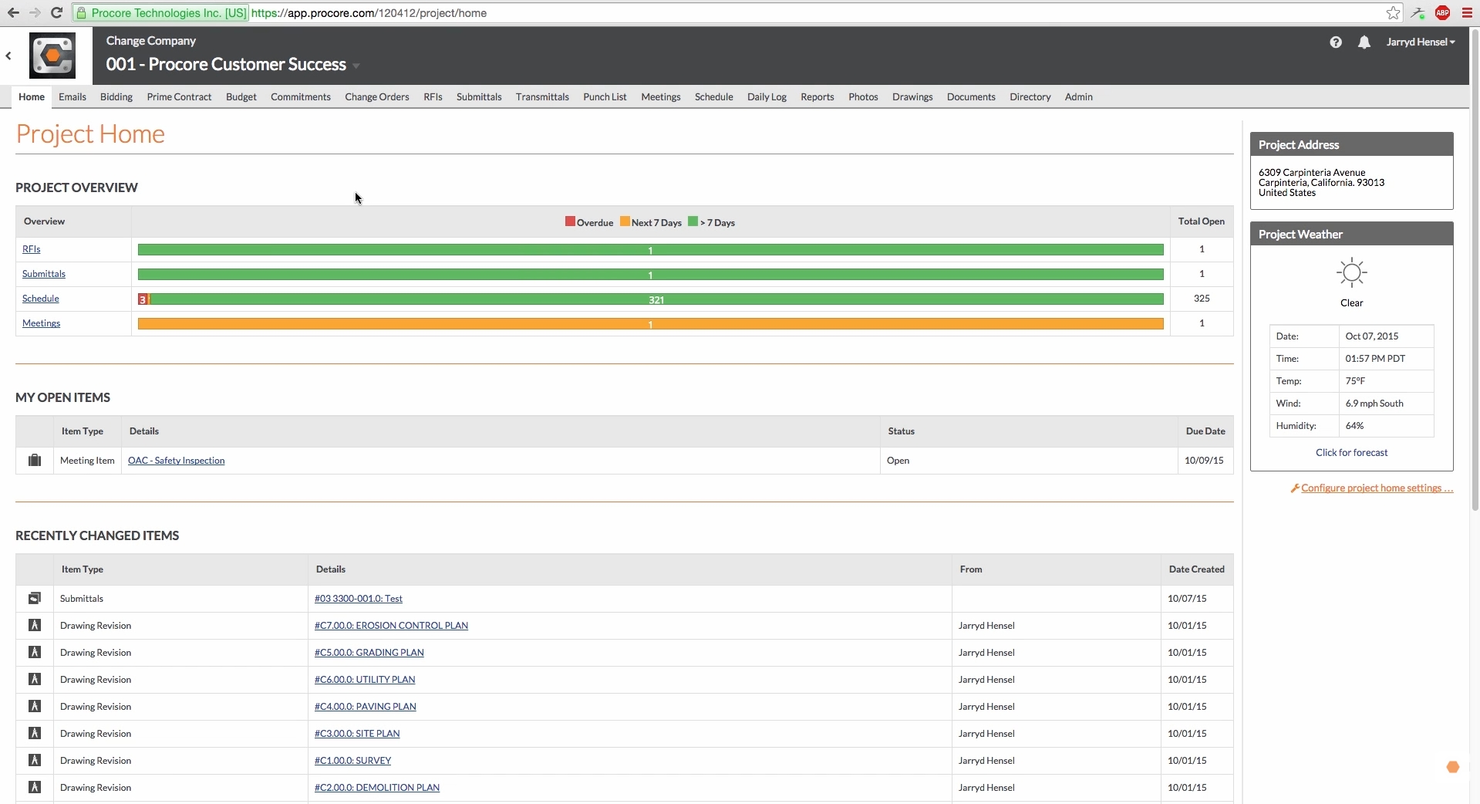
Procore is a construction management platform tailored for large construction firms. It supports project management, budgeting, and collaboration, helping general contractors and teams manage complex projects efficiently.
Why I picked Procore: Procore is tailored for large construction firms with its scalability and ability to handle multiple projects simultaneously. It allows you to manage budgets, track progress, and collaborate with your team, all in one place. Procore's project management capabilities make it ideal for handling the complexities of large construction projects. It's worth noting, however, that advanced financial controls often rely on integrations.
Standout Features and Integrations:
Features include customizable workflows that adapt to your specific needs, detailed reporting tools that provide critical insights, and a centralized platform that brings all project data together for easy access.
Integrations include QuickBooks, Sage 300, Microsoft Project, Primavera P6, Dropbox, Google Drive, Docusign, Bluebeam, Viewpoint Vista, Box, and more.
Pros and Cons
Pros:
- Centralized data management
- Customizable workflows
- Handles large projects well
Cons:
- Budgeting features are dependent on integrations
- Less flexible than specialized cost-control tools

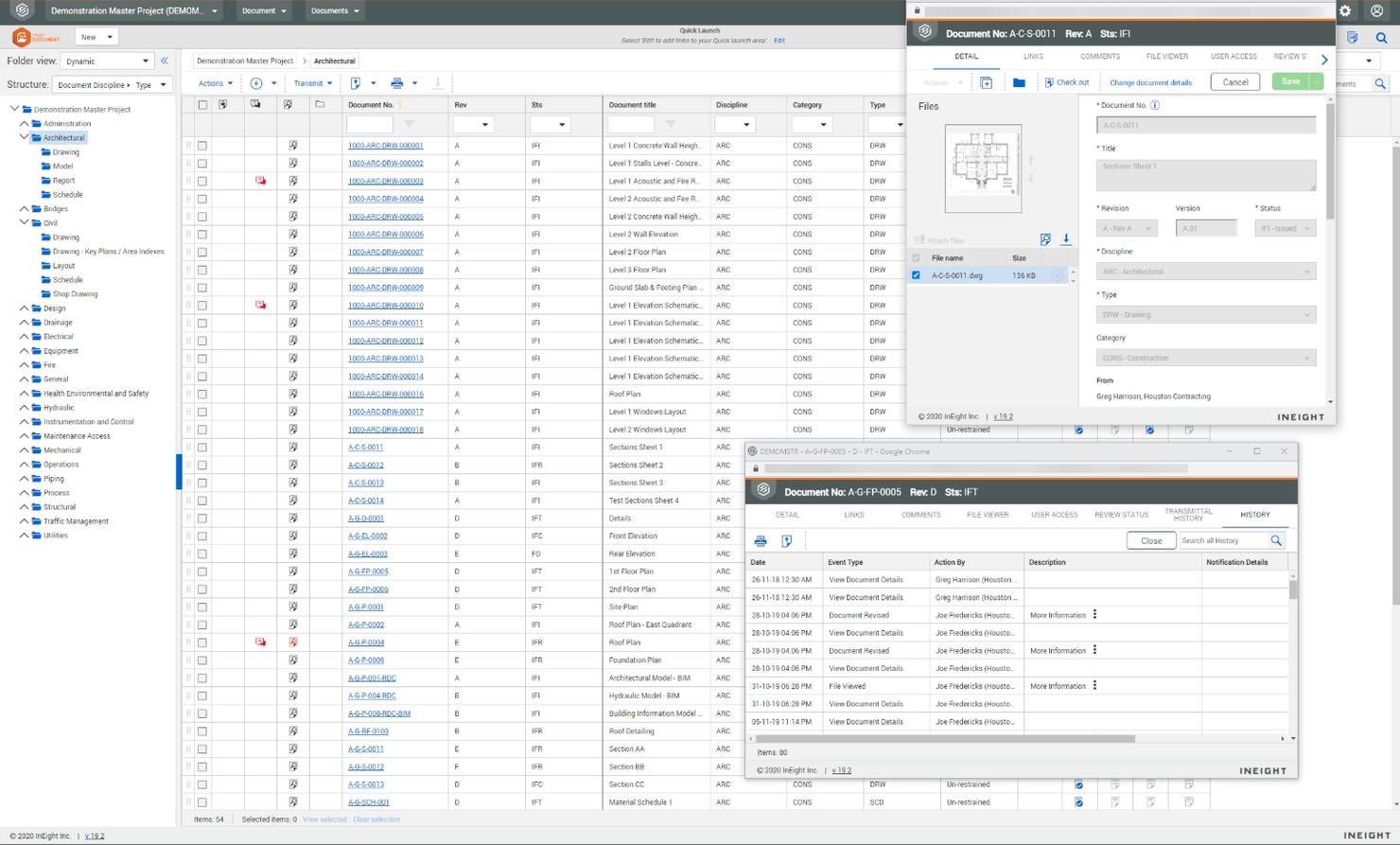
InEight is a construction project management software designed for complex capital projects. It offers tools for project planning, cost management, and risk assessment, providing essential functions for managing complex projects.
Why I picked InEight: InEight provides tools that help you keep costs under control while managing large-scale projects. In my experience, its focus on risk management is helpful for high-stakes projects. InEight's ability to handle complex project demands makes it a valuable asset for managing capital projects.
Standout Features and Integrations:
Features include advanced risk management tools that help you identify and mitigate potential issues, detailed project planning capabilities that keep your projects on schedule, and cost management features that ensure financial oversight.
Integrations include Microsoft Project, Autodesk Civil 3D, Bluebeam Studio, Microsoft SharePoint, Accubid, Ariba, Dropbox, EarthCam, Felix, Jovix, and more.
Pros and Cons
Pros:
- Supports complex project demands
- Detailed cost management
- Advanced risk management features
Cons:
- Limited flexibility for small projects
- High cost, making it less ideal for smaller businesses

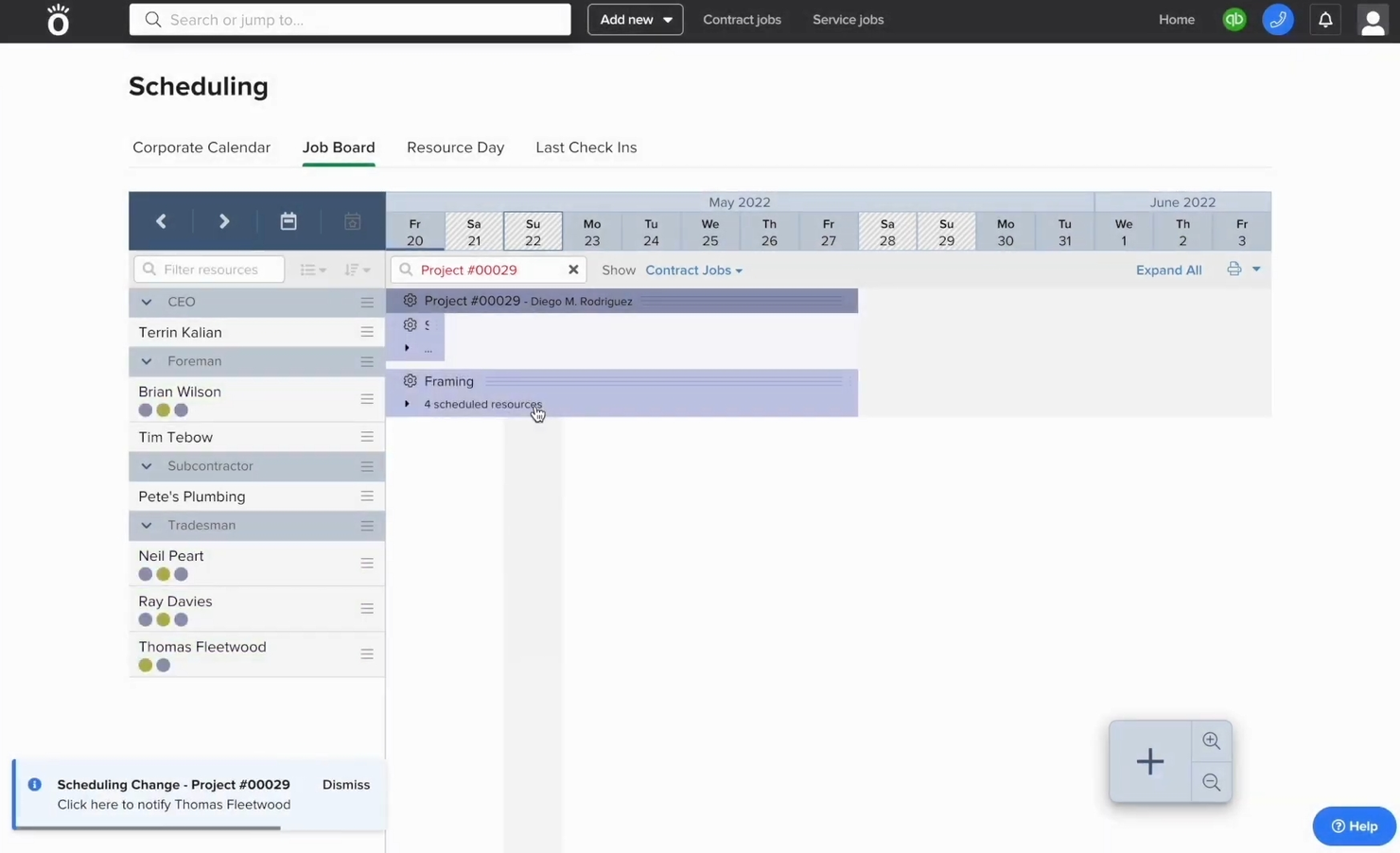
Knowify is a construction management software designed for subcontractors and small to medium-sized contractors. It facilitates project management, budgeting, and job costing, providing tools to manage contracts and track job progress efficiently.
Why I picked Knowify: Knowify is particularly beneficial for subcontractor management. It allows you to track project progress and expenses in real time, which is essential for subcontractors managing multiple jobs. The software's ability to manage contracts and bids makes it a valuable tool. Its focus on the needs of subcontractors ensures you can handle your projects with precision and efficiency.
Standout Features and Integrations:
Features include job-costing tools that help you track expenses accurately, contract management features that simplify your agreements, and a real-time dashboard that provides instant project insights.
Integrations include QuickBooks Online, Stripe, Authorized, Gmail, Microsoft Outlook, Dropbox, Google Drive, Microsoft Excel, Lumber, eBacon, and more.
Pros and Cons
Pros:
- Accurate job costing
- Real-time project tracking
- Tailored for subcontractors
Cons:
- Limited inventory and material budgeting features
- Limited scalability for growing companies

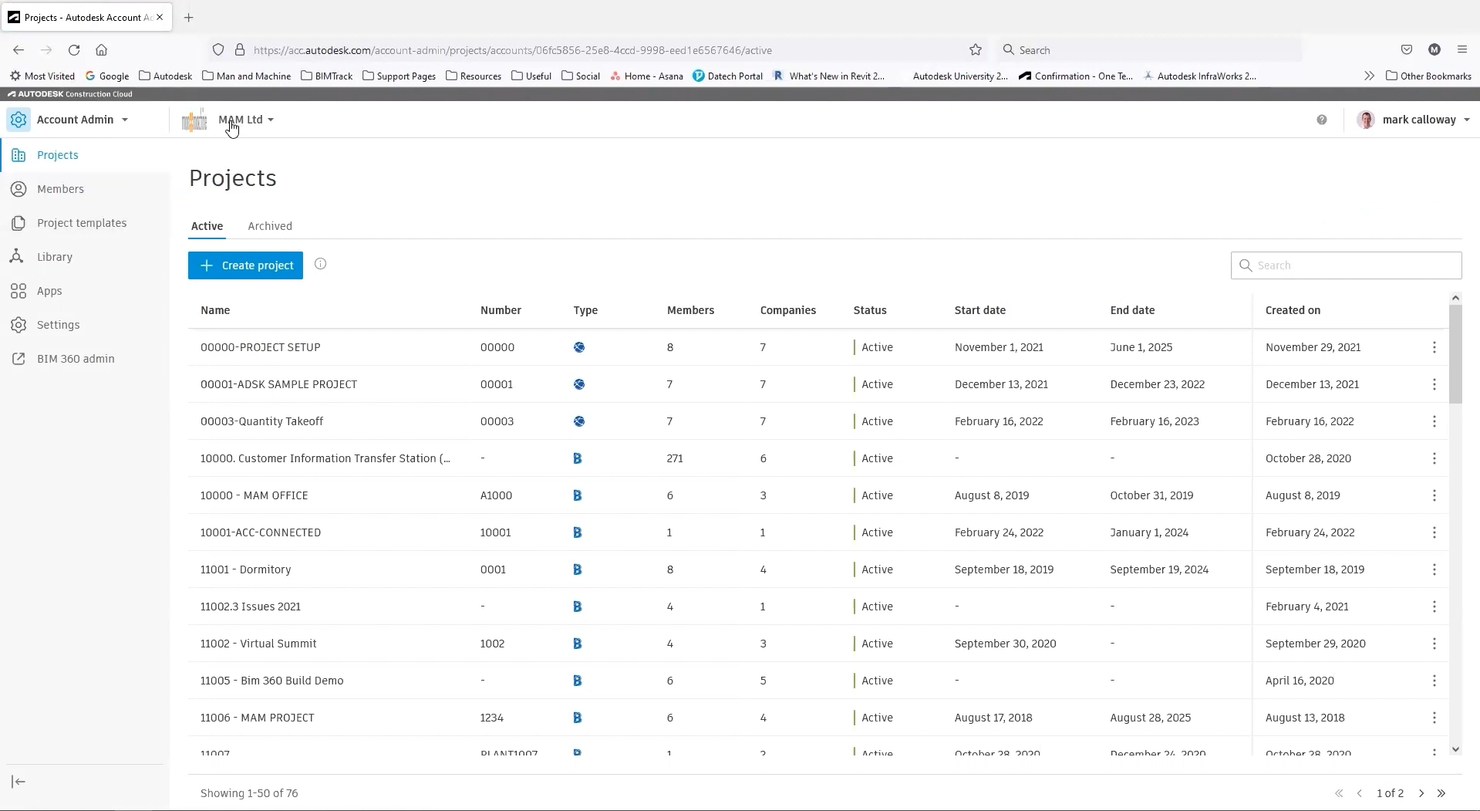
Autodesk Construction Cloud is a construction management platform tailored for teams that need strong design integration. It offers project management, design collaboration, and cost control tools to architects, engineers, and construction professionals.
Why I picked Autodesk Construction Cloud: The platform excels in design integration, allowing you to connect design and construction workflows. Autodesk Construction Cloud's emphasis on integrating design with construction makes it invaluable for teams needing cohesive workflows.
Standout Features and Integrations:
Features include cloud-based document management that ensures access to the latest designs, real-time design collaboration that improves project accuracy, and cost control features that help manage budgets effectively.
Integrations include Revit, AutoCAD, Navisworks, BIM 360, Dropbox, Jira, OneDrive, Salesforce, Slack, Smartsheet, and more.
Pros and Cons
Pros:
- Unified model-based quantity takeoff and cost planning
- Cloud-based document management
- Real-time design collaboration
Cons:
- Budgeting module does not feel fully integrated
- Complex setup process

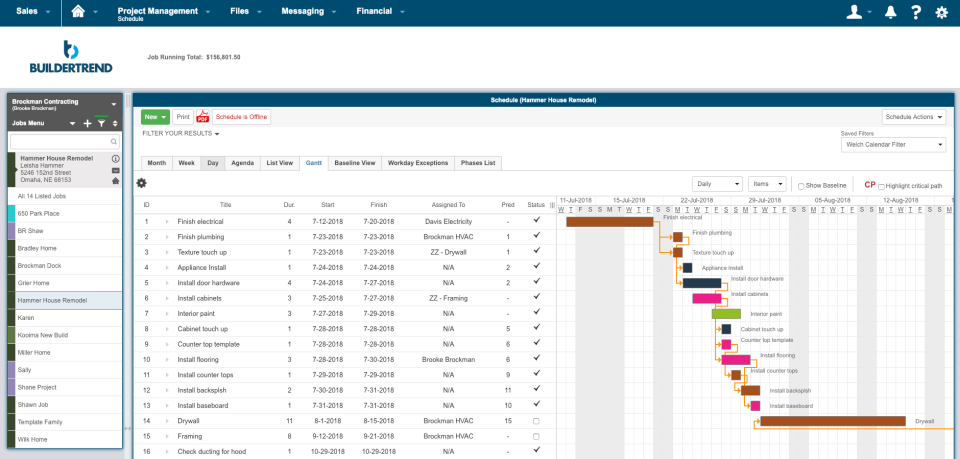
Buildertrend is a construction management software designed primarily for residential builders. It facilitates project management, budgeting, and client communication, making it ideal for home builders and remodelers.
Why I picked Buildertrend: Buildertrend is tailored for residential builders with features that simplify project management and client interaction. Its user-friendly interface allows you to manage projects efficiently and keep clients informed. Buildertrend's emphasis on residential needs makes it a valuable tool for home builders looking to improve their operations.
Standout Features and Integrations:
Features include a scheduling tool that helps you plan and track project timelines, budget management features that ensure financial control, and client communication tools that keep your clients informed throughout the project.
Integrations include QuickBooks, Xero, The Home Depot Pro Xtra, HubSpot, Pipedrive, Salesforce, Gusto, and more.
Pros and Cons
Pros:
- Efficient scheduling tools
- All-inclusive project management
- Tailored for residential projects
Cons:
- Limited bid management features
- Limited to commercial projects

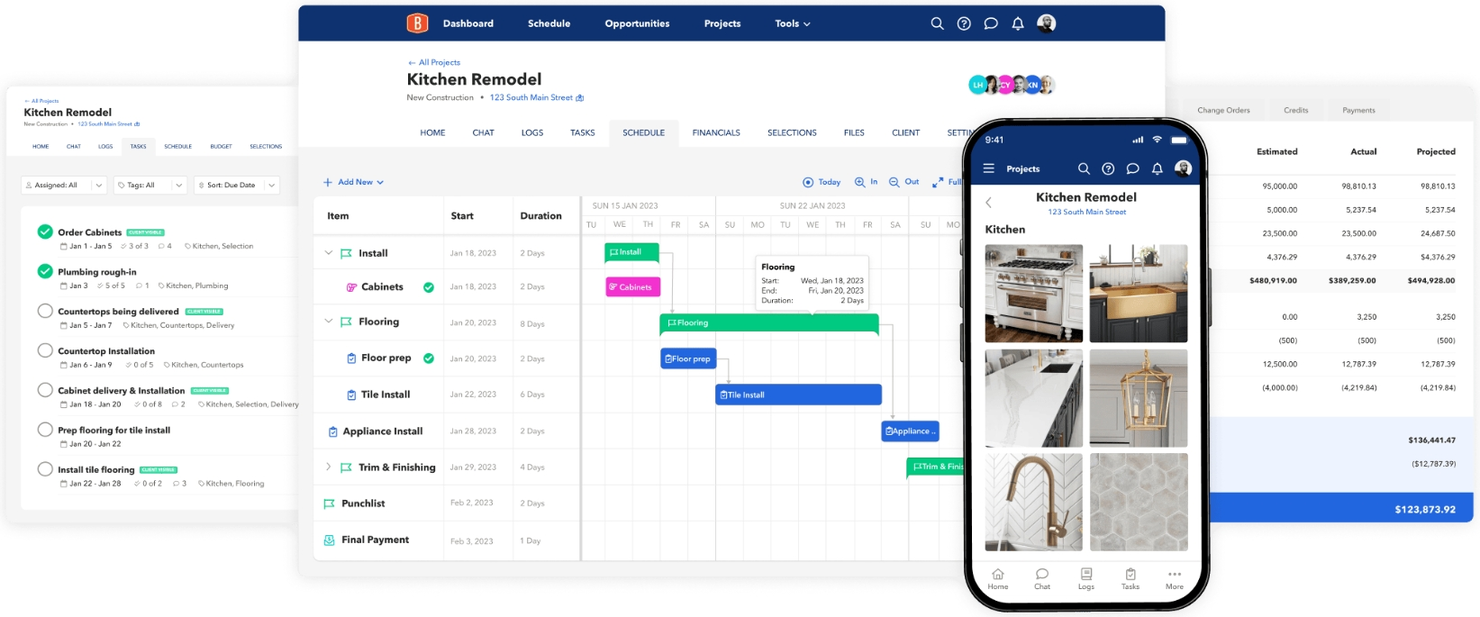
BuildBook is a construction management platform designed for builders who prioritize clear client communication. It’s well-suited for small to mid-sized construction companies that want to keep projects, timelines, and budget expectations aligned in one shared space.
Why I picked BuildBook: BuildBook stands out for how it supports budget transparency through communication, rather than complex financial modeling. You can share project updates, selections, and change orders in real time, helping clients understand how scope changes affect timelines and costs. This reduces billing disputes and keeps financial expectations aligned throughout the build. Its clean, user-friendly interface makes it easy for teams to manage project details while keeping clients informed on cost-related changes.
Standout features and integrations:
Features include change order tracking that ties scope updates to cost adjustments, client-facing portals for sharing budget-related updates, and project tracking tools that help you monitor progress against planned work. While BuildBook doesn’t replace full budgeting or job-costing software, it plays a valuable role in keeping clients aligned with budget decisions as projects evolve.
Integrations include Google Calendar, QuickBooks, and more.
Pros and Cons
Pros:
- Client portal reduces billing confusion and approval delays
- Change order tracking helps tie scope changes to cost discussions
- Strong client-facing budget transparency through real-time updates
Cons:
- No native cost code structure for detailed budget tracking
- Lacks advanced budgeting, forecasting, and job-costing tools

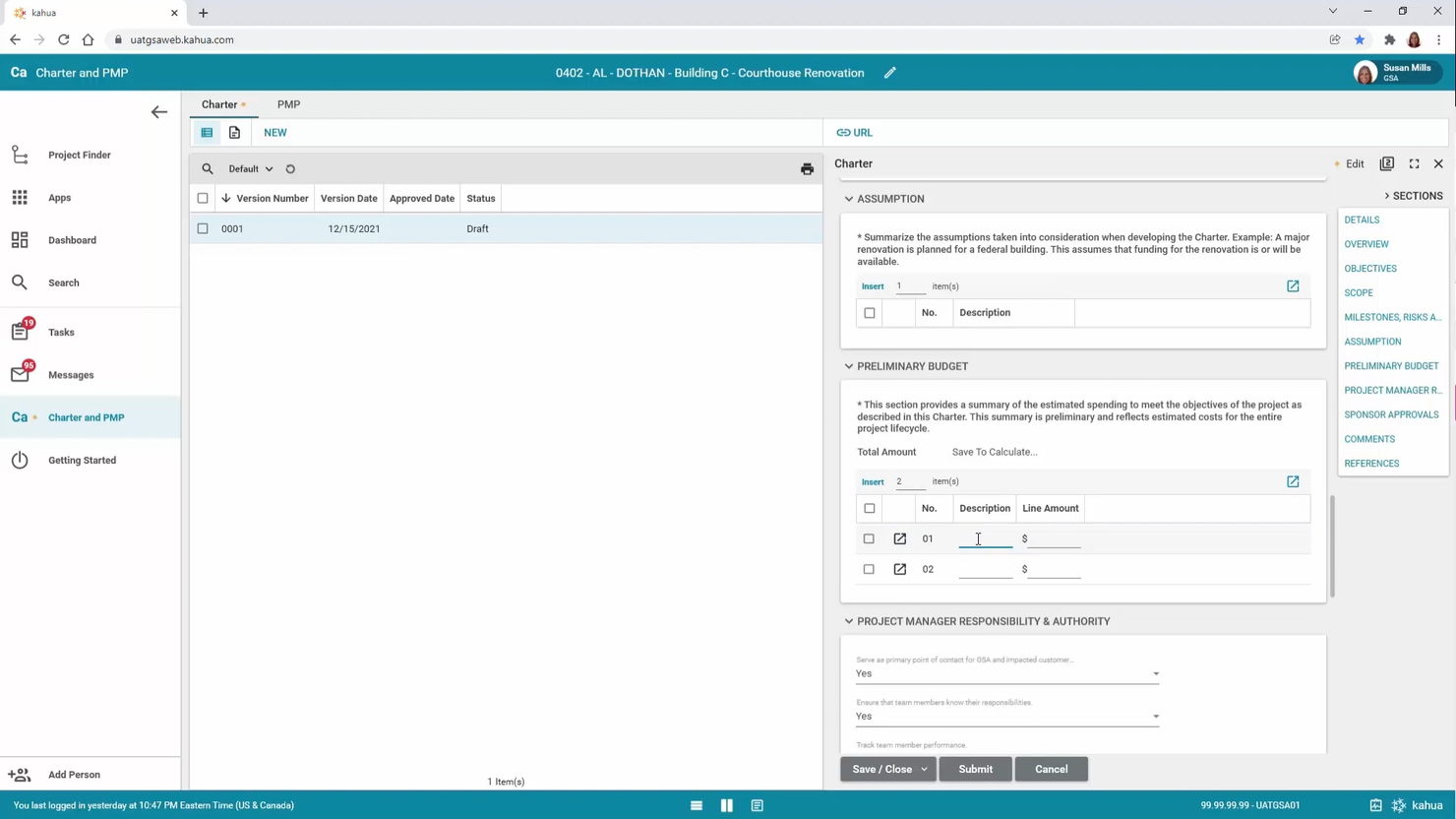
Kahua is a construction project management software tailored for organizations seeking customizable solutions. It offers project management, budgeting, and collaboration tools that adapt to specific business processes for a wide range of industries.
Why I picked Kahua: I chose Kahua for its customizable workflows, which enable you to tailor the software to match your specific project needs. Its focus on adaptability makes it an excellent choice for teams looking to personalize their project management experience.
Standout Features and Integrations:
Features include flexible project management tools that adapt to your needs, budgeting capabilities that help you manage costs effectively, and collaboration features that improve team communication and coordination.
Integrations include Microsoft Dynamics 365, Oracle, SAP, Autodesk Forge, Viewpoint, Docusign, Alfresco, Sage Intacct, Microsoft Project, Microsoft Outlook, and more.
Pros and Cons
Pros:
- Improves team collaboration
- Highly customizable workflows
- Adapts to various project types
Cons:
- May overwhelm smaller teams
- Limited depth in estimating and quantity takeoff tools
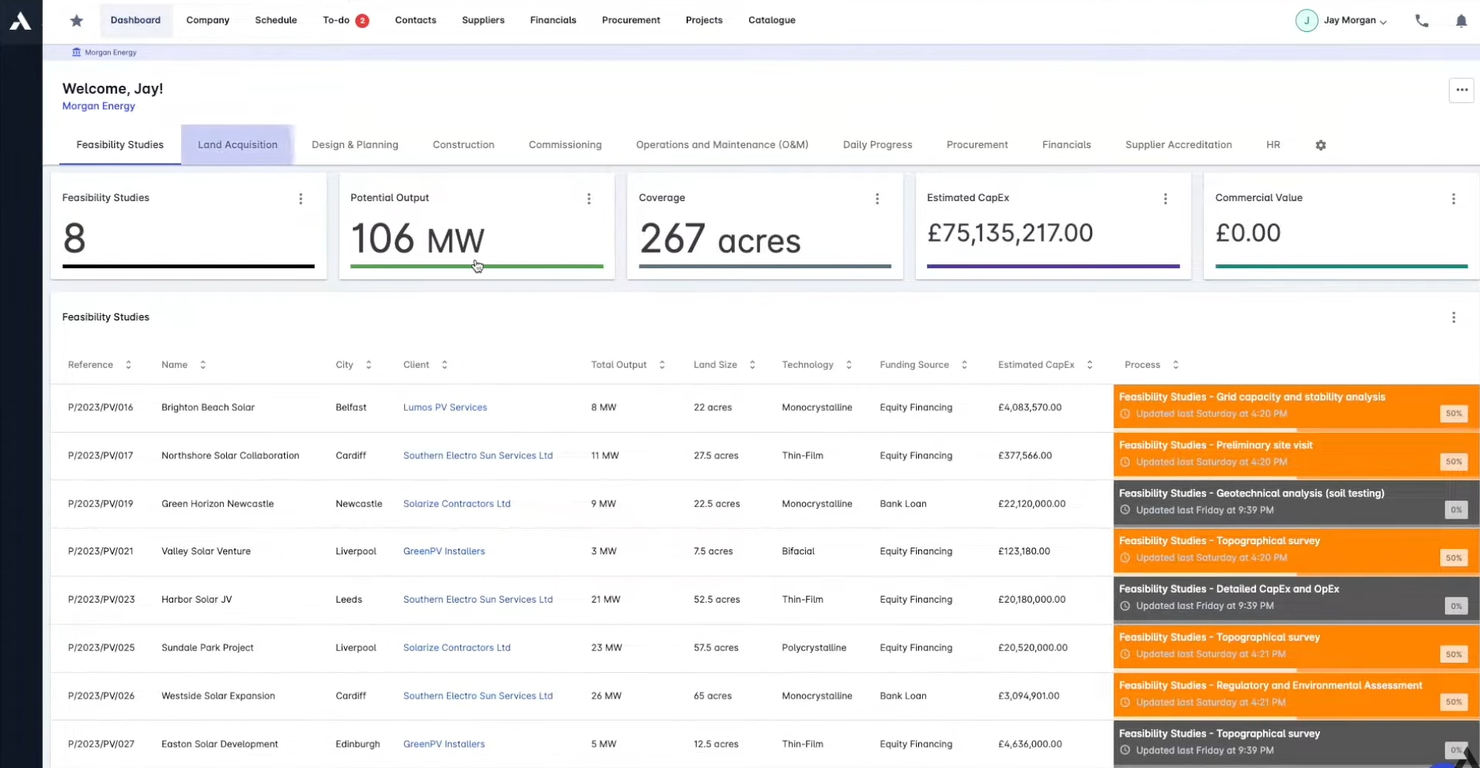
Archdesk is a construction management software designed for growing and established firms. It handles project management, cost control, and document management, helping users efficiently manage resources and projects.
Why I picked Archdesk: Archdesk excels in resource management. The software's ability to integrate various facets of construction management into one platform sets it apart. Its focus on providing real-time data helps you make informed decisions about resource allocation.
Standout Features and Integrations:
Features include real-time scheduling to keep your projects on track, procurement tracking to ensure resources are available when needed, and live dashboards that provide instant insights into project status.
Integrations include Xero, QuickBooks, Sage, Zoho, Zapier, and more.
Pros and Cons
Pros:
- Designed for all company sizes
- All-inclusive resource management
- Real-time project insights
Cons:
- Regional pricing can create cost opacity for non-UK/European users
- Lacks complex union payroll integrations

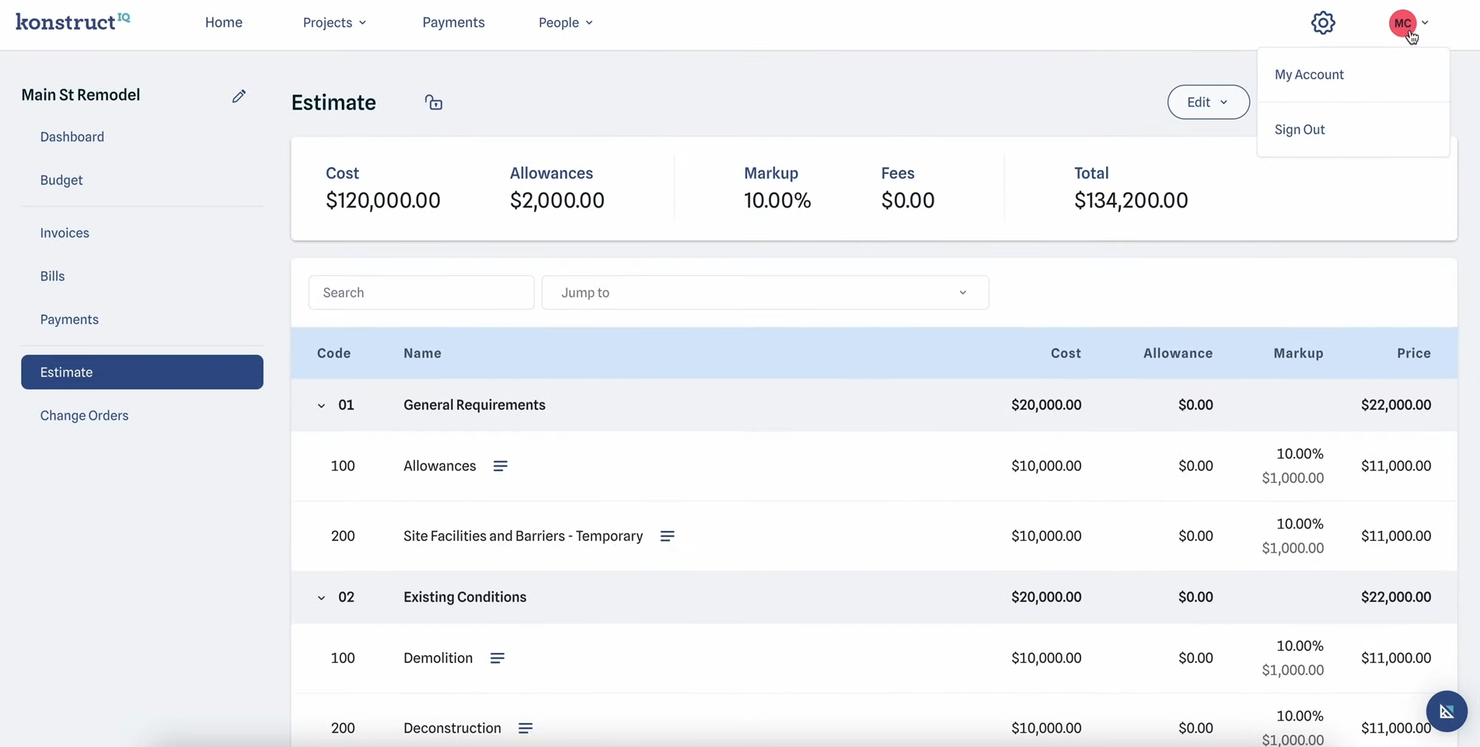
KonstructIQ is a construction software designed for builders and remodelers. It offers tools to simplify project management, budgeting, and subcontractor collaboration.
Why I picked KonstructIQ: KonstructIQ is known for its intuitive interface, making it accessible for users who want a straightforward experience. Its digital payment options improve financial management. KonstructIQ provides a user-friendly platform that improves efficiency for builders and remodelers.
Standout Features and Integrations:
Features include subcontractor collaboration that allows easy project participation, client dashboards that offer project progress insights, and transparent invoicing that links invoices to specific line items.
Integrations include QuickBooks.
Pros and Cons
Pros:
- Simplified digital payments
- Transparent invoicing process
- Simplifies subcontractor collaboration
Cons:
- Lacks advanced analytic features
- Inconsistent customer support
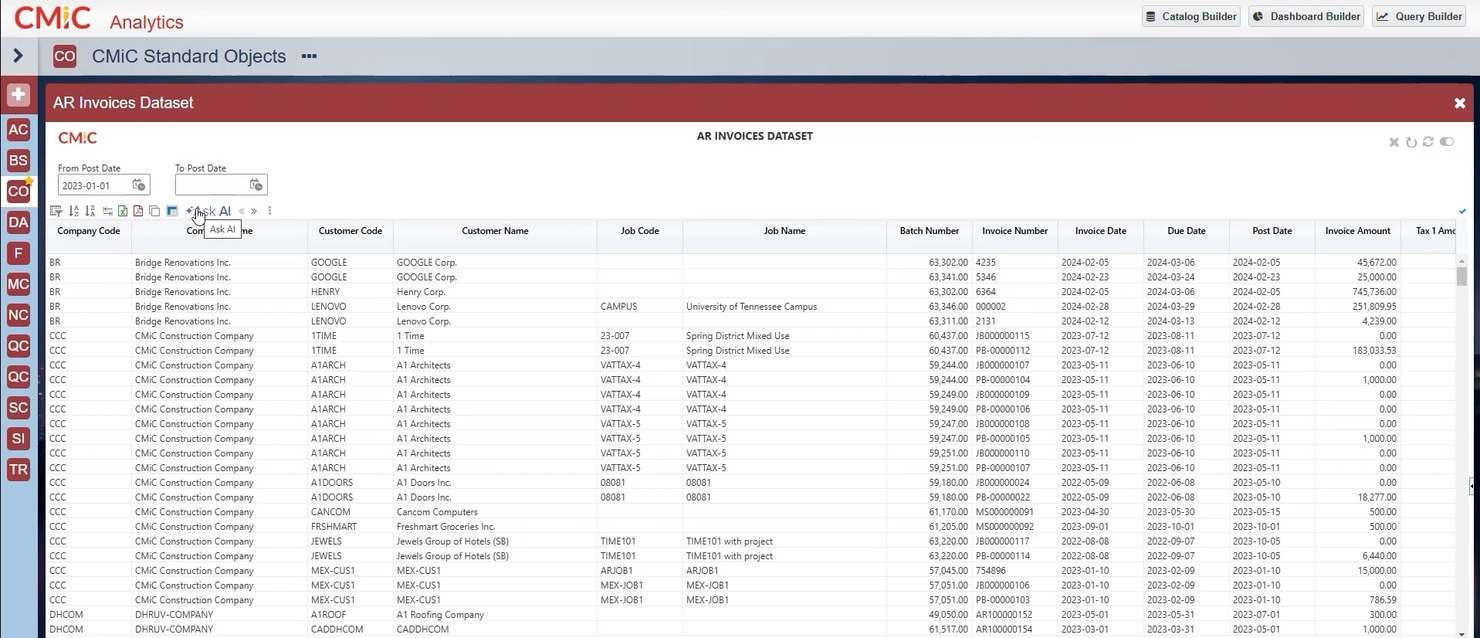
CMiC is an all-in-one construction management software designed for heavy civil projects. It offers large construction firms integrated project management, financials, and field operations functions.
Why I picked CMiC: CMiC is ideal for civil projects because it offers a unified platform that integrates project management with financials. Its ability to handle large volumes of data makes it well-suited for extensive projects. CMiC provides the tools needed to manage complex project requirements.
Standout Features and Integrations:
Features include project management tools that keep your projects organized, financial management features that integrate with operations, and field operations capabilities that connect on-site activities with back-office processes.
Integrations include Oracle Textura, Procore, Finvari, ProEst, Prophix, GCPay, Corpay, HammerTech, Clearstory, SmartBarrel, and more.
Pros and Cons
Pros:
- Handles large data volumes
- Integrates project and financial management
- Ideal for large infrastructure projects
Cons:
- Cumbersome custom reporting process
- Limited flexibility for smaller projects
Other Construction Budgeting Software
Here are some additional construction budgeting software options that didn’t make it onto my shortlist, but are still worth checking out:
- Buildxact
For small builders
- Projectmates
For project collaboration
- LiveCosts
For real-time cost tracking


Construction Budgeting Software Selection Criteria
When selecting the best construction budgeting software to include in this list, I considered common buyer needs and pain points, such as managing cost overruns and ensuring accurate budget forecasting. I also used the following framework to keep my evaluation structured and fair:
Core Functionality (25% of total score)
To be considered for inclusion in this list, each solution had to fulfill these common use cases:
- Manage project budgets
- Track expenses and costs
- Generate financial reports
- Monitor project progress
- Forecast future costs
Additional Standout Features (25% of total score)
To help further narrow down the competition, I also looked for unique features, such as:
- Customizable dashboards
- Integration with BIM tools
- Real-time collaboration features
- Automated alerts for budget overruns
- Advanced analytics and reporting
Usability (10% of total score)
To get a sense of the usability of each system, I considered the following:
- Intuitive user interface
- Easy navigation
- Minimal learning curve
- Responsive design
- Accessibility on mobile devices
Onboarding (10% of total score)
To evaluate the onboarding experience for each platform, I considered the following:
- Availability of training videos
- Interactive product tours
- Access to support chatbots
- Extensive user manuals
- Scheduled webinars for training
Customer Support (10% of total score)
To assess each software provider's customer support services, I considered the following:
- 24/7 support availability
- Response time to inquiries
- Availability of live chat
- Quality of help documentation
- Access to a dedicated account manager
Value for Money (10% of total score)
To evaluate the value for money of each platform, I considered the following:
- Competitive pricing
- Feature set relative to cost
- Availability of flexible pricing plans
- Cost of additional features
- Satisfaction with investment
Customer Reviews (10% of total score)
To get a sense of overall customer satisfaction, I considered the following when reading customer reviews:
- Overall satisfaction ratings
- Feedback on ease of use
- Comments on customer support experience
- Reports on software reliability
- Testimonials on value for money
How To Choose Construction Budgeting Software
It's easy to get bogged down in long feature lists and complex pricing structures. To help you stay focused as you work through your unique software selection process, here's a checklist of factors to keep in mind:
| Factor | What To Consider |
|---|---|
| Scalability | Can the software grow with your business? Consider whether it can handle more users, projects, or data as your company expands. Avoid tools that may limit your growth. |
| Integrations | Check if the software integrates with your existing systems, such as accounting or project management tools. Continuous data flow can save time and reduce errors. |
| Customizability | Determine if the software can adapt to your workflows. Look for tools that allow you to modify templates and reports to fit your business needs. |
| Ease of use | Evaluate the learning curve for your team. Choose software with a user-friendly interface that requires minimal training to get started. |
| Implementation and onboarding | Assess the time and resources needed to set up the software. Look for solutions that offer quick onboarding and support during the transition. |
| Cost | Consider the total cost, including setup fees, monthly subscriptions, and additional charges. Ensure it fits within your budget without hidden costs. |
| Security safeguards | Verify the software's data protection measures. Ensure it complies with industry standards and offers features such as data encryption and regular backups. |
| Support availability | Ensure the vendor provides reliable customer support. Check for 24/7 availability, multiple support channels, and prompt response times to keep your team supported. |
What Is Construction Budgeting Software?
Construction budgeting software is a tool that helps manage and track the financial aspects of construction projects. Project managers, contractors, and financial teams typically use these tools to ensure projects stay within budget and on schedule.
Cost estimation, budget tracking, and financial reporting features help with accurate planning, monitoring expenses, and decision-making. Overall, these tools improve efficiency and financial control in construction projects.
Features
When selecting construction budgeting software, look for the following key features:
- Cost estimation: Provides tools to accurately predict project costs, helping you plan budgets effectively.
- Budget tracking: Monitors spending throughout the project to ensure it stays within the allocated budget.
- Financial reporting: Generates reports that offer insights into financial performance and help decision-making.
- Project management: Integrates budgeting with project timelines and tasks for all-inclusive oversight.
- Real-time collaboration: Allows team members to work together and share updates, improving communication and efficiency.
- Customizable dashboards: Offer personalized views of key metrics and data, tailored to your specific needs.
- Integration capabilities: Connect with other systems, including accounting and project management tools, for continuous data flow.
- Risk management: Identifies potential financial risks and provides tools to mitigate them.
- Client communication: Facilitates clear and consistent communication with clients about financial progress and changes.
Benefits
Implementing construction budgeting software provides several benefits for your team and your business. Here are a few you can look forward to:
- Improved cost control: You can track expenses in real time to prevent budget overruns and maintain financial discipline.
- Simplified decision-making: Financial reporting features provide insights that help you make informed decisions about project adjustments.
- Increased efficiency: Features such as project management and real-time collaboration help your team work more effectively, reduce delays, and complete projects in less time.
- Accurate forecasting: Cost estimation tools allow you to predict future expenses accurately, aiding in better financial planning.
- Better client satisfaction: Clear communication tools ensure clients are informed about financial progress, building trust and transparency.
- Risk reduction: Risk management features help identify and mitigate potential financial risks, safeguarding your projects.
- Customizable solutions: Customizable dashboards and reports allow you to tailor the software to fit your specific business needs.
Costs and Pricing
Selecting construction budgeting software requires an understanding of the various pricing models and plans available. Costs vary based on features, team size, add-ons, and more. The table below summarizes common plans, their average prices, and typical features included in construction budgeting software solutions:
Plan Comparison Table for Construction Budgeting Software
| Plan Type | Average Price | Common Features |
|---|---|---|
| Free Plan | $0 | Basic budgeting tools, limited project management, and basic reporting. |
| Personal Plan | $10-$30/user/month | Budget tracking, project management, cost estimation, and basic collaboration features. |
| Business Plan | $30-$60/user/month | Advanced budgeting features, improved collaboration tools, integration capabilities, and customizable dashboards. |
| Enterprise Plan | $99-$509/user/month | Extensive reporting, real-time collaboration, advanced security measures, and full integration with other business systems. |
Construction Budgeting Software FAQs
Here are some answers to common questions about construction budgeting software:
How can I ensure the accuracy and reliability of data in construction budgeting software?
To increase accuracy, you can set up standardized data entry protocols and regularly audit entries for errors. Make sure your team is trained to input project data consistently and verify numbers against original contracts or invoices. Use permission settings to control who can make changes, and schedule regular reconciliations to catch discrepancies quickly.
How does construction budgeting software handle complex multiphase projects?
Most construction budgeting software lets you create separate budgets and schedules for each project phase. You can track actual versus projected costs at every stage, adjust allocations based on progress, and combine data for a total project overview. This helps you manage cash flow and anticipate overruns early, even on long-term or staggered jobs.
Can I generate custom reports for board or regulatory review using construction budgeting software?
Yes. Most solutions let you build custom financial reports tailored to board, audit, or regulatory requirements. You can pull in specific data sets, filter by project, phase, or cost code, and export reports in multiple formats. This makes it easier to provide clear updates or meet compliance obligations without manual data consolidation.
What kinds of real-time alerts or notifications can I set up in construction budgeting tools?
You can usually set up alerts for budget thresholds, unapproved expenses, or major variances from estimated costs. Some software also lets you trigger notifications when invoices are pending or payments are overdue. These real-time alerts help you act fast, manage risks, and keep your project on budget.
Is training necessary for using construction budgeting software?
Yes. Training is often necessary, especially for complex software. Look for vendors that offer training resources, such as tutorials, webinars, and user manuals. Investing time in training can help your team use the software effectively, reducing errors and improving productivity. Some vendors also provide onboarding support to help you get started quickly.
What's Next:
If you're in the process of researching construction budgeting software, connect with a SoftwareSelect advisor for free recommendations.
You fill out a form and have a quick chat where they get into the specifics of your needs. Then you'll get a shortlist of software to review. They'll even support you through the entire buying process, including price negotiations.