
13 Construction Expense Trackers for 2026

Construction Expense Tracker Shortlist
Here’s my shortlist of construction expense tracker tools:


A construction expense tracker is a software tool that helps your team record, categorize, and monitor project costs in real time. If you’re searching for the best construction expense tracker, you’re likely aiming to improve cost visibility, reduce manual errors, and keep projects on budget—especially when juggling multiple jobs, vendors, and compliance requirements. This list will help you compare leading options for 2026, so you can find a solution that fits your workflows, supports accurate reporting, and keeps your financial operations running smoothly.
Why Trust Our Software Reviews
Best Construction Expense Tracker Summary
This comparison chart summarizes pricing details for my top construction expense tracker selections to help you find the best one for your budget and business needs.
| Tool | Best For | Trial Info | Price | ||
|---|---|---|---|---|---|
| 1 | Best for syncing expenses with service operations | Free demo available | Pricing upon request | Website | |
| 2 | Best for integrated job costing and expense control | 30-day free trial + free demo available | From $39/month (billed annually) | Website | |
| 3 | Best for customizable expense tracking databases | 14-day free trial available | From $49/month (billed annually) | Website | |
| 4 | Best for automated invoice and receipt data extraction | 14-day free trial + free demo available | From $20.80/client/month (billed annually) | Website | |
| 5 | Best for real-time collaboration on project costs | Free demo available | Pricing upon request | Website | |
| 6 | Best for automated receipt capture and logging | Free demo available | Pricing upon request | Website | |
| 7 | Best for advanced financial reporting and analytics | Free demo available | Pricing upon request | Website | |
| 8 | Best for multi-user expense approval workflows | 14-day free trial + free demo available | From $139/month | Website | |
| 9 | Best for field expense tracking via mobile devices | Free demo available | Pricing upon request | Website | |
| 10 | Best for tracking supplier and subcontractor expenses | 14-day free trial + free demo available | From $169/month (billed annually) | Website |
-

LiveFlow
Visit WebsiteThis is an aggregated rating for this tool including ratings from Crozdesk users and ratings from other sites.4.9 -
Float Financial
Visit WebsiteThis is an aggregated rating for this tool including ratings from Crozdesk users and ratings from other sites.4.1 -
Creatio CRM
Visit WebsiteThis is an aggregated rating for this tool including ratings from Crozdesk users and ratings from other sites.4.7


Construction Expense Tracker Reviews
Below are my detailed summaries of the construction expense tracker tools that made it onto my shortlist. My reviews offer a detailed look at the features, best use cases, and integrations of each software to help you find the best one for you.

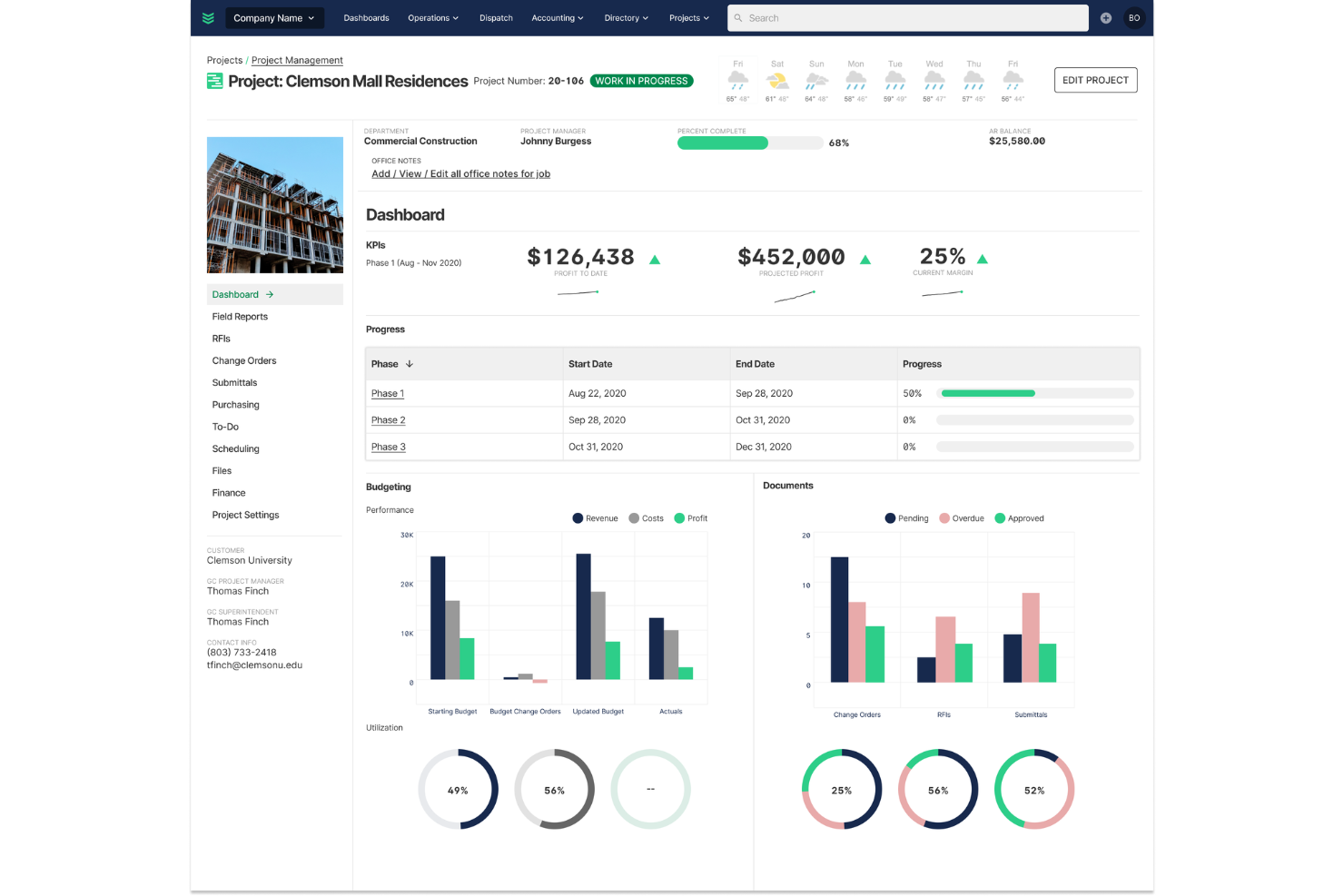
BuildOps is a construction management platform designed for commercial contractors who need to connect field service operations with expense tracking. It appeals to businesses looking to unify job costing, invoicing, and service workflows in one system. If you want to reduce manual entry and keep financial data aligned with daily operations, BuildOps offers tools built for that purpose.
Who Is BuildOps Best For?
BuildOps is a strong fit for commercial contractors and service businesses that need to connect expense tracking with field operations.
Why I Picked BuildOps
What drew me to BuildOps is how it connects expense tracking directly with service operations, which is a challenge for many commercial contractors. The platform lets you sync job costs, purchase orders, and invoices with field activities, so your financial data always reflects what’s happening on-site. I like that you can track expenses in real time as technicians complete work orders, making it easier to manage budgets and spot overruns early. This level of integration helps teams avoid manual data entry and ensures that project costs stay aligned with actual service delivery.
BuildOps Key Features
Some other features that make BuildOps useful for construction expense tracking include:
- Customizable cost codes: Assign and track expenses using cost codes tailored to your company’s accounting structure.
- Mobile expense capture: Upload receipts and enter expenses from the field using the mobile app.
- Vendor management: Store vendor details, track purchase history, and manage payments within the platform.
- Role-based permissions: Control who can view, enter, or approve expenses based on user roles.
BuildOps Integrations
Integrations include ADP, Sage Intacct, Arcoro, Avalara, Azuga, and Accordant.
Pros and Cons
Pros:
- Highly responsive customer support team
- Mobile receipt and PO capture for techs
- All-in-one field and office management
Cons:
- Some lag and bugs in the mobile app
- Higher cost than basic tracking apps

Best for integrated job costing and expense control
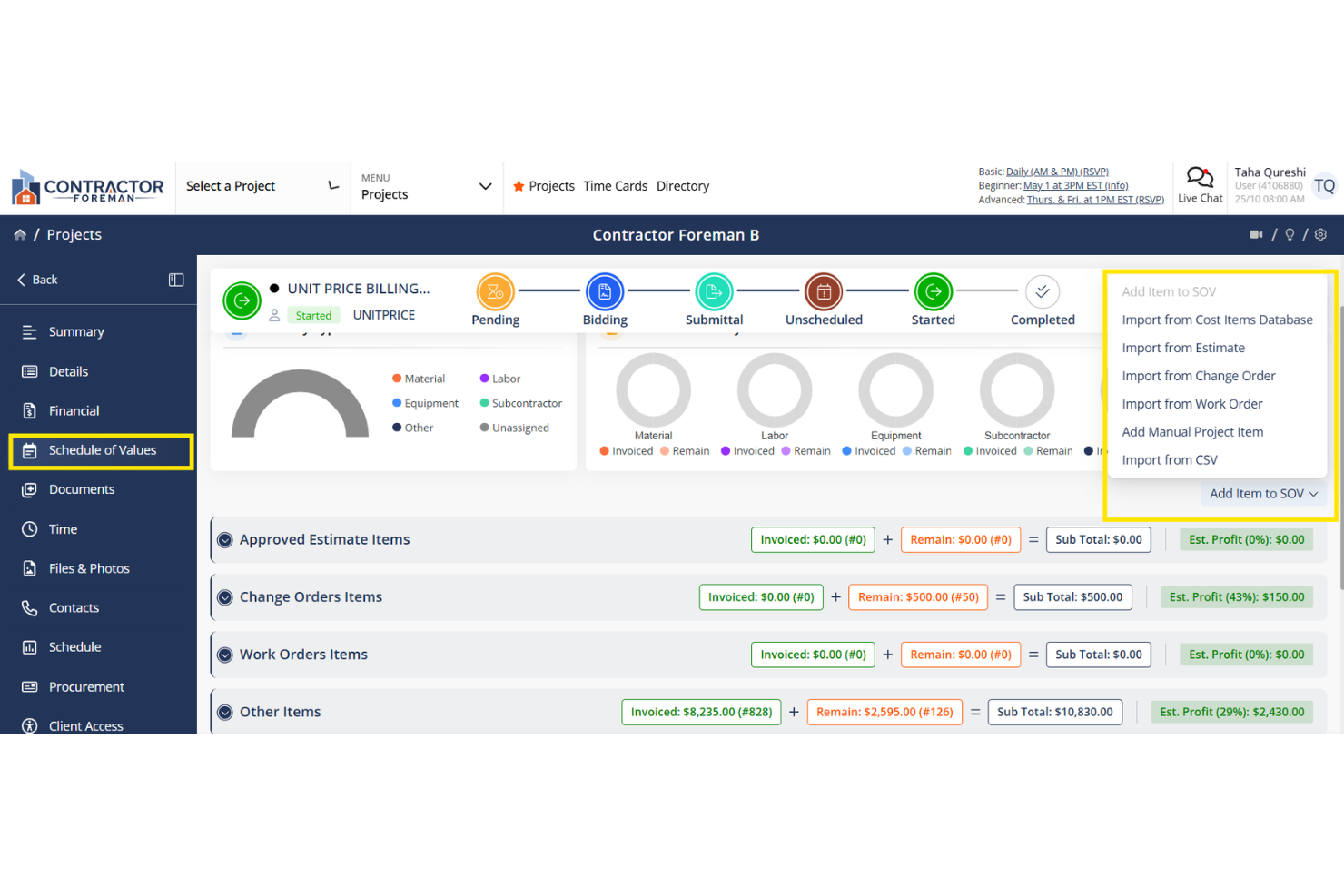
Contractor Foreman is a construction management platform designed for contractors and project managers who need to keep a close eye on project expenses. It brings together tools for tracking costs, managing documents, and organizing daily operations in one place. If you’re looking to control spending and improve visibility across multiple jobs, this platform offers features tailored to construction workflows.
Who Is Contractor Foreman Best For?
Contractor Foreman is well suited for small to mid-sized construction firms that need centralized control over job costs and project expenses.
Why I Picked Contractor Foreman
What stands out about Contractor Foreman is how it brings job costing and expense control together in one platform. I picked it because you can track actual costs against budgets in real time, which is essential for construction teams managing multiple projects. The tool also lets you assign expenses directly to jobs and cost codes, so you always know where your money is going. This level of integration helps reduce overspending and gives project managers the financial visibility they need to keep projects on track.
Contractor Foreman Key Features
Some other features that make Contractor Foreman useful for construction expense tracking include:
- Document management: Store, organize, and share project documents, receipts, and invoices in a centralized location.
- Change order tracking: Create, approve, and monitor change orders to keep project costs updated and controlled.
- Time tracking: Log worker hours and allocate labor costs directly to specific jobs or cost codes.
- Vendor management: Track vendor contacts, purchase orders, and payments to maintain clear records of all project-related spending.
Contractor Foreman Integrations
Integrations include QuickBooks Online, CompanyCam, Gusto, Google Calendar, and Square.
Pros and Cons
Pros:
- Offers built-in change order management
- Links receipts and invoices to projects
- Tracks expenses by job and cost code
Cons:
- Reporting options for expenses are basic
- No direct bank feed for expense import

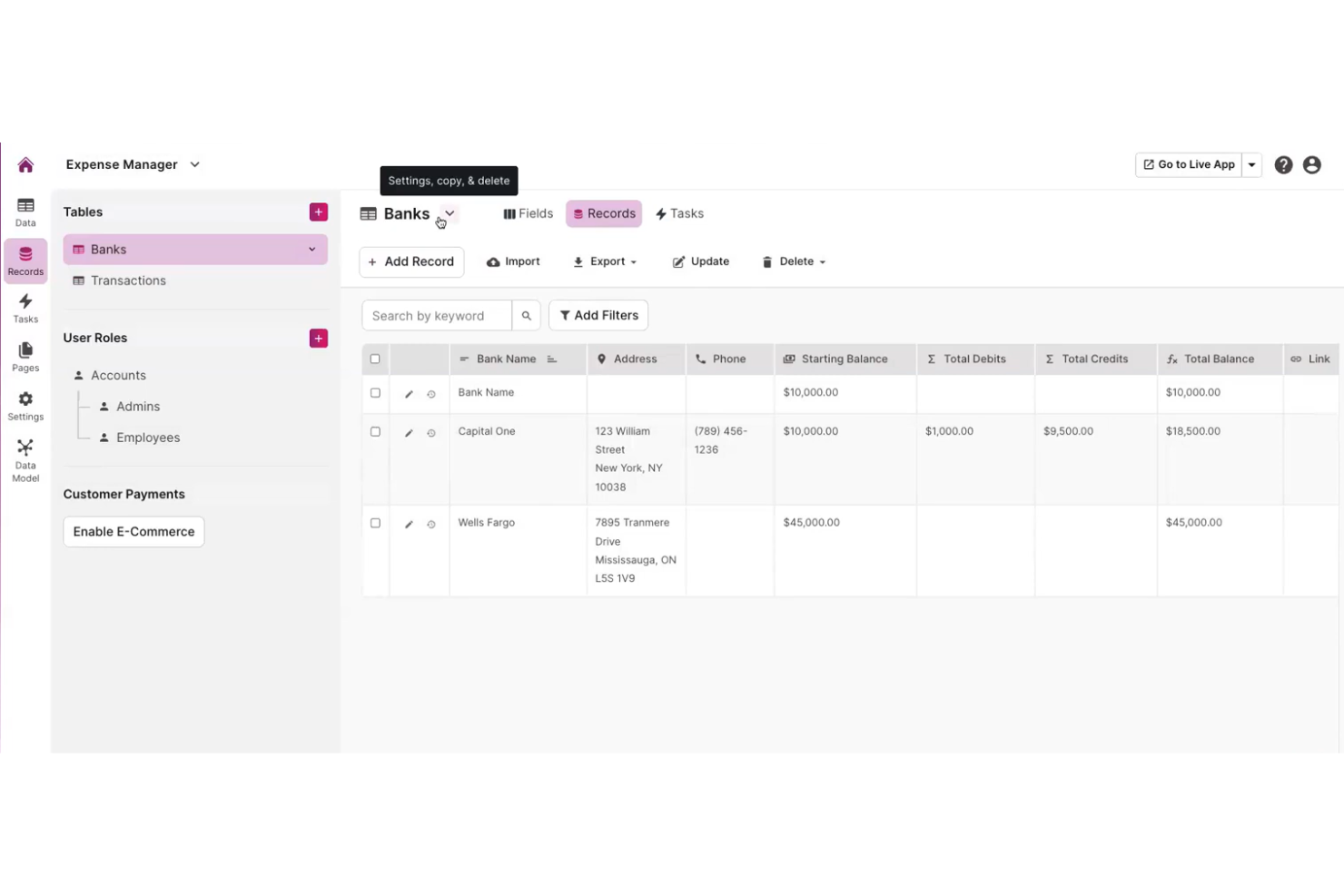
Knack gives construction teams a way to build their own expense tracking databases without coding. It’s a strong fit for firms that need expense management software for unique workflows or project requirements. If your business wants more control over how you collect, organize, and report on construction costs, Knack offers flexible tools to design the system you need.
Who Is Knack Best For?
Knack is a good fit for construction businesses that need to customize expense tracking workflows to match specific project or organizational requirements.
Why I Picked Knack
I picked Knack because it lets you design a construction expense tracker that fits your exact process, not the other way around. With Knack, you can create custom fields, forms, and approval workflows to match how your team actually manages costs. I appreciate that you can build dashboards and reports tailored to your project or client needs, so you always see the data that matters most. This level of flexibility is hard to find in off-the-shelf construction expense tracking tools.
Knack Key Features
Some other features in Knack help construction teams manage expenses and data more efficiently:
- Role-based access controls: Set permissions so only authorized users can view or edit sensitive expense data.
- Automated notifications: Trigger email or in-app alerts when expenses are submitted, approved, or require attention.
- Mobile-friendly interface: Access and update expense records from any device, including smartphones and tablets.
- File attachment support: Upload and store receipts, invoices, and supporting documents directly within each expense record.
Knack Integrations
Integrations include QuickBooks, Salesforce, HubSpot, Google Sheets, and Mailchimp.
Pros and Cons
Pros:
- Real-time dashboard updates for project costs
- File uploads for receipts and invoices
- Mobile access for field expense entry
Cons:
- No direct integration with construction ERP systems
- Reporting features may lack advanced analytics

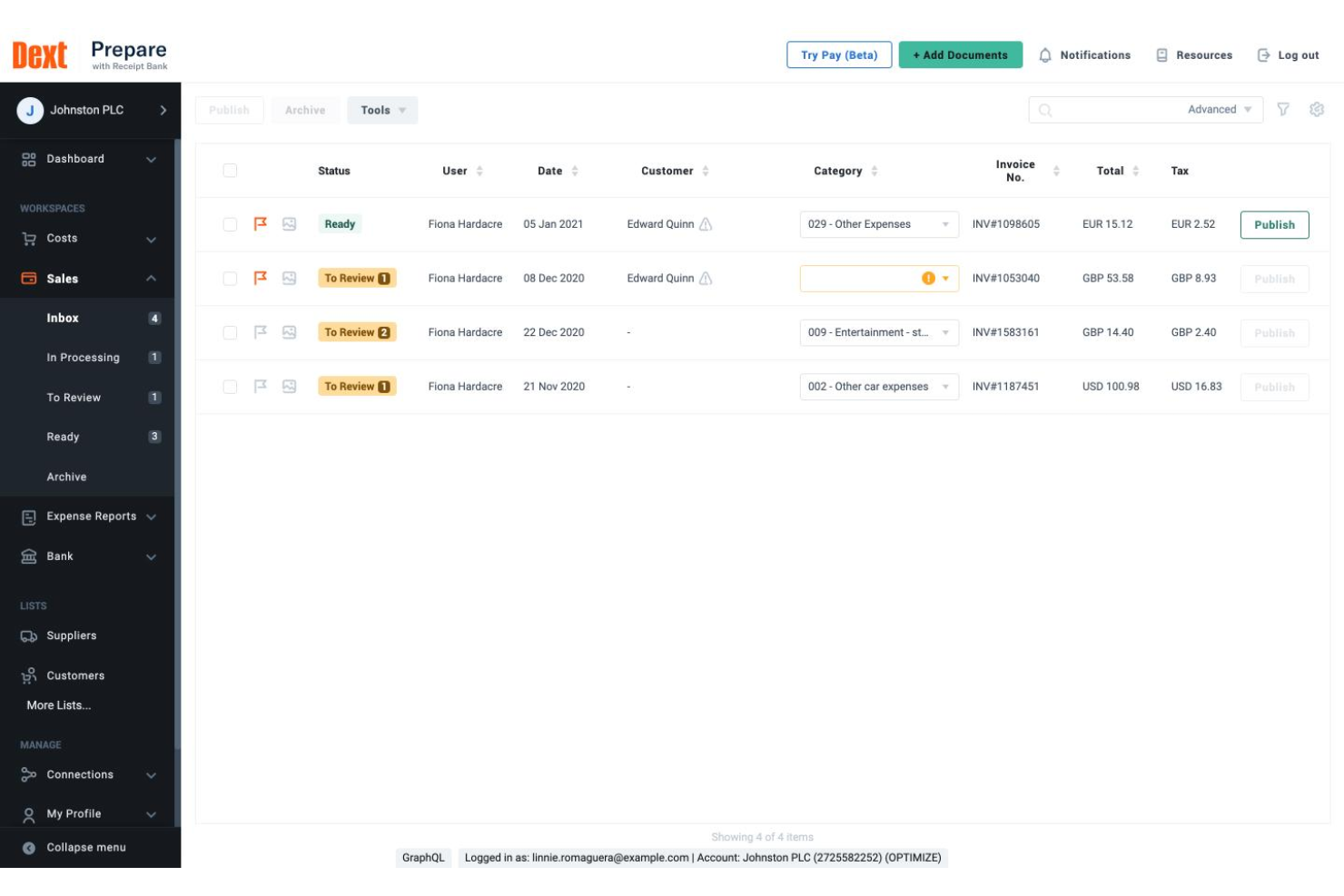
Dext offers construction businesses a way to digitize and organize financial paperwork with minimal manual effort. It’s especially useful for contractors and finance teams who handle large volumes of invoices and receipts. By automating document capture and extraction, Dext helps reduce errors and save time on expense tracking.
Who Is Dext Best For?
Dext is a good fit for construction finance teams and contractors who need to automate invoice and receipt data entry.
Why I Picked Dext
What drew me to Dext is how it automates the extraction of data from invoices and receipts, which is a major time-saver for construction teams dealing with high volumes of paperwork. The platform uses OCR technology to pull key details from documents, so you don’t have to enter amounts, dates, or vendor names by hand. I also like that Dext can process documents from multiple sources, including email and mobile uploads, making it easier to capture expenses from the field. This focus on automated data extraction helps reduce manual errors and keeps expense records accurate for construction projects.
Dext Key Features
In addition to automated data extraction, Dext offers several features that support construction expense tracking:
- Multi-currency support: Track and process expenses in different currencies for international projects or vendors.
- Line item extraction: Capture individual line items from invoices and receipts for more detailed expense records.
- Automated expense categorization: Assign expenses to the correct categories based on rules or historical data.
- Cloud document storage: Store all captured documents securely online for easy access and audit readiness.
Dext Integrations
Integrations include Xero, QuickBooks, Sage, PayPal, KashFlow, Twinfield, and MYOB.
Pros and Cons
Pros:
- Speeds up field crew data entry
- Tracks costs by project category
- Connects with accounting software
Cons:
- High subscription costs for teams
- Lacks native AIA billing features

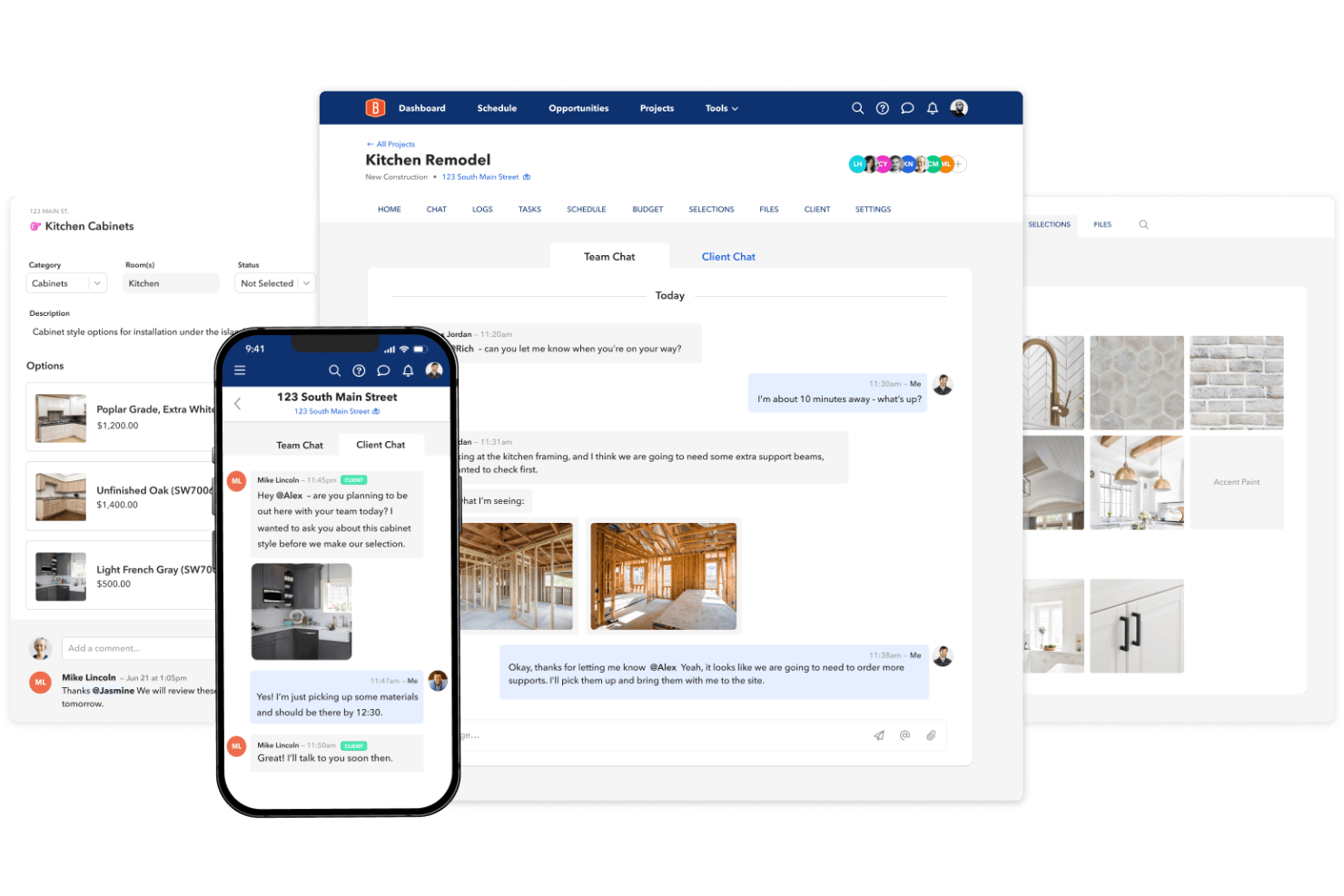
BuildBook offers construction teams a way to track expenses while keeping everyone connected throughout a project. It’s designed for residential builders, remodelers, and contractors who need to manage costs and communication in one place. If you’re looking to reduce miscommunication and keep your project’s finances organized, BuildBook brings these elements together in a single platform.
Who Is BuildBook Best For?
BuildBook is a good fit for residential construction teams and contractors who need to manage project expenses and team collaboration in one platform.
Why I Picked BuildBook
I picked BuildBook because it brings real-time collaboration directly into expense tracking for construction projects. The platform lets teams share updates, upload receipts, and comment on cost changes as they happen, so everyone stays informed. I like that you can assign expenses to specific tasks or phases, making it easier to see where money is going throughout the project. This focus on live communication and transparency helps prevent costly misunderstandings and keeps your financial records accurate.
BuildBook Key Features
Some other features in BuildBook help construction teams manage expenses and projects more efficiently:
- Budget tracking dashboard: View and update construction budgets in real time to monitor spending against estimates.
- Change order management: Create, track, and approve change orders directly within the platform to keep cost adjustments organized.
- Document storage: Store invoices, receipts, and contracts in a centralized location for easy access and audit trails.
- Client portal: Share selected financial updates and documents with clients to keep them informed without exposing internal details.
BuildBook Integrations
Integrations include QuickBooks.
Pros and Cons
Pros:
- QuickBooks integration for accounting sync
- Client portal for sharing financial progress
- Centralized document storage for receipts and invoices
Cons:
- Budgeting features may be basic for large projects
- Not designed for commercial construction workflows
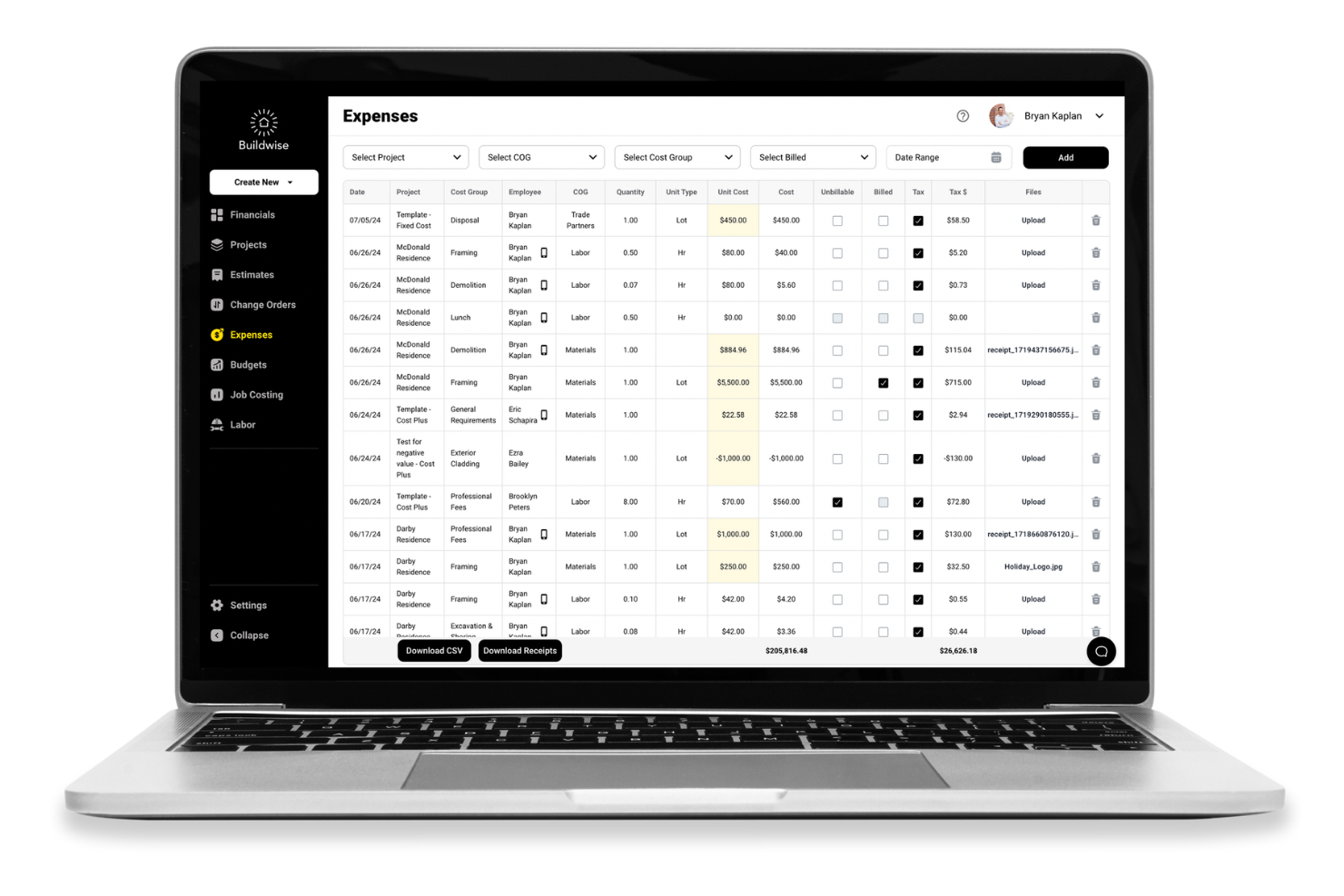
Buildwise offers construction teams a way to manage project expenses with a focus on digitizing paperwork and simplifying cost tracking. It’s designed for contractors, project managers, and finance teams who want to reduce manual entry and keep expense records organized. The platform helps address common challenges like lost receipts, inconsistent documentation, and time-consuming reconciliation.
Who Is Buildwise Best For?
Buildwise is a good fit for construction companies and contractors who need to digitize and automate expense documentation in the field.
Why I Picked Buildwise
What drew me to Buildwise is how it automates receipt capture and logging, which is a major pain point for construction teams handling expenses across multiple projects. The platform lets users snap photos of receipts from their phones, automatically extracting and logging key details into the expense system. I also like that Buildwise organizes these digital records by project, making it easier to track spending and prepare for audits. This focus on automation and documentation helps reduce lost paperwork and manual entry errors that often slow down construction expense management.
Buildwise Key Features
Some other features in Buildwise help construction teams manage expenses and documentation more efficiently:
- Multi-project expense tracking: Track and categorize expenses across multiple jobs or projects from a single dashboard.
- Role-based permissions: Control who can view, submit, or approve expenses based on user roles.
- Custom expense categories: Create and manage categories tailored to your company’s specific cost codes or accounting needs.
- Exportable reports: Generate and export detailed expense reports for accounting, audits, or project reviews.
Buildwise Integrations
Integrations include QuickBooks.
Pros and Cons
Pros:
- Clean and simple user interface
- Flat monthly fee for unlimited users
- Real-time project job cost tracking
Cons:
- Not meant for large enterprise firms
- Mobile app lacks some web features
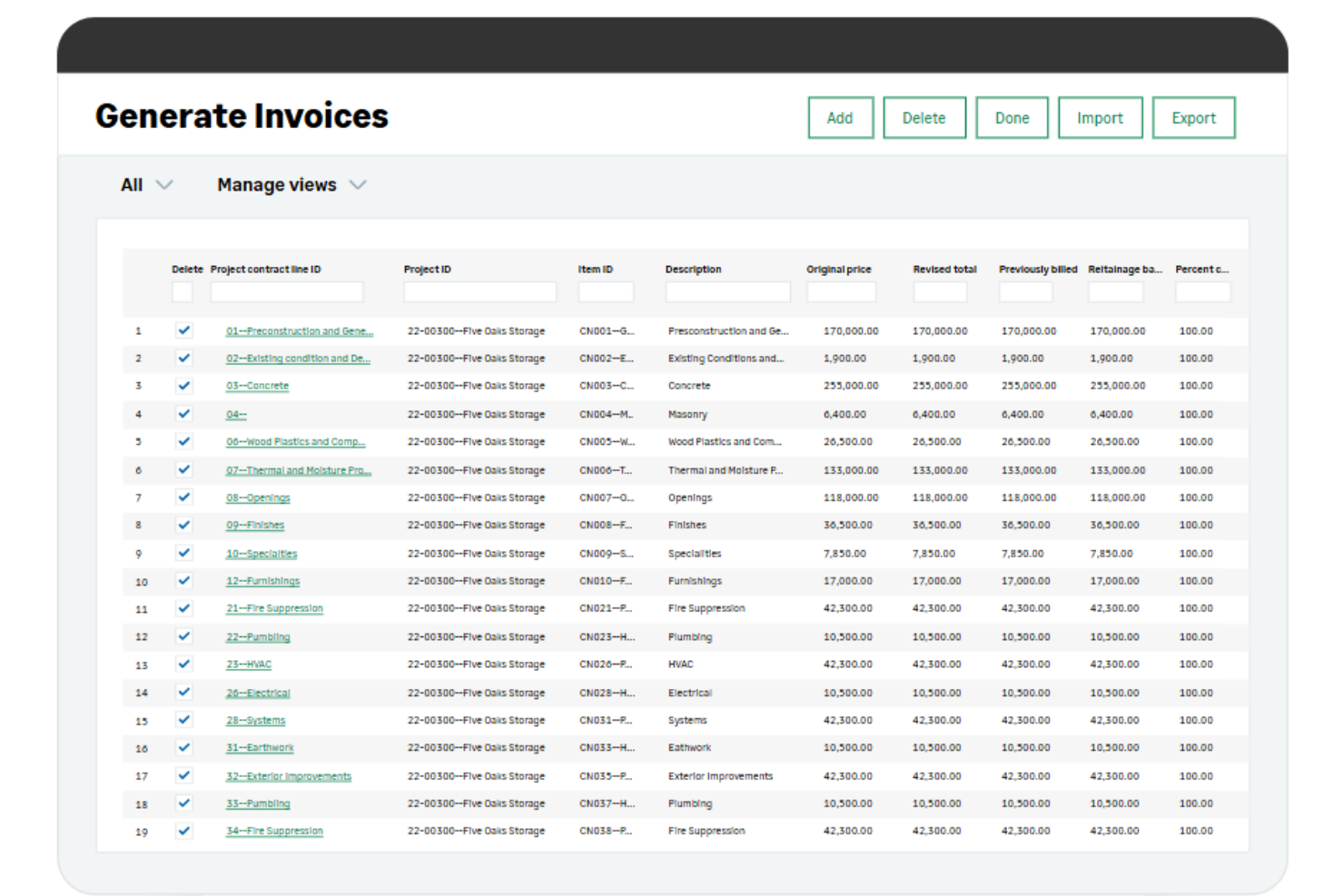
Sage Intacct Construction is a cloud-based financial management platform built for construction and real estate businesses. It appeals to finance teams and project managers who need to manage complex project accounting, compliance, and multi-entity operations. The platform helps address challenges like job cost tracking, contract billing, and consolidating financial data across multiple projects.
Who Is Sage Intacct Construction Best For?
Sage Intacct Construction is a strong fit for mid-sized to large construction and real estate companies that need advanced financial management and project accounting capabilities.
Why I Picked Sage Intacct Construction
I chose Sage Intacct Construction because it offers advanced financial reporting and analytics that are especially valuable for construction businesses managing multiple projects. The platform provides customizable dashboards and real-time reporting tools, so you can drill down into project costs, commitments, and profitability at a granular level. I also like that it supports multi-entity consolidations and intercompany transactions, which is important for firms operating across several subsidiaries or joint ventures. These capabilities help finance teams gain deeper visibility into project performance and make more informed decisions.
Sage Intacct Construction Key Features
Some other features that make Sage Intacct Construction useful for construction expense tracking include:
- Job cost tracking: Track expenses and commitments at the job, phase, or cost code level for detailed project oversight.
- Change order management: Manage and document change orders directly within the platform to keep project budgets accurate.
- Automated accounts payable workflows: Route invoices for approval and automate payment processes to reduce manual entry.
- Retainage tracking: Monitor and manage retainage amounts on contracts and subcontracts to support compliance and cash flow.
Sage Intacct Construction Integrations
Integrations include Procore, Autodesk, Timberscan, Sage Intacct Payroll, Sage Inventory Planner, and Sage AR Automation.
Pros and Cons
Pros:
- Secure cloud access from any job site
- Automates complex construction billing
- Deeply customizable dimensional reports
Cons:
- Core app needs add-ons for full mobile
- Time-consuming and rigid initial setup

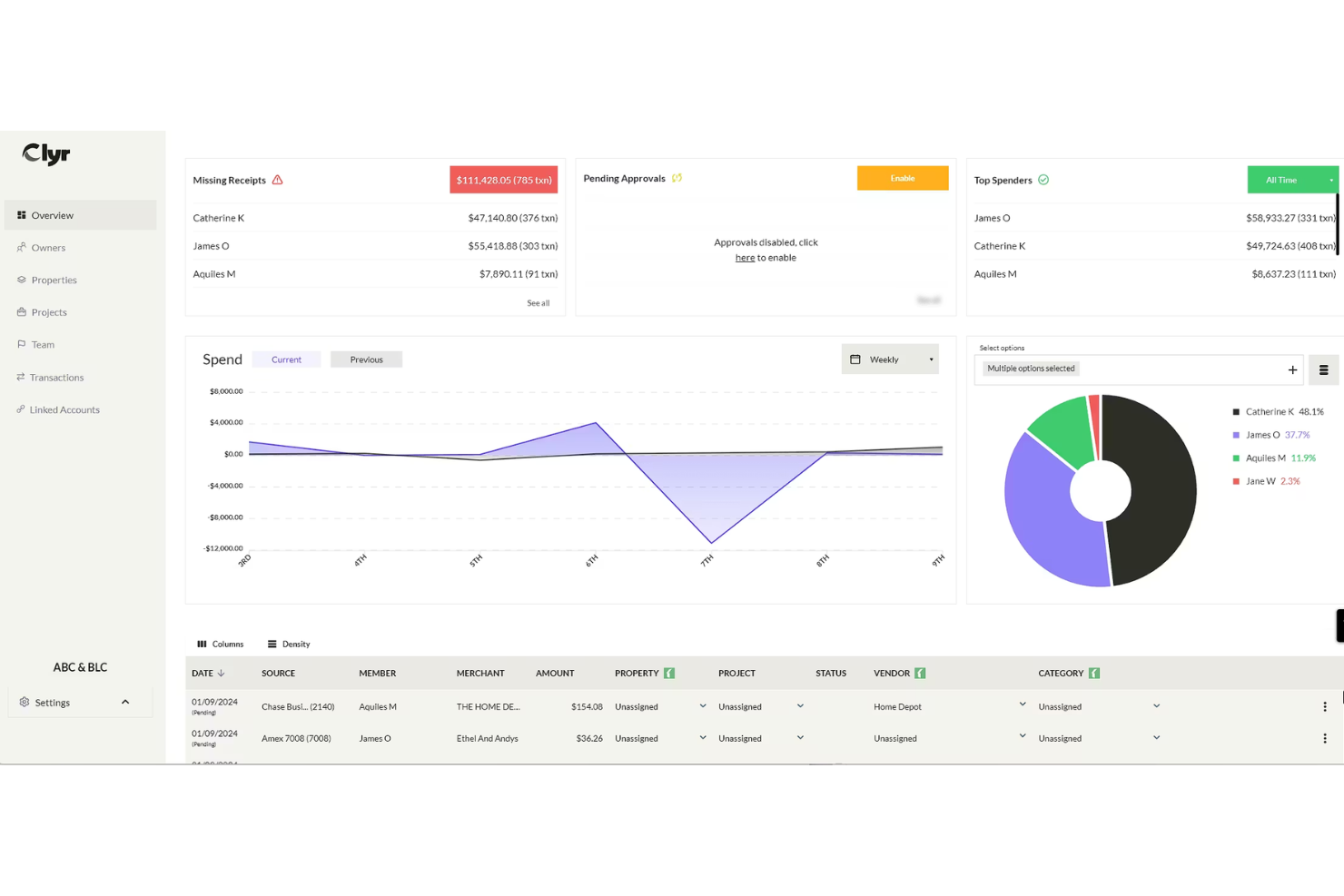
Clyr is a construction-focused expense management platform designed for teams that need to track and control spending across multiple users and projects. It’s a good fit for contractors, project managers, and finance teams who want to centralize expense capture and approval. The platform helps reduce paperwork and manual errors by digitizing receipts and automating expense categorization.
Who Is Clyr Best For?
Clyr suits construction companies and contractors that need multi-user expense tracking and approval across multiple projects.
Why I Picked Clyr
What stands out about Clyr is how it handles multi-user expense approval workflows, which is a common challenge for construction teams managing multiple projects and field staff. The platform lets you set up custom approval chains, so expenses can be routed to the right managers or project leads before being finalized. I appreciate that you can assign permissions by user or role, making it easier to control who can submit, review, or approve expenses. This structure helps construction businesses maintain tighter oversight and accountability for project spending.
Clyr Key Features
Some other features that make Clyr useful for construction expense tracking include:
- Receipt capture via mobile app: Team members can snap photos of receipts from the field and upload them directly to the platform.
- Automated expense categorization: The system uses rules and AI to assign expenses to the correct categories and projects.
- Real-time expense dashboard: View up-to-date spending across projects, users, and categories in a single dashboard.
- Integration with accounting software: Sync expense data with QuickBooks, Sage, and other accounting platforms for streamlined reconciliation.
Clyr Integrations
Integrations include QuickBooks, Sage Intacct, Xero, Foundation, Viewpoint Vista, and Gusto.
Pros and Cons
Pros:
- Works with any existing credit card
- AI automatically codes to job and phase
- SMS chatbot for instant receipt capture
Cons:
- Support can be slow to respond at times
- Not ideal for very small solo outfits

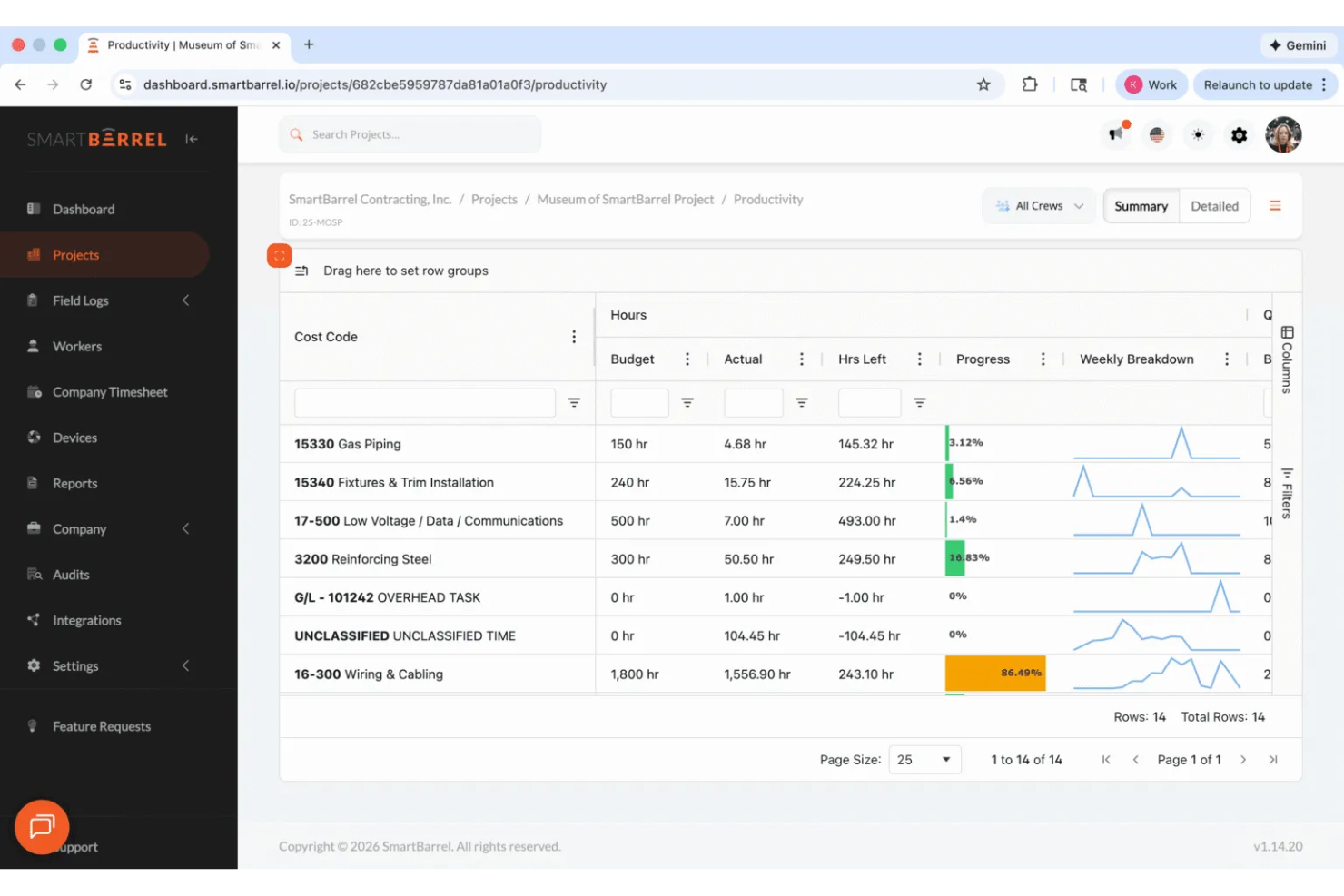
SmartBarrel gives construction teams a way to track expenses directly from the field using mobile devices. It’s designed for contractors and project managers who need real-time visibility into job site spending. The platform helps address challenges like delayed expense reporting, lost receipts, and manual data entry.
Who Is SmartBarrel Best For?
SmartBarrel is a good fit for construction companies and field crews that need to track and manage expenses directly from job sites using mobile devices.
Why I Picked SmartBarrel
What stands out to me about SmartBarrel is how it’s built for field teams who need to capture expenses on the go. The mobile-first design lets workers snap photos of receipts and log expenses directly from job sites, which helps reduce delays and lost paperwork. I also appreciate that SmartBarrel allows supervisors to review and approve expenses in real time, so project costs stay visible and up to date. This focus on field expense tracking makes it a strong fit for construction businesses that want to keep job site spending under control.
SmartBarrel Key Features
Some other features in SmartBarrel help construction teams manage expenses and documentation more efficiently:
- Automated expense categorization: Expenses are automatically sorted into predefined categories for easier tracking and reporting.
- Digital document storage: Store receipts and expense documents securely in the cloud for easy access and audit trails.
- Role-based access controls: Set permissions for who can view, submit, or approve expenses based on user roles.
- Exportable expense reports: Generate and export detailed reports for accounting, project management, or compliance needs.
SmartBarrel Integrations
Integrations include Procore, CMiC, Viewpoint, Plexxis, Foundation, and Power BI.
Pros and Cons
Pros:
- Rugged offline time clock hardware
- Tracks labor costs and job codes
- AI biometric facial verification
Cons:
- Initial dashboard can feel cluttered
- Geared more toward larger work crews
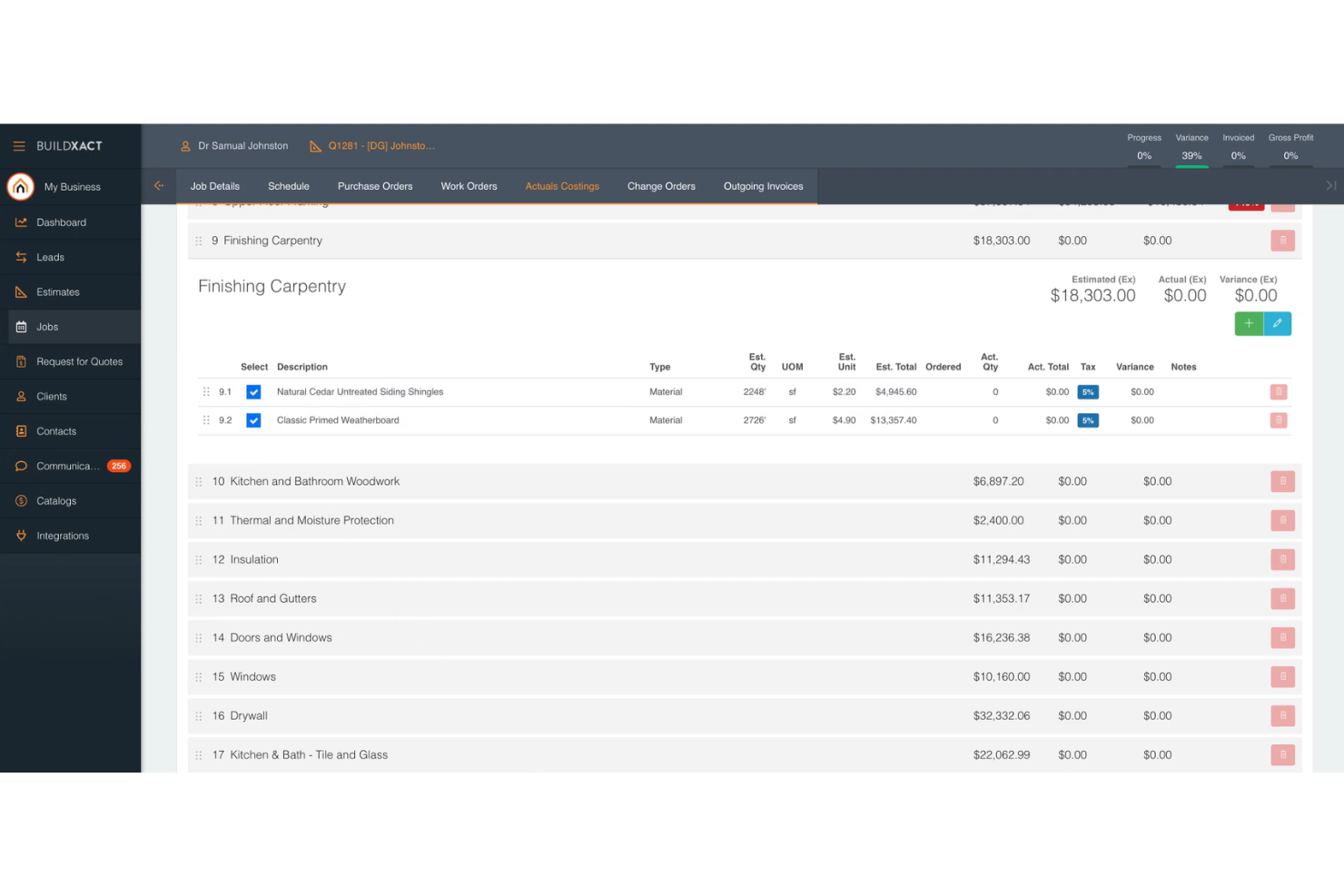
Buildxact is a cloud-based construction management platform designed for small builders and remodelers. It helps contractors gain control over project costs by centralizing expense tracking, quoting, and purchase orders. The platform is especially useful for businesses looking to simplify how they manage supplier and subcontractor spending.
Who Is Buildxact Best For?
Buildxact is a strong fit for small to mid-sized construction businesses and remodelers that need to manage supplier and subcontractor expenses in one place.
Why I Picked Buildxact
What stands out about Buildxact is how it streamlines tracking of supplier and subcontractor expenses throughout the construction process. The platform lets you create and manage purchase orders, track committed costs, and match invoices directly to specific jobs or cost codes. I appreciate that you can compare supplier quotes side by side and automatically update budgets as expenses are approved. This level of control helps ensure that every dollar spent with suppliers and subcontractors is accounted for in real time.
Buildxact Key Features
Some other features that make Buildxact useful for construction expense tracking include:
- Budget tracking dashboard: Monitor project budgets and actuals in real time with a visual dashboard.
- Document management: Store and organize invoices, receipts, and contracts within each project.
- Change order tracking: Log and manage change orders to keep expenses aligned with project scope.
- Xero and QuickBooks Online integration: Sync expense data directly with popular accounting platforms for streamlined reconciliation.
Buildxact Integrations
Integrations include Xero, QuickBooks Online, and Deputy.
Pros and Cons
Pros:
- Provides real-time budget vs. actual dashboards
- Links purchase orders directly to job budgets
- Offers side-by-side supplier quote comparisons
Cons:
- Document management lacks advanced search filters
- Change order tracking can be manual


Construction Expense Tracker Selection Criteria
When selecting the best construction expense tracker to include in this list, I considered common buyer needs and pain points like tracking project-specific costs and managing supplier and subcontractor expenses. I also used the following framework to keep my evaluation structured and fair:
Core Functionality (25% of total score)
To be considered for inclusion in this list, each solution had to fulfill these common use cases:
- Track expenses by project or job
- Manage purchase orders and invoices
- Allocate costs to suppliers and subcontractors
- Monitor budget vs. actual spending
- Generate basic expense and cost reports
Additional Standout Features (25% of total score)
To help further narrow down the competition, I also looked for unique features, such as:
- Real-time dashboard visualizations
- Automated change order tracking
- Direct integration with accounting software
- Mobile expense capture or entry
- Side-by-side supplier quote comparison
Usability (10% of total score)
To get a sense of the usability of each system, I considered the following:
- Simple and intuitive navigation
- Clear labeling of expense categories
- Minimal clicks to enter or approve expenses
- Customizable dashboards or views
- Responsive design for different devices
Onboarding (10% of total score)
To evaluate the onboarding experience for each platform, I considered the following:
- Availability of training videos and tutorials
- Access to pre-built templates for setup
- Interactive product tours or walkthroughs
- In-app chatbots for onboarding support
- Live or recorded webinars for new users
Customer Support (10% of total score)
To assess each software provider’s customer support services, I considered the following:
- Multiple support channels like chat, email, and phone
- Fast response times to inquiries
- Access to a searchable help center or knowledge base
- Availability of dedicated account managers
- Community forums for peer support
Value For Money (10% of total score)
To evaluate the value for money of each platform, I considered the following:
- Transparent and predictable pricing structure
- Flexible plans for different business sizes
- No hidden fees or surprise charges
- Free trial or demo availability
- Features included at each pricing tier
Customer Reviews (10% of total score)
To get a sense of overall customer satisfaction, I considered the following when reading customer reviews:
- Positive feedback on expense tracking accuracy
- Reports of reliable customer support
- Comments on ease of implementation
- User satisfaction with integrations
- Feedback on ongoing product updates and improvements
How to Choose Construction Expense Tracker
It’s easy to get bogged down in long feature lists and complex pricing structures. To help you stay focused as you work through your unique software selection process, here’s a checklist of factors to keep in mind:
| Factor | What to Consider |
|---|---|
| Scalability | Will the tool handle more projects, users, or expense volume as your business grows? Check for user limits, project caps, or extra fees. |
| Integrations | Does it connect natively to your accounting, payroll, or project management systems? Confirm compatibility with tools like QuickBooks, Xero, or Procore. |
| Customizability | Can you tailor cost codes, approval workflows, or reporting formats to match your company’s processes? Avoid rigid systems that force you to adapt. |
| Ease of use | Will your team adopt it quickly? Look for clear navigation, minimal training requirements, and logical workflows that match your current practices. |
| Implementation and onboarding | How long will the setup take, and what resources are required? Ask about data migration, training support, and whether you’ll need IT involvement. |
| Cost | Are pricing tiers transparent and predictable? Watch for hidden fees, per-user charges, or extra costs for integrations and support. |
| Security safeguards | Does the platform offer role-based access, audit trails, and data encryption? Ensure it meets your company’s security and compliance standards. |
| Support availability | What support channels are offered, and during what hours? Consider if you need 24/7 help, dedicated account reps, or self-service resources. |
What Are Construction Expense Trackers?
A construction expense tracker is a software tool that helps construction businesses record, categorize, and monitor project-related costs in real time. These systems centralize expense data from suppliers, subcontractors, and internal teams, making it easier to manage budgets and control spending. By tracking expenses at the project or job level, construction expense trackers support accurate reporting, cost forecasting, and financial decision-making throughout the project lifecycle.
Features of Construction Expense Tracker
When selecting construction expense tracker, keep an eye out for the following key features:
- Project-based expense tracking: Assign and monitor costs for each project or job, ensuring all expenses are accurately attributed and easy to review.
- Purchase order management: Create, issue, and track purchase orders to suppliers and subcontractors, helping control commitments and prevent unauthorized spending.
- Invoice matching: Link invoices to specific purchase orders or cost codes, making it easier to verify charges and reduce errors or duplicate payments.
- Budget vs. actual reporting: Compare planned budgets to real-time spending, allowing for early detection of overruns and better financial control.
- Change order tracking: Record and manage changes to project scope or costs, ensuring all adjustments are documented and reflected in budgets.
- Document management: Store and organize receipts, contracts, and supporting documents within the system for easy retrieval and audit readiness.
- Supplier and subcontractor management: Maintain detailed records of vendors, track their expenses, and monitor payment status for better relationship management.
- Integration with accounting software: Sync expense data with your accounting platform to streamline reconciliation and reduce manual data entry.
- User permissions and approvals: Set role-based access and approval workflows to ensure only authorized users can enter, approve, or modify expenses.
- Customizable reporting: Generate tailored reports on expenses, commitments, and budget status to meet the needs of different stakeholders.
Benefits of Construction Expense Tracker
Implementing a construction expense tracker provides several benefits for your team and your business. Here are a few you can look forward to:
- Improved cost visibility: Centralized expense tracking by project or job gives you a clear, real-time view of where money is being spent.
- Better budget control: Budget vs. actual reporting and change order tracking help you spot overruns early and keep projects financially on track.
- Streamlined approvals and compliance: Role-based permissions and approval workflows ensure only authorized expenses are processed, supporting internal controls and audit readiness.
- Faster, more accurate reporting: Automated data capture and customizable reports reduce manual work and provide timely insights for decision-making.
- Simplified supplier and subcontractor management: Integrated records and payment tracking make it easier to manage vendor relationships and avoid missed or duplicate payments.
- Reduced manual errors: Linking invoices, purchase orders, and supporting documents in one system minimizes data entry mistakes and lost paperwork.
- Easier integration with accounting: Direct syncing with accounting software eliminates double entry and speeds up reconciliation.
Costs and Pricing of Construction Expense Tracker
Selecting a construction expense tracker requires an understanding of the various pricing models and plans available. Costs vary based on features, team size, add-ons, and more. The table below summarizes common plans, their average prices, and typical features included in construction expense tracker solutions:
Plan Comparison Table for Construction Expense Tracker
| Plan Type | Average Price | Common Features |
|---|---|---|
| Free Plan | $0 | Basic project expense tracking, limited users, simple reporting, and email support. |
| Personal Plan | $22–$169/month | Single-user access, project-based expense tracking, basic purchase order management, and standard reports. |
| Business Plan | $22.30–$399/month | Multi-user access, advanced reporting, supplier and subcontractor management, integrations, and approval workflows. |
| Enterprise Plan | $599+/user/month | Unlimited projects, custom workflows, advanced security, dedicated support, and custom integrations. |
Construction Expense Tracker FAQs
Here are some answers to common questions about construction expense trackers:
How does a construction expense tracker help manage project budgets?
A construction expense tracker helps manage project budgets by recording and categorizing every cost in real time. This allows you to compare actual spending against planned budgets, spot overruns early, and make informed adjustments before issues escalate.
Can construction expense trackers integrate with accounting software?
Yes, most construction expense trackers offer integrations with popular accounting software. This reduces manual data entry, speeds up reconciliation, and ensures your financial records stay accurate and up to date.
What types of expenses can be tracked with these tools?
You can track direct costs like materials, labor, and equipment, as well as indirect costs such as permits, insurance, and overhead. Many systems also let you allocate expenses to specific projects, phases, or cost codes.
Are construction expense trackers suitable for small contractors?
Yes, many construction expense trackers offer plans and features designed for small contractors. Look for solutions with simple setup, affordable pricing, and the ability to scale as your business grows.
How secure is the data stored in a construction expense tracker?
Most reputable construction expense trackers use encryption, role-based access controls, and audit trails to protect your data. Always review a vendor’s security policies to ensure they meet your company’s standards and compliance needs.