
21 Best Financial Analysis Software for Accountants Reviewed in 2026

Best Financial Analysis Software for Accountants Shortlist
Here's my pick of the 10 best software from the 22 tools reviewed.


As an accountant, you're juggling complex financial data, tight deadlines, and the pressure to make informed decisions. It's no easy feat. That's where financial analysis software comes in. It can help you and your team manage and interpret data more effectively, saving time and reducing errors.
In my experience, choosing the right software can transform how you handle financial tasks. I've independently tested and reviewed various options, focusing on what truly works for accountants.
In this article, you'll find my top picks for financial analysis software for accountants. I'll share unbiased insights, highlighting advanced features that can address your specific challenges. Let's find the right tool to elevate your business decisions.
Table of Contents
Why Trust Our Software Reviews
Best Financial Analysis Software for Accountants Summary
This comparison chart summarizes pricing details for my top selections of financial analysis software for accountants, to help you find the best one for your budget and business needs.
| Tool | Best For | Trial Info | Price | ||
|---|---|---|---|---|---|
| 1 | Best for AI-ready data analytics | Free trial + free demo available | From $250/user/month (billed annually) | Website | |
| 2 | Best for dynamic forecasting | Free demo available | From $50/month | Website | |
| 3 | Best for visual financial reporting | 14-day free trial | From $53/company/month | Website | |
| 4 | Best for AI-powered insights | 14-day free trial available | From $24/month (billed annually) | Website | |
| 5 | Best for project-based firms | Free demo available | Pricing upon request | Website | |
| 6 | Best for AI-powered spreadsheet flexibility | 1-month free trial + free plan available | From $4.4/user/month (billed annually) | Website | |
| 7 | Best for small businesses | 14-day free trial + free demo available | From $40/month | Website | |
| 8 | Best for AI-powered planning and analysis | Free demo available | Pricing upon request | Website | |
| 9 | Best for AI-driven financial automation | Free demo available | Pricing upon request | Website | |
| 10 | Best for tax compliance | Free demo available | Pricing upon request | Website |
-

LiveFlow
Visit WebsiteThis is an aggregated rating for this tool including ratings from Crozdesk users and ratings from other sites.4.9 -
Float Financial
Visit WebsiteThis is an aggregated rating for this tool including ratings from Crozdesk users and ratings from other sites.4.1 -
Rippling Spend
Visit WebsiteThis is an aggregated rating for this tool including ratings from Crozdesk users and ratings from other sites.4.8


Best Financial Analysis Software for Accountants Reviews
Below are my detailed summaries of the best financial analysis software for accountants that made it onto my shortlist. My reviews offer a detailed look at the key features, pros and cons, integrations, and ideal use cases of each tool to help you find the best one for you.

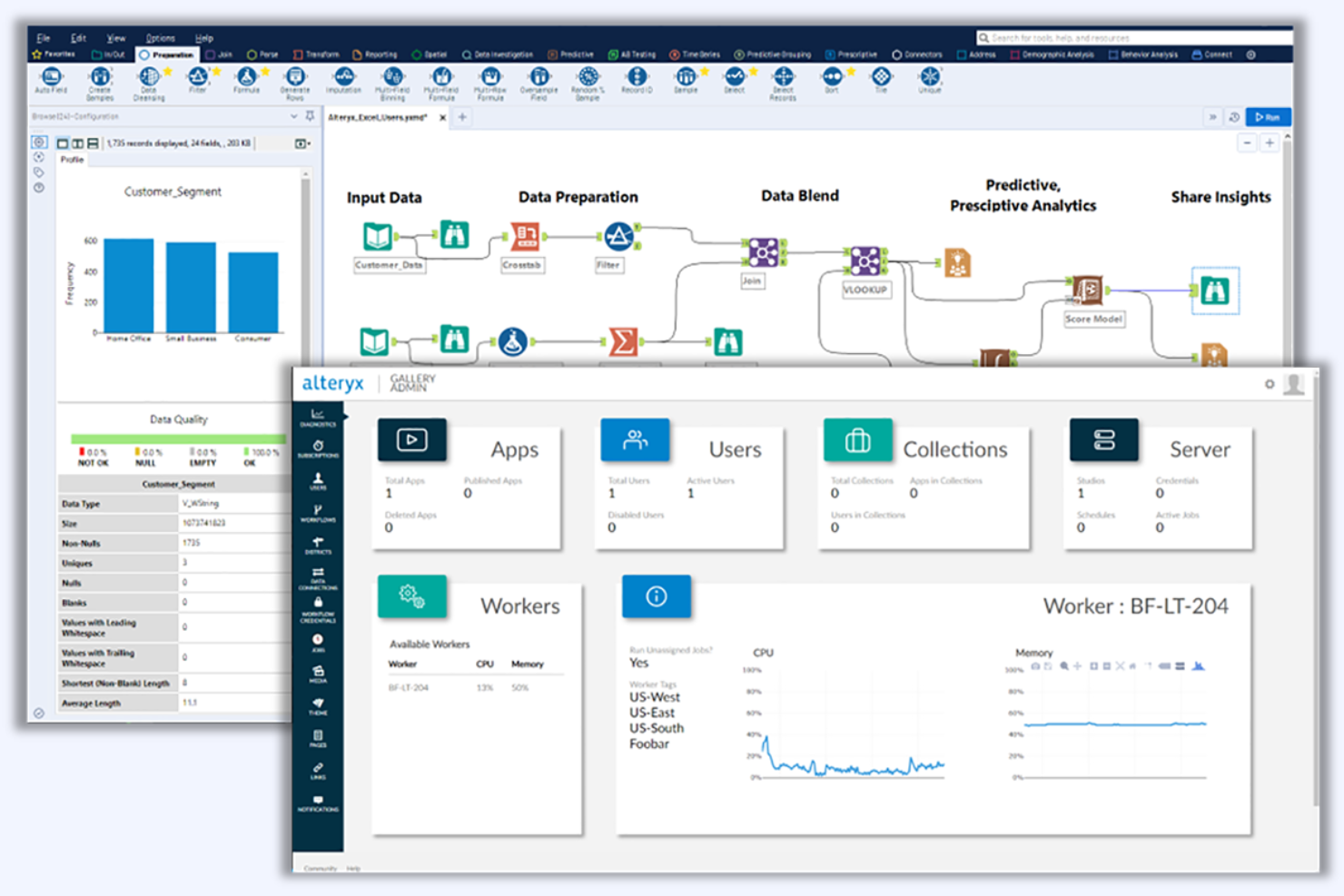
Alteryx is a data analytics platform designed for finance professionals and data analysts. It performs functions such as data blending, advanced analytics, and predictive modeling.
Why I picked Alteryx: Alteryx uses AI to automate data preparation and advanced analytics workflows. The user-friendly interface eliminates the need for coding skills. The platform's predictive modeling features help forecast financial outcomes effectively. With Alteryx, your team can make data-driven decisions with confidence.
Standout Features and Integrations:
Features include a drag-and-drop interface that simplifies data processing tasks. The platform provides advanced analytics capabilities, giving you actionable insights from your data. Additionally, its tools allow you to blend multiple data sources.
Integrations include Microsoft Excel, Salesforce, Snowflake, Oracle, Amazon Redshift, Amazon S3, Google BigQuery, Databricks, Teradata, MongoDB, and more.
Pros and Cons
Pros:
- Extensive predictive modeling
- Effective data blending tools
- No coding skills needed
Cons:
- Basic visualization features
- High starting price

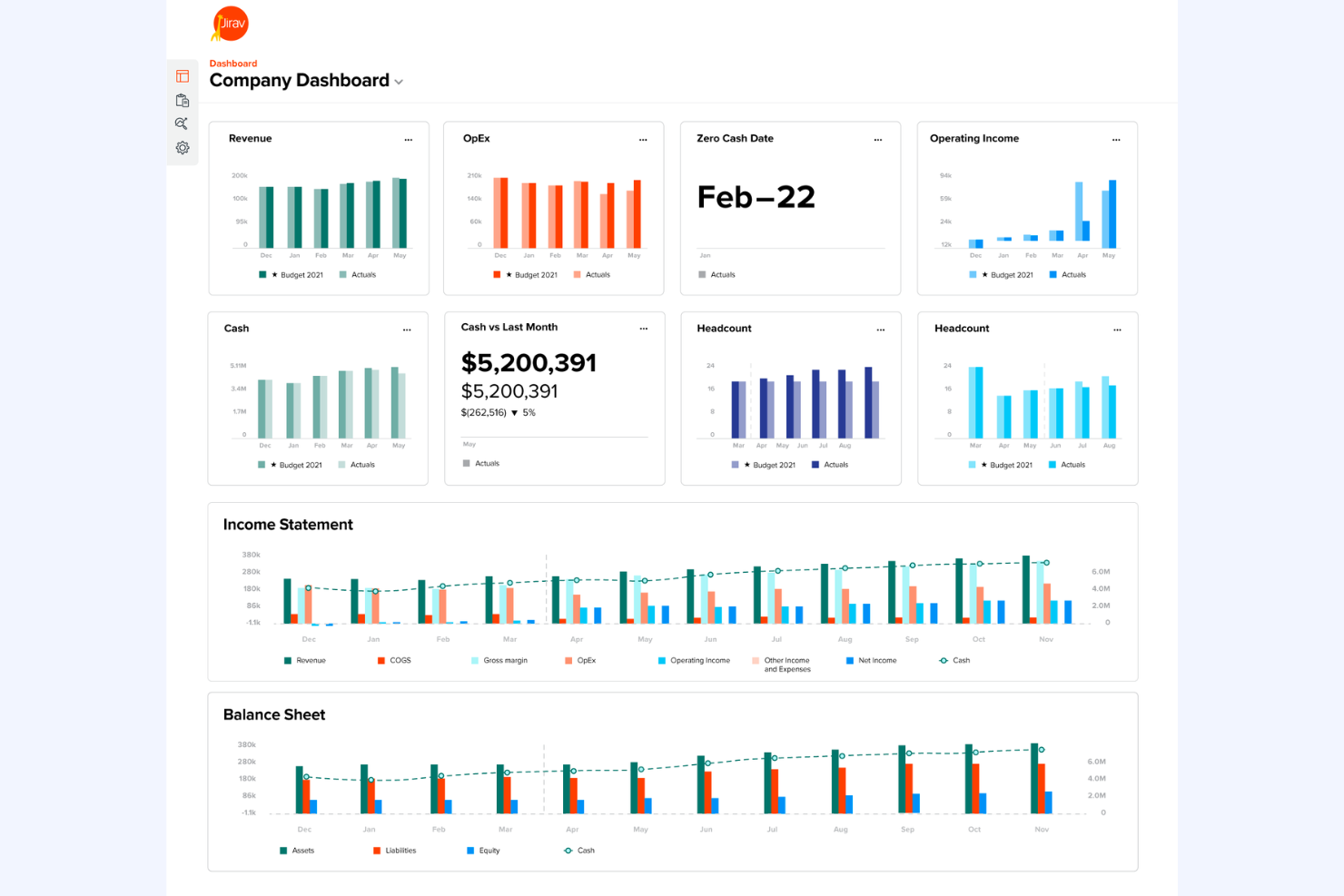
Jirav is a financial planning and analysis software designed for small to medium-sized businesses and accounting firms. It performs key functions, such as budgeting, forecasting, and reporting, helping users manage financial processes effectively.
Why I picked Jirav: Jirav offers dynamic forecasting, enabling you to build flexible financial models. It includes features such as multi-year and multi-scenario planning, making it ideal for businesses that need customized financial insights. The platform also supports quick integration with accounting data, amplifying its forecasting capabilities. With Jirav, your team can tailor financial plans to suit your unique business needs.
Standout Features and Integrations:
Features include real-time dashboards that provide instant visibility into your financial data and KPI templates that help you track performance metrics efficiently. You can also utilize its budgeting tools to align financial goals across departments. The platform's reporting capabilities enable detailed financial analysis, providing the insights you need to make informed decisions.
Integrations include QuickBooks Online, Xero, QuickBooks Desktop, NetSuite, Sage Intacct, ADP, Gusto, BambooHR, Microsoft Excel, Google Sheets, and more.
Pros and Cons
Pros:
- Combined dashboarding, reporting, and forecasting suite
- Driver-based planning and forecasting logic
- Integration allows auto-import of actuals
Cons:
- Formula editing not as flexible as spreadsheets
- Limited visualization options for reporting

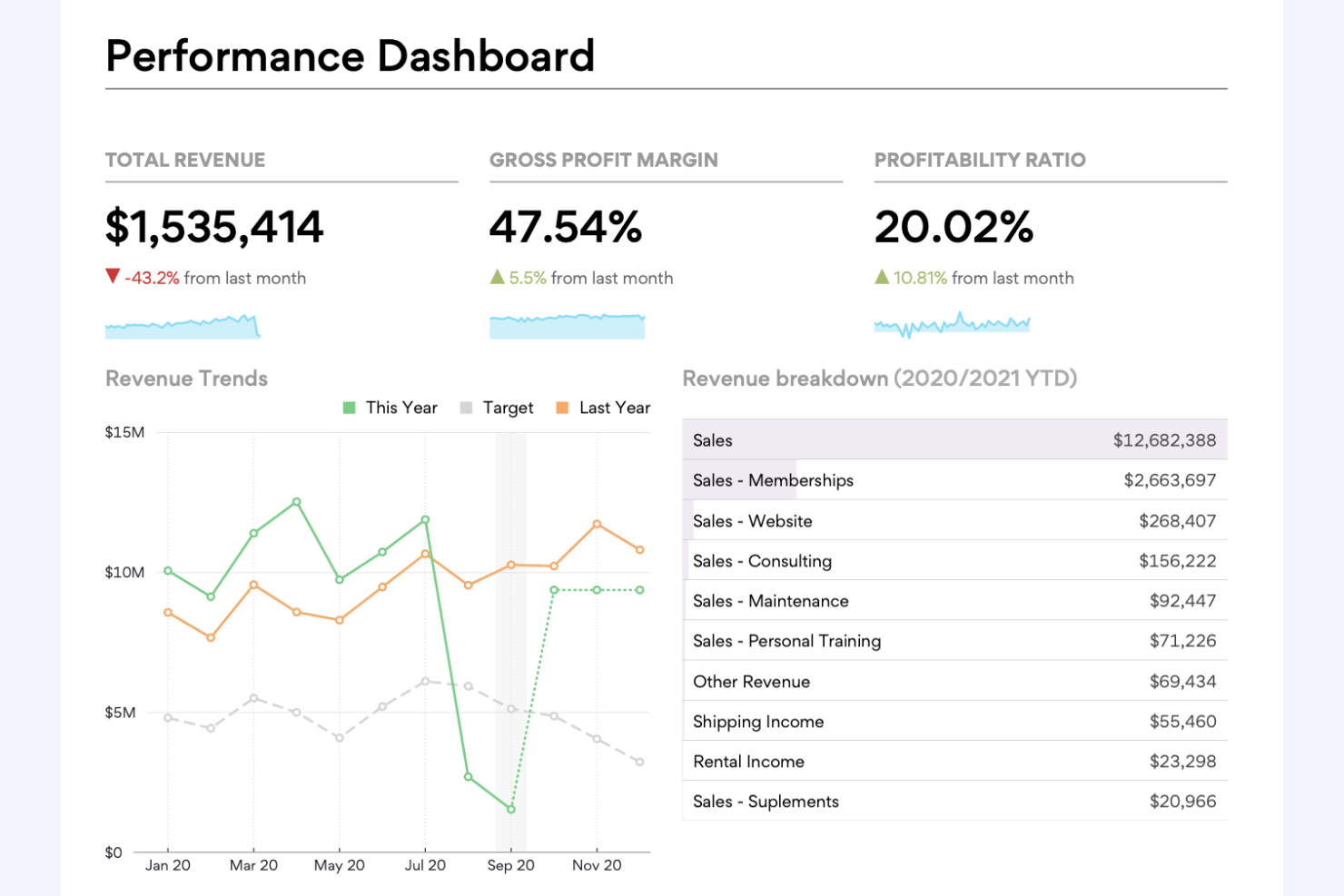
Fathom is a reporting and forecasting software tailored for small to medium businesses and accounting firms. It provides key functions, such as financial analysis, management reporting, and cash flow forecasting.
Why I picked Fathom: Fathom provides visual financial reporting. It features three-way cash flow forecasts and KPI monitoring, making it ideal for accountants and CPAs who need detailed business insights. It reports and analyzes balance sheet metrics. The software's ability to consolidate financial data strengthens its reporting capabilities. With Fathom, your team can turn complex data into easy-to-understand visuals that support business performance.
Standout Features and Integrations:
Features include customizable management reports that allow you to tailor financial presentations to your needs. The insights dashboard provides a clear overview of key metrics, helping you monitor performance at a glance. Additionally, the cash flow forecasting feature supports strategic financial planning by projecting future financial positions.
Integrations include QuickBooks Online, QuickBooks Desktop, Xero, MYOB, Microsoft Excel, Access Financials, Sage, and more.
Pros and Cons
Pros:
- Consolidated reporting for multiple entities
- Customizable reporting options
- Visual insights for easy understanding
Cons:
- No built-in payroll or tax analytics modules
- Forecasting options are too basic

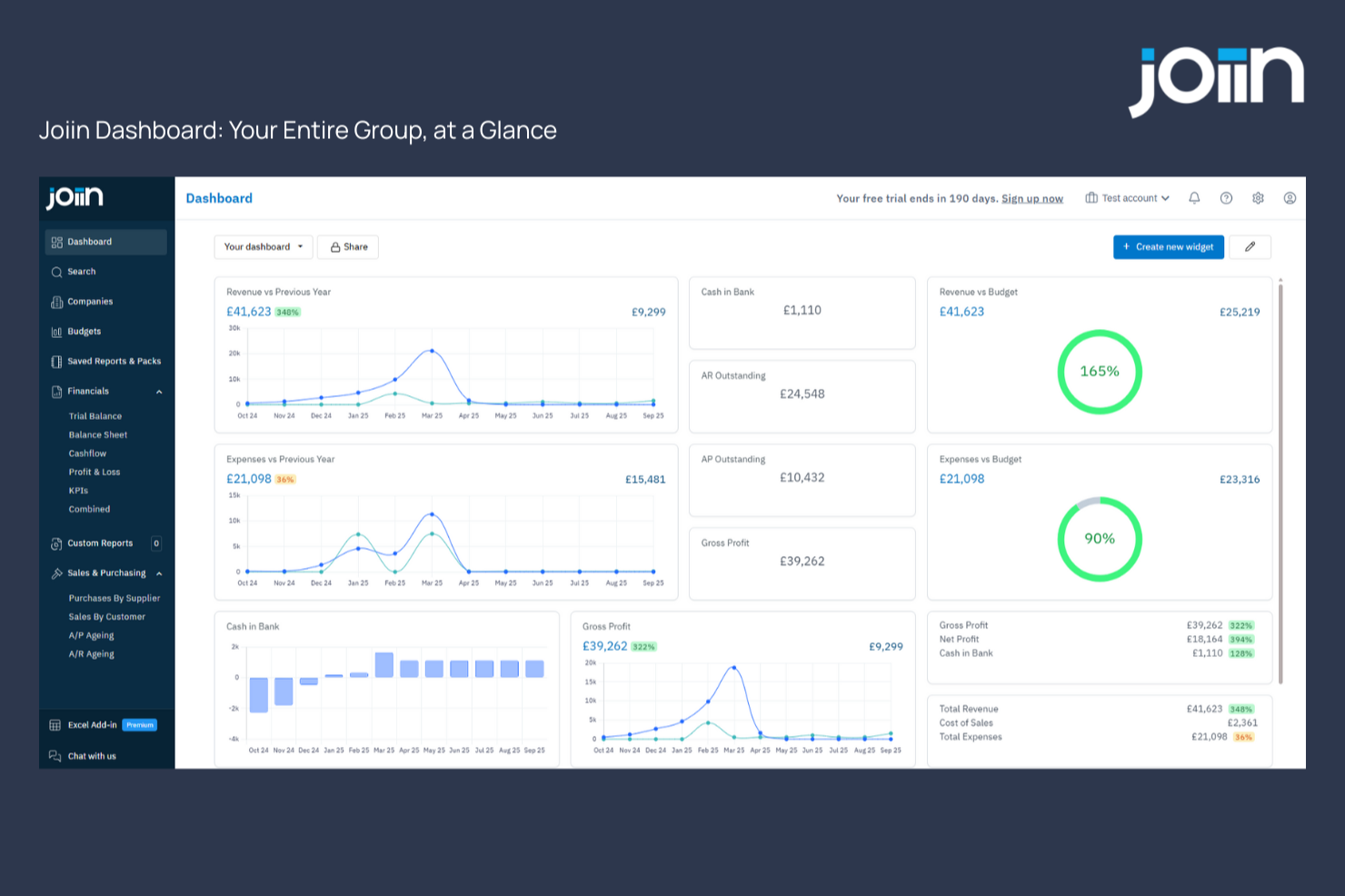
Joiin is a financial analysis software crafted for accountants who seek to enhance their financial reporting and consolidation processes. This tool is particularly appealing to accounting professionals and finance teams that manage complex financial structures and require a streamlined approach to generating comprehensive reports. By transforming intricate financial data into actionable insights, Joiin addresses the challenge of producing management reports, dashboards, and consolidated results swiftly and accurately.
Why I Picked Joiin
I picked Joiin because of its focus on transforming financial data into actionable insights, a crucial aspect for accountants involved in financial analysis. The software's automated reporting feature stands out, enabling your team to produce management reports and dashboards quickly, reducing the time spent on manual data entry. Additionally, Joiin's AI-powered insights offer a deeper understanding of financial data, helping you make informed decisions. These features align perfectly with the needs of accountants who require reliable and efficient tools for financial consolidation and analysis.
Joiin Key Features
In addition to its automated reporting and AI-powered insights, I also found these features valuable for your team:
- Real-Time Dashboards: Provides up-to-the-minute financial data visualization, allowing your team to monitor key performance indicators effectively.
- Multi-Currency Reporting: Enables accurate financial reporting across different currencies, essential for multinational operations.
- User Management: Facilitates collaboration by allowing multiple users to access and manage financial data securely.
- Mobile Access: Offers the convenience of accessing financial reports on-the-go, ensuring your team can work flexibly.
Joiin Integrations
Integrations include Xero, QuickBooks, Sage, Excel, FreshBooks, KashFlow, FreeAgent, MYOB, Zoho Books, and Pennylane.
Pros and Cons
Pros:
- Supports multiple currencies globally
- Real-time financial dashboard visibility
- Strong multi-entity consolidation tools
Cons:
- Dependent on third-party integrations
- No built-in expense tracking
New Product Updates from Joiin
Joiin Launches Joiin AI
Joiin launches Joiin AI for real-time insights and analysis. This update helps finance teams spot trends faster, build smarter report packs, and reduce manual reporting work. For more information, visit Joiin's official site.
 .
.
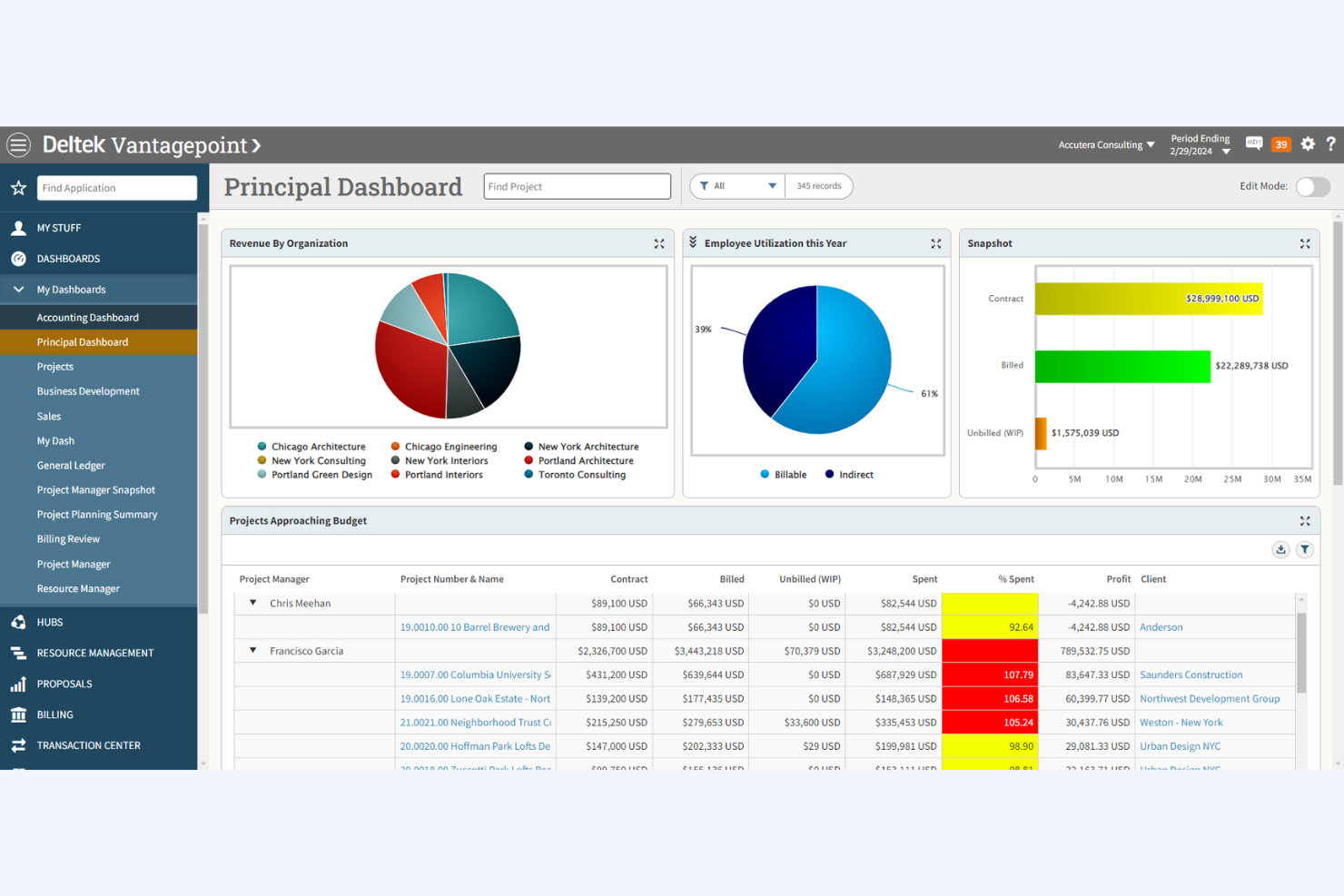
Deltek is a project-based accounting software tailored for firms that manage projects and contracts. It supports functions such as project accounting, financial management, and resource planning.
Why I picked Deltek: It's ideal for project-based firms. It allows you to manage budgets across multiple projects. Integrated ERP modules connect Deltek with project management and resource planning. With Deltek, your firm can refine project finances and improve profitability.
Standout Features and Integrations:
Features include project cost tracking, which keeps your projects within budget. The contract management feature helps you efficiently manage agreements and maintain compliance. Additionally, the resource planning tools allow you to allocate resources effectively across projects, maximizing productivity.
Integrations include Salesforce, QuickBooks, Costpoint, Vantagepoint, Ajera, ComputerEase, Maconomy, and more.
Pros and Cons
Pros:
- Optimized resource planning
- Effective contract management
- Detailed project cost tracking
Cons:
- Custom report creation may require external support
- Complex user interface

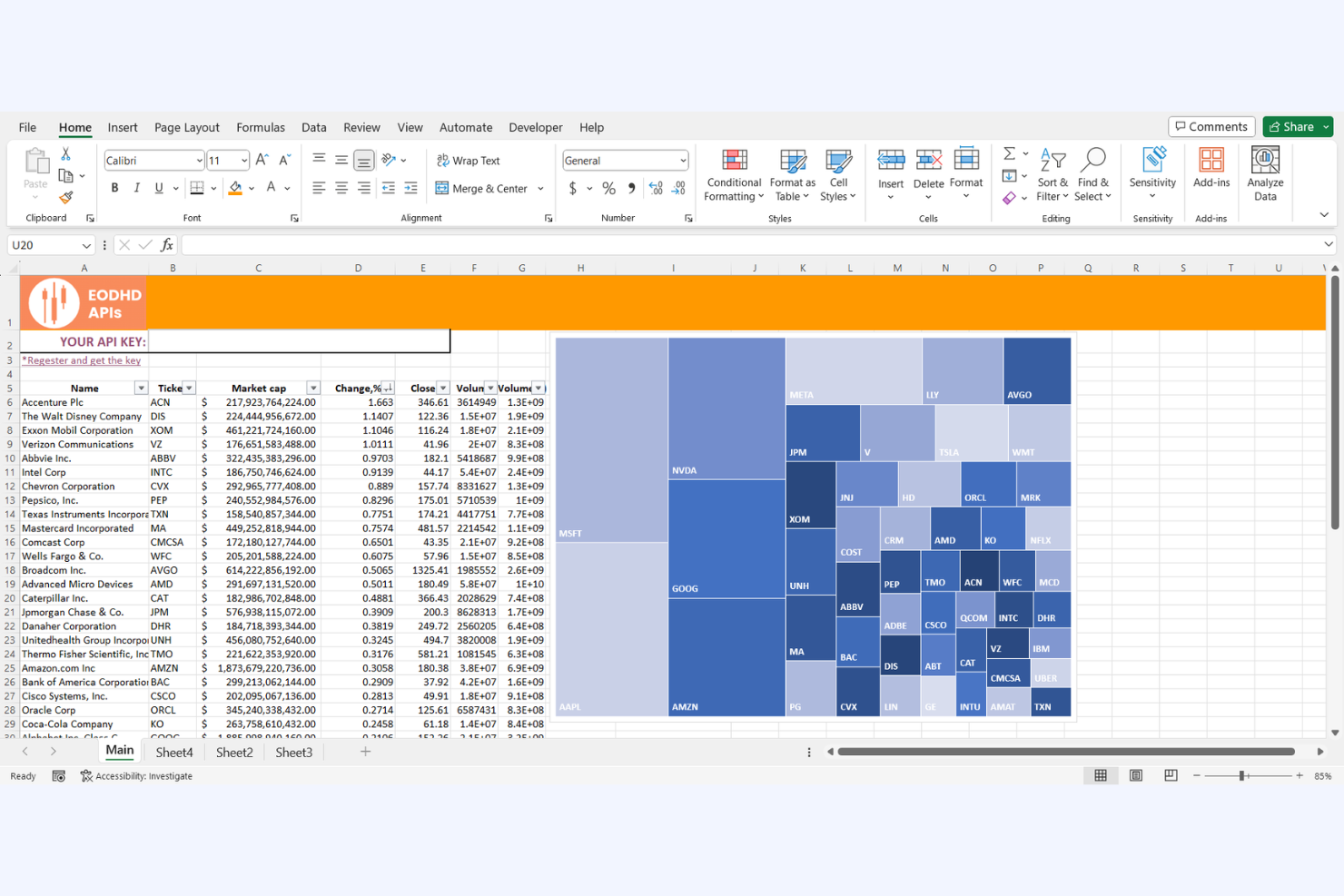
Microsoft Excel is a versatile spreadsheet application used by businesses of all sizes for data analysis and financial modeling. It supports key functions such as data organization, complex calculations, and visualization.
Why I picked Microsoft Excel: Excel provides unmatched spreadsheet flexibility, allowing you to create custom financial models and perform intricate calculations. It exists as both a desktop and a mobile app. You can use its extensive formula library to tailor your analysis to specific needs. The pivot table feature helps summarize large datasets efficiently. Its AI tools assist users with forecasting, formula suggestions, and data summaries. With Excel, your team can adapt and manipulate data to suit various financial tasks.
Standout Features and Integrations:
Features include data visualization tools that help you create charts and graphs for better insight. The conditional formatting feature lets you automatically highlight key data points. Additionally, the macro function enables you to automate repetitive tasks, saving time in your workflows.
Integrations include Microsoft Word, Microsoft PowerPoint, Microsoft Access, Microsoft Outlook, Microsoft Teams, Microsoft Dynamics 365, Power BI, SharePoint, OneDrive, SQL Server, and more.
Pros and Cons
Pros:
- Automates tasks with macros
- Efficient pivot table functionality
- Extensive formula library
Cons:
- Lacks built-in audit trail features
- Potential for human error

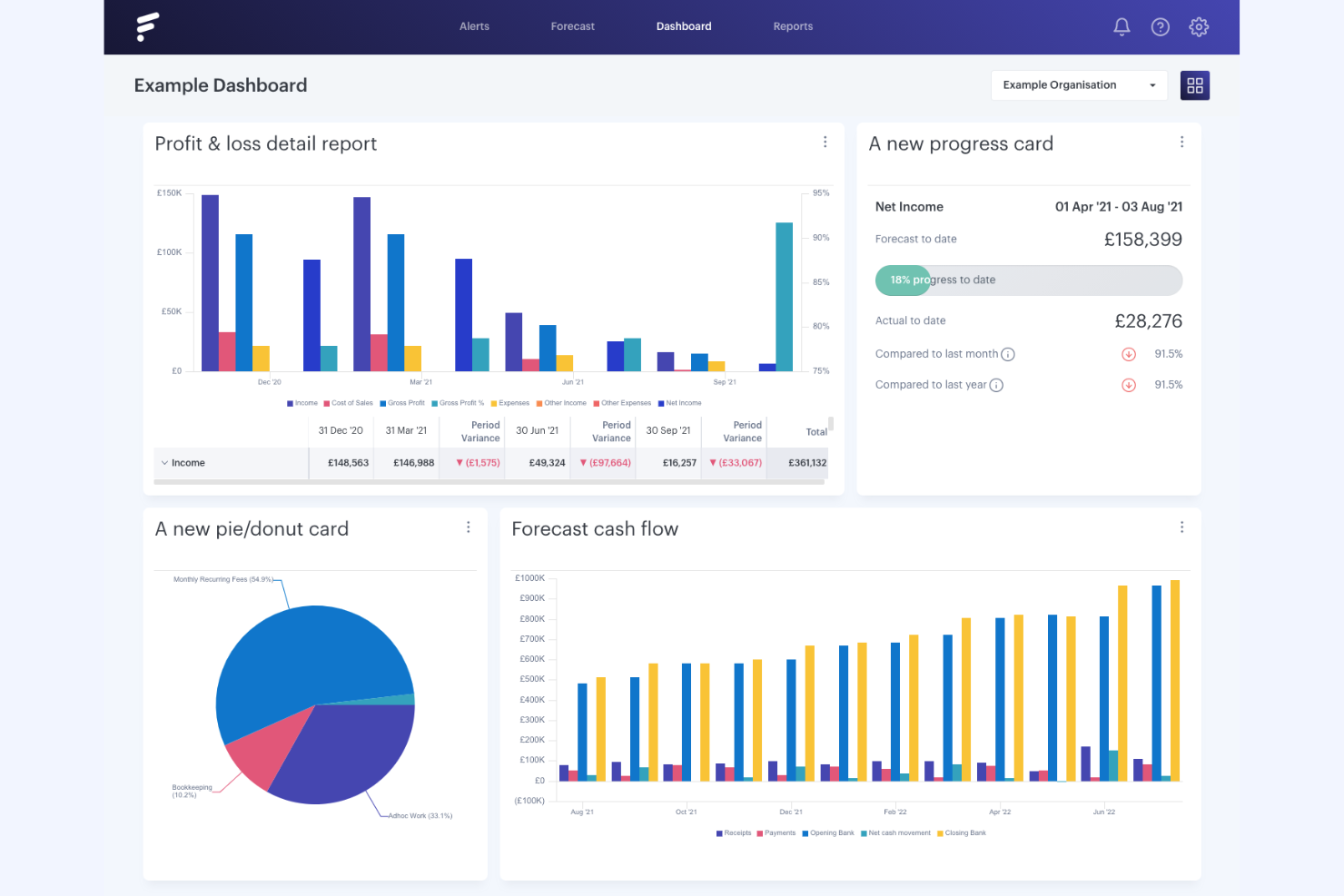
Futrli is a financial forecasting and reporting tool designed for small businesses and accounting firms. It offers services such as cash flow forecasting, budgeting, and scenario planning to help manage financial operational data.
Why I picked Futrli: Futrli provides small businesses with intuitive forecasting tools that simplify financial planning. You can create detailed cash flow forecasts to anticipate future financial positions. The scenario planning feature lets you test different business strategies, and with Futrli, your team can make informed decisions and stay ahead of financial challenges.
Standout Features and Integrations:
Features include visual dashboards that let you track key financial metrics in real time. The budgeting tools allow you to set and monitor financial goals across your business. Additionally, the platform provides automated alerts to keep you informed of any significant changes in your financial data.
Integrations include Xero, QuickBooks Online, MYOB, Sage, Microsoft Excel, and more.
Pros and Cons
Pros:
- Visual dashboards for metrics
- AI-driven predictive cash flow alerts
- Intuitive forecasting tools
Cons:
- Reporting takes precedence over platform functions
- Limited features for large enterprises

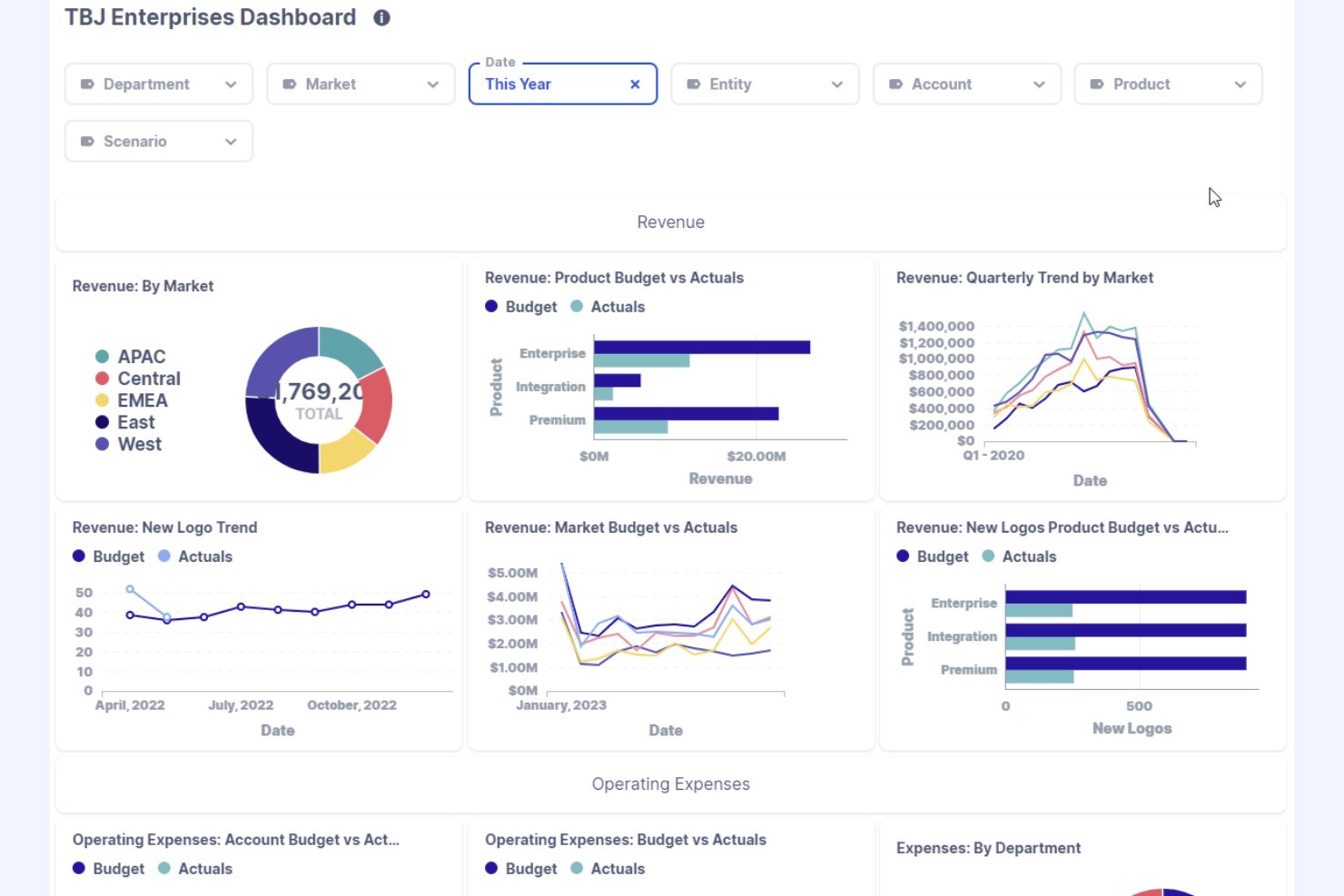
Cube is a financial planning and analysis tool designed for finance teams and accountants. It facilitates budgeting, forecasting, and reporting to optimize financial processes.
Why I picked Cube: Cube supports planning and analysis, and it provides data synchronization with your existing spreadsheets. It offers cash flow reporting and forecasting, including direct and indirect cash flow statements and scenario planning. You can create dynamic budgets and forecasts, as well. The platform's reporting capabilities allow you to generate insights quickly and accurately. Its AI features help identify anomalies and reduce manual errors. With Cube, your team can refine financial planning without disrupting familiar workflows.
Standout Features and Integrations:
Features include a user-friendly dashboard that provides a clear overview of your financial data. The scenario planning tools let you test different financial strategies to see potential outcomes. Additionally, the real-time collaboration feature allows your team to work together efficiently, ensuring everyone is on the same page.
Integrations include Microsoft Excel, Google Sheets, NetSuite, QuickBooks, Xero, Sage, Oracle, SAP SuccessFactors, Workday, Salesforce, and more.
Pros and Cons
Pros:
- User-friendly interface
- Supports dynamic budgeting
- Bidirectional sync with source systems
Cons:
- Predefined dimensions limit reporting depth
- Complex data transfer
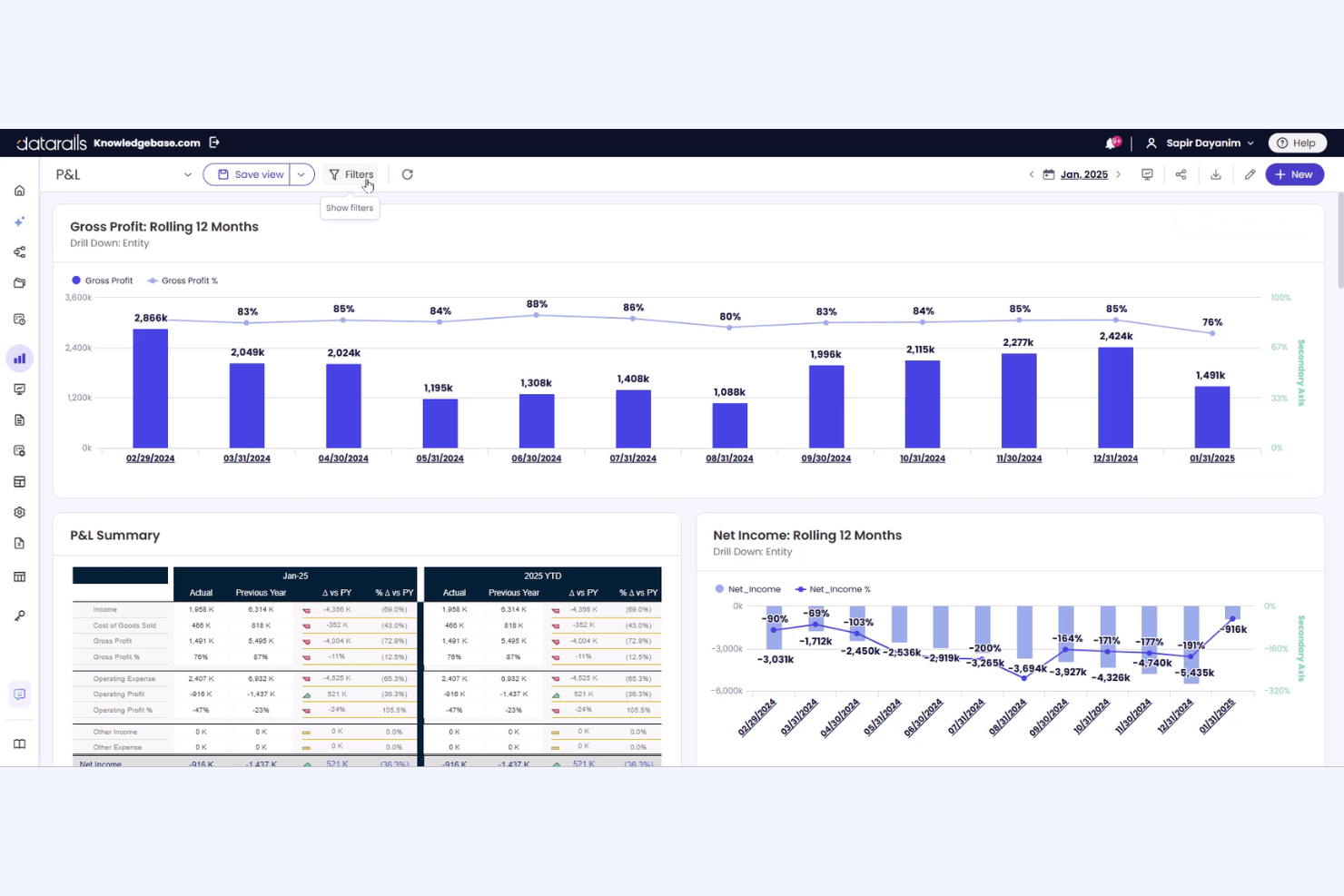
Datarails FP&A is an FP&A platform designed for finance teams and accountants. It automates data consolidation, financial reporting, and the generation of financial statements, boosting financial management efficiency.
Why I picked Datarails FP&A: Datarails FP&A distinguishes itself by reducing manual data entry. You can automate financial reporting to save time and improve accuracy. It uses AI to automate variance analysis and financial trend identification. The tool's ability to integrate with existing spreadsheets makes it user-friendly for teams already familiar with Excel. With Datarails FP&A, your team can focus more on strategic planning and less on data management.
Standout Features and Integrations:
Features include automated data consolidation, which brings all your financial data into one place for easy access. The reporting feature allows you to generate financial reports quickly and accurately. Additionally, the platform's scenario analysis tools help you evaluate different financial strategies effectively.
Integrations include Microsoft Excel, Microsoft Dynamics 365, QuickBooks, Xero, Sage, NetSuite, Oracle, Salesforce, HubSpot, Snowflake, BambooHR, and more.
Pros and Cons
Pros:
- Dashboard and visualization enrich insights
- Native Excel interface
- Automates data consolidation
Cons:
- Slow performance with massive datasets
- Initial data mapping can be complex


Accounting CS is a professional accounting software tailored for accounting firms and tax professionals. It handles key functions, such as payroll processing, financial reporting, and tax compliance.
Why I picked Accounting CS: This tool is exceptional for tax compliance, offering features such as real-time collaboration and automated payroll tax calculations. It provides detailed tax management tools to help with accuracy and efficiency. The platform's ability to handle complex payroll scenarios is a significant advantage. With Accounting CS, your team can manage tax-related tasks with confidence and precision.
Standout Features and Integrations:
Features include payroll processing, which allows your team to handle payroll tasks efficiently. The financial reporting feature provides detailed insights into your firm's financial health. Additionally, the software's document management system helps organize and securely store financial documents.
Integrations include QuickBooks, Microsoft Excel, NetClient CS, UltraTax CS, Practice CS, FileCabinet CS, GoFileRoom, Virtual Office CS, Thomson Reuters Checkpoint, Swipeclock, and more.
Pros and Cons
Pros:
- Extensive tax form library
- Handles complex payroll scenarios
- Automated payroll tax calculations
Cons:
- Requires additional modules for full reporting
- Lengthy initial setup and configuration
Other Financial Analysis Software for Accountants
Here are some additional financial analysis software options for accountants that didn’t make it onto my shortlist, but are still worth checking out:
- NetSuite Cloud Accounting
For AI-powered cloud integration
- Vena
For AI-assisted budgeting processes
- QuickBooks
For AI-powered cash flow insights
- Zoho Analytics
For self-service analytics
- Sage Intacct
For real-time financial insights
- Hub
For operational metrics
- IBM Cognos Analytics
For enterprise reporting
- Power BI
For business intelligence
- Spotlight
For multi-entity reporting
- Syft
For AI-first data visualization
- Reach Reporting
For customizable dashboards
- Less Accounting
For simple bookkeeping


Financial Analysis Software for Accountants Selection Criteria
When selecting the best financial analysis software for accountants to include in this list, I considered common buyer needs and pain points, such as data accuracy and ease of integration with existing systems. I also used the following framework to keep my evaluation structured and fair:
Core Functionality (25% of total score)
To be considered for inclusion in this list, each solution had to fulfill these common use cases:
- Generate financial reports
- Perform budget forecasting
- Analyze cash flow
- Track key performance indicators
- Consolidate financial data
Additional Standout Features (25% of total score)
To help further narrow down the competition, I also looked for unique features, such as:
- Real-time data analytics
- Customizable dashboards
- Scenario planning tools
- Automated data integration
- Multi-currency support
Usability (10% of total score)
To get a sense of the usability of each system, I considered the following:
- Intuitive user interface
- Easy navigation
- Minimal learning curve
- Responsive design
- Accessibility features
Onboarding (10% of total score)
To evaluate the onboarding experience for each platform, I considered the following:
- Availability of training videos
- Interactive product tours
- Ready-to-use templates
- Access to webinars
- Support from chatbots
Customer Support (10% of total score)
To assess each software provider's customer support services, I considered the following:
- 24/7 support availability
- Multiple support channels
- Response time to inquiries
- Availability of a knowledge base
- Personalized support options
Value for Money (10% of total score)
To evaluate the value for money of each platform, I considered the following:
- Competitive pricing
- Transparent pricing structure
- Features offered at each pricing tier
- Discounts for long-term commitments
- Cost-benefit ratio
Customer Reviews (10% of total score)
To get a sense of overall customer satisfaction, I considered the following when reading customer reviews:
- Overall satisfaction ratings
- Feedback on customer service
- Reports on system reliability
- Comments on ease of use
- Testimonials on feature effectiveness
How To Choose Financial Analysis Software for Accountants
It's easy to get bogged down in long feature lists and complex pricing structures. To help you stay focused as you work through your unique software selection process, here's a checklist of factors to keep in mind:
| Factor | What To Consider |
|---|---|
| Scalability | Can the software grow with your business? Look for solutions that can handle increased data volume and complexity as your company expands. |
| Integrations | Does it connect with your existing systems? Ensure compatibility with accounting, CRM, and other business tools you currently use. |
| Customizability | Can you tailor it to your workflows? Check if the software allows you to customize dashboards and reports to fit your specific needs. |
| Ease of use | Is it straightforward for your team? Evaluate the user interface and seek feedback from potential users to ensure it's intuitive. |
| Implementation and onboarding | How quickly can you get started? Consider the time and resources required to implement the software and train your team. |
| Cost | Does it fit your budget? Compare the pricing plans and consider the total cost of ownership, including any hidden fees. |
| Security safeguards | Is your data protected? Look for effective security measures, such as encryption and regular audits, to ensure data safety. |
| Support availability | Can you get help when needed? Check for 24/7 support, response times, and the availability of dedicated account managers. |
What Is Financial Analysis Software for Accountants?
Financial analysis software for accountants is a tool used to evaluate financial data, create reports, and forecast future financial outcomes. Accountants, financial analysts, and CFOs typically use these tools to gain insights into a company's financial health and make informed decisions. Budgeting, forecasting, and data visualization features help with analyzing financial trends and improving decision-making. Overall, these tools provide valuable insights that advance financial planning and accountability.
Features
When selecting financial analysis software for accountants, keep an eye out for the following key features:
- Budgeting: Helps set and manage financial goals by allocating resources effectively.
- Forecasting: Predicts future financial trends to aid strategic planning.
- Data visualization: Provides graphical representations of data to facilitate interpretation and deeper insights.
- Scenario planning: Enables testing of various financial strategies to see potential outcomes.
- Real-time analytics: Provide up-to-date financial data to support timely decision-making.
- Customizable dashboards: Let users tailor their interface to display relevant metrics.
- Automated reporting: Accelerates the process of generating financial reports to save time.
- Integrations: Connect with other business tools to ensure uninterrupted data flow.
- Security safeguards: Protect sensitive financial information with encryption and security protocols.
- User-friendly interface: Ensures ease of use for all team members, reducing the learning curve.
Benefits
Implementing financial analysis software for accountants provides several benefits for your team and your business. Here are a few you can look forward to:
- Improved decision-making: Access to real-time data and forecasting tools helps stakeholders make informed financial decisions quickly.
- Time savings: Automated reporting and data consolidation reduce the time spent on manual processes.
- Increased accuracy: Budgeting and scenario planning features minimize errors in financial projections.
- Better insights: Data visualization tools offer clear insights into financial trends and performance.
- Increased collaboration: Integrations with existing systems help ensure smooth data sharing across teams.
- Scalability: The software grows with your business, adapting to increased data and complexity.
- Security: Strong safeguards protect your financial data, maintaining confidentiality and compliance.
Costs and Pricing
Selecting financial analysis software for accountants requires an understanding of the various pricing models and plans available. Costs vary based on features, team size, add-ons, and more. The table below summarizes standard plans, their average prices, and typical features included in financial analysis software solutions for accountants:
Plan Comparison Table for Financial Analysis Software for Accountants
| Plan Type | Average Price | Common Features |
|---|---|---|
| Free Plan | $0 | Basic reporting, limited data storage, and basic support. |
| Personal Plan | $10-$30/user/month | Budgeting tools, simple forecasting, and email support. |
| Business Plan | $50-$250/user/month | Advanced analytics, data visualization, and integrations with accounting software. |
| Enterprise Plan | $300-$550/month | Customizable dashboards, scenario planning, dedicated support, and strengthened security features. |
Financial Analysis Software for Accountants FAQs
Here are some answers to common questions about financial analysis software for accountants:
Can financial analysis software integrate with my current accounting systems?
Yes, most financial analysis software can integrate with popular accounting systems, such as QuickBooks, Xero, and Sage. This integration helps you consolidate data and create more accurate reports. Before purchasing, check if the software supports your specific systems. If you’re unsure, ask for a demo or trial to see the integration in action. This step ensures a smooth transition and minimizes disruption to your workflow.
What level of technical expertise do users require to operate financial analysis software?
The level of expertise required varies by software. Some tools are user-friendly and designed for those with basic accounting knowledge, while others may require more advanced skills. Look for software with a user-friendly interface and training resources if you’re concerned about the learning curve. Many vendors offer tutorials and support to help you and your team get up to speed. In my experience, starting with a trial version can help assess the complexity.
Is data security a concern with financial analysis software?
Yes, data security is essential when selecting financial analysis software. Ensure the software uses encryption and complies with relevant data protection regulations. Ask the vendor about their security measures and check whether they offer features such as two-factor authentication. It’s also wise to read reviews or testimonials regarding the software’s security history. Protecting your financial data should be a priority, so don’t hesitate to ask detailed questions about security protocols.
What's Next:
If you're in the process of researching financial analysis software for accountants, connect with a SoftwareSelect advisor for free recommendations.
You fill out a form and have a quick chat where they get into the specifics of your needs. Then you'll get a shortlist of software to review. They'll even support you through the entire buying process, including price negotiations.