
13 Best Forecasting Software for Small Businesses Reviewed in 2026

Best Forecasting Software for Small Business Shortlist
Here's my pick of the 10 best software from the 13 tools reviewed.


Managing finances can be tough, especially when you're juggling forecasts, budgets, and unexpected expenses. As the person owning finance, you're always looking for ways to make your financial planning more accurate and efficient. That's where forecasting software comes in. It helps you anticipate financial challenges and make informed decisions.
In my experience testing and reviewing software, I've found that the right tools can make a difference. I'll guide you through my top picks for small business forecasting software. Some tools here are FP&A platforms, others are reporting tools that support forecasting, and a few are sales forecasting tools. You'll find insights on features, pricing, and suitability for your specific needs, helping you choose the best option for your team.
Table of Contents
Why Trust Our Software Reviews
Best Forecasting Software for Small Business Summary
This comparison chart summarizes pricing details for my top forecasting software for small business selections to help you find the best one for your budget and business needs.
| Tool | Best For | Trial Info | Price | ||
|---|---|---|---|---|---|
| 1 | Best for financial modeling | Free demo available | From $50/month | Website | |
| 2 | Best for sales forecasting | Free demo available | Pricing upon request | Website | |
| 3 | Best for visual reporting | 14-day free trial | From $53/company/month | Website | |
| 4 | Best for business planning | Free demo available | From $15/month (billed annually) | Website | |
| 5 | Best for Excel integration | Free demo available | Pricing upon request | Website | |
| 6 | Best for HubSpot sales teams | Free demo available | From $199/2 seats/month (billed annually) | Website | |
| 7 | Best for advanced forecasting | Free trial + free demo available | From $83/user/month (billed annually) | Website | |
| 8 | Best for small businesses looking to scale operations | Free demo available | Pricing upon request | Website | |
| 9 | Best for statistical forecasting | Free demo available | From $59/month | Website | |
| 10 | Best for collaborative departmental budgeting | Free demo available | From $4,788 (billed annually) + $1,915 (setup and training fee) | Website |
-

LiveFlow
Visit WebsiteThis is an aggregated rating for this tool including ratings from Crozdesk users and ratings from other sites.4.9 -
Float Financial
Visit WebsiteThis is an aggregated rating for this tool including ratings from Crozdesk users and ratings from other sites.4.1 -
Rippling Spend
Visit WebsiteThis is an aggregated rating for this tool including ratings from Crozdesk users and ratings from other sites.4.8


Best Forecasting Software for Small Business Reviews
Below are my detailed summaries of the best forecasting software for small businesses that made it onto my shortlist. My reviews offer a detailed look at the key features, pros and cons, integrations, and ideal use cases of each tool to help you find the best one for you.

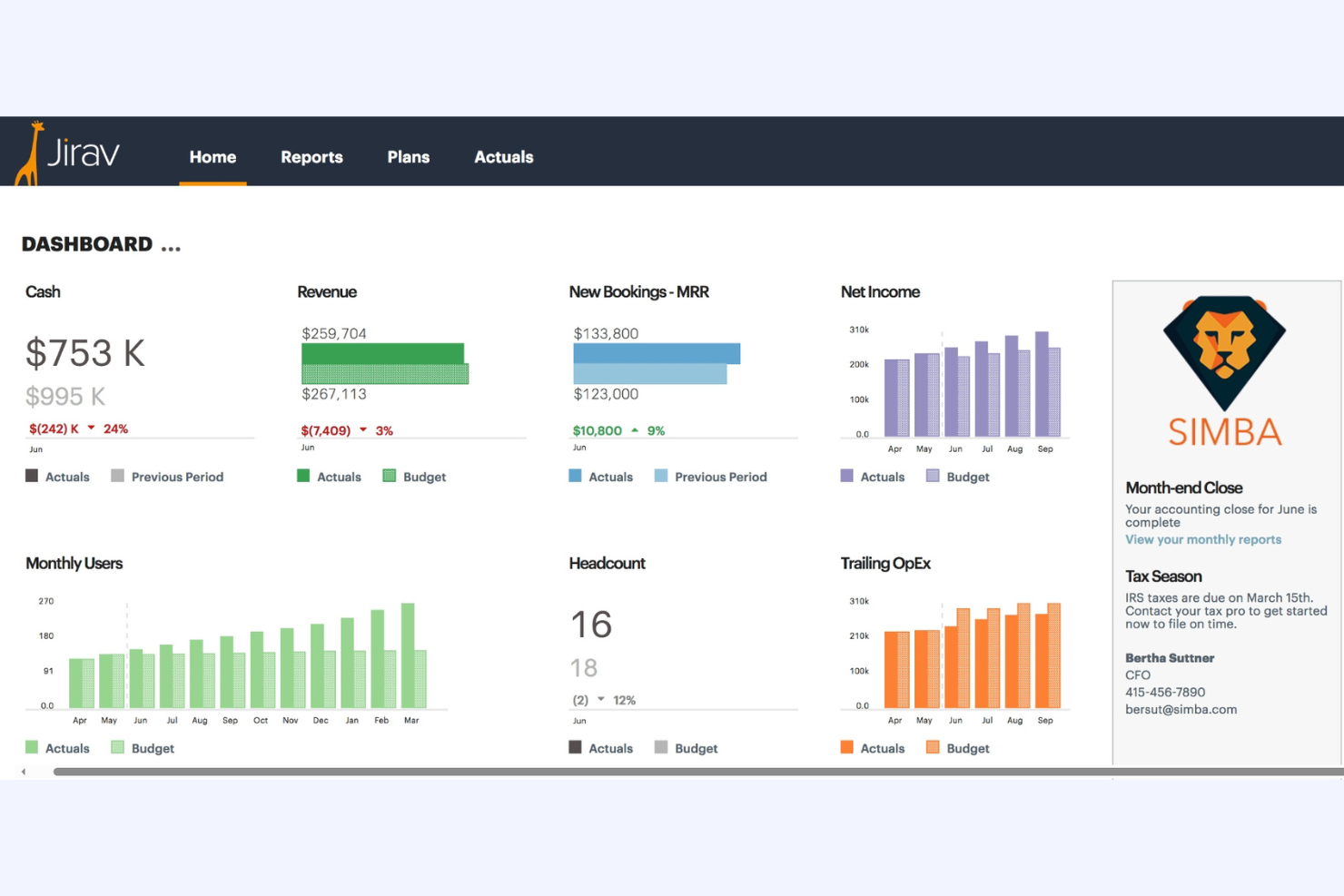
Jirav is a financial planning and analysis tool for finance teams, helping small to medium-sized businesses to model, budget, and forecast. It provides a view of financial health and future projections.
Why I picked Jirav: It excels in financial modeling by providing flexible scenario planning and forecasting. The ability to compare different scenarios helps you make informed decisions. Jirav's dashboard visualizes key metrics, turning complex data into understandable insights. The platform's collaboration tools ensure your team can work together efficiently on financial models.
Standout features and integrations:
Features include real-time dashboards that provide a clear view of your financial metrics. Scenario planning allows you to test different business strategies and see potential outcomes. Driver-based forecasting gives you control over key business assumptions and their impacts.
Integrations include QuickBooks, NetSuite, Xero, Sage Intacct, Salesforce, Google Sheets, and more.
Pros and Cons
Pros:
- Strong collaboration tools
- Real-time dashboard updates
- Flexible scenario planning
Cons:
- Not ideal for granular, day-to-day cash management
- Limited advanced analytics

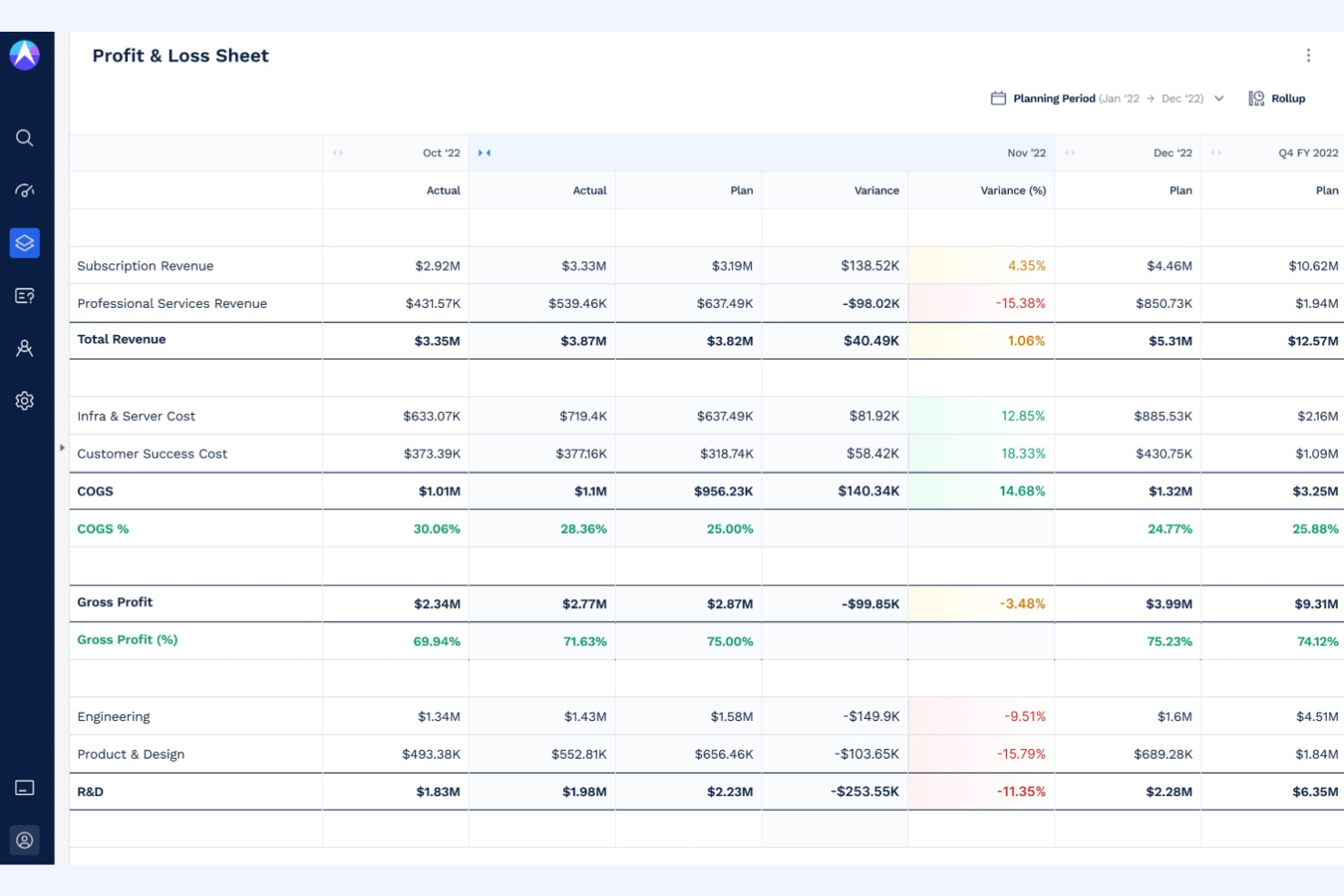
Drivetrain is a forecasting tool specifically designed for sales teams to predict revenue and manage pipelines effectively. It's designed for businesses looking to enhance accuracy and streamline decision-making.
Why I picked Drivetrain: Drivetrain offers specialized features for sales forecasting, including pipeline management and revenue prediction tools. It provides real-time insights, helping your team make informed decisions quickly. The platform's ability to integrate with CRM systems ensures that your data remains consistent and up to date. Drivetrain's user-friendly interface makes it accessible, even for teams new to forecasting software.
Standout features and integrations:
Features include real-time insights that help your team make quick operational planning decisions based on current data. Pipeline management tools allow you to track and optimize your sales processes effectively. The platform also offers revenue prediction capabilities, ensuring that your forecasts are as accurate as possible.
Integrations include Salesforce, HubSpot, Pipedrive, Zoho CRM, Microsoft Dynamics, Slack, and more.
Pros and Cons
Pros:
- Integrates with CRM systems
- Provides real-time insights
- Specialized for sales teams
Cons:
- Requires CRM integration to deliver full value
- Limited to sales forecasting

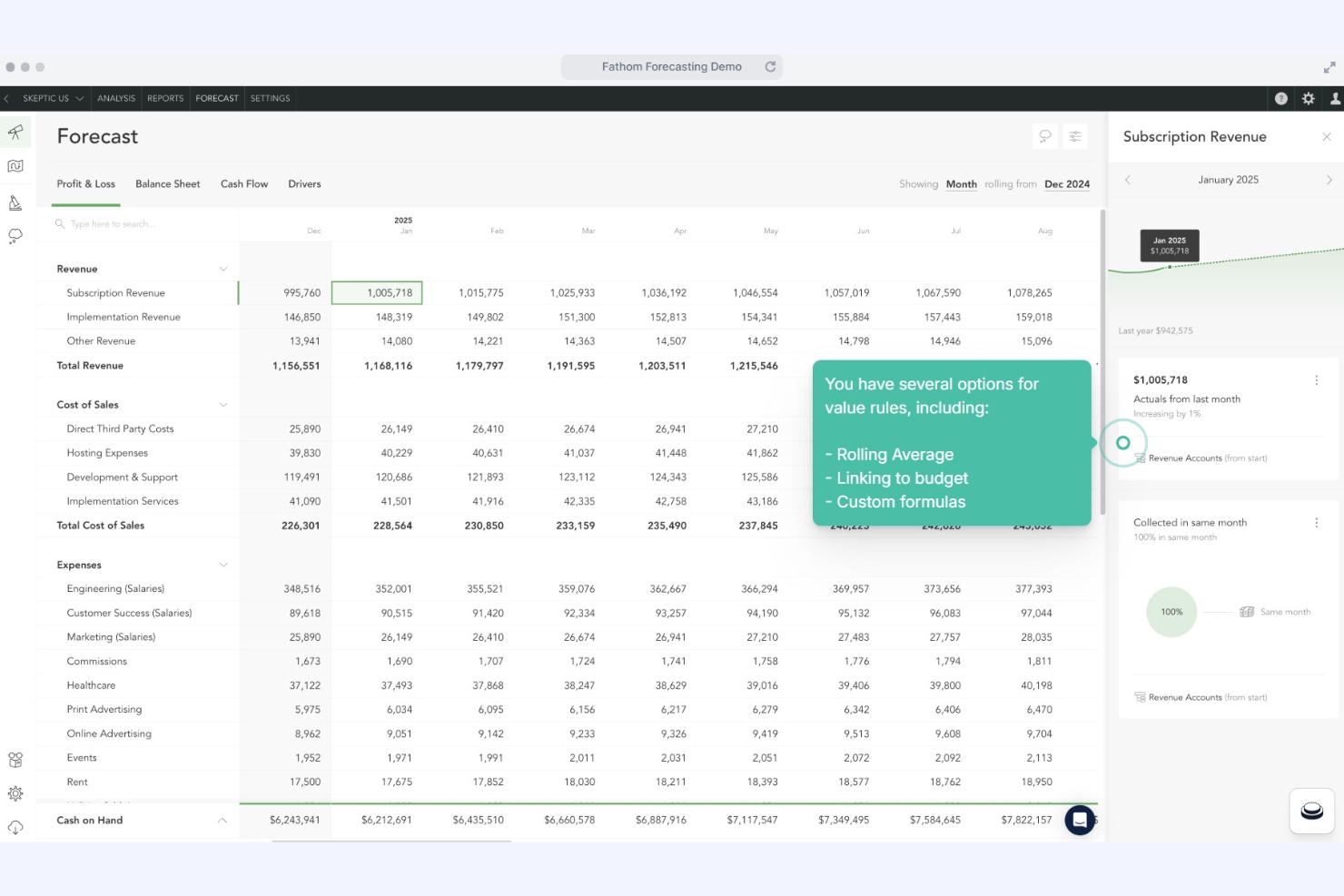
Fathom is a financial analysis and management reporting tool that provides visual reports and insights to help you understand your financial data better.
Why I picked Fathom: Fathom makes financial data easy to interpret through informative dashboards. It offers customizable KPIs so you can track the metrics that matter most to your business. Fathom's ability to consolidate multiple entities is ideal for businesses with complex structures. It also provides detailed variance analysis, helping you understand the differences between your financial goals and actual performance.
Standout features and integrations:
Features include trend analysis that helps you identify patterns over time, providing a clear picture of your financial health. The benchmarking feature allows you to compare your performance against industry standards. Additionally, Fathom offers scenario modeling to test different business strategies and predict outcomes.
Integrations include QuickBooks, Xero, MYOB, Sage, Excel, and more.
Pros and Cons
Pros:
- Detailed variance analysis
- Customizable KPIs
- Rich visual dashboards
Cons:
- Initial setup time-consuming
- Limited mobile functionality

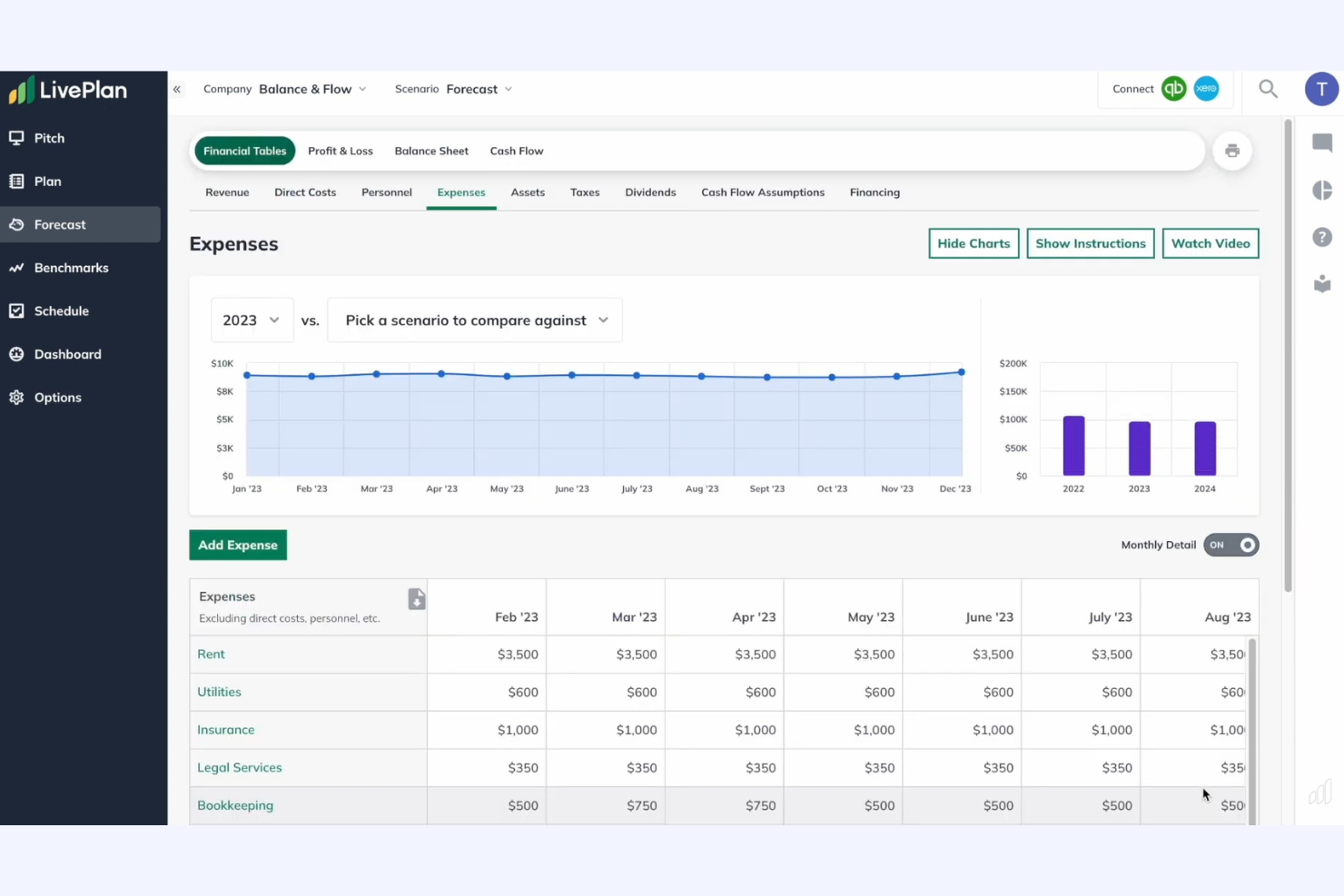
LivePlan is a business planning tool designed for entrepreneurs and small business owners. It helps users create detailed business plans and financial forecasts, focusing on strategy and financial management.
Why I picked LivePlan: It excels in business planning with features such as an AI-powered assistant and automatic financial generation. Integration with QuickBooks and Xero allows for real-time performance tracking, while its formatting standardization is commonly used for SBA loan business plans to meet industry standards. Access to real-world data further supports accurate and relevant forecasting.
Standout features and integrations:
Features include an AI-powered assistant to guide you through the planning process, automatic financial generation to simplify financial forecasts, and cash flow forecasting to help manage your finances effectively.
Integrations include QuickBooks, Xero, and more.
Pros and Cons
Pros:
- Real-time performance tracking
- Access to real industry data
- AI-powered planning assistant
Cons:
- No mobile app available
- Limited customization options

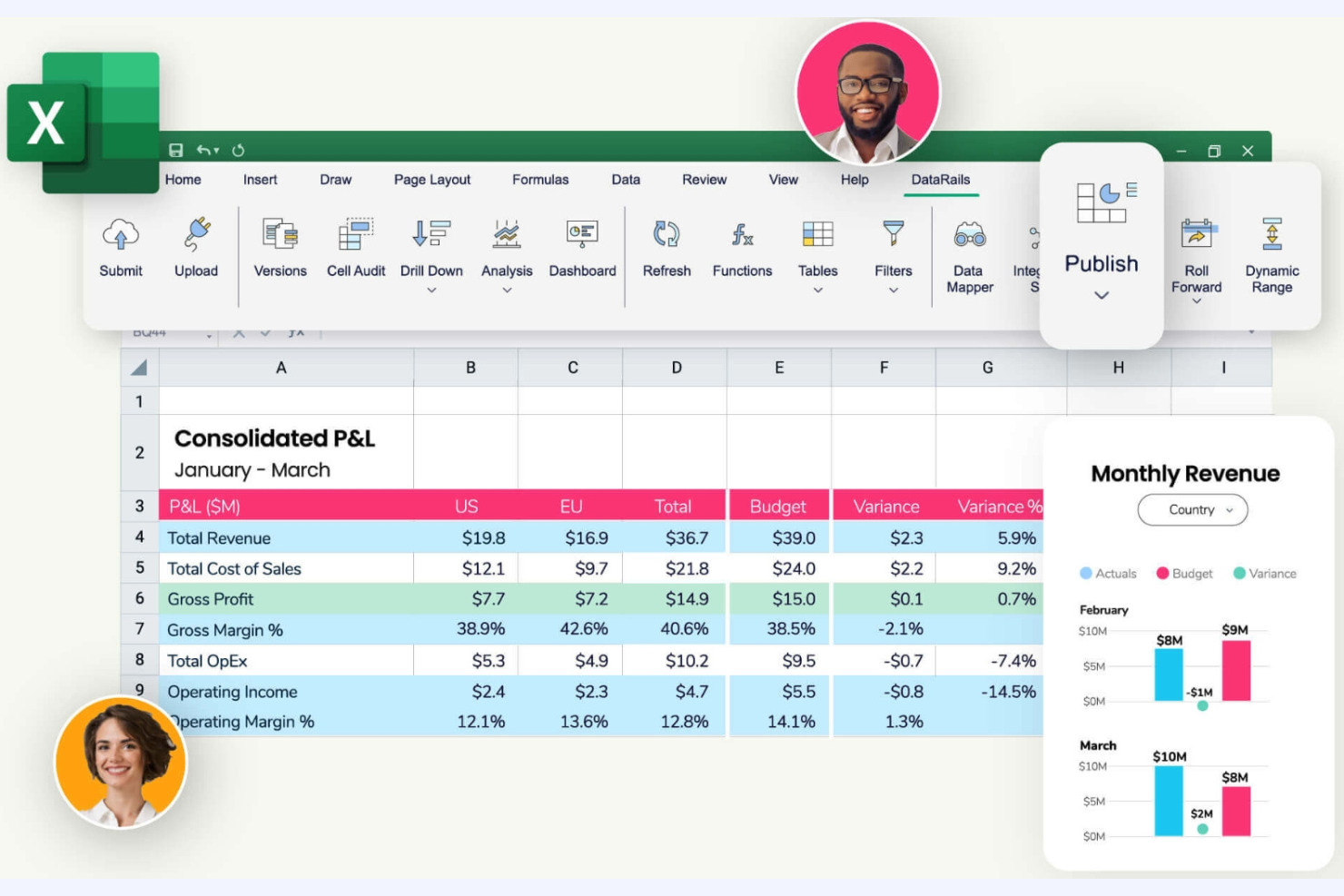
Datarails is a financial planning and analysis platform aimed at small to medium-sized businesses. It automates data management, making it easier for finance teams to work with their existing Excel spreadsheets.
Why I picked Datarails: It allows you to continue using Excel while enhancing its capabilities with automation. With features such as version control, you can manage complex financial data without leaving Excel. The audit trail ensures transparency, so your team can track changes easily. Datarails also offers customizable dashboards for real-time insights, making it ideal for users seeking more control.
Standout features and integrations:
Features include the ability to automate data consolidation, reducing manual errors and saving time. Customizable dashboards let you visualize information in real-time, providing insights at a glance. The audit trail feature helps track changes for better accountability.
Integrations include QuickBooks, Sage Intacct, NetSuite, Salesforce, Xero, Microsoft Dynamics, and more.
Pros and Cons
Pros:
- Audit trail for accountability
- Real-time data visualization
- Enhances Excel functionality
Cons:
- Requires Excel proficiency
- High starting price
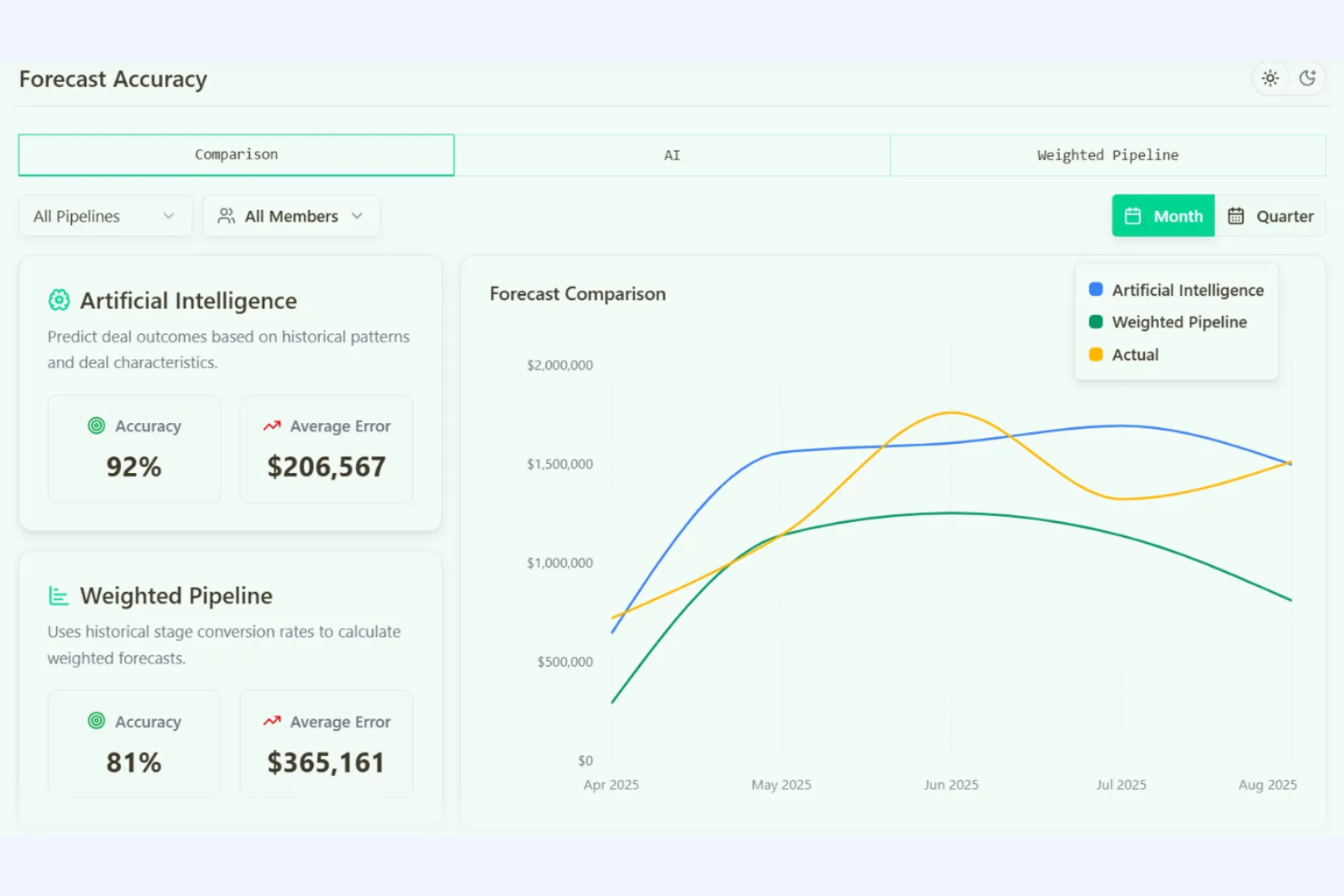
Forecastio is an AI-driven sales forecasting tool tailored for B2B teams using HubSpot. It provides precise sales predictions, making it ideal for sales teams looking to enhance their forecasting accuracy.
Why I picked Forecastio: It works well with HubSpot, allowing for quick data integration and accurate forecasting. The tool supports multiple forecasting methods, including weighted pipeline and time-series analysis, to suit different sales models. Its audit trail feature ensures accountability, while the what-if scenarios help you assess potential risks. Forecastio's rapid setup makes it easy for teams to start working with minimal onboarding.
Standout features and integrations:
Features include real-time updates that automate forecasts as deals progress, eliminating the need for manual spreadsheet updates. The audit trail and accuracy tracking features maintain logs of changes and compare forecasts with actual results for transparency. Scenario planning enables your team to model different outcomes and assess risks effectively.
Integrations include HubSpot.
Pros and Cons
Pros:
- Rapid setup
- Significant time savings
- High forecast accuracy
Cons:
- Users need to learn new techniques
- Limited to HubSpot users

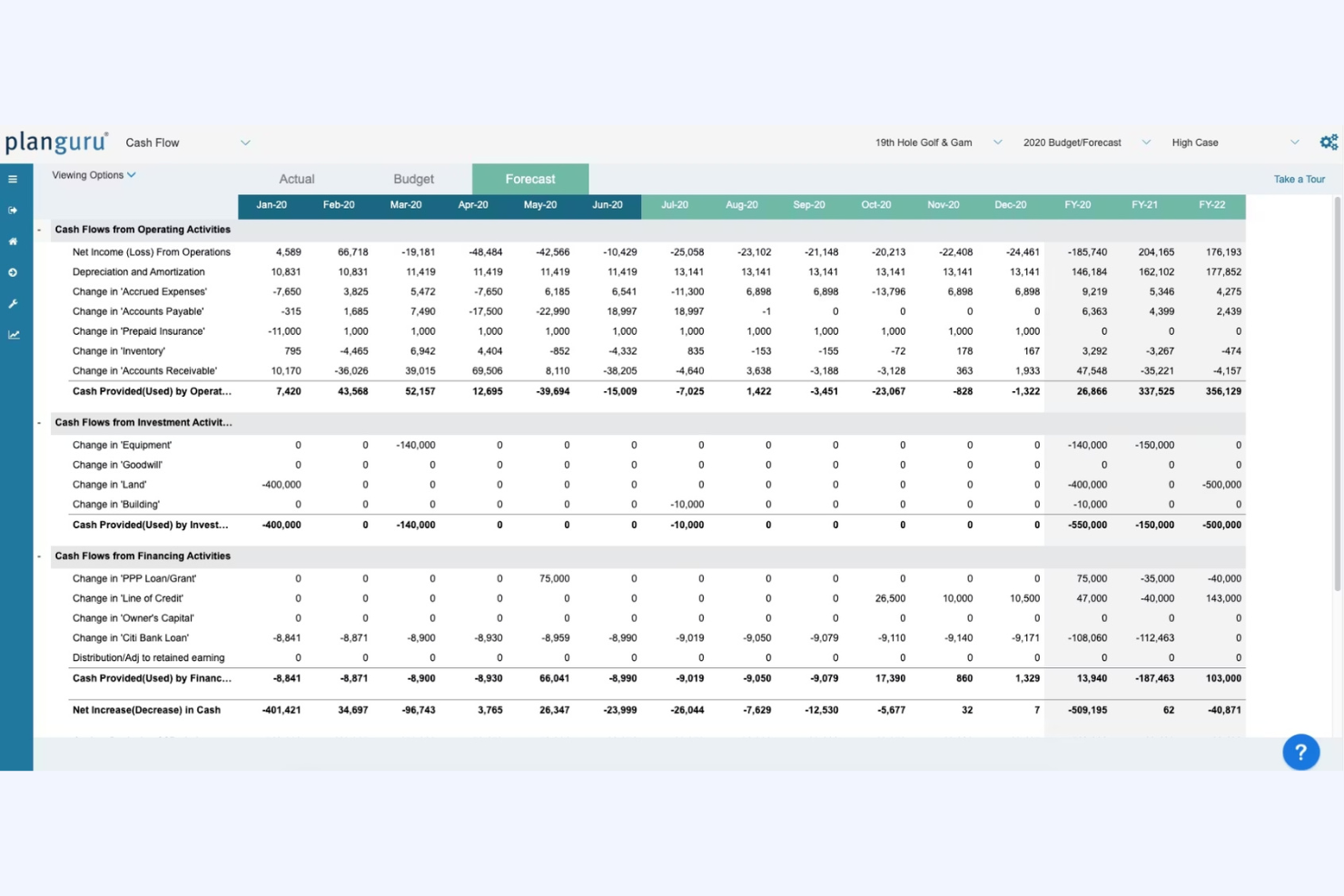
PlanGuru is a budgeting, forecasting, and financial analytics tool that helps businesses create forecasts and analyze their financial health.
Why I picked PlanGuru: It offers forecasting capabilities with more than 20 different methods. This flexibility allows you to tailor forecasts to your unique business needs. The platform includes a strategic planning tool that helps align your goals with your business objectives. PlanGuru's ability to handle multi-year projections makes it suitable for long-term planning.
Standout features and integrations:
Features include a strategic planning tool that aligns forecasts and goals. Multi-year forecasting capabilities allow you to plan for the long term. The rolling forecast feature keeps your projections up to date and relevant.
Integrations include QuickBooks Online, Xero, Microsoft Excel, and more.
Pros and Cons
Pros:
- Tailors to unique business needs
- Multi-year projections
- Advanced forecasting methods
Cons:
- May require additional training
- Requires financial expertise


Cube is financial forecasting software that supports planning processes. It connects directly with your existing spreadsheets, allowing for efficient data management and financial planning.
Why I picked Cube: Cube is designed for mid-sized companies that need a scalable solution for financial planning. It offers features such as real-time collaboration and version control, ensuring your team can work together efficiently. The platform's integration capabilities mean you can maintain familiarity while gaining enhanced functionality. Cube's ability to handle complex budgeting scenarios makes it ideal for businesses with more intricate financial needs.
Standout features and integrations:
Features include intuitive dashboards that provide a clear overview of financial performance. The real-time collaboration tool allows your team to work together without version conflicts. Cube also offers detailed reporting to help you analyze financial data effectively.
Integrations include Microsoft Excel, Google Sheets, QuickBooks, NetSuite, Sage Intacct, Salesforce, Xero, and more.
Pros and Cons
Pros:
- Scalable for growing businesses
- Detailed reporting capabilities
- Handles complex budgeting
Cons:
- Initial setup may require training for full use
- High starting price
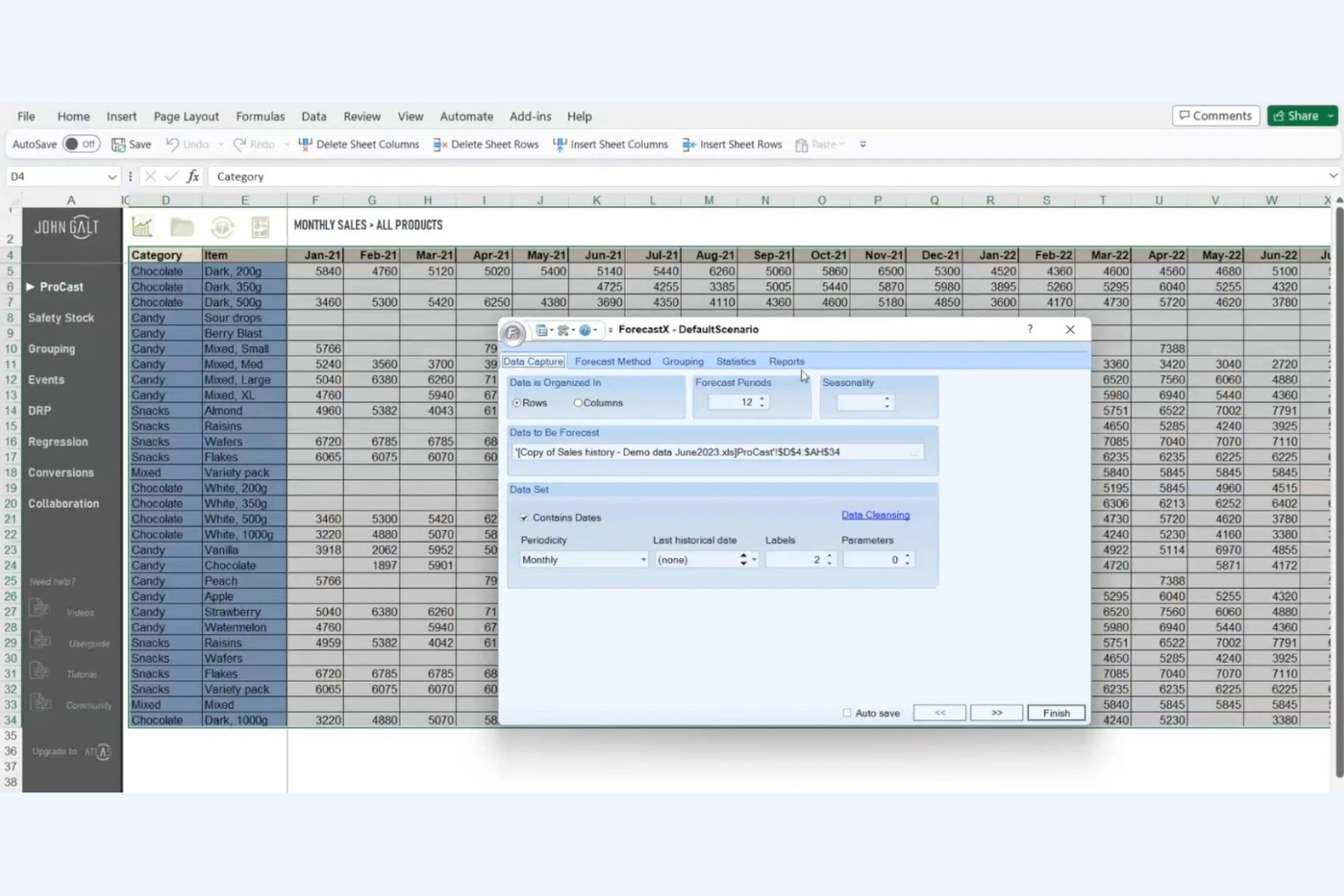
John Galt ForecastX helps businesses predict future trends based on statistical information. It's widely used by analysts and planners to enhance decision-making through data-driven insights.
Why I picked John Galt ForecastX: It excels in statistical forecasting, offering advanced analytics tools, statistical models, and customization to suit your business needs. Its focus on data accuracy ensures you can trust the insights you gain. With a user-friendly interface, even complex statistical methods become accessible to your team.
Standout features and integrations:
Features include statistical models that provide precise forecasting capabilities. The tool offers scenario analysis, enabling you to explore different business outcomes. Its intuitive interface simplifies complex data analysis, making it easier for your team to use.
Integrations include Microsoft Excel and possibly other systems via export/import or partner ecosystem.
Pros and Cons
Pros:
- Supports scenario analysis
- Customizable forecasting options
- Advanced statistical models
Cons:
- High learning curve for beginners
- Requires statistical knowledge

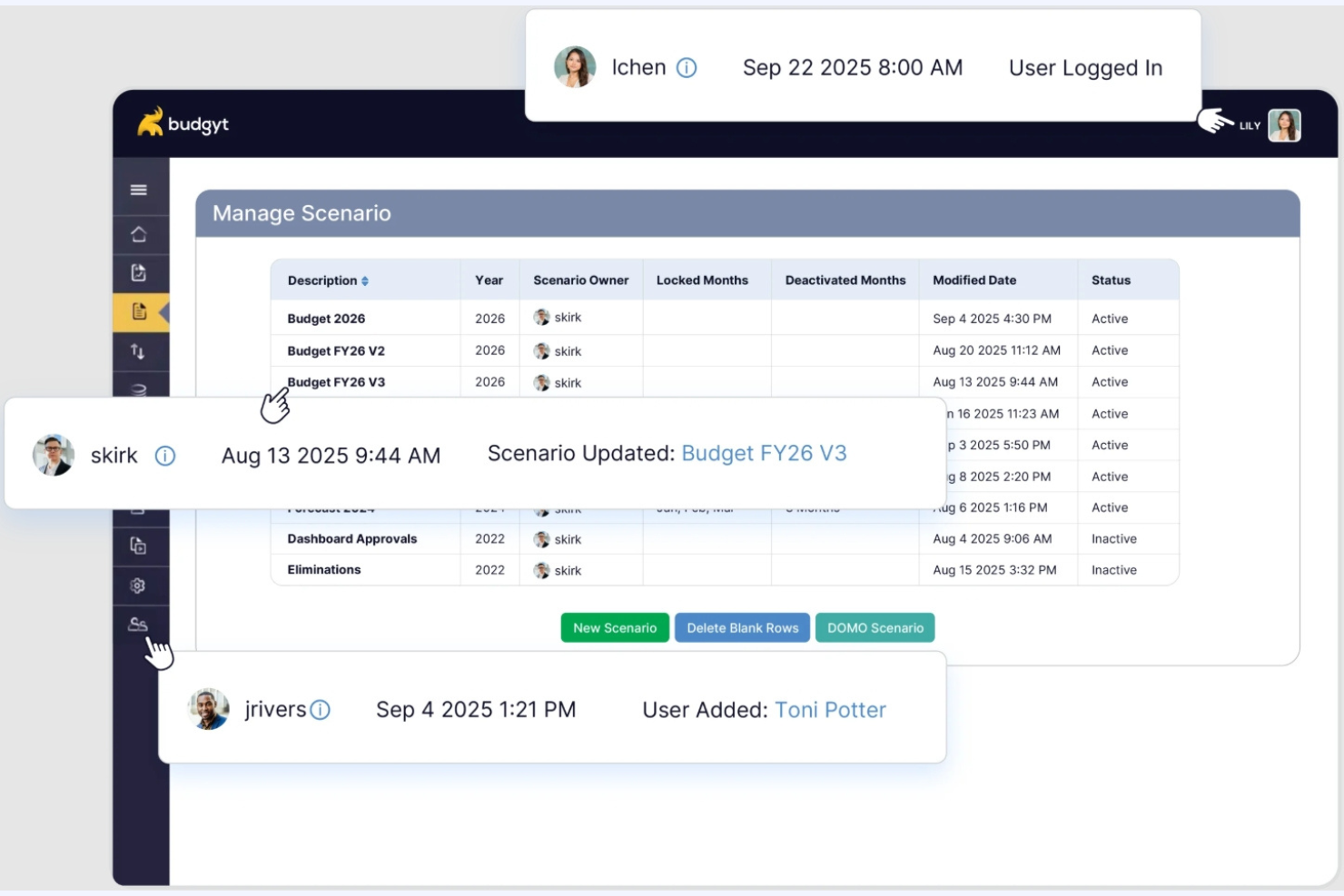
Budgyt is a budgeting and planning platform designed to help finance teams coordinate budgets across departments without relying on fragile spreadsheets. It provides a centralized environment where contributors can build, review, and update budgets within defined rules, giving finance clear oversight while enabling wider participation.
Why I picked Budgyt: Budgyt stands out for organizations that need many stakeholders involved in budgeting, but still want consistency and control. It allows departments to contribute directly to budgets without breaking models or formulas, while finance retains a single source of truth. Built-in variance analysis helps teams understand performance gaps quickly, and rolling forecasts make it easier to update plans as assumptions change. This makes Budgyt especially useful when budgeting is a shared responsibility rather than a finance-only task.
Standout features and integrations:
Features include driver-based formulas that keep assumptions consistent across departments, automated multi-department consolidation that eliminates manual rollups, and built-in audit trails that make changes transparent and review-ready.
Integrations include QuickBooks, Xero, NetSuite, Sage Intacct, Microsoft Dynamics, and more.
Pros and Cons
Pros:
- Extensive reporting tools
- Reduces Excel errors
- User-friendly interface
Cons:
- Steep learning curve
- Adjustment from Excel is occasionally needed


Forecasting Software for Small Businesses Selection Criteria
When selecting the best forecasting software for small businesses to include in this list, I considered common buyer needs and pain points such as accuracy in financial projections and ease of integration with existing systems. I also used the following framework to keep my evaluation structured and fair:
Core Functionality (25% of total score)
To be considered for inclusion in this list, each solution had to fulfill these common use cases:
- Create financial forecasts
- Generate budgeting reports
- Analyze cash flow
- Track key performance indicators
- Provide scenario planning
Additional Standout Features (25% of total score)
To help further narrow down the competition, I also looked for unique features, such as:
- Customizable dashboards
- Integration with CRM systems
- AI-driven insights
- Real-time collaboration
- Advanced data visualization
Usability (10% of total score)
To get a sense of the usability of each system, I considered the following:
- Intuitive interface design
- Easy navigation
- Minimal learning curve
- Responsive design for mobile use
- Clear and accessible help resources
Onboarding (10% of total score)
To evaluate the onboarding experience for each platform, I considered the following:
- Availability of training videos
- Access to interactive product tours
- Use of chatbots for guidance
- Provision of ready-to-use templates
- Scheduling of live webinars
Customer Support (10% of total score)
To assess each software provider's customer support services, I considered the following:
- Availability of 24/7 support
- Access to a deep knowledge base
- Response time for support queries
- Availability of live chat support
- Quality of support documentation
Value For Money (10% of total score)
To evaluate the value for money of each platform, I considered the following:
- Competitive pricing structure
- Flexibility in pricing plans
- Inclusion of essential features in the base plan
- Discounts for annual billing
- No hidden fees
Customer Reviews (10% of total score)
To get a sense of overall customer satisfaction, I considered the following when reading customer reviews:
- Overall user satisfaction ratings
- Frequency of positive feedback
- Consistency of performance praise
- Mention of reliable customer support
- Feedback on ease of use
How to Choose Forecasting Software for a Small Business
It's easy to get bogged down in long feature lists and complex pricing structures. To help you stay focused as you work through your unique software selection process, here's a checklist of factors to keep in mind:
| Factor | What to Consider |
|---|---|
| Scalability | Will the software grow with your business? Consider if it can handle increased data volume and more users without a drop in performance. |
| Integrations | Does it integrate with your existing tools? Ensure it connects smoothly with your accounting software, CRM, and other essential systems. |
| Customizability | Can you tailor the software to fit your processes? Look for options to adjust dashboards, reports, and workflows to match your unique needs. |
| Ease of use | Is it easy for your team to use? Evaluate the learning curve and whether the interface is intuitive enough for everyday use. |
| Implementation and onboarding | How quickly can you get started? Check for available resources such as training videos and templates to ease the transition. |
| Cost | Does the pricing fit your budget? Compare the cost against the features you need and look out for hidden fees or charges for extra services. |
| Security safeguards | Are your data and privacy protected? Ensure the software complies with industry standards and offers encryption and regular security updates. |
| Support availability | What support options are available? Consider the availability of customer service, including live chat, phone support, and online resources. |
What Is Forecasting Software for Small Businesses?
Forecasting software for small businesses is a tool that helps companies predict future financial outcomes by analyzing historical data and trends. These tools are typically used by financial analysts, accountants, and business owners who need to make informed decisions about budgeting and planning. Features such as data visualization, scenario analysis, and real-time updates help with understanding financial performance and planning for future needs. Overall, these tools provide valuable insights that aid in strategic decision-making and financial management.
Features
When selecting forecasting software for a small business, keep an eye out for the following key features:
- Data visualization: Displays financial data in easy-to-understand performance management charts and graphs, aiding in quick analysis and decision-making.
- Scenario analysis: Allows you to model different financial scenarios to understand potential sales data outcomes and plan accordingly.
- Real-time updates: Provides current data and forecasts, helping you make timely and informed decisions.
- Customizable dashboards: Let you tailor the interface to show the most relevant metrics and reports for your stakeholders.
- Automated reporting: Generates reports automatically, saving time and reducing manual errors in financial analysis.
- Integration capabilities: Connect with other tools such as accounting software, ERPs, and CRMs, ensuring all-in-one data flow and accuracy.
- Multi-year forecasting: Supports long-term planning by allowing projections over several years.
- Security safeguards: Protect sensitive financial statement information with encryption and compliance with industry standards.
- Collaboration tools: Enable team members to work together on forecasts and share insights easily.
- User-friendly interface: Ensures that even those without a financial background can navigate and use the software effectively.
Benefits
Implementing forecasting software for small businesses provides several benefits for your team and your business. Here are a few you can look forward to:
- Improved decision-making: Access to real-time data and scenario analysis helps your team make informed financial decisions quickly.
- Time savings: Automated reporting and data visualization reduce the time spent on manual data entry in accounting systems.
- Enhanced accuracy: With integration capabilities and real-time updates, you can trust the accuracy of your financial forecasting process.
- Better financial planning: Multi-year forecasting allows you to plan for the long term, aligning your financial goals with business strategies.
- Increased collaboration: Collaboration tools enable your team to work together efficiently, sharing balance sheet insights and forecasts easily.
- Cost efficiency: By optimizing financial planning and reducing errors, you can manage resources more effectively and reduce unnecessary expenses.
Costs and Pricing
Selecting forecasting software for startups and small businesses requires an understanding of the various pricing models and cloud-based plans available. Costs vary based on features, team size, add-ons, and more. The table below summarizes common plans, their average prices, and typical features included in forecasting software for small business solutions:
Plan Comparison Table for Forecasting Software for a Small Business
| Plan Type | Average Price | Common Features |
|---|---|---|
| Free Plan | $0 | Basic forecasting tools, limited data visualization, and basic reporting. |
| Starter Plan | $10-$30/user/month | Enhanced data visualization, scenario analysis, and integration with basic accounting software. |
| Growth Plan | $50-$100/user/month | Advanced reporting, real-time collaboration, multi-year forecasting, and customizable dashboards. |
| Advanced Plan | $150-$300/user/month | Extensive integrations, advanced security features, priority support, and extensive customization options. |
Forecasting Software for Small Business FAQs
Here are some answers to common questions about forecasting software for small businesses:
How can forecasting software improve cash flow planning for small businesses?
Forecasting software helps you project cash inflows and outflows, giving you clearer insight into your business’s future liquidity. By spotting trends and timing gaps in revenue or expenses, you can make more informed decisions and prevent cash shortfalls. It makes it easier to plan for investments, manage expenses, and handle unexpected costs.
How often should I update my forecasts using small business forecasting tools?
You should update your forecasts at least monthly, but many CFOs choose to do it more frequently if there are significant changes in sales, costs, or market conditions. Regular updates ensure your projections reflect current realities and help you react quickly to business shifts. Consistent updates support better board reporting and financial planning.
Can forecasting software help identify financial risks for my business?
Yes, forecasting software can highlight potential financial risks by analyzing cash flow gaps, unexpected expense spikes, or falling revenues. Many tools flag issues early, letting you address problems before they escalate. You can also use scenario planning features to test different outcomes and prepare for best- and worst-case scenarios.
What's Next:
If you're in the process of researching forecasting software for a small business, connect with a SoftwareSelect advisor for free recommendations.
You fill out a form and have a quick chat where they get into the specifics of your needs. Then you'll get a shortlist of software to review. They'll even support you through the entire buying process, including price negotiations.