

10 Best Internal Audit Management Software Picked for 2026

Internal Audit Management Software Shortlist


When everything is scattered, audits can easily turn into last-minute scrambles for evidence, unclear ownership, and reporting that never quite feels audit-ready. Internal audit management software helps you plan, execute, and track audits while keeping compliance and documentation in one place.
I have worked with audit and compliance teams and reviewed dozens of tools, and I know how quickly “simple” audits turn into messy fire drills when systems do not talk to each other.
In this guide, I break down the top internal audit management software for 2026, so you can compare features, cut the manual work, and choose a system that actually holds up under real audit pressure.
Why Trust Our Software Recommendations
Our team has been testing and reviewing software since 2012. As finance leaders ourselves, we know how difficult—and important—it is to choose the right software.
For this guide, we evaluated tools using hands-on testing and independent research, scoring tools using our selection criteria.
Our reviews reflect our human editorial judgment, not a sales pitch.
Internal Audit Management Software Comparison Table
This comparison table outlines pricing for my internal audit management software selections to help you compare options based on budget and business needs.
| Tool | Best For | Trial Info | Price | ||
|---|---|---|---|---|---|
| 1 | Best for regulatory compliance tracking | Free demo available | Pricing upon request | Website | |
| 2 | Best for large enterprise audit workflows | Free demo available | Pricing upon request | Website | |
| 3 | Best for evidence collection workflows | Free demo available | Pricing upon request | Website | |
| 4 | Best for incident-to-audit linkage | Free demo available | Pricing upon request | Website | |
| 5 | Best for integrated GRC capabilities | Free demo available | Pricing upon request | Website | |
| 6 | Best for customizable audit frameworks | Free demo available | Pricing upon request | Website | |
| 7 | Best with ERP system integration | Free demo available | Pricing upon request | Website | |
| 8 | Best for audit process automation | Not available | Pricing upon request | Website | |
| 9 | Best for board-level reporting needs | Free demo available | Pricing upon request | Website | |
| 10 | Best for real-time risk visibility | Free demo available | Pricing upon request | Website |
Internal Audit Management Software Reviews
Below are my detailed summaries of the internal audit management software that made it onto my shortlist. My reviews offer a detailed look at the features, best use cases, and integrations of each platform to help you find the best one for you.

SAI360
Best for regulatory compliance tracking
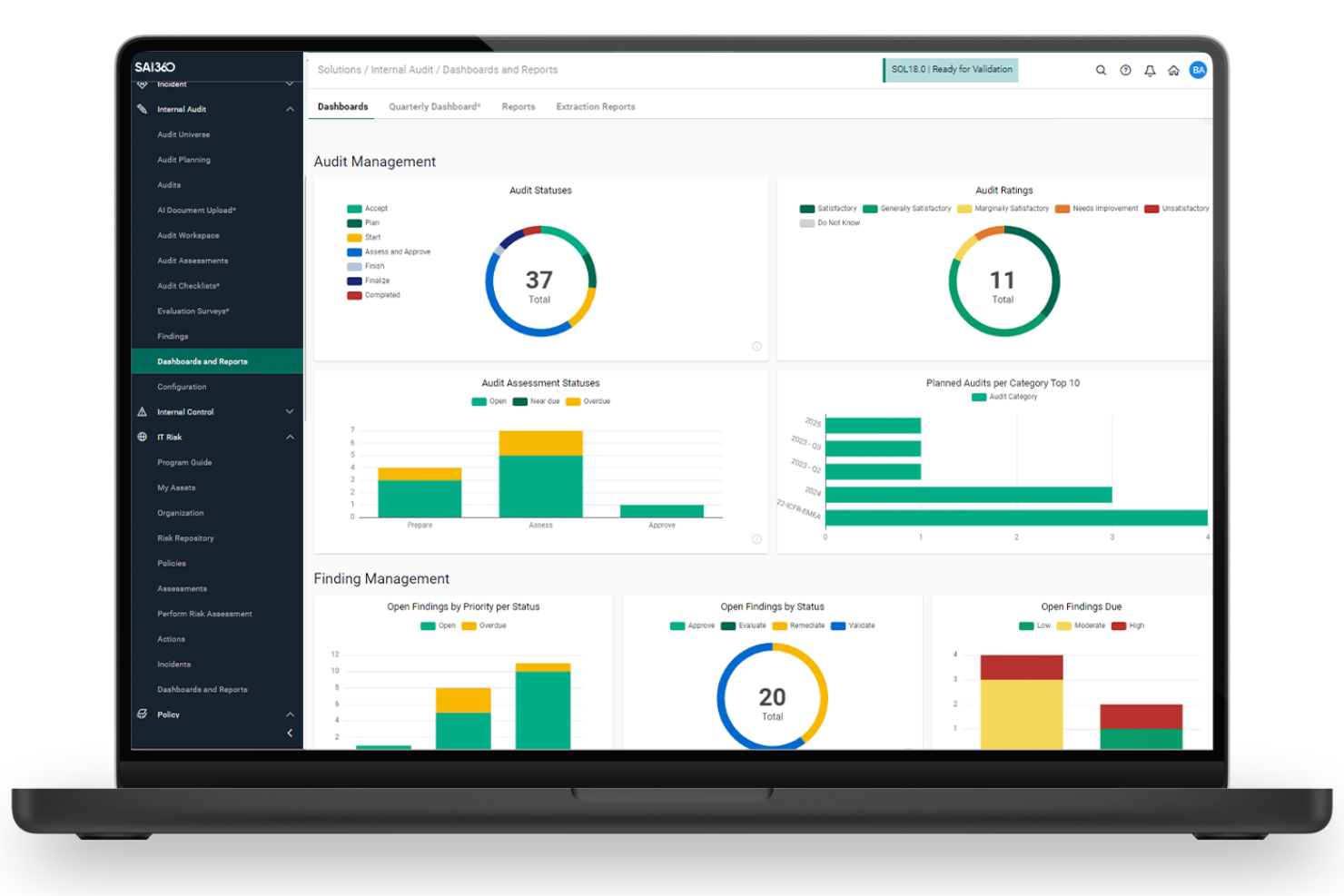
SAI360 is built for organizations that need to manage complex regulatory compliance and risk requirements alongside their internal audits. This platform is especially useful for highly regulated industries like healthcare, financial services, and energy, where tracking evolving regulations is a constant challenge. Its integrated approach helps audit teams centralize compliance data, automate evidence collection, and stay ahead of regulatory changes.
Why I Picked SAI360
For audit teams that need to keep pace with shifting regulatory demands, SAI360 offers a focused solution for compliance tracking within internal audit management. I picked SAI360 for its strong focus on regulatory compliance alongside audit management. I liked how it connects audit activities directly to regulatory requirements, making it easier to demonstrate compliance. Its regulatory content and change tracking help teams stay up to date with evolving standards. This makes it a solid choice for organizations operating in heavily regulated industries.
SAI360 Key Features
In addition to its compliance tracking strengths, SAI360 offers several other features for audit teams:
- Automated Workflow Management: Configure and automate audit workflows to match your organization’s processes.
- Risk Assessment Tools: Score and prioritize risks using built-in assessment modules.
- Document Management: Store, organize, and version audit evidence and supporting documents.
- Customizable Dashboards: Build dashboards to visualize audit status, findings, and trends.
SAI360 Integrations
Integrations include Workday, ADP, BambooHR, Slack, Oracle, SAP, Salesforce, ServiceNow, Microsoft 365, and SharePoint.
Pros and Cons
Pros:
- Customizable dashboards provide visibility into audit status and findings
- Built-in risk assessment tools support audit prioritization
- Regulatory mapping links audits directly to compliance requirements
Cons:
- Reporting customization may require additional support
- User permissions setup can be complex to manage

Workiva
Best for large enterprise audit workflows
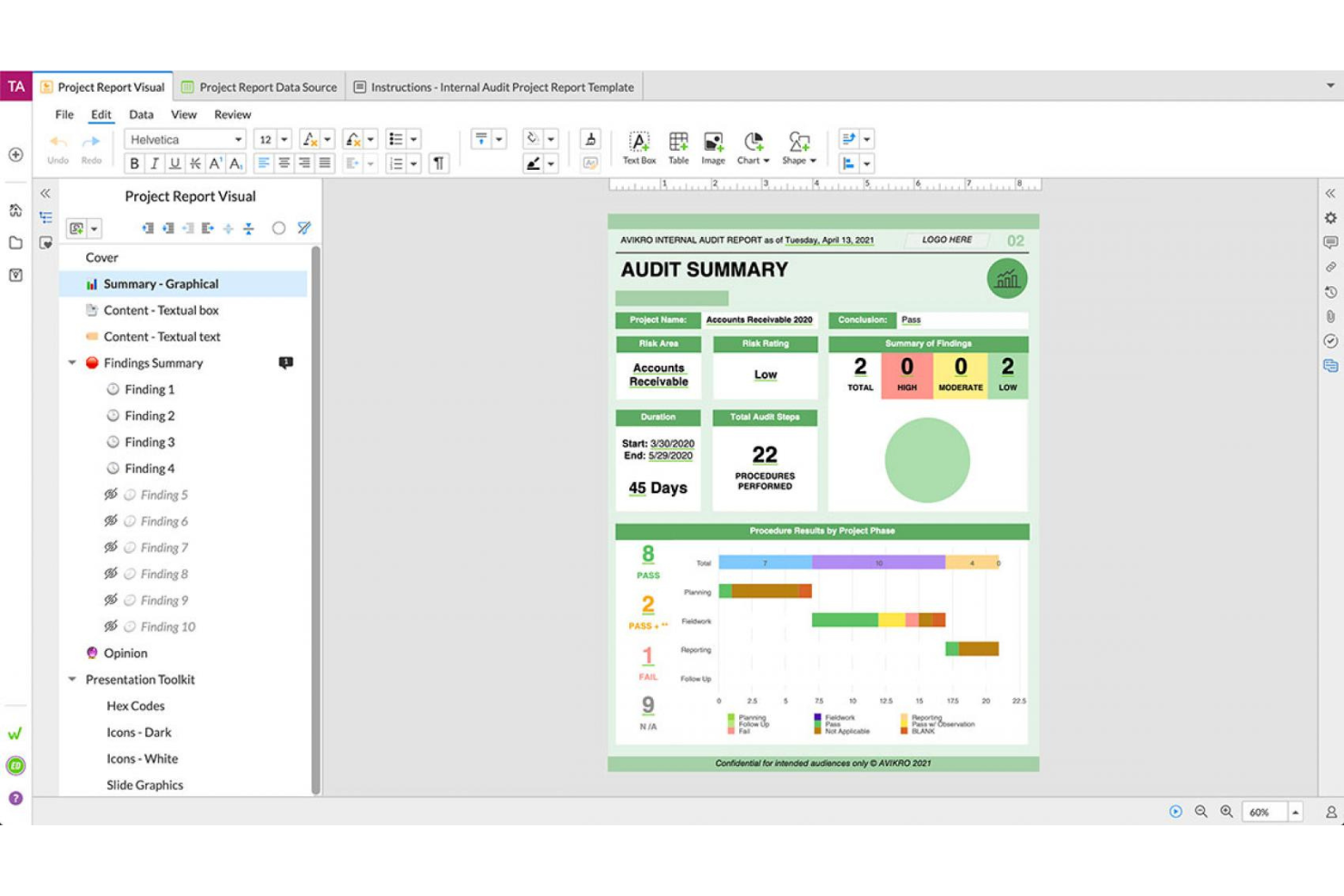
Workiva is designed for audit teams in large enterprises that need to manage complex, multi-entity audit workflows. The platform connects audit planning, execution, and reporting in a single environment, helping you coordinate across departments and maintain compliance. If your organization faces demanding regulatory requirements and high volumes of audit data, Workiva offers tools to centralize and automate your processes.
Why I Picked Workiva
I chose Workiva because it’s built to handle the scale and complexity of large enterprise audit workflows. The platform supports multi-entity audit planning and execution, letting you coordinate audits across different business units and geographies. I also appreciate how Workiva’s workflow automation tools help standardize processes and ensure consistent documentation. Its real-time collaboration features also make it easier for large teams like mine to manage findings, track issues, and maintain compliance across the organization.
Workiva Key Features
Some other features in Workiva that support audit teams include:
- Audit Analytics: Run data-driven tests and analyses directly within the platform to identify anomalies and trends.
- Issue Management: Track, assign, and resolve audit findings with built-in workflows and status updates.
- Document Management: Store, organize, and version-control all audit documentation in a secure, centralized repository.
- Role-Based Access Controls: Set granular permissions for users and teams to protect sensitive audit information.
Workiva Integrations
Integrations include SAP, Oracle, Microsoft Office 365, NetSuite, Workday, Salesforce, Coupa, BlackLine, Trintech, and an API for custom integrations.
Pros and Cons
Pros:
- Automated audit trail and documentation tracking
- Real-time collaboration for distributed audit teams
- Supports multi-entity and global audit workflows
Cons:
- Implementation can be lengthy for large teams
- Pricing is not transparent or public

Best for evidence collection workflows
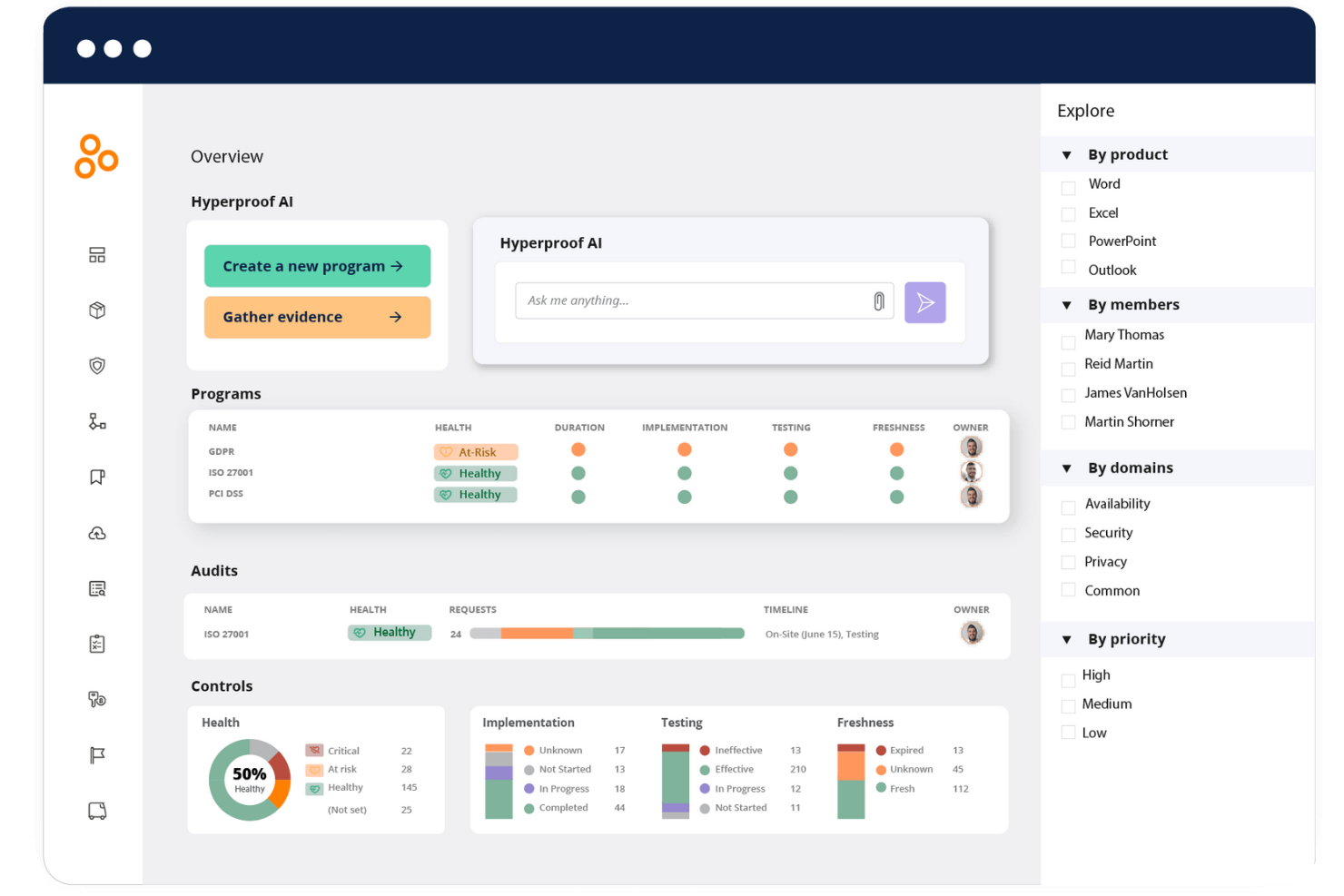
Hyperproof is designed for audit and compliance teams that need to manage evidence collection across multiple frameworks and audits. The platform appeals to organizations with complex regulatory requirements, especially those juggling SOC 2, ISO 27001, or HIPAA. Its workflow-driven approach helps teams centralize, track, and automate evidence gathering, reducing manual follow-up and audit fatigue.
Why I Picked Hyperproof
I picked Hyperproof because it focuses heavily on evidence collection and management. I liked how it centralizes evidence and allows teams to map it across multiple controls and frameworks. Its task tracking and reminders help keep audits on schedule without constant manual follow-up. This makes it particularly useful for teams managing recurring audits across multiple compliance standards.
Hyperproof Key Features
In addition to its evidence collection workflows, Hyperproof offers several other features worth noting:
- Framework Library: Access a built-in library of compliance frameworks to quickly align your audits with industry standards.
- Task Management: Assign, track, and manage audit-related tasks within the platform.
- Risk Register: Maintain a centralized log of risks and link them to controls and audit activities.
- Audit Trail: View a detailed history of changes and actions taken on evidence and controls.
Hyperproof Integrations
Integrations include Slack, Snowflake, Splunk, Square Payroll, Tenable, Trinet, Ultipro, Zendesk, Zenefits, and Zoom.
Pros and Cons
Pros:
- Audit trails provide visibility into evidence activity
- Automated reminders keep audit tasks on track
- Centralized evidence management supports multi-framework audits
Cons:
- Reporting templates offer limited customization
- No mobile app for conducting audits in the field

Resolver
Best for incident-to-audit linkage
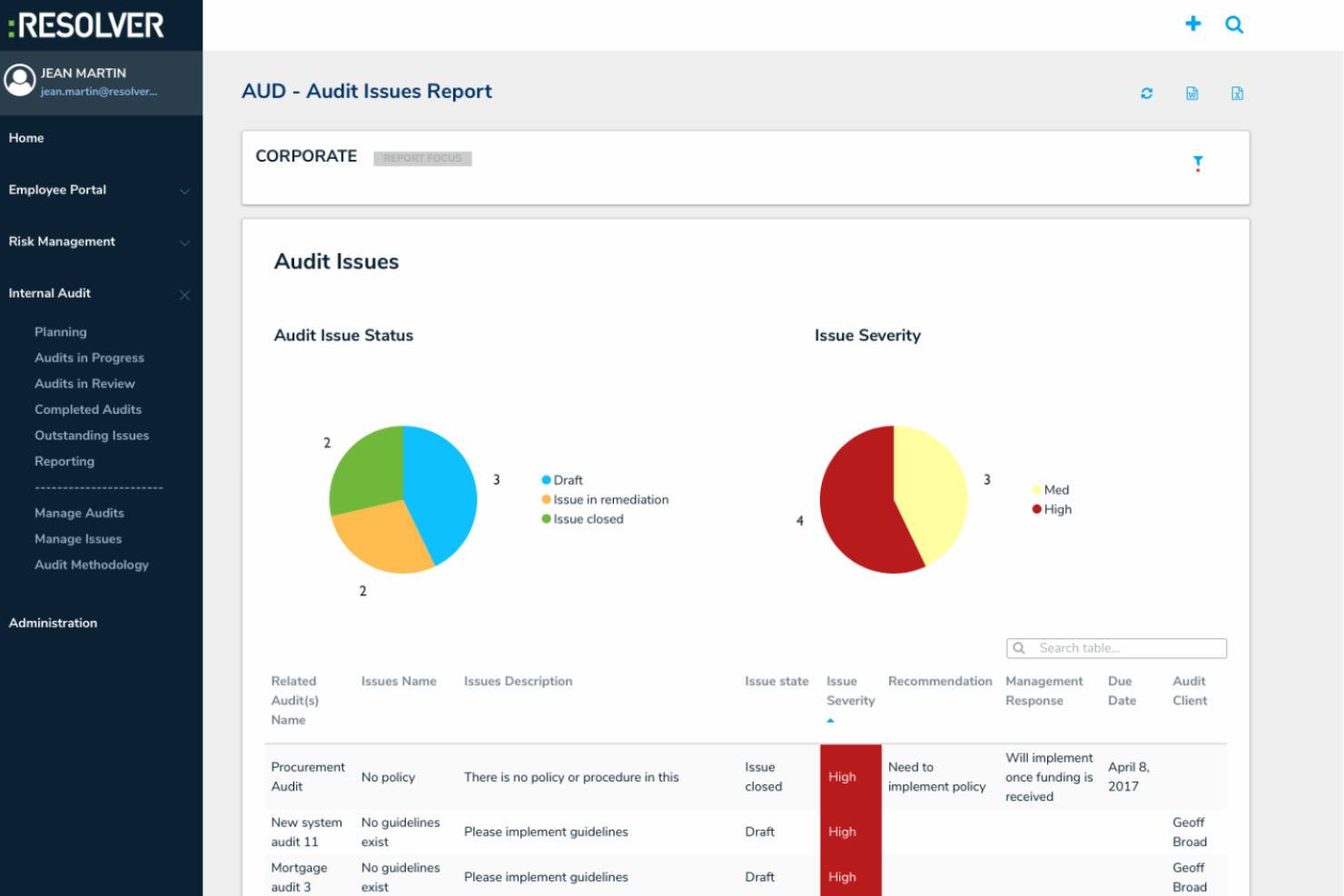
Resolver stands out for audit teams that need to connect incident management directly to their audit processes. This platform is especially useful for organizations in industries like financial services, healthcare, and manufacturing, where tracking the lifecycle from incident to remediation is essential. By linking incidents, risks, and audits in one system, Resolver helps teams identify root causes and strengthen controls based on real-world events.
Why I Picked Resolver
What drew me to Resolver is its ability to connect incident management directly with internal audit activities. The platform lets you link incidents, risks, and audit findings in a single workflow, so you can trace issues from initial report through to remediation and audit closure. I appreciate how Resolver’s incident-to-audit linkage helps audit teams identify patterns and root causes, making it easier to prioritize audits based on real operational events. This approach is especially valuable for organizations that want to strengthen controls and demonstrate a clear response to incidents within their audit process.
Resolver Key Features
Some other features that make Resolver useful for audit teams include:
- Automated Audit Scheduling: Set up recurring or one-time audit schedules with automated reminders.
- Customizable Audit Templates: Build and reuse audit templates tailored to your organization’s requirements.
- Real-Time Reporting: Generate and share audit reports with up-to-date data and visualizations.
- Role-Based Access Controls: Assign permissions and restrict access based on user roles and responsibilities.
Resolver Integrations
Integrations are not listed.
Pros and Cons
Pros:
- Real-time reporting provides up-to-date audit insights
- Customizable templates support different audit frameworks
- Links incidents directly to audit findings for better root cause analysis
Cons:
- Audit report formatting options are somewhat limited
- Workflow setup can take time to fully configure

Best for integrated GRC capabilities
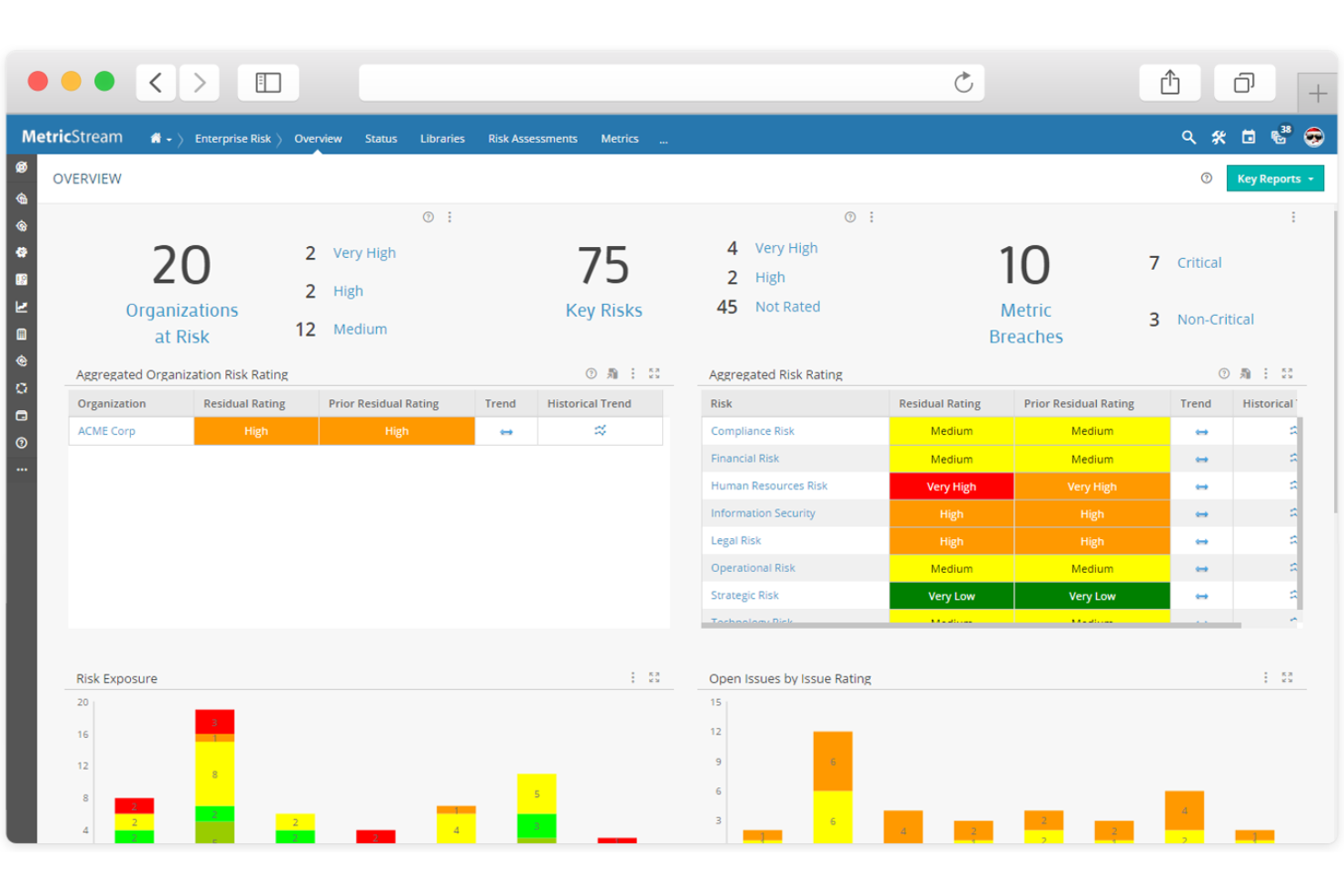
MetricStream brings together audit, risk, and compliance management into a single platform designed for organizations with complex governance needs. It’s a strong fit for teams that want to connect internal audit processes with broader GRC activities, such as risk assessments and policy management. If your business needs unified oversight and reporting across multiple risk and compliance functions, MetricStream offers integrated workflows and analytics to support that.
Why I Picked MetricStream
I appreciate MetricStream’s ability to connect internal audit with broader governance, risk, and compliance activities, and it especially stands out for its integrated GRC capabilities. The platform links are helpful for audit planning, execution, and reporting with risk assessments and policy management, so I can manage everything in one place. I picked MetricStream because its unified workflows help me to coordinate audit findings with enterprise risk and compliance requirements. This approach supports organizations that want to break down silos and create a single source of truth for all GRC activities.
MetricStream Key Features
Some other features that MetricStream offers for audit teams include:
- Automated Issue Tracking: Track, assign, and monitor audit issues from identification through resolution within the platform.
- Customizable Audit Templates: Use and adapt pre-built templates for different audit types and industry requirements.
- Mobile Audit App: Conduct audits, collect evidence, and complete checklists directly from a mobile device.
- Real-Time Analytics Dashboards: Visualize audit progress, findings, and trends with configurable dashboards and reporting tools.
MetricStream Integrations
Integrations include SAP, Oracle, Salesforce, Microsoft Dynamics, Workday, ServiceNow, Tableau, Power BI, Jira, and NetSuite.
Pros and Cons
Pros:
- Offers configurable audit templates for industries
- Supports multi-language and multi-entity audits
- Centralizes audit, risk, and compliance workflows
Cons:
- Custom report building requires technical support
- Navigation can be complex for new users

Archer
Best for customizable audit frameworks
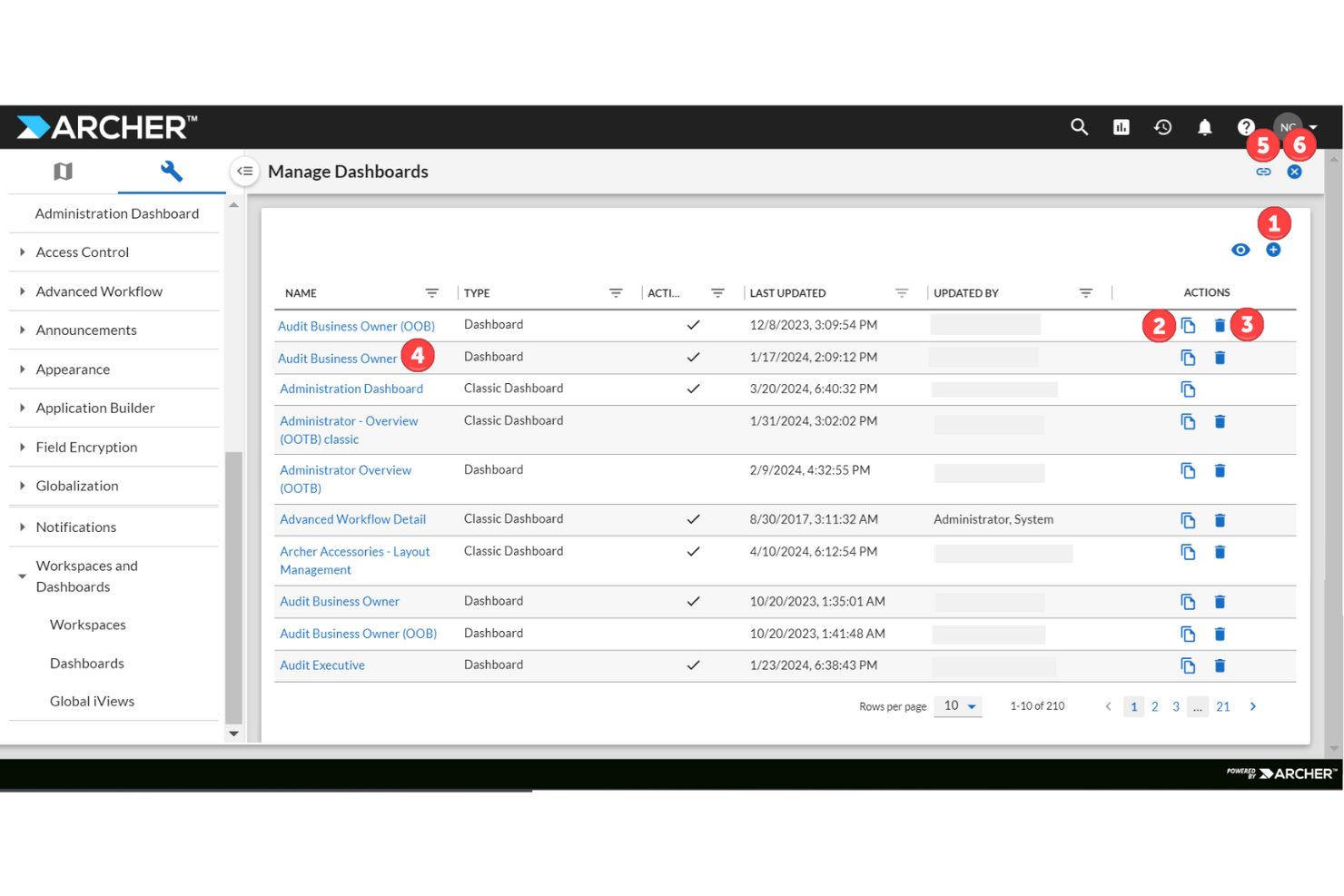
Archer gives audit teams the flexibility to build and customize audit frameworks that fit their organization’s unique risk landscape. It’s especially useful for large enterprises and regulated industries that need to align audit processes with complex internal controls and compliance standards. With Archer, you can adapt workflows and reporting to match evolving audit requirements and business priorities.
Why I Picked Archer
Archer stands out for teams that need to design highly customizable audit frameworks tailored to their organization’s risk and compliance needs. I picked Archer because of how much control it gives teams to design their own audit frameworks. I liked how you can configure workflows, scoring models, and reporting structures to match internal policies and regulatory requirements. Its audit universe management is especially useful for keeping track of auditable entities and associated risks. This level of customization makes it a strong fit for organizations with complex governance structures.
Archer Key Features
In addition to its customization capabilities, Archer offers several other features for audit teams:
- Automated Evidence Collection: Gather and organize supporting documentation directly within the platform.
- Role-Based Access Controls: Assign permissions and restrict access based on user roles and responsibilities.
- Issue and Exception Management: Track, document, and resolve audit findings and exceptions in a structured workflow.
- Audit Universe Management: Maintain a centralized inventory of all auditable entities and related risk data.
Archer Integrations
Integrations are not specified on their website.
Pros and Cons
Pros:
- Automated evidence collection supports consistent audit documentation
- Audit universe management centralizes the tracking of auditable entities
- Highly customizable workflows support complex audit and compliance needs
Cons:
- User interface updates are less frequent than those of some competitors
- Configuration can require significant setup effort

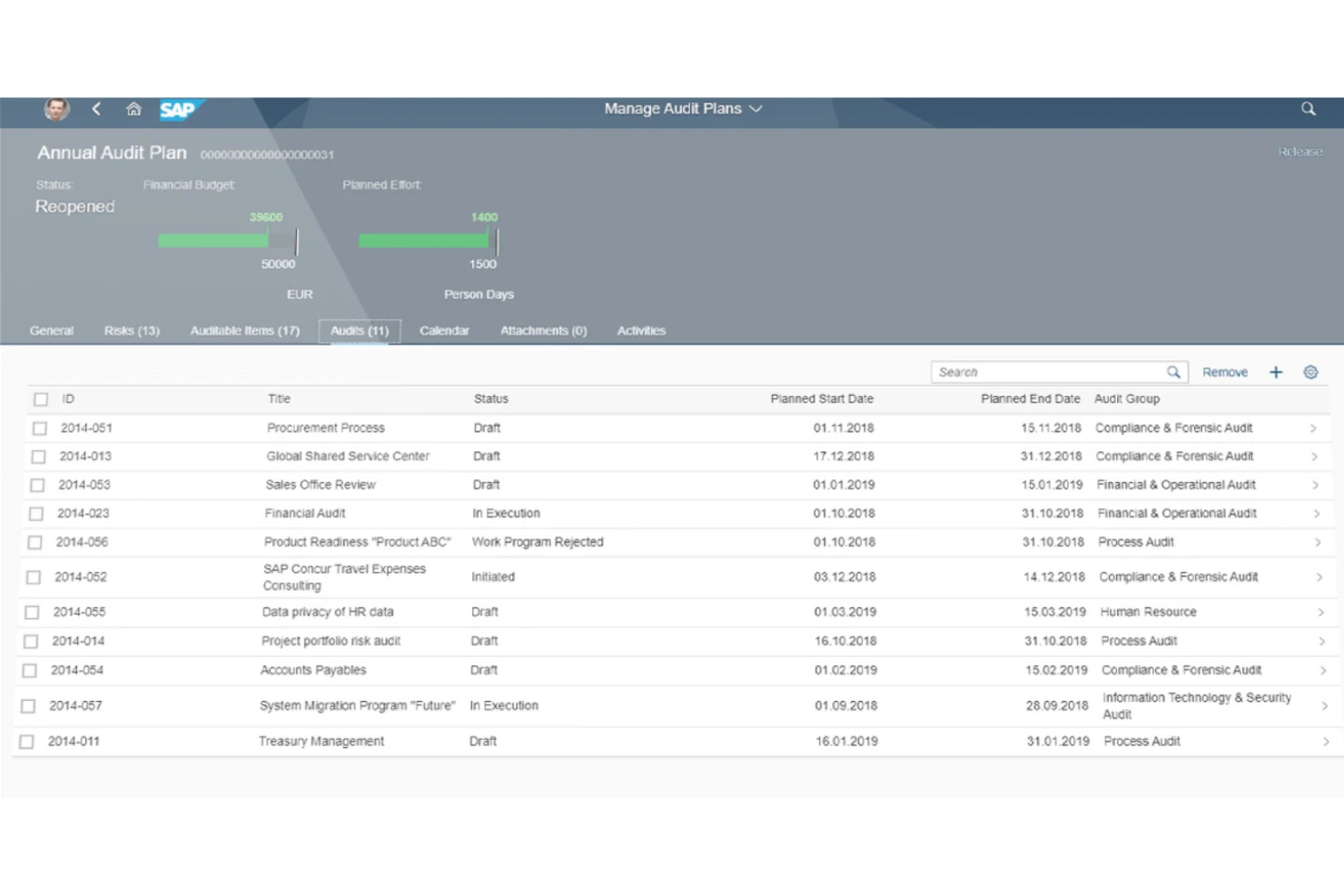
SAP Audit Management is designed for organizations that want to connect audit processes directly with their SAP ERP and financial systems. This tool is a strong fit for large enterprises and global businesses that need to manage audits across complex, integrated environments. Leveraging native SAP integration, it helps audit teams access real-time data and automate workflows within the broader SAP ecosystem.
Why I Picked SAP Audit Management
I picked SAP Audit Management because of its tight alignment with SAP environments. I liked how it allows audit teams to work directly with financial and operational data from SAP systems, which improves accuracy in audit planning and execution. Its template-driven approach and workflow automation also help standardize recurring audits. This makes it especially effective for organizations already operating within the SAP ecosystem.
SAP Audit Management Key Features
Some other features that make SAP Audit Management useful for audit teams include:
- Mobile Audit Capabilities: Conduct and document audits from mobile devices in the field.
- Issue and Action Tracking: Assign, monitor, and follow up on audit findings and remediation tasks.
- Template-Based Audit Planning: Use standardized templates to plan and schedule recurring audits.
- Role-Based Dashboards: Provide tailored dashboards for different user roles to monitor audit progress and status.
SAP Audit Management Integrations
Integrations include SAP Risk Management, SAP Process Control, and SAP Business Integrity Screening.
Pros and Cons
Pros:
- Integrated workflows align audit activities with business operations
- Template-based planning supports repeatable audit processes
- Direct access to SAP data improves audit accuracy and context
Cons:
- Custom reporting setup may require technical expertise
- Best suited for organizations already using SAP systems

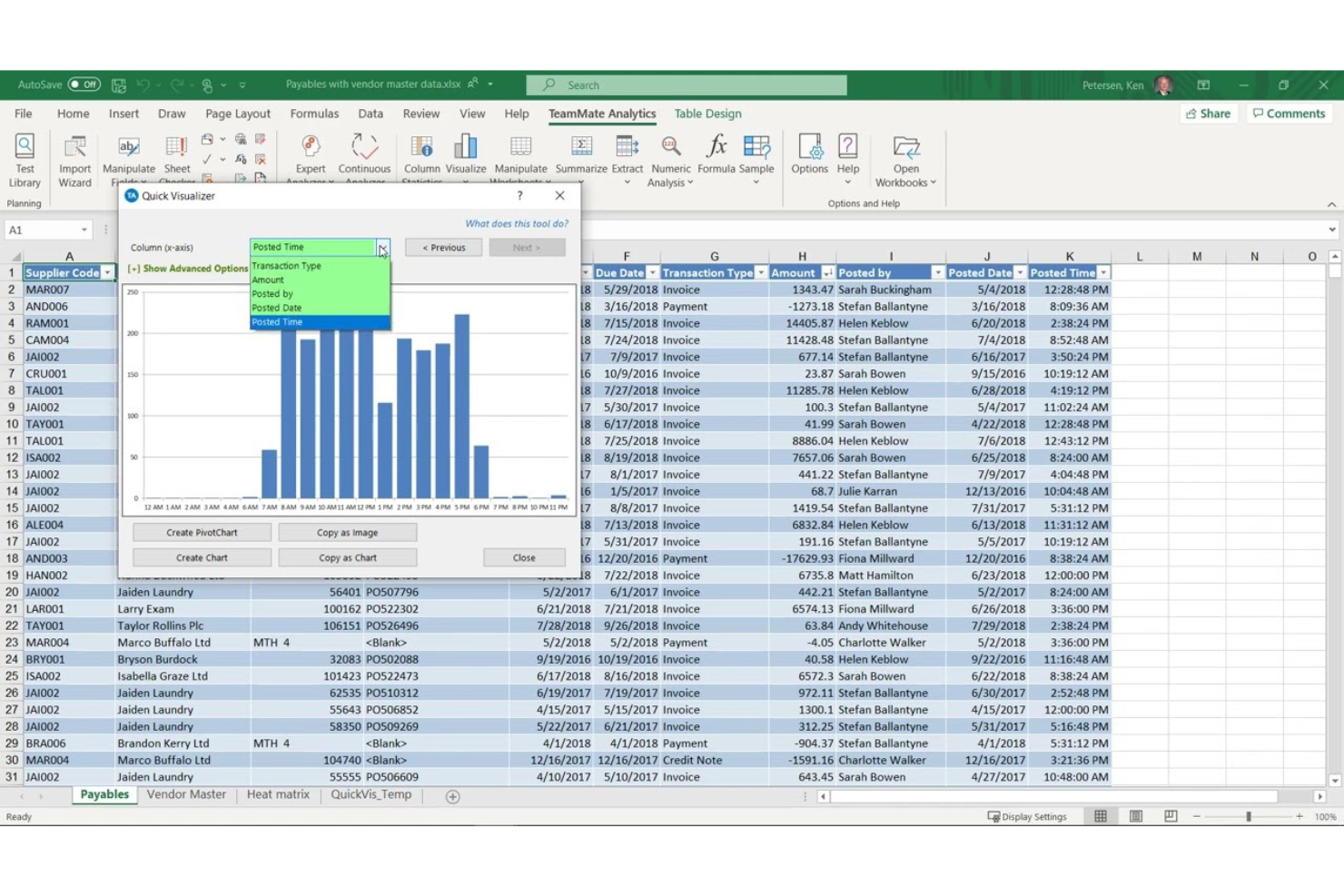
If you’re looking to automate and standardize your audit processes, TeamMate offers a specialized platform built for audit professionals. It’s designed for organizations that want to digitize workflows, manage documentation, and track audit progress from planning through reporting. TeamMate is especially useful for teams aiming to reduce manual work and improve audit consistency across departments or locations.
Why I Picked TeamMate
I picked TeamMate for its clear focus on automating the audit lifecycle. I liked how it handles scheduling, tracking, and follow-ups in a structured way, which helps reduce manual coordination. I picked TeamMate because it also provides automated issue tracking and reminders, helping audit teams stay on top of deadlines and action items. These automation features make it a strong choice for organizations that want to streamline repetitive audit tasks and maintain consistency across multiple audits.
TeamMate Key Features
Some other features that TeamMate offers for audit teams include:
- Risk Assessment Tools: Score and prioritize risks to guide audit planning and resource allocation.
- Document Management: Store, organize, and version audit documents within a centralized repository.
- Time Tracking: Log and monitor time spent on audit tasks and projects.
- Customizable Reporting: Build and tailor audit reports to meet organizational and regulatory requirements.
TeamMate Integrations
TeamMate offers a suite of APIs for custom integrations, including the Reporting API, Data Exchange API, Event Monitoring API, and Identity Provider API. Native integrations with specific third-party vendors are not currently listed.
Pros and Cons
Pros:
- Provides an audit trail for all user actions
- Offers configurable audit templates and workflows
- Includes built-in risk assessment modules
Cons:
- Mobile app functionality is limited
- No public marketplace for third-party integrations

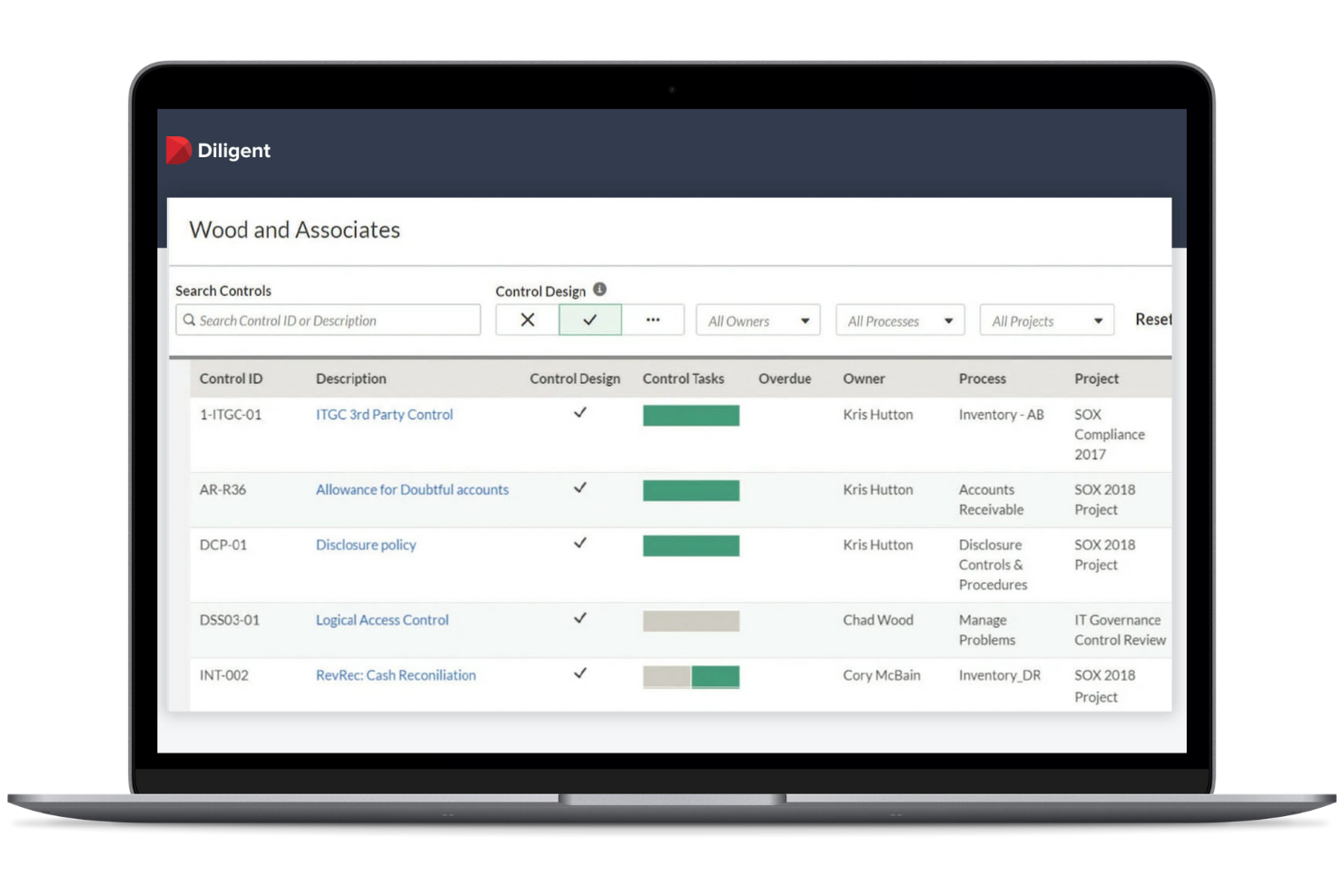
Diligent is designed for audit teams that need to deliver clear, actionable insights to executive leadership and boards. It’s especially useful for organizations that prioritize board-level reporting, risk visibility, and real-time dashboards. Diligent helps audit professionals connect audit findings to strategic objectives and communicate results in a format that decision-makers can use.
Why I Picked Diligent
I picked Diligent because it’s particularly strong when it comes to board-level reporting and executive visibility. I liked how it translates audit data into clear dashboards and reports that leadership can actually use. Its real-time risk monitoring also helps ensure stakeholders stay informed about emerging issues. This makes it well-suited for organizations where audit insights need to directly support strategic decision-making.
Diligent Key Features
Some other features that Diligent offers for audit teams include:
- Automated Workflow Management: Set up and manage audit processes with configurable workflows and task assignments.
- Issue and Action Tracking: Monitor audit issues and follow up on action items within the platform.
- Document Repository: Store, organize, and control access to audit documentation in a secure environment.
- Role-Based Access Controls: Assign permissions and restrict access based on user roles and responsibilities.
Diligent Integrations
Integrations include Microsoft Office, SharePoint, Salesforce, SAP, Oracle, Workday, NetSuite, Google Workspace, Jira, and Tableau.
Pros and Cons
Pros:
- Role-based access controls protect sensitive audit data
- Real-time dashboards highlight audit progress and risk exposure
- Board-ready reporting supports executive-level communication
Cons:
- Setup may require guidance for advanced configurations
- Report customization options can be restrictive

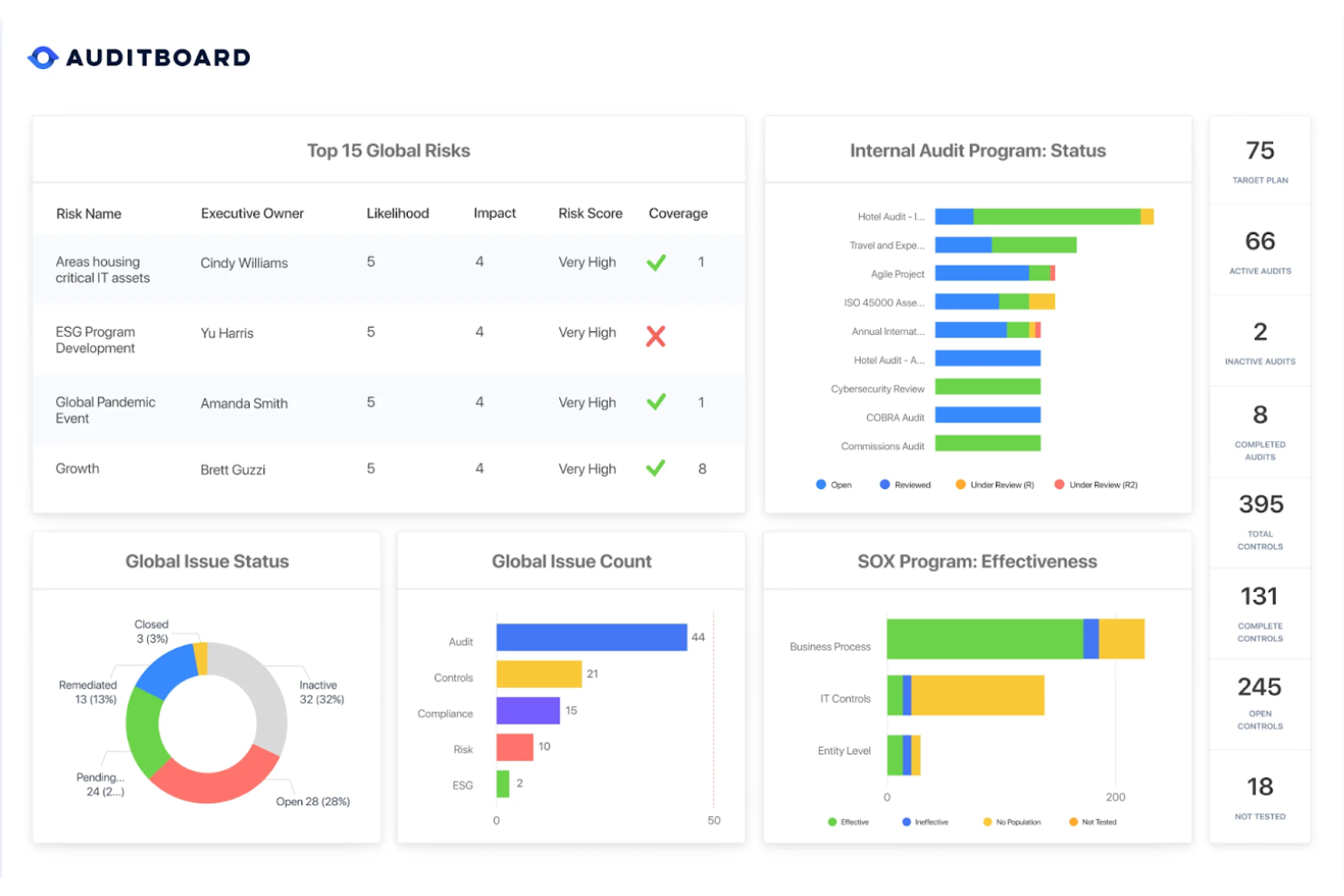
AuditBoard gives my team a way to monitor risk in real-time across the organization. Overall, I’d say the platform is especially useful for businesses that need to quickly identify, assess, and respond to emerging risks as part of their audit process. If your team needs continuous visibility into operational risks and audit findings, AuditBoard offers dashboards and automation to keep you informed and agile.
Why I Picked AuditBoard
What sets AuditBoard apart is its focus on delivering real-time risk visibility for audit teams. The platform’s dynamic dashboards and automated risk monitoring tools help us spot and respond to issues as they arise, rather than waiting for periodic reviews. I picked AuditBoard because its continuous risk assessment features are helpful for tracking changes and emerging threats. With built-in workflows for issue management and reporting, AuditBoard supports teams that need to stay agile and proactive in their audit approach.
AuditBoard Key Features
In addition to its real-time risk monitoring, AuditBoard offers several other features for audit teams:
- Audit Planning Calendar: Schedule and manage audit projects with a visual calendar that tracks milestones and deadlines.
- Template Library: Access pre-built templates for audit programs, checklists, and workpapers to standardize processes.
- Role-Based Permissions: Assign granular access controls to ensure sensitive audit data is only available to authorized users.
- Automated Evidence Collection: Collect and organize supporting documentation automatically as part of audit workflows.
AuditBoard Integrations
Integrations include Jira, ServiceNow, Azure DevOps, Microsoft Teams, Slack, Google Drive, Microsoft Office, Power BI, Tableau, and Workday.
Pros and Cons
Pros:
- Pre-built templates for audit workpapers
- Automated evidence collection from multiple sources
- Real-time dashboards for risk and audit status
Cons:
- Limited offline functionality for field audits
- No public pricing or plan details
Other Internal Audit Management Software
Here are some additional internal audit management software options that didn’t make it onto my shortlist, but are still worth checking out:
- Quantivate
For modular audit program design
- ComplianceQuest
For cloud-based audit collaboration
- Onspring
For configurable workflow templates
- SafetyCulture
For mobile audit inspections
- DataSnipper
For automated audit evidence extraction
- Audit Dashboard
For client document request management
- PSC Software
For life sciences compliance audits


How I Evaluate Internal Audit Management Software
I evaluate these tools in two layers: core functionality a CAE-level team can't do without—audit planning, workpaper management, issue tracking—and the differentiators that determine real fit.
Core Functionality (Table Stakes For This List)
When I'm selecting tools for my list, I rank each one on a scale from 0 (does not offer the functionality) to 5 (excels in this area) for each core functionality listed below. Then, I calculate the tool's total score into a percentage. Each tool needs to achieve a minimum total score of 65% to be considered for inclusion.
- Audit Planning & Scheduling: I look for risk-based audit universe mapping and annual plan builders that let you assign engagements, allocate staff, and set timelines from one view.
- Workpaper Management: A centralized repository with version control and reviewer sign-off matters here—especially when multiple auditors need to reference the same evidence.
- Risk & Control Assessment: I check whether the tool supports control libraries mapped to frameworks like COSO or SOX and offers structured testing workflows, not just static checklists.
- Issue & Remediation Tracking: Each finding should flow from logging through owner assignment to closure, with status visibility so nothing stalls between audit and management response.
- Audit Reporting & Dashboards: I evaluate whether reports are configurable enough for both the audit committee and operational stakeholders who need different levels of detail.
- Audit Trail & Access Controls: Role-based permissions and tamper-evident logs are what I look for, since auditor independence and data integrity depend on proper segregation.
Once I have a list of tools that meet the criteria, I consider what sets each platform apart.
Differentiating Factors (What Sets Vendors Apart)
Here's how I compare and contrast different vendors:
Standout Features
Continuous controls monitoring is a major differentiator—tools that flag control exceptions in real time between audit cycles give your team a head start on emerging risks. I also evaluate AI-assisted workflows, where some platforms can draft audit programs or summarize findings to cut report-writing time. A dedicated auditee portal matters too, since it lets process owners upload PBC evidence directly without needing a full license.
Beyond Features
ERP integrations matter a lot here. I check whether each platform connects to systems like SAP, Oracle, or NetSuite so auditors can pull transactional data directly for testing. Security posture is another factor—SOC 2 Type II certification and data residency options are worth confirming, especially for teams handling sensitive financial records. I also evaluate how well each tool scales for different audit team sizes, since a three-person shop and a 40-person function have very different needs around licensing and methodology configuration.
How to Choose Internal Audit Management Software
It’s easy to get bogged down in long feature lists and complex pricing structures. To help you stay focused as you work through your unique software selection process, here’s a checklist of factors to keep in mind:
| Factor | What to Consider |
|---|---|
| Scalability | Will the software handle your audit volume as your organization grows or changes? Check user limits, data storage, and multi-entity support. |
| Integrations | Does the tool connect natively with your ERP, HR, or compliance systems? Confirm compatibility with your existing tech stack. |
| Customizability | Can you tailor workflows, checklists, and reporting to your audit methodology and regulatory needs? Avoid rigid systems that force workarounds. |
| Ease of use | Will your audit team and stakeholders adopt the tool quickly? Look for clear navigation, minimal training needs, and intuitive layouts. |
| Implementation and onboarding | How long will it take to get up and running? Ask about migration support, training resources, and typical time to first audit completion. |
| Cost | Are pricing tiers transparent and predictable as your needs change? Watch for extra fees for users, storage, or advanced modules. |
| Security safeguards | Does the software meet your organization’s data protection standards? Look for encryption, access controls, and audit trails. |
| Support availability | Will you have access to timely help when issues arise? Check for 24/7 support, dedicated account managers, and response time SLAs. |
What Is Internal Audit Management Software?
Internal audit management software is an audit solution that helps organizations plan, execute, and monitor audits within a structured internal audit program. It gives internal auditors a centralized system to manage audit schedules, documentation, control testing, and findings while maintaining visibility across the entire audit lifecycle.
Many modern tools now function as an AI-powered audit management system, helping teams improve audit efficiency through automation, data analysis, and workflow management. These platforms also support end-to-end risk-based audit processes, allowing organizations to align audit activities with broader risk management software and compliance efforts.
Features
When selecting internal audit management software, keep an eye out for the following key features:
- Audit scheduling: Automates the planning and assignment of audits, ensuring that recurring and ad hoc audits are organized and deadlines are met.
- Document management: Centralizes storage and version control for audit-related files, making it easy to access, update, and share supporting documents.
- Workflow automation: Streamlines audit processes by routing tasks, approvals, and notifications to the right team members at each stage.
- Findings and issue tracking: Captures, categorizes, and monitors audit findings, allowing teams to assign responsibility and track resolution progress.
- Corrective action management: Links audit findings to corrective or preventive actions, enabling teams to document, assign, and follow up on remediation steps.
- Customizable checklists: Lets users create and modify audit checklists to match specific standards, regulations, or internal policies.
- Reporting and dashboards: Provides real-time visibility into audit status, trends, and outcomes through configurable reports and visual dashboards.
- User access controls: Restricts access to sensitive audit data based on user roles, ensuring confidentiality and compliance with internal policies.
- Integration capabilities: Connects with other business systems, such as ERP or compliance platforms, to share data and reduce manual entry.
- Mobile access: Allows auditors to conduct fieldwork, capture evidence, and update audit records from mobile devices, supporting audits outside the office.
Benefits
Implementing internal audit management software provides several benefits for your team and your business. Here are a few you can look forward to:
- Centralized audit data: All audit schedules, findings, and documentation are stored in one secure platform, making information easy to access and manage.
- Improved compliance: Automated workflows and audit trails help ensure your processes align with regulatory requirements and internal standards.
- Faster audit cycles: Task automation and real-time dashboards reduce manual work and help teams complete audits more quickly.
- Greater transparency: Customizable reports and dashboards provide clear visibility into audit status, trends, and outstanding issues for all stakeholders.
- Consistent processes: Standardized checklists and templates help ensure audits are conducted the same way across teams and locations.
- Easier collaboration: Cloud-based access and integration capabilities allow audit teams and stakeholders to work together, even across different departments or locations.
- Better risk management: Issue tracking and corrective action management make it easier to identify, address, and monitor risks uncovered during audits.
Costs & Pricing
Selecting internal audit management software requires an understanding of the various pricing models and plans available. Costs vary based on features, team size, add-ons, and more. The table below summarizes common plans, their average prices, and typical features included in internal audit management software solutions:
Plan Comparison Table for Internal Audit Management Software
| Plan Type | Average Price | Common Features |
|---|---|---|
| Free Plan | $0 | Basic audit scheduling, limited document storage, single user access, and basic reporting. |
| Personal Plan | $10-$30/user/month | Audit scheduling, document management, workflow automation, and standard reporting for individual users. |
| Business Plan | $30-$70/user/month | Multi-user access, customizable checklists, findings tracking, corrective action management, and integrations. |
| Enterprise Plan | $70-$150/user/month | Advanced security, custom workflows, dedicated support, advanced analytics, and compliance management. |
Internal Audit Management Software FAQs
Here are some answers to common questions about internal audit management software:
How does internal audit management software support regulatory compliance?
Internal audit management software helps you document, track, and report on audit activities in line with regulatory requirements. It provides audit trails, standardized checklists, and automated workflows that make it easier to demonstrate compliance during external reviews or inspections.
Can internal audit management software integrate with other business systems?
Yes, most internal audit management software can integrate with systems like ERP, HR, and compliance platforms. Integrations reduce manual data entry, help synchronize information across departments, and support a more unified approach to risk and compliance management.
What should I consider when migrating from spreadsheets to audit management software?
Start by mapping your current audit processes and identifying data that needs to be imported. Look for software with migration support, import tools, and onboarding resources. Plan for user training and allow time to adapt workflows to the new system.
Is mobile access important for internal audit management software?
Yes, mobile access is important if your audit team conducts fieldwork or site visits. Mobile features let auditors capture evidence, update findings, and complete checklists on the go, which improves accuracy and saves time.
How do user permissions work in internal audit management software?
User permissions let you control who can view, edit, or approve audit data. Most platforms offer role-based access, so you can restrict sensitive information to authorized users and ensure compliance with internal policies.