

10 Best International Payment Gateways Reviewed in 2026

10 Best International Payment Gateway Shortlist


Managing international transactions requires CFOs to oversee currency conversions, regulatory compliance, and transaction fees. Handling these elements across multiple regions adds operational complexity. You need a simple solution that makes these tasks easier and more efficient.
In my experience, international payment gateways are designed to support cross-border payments and centralize these processes. By using these tools, finance teams can reduce manual effort and maintain more consistent payment operations.
In this article, I'll share my top picks for international payment gateways. I’ve independently tested and reviewed each option to provide you with an unbiased perspective. You’ll find insights into features, benefits, and potential drawbacks, helping you make the best choice for your organization.
Why Trust Our Software Recommendations
Our team has been testing and reviewing software since 2012. As finance leaders ourselves, we know how difficult—and important—it is to choose the right software.
For this guide, we evaluated tools using hands-on testing and independent research, scoring tools using our selection criteria.
Our reviews reflect our human editorial judgment, not a sales pitch.
Best International Payment Gateway Summary
This comparison chart summarizes pricing details for my top international payment gateway selections to help you find the best one for your budget and business needs.
| Tool | Best For | Trial Info | Price | ||
|---|---|---|---|---|---|
| 1 | Best for global reach | Not available | From $620/month | Website | |
| 2 | Best for digital products | Free trial available | Pricing upon request | Website | |
| 3 | Best for small businesses | Free plan + free demo available | From $0.30/transaction | Website | |
| 4 | Best for SaaS businesses | Not available | Pricing upon request | Website | |
| 5 | Best for recurring payments | Free demo available | From 0.5% + $0.05/transaction | Website | |
| 6 | Best for Amazon shoppers | Free demo available | From 2.9% domestic processing fee + $0.30 authorization fee | Website | |
| 7 | Best for education payments | Free demo available | Pricing upon request | Website | |
| 8 | Best for fraud protection | Not available | From $25/month | Website | |
| 9 | Best for trade compliance | Free demo available | Pricing upon request | Website | |
| 10 | Best for enterprise solutions | Not available | Pricing upon request | Website |
Best International Payment Gateway Reviews
Below are my detailed summaries of the best international payment gateways that made it onto my shortlist. My reviews offer a detailed look at the key features, pros and cons, integrations, and ideal use cases of each tool to help you find the best one for you.

Stripe
Best for global reach

Stripe is a payment processing platform popular among businesses of all sizes, from startups to large enterprises. It enables online payments and financial transactions, making it a go-to choice for companies needing to handle international payments.
Why I picked Stripe: It offers extensive global reach with support for multiple currencies and countries, making it an ideal choice for businesses looking to expand internationally. Stripe's features include payment processing, billing, and fraud prevention, all designed to facilitate global transactions. It also provides a customizable checkout experience, allowing you to tailor the payment process to your brand. With its powerful API, your team can easily integrate Stripe into your existing systems.
Standout features and integrations:
Features include custom billing solutions that adjust to your business needs, a fraud prevention system that helps protect your transactions, and the ability to manage subscriptions and recurring billing with ease.
Integrations include Shopify, WooCommerce, Xero, QuickBooks, Salesforce, NetSuite, Zapier, FreshBooks, Adobe Commerce, Squarespace, and more.
Pros and Cons
Pros:
- Strong developer tools
- Customizable checkout options
- Supports multiple currencies
Cons:
- Limited direct customer support on lower tiers
- Complex pricing structure

Best for digital products

FastSpring is an e-commerce platform designed for businesses selling digital products, such as software and online services. It provides tools for global payments, subscription management, and digital storefront creation, catering mainly to digital content creators and software developers.
Why I picked FastSpring: It specializes in digital products, offering features that make it easy for your team to manage online sales and subscriptions. FastSpring handles global transactions with built-in tax compliance, ensuring you can sell your products internationally without hassle. The platform provides customizable storefronts, allowing you to create a branded shopping experience. Additionally, its subscription management tools help you retain customers and manage recurring revenue effectively.
Standout features and integrations:
Features include advanced reporting tools that give you insights into sales performance, automated tax calculation to simplify compliance, and promotional tools that help you drive sales with discounts and offers.
Integrations include Shopify, WordPress, WooCommerce, Zapier, Mailchimp, Google Analytics, Salesforce, HubSpot, Slack, PayPal, and more.
Pros and Cons
Pros:
- Automated tax compliance
- Offers customizable storefronts
- Supports global transactions
Cons:
- Requires technical setup for advanced features
- Limited suitability for physical goods

PayPal
Best for small businesses

PayPal is a versatile online payment platform widely used by small businesses for its ease of setup and global reach. It facilitates secure transactions, allowing businesses to accept payments from customers worldwide.
Why I picked PayPal: It's particularly beneficial for small businesses due to its straightforward setup and wide acceptance. You can use features like invoicing and payment tracking to manage your transactions efficiently. In my experience, these capabilities help businesses maintain smooth operations with minimal effort. PayPal's buyer and seller protection also adds an extra layer of security, making it a reliable choice for small enterprises.
Standout features & integrations:
Features include invoicing tools that let you create and send professional invoices quickly. Payment tracking helps you monitor your transactions with ease. You also get buyer and seller protection, which supports security for your team and customers.
Integrations include QuickBooks, Shopify, WooCommerce, BigCommerce, Adobe Commerce, Salesforce, Xero, FreshBooks, Squarespace, and Etsy.
Pros and Cons
Pros:
- Supports multiple currencies
- Widely accepted globally
- Easy to set up
Cons:
- Can be difficult for dispute resolution
- Occasional account verification delays

Paddle
Best for SaaS businesses

Paddle is a subscription billing and revenue delivery platform tailored for SaaS companies. It helps businesses manage billing, payments, and tax compliance, helping software companies simplify their financial operations.
Why I picked Paddle: It caters specifically to SaaS businesses, providing tools to manage subscriptions and recurring billing with ease. Paddle handles all aspects of payment processing, including global tax compliance, so you can focus on your product. It supports multiple currencies and payment methods, making it easy for your business to operate internationally. Additionally, Paddle’s analytics and reporting tools give you an understanding of your revenue and growth.
Standout features and integrations:
Features include a built-in fraud detection system that protects your transactions, customizable checkout pages that support your brand, and detailed revenue reporting that helps you track business performance.
Integrations include Salesforce, HubSpot, Xero, QuickBooks, Zapier, Slack, Mailchimp, Google Analytics, Stripe, and PayPal.
Pros and Cons
Pros:
- Provides built-in fraud protection
- Offers detailed revenue reports
- Supports global tax compliance
Cons:
- Limited customization options
- No monthly or hidden fees


GoCardless is an online payment solution designed for businesses of all sizes, focusing on automating recurring payments. It serves industries that rely on subscriptions and membership fees, offering an easy way to handle Direct Debit payments.
Why I picked GoCardless: It specializes in recurring payments, providing a reliable option for businesses with subscription models. GoCardless allows you to easily collect payments through its automated Direct Debit system. It offers features such as flexible payment scheduling, making it easy for you to manage recurring billing. The platform's global reach allows you to collect customer payments from multiple countries, ensuring you can expand your business without payment barriers.
Standout features and integrations:
Features include a user-friendly dashboard that gives you a clear view of your transactions, automated payment retries to reduce failed payments, and real-time notifications to keep you informed of payment statuses.
Integrations include Xero, QuickBooks, Salesforce, Zuora, Sage, KashFlow, and more.
Pros and Cons
Pros:
- Simple payment tracking
- Supports multiple currencies
- Reliable payment collection
Cons:
- Geographic coverage depends on Direct Debit systems
- Limited payment method support


Amazon Pay is an online payment service tailored for businesses of all sizes, focusing on enhancing the shopping experience. It primarily serves merchants looking to offer convenient payment options to their customers, such as buy now, pay later and quick transactions.
Why I picked Amazon Pay: This tool is particularly beneficial for Amazon shoppers, as it integrates with their existing Amazon accounts. You can leverage features like Express Payout and invoice payment capabilities to provide your customers with flexible payment options. These features can enhance customer satisfaction by offering convenience and speed. The integration with major e-commerce platforms makes it easy for your team to implement and use Amazon Pay effectively.
Standout features & integrations:
Features include buy now, pay later with Affirm, Express Payout for quick transactions, and invoice payment capabilities. These features provide you and your customers with flexible payment options, augmenting their shopping experience.
Integrations include Shopify, Stripe, BigCommerce, WooCommerce, PrestaShop, and Adobe Commerce.
Pros and Cons
Pros:
- Recognized branding and trust
- Supports buy now, pay later
- Easy integration for Amazon users
Cons:
- Higher fees compared to some peers
- Limited to Amazon customers


Flywire is a global payment platform that specializes in processing international payments for educational institutions. It caters primarily to universities and students, facilitating tuition payments and other educational fees across borders.
Why I picked Flywire: It excels in managing education payments, offering tailored solutions for institutions and students. Flywire simplifies the payment process with multiple payment options, including card payments and bank transfers, as well as currency support, making it easier for your team to handle international transactions. The platform provides real-time tracking and transparent fee structures, so both students and institutions know what to expect. Additionally, Flywire offers customer support in multiple languages, supporting the customer experience for international students.
Standout features and integrations:
Features include a customizable payment portal that aligns with your institution's branding, automated reconciliation processes that reduce manual effort, and detailed reporting tools that reveal payment trends.
Integrations include Ellucian, Oracle, SAP, Workday, PeopleSoft, Technolutions Slate, Salesforce, and more.
Pros and Cons
Pros:
- Transparent fee structures
- Specialized solutions for education
- Provides real-time tracking
Cons:
- Limited relevance outside education
- Slower settlement for certain payment methods


Authorize.net is a payment gateway solution that caters to small and medium-sized businesses, providing tools for processing payments securely. Its primary function is to facilitate online and in-person transactions while offering fraud prevention features to protect your business and customers.
Why I picked Authorize.net: It excels in fraud protection, offering advanced security measures to safeguard transactions. The platform includes features such as fraud detection tools, which help you minimize risk and protect your revenue. Authorize.net supports multiple payment methods, giving your team flexibility in how you accept payments. Additionally, the platform offers customizable checkout options, allowing you to tailor the purchase experience to your business needs.
Standout features and integrations:
Features include recurring billing options that help you manage subscriptions easily, a virtual terminal for manually processing credit card and ACH payments, and detailed reporting tools that provide awareness of your transactions and financial health.
Integrations include QuickBooks, Shopify, Adobe Commerce, Xero, Zoho Books, WooCommerce, BigCommerce, FreshBooks, Squarespace, PrestaShop, and more.
Pros and Cons
Pros:
- Offers a virtual terminal
- Highly customizable checkout options
- Strong AI fraud detection tools
Cons:
- Requires a separate merchant account
- Initial setup can be complex
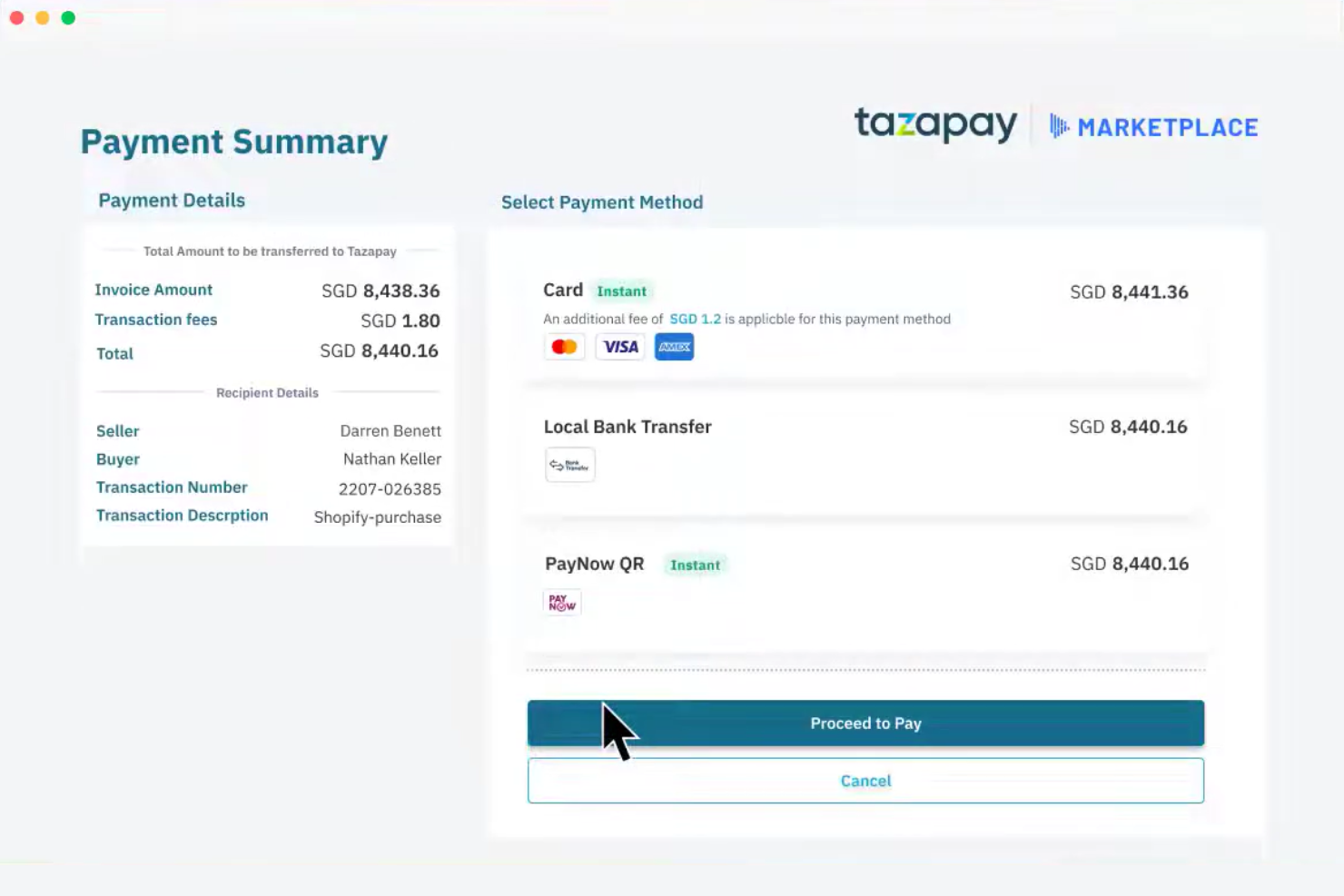
Tazapay is a cross-border payment platform designed for businesses needing secure international transactions. It serves industries such as e-commerce and fintech, providing solutions for accepting payments from over 173 countries.
Why I picked Tazapay: Tazapay excels in trade compliance, offering features such as buyer protection and compliance with international regulations. Its global collection accounts allow you to hold and disburse funds in multiple currencies. The platform supports same-day payouts in numerous markets, providing quick access to funds. With tailored solutions for various industries, Tazapay meets the specific needs of most businesses engaging in international trade.
Standout features and integrations:
Features include secure transaction management across multiple countries, instant bank settlements, and strong foreign exchange management. You can also benefit from simplified global compliance and risk management features.
Integrations include Shopify, WooCommerce, Adobe Commerce, BigCommerce, and more.
Pros and Cons
Pros:
- High compliance standards
- Offers local payment methods
- Supports multi-currency transactions
Cons:
- Smaller integration ecosystem Limited public documentation
- Smaller integration ecosystem


Nium is a global payment platform designed for enterprises that facilitate cross-border transactions and financial management. It serves large businesses by providing tools for international payments, card issuance, and currency conversion.
Why I picked Nium: It's tailored for enterprise solutions, providing all-in-one services for managing global payments. Nium offers multi-currency accounts, helping your team easily handle transactions in different currencies. The platform supports instant money transfers across numerous countries, supporting your business’s ability to operate internationally. Additionally, Nium provides a secure environment for transactions and compliance with international regulations.
Standout features and integrations:
Features include real-time currency conversion that helps you manage foreign exchange risks, a unified platform for managing multiple financial services, and advanced security measures to protect your transactions.
Integrations include SAP, Oracle, Microsoft Dynamics, Salesforce, Xero, QuickBooks, NetSuite, Stripe, PayPal, Shopify, and more.
Pros and Cons
Pros:
- Real-time currency conversion
- Compliance with international regulations
- Provides a secure transaction environment
Cons:
- Limited self-serve configuration
- Primarily suited for large enterprises


How I Evaluate International Payment Gateways
When a global AR team needs to settle invoices in 30 currencies without a tangle of FX fees, I split my evaluation into baseline must-haves and the differentiators that separate good from great.
Core Functionality (Table Stakes For This List)
When I'm selecting tools for my list, I rank each one on a scale from 0 (does not offer the functionality) to 5 (excels in this area) for each core functionality listed below. Then, I calculate the tool's total score into a percentage. Each tool needs to achieve a minimum total score of 65% to be considered for inclusion.
- Multi-Currency Processing: I check how many currencies a gateway can accept and settle in, and whether a merchant needs separate accounts per region or can manage everything from one.
- Local Payment Method Support: Coverage of region-specific options like iDEAL, SEPA, Alipay, or Boleto matters because card-only gateways lose conversions in markets where wallets dominate.
- Cross-Border FX Handling: I evaluate whether conversion happens at checkout or settlement, how transparent the markup is, and whether options like dynamic currency conversion are available.
- Global Compliance & Security: PCI DSS Level 1 is the baseline, but I also look for SCA and 3D Secure 2.0 support plus adherence to regional frameworks like PSD2.
- Multi-Region Payout & Settlement: The ability to settle funds into bank accounts across multiple countries in local currencies saves teams from costly intermediary bank fees.
- Fraud Prevention & Risk Tools: I evaluate whether fraud screening accounts for cross-border patterns, such as mismatched billing and IP geolocation, beyond basic rule-based filters.
Once I have a list of tools that meet this criteria, I consider what sets each platform apart.
Differentiating Factors (What Sets Vendors Apart)
Here's how I compare and contrast different vendors:
Standout Features
Smart payment routing is a big one. Gateways that automatically direct transactions to the best-performing acquirer based on currency, region, or card type can meaningfully lift authorization rates. I also look for a unified global dashboard that consolidates multi-currency transaction data into one view, which makes month-end reconciliation far less painful. Merchant of record services are worth evaluating too, since they shift the burden of tax collection, remittance, and regional compliance off your team entirely.
Beyond Features
ERP and accounting integrations matter a lot here. A gateway with native connectors to systems like NetSuite, SAP, or Xero saves your team hours of manual reconciliation across currencies. I also evaluate pricing transparency, specifically whether the vendor clearly breaks out interchange, cross-border, and FX markup fees or buries them. Geographic licensing is another factor I check. Gateways that hold direct acquiring licenses in your target markets tend to deliver better approval rates and faster settlements than those relying on third-party processors.
How To Choose International Payment Gateways
It’s easy to get bogged down in long feature lists and complex pricing structures. To help you stay focused as you work through your unique software selection process, here’s a checklist of factors to keep in mind:
| Factor | What to Consider |
|---|---|
| Scalability | Can the gateway grow with your business? Consider transaction volume limits and whether the tool can handle increased demands without extra costs or performance issues. |
| Integrations | Does it work with your existing systems? Look for compatibility with your CRM, accounting software, and other business tools you use daily. |
| Customizability | Can you tailor the gateway to fit your needs? Evaluate how much you can adjust user interfaces, workflows, and payment options to match your business processes. |
| Ease of use | Is the gateway intuitive for your team? Test the user interface and look for easy navigation to minimize training time and errors. |
| Implementation and onboarding | How long will it take to get started? Assess the setup process, availability of support, and any training resources to support a smooth transition. |
| Cost | What are the total costs? Look beyond initial pricing to consider transaction fees, setup fees, and any hidden charges that may affect your budget. |
| Security safeguards | How does it protect your data? Check for encryption, fraud detection, and compliance with security standards to keep transactions secure. |
| Compliance requirements | Can it meet your regulatory needs? Verify that the gateway complies with local and international regulations relevant to your business, such as GDPR or PCI DSS. |
What Is an International Payment Gateway?
An international payment gateway is a service that authorizes and processes payments for businesses across borders. These tools are commonly used by financial professionals and business owners to facilitate secure and efficient international transactions. Features such as currency conversion, transaction tracking, and multi-currency support help businesses manage cross-border payments effectively. Overall, these tools simplify global commerce by ensuring secure and smooth payment processing.
Features
When selecting an international payment gateway, keep an eye out for the following key features:
- Currency conversion: Automatically converts currencies to simplify international transactions and reduce manual calculations.
- Multi-currency support: Allows businesses to accept payments in various currencies, expanding global reach.
- Transaction tracking: Provides real-time updates on payment statuses, helping businesses manage cash flow and reconciliation.
- Fraud detection: Includes security measures to identify and prevent fraudulent transactions, protecting your business and customers.
- Customizable checkout: Offers options to tailor the payment experience to match your brand, supporting customer satisfaction.
- Recurring billing: Facilitates the management of subscriptions and repeat payments, supporting consistent revenue streams.
- Instant payment notifications: Alerts you to completed transactions, keeping your team informed and responsive.
- Security compliance: Adheres to international security standards, safeguarding sensitive financial data.
- Advanced analytics: Delivers insights into payment trends and business performance, aiding strategic decision-making.
Benefits
Implementing an international payment gateway provides several benefits for your team and your business. Here are a few you can look forward to:
- Global reach: Accept payments from customers worldwide due to multi-currency support and international reach.
- Improved cash flow: Real-time transaction tracking and instant payment notifications help you manage your cash flow efficiently.
- Strong security: Fraud detection and security compliance features protect your business from fraudulent transactions.
- Customer satisfaction: Customizable checkout options provide a personalized payment experience, boosting customer satisfaction.
- Consistent revenue: Recurring billing capabilities support steady income from subscriptions and repeat customers.
- Informed decisions: Advanced analytics offer insights into payment trends, aiding in strategic business planning.
- Reduced manual work: Automated currency conversion and reconciliation processes save time and minimize errors.
Costs & Pricing
Selecting an international payment gateway requires an understanding of the various pricing models and plans available. Costs vary based on features, team size, add-ons, and more. The table below summarizes common plans, their average prices, and typical features included in international payment gateway solutions:
Plan Comparison Table for International Payment Gateway
| Plan Type | Average Price | Common Features |
|---|---|---|
| Free Plan | $0 | Basic transaction processing, limited currency support, and simple reporting. |
| Personal Plan | $5-$25/user/month | Multi-currency support, basic fraud detection, and customizable checkout options. |
| Business Plan | $50-$150/user/month | Advanced analytics, recurring billing features, and security measures. |
| Enterprise Plan | $200-$500/user/month | Full integration options, dedicated customer support, and advanced fraud prevention tools. |
International Payment Gateway FAQs
Here are some answers to common questions about international payment gateways:
How can I be sure an international payment gateway is secure and compliant?
Look for PCI DSS compliance, data encryption in transit and at rest, powerful fraud tools, and clear policies around dispute handling and chargebacks. Gateways that operate globally should also support regional regulations such as PSD2/SCA in Europe and data privacy rules such as GDPR.
Are international payment gateways only for large enterprises?
No. Many options on this shortlist cater specifically to SMBs and startups, with low entry barriers and simple onboarding. The key is matching complexity and cost to your business stage. Small businesses may begin with a single, easy-to-implement gateway and add more advanced tools, such as trade compliance or virtual accounts, as their cross-border volume grows.
Can I use multiple international payment gateways at the same time?
Yes, you can, and many CFOs do. A multi-gateway strategy can improve authorization rates in key markets, provide redundancy if one gateway has outages, and let you route transactions based on geography, card type, or fees. It does add operational complexity, so have a clear routing, reconciliation, and reporting strategy.
How long does it take to get set up with an international payment gateway?
Timelines vary. Simple SaaS-style gateways with standard risk profiles can often be up and running in days. Solutions that involve trade finance, local collection accounts, or enterprise compliance (e.g., for regulated industries or very high volumes) may require more extensive KYC, underwriting, and technical integration.
What’s Next:
If you're in the process of researching international payment gateways, connect with a SoftwareSelect advisor for free recommendations.
You fill out a form and have a quick chat where they get into the specifics of your needs. Then you'll get a shortlist of software to review. They'll even support you through the entire buying process, including price negotiations.