


Finario is a capital expenditure (CapEx) software that helps organizations manage their capital expenditures efficiently and effectively. It's ideal for finance teams in large enterprises, manufacturing sectors, and project management departments looking to streamline budgeting and forecasting processes. Finario provides value by enabling you to make informed investment decisions and optimize your capital allocation.
In this article, you'll learn about Finario’s features, pros and cons, best and worst use cases, and pricing. Whether you're looking to improve your team's operational efficiency or align your capital strategy with long-term business goals, this review is here to provide clear, actionable insights to help you make a confident decision.
Finario Evaluation Summary

- Pricing upon request
- Free demo available
Why Trust Our Software Reviews
We’ve been testing and reviewing financial software since 2023. As finance specialists ourselves, we know how critical and difficult it is to make the right decision when selecting software.
We invest in deep research to help our audience make better software purchasing decisions. We’ve tested more than 2,000 tools for different finance use cases and written over 1,000 comprehensive software reviews. Learn how we stay transparent & our software review methodology.
Finario Overview
pros
-
The advanced support ensures your team gets the help they need to manage complex systems.
-
Finario offers detailed expenditure tracking, which helps your team make informed investment decisions.
-
You can customize approval workflows, project hierarchies, data fields, and reporting dashboards to align with your specific business needs.
cons
-
Finario isn’t as intuitive as some competitors, which may impact user adoption.
-
The learning curve is steep, which might slow down your onboarding process.
-
Finario's interface can be challenging, requiring additional training time for your team to use the software effectively.
-

LiveFlow
Visit WebsiteThis is an aggregated rating for this tool including ratings from Crozdesk users and ratings from other sites.4.9 -
Float Financial
Visit WebsiteThis is an aggregated rating for this tool including ratings from Crozdesk users and ratings from other sites.4.2 -
Creatio CRM
Visit WebsiteThis is an aggregated rating for this tool including ratings from Crozdesk users and ratings from other sites.4.7


How We Test & Score Tools
We’ve spent years building, refining, and improving our software testing and scoring system. The rubric is designed to capture the nuances of software selection and what makes a tool effective, focusing on critical aspects of the decision-making process.
Below, you can see exactly how our testing and scoring works across seven criteria. It allows us to provide an unbiased evaluation of the software based on core functionality, standout features, ease of use, onboarding, customer support, integrations, customer reviews, and value for money.
Core Functionality (25% of final scoring)
The starting point of our evaluation is always the core functionality of the tool. Does it have the basic features and functions that a user would expect to see? Are any of those core features locked to higher-tiered pricing plans? At its core, we expect a tool to stand up against the baseline capabilities of its competitors.
Standout Features (25% of final scoring)
Next, we evaluate uncommon standout features that go above and beyond the core functionality typically found in tools of its kind. A high score reflects specialized or unique features that make the product faster, more efficient, or offer additional value to the user.
We also evaluate how easy it is to integrate with other tools typically found in the tech stack to expand the functionality and utility of the software. Tools offering plentiful native integrations, 3rd party connections, and API access to build custom integrations score best.
Ease of Use (10% of final scoring)
We consider how quick and easy it is to execute the tasks defined in the core functionality using the tool. High scoring software is well designed, intuitive to use, offers mobile apps, provides templates, and makes relatively complex tasks seem simple.
Onboarding (10% of final scoring)
We know how important rapid team adoption is for a new platform, so we evaluate how easy it is to learn and use a tool with minimal training. We evaluate how quickly a team member can get set up and start using the tool with no experience. High scoring solutions indicate little or no support is required.
Customer Support (10% of final scoring)
We review how quick and easy it is to get unstuck and find help by phone, live chat, or knowledge base. Tools and companies that provide real-time support score best, while chatbots score worst.
Customer Reviews (10% of final scoring)
Beyond our own testing and evaluation, we consider the net promoter score from current and past customers. We review their likelihood, given the option, to choose the tool again for the core functionality. A high scoring software reflects a high net promoter score from current or past customers.
Value for Money (10% of final scoring)
Lastly, in consideration of all the other criteria, we review the average price of entry level plans against the core features and consider the value of the other evaluation criteria. Software that delivers more, for less, will score higher.
Core Features
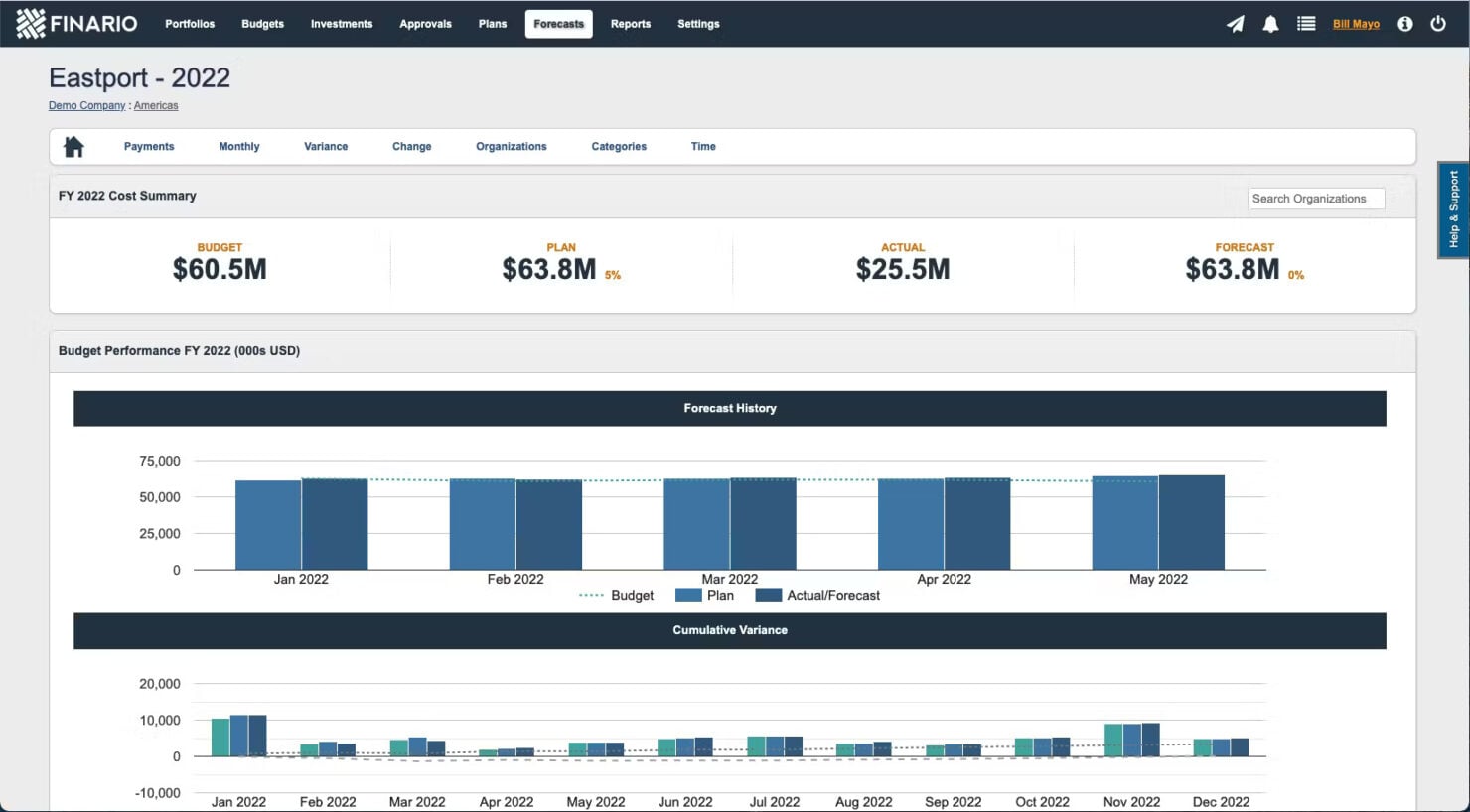
Budgeting and Forecasting: Finario lets you plan and predict your capital expenditures with precision. Your team can track spending against CapEx budgets in real-time, ensuring financial goals are met.
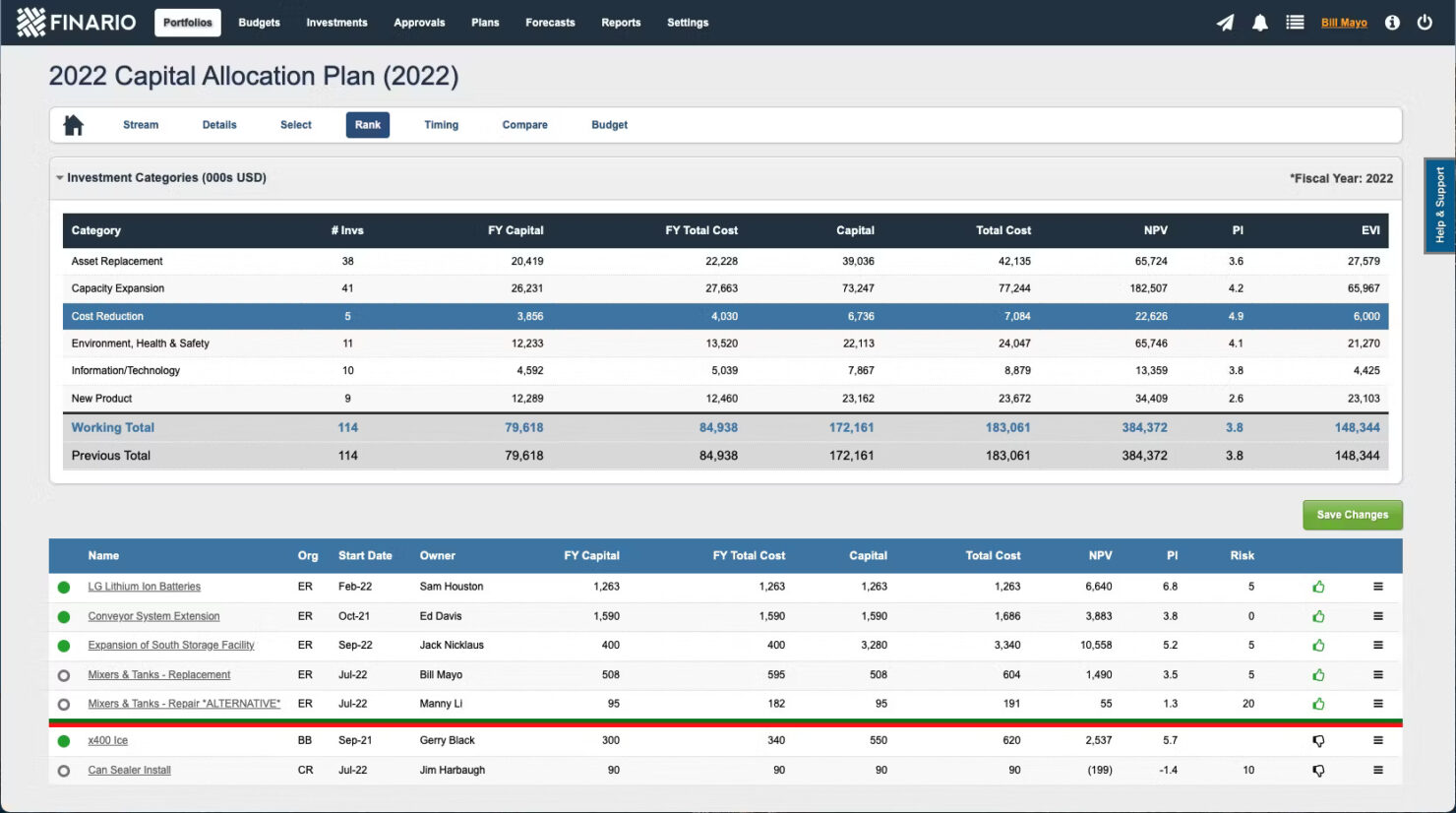
Capital Allocation: The software’s capital allocation features helps you allocate funds effectively across projects. You can prioritize investments based on strategic goals and available resources.
Reporting and Analytics: Finario provides detailed reports that give insights into your CapEx performance. Use these financial analysis tools to make informed decisions and optimize your financial strategies.
Project Tracking: The software provides project tracking to help you keep tabs on your project timelines and budgets. This ensures you stay on schedule and within financial limits.
Approval Workflows: With Finario, you can automate and customize workflows, reducing the time spent on manual approvals. This streamlines your approval processes, enhancing overall efficiency.
Risk Management: Finario equips you with tools to mitigate risks and safeguard your investments. Using these features, you can successfully identify and manage potential risks associated with your capital projects before they happen.
Ease of Use
Finario's user interface may seem challenging at first, especially if your team is used to more intuitive systems. Initially, the software's complexity requires a time investment to fully understand its capabilities. However, once you've navigated the learning curve, the customization options and detailed features become valuable assets.
While it might not be the easiest to adopt initially, the depth of functionality Finario offers can significantly enhance your CapEx management once you're familiar with it.
Finario Specs
- 2-Factor Authentication
- Accounts Payable
- Accounts Receivable
- API
- Audit Trail
- Balance Sheet
- Billing/Invoicing
- Budgeting
- Calendar Management
- Comparative Reporting
- Compliance Tracking
- CRM Integration
- Custom Reports
- Dashboard
- Dashboards
- Data Export
- Data Import
- Data Mining
- Data Visualization
- Document Comparison
- Expense Tracking
- External Integrations
- Financial Analysis
- Forecasting
- General Account Ledger
- Multi-Currency
- Multi-User
- Notifications
- P&L
- Payroll
- Process Reporting
- Risk Assessment
- SAP Integration
- Scenario Planning
- Scheduling
- Tax Management
- Visualization
- Workflow Management


Finario FAQs
Can Finario support multi-currency transactions?
How does Finario handle data security and compliance?
Is there a mobile app available for Finario?
What kind of training does Finario offer for new users?
How customizable is Finario for specific business needs?
How does Finario facilitate collaboration across departments?
Does Finario offer customer support outside regular business hours?
How does Finario help with strategic financial planning?
What's Next?
Ready to compound your abilities as a finance professional? Subscribe to our free newsletter.