

En iyi ücretsiz muhasebe yazılımları, girişimlerin ve küçük işletmelerin aylık ücret ödemeden mali durumlarını etkili bir şekilde yönetmesine yardımcı olur; defter tutma, faturalandırma ve gider takibini daha en başından kolaylaştırır.
Güvenilir muhasebe yazılımları manuel veri girişini en aza indirir, hataları azaltır ve hesap mutabakatı ile finansal raporlama gibi görevleri hızlandırır. Doğru ücretsiz muhasebe aracını seçmek, daha az kaçırılmış ödeme, doğru kayıtlar ve işletmenizi stratejik olarak büyütmeye odaklanmak için daha fazla zaman anlamına gelir.
Why Trust Our Software Recommendations
6,700+
Reviews
20
Industry experts
16+
Evaluation factors
14
Years
Our team has been testing and reviewing software since 2012. As finance leaders ourselves, we know how difficult—and important—it is to choose the right software.
For this guide, we evaluated tools using hands-on testing and independent research, scoring tools using our selection criteria.
Our reviews reflect our human editorial judgment, not a sales pitch.
Ücretsiz Muhasebe Yazılımları Karşılaştırma Tablosu
Bu karşılaştırma tablosu, en iyi ücretsiz muhasebe yazılımı seçimlerimdeki fiyatlandırma ve ücretsiz deneme ayrıntılarını öne çıkarır.
Sorted by: Default
| Tool | Starting Price | Website | |
|---|---|---|---|
Best with unlimited user access on every plan | 4.4 out of 5 | $78 AUD/month 30-day free trial available | Website |
Best for expense tracking | 4.8 out of 5 | $15/user/month Free plan available; 30-day free trial | Website |
Best for real-time collaboration | 4.6 out of 5 | $7/user/month 14-day free trial + free plan available | Website |
Best for invoicing | 4.6 out of 5 | $15/month Free plan + free trial available | Website |
Best for businesses using other Zoho services | 4.3 out of 5 | $20/month Free plan + 14-day trial + demo available | Website |
Best for multi-entity consolidation | 4.7 out of 5 | $24/month 14-day free trial available | Website |
Best for small teams | 4.4 out of 5 | Pricing upon request Free plan available | Website |
Best for sole proprietors | 4.5 out of 5 | Free to use | Website |
Best for power users | 4.8 out of 5 | $60/user/year Free plan available | Website |
Best for AI-driven insights | 5.0 out of 5 | $30/month 14-day free trial | Website |


En İyi Ücretsiz Muhasebe Yazılımları İncelemeleri
Ayrıntılı incelemelerimde en iyi ücretsiz muhasebe yazılımlarını keşfedin. Doğru seçeneği hızla bulmanıza yardımcı olmak için temel özellikleri, artıları ve eksileri, entegrasyonları ve başlıca kullanım alanlarını ele aldım.
 1Best with unlimited user access on every plan
Xero
- 30-day free trial available
- From $78 AUD/month
Visit WebsiteCustomer Rating:4.4/5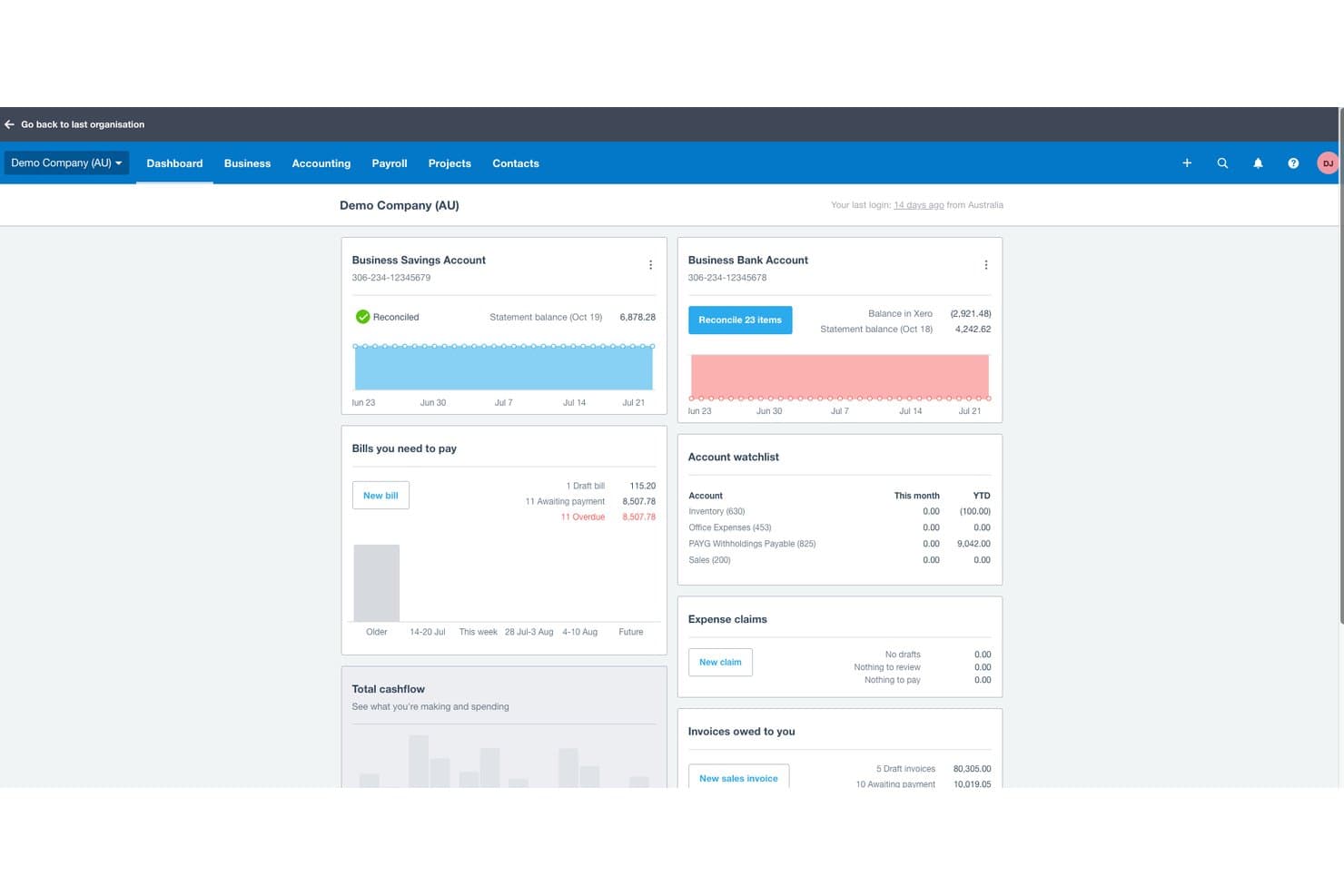
Xero offers a comprehensive dashboard displaying bank balances, bills to pay, expense claims, invoices owed, and account watchlist in one view. Xero is a cloud-based accounting platform offering invoicing, bank reconciliation, expense tracking, financial reporting, and multi-currency support for small businesses and their advisors.
Who Is Xero Best For?
Xero suits small businesses that need multiple people — owners, bookkeepers, and accountants — working in the same accounting platform without per-seat costs.
Why I Picked Xero
I've included Xero in my top picks because its unlimited user access across all plans solves a real pain point I see with competing tools. Most platforms charge per seat, so adding a bookkeeper or an external accountant drives costs up fast. With Xero, I can invite my accountant and bookkeeper into the same account without touching my plan, and features like Hubdoc document capture and AI-powered bank transaction matching stay fully accessible to every user.
Xero Key Features
- Multi-currency accounting: Track transactions and generate invoices in multiple currencies with automatic exchange rates.
- Automated sales tax calculation: Calculates and tracks sales tax, VAT, or GST on invoices and reports.
- Bank transaction feeds: Connect bank accounts for daily transaction imports and faster reconciliation.
- Mobile app access: Capture receipts, send invoices, and check cash flow from iOS and Android devices.
Xero Integrations
Xero offers native integrations with Stripe, PayPal, Square, Hubdoc, Avalara, Gusto, Receipt Bank, Shopify, WooCommerce, and Zapier. An API is available for custom integrations.
What's Free?
Xero offers a 30-day free trial with access to all features, no credit card required. There's no free-forever plan, so you'll need to choose a paid plan once the trial ends.
Pros and Cons
Pros:
- Hubdoc document capture built in
- AI-powered bank transaction matching included
- Unlimited users on every paid plan
Cons:
- Payroll requires an additional paid add-on
- No free-forever plan exists
Learn more about Xero: 2Best for expense tracking
Ramp
- Free plan available; 30-day free trial
- From $15/user/month
Visit WebsiteCustomer Rating:4.8/5
Ramp provides an automated accounting dashboard that categorizes transactions, syncs expenses, and flags missing memos for review. Ramp is a corporate expense management platform that combines physical and virtual company cards with built-in financial controls.
Why I picked Ramp: Ramp offers real-time expense recognition by texting you right after a card swipe, prompting you to upload the receipt via SMS or the app. That means you don’t have to chase paper, and it reduces missing or mismatched receipts. The platform also allows flexible control over spending limits on each virtual or physical card, so you can set monthly, per-transaction, and merchant-specific caps to prevent off-policy charges.
Standout features & integrations:
Features include machine‑learning‑based receipt matching and categorization that automatically pairs receipt images with transactions and tags expenses based on set rules. It also offers bill pay support where you can email or upload vendor invoices, set approval workflows, and pay bills via ACH, check, or card.
Integrations include NetSuite, Sage Intacct, QuickBooks, Microsoft Dynamics Business Central, Acumatica, Workday Financial Management, Uber, Lyft, Amazon Business, TravelPerk, ADP Workforce Now, and Gusto.
What's Free? Ramp includes a free plan for smaller teams looking for basic functions to simplify finances.
Pros and Cons
Pros:
- Automated expense reporting and receipt matching
- Ability to issue multiple virtual cards with customizable controls
- Combined AR, AP, and expense management in one system
Cons:
- Mobile app has fewer features than desktop version
- Could offer more advanced accounting features
 Best for real-time collaboration
- 14-day free trial + free plan available
- From $7/user/month (billed annually)
Visit WebsiteCustomer Rating:4.6/5
Google Sheets provides a simple cash flow template. Source: Google Docs For those seeking a cost-effective solution to manage financial tasks, Google Sheets offers a compelling option. This versatile tool allows you to create and collaborate on spreadsheets, making it ideal for small businesses and individuals who need to organize financial data without incurring additional costs. Whether you're tracking expenses, managing budgets, or generating reports, Google Sheets provides the essential functionalities to simplify your accounting processes.
Why I Picked Google Sheets
I picked Google Sheets for its unparalleled ability to facilitate real-time collaboration, a feature that stands out in the realm of Free Accounting Software Options. You and your team can simultaneously work on the same spreadsheet, see each other's changes instantly, and communicate via comments, which can significantly enhance teamwork and decision-making processes. The automatic saving and version history features ensure that no data is lost, and you can always revert to previous versions if needed. This collaborative environment makes Google Sheets particularly valuable for businesses and individuals who need to manage and share financial data seamlessly.
Google Sheets Key Features
In addition to its real-time collaboration capabilities, Google Sheets offers a range of features that are particularly useful for managing accounting tasks.
- Templates: Google Sheets provides pre-designed templates for tracking income, expenses, and budgets, simplifying the bookkeeping process.
- Formulas and Functions: With built-in functions like SUM, AVERAGE, and IF, you can automate calculations and analyze data efficiently.
- Data Visualization: You can create charts and graphs to visualize financial data, making it easier to interpret trends and performance.
- Advanced Functions: Features like VLOOKUP and IMPORTRANGE streamline data retrieval and synchronization across multiple sheets.
Google Sheets Integrations
Integrations include Salesforce, Intuit, Asana, BigQuery, Looker, and other tools within Google Workspace.
Pros and Cons
Pros:
- Strong data visualization tools
- Excellent real-time collaboration
- Powerful formulas and automation options
Cons:
- Requires manual setup for reports
- Limited advanced accounting functions
Learn more about Google Sheets:

ZipBooks displays your invoice stats in a simple dashboard while letting you select other key services with a single click. ZipBooks is a cloud-based tool designed to simplify financial management for a wide range of users. It's tailored especially for small businesses and freelancers, providing solutions that cover time tracking, expense management, and accounts receivable automation.
Why I picked ZipBooks: ZipBooks offers a unique combination of features that cater to small-scale financial needs without additional costs. You can track time, manage expenses, and automate accounts receivable, all while enjoying seamless bank reconciliation and multi-currency support. Additionally, ZipBooks provides dedicated customer support and allows unlimited users, which is often not seen in other free accounting solutions.
Standout features & integrations:
Features include simple invoicing tools that let you customize and send invoices quickly. You can track expenses effortlessly, giving you a clear view of your spending. It also provides smart insights to help you and your team make better financial decisions.
Integrations include PayPal, Square, Stripe, Gusto, Plaid, Slack, QuickBooks, Google Drive, Trello, and Asana.
What's Free? ZipBooks offers a free-forever plan with essential features for small businesses and freelancers. This plan includes unlimited invoicing, time tracking, and basic reporting, with no user limitations.
Pros and Cons
Pros:
- Unlimited invoices with free service
- Easily accept payments
- Free service with no limit on business size
Cons:
- Most useful features require a paid subscription
- Limited support
Learn more about ZipBooks: Best for businesses using other Zoho services
- Free plan + 14-day trial + demo available
- From $20/month
Visit WebsiteCustomer Rating:4.3/5
Zoho Books has a clean-looking dashboard that makes it easy to see basic details about your company and to find all of the features you need. If you’re already a Zoho customer, I’d definitely recommend looking into adding their accounting software to your current setup. Zoho Books can handle everything from expense reporting to automated follow-up on customer accounts.
Why I picked Zoho Books: Zoho Books offers seamless integration within the Zoho ecosystem, creating a unified platform for managing everything from sales and CRM to inventory and invoicing. This tight integration reduces the need for manual data entry, improves workflow efficiency, and provides real-time financial insights across departments.
Standout features & integrations:
Features include the ability to create and send professional invoices with just a few clicks, making your billing process efficient and straightforward. You can also track expenses and time, ensuring your team stays on top of all financial activities without missing a beat.
Integrations include Zoho CRM, PayPal, Stripe, Google Drive, Dropbox, Office 365, Slack, G Suite, Mailchimp, and Zendesk.
What's Free? Zoho Books offers a free-forever plan for businesses with revenue below a certain threshold, allowing one user and one accountant. While it provides essential accounting features, integrations with other applications might be limited in the free version.
Pros and Cons
Pros:
- Most important features available with free service
- Easy to use
- Test account lets you check out the service before signing up
Cons:
- Works best if you pay for additional services
- Limited support
 Best for multi-entity consolidation
- 14-day free trial available
- From $24/month (billed annually)
Visit WebsiteCustomer Rating:4.7/5
Joiin provides consolidated profit and loss reports with real-time variances across multiple entities. Joiin gives you a way to bring together financial and operational data from multiple entities — including accounting systems, spreadsheets, and non-financial sources — into a single cloud-based platform so your finance team can build consolidated reports, dashboards, and consolidated group-level views in one place. It’s especially useful if you manage more than one company, operate across different currencies, or want to replace manual spreadsheet consolidation with something more reliable and audit-ready.
Why I Picked Joiin
I picked Joiin because it excels at multi-entity consolidation — it lets you combine financial, sales, KPI, and non-financial data across different entities, currencies, and accounting systems into unified reports. Its support for inter-company eliminations, automatic currency conversion, and real-time consolidated dashboards stands out as a practical advantage when tracking group-level finances. I like that it can pull data from various sources like spreadsheets, bookkeeping tools, and ERP systems, giving you flexibility while still maintaining a clean, centralized reporting structure.
Joiin Key Features
Aside from its consolidation strength, Joiin also offers these useful features:
- Real-Time Dashboards and KPI Tracking: View live consolidated dashboards that mix financial metrics, sales, and non-financial KPIs for a holistic business view.
- Budgeting and Forecasting: Provides tools to create detailed budgets and forecasts, helping you plan your financial future with precision.
- Customizable Financial Reports: Enables you to tailor reports to fit your specific business needs, ensuring you have the most relevant data at your fingertips.
- Mobile-Ready Reports: Ensures you can access and review financial reports on the go, making it easier to manage your finances from anywhere.
Joiin Integrations
Integrations include Xero, QuickBooks, Sage, Pennylane, Excel, Puzzle, and Zapier. Joiin also provides an API for custom integrations, allowing further flexibility in connecting with other platforms.
What's Free?
While Joiin doesn't offer a free plan, it does offer a 14-day free trial of all its features.
Pros and Cons
Pros:
- Offers automated intercompany eliminations for group-level accuracy.
- Generates both standard financial statements and custom reports.
- Handles multi-entity and multi-currency consolidation reliably.
Cons:
- Less advanced forecasting and planning tools compared to full ERP modules.
- Does not fully replace core accounting functions like invoicing.
Learn more about Joiin:

GnuCash doesn’t have the friendliest or best-looking user interface, but it has more features than you’ll probably ever need. GnuCash won’t disappoint when it comes to features–everything from the most basic to the most advanced ones are completely free. But, fair warning: be ready for a bit of a learning curve.
Why I picked GnuCash: GnuCash is open source and includes features such as double-entry accounting and a checkbook-style register for transaction management for no cost. It offers advanced capabilities such as stock tracking and multi-currency handling, aligning with its focus on detailed financial management. The software also supports importing data from other financial applications, enhancing its flexibility and usability for various financial tasks.
Standout features & integrations:
Features include the ability to handle double-entry accounting, ensuring your transactions balance correctly by impacting two accounts. You can also manage your transactions with a checkbook-style register, which provides a straightforward interface for entering and viewing financial activities.
Integrations include the ability to import financial data from QIF and OFX files, support for the German HBCI protocol for banking transactions, and it works on Windows, MacOS, and Linux platforms.
What's Free? GnuCash is a free accounting software available for personal and business use, with no trial limitations. It supports an unlimited number of users and offers extensive documentation and community support.
Pros and Cons
Pros:
- Great reporting capability
- Extensive user guides and how-to documentation
- Open-source software that offers all features for free
Cons:
- No professional support
- Steep learning curve
Learn more about GnuCash:

Lendio’s accounting tool has a clean dashboard to give you a quick snapshot of what’s happening with your company. Lendio’s accounting tool, formerly known as Sunrise, is great for invoice automations. For sole proprietors and those who don’t have a dedicated accounting department, Lendio can save you a lot of time and money.
Why I picked Lendio: Lendio offers easy invoicing, includes automations, and has reasonably-priced payment acceptance. However, the software does charge a fee for payment processing (from 2.55% + $0.30 to 3.55% + $0.30 for credit card payments, 0.5% + $0.30 - 1.5% + $0.30 for ACH transactions).
Standout features & integrations:
Features include access to a wide variety of loan options tailored to your business needs. You can easily compare different lenders to find the best terms and rates. The platform also provides a simple online application process, saving you and your team valuable time.
Integrations include QuickBooks, Xero, FreshBooks, Stripe, Square, PayPal, Shopify, Amazon, and eBay.
What's Free? Lendio provides free access to its marketplace for comparing financing options. You can explore different loan products and use tools like loan calculators without any cost, but actual loan applications will depend on the terms of the lenders.
Pros and Cons
Pros:
- Easy expense tracking
- Reporting tools
- Free service that offers invoice automation
Cons:
- Provides little help with signing up
- Website and support availability are not detailed
Learn more about Lendio: Best for power users
- Free plan available
- From $60/user/year (billed annually)
Visit WebsiteCustomer Rating:4.8/5
TurboCASH may not be the best-looking option on the list, but it has all the tools you need. TurboCASH stands out as a versatile tool designed for small to medium-sized businesses seeking a cost-effective way to handle their accounting needs. With its user-friendly interface and support for multiple languages, it caters to a diverse range of users, allowing you to manage tasks such as invoicing, inventory, and financial reporting with ease. If you're aiming to refine your accounting processes without hefty expenses, TurboCASH offers a practical solution to tackle these challenges.
Why I Picked TurboCASH
I picked TurboCASH for its ability to cater to power users seeking a free accounting software option with advanced functionalities. TurboCASH stands out with its multi-workstation support, allowing simultaneous access by multiple users, which is ideal for teams managing complex financial operations. The software's Bank Import Plugin significantly enhances efficiency by automating transaction entries through direct bank statement imports. Additionally, TurboCASH's Document E-mail Pro feature, which enables the emailing of customizable documents, provides a streamlined communication process, making it a robust choice for those requiring comprehensive accounting capabilities.
TurboCASH Key Features
In addition to the advanced functionalities highlighted earlier, TurboCASH offers a variety of features that cater to diverse accounting needs.
- Invoicing Capabilities: Easily create and manage invoices, helping you keep track of payments and outstanding balances.
- Expense Tracking: Allows you to monitor expenses efficiently, ensuring accurate financial reporting.
- Inventory Management: Provides tools to manage stock levels and inventory, crucial for businesses with physical products.
- Financial Reporting: Offers comprehensive financial reporting tools to help you gain insights into your business's financial health.
TurboCASH Integrations
Integrations include QuickBooks, Xero, FreshBooks, Zoho Books, Sage, Tally, MYOB, Wave, Kashoo, and NetSuite.
Pros and Cons
Pros:
- Powerful customer tracking and reporting tools
- Multi-language support
- Truly free if you use version 4
Cons:
- Limited support
- Steep learning curve
Learn more about TurboCASH:

Puzzle.io’s Transactions dashboard helps you categorize and track expenses with clear visibility into vendors and spending categories. For those seeking an intuitive yet powerful free accounting solution, Puzzle.io stands out with its AI-driven capabilities tailored for startups and small businesses. You’ll appreciate how it automates up to 95% of transaction categorizations, drastically reducing manual bookkeeping tasks. With seamless integration with popular tools like Stripe and Brex, Puzzle.io addresses the challenge of transitioning from traditional software, offering a smoother financial reporting process.
Why I Picked Puzzle.io
I picked Puzzle.io because its AI-driven insights make it a strong choice for those seeking free accounting software options. The platform offers an AI Categorizer that automates the categorization of 90-95% of transactions, dramatically reducing manual entry and enhancing accuracy. Additionally, it provides real-time cash flow insights, allowing you to quickly assess your financial health and make informed decisions without delay. These features are particularly beneficial for startups and small businesses aiming to optimize their financial management processes efficiently.
Puzzle.io Key Features
In addition to AI-driven insights, Puzzle.io offers several key features that enhance its appeal as a free accounting software option for startups and small businesses.
- Automated Revenue Recognition: This feature is designed for Stripe users, simplifying complex calculations such as accrued and deferred revenue.
- Automated Cash Reconciliation: Puzzle.io significantly reduces month-end close times by automating the reconciliation process.
- Integration with AngelList and Brex: These integrations allow for seamless data synchronization and auto-categorization of transactions, ensuring up-to-date financial records.
- Dual Cash and Accrual Accounting Books: The platform provides the flexibility to maintain both cash and accrual accounting books, offering comprehensive financial insights.
Puzzle.io Integrations
Integrations include Stripe, Brex, Ramp, Rippling, and Gusto.
Pros and Cons
Pros:
- Real-time dashboards provide immediate financial insights
- AI-powered transaction categorization
- Automated bank reconciliations ensure accuracy
Cons:
- Free trial requires users to connect a bank account
- May not be suitable for very large enterprises
Learn more about Puzzle:
Diğer Ücretsiz Muhasebe Yazılımları
Kısa listeme girmeyen ancak yine de göz atmaya değer bazı ek ücretsiz muhasebe yazılımı seçenekleri şunlardır:
- 11Express AccountsBest for financial reporting
- 12AkauntingBest for payroll
- 13Odoo ERPBest for essential accounting tasks
- 14Fiverr WorkspaceBest for invoicing and expense tracking
- 15WAVEBest for automations
- 16Money Manager EXBest for simple projects
- 17TrulySmallBest for very small businesses/freelancers
- 18BrightbookBest for remote and virtual teams
- 19AcuSheetBest for automated accounting tasks
- 20HiverBest for shared inbox management
- 21StrivenBest for a range of features
İlgili İncelemeler
- Çevrim İçi Muhasebe Yazılımı Sağlayıcıları
- Küçük İşletmeler için Muhasebe Yazılımı
- Kâr Amacı Gütmeyen Kuruluşlar için Muhasebe Yazılımı
- Genel Olarak En İyi Muhasebe Yazılımı
- Finansal Raporlama Yazılımı
- Ödenecek Hesaplar Yazılımı
- ERP Yazılımı
How I Evaluate Free Accounting Software
Whether you're a freelancer sending invoices or a founder tracking cash flow, I evaluate tools on two levels: core accounting must-haves to qualify, and differentiators that separate the best.
Core Functionality (Table Stakes For This List)
When I'm selecting tools for my list, I rank each one on a scale from 0 (does not offer the functionality) to 5 (excels in this area) for each core functionality listed below. Then, I calculate the tool's total score into a percentage. Each tool needs to achieve a minimum total score of 65% to be considered for inclusion.
- General Ledger & Bookkeeping: I check whether the tool supports double-entry bookkeeping with a chart of accounts, since that's the foundation for accurate records come tax season.
- Invoicing & Billing: Every freelancer and small business owner needs to bill clients, so I look for customizable invoices with payment tracking on the free plan.
- Expense & Income Tracking: Categorizing revenue and costs across accounts matters, especially when a solopreneur needs to separate project income or sort vendor expenses.
- Financial Reporting: I evaluate whether the tool generates at least a profit & loss, balance sheet, and cash flow report you can hand to a bookkeeper or tax preparer.
- Bank Reconciliation: Matching bank transactions to your books catches errors fast, so I look for CSV imports at minimum and give higher marks for live bank feeds.
- Free Tier Availability: A time-limited trial doesn't count here. I confirm each tool offers a genuinely free plan with enough functionality to run real day-to-day accounting.
Once I have a list of tools that meet this criteria, I consider what sets each platform apart.
Differentiating Factors (What Sets Vendors Apart)
Here's how I compare and contrast different vendors:
Standout Features
Tax calculation features carry real weight when you're a freelancer juggling sales tax, VAT, or GST across client invoices. I look for tools that auto-apply the right rates and generate tax-ready reports. Multi-currency support is another separator, especially for startups billing international clients. I evaluate whether exchange rates update automatically or require manual input. Receipt scanning with OCR paired with a solid mobile app also splits the field, since solopreneurs who capture expenses from their phone save meaningful time versus manual desktop entry.
Beyond Features
Free plan caps matter a lot here. I check how many invoices, users, and transactions each tool allows before requiring an upgrade, because a growing small business can hit those limits fast. Integrations also weigh heavily—if your clients pay through Stripe or PayPal, the tool should connect to those processors without workarounds. I also evaluate whether you can invite an external bookkeeper or accountant to your account at no cost, with proper role-based permissions, so your tax preparer can pull what they need without full admin access to your books.
Ücretsiz Muhasebe Yazılımı Nasıl Seçilir?
Sonsuz özellikler ve kafa karıştırıcı fiyatlandırma katmanları, ücretsiz muhasebe yazılımı seçimini bunaltıcı hâle getirebilir. Süreci kolaylaştırmak için, doğru çözümü güvenle bulmanıza yardımcı olacak basit bir kontrol listesi hazırladım:
| Etken | Dikkate Alınması Gerekenler |
|---|---|
| EtkenÖlçeklenebilirlik | Dikkate Alınması GerekenlerYazılımın işletmenizle birlikte büyüyebildiğinden emin olun. Artan kullanıcı sayılarını ve işlem hacimlerini destekleyen çözümler arayın. |
| EtkenEntegrasyonlar | Dikkate Alınması Gerekenlerİş akışlarını kolaylaştırmak ve veri silolarını önlemek için CRM veya ERP'ler gibi mevcut araçlarınıza bağlanıp bağlanmadığını kontrol edin. |
| EtkenÖzelleştirilebilirlik | Dikkate Alınması Gerekenlerİşletme süreçlerinize daha iyi uyum sağlaması için özel raporlar veya faturalandırma şablonları gibi yazılımı belirli ihtiyaçlarınıza göre uyarlayıp uyarlayamayacağınızı belirleyin. |
| EtkenKullanım Kolaylığı | Dikkate Alınması GerekenlerEkibiniz için öğrenme eğrisini göz önünde bulundurun. Kullanıcı dostu arayüzler ve kapsamlı destek materyalleri eğitim süresini azaltır ve verimliliği artırır. |
| EtkenBütçe | Dikkate Alınması GerekenlerÜcretsiz olsa da bütçenizi etkileyebilecek ücretli eklentiler, işlem ücretleri veya premium destek seçenekleri gibi olası gizli maliyetleri değerlendirin. |
| EtkenGüvenlik Önlemleri | Dikkate Alınması GerekenlerYazılımın finansal bilgilerinizi korumak için veri şifreleme ve düzenli yedeklemeler gibi güçlü güvenlik özellikleri sunduğundan emin olun. |
Ücretsiz Muhasebe Yazılımlarındaki Eğilimler
Ücretsiz muhasebe yazılımları araştırmam sırasında önde gelen sağlayıcıların ürün güncellemelerini, basın bültenlerini ve sürüm günlüklerini inceledim. Öne çıkanlar şunlardı:
- Yapay Zekâ Odaklı İçgörüler: Yapay zekâ özellikleri, kullanıcıların bilinçli kararlar almasına yardımcı olmak amacıyla öngörücü içgörüler ve finansal tahminler sunmak için kullanılıyor. Örneğin Wave, işletmelerin nakit akışı modellerini anlamasına yardımcı olan raporlar oluşturmak için yapay zekâdan yararlanıyor.
- Şeffaflık için Blok Zinciri: Bazı sağlayıcılar, işlem şeffaflığını ve güvenliğini artırmak için blok zinciri teknolojisini araştırıyor. Bu teknoloji, üçüncü tarafların müdahalesi olmadan doğrulanabilir denetim izlerine ihtiyaç duyan kullanıcılar için özellikle yararlıdır.
- Özelleştirilebilir Gösterge Panelleri: Kullanıcılar artık gösterge panellerini yalnızca en ilgili bilgileri gösterecek şekilde özelleştirebilir ve arayüzü bireysel veya işletme ihtiyaçlarına göre uyarlayabilir.
- Veri Gizliliğine Odaklanma: Veri güvenliğiyle ilgili endişelerin artmasıyla birlikte ücretsiz muhasebe yazılımları, daha güçlü şifreleme ve gizlilik ayarları uygulayarak kullanıcı verilerinin gizliliğine öncelik veriyor.
- Gelişmiş İş Birliği Araçları: İş birliğine dayalı özellikler entegre edilerek birden fazla kullanıcının finansal belgeler üzerinde aynı anda çalışması sağlanıyor. Bu özellik, mali işlemleri birlikte yönetmesi gereken küçük ekipler için idealdir.
Ücretsiz Muhasebe Yazılımı Nedir?
Ücretsiz muhasebe yazılımı, küçük işletmelerin defter tutma, faturalandırma ve gider takibi gibi mali görevleri ücretsiz olarak yönetmesine yardımcı olmak için tasarlanmış dijital bir araçtır.
Öncelikli olarak, ek masraflar olmadan mali yönetimi kolaylaştırmayı amaçlayan girişimler ve küçük işletmeler tarafından kullanılır. Ücretleri ortadan kaldırarak işletmelerin doğru mali kayıtlar tutmasına, kolayca rapor oluşturmasına ve nakit akışını etkili bir şekilde yönetmesine yardımcı olurken manuel çalışmayı ve olası hataları en aza indirir.
Ücretsiz Muhasebe Yazılımının Özellikleri
Ücretsiz muhasebe yazılımı seçerken, günlük operasyonları desteklemeye yetecek işlevselliği sunarken temel mali görevleri kapsayan araçlara odaklanın. Bir fiyat etiketi olmasa bile yazılım, iş akışlarını kolaylaştırmaya, doğruluğu artırmaya ve mali durumunuz hakkında görünürlük sağlamaya yardımcı olmalıdır. Aranması gereken temel özellikler şunlardır:
- Temel faturalandırma: Ücretsiz muhasebe araçları, profesyonel faturalar oluşturup göndermenize olanak tanımalıdır; böylece faturalandırmayı yönetebilir, ödemeleri takip edebilir ve gelir akışını sürdürebilirsiniz.
- Gider takibi: Giderleri kaydetme ve kategorilere ayırma olanağı, kullanıcıların harcama modellerini anlamasına ve bütçeler üzerindeki kontrolü korumasına yardımcı olur. Bu özellik, satın alma siparişlerini ve yinelenen maliyetleri yönetirken özellikle değerlidir.
- Mali raporlama: Kâr ve zarar tabloları, bilançolar, defterler ve nakit akışı tabloları gibi temel raporları arayın. Bu içgörüler karar alma süreçlerini destekler ve işletme mali durumunuzu şeffaf tutar.
- Banka mutabakatı: Otomatik veya yarı otomatik mutabakat, banka işlemlerinin kayıtlarınızla eşleştirilmesine yardımcı olarak hataları azaltır ve mali verilerinizin doğruluğunu korur.
- Çoklu para birimi desteği: Uluslararası tedarikçilerle veya müşterilerle çalışıyorsanız çoklu para birimi özellikleri, manuel dönüşümler yapmadan yabancı para işlemlerini yönetmenizi kolaylaştırır.
- Mobil erişim: Mobil uyumlu yazılımlar, kullanıcıların mali verileri incelemesine, giderleri kaydetmesine ve faturaları her yerden yönetmesine olanak tanıyarak hareket hâlindeyken üretkenliği destekler.
- Kullanıcı erişim denetimleri: Rol tabanlı izinler, hassas bilgilerin korunmasına ve doğru kişilerin doğru işlevlere erişmesine yardımcı olur.
- Entegrasyon olanakları: Ücretsiz yazılımlar bile daha sorunsuz iş akışlarını desteklemek ve manuel veri girişini azaltmak için ödeme işlemcileri, CRM sistemleri veya e-ticaret platformları gibi araçlara bağlanabilmelidir.
- Otomatik yedeklemeler: Düzenli veri yedeklemeleri, mali bilgilerinizi sistem çökmeleri veya yanlışlıkla silinme nedeniyle oluşabilecek kayıplara karşı korur.
- Müşteri desteği: Eğitimler, yardım merkezleri, topluluk forumları veya e-posta desteği, yazılımı öğrenirken ya da sorunları giderirken büyük fark yaratabilir.
Ücretsiz Muhasebe Yazılımlarındaki Yaygın Yapay Zekâ Özellikleri
Bazı ücretsiz veya freemium muhasebe araçları artık verimliliği ve doğruluğu artıran, aşağıdaki gibi temel yapay zekâ özelliklerini içeriyor:
- Otomatik işlem kategorilendirme: Yapay zekâ, gelir ve giderleri otomatik olarak sınıflandırmak için geçmiş davranışlardan öğrenerek manuel temizlik işlemlerini azaltır.
- Akıllı makbuz yakalama: Yapay zekâ, yüklenen makbuzlardan tarih, tutar ve satıcı gibi önemli ayrıntıları çıkararak gider takibini hızlandırır.
- Anormallik uyarıları: Temel yapay zekâ modelleri olağandışı işlemleri veya tutarsızlıkları işaretleyerek kullanıcıların hataları erkenden fark etmesine yardımcı olur.
- Öngörücü nakit akışı içgörüleri: Bazı araçlar, yaklaşan nakit açıklarını veya fazlalıklarını öngörmeye yardımcı olmak için geçmiş verilere dayalı basit yapay zekâ destekli tahminler sunar.
- Doğal dil araması: Kullanıcılar “Geçen ay giderlerim ne kadardı?” gibi sorular yazabilir ve raporları incelemek zorunda kalmadan hızlı, anlaşılır yanıtlar alabilir.
Ücretsiz Muhasebe Yazılımının Faydaları
İşletmenizde ücretsiz muhasebe yazılımı kullanmak, sizin ve ekibiniz için gerçek avantajlar sağlayabilir. Şunları bekleyebilirsiniz:
- Maliyet Tasarrufu: Ücretsiz muhasebe yazılımı, pahalı aboneliklere olan ihtiyacı ortadan kaldırarak fonları diğer işletme ihtiyaçlarına ayırmanıza olanak tanır.
- Gider Takibi: İşletme giderlerini kolayca takip edebilir ve yerleşik takip özellikleriyle nakit akışınızı yönetebilirsiniz.
- Faturalama: Yazılım genellikle faturalama özellikleri içerir; bu da müşterilere fatura kesmeyi ve gelen ödemeleri yönetmeyi kolaylaştırır.
- Finansal Raporlama: Finansal raporları hızlıca oluşturabilir, ek bir maliyet olmadan işletmenizin performansı hakkında fikir sahibi olabilirsiniz.
- Vergi Hazırlığı: Vergiyle ilgili belgeleri düzenlemeye yönelik özellikler sayesinde vergi beyanı sürecinizi kolaylaştırabilir ve vergi dönemindeki stresi azaltabilirsiniz.
- Veri Organizasyonu: Yazılım, finansal verilerinizi düzenlemenize yardımcı olarak gerektiğinde bu verileri bulmayı ve yorumlamayı kolaylaştırır.
- Erişilebilirlik: Birçok ücretsiz muhasebe aracı bulut tabanlı erişim sunar; böylece finanslarınızı internet bağlantısı olan her yerden yönetebilirsiniz.
- İş Akışlarını Kolaylaştırma: Ücretsiz muhasebe yazılımı ayrıca şirket iş akışlarını kolaylaştırmaya yardımcı olarak daha önemli görevlere odaklanmak için zaman kazandırabilir.
Ücretsiz Muhasebe Yazılımının Maliyetleri ve Fiyatlandırması
Ücretsiz muhasebe yazılımı seçmek yalnızca maliyetlerden kaçınmakla ilgili değildir: ne elde ettiğinizi tam olarak bilmekle ilgilidir. Bazı araçlar özellikleri, kullanıcıları veya desteği kısıtlar.
Temel plan ayrıntılarını, olası maliyetleri ve ücretsiz muhasebe yazılımından gerçekçi olarak neler bekleyebileceğinizi vurgulamak için bu tabloyu oluşturdum:
Ücretsiz Muhasebe Yazılımı İçin Plan Karşılaştırma Tablosu
| Plan Türü | Ortalama Fiyat | Yaygın Özellikler |
|---|---|---|
| Plan TürüÜcretsiz Plan | Ortalama Fiyat$0 | Yaygın ÖzelliklerTemel faturalama, gider takibi ve sınırlı raporlama. |
| Plan TürüKişisel Plan | Ortalama Fiyat$5-$25/kullanıcı/ay | Yaygın ÖzelliklerTemel faturalama, gider takibi, zaman takibi ve temel raporlama. |
| Plan Türüİşletme Planı | Ortalama Fiyat$25-$50/kullanıcı/ay | Yaygın ÖzelliklerFaturalama, gider takibi, zaman takibi, proje yönetimi ve gelişmiş raporlama. |
| Plan TürüKurumsal Plan | Ortalama FiyatÖzel Fiyatlandırma | Yaygın ÖzelliklerTüm işletme özellikleri, çoklu para birimi desteği, gelişmiş analizler ve özel destek. |
Ücretsiz Muhasebe Yazılımı SSS
Aşağıda, ücretsiz muhasebe yazılımı hakkında en sık sorulan soruların bazılarına verilen yanıtlar yer almaktadır.
Herhangi bir yazılım şirketi ürününü neden ücretsiz sunsun?
Yazılım şirketleri yeni kullanıcıları çekmek, marka bağlılığı oluşturmak ve daha sonra ücretli planların üst paket satışını yapmak için genellikle ücretsiz sürümler sunar. Ücretsiz katman, temel muhasebe özelliklerini sergiler. Ardından işletmeniz büyüdükçe daha gelişmiş araçlara veya desteğe ihtiyaç duyarsanız ücretli seçeneklerini değerlendirme olasılığınız artar.
Ücretsiz muhasebe yazılımı güvenli midir?
Evet, saygın ücretsiz muhasebe yazılımlarının çoğu ücretli alternatiflerle aynı güvenlik protokollerini kullanır. Buna veri şifreleme ve düzenli güvenlik güncellemeleri dahildir. Finansal bilgilerinizin güvende kalmasını sağlamak için her zaman iki faktörlü kimlik doğrulama ve açık bir güvenlik politikası gibi özellikleri kontrol edin.
Benim için doğru ücretsiz muhasebe yazılımını nasıl bulabilirim?
Faturalandırma, gider takibi veya çok kullanıcılı erişim gibi olmazsa olmaz özelliklerinizi listeleyerek başlayın. Küçük işletmeler için en iyi ücretsiz muhasebe yazılımını değerlendirirken atılacak diğer adımlar şunlardır:
- Ücretsiz araçları listenizle karşılaştırmak ve kullanım kolaylığını, destek seçeneklerini ve yükseltme yollarını kontrol etmek.
- Her seçeneğin sizinkine benzer işletmeler için nasıl çalıştığını görmek üzere gerçek kullanıcı yorumlarını okumak.
Muhasebe yazılımını ücretsiz olarak nereden indirebilirim?
Ücretsiz küçük işletme muhasebe yazılımını resmi satıcı web sitelerinden veya Microsoft Store ya da Apple App Store gibi güvenilir uygulama mağazalarından indirebilirsiniz. Kötü amaçlı yazılımlardan veya güncel olmayan sürümlerden kaçınmak için her zaman resmi kaynağı kullanın.
Ücretsiz muhasebe yazılımından daha sonra ücretli bir plana geçebilir miyim?
Evet, çoğu sağlayıcı ücretsiz bir işletme muhasebe yazılımı planından ücretli bir plana geçişi kolaylaştırır. Verileriniz genellikle sorunsuz bir şekilde aktarılır ve işletmeniz büyüdükçe ek özelliklerin veya daha yüksek kullanım limitlerinin kilidini açarsınız.
Ücretsiz muhasebe yazılımının küçük işletmeler için sınırlamaları nelerdir?
Ücretsiz muhasebe yazılımları genellikle kullanıcı, fatura ve hesap sayısını veya bordro gibi gelişmiş özellikleri sınırlar. Müşteri desteği ve depolama alanı da sınırlı olabilir. Karar vermeden önce bu sınırlamaların işletmenizin ilerlemesini engellemeyeceğinden emin olun.
Ücretsiz muhasebe yazılımı diğer işletme araçlarımla entegre olabilir mi?
Bazı ücretsiz muhasebe araçları bordro sistemleri, ödeme işlemcileri veya e-ticaret platformları gibi popüler uygulamalara bağlanır; ancak entegrasyonlar ücretli planlarla sınırlı olabilir. Kaydolmadan önce aracın entegrasyonlar sayfasını veya yardım belgelerini kontrol edin.
Ücretsiz muhasebe araçları yedeklemeleri ve veri korumasını nasıl ele alır?
Güvenilir ücretsiz muhasebe araçları verilerinizi otomatik olarak yedekler ve yüksek güvenlik standartlarına sahip bulut depolamayı kullanır. Yine de sağlayıcının yedekleme politikasını okuyun ve içinizin daha rahat etmesi için verilerinizi düzenli olarak dışa aktarmayı düşünün.