

Un software ERP gratuito è un sistema tutto-in-uno che aiuta piccole imprese e startup a gestire funzioni fondamentali come finanza, inventario, vendite e risorse umane, senza dover pagare una piattaforma premium. Sostituisce fogli di calcolo disconnessi, applicazioni isolate e processi manuali centralizzando i dati, ottimizzando i flussi di lavoro e offrendo visibilità in tempo reale tra i vari team.
Nel corso della mia carriera nella gestione finanziaria e nel software digitale, ho visto come la gestione di numerosi strumenti possa portare a dati duplicati, scadenze mancate ed errori costosi. L'ERP giusto, anche se gratuito, può riunire tutto in un unico luogo, ridurre gli attriti tra i reparti e darti un maggiore controllo sulla tua attività mentre cresce.
Dopo aver effettuato numerosi test pratici e aver analizzato attentamente le recensioni degli utenti, ho raccolto le migliori opzioni di software ERP gratuiti disponibili. Questi sono gli strumenti che funzionano davvero, così puoi liberarti del caos dei sistemi frammentati e tornare a gestire la tua attività con fiducia.
Perché fidarsi dei nostri consigli sui software
6,700+
Reviews
20
Industry experts
16+
Evaluation factors
14
Years
Le nostre recensioni riflettono il nostro giudizio indipendente, non un discorso di vendita. Scopri come manteniamo la trasparenza.
Per questa guida, abbiamo valutato gli strumenti attraverso test pratici e ricerche indipendenti, assegnando un punteggio agli strumenti in base ai nostri criteri di selezione.
Le nostre recensioni riflettono il nostro giudizio editoriale umano, non un discorso di vendita.
Tabella comparativa dei software ERP gratuiti
Questa tabella comparativa riassume i dettagli sui prezzi della mia selezione dei migliori software ERP gratuiti:
| Tool | Best For | Trial Info | Price | ||
|---|---|---|---|---|---|
| 1 | Ideale per la reportistica in tempo reale delle attività di produzione | Prova gratuita di 30 giorni disponibile | Da $49/utente/mese | Website | |
| 2 | Il migliore per automazione flussi di lavoro personalizzabile | Prova gratuita disponibile | Da $35/utente/mese | Website | |
| 3 | Ideale per coordinare il lavoro insieme a un sistema ERP | Piano gratuito + prova gratuita di 14 giorni + dimostrazione gratuita disponibile | Da 10 $/utente/mese (fatturato annualmente) | Website | |
| 4 | Ideale per ERP low-code con una suite applicativa estesa | Piano gratuito disponibile | Prezzo su richiesta | Website | |
| 5 | Ideale per spazio di lavoro online gratuito con CRM e attività | Prova gratuita di 15 giorni + piano gratuito + demo gratuita disponibile | Da $49/organizzazione/mese (fatturati annualmente) | Website | |
| 6 | Ideale per ERP personalizzabili senza costi di licenza | Demo gratuita disponibile | Gratuito | Website | |
| 7 | Ideale per una gestione aziendale flessibile e tutto-in-uno | Prova gratuita di 30 giorni disponibile | Prezzo su richiesta | Website | |
| 8 | Ideale per una suite completa di applicazioni aziendali | Prova gratuita + piano gratuito disponibile | Da $31.10/utente/mese (fatturato annualmente) | Website | |
| 9 | Ideale per software aziendale modulare e scalabile | Demo gratuita disponibile | Gratuito da usare | Website | |
| 10 | Ideale per un ERP open source con forte supporto della comunità | Piano gratuito disponibile | Gratuito | Website |


Recensioni dei migliori software ERP gratuiti
Scopri i migliori software ERP gratuiti nelle mie recensioni approfondite. Ho analizzato funzionalità principali, vantaggi e svantaggi, integrazioni e principali casi d’uso per aiutarti a trovare rapidamente la soluzione più adatta.
 Ideale per la reportistica in tempo reale delle attività di produzione
- Prova gratuita di 30 giorni disponibile
- Da $49/utente/mese
Visit WebsiteCustomer Rating:4.5/5
MRPeasy offre una sezione completa per la gestione dell'inventario a magazzino. MRPeasy è un sistema ERP basato su cloud pensato per le piccole aziende manifatturiere. Ti aiuta a gestire produzione, inventario, vendite e finanze su un'unica piattaforma, offrendo visibilità in tempo reale sulle attività di produzione e sull'allocazione delle risorse.
Perché ho scelto MRPeasy: Ho scelto MRPeasy per il suo forte focus sulla pianificazione della produzione. Funzionalità come la programmazione automatica e la reportistica in tempo reale sulle attività di produzione rendono più semplice allineare le risorse alla domanda e mantenere fluido il flusso produttivo. Supporta inoltre distinte base multilivello, particolarmente utili per i produttori che gestiscono processi di assemblaggio complessi.
Funzionalità e integrazioni principali:
Le funzionalità includono gestione dell'inventario in tempo reale con tracciabilità dei lotti e codici a barre, previsioni di approvvigionamento con creazione di ordini di acquisto e strumenti di gestione finanziaria per transazioni e reportistica.
Le integrazioni includono Amazon, BigCommerce, HubSpot, Magento, Microsoft Power BI, Pipedrive, QuickBooks Online, Salesforce, ShipStation, Shopify, WooCommerce, Xero, Zapier ed EDI.
Pros and Cons
Pros:
- Potenti strumenti di pianificazione della produzione
- Tracciamento dell'inventario in tempo reale
- Ampie opzioni di integrazione
Cons:
- Opzioni di personalizzazione limitate
- Configurazione iniziale complessa
Learn more about MRPeasy: Il migliore per automazione flussi di lavoro personalizzabile
- Prova gratuita disponibile
- Da $35/utente/mese
Visit WebsiteCustomer Rating:4.7/5
Striven offre una dashboard ERP accessibile con strumenti integrati di fatturazione, report finanziari e monitoraggio operativo. Striven è una piattaforma ERP basata su cloud per le aziende che unisce contabilità, gestione dell'inventario, CRM, gestione dei progetti e automazione dei flussi di lavoro in un unico sistema.
Per chi è indicato Striven?
Striven è adatto a piccole e medie imprese che desiderano un sistema ERP unificato per gestire le operazioni in vari reparti.
Perché ho scelto Striven
Ho scelto Striven tra i migliori perché permette di creare automazioni personalizzate dei flussi di lavoro adatte ai processi specifici del mio team. Utilizzo il suo progettista di workflow drag-and-drop per automatizzare approvazioni, assegnazioni di compiti e notifiche tra contabilità, vendite e inventario. Il mio team può impostare trigger condizionali e flussi di lavoro multi-step senza bisogno di codice, il che ci aiuta a mantenere le operazioni senza intervento manuale.
Funzionalità principali di Striven
- Contabilità integrata: Gestisci il libro mastro generale, conti da pagare e da ricevere sulla stessa piattaforma.
- Gestione dell'inventario: Monitora livelli di stock, punti di riordino e trasferimenti di magazzino in tempo reale.
- Strumenti CRM: Archivia dati dei clienti, gestisci lead e monitora le attività di vendita da un'unica dashboard.
- Gestione progetti: Pianifica progetti, assegna compiti e monitora i progressi con strumenti integrati di monitoraggio dei progetti.
Integrazioni di Striven
Le integrazioni native non sono chiaramente documentate. Striven fornisce un'API per integrazioni personalizzate.
Cosa è gratuito?
Striven offre una prova gratuita, ma non prevede un piano gratuito permanente. La prova gratuita consente l'accesso completo alle funzionalità per un periodo limitato, dopo il quale è necessario un abbonamento a pagamento.
Pros and Cons
Pros:
- Automazione dei flussi di lavoro per i processi aziendali
- Include strumenti per la gestione di beni e inventario
- Offre funzionalità CRM e HR integrate
Cons:
- Integrazioni native limitate con strumenti di terze parti
- Le funzionalità avanzate richiedono un abbonamento a pagamento
Learn more about Striven: Ideale per coordinare il lavoro insieme a un sistema ERP
- Piano gratuito + prova gratuita di 14 giorni + dimostrazione gratuita disponibile
- Da 10 $/utente/mese (fatturato annualmente)
Visit WebsiteCustomer Rating:4.3/5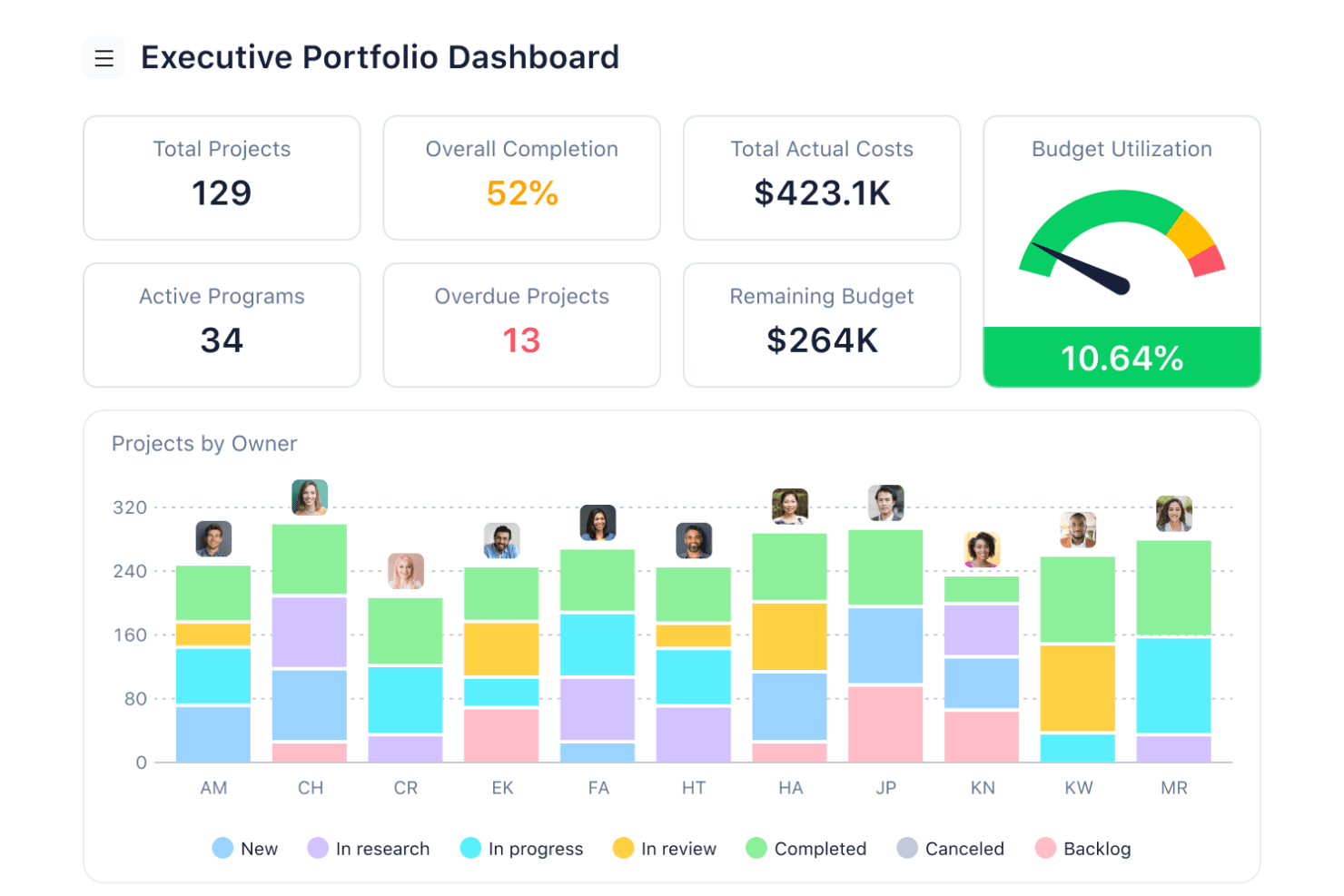
I pannelli di controllo del team di Wrike offrono ai responsabili una visibilità in tempo reale sull'avanzamento dei progetti e sullo stato delle attività nelle visualizzazioni per computer e dispositivi mobili. Wrike è una piattaforma basata sul cloud per la gestione di progetti e del lavoro, con gestione di attività e progetti, diverse visualizzazioni del lavoro, strumenti di collaborazione e integrazioni che consentono di collegarla ad altri sistemi aziendali. Le funzionalità più avanzate, tra cui moduli di richiesta, monitoraggio del tempo, gestione delle risorse e gestione del budget, richiedono piani a pagamento.
Per chi è più adatto Wrike?
Wrike è adatto ai team operativi e di progetto che devono coordinare progetti e attività quotidiane insieme a un sistema ERP o contabile separato.
Perché ho scelto Wrike
Ho scelto Wrike per il coordinamento di base del lavoro e le visualizzazioni flessibili dei progetti, piuttosto che per le funzionalità ERP. Il suo piano gratuito offre la gestione essenziale di progetti e attività, insieme alle visualizzazioni a bacheca e a tabella, rendendolo utile per i team che vogliono organizzare il lavoro senza adottare un altro sistema a pagamento. Le funzionalità più avanzate, come i moduli di richiesta, la gestione delle risorse, il monitoraggio del tempo e la gestione del budget, richiedono piani di livello superiore.
Funzionalità principali di Wrike
- Gestione di progetti e attività (gratuito): Organizza i progetti, assegna il lavoro, allega file e tieni traccia delle attività e delle sottoattività.
- Visualizzazioni a bacheca e a tabella (gratuito): Visualizza e gestisci il lavoro utilizzando bacheche in stile Kanban o una tabella simile a un foglio di calcolo.
- Moduli di richiesta (Business): Standardizza la raccolta delle richieste di lavoro e trasforma automaticamente le richieste inviate in elementi di lavoro.
- Gestione del tempo e delle risorse (Business e piani superiori): I piani a pagamento aggiungono funzionalità per monitorare il tempo e gestire i carichi di lavoro e le risorse del team.
Integrazioni di Wrike
Wrike supporta le integrazioni con altre applicazioni aziendali e offre un'API REST aperta disponibile per gli account di qualsiasi piano di abbonamento, incluso il piano gratuito. Le integrazioni disponibili e le relative funzionalità possono variare in base al piano.
Cosa è gratuito?
Wrike offre un piano gratuito incentrato sulla gestione essenziale di attività e progetti, che include applicazioni web, per computer e mobili, oltre alle visualizzazioni a bacheca e a tabella. I moduli di richiesta, il monitoraggio del tempo, la gestione avanzata delle risorse, la gestione del budget e altre funzionalità avanzate non sono inclusi nel piano gratuito e richiedono il passaggio a un piano superiore. Wrike offre inoltre una prova separata di 14 giorni delle funzionalità a pagamento.
Pros and Cons
Pros:
- Gli utenti illimitati supportano un'ampia partecipazione ai progetti
- Il coordinamento dei progetti integra i sistemi ERP separati
- Il monitoraggio del lavoro migliora la visibilità operativa
Cons:
- Nessun libro mastro, strumento per debiti verso fornitori o crediti verso clienti
- Nessuno strumento per bilanci, inventario o imposte
 Ideale per ERP low-code con una suite applicativa estesa
- Piano gratuito disponibile
- Prezzo su richiesta
Visit WebsiteCustomer Rating:4.8/5
Axelor combina potenti moduli per finanza, gestione progetti e CRM per ottimizzare le operazioni aziendali. Axelor è un software ERP low-code con una vasta suite di applicazioni per le diverse esigenze aziendali. Consente un’ampia personalizzazione per soddisfare requisiti aziendali specifici, rendendolo una soluzione versatile per aziende di qualsiasi dimensione.
Perché ho scelto Axelor: La natura open source di Axelor garantisce un miglioramento continuo e il supporto della community, offrendo una soluzione affidabile e sempre aggiornata. A differenza di altri software ERP, offre un'unica combinazione di flessibilità e un'ampia gamma di applicazioni aziendali integrate. Il suo design modulare propone una vasta gamma di applicazioni, dal CRM alla gestione progetti, personalizzabili secondo le esigenze aziendali, migliorando efficienza e adattabilità.
Funzionalità e integrazioni principali:
Funzionalità includono una piattaforma low-code, CRM, ERP, gestione progetti, gestione risorse umane, contabilità, magazzino, produzione, vendite, approvvigionamento e moduli per la gestione dei processi aziendali.
Integrazioni includono MySQL, PostgreSQL, Oracle, MS SQL Server, Apache Tomcat, JasperReports, Google Maps, Dropbox, LDAP, SMTP e Active Directory.
Pros and Cons
Pros:
- Modulare e personalizzabile
- Suite applicativa estesa
- Piattaforma low-code
Cons:
- Supporto limitato della community
- Richiede conoscenze tecniche
Learn more about Axelor: Ideale per spazio di lavoro online gratuito con CRM e attività
- Prova gratuita di 15 giorni + piano gratuito + demo gratuita disponibile
- Da $49/organizzazione/mese (fatturati annualmente)
Visit WebsiteCustomer Rating:4.2/5
Bitrix24 combina gestione dei progetti, CRM e strumenti di comunicazione in un'unica piattaforma, progettata per migliorare la collaborazione e semplificare i processi aziendali. Bitrix24 è uno spazio di lavoro online gratuito per le aziende che offre CRM, gestione delle attività, riunioni online e molto altro. È ideale per fornire una suite avanzata di strumenti per la gestione di vendite, clienti e progetti senza alcun costo.
Perché ho scelto Bitrix24: Bitrix24 offre agli utenti una vasta gamma di funzionalità che soddisfano diverse esigenze aziendali, tutte disponibili gratuitamente. A differenza di altri strumenti che offrono opzioni gratuite limitate, Bitrix24 mette a disposizione un set completo di funzionalità, rendendolo una scelta di rilievo per le aziende che cercano una soluzione efficace dal punto di vista dei costi. Inoltre, il software integra diversi strumenti aziendali essenziali in un'unica piattaforma, migliorando la produttività e la collaborazione.
Funzionalità e integrazioni principali:
Le funzionalità includono gestione delle vendite, centro di contatto, collaborazione del team di vendita, abilitazione alle vendite, analisi e report, CRM mobile, marketing, automazione e integrazioni, gestione delle attività, monitoraggio delle attività, API e integrazioni e gestione dei progetti.
Le integrazioni includono strumenti come WhatsApp, Instagram, Facebook, Google Analytics, Stripe, Mailchimp, Trello, Asana, Microsoft Office e Google Drive.
Pros and Cons
Pros:
- Piano gratuito completo
- Ampio set di funzionalità
- Solide capacità CRM
Cons:
- Interfaccia complessa
- Occasionali problemi di prestazioni
Learn more about Bitrix24: Ideale per ERP personalizzabili senza costi di licenza
- Demo gratuita disponibile
- Gratuito
Visit WebsiteCustomer Rating:4.1/5
Apache OFBiz offre strumenti avanzati per la gestione aziendale e una suite personalizzabile per le imprese. Apache OFBiz è una suite di applicazioni aziendali abbastanza flessibile da poter essere utilizzata in qualsiasi settore. Offre un'ampia gamma di moduli e funzionalità che possono essere adattati alle esigenze di qualsiasi azienda senza l'onere dei costi di licenza.
Perché ho scelto Apache OFBiz: Apache OFBiz si distingue come una soluzione ERP altamente flessibile e personalizzabile. A differenza di altri sistemi ERP che possono avere costi nascosti o versioni gratuite limitate, Apache OFBiz è completamente gratuito e open source, il che lo rende una scelta conveniente per le aziende. Il software offre un'ampia gamma di moduli e la possibilità di modificare ed estendere le sue funzionalità per soddisfare requisiti aziendali specifici.
Funzionalità principali e integrazioni:
Le funzionalità includono contabilità, CRM, gestione degli ordini, commercio elettronico, gestione dei magazzini, gestione dell'inventario, produzione, MRP, gestione dei prodotti e dei cataloghi, gestione delle promozioni e dei prezzi, gestione dell'evasione della catena di approvvigionamento, contratti, pagamenti e fatturazione.
Le integrazioni includono Apache Tomcat, PostgreSQL, MySQL, MariaDB, Oracle Database, Google Maps, Apache Lucene, Apache FOP, Apache Velocity e JasperReports.
Pros and Cons
Pros:
- Nessun costo di licenza
- Altamente personalizzabile
- Ampia gamma di moduli
Cons:
- Richiede competenze tecniche
- Opzioni limitate per l'interfaccia utente
Learn more about Apache OFBiz: Ideale per una gestione aziendale flessibile e tutto-in-uno
- Prova gratuita di 30 giorni disponibile
- Prezzo su richiesta
Visit WebsiteCustomer Rating:4.5/5
Dolibarr unisce semplicità e flessibilità per gestire efficacemente le operazioni aziendali, offrendo moduli per fatturazione, inventario, gestione progetti e altro ancora. Dolibarr è una suite web open source ERP e CRM progettata per aziende di ogni dimensione. È ideale per una gestione aziendale flessibile e tutto-in-uno grazie ai suoi moduli personalizzabili e a una gamma avanzata di funzionalità.
Perché ho scelto Dolibarr: La flessibilità di Dolibarr e la sua ampia gamma di funzionalità rispondono a diverse esigenze aziendali. Si distingue perché permette agli utenti di abilitare solo le funzionalità necessarie, rendendolo altamente adattabile. Il software integra molteplici funzioni aziendali in un'unica piattaforma, riducendo la necessità di molteplici soluzioni software.
Funzionalità e integrazioni distintive:
Funzionalità incluse gestione delle relazioni con i clienti, vendite, risorse umane, logistica, gestione magazzino, fatturazione, contabilità, produzione, marketing, gestione di fondazioni e personalizzazione tramite un Module Builder a basso codice sorgente.
Integrazioni includono PayPal, Stripe, Google Calendar, Google Contacts, Google Drive, Dropbox, Mailchimp, WooCommerce, Prestashop e Magento.
Pros and Cons
Pros:
- Altamente personalizzabile
- Set di funzionalità completo
- Forte supporto della community
Cons:
- Integrazioni native limitate
- Richiede conoscenze tecniche per l’installazione
Learn more about Dolibarr: 8Ideale per una suite completa di applicazioni aziendali
Odoo
- Prova gratuita + piano gratuito disponibile
- Da $31.10/utente/mese (fatturato annualmente)

Odoo offre applicazioni aziendali estese per diverse esigenze operative. Odoo è un avanzato software ERP e CRM open source che offre una vasta gamma di applicazioni per diverse funzioni aziendali. Propone un’ampia suite di app gestionali, rendendolo una soluzione versatile per aziende di ogni dimensione.
Perché ho scelto Odoo: Odoo fornisce agli utenti una gamma estesa di applicazioni aziendali integrate, che lo distingue dalle altre soluzioni ERP. La capacità della piattaforma di coprire molteplici esigenze aziendali, dal CRM alla gestione dell’inventario, è senza pari. Questa struttura modulare permette di iniziare con le funzionalità essenziali e ampliarle secondo necessità, garantendo così flessibilità e convenienza economica.
Caratteristiche e integrazioni di spicco:
Le funzionalità comprendono il design modulare, che consente alle aziende di aggiungere app secondo le necessità, e la natura open source che assicura flessibilità e personalizzazione. La piattaforma vanta inoltre un’interfaccia intuitiva e un forte supporto della community.
Le integrazioni includono Google Calendar, Google Drive, Microsoft Outlook, QuickBooks, PayPal, Stripe, Amazon, eBay, WooCommerce e Shopify.
Pros and Cons
Pros:
- Ampia suite di app
- Flessibilità open source
- Forte supporto della community
Cons:
- Configurazione complessa
- Funzionalità gratuite limitate
Learn more about Odoo: Ideale per software aziendale modulare e scalabile
- Demo gratuita disponibile
- Gratuito da usare

Tryton presenta un design modulare che consente alle aziende di personalizzare ed espandere le funzionalità per soddisfare le proprie esigenze specifiche. Tryton è un software ERP gratuito, modulare e scalabile che offre ampie funzionalità di gestione aziendale per diversi settori.
Perché ho scelto Tryton: Tryton offre un’eccezionale modularità e scalabilità, rendendolo adattabile a diverse esigenze aziendali. La sua natura open-source e il supporto di una comunità attiva lo distinguono da altre soluzioni ERP. Inoltre, la comunità attiva e gli aggiornamenti regolari ne rafforzano la robustezza e il miglioramento continuo.
Funzionalità distintive e integrazioni:
Le funzionalità includono architettura modulare, contabilità finanziaria, gestione inventario, gestione progetti, gestione vendite, gestione acquisti, CRM, gestione della produzione, risorse umane e punto vendita.
Le integrazioni includono PostgreSQL, MySQL, SQLite, LDAP, Google Maps, Matomo, LibreOffice, Microsoft Office, Odoo e OpenERP.
Pros and Cons
Pros:
- Altamente modulare
- Architettura scalabile
- Forte supporto della comunità
Cons:
- Funzionalità limitate pronte all'uso
- Richiede personalizzazione
Learn more about Tryton: Ideale per un ERP open source con forte supporto della comunità
- Piano gratuito disponibile
- Gratuito

iDempiere offre soluzioni scalabili di livello aziendale supportate da una comunità globale e collaborativa. iDempiere è un software ERP gratuito e open source, nonché un sistema CRM. È ideale per le aziende che cercano una soluzione ERP affidabile con un forte supporto comunitario, garantendo miglioramenti continui e collaborazione.
Perché ho scelto iDempiere: Il solido sostegno della comunità e il carattere open source di iDempiere lo distinguono dagli altri ERP. La comunità attiva di professionisti e sviluppatori garantisce che il software rimanga sempre aggiornato e di alta qualità. Combina tecnologia all’avanguardia con un approccio collaborativo, rendendolo una scelta affidabile ed economica.
Funzionalità principali e integrazioni:
Le funzionalità includono gestione finanziaria, gestione integrata della catena di approvvigionamento, report e analisi flessibili, workflow personalizzabili, supporto multi-lingua e multi-valuta, solide caratteristiche di sicurezza, ampie capacità di integrazione, interfaccia intuitiva, architettura scalabile e supporto attivo della comunità.
Le integrazioni includono PostgreSQL, Oracle, Java, ZK, OSGi, Maven, JasperReports, Apache Tomcat, Eclipse, GitHub e Jenkins.
Pros and Cons
Pros:
- Forte supporto della comunità
- Software di alta qualità
- Conveniente
Cons:
- Supporto ufficiale limitato
- Richiede competenze tecniche
Learn more about iDempiere:
Altri software ERP gratuiti
Di seguito è riportato un elenco di ulteriori software ERP gratuiti che ho selezionato. Sebbene non siano rientrati tra i primi 15, sono comunque validi e meritano ulteriori approfondimenti.
- 11ERP5Ideale per applicazioni mission-critical con modello di business unificato
- 12Scipio ERPIdeale per operazioni e-commerce su larga scala
- 13ERPNextIdeale per piccole imprese che necessitano di utenti illimitati
- 14inoERPIdeale per ERP open source con documentazione esaustiva
- 15BlueSeerIdeale per ERP ed EDI gratuiti per il settore manifatturiero
- 16monday AI WorkspaceIdeale per la gestione dei progetti e la collaborazione in team
- 17EpicflowIdeale per grafici del carico storico e futuro
Recensioni correlate sui software ERP
Se non hai ancora trovato ciò che cerchi, dai un'occhiata a questi strumenti strettamente correlati ai software ERP che abbiamo testato e valutato.
- Software di contabilità
- Sistemi POS
- Software di fatturazione
- Servizi per la gestione delle buste paga
- Servizi per conti esercenti
- Software per la gestione dell'inventario
Come Valuto i Software ERP Gratuiti
Valuto gli strumenti ERP gratuiti su due livelli: il requisito base imprescindibile — vero accesso gratuito, contabilità generale, conti da pagare/ricevere e copertura di più moduli — e i fattori distintivi che separano una buona opzione da una meno valida.
Funzionalità Principali (Requisiti Minimi per Questa Lista)
Quando seleziono gli strumenti per la mia lista, ne valuto ciascuno su una scala da 0 (non offre la funzionalità) a 5 (eccelle in quest'area) per ogni funzionalità principale elencata qui sotto. Poi, calcolo il punteggio totale dello strumento in percentuale. Ogni strumento deve raggiungere un punteggio totale minimo del 65% per essere considerato per l'inclusione.
- Gestione Finanziaria: Cerco una soluzione completa di contabilità — libro mastro, AP, AR e riconciliazione bancaria — che consenta la chiusura di fine mese senza soluzioni alternative o tracciamenti manuali su fogli di calcolo.
- Disponibilità di un Piano Gratuito: Il prodotto deve offrire davvero un piano gratuito o un'edizione open source, non una prova di 14 giorni che si interrompe a metà riconciliazione. Verifico se la versione gratuita supporta effettivamente il lavoro contabile quotidiano.
- Moduli ERP Integrati: Un software può definirsi ERP se collega la contabilità a moduli come magazzino, approvvigionamento o CRM. Valuto se i dati fluiscono tra i moduli o rimangono isolati.
- Supporto Multi-Utente: Il lavoro finanziario richiede approvatori, contabili e controllori. Valuto quanti utenti supporta il piano gratuito e se include permessi basati sui ruoli per la separazione dei compiti.
- Reportistica & Dashboard: Controllo se la piattaforma genera report finanziari standard come conto economico, bilancio e rendiconto finanziario. Dashboard personalizzabili con KPI in tempo reale aumentano il punteggio.
- Importazione & Esportazione Dati: Spostare i dati dentro e fuori è importante per revisioni, migrazioni e collegamento con strumenti esterni. Valuto se il piano gratuito supporta CSV, Excel e accesso API per l'integrazione con strumenti di BI.
Una volta individuati gli strumenti che soddisfano questi criteri, considero cosa distingue ciascuna piattaforma.
Fattori Distintivi (Cosa Distingue i Fornitori)
Ecco come confronto e metto a confronto i diversi fornitori:
Caratteristiche Distintive
L'automazione dei flussi di lavoro è un grande elemento distintivo. Cerco flussi di approvazione configurabili per ordini di acquisto e fatture, in modo che i controller possano far rispettare le politiche di spesa senza inseguire email. Un piano dei conti flessibile è altrettanto importante, soprattutto per le organizzazioni non profit che seguono budget a livello di fondo o per startup che hanno bisogno di suddivisioni per reparto. Controllo se la piattaforma registra una traccia di controllo immutabile, perché storici delle transazioni puliti rendono molto più semplici audit di fine anno e report per sovvenzioni.
Oltre le Caratteristiche
La scalabilità è una delle prime cose che valuto. Un ERP gratuito che ti limita a poche transazioni o utenti può diventare un vicolo cieco quando l'azienda cresce oltre il primo anno. Cerco un percorso di aggiornamento chiaro con soglie di livello trasparenti. Anche il modello di distribuzione è importante — opzioni open source auto-gestite come ERPNext danno al team finanziario il pieno controllo dei dati, mentre i piani cloud riducono l'impegno IT per chi non ha infrastruttura dedicata. Anche il supporto della community conta, dato che gli utenti del piano gratuito raramente hanno priorità nei ticket. Una documentazione solida e forum attivi fanno la differenza in fase di implementazione.
Come scegliere un software ERP gratuito
Mentre affronti il tuo personale e unico processo di selezione del software, tieni a mente i seguenti punti:
| Fattore | Cosa considerare |
|---|---|
| FattoreScalabilità | Cosa considerareIl software crescerà insieme alla tua azienda? Considera le esigenze future e assicurati che l'ERP sia in grado di gestire un carico di lavoro maggiore senza problemi di prestazioni. |
| FattoreIntegrazioni | Cosa considerareL'ERP può connettersi agli strumenti che già utilizzi? Verifica la compatibilità con sistemi essenziali come il CRM e il software di contabilità. |
| FattorePersonalizzazione | Cosa considerareConsente di adattarlo ai tuoi processi? Assicurati che supporti flussi di lavoro specifici senza richiedere risorse estese da parte degli sviluppatori. |
| FattoreFacilità d'uso | Cosa considerareÈ intuitivo per il tuo team? Cerca interfacce facili da usare e verifica la disponibilità di risorse per la formazione, così da ridurre al minimo la curva di apprendimento. |
| FattoreImplementazione e inserimento | Cosa considerareQuanto tempo occorrerà per iniziare? Valuta le tempistiche e le risorse necessarie per l'implementazione. Fai attenzione ai costi nascosti nei servizi di inserimento. |
| FattoreCosto | Cosa considerareCi sono spese nascoste? Oltre a essere gratuito, verifica i costi relativi ad aggiunte, assistenza o funzionalità aggiuntive di cui potresti aver bisogno in seguito. |
| FattoreMisure di sicurezza | Cosa considerareProtegge i tuoi dati? Assicurati che sia conforme agli standard pertinenti, come il GDPR, e verifica la presenza della crittografia e di verifiche di sicurezza regolari. |
| FattoreDisponibilità dell'assistenza | Cosa considerareÈ facile accedere all'aiuto? Valuta la disponibilità e la reattività dell'assistenza clienti, considerando i fusi orari e le lingue supportate. |
Tendenze dei software ERP gratuiti
Ecco alcune tendenze che ho notato nella tecnologia dei software ERP gratuiti e cosa potrebbero significare per il futuro. Ho analizzato innumerevoli aggiornamenti dei prodotti, comunicati stampa e registri delle versioni per individuare gli approfondimenti più importanti.
- Maggiore attenzione alle piattaforme a basso codice: le piattaforme a basso codice consentono alle aziende di personalizzare i propri sistemi ERP senza una conoscenza approfondita della programmazione. Questa tendenza è importante perché democratizza l'accesso alla personalizzazione degli ERP, rendendola accessibile alle aziende più piccole.
- Integrazione con l'intelligenza artificiale e l'apprendimento automatico: le integrazioni con l'intelligenza artificiale e l'apprendimento automatico stanno diventando sempre più comuni nei software ERP. Queste tecnologie migliorano il processo decisionale fornendo analisi predittive e automatizzando le attività di routine, aumentando così l'efficienza.
- Maggiore accessibilità da dispositivi mobili: l'accessibilità da dispositivi mobili è una tendenza in crescita, con soluzioni ERP che offrono solide applicazioni mobili. Ciò consente agli utenti di gestire i processi aziendali ovunque si trovino, aumentando flessibilità e reattività.
- Maggiore attenzione alla sicurezza e alla privacy dei dati: la sicurezza e la privacy dei dati sono fondamentali e i sistemi ERP implementano misure di sicurezza avanzate. Questa tendenza è essenziale a causa della quantità crescente di dati sensibili gestiti dai sistemi ERP.
- Adozione delle soluzioni ERP basate sul cloud: le soluzioni ERP basate sul cloud stanno guadagnando popolarità rispetto alle opzioni locali grazie alla loro scalabilità e al loro rapporto costo-efficacia. Questa tendenza consente alle aziende di accedere alle funzionalità ERP senza significativi investimenti iniziali nell'infrastruttura.
Che cos'è un software ERP gratuito?
Il software ERP gratuito è uno strumento che integra diversi processi aziendali in un sistema unificato senza i costi associati alle soluzioni ERP commerciali.
È particolarmente utile per le startup e le piccole imprese che mirano a semplificare le operazioni e migliorare l'efficienza con un budget limitato. Sebbene alcune piattaforme siano completamente gratuite, la maggior parte offre piani gratuiti limitati o periodi di prova. Questi includono generalmente funzionalità chiave come la gestione finanziaria, il monitoraggio dell'inventario, strumenti di base per la gestione delle relazioni con i clienti e controlli degli accessi degli utenti.
Funzionalità dei software ERP gratuiti
Quando valuti un software ERP gratuito, è essenziale comprendere le funzionalità chiave che possono influire significativamente sulle operazioni aziendali. Ecco alcune delle funzionalità più importanti da cercare in un software ERP gratuito:
- Gestione finanziaria: questa funzionalità include strumenti per la gestione dei debiti, dei crediti, della gestione della liquidità e della rilevazione dei ricavi. Aiuta le aziende a gestire centralmente tutti i processi finanziari, garantendo una rendicontazione finanziaria accurata e la conformità normativa.
- Contabilità: analogamente ai software di contabilità autonomi, i sistemi ERP offrono libro mastro, flussi di cassa, contabilità clienti e fornitori e gestione delle spese. L'integrazione della contabilità in un sistema ERP consente una migliore sintesi e rendicontazione dei dati.
- Elaborazione degli ordini: questa funzionalità gestisce il ciclo di vita degli ordini di acquisto, dalla registrazione iniziale fino alla fatturazione, alla consegna e al pagamento. Semplifica la gestione degli ordini riunendo le informazioni provenienti da più sistemi in un unico flusso di dati.
- Gestione dei progetti: i sistemi ERP includono spesso strumenti per la pianificazione, l'esecuzione e il monitoraggio dei progetti. Le funzionalità possono comprendere la gestione delle attività, la definizione del budget, il controllo dei costi e la gestione dei rischi, elementi fondamentali per portare a termine con successo un progetto.
- IA integrata: le funzionalità di IA nei sistemi ERP automatizzano attività come la rendicontazione delle spese e i riepiloghi finanziari. L'IA migliora l'efficienza riducendo l'intervento manuale e velocizzando i processi.
- Dati in tempo reale: l'accesso ai dati in tempo reale consente alle aziende di prendere rapidamente decisioni informate. Garantisce l'integrità dei dati e aiuta a individuare tempestivamente i cambiamenti nelle condizioni aziendali.
- Automazione: automatizzare i processi aziendali di routine, come l'evasione degli ordini e la gestione dell'inventario, riduce il lavoro manuale, minimizza gli errori e migliora la produttività complessiva.
- Analisi dei dati: le funzionalità fondamentali di reportistica e analisi aiutano le aziende a raccogliere e analizzare i dati operativi. Questa funzionalità supporta il processo decisionale fornendo informazioni utili attraverso report, dashboard e visualizzazioni.
- Controlli dei processi aziendali: questi controlli ottimizzano e automatizzano le attività di routine, migliorando l'efficienza operativa e la conformità. Comprendono la gestione dei flussi di lavoro, i processi di approvazione e i controlli degli accessi basati sui ruoli.
- Reportistica: i sistemi ERP offrono diverse funzionalità di reportistica, tra cui report finanziari, operativi e di conformità. Questi report garantiscono trasparenza e aiutano a prendere decisioni basate sui dati
Vantaggi dei software ERP gratuiti
I software ERP gratuiti offrono vantaggi significativi agli utenti e alle organizzazioni. Ecco alcuni dei principali vantaggi che i potenziali acquirenti dovrebbero considerare:
- Risparmio sui costi: i software ERP gratuiti eliminano la necessità di costose licenze, consentendo alle aziende di destinare le risorse ad altre aree critiche. Ciò è particolarmente vantaggioso per le piccole imprese, le startup o le organizzazioni senza scopo di lucro.
- Scalabilità: molte soluzioni ERP gratuite offrono moduli scalabili, consentendo alle aziende di aggiungere funzionalità durante la crescita senza sostenere costi aggiuntivi.
- Personalizzazione: le piattaforme ERP gratuite spesso includono funzionalità open source, consentendo alle aziende di adattare il software alle proprie esigenze e ai propri flussi di lavoro.
- Supporto della community: gli utenti beneficiano di community attive composte da sviluppatori e utenti che contribuiscono ai miglioramenti continui, al supporto e alla risoluzione dei problemi.
- Accessibilità: i software ERP gratuiti sono generalmente basati sul cloud e offrono agli utenti un facile accesso ai dati e ai processi aziendali da qualsiasi luogo con una connessione Internet
Costi e prezzi dei software ERP gratuiti
Per gli acquirenti di software con poca o nessuna esperienza, comprendere i costi e le opzioni di prezzo dei software ERP gratuiti può essere difficile.
Tuttavia, è importante ricordare che, sebbene il software possa essere gratuito, le funzionalità, l'utilizzo o il supporto potrebbero essere limitati rispetto ai piani a pagamento. Di seguito è riportata una tabella che riepiloga le diverse opzioni di software ERP gratuiti, i relativi prezzi medi e le funzionalità comunemente incluse in ciascun piano.
Tabella di confronto dei piani per i software ERP gratuiti
| Opzione del piano | Prezzo medio (al mese) | Funzionalità comunemente incluse |
| Piano gratuito | $0 | Contabilità di base, gestione dell'inventario, CRM, supporto limitato agli utenti. |
| Piano base | $50-$100 | Moduli fondamentali come contabilità, CRM di base e gestione dell'inventario. |
| Piano standard | $100-$250 | Include moduli avanzati come gestione dei progetti, risorse umane e funzionalità CRM potenziate. |
| Piano premium | $250+ | Offre funzionalità complete, tra cui analisi avanzate, automazione e personalizzazioni. |
| Piano aziendale | Prezzi personalizzati | Fornisce accesso completo a tutti i moduli, supporto dedicato e ampie opzioni di personalizzazione. |
Domande frequenti sul software ERP gratuito
Ecco alcune domande frequenti che ho ricevuto sul software ERP gratuito.
Il software ERP gratuito è in grado di gestire operazioni aziendali su larga scala?
Sì, molte soluzioni ERP gratuite sono progettate per adattarsi alla crescita della tua azienda. Offrono architetture modulari che consentono di aggiungere funzionalità e capacità man mano che l’azienda cresce.
Quanto è sicuro il software ERP gratuito?
La sicurezza del software ERP gratuito varia a seconda del fornitore. Molte soluzioni implementano misure di sicurezza avanzate, ma è essenziale valutare le funzionalità di sicurezza specifiche di ciascun software e assicurarsi che soddisfino i requisiti aziendali.
È disponibile il supporto tecnico per il software ERP gratuito?
La disponibilità del supporto tecnico varia. Molte soluzioni ERP gratuite dispongono di comunità di utenti attive e forum per il supporto, mentre alcune offrono piani di supporto a pagamento per ulteriore assistenza e servizi.
L'utilizzo del software ERP gratuito presenta delle limitazioni?
Il software ERP gratuito può presentare limitazioni nelle funzionalità avanzate e nella scalabilità rispetto alle versioni a pagamento. Alcune soluzioni possono inoltre richiedere competenze tecniche per la personalizzazione e l’implementazione.
Quanto è difficile implementare un software ERP gratuito?
La difficoltà di implementazione dipende dal software e dalle esigenze aziendali. Alcune soluzioni ERP gratuite offrono procedure di installazione semplici e una documentazione completa, mentre altre possono richiedere maggiori conoscenze tecniche.