

O software ERP gratuito é um sistema completo que ajuda pequenas empresas e startups a gerir funções essenciais como finanças, inventário, vendas e recursos humanos, sem pagar por uma plataforma premium. Substitui folhas de cálculo desconexas, aplicações isoladas e processos manuais ao centralizar os dados, simplificar os fluxos de trabalho e oferecer visibilidade em tempo real em todas as equipas.
Ao longo da minha carreira na gestão financeira e no software digital, vi como a utilização de várias ferramentas pode levar à duplicação de dados, ao incumprimento de prazos e a erros dispendiosos. O ERP certo, mesmo sendo gratuito, pode reunir tudo num só lugar, reduzir as dificuldades de comunicação entre departamentos e dar-lhe um maior controlo sobre a sua empresa à medida que esta cresce.
Depois de realizar testes práticos exaustivos e analisar avaliações de utilizadores, reuni as melhores opções de software ERP gratuito disponíveis. Estas são as ferramentas que funcionam realmente, para que possa deixar para trás o caos dos sistemas dispersos e voltar a gerir a sua empresa com confiança.
Why Trust Our Software Recommendations
6,700+
Reviews
20
Industry experts
16+
Evaluation factors
14
Years
Our team has been testing and reviewing software since 2012. As finance leaders ourselves, we know how difficult—and important—it is to choose the right software.
For this guide, we evaluated tools using hands-on testing and independent research, scoring tools using our selection criteria.
Our reviews reflect our human editorial judgment, not a sales pitch.
Tabela comparativa de software ERP gratuito
Esta tabela comparativa resume os detalhes de preços das minhas principais seleções de software ERP gratuito:
| Tool | Best For | Trial Info | Price | ||
|---|---|---|---|---|---|
| 1 | Best for live shop floor reporting | 15 + 15-day free trial available | From $49/user/month | Website | |
| 2 | Best with customizable workflow automation | Free plan + 7-day free trial available | From $35/user/month | Website | |
| 3 | Best for coordinating work alongside an ERP system | Free plan + 14-day trial + demo available | From $10/user/month (billed annually) | Website | |
| 4 | Best for low-code ERP with extensive application suite | Free plan available | Pricing upon request | Website | |
| 5 | Best for free online workspace with CRM and tasks | Free plan + 15-day free trial + free demo available | From €69/month | Website | |
| 6 | Best for customizable ERP with no licensing fees | Free plan available | Pricing upon request | Website | |
| 7 | Best for flexible, all-in-one business management | Free plan + 15-day free trial + free demo available | From €5/month | Website | |
| 8 | Best for a comprehensive business apps suite | Free plan + free trial available | From $31.10/user/month (billed annually) | Website | |
| 9 | Best for modular and scalable business software | Free plan available | Pricing upon request | Website | |
| 10 | Best for open source ERP with strong community support | Free plan available | Free to use | Website |


Avaliações do melhor software ERP gratuito
Explore o melhor software ERP gratuito nas minhas avaliações aprofundadas. Analisei as principais funcionalidades, vantagens e desvantagens, integrações e principais casos de utilização para o ajudar a encontrar rapidamente a opção certa.
 Best for live shop floor reporting
- 15 + 15-day free trial available
- From $49/user/month
Visit WebsiteCustomer Rating:4.5/5
MRPeasy offers a comprehensive stock inventory section. MRPeasy is a cloud-based ERP system designed for small manufacturers. It helps you manage production, inventory, sales, and finances in one platform, with real-time visibility into shop floor activity and resource allocation.
Why I picked MRPeasy: I chose MRPeasy because of its strong focus on production planning. Features like automatic scheduling and live shop floor reporting make it easier to align resources with demand and keep production running smoothly. It also supports multi-level bills of materials, which is especially useful for manufacturers managing complex assembly processes.
Standout features & integrations:
Features include real-time inventory management with lot tracking and barcodes, procurement forecasting with purchase order creation, and financial management tools for transactions and reporting.
Integrations include Amazon, BigCommerce, HubSpot, Magento, Microsoft Power BI, Pipedrive, QuickBooks Online, Salesforce, ShipStation, Shopify, WooCommerce, Xero, Zapier, and EDI.
Pros and Cons
Pros:
- Wide integration options
- Real-time inventory tracking
- Strong production planning tools
Cons:
- Complex initial setup
- Limited customization options
Learn more about MRPeasy: Best with customizable workflow automation
- Free plan + 7-day free trial available
- From $35/user/month
Visit WebsiteCustomer Rating:4.7/5
Striven offers an accessible ERP dashboard with integrated billing, financial reporting, and operational tracking tools. Striven is a cloud-based ERP platform for businesses that brings together accounting, inventory, CRM, project management, and workflow automation in a single system.
Who Is Striven Best For?
Striven is a good fit for small to midsize businesses that want a unified ERP system to manage operations across multiple departments.
Why I Picked Striven
I picked Striven as one of the best because I can build custom workflow automations that fit my team’s exact processes. I use its drag-and-drop workflow designer to automate approvals, task assignments, and notifications across accounting, sales, and inventory. My team is able to set up conditional triggers and multi-step workflows without coding, which helps us keep operations moving without manual intervention.
Striven Key Features
- Integrated accounting: Manage general ledger, accounts payable, and receivable within the same platform.
- Inventory management: Track stock levels, reorder points, and warehouse transfers in real time.
- CRM tools: Store customer data, manage leads, and track sales activities from one dashboard.
- Project management: Plan projects, assign tasks, and monitor progress with built-in project tracking tools.
Striven Integrations
Native integrations are not clearly documented. Striven provides an API for custom integrations.
What's Free?
Striven offers a free trial, but it does not have a free-forever plan. The free trial provides full access to features for a limited time, after which a paid subscription is required.
Pros and Cons
Pros:
- Offers integrated CRM and HR features
- Includes asset and inventory management tools
- Workflow automation for business processes
Cons:
- Advanced features require paid subscription
- Limited native integrations with third-party tools
Learn more about Striven: Best for coordinating work alongside an ERP system
- Free plan + 14-day trial + demo available
- From $10/user/month (billed annually)
Visit WebsiteCustomer Rating:4.3/5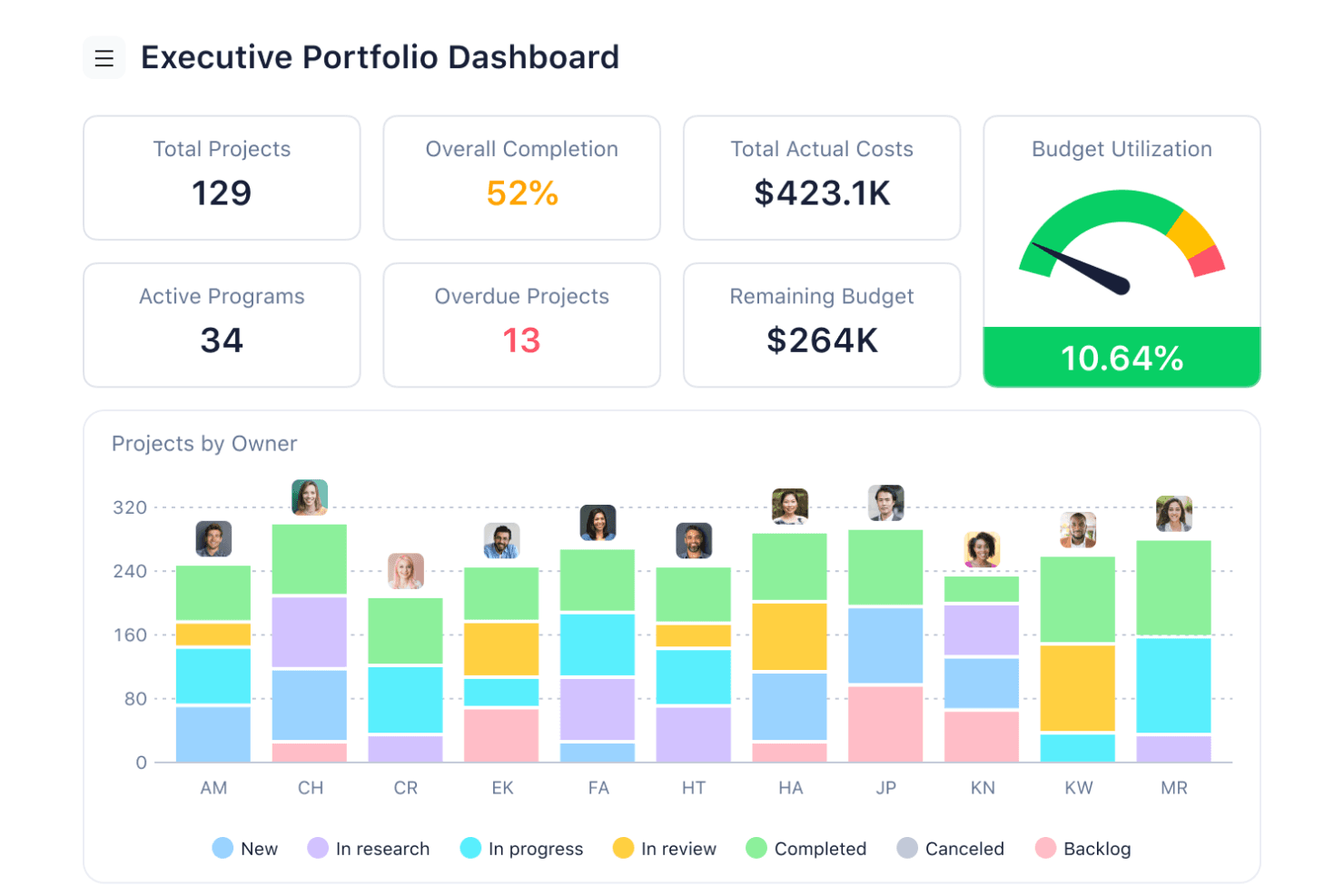
Wrike’s team dashboards give managers real-time visibility into project progress and task status across desktop and mobile views. Wrike is a cloud-based project and work management platform with task and project management, multiple work views, collaboration tools, and integrations that can connect it with other business systems. More advanced capabilities, including request forms, time tracking, resource management, and budgeting, require paid plans.
Who Is Wrike Best For?
Wrike suits operations and project teams that need to coordinate projects and day-to-day work alongside a separate ERP or accounting system.
Why I Picked Wrike
I picked Wrike for basic work coordination and flexible project views rather than ERP functionality. Its Free plan provides core project and task management along with Board and Table views, making it useful for teams that want to organize work without adopting another paid system. More advanced capabilities, such as request forms, resource management, time tracking, and budgeting, require higher-tier plans.
Wrike Key Features
- Project and task management (Free): Organize projects, assign work, attach files, and keep track of tasks and subtasks.
- Board and Table views (Free): View and manage work using Kanban-style boards or a spreadsheet-like table.
- Request forms (Business): Standardize work intake and automatically turn submitted requests into work items.
- Time and resource management (Business and higher): Paid tiers add capabilities for tracking time and managing team workloads and resources.
Wrike Integrations
Wrike supports integrations with other business applications and offers an open REST API that is available to accounts on any subscription plan, including Free. Available integrations and their functionality can vary by plan.
What's Free?
Wrike offers a free plan centered on essential task and project management, including web, desktop, and mobile apps plus Board and Table views. Request forms, time tracking, advanced resource management, budgeting, and other advanced functionality are not included in the Free plan and require an upgrade. Wrike also offers a separate 14-day trial of paid features.
Pros and Cons
Pros:
- Work tracking improves operational visibility
- Project coordination complements separate ERP systems
- Unlimited users support broad project participation
Cons:
- No financial statements, inventory, or tax tools
- No general ledger, AP, or AR
 Best for low-code ERP with extensive application suite
- Free plan available
- Pricing upon request
Visit WebsiteCustomer Rating:4.8/5
Axelor combines powerful modules for finance, project management, and CRM to streamline business operations. Axelor is a low-code ERP software with an extensive application suite for diverse business needs. It allows extensive customization to meet specific business requirements, making it a versatile solution for companies of all sizes.
Why I picked Axelor: Axelor’s open source nature ensures continuous improvement and community support, providing a reliable and up-to-date solution. Unlike other ERP software, it offers a unique blend of flexibility and a wide range of integrated business applications. Its modular design offers a wide range of applications, from CRM to project management, which can be tailored to specific business needs, enhancing efficiency and adaptability.
Standout features & integrations:
Features include a low-code platform, CRM, ERP, project management, HR management, accounting, inventory, manufacturing, sales, procurement, and business process management modules.
Integrations include MySQL, PostgreSQL, Oracle, MS SQL Server, Apache Tomcat, JasperReports, Google Maps, Dropbox, LDAP, SMTP, and Active Directory.
Pros and Cons
Pros:
- Low-code platform
- Extensive application suite
- Modular and customizable
Cons:
- Requires technical knowledge
- Limited community support
Learn more about Axelor: Best for free online workspace with CRM and tasks
- Free plan + 15-day free trial + free demo available
- From €69/month
Visit WebsiteCustomer Rating:4.2/5
Bitrix24 combines project management, CRM, and communication tools in a single platform, designed to enhance collaboration and streamline business processes. Bitrix24 is a free online workspace for businesses that offers CRM, task management, online meetings, and more. It’s best for providing an advanced suite of tools for managing sales, clients, and projects without any cost.
Why I picked Bitrix24: Bitrix24 provides users with an extensive range of features that cater to various business needs, all available for free. Unlike other tools that offer limited free options, Bitrix24 provides a full suite of functionalities, making it a standout choice for businesses looking for a cost effective solution. Additionally, the software integrates multiple essential business tools into one platform, enhancing productivity and collaboration.
Standout features & integrations:
Features include sales management, contact center, sales team collaboration, sales enablement, analytics and reports, mobile CRM, marketing, automation and integrations, task management, task tracking, API and integrations, and project management.
Integrations include tools such as WhatsApp, Instagram, Facebook, Google Analytics, Stripe, Mailchimp, Trello, Asana, Microsoft Office, and Google Drive.
Pros and Cons
Pros:
- Strong CRM capabilities
- Extensive feature set
- Comprehensive free plan
Cons:
- Occasional performance issues
- Complex interface
Learn more about Bitrix24: Best for customizable ERP with no licensing fees
- Free plan available
- Pricing upon request
Visit WebsiteCustomer Rating:4.1/5
Apache OFBiz offers advanced business management tools and a customizable suite for enterprises. Apache OFBiz is a suite of business applications flexible enough to be used across any industry. It offers a wide range of modules and features that can be tailored to fit any business needs without the burden of licensing costs.
Why I picked Apache OFBiz: Apache OFBiz stands out as a highly flexible and customizable ERP solution. Unlike other ERP systems that may have hidden costs or limited free versions, Apache OFBiz is entirely free and open source, making it a cost effective choice for businesses. The software offers an extensive range of modules and the ability to modify and extend its features to suit specific business requirements.
Standout features & integrations:
Features include accounting, CRM, order management, e-commerce, warehousing, inventory, manufacturing, MRP, product and catalog management, promotion and pricing management, supply chain fulfillment, contracts, payments, and billing.
Integrations include Apache Tomcat, PostgreSQL, MySQL, MariaDB, Oracle Database, Google Maps, Apache Lucene, Apache FOP, Apache Velocity, and JasperReports.
Pros and Cons
Pros:
- Wide range of modules
- Highly customizable
- No licensing fees
Cons:
- Limited user interface options
- Requires technical expertise
Learn more about Apache OFBiz: Best for flexible, all-in-one business management
- Free plan + 15-day free trial + free demo available
- From €5/month
Visit WebsiteCustomer Rating:4.5/5
Dolibarr combines simplicity and flexibility to manage business operations efficiently, offering modules for invoicing, inventory, project management, and more. Dolibarr is an open source ERP and CRM web suite designed for businesses of all sizes. It’s best for flexible, all-in-one business management due to its customizable modules and advanced feature set.
Why I picked Dolibarr: Dolibarr’s flexibility and extensive range of features cater to various business needs. It stands out because it allows users to enable only the features they need, making it highly adaptable. The software integrates multiple business functions into a single platform, reducing the need for multiple software solutions.
Standout features & integrations:
Features include customer relationship management, sales, human resources, logistics, stock management, invoicing, accounting, manufacturing, marketing, foundation management, and customization through a low source code Module Builder.
Integrations include PayPal, Stripe, Google Calendar, Google Contacts, Google Drive, Dropbox, Mailchimp, WooCommerce, Prestashop, and Magento.
Pros and Cons
Pros:
- Strong community support
- Comprehensive feature set
- Highly customizable
Cons:
- Requires technical knowledge for setup
- Limited native integrations
Learn more about Dolibarr: 8Best for a comprehensive business apps suite
Odoo
- Free plan + free trial available
- From $31.10/user/month (billed annually)

Odoo provides extensive business applications for diverse operational needs. Odoo is an advanced open source ERP and CRM software that offers a wide range of applications for various business functions. It offers an extensive suite of business apps, making it a versatile solution for businesses of all sizes.
Why I picked Odoo: Odoo provides users with an extensive range of integrated business applications, which makes it stand out from other ERP solutions. The platform's ability to cover multiple business needs, from CRM to inventory management, is unparalleled. As such, this modular structure allows businesses to start with the essentials and scale up as needed, ensuring flexibility and cost-effectiveness.
Standout features & integrations:
Features include its modular design, allowing businesses to add apps as needed, and its open source nature, which provides flexibility and customization. The platform also boasts a user-friendly interface and strong community support.
Integrations include Google Calendar, Google Drive, Microsoft Outlook, QuickBooks, PayPal, Stripe, Amazon, eBay, WooCommerce, and Shopify.
Pros and Cons
Pros:
- Strong community support
- Open source flexibility
- Extensive app suite
Cons:
- Limited free features
- Complex setup
Learn more about Odoo: Best for modular and scalable business software
- Free plan available
- Pricing upon request

Tryton features a modular design that allows businesses to customize and expand functionalities to suit their unique needs. Tryton is a free, modular, and scalable ERP software offering extensive business management features for various industries.
Why I picked Tryton: Tryton offers exceptional modularity and scalability, making it adaptable to various business needs. Its open-source nature and active community support distinguish it from other ERP solutions. Additionally, the active community and regular updates contribute to its robustness and continuous improvement.
Standout features & integrations:
Features include modular architecture, financial accounting, inventory management, project management, sales management, purchase management, CRM, manufacturing management, human resources, and point of sale.
Integrations include PostgreSQL, MySQL, SQLite, LDAP, Google Maps, Matomo, LibreOffice, Microsoft Office, Odoo, and OpenERP.
Pros and Cons
Pros:
- Strong community support
- Scalable architecture
- Highly modular
Cons:
- Requires customization
- Limited out-of-the-box features
Learn more about Tryton: Best for open source ERP with strong community support
- Free plan available
- Free to use

iDempiere offers scalable, enterprise-grade solutions supported by a collaborative global community. iDempiere is a free open source ERP software and CRM system. It’s best for businesses seeking a reliable ERP solution with strong community support, ensuring continuous improvement and collaboration.
Why I picked iDempiere: iDempiere’s strong community backing and open-source nature sets it apart from other ERP solutions. The active community of professionals and developers ensure the software remains up-to-date and high-quality. It combines state-of-the-art technology with a collaborative approach, making it a reliable and cost-effective choice.
Standout features & integrations:
Features include financial management, integrated supply chain management, flexible reporting and analytics, customizable workflows, multi-language and multi-currency support, robust security features, extensive integration capabilities, user-friendly interface, scalable architecture, and active community support.
Integrations include PostgreSQL, Oracle, Java, ZK, OSGi, Maven, JasperReports, Apache Tomcat, Eclipse, GitHub, and Jenkins.
Pros and Cons
Pros:
- Cost-effective
- High-quality software
- Strong community support
Cons:
- Requires technical expertise
- Limited official support
Learn more about iDempiere:
Outro software ERP gratuito
Segue-se uma lista de software ERP gratuito adicional que selecionei. Embora não tenham chegado às 15 melhores opções, continuam a ser valiosos e merecem uma investigação mais aprofundada.
- 11ERP5Best for mission-critical applications with unified business model
- 12Scipio ERPBest for large-scale e-commerce operations
- 13ERPNextBest for small businesses needing unlimited users
- 14inoERPBest for open source ERP with extensive documentation
- 15BlueSeerBest for free ERP and EDI for manufacturing
- 16monday AI WorkspaceBest for project management and team collaboration
- 17EpicflowBest for historical and future load graphs
- 18MaintainXBest for operations and maintenance management
- 19Microsoft Dynamics 365 Business CentralBest for scalable enterprise resource planning
- 20OpenProBest for comprehensive ERP solutions
- 21TallyPrime 4.1Best for accounting and financial management
Avaliações de software ERP relacionadas
Se ainda não encontrou aqui o que procura, consulte estas ferramentas estreitamente relacionadas com o software ERP que testámos e avaliámos.
- Software de contabilidade
- Sistemas POS
- Software de faturação
- Serviços de processamento salarial
- Serviços de contas de comerciante
- Software de gestão de inventário
How I Evaluate Free ERP Software
I evaluate free ERP tools on two layers: the non-negotiable baseline—real free access, GL, AP/AR, and multi-module scope—and the differentiators that separate a strong option from a weaker one.
Core Functionality (Table Stakes For This List)
When I'm selecting tools for my list, I rank each one on a scale from 0 (does not offer the functionality) to 5 (excels in this area) for each core functionality listed below. Then, I calculate the tool's total score into a percentage. Each tool needs to achieve a minimum total score of 65% to be considered for inclusion.
- Financial Management: I look for a full accounting backbone—general ledger, AP, AR, and bank reconciliation—that can handle month-end close without workarounds or manual tracking in spreadsheets.
- Free Tier Availability: The product needs a genuinely free plan or open-source edition, not a 14-day trial that locks you out mid-reconciliation. I check whether the free version supports real daily accounting work.
- Integrated ERP Modules: A tool earns its ERP label when it connects accounting to modules like inventory, procurement, or CRM. I evaluate whether data flows between modules or sits in silos.
- Multi-User Support: Finance work involves approvers, bookkeepers, and controllers. I look at how many users the free plan supports and whether it includes role-based permissions for segregation of duties.
- Reporting & Dashboards: I check whether the platform generates standard financial statements like P&L, balance sheets, and cash flow reports. Customizable dashboards with real-time KPIs push a score higher.
- Data Import & Export: Moving data in and out matters for audits, migrations, and connecting to external tools. I evaluate whether the free tier supports CSV, Excel, and API access for pulling data into BI tools.
Once I have a list of tools that meet this criteria, I consider what sets each platform apart.
Differentiating Factors (What Sets Vendors Apart)
Here's how I compare and contrast different vendors:
Standout Features
Workflow automation is a big differentiator. I look for configurable approval flows on purchase orders and invoices so controllers can enforce spending policies without chasing emails. A flexible chart of accounts also matters, especially for nonprofits tracking fund-level budgets or startups that need departmental breakdowns. I check whether the platform logs an immutable audit trail, since clean transaction histories make year-end audits and grant reporting far less painful.
Beyond Features
Scalability is one of the first things I evaluate. A free ERP that caps you at a handful of transactions or users can become a dead end once your business grows past its first year. I look for a clear upgrade path with transparent tier thresholds. Deployment model also carries weight—self-hosted open-source options like ERPNext give finance teams full data control, while cloud-hosted plans reduce IT overhead for teams without dedicated infrastructure. Community support matters too, since free-tier users rarely get priority tickets. Strong documentation and active forums make the difference during implementation.
Como escolher software ERP gratuito
Enquanto realiza o seu próprio processo de seleção de software, tenha em mente os seguintes pontos:
| Fator | O que considerar |
|---|---|
| FatorEscalabilidade | O que considerarO software irá crescer com a sua empresa? Considere as necessidades futuras e certifique-se de que o ERP consegue lidar com um aumento da carga de trabalho sem problemas de desempenho. |
| FatorIntegrações | O que considerarO ERP consegue ligar-se às suas ferramentas atuais? Verifique a compatibilidade com sistemas essenciais, como software de CRM e de contabilidade. |
| FatorPersonalização | O que considerarPermite adaptar-se aos seus processos? Certifique-se de que suporta fluxos de trabalho únicos sem exigir recursos extensivos de programadores. |
| FatorFacilidade de utilização | O que considerarÉ intuitivo para a sua equipa? Procure interfaces fáceis de utilizar e verifique a existência de recursos de formação para minimizar a curva de aprendizagem. |
| FatorImplementação e integração inicial | O que considerarQuanto tempo será necessário para começar? Avalie o prazo e os recursos necessários para a implementação. Tenha atenção aos custos ocultos dos serviços de integração inicial. |
| FatorCusto | O que considerarExistem despesas ocultas? Além de ser gratuito, verifique os custos relacionados com complementos, suporte ou funcionalidades adicionais de que poderá necessitar mais tarde. |
| FatorMedidas de segurança | O que considerarProtege os seus dados? Certifique-se de que cumpre normas relevantes, como o RGPD, e verifique a existência de encriptação e auditorias de segurança regulares. |
| FatorDisponibilidade do suporte | O que considerarÉ fácil obter ajuda? Avalie a disponibilidade e a capacidade de resposta do suporte ao cliente, tendo em conta os fusos horários e os idiomas abrangidos. |
Tendências do software ERP gratuito
Eis algumas tendências que tenho observado na tecnologia de software ERP gratuito, bem como o que poderão significar para o futuro. Consultei inúmeras atualizações de produtos, comunicados de imprensa e registos de versões para identificar as informações mais importantes.
- Maior foco nas plataformas de baixo código: As plataformas de baixo código permitem que as empresas personalizem os seus sistemas ERP sem conhecimentos extensivos de programação. Esta tendência é importante porque democratiza o acesso à personalização de ERP, tornando-a acessível a empresas mais pequenas.
- Integração com IA e aprendizagem automática: As integrações de IA e aprendizagem automática estão a tornar-se mais comuns no software ERP. Estas tecnologias melhoram a tomada de decisões através da disponibilização de análises preditivas e da automatização de tarefas rotineiras, aumentando assim a eficiência.
- Maior acessibilidade em dispositivos móveis: A acessibilidade em dispositivos móveis é uma tendência crescente, com soluções ERP a disponibilizarem aplicações móveis robustas. Isto permite aos utilizadores gerir processos empresariais em qualquer lugar, aumentando a flexibilidade e a capacidade de resposta.
- Ênfase na segurança e privacidade dos dados: A segurança e a privacidade dos dados são fundamentais, com os sistemas ERP a implementarem medidas de segurança avançadas. Esta tendência é vital devido à quantidade crescente de dados sensíveis geridos pelos sistemas ERP.
- Adoção de soluções ERP baseadas na nuvem: As soluções ERP baseadas na nuvem estão a ganhar popularidade face às opções instaladas localmente, devido à sua escalabilidade e relação custo-benefício. Esta tendência permite às empresas aceder às funcionalidades de ERP sem investimentos iniciais significativos em infraestruturas.
O que é software ERP gratuito?
O software ERP gratuito é uma ferramenta que integra vários processos empresariais num sistema unificado, sem o custo associado às soluções ERP comerciais.
É particularmente valioso para empresas em fase de arranque e pequenas empresas que procuram simplificar as operações e melhorar a eficiência com um orçamento reduzido. Embora algumas plataformas sejam totalmente gratuitas, a maioria oferece planos gratuitos limitados ou períodos de avaliação. Estes incluem normalmente funcionalidades essenciais, como gestão financeira, acompanhamento de inventário, ferramentas básicas de relacionamento com clientes e controlos de acesso dos utilizadores.
Funcionalidades do software ERP gratuito
Ao considerar software ERP gratuito, é essencial compreender as principais funcionalidades que podem afetar significativamente as operações da sua empresa. Eis algumas das funcionalidades mais importantes a procurar num software ERP gratuito:
- Gestão financeira: Esta funcionalidade inclui ferramentas para gerir contas a pagar, contas a receber, gestão de tesouraria e reconhecimento de receitas. Ajuda as empresas a gerir centralmente todos os processos financeiros, garantindo relatórios financeiros precisos e conformidade.
- Contabilidade: À semelhança do software de contabilidade autónomo, os sistemas ERP disponibilizam razão geral, fluxos de caixa, contas a receber e a pagar e gestão de despesas. A integração da contabilidade num sistema ERP permite uma melhor síntese e elaboração de relatórios de dados.
- Processamento de encomendas: Esta funcionalidade gere o ciclo de vida das ordens de compra, desde o registo inicial até à faturação, entrega e pagamento. Simplifica a gestão de encomendas, reunindo informações de vários sistemas num único fluxo de dados.
- Gestão de projetos: Os sistemas ERP incluem frequentemente ferramentas para planear, executar e monitorizar projetos. As funcionalidades podem incluir gestão de tarefas, orçamentação, controlo de custos e gestão de riscos, aspetos essenciais para a conclusão bem-sucedida dos projetos.
- IA incorporada: As capacidades de IA nos sistemas ERP automatizam tarefas como a elaboração de relatórios de despesas e de resumos financeiros. A IA aumenta a eficiência ao reduzir a intervenção manual e acelerar os processos.
- Dados em tempo real: O acesso a dados em tempo real permite às empresas tomar rapidamente decisões informadas. Garante a integridade dos dados e ajuda a identificar prontamente alterações nas condições do negócio.
- Automação: A automatização de processos empresariais de rotina, como o processamento de encomendas e a gestão de inventário, reduz o esforço manual, minimiza os erros e melhora a produtividade geral.
- Análise de dados: As capacidades essenciais de elaboração de relatórios e análise ajudam as empresas a recolher e analisar dados operacionais. Esta funcionalidade apoia a tomada de decisões ao fornecer informações através de relatórios, painéis e visualizações.
- Controlos de processos empresariais: Estes controlos otimizam e automatizam tarefas de rotina, melhorando a eficiência operacional e a conformidade. Incluem gestão de fluxos de trabalho, processos de aprovação e controlos de acesso baseados em funções.
- Relatórios: Os sistemas ERP disponibilizam várias capacidades de elaboração de relatórios, incluindo relatórios financeiros, operacionais e de conformidade. Estes relatórios proporcionam transparência e ajudam a tomar decisões baseadas em dados
Vantagens do software ERP gratuito
O software ERP gratuito oferece vantagens significativas para os utilizadores e as organizações. Eis alguns dos principais benefícios que os potenciais compradores devem considerar:
- Poupança de custos: O software ERP gratuito elimina a necessidade de pagar taxas de licenciamento dispendiosas, permitindo às empresas afetar recursos a outras áreas críticas. Isto é particularmente benéfico para pequenas empresas, empresas em fase de arranque ou organizações sem fins lucrativos.
- Escalabilidade: Muitas soluções ERP gratuitas disponibilizam módulos escaláveis, permitindo às empresas adicionar funcionalidades à medida que crescem sem incorrer em custos adicionais.
- Personalização: As plataformas ERP gratuitas incluem frequentemente capacidades de código aberto, permitindo às empresas adaptar o software às suas necessidades e fluxos de trabalho específicos.
- Suporte da comunidade: Os utilizadores beneficiam de comunidades ativas de programadores e utilizadores que contribuem para melhorias contínuas, suporte e resolução de problemas.
- Acessibilidade: O software ERP gratuito é normalmente baseado na nuvem, oferecendo aos utilizadores um acesso fácil aos dados e processos empresariais a partir de qualquer lugar com ligação à Internet
Custos e preços do software ERP gratuito
Para os compradores de software com pouca ou nenhuma experiência, compreender os custos e as opções de preços do software ERP gratuito pode ser um desafio.
No entanto, é importante lembrar que, embora o software possa ser gratuito, as funcionalidades, a utilização ou o suporte podem ser limitados em comparação com os planos pagos. Abaixo encontra-se uma tabela que resume as diferentes opções de software ERP gratuito, os respetivos preços médios e as funcionalidades habitualmente incluídas em cada plano.
Tabela de comparação de planos para software ERP gratuito
| Opção de plano | Preço médio (por mês) | Funcionalidades habitualmente incluídas |
| Plano gratuito | $0 | Contabilidade básica, gestão de inventário, CRM e suporte limitado ao utilizador. |
| Plano básico | $50-$100 | Módulos essenciais, como contabilidade, CRM básico e gestão de inventário. |
| Plano standard | $100-$250 | Inclui módulos avançados, como gestão de projetos, RH e funcionalidades de CRM melhoradas. |
| Plano premium | $250+ | Oferece funcionalidades abrangentes, incluindo análise avançada, automação e personalizações. |
| Plano empresarial | Preços personalizados | Proporciona acesso completo a todos os módulos, suporte dedicado e amplas opções de personalização. |
Perguntas frequentes sobre software ERP gratuito
Eis algumas perguntas frequentes que recebi sobre software ERP gratuito.
O software ERP gratuito consegue gerir operações empresariais de grande escala?
Sim, muitas soluções ERP gratuitas foram concebidas para acompanhar o crescimento da sua empresa. Oferecem arquiteturas modulares, permitindo-lhe adicionar funcionalidades e capacidades à medida que a sua empresa cresce.
Até que ponto é seguro o software ERP gratuito?
A segurança do software ERP gratuito varia consoante o fornecedor. Muitas soluções implementam medidas de segurança avançadas, mas é essencial avaliar as funcionalidades de segurança específicas de cada software e garantir que satisfazem os requisitos da sua empresa.
Está disponível suporte técnico para software ERP gratuito?
A disponibilidade de suporte técnico varia. Muitas soluções ERP gratuitas dispõem de comunidades de utilizadores ativas e fóruns de apoio, enquanto algumas oferecem planos de suporte pagos para obter ajuda e serviços adicionais.
Existem limitações na utilização de software ERP gratuito?
O software ERP gratuito pode apresentar limitações ao nível das funcionalidades avançadas e da escalabilidade em comparação com as versões pagas. Alguns podem também exigir conhecimentos técnicos para a personalização e implementação.
Quão difícil é implementar software ERP gratuito?
A dificuldade de implementação depende do software e das necessidades da sua empresa. Algumas soluções ERP gratuitas oferecem processos de instalação simples e documentação abrangente, enquanto outras podem exigir mais conhecimentos técnicos.