
13 Expense Management Software Options for Healthcare in 2026

10 Expense Management Software for Healthcare Shortlist
Here's my pick of the 10 best software from the 13 tools reviewed.


Expense management software for healthcare helps your organization track, control, and report spending across departments, locations, and providers while meeting strict industry regulations. If you’re searching for the best expense and spend management software for healthcare, you’re likely balancing compliance requirements, complex approval workflows, and the need for real-time visibility into costs.
Choosing the right, single platform for these requirements can help you manage physician reimbursements, automate policy enforcement, and support multi-entity operations—all while reducing manual errors and audit risks. This list will help you compare top solutions so you can find the right fit for your healthcare organization’s financial processes.
Why Trust Our Software Reviews
Expense Management Software for Healthcare Summary
This comparison chart summarizes pricing details for my top expense management software for healthcare to help you find the best one for your budget and business needs.
| Tool | Best For | Trial Info | Price | ||
|---|---|---|---|---|---|
| 1 | Best for Sunshine Act compliance tracking | 14-day free trial + free plan + free demo available | From C$4/user/month (billed annually) | Website | |
| 2 | Best with global payment and AP automation | Free demo available | From $99/month | Website | |
| 3 | Best for customizable approval workflows | Free trial available | From $6.00/active submitter/month | Website | |
| 4 | Best with EHR and ERP system integrations | Free demo available | Pricing upon request | Website | |
| 5 | Best for physician expense database integration | Free demo available | Pricing upon request | Website | |
| 6 | Best for HIPAA-compliant mobile expense tracking | Free demo available | From $300/month | Website | |
| 7 | Best for multi-location healthcare practices | Free demo available | Pricing upon request | Website | |
| 8 | Best with automated policy enforcement | 30-day free trial + free plan + free demo available | From $15/user/month + platform-based fee | Website | |
| 9 | Best for multi-entity healthcare organizations | Free demo available | Pricing upon request | Website | |
| 10 | Best for AI-powered receipt capture | Free demo available | Pricing upon request | Website |
-

LiveFlow
Visit WebsiteThis is an aggregated rating for this tool including ratings from Crozdesk users and ratings from other sites.4.9 -
Float Financial
Visit WebsiteThis is an aggregated rating for this tool including ratings from Crozdesk users and ratings from other sites.4.1 -
Creatio CRM
Visit WebsiteThis is an aggregated rating for this tool including ratings from Crozdesk users and ratings from other sites.4.7


Expense Management Software for Healthcare Reviews
Below are my detailed summaries of the expense management software for healthcare that made it onto my shortlist. My reviews offer a detailed look at the features, integrations, and best use cases of each platform to help you find the best one for you.

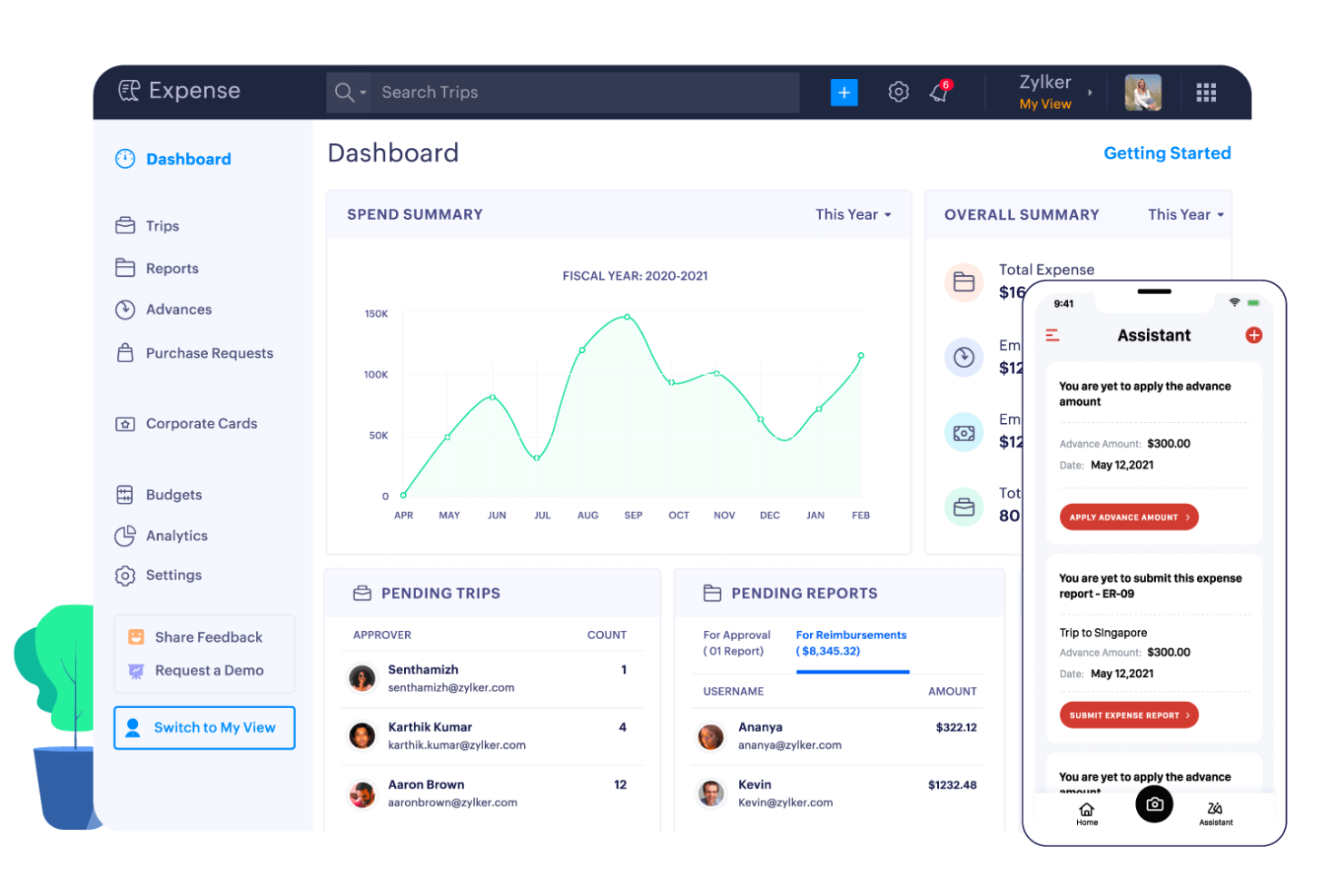
Zoho Expense offers healthcare organizations a way to manage and automate expense reporting with built-in controls for regulatory needs. It’s designed for hospitals, clinics, and medical groups that need to track spending across departments and ensure policy compliance. Finance teams can use Zoho Expense to simplify approvals, monitor spending, and reduce manual entry errors.
Who Is Zoho Expense Best For?
Zoho Expense suits healthcare finance teams and compliance officers in hospitals and medical groups that need to track and report expenses under strict regulatory requirements.
Why I Picked Zoho Expense
I chose Zoho Expense because it offers built-in tools for tracking and reporting healthcare expenses in line with Sunshine Act requirements. The platform lets you categorize and flag payments to physicians and teaching hospitals, making it easier to capture the data needed for federal transparency reporting. I appreciate how Zoho Expense allows you to set up custom fields and approval workflows that align with healthcare compliance policies. This focus on regulatory tracking makes it a strong fit for organizations that need to manage detailed reporting obligations in the healthcare sector.
Zoho Expense Key Features
Some other features that make Zoho Expense useful for the healthcare expense management process include:
- Automated receipt scanning: Users can upload receipts via mobile or web, and the system extracts key data automatically.
- Multi-level approval workflows: Configure complex approval chains to match hospital or clinic policies.
- Policy violation alerts: The platform flags expenses that fall outside of set guidelines for further review.
- Mileage and travel tracking: Track mileage and travel-related expenses with built-in GPS and mapping tools.
Zoho Expense Integrations
Integrations include Zoho Books, Zoho CRM, Zoho People, Slack, QuickBooks, and Xero.
Pros and Cons
Pros:
- Automated policy violation alerts for healthcare spend
- Multi-level approvals for hospital policy compliance
- Mobile app supports on-the-go receipt capture
Cons:
- Customer support response times can vary
- Advanced features require higher-tier plans

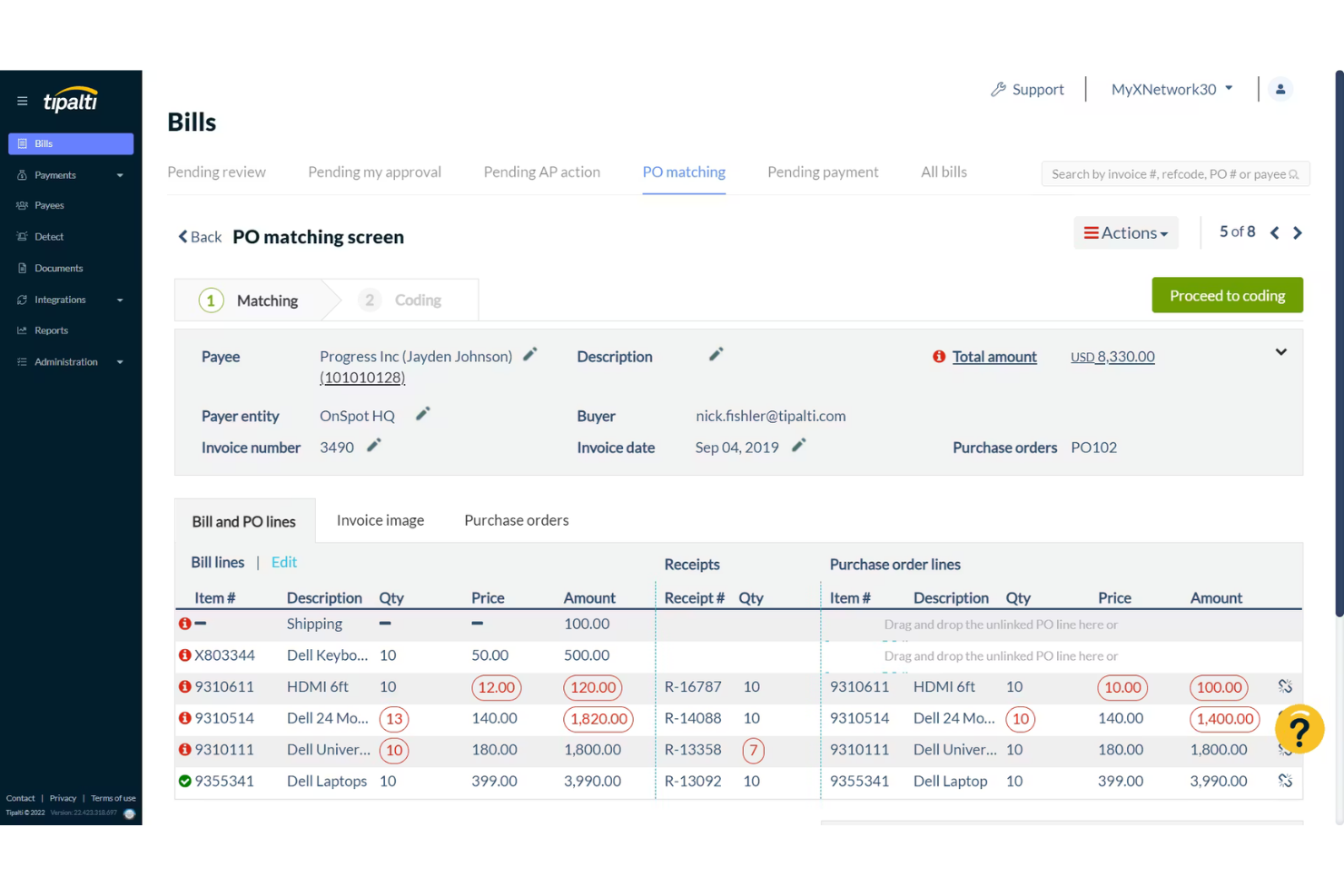
Tipalti is an accounts payable automation platform designed for healthcare organizations managing complex supplier payments and compliance requirements. It appeals to finance teams in hospitals, clinics, and healthcare networks that need to handle high transaction volumes and strict regulatory standards. The platform helps reduce manual workload and minimize payment errors in environments where accuracy and auditability are essential.
Who Is Tipalti Best For?
Tipalti is a strong fit for mid-sized to large healthcare organizations that need to automate global accounts payable and supplier payments.
Why I Picked Tipalti
What makes Tipalti stand out for healthcare expense management is its ability to automate global payments and accounts payable processes at scale. I picked Tipalti because it supports multi-currency payments to suppliers in over 190 countries, which is essential for healthcare organizations with international vendors or research partners. The platform also includes built-in tax compliance and payment reconciliation features, helping finance teams manage regulatory requirements and reduce manual intervention. These capabilities make Tipalti a strong choice for healthcare finance teams that need to handle complex, high-volume payments with strict audit trails.
Tipalti Key Features
Some other features that make Tipalti useful for healthcare expense management include:
- Automated invoice capture: The platform uses OCR technology to extract and validate invoice data for faster processing.
- Supplier onboarding portal: Vendors can self-register and update their information, reducing manual data entry for finance teams.
- Payment status tracking: Both internal users and suppliers can view real-time payment statuses through a centralized dashboard.
- Audit-ready approval workflows: Customizable approval chains help ensure compliance with internal controls and regulatory requirements.
Tipalti Integrations
Integrations include Oracle NetSuite, Sage Intacct, Microsoft Dynamics 365, Xero, SAP Business One, and LinkTrust.
Pros and Cons
Pros:
- Automated tax form collection
- Strong NetSuite and Sage integration
- Global payments in 120+ currencies
Cons:
- Initial implementation is slow
- Reporting requires manual downloads

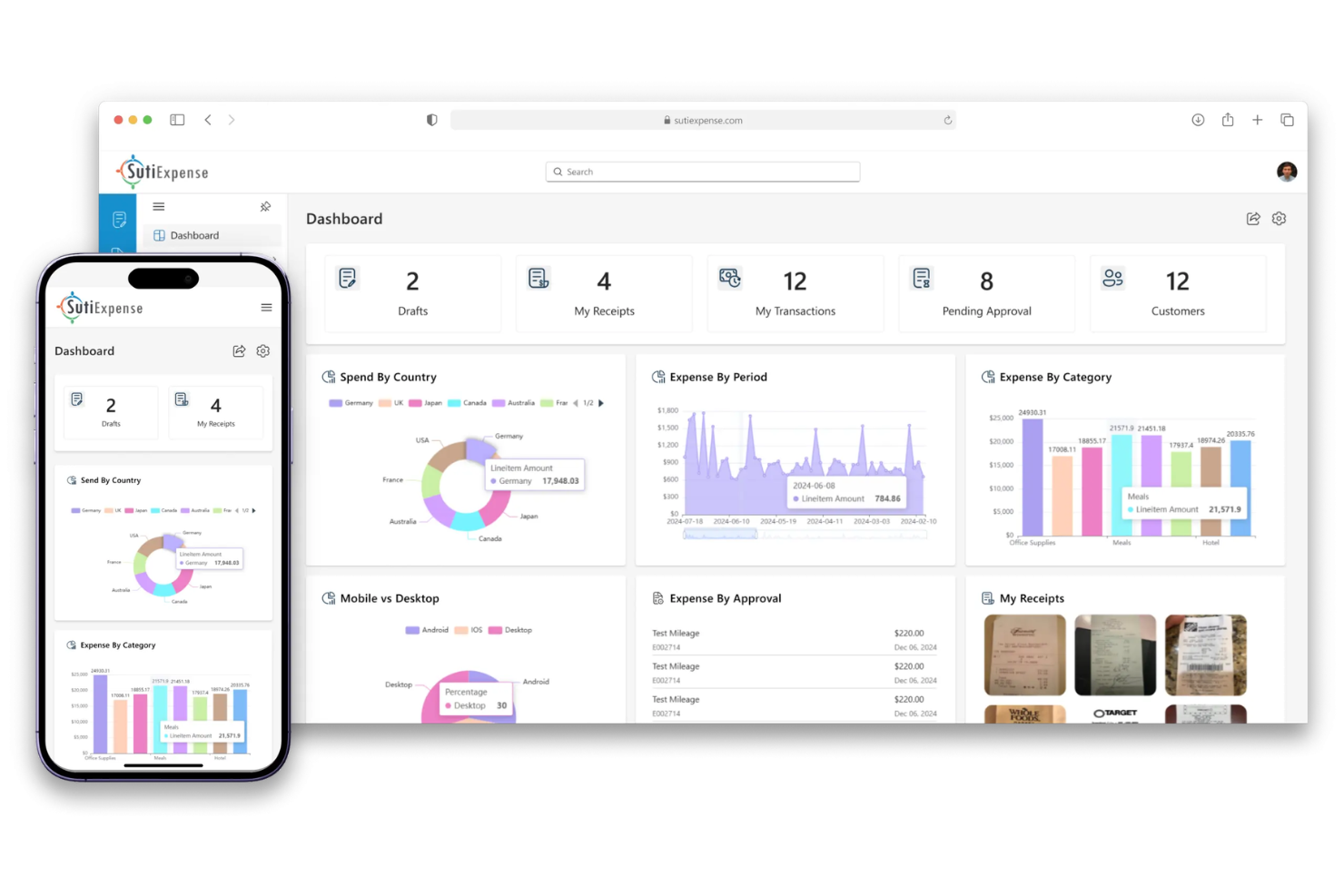
SutiExpense is an expense management platform designed for healthcare organizations that need flexible controls and compliance support. Finance teams at hospitals, clinics, and medical groups can use it to automate expense capture, enforce policy, and manage reimbursements. The system helps address challenges like decentralized spending, regulatory requirements, and the need for detailed audit trails.
Who Is SutiExpense Best For?
SutiExpense is a good fit for mid-sized to large healthcare organizations that require tailored approval processes and strict policy enforcement.
Why I Picked SutiExpense
What drew me to SutiExpense is how it lets healthcare organizations design approval workflows that match their unique operational structures. You can set up multi-level routing, conditional approvals, and department-specific rules, which is especially useful for hospitals and clinics with complex hierarchies. I appreciate that the platform allows you to automate policy enforcement and escalation paths, reducing manual oversight and compliance risk. These workflow customization options make SutiExpense a strong choice for healthcare finance teams that need granular control over expense approvals.
SutiExpense Key Features
Some other features that make SutiExpense useful for healthcare expense management include:
- Automated receipt capture: Users can upload receipts via mobile or desktop, and the system matches them to transactions for easier reconciliation.
- Policy violation alerts: The platform flags out-of-policy expenses in real time, helping finance teams maintain compliance.
- Multi-currency support: SutiExpense handles expenses in multiple currencies, which is helpful for organizations with international operations or vendors.
- Integration with ERP and HR systems: The software connects directly to leading ERP and HR platforms, allowing for smoother data flow and reporting.
SutiExpense Integrations
Integrations include QuickBooks Online, NetSuite, Sage Intacct, ADP, Blackbaud, and Twilio.
Pros and Cons
Pros:
- Mobile receipt capture with voice bot
- Strong AI-powered audit & fraud alerts
- Highly customizable approval workflows
Cons:
- Occasional glitches in mobile app
- Admin section is often confusing

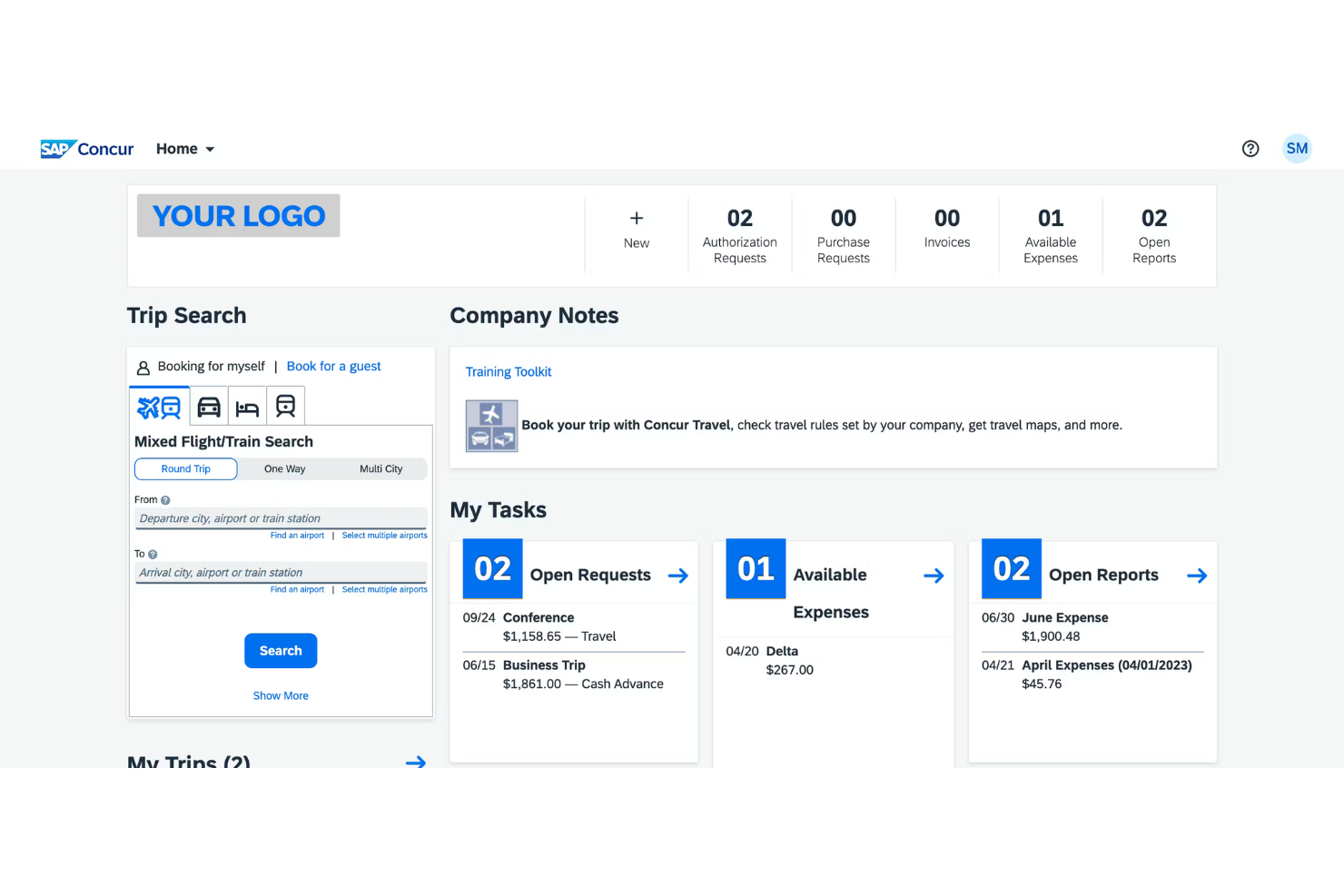
Healthcare organizations looking for a unified way to manage expenses across departments often turn to SAP Concur. This platform is designed for hospitals, clinics, and large healthcare networks that need to connect expense data with other core systems. It helps finance teams address compliance, automate approvals, and gain visibility into spending patterns.
Who Is SAP Concur Best For?
SAP Concur is a good fit for large healthcare organizations and hospital systems that need to integrate expense management with existing EHR and ERP platforms.
Why I Picked SAP Concur
I chose SAP Concur because it offers deep integrations with EHR and ERP systems, which is essential for healthcare organizations managing complex financial data. The platform connects expense workflows directly to clinical and operational systems, reducing manual entry and improving data accuracy. I appreciate how its integration capabilities help finance teams maintain compliance and streamline reconciliation across multiple departments. With automated data syncing, SAP Concur supports real-time visibility into both clinical and non-clinical spending.
SAP Concur Key Features
Some other features that make SAP Concur useful for healthcare expense management include:
- Mobile receipt capture: Users can upload business expenses receipts directly from their mobile devices, making it easier to document expenses on the go.
- Custom approval workflows: Configure multi-level approval processes to match your organization’s internal controls and compliance requirements.
- Audit and compliance tools: Built-in audit capabilities help ensure expenses meet healthcare regulations and organizational policies.
- Real-time spend reporting: Access up-to-date dashboards and reports to monitor spending trends across departments and locations.
SAP Concur Integrations
Integrations include SAP, ADP, NetSuite, QuickBooks, Xero, and Oracle NetSuite.
Pros and Cons
Pros:
- Enables granular spend tracking by department
- Provides audit trails for regulatory compliance
- Offers mobile receipt capture for clinicians
Cons:
- Limited customization for healthcare-specific reports
- Implementation can be lengthy for large systems
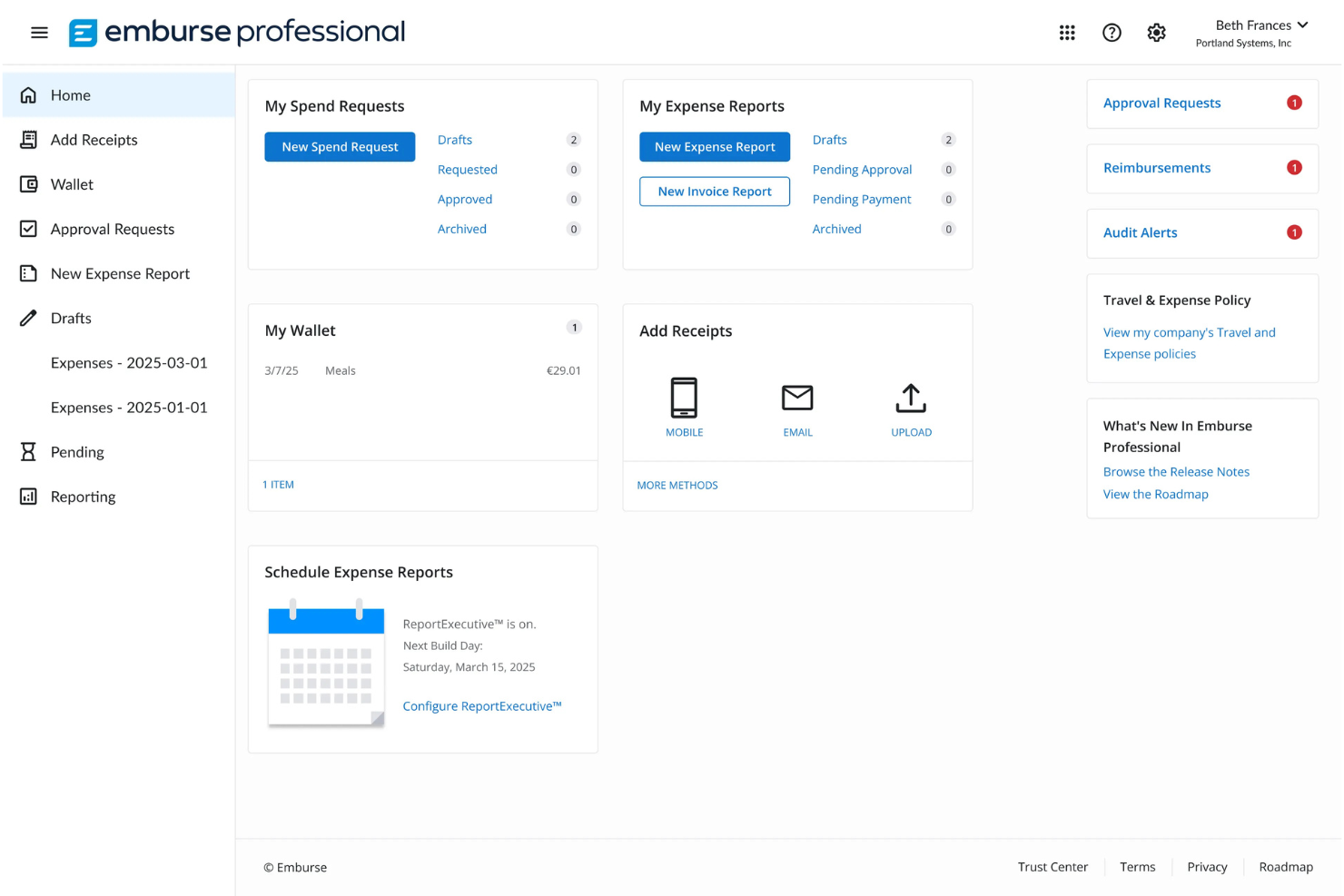
Emburse offers expense management solutions tailored for healthcare organizations that need to manage complex physician and staff spending. It appeals to finance teams looking for greater control, transparency, and compliance in a highly regulated environment. The platform helps healthcare providers centralize expense data and automate workflows to reduce manual errors and administrative burden, and increase operational efficiency.
Who Is Emburse Best For?
Emburse suits healthcare organizations and hospital finance teams that need to manage physician and staff expenses with centralized oversight.
Why I Picked Emburse
What stands out about Emburse is its ability to integrate directly with physician expense databases, which is a unique need for many healthcare organizations. This integration lets finance teams track, categorize, and report on physician-specific expenses without manual data entry or reconciliation. I appreciate that Emburse supports granular policy controls and audit trails tailored to healthcare compliance requirements. These features make it easier to manage complex spending patterns and ensure regulatory alignment across physician and staff expenses.
Emburse Key Features
Some other features make Emburse a strong choice for healthcare expense management:
- Automated receipt capture: Users can upload receipts via mobile or email, and the system matches them to transactions automatically.
- Role-based access controls: Administrators can set permissions by user, department, or location to protect sensitive financial data.
- Custom approval workflows: Finance teams can design multi-step approval processes that reflect healthcare organizational structures.
- Real-time policy violation alerts: The platform notifies users and approvers immediately when expenses fall outside set policies.
Emburse Integrations
Integrations include NetSuite, Sage Intacct, QuickBooks, Microsoft Dynamics Business Central, Xero, Workday Financial Management, and Oracle Fusion Cloud.
Pros and Cons
Pros:
- Great mobile app for clinical staff
- Built-in GSA per diem rate logic
- HIPAA-compliant data security
Cons:
- Reporting can feel overly technical
- Pricey compared to basic trackers

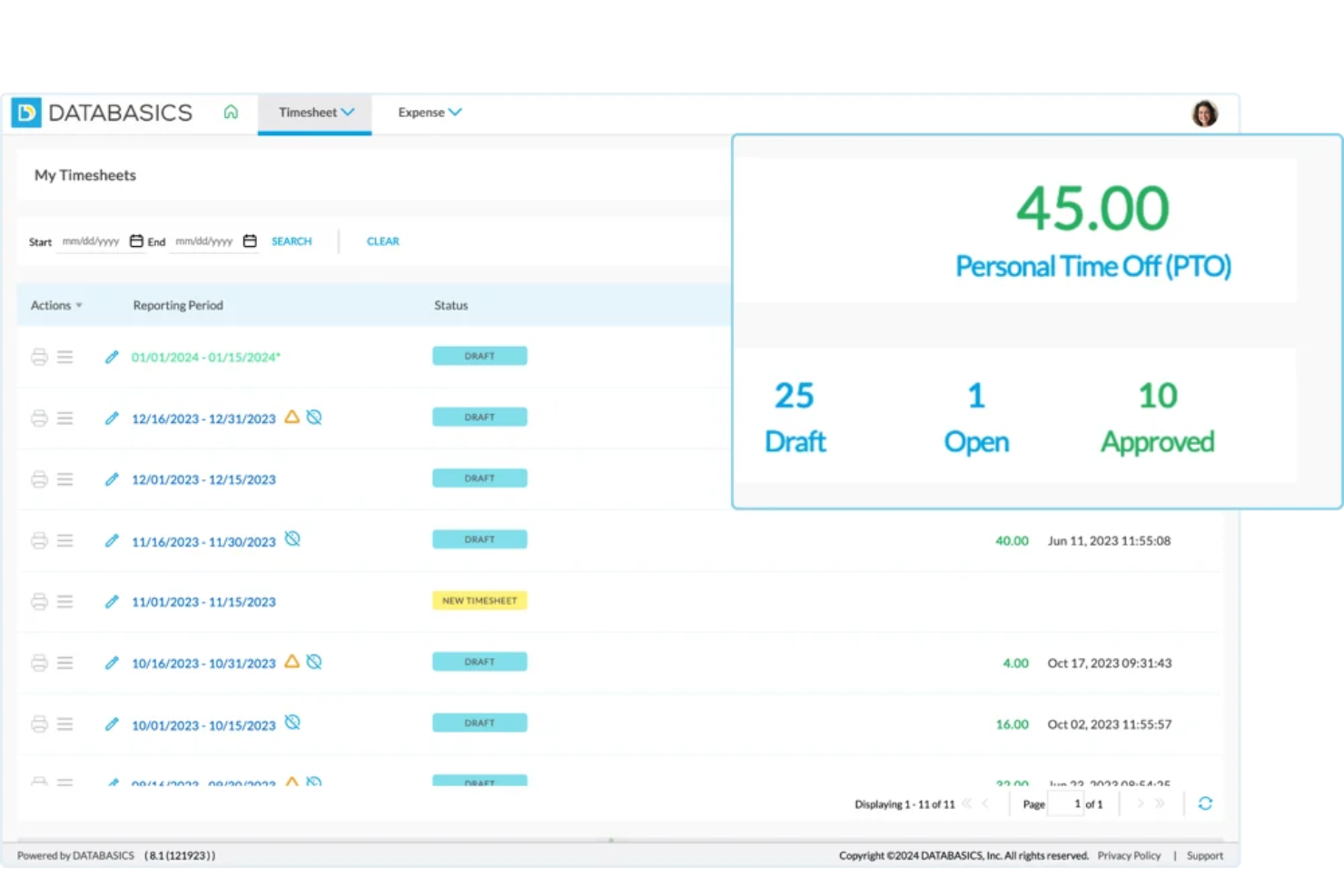
Healthcare organizations looking for secure, mobile-first expense management often turn to DATABASICS. The platform is designed for hospitals, clinics, and medical groups that need to manage expenses while meeting strict data privacy requirements. Finance teams can use it to simplify expense capture, automate approvals, and maintain compliance in a regulated environment.
Who Is DATABASICS Best For?
DATABASICS is a strong choice for healthcare organizations that require HIPAA-compliant mobile expense tracking and strict data security.
Why I Picked DATABASICS
What stands out about DATABASICS is its commitment to HIPAA-compliant mobile expense tracking, which is essential for healthcare organizations handling sensitive data. I picked this tool because it offers secure mobile apps that let staff capture and submit expenses on the go, while ensuring all data is encrypted and protected according to healthcare regulations. The platform also provides audit trails and granular access controls, so finance teams can monitor activity and restrict sensitive information as needed. These features make DATABASICS a reliable option for healthcare providers who can’t compromise on data privacy or compliance.
DATABASICS Key Features
Some other features that make DATABASICS useful for healthcare expense management include:
- Automated policy enforcement: The system flags out-of-policy expenses and notifies users and approvers in real time.
- Multi-currency and multi-language support: Organizations with international operations can manage expenses across different currencies and languages.
- Customizable approval workflows: Finance teams can configure multi-level approval chains to match organizational hierarchies.
- Integration with accounting and ERP systems: DATABASICS connects directly to platforms like Sage Intacct, Microsoft Dynamics, and QuickBooks for streamlined data flow.
DATABASICS Integrations
Integrations include Sage Intacct, Microsoft Dynamics, Oracle NetSuite, QuickBooks, and SAP.
Pros and Cons
Pros:
- All-in-one time and expense tracking
- Award-winning responsive support team
- Highly flexible for complex workflows
Cons:
- Interface can feel dated for users
- Internal report builder is difficult

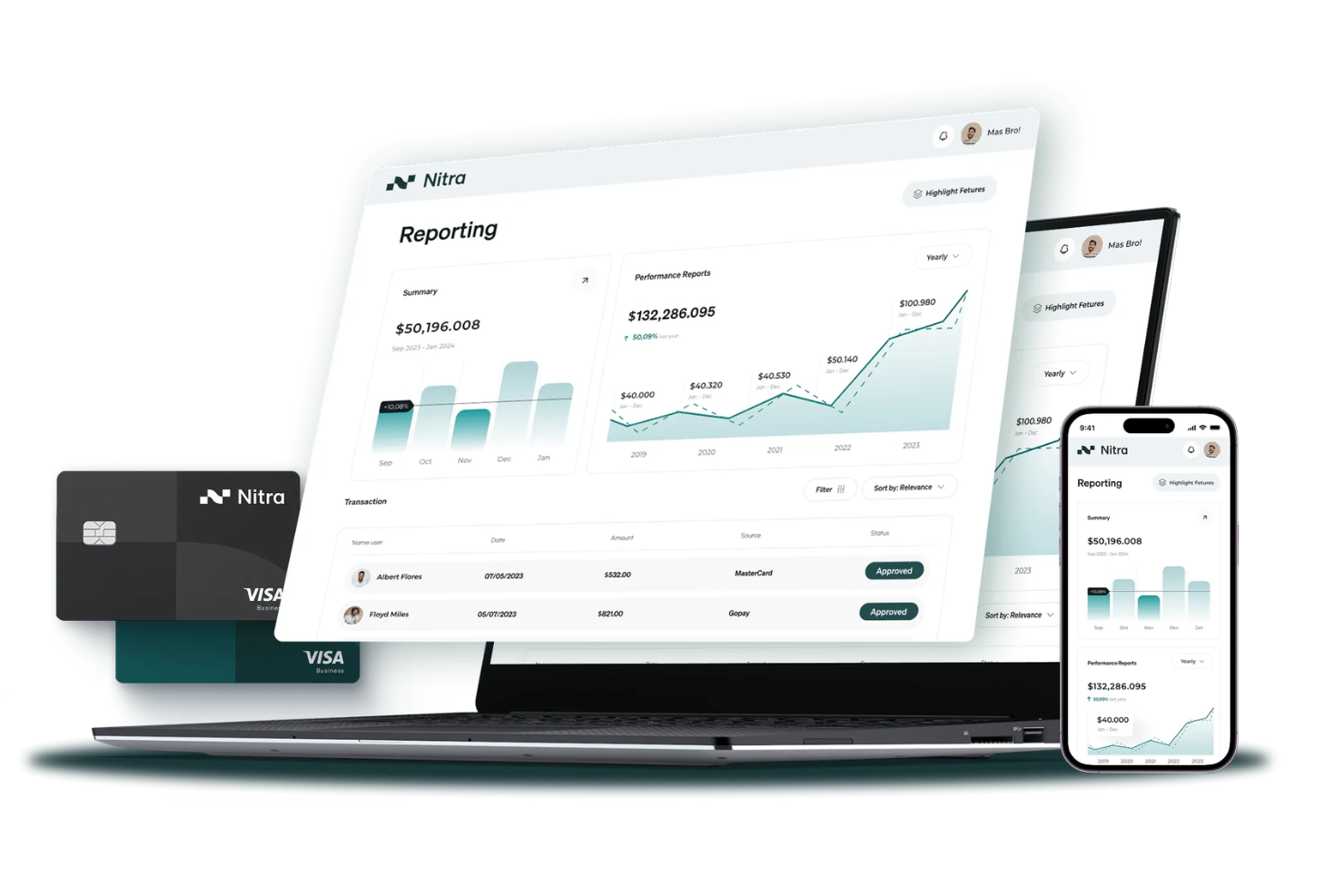
Nitra offers expense management software designed specifically for healthcare organizations with complex operational needs. Finance teams at medical practices and clinics can use Nitra to automate expense tracking, manage spending controls, and simplify reconciliation. The platform addresses challenges like fragmented purchasing, decentralized approvals, and the need for clear audit trails in regulated healthcare environments.
Who Is Nitra Best For?
Nitra is a good fit for healthcare organizations and medical practices that operate across multiple locations and need centralized expense controls.
Why I Picked Nitra
What stands out about Nitra is how it addresses the unique needs of healthcare organizations with multiple locations. The platform lets you issue virtual and physical corporate cards to different sites, set custom spending limits, and track purchases by location or department. I appreciate that Nitra’s centralized dashboard gives finance teams real-time visibility into spending across all branches, which is especially valuable for healthcare groups managing distributed operations. These features help maintain control and consistency in expense management, even as your organization grows or operates in several regions.
Nitra Key Features
In addition to its multi-location controls, Nitra offers several other features designed for healthcare expense management:
- Automated receipt capture: Users can upload receipts via mobile or desktop, and the system automatically matches them to transactions.
- Custom approval workflows: Configure multi-level approval chains to reflect your organization’s hierarchy and compliance requirements.
- Real-time transaction alerts: Receive instant notifications for card activity, helping you monitor spending as it happens.
- Vendor management tools: Track and manage vendor payments, contracts, and purchase histories within the platform.
Nitra Integrations
Integrations include AdvancedMD, Doximity, PatientPop, and RealSelf.
Pros and Cons
Pros:
- Unlimited virtual cards for vendors
- SMS-based AI receipt matching
- Specialized medical supply marketplace
Cons:
- Some users report slow customer support responses
- Reporting exports limited to CSV format

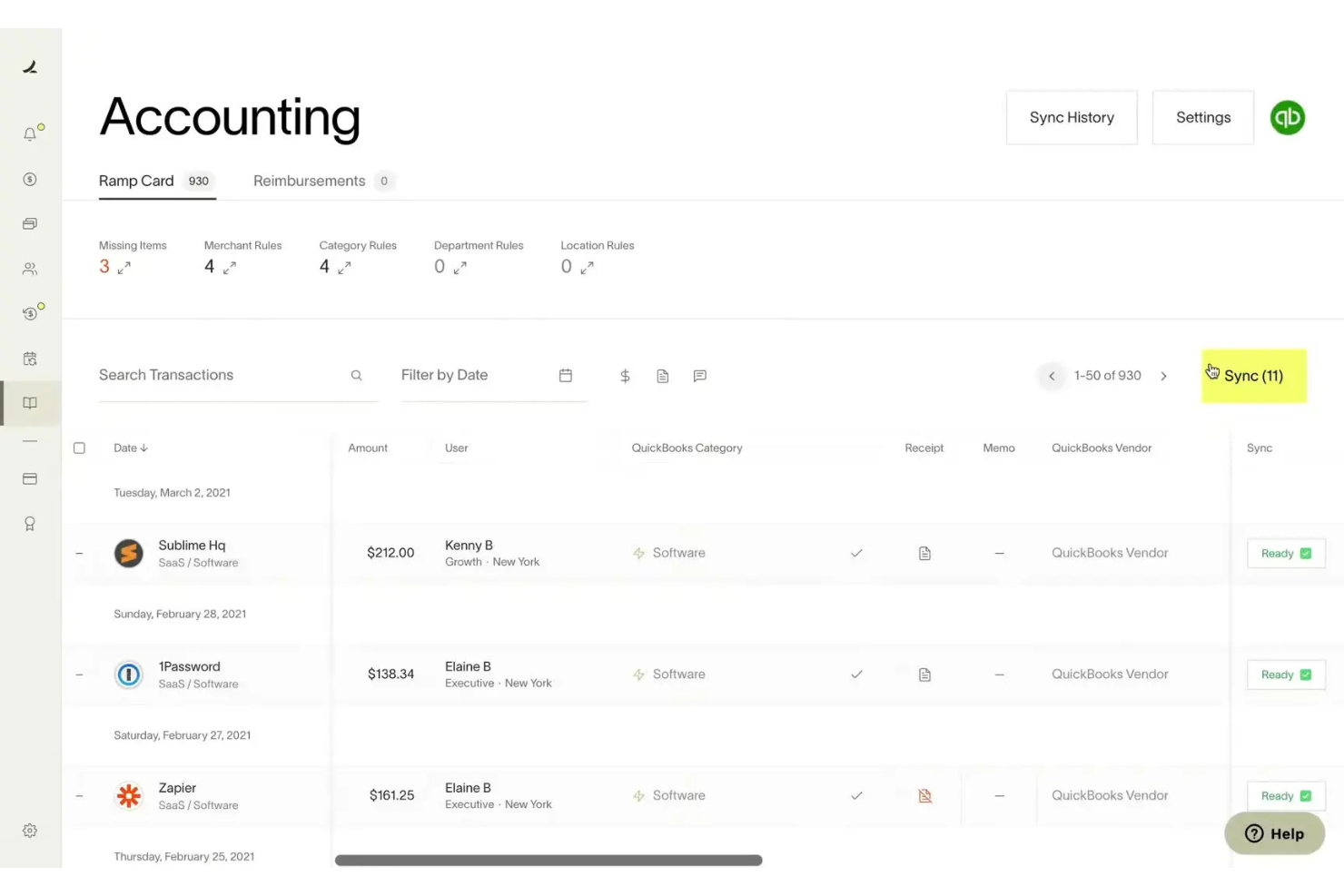
Ramp offers a modern expense management platform designed for finance teams in healthcare organizations that need strong controls and real-time visibility. It appeals to leaders who want to automate manual expense processes and reduce policy violations across departments or locations. The platform helps healthcare finance professionals centralize expense tracking and maintain compliance in a fast-paced, regulated environment.
Who Is Ramp Best For?
Ramp fits healthcare finance teams at mid-sized to large organizations that need automated expense controls and policy enforcement.
Why I Picked Ramp
I chose Ramp because its automated policy enforcement tools address a major challenge for healthcare finance teams: maintaining compliance and controlling spend across multiple departments. Ramp lets you set granular expense policies that automatically flag or block out-of-policy transactions in real time, reducing manual review and the risk of non-compliance. I also like that Ramp provides automated receipt matching and audit trails, which help healthcare organizations meet strict regulatory requirements. These features make Ramp a strong fit for healthcare organizations that need to enforce spending rules without slowing down operations.
Ramp Key Features
In addition to automated policy enforcement, Ramp offers several features that support healthcare expense management:
- Real-time spend insights: Get up-to-date analytics on spending by department, vendor, or category to help monitor budgets and spot anomalies.
- Custom approval workflows: Set up multi-level approval chains tailored to your organization’s structure and compliance needs.
- Physical and virtual cards: Issue cards with custom limits for staff, contractors, or departments to control company spending and employee spend at the source.
- Direct accounting integrations: Sync expense data with accounting platforms like QuickBooks, NetSuite, and Sage Intacct for faster reconciliation.
Ramp Integrations
Integrations include NetSuite, Sage Intacct, QuickBooks, Microsoft Dynamics Business Central, Xero, and Oracle Fusion Cloud.
Pros and Cons
Pros:
- CMS-ready report exports for audits
- Automates complex clinical approvals
- HIPAA-compliant data security
Cons:
- Doesn't submit files to CMS directly
- Dynamic limits can shift suddenly

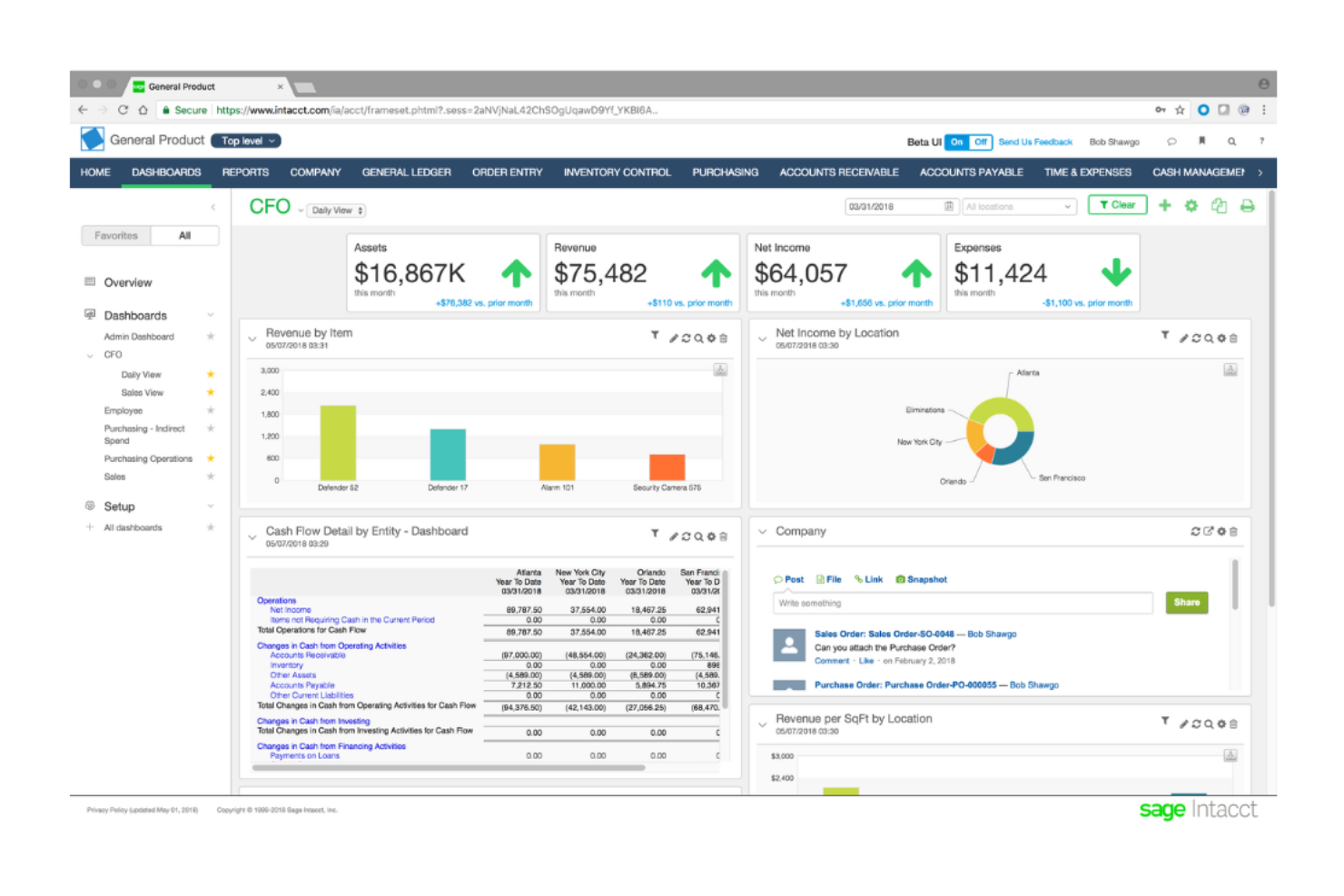
Sage Intacct is a cloud-based financial management and accounting software designed to help growing and mid-sized organizations manage core financial processes with greater visibility and control. It provides real-time insights, automation, and multi-entity capabilities to support finance teams that need accurate reporting, streamlined workflows, and scalable financial operations.
Who Is Sage Intacct Best For?
Sage Intacct is best suited for finance teams in growing organizations that need advanced accounting capabilities, multi-entity management, and real-time financial reporting in a cloud-based system.
Why I Picked Sage Intacct
I picked Sage Intacct because it combines core financial management with strong automation and reporting capabilities in a true cloud environment. It supports multi-entity consolidation, dimensional reporting, and configurable workflows, allowing finance teams to gain deeper visibility into performance without relying on manual spreadsheets. Its real-time dashboards and built-in controls help organizations optimize accuracy, strengthen compliance, and make more informed financial decisions as they scale.
Sage Intacct Key Features
Some other features that make Sage Intacct useful for healthcare expense management include:
- Core financial management: General ledger, accounts payable, accounts receivable, cash management, and order management in one unified platform.
- Multi-entity and global consolidations: Manage multiple entities and automate inter-entity transactions and consolidations.
- Dimensional reporting: Analyze financial data across departments, locations, projects, or other dimensions without complex chart-of-account structures.
- Real-time dashboards and reporting: Access customizable dashboards and financial reports for faster decision-making.
Sage Intacct Integrations
Integrations include Salesforce.
Pros and Cons
Pros:
- Detailed audit trails for healthcare expense reviews
- Automated approval routing for complex hierarchies
- Custom expense categories for medical departments
Cons:
- Advanced features require additional modules
- Limited out-of-the-box healthcare analytics reports

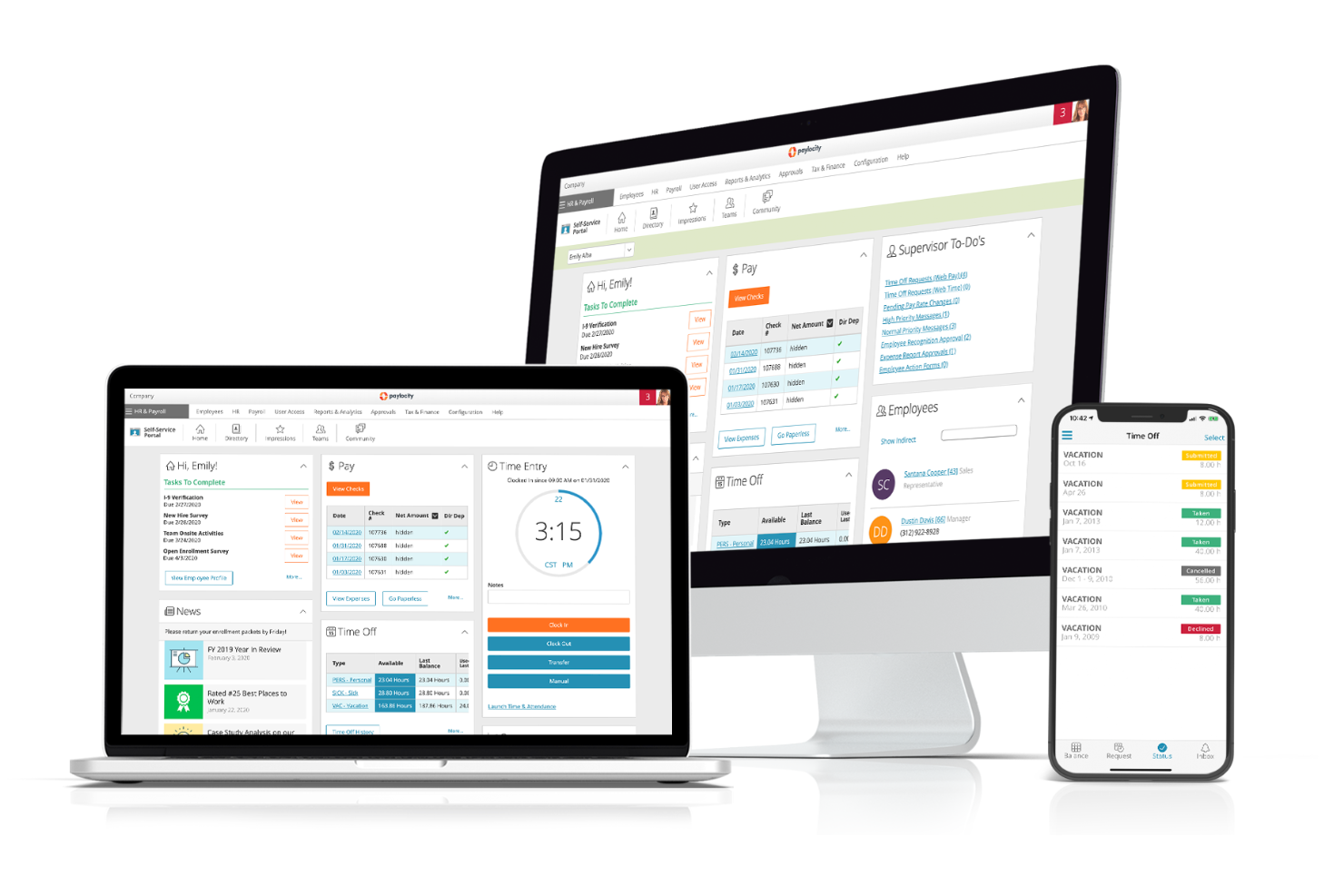
Paylocity offers expense management software designed for organizations that want to automate and simplify finance workflows. Healthcare finance teams can use Paylocity to centralize expense tracking and enforce policy compliance across departments. The platform addresses common pain points like manual data entry, delayed reimbursements, and fragmented expense reporting.
Who Is Paylocity Best For?
Paylocity suits healthcare organizations and finance teams that need automated expense capture and centralized policy management.
Why I Picked Paylocity
What drew me to Paylocity is its AI-powered receipt capture, which directly addresses the challenge of handling large volumes of healthcare expense documentation. The platform uses machine learning to extract data from receipts and automatically match them to expense reports, reducing manual entry and the risk of errors. I also like that Paylocity flags duplicate or non-compliant receipts in real time, which helps healthcare finance teams maintain audit readiness. These features make it easier to manage complex expense workflows and support compliance in a highly regulated environment.
Paylocity Key Features
Some other features make Paylocity a strong option for healthcare expense management:
- Custom approval workflows: Configure multi-level approval chains to match your organization’s structure and compliance needs.
- Mobile expense submission: Staff can submit expenses and supporting documents directly from their mobile devices.
- Policy enforcement rules: Set up automated rules to flag or block expenses that fall outside your organization’s guidelines.
- Integration with payroll and HR: Sync expense data with payroll and HR modules to optimize reimbursement and reporting.
Paylocity Integrations
Integrations include QuickBooks Online, Microsoft Dynamics 365, Oracle NetSuite, and Sage Intacct.
Pros and Cons
Pros:
- Payroll integration optimizes reimbursements
- Policy rules automate compliance checks
- Custom approval chains fit healthcare hierarchies
Cons:
- Limited healthcare-specific spend analytics
- No direct EHR or EMR integration
Other Expense Management Software for Healthcare
Here are some additional expense management software for healthcare options that didn’t make it onto my shortlist, but are still worth checking out:
- Sage Expense Management (formerly Fyle)
For real-time card transaction matching
- Glide
For custom mobile expense workflows
- Rippling
With unified HR and finance data sync


Expense Management Software for Healthcare Selection Criteria
When selecting the best expense management software for healthcare to include in this list, I considered common buyer needs and pain points like HIPAA compliance and managing high volumes of vendor payments. I also used the following framework to keep my evaluation structured and fair:
Core Functionality (25% of total score)
To be considered for inclusion in this list, each solution had to fulfill these common use cases:
- Capture and process invoices
- Automate approval workflows
- Track and manage vendor payments
- Generate audit-ready expense reports
- Support multi-user access and permissions
Additional Standout Features (25% of total score)
To help further narrow down the competition, I also looked for unique features, such as:
- Built-in healthcare compliance tools
- Global payment capabilities
- Supplier self-service portals
- Automated tax form collection
- Real-time payment status tracking
Usability (10% of total score)
To get a sense of the usability of each system, I considered the following:
- Simple and intuitive user interface
- Clear navigation for finance teams
- Minimal manual data entry required
- Customizable dashboards and views
- Accessibility for non-technical users
Onboarding (10% of total score)
To evaluate the onboarding experience for each platform, I considered the following:
- Step-by-step product tours
- Availability of training videos and webinars
- Pre-built templates for healthcare workflows
- Responsive onboarding support team
- In-app guidance and chatbots
Customer Support (10% of total score)
To assess each software provider’s customer support services, I considered the following:
- 24/7 support availability
- Dedicated account managers
- Fast response times to inquiries
- Access to a knowledge base or help center
- Support for integration troubleshooting
Value For Money (10% of total score)
To evaluate the value for money of each platform, I considered the following:
- Transparent pricing structure
- Flexible plans for different organization sizes
- No hidden fees or surprise charges
- Discounts for annual commitments
- Features included at each pricing tier
Customer Reviews (10% of total score)
To get a sense of overall customer satisfaction, I considered the following when reading customer reviews:
- Positive feedback on reliability and uptime
- Reports of responsive customer service
- Comments on ease of implementation
- User satisfaction with feature set
- Feedback on integration experiences
How to Choose Expense Management Software for Healthcare
It’s easy to get bogged down in long feature lists and complex pricing structures. To help you stay focused as you work through your unique software selection process, here’s a checklist of factors to keep in mind:
| Factor | What to Consider |
| Scalability | Will the software handle your current and projected invoice and payment volumes as your organization grows? |
| Integrations | Does the tool connect natively with your EHR, ERP, accounting, and procurement systems? |
| Customizability | Can you tailor approval workflows, user roles, and reporting to match your organization’s policies and structure? |
| Ease of use | Will finance and non-finance staff be able to navigate the system with minimal training or IT support? |
| Implementation and onboarding | How long will it take to get up and running, and what resources or support does the vendor provide during rollout? |
| Cost | Are all costs transparent, including setup, user licenses, and transaction fees? Does the pricing model fit your budget and usage patterns? |
| Security safeguards | Does the software offer HIPAA-compliant data handling, audit trails, and user access controls to protect sensitive information? |
| Compliance requirements | Can the system support your specific regulatory needs, such as healthcare-specific tax reporting or audit documentation? |
What Is Expense Management Software for Healthcare?
Expense management software for healthcare is a digital tool that helps healthcare organizations track, process, and control spending related to vendor payments, invoices, and operational expenses. These systems automate approval workflows, enforce compliance with healthcare regulations, and provide audit-ready records. By centralizing expense data, they support accurate reporting and help finance teams manage budgets, reduce errors, and maintain transparency across complex healthcare operations.
Features of Expense Management Software for Healthcare
When selecting expense management software for healthcare, keep an eye out for the following key features:
- Invoice capture and processing: Digitizes incoming invoices, extracts key data, and routes them for approval, reducing manual entry and minimizing errors.
- Automated approval workflows: Allows you to set up multi-level approval chains that match your organization’s policies, ensuring compliance and accountability.
- Vendor management: Centralizes vendor information, tracks payment histories, and helps maintain up-to-date records for all suppliers and service providers.
- Expense policy enforcement: Applies your organization’s spending rules automatically, flagging out-of-policy expenses and supporting internal controls.
- Audit trail and reporting: Maintains a detailed log of all actions and changes, making it easier to prepare for audits and generate compliance-ready reports.
- Multi-currency and international payments: Supports payments in different currencies and countries, which is essential for organizations with global vendors or research partners.
- Integration with accounting systems: Connects directly to your existing accounting or ERP software, syncing expense data and reducing reconciliation work.
- User access controls: Lets you define roles and permissions, ensuring that only authorized staff can view or approve sensitive financial information.
Common Expense Management Software for Healthcare AI Features
Beyond the standard expense management software for healthcare features listed above, many of these solutions are incorporating AI with features like:
- Anomaly detection: Uses AI to automatically flag unusual spending patterns or transactions that may indicate fraud, duplicate payments, or policy violations.
- Predictive cash flow analysis: Leverages AI to forecast future expenses and cash needs based on historical data, helping finance teams plan more accurately.
- Smart invoice matching: Applies AI algorithms to match invoices with purchase orders and receipts, reducing manual reconciliation and catching discrepancies.
- Automated data extraction: Uses AI-powered optical character recognition to extract and categorize data from invoices, receipts, and other documents with high accuracy.
- Natural language expense categorization: Employs AI to interpret and categorize expense descriptions written in plain language, improving classification and reporting accuracy.
Benefits of Expense Management Software for Healthcare
Implementing expense management software for healthcare provides several benefits for your team and your business. Here are a few you can look forward to:
- Improved compliance: Automated workflows and audit trails help ensure adherence to healthcare regulations and internal policies.
- Faster invoice processing: Digital capture and AI-powered data extraction reduce manual entry and speed up approval cycles.
- Greater financial visibility: Centralized dashboards and real-time reporting give finance teams a clear view of spending across departments and vendors.
- Reduced risk of errors and fraud: AI-driven anomaly detection and policy enforcement minimize duplicate payments and unauthorized expenses.
- Simplified vendor management: Centralized supplier records and automated onboarding streamline relationships with healthcare vendors.
- Easier audit preparation: Detailed logs and compliance-ready reports make it simpler to respond to audits and regulatory reviews.
- Scalable operations: Automated processes and multi-currency support allow your organization to handle growing transaction volumes and international payments.
Costs and Pricing of Expense Management Software for Healthcare
Selecting expense management software for healthcare requires an understanding of the various pricing models and plans available. Costs vary based on features, team size, add-ons, and more. The table below summarizes common plans, their average prices, and typical features included in expense management software for healthcare solutions:
Plan Comparison Table for Expense Management Software for Healthcare
| Plan Type | Average Price | Common Features |
| Free Plan | $0 | Basic invoice capture, limited approval workflows, manual data entry, and basic reporting. |
| Personal Plan | $3-$6/user/month | Single-user access, expense tracking, simple vendor management, and standard support. |
| Business Plan | $4-$15/user/month | Multi-user access, automated approvals, integration with accounting systems, and advanced reporting. |
| Enterprise Plan | $15+/user/month | Custom workflows, advanced security, compliance tools, dedicated support, and multi-entity management. |
Expense Management Software for Healthcare FAQs
Here are some answers to common questions about expense management software for healthcare:
Can expense management software integrate with electronic health record (EHR) systems?
Yes, many expense management software solutions offer integrations with EHR systems and other healthcare platforms. This allows for seamless data sharing, reduces manual entry, and helps ensure that financial and clinical records stay aligned.
What should healthcare organizations look for in vendor management features?
Look for centralized vendor records, automated onboarding, and tools for tracking payment histories and contract terms. These features help healthcare organizations manage a large number of suppliers, maintain accurate records, and support compliance with procurement policies.
Is it possible to automate multi-level approvals for healthcare expenses?
Yes, most expense management software for healthcare allows you to set up multi-level approval workflows. This ensures that expenses are reviewed by the right people at each stage, supporting internal controls and compliance requirements.
How secure is expense management software for sensitive healthcare data?
Reputable solutions offer strong security safeguards, including data encryption, user access controls, and audit trails. Many also provide HIPAA-compliant data handling to protect patient and financial information from unauthorized access or breaches.
How long does it take to implement expense management software in a healthcare organization?
Implementation timelines vary, but many cloud-based solutions can be set up in a few weeks. Factors like data migration, integration needs, and staff training can affect the timeline, so it’s important to plan for onboarding and support during rollout.
What’s Next:
If you're in the process of researching expense management software for healthcare, connect with a SoftwareSelect advisor for free recommendations.
You fill out a form and have a quick chat where they get into the specifics of your needs. Then you'll get a shortlist of software to review. They'll even support you through the entire buying process, including price negotiations.