

10 SAP Concur Alternatives for 2026

SAP Concur Alternatives Shortlist


A strong SAP Concur alternative offers reliable expense management features, flexible policy controls, and seamless integration with your existing financial systems. If you’re searching for SAP Concur alternatives, you’re likely looking for tools that simplify expense tracking, automate approvals, and help your team stay compliant—without sacrificing usability or visibility.
With so many options available, it’s essential to find a solution that matches your business’s workflow, reporting needs, and growth plans. This list will help you compare leading expense management platforms so you can make an informed decision for your finance team.
What Is SAP Concur?
SAP Concur is an expense management software that helps businesses automate expense reporting, manage travel expenses and bookings, and enforce spending policies. It centralizes expense data, streamlines approvals, and integrates with accounting systems to support accurate financial reporting. Finance teams use SAP Concur to improve compliance, gain visibility into company spending, and reduce manual data entry.
Best SAP Concur Alternatives Summary
This comparison chart summarizes pricing details for my top SAP Concur alternative selections to help you find the best one for your budget and business needs.
| Tool | Best For | Trial Info | Price | ||
|---|---|---|---|---|---|
| 1 | Best for AI-powered unified travel and expense management | Free plan available | Pricing upon request | Website | |
| 2 | Best for automated expense reporting | 14-day free trial available | From $3/user/month (billed annually) | Website | |
| 3 | Best for corporate cards with built-in expense tracking | Free plan available | From $12/user/month | Website | |
| 4 | Best for customizable expense workflows | Free demo available | From $8.50 to $12/active user | Website | |
| 5 | Best for real-time expense management with global compliance | Free demo available | From $8/user/month (billed annually) | Website | |
| 6 | Best for unified spend management with advanced analytics | Free demo available | Pricing upon request | Website | |
| 7 | Best for automated receipt scanning and expense reporting for teams | 30-day free trial available | From $5/member/month | Website | |
| 8 | Best for unified corporate card and expense management | Free demo available | Pricing upon request | Website | |
| 9 | Best for corporate cards with automated expense controls | Free plan + free demo available | From $15/user/month | Website | |
| 10 | Best for global expense management with built-in payments | 7-day free trial | Pricing upon request | Website |
Why Trust Our Software Reviews
We’ve been testing and reviewing financial software since 2023. As finance specialists ourselves, we know how critical and difficult it is to make the right decision when selecting software.
We invest in deep research to help our audience make better software purchasing decisions. We’ve tested more than 2,000 tools for different finance use cases and written over 1,000 comprehensive software reviews. Learn how we stay transparent & our software review methodology.
-

Creatio CRM
Visit WebsiteThis is an aggregated rating for this tool including ratings from Crozdesk users and ratings from other sites.4.7 -
DealHub AI
Visit WebsiteThis is an aggregated rating for this tool including ratings from Crozdesk users and ratings from other sites.4.7 -
LiveFlow
Visit WebsiteThis is an aggregated rating for this tool including ratings from Crozdesk users and ratings from other sites.4.9


SAP Concur Alternatives Reviews
Below are my detailed summaries of the SAP Concur alternatives that made it onto my shortlist. My reviews offer a detailed look at the features, integrations, and pricing of each expense management platform to help you find the best one for you.

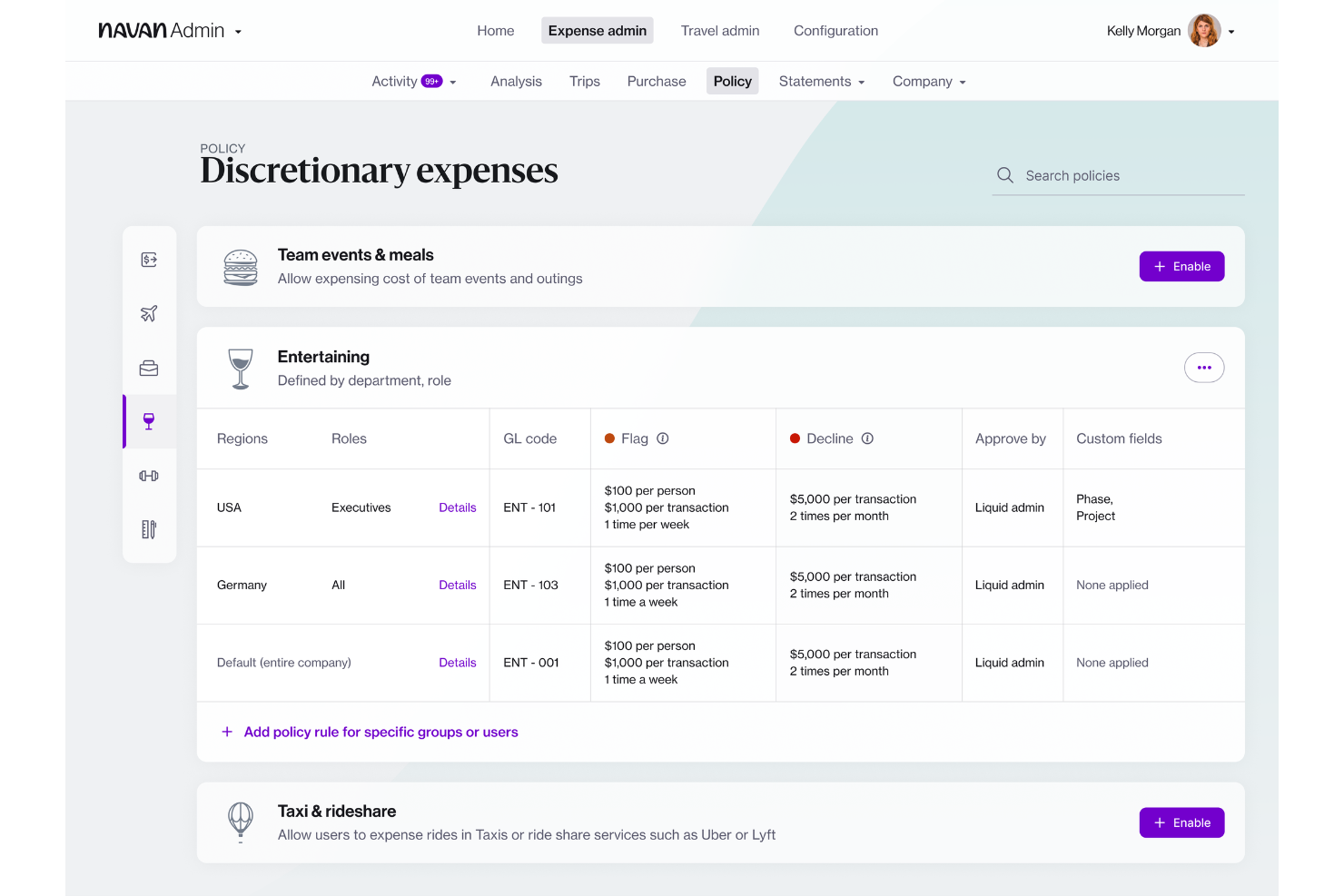
Navan offers expense management software that combines travel booking and expense tracking in one platform. It’s a strong fit for companies that want to manage business travel and expenses together, especially those with frequent travelers or distributed teams. If you’re looking to simplify policy enforcement and automate reconciliation for both travel and non-travel spend, Navan is worth considering.
Who Is Navan Best For?
Navan suits mid-sized to large organizations with frequent business travel and a need for unified expense and travel management.
Why Navan Is a Good SAP Concur Alternative
What sets Navan apart as a SAP Concur alternative is its unified approach to travel and expense management, powered by AI-driven automation. I picked Navan because it lets you book travel and manage expenses in a single workflow, eliminating the need to juggle multiple systems. The platform uses AI to automatically categorize expenses and flag policy violations, which helps finance teams maintain compliance without manual review. If you want to centralize travel booking, expense capture, and policy compliance, Navan offers a tightly integrated solution.
Navan Key Features
Some other features in Navan that may interest finance teams include:
- Real-Time Spend Analytics: Access up-to-date dashboards that break down spend by category, department, or employee.
- Mobile Receipt Capture: Snap and upload receipts directly from the mobile app for faster expense submission.
- Custom Policy Controls: Set granular rules for spend limits, approval flows, and travel preferences across teams or locations.
- Corporate Card Integration: Issue and manage physical or virtual cards with built-in controls for expense tracking.
Navan Integrations
Integrations include NetSuite, QuickBooks Online, Xero, Sage Intacct, and Microsoft Azure.
Pros and Cons
Pros:
- Integrates with major ERP and HR systems
- Real-time spend analytics and reporting tools
- Mobile app supports receipt capture and approvals
Cons:
- Some users report slow customer support response
- Requires separate setup for corporate card program

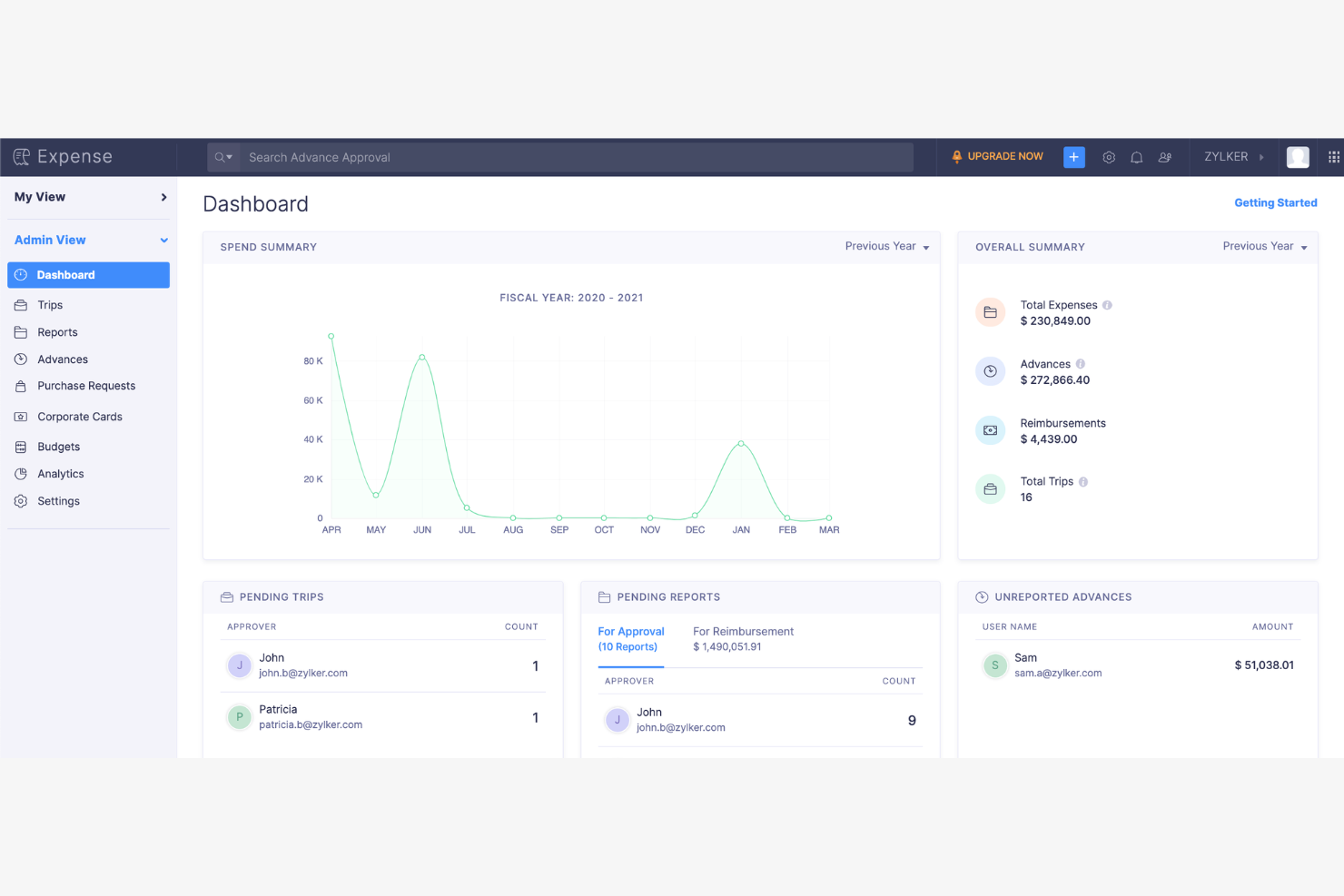
Zoho Expense is a cloud-based expense management platform designed for businesses that want to automate and control employee spending. It’s a strong fit for organizations seeking granular policy enforcement and customizable approval workflows. If you need a solution that helps reduce manual entry and improves compliance, Zoho Expense is worth a closer look.
Who Is Zoho Expense Best For?
Zoho Expense fits small to mid-sized businesses that need automated expense reporting and strict policy controls.
Why Zoho Expense Is a Good SAP Concur Alternative
What sets Zoho Expense apart as a SAP Concur alternative is its automated expense reporting paired with deep policy controls. I picked Zoho Expense because it lets you create highly detailed approval workflows and enforce custom spending rules at multiple levels. The platform also supports automated receipt scanning and policy violation alerts, which help finance teams maintain compliance without manual oversight. If your business needs granular control over expense policies and automated compliance checks, Zoho Expense delivers focused solutions in these areas.
Zoho Expense Key Features
Some other features in Zoho Expense that may interest finance teams include:
- Multi-currency support: Manage and reimburse expenses in multiple currencies for global teams.
- Corporate card reconciliation: Automatically match card transactions with submitted expenses for faster month-end close.
- Per diem management: Set up and enforce per diem rates for business travel based on location and employee role.
- Mileage tracking: Employees can log mileage using built-in GPS or manual entry for accurate reimbursement.
Zoho Expense Integrations
Integrations include QuickBooks Online, Xero, Sage Accounting, Zoho Books, Zoho People, Uber for Business, Lyft, Slack, Office 365, and G Suite.
Pros and Cons
Pros:
- Very affordable pricing tiers
- Strong mileage tracking tools
- Highly intuitive mobile app
Cons:
- Setup is complex for big teams
- UI feels cluttered sometimes

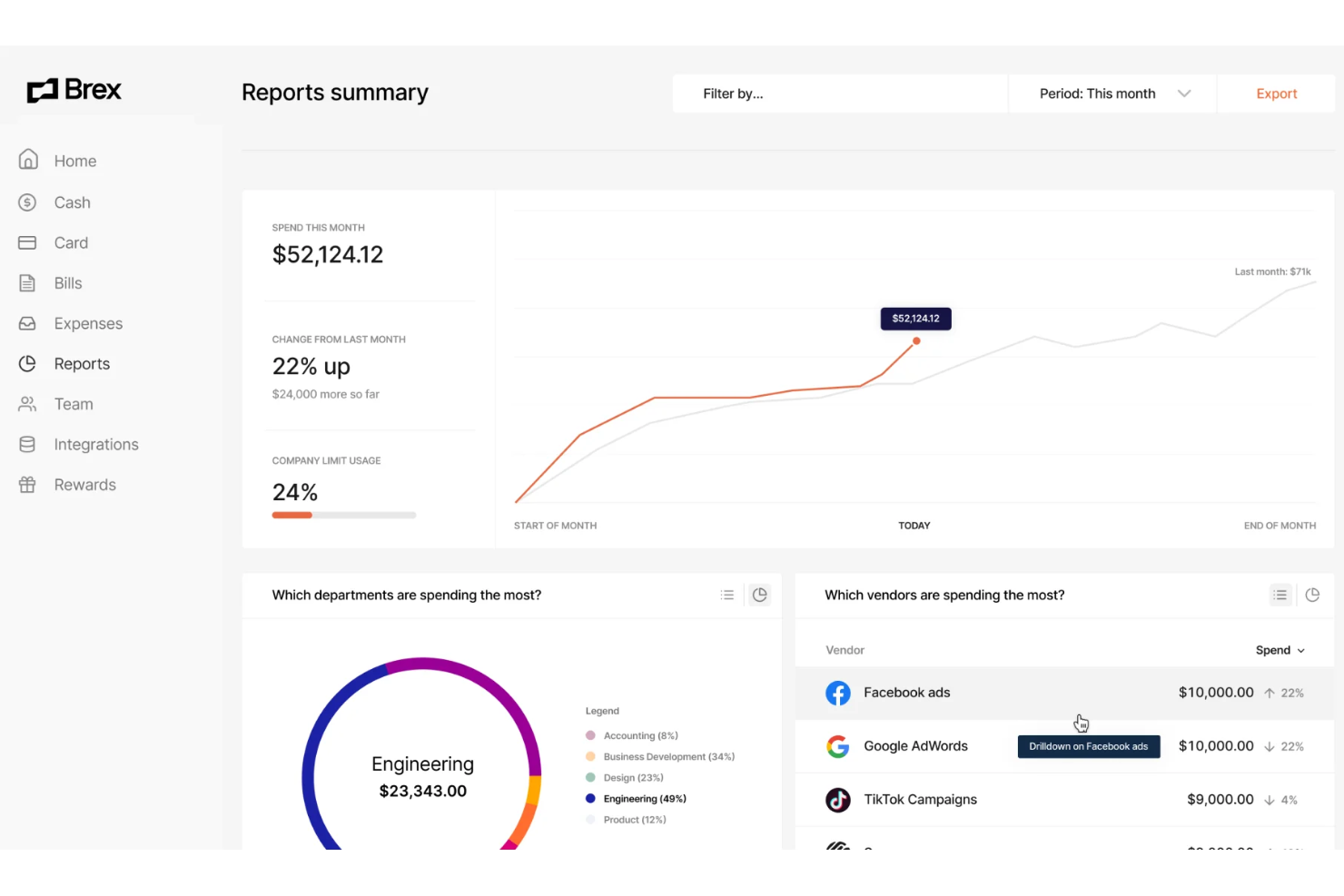
Brex offers expense management software designed for fast-growing companies and finance teams that want more control over corporate spending. Its platform appeals to businesses looking for integrated card issuing, real-time expense tracking, and automated policy enforcement. If you need a solution that combines spend management with flexible controls and modern integrations, Brex is worth considering.
Who Is Brex Best For?
Brex suits finance teams at startups and mid-sized companies that need integrated expense management and corporate card solutions.
Why Brex Is a Good SAP Concur Alternative
Brex stands out for its corporate cards that come with built-in expense tracking and policy controls. I picked Brex because it lets you issue physical and virtual cards to employees, automatically categorizing and tracking spend as transactions happen. The platform enforces custom spending rules at the card level, reducing manual review and helping your team stay compliant. These features make Brex a strong choice if you want to manage expenses and control spending in one unified system.
Brex Key Features
Some other features in Brex that may interest finance teams include:
- Automated Receipt Matching: The platform automatically matches uploaded receipts to transactions, reducing manual reconciliation work.
- Real-Time Spend Insights: Brex provides dashboards and analytics that show up-to-date spending by team, category, or project.
- Multi-Entity Support: Manage expenses and cards across multiple subsidiaries or business units from a single account.
- ERP Integrations: Brex connects with accounting systems like NetSuite and QuickBooks to sync expense data directly into your financial workflows.
Brex Integrations
Integrations include NetSuite, QuickBooks Online, Xero, Sage Intacct, and BambooHR.
Pros and Cons
Pros:
- Customizable spend controls at card level
- Direct ERP and HRIS integrations
- Multi-entity and subsidiary management
Cons:
- Limited international currency support
- No mileage or travel booking management

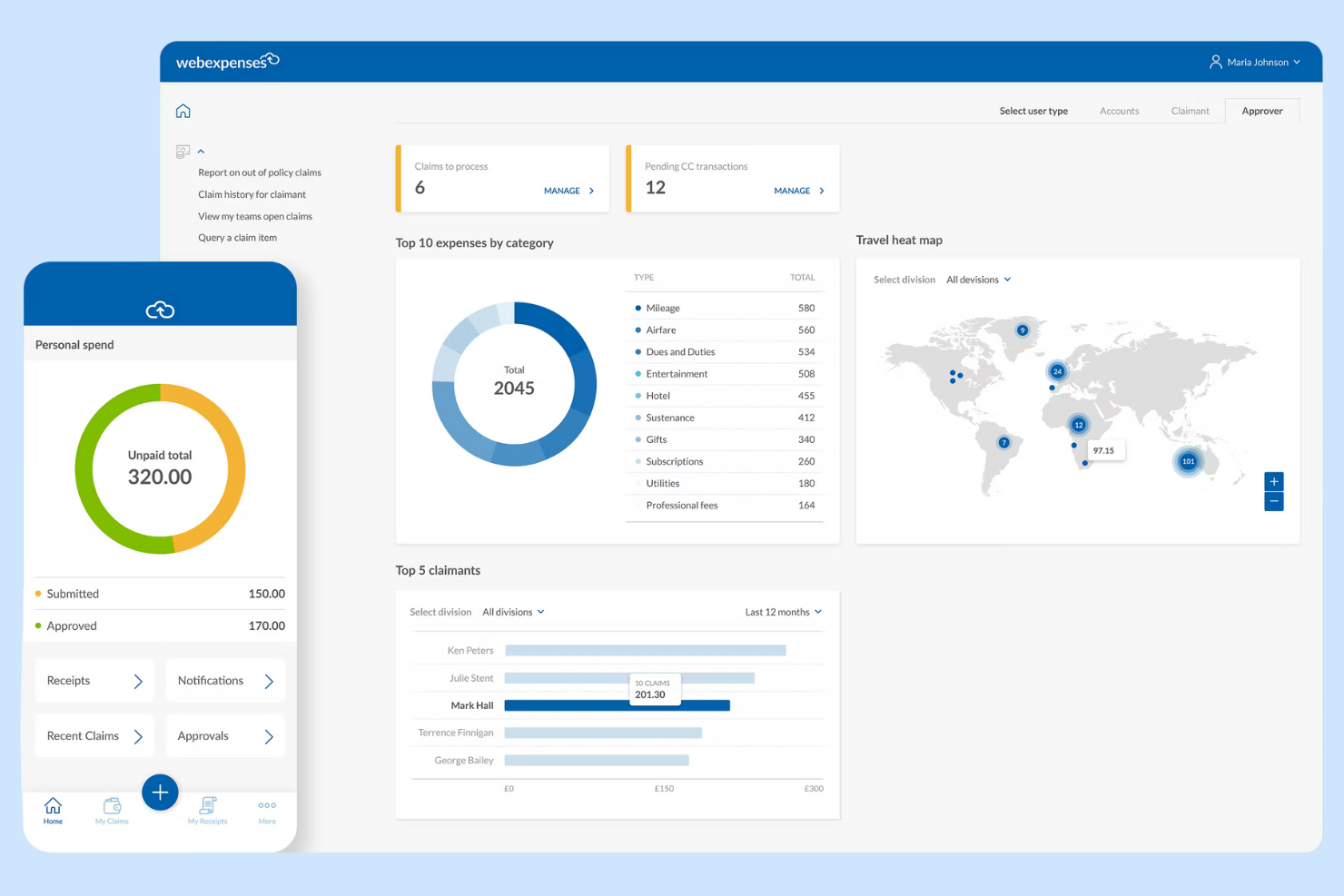
Webexpenses offers expense management software designed for organizations that want to automate and control business spending. It’s a strong choice for finance teams in mid-sized to large companies that need configurable workflows and policy enforcement. If you’re looking to reduce manual errors and improve compliance compared to traditional expense tools, Webexpenses is worth a closer look.
Who Is Webexpenses Best For?
Webexpenses fits mid-sized to large businesses that need configurable expense management and policy controls across multiple departments or locations.
Why Webexpenses Is a Good SAP Concur Alternative
What sets Webexpenses apart as a SAP Concur alternative is its unified spend management and advanced analytics capabilities. I picked Webexpenses because it brings expense, invoice, and procurement management together in one platform, making it easier to track and control all business spend. The analytics dashboard provides real-time insights into spending patterns, helping finance teams identify trends and compliance risks quickly. For organizations that want more than basic expense tracking, Webexpenses offers a centralized solution for managing and analyzing company-wide spend.
Webexpenses Key Features
Some other features in Webexpenses that may interest finance teams include:
- Mobile Receipt Capture: Users can photograph and upload receipts directly from their mobile devices for faster expense submission.
- Automated Policy Enforcement: The system flags out-of-policy expenses and routes them for additional review before approval.
- Multi-Currency Support: Webexpenses handles expenses in multiple currencies, making it suitable for global teams.
- Audit Trail and Compliance Tracking: Every action is logged, supporting audit readiness and regulatory compliance.
Webexpenses Integrations
Integrations include NetSuite, Sage Intacct, Oracle, Microsoft Dynamics, and Amazon.
Pros and Cons
Pros:
- Very responsive customer support
- Highly customizable approval flows
- Great ERP/accounting integrations
Cons:
- Can be pricey for small businesses
- Occasional app syncing glitches

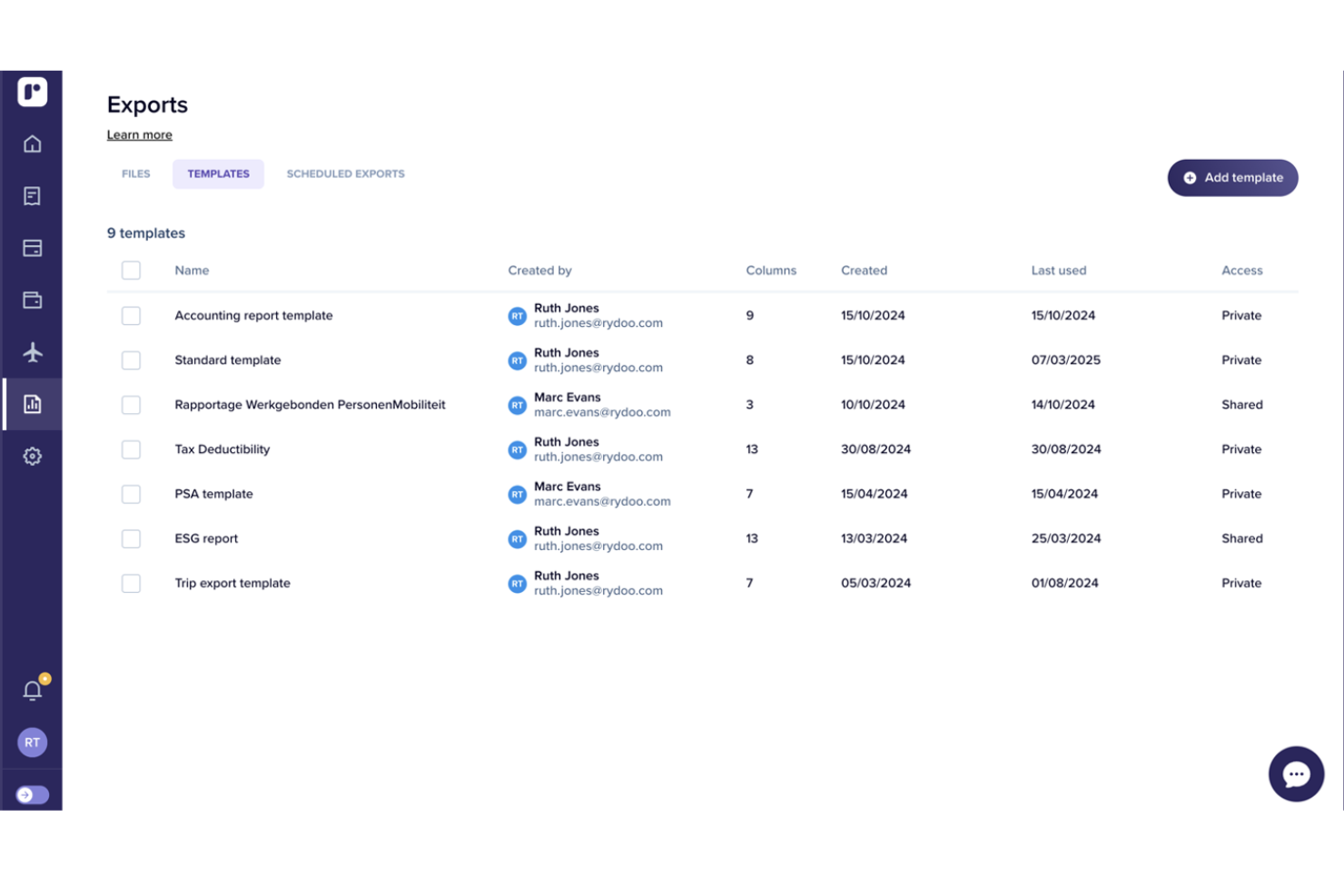
Rydoo is a cloud-based expense management platform designed for companies with international operations and distributed teams. It appeals to finance professionals who need real-time expense tracking and compliance across multiple countries. If your business struggles with manual processes or cross-border policy enforcement, Rydoo addresses these challenges with automation and global coverage.
Who Is Rydoo Best For?
Rydoo suits mid-sized to large businesses with global operations that need real-time expense management and compliance across multiple countries.
Why Rydoo Is a Good SAP Concur Alternative
Rydoo stands out for its real-time expense management and strong global compliance capabilities. I picked Rydoo because it lets finance teams monitor and approve expenses as they happen, reducing delays and improving visibility. The platform also supports country-specific tax rules and per diem rates, which helps multinational organizations stay compliant with local regulations. If your business needs to manage expenses across borders with up-to-date policy enforcement, Rydoo offers focused solutions in these areas.
Rydoo Key Features
Some other features in Rydoo that may interest finance teams include:
- Mobile receipt scanning: Employees can capture and submit receipts instantly using the mobile app.
- Corporate card integration: Syncs transactions from company cards directly into expense reports for faster reconciliation.
- Custom approval workflows: Configure multi-level approval chains to match your organization’s policies.
- Integration with ERP and accounting systems: Connects natively with platforms like NetSuite, SAP, and Xero for streamlined data transfer.
Rydoo Integrations
Integrations include SAP S/4HANA, NetSuite, QuickBooks, Xero, Sage, and Uber.
Pros and Cons
Pros:
- Real-time expense approvals
- Integrates well with ERPs
- Good mileage tracking tools
Cons:
- Occasional app crashing bugs
- Limited custom reporting tools

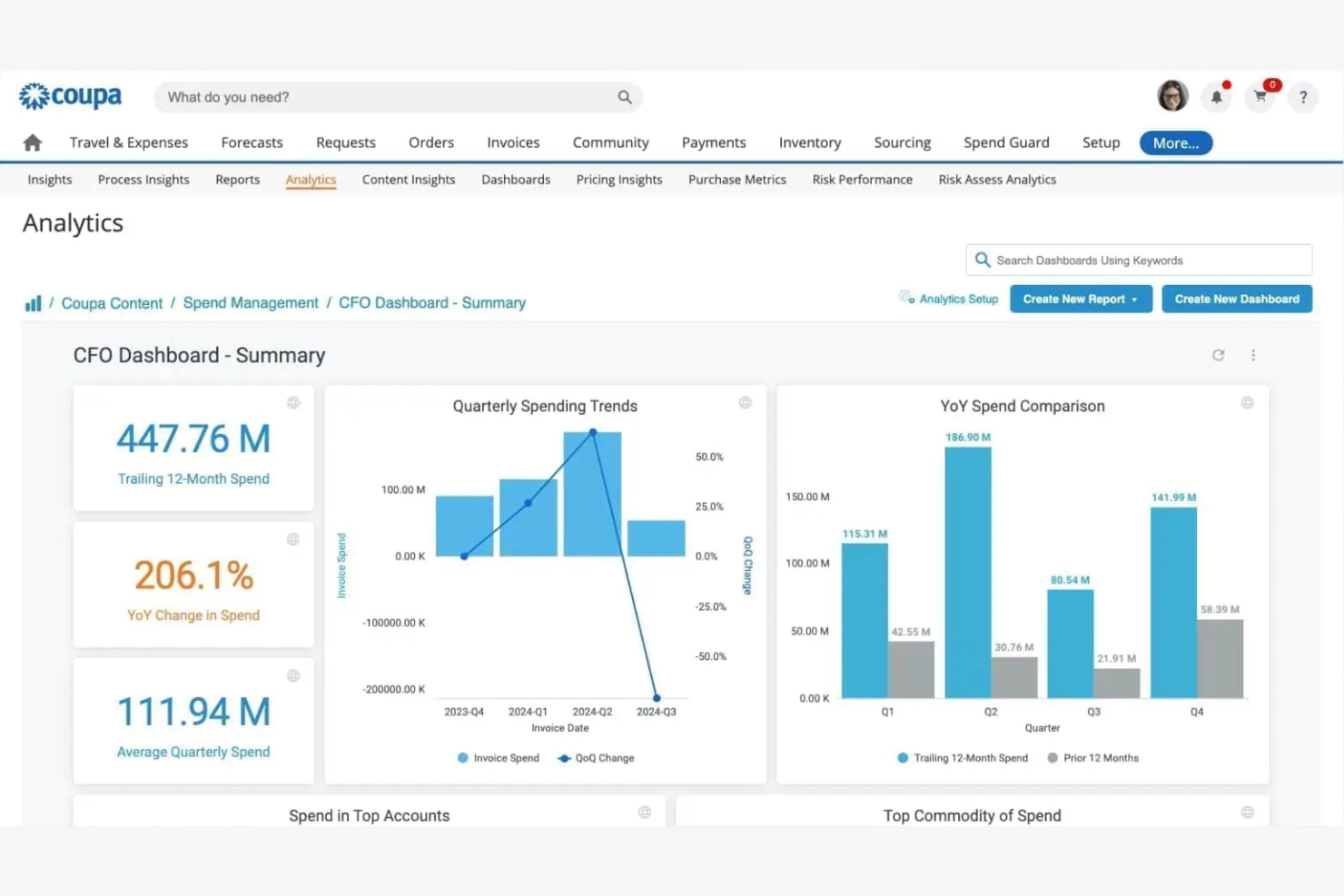
Coupa offers expense management software designed for organizations that want to unify spend control across departments and subsidiaries. It’s a strong fit for finance teams in larger enterprises or global businesses that need advanced visibility and compliance features. If you’re looking to centralize expense policies and gain actionable insights into company-wide spending, Coupa is worth considering.
Who Is Coupa Best For?
Coupa suits large enterprises and multinational organizations that need centralized control and visibility over global expense management.
Why Coupa Is a Good SAP Concur Alternative
I chose Coupa as a SAP Concur alternative because it brings unified spend management and advanced analytics into one platform. Coupa’s expense management solution connects expense, invoice, and procurement data, giving finance teams an end-to-end view of company spend. I also appreciate the platform’s built-in analytics tools, which help identify savings opportunities and compliance risks in real time. For organizations that want to move beyond basic expense tracking and gain actionable insights across all spend categories, Coupa offers a compelling option.
Coupa Key Features
Some other features in Coupa that may interest finance teams include:
- Mobile Receipt Capture: Users can upload receipts and submit expenses directly from their mobile devices.
- Policy Enforcement Engine: The platform automatically flags out-of-policy expenses for review before approval.
- Multi-Currency and Multi-Language Support: Coupa accommodates global teams with support for multiple currencies and languages.
- Audit Trail and Compliance Tracking: Every expense action is logged for audit readiness and regulatory compliance.
Coupa Integrations
Integrations include NetSuite, Oracle, SAP, Workday, and Slack.
Pros and Cons
Pros:
- Advanced analytics for spend optimization
- Automated policy enforcement for global compliance
- Real-time spend visibility across all business units
Cons:
- Custom reporting options are limited
- Implementation process can be lengthy

Best for automated receipt scanning and expense reporting for teams
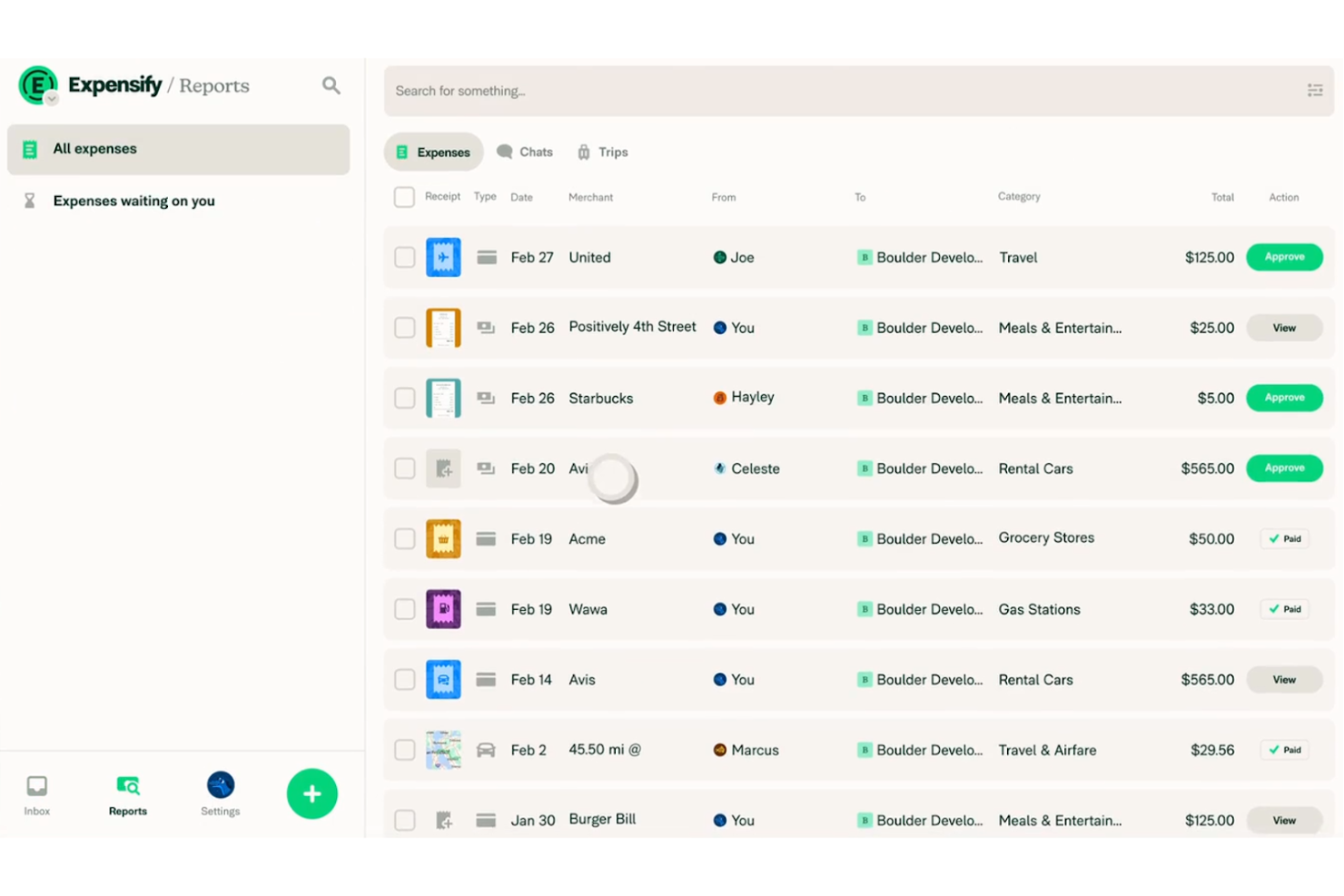
Expensify offers expense management software designed for businesses that want to automate receipt capture and reporting. It’s a strong fit for teams looking to simplify expense submission and approval without complex setup. If you need a tool that helps reduce manual entry and speeds up reimbursement, Expensify is worth a look.
Who Is Expensify Best For?
Expensify fits small to mid-sized businesses and finance teams that want to automate expense reimbursement and tracking, and simplify receipt management.
Why Expensify Is a Good SAP Concur Alternative
I picked Expensify as a SAP Concur alternative because it automates receipt scanning and expense reporting in a way that’s accessible for teams of any size. The SmartScan feature lets users snap photos of receipts, which are then automatically coded and matched to expenses. I also appreciate that Expensify can auto-generate expense reports and route them for approval without manual intervention. If you want to reduce time spent on data entry and streamline expense workflows, Expensify’s automation stands out.
Expensify Key Features
Some other features in Expensify that may interest finance teams include:
- Corporate Card Management: Issue and manage Expensify Cards with built-in spend controls and real-time transaction tracking.
- Multi-Level Approval Workflows: Set up custom approval chains to match your organization’s expense policy and hierarchy.
- Automatic Reimbursement: Enable direct deposit reimbursements to employees’ bank accounts once expenses are approved.
- Policy Enforcement Tools: Configure rules to flag out-of-policy expenses and require additional documentation or justification.
Expensify Integrations
Integrations include QuickBooks, Xero, NetSuite, Sage Intacct, and TravelPerk.
Pros and Cons
Pros:
- Mobile app supports on-the-go expense capture
- Multi-level approval workflows for expense policies
- Expensify Card offers real-time spend controls
Cons:
- Occasional syncing issues with accounting software
- Reporting customization options are restricted

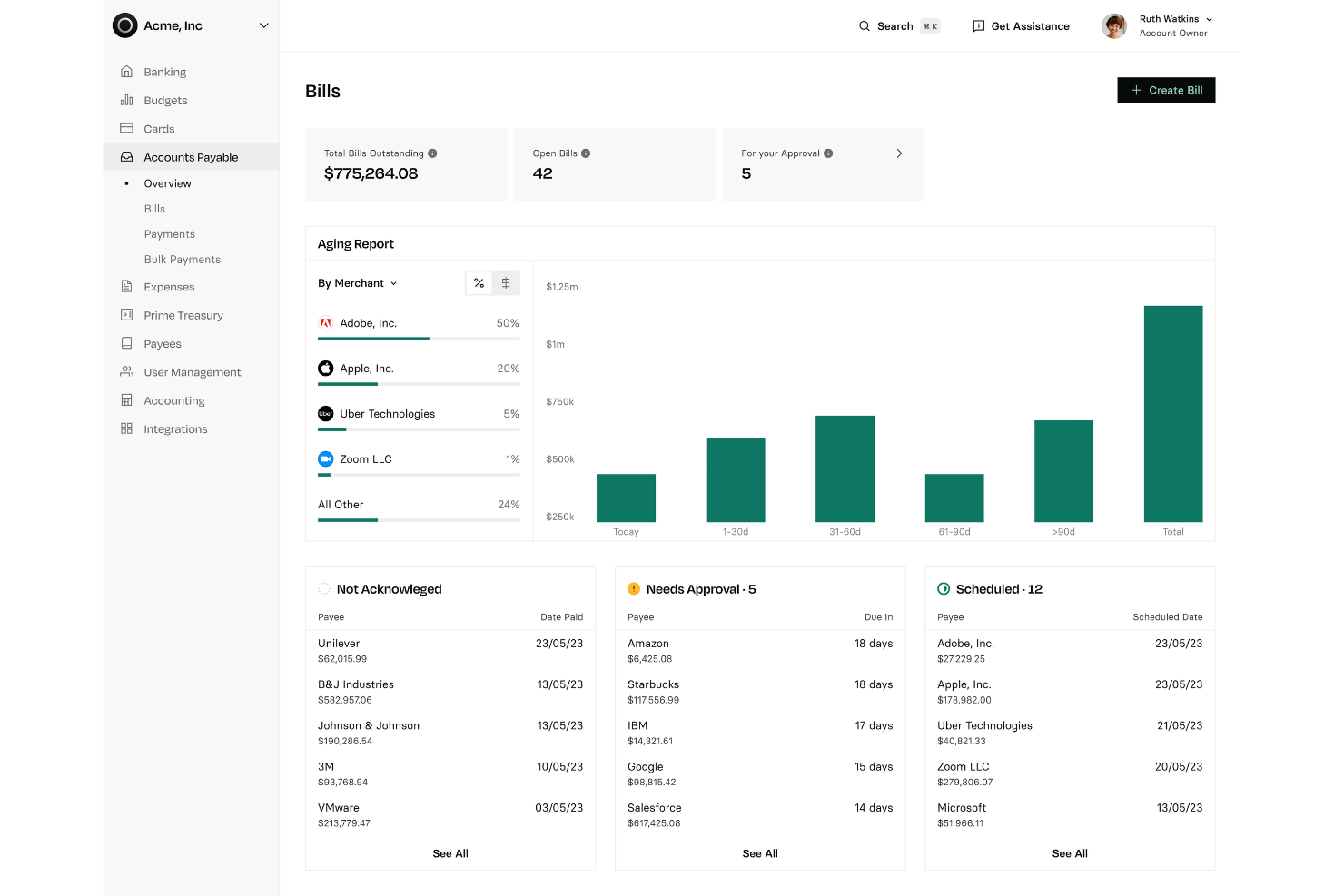
Rho offers an integrated expense management and corporate card platform designed for finance teams seeking tighter control over company spending. It appeals to businesses that want to unify card issuance, expense tracking, and policy enforcement in one place. If your organization needs real-time visibility and automated controls for employee expenses, Rho addresses these needs directly.
Who Is Rho Best For?
Rho fits mid-sized to large businesses that want unified expense management and corporate card controls within a single platform.
Why Rho Is a Good SAP Concur Alternative
Rho stands out for combining corporate card issuance and expense management in a single platform. I picked Rho because it lets finance teams issue physical and virtual cards, set granular spending controls, and track expenses in real time—all from one dashboard. This unified approach reduces the need for multiple tools and manual reconciliation between card and expense data. If you want to centralize spend management and policy enforcement, Rho offers a focused solution that’s different from traditional expense platforms.
Rho Key Features
Some other features in Rho that may interest finance teams include:
- Automated receipt matching: Rho automatically matches uploaded receipts to transactions, reducing manual entry and reconciliation work.
- Custom approval workflows: Set up multi-level approval chains to align with your organization’s expense policies.
- Real-time spend analytics: Access dashboards and reports that break down spending by department, cardholder, or category.
- ACH and wire payment support: Initiate ACH and wire transfers directly from the platform for vendor payments and reimbursements.
Rho Integrations
Integrations include QuickBooks, Xero, NetSuite, Sage Intacct, BambooHR, and SAP Concur.
Pros and Cons
Pros:
- Strong corporate card with cashback
- Fast highly responsive support
- Zero platform ACH or user fees
Cons:
- Lacks a native payroll system
- Bill pay features can feel clunky

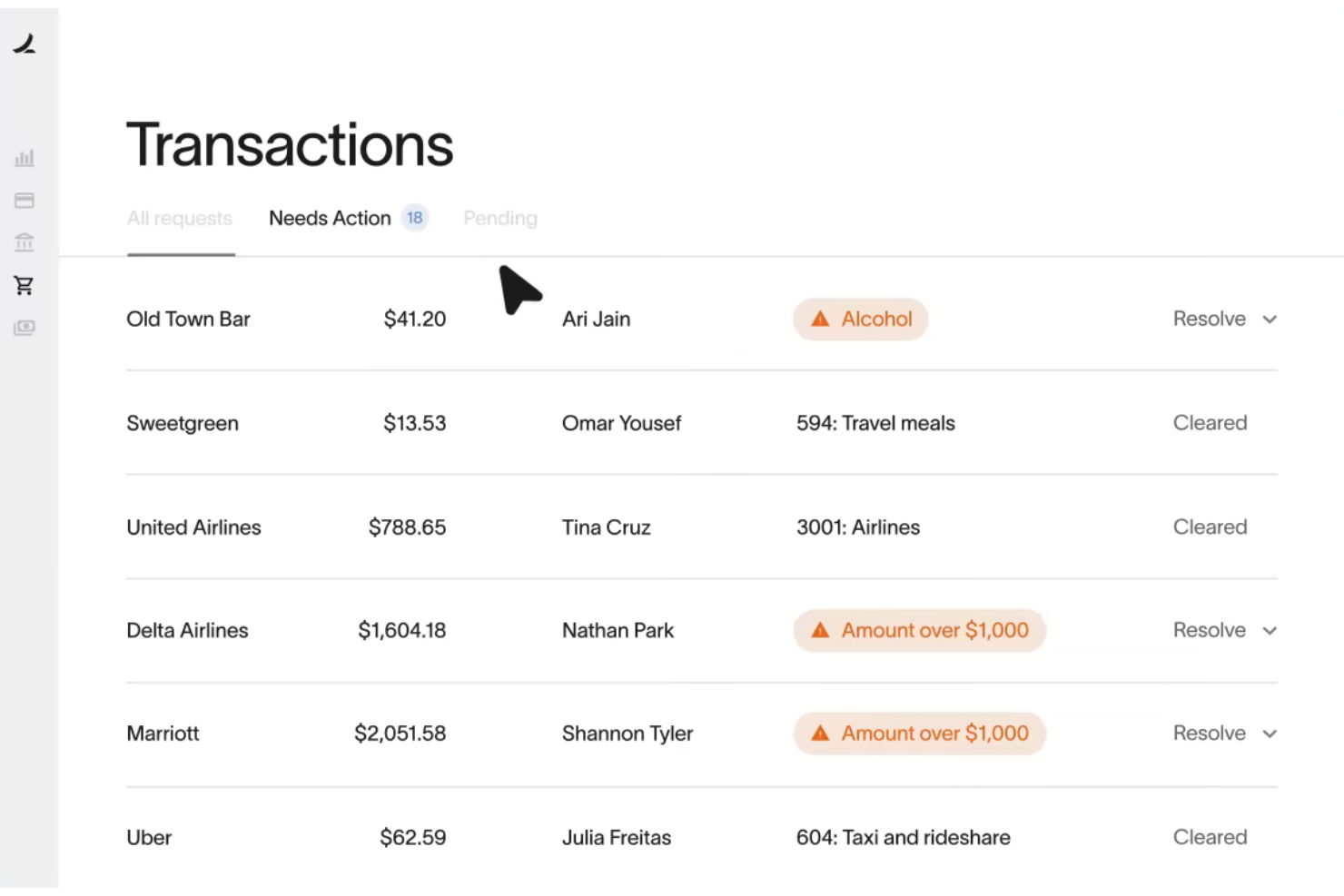
Ramp offers expense management software designed for finance teams that want to automate spend controls and gain deeper visibility into company expenses. It’s a strong fit for mid-sized and growing businesses looking to replace manual processes with real-time policy enforcement and analytics. If you need a solution that combines corporate cards with automated workflows, Ramp is worth a closer look.
Who Is Ramp Best For?
Ramp fits mid-sized and enterprise finance teams that need automated expense controls and real-time spend visibility.
Why Ramp Is a Good SAP Concur Alternative
Ramp is a strong SAP Concur alternative because it combines corporate cards with automated expense controls and real-time insights. I picked Ramp for its ability to automatically enforce spend policies at the point of purchase, which helps finance teams reduce out-of-policy expenses. The platform also provides detailed analytics on company spending, making it easier to spot trends and optimize budgets. If you want a solution that tightly links card usage with expense management, Ramp delivers a unified approach.
Ramp Key Features
Some other features in Ramp that may interest finance teams include:
- Automated Receipt Collection: Ramp automatically requests and matches receipts to transactions, reducing manual follow-up.
- Multi-Level Approval Workflows: Set up custom approval chains for expenses based on amount, department, or policy.
- Real-Time Accounting Sync: Sync transactions directly with accounting platforms like NetSuite and QuickBooks for up-to-date books.
- Vendor Management Dashboard: Track and manage vendor spend, contracts, and renewal dates in one place.
Ramp Integrations
Integrations include NetSuite, QuickBooks Online, Xero, Sage Intacct, Slack, and Workday.
Pros and Cons
Pros:
- Customizable approval workflows for expenses
- Automated receipt capture and matching
- Corporate cards with real-time spend controls
Cons:
- No mileage tracking or per diem management
- Expense reporting less detailed than SAP Concur

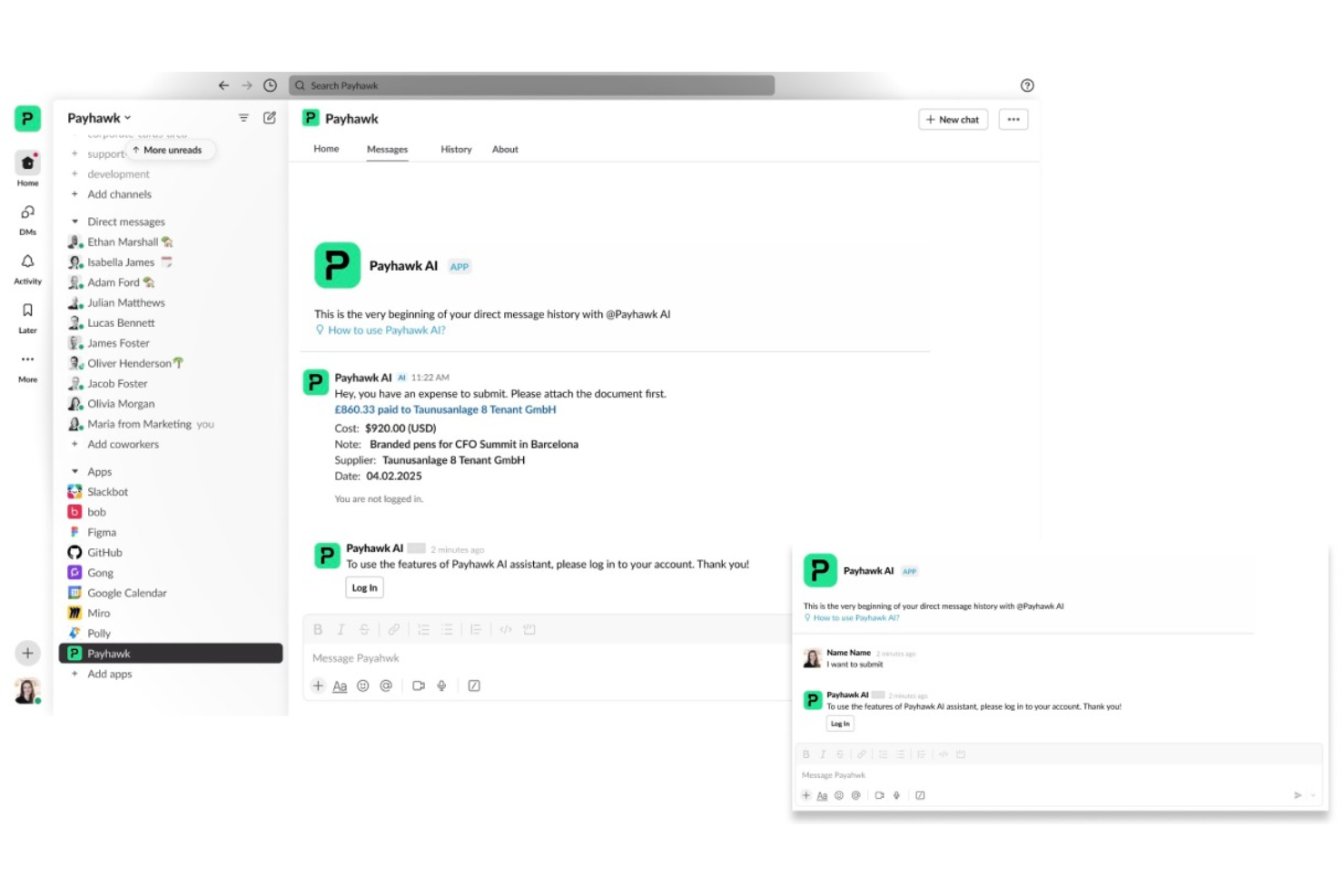
Payhawk is an expense management platform designed for finance teams in multinational companies. It appeals to organizations that need to unify card payments, reimbursements, and spend controls across multiple entities. If you’re looking for a solution that handles global expense policies and real-time visibility, Payhawk is worth considering.
Who Is Payhawk Best For?
Payhawk suits mid-sized to large multinational companies that need centralized control over global expenses and payments.
Why Payhawk Is a Good SAP Concur Alternative
What makes Payhawk a strong SAP Concur alternative is its ability to combine global expense management with built-in payments in one platform. I picked Payhawk because it lets you issue company cards, manage reimbursements, and enforce spend policies across multiple countries from a single dashboard. The platform also supports real-time spend tracking and automated VAT extraction, which is especially useful for multinational finance teams. If your business needs unified control over global expenses and payments, Payhawk offers a focused solution.
Payhawk Key Features
Some other features in Payhawk that may interest finance teams include:
- Automated Receipt Matching: The platform automatically matches receipts to card transactions, reducing manual reconciliation work.
- Custom Approval Workflows: You can set up multi-level approval chains tailored to your company’s expense policies.
- Mileage Tracking: Payhawk allows employees to submit mileage claims with built-in distance calculations.
- Real-Time Budget Controls: Managers can set and adjust spend limits instantly for teams or individuals.
Payhawk Integrations
Integrations include NetSuite, Sage Intacct, Microsoft Dynamics 365, Xero, QuickBooks, and Workday.
Pros and Cons
Pros:
- Fast and helpful customer support
- Excellent accounting integrations
- Very intuitive and easy to use
Cons:
- Receipt OCR can sometimes glitch
- Occasional invoice syncing delays
Other SAP Concur Alternatives
Here are some additional SAP Concur alternatives options that didn’t make it onto my shortlist, but are still worth checking out:
- Pleo
For smart company cards with automated expense tracking
- Spendesk
For all-in-one spend management for teams
- Tipalti
For global payables automation and expense management
- BILL Spend & Expense
For corporate cards and expense management for SMBs
- Yokoy
For AI-driven spend management and automation


SAP Concur Alternatives Selection Criteria
When selecting the best SAP Concur alternatives to include in this list, I considered common buyer needs and pain points related to expense management software products, like controlling employee spend and automating expense reconciliation. I also used the following framework to keep my evaluation structured and fair:
Core Functionality (25% of total score)
To be considered for inclusion in this list, each solution had to fulfill these common use cases:
- Capture and categorize employee expenses
- Issue and manage corporate cards
- Set and enforce spend policies
- Automate receipt collection and matching
- Generate expense reports for accounting
Additional Standout Features (25% of total score)
To help further narrow down the competition, I also looked for unique features, such as:
- Real-time spend analytics dashboards
- Automated multi-currency support
- Built-in travel booking tools
- Advanced approval workflow customization
- Direct ERP and payroll integrations
Usability (10% of total score)
To get a sense of the usability of each system, I considered the following:
- Clean and intuitive user interface
- Logical navigation and menu structure
- Minimal manual data entry required
- Mobile app availability and functionality
- Accessibility for non-finance users
Onboarding (10% of total score)
To evaluate the onboarding experience for each platform, I considered the following:
- Step-by-step product tours or walkthroughs
- Availability of training videos and webinars
- Pre-built templates for expense policies
- In-app chatbots or live onboarding support
- Clear documentation for setup and migration
Customer Support (10% of total score)
To assess each software provider’s customer support services, I considered the following:
- Availability of live chat or phone support
- Responsiveness to support tickets
- Access to a searchable help center
- Dedicated account management options
- Community forums or user groups
Value For Money (10% of total score)
To evaluate the value for money of each platform, I considered the following:
- Transparent and predictable pricing structure
- Features included at each pricing tier
- No hidden fees or surprise charges
- Discounts for annual or volume contracts
- Free trial or demo availability
Customer Reviews (10% of total score)
To get a sense of overall customer satisfaction, I considered the following when reading customer reviews:
- Positive feedback on expense automation
- Reports of reliable customer support
- Comments on integration quality
- User satisfaction with mobile experience
- Feedback on reporting and analytics tools
Why Look for a SAP Concur Alternative?
While SAP Concur is a good choice of expense management software, there are a number of reasons why some users seek out alternative solutions. You might be looking for a SAP Concur alternative because…
- You want a simpler, more modern user interface
- You need faster implementation and onboarding
- You require more flexible approval workflows
- You want better integration with your accounting system
- You need more transparent or predictable pricing
- You operate in regions where SAP Concur support is limited
If any of these sound like you, you’ve come to the right place. My list contains several expense management software options that are better suited for teams facing these challenges with SAP Concur and looking for alternative solutions.
SAP Concur Key Features
Here are some of the key features of SAP Concur, to help you contrast and compare what alternative solutions offer:
- Automated expense capture: SAP Concur uses OCR and mobile apps to automatically extract data from receipts and populate expense reports, reducing manual entry.
- Travel booking integration: Book flights, hotels, and rental cars directly within the platform, syncing travel itineraries with expense tracking.
- Policy enforcement: Configure custom spend policies that automatically flag or block out-of-policy expenses for review or rejection.
- Multi-currency support: Manage expenses and reimbursements in multiple currencies, with automatic currency conversion and compliance tracking.
- Approval workflows: Set up multi-level, customizable approval chains to match your organization’s expense authorization process.
- Mobile app: Submit, review, and approve expenses on the go using SAP Concur’s dedicated mobile application.
- ERP and accounting integrations: Connect SAP Concur with major ERP and accounting systems to sync expense data and streamline reconciliation.
- Audit and compliance tools: Use built-in audit trails, compliance checks, and reporting to support regulatory requirements and internal controls.
- Reporting and analytics: Access dashboards and customizable reports to analyze spend patterns, identify savings opportunities, and monitor compliance.
- Corporate card integration: Link company credit cards to automatically import and match transactions with submitted expenses.
What’s Next:
If you're in the process of researching SAP Concur alternatives, connect with a SoftwareSelect advisor for free recommendations.
You fill out a form and have a quick chat where they get into the specifics of your needs. Then you'll get a shortlist of software to review. They'll even support you through the entire buying process, including price negotiations.