

Procurement spend management software gives you one place to track, analyze, and control every business purchase—from onboarding to final payout. But with so many platforms offering AI features and ERP connections, finding the right fit can get overwhelming.
In this guide, I'll share my top picks for 2026, explain how they work for different business needs, and highlight key features that help control costs and reduce risks.
Why Trust Our Software Recommendations
6,700+
Reviews
20
Industry experts
16+
Evaluation factors
14
Years
Our team has been testing and reviewing software since 2012. As finance leaders ourselves, we know how difficult—and important—it is to choose the right software.
For this guide, we evaluated tools using hands-on testing and independent research, scoring tools using our selection criteria.
Our reviews reflect our human editorial judgment, not a sales pitch.
Procurement Spend Management Software Comparison Table
Compare pricing and specs, side by side, for the procurement spend management software that made it onto my shortlist.
| Tool | Best For | Trial Info | Price | ||
|---|---|---|---|---|---|
| 1 | Best for fast mid-market budget tracking | Free demo available | From $499/month (billed annually) | Website | |
| 2 | Best for AI-driven global source-to-pay automation | Not available | Pricing upon request | Website | |
| 3 | Best for AP automation with built-in fraud checks | Free demo available | Pricing upon request | Website | |
| 4 | Best for high-volume touchless invoice processing | Free demo available | Pricing upon request | Website | |
| 5 | Best for predictive AI spend classification | 30-day free trial OR Free demo available | From $12/user/month | Website | |
| 6 | Best for end-to-end total spend control | Free demo available | Pricing upon request | Website | |
| 7 | Best for direct and indirect spend management | Free demo available | Pricing upon request | Website | |
| 8 | Best for enterprise supply network connectivity | Free demo available | Pricing upon request | Website | |
| 9 | Best for Oracle ERP-native S2P with AI agents | Free demo available | Pricing upon request | Website | |
| 10 | Best for highly configurable source-to-pay workflows | Free demo available | Pricing upon request | Website |


Procurement Spend Management Software Reviews
Below are my detailed summaries of the best procurement spend management software that made it onto my shortlist. My reviews offer a detailed look at the features, best use cases, and capabilities of each platform to help you find the best one for you.
 Best for fast mid-market budget tracking
- Free demo available
- From $499/month (billed annually)
Visit WebsiteCustomer Rating:4.8/5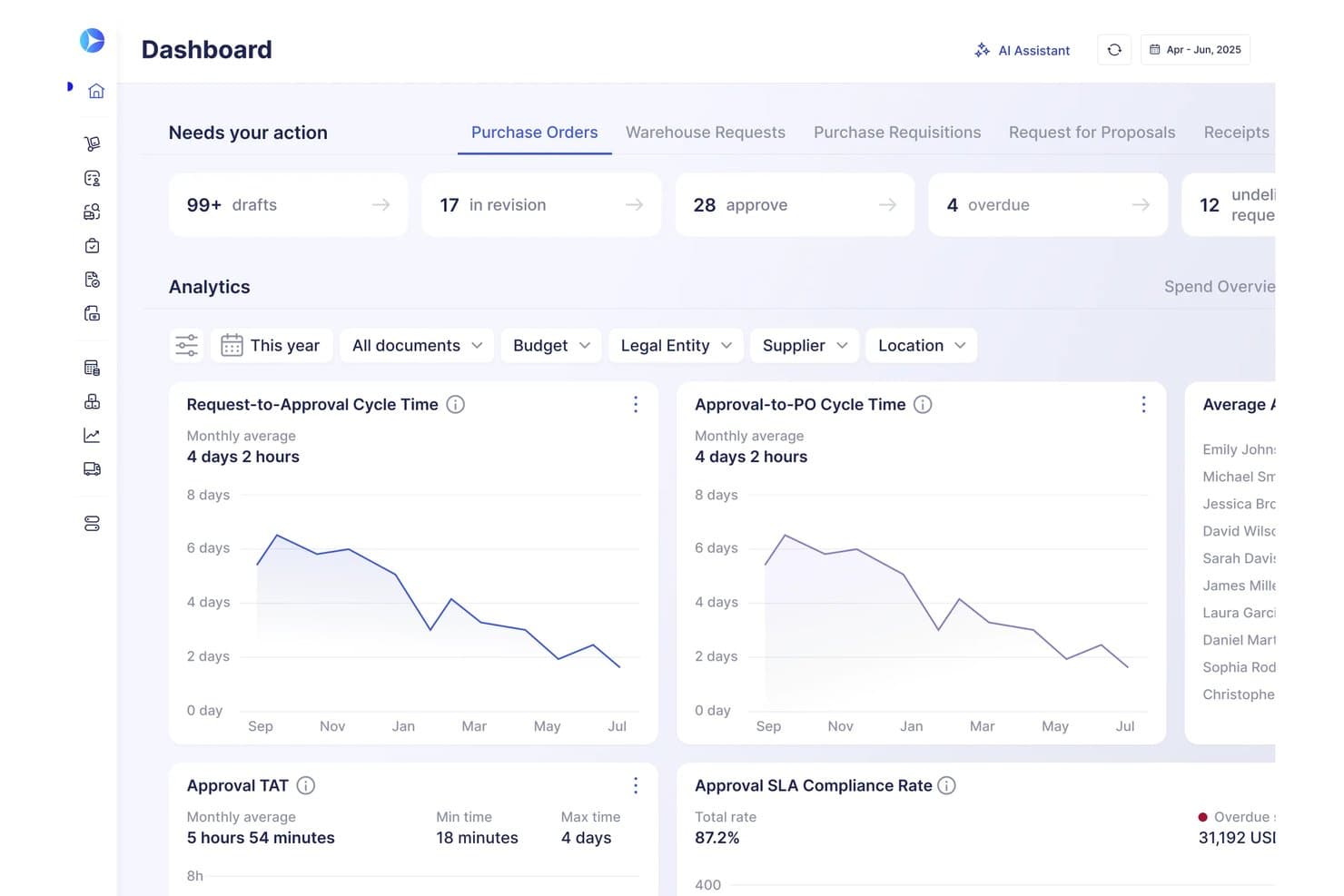
Precoro integrates procurement approvals and cycle-time analytics into a single workspace. Precoro is a procure-to-pay platform that covers purchase requisitions, PO management, supplier catalogs, contract tracking, invoice matching, and AP automation in one system.
Who Is Precoro Best For?
Precoro is a strong fit for mid-market finance and procurement teams that need full procure-to-pay coverage without the implementation complexity of enterprise suites.
Why I Picked Precoro
I picked Precoro as one of the best because it tracks budget consumption in real time, at a pace I haven't seen matched in the mid-market. As soon as a purchase requisition hits an approval queue, Precoro checks it against your department or project budget and blocks it if it crosses a set threshold. Pair that with actual-vs-planned dashboards that drill down by supplier, category, or entity, and your finance team always knows exactly where spend stands, not where it stood last week.
Precoro Key Features
- AI-powered invoice capture: Scans and extracts invoice data in under 3 seconds with 96%+ accuracy, including PDFs, scans, and low-quality photos.
- Supplier Portal: Vendors self-manage their profiles, catalog uploads, RFP responses, and invoice submissions directly through a dedicated portal.
- AI Contract Agent: Reviews supplier agreements to extract key terms, flag risk clauses, and send renewal alerts before contracts lapse.
- Real-time budget tracking: Flags over-budget requests by tracking spend against pre-set limits at the department, project, or organizational level.
Precoro Integrations
Precoro offers native integrations with QuickBooks Online, Xero, NetSuite, Slack, Power BI, and BILL, plus PunchOut connections for Amazon Business, Staples Advantage, Home Depot, and Grainger. REST API and SFTP connectors support custom integrations.
Pros and Cons
Pros:
- Vendor self-service supplier portal available
- AI-powered invoice capture and matching
- Fast, real-time budget checks on requisitions
Cons:
- Approval progress tracking can be unclear
- Virtual cards still in limited release
Learn more about Precoro: Best for AI-driven global source-to-pay automation
- Not available
- Pricing upon request
Visit WebsiteCustomer Rating:4.4/5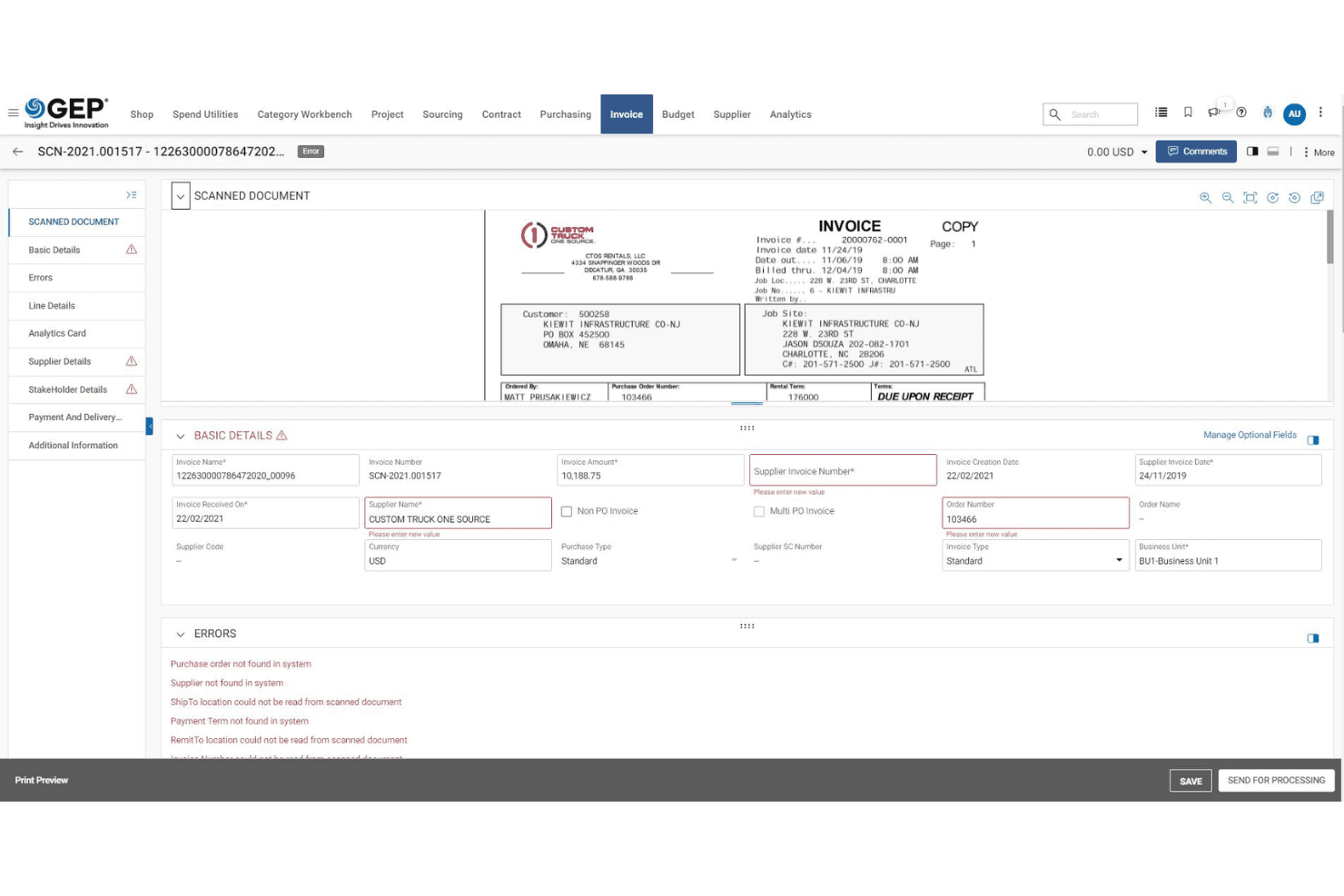
GEP SMART flags invoice errors and missing fields for resolution. GEP SMART is an enterprise procurement software that unifies spend analysis, strategic sourcing, contract lifecycle management, supplier management, and AP invoice automation in a single AI-native system.
Who Is GEP SMART Best For?
GEP SMART is built for large enterprises and multinationals that need a unified platform covering the full source-to-pay lifecycle across multiple business units, ERPs, and geographies.
Why I Picked GEP SMART
GEP SMART earns its spot on my shortlist because no other platform I've used runs the full source-to-pay cycle through a coordinated layer of 30+ AI agents the way this one does. I'm impressed by the Intelligent Buying Agent, which steers requestors toward in-contract items before spend is committed, and the Invoice N-Way Matching Agent, which auto-processes invoices against POs, contracts, and receipts with configurable tolerances. That kind of pre- and post-commitment coverage in a single platform is what makes GEP SMART the right call for large, multi-ERP enterprises.
GEP SMART Key Features
- Conversational reporting agent: Query spend data and get instant dashboard insights using natural language questions.
- Contract clause risk agent: Reviews contract language and suggests alternate clauses to reduce legal and compliance exposure.
- Supplier risk assessment agent: Monitors vendor performance risks, financial, and ESG on a continuous basis.
- Dynamic discounting: Automates early-payment discount management to support working-capital objectives across your AP workflows.
GEP SMART Integrations
GEP SMART connects with SAP, Oracle, Workday, NetSuite, and Power BI across multi-ERP environments.
Pros and Cons
Pros:
- Unified direct and indirect spend in one platform
- Full contract lifecycle and clause risk management
- AI agents automate sourcing and invoice matching
Cons:
- Too complex and costly for smaller businesses
- Core transactional procurement capabilities are less mature
Learn more about GEP SMART: Best for AP automation with built-in fraud checks
- Free demo available
- Pricing upon request
Visit WebsiteCustomer Rating:4.3/5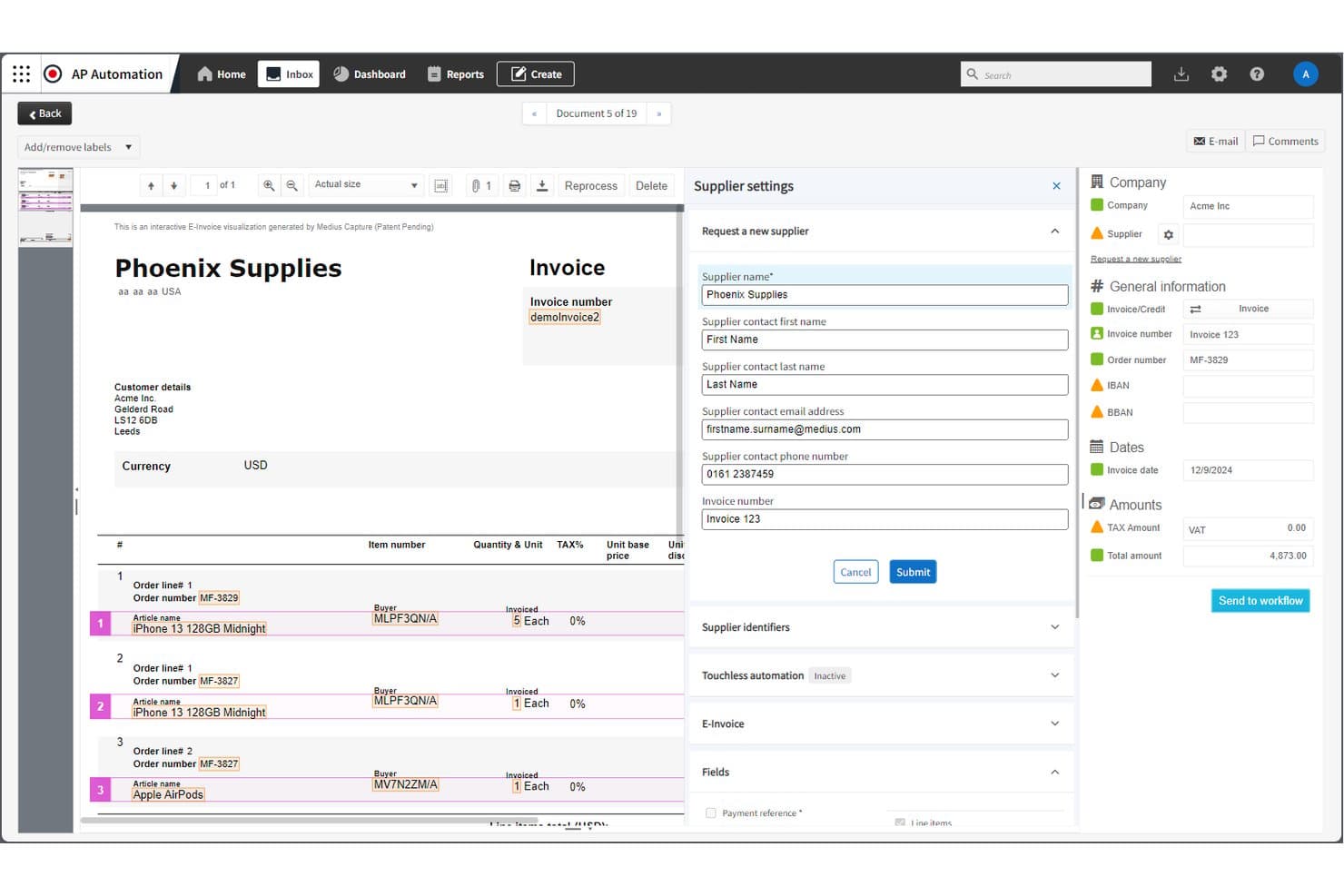
Medius lets users onboard new suppliers from an invoice capture workflow. Medius is a source-to-pay platform covering AP automation, procurement, sourcing, contract management, supplier onboarding, expense management, and payment execution.
Who Is Medius Best For?
Medius is a strong fit for mid-market and enterprise finance teams that need tight AP controls and fraud detection built directly into their invoice-to-pay workflow.
Why I Picked Medius
Medius earns its spot on my shortlist because of how tightly fraud detection is woven into the AP workflow. I'm impressed by its machine learning layer, which flags suspicious supplier bank account changes, duplicate invoices, and anomalous payment patterns in real time before any money moves. Paired with 95% touchless invoice processing through Medius Capture, the system reaches that precision after processing as few as two invoices from a new supplier.
Medius Key Features
- Supplier Conversations AI: Drafts and sends responses to incoming supplier invoice and payment inquiries, reducing AP inbox management.
- Medius Sourcing: Runs RFX events, eAuctions, and quick quotes with configurable multi-round templates and automatic supplier scoring.
- Medius Contract Management: Centralizes contract lifecycles with eSignature, renewal alerts, parent-child contract linking, and red-line capture.
- Statement Reconciliation: Cross-references supplier account statements against received invoices to detect missing items, discrepancies, or unrecorded liabilities.
Medius Integrations
Medius connects with Oracle NetSuite, Oracle Fusion, Microsoft Dynamics 365, and Power BI. It also supports Microsoft Teams, DocuSign, and a REST API.
Pros and Cons
Pros:
- Configurable approval policies for spend control
- 95% straight-through invoice processing rate
- AI-driven fraud detection in AP workflow
Cons:
- Procurement modules require separate purchase
- Virtual cards limited to EEA businesses
Learn more about Medius: Best for high-volume touchless invoice processing
- Free demo available
- Pricing upon request
Visit WebsiteCustomer Rating:4.1/5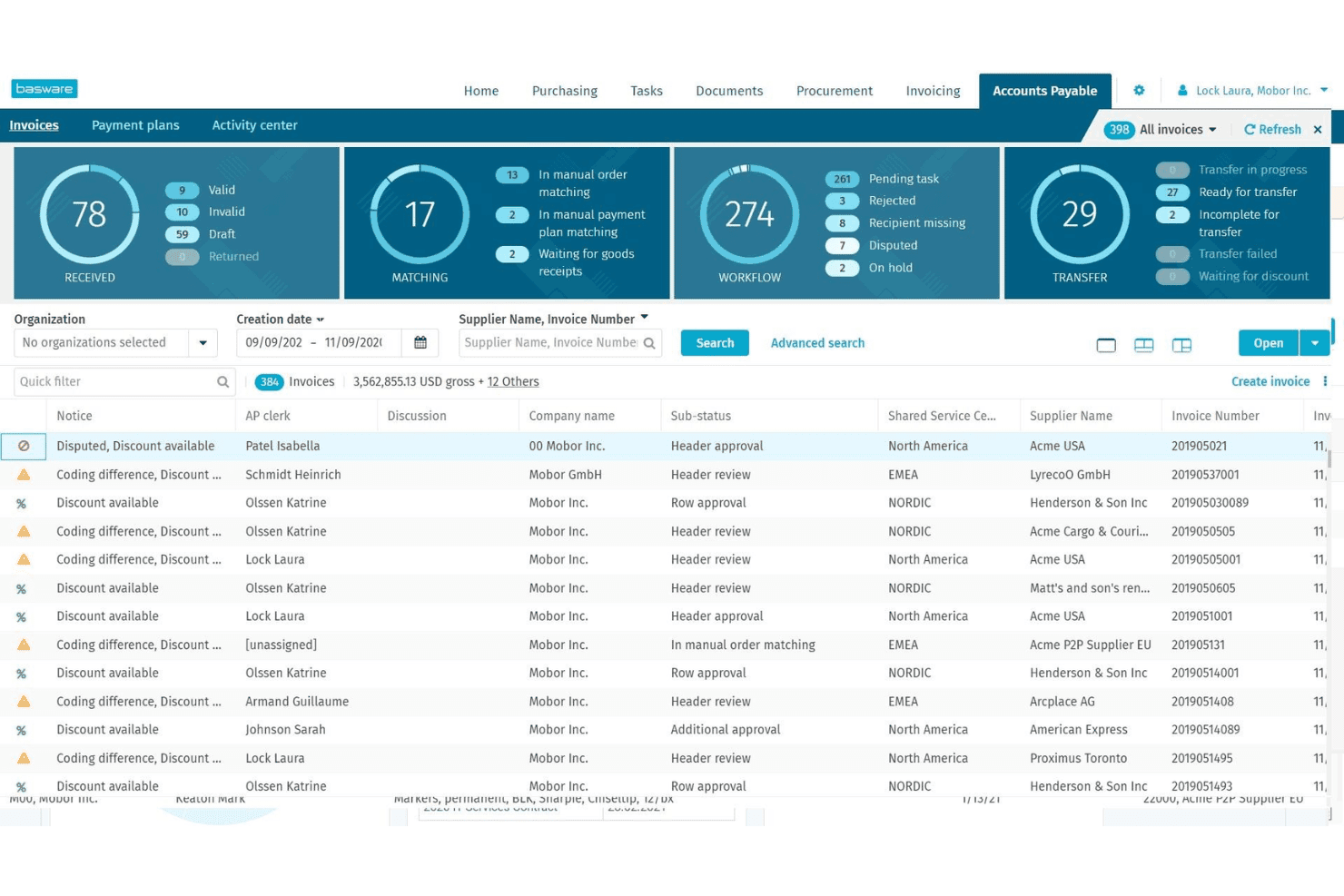
Basware consolidates invoice tracking across workflow stages in one view. Basware is an enterprise procure-to-pay platform built around AI-powered invoice processing, purchase requisition and PO management, catalog and supplier network access, spend analytics, and AP automation across complex, multi-ERP environments.
Who Is Basware Best For?
Basware is built for enterprise finance and AP teams processing high invoice volumes across multiple entities, ERPs, or countries.
Why I Picked Basware
Basware earns its spot on my shortlist because of its InvoiceAI suite, which is trained on over 2.3 billion invoices and delivers an 89% touchless processing rate. I'm impressed by SmartCoding and SmartWorkflow, which handle GL coding and approval routing for non-PO invoices without manual input. In practice, that means high-volume AP teams can process invoices at scale across multiple ERPs and entities without building out a proportionally large team.
Basware Key Features
- Guided purchasing: Routes requisitions to preferred suppliers and negotiated contract pricing before an order is placed.
- AP Protect fraud detection: Monitors invoices in real time and flags duplicates, currency discrepancies, and suspicious activity before posting.
- Committed Spend Analytics dashboard: Surfaces 100% of open POs, payment plans, and non-PO invoices in a single forward-looking view.
- Dynamic discounting: Lets suppliers offer early payment discounts, giving AP teams a tool to capture savings on approved invoices.
Basware Integrations
Basware supports 250+ ERP integrations, including SAP, Oracle, Microsoft Dynamics, and NetSuite, plus REST APIs with webhooks for custom integrations.
Pros and Cons
Pros:
- Deep multi-ERP integration for global entities
- AI-driven fraud detection and anomaly monitoring
- Exceptionally high touchless invoice processing rates
Cons:
- Invoice rejection process can create workflow confusion
- Full contract management requires an external partner system
Learn more about Basware: Best for predictive AI spend classification
- 30-day free trial OR Free demo available
- From $12/user/month
Visit WebsiteCustomer Rating:3.6/5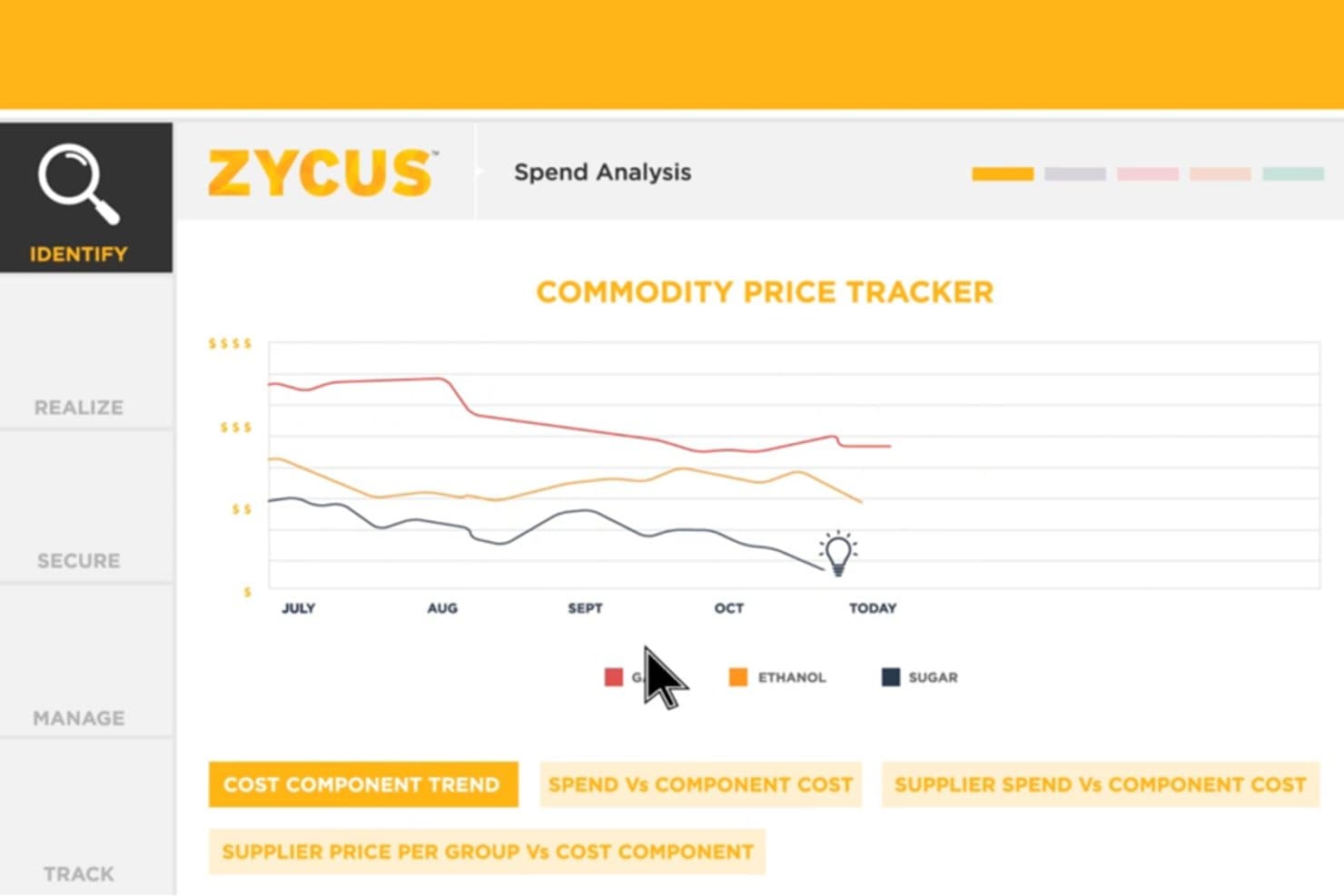
Zycus tracks commodity price trends to support smarter sourcing decisions. Zycus is a source-to-pay suite that covers spend analysis, eProcurement, eSourcing, supplier management, contract lifecycle management, and accounts payable automation on a single AI-driven platform.
Who Is Zycus Best For?
Zycus is a strong fit for mid-to-large enterprises managing high-volume, cross-category procurement that need native AI-driven spend classification.
Why I Picked Zycus
I picked Zycus as one of the best because its AI-driven spend classification is best-in-class, reaching 99% accuracy through the Merlin Analytics Agent, which classifies spend continuously. I've found the conversational analytics particularly valuable as you can query spend by category, supplier, or department in plain language and get results in under 15 seconds. The Merlin Intake Agent adds another layer by enforcing policy at the exact moment a request is submitted, so classification and compliance happen together.
Zycus Key Features
- Merlin Autonomous Negotiation Agent: Negotiates price and non-price terms with suppliers for tail spend items without human intervention.
- iSupplier portal: Allows suppliers to upload documents and AI auto-populates profile data for faster qualification.
- Obligation Extract Genie: Scans contracts to extract key terms, renewal dates, pricing tiers, and SLAs from your contract repository.
- AP SmartDesk: Handles 2-way and 3-way PO matching, exception routing, and AP queries autonomously.
Zycus Integrations
Zycus integrates with SAP S/4HANA, NetSuite, Oracle, Workday, Microsoft Dynamics, and Slack. Native connectors and APIs are also available.
Pros and Cons
Pros:
- Supplier onboarding with auto-populated data
- High spend classification accuracy at 99 percent
- AI agents automate intake and negotiations
Cons:
- No native virtual card or payment solution
- Requires process changes to fit workflows
Learn more about Zycus: Best for end-to-end total spend control
- Free demo available
- Pricing upon request
Visit WebsiteCustomer Rating:4.2/5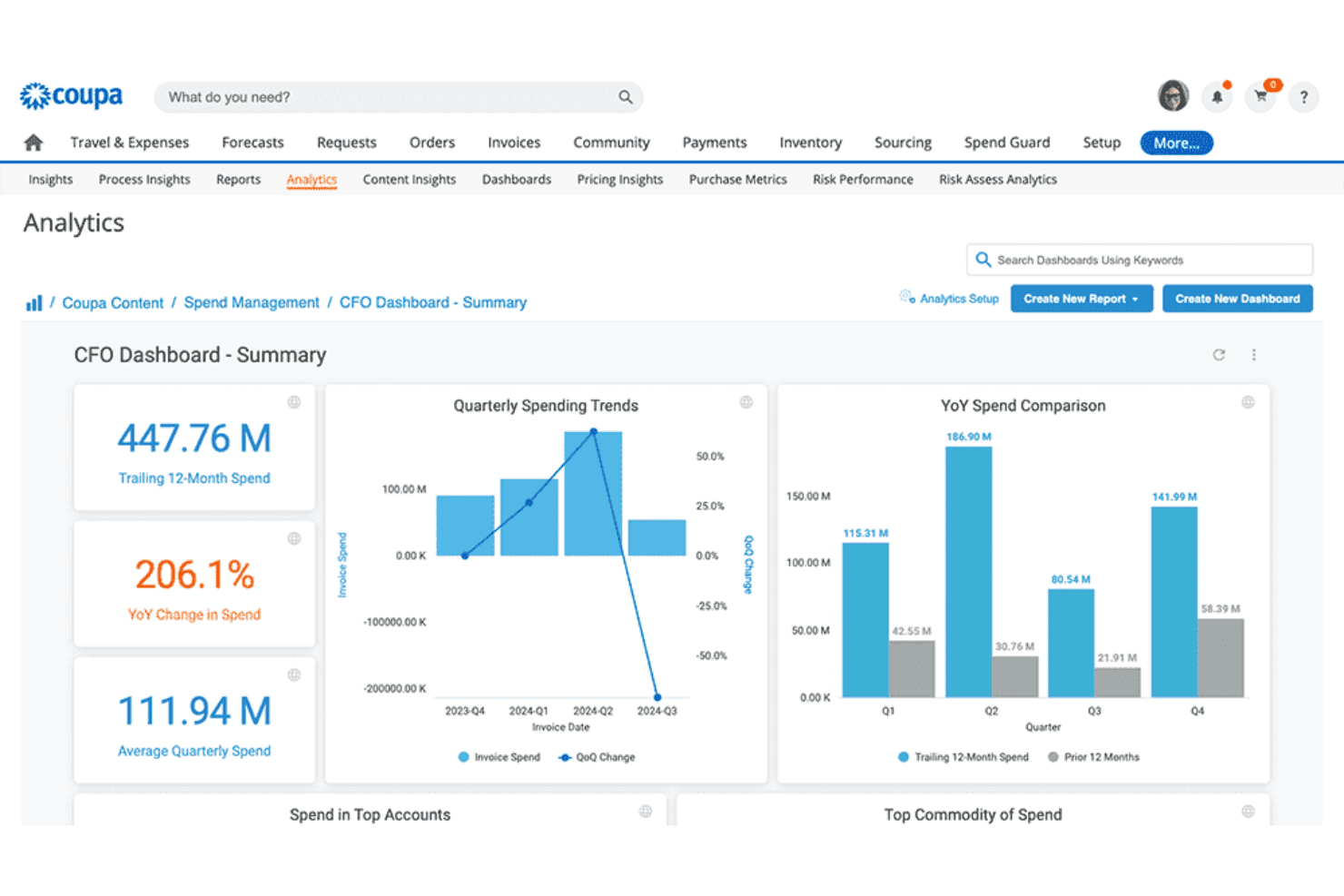
Coupa delivers real-time spend analytics and trends. Coupa is an enterprise procure-to-pay platform that covers purchase requisitions, PO management, supplier catalogs, contract lifecycle management, AP automation, and payment execution in a single system.
Who Is Coupa Best For?
Coupa is built for mid-to-large enterprises where finance and procurement teams need to manage complex, high-volume spend across multiple entities, regions, and supplier networks from a single platform.
Why I Picked Coupa
Coupa earns its spot on my shortlist because it offers visibility and control across the full spend lifecycle in one place. I'm particularly impressed by SpendGuard, which uses AI to flag duplicate invoices, split requisitions, and policy violations in real time, before a payment ever goes out. Combined with benchmarking against $10 trillion in real transaction data from the Coupa Community, this ensures your spend decisions are based on actual peer performance, not guesswork.
Coupa Key Features
- Coupa Supplier Portal (CSP): Suppliers self-register, maintain certifications, and manage their profiles within a dedicated portal.
- Contract lifecycle management: Use approved clauses to create contracts, extract key terms with AI, and link contracts to purchasing.
- Multi-rail payment execution via Coupa Pay: Process payments across ACH, wire, check, and virtual card rails, with automatic reconciliation.
- Services Procurement (SOW): Specialized controls for managing contingent labor, Statement of Work (SOW) projects, and milestone-based deliverables.
Coupa Integrations
Coupa integrates with SAP, Oracle Cloud ERP, NetSuite, Microsoft Dynamics, QuickBooks, and Xero. It also supports REST APIs and webhooks.
Pros and Cons
Pros:
- Embedded SpendGuard for real-time fraud alerts
- Community benchmarking with $10T real transaction data
- AI-driven intake with policy-aware routing
Cons:
- Supplier portal often difficult for vendors
- Implementation can take up to 18 months
Learn more about Coupa: Best for direct and indirect spend management
- Free demo available
- Pricing upon request
Visit WebsiteCustomer Rating:4.1/5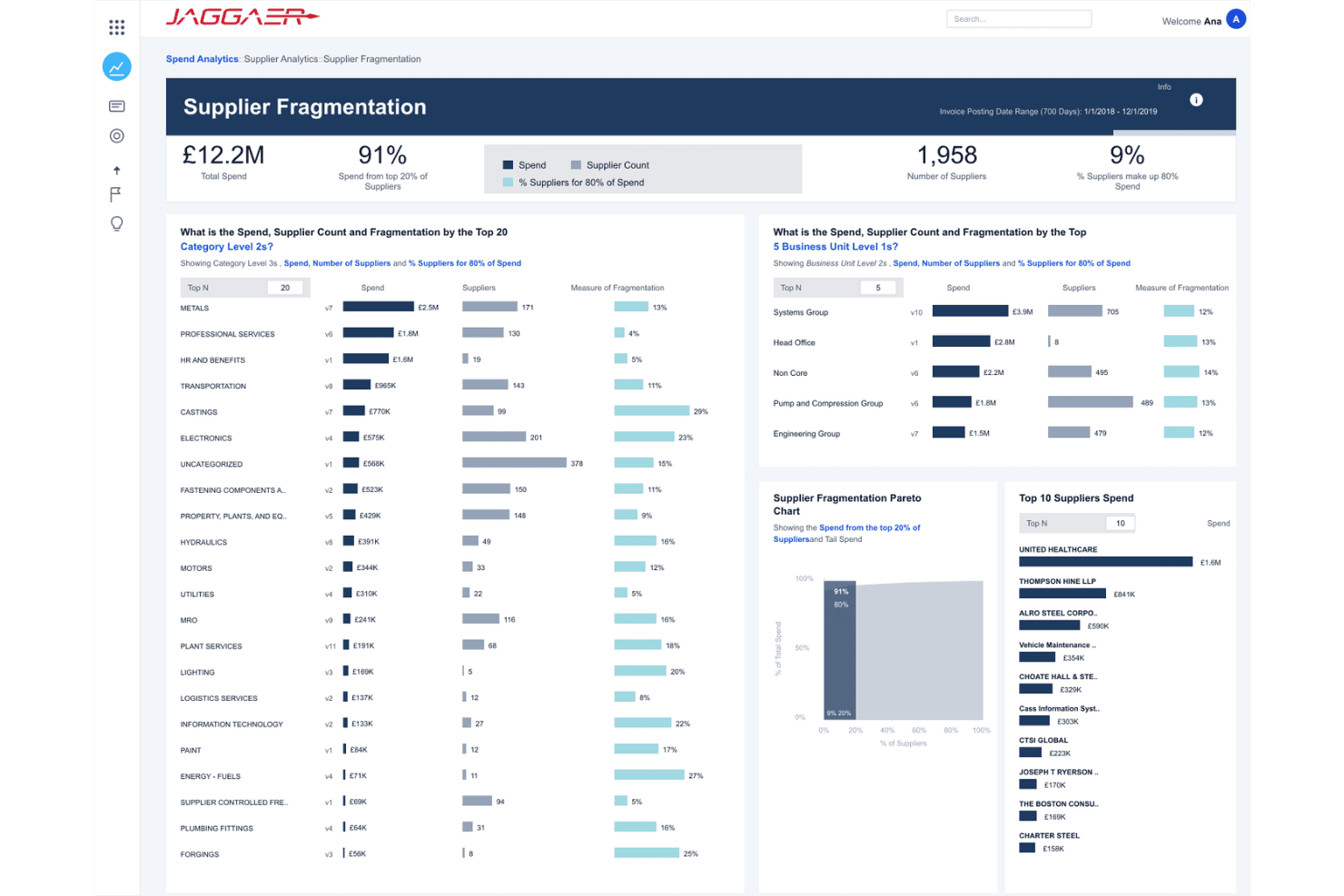
JAGGAER's dashboard shows spend concentration across suppliers. JAGGAER is a source-to-pay platform that covers sourcing, contract lifecycle management, supplier management, eProcurement, invoicing, and spend analytics for both direct and indirect spend.
Who Is JAGGAER Best For?
JAGGAER is built for enterprise and upper-mid-market organizations that need a single platform to manage both direct and indirect spend across complex, multi-entity procurement environments.
Why I Picked JAGGAER
JAGGAER earns its spot on my shortlist because it's one of the few platforms that handles both direct and indirect spend natively, without bolting on a separate solution for manufacturing. I particularly like the AI-powered Purchase Requisition Approval Recommendations, which use historical PO data to fast-track low-risk requisitions while flagging anomalies before they reach an approver.
JAGGAER Key Features
- Supplier intelligence module: Access enriched profiles for 13M+ suppliers, with integrated risk signals and ESG scoring from providers like D&B and EcoVadis.
- Multi-channel invoice capture: Collect invoices through portals, email, EDI, cXML, OCR, and PEPPOL, then match them with POs and receipts.
- Spend analytics dashboard: View spend breakdowns by supplier, category, department, and entity, with AI-automated classification and anomaly detection.
- JAI AI copilot: Get AI-assisted drafting, summarization, and risk flagging across sourcing, contracts, eProcurement, and invoicing.
JAGGAER Integrations
JAGGAER offers 40+ ready integrations with SAP, Oracle, Workday, and more. Connectivity is supported via JAGGAER Link, REST APIs, EDI, cXML, and OCI.
Pros and Cons
Pros:
- Deep supplier risk and ESG monitoring
- Single data layer for direct and indirect spend
- AI-driven requisition and invoice approval recommendations
Cons:
- User interface can be complex to navigate
- Long implementation timeline for full suite
Learn more about Jaggaer: Best for enterprise supply network connectivity
- Free demo available
- Pricing upon request
Visit WebsiteCustomer Rating:3.9/5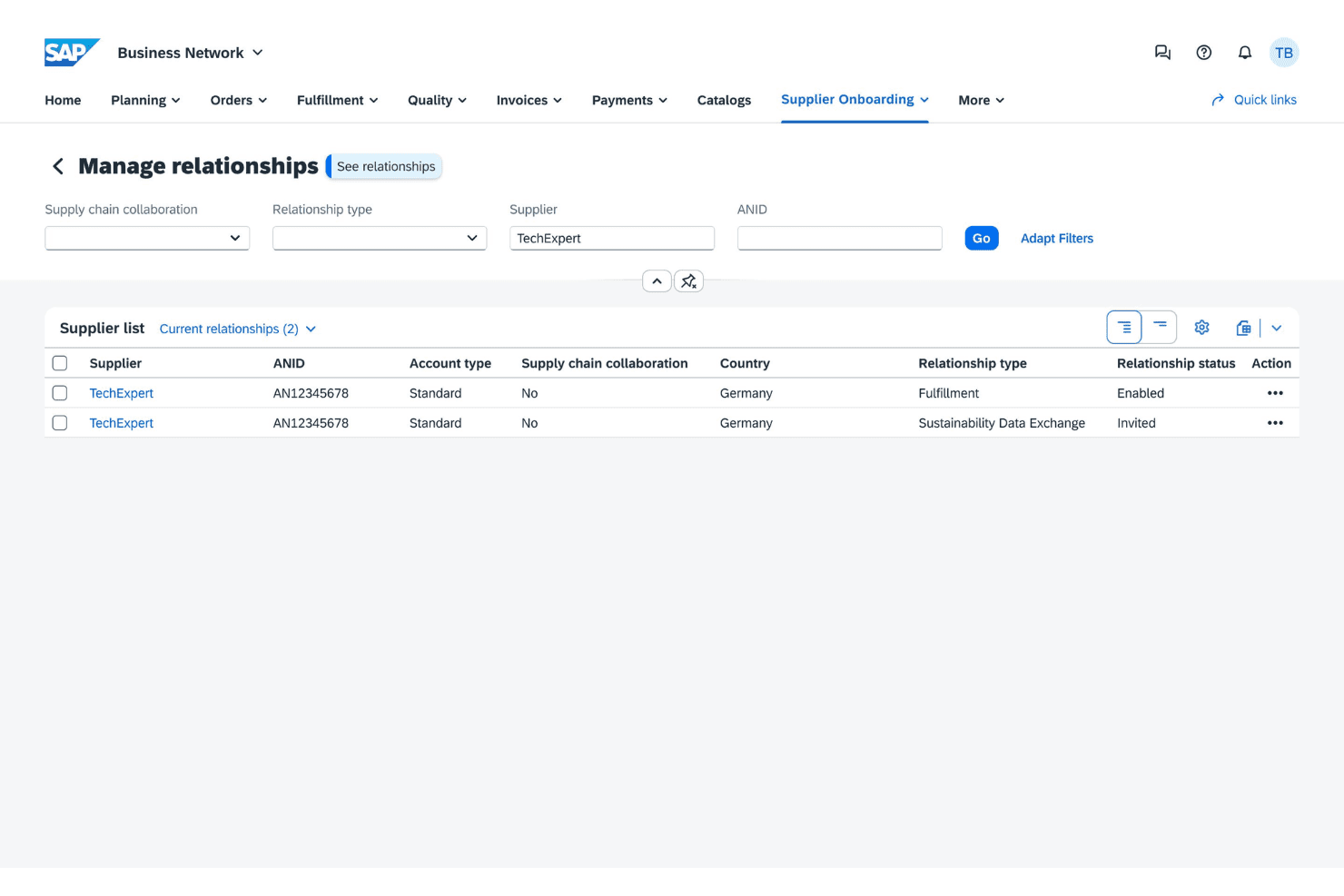
SAP Ariba lets users manage and monitor supplier relationships. SAP Ariba is a cloud-based source-to-pay platform that covers sourcing, contract management, guided buying, invoicing, supplier lifecycle management, and spend analytics across a global B2B commerce network.
Who Is SAP Ariba Best For?
- SAP Ariba is built for mid-to-large enterprises running SAP ERP environments that need to align procurement spend with overall supply chain management across complex, global supplier networks.
Why I Picked SAP Ariba
SAP Ariba earns its spot on my shortlist because no other platform connects buyers to a supplier network at the scale SAP Business Network does, with millions of trading partners already transacting electronically. I find the combination of guided buying with embedded policy guardrails and Spot Buy marketplace integrations (Amazon Business, Unite) especially practical for steering spend toward contracted suppliers. On top of that, the nine Joule AI agents cover sourcing, supplier risk, and invoicing in ways that genuinely reduce manual intervention across the procurement cycle.
SAP Ariba Key Features
- Supplier lifecycle management: Manage the full supplier journey including onboarding, performance tracking, and risk monitoring.
- Global e-invoicing compliance: Process electronic invoices in 41 countries with country-specific tax rules and PEPPOL support.
- Virtual cards: Offer virtual cards, each with spending limits and expiration dates to make managing expenses easier.
- Spend classification: Categorizes and enriches spend data from SAP and non-SAP sources to surface savings opportunities across categories and suppliers.
SAP Ariba Integrations
SAP Ariba integrates with SAP S/4HANA, SAP ECC, SAP Concur, and SAP Fieldglass, as well as Amazon Business, Unite, and Microsoft Dynamics via gateways and APIs.
Pros and Cons
Pros:
- Embedded virtual card payments for purchases
- AI-guided buying with real-time policy checks
- Connects buyers to millions of suppliers
Cons:
- High cost and complexity to set up and use
- Interface is often difficult to use
Learn more about SAP Ariba: Best for Oracle ERP-native S2P with AI agents
- Free demo available
- Pricing upon request
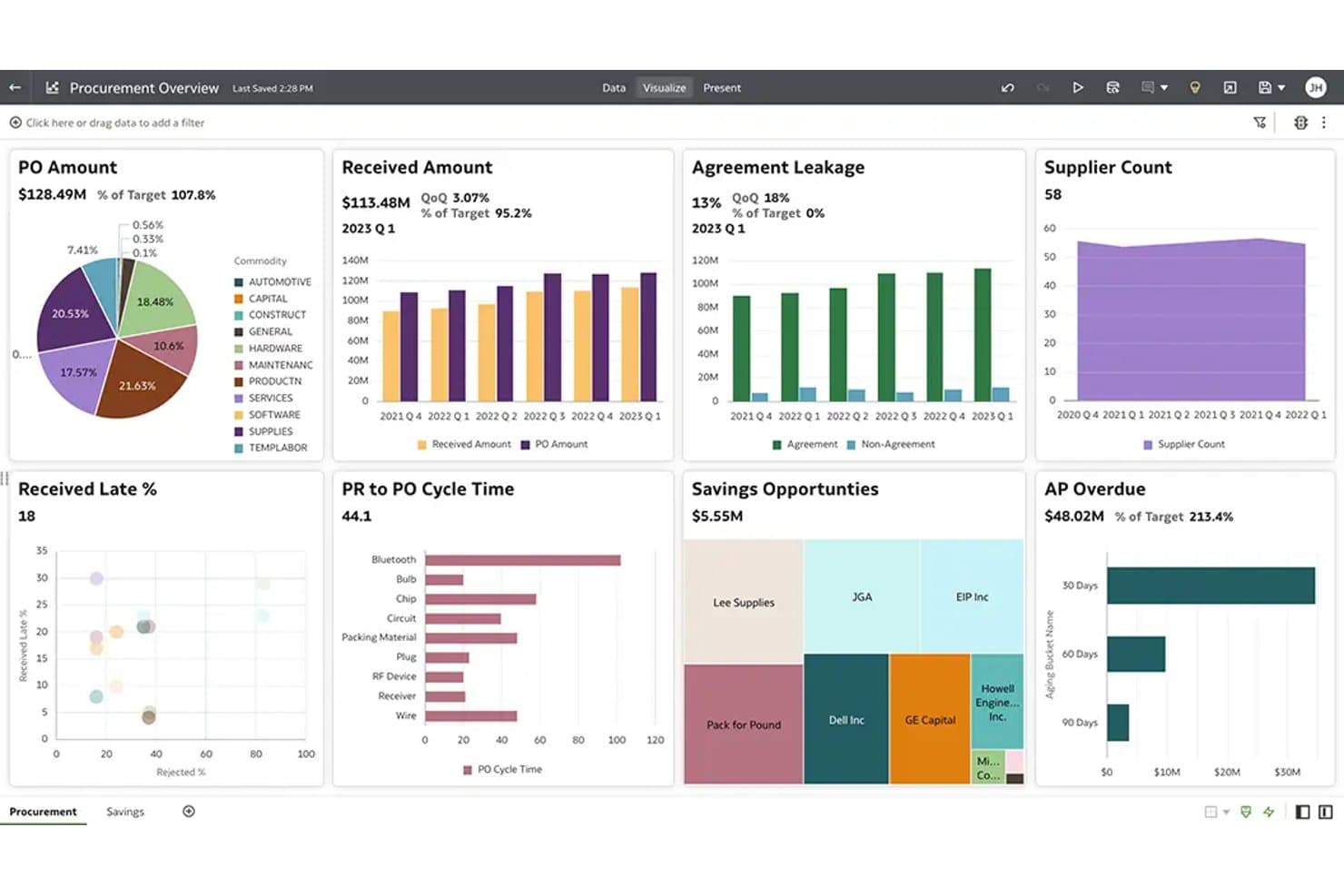
Oracle Fusion Cloud Procurement shows spend KPIs across suppliers. Oracle Fusion Cloud Procurement is an enterprise source-to-pay suite that covers strategic sourcing, contract lifecycle management, purchase requisitions, supplier management, AP automation, and spend analytics within the Oracle Fusion Cloud ecosystem.
Who Is Oracle Fusion Cloud Procurement Best For?
Oracle Fusion Cloud Procurement is built for mid-to-large enterprises that are already on Oracle Fusion Cloud ERP and need a fully native source-to-pay suite without stitching together third-party tools.
Why I Picked Oracle Fusion Cloud Procurement
I've included Oracle Fusion Cloud Procurement in my top picks because it's the only source-to-pay suite that runs natively inside Oracle Fusion Cloud ERP, meaning procurement data, AP invoices, and GL entries share the same data model with zero reconciliation gaps. I especially like the Procurement Policy Advisor AI agent, which flags off-contract purchases at the moment a requisition is created, and the Quote-to-Requisition Assistant, which converts supplier quotes directly into requisitions without manual re-keying.
Oracle Fusion Cloud Procurement Key Features
- Supplier self-service portal: Suppliers submit invoices, review POs, complete onboarding questionnaires, and upload compliance documents directly through a dedicated portal.
- Strategic sourcing with RFx management: Run guided sourcing requests, manage supplier bids, compare responses side by side, and generate AI-assisted award recommendations.
- Contract lifecycle management: Author, collaborate on, approve, and store buy-side contracts in a centralized repository with obligation tracking and AI-powered clause extraction.
- Sustainability tracking: Calculates greenhouse gas emissions and energy, water, and waste consumption from AP invoice and item data, feeding directly into enterprise sustainability reporting.
Oracle Fusion Cloud Procurement Integrations
Oracle Fusion Cloud Procurement natively integrates with Oracle Suite. It also supports Microsoft Word, cXML punchout catalogs, and REST APIs.
Pros and Cons
Pros:
- Supplier portal makes onboarding and compliance easy
- Native Oracle ERP integration for unified data
- AI agents flag off-contract requisitions instantly
Cons:
- Report customization requires specialized IT knowledge
- Implementation usually takes 12–24 months
Learn more about Oracle Fusion Cloud Procurement:
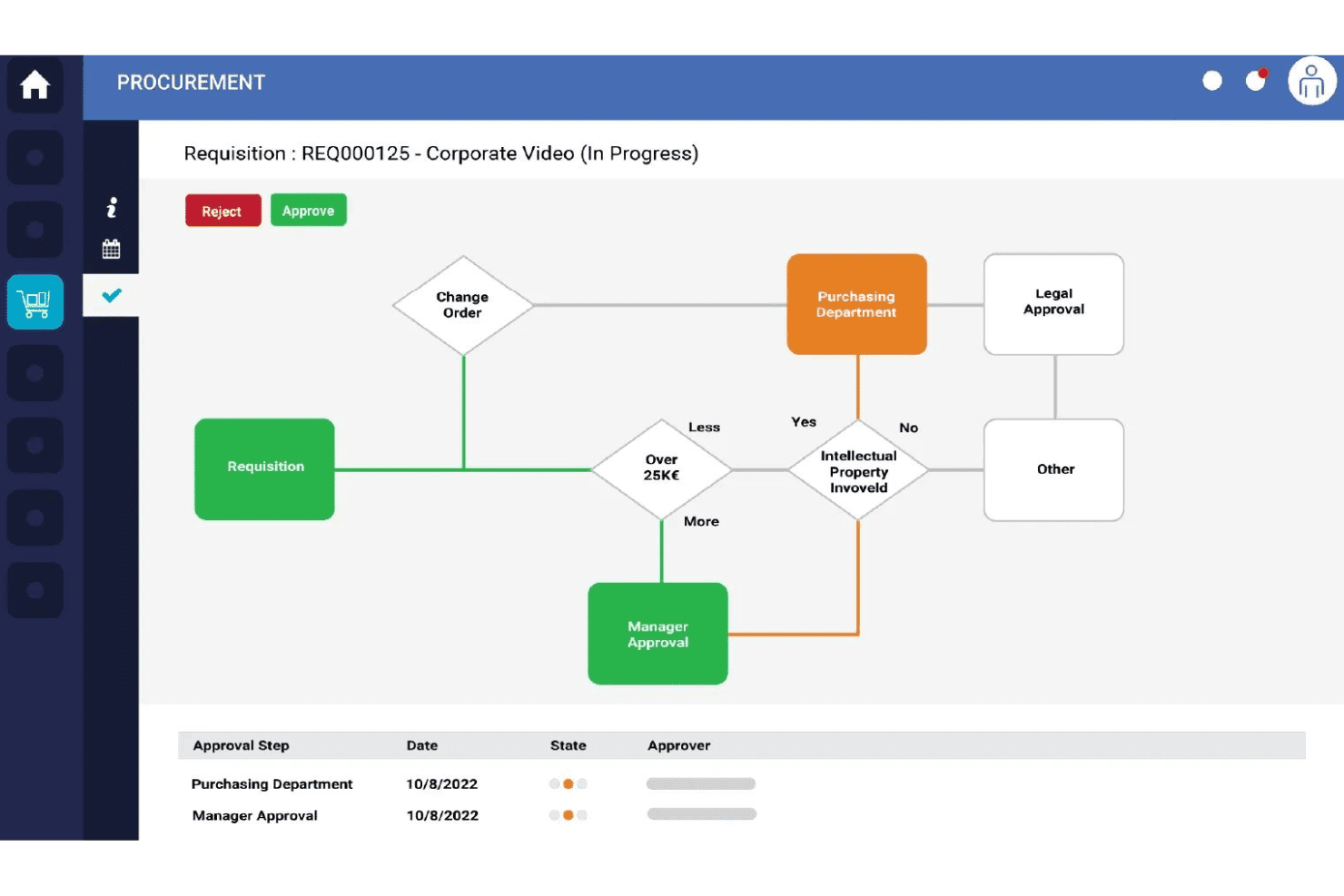
Ivalua visualizes procurement approval workflows with real-time status tracking. Ivalua is a source-to-pay platform that covers intake management, sourcing, contract lifecycle management, supplier management, eProcurement, AP automation, and spend analysis across both direct and indirect spend categories.
Who Is Ivalua Best For?
Ivalua is built for mid-market and enterprise procurement and finance teams that need to manage both direct and indirect spend across complex, multi-ERP environments.
Why I Picked Ivalua
Ivalua earns its spot on my shortlist because no other platform I've used matches its depth of workflow configurability across the full source-to-pay cycle. Its no-code Design Mode lets procurement teams build conditional, role-based approval hierarchies, and the AI-powered Intake Management routes any procurement request, whether it's a new supplier, a contract, or a purchase, through the right backend process automatically. I also love that it handles both direct and indirect spend in one data model, which is genuinely rare at this level.
Ivalua Key Features
- Spend Analysis: Automates data aggregation, categorizes data, and applies AI-driven spend classification to uncover savings and manage tail spend.
- AP Automation (eInvoicing): Captures invoice data and runs automated 2-way, 3-way, or 4-way matching against POs and receipts.
- BOM & Direct Materials Sourcing: Manages multi-level Bills of Materials (BOMs), tracks target costing, and processes engineering change orders.
- Real-time analytics: Helps with real-time expense tracking and monitors spend by category, supplier, business unit, and region.
Ivalua Integrations
Ivalua supports 60+ ERP and backend integrations, including SAP, Oracle, and NetSuite. It also supports API, ETL, EDI, cXML, and PEPPOL.
Pros and Cons
Pros:
- AI-powered procurement intake with chat interface
- Fully configurable no-code workflow engine
- Handles direct and indirect spend together
Cons:
- Analytics require manual dashboard exploration
- Requires system integrators for custom setups
Learn more about Ivalua:
Other Procurement Spend Management Software
Here are some additional procurement spend management software options that didn’t make it onto my shortlist, but are still worth checking out:
- 11ZipBest for cross-department intake-to-procure routing
- 12VrooziBest for mobile-first B2B catalog purchasing
- 13StampliBest for collaborative AI invoice exception resolution
- 14Sage IntacctBest for real-time ledger budget control
- 15PlanergyBest for audit-ready multi-entity spend tracking
- 16TipaltiBest for global multi-subsidiary supplier payouts
- 17RampBest for card-first SMB real-time spend limits
- 18Order.coBest for multi-vendor checkout aggregation
- 19ProcureDeskBest for simple SMB purchasing and PO matching
- 20FraxionBest for strict pre-purchase approval governance
How I Evaluate Procurement Spend Management Software
I split my evaluation into two layers: core functionality every tool must meet—like PO workflows, spend visibility, and ERP integration—and differentiating factors that separate leaders from the rest.
Core Functionality (Table Stakes For This List)
When I'm selecting tools for my list, I rank each one on a scale from 0 (does not offer the functionality) to 5 (excels in this area) for each core functionality listed below. I then calculate the tool's total score into a percentage, using 75% as a benchmark to help assess its overall fit for the list.
- Purchase requisition and PO management: I evaluate how each tool handles multi-step approval routing, mobile approvals, and PO change orders across departments.
- Spend visibility and analytics: Real-time dashboards that let you drill into spend by supplier, category, or entity are what I look for here.
- Supplier and catalog management: I check whether the platform supports punch-out catalogs, supplier onboarding workflows, and contract storage in one place.
- Budget controls and policy enforcement: Pre-commitment budget checks and automated flags on out-of-policy requests show me a tool takes spend governance seriously.
- Invoice matching and AP integration: I look at whether the tool can automate 2- and 3-way matching and route exceptions without manual handoffs to your AP team.
- Accounting software and ERP integrations: Bi-directional sync with your GL, vendor records, and transaction data across systems like SAP, Oracle, or NetSuite is what I evaluate.
Once I have a list of tools that meet the criteria, I consider what sets each platform apart.
Differentiating Factors (What Sets Vendors Apart)
Here's how I compare and contrast different vendors:
Standout Features
I evaluate whether a platform offers AI-powered intake that routes requesters to the right catalog or policy path before a purchase is made—this is where rogue spend gets stopped early. Tail spend automation matters just as much; I check for guided buying flows and marketplace punch-outs that keep high-frequency, low-value purchases compliant. I also look at automated PO-based accrual reporting, since finance controllers need audit-ready spend cutoffs that feed directly into month-end close without manual spreadsheet work.
Beyond Features
I evaluate total cost of ownership by comparing per-user, per-transaction, and percentage-of-spend pricing models against how fast requester and supplier counts grow. Supplier enablement support matters just as much—getting vendors onto catalogs and e-invoicing rails is often the biggest adoption bottleneck, so I check whether the vendor provides onboarding resources or leaves that lift to your team. I also look at ERP connector depth, confirming real-time, bi-directional sync with GL, vendor master, and cost-center data across systems like SAP, Oracle, NetSuite, or Sage Intacct.
How to Choose a Procurement Spend Management Software
Picking the right procurement spend management software comes down to finding a platform that fits your team’s oversight needs, reporting pressure, and integration demands. Ask yourself: what’s the make-or-break need for your procurement and finance processes?
| If your priority is... | Look for... |
|---|---|
| If your priority is...Real-time spend visibility across entities | Look for...Customizable analytics dashboards |
| If your priority is...Bulletproof budget controls on every purchase | Look for...Pre-commitment approval workflows |
| If your priority is...Fast adoption across business users | Look for...Guided buying and intuitive intake forms |
| If your priority is...Zero manual work for AP | Look for...Automated invoice matching and exception routing |
| If your priority is...Deep ERP integration | Look for...Certified connectors with your ERP or GL |
How to Vet Your Shortlist
- Test real-time analytics: Request access to a demo dashboard with live or sample data by week one.
- Check approval routing depth: Map out a multi-step PO approval workflow in a sandbox and note any gaps within two days.
- Validate integration quality: Ask for a list of certified ERP connectors and schedule a technical Q&A with the vendor’s integration team.
- Confirm supplier onboarding support: Request a copy of vendor-provided supplier enablement materials or documentation.
- Choose between flexibility vs. speed: Decide if you’d rather have endless workflow customization (flexibility) or rapid out-of-the-box adoption (speed).
What Are Procurement Spend Management Software?
Procurement spend management software are digital tools that help organizations oversee business purchasing, supplier relationships, spending, and compliance. These platforms give finance and procurement teams visibility into sourcing, requisition, approvals, purchase orders, and invoice processing.
By centralizing procurement activities, the software supports cost control, risk management, audit readiness, and integration with accounting systems, making it essential for tracking and managing company-wide spend.
Features of Procurement Spend Management Software
When selecting procurement spend management software, keep an eye out for the following key features:
- Purchase requisition and PO management: Lets you set up multi-step approval workflows for requests and orders. This gives you a clear, auditable record, so you can enforce spending authority and compliance across departments.
- Spend visibility and analytics: Provides dashboards and reporting tools to track spend by supplier, category, department, and more. This helps you spot trends, monitor budget usage, and identify negotiation opportunities.
- Supplier and catalog management: Centralizes supplier data, onboarding, contracts, and item catalogs/punch-outs. This reduces duplicate vendors, helps monitor compliance, and unifies pricing agreements.
- Budget controls and policy enforcement: Monitors budgets, flags out-of-policy requests, and enforces pre-commitment checks. This feature strengthens spend governance and helps you avoid unapproved or accidental overspending.
- Invoice matching and AP integration: Automates 2-way or 3-way matching of invoices, POs, and receipts for accuracy before approving payments. This reduces manual AP work and prevents duplicate or invalid payouts.
- Accounting and ERP integrations: Connects to accounting and ERP systems to sync vendor records, GL codes, and transaction data. This keeps finance data consistent across platforms and reduces data silos.
- Guided buying and intake workflows: Directs employees through request forms and decision trees, routing them to the right catalogs or approval paths. This helps non-procurement users comply with policy and negotiated pricing.
- Contract lifecycle management: Centralize contract storage, tracking, and renewal reminders. This delivers proactive risk mitigation, helps maintain audit readiness, and ensures you take advantage of negotiated terms.
- Audit trails and compliance reporting: Maintains detailed logs of all purchasing activities, approvals, and changes. This feature supports internal and external audits and helps you meet regulatory or corporate requirements.
- Supplier onboarding and enablement: Provides tools for vendor onboarding, questionnaires, and e-invoicing. This reduces bottlenecks and scales supplier relationships without added overhead.
Benefits of Procurement Spend Management Software
Implementing procurement spend management software provides several benefits for your team and your business. Here are a few you can look forward to:
- Improved spend visibility: Offers real-time reporting that let you track spend by supplier, category, or entity so you can spot trends and address overspending.
- Stronger policy enforcement: Enforce budget controls and pre-approved checks with approval workflows and automated flags for out-of-policy requests.
- Greater supplier management: Centralize supplier onboarding, catalog management, and contract storage to reduce duplication and increase compliance with preferred vendors.
- Faster accounts payable processes: Use invoice matching and AP integration features to automate 2- or 3-way matching, cutting down on manual work and reducing payment errors.
- Deep ERP and accounting integration: Connect bidirectionally with your ERP and GL systems so you maintain a single source of truth for financial data and reduce manual entry risks.
- Audit-ready transparency: Maintain detailed audit trails and compliance logs for all purchasing activities, making it easier to prepare for audits and demonstrate adherence to policies.
- Simplified guided buying: Use intuitive intake workflows that funnel employees to the correct catalogs or approval paths, increasing purchasing compliance and adoption across your business.
Costs and Pricing of Procurement Spend Management Software
Selecting procurement spend management software requires an understanding of the various pricing models and plans available. Costs vary based on features, team size, add-ons, and more. The table below summarizes common plans, their average prices, and typical features included in procurement spend management software:
Plan Comparison Table for Procurement Spend Management Software
| Plan Type | Average Price | Common Features |
|---|---|---|
| Plan TypeFree Plan | Average Price$0 | Common FeaturesBasic purchase requisition, limited reporting, basic approval workflows, and supplier directory. |
| Plan TypePersonal Plan | Average Price$15–$40/user/month | Common FeaturesStandard PO management, spend analytics, entry-level supplier onboarding, and basic integrations. |
| Plan TypeBusiness Plan | Average Price$35–$90/user/month | Common FeaturesAdvanced approval routing, custom dashboards, invoice matching, multi-entity support, and API or ERP integration. |
| Plan TypeEnterprise Plan | Average Price$100–$250+/user/month | Common FeaturesCustomizable workflows, real-time budget controls, contract management, audit trails, and advanced support. |
Procurement Spend Management Software FAQs
Here are some answers to common questions about procurement spend management software:
How do you choose the right procurement spend management software for a growing finance team?
Start by matching the software to your most urgent oversight and reporting needs—like spend visibility, budget controls, and integration depth. Test demo dashboards, map out multi-step PO approvals, and validate integration quality before you decide.
Can procurement spend management software integrate with ERP and accounting systems?
Yes, most reputable platforms connect bidirectionally with major ERP and accounting systems. Look for certified connectors, real-time sync with vendor and GL data, and options for custom integration if you have complex workflows. Integration quality determines how reliable your spend data is and how much manual work your team avoids.
What should I prioritize: out-of-the-box adoption or workflow customization?
You usually have to pick one as your main priority. Out-of-the-box tools let you get up and running quickly, which is great for smaller teams or first-time automation. If your business has complex approval paths or policy rules, a more customizable platform may be worth the extra setup effort. Balance speed with flexibility based on your compliance and operational needs.
How important is supplier onboarding and enablement in procurement spend management software?
It’s essential if you want high adoption and accurate data. Good supplier onboarding tools help you centralize vendor data, manage questionnaires, and move suppliers onto e-invoicing. When onboarding feels like a heavy lift, adoption slows—and that impacts the accuracy of your reporting and compliance.
Are there affordable options for small businesses or teams just getting started?
Yes, many platforms offer free or lower-priced personal plans with basic requisition, approvals, and supplier directory features. These plans work for teams with simple procurement needs but limited budget. As you grow, you can upgrade for advanced analytics, deeper approval flows, or ERP integration. Always check what each plan includes before committing.