
13 Credit Card Reconciliation Software for 2026

Credit Card Reconciliation Software Shortlist
Here’s my shortlist of credit card reconciliation software:


Credit card reconciliation software automates the process of matching credit card transactions with your financial records, helping your team catch discrepancies and close the books faster. If you’re searching for the best credit card reconciliation software, you’re likely looking to reduce manual work, improve accuracy, and keep up with growing transaction volumes—without sacrificing compliance or control over business expenses. This list will help you compare top reconciliation tools, understand which features matter most for finance teams, and choose the right tool to support your organization’s financial operations.
Why Trust Our Software Reviews
Best Credit Card Reconciliation Software Summary
This comparison chart summarizes pricing details for my top credit card reconciliation software selections to help you find the best one for your budget and business needs.
| Tool | Best For | Trial Info | Price | ||
|---|---|---|---|---|---|
| 1 | Best for team collaboration on reconciliations | Free demo available | Pricing upon request | Website | |
| 2 | Best for enterprise-grade audit controls | Free demo available | Pricing upon request | Website | |
| 3 | Best for real-time transaction matching | Free demo available | From $8/user/month (billed annually) | Website | |
| 4 | Best for mobile-first reconciliation workflows | Free demo available | From $5/member/month | Website | |
| 5 | Best for global card program integration | Free demo available | Pricing upon request | Website | |
| 6 | Best for AI-powered exception identification | Free demo available | Pricing upon request | Website | |
| 7 | Best for configurable workflow automation | Free demo available | Pricing upon request | Website | |
| 8 | Best for automated multi-bank imports | Free demo available | Pricing upon request | Website | |
| 9 | Best for hospitality and retail operations | Free demo available | Pricing upon request | Website | |
| 10 | Best for direct card provider integrations | 14-day free trial + free demo available | Pricing upon request | Website |
-

LiveFlow
Visit WebsiteThis is an aggregated rating for this tool including ratings from Crozdesk users and ratings from other sites.4.9 -
Float Financial
Visit WebsiteThis is an aggregated rating for this tool including ratings from Crozdesk users and ratings from other sites.4.1 -
Creatio CRM
Visit WebsiteThis is an aggregated rating for this tool including ratings from Crozdesk users and ratings from other sites.4.7


Credit Card Reconciliation Software Reviews
Below are my detailed summaries of credit card reconciliation software that made it onto my shortlist. My reviews offer a detailed look at the features, integrations, and best use cases of each platform to help you find the best one for you.

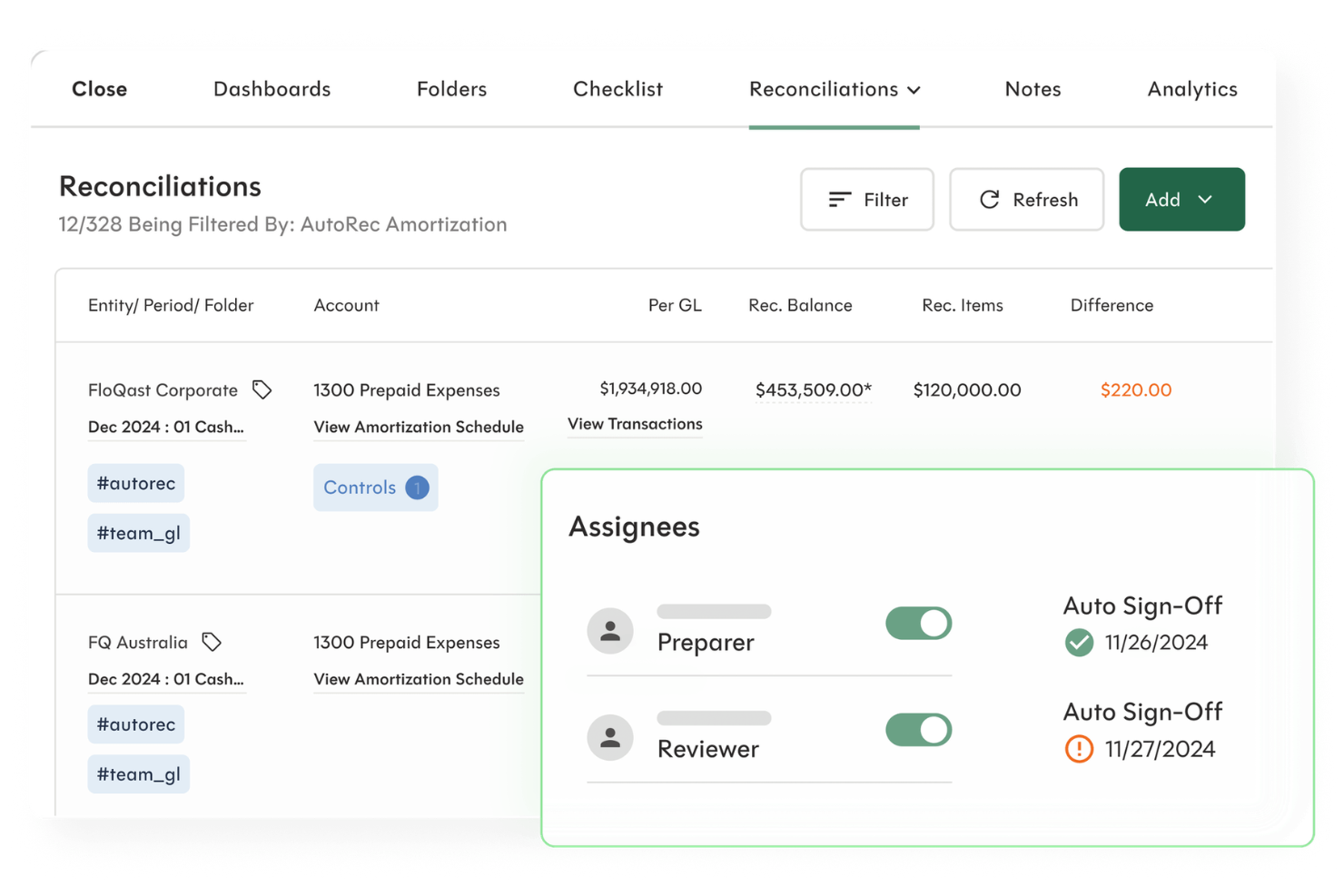
FloQast offers automated reconciliation software designed for accounting teams that need to coordinate across multiple users and departments. It’s a good fit for organizations looking to centralize documentation, manage review workflows, and keep everyone aligned during the year-end or month-end close process. Finance professionals use FloQast to reduce manual tracking and improve visibility into reconciliation status.
Who Is FloQast Best For?
FloQast is well-suited for mid-sized to large accounting teams that need to coordinate reconciliations across multiple users and departments.
Why I Picked FloQast
What drew me to FloQast for credit card reconciliation is how it’s built to support real-time collaboration among accounting teams. The platform lets multiple users work together on reconciliations, assign ownership, and track review status, which is especially useful when several people need to coordinate on high-volume company credit card accounts. I also appreciate the built-in workflow management tools that help teams manage sign-offs and keep everyone accountable during the close process. For organizations where teamwork and transparency are essential, FloQast’s collaborative features make it a strong choice.
FloQast Key Features
Some other features in FloQast that support credit card reconciliation workflows include:
- Automated transaction matching: The system automatically matches imported credit card transactions to general ledger entries using configurable rules.
- Audit trail and documentation: Every reconciliation includes a detailed audit log and the ability to attach supporting documents for compliance.
- Role-based access controls: Administrators can set granular permissions for users, ensuring sensitive financial data is only accessible to authorized team members.
- Integration with cloud storage: FloQast connects directly to platforms like Box, Dropbox, and Google Drive for centralized document management.
FloQast Integrations
Integrations include NetSuite, Sage Intacct, Microsoft Dynamics 365, SAP, and Stripe.
Pros and Cons
Pros:
- Automatic alerts for out-of-balance GL
- Integrated audit trails for compliance
- Real-time dashboard of close progress
Cons:
- Lacks granular transaction-level views
- Priced for mid-market not small firms

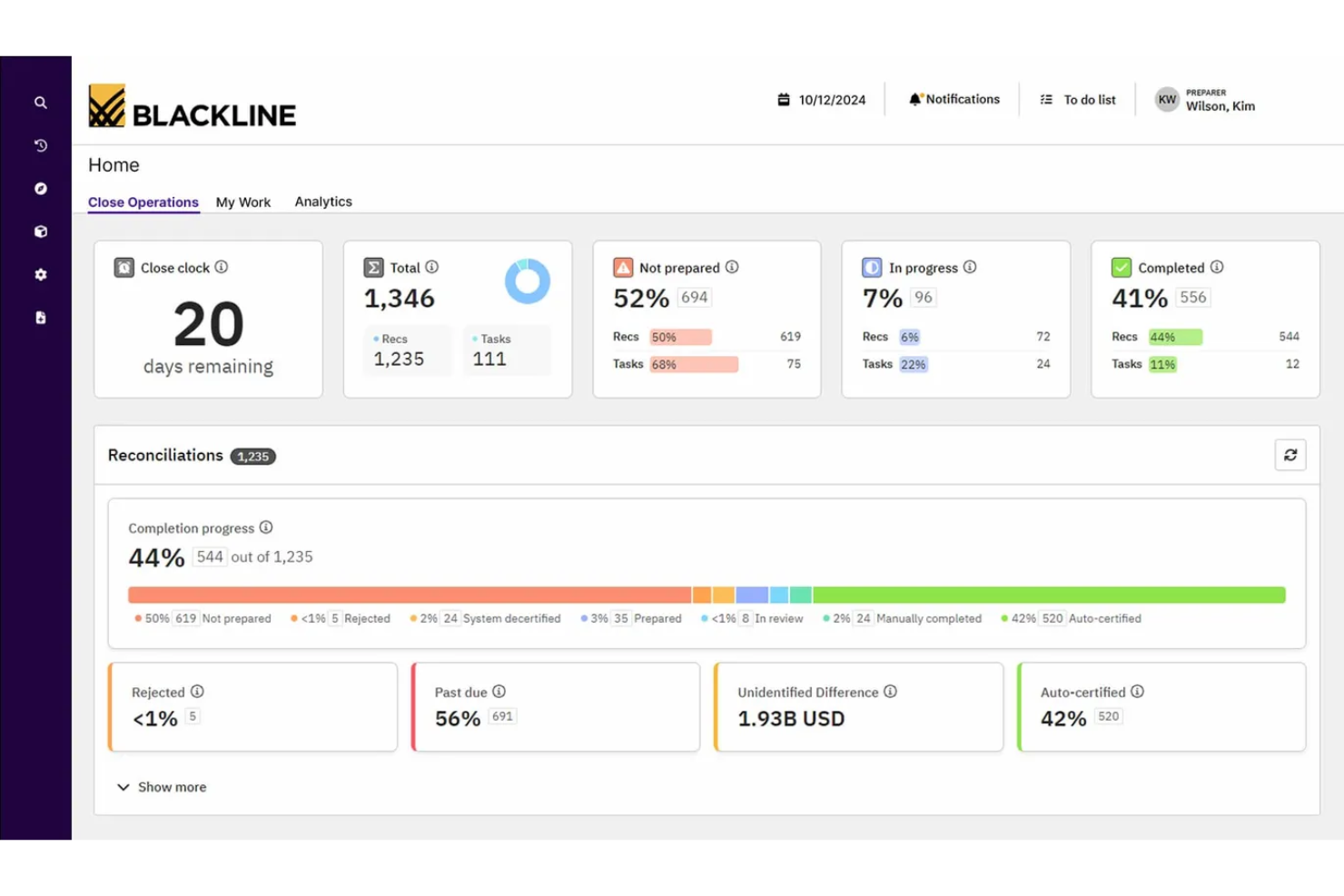
BlackLine is a financial close and account reconciliation platform designed for large organizations with complex accounting and financial reporting needs. It appeals to finance teams that require strict controls, detailed audit trails, and automated workflows for high-volume reconciliations. If your business needs to standardize and centralize reconciliation processes across multiple entities, BlackLine addresses these challenges directly.
Who Is BlackLine Best For?
BlackLine is a strong fit for enterprise finance teams in regulated industries that need rigorous audit controls and standardized reconciliation processes.
Why I Picked BlackLine
What stands out about BlackLine is its focus on enterprise-grade audit controls, which is essential for organizations with strict compliance requirements. I picked BlackLine because it offers automated certification workflows and detailed audit trails for every reconciliation, making it easier to track approvals and changes. The platform also supports segregation of duties and granular user permissions, so you can enforce internal controls across large teams. For finance leaders who need to demonstrate transparency and accountability in credit card reconciliation, these features are especially valuable.
BlackLine Key Features
Some other features in BlackLine that support credit card reconciliation workflows include:
- Automated transaction matching: The system matches imported credit card transactions to ledger entries using configurable rules.
- Exception management dashboard: Users can view, investigate, and resolve unmatched or flagged transactions in a centralized workspace.
- Real-time reconciliation status tracking: Dashboards display the progress and status of all reconciliations across entities and accounts.
- Document management: Attach supporting documents and evidence directly to reconciliations for easy reference and audit readiness.
BlackLine Integrations
Integrations include SAP, Oracle, NetSuite, Microsoft Dynamics 365, and Kyriba.
Pros and Cons
Pros:
- Centralized dashboard for audit readiness
- Role-based access for secure approvals
- Verity AI detects anomalies in real-time
Cons:
- Support is often ticket-based and slow
- Interface can feel clunky and outdated

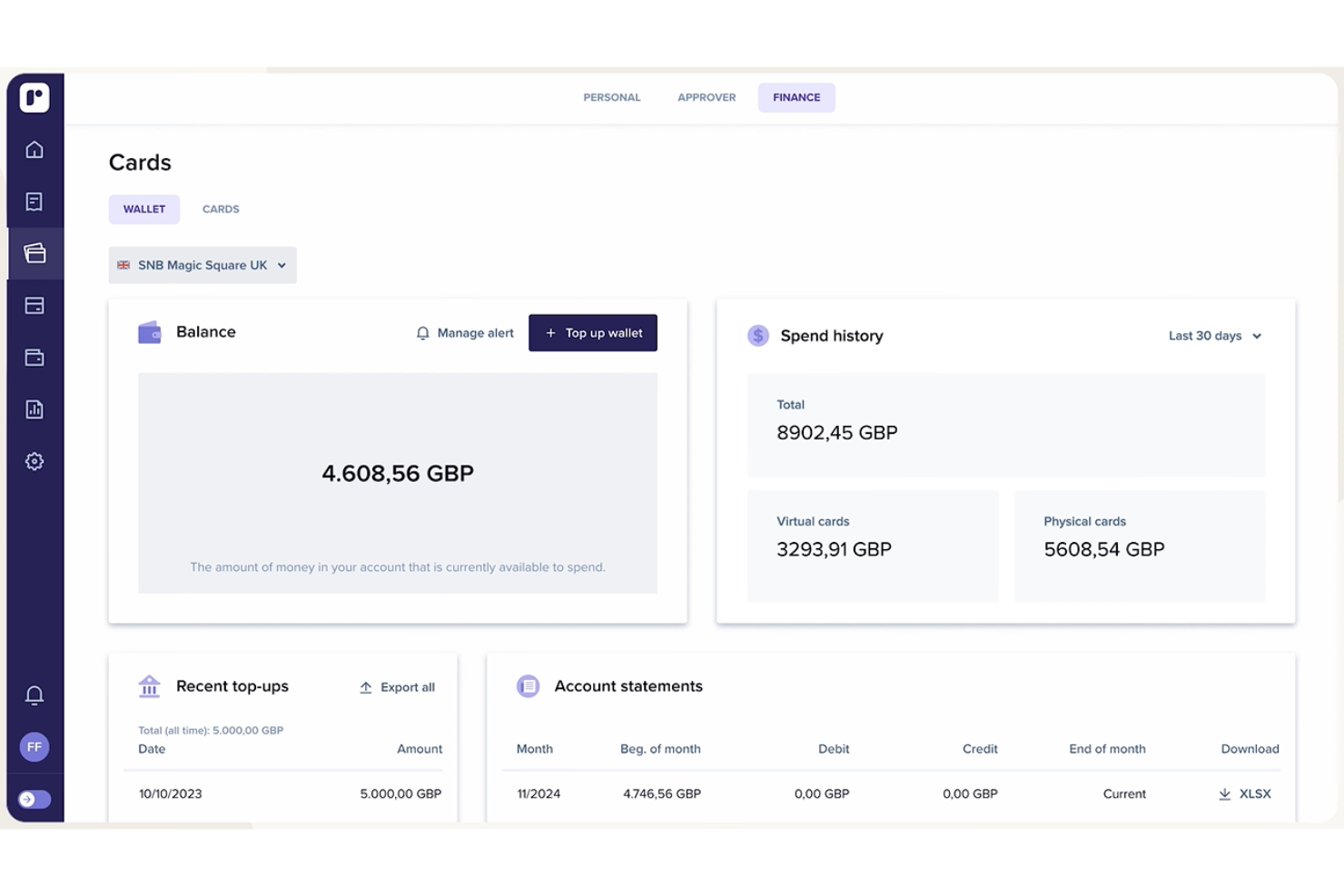
Rydoo is a cloud-based expense management platform designed for finance teams that need fast, accurate automated credit card reconciliation. It’s especially useful for businesses that want to automate transaction matching and reduce manual data entry. Finance professionals in growing companies or those with distributed teams may find Rydoo helps them keep expense data current and compliant.
Who Is Rydoo Best For?
Rydoo is a good fit for mid-sized businesses and finance teams that need to automate and accelerate credit card transaction matching across multiple cards and users.
Why I Picked Rydoo
I chose Rydoo because it’s one of the few platforms that offers true real-time transaction matching for credit card reconciliation. The system automatically imports card transactions as they happen and matches them to submitted expenses, which helps finance teams catch discrepancies right away. I also like that Rydoo provides instant notifications for unmatched or missing receipts, so you can resolve issues before they become month-end headaches. This focus on up-to-the-minute data makes Rydoo especially valuable for teams that need to keep their books accurate and current throughout the month.
Rydoo Key Features
Some other features that make Rydoo useful for credit card reconciliation include:
- Custom approval workflows: Set up multi-level approval chains to match your organization’s expense policy requirements.
- Automated VAT detection: The platform identifies and extracts VAT from receipts to support accurate tax reporting.
- Mobile receipt capture: Users can snap photos of receipts on the go and attach them directly to expenses.
- Audit trail tracking: Every action on an expense is logged, supporting compliance and audit readiness.
Rydoo Integrations
Integrations include SAP S/4HANA, NetSuite, Microsoft Dynamics 365, QuickBooks, Xero, and Visa.
Pros and Cons
Pros:
- Detailed audit trails for compliance tracking
- Multi-currency support for global teams
- Automated receipt capture with mobile app
Cons:
- No built-in support for virtual cards
- Approval workflow setup can be complex

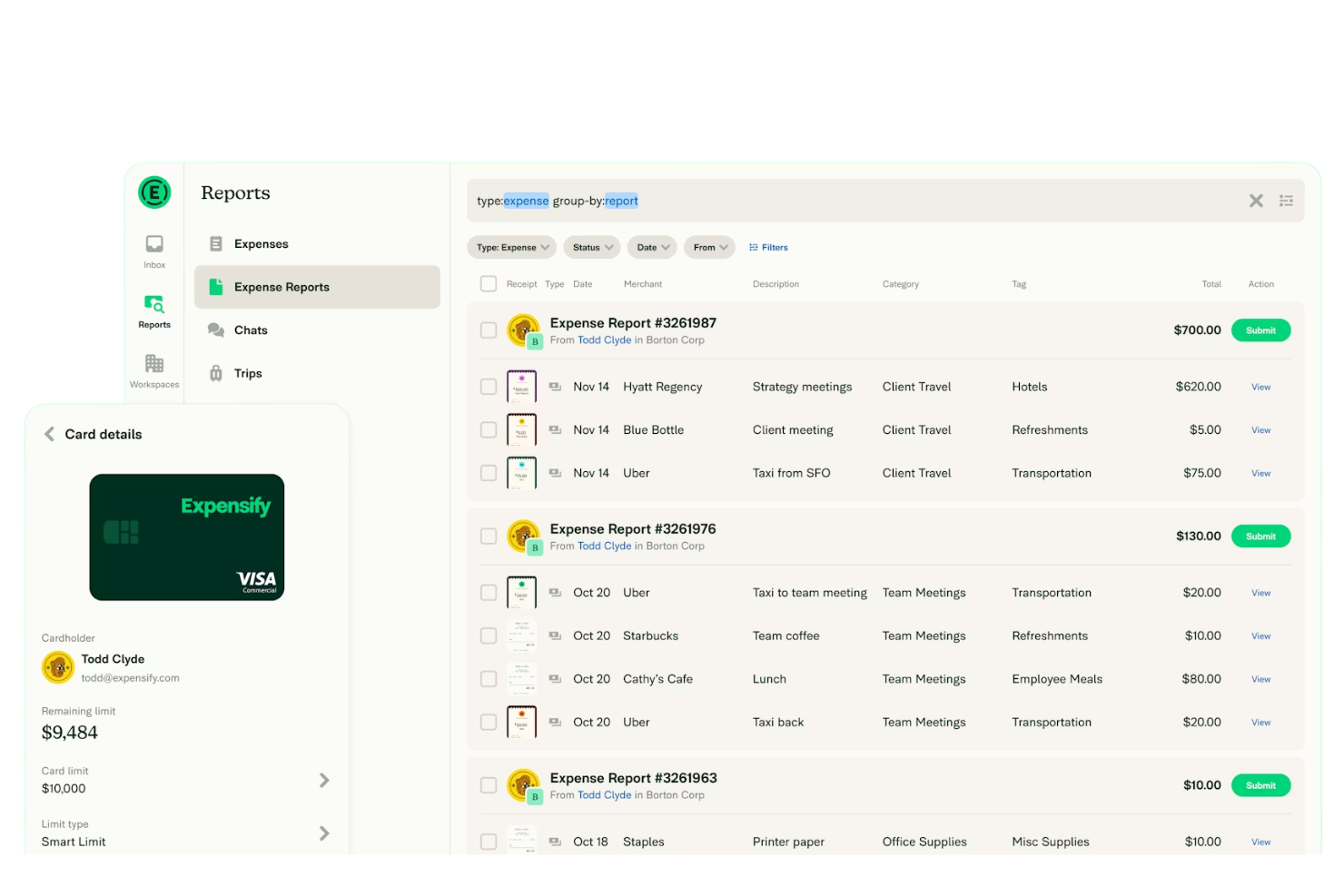
Expensify offers a modern approach to expense and credit card reconciliation, designed for finance teams that need flexibility and automation. The platform appeals to organizations with distributed workforces or frequent travelers who rely on mobile tools to manage expenses on the go. It helps simplify transaction matching, receipt capture, and policy enforcement for businesses looking to reduce manual reconciliation work.
Who Is Expensify Best For?
Expensify fits finance teams at growing businesses and enterprises that need mobile-first tools for managing and reconciling corporate card expenses.
Why I Picked Expensify
What drew me to Expensify is its strong focus on mobile-first reconciliation workflows, which is especially valuable for teams that manage expenses on the go. The mobile app lets users capture receipts, match transactions, and submit expenses directly from their phones, reducing delays and manual entry. I also appreciate that Expensify automates policy checks and transaction matching in real time, so finance teams can address issues quickly without waiting for end-of-month reviews. For organizations with distributed or traveling staff, these features help keep reconciliation accurate and up to date, no matter where employees are working.
Expensify Key Features
Some other features that make Expensify useful for credit card reconciliation include:
- Corporate card feed integration: Expensify connects directly to major card providers to import transactions automatically.
- Automated expense policy enforcement: The platform checks expenses against company policies and flags violations for review.
- Multi-currency support: Expensify handles transactions in multiple currencies, making it suitable for global teams.
- Custom approval workflows: You can set up multi-level approval processes to match your organization’s expense management structure.
Expensify Integrations
Integrations include QuickBooks, NetSuite, Xero, Sage Intacct, Oracle, and Lyft.
Pros and Cons
Pros:
- Automatic matching of card to receipts
- Real-time sync with major bank feeds
- AI SmartScan captures receipt data fast
Cons:
- Duplicate entries frustrate admins
- Complicated pricing for larger teams


SAP Concur offers a credit card reconciliation solution designed for organizations managing complex, high-volume card programs. Finance teams in multinational companies or those with multiple card providers can use it to centralize transaction data and automate reconciliation tasks. The platform helps reduce manual entry and supports compliance with internal and external policies.
Who Is SAP Concur Best For?
SAP Concur is a good fit for large or global organizations that need to manage and reconcile credit card transactions across multiple countries and card programs.
Why I Picked SAP Concur
I picked SAP Concur because it’s one of the few platforms built to handle global card program integration at scale. The software connects with a wide range of international card providers, allowing finance teams to consolidate and reconcile transactions from multiple sources in one place. I appreciate how it automates matching and policy enforcement across currencies and geographies, which is especially valuable for multinational organizations. Its centralized dashboard and reporting tools also help teams maintain visibility and compliance across complex corporate credit card programs.
SAP Concur Key Features
Some other features that make SAP Concur a strong option for credit card reconciliation include:
- Automated receipt capture: Users can upload receipts via mobile or email, and the system automatically matches them to card transactions.
- Custom approval workflows: Configure multi-level approval processes to align with your organization’s expense policies.
- Audit trail tracking: Every transaction and adjustment is logged, supporting compliance and audit readiness.
- Real-time policy alerts: The platform flags out-of-policy expenses as transactions are submitted, helping prevent errors before they reach the ledger.
SAP Concur Integrations
Integrations include SAP, ADP, NetSuite, QuickBooks, Xero, and Oyster HR.
Pros and Cons
Pros:
- Provides real-time policy violation alerts
- Integrates with major ERP and accounting systems
- Offers detailed audit trails for compliance
Cons:
- Requires ongoing maintenance for integration updates
- Customer support response times may vary


HighRadius offers a specialized platform for finance teams that need to automate and control credit card payment reconciliation at scale. It’s designed for enterprises and large organizations that handle high transaction volumes and complex financial statements. The software helps reduce manual work and improve accuracy by centralizing reconciliation processes and supporting detailed exception management.
Who Is HighRadius Best For?
HighRadius is a strong fit for enterprise finance teams in retail, ecommerce, or other high-volume transaction industries that need advanced automation for credit card reconciliation.
Why I Picked HighRadius
What stands out about HighRadius is its use of AI to automatically identify and flag exceptions during the credit card reconciliation process. This means the system can quickly surface mismatches, missing transactions, or anomalies that would otherwise require hours of manual review. I appreciate that HighRadius also provides configurable exception workflows, so finance teams can route and resolve issues efficiently. For organizations dealing with large volumes of credit card payments, these AI-powered exception management features help reduce risk and keep reconciliations accurate and timely.
HighRadius Key Features
In addition to its AI-powered exception identification, HighRadius offers several other features that support credit card reconciliation workflows:
- Automated data import from multiple sources: The platform pulls transaction data from banks, card processors, and ERP systems to centralize reconciliation.
- Custom matching rules engine: Users can define and adjust matching logic to fit unique business requirements and transaction patterns.
- Audit-ready reconciliation logs: Every action and change is tracked in detailed logs to support compliance and audit needs.
- Role-based access controls: Administrators can set granular permissions to ensure only authorized users can view or edit sensitive reconciliation data.
HighRadius Integrations
Integrations include SAP, Oracle, Microsoft Dynamics, NetSuite, and JD Edwards.
Pros and Cons
Pros:
- Scalable for high-volume enterprise needs
- Built-in anomaly detection for fraud risk
- Real-time visibility into global spending
Cons:
- Premium pricing geared for large firms
- Implementation can take three to six months

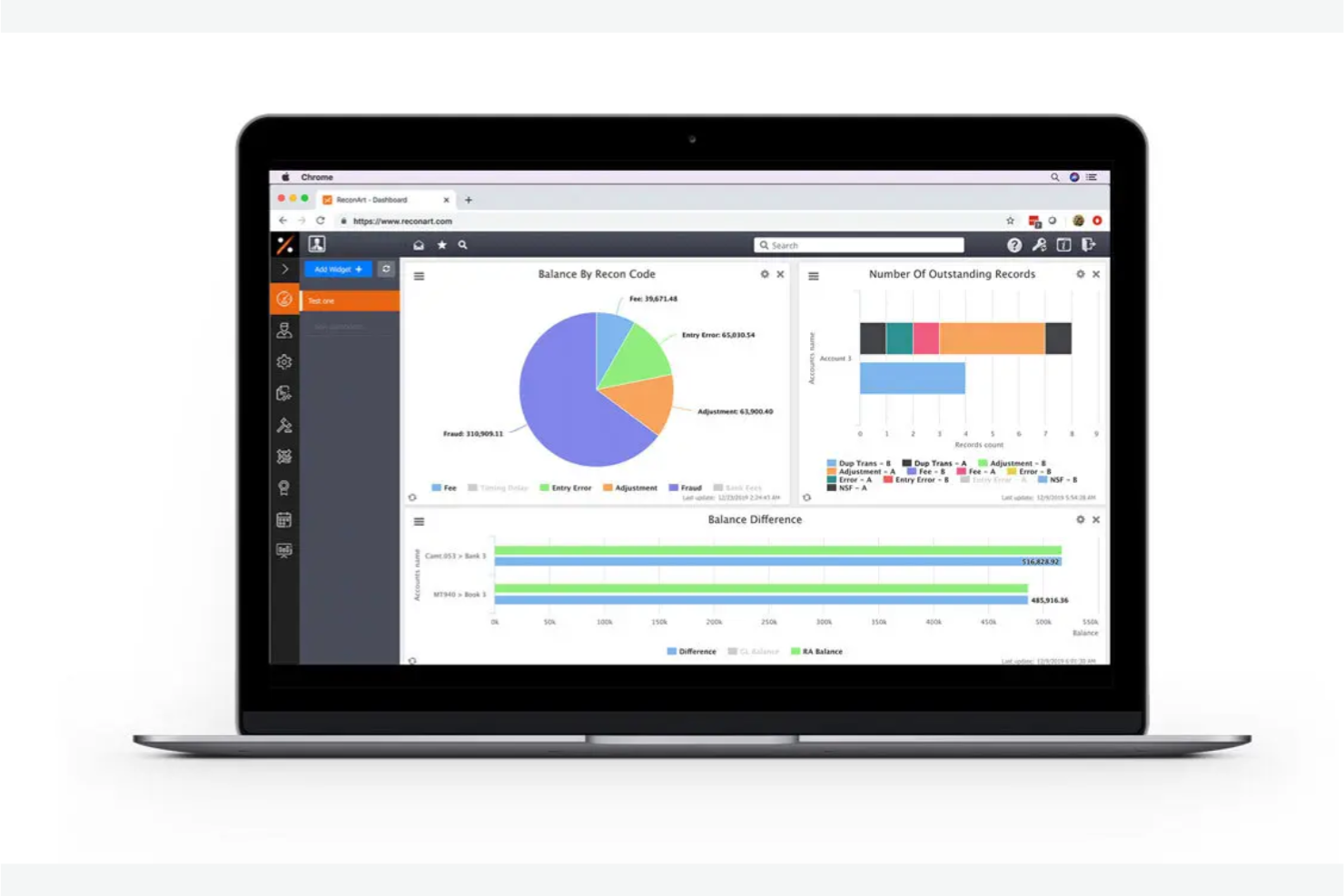
ReconArt is a reconciliation platform designed for finance teams that need to manage complex, high-volume credit card transactions. It appeals to organizations looking for a solution that can adapt to unique reconciliation processes and compliance requirements. The tool helps users automate matching, exception management, and reporting to reduce manual work and improve accuracy.
Who Is ReconArt Best For?
ReconArt is a strong fit for mid-sized to large finance teams in industries with complex, high-volume credit card reconciliation needs.
Why I Picked ReconArt
What stands out to me about ReconArt is how deeply configurable its workflow automation is for credit card reconciliation. The platform lets you design custom matching rules, approval steps, and exception handling processes to fit your organization’s exact needs. I like that you can automate multi-step workflows, including transaction import, matching, review, and escalation, all within a single system. For teams with unique or evolving reconciliation requirements, ReconArt’s flexibility makes it a strong choice.
ReconArt Key Features
In addition to workflow automation, ReconArt offers several other features relevant to credit card reconciliation:
- Automated data import: The platform supports scheduled and on-demand imports from multiple sources, including banks and card providers.
- Exception management dashboard: Users can view, categorize, and resolve unmatched transactions from a centralized dashboard.
- Audit trail and reporting: Every action is logged, and users can generate detailed reconciliation and exception reports.
- User roles and permissions: Administrators can assign granular access controls to manage who can view, edit, or approve reconciliations.
ReconArt Integrations
Integrations include NetSuite, Wells Fargo, Bank of America, PayPal, American Express.
Pros and Cons
Pros:
- Scales easily for global banking needs
- Full audit trails for 2026 compliance
- 100% web-based with no local install
Cons:
- IInterface feels dated to some users
- Minimum user seats may be too many
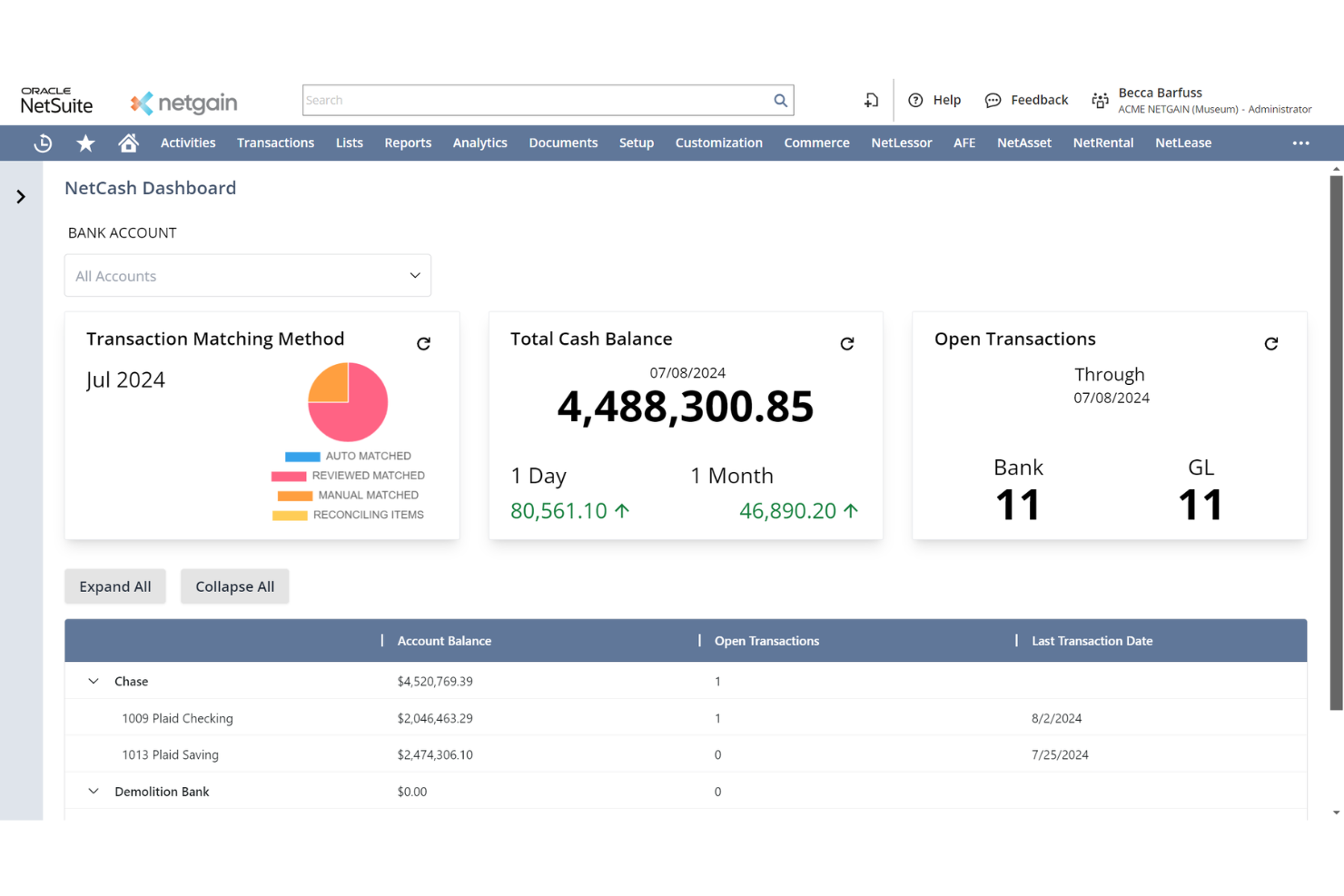
NetCash is a financial automation platform designed for finance teams that need to manage reconciliation across multiple banks and bank accounts. It’s especially useful for organizations handling high transaction volumes or operating in industries with complex banking relationships. Finance professionals looking to reduce manual imports and improve bank reconciliation accuracy may find NetCash addresses these challenges directly.
Who Is NetCash Best For?
NetCash suits mid-sized to large finance teams that need to automate reconciliation across multiple banks and accounts.
Why I Picked NetCash
What drew me to NetCash is its ability to automate the import of transactions from multiple banks into a single platform. For finance teams managing several accounts, this eliminates the need to manually download and upload bank statements, which can be time-consuming and error-prone. NetCash supports direct connections to a wide range of banks, so you can centralize reconciliation activities and keep your data current. This focus on multi-bank automation makes it especially practical for organizations with complex banking structures or high transaction volumes.
NetCash Key Features
In addition to automated multi-bank imports, NetCash offers several features that support credit card reconciliation workflows:
- Automated transaction categorization: The platform uses rules to assign categories to imported transactions, reducing manual data entry.
- Custom reconciliation rules: You can set up tailored matching logic to fit your organization’s reconciliation policies.
- Audit-ready reporting: Generate detailed reports that track reconciliation status and support compliance requirements.
- User access controls: Assign permissions and roles to ensure only authorized team members can view or edit sensitive financial data.
NetCash Integrations
Integrations include NetSuite.
Pros and Cons
Pros:
- Generates audit-ready cash flow reports
- Direct bank feeds via secure API connections
- AI-enhanced matching reduces manual work
Cons:
- Reporting lacks deep custom visuals
- Occasional lag during high-traffic periods

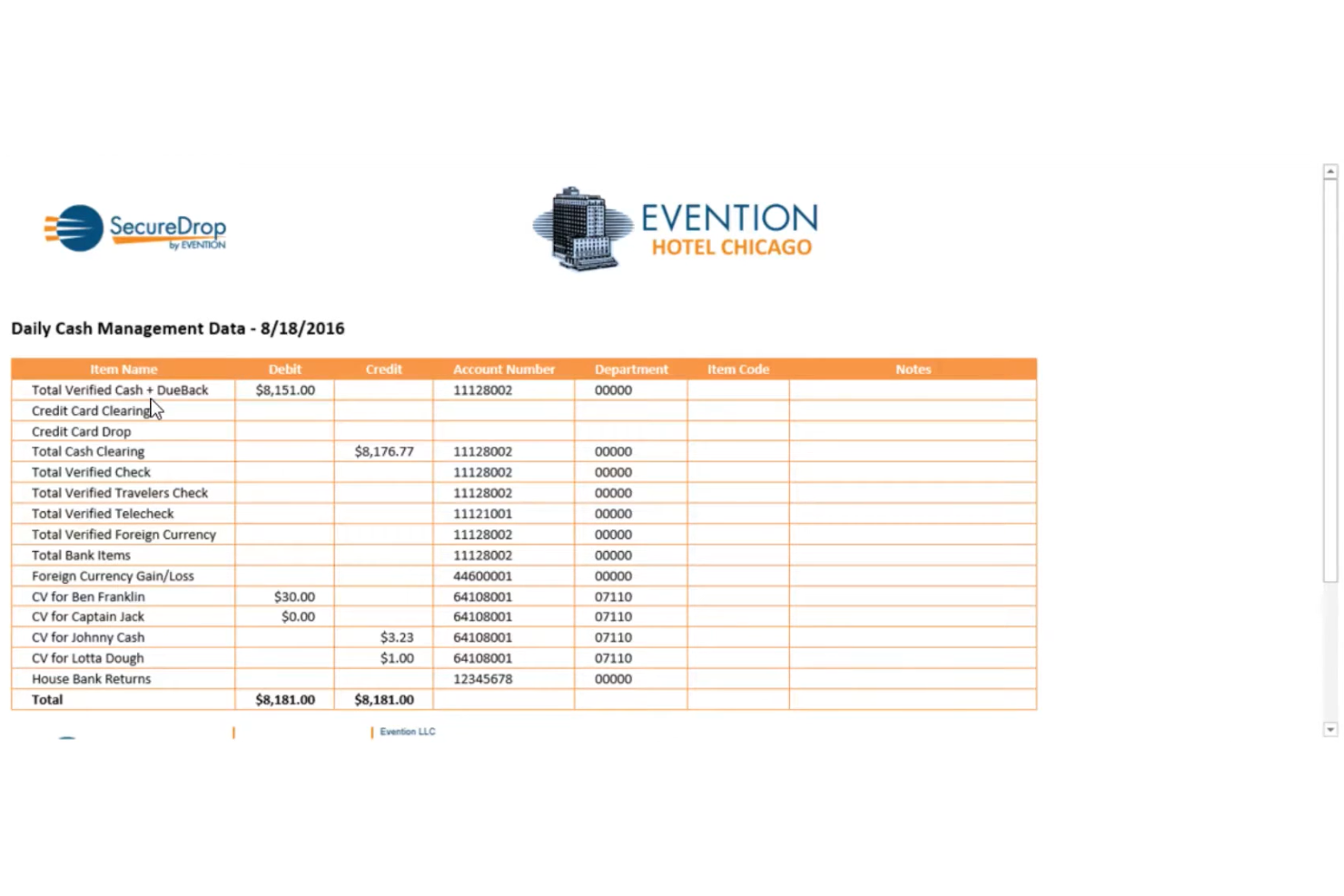
Evention Total Recon is a credit card reconciliation platform designed for businesses with complex, multi-location operations. It’s especially relevant for hospitality and retail teams that need to manage high transaction volumes and multiple payment sources. The tool helps automate reconciliation tasks and reduce manual errors for finance and accounting professionals.
Who Is Evention Total Recon Best For?
Evention Total Recon is a strong fit for hospitality and retail finance teams managing multi-location credit card reconciliation.
Why I Picked Evention Total Recon
What drew me to Evention Total Recon is how purpose-built it is for hospitality and retail operations with high transaction volumes and multiple locations. The platform centralizes credit card reconciliation across properties, letting finance teams standardize processes and monitor exceptions in real time. I appreciate that it supports automated imports from a wide range of POS and payment systems, which is especially valuable for businesses juggling many payment sources. Its focus on industry-specific workflows makes it a practical choice for organizations that need to reconcile credit card activity quickly and accurately across diverse venues.
Evention Total Recon Key Features
Some other features that make Evention Total Recon useful for finance teams include:
- Automated exception alerts: The system flags discrepancies and notifies users when transactions fall outside set parameters.
- Audit-ready reporting: Users can generate detailed reconciliation and exception reports for compliance and audit purposes.
- User access controls: Administrators can assign permissions and roles to manage who can view, edit, or approve reconciliations.
- Historical data archiving: The platform stores past reconciliation data for easy retrieval and long-term recordkeeping.
Evention Total Recon Integrations
Integrations include Oracle, Agilysys, Shiji, Toast, American Express, and Workday.
Pros and Cons
Pros:
- Audit-ready SOC 2 compliant records
- Analytics dashboard reduces card fees
- Strong POS and PMS hotel integrations
Cons:
- Processing can lag with massive volumes
- AI reasoning is sometimes not transparent

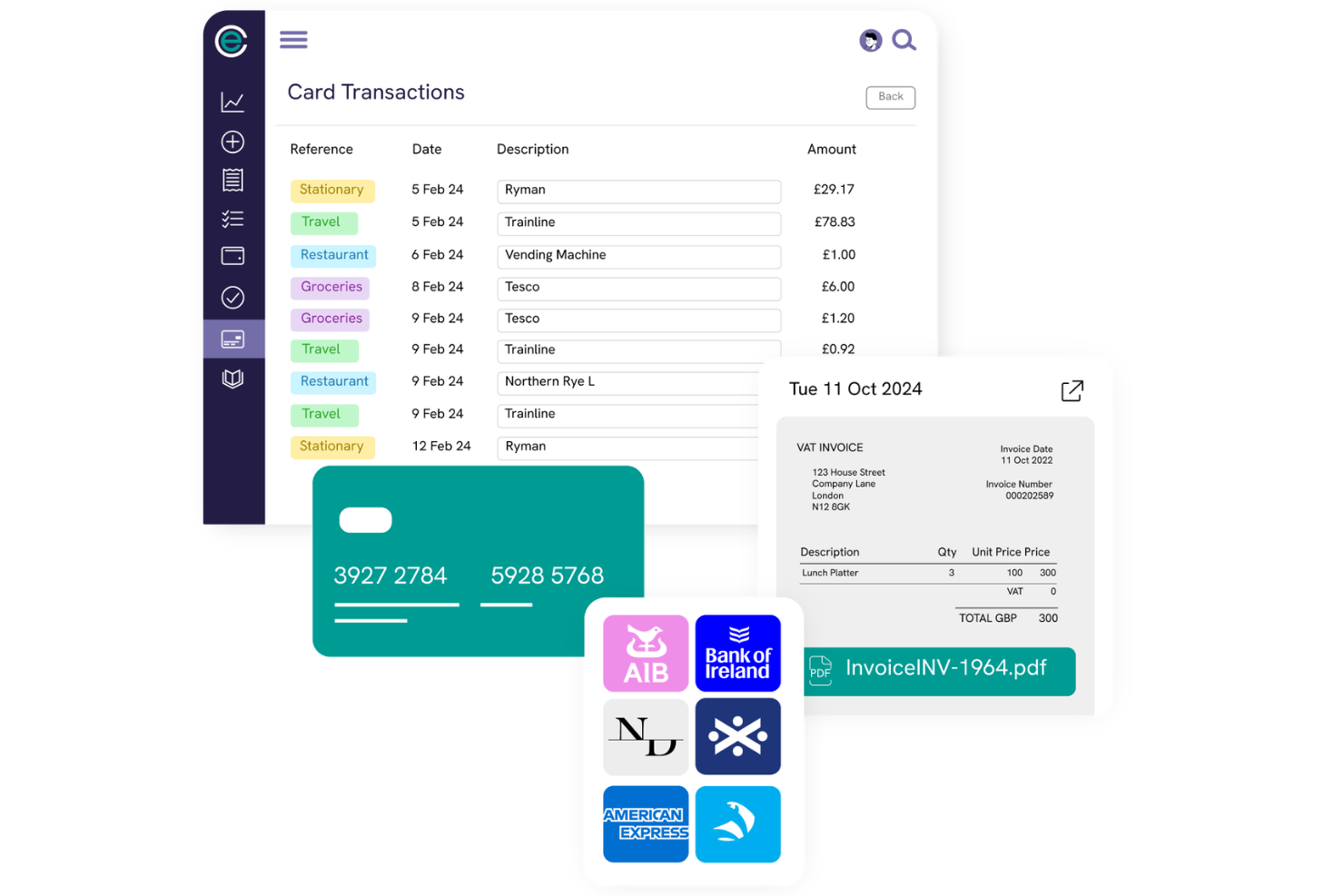
Finance teams looking for a modern approach to card reconciliation may find Capture Expense a strong fit. The platform is designed for organizations that want to automate reconciliation directly from card provider feeds. It helps reduce human error and supports accurate, timely matching of card transactions for businesses with complex expense management needs.
Who Is Capture Expense Best For?
Capture Expense suits finance teams at mid-sized and large organizations that need direct integrations with card providers for automated reconciliation.
Why I Picked Capture Expense
What stands out about Capture Expense is its direct integration with major card providers, which eliminates the need for manual data imports or third-party connectors. This approach allows finance teams to automatically pull transaction data straight from the source, reducing reconciliation errors and delays. I also like that the platform supports real-time transaction matching and provides clear audit trails for every card transaction. For organizations that want to minimize manual intervention and ensure data accuracy, these features make Capture Expense a practical choice.
Capture Expense Key Features
Some other features that make Capture Expense useful for finance teams include:
- Automated policy enforcement: The platform checks card transactions against company expense policies and flags violations for review.
- Multi-currency support: Users can reconcile transactions in multiple currencies, which is helpful for global teams.
- Custom approval workflows: Finance teams can set up multi-level approval processes for card expenses and reconciliations.
- Integration with accounting software: The tool connects directly to platforms like Xero and QuickBooks for seamless data transfer.
Capture Expense Integrations
Integrations include Sage, NetSuite, Cintra, Iris, ClearSpend, Barclaycard, Lloyds, HSBC, and NatWest.
Pros and Cons
Pros:
- Mobile-first design for on-the-go entry
- Direct two-way sync with Xero and Sage
- AI Smart Audit automates policy checks
Cons:
- Initial bank feed setup can be tricky
- Administrative permissions lack granularity
Other Credit Card Reconciliation Software
Here are some additional credit card reconciliation software options that didn’t make it onto my shortlist, but are still worth checking out:
- Xero
For small business automation
- Trintech Adra
For rapid multi-entity transaction matching
- ZoneReconcile
With native NetSuite integration


Credit Card Reconciliation Software Selection Criteria
When selecting the best credit card reconciliation software to include in this list, I considered common buyer needs and pain points like reducing manual reconciliation work and ensuring accurate, audit-ready records. I also used the following framework to keep my evaluation structured and fair:
Core Functionality (25% of total score)
To be considered for inclusion in this list, each solution had to fulfill these common use cases:
- Import credit card statements and transaction data
- Match transactions to bank and ERP records
- Identify and flag exceptions or discrepancies
- Generate reconciliation reports
- Maintain audit trails of reconciliation activity
Additional Standout Features (25% of total score)
To help further narrow down the competition, I also looked for unique features, such as:
- AI-powered exception detection
- Customizable matching rules
- Real-time reconciliation dashboards
- Automated data import from multiple processors
- Role-based access controls
Usability (10% of total score)
To get a sense of the usability of each system, I considered the following:
- Clean and intuitive user interface
- Logical workflow navigation
- Minimal clicks to complete core tasks
- Clear error messages and guidance
- Responsive design for different devices
Onboarding (10% of total score)
To evaluate the onboarding experience for each platform, I considered the following:
- Availability of training videos and documentation
- Access to onboarding webinars or live sessions
- Pre-built templates for common reconciliation tasks
- Interactive product tours or walkthroughs
- In-app chatbots or guided help
Customer Support (10% of total score)
To assess each software provider’s customer support services, I considered the following:
- 24/7 support availability
- Multiple support channels like chat, phone, and email
- Access to a searchable knowledge base
- Fast response times for urgent issues
- Dedicated account management for enterprise clients
Value For Money (10% of total score)
To evaluate the value for money of each platform, I considered the following:
- Transparent and predictable pricing structure
- Features included at each pricing tier
- No hidden fees for integrations or add-ons
- Flexible contract terms or free trial availability
- Alignment of price with feature depth
Customer Reviews (10% of total score)
To get a sense of overall customer satisfaction, I considered the following when reading customer reviews:
- Positive feedback on reconciliation accuracy
- Reports of time savings and efficiency gains
- Comments on ease of implementation
- Experiences with customer support quality
- Noted limitations or frustrations with the tool
How to Choose Credit Card Reconciliation Software
It’s easy to get bogged down in long feature lists and complex pricing structures. To help you stay focused as you work through your unique software selection process, here’s a checklist of factors to keep in mind:
| Factor | What to Consider |
|---|---|
| Scalability | Will the software handle your current and projected transaction volumes without performance issues or extra costs? Consider future growth and seasonal spikes. |
| Integrations | Does the tool natively connect with your ERP, accounting, and payment processors? Check for compatibility with your existing tech stack and avoid costly workarounds. |
| Customizability | Can you tailor matching rules, workflows, and reporting to your organization’s unique reconciliation processes? Rigid systems may not fit complex or evolving needs. |
| Ease of use | Will your team be able to navigate and operate the system with minimal training? Look for clear workflows and intuitive layouts to reduce errors and onboarding time. |
| Implementation and onboarding | How long will it take to get up and running? Ask about migration support, data mapping, and the availability of onboarding resources like training or dedicated support. |
| Cost | Are all costs transparent, including setup, integrations, and ongoing fees? Compare pricing models and watch for hidden charges that could impact your budget. |
| Security safeguards | Does the software meet your organization’s data security standards? Look for encryption, access controls, and audit trails, especially if handling sensitive payment data. |
| Support availability | What support channels and response times are offered? Consider if you need 24/7 help, dedicated account managers, or self-service resources for troubleshooting. |
What Is Credit Card Reconciliation Software?
Credit card reconciliation software is a specialized tool that automates the process of matching credit card transactions with accounting records and bank statements. It helps finance teams quickly identify discrepancies, flag exceptions, and maintain accurate, audit-ready records. By reducing manual effort and minimizing errors, this software supports timely financial close processes and strengthens internal controls around credit card payments.
Features of Credit Card Reconciliation Software
When selecting credit card reconciliation software, keep an eye out for the following key features:
- Automated data import: Automatically pulls transaction data from banks, card processors, and accounting systems to centralize reconciliation and reduce manual entry.
- Custom matching rules: Lets users define how transactions are matched, accommodating unique business processes and complex reconciliation scenarios.
- Exception flagging: Identifies and highlights mismatches, missing transactions, or duplicate entries for further review and resolution.
- Audit trail: Tracks every action and change within the system, providing a detailed log for compliance and audit purposes.
- Multi-entity support: Enables reconciliation across multiple business units, subsidiaries, or locations within a single platform.
- Reconciliation reporting: Generates detailed reports on reconciliation status, outstanding exceptions, and historical trends for management and audit teams.
- Role-based access controls: Restricts access to sensitive data and functions based on user roles, supporting internal controls and data security.
- Integration with ERP/accounting systems: Connects directly to core financial platforms to ensure data consistency and reduce reconciliation delays.
- User activity dashboards: Provides real-time visibility into reconciliation progress, outstanding tasks, and team workloads.
- Export and data sharing: Allows users to export reconciliation data and reports in various formats for sharing with auditors or other stakeholders.
Common Credit Card Reconciliation Software AI Features
Beyond the standard credit card reconciliation software features listed above, many of these solutions are incorporating AI with features like:
- Predictive transaction matching: Uses machine learning to anticipate and match transactions that don’t follow standard patterns, reducing manual intervention for complex cases.
- Anomaly detection: Continuously analyzes transaction data to identify unusual patterns or outliers that may indicate fraud, errors, or policy violations.
- Automated exception resolution suggestions: Recommends likely causes and next steps for flagged exceptions, helping users resolve issues faster and with greater accuracy.
- Intelligent data extraction: Applies AI to extract relevant details from unstructured documents, such as receipts or statements, and automatically populates reconciliation fields.
- Adaptive learning from user corrections: Learns from how users resolve mismatches and exceptions, improving future matching accuracy and reducing repetitive manual work.
Benefits of Credit Card Reconciliation Software
Implementing credit card reconciliation software provides several benefits for your team and your business. Here are a few you can look forward to:
- Reduced manual workload: Automated data import and transaction matching eliminate repetitive data entry and manual cross-checking.
- Faster financial close: Streamlined reconciliation workflows and real-time dashboards help teams resolve exceptions and close books more quickly.
- Improved accuracy: Exception flagging, audit trails, and AI-powered matching reduce errors and ensure records are audit-ready.
- Enhanced fraud detection: AI-driven anomaly detection and exception alerts help identify suspicious transactions before they become costly issues.
- Better compliance and controls: Role-based access, audit logs, and detailed reporting support regulatory compliance and strengthen internal controls.
- Scalability for growth: Multi-entity support and high-volume processing ensure the software can handle increased transaction loads as your business expands.
- Greater financial visibility: Centralized data and customizable reports provide clear insights into reconciliation status and outstanding issues for finance leaders.
Costs and Pricing of Credit Card Reconciliation Software
Selecting credit card reconciliation software requires an understanding of the various pricing models and plans available. Costs vary based on features, team size, add-ons, and more. The table below summarizes common plans, their average prices, and typical features included in credit card reconciliation software solutions:
Plan Comparison Table for Credit Card Reconciliation Software
| Plan Type | Average Price | Common Features |
|---|---|---|
| Free Plan | $0 | Basic transaction import, limited reconciliation volume, simple reporting, and email support. |
| Personal Plan | $5–$15/user/month | Automated data import, standard matching rules, basic exception flagging, and limited integration options. |
| Business Plan | $40–$105/user/month | Multi-entity support, advanced reporting, custom matching rules, audit trails, and integration with ERP systems. |
| Enterprise Plan | $166–$400/user/month | High-volume processing, role-based access controls, AI-powered features, dedicated onboarding, and premium support. |
Credit Card Reconciliation Software FAQs
Here are some answers to common questions about credit card reconciliation software:
How does credit card reconciliation software handle multiple card providers?
Most solutions let you connect accounts from different card providers and import transactions automatically. This centralizes reconciliation, so you don’t have to log in to each provider separately or manually merge data from multiple sources.
Can credit card reconciliation software integrate with my existing accounting system?
Yes, most credit card reconciliation software offers integrations with popular accounting and ERP systems. Check for native connectors or API options to ensure smooth data flow and avoid manual uploads or exports.
What types of exceptions can the software flag?
The software can flag unmatched transactions, duplicates, missing receipts, and unusual spending patterns. Some tools also use AI to detect anomalies or potential fraud, helping you resolve issues before they impact your finances.
How long does it take to implement credit card reconciliation software?
Implementation time varies by provider and complexity, but many cloud-based solutions can be set up in a few days to a few weeks. Factors like data migration, integration needs, and user training can affect the timeline.
Is my financial data secure with credit card reconciliation software?
Yes, reputable vendors use encryption, access controls, and audit trails to protect sensitive data. Always review a provider’s security certifications and compliance standards to ensure they meet your organization’s requirements.
What should I look for when evaluating pricing?
Look for transparent pricing that covers all core features, integrations, and support. Watch for extra fees for high transaction volumes, advanced modules, or premium support, and compare plans to find the best fit for your needs and budget.