

El mejor software de contabilidad gratuito ayuda a las startups y pequeñas empresas a gestionar sus finanzas de forma eficaz sin cuotas mensuales, simplificando la contabilidad, la facturación y el seguimiento de gastos desde el principio.
Un software de contabilidad fiable minimiza la introducción manual de datos, reduce los errores y acelera tareas como la conciliación de cuentas y los informes financieros. Elegir la herramienta de contabilidad gratuita adecuada se traduce en menos pagos atrasados, registros precisos y más tiempo para centrarse en hacer crecer estratégicamente tu empresa.
Por qué confiar en nuestras recomendaciones de software
6,700+
Reviews
20
Industry experts
16+
Evaluation factors
14
Years
Nuestras reseñas reflejan nuestro criterio independiente, no un discurso de ventas. Descubra cómo mantenemos la transparencia.
Para esta guía, evaluamos las herramientas mediante pruebas prácticas e investigación independiente, puntuando las herramientas según nuestros criterios de selección.
Nuestras reseñas reflejan nuestro criterio editorial humano, no un discurso de ventas.
Resumen del mejor software de contabilidad gratuito
Compara rápidamente los precios de mi selección del mejor software de contabilidad gratuito a continuación. Algunas herramientas son completamente gratuitas y otras ofrecen pruebas gratuitas para que puedas probar sus funciones antes de comprometerte.
| Tool | Best For | Trial Info | Price | ||
|---|---|---|---|---|---|
| 1 | La mejor opción con acceso ilimitado para usuarios en todos los planes | Prueba gratuita de 30 días | Desde $25/mes | Website | |
| 2 | Ideal para el seguimiento de gastos | Plan gratuito + prueba gratuita de 30 días + demostración gratuita disponible | Desde $15/usuario/mes | Website | |
| 3 | Ideal para la colaboración en tiempo real | Prueba gratuita de 14 días + plan gratuito disponible | Desde $7/usuario/mes (facturado anualmente) | Website | |
| 4 | Mejor para facturación | Prueba gratuita de 30 días + plan gratuito disponible | Gratis | Website | |
| 5 | Mejor para empresas que usan otros servicios de Zoho | Plan gratuito + demo gratis disponible | Gratis | Website | |
| 6 | La mejor opción para consolidación multi-entidad | Prueba gratuita de 14 días disponible | Desde $24/mes (facturado anualmente) | Website | |
| 7 | Mejor para equipos pequeños | Gratis | Website | ||
| 8 | Mejor para propietarios únicos | Gratis | Website | ||
| 9 | Mejor para usuarios avanzados | Gratis | Website | ||
| 10 | El mejor para información basada en IA | Prueba gratuita de 14 días | Desde $25/mes | Website |


Análisis del mejor software de contabilidad gratuito
Descubre el mejor software de contabilidad gratuito en mis análisis detallados. He desglosado las funciones principales, las ventajas y desventajas, las integraciones y los casos de uso más destacados para ayudarte a encontrar rápidamente la opción adecuada.
 1La mejor opción con acceso ilimitado para usuarios en todos los planes
Xero
- Prueba gratuita de 30 días
- Desde $25/mes
Visit WebsiteCustomer Rating:4.4/5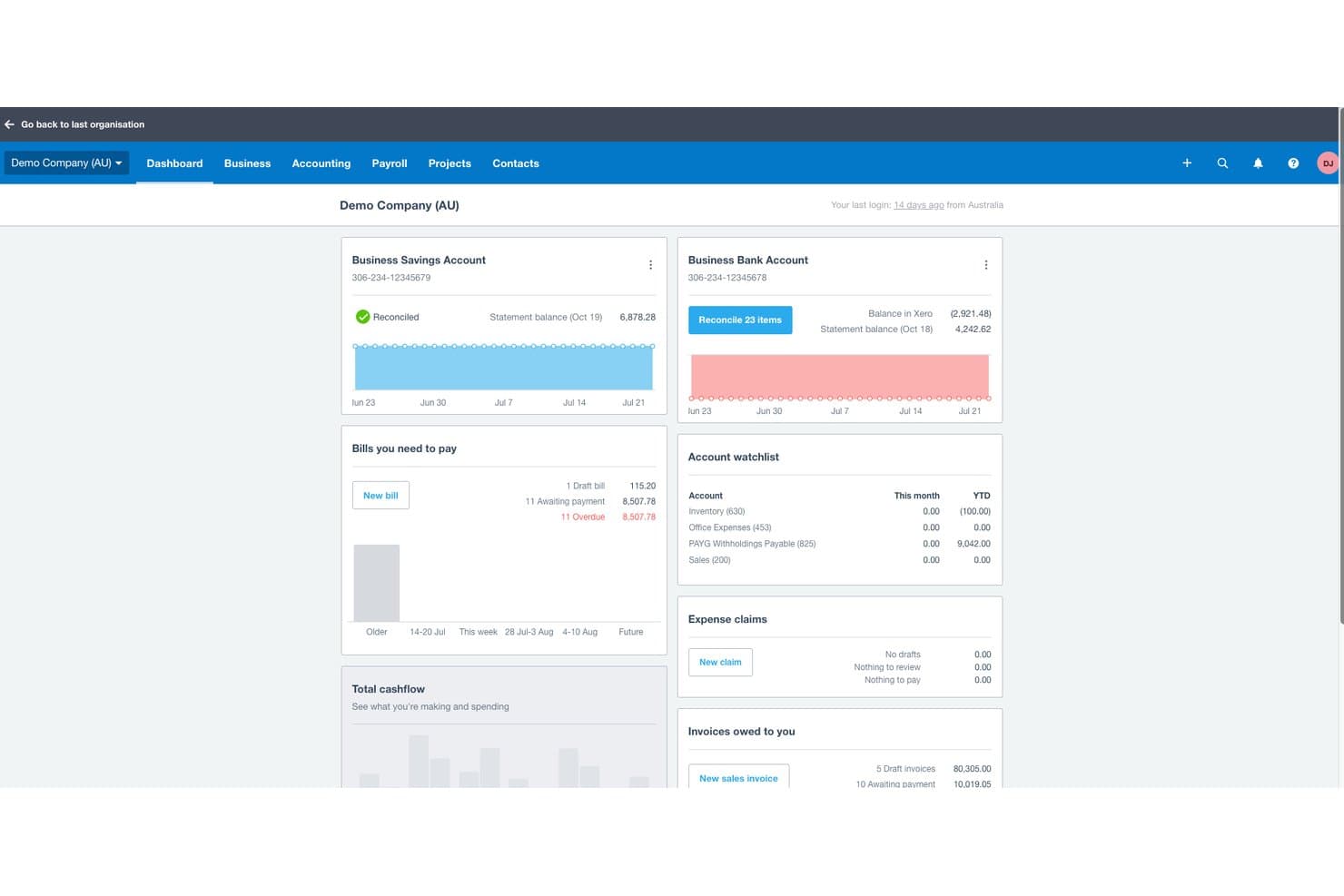
Xero ofrece un panel completo que muestra en una sola vista los saldos bancarios, las facturas por pagar, las reclamaciones de gastos, las facturas pendientes de cobro y la lista de seguimiento de cuentas. Xero es una plataforma de contabilidad basada en la nube que ofrece facturación, conciliación bancaria, seguimiento de gastos, informes financieros y compatibilidad con múltiples divisas para pequeñas empresas y sus asesores.
¿Para quién es más adecuado Xero?
Xero es adecuado para pequeñas empresas que necesitan que varias personas —propietarios, encargados de la contabilidad y contables— trabajen en la misma plataforma de contabilidad sin costes por usuario.
Por qué elegí Xero
He incluido Xero entre mis opciones principales porque su acceso ilimitado para usuarios en todos los planes resuelve un problema real que observo en las herramientas de la competencia. La mayoría de las plataformas cobran por usuario, por lo que añadir a un encargado de la contabilidad o a un contable externo aumenta los costes rápidamente. Con Xero, puedo invitar a mi contable y al encargado de la contabilidad a la misma cuenta sin modificar mi plan, y funciones como la captura de documentos de Hubdoc y la conciliación de transacciones bancarias impulsada por IA siguen estando plenamente disponibles para todos los usuarios.
Funciones principales de Xero
- Contabilidad multidivisa: Registra transacciones y genera facturas en múltiples divisas con tipos de cambio automáticos.
- Cálculo automatizado de impuestos sobre las ventas: Calcula y registra el impuesto sobre las ventas, el IVA o el GST en facturas e informes.
- Fuentes de transacciones bancarias: Conecta cuentas bancarias para importar transacciones diariamente y agilizar la conciliación.
- Acceso mediante aplicación móvil: Captura recibos, envía facturas y consulta el flujo de caja desde dispositivos iOS y Android.
Integraciones de Xero
Xero ofrece integraciones nativas con Stripe, PayPal, Square, Hubdoc, Avalara, Gusto, Receipt Bank, Shopify, WooCommerce y Zapier. También hay una API disponible para integraciones personalizadas.
¿Qué es gratis?
Xero ofrece una prueba gratuita de 30 días con acceso a todas las funciones y sin necesidad de tarjeta de crédito. No existe un plan gratuito permanente, por lo que tendrás que elegir un plan de pago cuando termine la prueba.
Pros and Cons
Pros:
- Usuarios ilimitados en todos los planes de pago
- Conciliación de transacciones bancarias impulsada por IA incluida
- Captura de documentos de Hubdoc integrada
Cons:
- No existe un plan gratuito permanente
- La nómina requiere un complemento de pago adicional
Learn more about Xero: 2Ideal para el seguimiento de gastos
Ramp
- Plan gratuito + prueba gratuita de 30 días + demostración gratuita disponible
- Desde $15/usuario/mes
Visit WebsiteCustomer Rating:4.8/5
Ramp ofrece un panel de contabilidad automatizado que categoriza transacciones, sincroniza gastos y señala memos faltantes para su revisión. Ramp es una plataforma de gestión de gastos corporativos que combina tarjetas físicas y virtuales de la empresa con controles financieros integrados.
Por qué elegí Ramp: Ramp ofrece reconocimiento de gastos en tiempo real enviándote un mensaje justo después de usar la tarjeta, pidiéndote que subas el recibo por SMS o la aplicación. Eso significa que no tienes que perseguir recibos en papel y reduce los recibos perdidos o desparejados. La plataforma también permite un control flexible sobre los límites de gasto en cada tarjeta virtual o física, para que puedas establecer topes mensuales, por transacción y específicos por comerciante para prevenir cargos fuera de política.
Características destacadas e integraciones:
Las características incluyen coincidencia y categorización de recibos basada en aprendizaje automático que empareja automáticamente imágenes de recibos con transacciones y etiqueta los gastos según reglas preestablecidas. También ofrece soporte para pago de facturas donde puedes enviar por correo electrónico o cargar facturas de proveedores, establecer flujos de aprobación y pagar facturas mediante ACH, cheque o tarjeta.
Las integraciones incluyen NetSuite, Sage Intacct, QuickBooks, Microsoft Dynamics Business Central, Acumatica, Workday Financial Management, Uber, Lyft, Amazon Business, TravelPerk, ADP Workforce Now y Gusto.
¿Qué es gratis? Ramp incluye un plan gratuito para equipos pequeños que buscan funciones básicas para simplificar las finanzas.
Pros and Cons
Pros:
- Gestión combinada de cuentas por cobrar, cuentas por pagar y gastos en un solo sistema
- Capacidad de emitir múltiples tarjetas virtuales con controles personalizables
- Informes de gastos automatizados y coincidencia de recibos
Cons:
- Podría ofrecer funciones contables más avanzadas
- La aplicación móvil tiene menos funciones que la versión de escritorio
 Ideal para la colaboración en tiempo real
- Prueba gratuita de 14 días + plan gratuito disponible
- Desde $7/usuario/mes (facturado anualmente)
Visit WebsiteCustomer Rating:4.6/5
Google Sheets ofrece una plantilla sencilla de flujo de caja. Fuente: Google Docs Para quienes buscan una solución rentable para gestionar tareas financieras, Google Sheets ofrece una opción atractiva. Esta herramienta versátil permite crear y colaborar en hojas de cálculo, lo que la hace ideal para pequeñas empresas e individuos que necesitan organizar datos financieros sin incurrir en costos adicionales. Ya sea que estés controlando gastos, gestionando presupuestos o generando informes, Google Sheets proporciona las funcionalidades esenciales para simplificar tus procesos contables.
Por qué elegí Google Sheets
Elegí Google Sheets por su capacidad inigualable para facilitar la colaboración en tiempo real, una característica que destaca en el ámbito de Opciones de Software de Contabilidad Gratuito. Tú y tu equipo pueden trabajar simultáneamente en la misma hoja de cálculo, ver los cambios de los demás al instante y comunicarse mediante comentarios, lo que puede mejorar significativamente el trabajo en equipo y los procesos de toma de decisiones. Las funciones de guardado automático e historial de versiones aseguran que no se pierdan datos y que siempre puedas volver a versiones anteriores si es necesario. Este entorno colaborativo hace que Google Sheets sea especialmente valioso para empresas e individuos que necesitan gestionar y compartir datos financieros de forma fluida.
Características clave de Google Sheets
Además de sus capacidades de colaboración en tiempo real, Google Sheets ofrece una variedad de características especialmente útiles para la administración de tareas contables.
- Plantillas: Google Sheets proporciona plantillas prediseñadas para seguir ingresos, gastos y presupuestos, simplificando el proceso contable.
- Fórmulas y funciones: Con funciones integradas como SUMA, PROMEDIO y SI, puedes automatizar cálculos y analizar datos de manera eficiente.
- Visualización de datos: Puedes crear gráficos y diagramas para visualizar los datos financieros, facilitando la interpretación de tendencias y el rendimiento.
- Funciones avanzadas: Características como BUSCARV e IMPORTRANGE agilizan la recuperación y sincronización de datos entre varias hojas.
Integraciones de Google Sheets
Las integraciones incluyen Salesforce, Intuit, Asana, BigQuery, Looker y otras herramientas dentro de Google Workspace.
Pros and Cons
Pros:
- Fórmulas y opciones de automatización avanzadas
- Excelente colaboración en tiempo real
- Potentes herramientas de visualización de datos
Cons:
- Funciones avanzadas de contabilidad limitadas
- Requiere configuración manual para los informes
Learn more about Google Sheets: Mejor para facturación
- Prueba gratuita de 30 días + plan gratuito disponible
- Gratis
Visit WebsiteCustomer Rating:4.6/5
ZipBooks muestra tus estadísticas de facturación en un panel sencillo mientras te permite seleccionar otros servicios clave con un solo clic. ZipBooks es una herramienta en la nube diseñada para simplificar la gestión financiera para una amplia variedad de usuarios. Está especialmente adaptada para pequeñas empresas y freelancers, ofreciendo soluciones que abarcan el seguimiento de tiempo, la gestión de gastos y la automatización de cuentas por cobrar.
Por qué elegí ZipBooks: ZipBooks ofrece una combinación única de funciones que atienden las necesidades financieras de pequeña escala sin costos adicionales. Puedes registrar el tiempo, gestionar gastos y automatizar las cuentas por cobrar, todo mientras disfrutas de conciliación bancaria fluida y soporte para múltiples monedas. Además, ZipBooks brinda atención al cliente dedicada y permite usuarios ilimitados, algo que rara vez se ve en otras soluciones contables gratuitas.
Funciones destacadas e integraciones:
Funciones incluyen herramientas de facturación simples que te permiten personalizar y enviar facturas rápidamente. Puedes registrar gastos sin esfuerzo, lo que te brinda una visión clara de tus gastos. También ofrece información inteligente para ayudar a ti y a tu equipo a tomar mejores decisiones financieras.
Integraciones incluyen PayPal, Square, Stripe, Gusto, Plaid, Slack, QuickBooks, Google Drive, Trello y Asana.
¿Qué es gratis? ZipBooks ofrece un plan gratuito para siempre con funciones esenciales para pequeñas empresas y freelancers. Este plan incluye facturación ilimitada, seguimiento de tiempo y reportes básicos, sin limitación de usuarios.
Pros and Cons
Pros:
- Servicio gratuito sin límite en el tamaño del negocio
- Aceptación fácil de pagos
- Facturación ilimitada con el servicio gratuito
Cons:
- Soporte limitado
- Las funciones más útiles requieren una suscripción paga
Learn more about ZipBooks: Mejor para empresas que usan otros servicios de Zoho
- Plan gratuito + demo gratis disponible
- Gratis
Visit WebsiteCustomer Rating:4.3/5
Zoho Books tiene un panel de control de aspecto limpio que facilita ver detalles básicos sobre tu empresa y encontrar todas las funciones que necesitas. Si ya eres cliente de Zoho, definitivamente recomendaría considerar agregar su software de contabilidad a tu configuración actual. Zoho Books puede gestionar todo, desde informes de gastos hasta el seguimiento automatizado de cuentas de clientes.
Por qué elegí Zoho Books: Zoho Books ofrece una integración perfecta dentro del ecosistema de Zoho, creando una plataforma unificada para gestionar desde ventas y CRM hasta inventario y facturación. Esta integración ajustada reduce la necesidad de ingreso manual de datos, mejora la eficiencia del flujo de trabajo y proporciona información financiera en tiempo real entre departamentos.
Características destacadas e integraciones:
Características incluyen la capacidad de crear y enviar facturas profesionales con solo unos clics, lo que hace que tu proceso de facturación sea eficiente y sencillo. También puedes registrar gastos y tiempo, asegurando que tu equipo esté al tanto de todas las actividades financieras sin perder detalle.
Integraciones incluyen Zoho CRM, PayPal, Stripe, Google Drive, Dropbox, Office 365, Slack, G Suite, Mailchimp y Zendesk.
¿Qué es gratis? Zoho Books ofrece un plan gratuito para siempre para empresas con ingresos por debajo de cierto umbral, permitiendo un usuario y un contador. Aunque proporciona funciones de contabilidad esenciales, las integraciones con otras aplicaciones pueden estar limitadas en la versión gratuita.
Pros and Cons
Pros:
- La cuenta de prueba te permite revisar el servicio antes de suscribirte
- Fácil de usar
- Las funciones más importantes están disponibles en el servicio gratuito
Cons:
- Soporte limitado
- Funciona mejor si pagas por servicios adicionales
 La mejor opción para consolidación multi-entidad
- Prueba gratuita de 14 días disponible
- Desde $24/mes (facturado anualmente)
Visit WebsiteCustomer Rating:4.7/5
Joiin proporciona informes consolidados de resultados con variaciones en tiempo real entre múltiples entidades. Joiin le permite reunir datos financieros y operativos de varias entidades —incluyendo sistemas contables, hojas de cálculo y fuentes no financieras— en una única plataforma basada en la nube para que su equipo financiero pueda crear informes consolidados, paneles de control y vistas a nivel de grupo consolidado en un solo lugar. Es especialmente útil si gestiona más de una empresa, opera en diferentes monedas o quiere sustituir la consolidación manual mediante hojas de cálculo por una solución más confiable y lista para auditorías.
Por Qué Elegí Joiin
Elegí Joiin porque sobresale en la consolidación multi-entidad —le permite combinar datos financieros, ventas, KPI y datos no financieros de diferentes entidades, monedas y sistemas contables en informes unificados. Su soporte para eliminaciones entre compañías, conversión automática de divisas y paneles de control consolidados en tiempo real se destacan como una ventaja práctica para el seguimiento de las finanzas a nivel grupal. Me gusta que puede extraer datos de varias fuentes como hojas de cálculo, herramientas de contabilidad y sistemas ERP, lo que proporciona flexibilidad mientras mantiene una estructura de informes limpia y centralizada.
Características Clave de Joiin
Además de su poder de consolidación, Joiin también brinda estas características útiles:
- Paneles en Tiempo Real y Seguimiento de KPIs: Vea paneles de control consolidados en vivo que combinan métricas financieras, ventas y KPIs no financieros para una visión integral del negocio.
- Presupuestación y Pronósticos: Ofrece herramientas para crear presupuestos y previsiones detalladas, ayudándole a planificar su futuro financiero con precisión.
- Informes Financieros Personalizables: Permite adaptar los informes para satisfacer las necesidades específicas de su negocio, asegurando que siempre tenga los datos más relevantes a la mano.
- Informes Compatibles con Móviles: Asegura que pueda acceder y revisar informes financieros desde cualquier lugar, facilitando la gestión de las finanzas donde sea que esté.
Integraciones de Joiin
Las integraciones incluyen Xero, QuickBooks, Sage, Pennylane, Excel, Puzzle y Zapier. Joiin también proporciona una API para integraciones personalizadas, lo que permite aún más flexibilidad para conectarse con otras plataformas.
¿Qué es gratis?
Aunque Joiin no ofrece un plan gratuito, sí dispone de una prueba gratuita de 14 días con todas sus funciones.
Pros and Cons
Pros:
- Gestiona la consolidación multi-entidad y multi-divisa de forma confiable.
- Genera tanto estados financieros estándar como informes personalizados.
- Ofrece eliminaciones automáticas entre compañías para mayor precisión a nivel grupal.
Cons:
- No reemplaza totalmente funciones contables clave como la facturación.
- Herramientas de pronóstico y planificación menos avanzadas en comparación con módulos ERP completos.
Learn more about Joiin:

La interfaz de usuario de GnuCash no es la más amigable ni la más atractiva, pero tiene más funciones de las que probablemente necesites. GnuCash no te decepcionará en cuanto a características: desde las más básicas hasta las más avanzadas, todo es completamente gratuito. Pero, un aviso: prepárate para una pequeña curva de aprendizaje.
Por qué elegí GnuCash: GnuCash es de código abierto e incluye funciones como la contabilidad de partida doble y un registro de chequera para la gestión de transacciones sin coste alguno. Ofrece capacidades avanzadas como seguimiento de acciones y manejo de múltiples monedas, acorde con su enfoque en una gestión financiera detallada. El software también permite importar datos de otras aplicaciones financieras, lo que aumenta su flexibilidad y utilidad para diversas tareas financieras.
Características e integraciones destacadas:
Características incluyen la capacidad de gestionar la contabilidad de partida doble, asegurando que tus transacciones se equilibren correctamente al impactar dos cuentas. También puedes administrar tus transacciones con un registro tipo chequera, que proporciona una interfaz sencilla para ingresar y visualizar actividades financieras.
Integraciones incluyen la capacidad de importar datos financieros de archivos QIF y OFX, soporte para el protocolo alemán HBCI para transacciones bancarias y funciona en las plataformas Windows, MacOS y Linux.
¿Qué es gratis? GnuCash es un software de contabilidad gratuito disponible para uso personal y empresarial, sin limitaciones de prueba. Admite un número ilimitado de usuarios y ofrece documentación extensa y soporte de la comunidad.
Pros and Cons
Pros:
- Software de código abierto que ofrece todas las funciones gratis
- Guías de usuario y documentación paso a paso extensas
- Gran capacidad de generación de informes
Cons:
- Curva de aprendizaje pronunciada
- Sin soporte profesional
Learn more about GnuCash:

La herramienta de contabilidad de Lendio tiene un panel limpio que te brinda una visión rápida de lo que está sucediendo en tu empresa. La herramienta de contabilidad de Lendio, anteriormente conocida como Sunrise, es excelente para la automatización de facturas. Para los propietarios únicos y quienes no cuentan con un departamento de contabilidad dedicado, Lendio puede ahorrarte mucho tiempo y dinero.
Por qué elegí Lendio: Lendio ofrece facturación sencilla, incluye automatizaciones y acepta pagos a precios razonables. Sin embargo, el software cobra una comisión por el procesamiento de pagos (desde 2,55% + $0,30 hasta 3,55% + $0,30 para pagos con tarjeta de crédito, 0,5% + $0,30 - 1,5% + $0,30 para transacciones ACH).
Características destacadas e integraciones:
Características incluyen acceso a una amplia variedad de opciones de préstamos adaptadas a las necesidades de tu negocio. Puedes comparar fácilmente diferentes prestamistas para encontrar las mejores condiciones y tasas. La plataforma también proporciona un sencillo proceso de solicitud en línea, lo que te ahorra tiempo a ti y a tu equipo.
Integraciones incluyen QuickBooks, Xero, FreshBooks, Stripe, Square, PayPal, Shopify, Amazon y eBay.
¿Qué es gratis? Lendio ofrece acceso gratuito a su mercado para comparar opciones de financiamiento. Puedes explorar diferentes productos de préstamos y utilizar herramientas como calculadoras de préstamos sin costo alguno, pero las solicitudes reales de préstamos dependerán de las condiciones de los prestamistas.
Pros and Cons
Pros:
- Servicio gratuito que ofrece automatización de facturas
- Herramientas de informes
- Seguimiento sencillo de gastos
Cons:
- No se detallan la disponibilidad del sitio web ni del soporte
- Ofrece poca ayuda para registrarse
Learn more about Lendio:

Puede que TurboCASH no sea la opción más atractiva de la lista, pero tiene todas las herramientas que necesitas. TurboCASH destaca como una herramienta versátil diseñada para pequeñas y medianas empresas que buscan una forma rentable de gestionar sus necesidades contables. Con su interfaz fácil de usar y soporte para varios idiomas, se adapta a una amplia variedad de usuarios, permitiéndote administrar tareas como facturación, inventario e informes financieros con facilidad. Si tu objetivo es mejorar los procesos contables sin incurrir en grandes gastos, TurboCASH ofrece una solución práctica para afrontar estos retos.
Por qué elegí TurboCASH
Elegí TurboCASH por su capacidad para satisfacer a usuarios avanzados que buscan una opción de software contable gratuita con funcionalidades avanzadas. TurboCASH destaca por su soporte multiestación, lo que permite el acceso simultáneo de varios usuarios, ideal para equipos que gestionan operaciones financieras complejas. El complemento Bank Import mejora significativamente la eficiencia al automatizar la entrada de movimientos a través de la importación directa de extractos bancarios. Además, la función Document E-mail Pro de TurboCASH, que permite enviar documentos personalizables por correo electrónico, proporciona un proceso de comunicación simplificado, convirtiéndolo en una opción sólida para quienes necesitan capacidades contables integrales.
Características clave de TurboCASH
Además de las funciones avanzadas mencionadas anteriormente, TurboCASH ofrece una variedad de características que se adaptan a diferentes necesidades contables.
- Capacidades de facturación: Crea y gestiona facturas fácilmente, ayudándote a llevar el control de pagos y saldos pendientes.
- Seguimiento de gastos: Permite monitorear los gastos de manera eficiente, asegurando una presentación financiera precisa.
- Gestión de inventario: Proporciona herramientas para gestionar niveles de existencias e inventario, crucial para empresas con productos físicos.
- Informes financieros: Ofrece herramientas integrales de informes financieros para ayudarte a obtener información sobre la salud financiera de tu negocio.
Integraciones de TurboCASH
Las integraciones incluyen QuickBooks, Xero, FreshBooks, Zoho Books, Sage, Tally, MYOB, Wave, Kashoo y NetSuite.
Pros and Cons
Pros:
- Realmente gratis si utilizas la versión 4
- Soporte multilingüe
- Potentes herramientas de seguimiento y reporte de clientes
Cons:
- Curva de aprendizaje pronunciada
- Soporte limitado
Learn more about TurboCASH: 10El mejor para información basada en IA
Puzzle
- Prueba gratuita de 14 días
- Desde $25/mes
Visit WebsiteCustomer Rating:5/5
El panel de Transacciones de Puzzle.io te ayuda a categorizar y rastrear gastos con una visibilidad clara de proveedores y categorías de gasto. Para quienes buscan una solución de contabilidad gratuita que sea intuitiva pero potente, Puzzle.io destaca gracias a sus capacidades impulsadas por IA, diseñadas específicamente para startups y pequeñas empresas. Apreciarás cómo automatiza hasta el 95% de las categorizaciones de transacciones, reduciendo drásticamente las tareas manuales de contabilidad. Con integración fluida con herramientas populares como Stripe y Brex, Puzzle.io resuelve el desafío de la transición desde el software tradicional, ofreciendo un proceso de reporte financiero mucho más sencillo.
Por qué elegí Puzzle.io
Elegí Puzzle.io porque las capacidades impulsadas por IA lo convierten en una excelente opción para quienes buscan software de contabilidad gratuito. La plataforma ofrece un categorizador impulsado por IA que automatiza la categorización del 90-95% de las transacciones, reduciendo drásticamente el ingreso manual y mejorando la precisión. Además, proporciona información de flujo de caja en tiempo real, permitiéndote evaluar rápidamente la salud financiera y tomar decisiones informadas al instante. Estas funciones son especialmente beneficiosas para startups y pequeñas empresas que buscan optimizar sus procesos de gestión financiera de manera eficiente.
Características clave de Puzzle.io
Además de las funciones impulsadas por IA, Puzzle.io ofrece varias características clave que aumentan su atractivo como opción de software de contabilidad gratuito para startups y pequeñas empresas.
- Reconocimiento de ingresos automatizado: Esta función está pensada para usuarios de Stripe, simplificando cálculos complejos como los ingresos devengados y diferidos.
- Conciliación de caja automatizada: Puzzle.io reduce significativamente los tiempos de cierre de mes automatizando el proceso de conciliación.
- Integración con AngelList y Brex: Estas integraciones permiten la sincronización de datos y la categorización automática de transacciones sin problemas, asegurando registros financieros siempre actualizados.
- Libros contables en efectivo y devengo: La plataforma ofrece la flexibilidad de mantener tanto libros de contabilidad en efectivo como en devengo, proporcionando una visión financiera más completa.
Integraciones de Puzzle.io
Las integraciones incluyen Stripe, Brex, Ramp, Rippling y Gusto.
Pros and Cons
Pros:
- Conciliaciones bancarias automatizadas aseguran precisión
- Categorización de transacciones impulsada por IA
- Los paneles en tiempo real proporcionan información financiera inmediata
Cons:
- Puede no ser adecuado para empresas de gran tamaño
- La prueba gratuita requiere que los usuarios conecten una cuenta bancaria
Learn more about Puzzle:
Otros programas de contabilidad gratuitos
Estas son algunas opciones adicionales de software de contabilidad gratuito que no llegaron a mi selección, pero que aún merece la pena considerar:
- 11Express AccountsMejor para informes financieros
- 12AkauntingMejor para nómina
- 13Odoo ERPIdeal para tareas contables esenciales
- 14Fiverr WorkspaceIdeal para facturación y control de gastos
- 15WAVEMejor para automatizaciones
- 16Money Manager EXIdeal para proyectos simples
- 17TrulySmallMejor para negocios muy pequeños/freelancers
- 18BrightbookMejor para equipos remotos y virtuales
- 19AcuSheetLa mejor opción para tareas contables automatizadas
- 20HiverIdeal para la gestión de bandejas de entrada compartidas
- 21StrivenIdeal para un amplio rango de funciones
Reseñas relacionadas
- Proveedores de software de contabilidad en línea
- Software de contabilidad para pequeñas empresas
- Software de contabilidad para organizaciones sin ánimo de lucro
- Mejor software de contabilidad en general
- Software de informes financieros
- Software de cuentas por pagar
- Software ERP
Cómo evalúo el software de contabilidad gratuito
Ya seas un trabajador independiente que envía facturas o un fundador que rastrea el flujo de caja, evalúo las herramientas en dos niveles: requisitos básicos de contabilidad para calificar y diferenciadores que separan a las mejores.
Funcionalidad esencial (requisitos mínimos para esta lista)
Cuando selecciono herramientas para mi lista, califico cada una en una escala de 0 (no ofrece esta funcionalidad) a 5 (sobresale en este área) para cada funcionalidad esencial que detallo a continuación. Entonces, calculo la puntuación total de la herramienta en porcentaje. Cada herramienta necesita lograr una puntuación total mínima del 65% para ser considerada para inclusión.
- Libro mayor y contabilidad: Reviso si la herramienta soporta la contabilidad de partida doble con un plan de cuentas, ya que es la base para registros precisos cuando llega la declaración de impuestos.
- Facturación y cobro: Cada trabajador independiente y propietario de pequeña empresa necesita facturar a clientes, así que busco facturas personalizables con seguimiento de pagos en el plan gratuito.
- Seguimiento de gastos e ingresos: Categorizar ingresos y costes en distintas cuentas es importante, especialmente cuando un autónomo necesita separar ingresos de proyectos o clasificar gastos de proveedores.
- Informes financieros: Evalúo si la herramienta genera al menos un informe de pérdidas y ganancias, balance general y flujo de caja que se pueda entregar a un contable o preparador de impuestos.
- Conciliación bancaria: Igualar las transacciones bancarias con tus libros detecta errores rápidamente, así que busco importación de archivos CSV como mínimo y doy mayor puntuación a quienes tienen conexión directa con los bancos.
- Disponibilidad de una versión gratuita: Una prueba limitada por tiempo no cuenta aquí. Confirmo que cada herramienta ofrezca un plan realmente gratuito, con funcionalidad suficiente para llevar la contabilidad diaria real.
Una vez que tengo la lista de herramientas que cumplen estos criterios, considero qué distingue a cada plataforma.
Factores diferenciadores (lo que diferencia a los proveedores)
Así es como comparo y contrasto los diferentes proveedores:
Características destacadas
Las funciones de cálculo de impuestos son realmente relevantes cuando eres autónomo y debes gestionar impuestos sobre ventas, IVA o GST en las facturas a tus clientes. Busco herramientas que apliquen automáticamente las tasas correctas y generen informes listos para impuestos. El soporte multimoneda es otro factor diferenciador, especialmente para startups que facturan a clientes internacionales. Evalúo si las tasas de cambio se actualizan automáticamente o requieren ingreso manual. El escaneo de recibos con OCR junto con una buena app móvil también marca la diferencia, ya que los autónomos que capturan gastos desde el móvil ahorran tiempo significativo comparado con la introducción manual en escritorio.
Más allá de las características
Los límites del plan gratuito son muy importantes aquí. Reviso cuántas facturas, usuarios y transacciones permite cada herramienta antes de requerir una actualización, porque una pequeña empresa en crecimiento puede alcanzar esos límites rápidamente. Las integraciones también pesan mucho: si tus clientes pagan a través de Stripe o PayPal, la herramienta debe conectarse con esos procesadores sin soluciones alternativas. También evalúo si puedes invitar a un contable o asesor externo a tu cuenta sin costo, con los permisos adecuados por rol, para que tu preparador de impuestos pueda conseguir lo que necesita sin tener acceso total de administrador a tus libros.
Cómo elegir un software de contabilidad gratuito
La gran cantidad de funciones y los niveles de precios confusos pueden hacer que elegir un software de contabilidad gratuito resulte abrumador. Para facilitar el proceso, aquí tienes una lista de comprobación sencilla que te ayudará a encontrar la solución adecuada con confianza:
| Factor | Qué considerar |
|---|---|
| FactorEscalabilidad | Qué considerarAsegúrate de que el software pueda crecer junto con tu empresa. Busca soluciones que admitan un número creciente de usuarios y volúmenes de transacciones. |
| FactorIntegraciones | Qué considerarComprueba si se conecta con tus herramientas actuales, como CRM o ERP, para optimizar los flujos de trabajo y evitar silos de datos. |
| FactorPersonalización | Qué considerarDetermina si puedes adaptar el software para satisfacer tus necesidades específicas, como informes personalizados o plantillas de facturación, para ajustarlo mejor a tus procesos empresariales. |
| FactorFacilidad de uso | Qué considerarConsidera la curva de aprendizaje para tu equipo. Las interfaces intuitivas y los materiales de asistencia completos reducen el tiempo de formación y aumentan la productividad. |
| FactorPresupuesto | Qué considerarAunque es gratuito, evalúa posibles costos ocultos, como complementos de pago, tarifas por transacción u opciones de asistencia prémium que podrían afectar tu presupuesto. |
| FactorMedidas de seguridad | Qué considerarAsegúrate de que el software ofrezca funciones de seguridad sólidas, como cifrado de datos y copias de seguridad periódicas, para proteger tu información financiera. |
Tendencias del software de contabilidad gratuito
Durante mi investigación sobre el software de contabilidad gratuito, revisé actualizaciones de productos, comunicados de prensa y registros de versiones de los principales proveedores. Esto fue lo más destacable:
- Perspectivas basadas en IA: Las capacidades de IA se utilizan para ofrecer perspectivas predictivas y previsiones financieras, ayudando a los usuarios a tomar decisiones fundamentadas. Wave, por ejemplo, utiliza IA para generar informes que ayudan a las empresas a comprender sus patrones de flujo de caja.
- Cadena de bloques para la transparencia: Algunos proveedores están explorando la tecnología de cadena de bloques para mejorar la transparencia y la seguridad de las transacciones. Esta tecnología es especialmente útil para los usuarios que necesitan registros de auditoría verificables sin la intervención de terceros.
- Paneles personalizables: Ahora los usuarios tienen la opción de personalizar sus paneles para mostrar únicamente la información más relevante, adaptando la interfaz a las necesidades empresariales o individuales.
- Enfoque en la privacidad de los datos: Ante la creciente preocupación por la seguridad de los datos, el software de contabilidad gratuito prioriza la privacidad de los datos de los usuarios mediante la implementación de un cifrado más sólido y configuraciones de privacidad.
- Herramientas de colaboración mejoradas: Se están integrando funciones colaborativas que permiten a varios usuarios trabajar simultáneamente en documentos financieros. Esto es ideal para equipos pequeños que necesitan gestionar sus finanzas conjuntamente.
¿Qué es el software de contabilidad gratuito?
El software de contabilidad gratuito es una herramienta digital diseñada para ayudar a las pequeñas empresas a gestionar tareas financieras como la contabilidad, la facturación y el seguimiento de gastos sin costo alguno.
Lo utilizan principalmente empresas emergentes y pequeñas empresas que buscan optimizar la gestión financiera sin incurrir en gastos adicionales. Al eliminar las tarifas, ayuda a las empresas a mantener registros financieros precisos, generar informes fácilmente y gestionar el flujo de caja de forma eficaz, al tiempo que minimiza el trabajo manual y los posibles errores.
Características del software de contabilidad gratuito
Al elegir un software de contabilidad gratuito, céntrate en las herramientas que cubran las tareas financieras esenciales y que, al mismo tiempo, ofrezcan la funcionalidad suficiente para respaldar las operaciones diarias. Aunque no tenga costo, el software debería ayudar a optimizar los flujos de trabajo, mejorar la precisión y proporcionar visibilidad sobre tu situación financiera. Entre las características clave que debes buscar se incluyen:
- Facturación básica: Las herramientas contables gratuitas deberían permitirte crear y enviar facturas profesionales para que puedas gestionar la facturación, hacer un seguimiento de los pagos y mantener el flujo de ingresos.
- Seguimiento de gastos: La posibilidad de registrar y categorizar los gastos ayuda a los usuarios a comprender los patrones de gasto y mantener el control de los presupuestos. Esto es especialmente valioso al gestionar órdenes de compra y costos recurrentes.
- Informes financieros: Busca informes esenciales como los de pérdidas y ganancias, balances generales, libros mayores y estados de flujo de caja. Estos análisis respaldan la toma de decisiones y mantienen transparentes las finanzas de tu empresa.
- Conciliación bancaria: La conciliación automatizada o semiautomatizada ayuda a hacer coincidir las transacciones bancarias con tus libros contables, reduciendo los errores y manteniendo la precisión de tus datos financieros.
- Compatibilidad con varias monedas: Si trabajas con proveedores o clientes internacionales, las funciones multidivisa facilitan la gestión de transacciones en moneda extranjera sin conversiones manuales.
- Acceso móvil: El software compatible con dispositivos móviles permite a los usuarios consultar datos financieros, registrar gastos y gestionar facturas desde cualquier lugar, favoreciendo la productividad en movimiento.
- Controles de acceso de usuarios: Los permisos basados en roles ayudan a proteger la información confidencial y garantizan que las personas adecuadas tengan acceso a las funciones correspondientes.
- Capacidades de integración: Incluso el software gratuito debería conectarse con herramientas como procesadores de pagos, sistemas CRM o plataformas de comercio electrónico para facilitar los flujos de trabajo y reducir la introducción manual de datos.
- Copias de seguridad automatizadas: Las copias de seguridad periódicas protegen tu información financiera frente a pérdidas causadas por fallos del sistema o eliminaciones accidentales.
- Atención al cliente: Los tutoriales, centros de ayuda, foros de la comunidad o la asistencia por correo electrónico pueden marcar una gran diferencia al aprender a utilizar el software o solucionar problemas.
Funciones habituales de inteligencia artificial del software contable gratuito
Algunas herramientas contables gratuitas o freemium ahora incluyen funciones ligeras de inteligencia artificial que mejoran la eficiencia y la precisión, como las siguientes:
- Categorización automatizada de transacciones: La inteligencia artificial aprende del comportamiento anterior para clasificar automáticamente los ingresos y gastos, reduciendo la necesidad de correcciones manuales.
- Captura inteligente de recibos: La inteligencia artificial extrae detalles clave —como fechas, importes y proveedores— de los recibos cargados, acelerando el seguimiento de gastos.
- Alertas de anomalías: Los modelos básicos de inteligencia artificial señalan transacciones inusuales o inconsistencias, ayudando a los usuarios a detectar errores con anticipación.
- Análisis predictivo del flujo de caja: Algunas herramientas ofrecen proyecciones sencillas basadas en inteligencia artificial y datos históricos para ayudar a anticipar próximos déficits o excedentes de efectivo.
- Búsqueda en lenguaje natural: Los usuarios pueden escribir preguntas como “¿Cuáles fueron mis gastos el mes pasado?” y recibir respuestas rápidas y fáciles de entender sin tener que revisar los informes.
Beneficios del software contable gratuito
Usar software contable gratuito en tu empresa puede aportar ventajas reales para ti y tu equipo. Esto es lo que puedes esperar:
- Ahorro de costos: El software contable gratuito elimina la necesidad de suscripciones costosas, lo que te permite destinar fondos a otras necesidades empresariales.
- Seguimiento de gastos: Puedes llevar un control sencillo de los gastos empresariales, lo que ayuda a gestionar el flujo de caja mediante funciones de seguimiento integradas.
- Facturación: El software suele incluir funciones de facturación, lo que facilita cobrar a los clientes y gestionar los pagos recibidos.
- Informes financieros: Genera informes financieros rápidamente para obtener información sobre el rendimiento de tu empresa sin costos adicionales.
- Preparación de impuestos: Gracias a las funciones para organizar documentos relacionados con los impuestos, puedes agilizar el proceso de presentación de declaraciones y reducir el estrés durante la temporada fiscal.
- Organización de datos: El software ayuda a organizar tus datos financieros, facilitando su localización e interpretación cuando sea necesario.
- Accesibilidad: Muchas herramientas contables gratuitas ofrecen acceso basado en la nube, por lo que puedes gestionar tus finanzas desde cualquier lugar con una conexión a internet.
- Agilización de los flujos de trabajo: El software contable gratuito también puede ayudar a agilizar los flujos de trabajo de la empresa, liberando tiempo para que te concentres en tareas más importantes.
Costos y precios del software contable gratuito
Elegir un software contable gratuito no consiste únicamente en evitar costos: se trata de saber exactamente qué estás obteniendo. Algunas herramientas limitan las funciones, el número de usuarios o la asistencia.
He creado esta tabla para destacar los detalles clave de los planes, los posibles costos y lo que puedes esperar de forma realista de un software de contabilidad gratuito:
Tabla comparativa de planes de software de contabilidad gratuito
| Tipo de plan | Precio promedio | Características comunes |
|---|---|---|
| Tipo de planPlan gratuito | Precio promedio$0 | Características comunesFacturación básica, seguimiento de gastos e informes limitados. |
| Tipo de planPlan personal | Precio promedio$5-$25/usuario/mes | Características comunesFacturación básica, seguimiento de gastos, control del tiempo e informes básicos. |
| Tipo de planPlan empresarial | Precio promedio$25-$50/usuario/mes | Características comunesFacturación, seguimiento de gastos, control del tiempo, gestión de proyectos e informes avanzados. |
| Tipo de planPlan empresarial avanzado | Precio promedioPrecios personalizados | Características comunesTodas las funciones empresariales, compatibilidad con varias divisas, análisis avanzados y asistencia especializada. |
Preguntas frecuentes sobre el software de contabilidad gratuito
A continuación encontrarás respuestas a algunas de las preguntas más frecuentes sobre el software de contabilidad gratuito.
¿Por qué una empresa de software ofrecería su producto gratis?
Las empresas de software suelen ofrecer versiones gratuitas para atraer a nuevos usuarios, fomentar la fidelidad a la marca y vender posteriormente planes de pago. El nivel gratuito muestra sus funciones contables principales. Después, si necesitas herramientas o asistencia más avanzadas a medida que crece tu empresa, es más probable que consideres sus opciones de pago.
¿Es seguro el software de contabilidad gratuito?
Sí, la mayoría de los programas de contabilidad gratuitos de buena reputación utilizan los mismos protocolos de seguridad que las alternativas de pago. Esto incluye el cifrado de datos y actualizaciones de seguridad periódicas. Comprueba siempre que cuenten con funciones como la autenticación de dos factores y una política de seguridad clara para asegurarte de que tu información financiera esté protegida.
¿Cómo puedo encontrar el software de contabilidad gratuito adecuado para mí?
Empieza por hacer una lista de las funciones imprescindibles, como la facturación, el seguimiento de gastos o el acceso para varios usuarios. Otros pasos que debes seguir al buscar el mejor software de contabilidad gratuito para pequeñas empresas son:
- Comparar las herramientas gratuitas con tu lista y comprobar su facilidad de uso, las opciones de asistencia y las posibilidades de actualización.
- Leer reseñas de usuarios reales para ver cómo funciona cada opción para empresas como la tuya.
¿Dónde puedo descargar software de contabilidad gratis?
Puedes descargar software de contabilidad gratuito para pequeñas empresas desde los sitios web oficiales de los proveedores o desde mercados de aplicaciones de confianza, como Microsoft Store o Apple App Store. Utiliza siempre la fuente oficial para evitar programas maliciosos o versiones desactualizadas.
¿Puedo pasar del software de contabilidad gratuito a un plan de pago más adelante?
Sí, la mayoría de los proveedores facilita la actualización de un plan gratuito de software de contabilidad empresarial a uno de pago. Por lo general, tus datos se transfieren sin problemas y desbloquearás funciones adicionales o límites de uso más altos a medida que crezca tu empresa.
¿Cuáles son las limitaciones del software de contabilidad gratuito para pequeñas empresas?
El software de contabilidad gratuito suele limitar el número de usuarios, facturas, cuentas o funciones avanzadas, como la nómina. También es posible que ofrezca asistencia al cliente y almacenamiento limitados. Asegúrate de que estas limitaciones no frenen el crecimiento de tu empresa antes de comprometerte.
¿Puede el software de contabilidad gratuito integrarse con mis otras herramientas empresariales?
Algunas herramientas contables gratuitas se conectan con aplicaciones populares, como sistemas de nómina, procesadores de pagos o plataformas de comercio electrónico, pero las integraciones pueden estar restringidas a los planes de pago. Consulta la página de integraciones o la documentación de ayuda de la herramienta antes de registrarte.
¿Cómo gestionan las herramientas contables gratuitas las copias de seguridad y la protección de datos?
Las herramientas contables gratuitas fiables realizan copias de seguridad automáticas de tus datos y utilizan almacenamiento en la nube con sólidos estándares de seguridad. Aun así, lee la política de copias de seguridad del proveedor y considera la posibilidad de exportar tus datos periódicamente para mayor tranquilidad.
¿Qué sigue?
¿Listo para ampliar tus habilidades como profesional de las finanzas? Suscríbete a nuestro boletín gratuito.