

Un software de contabilidad obsoleto para contables hace que tu trabajo sea más difícil de lo necesario. Los informes lentos, la introducción interminable de datos y las interfaces poco intuitivas convierten las tareas sencillas en un quebradero de cabeza. En lugar de ayudarte, el software aumenta el caos y consume un tiempo del que no dispones.
Como experto en software digital, lo he visto todo: lo bueno, lo malo y lo dolorosamente obsoleto. Sé qué marca realmente la diferencia en tu trabajo diario y qué solo se interpone en el camino. ¿Mi objetivo? Ayudarte a encontrar una herramienta que funcione para las necesidades específicas de tu negocio.
He probado y analizado estas herramientas teniendo eso en cuenta. Tanto si necesitas automatización como mejores informes o integraciones más fluidas, aquí encontrarás algo que te hará la vida más fácil. Encontremos tu próximo software de contabilidad para contables.
Por qué confiar en nuestras recomendaciones de software
6,700+
Reviews
20
Industry experts
16+
Evaluation factors
14
Years
Nuestras reseñas reflejan nuestro criterio independiente, no un discurso de ventas. Descubra cómo mantenemos la transparencia.
Para esta guía, evaluamos las herramientas mediante pruebas prácticas e investigación independiente, puntuando las herramientas según nuestros criterios de selección.
Nuestras reseñas reflejan nuestro criterio editorial humano, no un discurso de ventas.
Tabla comparativa de software de contabilidad para contables
He desglosado los detalles de precios para que puedas comparar rápidamente las opciones y encontrar la que mejor se adapte a tus necesidades.
| Tool | Best For | Trial Info | Price | ||
|---|---|---|---|---|---|
| 1 | Mejor para extracción automatizada de datos de documentos | Prueba gratuita de 14 días | Desde $25.21/mes | Website | |
| 2 | Mejor para herramientas de cumplimiento con la PCAOB | Demostración gratuita disponible | Precio a consultar | Website | |
| 3 | Mejor con programas de soporte dedicado para contadores | Prueba gratuita + plan gratuito + demo gratuita disponible | Desde $49/usuario/mes | Website | |
| 4 | La mejor opción para contabilidad gratuita e ilimitada | Prueba gratuita disponible | Desde $59/usuario/mes | Website | |
| 5 | Ideal para servicios de contabilidad dedicados | Prueba gratuita disponible | Desde $249/mes (facturado anualmente) | Website | |
| 6 | Ideal para asistencia experta en vivo | Prueba gratuita de 30 días | Desde $30/mes | Website | |
| 7 | Ideal para integraciones de aplicaciones sin inconvenientes | Prueba gratuita de 30 días disponible | Desde $2.50/mes | Website | |
| 8 | Ideal para obtener información y reportes inteligentes | Prueba gratuita de 30 días + plan gratuito disponible | Desde $15/mes | Website | |
| 9 | Mejor para la gestión empresarial integral | Plan gratuito + demo gratis disponible | Desde $15/mes (facturado anualmente) | Website | |
| 10 | Mejor para contabilidad automatizada | Prueba gratuita de 14 días disponible | Desde $30/mes | Website |


Opiniones sobre el mejor software de contabilidad para contables
Elegir el software de contabilidad adecuado puede facilitarte el trabajo, pero con tantas opciones es difícil saber cuál cumple realmente lo que promete. A continuación, he descrito cada una de mis principales opciones de software de contabilidad para contables, destacando sus ventajas y desventajas, precios y mucho más para ayudarte a encontrar una herramienta fiable que se adapte a tus necesidades.
 1Mejor para extracción automatizada de datos de documentos
Dext
- Prueba gratuita de 14 días
- Desde $25.21/mes
Visit WebsiteCustomer Rating:4.5/5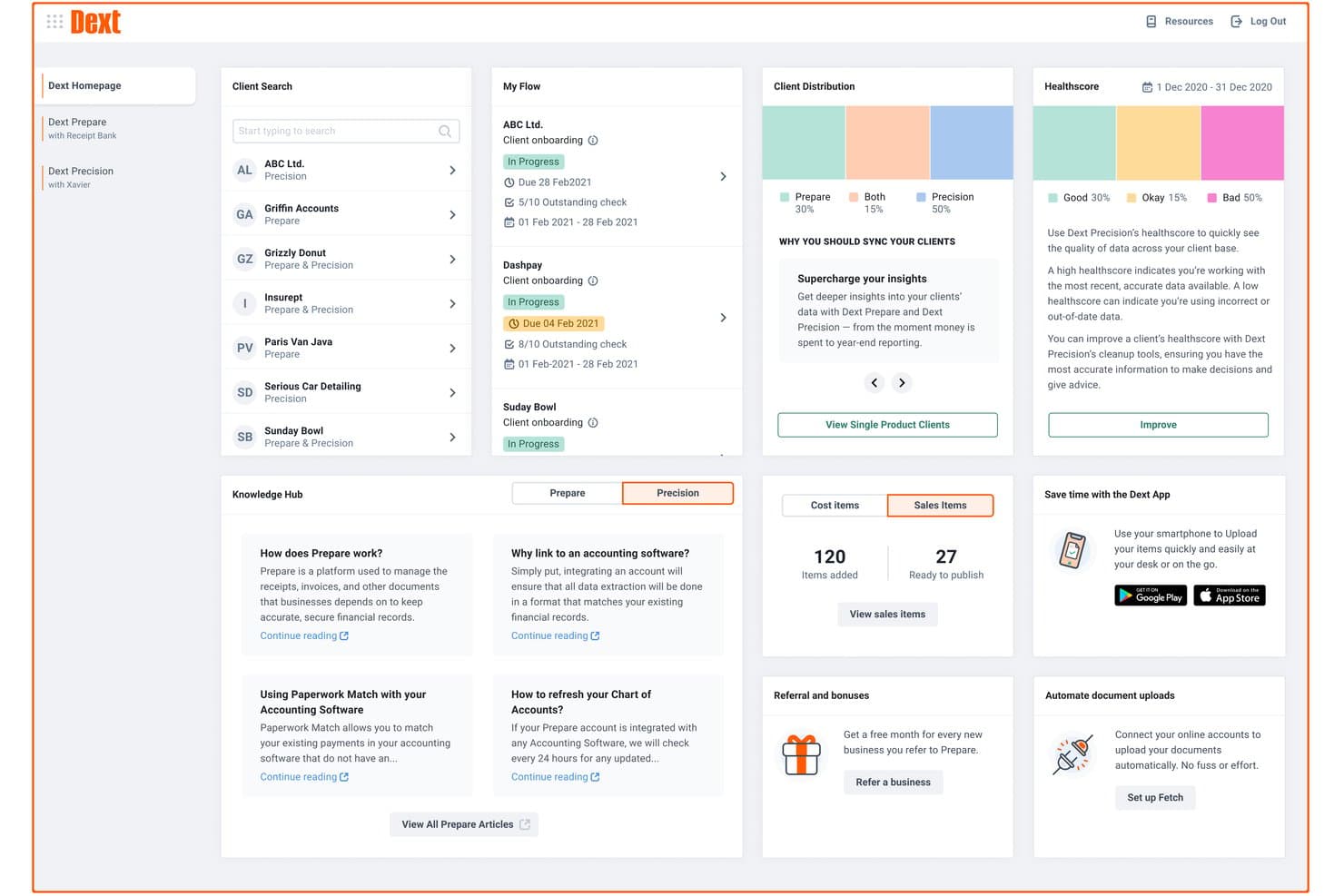
Dext ofrece un panel integral con gestión de clientes, puntuaciones de salud, seguimiento del flujo de documentos y recursos de centro de conocimiento para contadores. Dext es una plataforma de captura de documentos y extracción de datos que automatiza la recopilación, el procesamiento y la categorización de recibos, facturas y extractos bancarios para despachos contables y contadores.
¿Para Quién es Mejor Dext?
Dext es ideal para contadores y despachos contables que gestionan grandes volúmenes de documentos de clientes y buscan reducir la entrada manual de datos.
Por Qué Elegí Dext
Incluí Dext entre mis principales recomendaciones porque su precisión de extracción impulsada por IA, que se afirma es del 99.9%, realmente se mantiene al procesar cientos de documentos de clientes al mes. Me gusta cómo extrae automáticamente el detalle de cada línea de las facturas, no solo los totales, lo que reduce significativamente el ida y vuelta con los clientes. El motor de reglas para proveedores también aprende de categorizaciones anteriores, por lo que los proveedores recurrentes se codifican correctamente sin necesidad de intervención manual cada vez.
Funciones Clave de Dext
- Panel multi-cliente: Administra todas las entidades de clientes y sus documentos desde un único espacio de trabajo centralizado.
- Almacenamiento seguro Vault: Almacena y accede de forma segura a documentos de cumplimiento y extractos hasta por 10 años.
- Herramientas de productividad para despachos: Utiliza paneles de plazos de clientes, flujos de trabajo inteligentes y gestión avanzada de clientes diseñada para equipos contables.
- Integración con Commerce Lite: Importa datos de ventas en línea de plataformas como Shopify y WooCommerce directamente en el sistema.
Integraciones de Dext
Dext ofrece integraciones nativas con Xero, QuickBooks Online, Sage Accounting, FreeAgent y más.
Pros and Cons
Pros:
- Alta precisión de extracción en cientos de documentos
- Las reglas de proveedores categorizan automáticamente a los vendedores recurrentes de clientes
- Panel dedicado para despachos con gestión multi-cliente
Cons:
- No es una solución de contabilidad completa e independiente
- La fiabilidad de la app móvil es baja
Learn more about Dext: Mejor para herramientas de cumplimiento con la PCAOB
- Demostración gratuita disponible
- Precio a consultar
Visit WebsiteCustomer Rating:4.9/5
DualEntry ofrece a su equipo una visión financiera en tiempo real de ingresos, gastos, flujo de caja e información operativa, todo en un único panel. DualEntry es un ERP nativo de IA construido alrededor de un completo conjunto de contabilidad, que abarca libro mayor, gestión multi-entidad, cuentas por pagar, cuentas por cobrar, reconocimiento de ingresos y gestión del cierre.
¿Para quién es mejor DualEntry?
DualEntry es ideal para equipos financieros de empresas en expansión o en crecimiento que necesitan un sistema de contabilidad moderno, nativo de IA, con sólidos controles y soporte de auditoría.
Por qué elegí DualEntry
He incluido DualEntry entre mis principales opciones porque sus funciones de automatización de auditoría cumplen con los requisitos de la PCAOB para controles y documentación. Las herramientas de prueba de asientos contables permiten a su equipo verificar los registros contables de manera masiva, con IA que detecta patrones sospechosos y anomalías. El historial de versiones y la gestión de listas de verificación PBC (proporcionado por el cliente) de DualEntry mantienen organizada la recopilación de evidencias, ofreciendo a los auditores una pista de auditoría limpia y con sello de tiempo, así como acceso inmediato a los documentos de respaldo.
Funciones clave de DualEntry
- Consolidación multi-entidad: Gestione subsidiarias ilimitadas con eliminaciones intercompañía automáticas, conversiones de moneda y publicaciones de CTA entre entidades.
- Reconocimiento de ingresos: Automatice los calendarios de ingresos para todo tipo de contratos en cumplimiento con ASC 606 e IFRS 15, con cálculos asistidos por IA.
- Análisis de fluctuaciones: Genere informes personalizados de variaciones con comentarios explicativos generados por IA para describir los cambios de saldo entre periodos.
- Flujos de aprobación: Configure cadenas de aprobación de varios pasos para asientos contables, facturas y órdenes de compra para reforzar los controles internos de su equipo.
Pros and Cons
Pros:
- Funciones avanzadas de IA ayudan con tareas contables complejas
- Admite operaciones multi-entidad y multimoneda
- Reconocimiento de ingresos automatizado asegura el cumplimiento de las normas
Cons:
- Las opciones de personalización requieren configuración cuidadosa
- Como ERP, puede ofrecer más funciones de las que requiere una contabilidad simple
Learn more about DualEntry: 3Mejor con programas de soporte dedicado para contadores
BILL
- Prueba gratuita + plan gratuito + demo gratuita disponible
- Desde $49/usuario/mes
Visit WebsiteCustomer Rating:4.5/5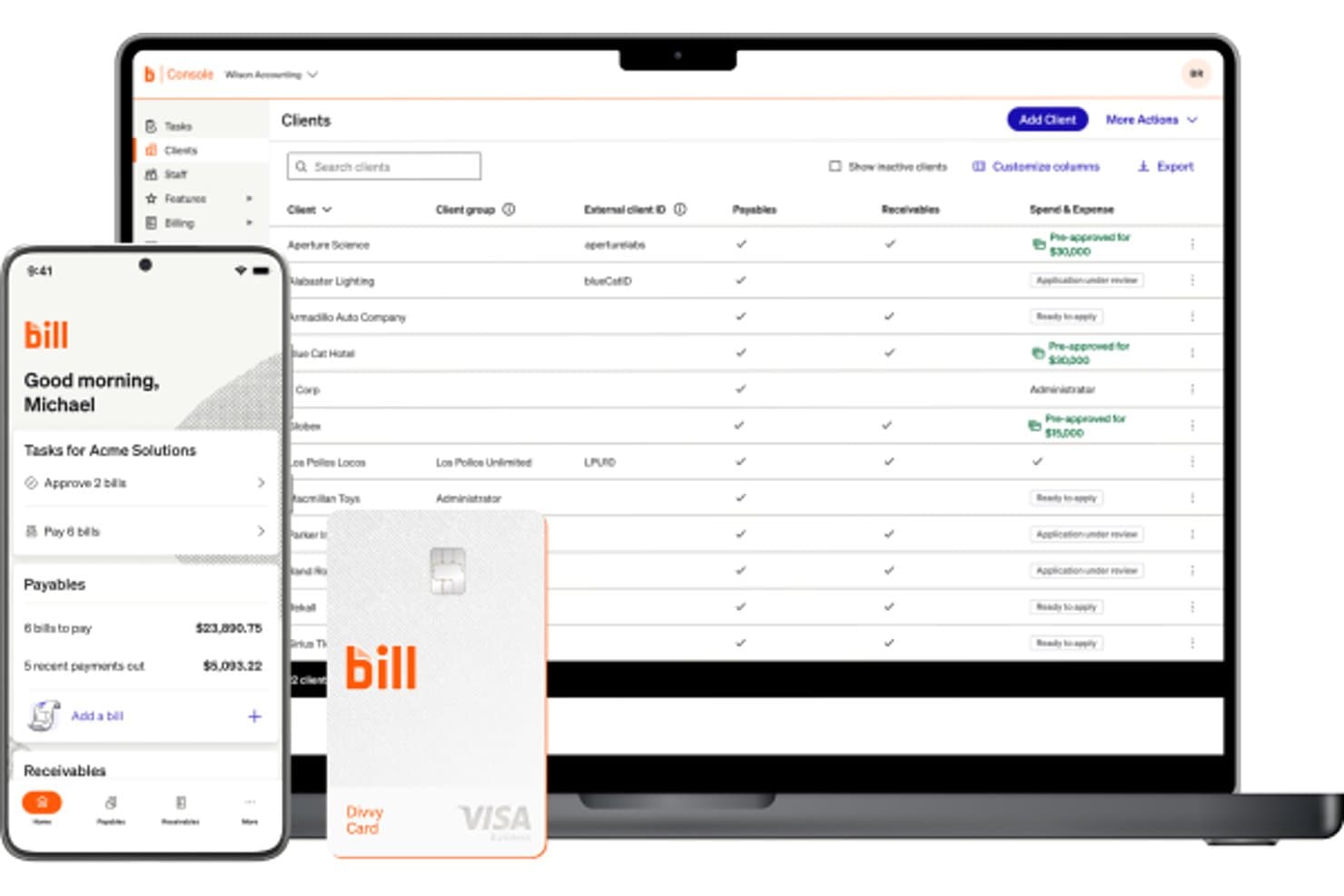
BILL ofrece un panel de control de consola contable que muestra una lista de clientes con estados de cuentas por pagar, por cobrar y gestiones de gastos, junto a una aplicación móvil y la tarjeta Divvy. BILL es una plataforma de operaciones financieras para firmas de contabilidad que centraliza las cuentas por pagar, las cuentas por cobrar y la gestión de gastos entre múltiples entidades de clientes desde una única consola.
¿Para quién es mejor BILL?
BILL es ideal para firmas de contabilidad que gestionan flujos de trabajo de cuentas por pagar y por cobrar en nombre de múltiples clientes de pequeñas y medianas empresas.
Por qué elegí BILL
Elegí BILL como uno de los mejores porque su Programa de Socios para Contadores está diseñado para el éxito de la firma, no solo para el acceso al producto. Me gusta que la estructura por niveles (Bronce a Platino) escala beneficios reales como la gestión de cuentas dedicada, fondos para co-marketing y soporte Premium Care. La Consola para Contadores gestiona todas las entidades de clientes desde un solo lugar, y más de 100 horas de capacitación CPE acreditada por NASBA mantiene a mi equipo actualizado sin tener que buscar recursos externos.
Características clave de BILL
- Flujos de trabajo AP automatizados: Optimiza la captura de facturas, aprobaciones, pagos y registros de auditoría para cada entidad de cliente.
- Roles y permisos de usuario personalizados: Permite a las firmas controlar el acceso de aprobadores, personal y clientes en múltiples cuentas.
- Agente W-9 para cumplimiento: Recoge y verifica los formularios W-9 automáticamente, con presentación electrónica incorporada de los IRS 1099.
- Integración con software contable líder: Sincroniza transacciones de cuentas por pagar y por cobrar directamente con QuickBooks, Xero, NetSuite y Sage Intacct.
Integraciones de BILL
BILL ofrece integraciones nativas con QuickBooks Online, Xero, Sage Intacct y NetSuite. Se dispone de una API para integraciones personalizadas.
Pros and Cons
Pros:
- Programa de socios dedicado que apoya el crecimiento de las firmas contables
- Gestión centralizada de cuentas por pagar y cobrar para múltiples clientes
- Capacitación CPE acreditada por NASBA incluida para firmas socias
Cons:
- No es una solución de libro mayor general completo
- Funciones limitadas para preparación y presentación de impuestos
Learn more about BILL: La mejor opción para contabilidad gratuita e ilimitada
- Prueba gratuita disponible
- Desde $59/usuario/mes
Visit WebsiteCustomer Rating:4.7/5
Manager.io es un software de contabilidad para contadores que proporciona una solución gratuita y de código abierto para gestionar facturas, contabilidad e informes financieros. Manager.io es un software de contabilidad de partida doble que cubre el ciclo contable completo, desde el libro mayor y asientos de diario hasta facturación, conciliación bancaria, nóminas, activos fijos e informes financieros en múltiples monedas.
¿Para quién es mejor Manager.io?
Manager.io es ideal para autónomos, propietarios de pequeñas empresas y contadores independientes que necesitan un software de contabilidad completo sin coste de suscripción.
Por qué elegí Manager.io
Elegí Manager.io como uno de los mejores porque su edición de escritorio es realmente gratuita: sin períodos de prueba, sin limitaciones de funciones, sin anuncios y sin límites de uso. Puedo gestionar todo el plan de cuentas, realizar conciliaciones bancarias, llevar el control de activos fijos y procesar nóminas sin encontrarme nunca con un muro de pago. Lo que me parece inusual aquí es que la versión gratuita no elimina módulos contables fundamentales como la mayoría de herramientas. Cubre el ciclo contable completo a coste cero, lo cual es realmente diferenciador en un mercado dominado por software orientado a suscripción.
Funciones clave de Manager.io
- Contabilidad multi-moneda: Registre transacciones en varias monedas con seguimiento automático del tipo de cambio y cálculo de ganancias/pérdidas por diferencia de cambio.
- Gestión de códigos fiscales: Asigne códigos de IVA, GST o impuestos sobre ventas a las transacciones y genere informes de obligaciones fiscales directamente desde la plataforma.
- Informes financieros comparativos: Genere estados de resultados, balances generales y balanzas de comprobación con comparaciones de períodos lado a lado.
- Contabilidad por proyectos: Controle ingresos y gastos por proyectos específicos para monitorizar la rentabilidad a nivel de proyecto.
Pros and Cons
Pros:
- Completamente gratuito en la versión de escritorio
- Funciones de contabilidad ilimitadas
- Soporte para múltiples monedas y nóminas
Cons:
- Integraciones limitadas con aplicaciones de terceros
- La versión de escritorio no tiene acceso en la nube
- La interfaz de usuario puede parecer anticuada
Learn more about Manager.io: Ideal para servicios de contabilidad dedicados
- Prueba gratuita disponible
- Desde $249/mes (facturado anualmente)
Visit WebsiteCustomer Rating:4.5/5
Bench es un software de contabilidad para contadores que combina software con servicios de contabilidad para gestionar registros financieros y proporcionar informes financieros. Bench es un servicio de contabilidad para pequeñas empresas que combina software propietario con un equipo dedicado de contadores encargados de la contabilidad mensual, presentación de impuestos y elaboración de informes financieros.
¿Para quién es mejor Bench?
Bench es ideal para propietarios de pequeñas empresas que prefieren delegar completamente su contabilidad en lugar de gestionarla ellos mismos.
Por qué elegí Bench
He incluido Bench en mis principales elecciones porque adopta un enfoque fundamentalmente diferente de la contabilidad: en lugar de entregarte un software para que lo resuelvas, te asigna un equipo dedicado de contadores que gestionan tus libros mes a mes. Me gusta que cada plan incluya una persona real que categoriza las transacciones, concilia las cuentas y entrega estados financieros actualizados. Además, la mensajería dentro de la aplicación de Bench te permite comunicarte directamente con tu equipo de contabilidad sin tener que cambiar entre cadenas de correos o agendar llamadas.
Características clave de Bench
- Informes financieros en tiempo real: Accede y descarga un estado de resultados o balance actualizado en cualquier momento directamente desde la plataforma Bench.
- Gestión de documentos: Sube, organiza y recupera documentos financieros desde una ubicación central dentro de tu cuenta de Bench.
- Presentación y asesoría fiscal: Bench se encarga de la preparación y presentación de impuestos para pequeñas empresas, incluyendo asesoría fiscal durante todo el año en los planes de nivel superior.
- Centro de notificaciones: Recibe recordatorios sobre próximas tareas y plazos financieros para que nada se quede atrás entre los ciclos mensuales de cierre.
Pros and Cons
Pros:
- Servicio de contabilidad dedicado
- Se entregan estados financieros mensuales
- Comunicación sencilla con los contadores
Cons:
- Costo superior en comparación con software de autogestión
- Limitado a empresas establecidas en EE. UU.
- Sin opciones de personalización en tiempo real
Learn more about Bench: Ideal para asistencia experta en vivo
- Prueba gratuita de 30 días
- Desde $30/mes
Visit WebsiteCustomer Rating:4.4/5
QuickBooks es un software de contabilidad para contadores que simplifica la contabilidad, la nómina y la preparación de impuestos para pequeñas y medianas empresas. QuickBooks es una plataforma de contabilidad en la nube que combina contabilidad impulsada por IA, generación de informes financieros, facturación, gestión de cuentas por pagar, nómina y previsión de flujo de caja para empresas y profesionales contables.
¿Para quién es mejor QuickBooks?
QuickBooks es ideal para pequeñas y medianas empresas y despachos contables que gestionan la contabilidad de clientes, nómina e informes financieros en un solo lugar.
Por qué elegí QuickBooks
QuickBooks es una de mis principales elecciones porque me encanta cómo ofrece acceso a expertos en tiempo real directamente en el flujo de trabajo contable. El plan de Asistencia Experta te brinda acceso bajo demanda a contadores certificados por QuickBooks que pueden guiarte en la categorización, conciliación e interpretación de informes en tiempo real. Si necesitas un apoyo más personalizado, la opción de Contabilidad Integral con Experto te asigna un contador dedicado que cierra tus libros mensualmente y entrega estados de resultados y balances. Esa combinación de automatización mediante IA y supervisión humana es algo que no encontrarás en la mayoría de herramientas contables.
Características clave de QuickBooks
- Previsión de flujo de caja: Consulta una proyección de flujo de caja a 90 días que se alimenta de tus cuentas bancarias, facturas y cuentas por pagar en tiempo real.
- Seguimiento automatizado del impuesto sobre ventas: Calcula, rastrea y categoriza automáticamente los impuestos sobre ventas en múltiples tarifas y jurisdicciones.
- Informes financieros personalizados: Crea y filtra informes por clase, ubicación o campos personalizados para adaptarlos a tu estructura de reportes.
- Controles de acceso multiusuario: Asigna permisos de acceso por roles a hasta 25 usuarios, con un acceso dedicado para contadores incorporado.
Pros and Cons
Pros:
- Asistencia experta en vivo disponible
- Herramientas extensas de generación de informes financieros
- Amplias capacidades de integración
Cons:
- Precio más elevado
- Personalización limitada de informes
- Curva de aprendizaje para nuevos usuarios
 7Ideal para integraciones de aplicaciones sin inconvenientes
Xero
- Prueba gratuita de 30 días disponible
- Desde $2.50/mes
Visit WebsiteCustomer Rating:4.4/5
Xero es un software de contabilidad para contadores que ofrece soluciones en la nube para gestionar facturación, conciliación bancaria y reportes financieros. Xero es una plataforma de contabilidad en la nube diseñada para contadores y pequeñas empresas, que abarca conciliación bancaria, facturación, nómina, seguimiento de gastos e informes financieros, junto con un conjunto dedicado de herramientas de gestión para despachos contables.
¿Para quién es mejor Xero?
Xero es una excelente opción para despachos contables pequeños y medianos, así como para contadores independientes que gestionan múltiples clientes en diferentes industrias.
Por qué elegí Xero
Elegí Xero porque su ecosistema de aplicaciones es uno de los más completos en software de contabilidad. La Xero App Store se conecta con más de 1,000 herramientas de terceros para nómina, pagos, informes y comercio electrónico. Me gusta especialmente que integraciones como Shopify sincronizan ventas, comisiones, reembolsos y pagos en tiempo real, mientras que Dext introduce recibos y gastos capturados directamente en Xero sin necesidad de entradas manuales. Para contadores que administran clientes de distintos sectores, esa conectividad tipo plug-and-play significa que no es necesario encasillar a cada cliente en la misma pila tecnológica.
Características clave de Xero
- Conciliación bancaria: Importa y categoriza automáticamente las transacciones bancarias a diario, permitiéndote vincular y conciliar en múltiples cuentas desde una sola vista.
- Xero HQ: Un panel de control para despachos donde puedes monitorear la salud financiera de los clientes, gestionar la asignación de personal y seguir la actividad de los clientes en todo tu portafolio.
- Soporte multimoneda: Registra transacciones, envía facturas y concilia en más de 160 monedas con tipos de cambio en tiempo real.
- Gestor de activos fijos: Haz seguimiento, deprecia y da de baja los activos de los clientes con programas de depreciación automatizados dentro de la plataforma.
Pros and Cons
Pros:
- Opciones extensas de integración con aplicaciones
- Sincronización de datos financieros en tiempo real
- Interfaz fácil de usar
Cons:
- Soporte al cliente limitado
- Precios más altos para funciones avanzadas
- Curva de aprendizaje más pronunciada para principiantes
Learn more about Xero: Ideal para obtener información y reportes inteligentes
- Prueba gratuita de 30 días + plan gratuito disponible
- Desde $15/mes
Visit WebsiteCustomer Rating:4.6/5
ZipBooks es un software de contabilidad para contadores que ofrece contabilidad inteligente, facturación y seguimiento de gastos, con funciones integradas de inteligencia empresarial. ZipBooks es un software de contabilidad en la nube que incluye facturación, seguimiento de gastos, conciliación bancaria, informes financieros y una capa de inteligencia que genera puntuaciones de salud empresarial y categoriza automáticamente las transacciones.
¿Para quién es mejor ZipBooks?
ZipBooks es ideal para freelancers, propietarios de pequeñas empresas y contadores independientes que gestionan una cartera de clientes reducida y necesitan una contabilidad sólida sin la complejidad empresarial.
Por qué elegí ZipBooks
ZipBooks es una de mis principales elecciones porque me encanta cómo su capa de Inteligencia va más allá de los informes financieros estándar. El Business Health Score compara tus finanzas con las de la competencia, mientras que el Invoice Quality Score señala los elementos específicos de las facturas que ralentizan el pago. También considero que la categorización automática mediante aprendizaje automático es realmente útil en el día a día: reduce el trabajo manual de etiquetar transacciones, así que puedo centrarme en revisar los números en lugar de introducirlos.
Funciones clave de ZipBooks
- Conciliación bancaria: Conecta cuentas bancarias y compara transacciones con tus registros para conciliar los saldos directamente en ZipBooks.
- Informes en base de efectivo y devengo: Cambia entre base de efectivo y devengo en los estados financieros como el estado de resultados y el balance.
- Registro de tiempo: Registra las horas facturables para varios clientes y convierte el tiempo registrado directamente en facturas.
- Panel de control para contadores con múltiples clientes: Administra varias cuentas de clientes desde un único inicio de sesión con cobranding y edición masiva de transacciones.
Pros and Cons
Pros:
- Información y reportes financieros inteligentes
- Puntuación de salud empresarial en tiempo real
- Precios asequibles para pequeñas empresas
Cons:
- Funciones avanzadas limitadas
- Menos integraciones que la competencia
- La respuesta del soporte al cliente puede variar
Learn more about ZipBooks: Mejor para la gestión empresarial integral
- Plan gratuito + demo gratis disponible
- Desde $15/mes (facturado anualmente)
Visit WebsiteCustomer Rating:4.3/5
Zoho Books es un software de contabilidad para contadores que ofrece soluciones contables integrales, incluyendo gestión de inventarios, facturación y cumplimiento fiscal. Zoho Books es una plataforma de contabilidad basada en la nube que abarca facturación, seguimiento de gastos, conciliación bancaria, gestión de inventarios, facturación de proyectos e informes financieros; todo diseñado para respaldar tanto a los propietarios de negocios como a los contadores que administran sus libros.
¿Para quién es mejor Zoho Books?
Zoho Books es ideal para pequeñas y medianas empresas que desean una solución contable que se conecte con una suite más amplia de herramientas empresariales.
Por qué elegí Zoho Books
Elegí Zoho Books como uno de los mejores porque cubre mucho más que la mayoría de las herramientas de contabilidad. Me gusta que la gestión de inventarios, la facturación de proyectos con hojas de tiempo y un portal integrado para clientes, todo esto se incluya de forma nativa—no como complementos separados. La automatización de flujos de trabajo también gestiona tareas recurrentes como recordatorios de pago y rutas de aprobación, lo que mantiene las operaciones financieras en movimiento sin seguimiento manual en cada paso.
Funciones clave de Zoho Books
- Conciliación bancaria: Haz coincidir transacciones bancarias importadas con registros en el sistema y detecta discrepancias directamente en la plataforma.
- Informes financieros: Genera más de 70 informes incluyendo estado de resultados, balance general, flujo de caja y cuentas por cobrar vencidas.
- Seguimiento de impuestos sobre ventas: Configura reglas fiscales, sigue los pasivos por jurisdicción y gestiona el cumplimiento de 1099/W-9 entre proveedores.
- Pista de auditoría: Consulta un registro completo con sello de tiempo de cada cambio en las transacciones, incluyendo quién realizó la modificación y cuándo.
Pros and Cons
Pros:
- Suite integral de herramientas de gestión empresarial
- Fuerte integración con otras aplicaciones de Zoho
- Flujos de trabajo personalizables
Cons:
- Curva de aprendizaje para nuevos usuarios
- Integraciones limitadas con terceros fuera de Zoho
- Costo más alto para funciones avanzadas
 10Mejor para contabilidad automatizada
Kashoo
- Prueba gratuita de 14 días disponible
- Desde $30/mes
Visit WebsiteCustomer Rating:4.5/5
Kashoo es un software de contabilidad para contadores que proporciona herramientas sencillas, en la nube, para la contabilidad, la facturación y el seguimiento de gastos de pequeñas empresas. Kashoo es una plataforma de contabilidad en la nube para pequeñas empresas que cubre el seguimiento de ingresos y gastos, la facturación, la conciliación bancaria y la elaboración de informes financieros, con categorización de transacciones impulsada por IA en su núcleo.
¿Para quién es mejor Kashoo?
Kashoo se adapta a propietarios de pequeñas empresas y autónomos que desean manejar su propia contabilidad sin necesidad de un contador ni conocimientos financieros avanzados.
Por qué elegí Kashoo
Kashoo ganó un lugar en mi lista porque automatiza gran parte del trabajo repetitivo de la contabilidad. Se conecta en tiempo real a más de 5,000 bancos y cooperativas de crédito, transfiriendo transacciones al libro mayor sin importaciones manuales. La categorización impulsada por IA ordena estas transacciones, por lo que la conciliación lleva minutos en vez de horas. También registra automáticamente ingresos y gastos usando un libro mayor de partida doble en segundo plano.
Características clave de Kashoo
- Facturación en múltiples monedas: Crea y envía facturas en varias monedas, con conversión automática del tipo de cambio aplicada a cada transacción.
- Seguimiento de impuestos sobre ventas: Configura y aplica tasas de impuestos sobre ventas a facturas y gastos, con totales calculados automáticamente en cada transacción.
- Informes financieros: Genera estados de resultados y balances directamente desde los datos de tu libro mayor en cualquier momento.
- Usuarios ilimitados: Añade a tu contador, tenedor de libros o socios comerciales a tu cuenta sin coste adicional.
Pros and Cons
Pros:
- Potentes capacidades de automatización
- Interfaz sencilla e intuitiva
- Categorización de gastos en tiempo real
Cons:
- Funciones avanzadas limitadas
- Menos opciones de integración que los competidores
- Costo elevado para funciones básicas
Learn more about Kashoo:
Otros programas de contabilidad para contables
A continuación encontrarás una lista de otros programas de contabilidad para contables que preseleccionamos, pero que no llegaron a formar parte de la lista principal. Sin duda merece la pena echarles un vistazo.
- 11ZarMoneyMejor para gestión de inventario
- 12JoiinMejor para reportes multi-entidad
- 13MYOBMejor para soluciones empresariales escalables
- 14HighRadiusIdeal para auditorías continuas
- 15PuzzleIdeal para la detección de errores en tiempo real
- 16WaveMejor para funciones contables gratuitas
- 17AccountEdgeMejor para gestión avanzada de datos
- 18HeardMejor para automatización de impuestos y nómina para terapeutas
- 19AcumaticaLa mejor para contabilidad multi-entidad
Related Reviews
Wie ich Conversational-Marketing-Plattformen bewerte
Ich bewerte diese Plattformen auf zwei Ebenen: die grundlegenden Fähigkeiten, die ein Tool bieten muss – Echtzeit-Chat, botgesteuerte Lead-Qualifizierung und Terminvereinbarung – sowie die Unterscheidungsmerkmale, die starke Kandidaten hervorheben.
Kernfunktionalität (Grundvoraussetzungen für diese Liste)
Wenn ich Tools für meine Liste auswähle, bewerte ich jedes einzelne auf einer Skala von 0 (bietet die Funktion nicht) bis 5 (übertrifft in diesem Bereich) hinsichtlich der unten aufgeführten Kernfunktionen. Anschließend berechne ich die Gesamtpunktzahl des Tools als Prozentwert. Jedes Tool muss eine Mindestgesamtpunktzahl von 65 % erreichen, um für die Aufnahme berücksichtigt zu werden.
- Live-Chat & Chatbots: Ich bewerte, ob die Plattform sowohl automatisierte Bot-Flows als auch eine Übergabe an echte Personen unterstützt, zum Beispiel wenn ein Bot einen wiederkehrenden Besucher begrüßt und das Gespräch mitten im Verlauf an einen Mitarbeiter übergibt.
- Lead-Qualifizierungslogik: Jedes Tool sollte es ermöglichen, verzweigte Gesprächsabläufe zu erstellen, die Besucher anhand von Kriterien wie Unternehmensgröße, Rolle oder Budget qualifizieren, bevor sie an den Vertrieb übergeben werden.
- Terminvereinbarung: Ich prüfe, ob eine native Terminbuchung im Chat-Erlebnis möglich ist, einschließlich einer gleichmäßigen Zuteilung an verschiedene Mitarbeiter, sodass qualifizierte Interessenten einen Termin buchen können, ohne die Seite zu verlassen.
- Besucheridentifikation & -targeting: Die Plattform sollte erkennen, wer sich auf Ihrer Seite befindet, und gezielte Playbooks ausspielen, etwa indem ein ABM-spezifischer Gruß ausgelöst wird, wenn ein Kontakt aus einem Zielaccount die Preisseite besucht.
- CRM- & MarTech-Integrationen: Ich prüfe, wie tief das Tool mit Plattformen wie Salesforce, HubSpot und Marketo integriert ist – insbesondere auf einen bidirektionalen Datenfluss, der den Gesprächskontext an den Kontaktdatensätzen erhält.
- Konversationsanalyse & Routing: Berichte sollten Gespräche mit Pipeline-Ergebnissen verknüpfen, und die Routing-Logik sollte Chats basierend auf Gebiet, Deal-Phase oder Verfügbarkeit des Mitarbeiters zuweisen – nicht nur per einfachem Rotationsverfahren.
Sobald ich eine Liste von Tools habe, die diese Kriterien erfüllen, betrachte ich, was die jeweilige Plattform besonders macht.
Unterscheidungsmerkmale (Was Anbieter unterscheidet)
So vergleiche und kontrastiere ich verschiedene Anbieter:
Herausragende Funktionen
Generative KI-Agenten sind ein bedeutendes Unterscheidungsmerkmal. Ich achte darauf, ob Bots aus einer Wissensdatenbank schöpfen, um differenzierte Produktfragen zu beantworten, statt nur vordefinierten Abläufen zu folgen. Multikanal-Reichweite ist ebenfalls wichtig, insbesondere wenn Käufer das Gespräch auf Ihrer Website beginnen, aber per WhatsApp oder SMS fortsetzen. Ich bewerte auch, ob eine Plattform A/B-Tests für Playbooks und Bot-Texte anbietet, denn schon kleine Änderungen an einer Begrüßung oder Qualifizierungsfrage können Konversionsraten stark beeinflussen.
Mehr als nur Funktionen
Dem Revenue Attribution widme ich besondere Aufmerksamkeit. Wenn eine Plattform nicht zeigen kann, welche Gespräche zur Pipeline beigetragen haben oder diese beeinflusst haben, ist es schwer, die Investition gegenüber der Geschäftsleitung zu rechtfertigen. Auch die Tiefe der Integration in den Revenue Stack ist entscheidend – ich prüfe, ob Konversationsdaten in CRM-Opportunitätsdaten und Attribution-Tools einfließen, sodass das Marketing für beeinflusste Deals anerkannt wird. Schließlich berücksichtige ich die Compliance-Lage, insbesondere Consent-Lösungen für Cookies und Optionen zur Datenspeicherung, da Chat-Widgets Besucherdaten bereits beim Laden sammeln.
Cómo elegir software de contabilidad para contables
Revisar una cantidad interminable de funciones y precios puede resultar abrumador. Esta lista de comprobación te ayudará a centrarte en lo que realmente importa a la hora de elegir un software de contabilidad para contables.
| Factor | Qué debes tener en cuenta |
|---|---|
| FactorEscalabilidad | Qué debes tener en cuentaAsegúrate de que el software pueda crecer junto con tu despacho. Busca funciones que admitan usuarios y clientes adicionales sin aumentos significativos de costes. |
| FactorIntegraciones | Qué debes tener en cuentaComprueba la compatibilidad con otras herramientas que utilices, como sistemas CRM o software de nóminas, para agilizar los flujos de trabajo y reducir la introducción manual de datos. |
| FactorPersonalización | Qué debes tener en cuentaElige un software que te permita adaptar las funciones y los informes a tus prácticas contables y a las necesidades de tus clientes. |
| FactorFacilidad de uso | Qué debes tener en cuentaOpta por interfaces intuitivas que requieran una formación mínima, permitiendo que tu equipo se adapte rápidamente y mantenga la productividad. |
| FactorPresupuesto | Qué debes tener en cuentaTen en cuenta no solo el coste inicial, sino también las tarifas periódicas y cualquier cargo adicional por funciones o usuarios extra. Asegúrate de que se ajuste a tu presupuesto. |
| FactorMedidas de seguridad | Qué debes tener en cuentaDa prioridad al software con medidas de seguridad sólidas, como el cifrado y la autenticación de dos factores, para proteger los datos financieros confidenciales. |
| FactorFunciones de elaboración de informes | Qué debes tener en cuentaBusca herramientas completas de elaboración de informes que ofrezcan información sobre la salud financiera y te ayuden a tomar decisiones fundamentadas para tus clientes. |
| FactorAsistencia al cliente | Qué debes tener en cuentaUn servicio de asistencia fiable puede ser crucial cuando surgen problemas. Evalúa la disponibilidad y la calidad del servicio de atención al cliente, incluidos los tiempos de respuesta y los canales de asistencia. |
Tendencias del software de contabilidad para contables
He revisado montones de actualizaciones de productos, comunicados de prensa y registros de lanzamientos de proveedores de software de contabilidad. Estas son las principales tendencias que tengo en el radar:
- Análisis impulsados por IA: La IA se está integrando cada vez más para ofrecer análisis predictivos e información útil, ayudando a los contables a tomar decisiones basadas en datos. Xero y QuickBooks están a la vanguardia al ofrecer herramientas de IA que analizan datos financieros para pronosticar tendencias e identificar anomalías.
- Integración de blockchain: Algunos programas de contabilidad están explorando blockchain para mejorar la seguridad y la transparencia de las transacciones financieras. Proveedores como Oracle están experimentando con blockchain para crear registros inmutables, lo que puede resultar especialmente útil para las auditorías.
- Herramientas de colaboración en tiempo real: Cada vez más plataformas incorporan funciones que permiten a varios usuarios trabajar simultáneamente con datos financieros. FreshBooks, un programa de contabilidad en línea, ha implementado funciones de colaboración en tiempo real que permiten a contables y clientes interactuar dentro del programa, mejorando la comunicación y la eficiencia.
- Soluciones basadas en la nube: El cambio hacia plataformas basadas en la nube sigue creciendo a medida que las empresas buscan flexibilidad y accesibilidad. Sage Intacct ofrece amplias soluciones en la nube, lo que permite a los contables acceder a los datos financieros desde cualquier lugar y respalda las tendencias de trabajo remoto. Esto resulta especialmente beneficioso si trabajas para una empresa con sedes internacionales.
- Informes personalizables: Existe una demanda creciente de herramientas de generación de informes personalizables y dinámicas. Zoho Books ofrece funciones avanzadas de generación de informes que permiten a los usuarios crear informes financieros adaptados para satisfacer necesidades empresariales específicas, ofreciendo una experiencia más personalizada.
¿Qué es un programa de contabilidad para contables?
Un programa de contabilidad para contables es una herramienta especializada diseñada para gestionar y agilizar procesos financieros como la teneduría de libros, la facturación, las nóminas y la preparación de impuestos.
Los servicios y despachos de contabilidad utilizan un sistema contable para garantizar un registro financiero preciso, el cumplimiento de la normativa y la elaboración eficiente de informes financieros. Este programa es esencial para los contables de grandes empresas que necesitan gestionar datos financieros complejos, automatizar tareas rutinarias y generar informes detallados para clientes o para uso interno de la empresa.
Funciones de los programas de contabilidad para contables
Al revisar programas de contabilidad SaaS para contables, busco funciones que realmente ayuden con la gestión financiera y la elaboración de informes. Estas son las imprescindibles que considero:
- Gestión del libro mayor: Centraliza los datos financieros para realizar un seguimiento preciso de todas las transacciones.
- Cuentas por pagar y por cobrar: Gestiona eficazmente los pagos entrantes y salientes.
- Procesamiento de nóminas: Automatiza los cálculos salariales, las deducciones fiscales y los pagos a los empleados.
- Cumplimiento fiscal: Garantiza el cumplimiento de la normativa fiscal local, autonómica y estatal.
- Informes financieros: Genera informes detallados para el análisis financiero y la toma de decisiones.
- Conciliación bancaria: Compara las transacciones con los extractos bancarios para garantizar su precisión.
- Seguimiento de gastos: Supervisa y categoriza automáticamente los gastos empresariales.
- Gestión de inventario: Controla los niveles de inventario y se integra con los registros contables.
- Compatibilidad con múltiples divisas: Gestiona transacciones en distintas divisas con conversión en tiempo real.
- Registros de auditoría: Proporciona un registro detallado de todas las actividades financieras para garantizar la responsabilidad. Esto resulta especialmente beneficioso si eres un contable que gestiona cuentas fiduciarias.
Beneficios de los programas de contabilidad para contables
Los programas de contabilidad ayudan a los contables y a las empresas a trabajar de forma más eficiente al simplificar las finanzas y mejorar la precisión. Estos son los principales beneficios para ti:
- Mayor eficiencia: Automatiza las tareas financieras rutinarias, ahorrando tiempo y reduciendo la probabilidad de errores manuales. Esto es extremadamente valioso si trabajas para una organización con varias empresas y necesitas una solución para gestionar las finanzas en varias ubicaciones.
- Mayor precisión: Proporciona cálculos precisos y datos coherentes, lo que ayuda a evitar errores costosos en los registros financieros.
- Mejor visión financiera: Genera informes y análisis detallados, lo que permite tomar decisiones más informadas basadas en datos financieros en tiempo real.
- Mayor cumplimiento normativo: Se mantiene al día con los cambios normativos y garantiza que las prácticas financieras cumplan las leyes locales, estatales y federales. Esto resulta cada vez más complejo para las empresas medianas y las grandes corporaciones.
- Escalabilidad: Ayuda a las empresas en crecimiento al gestionar transacciones financieras más complejas y un mayor volumen de datos sin comprometer el rendimiento.
Costes y precios del software de contabilidad para contables
Saber cuánto cuesta el software de contabilidad (y por qué estás pagando realmente) es fundamental para encontrar la opción adecuada para tu empresa. Los precios pueden variar en función de las funcionalidades, el acceso de los usuarios y el tipo de asistencia que recibas. Para facilitar las cosas, he desglosado los planes de precios habituales para que puedas elegir el que mejor se adapte a tus necesidades y presupuesto.
| Tipo de plan | Precio medio | Funciones habituales |
| Plan gratuito | $0 | Facturación básica, seguimiento de gastos, informes limitados, asistencia para un solo usuario |
| Plan básico | $10-$25/usuario/mes | Facturación, cuentas por pagar y por cobrar, informes básicos, asistencia por correo electrónico |
| Plan estándar | $30-$50/usuario/mes | Gestión de nóminas, informes avanzados, acceso multiusuario, integraciones |
| Plan premium | $60-$100/usuario/mes | Compatibilidad con múltiples divisas, gestión de inventario, informes exhaustivos, asistencia prioritaria |
| Plan empresarial | $150+/usuario/mes | Funciones personalizadas, usuarios ilimitados, gestor de cuenta dedicado, acceso completo a la API |
Preguntas frecuentes sobre software de contabilidad para contables
¿Es seguro el software de contabilidad basado en la nube?
Sí, el software de contabilidad basado en la nube de proveedores reputados utiliza cifrado y otras medidas de seguridad para proteger tus datos. Las copias de seguridad y las actualizaciones periódicas garantizan la seguridad de los datos y el cumplimiento de los estándares del sector. Verifica siempre las funciones de seguridad del proveedor del software y utiliza contraseñas seguras y únicas.
¿Puede el software de contabilidad gestionar varias divisas?
Muchas opciones de software de contabilidad ofrecen compatibilidad con varias divisas, algo fundamental para las empresas que realizan transacciones internacionales. Esta función convierte y registra automáticamente las transacciones en distintas divisas. Asegúrate de que el software que elijas sea compatible con las divisas que utilizas habitualmente.
¿Cuál es la diferencia entre el software de facturación y el software de contabilidad?
El software de facturación se centra principalmente en crear y gestionar facturas. El software de contabilidad, por otro lado, ofrece una gama más amplia de herramientas de gestión financiera, como facturación, seguimiento de gastos, gestión de nóminas e informes financieros. El software de contabilidad proporciona una solución más completa para gestionar las finanzas de una empresa.
¿Puedo integrar el software de contabilidad con otras herramientas empresariales?
Sí, la mayoría de los programas de contabilidad se integran con diversas herramientas, como sistemas CRM, plataformas de comercio electrónico y pasarelas de pago. Estas integraciones agilizan los flujos de trabajo y reducen la introducción manual de datos. Comprueba qué integraciones específicas son compatibles con las herramientas empresariales que ya utilizas.
¿Es difícil migrar de un software de contabilidad a otro?
La migración puede ser complicada, pero muchos proveedores de software de contabilidad ofrecen herramientas y asistencia para facilitar la transición. Antes de cambiar, haz una copia de seguridad de tus datos y asegúrate de que el nuevo software pueda importar los formatos de datos existentes. Considera la posibilidad de solicitar ayuda profesional para migraciones complejas.
¿Con qué frecuencia debo actualizar mi software de contabilidad?
Las actualizaciones periódicas son fundamentales para mantener la seguridad del software y garantizar el cumplimiento de la normativa financiera más reciente. La mayoría de los programas basados en la nube se actualizan automáticamente, lo que garantiza que dispongas de las funciones más recientes y de los parches de seguridad. Si utilizas un programa de escritorio, comprueba periódicamente si hay actualizaciones e instálalas cuando sea necesario.