

I sistemi ERP integrano vari processi aziendali, come finanza, risorse umane e catena di approvvigionamento, in un'unica piattaforma, offrendo maggiore efficienza e precisione dei dati. Tuttavia, trovare la soluzione giusta per il tuo team potrebbe richiedere l'analisi di diverse soluzioni alternative.
Grazie alla mia esperienza combinata nel software ERP e nelle operazioni finanziarie, ho testato e confrontato diverse soluzioni ERP per aiutare i team a trovare i migliori strumenti sul mercato. Raccogliendo i miei risultati in recensioni approfondite, spero di guidarti verso il prossimo software in grado di favorire efficacemente la crescita aziendale e gestire le operazioni.
Che cos'è un ERP?
Il software di pianificazione delle risorse aziendali (ERP) è un tipo di software che integra vari processi e funzioni aziendali in un unico sistema. Con un ERP, le aziende possono gestire finanza, risorse umane, catena di approvvigionamento e altre attività aziendali fondamentali da un'unica posizione centrale, aumentando la produttività e riducendo i costi.
Perché fidarsi dei nostri consigli sui software
6,700+
Reviews
20
Industry experts
16+
Evaluation factors
14
Years
Le nostre recensioni riflettono il nostro giudizio indipendente, non un discorso di vendita. Scopri come manteniamo la trasparenza.
Per questa guida, abbiamo valutato gli strumenti attraverso test pratici e ricerche indipendenti, assegnando un punteggio agli strumenti in base ai nostri criteri di selezione.
Le nostre recensioni riflettono il nostro giudizio editoriale umano, non un discorso di vendita.
Tabella di confronto delle alternative agli ERP
Questa tabella di confronto riassume i dettagli sui prezzi delle mie migliori alternative agli ERP:
| Tool | Best For | Trial Info | Price | ||
|---|---|---|---|---|---|
| 1 | Ideale per le piccole aziende manifatturiere che necessitano di consegne precise e puntuali | Prova gratuita di 30 giorni disponibile | Da $49/utente/mese | Website | |
| 2 | Ideale per onboarding e supporto guidati da CPA | Demo gratuita disponibile | Prezzi su richiesta | Website | |
| 3 | Ottimo per CRM integrato e strumenti di pipeline di vendita | Prova gratuita disponibile | Da $35/utente/mese | Website | |
| 4 | Ideale per la gestione completa e trasversale delle risorse orientata alle persone | Non disponibile | Prezzo su richiesta | Website | |
| 5 | Ideale grazie agli oltre 1.000 connettori preconfigurati | Demo gratuita disponibile | Prezzi su richiesta | Website | |
| 6 | Ideale per la gestione di piccole e medie imprese | Demo gratuita disponibile | Prezzo su richiesta | Website | |
| 7 | Ideale per ERP cloud con approfondimenti in tempo reale | Demo gratuita disponibile | Prezzo su richiesta | Website | |
| 8 | Ideale per la gestione di finanza e risorse umane con ricalibrazione continua | Demo gratuita disponibile | Prezzo su richiesta | Website | |
| 9 | Ideale per la gestione finanziaria e operativa | Demo gratuita disponibile | Prezzi su richiesta | Website | |
| 10 | Ideale per prestazioni di inventario connesso con analisi in tempo reale | Prova gratuita di 14 giorni + demo gratuita disponibile | A partire da $349/mese | Website |


Recensioni delle migliori alternative agli ERP
In questa sezione fornirò un’analisi e una panoramica approfondite di ciascuna alternativa agli ERP. Ti illustrerò i pro e i contro di ogni strumento, le sue funzionalità e i casi d’uso più indicati.
 Ideale per le piccole aziende manifatturiere che necessitano di consegne precise e puntuali
- Prova gratuita di 30 giorni disponibile
- Da $49/utente/mese
Visit WebsiteCustomer Rating:4.5/5
MRPeasy è una soluzione ERP cloud facile da usare, progettata per le piccole aziende manifatturiere, che semplifica la gestione della produzione, dell'inventario e della catena di approvvigionamento. MRPeasy è un software per la produzione progettato per le piccole aziende manifatturiere. Si distingue per la capacità di garantire consegne precise e puntuali, migliorare la soddisfazione del cliente e ottimizzare i processi produttivi.
Perché ho scelto MRPeasy: L'attenzione di MRPeasy verso le piccole aziende che necessitano di consegne precise e puntuali lo rende una delle migliori soluzioni ERP. Le sue funzionalità avanzate sono pensate per ambienti di produzione su piccola scala, offrendo un'alternativa affidabile ai tradizionali sistemi ERP.
Funzionalità e integrazioni principali:
Le funzionalità includono pianificazione accurata della produzione, gestione dell'inventario in tempo reale, panoramica completa delle operazioni aziendali, gestione delle distinte base, ripianificazione con drag-and-drop e tracciabilità dei lotti.
Le integrazioni includono QuickBooks Online, Xero, Shopify, Magento, BigCommerce, WooCommerce, Pipedrive, ShipStation, Zapier, Ware2Go.
Pros and Cons
Pros:
- Interfaccia intuitiva
- Strumenti completi per la pianificazione della produzione
- Gestione dell'inventario in tempo reale
Cons:
- Funzionalità e accessibilità mobile limitate
- Aggiornamenti software poco frequenti possono ritardare l'accesso a nuove funzionalità
Learn more about MRPeasy: Ideale per onboarding e supporto guidati da CPA
- Demo gratuita disponibile
- Prezzi su richiesta
Visit WebsiteCustomer Rating:4.9/5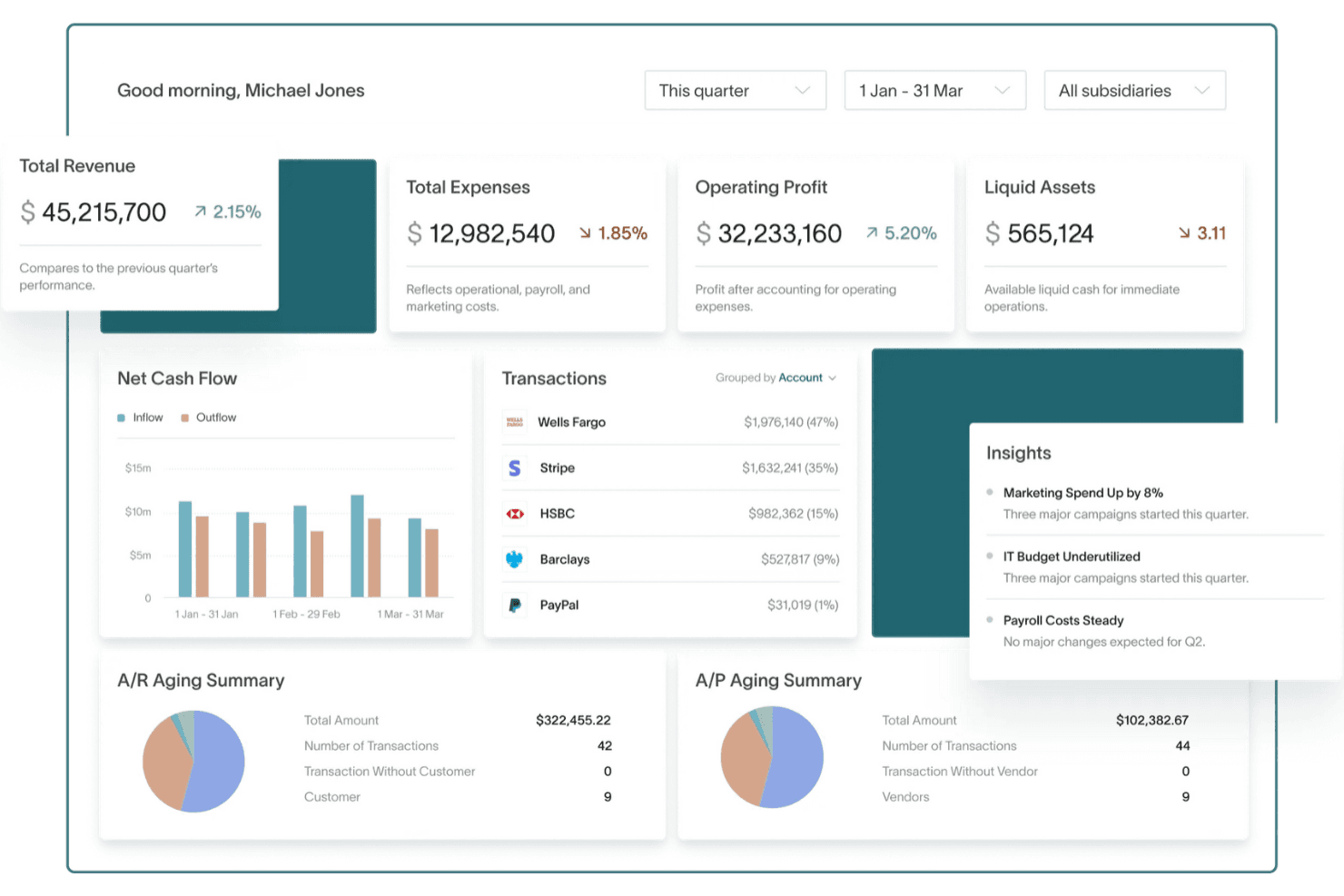
DualEntry offre al tuo team una panoramica finanziaria in tempo reale su ricavi, spese, flussi di cassa e dati operativi—tutto in una sola dashboard. DualEntry è una piattaforma di gestione finanziaria basata su AI che aiuta le aziende di medie dimensioni ad automatizzare attività contabili complesse. Il software combina controlli finanziari, elaborazione delle transazioni e reportistica in tempo reale per offrire un’alternativa moderna agli ERP.
Perché ho scelto DualEntry: Ho scelto DualEntry per la sua automazione guidata dall’intelligenza artificiale che semplifica processi finanziari come l’abbinamento bancario e la categorizzazione delle transazioni. Offre anche onboarding e supporto guidati da CPA, oltre a una solida gestione multi-entità e multi-valuta per operazioni globali. Le sue funzioni di riconoscimento ricavi e gestione fiscale aiutano a mantenere precisione e conformità durante la crescita aziendale.
Funzionalità ed integrazioni principali:
Le funzionalità includono la gestione delle chiusure contabili per aiutarti a finalizzare accuratamente i periodi finanziari, la preparazione ad audit con tracciabilità integrata e la gestione dei cespiti per automatizzare i piani di ammortamento. Le dashboard e gli strumenti di reportistica di DualEntry offrono inoltre una visione in tempo reale su tutti i dati finanziari.
Le integrazioni includono BambooHR, Bill.com, Brex, Deel, Google SSO, Gusto, HubSpot, Ramp, Rippling, Salesforce, Stripe Billing e Stripe Invoicing.
Pros and Cons
Pros:
- Le funzioni AI avanzate aiutano nella gestione contabile complessa
- Supporta operazioni multi-entità e multi-valuta
- Il riconoscimento automatico dei ricavi assicura la conformità agli standard
Cons:
- Le opzioni di personalizzazione richiedono una configurazione attenta
- Essendo un ERP, potrebbe offrire più funzionalità del necessario per esigenze contabili semplici
Learn more about DualEntry: Ottimo per CRM integrato e strumenti di pipeline di vendita
- Prova gratuita disponibile
- Da $35/utente/mese
Visit WebsiteCustomer Rating:4.7/5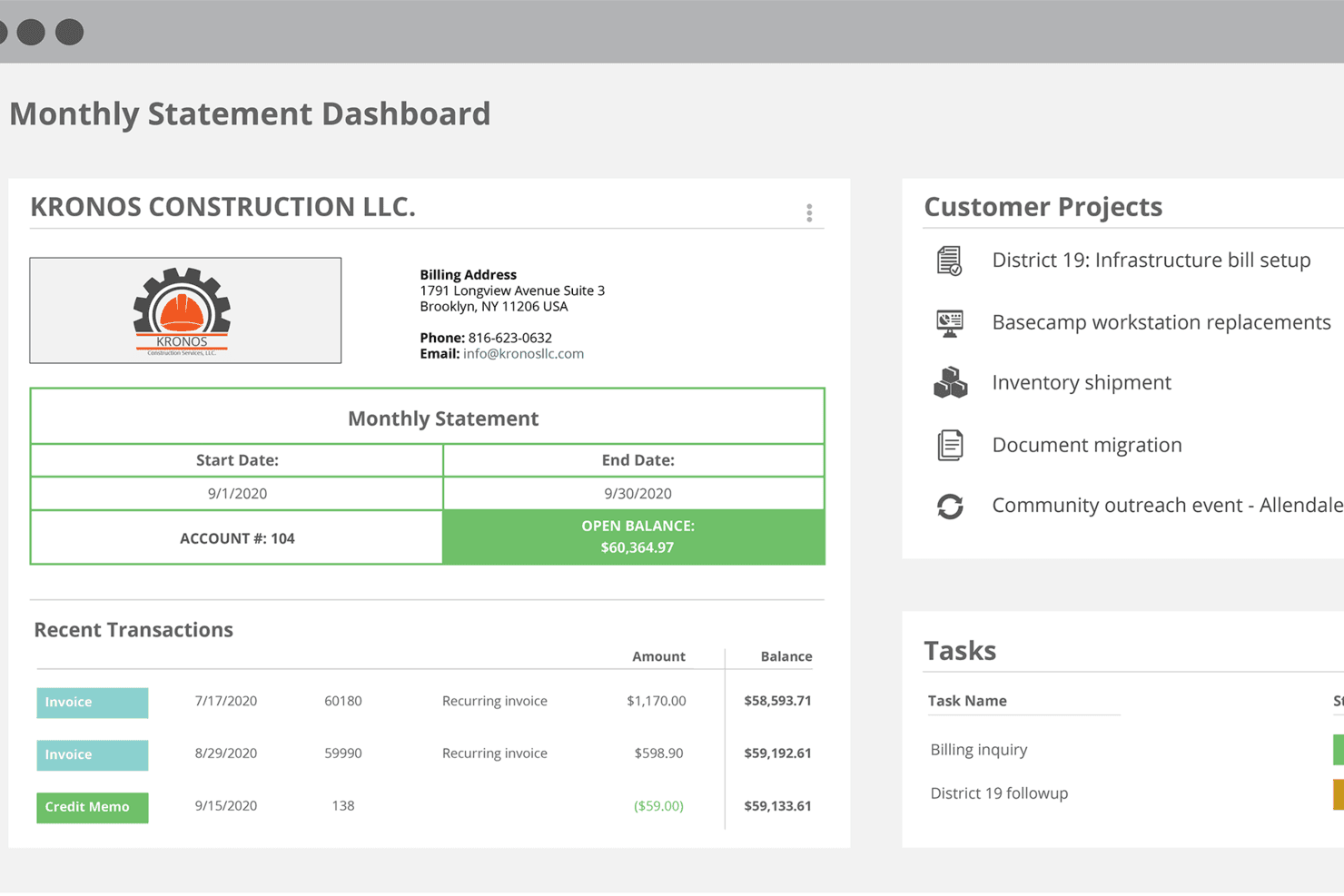
Dashboard di Striven che mostra panoramica dell'estratto conto mensile, transazioni recenti, progetti dei clienti e gestione delle attività Striven è un software ERP tutto-in-uno per aziende in crescita che riunisce funzionalità di contabilità, CRM, risorse umane, gestione progetti, vendite e magazzino in un'unica piattaforma cloud.
Per chi è Striven?
Striven è adatto a piccole e medie imprese che necessitano di una piattaforma unica per gestire le operazioni in ambito finanziario, commerciale, dei progetti e delle risorse umane.
Perché ho scelto Striven
Striven è una delle mie scelte preferite perché adoro il fatto che il suo CRM sia integrato direttamente nella stessa piattaforma degli strumenti di contabilità e di gestione operativa, e non aggiunto come un ripensamento. Posso seguire i lead attraverso una pipeline di vendita visuale, gestire i contatti dei clienti e vedere poi queste trattative trasformarsi direttamente in progetti e fatturazione senza cambiare sistema. La gestione dei contatti collegata consente inoltre di visualizzare la cronologia cliente tra preventivi, lavori e pagamenti, dando al mio team sempre il quadro completo di un account. Questo tipo di integrazione nativa tra vendite e operazioni amministrative è proprio ciò che rende Striven una valida alternativa ERP.
Caratteristiche principali di Striven
- Gestione contabile e finanziaria: Gestione di libro mastro, conti da pagare e ricevere, riconciliazione bancaria e reportistica finanziaria in un unico posto.
- Strumenti di gestione progetti: Creazione e assegnazione di attività, monitoraggio delle milestone, registrazione del tempo e controllo dei budget rispetto al reale.
- Gestione magazzino: Monitoraggio dei livelli di stock, gestione degli ordini di acquisto e collegamento diretto dell’inventario ai flussi di vendita ed evasione.
- Gestione HR e del personale: Archiviazione delle anagrafiche dipendenti, gestione dell’onboarding e rilevazione di presenze e orari di lavoro.
Integrazioni di Striven
Striven offre integrazioni native con QuickBooks, Gmail, Microsoft Outlook e Mailchimp. È disponibile un'API per integrazioni personalizzate.
Pros and Cons
Pros:
- Elaborazione stipendi diretta collegata ai fogli presenze
- Include gestione documentale e portali clienti
- Dashboard personalizzabili per insight tra reparti
Cons:
- Alcuni utenti segnalano tempi di caricamento delle pagine più lenti
- Meno modelli specifici per settore rispetto agli ERP più grandi
Learn more about Striven: Ideale per la gestione completa e trasversale delle risorse orientata alle persone
- Non disponibile
- Prezzo su richiesta
Visit WebsiteCustomer Rating:4.2/5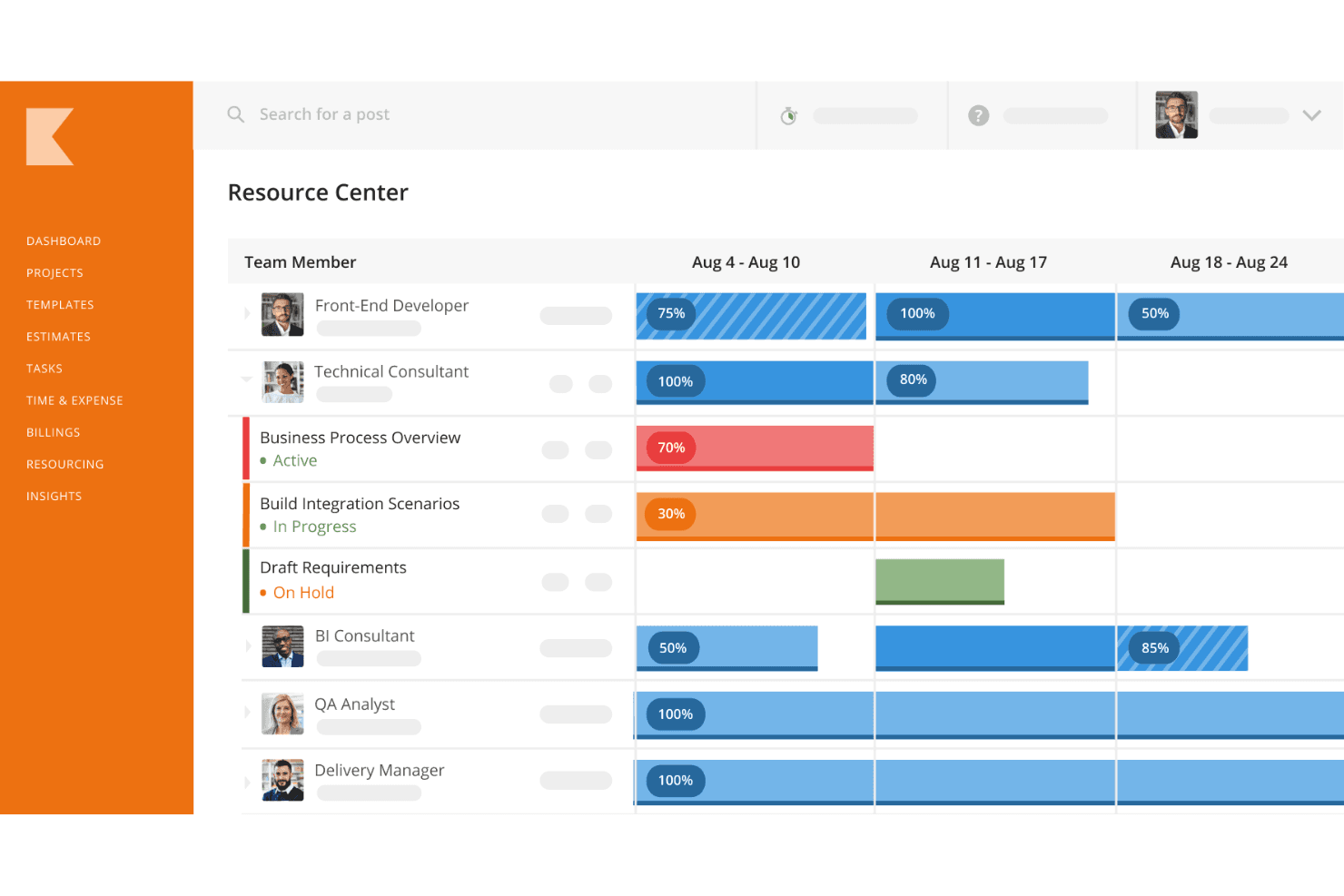
Kantata permette agli utenti di pianificare i progetti grazie alle sue avanzate capacità di gestione delle risorse. Kantata è una piattaforma cloud progettata su misura per le società di servizi professionali che cercano un'alternativa all'ERP adattata ai loro flussi di lavoro unici. A differenza dei tradizionali sistemi ERP che si concentrano maggiormente su finanza e operazioni, Kantata unisce persone, progetti e aspetti finanziari in un'unica soluzione integrata.
Perché ho scelto Kantata: Ciò che distingue Kantata è il modo in cui combina la pianificazione delle risorse centrata sulle persone con la gestione completa dell’intero ciclo di vita dei progetti. I suoi strumenti di previsione e gestione della capacità ti aiutano ad allineare le competenze e la disponibilità della squadra alle esigenze di progetto, così il tuo team resta bilanciato e coinvolto. Allo stesso tempo, unifica pianificazione, consegna, controllo finanziario e reportistica dei progetti, offrendo un'unica fonte di verità per tutto il ciclo di vita dei servizi. Questo rende Kantata una valida alternativa ERP per le società che desiderano una visibilità globale senza sacrificare un approccio umano alla gestione delle risorse.
Funzionalità e integrazioni principali:
Funzionalità includono inventari delle competenze, suggerimenti automatizzati per lo staffing, budgeting e fatturazione dei progetti, monitoraggio di tempi e spese, report su utilizzo e redditività, oltre a dashboard personalizzabili per la salute generale del portfolio.
Integrazioni includono NetSuite, Slack, Xero, HubSpot, Jira, Concur, Expensify, Intacct, Salesforce, Google Workspace, Microsoft 365 e QuickBooks.
Pros and Cons
Pros:
- Ottima reportistica di business intelligence
- Ampia gamma di funzionalità per la gestione delle risorse
- Buone opzioni di integrazione
Cons:
- Poche opzioni di personalizzazione aggiuntive
- La configurazione iniziale può richiedere tempo per abituarsi
Learn more about Kantata: Ideale grazie agli oltre 1.000 connettori preconfigurati
- Demo gratuita disponibile
- Prezzi su richiesta
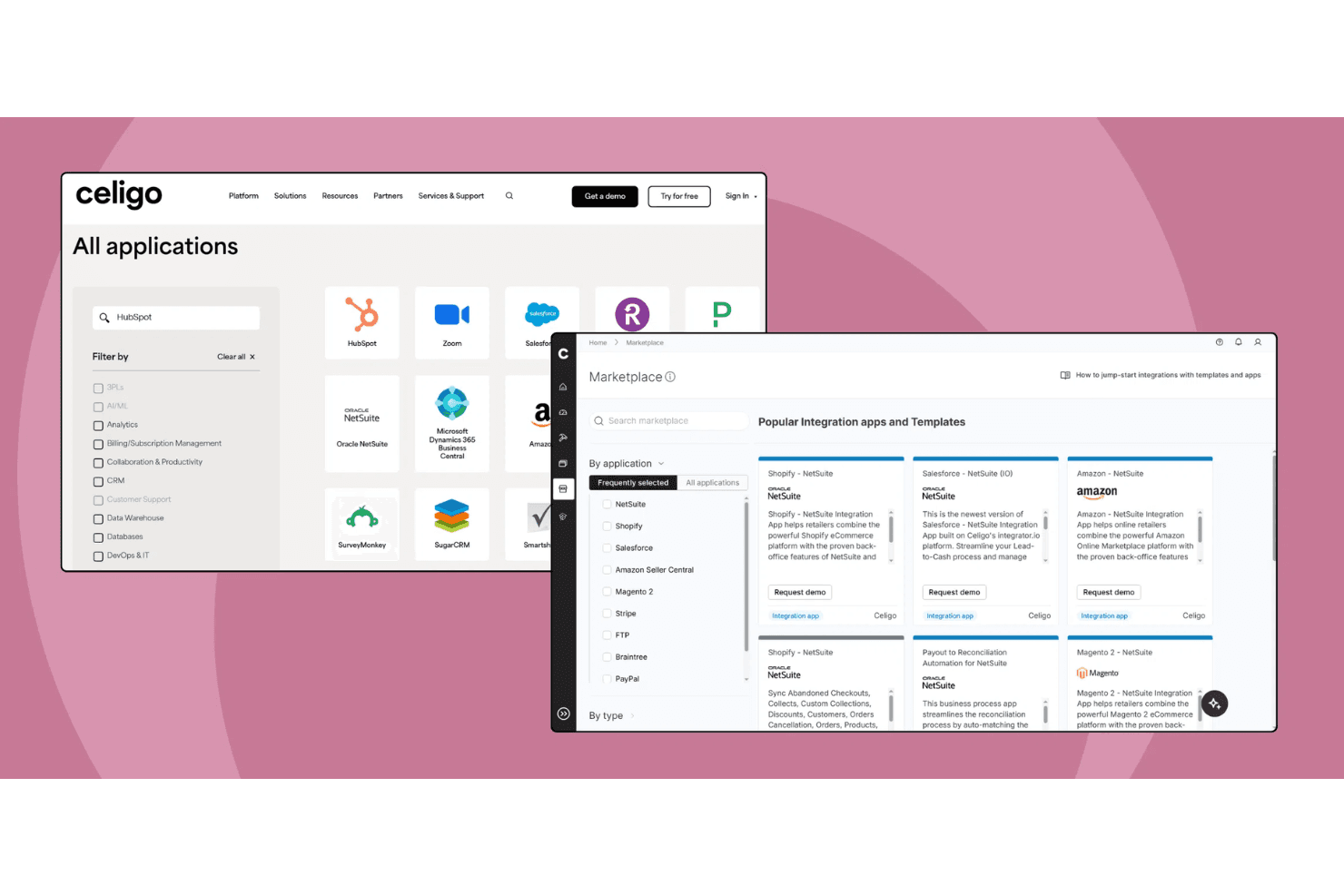
Celigo offre un marketplace di app di integrazione preconfigurate che collegano strumenti aziendali popolari come NetSuite, Shopify, Salesforce e Amazon come alternativa alle piattaforme ERP tradizionali. Celigo è una piattaforma di integrazione come servizio (iPaaS) che connette e automatizza i flussi di lavoro tra sistemi ERP, finanza, HR, CRM ed ecommerce per aziende alla ricerca di alternative agli ERP.
Per chi è più indicato Celigo?
Team IT e operativi di aziende di medie e grandi dimensioni che devono connettere e automatizzare molteplici applicazioni aziendali tra vari reparti.
Perché ho scelto Celigo
Ho scelto Celigo tra i migliori perché la sua libreria di oltre 1.000 connettori preconfigurati consente al mio team di collegare rapidamente sistemi ERP, CRM, ecommerce e finance senza necessità di sviluppi personalizzati. Utilizzo questi connettori per automatizzare i flussi di lavoro dall'ordine all'incasso e dall'approvvigionamento al pagamento su piattaforme come NetSuite, Salesforce e Shopify. Questo ci evita di dover costruire e mantenere integrazioni punto a punto per ogni nuovo strumento che aggiungiamo.
Funzionalità principali di Celigo
- Flow builder: Progetta e gestisci i flussi di integrazione utilizzando un'interfaccia visiva drag-and-drop.
- Pannello di gestione degli errori: Monitora, risolvi e gestisci gli errori di integrazione da un cruscotto centralizzato.
- Controlli di accesso basati sui ruoli: Imposta i permessi utente e gestisci gli accessi alle integrazioni e ai dati.
- Log di audit: Traccia le modifiche e monitora le attività su tutte le integrazioni per conformità e trasparenza.
Integrazioni di Celigo
Celigo offre oltre 1.000 connettori preconfigurati nativi, tra cui NetSuite, Microsoft Dynamics 365, SAP, Sage Intacct, Acumatica, QuickBooks, Shopify, Salesforce, HubSpot e Snowflake. Un'API è disponibile per integrazioni personalizzate.
Pros and Cons
Pros:
- Supporta la crittografia dei dati a livello di campo e i log di audit
- Compatibile con le normative SOC 2 Type II e GDPR
- Pannello visivo per la gestione degli errori e la risoluzione dei problemi
Cons:
- Opzioni limitate per implementazione offline o on-premise
- Alcuni connettori richiedono configurazioni aggiuntive
Learn more about Celigo: Ideale per la gestione di piccole e medie imprese
- Demo gratuita disponibile
- Prezzo su richiesta
Visit WebsiteCustomer Rating:4.4/5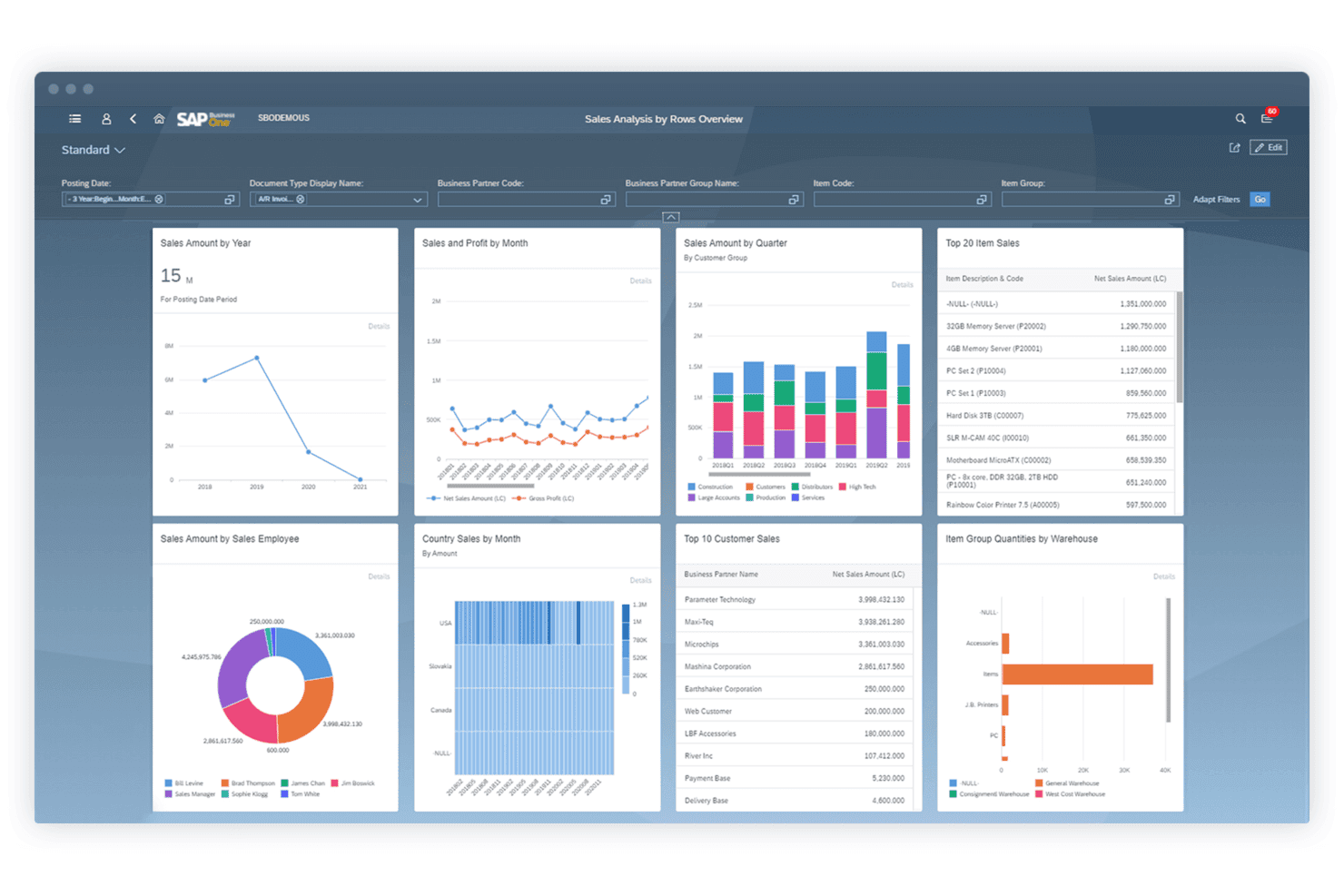
SAP Business One è una soluzione ERP integrata progettata per piccole e medie imprese, che semplifica le operazioni e migliora l'efficienza. SAP Business One è una soluzione ERP conveniente pensata per aiutare le piccole e medie imprese a gestire vari aspetti delle loro operazioni, tra cui contabilità, finanza, acquisti, inventario, vendite e relazioni con i clienti.
Perché ho scelto SAP Business One: SAP Business One offre un set di funzionalità pensate appositamente per le piccole e medie imprese. La capacità di integrare varie funzioni aziendali in un'unica piattaforma e le funzionalità di analisi in tempo reale lo rendono una valida alternativa per le aziende che desiderano ottimizzare le operazioni e aumentare l'efficienza.
Funzionalità principali e integrazioni:
Funzionalità includono implementazione on-premise o in cloud, business intelligence integrata, implementazione rapida e reportistica e analisi in tempo reale.
Integrazioni includono SAP HANA, Microsoft Excel, Microsoft Outlook, Shopify, Magento, WooCommerce, QuickBooks, Salesforce, HubSpot e Mailchimp.
Pros and Cons
Pros:
- Funzionalità complete di gestione aziendale
- Analisi e reportistica in tempo reale
- Opzioni di implementazione flessibili
Cons:
- Potrebbe richiedere personalizzazioni per esigenze specifiche
- Limitato a piccole e medie imprese
Learn more about SAP Business One: Ideale per ERP cloud con approfondimenti in tempo reale
- Demo gratuita disponibile
- Prezzo su richiesta
Visit WebsiteCustomer Rating:4.4/5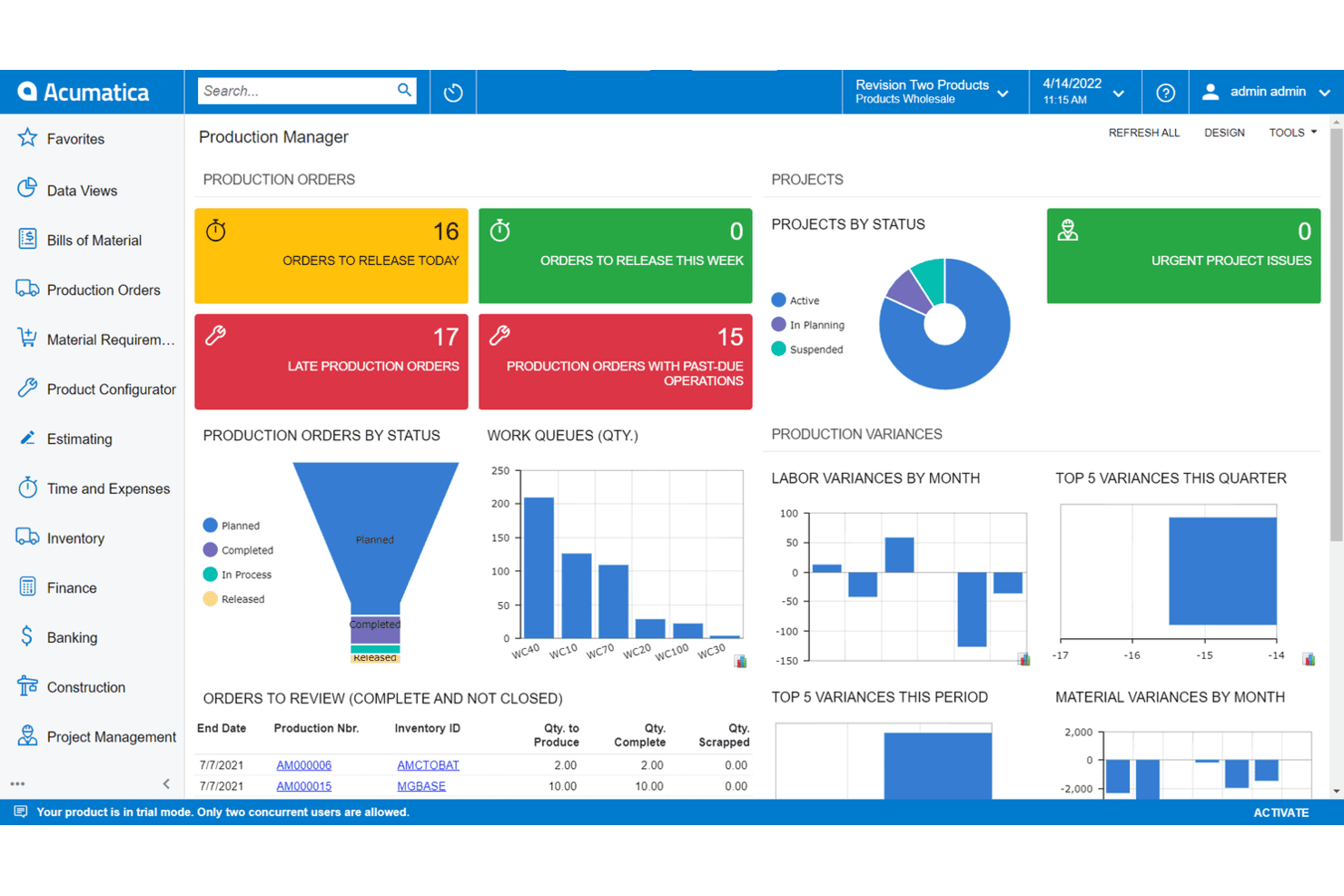
Acumatica è una soluzione ERP flessibile e basata su cloud che offre potenti strumenti di gestione aziendale per aziende di piccole e medie dimensioni. Acumatica è una soluzione ERP cloud progettata per offrire approfondimenti in tempo reale e avanzate capacità di gestione aziendale. È ideale per le aziende che cercano un sistema ERP flessibile e scalabile che fornisca dati e analisi in tempo reale.
Perché ho scelto Acumatica: Acumatica offre una solida architettura basata su cloud e approfondimenti in tempo reale, aspetti fondamentali per ambienti aziendali dinamici. Il suo modello di prezzo flessibile e il ricco set di funzionalità la rendono una scelta eccellente per le aziende che desiderano crescere in modo efficiente.
Funzionalità e integrazioni principali:
Le funzionalità includono gestione finanziaria, contabilità di progetto, CRM, soluzioni specifiche per settore, capacità di dati in tempo reale e opzioni di licenza flessibili.
Le integrazioni includono Amazon, BigCommerce, Shopify, Microsoft Dynamics 365, Salesforce, HubSpot, Avalara, Docusign, Adobe Sign e Magento.
Pros and Cons
Pros:
- Dati e analisi in tempo reale
- Prezzi flessibili e basati sull'uso
- Set di funzionalità completo
Cons:
- Configurazione complessa
- Capacità offline limitate
Learn more about Acumatica: Ideale per la gestione di finanza e risorse umane con ricalibrazione continua
- Demo gratuita disponibile
- Prezzo su richiesta
Visit WebsiteCustomer Rating:4.3/5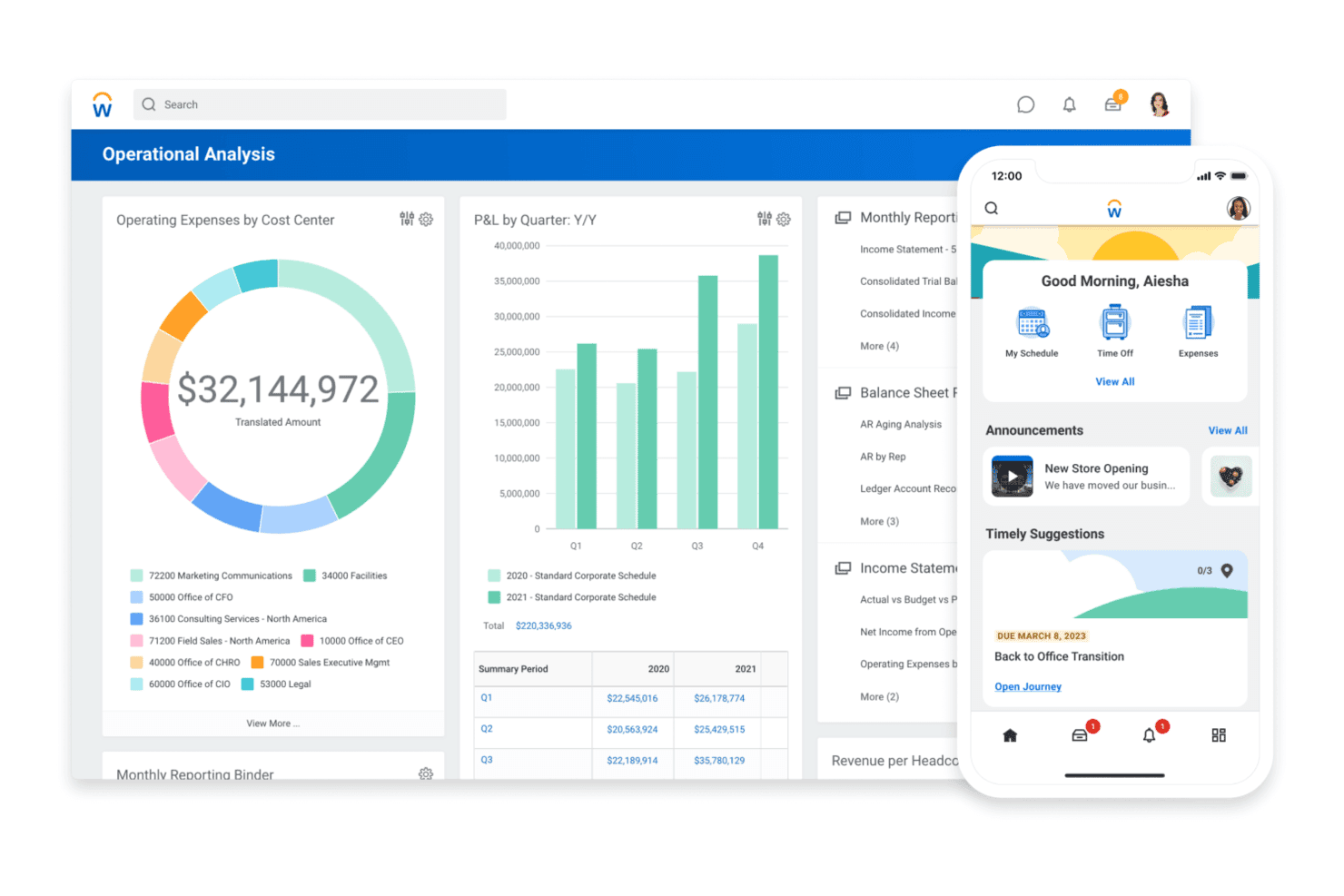
Workday è una soluzione ERP cloud specializzata in finanza e risorse umane, che offre strumenti avanzati di gestione per le grandi organizzazioni. Workday è un software aziendale basato su cloud che offre soluzioni per la gestione finanziaria e del capitale umano. Grazie alle sue avanzate capacità di integrazione e alle analisi in tempo reale, è ideale per grandi aziende con oltre 2.000 dipendenti e operazioni complesse distribuite su più regioni o entità.
Perché ho scelto Workday: Workday unisce le funzionalità di finanza e risorse umane in un'unica piattaforma, fornendo una soluzione unificata per esigenze aziendali complesse. Considerando le sue estese opzioni di integrazione e gli strumenti basati sull'intelligenza artificiale, si distingue come una valida alternativa ERP, soprattutto per le grandi imprese che cercano di ottimizzare e snellire le proprie operazioni.
Funzionalità e integrazioni principali:
Funzionalità includono un'interfaccia moderna basata su cloud e numerose integrazioni predefinite con strumenti aziendali di terze parti.
Le integrazioni includono Salesforce, Microsoft Azure, ServiceNow, Slack, Adobe Sign, Google Workspace, Okta, Docusign, IBM e SAP.
Pros and Cons
Pros:
- Integrazione completa con oltre 600 strumenti di terze parti
- Capacità avanzate di reportistica e analisi
- Funzionalità finanziarie e HR integrate in un'unica piattaforma
Cons:
- Nessun tasto Indietro nelle pagine
- Notifiche persistenti
 Ideale per la gestione finanziaria e operativa
- Demo gratuita disponibile
- Prezzi su richiesta
Visit WebsiteCustomer Rating:4.3/5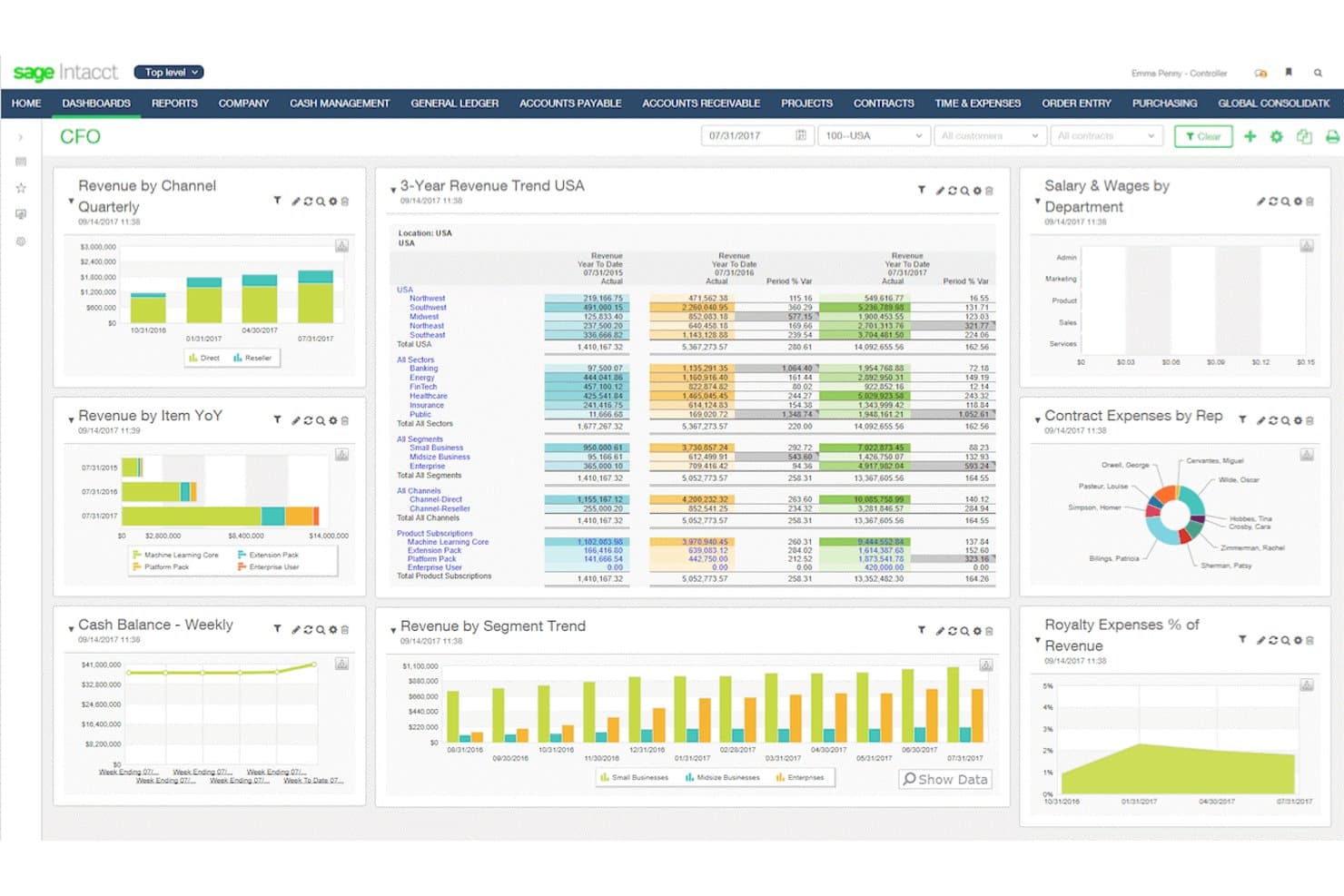
Sage Intacct è una soluzione ERP basata su cloud focalizzata sulla gestione finanziaria, che offre automazione avanzata e approfondimenti per aziende in crescita. Sage Intacct è una soluzione di gestione finanziaria basata sul cloud progettata per aziende in crescita. È ideale per la gestione finanziaria e operativa di aziende di medie dimensioni grazie alla sua suite avanzata di funzionalità che semplificano i processi finanziari e forniscono informazioni in tempo reale.
Perché ho scelto Sage Intacct: Sage Intacct offre funzionalità avanzate di gestione finanziaria pensate per le aziende di medie dimensioni. La sua natura cloud garantisce scalabilità e flessibilità, rendendolo una valida opzione per le aziende che vogliono migliorare le proprie operazioni finanziarie senza la necessità di un'infrastruttura IT complessa.
Funzionalità e integrazioni principali:
Funzionalità includono il supporto multi-società e multi-valuta, reportistica in tempo reale e flussi di lavoro automatizzati.
Integrazioni includono Salesforce, ADP, Expensify, Bill.com, Avalara, American Express, Stripe, PayPal, Square e Shopify.
Pros and Cons
Pros:
- Funzionalità complete di gestione finanziaria
- Soluzione scalabile basata su cloud
- Forti capacità di integrazione
Cons:
- Tempi di caricamento lenti durante i picchi di utilizzo
- Potrebbe richiedere formazione per un utilizzo completo
Learn more about Sage Intacct: 10Ideale per prestazioni di inventario connesso con analisi in tempo reale
Cin7
- Prova gratuita di 14 giorni + demo gratuita disponibile
- A partire da $349/mese
Visit WebsiteCustomer Rating:4.3/5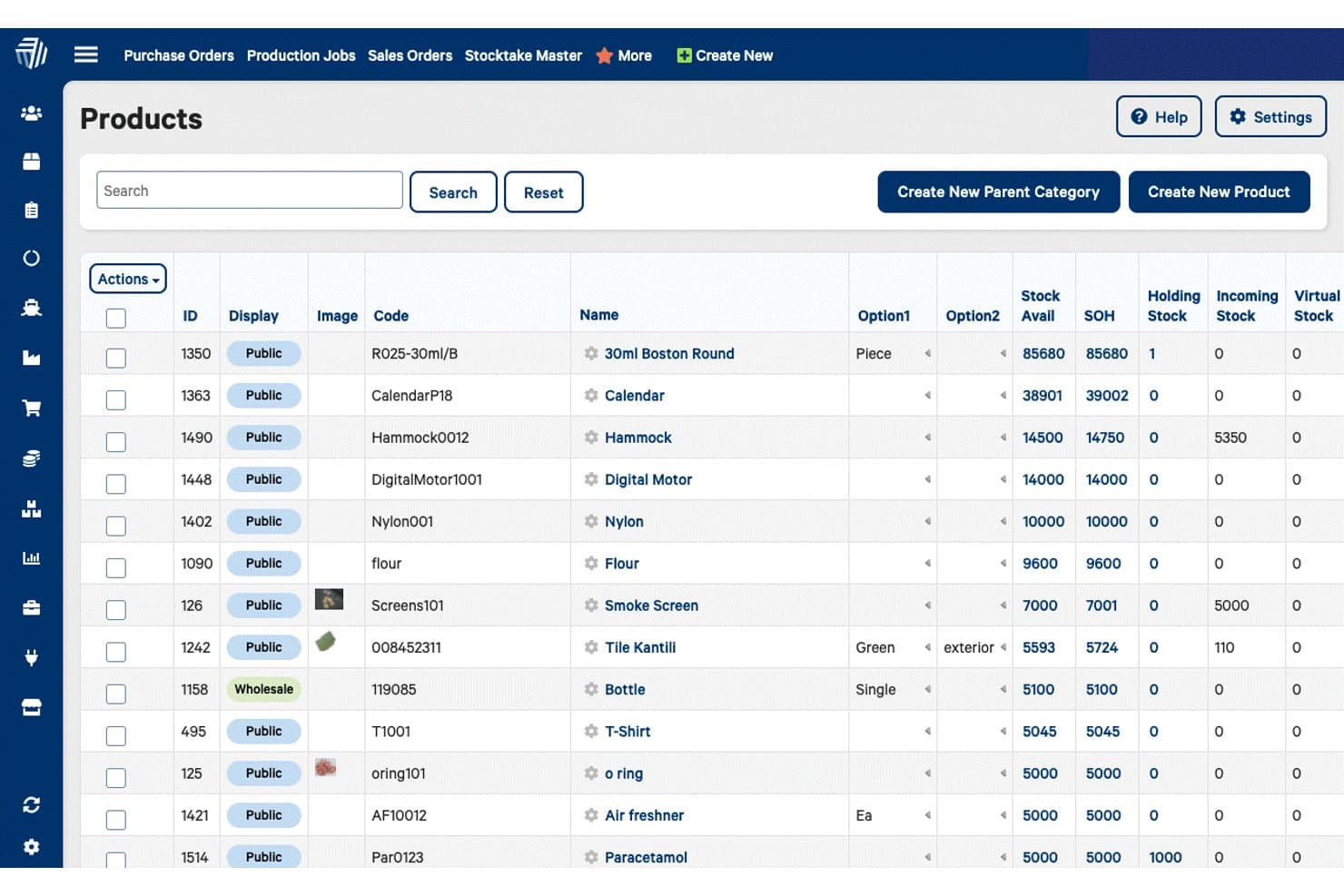
Cin7 è una soluzione ERP cloud che integra la gestione dell'inventario, delle vendite e dei processi della catena di approvvigionamento per aziende al dettaglio e all'ingrosso. Cin7 è un software cloud per la gestione dell'inventario e degli ordini progettato per aziende di vendita al dettaglio e all'ingrosso su più canali. È ideale per le aziende che desiderano semplificare la gestione dell'inventario e potenziare le capacità di vendita multicanale grazie alle sue avanzate funzionalità di integrazione e agli strumenti di automazione.
Perché ho scelto Cin7: Cin7 offre solide funzionalità per la gestione dell'inventario e degli ordini, fondamentali per le aziende multicanale. A mio avviso, le sue estese capacità di integrazione e le funzioni di automazione lo rendono un'opzione valida per le aziende che mirano a migliorare l'efficienza operativa e la scalabilità.
Caratteristiche principali & integrazioni:
Le funzionalità includono gestione dell'inventario, gestione degli ordini, sistema di punto vendita, gestione del magazzino, integrazione con e-commerce, vendite multicanale, gestione dei fornitori, gestione della produzione, gestione delle relazioni con i clienti e reportistica personalizzabile.
Le integrazioni includono QuickBooks, Shopify, Power BI, SAP, Oracle, Shipcaddie, Salesforce, Microsoft Office 365, Docusign e Magento.
Pros and Cons
Pros:
- Si integra con oltre 700 app
- Automatizza la gestione dell'inventario
- Supporta le vendite multicanale
Cons:
- La configurazione iniziale può essere complessa
- Bug occasionali negli aggiornamenti di sistema
Altre alternative agli ERP
Di seguito è riportato un elenco di ulteriori alternative agli ERP che ho selezionato. Anche se non sono rientrate tra le prime 10, sono comunque valide e meritano ulteriori approfondimenti.
- 11EpicorIdeale per soluzioni ERP specifiche di settore
- 12Microsoft Dynamics 365 Business CentralIdeale per un'integrazione perfetta con Microsoft 365
- 13FulfilIdeale per marchi direct-to-consumer
- 14QuickBooks EnterpriseIdeale per funzionalità avanzate di gestione inventario e prezzi
- 15InforIdeale per capacità e funzionalità cloud
- 16NEXIdeale per la gestione aziendale avanzata con soluzioni modulari
Come Valuto le Alternative ERP
Valuto le alternative ERP su due livelli: le capacità di base—come un GL multi-ente e l'automazione AP—che qualificano uno strumento, e i fattori differenzianti che distinguono i migliori.
Funzionalità di Base (Requisiti Minimi per Questa Lista)
Quando seleziono gli strumenti per la mia lista, valuto ciascuno su una scala da 0 (non offre la funzionalità) a 5 (eccelle in quest'area) per ogni funzionalità di base elencata di seguito. Poi calcolo il punteggio totale dello strumento in percentuale. Ogni strumento deve ottenere un punteggio totale minimo del 65% per essere preso in considerazione.
- Contabilità Principale e GL: Cerco un libro mastro completo con gestione AP, AR e delle scritture contabili—abbastanza da fungere da sistema finanziario di riferimento per il team.
- Reporting Finanziario e Analisi: Ogni strumento dovrebbe offrire bilanci standard, generatori di report personalizzati e dashboard che consentano ai controller di approfondire i dettagli delle variazioni.
- Multi-Ente e Multi-Valuta: Valuto se la piattaforma gestisce consolidamenti tra filiali e valute, poiché questa è una delle principali ragioni per cui i team superano gli strumenti di contabilità di base.
- Workflow Finanziari Automatizzati: Catene di approvazione, riconciliazioni bancarie e gestione delle attività di chiusura sono tutti fattori che considero—controllo se questi processi funzionano con il minimo intervento manuale.
- Integrazioni e Accesso API: Lo strumento deve collegarsi a CRM, paghe, fatturazione e sistemi bancari, tramite connettori preconfigurati o API aperte.
- Compliance e Controlli di Audit: Cerco allineamento a GAAP/IFRS, permessi basati sui ruoli e tracciamento dettagliato per supportare i controlli interni durante audit esterni.
Una volta compilata una lista di strumenti che soddisfano questi criteri, considero cosa distingue ogni piattaforma.
Fattori Differenzianti (Cosa Distingue i Fornitori)
Ecco come confronto i diversi fornitori:
Funzionalità Distintive
Un grande elemento distintivo è la presenza integrata di FP&A. Strumenti come Sage Intacct e Oracle NetSuite offrono budgeting, forecasting e pianificazione di scenari nativamente, così che i team finance non devono integrare una piattaforma separata per la pianificazione. Conta anche l'architettura componibile—alcuni team ora necessitano solo di automazione AP e reporting, ma vogliono aggiungere la consolidazione man mano che crescono. Verifico anche la presenza di funzionalità AI per la chiusura, dato che le piattaforme che abbinano automaticamente le transazioni e segnalano le anomalie possono ridurre i tempi di chiusura mensile.
Oltre le Funzionalità
Il costo totale di proprietà è una delle prime cose che valuto. Gli ERP tradizionali spesso comportano costi nascosti di consulenza e personalizzazione, quindi controllo che la tariffazione del fornitore sia prevedibile man mano che si aggiungono entità o utenti. Anche i tempi di implementazione hanno peso—una piattaforma che richiede sei mesi per essere avviata può bloccare un team finanziario in crescita. Controllo anche le certificazioni SOC 1/SOC 2 e ISO 27001, poiché gli auditor chiedono sempre più spesso la prova che i sistemi finanziari siano conformi a questi standard.
Perché cercare un'alternativa agli ERP
Con la crescita della tua azienda, è probabile che tu provi diverse soluzioni ERP e che, prima o poi, finisca per cercare un software alternativo. Ecco alcuni motivi comuni per cui potresti essere alla ricerca di una soluzione alternativa:
- Costo: A seconda dell'ERP scelto, questi tipi di software possono diventare piuttosto costosi, soprattutto se opti per componenti aggiuntivi. Un'alternativa ERP potrebbe avere costi inferiori rispetto all'opzione attuale o offrire una prova gratuita.
- Complessità: Alcuni ERP richiedono una formazione approfondita per poter utilizzare tutte le loro funzionalità. Se sei una SMB o non hai bisogno di tutte le funzionalità avanzate incluse nel tuo ERP, un'alternativa potrebbe essere più adatta.
- Flessibilità: Il tuo ERP attuale soddisfa le esigenze della tua azienda? In caso contrario, potresti essere alla ricerca di un'alternativa ERP.
- Scalabilità: Il tuo software dovrebbe sempre essere in grado di crescere insieme alla tua azienda. Ad esempio, se sei una piccola banca che ha acquisito recentemente molti clienti, avrai bisogno di un ERP più potente per gestire i conti.
- Personalizzazione: Opzioni di personalizzazione limitate possono ostacolare i processi aziendali, ma un'alternativa ERP con una maggiore personalizzazione, come le soluzioni a codice sorgente aperto, può aiutare la tua azienda a distinguersi e a diventare memorabile.
Gli ERP alternativi possono offrire soluzioni più convenienti, intuitive e adattabili, in grado di soddisfare meglio esigenze aziendali specifiche e requisiti di crescita. Considerando diverse opzioni, puoi trovare un sistema che offra maggiore flessibilità, scalabilità ed efficienza, migliorando in definitiva le prestazioni e la crescita complessive della tua azienda.
Caratteristiche principali delle alternative agli ERP
Ecco alcune caratteristiche chiave degli ERP che il software alternativo dovrebbe essere in grado di replicare o migliorare per adattarsi al meglio.
- Integrazione: le alternative ai software ERP combinano diversi processi aziendali in un unico sistema unificato, garantendo un flusso di dati e una comunicazione senza interruzioni tra i vari reparti. Questo consolidamento elimina i silos di dati e migliora l'efficienza operativa.
- Automazione: questi sistemi riducono le attività manuali attraverso flussi di lavoro automatizzati, semplificando le operazioni e riducendo al minimo il rischio di errore umano. Aziende come Gusto, ad esempio, si rendono conto che l'automazione fa risparmiare tempo e consente ai dipendenti di concentrarsi su attività più strategiche.
- Analisi dei dati: le alternative agli ERP offrono strumenti avanzati per analizzare i dati aziendali, consentendo alle aziende di prendere decisioni informate basate su informazioni accurate e complete. Questa funzionalità supporta la pianificazione strategica e il miglioramento delle prestazioni.
- Reportistica in tempo reale: offrendo report aggiornati sulle prestazioni aziendali, i sistemi ERP garantiscono alle parti interessate l'accesso immediato alle informazioni critiche.
- Scalabilità: le soluzioni ERP sono progettate per adattarsi alla crescita dell'azienda, gestendo volumi di dati in aumento e operazioni in espansione senza compromettere le prestazioni.
- Personalizzazione: questi sistemi consentono di creare soluzioni su misura per soddisfare esigenze organizzative specifiche, offrendo la flessibilità necessaria per adeguare le funzionalità ai processi aziendali unici.
- Controllo degli accessi degli utenti: la gestione delle autorizzazioni e dei livelli di accesso degli utenti è una caratteristica fondamentale dei software ERP, che garantisce la sicurezza dei dati e la conformità alle normative. Grazie al controllo degli accessi degli utenti, le aziende dei settori in cui i dati sono sensibili (ad esempio, il settore sanitario e i settori aeronautici) possono proteggere le informazioni sensibili e applicare le politiche organizzative.
- Gestione dell'inventario: una gestione efficiente dell'inventario contribuisce al risparmio sui costi e alla soddisfazione dei clienti. Di conseguenza, le migliori alternative agli ERP monitorano e gestiscono accuratamente i livelli delle scorte, ottimizzando il controllo delle scorte e riducendo il rischio di eccedenze o di esaurimento delle scorte.
- Gestione delle relazioni con i clienti: questi sistemi gestiscono le interazioni e i dati dei clienti, migliorando il servizio clienti e la gestione delle relazioni.
- Gestione finanziaria: una gestione finanziaria efficace supporta la pianificazione strategica e la conformità normativa. I migliori software ERP gestiscono la contabilità, la definizione del budget, le previsioni e la reportistica finanziaria, offrendo una visione completa della salute finanziaria dell'azienda.
Dalla gestione avanzata dell'inventario e degli ordini all'integrazione completa di CRM e commercio elettronico, queste soluzioni offrono la flessibilità e la scalabilità necessarie per ottimizzare le operazioni e promuovere la crescita. Esplorando diverse alternative agli ERP, le aziende possono trovare la soluzione più adatta per migliorare l'efficienza e raggiungere i propri obiettivi strategici.