

Il software per la gestione delle spese aziendali aiuta la tua azienda a controllare, monitorare e analizzare le spese dell'intera organizzazione in un unico luogo. Se stai cercando il miglior software per la gestione delle spese aziendali, probabilmente vuoi rafforzare i controlli, migliorare la conformità e ottenere visibilità in tempo reale sulle spese tra reparti e aree geografiche. Con processi di approvazione complessi, operazioni globali e rigorosi requisiti di verifica, scegliere la piattaforma giusta può determinare il successo o il fallimento dei tuoi processi finanziari. In questa guida troverai una panoramica chiara e pratica dei principali strumenti, così potrai scegliere con sicurezza la soluzione più adatta alle esigenze della tua azienda nel 2026.
Perché fidarsi dei nostri consigli sui software
6,700+
Reviews
20
Industry experts
16+
Evaluation factors
14
Years
Le nostre recensioni riflettono il nostro giudizio indipendente, non un discorso di vendita. Scopri come manteniamo la trasparenza.
Per questa guida, abbiamo valutato gli strumenti attraverso test pratici e ricerche indipendenti, assegnando un punteggio agli strumenti in base ai nostri criteri di selezione.
Le nostre recensioni riflettono il nostro giudizio editoriale umano, non un discorso di vendita.
Tabella comparativa dei software per la gestione delle spese aziendali
Questa tabella comparativa riassume i dettagli sui prezzi delle mie principali selezioni di software per la gestione delle spese aziendali:
| Tool | Best For | Trial Info | Price | ||
|---|---|---|---|---|---|
| 1 | Ideale per una digitalizzazione delle fatture semplificata | Piano gratuito + demo gratuita disponibile | Da $49/utente/mese | Website | |
| 2 | Ideale per la normalizzazione dei dati di spesa basata sull'intelligenza artificiale | Demo gratuita disponibile | Prezzo su richiesta | Website | |
| 3 | Ideale per approvazioni delle spese in tempo reale | Demo gratuita disponibile | Prezzo su richiesta | Website | |
| 4 | Ideale per la gestione integrata di viaggi e spese | Piano gratuito + demo gratuita disponibile | Prezzo su richiesta | Website | |
| 5 | Ideale per la conformità alle regole sui pagamenti internazionali | Demo gratuita disponibile | Da $99/mese | Website | |
| 6 | Ideale per gerarchie di approvazione personalizzate | Prova gratuita di 14 giorni | Da $3/utente/mese (fatturazione annuale) | Website | |
| 7 | Ideale per il controllo automatico delle carte | Piano gratuito + demo gratuita disponibile | Da $12/utente/mese | Website | |
| 8 | Ideale per la riconciliazione delle fatture telecom | Demo gratuita disponibile | Prezzi su richiesta | Website | |
| 9 | Ideale per applicare politiche globali su larga scala | Demo gratuita disponibile | Prezzo su richiesta | Website | |
| 10 | Ideale per workflow collaborativi con i fornitori | Demo gratuita disponibile | Prezzo su richiesta | Website |


Recensioni dei migliori software per la gestione delle spese aziendali
Di seguito trovi le mie valutazioni dettagliate dei software per la gestione delle spese aziendali inclusi nel mio elenco. Le mie recensioni offrono uno sguardo approfondito sulle funzionalità, sui casi d’uso migliori e sulle integrazioni di ciascuna piattaforma, per aiutarti a trovare quella più adatta a te.
 1Ideale per una digitalizzazione delle fatture semplificata
BILL
- Piano gratuito + demo gratuita disponibile
- Da $49/utente/mese
Visit WebsiteCustomer Rating:4.5/5
Vista di riepilogo della fattura BILL che mostra azioni sulla fattura, dettagli del cliente, importo dovuto e monitoraggio dello stato del pagamento all'interno del sistema di gestione delle spese aziendali della piattaforma. BILL è una piattaforma di gestione delle spese che combina l'automazione dei conti fornitori (AP), il controllo delle carte aziendali, il monitoraggio delle spese e la gestione dei budget in un unico luogo. Progettata per i team finanziari, BILL è una piattaforma di gestione delle spese che copre l'automazione AP, la rendicontazione delle spese, l'emissione di carte aziendali e l'elaborazione dei pagamenti. Una piattaforma di automazione AP e gestione delle spese, BILL riunisce l'elaborazione delle fatture, le carte aziendali, il monitoraggio delle spese e i flussi di lavoro di approvazione a più livelli.
Per chi è migliore BILL?
BILL è adatto a piccole e medie imprese con team finanziari che desiderano centralizzare conti fornitori, spese e spese con carta senza dover gestire più strumenti scollegati.
Perché ho scelto BILL
Ho incluso BILL tra le mie scelte principali perché la sua digitalizzazione delle fatture alimentata dall'IA è davvero una delle più autonome che abbia mai utilizzato. Quando un fornitore invia una fattura tramite e-mail al tuo indirizzo AP dedicato, l'OCR di BILL la legge, estrae i campi chiave e codifica automaticamente le voci su più righe — con un'elevata accuratezza per quanto riguarda la rilevazione dei campi e una dichiarata significativa riduzione del tempo di codifica manuale. Mi piace anche il fatto che gestisca automaticamente i controlli a 2 e 3 vie, segnalando ordini d'acquisto duplicati e incongruenze prima che diventino errori di pagamento.
Caratteristiche principali di BILL
- Flussi di lavoro di approvazione a più livelli: Imposta catene di approvazione sequenziali o parallele per fatture e pagamenti in base all'importo, al dipartimento o al fornitore.
- Controlli sulle spese della carta aziendale: Emetti carte BILL Divvy virtuali o fisiche con limiti di spesa preimpostati e restrizioni di categoria per ciascun dipendente.
- Monitoraggio del budget in tempo reale: Monitora la spesa rispetto ai budget di reparto o di progetto man mano che si verificano le transazioni tramite carte e AP.
- Portale di gestione fornitori: Archivia i dettagli di pagamento dei fornitori, W-9 e informazioni di contatto in una directory centralizzata dei fornitori.
Integrazioni di BILL
BILL offre una sincronizzazione bidirezionale nativa con QuickBooks Online, QuickBooks Pro/Premier, QuickBooks Enterprise, Xero, Oracle NetSuite, Sage Intacct e Microsoft Dynamics. Supporta inoltre l'integrazione dei dati con ERP aggiuntivi come Blackbaud, Acumatica, Sage 50, Sage 100 e FreshBooks tramite modelli di importazione/esportazione file personalizzabili. Oltre alle sincronizzazioni contabili, BILL si integra con piattaforme HR, Slack e dispone di una piattaforma API per la creazione di integrazioni personalizzate. Il supporto a Zapier non è chiaramente documentato come connessione nativa.
Pros and Cons
Pros:
- Supporta pagamenti ACH, bonifico, assegno e carta
- Automatizza acquisizione, approvazioni e pagamenti delle fatture
- Acquisizione in tempo reale della ricevuta tramite app mobile dopo le transazioni
Cons:
- Manca un processo di verifica a tre vie affidabile
- Tempi di risposta lunghi da parte del supporto su problematiche complesse
Learn more about BILL: Ideale per la normalizzazione dei dati di spesa basata sull'intelligenza artificiale
- Demo gratuita disponibile
- Prezzo su richiesta
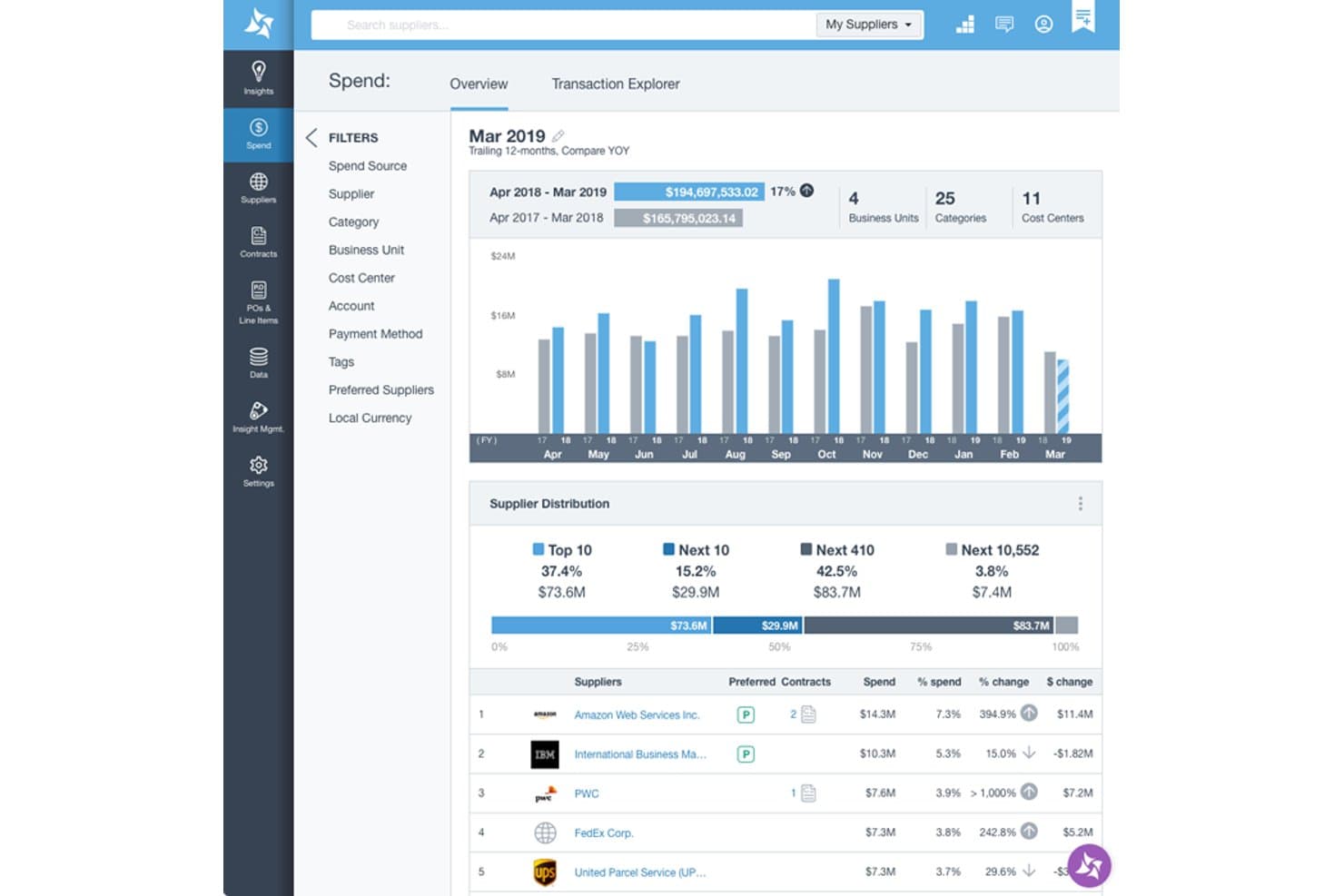
Suplari offre una dashboard panoramica della spesa con la distribuzione dei fornitori, il confronto della spesa anno su anno e la classifica dei principali fornitori in base alla percentuale di spesa. Suplari è una piattaforma di intelligence per gli acquisti che utilizza l'intelligenza artificiale per normalizzare, classificare e analizzare i dati di spesa raccolti dai sistemi ERP, P2P, di contabilità fornitori e di gestione delle spese aziendali.
Per chi è più indicato Suplari?
Suplari è particolarmente adatto ai responsabili degli acquisti di grandi aziende che gestiscono dati di spesa complessi e provenienti da più fonti, distribuiti su diversi sistemi ERP o P2P.
Perché ho scelto Suplari
Ho scelto Suplari perché nessun altro strumento della mia selezione gestisce i dati di spesa disordinati e provenienti da più fonti in modo altrettanto efficace. La sua intelligenza artificiale classifica automaticamente la spesa secondo tassonomie UNSPSC o personalizzate e deduplica i fornitori in gerarchie normalizzate padre-figlio, senza richiedere un progetto iniziale di pulizia dei dati. Mi piace il fatto che acquisisca simultaneamente i dati da più sistemi ERP, P2P e strumenti di contabilità fornitori, offrendo ai team acquisti una visione unica e accurata della spesa entro 90 giorni.
Funzionalità principali di Suplari
- Software di intelligence dei contratti: estrae e centralizza termini chiave, date e obblighi dai documenti contrattuali per l'analisi e l'invio di avvisi.
- Monitoraggio dei risparmi negli acquisti: monitora e quantifica i risparmi realizzati rispetto a quelli previsti, per progetto e categoria.
- Monitoraggio del rischio dei fornitori: verifica continuamente i dati dei fornitori alla ricerca di segnali di rischio, problemi di conformità e tendenze relative alle prestazioni.
- Creazione di dashboard senza codice: consente agli utenti di creare dashboard personalizzate per la spesa, i fornitori o i rischi senza richiedere risorse IT o sviluppatori.
Integrazioni di Suplari
Suplari offre integrazioni native con SAP, Oracle, Workday, Coupa, Ariba, Snowflake, Microsoft Dynamics e Databricks. È disponibile un'API per le integrazioni personalizzate.
Pros and Cons
Pros:
- La classificazione della spesa tramite intelligenza artificiale è estremamente accurata
- Tempi rapidi per ottenere visibilità sulla spesa
- Gestisce bene i dati disordinati provenienti da più fonti
Cons:
- Non è una piattaforma completa per il processo dall'approvvigionamento al pagamento
- Funzionalità native di automazione della contabilità fornitori limitate
Learn more about Suplari: Ideale per approvazioni delle spese in tempo reale
- Demo gratuita disponibile
- Prezzo su richiesta
Visit WebsiteCustomer Rating:4.7/5
Spendesk combina carte, spese, fatture, approvazioni e monitoraggio. Spendesk è una piattaforma di gestione delle spese aziendali che combina carte aziendali, gestione delle fatture, monitoraggio delle spese, flussi di approvazione e controllo delle spese in tempo reale in un unico sistema.
Per chi è Spendesk?
Spendesk è ideale per i team finanziari di aziende di medie dimensioni che necessitano di un controllo centralizzato sulle spese dei dipendenti.
Perché ho scelto Spendesk
Ho scelto Spendesk come uno dei migliori perché posso impostare approvazioni delle spese in tempo reale che avvertono immediatamente i responsabili quando viene effettuata una richiesta di acquisto. Il mio team utilizza le carte virtuali e fisiche della piattaforma per controllare le spese al momento dell'acquisto, e faccio affidamento sui flussi di approvazione automatizzati per mantenere le spese all'interno delle policy senza rallentare le operazioni. Apprezzo anche la possibilità di tracciare ogni transazione in tempo reale, il che mi aiuta a restare aggiornato sulle spese dell'intera azienda.
Funzionalità principali di Spendesk
- Gestione delle fatture: Carica, elabora e abbina le fatture direttamente sulla piattaforma.
- Acquisizione delle ricevute: Scatta una foto e allega le ricevute alle transazioni tramite l'app mobile.
- Dashboard di analisi delle spese: Visualizza dati e tendenze di spesa categorizzati in tempo reale.
- Supporto multi-entità: Gestisci le spese su più filiali o unità aziendali.
Integrazioni di Spendesk
Spendesk offre integrazioni native con Xero, NetSuite, QuickBooks, Slack, Workday, SAP SuccessFactors, HiBob, BambooHR, Personio e Google Workspace.
Pros and Cons
Pros:
- Notifiche di approvazione delle spese in tempo reale per i responsabili
- Carte virtuali e fisiche per spese controllate
- Supporto multi-entità per organizzazioni globali
Cons:
- Esportazione dei report può essere limitata come formato
- Personalizzazione limitata dei flussi di approvazione
Learn more about Spendesk: Ideale per la gestione integrata di viaggi e spese
- Piano gratuito + demo gratuita disponibile
- Prezzo su richiesta
Visit WebsiteCustomer Rating:4.7/5
Navan Expense offre una dashboard delle transazioni con monitoraggio della spesa per fornitore. Navan è una piattaforma di gestione delle spese aziendali che combina il monitoraggio delle spese, la prenotazione dei viaggi, il controllo delle policy e la reportistica in tempo reale in un unico sistema.
Per chi è ideale Navan?
Navan è adatto ai team finanziari di aziende di medie e grandi dimensioni che gestiscono frequenti viaggi di lavoro e rendicontazione delle spese dei dipendenti.
Perché ho scelto Navan
Ho scelto Navan come uno dei migliori perché posso gestire sia la prenotazione dei viaggi che il monitoraggio delle spese in un unico posto, cosa rara tra gli strumenti di gestione della spesa. Utilizzo i suoi controlli di policy in tempo reale per applicare automaticamente le regole relative ai viaggi e alle spese e il mio team si affida all'app mobile per acquisire ricevute e inviare le spese anche in movimento. Mi piace anche il fatto che Navan sincronizzi direttamente gli itinerari di viaggio con i report delle spese, rendendo la riconciliazione molto più veloce per noi.
Funzionalità principali di Navan
- Carte virtuali: Emetti carte virtuali monouso o ricorrenti per gli acquisti dei dipendenti.
- Categorizzazione automatica delle spese: Le spese vengono automaticamente ordinate in categorie predefinite.
- Flussi di approvazione personalizzati: Imposta processi di approvazione a più livelli per le richieste di spesa.
- Dashboard di analisi in tempo reale: Monitora dati e tendenze di spesa con report visivi aggiornati.
Integrazioni Navan
Navan offre integrazioni native con NetSuite, QuickBooks, Xero, Workday e Oracle.
Pros and Cons
Pros:
- Prenotazione viaggi e gestione delle spese integrate
- Acquisizione automatica delle ricevute dalle prenotazioni di viaggio
- Rilevamento frodi e insight sulle spese basati su AI
Cons:
- Personalizzazione limitata per workflow di approvazione complessi
- La focalizzazione sui viaggi potrebbe non essere adatta ad aziende con pochi viaggi
Learn more about Navan: Ideale per la conformità alle regole sui pagamenti internazionali
- Demo gratuita disponibile
- Da $99/mese
Visit WebsiteCustomer Rating:4.5/5
Tipalti offre una dashboard centralizzata per la gestione delle spese. Tipalti è una piattaforma aziendale di gestione delle spese che centralizza l'elaborazione delle spese, automatizza i pagamenti globali, gestisce l'onboarding dei fornitori e garantisce la conformità con i requisiti fiscali e normativi.
Per chi è più adatto Tipalti?
Tipalti è particolarmente indicato per i team finanziari di aziende multinazionali che devono gestire la complessa conformità dei pagamenti globali.
Perché ho scelto Tipalti
Ho scelto Tipalti come uno dei migliori perché posso automatizzare i pagamenti globali restando conforme ai requisiti fiscali e normativi locali. Il mio team utilizza la raccolta e la validazione delle dichiarazioni fiscali integrate per ridurre il rischio quando paghiamo fornitori internazionali. Mi affido anche ai controlli di screening dei pagamenti e alle verifiche sulle sanzioni per evitare problemi normativi in diversi paesi.
Caratteristiche principali di Tipalti
- Gestione multi-entità: consente di gestire spese e pagamenti tra più filiali o unità aziendali.
- Acquisizione automatica delle fatture: Estrae i dati dalle fatture e li associa agli ordini di acquisto.
- Flussi di approvazione personalizzati: Permette di configurare catene di approvazione a più livelli per le note spese.
- Monitoraggio in tempo reale dello stato dei pagamenti: Fornisce visibilità sull'avanzamento e il regolamento di ciascuna transazione.
Integrazioni Tipalti
Tipalti offre integrazioni native con NetSuite, QuickBooks Online, Sage Intacct, Xero e Oracle.
Pros and Cons
Pros:
- Supporta pagamenti globali in oltre 190 Paesi
- Strumenti automatizzati per la conformità fiscale e la validazione
- Gestione multi-entità e sussidiarie
Cons:
- L'app mobile non offre funzionalità avanzate
- Le opzioni di workflow di approvazione sono basilari
Learn more about Tipalti: Ideale per gerarchie di approvazione personalizzate
- Prova gratuita di 14 giorni
- Da $3/utente/mese (fatturazione annuale)
Visit WebsiteCustomer Rating:4.3/5
Zoho Expense offre una dashboard amministrativa con riassunti della spesa. Zoho Expense è una piattaforma di gestione delle spese aziendali che offre reportistica delle spese automatizzata, controlli sulle policy, approvazioni multilivello e integrazioni con sistemi contabili ed ERP.
Per chi è ideale Zoho Expense?
Zoho Expense è particolarmente indicato per i team finanziari di aziende di medie e grandi dimensioni che necessitano di un controllo dettagliato sulle approvazioni delle spese.
Perché ho scelto Zoho Expense
Ho scelto Zoho Expense come uno dei migliori perché posso costruire gerarchie di approvazione personalizzate e multilivello che rispecchiano la struttura della nostra organizzazione. Il mio team utilizza il suo avanzato motore di workflow per impostare instradamenti condizionali in base a dipartimento, importo o progetto. Mi affido inoltre ai suoi controlli granulati delle policy per garantire la conformità in ogni fase di approvazione.
Funzionalità principali di Zoho Expense
- Gestione delle carte aziendali: Emissione, monitoraggio e riconciliazione delle transazioni delle carte aziendali direttamente sulla piattaforma.
- Monitoraggio di chilometraggio e indennità giornaliere: Rilevamento e gestione delle spese di viaggio e indennità giornaliere per i dipendenti.
- Supporto multivaluta: Invio e gestione delle spese in più valute per team internazionali.
- Audit trail: Conservazione di un registro dettagliato di tutte le azioni e modifiche sulle spese per la conformità.
Integrazioni di Zoho Expense
Zoho Expense offre integrazioni native con Zoho Books, Zoho CRM, QuickBooks Online, Xero, Sage Accounting, Oracle e Microsoft 365.
Pros and Cons
Pros:
- Workflow di approvazione personalizzati per gerarchie complesse
- Forte applicazione delle policy e audit trail
- Scansione automatica delle ricevute e categorizzazione delle spese
Cons:
- Il processo di rimborso può essere lento
- Le regole per indennità giornaliere e chilometraggio sono rigide
Learn more about Zoho Expense: 7Ideale per il controllo automatico delle carte
Brex
- Piano gratuito + demo gratuita disponibile
- Da $12/utente/mese
Visit WebsiteCustomer Rating:4.5/5
Brex offre una dashboard di report sulla conformità con monitoraggio delle spese. Brex è una piattaforma di gestione delle spese aziendali che offre carte aziendali, monitoraggio automatico delle spese, controlli sugli acquisti e reportistica in tempo reale in un sistema unificato.
Per chi è ideale Brex?
Brex è particolarmente adatto ai team finanziari di startup in rapida crescita e aziende tecnologiche che necessitano di controlli automatici sulle carte e una gestione centralizzata delle spese.
Perché ho scelto Brex
Ho scelto Brex tra i migliori perché posso impostare controlli dettagliati e automatici sulle carte per ogni team e progetto, il che mi consente di applicare le politiche di spesa senza revisioni manuali. Uso Brex per emettere immediatamente carte virtuali e fisiche, ognuna con limiti personalizzati e restrizioni sui commercianti. Il mio team si affida al monitoraggio in tempo reale delle transazioni e all'abbinamento automatico delle ricevute, così possiamo individuare subito le spese fuori politica.
Funzionalità principali di Brex
- Automazione delle politiche di spesa: Imposta e applica automaticamente le politiche di spesa aziendali.
- Gestione multi-entità: Gestisci le spese di più filiali o unità aziendali in un'unica piattaforma.
- Integrazioni ERP: Sincronizza transazioni e dati di spesa direttamente con sistemi di contabilità come NetSuite e QuickBooks.
- Caricamento ricevute da mobile: Carica e abbina le ricevute alle transazioni tramite l'app mobile di Brex.
Integrazioni Brex
Brex offre integrazioni native con NetSuite, QuickBooks, Xero, Sage Intacct, Oracle Fusion Cloud, Workday, SAP Concur, Slack, Google Workspace e Zapier.
Pros and Cons
Pros:
- Controlli automatizzati sulle carte per ogni team
- Emissione rapida di carte virtuali e fisiche
- Gestione di multi-entità e filiali
Cons:
- Accettazione carte internazionale limitata
- Nessuna piattaforma integrata per prenotazione viaggi
 Ideale per la riconciliazione delle fatture telecom
- Demo gratuita disponibile
- Prezzi su richiesta
Visit WebsiteCustomer Rating:5/5
Lightyear offre una dashboard mensile delle spese per telecomunicazioni. Lightyear è una piattaforma di gestione delle spese per le telecomunicazioni progettata per le aziende che desiderano automatizzare l'elaborazione delle fatture, verificare le bollette telefoniche, gestire i contratti e centralizzare i dati dei fornitori di servizi di telecomunicazione.
Per chi è ideale Lightyear?
Lightyear è particolarmente adatto ai team di telecomunicazioni, IT e finanza in grandi aziende che gestiscono grandi volumi di fatture telefoniche e contratti con fornitori.
Perché ho scelto Lightyear
Ho scelto Lightyear tra i migliori perché consente di automatizzare la riconciliazione delle fatture telefoniche su larga scala, che rappresenta un punto dolente per le grandi aziende. Mi piace che il mio team possa controllare le bollette riga per riga, segnalare discrepanze e centralizzare i dati contrattuali di tutti i fornitori di telecomunicazioni. In pratica, ciò significa che possiamo gestire grandi volumi di fatture e individuare errori di fatturazione prima che arrivino al nostro bilancio generale.
Funzionalità principali di Lightyear
- Codifica automatica del bilancio generale: Assegna automaticamente le spese telefoniche ai corretti conti del piano dei conti aziendale.
- Supporto multi-valuta: Gestisce fatture e pagamenti in diverse valute per le operazioni globali.
- Gestione dei permessi utente: Permette di controllare i diritti di accesso e approvazione per i diversi membri del team.
- Archiviazione documentale: Conserva contratti, fatture e documenti di supporto in un archivio digitale centralizzato.
Integrazioni di Lightyear
Le integrazioni native non sono chiaramente documentate.
Pros and Cons
Pros:
- Automatizza l'estrazione dei dati dalle fatture telecom
- Segnala le discrepanze in fattura per la revisione
- Centralizza la gestione dei contratti telecom
Cons:
- Manca di dashboard di analisi integrate
- Nessuna funzione di elaborazione automatica dei pagamenti
Learn more about Lightyear: Ideale per applicare politiche globali su larga scala
- Demo gratuita disponibile
- Prezzo su richiesta
Visit WebsiteCustomer Rating:4.2/5
Coupa offre una dashboard approfondimenti alimentata dall’intelligenza artificiale, che mostra metriche di spesa, opportunità di risparmio e raccomandazioni prescrittive per la gestione delle spese aziendali. Coupa è una piattaforma di gestione delle spese aziendali progettata per grandi organizzazioni che devono gestire approvvigionamenti, spese, fatturazione, relazioni con i fornitori e conformità contrattuale in un unico sistema integrato.
Per chi è più indicato Coupa?
Coupa è ideale per grandi aziende con operazioni globali complesse e requisiti normativi rigorosi.
Perché ho scelto Coupa
Ho scelto Coupa tra i migliori perché posso impostare controlli sulle politiche a livello globale che si applicano in modo coerente a tutte le unità aziendali. Utilizzo il suo motore di applicazione delle politiche per automatizzare i controlli di conformità e le approvazioni per spese complesse in più paesi. Le tracce di audit della piattaforma e i flussi di lavoro configurabili consentono al mio team di gestire il rischio e applicare gli standard su larga scala.
Caratteristiche principali di Coupa
- Gestione fornitori: Centralizza onboarding dei fornitori, valutazione dei rischi e monitoraggio delle performance.
- Archivio contratti: Archivia e organizza i contratti per facilitarne l'accesso e il monitoraggio della conformità.
- Rendicontazione spese: Automatizza la registrazione delle spese, la loro categorizzazione e la verifica delle politiche.
- Monitoraggio budget: Fornisce visibilità in tempo reale sul consumo del budget e sulla spesa residua.
Integrazioni Coupa
Coupa offre integrazioni native con SAP, Oracle, NetSuite, Workday, Salesforce e dispone di integrazioni native nell'ecosistema Microsoft, inclusi Microsoft 365 e Azure.
Pros and Cons
Pros:
- Applicazione delle politiche globali tra più entità
- Tracce di audit avanzate per il monitoraggio della conformità
- Visibilità e notifiche di budget in tempo reale
Cons:
- Il processo di implementazione può essere lungo
- L’impostazione delle integrazioni può richiedere supporto tecnico
Learn more about Coupa: Ideale per workflow collaborativi con i fornitori
- Demo gratuita disponibile
- Prezzo su richiesta
Visit WebsiteCustomer Rating:3.8/5
Tradeshift unifica fatturazione, acquisti e workflow dei fornitori. Tradeshift è una piattaforma cloud per la gestione della spesa aziendale che unisce fatturazione elettronica, approvvigionamento, gestione dei fornitori e strumenti di workflow collaborativo per acquirenti e fornitori.
Per chi è più indicato Tradeshift?
Tradeshift è adatto a team di acquisto e finanza di grandi imprese che gestiscono reti di fornitori complesse.
Perché ho scelto Tradeshift
Ho scelto Tradeshift tra i migliori perché posso configurare flussi di lavoro collaborativi con i fornitori che permettono al mio team e ai partner di comunicare, condividere documenti e risolvere direttamente in piattaforma eventuali problemi di fatturazione. Utilizzo i suoi strumenti di onboarding dei fornitori per integrare rapidamente nuovi partner nella nostra rete e sfrutto lo scambio documentale in tempo reale per mantenere in sincronia approvvigionamento e contabilità fornitori. Il mio team è in grado di automatizzare le attività di collaborazione che altrimenti richiederebbero infinite conversazioni via email.
Funzionalità principali di Tradeshift
- Automazione della fatturazione elettronica: Elabora e valida automaticamente le fatture dei fornitori in diversi formati.
- Gestione dei cataloghi di approvvigionamento: Centralizza e gestisce i cataloghi dei fornitori per acquisti semplificati.
- Dashboard di analisi della spesa: Visualizza e monitora i dati di spesa su fornitori e categorie.
- Builder di workflow personalizzato: Progetta e automatizza i flussi di approvazione per i processi di acquisto e finanza.
Integrazioni di Tradeshift
Le integrazioni native non sono elencate pubblicamente.
Pros and Cons
Pros:
- L'onboarding dei fornitori è automatizzato e configurabile
- Collaborazione documentale in tempo reale con i fornitori
- Supporta transazioni multilingue e multidivisa
Cons:
- Integrazioni native limitate con strumenti di terze parti
- Le opzioni di personalizzazione dei report sono limitate
Learn more about Tradeshift:
Altri software per la gestione delle spese aziendali
Ecco alcune ulteriori opzioni di software per la gestione delle spese aziendali che non sono state incluse nel mio elenco, ma che vale comunque la pena valutare:
- 11ControlHubIdeale per l'automazione del procurement nelle aziende tecnologiche
- 12ExpensePointIdeale per l'elaborazione delle spese in più valute
- 13FraxionIdeale per documentazione di spesa pronta per l'audit
- 14SAP Concur ExpenseIdeale per la cattura di ricevute tramite dispositivi mobili e la creazione di report
Come valuto i software di gestione della spesa aziendale
Valuto ogni piattaforma su due livelli: capacità di base come il controllo delle fatture a 3 vie e le approvazioni multi-entità, e i fattori differenzianti che separano le opzioni migliori.
Funzionalità di base (requisiti minimi per questa lista)
Quando seleziono gli strumenti da inserire nella mia lista, assegno a ciascuno un punteggio da 0 (non offre la funzionalità) a 5 (eccelle in questo ambito) per ognuna delle funzionalità di base elencate di seguito. In seguito, calcolo il punteggio totale dello strumento in percentuale. Ogni soluzione deve raggiungere un punteggio totale minimo del 65% per essere presa in considerazione.
- Automazione Procure-to-Pay: Verifico se la piattaforma copre l’intero ciclo, dalla richiesta all’emissione dell’ordine d’acquisto, instradamento per l’approvazione e pagamento in un unico flusso connesso.
- Gestione AP & Fatture: È importante come vengono acquisite, codificate e abbinate le fatture. Controllo la presenza di OCR, codifica automatica dei conti e riconciliazione a 2 o 3 vie con ordini d’acquisto e ricevute.
- Gestione spese & carte: Valuto se lo strumento gestisce sia l’emissione di carte aziendali/virtuali sia i rimborsi spese per i dipendenti con applicazione delle policy già in fase di inserimento delle richieste.
- Controllo dei budget & approvazioni: Catene di approvazione multi-livello collegate a controlli di budget in tempo reale sono ciò che cerco, soprattutto l’instradamento per centro di costo, reparto o conto.
- Analisi & reportistica della spesa: Le dashboard devono offrire una visione consolidata di ordini, fatture, carte e spese. Mi assicuro che sia possibile approfondire le analisi per categorie di spesa ed entità.
- Integrazioni con ERP e sistemi finanziari: La piattaforma deve disporre di connettori nativi e bidirezionali con i principali ERP come NetSuite, SAP, Oracle, Workday o Microsoft Dynamics per la sincronizzazione dei conti.
Una volta che dispongo di un elenco di strumenti che soddisfano i criteri, considero cosa distingue ciascuna piattaforma dalle altre.
Fattori differenzianti (cosa distingue i fornitori)
Ecco come confronto e differenzio i vari fornitori:
Funzionalità distintive
L’individuazione di anomalie guidata dall’intelligenza artificiale è un forte elemento distintivo. Cerco strumenti che segnalano fatture duplicate, spese fuori policy e schemi di spesa insoliti prima del pagamento. Per le organizzazioni multinazionali, i circuiti di pagamento globali con gestione integrata delle valute liberano il team tesoreria dal dover gestire servizi terzi. La gestione del ciclo di vita dei contratti aggiunge valore reale—collegare i contratti a ordini e fatture offre ai controller visibilità immediata sulla spesa sotto contratto e sulle scadenze imminenti.
Oltre le funzionalità
Le certificazioni di compliance sono fondamentali quando il team finance gestisce dati di pagamento sensibili. Verifico i report SOC 1 e SOC 2 Type II, la profondità della tracciabilità e i controlli di segregazione dei compiti—specie per organizzazioni soggette a SOX. La trasparenza sui prezzi è un altro fattore che valuto accuratamente, poiché alcuni fornitori includono le commissioni sulle carte nel loro modello, mentre altri fanno pagare per utente o per transazione. Valuto inoltre i tempi di implementazione, perché un deployment multi-entità con migrazione ERP può richiedere mesi se il fornitore non offre un onboarding strutturato.
Come scegliere un software per la gestione delle spese aziendali
È facile perdersi in lunghi elenchi di funzionalità e strutture di prezzo complesse. Per aiutarti a rimanere concentrato mentre affronti il tuo specifico processo di selezione del software, ecco una lista di fattori da tenere a mente:
| Fattore | Cosa considerare |
| Scalabilità | Il software sarà in grado di gestire i volumi di transazioni attuali e previsti, il numero di entità e di utenti man mano che la tua azienda cresce? |
| Integrazioni | Si collega in modo nativo al tuo sistema ERP, ai sistemi contabili, delle risorse umane e bancari, oppure saranno necessari interventi personalizzati sulle API o un software intermedio? |
| Personalizzazione | Puoi adattare i flussi di lavoro, le catene di approvazione e i report per rispecchiare le politiche e la struttura della tua organizzazione senza un supporto IT significativo? |
| Facilità d'uso | Gli utenti del reparto finanziario e gli altri utenti riusciranno a navigare rapidamente nel sistema, oppure incontrerai resistenze e dovrai organizzare una formazione continua? |
| Implementazione e inserimento | Quanto tempo ci vorrà per rendere il sistema operativo e quali risorse, interne o fornite dal fornitore, saranno necessarie per un'implementazione efficace? |
| Costo | I livelli di prezzo sono trasparenti e sono in linea con i tuoi modelli di utilizzo, il numero di utenti e il ritorno sull'investimento previsto? |
| Misure di sicurezza | La piattaforma soddisfa i requisiti della tua organizzazione in materia di privacy dei dati, controllo degli accessi e verifica, soprattutto per i dati finanziari sensibili? |
| Disponibilità dell'assistenza | Avrai accesso a un'assistenza tempestiva durante il tuo orario lavorativo e sarà disponibile un referente dedicato per i problemi urgenti? |
Che cos'è un software per la gestione delle spese aziendali?
Il software per la gestione delle spese aziendali è una piattaforma digitale che aiuta le organizzazioni a controllare, monitorare e analizzare le spese dell'intera azienda, gli approvvigionamenti e i pagamenti ai fornitori. Questi sistemi centralizzano i dati sulle spese, automatizzano i flussi di approvazione e garantiscono il rispetto delle politiche. I team finanziari li utilizzano per ottimizzare la visibilità, ridurre gli errori manuali e supportare il processo decisionale strategico tra più reparti e unità aziendali.
Caratteristiche
Ecco le caratteristiche principali che ogni ottimo software aziendale per la gestione delle spese dovrebbe avere:
- Elaborazione automatizzata delle fatture: Digitalizza ed estrae i dati dalle fatture, le abbina agli ordini di acquisto e le inoltra per l'approvazione, riducendo l'inserimento manuale e gli errori.
- Applicazione delle politiche di spesa: Applica automaticamente le regole aziendali sulle spese, segnalando le transazioni non conformi alle politiche e richiedendo, quando necessario, approvazioni o documentazione aggiuntive.
- Analisi delle spese in tempo reale: Fornisce dashboard e report che mostrano le spese correnti e storiche per categoria, reparto, fornitore o progetto, per prendere decisioni migliori.
- Supporto per più entità e valute: Gestisce le spese tra filiali, unità aziendali e valute, consolidando i dati per le organizzazioni globali.
- Integrazione con sistemi ERP e contabili: Si collega direttamente alle piattaforme finanziarie principali per sincronizzare transazioni, codici di contabilità generale e dati dei fornitori senza caricamenti manuali.
- Controlli degli accessi basati sui ruoli: Consente di impostare le autorizzazioni per gli utenti in base ai loro ruoli, garantendo che i dati finanziari sensibili siano accessibili solo al personale autorizzato.
- Acquisizione mobile delle ricevute: Consente ai dipendenti di fotografare le ricevute e inviare le spese dagli smartphone, accelerando i rimborsi e riducendo la perdita di documenti cartacei.
- Flussi di approvazione automatizzati: Inoltra le richieste di spesa e le fatture attraverso catene di approvazione personalizzabili, garantendo la conformità e un'elaborazione tempestiva.
- Tracciamento delle attività e della conformità: Registra ogni azione eseguita nel sistema, supportando gli audit interni e la conformità normativa con registri dettagliati.
- Strumenti per la gestione dei fornitori: Centralizza i contratti dei fornitori, i termini di pagamento e i dati sulle prestazioni per aiutarti a negoziare tariffe migliori e monitorare i rapporti con i fornitori.
Vantaggi
L'implementazione di un software aziendale per la gestione delle spese offre diversi vantaggi al tuo team e alla tua azienda. Eccone alcuni che puoi aspettarti:
- Maggiore visibilità finanziaria: Dashboard centralizzate e analisi in tempo reale offrono una visione chiara delle spese tra reparti, progetti ed entità.
- Migliore conformità alle politiche: L'applicazione automatizzata delle politiche di spesa e dei flussi di approvazione contribuisce a garantire che ogni transazione rispetti le regole aziendali.
- Elaborazione più rapida di fatture e spese: L'estrazione automatizzata dei dati, l'acquisizione mobile delle ricevute e le approvazioni digitali riducono il lavoro manuale e accelerano i cicli di rimborso.
- Riduzione del rischio di errori e frodi: I registri delle attività, gli accessi basati sui ruoli e i controlli automatizzati aiutano a prevenire pagamenti duplicati, spese non autorizzate e problemi di conformità.
- Gestione semplificata di più entità: Il supporto per più valute ed entità facilita la gestione delle spese per le attività globali e il consolidamento dei dati finanziari.
- Rapporti migliori con i fornitori: Gli strumenti centralizzati per la gestione dei fornitori aiutano a monitorare i contratti e le prestazioni e a negoziare condizioni più favorevoli.
- Maggiore preparazione agli audit: I registri dettagliati e il monitoraggio della conformità facilitano la preparazione agli audit interni ed esterni.
Costi e prezzi
La scelta di un software aziendale per la gestione delle spese richiede la conoscenza dei vari modelli e piani tariffari disponibili. I costi variano in base alle funzionalità, alle dimensioni del team, agli extra e ad altri fattori. La tabella seguente riassume i piani più comuni, i relativi prezzi medi e le funzionalità tipicamente incluse nelle soluzioni software aziendali per la gestione delle spese:
Tabella comparativa dei piani per i software aziendali di gestione delle spese
| Tipo di piano | Prezzo medio | Funzionalità comuni |
| Piano gratuito | $0 | Monitoraggio di base delle spese, utenti limitati, inserimento manuale dei dati e supporto via e-mail. |
| Piano personale | $5-$15/utente/mese | Rendicontazione delle spese individuali, acquisizione mobile delle ricevute, flussi di approvazione di base e analisi semplici. |
| Piano aziendale | $20-$40/utente/mese | Elaborazione automatizzata delle fatture, applicazione delle politiche, integrazioni con i sistemi contabili e accesso multiutente. |
| Piano aziendale avanzato | $50-$100/utente/mese | Analisi avanzate, supporto per più entità e valute, flussi di lavoro personalizzati, assistenza dedicata e registri delle attività. |
Domande frequenti
Ecco alcune risposte alle domande comuni sul software aziendale per la gestione delle spese:
In che modo il software aziendale per la gestione delle spese aiuta a garantire la conformità?
Una soluzione completa per la gestione delle spese applica automaticamente le policy aziendali e conserva registri dettagliati delle attività di controllo. Questo aiuta il tuo team a rispettare i controlli interni e le normative esterne, segnalando le eccezioni ai limiti di spesa, impedendo le spese eccessive e fornendo la documentazione necessaria per gli audit.
Questi sistemi sono in grado di gestire più valute ed entità?
Sì, la maggior parte delle soluzioni aziendali per la gestione delle spese supporta la gestione di più valute e di più entità. Questo è essenziale per i responsabili finanziari delle organizzazioni globali che devono consolidare le spese e la reportistica di diverse filiali, mantenendo al contempo una visibilità completa sulle spese lungo l’intera catena di approvvigionamento.
Quali integrazioni dovrei cercare in un software aziendale per la gestione delle spese?
Cerca integrazioni con il tuo ERP e con gli strumenti di automazione AP per creare un flusso end-to-end dall’approvvigionamento al pagamento. Queste connessioni riducono l’inserimento manuale dei dati, aiutano a gestire gli abbonamenti ricorrenti e forniscono un’unica fonte di verità che consente al CFO di accedere a dati in tempo reale per previsioni accurate.
Quanto tempo occorre per implementare un software aziendale per la gestione delle spese?
I tempi di implementazione variano, ma la maggior parte delle soluzioni per la gestione delle spese aziendali richiede da alcune settimane a pochi mesi. Tra i fattori da considerare vi sono la migrazione dei dati, l’approvvigionamento strategico delle informazioni sui fornitori e la complessità delle funzionalità basate sull’IA che aiutano a effettuare confronti con i dati storici.
Quale tipo di supporto è disponibile per gli utenti aziendali?
I piani aziendali offrono solitamente account manager dedicati e supporto prioritario per garantire risparmi significativi sui costi attraverso un’adozione efficiente degli strumenti. Alcuni fornitori offrono anche assistenza per l’onboarding, per aiutare nelle attività di approvvigionamento, e sessioni di formazione personalizzate per i team che gestiscono attività di approvvigionamento complesse.