O software de automatização de contas a pagar é uma solução digital que simplifica o processamento de faturas, os fluxos de trabalho de aprovação e os pagamentos. Sem esta ferramenta, as equipas financeiras acabam frequentemente enterradas em folhas de cálculo, a tentar obter assinaturas e a esforçar-se por corrigir pagamentos atrasados, em vez de se concentrarem na visão global.
Com experiência em gestão financeira e vários anos dedicados à análise de ferramentas financeiras, testei mais software de contas a pagar do que consigo contar. A solução certa não se limita a poupar tempo. Reforça os controlos, aumenta a eficiência da equipa e proporciona à liderança a visibilidade em tempo real de que necessita para conduzir o negócio. Transforma as contas a pagar de uma tarefa administrativa confusa numa operação simples e estratégica.
Depois de muitos testes práticos e de analisar atentamente o feedback dos utilizadores, selecionei as melhores plataformas de automatização de contas a pagar disponíveis. Estas são as ferramentas que ajudam verdadeiramente, quer esteja a crescer rapidamente, a gerir vários fornecedores ou simplesmente pronto para deixar de perseguir aprovações e começar a ganhar controlo.
Why Trust Our Software Recommendations
6,700+
Reviews
20
Industry experts
16+
Evaluation factors
14
Years
Our team has been testing and reviewing software since 2012. As finance leaders ourselves, we know how difficult—and important—it is to choose the right software.
For this guide, we evaluated tools using hands-on testing and independent research, scoring tools using our selection criteria.
Our reviews reflect our human editorial judgment, not a sales pitch.
Tabela de comparação de software de automatização de contas a pagar
Esta tabela de comparação resume os detalhes de preços das minhas principais escolhas de software de automatização de contas a pagar:
| Tool | Best For | Trial Info | Price | ||
|---|---|---|---|---|---|
| 1 | Best with integrated fraud detection | Free demo available | Pricing upon request | Website | |
| 2 | Best for vendor payouts | Free plan available | Pricing upon request | Website | |
| 3 | Best for rapidly growing businesses | Free plan available; 90-day free trial | From $25/month | Website | |
| 4 | Best for automated invoice processing | Free demo available | Pricing upon request | Website | |
| 5 | Best for AI-powered bill entry | 21-day free trial available | From $99/month | Website | |
| 6 | Best for automated three-way matching | Not available | Pricing upon request | Website | |
| 7 | Best for AI-driven invoice automation | Free demo available | Pricing upon request | Website | |
| 8 | Best for startups | Free demo available | Pricing upon request | Website | |
| 9 | Best for multi-method payment support | Free plan available; 30-day free trial | From $15/user/month | Website | |
| 10 | Best for automated cash flow insights | 1-month free trial available | From $27/month | Website |


Avaliações do melhor software de automatização de contas a pagar
Explore os melhores softwares de automatização de contas a pagar através das minhas avaliações rápidas e claras. Conheça as funcionalidades, as vantagens, as desvantagens e as integrações, para encontrar a ferramenta que o ajudará a simplificar os fluxos de trabalho, reduzir os erros manuais e obter um melhor controlo sobre as suas contas a pagar.

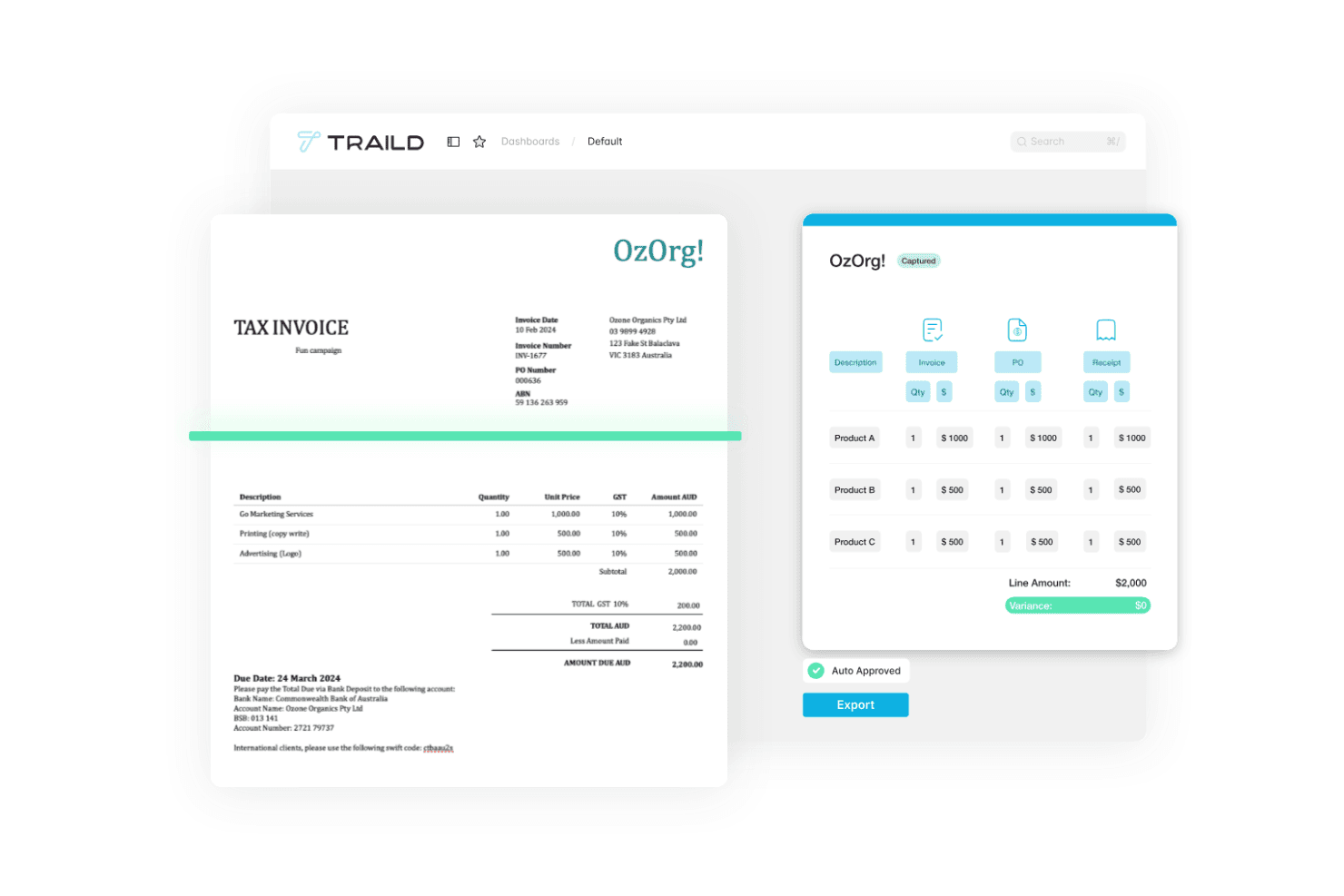
Traild displays an accounts payable automation dashboard that captures invoice data, validates line items, and automates invoice approvals. Traild is an AP automation platform that handles AI-driven invoice capture, PO matching, multi-level approval workflows, supplier verification, and fraud detection across the full invoice-to-pay cycle.
Who Is Traild Best For?
Traild is a good fit for mid-market finance teams that need structured AP controls without the complexity of an enterprise-grade implementation.
Why I Picked Traild
I've included Traild in my top picks because its approval workflow builder gives AP teams real control over how invoices move through the business. I like that you can set up templates with custom routing rules based on invoice type, supplier, cost center, or spend threshold, so different invoice categories follow different paths without manual intervention. You can also layer in conditional logic, meaning a utilities invoice routes differently than a capital expenditure without building those rules from scratch each time.
Traild Key Features
- AI invoice capture: Automatically extracts and codes invoice data using AI, reducing manual data entry across all invoice formats.
- 2-3 way PO matching: Matches invoices against purchase orders and receipts to flag discrepancies before approval.
- Supplier verification: Validates supplier bank details and contact information to reduce payment fraud risk.
- Automated statement reconciliation: Reconciles supplier statements against your AP records to catch missing or duplicate invoices.
Traild Integrations
Traild offers native integrations with Acumatica, SYSPRO, IFS, NetSuite, SAP Business One, MYOB, and Xero, providing real-time two-way data flow with each ERP.
Pros and Cons
Pros:
- Multi-entity management under one login
- Handles industry-specific AP workflows well
- Built-in AI fraud and anomaly detection
Cons:
- No self-serve free trial available
- Limited number of ERP integrations
Learn more about Traild:

Payouts' dashboard facilitates the management of pending invoices, allowing users to keep track of outstanding payments and manage cash flow effectively. Payouts is an accounts payable automation platform tailored to streamline financial processes for businesses in affiliate marketing, influencer platforms, and digital advertising networks. By focusing on automation and efficiency, Payouts simplifies vendor payments, invoicing, and accounts payable workflows.
Why I picked Payouts: Payouts excels in automating complex payment workflows, making it ideal for teams managing high transaction volumes across vendors and partners. Its AP automation capabilities ensure that vendor payments are processed accurately and on time, reducing administrative workload and improving financial transparency. Additionally, the platform's vendor management tools provide centralized oversight for communication, payment tracking, and compliance, helping businesses maintain strong relationships with partners.
Standout features & integrations:
Features include support for multiple payout methods, such as fiat and cryptocurrencies and global accounts that facilitate transactions in local currencies. Overall, these features reduce conversion costs and simplify international payments. The platform also offers advanced invoicing tools that ensure precise and timely billing and advanced AP workflows that minimize errors and delays.
Integrations include PayPal, Venmo, Payoneer, impact.com, CJ Affiliate, Everflow, Zelle, Priority, Tune, System1, and NetSuite.
Pros and Cons
Pros:
- Supports scaling operations
- Multiple payout methods
- Comprehensive automation of accounts payable processes
Cons:
- May require time to fully customize
- Potential challenges integrating with existing systems
Learn more about Payouts: Best for rapidly growing businesses
- Free plan available; 90-day free trial
- From $25/month
Visit WebsiteCustomer Rating:4.2/5
In Melio, you can combine payments and make partial payments, offering you flexibility when it comes to paying. Plus, you can use credit cards to pay vendors through Melio—even if those vendors don’t take cards. For small to medium-sized businesses looking to optimize financial operations, Melio provides a solution tailored to simplify vendor payment management. With features like optical character recognition for invoice data extraction and automated payment scheduling, Melio enhances your payment processes and cash flow management. This allows your team to focus more on strategic growth opportunities, reducing manual tasks and improving overall efficiency.
Why I Picked Melio
I picked Melio for its unique ability to enhance your accounts payable process by offering flexible payment options and automated workflows. The platform's capability to integrate seamlessly with QuickBooks and other accounting systems provides an effortless way to manage vendor payments and reduce manual entry errors. Additionally, Melio's feature of allowing payments via credit card, even if vendors only accept checks or bank transfers, offers unprecedented flexibility in managing cash flow. This makes it a compelling choice for businesses seeking to streamline their financial operations and improve efficiency.
Melio Key Features
In addition to its flexible payment options and seamless integration capabilities, Melio offers a range of features that enhance your accounts payable automation experience.
- Mobile App: Manage payments on the go with ease, allowing you to send and track payments from anywhere, which is perfect for business owners who are always on the move.
- Virtual Cards: Use virtual cards for secure online business expenses, providing a layer of protection against fraud and unauthorized transactions.
- Customizable Approval Workflows: Digitize your approval processes by assigning roles and permissions, ensuring transparency and control over your payment operations.
- International Payments: Facilitate payments to overseas suppliers, making it an essential feature for businesses engaged in global trade.
Melio Integrations
Integrations include QuickBooks Online, QuickBooks Desktop, and Xero. An API is also available for custom integrations.
Pros and Cons
Pros:
- Can schedule payments ahead of time
- Can pay vendors with credit cards even if they don’t accept them
- Simple and intuitive interface
Cons:
- No automation features beyond the basics
- Setting up new vendors could be improved
 Best for automated invoice processing
- Free demo available
- Pricing upon request
Visit WebsiteCustomer Rating:4.3/5
Paylocity’s dashboard displays automated invoice workflows and real-time visibility into payment approvals. For businesses aiming to simplify financial operations, Paylocity's Accounts Payable Automation Software offers a streamlined approach to managing payment processes and enhancing financial oversight. It appeals particularly to organizations looking to reduce manual errors and make informed decisions by automating workflows and providing real-time insight into transactions. By integrating with HR and IT solutions, Paylocity allows your team to focus resources on strategic growth, positioning itself as a valuable partner in financial management.
Why I Picked Paylocity
I picked Paylocity for its ability to transform traditional accounts payable tasks into a more efficient and accurate process through its AI-powered automation. The software offers automated invoice processing and approval workflows, which reduce manual data entry and minimize errors. Additionally, Paylocity supports real-time tracking and seamless integration with existing financial systems, providing your team with enhanced visibility and control over financial operations. These features collectively enable businesses to optimize their accounts payable processes, ultimately leading to cost savings and improved vendor relationships.
Paylocity Key Features
In addition to the reasons I previously mentioned, here are some other key features that make Paylocity's Accounts Payable Automation Software stand out:
- Fraud Detection: The software leverages AI to monitor transactions and identify suspicious activities, enhancing security and reducing the risk of fraud.
- Spend Analytics: This feature provides detailed insights into spending patterns, helping your team make data-driven decisions and identify areas for cost optimization.
- Policy Compliance: Automated checks ensure that all transactions adhere to company policies and regulatory standards, simplifying audits and maintaining compliance.
- Vendor Management: Streamlined onboarding and management of vendors improve relationships and ensure timely payments, enhancing your team's efficiency in handling vendor-related tasks.
Paylocity Integrations
Integrations include AxisCare, BenefitsMe, CompareMedsRX, Crunchtime, 15Five, 3rd Degree Screening, 401GO, 4MyBenefits, 7shifts, and ABG (Alliance Benefit Group).
Pros and Cons
Pros:
- Integrates HR and financial workflows
- Real-time spend analytics
- AI-driven invoice automation
Cons:
- Complex feature set for smaller teams
- Reporting setup may require training
Learn more about Paylocity: Best for AI-powered bill entry
- 21-day free trial available
- From $99/month
Visit WebsiteCustomer Rating:4.9/5
A digital invoice from MakersHub displaying itemized purchase details, payment terms, and total amount due. Imagine transforming your finance department's workflow with a tool that integrates into your existing systems, eliminating tedious data entry and reducing processing time by up to 90%. MakersHub's Accounts Payable Automation Software is designed for industries like construction and manufacturing, providing a centralized hub for managing approvals and payments. This intelligent platform captures invoice details automatically, freeing your team to focus on more strategic tasks while ensuring accuracy and compliance in financial records.
Why I Picked MakersHub
I picked MakersHub for its innovative WiseVision technology, which drastically reduces manual data entry by capturing all relevant data from various bill formats. This feature is particularly valuable for businesses seeking to streamline their accounts payable processes, as it enhances accuracy and saves substantial time. Additionally, the software's seamless integration with QuickBooks allows for efficient bill and payment management, automatically creating vendors and items to ensure smooth financial operations. The customizable approval flows and granular user access further support effective team collaboration, addressing the needs of organizations with complex workflows.
MakersHub Key Features
In addition to the reasons I picked MakersHub, there are several key features that make it a compelling choice for accounts payable automation.
- Auto-Mapping Rules: This feature allows you to configure mapping rules once, ensuring that expenses are correctly coded and new items are automatically created in the Chart of Accounts.
- AP Collaboration Hub: Your team can collaborate with context by adding notes and documents, facilitating a streamlined review process.
- Powerful Search & Filters: You can quickly locate specific bills by using various search filters, enhancing the efficiency of document retrieval.
- Granular User Access: Set flexible permissions for each user to access the necessary information without compromising the security of your accounting system.
MakersHub Integrations
Integrations include Sage Intacct and QuickBooks.
Pros and Cons
Pros:
- Integration with QuickBooks
- Multi-layered approval process
- Automation of bills and payments
Cons:
- Certain features are limited to higher-tier plans
- Steep learning curve for new users
Learn more about MakersHub: Best for automated three-way matching
- Not available
- Pricing upon request
Visit WebsiteCustomer Rating:4.6/5
Procurify's dashboard provides an overview of the procure-to-pay process, allowing users to manage and track purchases efficiently. For those looking to improve their accounts payable processes, Procurify provides a solution that integrates procurement and payment functions, specifically designed for mid-market businesses. It features AI-driven invoice processing and mobile access, which helps tackle challenges like manual errors and slow payment cycles, ensuring your financial operations are accurate. With vendor management and budget oversight capabilities, Procurify aligns with popular accounting systems, making it a practical choice for teams aiming to optimize financial management.
Why I Picked Procurify
I picked Procurify for its AI-driven invoice processing and automated reconciliation, which address the tedious manual tasks often faced by finance teams. These features enhance accuracy and reduce the risk of errors, allowing your team to focus on strategic financial planning. Additionally, its integration with popular accounting systems like QuickBooks facilitates seamless data management, making it a practical choice for businesses aiming to modernize their spend management. Procurify's approach to streamlining procure-to-pay processes aligns well with organizations looking to improve financial efficiency and accuracy.
Procurify Key Features
In addition to its AI-driven invoice processing and automated reconciliation, Procurify offers several other noteworthy features for accounts payable automation.
- Bill Management: This feature allows you to easily manage and track bills, providing real-time visibility into your financial obligations and helping to maintain strong vendor relationships.
- Flexible Payment Options: Procurify supports multiple payment methods, including ACH, wire transfers, and checks, ensuring you can handle vendor payments in the way that best suits your business needs.
- Real-Time Tracking: With this feature, your team can monitor accruals and financial data as they happen, allowing for more accurate budget forecasting and financial planning.
- Mobile Access: The Procurify mobile app enables you to manage requests, expenses, and approvals on-the-go, ensuring that your accounts payable processes are not hindered by location constraints.
Procurify Integrations
Integrations include QuickBooks Online, QuickBooks Desktop, NetSuite, Sage Intacct, Microsoft Dynamics 365, and API support for custom integrations.
Pros and Cons
Pros:
- The mobile app allows for approvals and management on the go
- Offers customizable reporting
- Real-time budget tracking
Cons:
- Editing purchase order requests can be cumbersome
- Could use more advanced analytics features
Learn more about Procurify: Best for AI-driven invoice automation
- Free demo available
- Pricing upon request
Visit WebsiteCustomer Rating:4.8/5
DOKKA's automated invoice processing feature streamlines and automates the extraction and organization of invoice data. For those seeking a solution to automate their accounts payable processes, DOKKA offers an AI-driven platform designed to simplify financial workflows. This tool appeals to finance professionals like CFOs and Accounts Payable Managers who aim to enhance efficiency and improve cash flow visibility. By integrating with various ERP systems, DOKKA reduces manual tasks and mitigates fraud, providing tailored solutions that improve overall business outcomes.
Why I Picked DOKKA
I picked DOKKA because its AI-powered platform excels in automating end-to-end accounts payable tasks, making it a standout choice for finance teams. DOKKA's advanced technology allows for seamless integration with various ERP systems, which means your team can easily adapt it to fit existing workflows. With features like automated invoice processing and multi-level approval workflows, DOKKA significantly reduces manual tasks and errors, leading to faster payment cycles and better cash flow management. This focus on efficiency and accuracy enables your team to shift attention from routine tasks to more strategic financial initiatives.
DOKKA Key Features
In addition to its robust automation capabilities, DOKKA offers several features that enhance the Accounts Payable process for your finance team:
- Google-Style Document Search: Quickly locate invoices, comments, or approval histories with powerful indexing and keyword searches.
- Automated Purchase Order Matching: Accurately reconcile purchase orders with invoices, minimizing payment errors by visualizing discrepancies.
- Line Item Extraction: Effortlessly extract detailed information from invoices into journal entries, improving processing speed and record accuracy.
- Centralized Workspace: Facilitate real-time collaboration, document management, and transparency among team members, ensuring everyone stays informed and aligned.
DOKKA Integrations
Native integrations with DOKKA include QuickBooks Online, Xero, Sage 50, Sage 200, Microsoft Dynamics 365, Oracle NetSuite, SAP Business One, Priority ERP, Exact, and Zoho Books.
Pros and Cons
Pros:
- Offers enhanced collaboration features
- Provides customizable workflows
- Highly accurate data extraction
Cons:
- Limited offline capabilities
- Limited scalability for large enterprises
Learn more about DOKKA:

Airbase lets you customize expense policies and set rules to automate a lot of broad spend management tasks along with AP. For finance professionals seeking a reliable solution to optimize their accounts payable operations, Airbase offers a platform tailored to streamline invoice processing, approval workflows, and vendor management. Its integration of AI technology ensures accuracy and reduces manual errors, providing operational efficiency and financial visibility. By leveraging Airbase, you can transform traditional, error-prone workflows into efficient processes, ultimately driving better financial control and supporting your organization's growth.
Why I Picked Airbase
I picked Airbase because it offers a specialized accounts payable automation solution that is particularly beneficial for startups. Its AI-driven invoice capture and workflow automation significantly reduce manual workload and enhance compliance. The platform's integration with popular ERPs ensures that your financial data remains synchronized, providing real-time visibility and control over operations. This combination of features allows startups to efficiently manage their accounts payable processes while focusing on strategic growth.
Airbase Key Features
In addition to its suitability for startups, Airbase offers several key features that enhance accounts payable automation.
- Guided Procurement: This feature simplifies the purchasing process for employees by providing a no-code routing system that ensures compliance without technical complexity.
- Expense Management: The AI-based OCR system automatically generates expense reports from receipt images, reducing manual data entry and ensuring compliance.
- Corporate Cards: Airbase integrates pre-approvals and expenditure details directly into the general ledger, with options for both virtual and physical card programs.
- Automatic Syncing to the GL: This feature ensures that all vendor and payment details are seamlessly synchronized with the general ledger, enhancing accounting transparency and efficiency.
Airbase Integrations
Integrations include Xero, NetSuite, Slack, QuickBooks Online, Sage Intacct, Indent, Microsoft Dynamics 365 Business Central, and Intuit QuickBooks Desktop.
Pros and Cons
Pros:
- Virtual credit cards offer secure and controlled spending
- Real-time reporting for all non-payroll spend
- Mobile app enables on-the-go expense management
Cons:
- Mobile app functionality is limited
- Reporting capabilities are limited
 9Best for multi-method payment support
Ramp
- Free plan available; 30-day free trial
- From $15/user/month
Visit WebsiteCustomer Rating:4.8/5
Ramp provides an automated accounts payable dashboard that categorizes transactions, syncs expenses, and flags missing memos for review. For those seeking to enhance their accounts payable processes, Ramp offers an innovative solution that caters to businesses aiming to accelerate their financial operations. As a tool designed with AI-driven invoice processing and seamless integration capabilities, it appeals particularly to finance teams looking to eliminate the inefficiencies of manual workflows. By automating tasks such as invoice capture and approval routing, Ramp not only speeds up processing times but also provides real-time insights into cash flow, helping your team focus on strategic financial management rather than repetitive tasks.
Why I Picked Ramp
I picked Ramp for its unique ability to address inefficiencies in the accounts payable process with features like optical character recognition (OCR) for accurate data extraction and automated approval routing. These functionalities allow your team to process invoices faster and reduce errors, tackling the challenges of manual systems. Additionally, Ramp's integration with existing financial systems maintains a consistent workflow, enhancing visibility and control over cash flow. These capabilities make Ramp an attractive solution for finance teams aiming to optimize their accounts payable operations.
Ramp Key Features
In addition to the features that initially drew me to Ramp, there are several other functionalities that can greatly enhance your accounts payable operations.
- Real-Time Reporting: Provides dashboards and reports that offer insights into processing times, spending patterns, and vendor performance, allowing your team to make informed financial decisions.
- Digital Audit Trails: Maintains comprehensive records of all invoice actions, supporting compliance and internal controls, which can be crucial during audits.
- Fraud Detection: Utilizes two and three-way matching to identify discrepancies and prevent unauthorized payments, ensuring the security of your financial transactions.
- Global Payment Capabilities: Facilitates payments to vendors worldwide, allowing your team to manage international transactions seamlessly and efficiently.
Ramp Integrations
Integrations include Xero, QuickBooks, Netsuite, Sage, and an API is available for custom integrations.
Pros and Cons
Pros:
- Automated expense reporting and receipt matching
- Ability to issue multiple virtual cards with customizable controls
- Comprehensive reporting features
Cons:
- Challenges integrating with less common ERP systems
- Limited advanced accounting features
 10Best for automated cash flow insights
Xero
- 1-month free trial available
- From $27/month
Visit WebsiteCustomer Rating:4.4/5
Xero lets you track and manage bills effectively, providing a clear view of accounts payable and cash flow. For those looking to address accounts payable challenges, Xero offers a tailored solution for small businesses. It automates tasks such as invoice processing and payment tracking, saving you time and reducing errors while providing better cash flow visibility. This makes it an appealing choice for business owners focused on improving efficiency, reducing operational costs, and maintaining strong vendor relationships.
Why I Picked Xero
I picked Xero for its ability to transform accounts payable processes through features like automated invoice uploads using OCR and AI, and streamlined approval workflows. These capabilities address the challenges of time-consuming manual entries and potential errors. The software's real-time dashboards enhance cash flow management by allowing you to track due payments with ease. With Xero, you not only benefit from reduced processing times and improved accuracy but also from maintaining strong vendor relationships through timely payments.
Xero Key Features
In addition to the features I highlighted earlier, Xero offers various other functionalities that make it a strong candidate for automating your accounts payable processes.
- Automated Data Capture: Xero uses OCR and AI technology to automatically upload and process invoices, reducing manual data entry tasks.
- Electronic Payments: You can facilitate vendor payments directly within the software, streamlining the financial transaction process.
- Invoice Matching: The software automatically compares purchase orders and invoices to ensure consistency and minimize errors.
- Real-Time Visibility: Xero provides dashboards and reports that allow you to track due payments and manage cash flow more effectively.
Xero Integrations
Integrations include Hubdoc, Syft, Stripe, Xero Inventory Plus, Shopify Integration, Xero Practice Manager, HubSpot CRM Integration, Xero Analytics Plus, Etsy, and Xero Workpapers.
Pros and Cons
Pros:
- User-friendly interface
- Good reporting features
- Cloud-based accessibility
Cons:
- May not be suitable for large enterprises
- Mobile app is not as robust as desktop version
Learn more about Xero:
Outras opções de software de automatização de contas a pagar
Eis algumas outras excelentes opções que não chegaram a integrar a lista dos melhores softwares de automatização de contas a pagar, mas que ainda assim vale a pena considerar:
- 11TipaltiBest for global organizations
- 12CentimeBest for all-in-one cash management
- 13XledgerBest for multi-entity financial management
- 14SettleBest for small CPG businesses
- 15Quadient AP By BeanworksBest for managing multiple locations
- 16SlashBest for real-time cash flow visibility
- 17PairsoftBest for fast-growing businesses
- 18RoutableBest for global vendor payments
- 19Rippling SpendBest for advanced policy controls
- 20PrecoroBest for automated approval workflows
- 21Doxis SpendControlBest for multi-currency support
- 22BILLBest for international payments
- 23QuickBooks OnlineBest for sole proprietors
- 24TrailHQBest for streamlining invoice data capture
- 25MineralTreeBest for financial services firms
- 26StampliBest for collaboration
- 27Sage IntacctBest for large organizations
- 28DocuWareBest for remote teams
- 29BonsaiBest for freelancers
- 30BaswareBest for predictive analytics and benchmarking
Software financeiro relacionado
Se ainda não encontrou o que procura, consulte outras ferramentas estreitamente relacionadas que testámos e avaliámos:
- Software de contabilidade
- Software de contas a pagar
- Software de relatórios de despesas
- Software de acompanhamento de despesas
- Software de relatórios financeiros
- Software ERP
- Sistemas POS
- Software de faturação
- Software de previsão
- Serviços de contas de comerciante
How I Evaluate Accounts Payable Automation Software
I look at AP tools through two lenses: baseline requirements like 3-way matching and ERP sync, plus the differentiators—like global payments or AI coding—that separate the right fit from the rest.
Core Functionality (Table Stakes For This List)
When I'm selecting tools for my list, I rank each one on a scale from 0 (does not offer the functionality) to 5 (excels in this area) for each core functionality listed below. Then, I calculate the tool's total score into a percentage. Each tool needs to achieve a minimum total score of 75% to be considered for inclusion.
- Invoice Capture & OCR: I check whether the tool can ingest invoices from email, upload, and EDI, then extract line-item data accurately enough to reduce manual correction on high-volume runs.
- Approval Workflow Automation: Multi-tier routing with conditional rules matters here—I look for delegation, mobile approvals, and notifications that keep invoices from stalling in someone's inbox.
- PO & Invoice Matching: I evaluate whether the platform handles automated 2-way and 3-way matching with configurable tolerances, since even small mismatches can cascade into month-end reconciliation headaches.
- Integrated Payment Execution: The tool should let you schedule and send payments via ACH, check, wire, and virtual card from one place rather than forcing your team into a separate banking portal.
- ERP & Accounting Integration: Bidirectional sync with systems like NetSuite, QuickBooks, SAP, or Sage Intacct is what I look for—GL codes, vendor records, and PO data should flow both ways in real time.
- Vendor Management & Compliance: I look at how the platform handles vendor onboarding, W-9/W-8 collection, and duplicate detection, plus whether it maintains audit-ready records your controller can pull during a review.
Once I have a list of tools that meet the criteria, I consider what sets each platform apart.
Differentiating Factors (What Sets Vendors Apart)
Here's how I compare and contrast different vendors:
Standout Features
AI-powered GL coding is a big differentiator. I look for platforms where machine learning auto-assigns accounts, cost centers, and departments based on historical patterns. This alone can cut hours off a high-volume coding queue. Virtual card rebate programs are worth evaluating too, since they let your AP team generate cashback on vendor payments. For multi-subsidiary organizations dealing with cross-border vendors, global support with native multi-currency payments and localized tax compliance makes a real difference.
Beyond Features
Company size matters more than most buyers realize. I evaluate whether a platform's pricing model—per invoice, per user, or flat tier—aligns with your AP volume without penalizing growth. Security and compliance certifications like SOC 2 Type II and PCI-DSS are worth checking, especially if your team handles payment execution in-platform. Pricing transparency rounds out the picture. I look for clear fee breakdowns that account for payment rail costs and implementation so there are no surprises post-contract.
Como escolher um software de automatização de contas a pagar
Escolher o software certo pode parecer uma tarefa avassaladora, tendo em conta as extensas listas de funcionalidades e os planos de preços confusos. Para tornar o processo mais simples, eis alguns fatores essenciais a ter em mente enquanto analisa as opções disponíveis.
| Fator | O que considerar |
|---|---|
| FatorEscalabilidade | O que considerarEste software crescerá com a sua empresa? |
| FatorIntegrações | O que considerarIntegra-se com os seus sistemas existentes (ou seja, sistemas ERP e CRM)? |
| FatorPersonalização | O que considerarPode adaptá-lo às suas necessidades específicas? |
| FatorFacilidade de utilização | O que considerarAs pessoas que o vão utilizar consideram-no fácil de usar? |
| FatorOrçamento | O que considerarEnquadra-se nas suas limitações financeiras? |
| FatorSegurança dos dados | O que considerarExistem medidas implementadas para proteger os seus dados? |
| FatorSuporte | O que considerarEstá disponível um suporte ao cliente fiável? |
| FatorConformidade | O que considerarAjuda-o a manter-se em conformidade com os regulamentos? |
Tendências no software de automatização de contas a pagar
O software de automatização de contas a pagar está a evoluir rapidamente. Depois de analisarmos os lançamentos e as atualizações de funcionalidades mais recentes, identificámos três tendências claras. Se pretende reduzir custos, aumentar o controlo e diminuir os erros manuais, esteja atento a estas tendências:
- Inteligência Artificial e Aprendizagem Automática: Estas tecnologias estão a tornar a automatização de contas a pagar mais inteligente, melhorando as previsões de fluxo de caixa, reforçando a deteção de fraude e tratando autonomamente de decisões complexas.
- Hiperautomatização: Isto vai além da automatização básica, combinando ferramentas como a IA e a RPA para automatizar o maior número possível de processos de contas a pagar. O objetivo? Fluxos de trabalho mais rápidos, menos erros e maior eficiência.
- Análise Avançada de Dados: Um número crescente de soluções de contas a pagar utiliza a análise de dados para proporcionar às empresas uma visão mais aprofundada dos padrões de despesas e da saúde financeira. O NetSuite, por exemplo, ajuda as empresas a gerir despesas e fluxos de caixa através das suas poderosas ferramentas de análise.
- Tecnologia de Cadeia de Blocos: Alguns fornecedores estão a começar a explorar a cadeia de blocos como forma de proteger os registos de transações, reduzir os riscos de fraude e garantir a transparência. Ao criar um registo digital imutável, a cadeia de blocos poderá tornar o processamento de faturas mais seguro e eficiente.
- Funcionalidades de Prevenção de Fraude: A segurança é mais importante do que nunca, sendo as ferramentas automatizadas de deteção de fraude cada vez mais indispensáveis. Estes algoritmos ajudam as empresas a identificar e impedir atividades fraudulentas antes de estas se tornarem um problema.
O que é o software de automatização de contas a pagar?
O software de automatização de contas a pagar é uma ferramenta digital que automatiza o processamento, a aprovação e o pagamento de faturas de fornecedores.
Substitui os fluxos de trabalho manuais de contas a pagar por funcionalidades como a captura automatizada de faturas, a correspondência a três níveis, o encaminhamento para aprovação e os pagamentos programados. Concebido para equipas de contabilidade e diretores financeiros, este software reduz o erro humano, acelera os ciclos de processamento de faturas e garante a conformidade com os controlos internos.
Ao proporcionar visibilidade em tempo real sobre as responsabilidades e o fluxo de caixa, o software de automatização de contas a pagar ajuda os responsáveis financeiros a otimizar o fundo de maneio e a expandir as operações de forma eficiente.
Funcionalidades do software de automatização de contas a pagar
Ao selecionar um software de automatização de contas a pagar, procure as seguintes funcionalidades principais:
- Processamento de faturas: Esta funcionalidade permite-lhe capturar, digitalizar e converter faturas em formato digital, para que possa abandonar a introdução manual e reduzir os erros humanos. Acelera as aprovações e traduz-se em tempo poupado.
- Fluxos de trabalho de aprovação automatizados: Pode definir os seus processos de aprovação com regras e encaminhamentos personalizados. Isto significa que envia as faturas para as pessoas certas, no momento certo — sem ter de andar atrás de assinaturas.
- Integração com sistemas de contabilidade: Ligue-se diretamente às suas ferramentas de contabilidade ou ERP existentes. Desta forma, os dados fluem sem problemas, eliminando a introdução duplicada e garantindo que todos os seus números permanecem sincronizados.
- Deteção de duplicados e fraude: O software sinaliza automaticamente as faturas suspeitas ou duplicadas. É uma forma prática de detetar possíveis fraudes antes que passem despercebidas.
- Programação de pagamentos: Programe e automatize pagamentos para nunca falhar uma data de vencimento — nem pagar demasiado cedo. Isto mantém o seu fluxo de caixa estável e os seus fornecedores satisfeitos.
- Gestão de documentos: Armazene, organize e recupere as suas faturas e registos de pagamentos com alguns cliques. Deixe de procurar em pilhas de papelada quando chegar a época das auditorias.
- Relatórios e análise: Obtenha uma visão clara das despesas, dos tempos de aprovação e dos estrangulamentos nos fluxos de trabalho através de painéis integrados e relatórios personalizáveis. Estes dados ajudam-no a identificar tendências e a encontrar formas de poupar dinheiro.
- Controlos de acesso dos utilizadores: Defina permissões para determinar quem pode consultar, aprovar ou editar cada parte do seu processo de contas a pagar. Isto mantém as informações sensíveis nas mãos certas e ajuda a garantir a conformidade.
- Acessibilidade móvel: Consulte faturas ou aprove pagamentos enquanto está fora do escritório. Esta flexibilidade ajuda a manter tudo em andamento, onde quer que esteja.
Funcionalidades comuns de IA do software de automatização de contas a pagar
Para além das funcionalidades padrão do software de automatização de contas a pagar acima listadas, muitas destas soluções estão a integrar IA com funcionalidades como:
- Extração inteligente de dados: A IA analisa e interpreta os detalhes das faturas — como datas, montantes e fornecedores — sem que tenha de introduzir nada manualmente. Isto reduz drasticamente os erros e poupa imenso tempo.
- Deteção automatizada de anomalias: O software utiliza IA para detetar padrões de pagamento invulgares, despesas fora da política ou possíveis fraudes, assinalando problemas que poderiam passar despercebidos ao olhar humano.
- Análise preditiva: A IA analisa o histórico das suas faturas e antecipa as necessidades de fluxo de caixa ou os riscos de pagamentos em atraso, para que possa tomar decisões financeiras mais informadas antes de chegar o momento crítico.
- Encaminhamento inteligente para aprovação: Com IA, o sistema aprende os hábitos da sua empresa e sugere ou encaminha automaticamente as aprovações com base nas tendências reais do fluxo de trabalho, reduzindo estrangulamentos e poupando esforço mental.
- Correspondência automatizada de fornecedores: A IA associa as faturas às ordens de compra e aos recibos, mesmo quando os detalhes não coincidem perfeitamente. Isto resolve rapidamente as discrepâncias — e significa que terá menos problemas para resolver.
Benefícios do software de automatização de contas a pagar
A adoção de software de automatização de contas a pagar pode fazer uma grande diferença para a sua equipa e para a sua empresa. Eis alguns dos principais benefícios que pode esperar:
- Maior visibilidade: Os dados centralizados e os relatórios em tempo real proporcionam melhores informações sobre o seu processo de contas a pagar e a saúde financeira global.
- Poupança de tempo: A automatização de tarefas repetitivas, como a introdução de dados e o processamento de faturas, liberta tempo da sua equipa para trabalhos mais importantes.
- Redução de erros: O software minimiza os erros humanos ao captar e associar automaticamente os dados das faturas às ordens de compra.
- Melhor gestão do fluxo de caixa: A monitorização em tempo real das faturas e dos pagamentos ajuda-o a gerir melhor o seu fluxo de caixa e a prever necessidades futuras.
- Maior conformidade: A automatização garante que todas as faturas são processadas de acordo com os requisitos regulamentares, reduzindo o risco de incumprimento.
- Melhores relações com os fornecedores: Um processamento de pagamentos mais rápido e preciso mantém os fornecedores satisfeitos e pode conduzir a melhores condições de pagamento ou descontos.
- Poupança de custos: A redução dos processos manuais diminui os custos administrativos e reduz a probabilidade de erros dispendiosos.
Custos e preços do software de automatização de contas a pagar
Os preços do software de automatização de contas a pagar costumam variar em função das funcionalidades e do tamanho da equipa. A maioria das ferramentas segue uma estrutura previsível por níveis. Utilize a minha tabela abaixo para comparar rapidamente os planos comuns, os custos médios e as principais funcionalidades, para poder definir o orçamento de forma inteligente e escolher a opção certa para a sua equipa financeira.
| Tipo de plano | Preço médio (por utilizador, por mês) | Funcionalidades comuns |
|---|---|---|
| Tipo de planoGratuito | Preço médio (por utilizador, por mês)$0 | Funcionalidades comunsProcessamento básico de faturas, armazenamento limitado de documentos, suporte por e-mail e relatórios básicos. |
| Tipo de planoArranque | Preço médio (por utilizador, por mês)$20-30 | Funcionalidades comunsProcessamento de faturas, armazenamento de documentos, suporte por e-mail e chat, integrações básicas e relatórios. |
| Tipo de planoEmpresarial | Preço médio (por utilizador, por mês)$50-70 | Funcionalidades comunsProcessamento avançado de faturas, armazenamento melhorado de documentos, acesso multiutilizador, integrações avançadas e relatórios detalhados. |
| Tipo de planoEmpresarial de grande dimensão | Preço médio (por utilizador, por mês)$100-150 | Funcionalidades comunsProcessamento abrangente de faturas, armazenamento ilimitado de documentos, suporte dedicado, integrações personalizadas e análises avançadas. |
Software de Automação de Contas a Pagar: Perguntas frequentes
Tem mais perguntas sobre a automatização de AP ou sobre o que deve ter em conta ao procurar uma solução? Eis algumas perguntas e respostas comuns:
Quais são os principais benefícios da automatização de AP?
Eis o que o software de AP pode fazer pelo seu departamento financeiro:
- Poupar tempo: A sua equipa dedica muito menos tempo à introdução manual de dados, às comunicações com fornecedores e a outras tarefas semelhantes.
- Reduzir os custos de mão de obra: Não precisa de contratar mais membros para a equipa de AP à medida que a sua empresa cresce — o software ajuda a gerir um volume de pagamentos crescente.
- Reduzir os erros: A automatização reduz a probabilidade de erros que poderiam resultar da introdução manual de dados.
- Visibilidade dos dados: Os relatórios financeiros são atualizados em tempo real. Obtém dados atuais para tomar decisões, não dados passados.
Que tarefas podem as soluções de automatização de AP realizar?
Eis o que a automatização de AP pode fazer por si:
- Aprovação e encaminhamento de requisições de compra, ordens de compra e faturas.
- Captura de dados das faturas através de OCR e IA.
- Comunicações com vendedores e fornecedores.
- Pagamentos, especialmente pagamentos recorrentes.
Como implementar a automatização de AP?
Para implementar a automatização de AP, comece por avaliar os seus processos atuais de AP e identificar as suas necessidades. Elabore um caso de negócio para obter o apoio das partes interessadas. Documente os seus requisitos e escolha um fornecedor de automatização de AP que responda às suas necessidades. Crie e execute um plano de implementação com etapas e prazos claros.
Quanto tempo permite poupar a automatização de AP?
A automatização de AP pode permitir poupar bastante tempo ao reduzir as tarefas manuais. Em média, pode esperar poupar entre 60% e 80% do tempo normalmente despendido na receção e captura de dados das faturas. Esta eficiência permite que a sua equipa se concentre em tarefas de maior valor.
Como podem a RPA e a IA ser utilizadas na automatização de contas a pagar?
A RPA (Robotic Process Automation) e a IA (Inteligência Artificial) podem automatizar tarefas repetitivas, como o processamento de faturas, a introdução de dados e a validação. Estas tecnologias tornam o seu fluxo de trabalho de contas a pagar mais eficiente e preciso, reduzindo os erros e acelerando os tempos de processamento.
Como gerir exceções na automatização de AP?
A gestão de exceções na automatização de AP envolve a configuração de fluxos de trabalho para gerir discrepâncias, como divergências nas faturas ou informações em falta. A sua equipa pode analisar e resolver estas exceções manualmente ou utilizar algoritmos de aprendizagem automática para identificar e corrigir problemas comuns ao longo do tempo.
Que medidas de segurança existem no software de automatização de AP?
O software de automatização de AP inclui normalmente várias medidas de segurança, como encriptação de dados, controlos de acesso dos utilizadores e registos de auditoria. Estas funcionalidades ajudam a proteger os seus dados financeiros contra acessos não autorizados e garantem a conformidade com as normas do setor.