Programele de automatizare a conturilor de plătit sunt soluții digitale care eficientizează procesarea facturilor, fluxurile de aprobare și plățile. În lipsa lor, echipele financiare ajung adesea îngropate în foi de calcul, alergând după semnături și străduindu-se să remedieze plățile întârziate, în loc să se concentreze asupra imaginii de ansamblu.
Având experiență în managementul financiar și ani de zile petrecuți analizând instrumente financiare, am testat mai multe programe pentru conturi de plătit decât pot număra. Soluția potrivită nu doar economisește timp. Îmbunătățește controalele, sporește eficiența echipei și oferă conducerii vizibilitatea în timp real de care are nevoie pentru a orienta compania înainte. Transformă activitatea conturilor de plătit dintr-o sarcină administrativă dezordonată într-o operațiune eficientă și strategică.
După numeroase testări practice și după ce am analizat feedbackul utilizatorilor, am restrâns lista celor mai bune platforme de automatizare a conturilor de plătit disponibile. Acestea sunt instrumentele care oferă cu adevărat rezultate, indiferent dacă vă dezvoltați rapid, gestionați numeroși furnizori sau pur și simplu sunteți gata să nu mai alergați după aprobări și să începeți să recâștigați controlul.
Why Trust Our Software Recommendations
6,700+
Reviews
20
Industry experts
16+
Evaluation factors
14
Years
Our team has been testing and reviewing software since 2012. As finance leaders ourselves, we know how difficult—and important—it is to choose the right software.
For this guide, we evaluated tools using hands-on testing and independent research, scoring tools using our selection criteria.
Our reviews reflect our human editorial judgment, not a sales pitch.
Tabel comparativ al programelor de automatizare a conturilor de plătit
Acest tabel comparativ sintetizează detaliile de preț pentru selecția mea de top de programe de automatizare a conturilor de plătit:
Sorted by: Default
| Tool | Starting Price | Website | |
|---|---|---|---|
Best with integrated fraud detection | Not rated | Pricing upon request Free demo available | Website |
Best for rapidly growing businesses | 4.2 out of 5 | $25/month Free plan available; 90-day free trial | Website |
Best for vendor payouts | 4.5 out of 5 | Pricing upon request Free plan + free demo available | Website |
Best for automated invoice processing | 4.3 out of 5 | Pricing upon request Free demo available | Website |
Best for AI-powered bill entry | 4.9 out of 5 | $99/month 21-day free trial available | Website |
Best for automated three-way matching | 4.6 out of 5 | Pricing upon request Not available | Website |
Best for AI-driven invoice automation | 4.8 out of 5 | Pricing upon request Free demo available | Website |
Best for startups | 4.8 out of 5 | Pricing upon request Free demo available | Website |
Best for multi-method payment support | 4.8 out of 5 | $15/user/month Free plan available; 30-day free trial | Website |
Best for automated cash flow insights | 4.4 out of 5 | $27/month 1-month free trial available | Website |


Recenzii ale celor mai bune programe de automatizare a conturilor de plătit
Descoperiți cele mai bune programe de automatizare a conturilor de plătit prin recenziile mele rapide și clare. Aflați detalii despre funcții, avantaje, dezavantaje și integrări, pentru a găsi instrumentul care vă ajută să eficientizați fluxurile de lucru, să reduceți erorile manuale și să obțineți un control mai bun asupra conturilor de plătit.

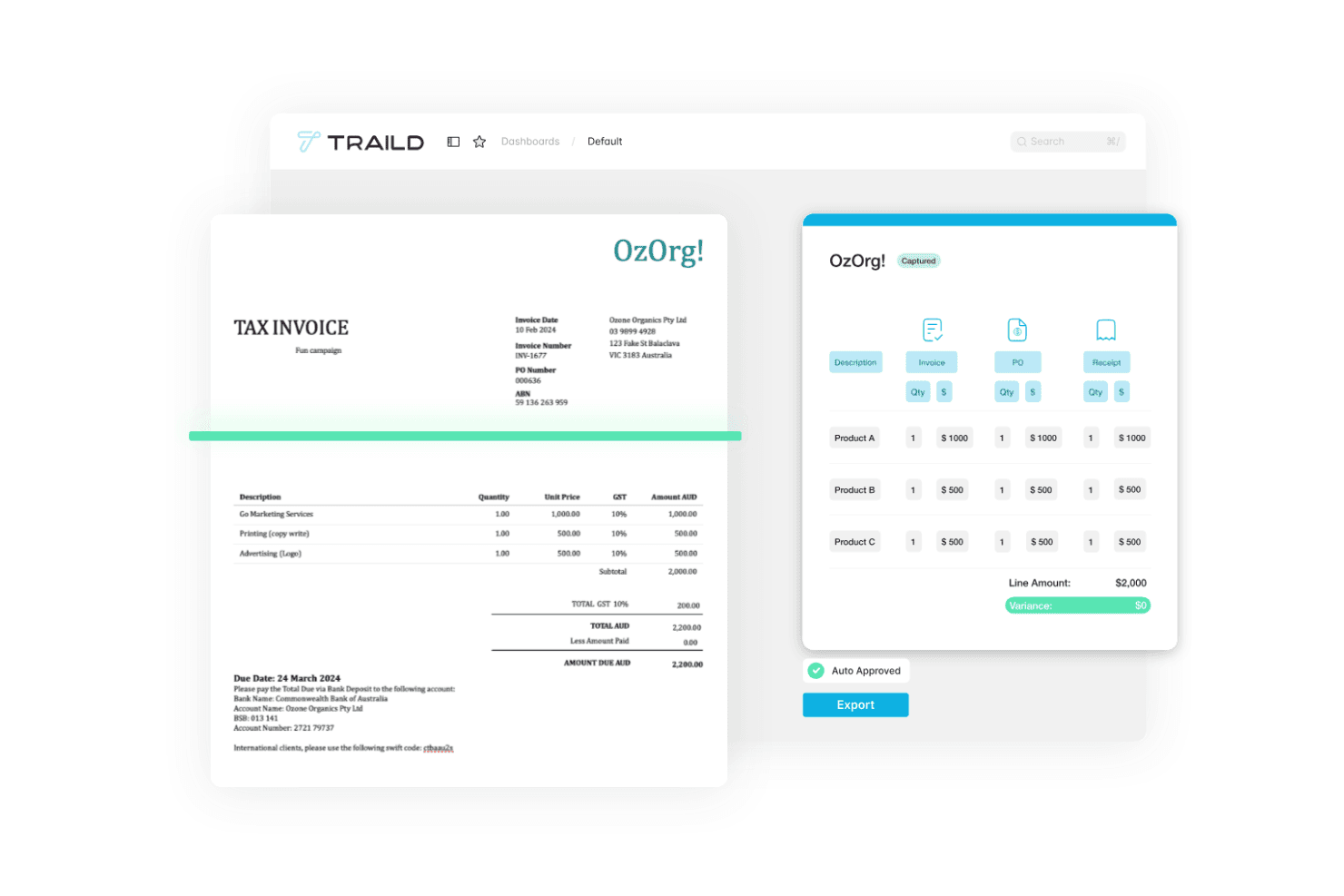
Traild displays an accounts payable automation dashboard that captures invoice data, validates line items, and automates invoice approvals. Traild is an AP automation platform that handles AI-driven invoice capture, PO matching, multi-level approval workflows, supplier verification, and fraud detection across the full invoice-to-pay cycle.
Who Is Traild Best For?
Traild is a good fit for mid-market finance teams that need structured AP controls without the complexity of an enterprise-grade implementation.
Why I Picked Traild
I've included Traild in my top picks because its approval workflow builder gives AP teams real control over how invoices move through the business. I like that you can set up templates with custom routing rules based on invoice type, supplier, cost center, or spend threshold, so different invoice categories follow different paths without manual intervention. You can also layer in conditional logic, meaning a utilities invoice routes differently than a capital expenditure without building those rules from scratch each time.
Traild Key Features
- AI invoice capture: Automatically extracts and codes invoice data using AI, reducing manual data entry across all invoice formats.
- 2-3 way PO matching: Matches invoices against purchase orders and receipts to flag discrepancies before approval.
- Supplier verification: Validates supplier bank details and contact information to reduce payment fraud risk.
- Automated statement reconciliation: Reconciles supplier statements against your AP records to catch missing or duplicate invoices.
Traild Integrations
Traild offers native integrations with Acumatica, SYSPRO, IFS, NetSuite, SAP Business One, MYOB, and Xero, providing real-time two-way data flow with each ERP.
Pros and Cons
Pros:
- Multi-entity management under one login
- Handles industry-specific AP workflows well
- Built-in AI fraud and anomaly detection
Cons:
- No self-serve free trial available
- Limited number of ERP integrations
Learn more about Traild: Best for rapidly growing businesses
- Free plan available; 90-day free trial
- From $25/month
Visit WebsiteCustomer Rating:4.2/5
In Melio, you can combine payments and make partial payments, offering you flexibility when it comes to paying. Plus, you can use credit cards to pay vendors through Melio—even if those vendors don’t take cards. For small to medium-sized businesses looking to optimize financial operations, Melio provides a solution tailored to simplify vendor payment management. With features like optical character recognition for invoice data extraction and automated payment scheduling, Melio enhances your payment processes and cash flow management. This allows your team to focus more on strategic growth opportunities, reducing manual tasks and improving overall efficiency.
Why I Picked Melio
I picked Melio for its unique ability to enhance your accounts payable process by offering flexible payment options and automated workflows. The platform's capability to integrate seamlessly with QuickBooks and other accounting systems provides an effortless way to manage vendor payments and reduce manual entry errors. Additionally, Melio's feature of allowing payments via credit card, even if vendors only accept checks or bank transfers, offers unprecedented flexibility in managing cash flow. This makes it a compelling choice for businesses seeking to streamline their financial operations and improve efficiency.
Melio Key Features
In addition to its flexible payment options and seamless integration capabilities, Melio offers a range of features that enhance your accounts payable automation experience.
- Mobile App: Manage payments on the go with ease, allowing you to send and track payments from anywhere, which is perfect for business owners who are always on the move.
- Virtual Cards: Use virtual cards for secure online business expenses, providing a layer of protection against fraud and unauthorized transactions.
- Customizable Approval Workflows: Digitize your approval processes by assigning roles and permissions, ensuring transparency and control over your payment operations.
- International Payments: Facilitate payments to overseas suppliers, making it an essential feature for businesses engaged in global trade.
Melio Integrations
Integrations include QuickBooks Online, QuickBooks Desktop, and Xero. An API is also available for custom integrations.
Pros and Cons
Pros:
- Can schedule payments ahead of time
- Can pay vendors with credit cards even if they don’t accept them
- Simple and intuitive interface
Cons:
- No automation features beyond the basics
- Setting up new vendors could be improved
 Best for vendor payouts
- Free plan + free demo available
- Pricing upon request
Visit WebsiteCustomer Rating:4.5/5
Payouts' dashboard facilitates the management of pending invoices, allowing users to keep track of outstanding payments and manage cash flow effectively. Payouts is an accounts payable automation platform tailored to streamline financial processes for businesses in affiliate marketing, influencer platforms, and digital advertising networks. By focusing on automation and efficiency, Payouts simplifies vendor payments, invoicing, and accounts payable workflows.
Why I picked Payouts: Payouts excels in automating complex payment workflows, making it ideal for teams managing high transaction volumes across vendors and partners. Its AP automation capabilities ensure that vendor payments are processed accurately and on time, reducing administrative workload and improving financial transparency. Additionally, the platform's vendor management tools provide centralized oversight for communication, payment tracking, and compliance, helping businesses maintain strong relationships with partners.
Standout features & integrations:
Features include support for multiple payout methods, such as fiat and cryptocurrencies and global accounts that facilitate transactions in local currencies. Overall, these features reduce conversion costs and simplify international payments. The platform also offers advanced invoicing tools that ensure precise and timely billing and advanced AP workflows that minimize errors and delays.
Integrations include PayPal, Venmo, Payoneer, impact.com, CJ Affiliate, Everflow, Zelle, Priority, Tune, System1, and NetSuite.
Pros and Cons
Pros:
- Supports scaling operations
- Multiple payout methods
- Comprehensive automation of accounts payable processes
Cons:
- May require time to fully customize
- Potential challenges integrating with existing systems
Learn more about Payouts: Best for automated invoice processing
- Free demo available
- Pricing upon request
Visit WebsiteCustomer Rating:4.3/5
Paylocity’s dashboard displays automated invoice workflows and real-time visibility into payment approvals. For businesses aiming to simplify financial operations, Paylocity's Accounts Payable Automation Software offers a streamlined approach to managing payment processes and enhancing financial oversight. It appeals particularly to organizations looking to reduce manual errors and make informed decisions by automating workflows and providing real-time insight into transactions. By integrating with HR and IT solutions, Paylocity allows your team to focus resources on strategic growth, positioning itself as a valuable partner in financial management.
Why I Picked Paylocity
I picked Paylocity for its ability to transform traditional accounts payable tasks into a more efficient and accurate process through its AI-powered automation. The software offers automated invoice processing and approval workflows, which reduce manual data entry and minimize errors. Additionally, Paylocity supports real-time tracking and seamless integration with existing financial systems, providing your team with enhanced visibility and control over financial operations. These features collectively enable businesses to optimize their accounts payable processes, ultimately leading to cost savings and improved vendor relationships.
Paylocity Key Features
In addition to the reasons I previously mentioned, here are some other key features that make Paylocity's Accounts Payable Automation Software stand out:
- Fraud Detection: The software leverages AI to monitor transactions and identify suspicious activities, enhancing security and reducing the risk of fraud.
- Spend Analytics: This feature provides detailed insights into spending patterns, helping your team make data-driven decisions and identify areas for cost optimization.
- Policy Compliance: Automated checks ensure that all transactions adhere to company policies and regulatory standards, simplifying audits and maintaining compliance.
- Vendor Management: Streamlined onboarding and management of vendors improve relationships and ensure timely payments, enhancing your team's efficiency in handling vendor-related tasks.
Paylocity Integrations
Integrations include AxisCare, BenefitsMe, CompareMedsRX, Crunchtime, 15Five, 3rd Degree Screening, 401GO, 4MyBenefits, 7shifts, and ABG (Alliance Benefit Group).
Pros and Cons
Pros:
- Integrates HR and financial workflows
- Real-time spend analytics
- AI-driven invoice automation
Cons:
- Complex feature set for smaller teams
- Reporting setup may require training
Learn more about Paylocity: Best for AI-powered bill entry
- 21-day free trial available
- From $99/month
Visit WebsiteCustomer Rating:4.9/5
A digital invoice from MakersHub displaying itemized purchase details, payment terms, and total amount due. Imagine transforming your finance department's workflow with a tool that integrates into your existing systems, eliminating tedious data entry and reducing processing time by up to 90%. MakersHub's Accounts Payable Automation Software is designed for industries like construction and manufacturing, providing a centralized hub for managing approvals and payments. This intelligent platform captures invoice details automatically, freeing your team to focus on more strategic tasks while ensuring accuracy and compliance in financial records.
Why I Picked MakersHub
I picked MakersHub for its innovative WiseVision technology, which drastically reduces manual data entry by capturing all relevant data from various bill formats. This feature is particularly valuable for businesses seeking to streamline their accounts payable processes, as it enhances accuracy and saves substantial time. Additionally, the software's seamless integration with QuickBooks allows for efficient bill and payment management, automatically creating vendors and items to ensure smooth financial operations. The customizable approval flows and granular user access further support effective team collaboration, addressing the needs of organizations with complex workflows.
MakersHub Key Features
In addition to the reasons I picked MakersHub, there are several key features that make it a compelling choice for accounts payable automation.
- Auto-Mapping Rules: This feature allows you to configure mapping rules once, ensuring that expenses are correctly coded and new items are automatically created in the Chart of Accounts.
- AP Collaboration Hub: Your team can collaborate with context by adding notes and documents, facilitating a streamlined review process.
- Powerful Search & Filters: You can quickly locate specific bills by using various search filters, enhancing the efficiency of document retrieval.
- Granular User Access: Set flexible permissions for each user to access the necessary information without compromising the security of your accounting system.
MakersHub Integrations
Integrations include Sage Intacct and QuickBooks.
Pros and Cons
Pros:
- Integration with QuickBooks
- Multi-layered approval process
- Automation of bills and payments
Cons:
- Certain features are limited to higher-tier plans
- Steep learning curve for new users
Learn more about MakersHub: Best for automated three-way matching
- Not available
- Pricing upon request
Visit WebsiteCustomer Rating:4.6/5
Procurify's dashboard provides an overview of the procure-to-pay process, allowing users to manage and track purchases efficiently. For those looking to improve their accounts payable processes, Procurify provides a solution that integrates procurement and payment functions, specifically designed for mid-market businesses. It features AI-driven invoice processing and mobile access, which helps tackle challenges like manual errors and slow payment cycles, ensuring your financial operations are accurate. With vendor management and budget oversight capabilities, Procurify aligns with popular accounting systems, making it a practical choice for teams aiming to optimize financial management.
Why I Picked Procurify
I picked Procurify for its AI-driven invoice processing and automated reconciliation, which address the tedious manual tasks often faced by finance teams. These features enhance accuracy and reduce the risk of errors, allowing your team to focus on strategic financial planning. Additionally, its integration with popular accounting systems like QuickBooks facilitates seamless data management, making it a practical choice for businesses aiming to modernize their spend management. Procurify's approach to streamlining procure-to-pay processes aligns well with organizations looking to improve financial efficiency and accuracy.
Procurify Key Features
In addition to its AI-driven invoice processing and automated reconciliation, Procurify offers several other noteworthy features for accounts payable automation.
- Bill Management: This feature allows you to easily manage and track bills, providing real-time visibility into your financial obligations and helping to maintain strong vendor relationships.
- Flexible Payment Options: Procurify supports multiple payment methods, including ACH, wire transfers, and checks, ensuring you can handle vendor payments in the way that best suits your business needs.
- Real-Time Tracking: With this feature, your team can monitor accruals and financial data as they happen, allowing for more accurate budget forecasting and financial planning.
- Mobile Access: The Procurify mobile app enables you to manage requests, expenses, and approvals on-the-go, ensuring that your accounts payable processes are not hindered by location constraints.
Procurify Integrations
Integrations include QuickBooks Online, QuickBooks Desktop, NetSuite, Sage Intacct, Microsoft Dynamics 365, and API support for custom integrations.
Pros and Cons
Pros:
- The mobile app allows for approvals and management on the go
- Offers customizable reporting
- Real-time budget tracking
Cons:
- Editing purchase order requests can be cumbersome
- Could use more advanced analytics features
Learn more about Procurify: Best for AI-driven invoice automation
- Free demo available
- Pricing upon request
Visit WebsiteCustomer Rating:4.8/5
DOKKA's automated invoice processing feature streamlines and automates the extraction and organization of invoice data. For those seeking a solution to automate their accounts payable processes, DOKKA offers an AI-driven platform designed to simplify financial workflows. This tool appeals to finance professionals like CFOs and Accounts Payable Managers who aim to enhance efficiency and improve cash flow visibility. By integrating with various ERP systems, DOKKA reduces manual tasks and mitigates fraud, providing tailored solutions that improve overall business outcomes.
Why I Picked DOKKA
I picked DOKKA because its AI-powered platform excels in automating end-to-end accounts payable tasks, making it a standout choice for finance teams. DOKKA's advanced technology allows for seamless integration with various ERP systems, which means your team can easily adapt it to fit existing workflows. With features like automated invoice processing and multi-level approval workflows, DOKKA significantly reduces manual tasks and errors, leading to faster payment cycles and better cash flow management. This focus on efficiency and accuracy enables your team to shift attention from routine tasks to more strategic financial initiatives.
DOKKA Key Features
In addition to its robust automation capabilities, DOKKA offers several features that enhance the Accounts Payable process for your finance team:
- Google-Style Document Search: Quickly locate invoices, comments, or approval histories with powerful indexing and keyword searches.
- Automated Purchase Order Matching: Accurately reconcile purchase orders with invoices, minimizing payment errors by visualizing discrepancies.
- Line Item Extraction: Effortlessly extract detailed information from invoices into journal entries, improving processing speed and record accuracy.
- Centralized Workspace: Facilitate real-time collaboration, document management, and transparency among team members, ensuring everyone stays informed and aligned.
DOKKA Integrations
Native integrations with DOKKA include QuickBooks Online, Xero, Sage 50, Sage 200, Microsoft Dynamics 365, Oracle NetSuite, SAP Business One, Priority ERP, Exact, and Zoho Books.
Pros and Cons
Pros:
- Offers enhanced collaboration features
- Provides customizable workflows
- Highly accurate data extraction
Cons:
- Limited offline capabilities
- Limited scalability for large enterprises
Learn more about DOKKA:

Airbase lets you customize expense policies and set rules to automate a lot of broad spend management tasks along with AP. For finance professionals seeking a reliable solution to optimize their accounts payable operations, Airbase offers a platform tailored to streamline invoice processing, approval workflows, and vendor management. Its integration of AI technology ensures accuracy and reduces manual errors, providing operational efficiency and financial visibility. By leveraging Airbase, you can transform traditional, error-prone workflows into efficient processes, ultimately driving better financial control and supporting your organization's growth.
Why I Picked Airbase
I picked Airbase because it offers a specialized accounts payable automation solution that is particularly beneficial for startups. Its AI-driven invoice capture and workflow automation significantly reduce manual workload and enhance compliance. The platform's integration with popular ERPs ensures that your financial data remains synchronized, providing real-time visibility and control over operations. This combination of features allows startups to efficiently manage their accounts payable processes while focusing on strategic growth.
Airbase Key Features
In addition to its suitability for startups, Airbase offers several key features that enhance accounts payable automation.
- Guided Procurement: This feature simplifies the purchasing process for employees by providing a no-code routing system that ensures compliance without technical complexity.
- Expense Management: The AI-based OCR system automatically generates expense reports from receipt images, reducing manual data entry and ensuring compliance.
- Corporate Cards: Airbase integrates pre-approvals and expenditure details directly into the general ledger, with options for both virtual and physical card programs.
- Automatic Syncing to the GL: This feature ensures that all vendor and payment details are seamlessly synchronized with the general ledger, enhancing accounting transparency and efficiency.
Airbase Integrations
Integrations include Xero, NetSuite, Slack, QuickBooks Online, Sage Intacct, Indent, Microsoft Dynamics 365 Business Central, and Intuit QuickBooks Desktop.
Pros and Cons
Pros:
- Virtual credit cards offer secure and controlled spending
- Real-time reporting for all non-payroll spend
- Mobile app enables on-the-go expense management
Cons:
- Mobile app functionality is limited
- Reporting capabilities are limited
 9Best for multi-method payment support
Ramp
- Free plan available; 30-day free trial
- From $15/user/month
Visit WebsiteCustomer Rating:4.8/5
Ramp provides an automated accounts payable dashboard that categorizes transactions, syncs expenses, and flags missing memos for review. For those seeking to enhance their accounts payable processes, Ramp offers an innovative solution that caters to businesses aiming to accelerate their financial operations. As a tool designed with AI-driven invoice processing and seamless integration capabilities, it appeals particularly to finance teams looking to eliminate the inefficiencies of manual workflows. By automating tasks such as invoice capture and approval routing, Ramp not only speeds up processing times but also provides real-time insights into cash flow, helping your team focus on strategic financial management rather than repetitive tasks.
Why I Picked Ramp
I picked Ramp for its unique ability to address inefficiencies in the accounts payable process with features like optical character recognition (OCR) for accurate data extraction and automated approval routing. These functionalities allow your team to process invoices faster and reduce errors, tackling the challenges of manual systems. Additionally, Ramp's integration with existing financial systems maintains a consistent workflow, enhancing visibility and control over cash flow. These capabilities make Ramp an attractive solution for finance teams aiming to optimize their accounts payable operations.
Ramp Key Features
In addition to the features that initially drew me to Ramp, there are several other functionalities that can greatly enhance your accounts payable operations.
- Real-Time Reporting: Provides dashboards and reports that offer insights into processing times, spending patterns, and vendor performance, allowing your team to make informed financial decisions.
- Digital Audit Trails: Maintains comprehensive records of all invoice actions, supporting compliance and internal controls, which can be crucial during audits.
- Fraud Detection: Utilizes two and three-way matching to identify discrepancies and prevent unauthorized payments, ensuring the security of your financial transactions.
- Global Payment Capabilities: Facilitates payments to vendors worldwide, allowing your team to manage international transactions seamlessly and efficiently.
Ramp Integrations
Integrations include Xero, QuickBooks, Netsuite, Sage, and an API is available for custom integrations.
Pros and Cons
Pros:
- Automated expense reporting and receipt matching
- Ability to issue multiple virtual cards with customizable controls
- Comprehensive reporting features
Cons:
- Challenges integrating with less common ERP systems
- Limited advanced accounting features
 10Best for automated cash flow insights
Xero
- 1-month free trial available
- From $27/month
Visit WebsiteCustomer Rating:4.4/5
Xero lets you track and manage bills effectively, providing a clear view of accounts payable and cash flow. For those looking to address accounts payable challenges, Xero offers a tailored solution for small businesses. It automates tasks such as invoice processing and payment tracking, saving you time and reducing errors while providing better cash flow visibility. This makes it an appealing choice for business owners focused on improving efficiency, reducing operational costs, and maintaining strong vendor relationships.
Why I Picked Xero
I picked Xero for its ability to transform accounts payable processes through features like automated invoice uploads using OCR and AI, and streamlined approval workflows. These capabilities address the challenges of time-consuming manual entries and potential errors. The software's real-time dashboards enhance cash flow management by allowing you to track due payments with ease. With Xero, you not only benefit from reduced processing times and improved accuracy but also from maintaining strong vendor relationships through timely payments.
Xero Key Features
In addition to the features I highlighted earlier, Xero offers various other functionalities that make it a strong candidate for automating your accounts payable processes.
- Automated Data Capture: Xero uses OCR and AI technology to automatically upload and process invoices, reducing manual data entry tasks.
- Electronic Payments: You can facilitate vendor payments directly within the software, streamlining the financial transaction process.
- Invoice Matching: The software automatically compares purchase orders and invoices to ensure consistency and minimize errors.
- Real-Time Visibility: Xero provides dashboards and reports that allow you to track due payments and manage cash flow more effectively.
Xero Integrations
Integrations include Hubdoc, Syft, Stripe, Xero Inventory Plus, Shopify Integration, Xero Practice Manager, HubSpot CRM Integration, Xero Analytics Plus, Etsy, and Xero Workpapers.
Pros and Cons
Pros:
- User-friendly interface
- Good reporting features
- Cloud-based accessibility
Cons:
- May not be suitable for large enterprises
- Mobile app is not as robust as desktop version
Learn more about Xero:
Alte opțiuni de programe pentru automatizarea conturilor de plătit
Iată câteva alte opțiuni excelente care nu au ajuns pe lista celor mai bune programe de automatizare a conturilor de plătit, dar care merită totuși luate în considerare:
- 11TipaltiBest for global organizations
- 12CentimeBest for all-in-one cash management
- 13XledgerBest for multi-entity financial management
- 14SettleBest for small CPG businesses
- 15Quadient AP By BeanworksBest for managing multiple locations
- 16SlashBest for real-time cash flow visibility
- 17PairsoftBest for fast-growing businesses
- 18RoutableBest for global vendor payments
- 19Rippling SpendBest for advanced policy controls
- 20PrecoroBest for automated approval workflows
- 21Doxis SpendControlBest for multi-currency support
- 22BILLBest for international payments
- 23QuickBooks OnlineBest for sole proprietors
- 24TrailHQBest for streamlining invoice data capture
- 25MineralTreeBest for financial services firms
- 26StampliBest for collaboration
- 27Sage IntacctBest for large organizations
- 28DocuWareBest for remote teams
- 29BonsaiBest for freelancers
- 30BaswareBest for predictive analytics and benchmarking
Programe financiare conexe
Dacă încă nu ați găsit ceea ce căutați, consultați și alte instrumente strâns legate de acestea, pe care le-am testat și evaluat:
- Programe de contabilitate
- Programe pentru conturi de plătit
- Programe pentru rapoarte de cheltuieli
- Programe pentru urmărirea cheltuielilor
- Programe pentru raportare financiară
- Programe ERP
- Sisteme POS
- Programe de facturare
- Programe de previzionare
- Servicii pentru conturi de comerciant
How I Evaluate Accounts Payable Automation Software
I look at AP tools through two lenses: baseline requirements like 3-way matching and ERP sync, plus the differentiators—like global payments or AI coding—that separate the right fit from the rest.
Core Functionality (Table Stakes For This List)
When I'm selecting tools for my list, I rank each one on a scale from 0 (does not offer the functionality) to 5 (excels in this area) for each core functionality listed below. Then, I calculate the tool's total score into a percentage. Each tool needs to achieve a minimum total score of 75% to be considered for inclusion.
- Invoice Capture & OCR: I check whether the tool can ingest invoices from email, upload, and EDI, then extract line-item data accurately enough to reduce manual correction on high-volume runs.
- Approval Workflow Automation: Multi-tier routing with conditional rules matters here—I look for delegation, mobile approvals, and notifications that keep invoices from stalling in someone's inbox.
- PO & Invoice Matching: I evaluate whether the platform handles automated 2-way and 3-way matching with configurable tolerances, since even small mismatches can cascade into month-end reconciliation headaches.
- Integrated Payment Execution: The tool should let you schedule and send payments via ACH, check, wire, and virtual card from one place rather than forcing your team into a separate banking portal.
- ERP & Accounting Integration: Bidirectional sync with systems like NetSuite, QuickBooks, SAP, or Sage Intacct is what I look for—GL codes, vendor records, and PO data should flow both ways in real time.
- Vendor Management & Compliance: I look at how the platform handles vendor onboarding, W-9/W-8 collection, and duplicate detection, plus whether it maintains audit-ready records your controller can pull during a review.
Once I have a list of tools that meet the criteria, I consider what sets each platform apart.
Differentiating Factors (What Sets Vendors Apart)
Here's how I compare and contrast different vendors:
Standout Features
AI-powered GL coding is a big differentiator. I look for platforms where machine learning auto-assigns accounts, cost centers, and departments based on historical patterns. This alone can cut hours off a high-volume coding queue. Virtual card rebate programs are worth evaluating too, since they let your AP team generate cashback on vendor payments. For multi-subsidiary organizations dealing with cross-border vendors, global support with native multi-currency payments and localized tax compliance makes a real difference.
Beyond Features
Company size matters more than most buyers realize. I evaluate whether a platform's pricing model—per invoice, per user, or flat tier—aligns with your AP volume without penalizing growth. Security and compliance certifications like SOC 2 Type II and PCI-DSS are worth checking, especially if your team handles payment execution in-platform. Pricing transparency rounds out the picture. I look for clear fee breakdowns that account for payment rail costs and implementation so there are no surprises post-contract.
Cum să alegeți un program de automatizare a conturilor de plătit
Alegerea programului potrivit poate părea copleșitoare, având în vedere listele lungi de funcții și planurile de prețuri confuze. Pentru a simplifica lucrurile, iată câțiva factori importanți de care trebuie să țineți cont pe parcursul procesului de selecție.
| Factor | Ce trebuie avut în vedere |
|---|---|
| FactorScalabilitate | Ce trebuie avut în vedereVa evolua acest program odată cu compania dumneavoastră? |
| FactorIntegrări | Ce trebuie avut în vedereSe integrează cu sistemele existente (de exemplu, sisteme ERP și CRM-uri)? |
| FactorPersonalizare | Ce trebuie avut în vedereÎl puteți adapta pentru a răspunde nevoilor specifice? |
| FactorUșurință în utilizare | Ce trebuie avut în vederePersoanele care îl vor utiliza îl consideră ușor de folosit? |
| FactorBuget | Ce trebuie avut în vedereSe încadrează în limitele dumneavoastră financiare? |
| FactorSecuritatea datelor | Ce trebuie avut în vedereExistă măsuri pentru protejarea datelor? |
| FactorAsistență | Ce trebuie avut în vedereEste disponibil un serviciu de asistență pentru clienți de încredere? |
| FactorConformitate | Ce trebuie avut în vedereVă ajută să respectați reglementările? |
Tendințe în programele de automatizare a conturilor de plătit
Software-ul de automatizare a conturilor de plătit evoluează rapid. După analizarea celor mai recente lansări și actualizări de funcții, s-au conturat trei tendințe clare. Dacă doriți să reduceți costurile, să creșteți controlul și să diminuați erorile manuale, urmăriți aceste tendințe:
- Inteligența artificială și învățarea automată: Aceste tehnologii fac automatizarea conturilor de plătit mai inteligentă, îmbunătățind previziunile privind fluxul de numerar, sporind detectarea fraudelor și gestionând singure deciziile complexe.
- Hiperautomatizarea: Aceasta depășește automatizarea de bază prin combinarea unor instrumente precum inteligența artificială și RPA pentru a automatiza cât mai multe procese din cadrul conturilor de plătit. Obiectivul? Fluxuri de lucru mai rapide, mai puține erori și o eficiență sporită.
- Analiza avansată a datelor: Tot mai multe soluții pentru conturile de plătit utilizează analiza datelor pentru a oferi companiilor informații mai aprofundate despre tiparele de cheltuieli și sănătatea financiară. NetSuite, de exemplu, ajută companiile să gestioneze cheltuielile și fluxul de numerar cu ajutorul instrumentelor sale puternice de analiză.
- Tehnologia blockchain: Unii furnizori încep să exploreze blockchain ca modalitate de securizare a registrelor tranzacțiilor, de reducere a riscurilor de fraudă și de asigurare a transparenței. Prin crearea unui registru digital imuabil, blockchain ar putea face procesarea facturilor mai sigură și mai eficientă.
- Funcții de prevenire a fraudelor: Securitatea este mai importantă ca oricând, iar instrumentele automate de detectare a fraudelor devin indispensabile. Acești algoritmi ajută companiile să identifice și să oprească activitățile frauduloase înainte ca acestea să devină o problemă.
Ce este software-ul de automatizare a conturilor de plătit?
Software-ul de automatizare a conturilor de plătit este un instrument digital care automatizează procesarea, aprobarea și plata facturilor furnizorilor.
Acesta înlocuiește fluxurile de lucru manuale pentru conturile de plătit cu funcții precum capturarea automată a facturilor, verificarea în trei puncte, direcționarea aprobărilor și plățile programate. Conceput pentru echipele de contabilitate și directorii financiari, acest software reduce erorile umane, accelerează durata ciclului de procesare a facturilor și asigură conformitatea cu controalele interne.
Oferind vizibilitate în timp real asupra datoriilor și fluxului de numerar, software-ul de automatizare a conturilor de plătit îi ajută pe liderii departamentelor financiare să optimizeze capitalul circulant și să extindă eficient operațiunile.
Funcțiile software-ului de automatizare a conturilor de plătit
Atunci când alegeți un software de automatizare a conturilor de plătit, urmăriți următoarele funcții esențiale:
- Procesarea facturilor: Această funcție vă permite să capturați, să scanați și să digitalizați facturile, astfel încât să eliminați introducerea manuală a datelor și să reduceți erorile umane. Accelerează aprobările și se traduce în timp economisit.
- Fluxuri automate de aprobare: Puteți configura procesele de aprobare folosind reguli și direcționări personalizate. Astfel, trimiteți facturile persoanelor potrivite, la momentul potrivit — fără să mai urmăriți semnăturile.
- Integrarea cu sistemele de contabilitate: Conectați-vă direct la instrumentele de contabilitate sau ERP existente. Astfel, datele circulă fără probleme — eliminând introducerea dublă a datelor și asigurând sincronizarea tuturor cifrelor.
- Detectarea duplicatelor și a fraudelor: Software-ul semnalează automat facturile suspecte sau duplicate. Aceasta este o modalitate utilă de a identifica potențialele fraude înainte ca acestea să treacă neobservate.
- Programarea plăților: Programați și automatizați plățile, astfel încât să nu ratați niciodată o scadență — și nici să nu plătiți prea devreme. Acest lucru menține stabilitatea fluxului de numerar și mulțumește furnizorii.
- Gestionarea documentelor: Stocați, organizați și recuperați facturile și înregistrările plăților cu câteva clicuri. Nu mai trebuie să căutați prin teancuri de documente atunci când începe perioada auditurilor.
- Raportarea și analiza datelor: Obțineți o vizibilitate clară asupra cheltuielilor, timpilor de aprobare și blocajelor din fluxurile de lucru, cu ajutorul tablourilor de bord integrate și al rapoartelor personalizabile. Aceste date vă ajută să identificați tendințele și să găsiți modalități de a economisi bani.
- Controale ale accesului utilizatorilor: Stabiliți permisiuni pentru persoanele care pot vizualiza, aproba sau edita fiecare parte a procesului pentru conturile de plătit. Astfel, informațiile sensibile rămân în mâinile potrivite și contribuiți la respectarea cerințelor de conformitate.
- Accesibilitate mobilă: Verificați facturile sau aprobați plățile în timp ce sunteți plecat de la birou. Această flexibilitate ajută lucrurile să meargă mai departe, oriunde v-ați afla.
Funcții AI frecvente ale software-ului de automatizare a conturilor de plătit
Pe lângă funcțiile standard ale software-ului de automatizare a conturilor de plătit prezentate mai sus, multe dintre aceste soluții integrează inteligența artificială prin funcții precum:
- Extragerea inteligentă a datelor: Inteligența artificială scanează și interpretează detaliile facturilor — precum datele, sumele și furnizorii — fără să fie nevoie să introduceți manual nimic. Acest lucru reduce considerabil erorile și economisește mult timp.
- Detectarea automată a anomaliilor: Software-ul utilizează inteligența artificială pentru a detecta tipare neobișnuite de plată, cheltuieli care nu respectă politica sau potențiale fraude, semnalând problemele pe care este posibil să le ratați cu ochiul liber.
- Analiza predictivă: Inteligența artificială analizează istoricul facturilor și anticipează necesarul de flux de numerar sau riscurile plăților întârziate, astfel încât să puteți lua decizii financiare mai bune înainte de apariția situațiilor urgente.
- Direcționarea inteligentă a aprobărilor: Cu ajutorul inteligenței artificiale, sistemul învață obiceiurile companiei dumneavoastră și sugerează sau direcționează automat aprobările pe baza tendințelor reale ale fluxurilor de lucru, reducând blocajele și efortul mental.
- Potrivirea automată a furnizorilor: Inteligența artificială potrivește facturile cu comenzile de achiziție și chitanțele, chiar și atunci când detaliile nu corespund perfect. Acest lucru rezolvă rapid neconcordanțele — și înseamnă mai puține probleme de gestionat.
Beneficiile software-ului de automatizare a conturilor de plătit
Trecerea la un software de automatizare a conturilor de plătit poate face o diferență semnificativă pentru echipa și compania dumneavoastră. Iată câteva beneficii esențiale la care vă puteți aștepta:
- Vizibilitate sporită: Datele centralizate și raportarea în timp real oferă o perspectivă mai bună asupra procesului de plată a facturilor și asupra stării generale a finanțelor dumneavoastră.
- Economie de timp: Automatizarea sarcinilor repetitive, precum introducerea datelor și procesarea facturilor, eliberează timpul echipei dumneavoastră pentru activități mai importante.
- Reducerea erorilor: Software-ul minimizează erorile umane prin capturarea și corelarea automată a datelor din facturi cu comenzile de achiziție.
- Gestionarea îmbunătățită a fluxului de numerar: Monitorizarea în timp real a facturilor și plăților vă ajută să vă gestionați mai bine fluxul de numerar și să prognozați necesitățile viitoare.
- Conformitate îmbunătățită: Automatizarea asigură procesarea tuturor facturilor în conformitate cu cerințele de reglementare, reducând riscul de neconformitate.
- Relații mai bune cu furnizorii: Procesarea mai rapidă și mai precisă a plăților menține furnizorii mulțumiți și poate duce la condiții de plată mai bune sau la reduceri.
- Economii de costuri: Reducerea proceselor manuale diminuează costurile administrative și scade probabilitatea unor erori costisitoare.
Costurile și prețurile software-ului de automatizare a plăților
Prețurile software-ului de automatizare a plăților se stabilesc, de obicei, în funcție de caracteristici și de dimensiunea echipei. Majoritatea instrumentelor urmează o structură pe niveluri, ușor de anticipat. Utilizați tabelul de mai jos pentru a compara rapid planurile obișnuite, costurile medii și caracteristicile principale, astfel încât să vă stabiliți bugetul în mod inteligent și să alegeți soluția potrivită pentru echipa dumneavoastră financiară.
| Tipul planului | Preț mediu (per utilizator, pe lună) | Caracteristici obișnuite |
|---|---|---|
| Tipul planuluiGratuit | Preț mediu (per utilizator, pe lună)$0 | Caracteristici obișnuiteProcesarea de bază a facturilor, stocare limitată a documentelor, asistență prin e-mail și raportare de bază. |
| Tipul planuluiStart-up | Preț mediu (per utilizator, pe lună)$20-30 | Caracteristici obișnuiteProcesarea facturilor, stocarea documentelor, asistență prin e-mail și chat, integrări de bază și raportare. |
| Tipul planuluiCompanii | Preț mediu (per utilizator, pe lună)$50-70 | Caracteristici obișnuiteProcesare avansată a facturilor, stocare îmbunătățită a documentelor, acces pentru mai mulți utilizatori, integrări avansate și raportare detaliată. |
| Tipul planuluiÎntreprindere | Preț mediu (per utilizator, pe lună)$100-150 | Caracteristici obișnuiteProcesare completă a facturilor, stocare nelimitată a documentelor, asistență dedicată, integrări personalizate și analize avansate. |
Întrebări frecvente despre software-ul de automatizare a conturilor de plătit
Aveți mai multe întrebări despre automatizarea conturilor de plătit sau despre aspectele de care trebuie să țineți cont atunci când căutați o soluție? Iată câteva întrebări și răspunsuri frecvente:
Care sunt principalele beneficii ale automatizării conturilor de plătit?
Iată ce poate face software-ul pentru conturi de plătit pentru departamentul dumneavoastră financiar:
- Economisiți timp: Echipa dumneavoastră efectuează mult mai puține introduceri manuale de date, comunicări cu furnizorii și alte activități similare.
- Reduceți costurile cu forța de muncă: Nu este nevoie să angajați membri suplimentari pentru echipa de conturi de plătit pe măsură ce compania se dezvoltă — software-ul vă ajută să gestionați volumul tot mai mare de plăți.
- Reduceți erorile: Automatizarea reduce probabilitatea erorilor care pot apărea în urma introducerii manuale a datelor.
- Vizibilitatea datelor: Rapoartele financiare se actualizează în timp real. Aveți la dispoziție date actuale pentru a lua decizii, nu date din trecut.
Ce sarcini pot gestiona soluțiile de automatizare a conturilor de plătit?
Iată ce poate gestiona pentru dumneavoastră automatizarea conturilor de plătit:
- Aprobarea și direcționarea cererilor de achiziție, a comenzilor de achiziție și a facturilor.
- Capturarea datelor din facturi prin OCR și inteligență artificială.
- Comunicarea cu vânzătorii și furnizorii.
- Plăți, în special plăți recurente.
Cum implementați automatizarea conturilor de plătit?
Pentru a implementa automatizarea conturilor de plătit, începeți prin evaluarea proceselor actuale și identificarea nevoilor dumneavoastră. Elaborați un caz de afaceri pentru a obține sprijinul părților interesate. Documentați cerințele și alegeți un furnizor de soluții de automatizare a conturilor de plătit care corespunde nevoilor dumneavoastră. Creați și puneți în aplicare un plan de implementare cu pași și termene clare.
Cât timp economisește automatizarea conturilor de plătit?
Automatizarea conturilor de plătit poate economisi timp semnificativ prin reducerea sarcinilor manuale. În medie, vă puteți aștepta să economisiți între 60% și 80% din timpul alocat de obicei primirii facturilor și capturării datelor. Această eficiență permite echipei dumneavoastră să se concentreze pe sarcini cu valoare adăugată mai mare.
Cum pot fi utilizate RPA și AI pentru automatizarea conturilor de plătit?
RPA (Robotic Process Automation) și AI (inteligență artificială) pot automatiza sarcini repetitive precum procesarea facturilor, introducerea datelor și validarea. Aceste tehnologii fac fluxul de lucru al conturilor de plătit mai eficient și mai precis, reducând erorile și accelerând timpii de procesare.
Cum gestionați excepțiile în automatizarea conturilor de plătit?
Gestionarea excepțiilor în automatizarea conturilor de plătit presupune configurarea unor fluxuri de lucru pentru gestionarea neconcordanțelor, cum ar fi diferențele dintre facturi sau informațiile lipsă. Echipa dumneavoastră poate analiza și soluționa manual aceste excepții sau poate utiliza algoritmi de învățare automată pentru a identifica și corecta în timp problemele frecvente.
Ce măsuri de securitate sunt incluse în software-ul de automatizare a conturilor de plătit?
Software-ul de automatizare a conturilor de plătit include de obicei mai multe măsuri de securitate, precum criptarea datelor, controale privind accesul utilizatorilor și piste de audit. Aceste funcții contribuie la protejarea datelor financiare împotriva accesului neautorizat și asigură conformitatea cu standardele din industrie.