

Automated financial reporting software lets you generate, consolidate, and share financial reports with minimal manual effort by connecting directly to your accounting and business systems. If you’re searching for ways to reduce reporting errors, speed up close cycles, and keep up with evolving compliance demands, the right platform can make a real difference. This list will help you compare leading options for 2026, so you can find a solution that fits your reporting needs, integrates with your existing tools, and supports your team’s accuracy and efficiency.
Why Trust Our Software Recommendations
6,700+
Reviews
20
Industry experts
16+
Evaluation factors
14
Years
Our team has been testing and reviewing software since 2012. As finance leaders ourselves, we know how difficult—and important—it is to choose the right software.
For this guide, we evaluated tools using hands-on testing and independent research, scoring tools using our selection criteria.
Our reviews reflect our human editorial judgment, not a sales pitch.
Automated Financial Reporting Software Comparison Table
This comparison table summarizes pricing details for my top automated financial reporting software selections:
| Tool | Best For | Trial Info | Price | ||
|---|---|---|---|---|---|
| 1 | Best with customizable AI finance agents | Free plan available | Pricing upon request | Website | |
| 2 | Best for Excel-based financial automations | Free demo available | Pricing upon request | Website | |
| 3 | Best for connected data management across teams | Free demo available | Pricing upon request | Website | |
| 4 | Best for visual performance analytics | Free plan + free demo available | From $16/user/month (billed annually) | Website | |
| 5 | Best for enterprise-scale financial planning | Free demo available | Pricing upon request | Website | |
| 6 | Best for small business integration | 30-day free trial | From $38/month | Website | |
| 7 | Best for spreadsheet-native workflows | Free demo available | Pricing upon request | Website | |
| 8 | Best for multi-dimensional ledger insights | Free demo available | From £1,200/month | Website | |
| 9 | Best for agile scenario modeling | Free demo available | Pricing upon request | Website | |
| 10 | Best for multi-entity financial tracking | Free demo available | From $22,000/year (billed annually) | Website |


Best Automated Financial Reporting Software Reviews
Below are my detailed summaries of the automated financial reporting software that made it onto my shortlist. My reviews offer a detailed look at the features, integrations, and best use cases of each platform to help you find the best one for you.
 Best with customizable AI finance agents
- Free plan available
- Pricing upon request
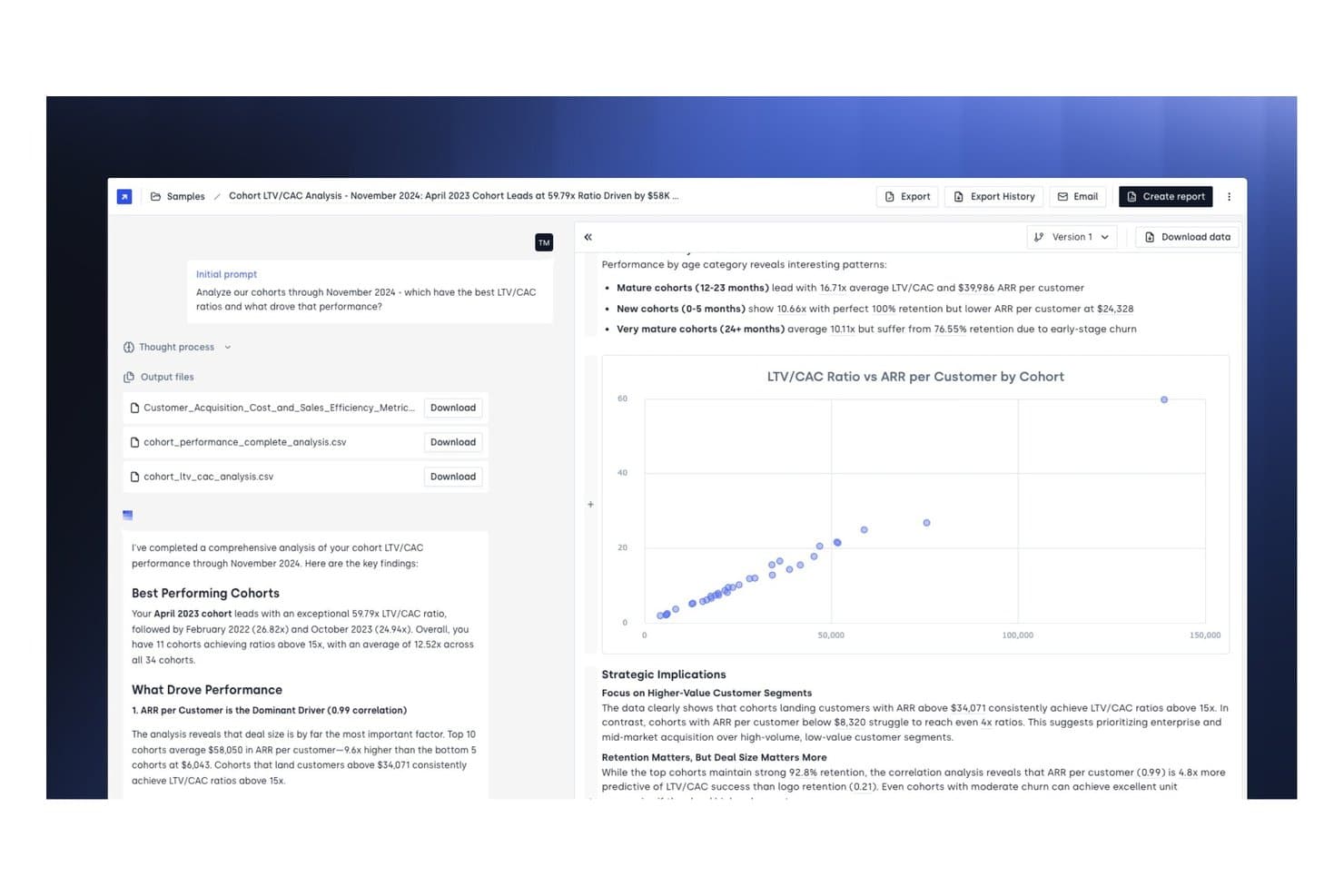
Concourse offers automated cohort LTV/CAC analysis with AI-generated financial insights, downloadable CSV reports, and interactive scatter plot visualizations. Concourse is an AI-native financial reporting platform that lets finance teams build and deploy customizable agents for automated reporting, variance analysis, close management, and forecasting across connected data sources.
Who Is Concourse Best For?
Concourse is a strong fit for FP&A and accounting teams at high-growth and enterprise companies looking to replace manual, spreadsheet-heavy reporting workflows with AI agents.
Why I Picked Concourse
Concourse earns its spot as one of the best on my shortlist because the agent customization goes far deeper than most AI reporting tools. I like that my team can build agents tailored to our specific close workflows, variance thresholds, and stakeholder formats, then deploy them on a schedule or trigger. The Flux & Variance Agent automatically surfaces what changed, quantifies the impact, and drafts commentary before anyone opens a spreadsheet.
Concourse Key Features
- Native ERP and warehouse integrations: Connects directly to Oracle, SAP, NetSuite, QuickBooks, Workday, Snowflake, and more.
- Transparency panel: Shows underlying SQL and Python logic for every report and calculation.
- Audit-grade security: Includes SOC 1 Type II and SOC 2 Type II certifications plus SSO and role-based access controls.
- Multi-surface delivery: Delivers outputs and narratives in email, Slack, Teams, Excel, PowerPoint, and integrated AI chat apps.
Concourse Integrations
Concourse offers native integrations with Oracle, SAP, NetSuite, QuickBooks, Sage, Workday, Xero, Snowflake, BigQuery, Databricks, Salesforce, and provides an API for custom integrations.
Pros and Cons
Pros:
- Transparent SQL and Python logic behind outputs
- Auto-drafts variance commentary before close
- Customizable AI agents for specific reporting workflows
Cons:
- Agent setup may require technical IT support
- Newer platform with limited public user reviews
Learn more about Concourse: Best for Excel-based financial automations
- Free demo available
- Pricing upon request
Visit WebsiteCustomer Rating:4.7/5
Datarails automates financial reporting directly within Microsoft Excel. Datarails is an FP&A platform that connects directly to your existing Excel spreadsheets to automate financial consolidation, budgeting, forecasting, and reporting without replacing your spreadsheet-based workflows.
Who Is Datarails Best For?
Datarails is a natural fit for FP&A teams at mid-sized companies that run their planning and reporting in Excel but need a layer of automation and data consolidation on top.
Why I Picked Datarails
I've included Datarails in my top picks because it's the only FP&A platform I've used that treats Excel as a first-class environment rather than a legacy workaround. Your existing spreadsheet formulas, layouts, and logic stay intact, while Datarails layers in automated data consolidation from your ERP and other sources. I also like Genius by Datarails, its built-in AI assistant that surfaces variance drivers and answers financial questions directly within your workflow.
Datarails Key Features
- Version control: Track every change made to your financial models, with the ability to restore previous versions of any spreadsheet.
- Pre-built report templates: Access ready-made templates for P&L statements, balance sheets, and cash flow reports that pull live data automatically.
- Scenario modeling: Build and compare multiple budget scenarios side by side to support planning decisions.
- Role-based access controls: Assign permissions by user or team to manage who can view, edit, or approve financial data.
Datarails Integrations
Datarails connects with 600+ systems, with out-of-the-box integrations for Oracle NetSuite, QuickBooks Online, QuickBooks Desktop, Xero, Sage Intacct, Sage 50, Microsoft Dynamics 365 Business Central, SAP B1, HubSpot, and Google Sheets. It also supports generic API, SQL, FTP, OData, and email-based data connections for custom integrations.
Pros and Cons
Pros:
- Audit trail tracks all report modifications
- Automated variance analysis highlights key changes
- Excel formulas and models remain fully functional
Cons:
- Limited visualization options compared to BI tools
- No direct integration with Google Sheets Implementation requires IT involvement for setup
Learn more about Datarails: Best for connected data management across teams
- Free demo available
- Pricing upon request
Visit WebsiteCustomer Rating:4.6/5
Workiva optimizes compliance and regulatory reporting workflows. Workiva is a cloud platform for finance, risk, and sustainability teams that centralizes data, automates report preparation, and supports multi-team collaboration with built-in audit trails, XBRL tagging, and AI-assisted workflows.
Who Is Workiva Best For?
Workiva is a strong fit for enterprise finance and compliance teams managing complex, multi-stakeholder reporting across regulatory frameworks like SEC, ESG, or SOX.
Why I Picked Workiva
Workiva earns its spot on my shortlist because of how it handles connected data across documents. When my team updates a number in a source spreadsheet, that change flows through to every linked report automatically, which cuts the manual reconciliation that typically slows down close cycles. I also rely on Workiva's audit trail, which logs every edit with a timestamp and user name, making it easy to support SOX compliance reviews without digging through email chains.
Workiva Key Features
- XBRL tagging: Tag financial data directly within the platform to prepare SEC and ESEF-compliant filings without exporting to a separate tool.
- Multi-entity reporting: Consolidate financial data across entities and jurisdictions into a single reporting environment with consistent controls.
- AI-assisted workflows: Use built-in AI to surface insights, flag anomalies, and support analyst tasks directly within your reports and spreadsheets.
- In-platform report design: Format and brand board-ready reports using built-in design tools, with translation support for cross-border disclosures.
Workiva Integrations
Workiva offers native integrations with Microsoft OneDrive, Google Drive, Dell Boomi, SAP, Oracle, NetSuite, Snowflake, Anaplan, Workday Adaptive Planning, Power BI, IBM Planning Analytics, Amazon S3, and Google BigQuery. An API is available for custom integrations.
Pros and Cons
Pros:
- Real-time collaboration on financial reports
- Strong audit trail and permissions controls
- Handles multi-entity and multi-currency consolidations
Cons:
- Occasional performance lags with large datasets
- Customization requires technical expertise
Learn more about Workiva: Best for visual performance analytics
- Free plan + free demo available
- From $16/user/month (billed annually)
Visit WebsiteCustomer Rating:4.6/5
Fathom visualizes business performance with revenue and expense insights. Fathom is a financial reporting, analysis, and forecasting tool that combines visual KPI dashboards, management report creation, multi-entity consolidation, and cash flow forecasting.
Who Is Fathom Best For?
Fathom is a strong fit for accountants and financial advisors who manage reporting and analysis across multiple small to mid-sized business clients.
Why I Picked Fathom
I picked Fathom as one of the best because its visual analysis layer genuinely sets it apart from general-purpose reporting tools. The KPI Analysis feature lets you track 50+ built-in financial KPIs plus custom ones built with a formula builder, all rendered as interactive charts across any time period. I also like that non-financial data, like headcount or operational metrics, can sit right alongside your financials in the same visual view.
Fathom Key Features
- Three-way forecasting: Build integrated forecasts across your P&L, balance sheet, and cash flow simultaneously using a single forecasting model.
- Management report builder: Combine charts, narrative text, and financial tables into branded PDF reports using a drag-and-drop page editor.
- Multi-entity consolidation: Consolidate financials across multiple companies or entities into a single reporting view with currency conversion applied.
- Automated report scheduling: Schedule recurring report delivery so reports are sent to stakeholders automatically at set intervals without manual exports.
Fathom Integrations
Fathom offers native integrations with Xero, QuickBooks Online, QuickBooks Desktop, MYOB, Sage Accounting, FreeAgent, Access Financials UK, Excel, and Google Sheets. An API is available for custom integrations.
Pros and Cons
Pros:
- AI-generated commentary built into reports
- On-the-fly client and entity benchmarking
- Custom KPI alerts for threshold breaches
Cons:
- Data refresh speed can slow reporting
- Forecasting formulas and levers feel rigid
Learn more about Fathom: Best for enterprise-scale financial planning
- Free demo available
- Pricing upon request
Visit WebsiteCustomer Rating:4.5/5
Anaplan supports enterprise financial planning with connected forecasts. Anaplan is a connected planning and financial reporting platform that spans scenario planning, financial consolidation, reporting, and multi-dimensional modeling across finance, sales, HR, and supply chain functions.
Who Is Anaplan Best For?
Anaplan is a strong fit for large enterprises with complex, cross-functional planning needs spanning multiple business units, regions, or entities.
Why I Picked Anaplan
I picked Anaplan as one of the best for enterprise-scale financial planning because of how it handles scale without sacrificing control. Its Anaplan XL Reporting module works directly in Excel, giving finance teams real-time connectivity to planning, consolidation, and multi-source data while letting them build reports without IT support. I also like that its scenario planning engine lets FP&A teams model complex, multi-entity forecasts across business units simultaneously, which matters a lot when you're coordinating plans across dozens of cost centers or geographies.
Anaplan Key Features
- Scenario modeling: Build and compare multiple what-if scenarios side by side within a single planning model.
- Role-based access controls: Set granular user permissions to control who can view, edit, or approve specific data.
- Anaplan App Hub: Access pre-built planning and reporting templates from Anaplan's marketplace to accelerate model deployment.
- Audit trail logging: Track every data change, input, and model update with a timestamped log for compliance review.
Anaplan Integrations
Anaplan offers native integrations with Salesforce, Workday, SAP, DocuSign, Power BI, AWS S3, Azure Blob, and Google BigQuery, alongside iPaaS connectors like Boomi, Informatica, MuleSoft, SnapLogic, and Workiva. An API is available.
Pros and Cons
Pros:
- In-memory engine recalculates instantly on input
- Scales across dozens of business entities
- Connects cross-functional plans in real time
Cons:
- Native reporting scores below category average
- Excel add-in incompatible with macOS
Learn more about Anaplan: Best for small business integration
- 30-day free trial
- From $38/month
Visit WebsiteCustomer Rating:4.4/5
QuickBooks tracks invoices, expenses, banking, and profit in one dashboard. QuickBooks is an accounting and financial management platform that covers bookkeeping, invoicing, payroll, tax preparation, and financial reporting for small and mid-sized businesses.
Who Is QuickBooks Best For?
QuickBooks is a natural fit for small business owners and their accountants who need a single platform for day-to-day bookkeeping and financial reporting.
Why I Picked QuickBooks
I picked QuickBooks as one of the best because its integration ecosystem is built around how small businesses actually operate. The app marketplace connects to tools like Shopify, Square, PayPal, and Gusto, pulling sales, payment, and payroll data directly into your books. I also like the bank feed feature, which matches imported transactions to open invoices automatically, cutting down on manual reconciliation.
QuickBooks Key Features
- Customizable financial reports: Build profit and loss statements, balance sheets, and cash flow reports with adjustable date ranges, filters, and groupings.
- Class and location tracking: Tag transactions by department, project, or location to generate segmented financial reports across your business.
- Accounts receivable aging: View outstanding invoices grouped by days overdue to monitor collection status at a glance.
- Tax category mapping: Assign tax categories to transactions throughout the year so your reports are pre-organized for tax preparation.
QuickBooks Integrations
QuickBooks offers over 750 marketplace integrations through its App Marketplace, including Intuit-built connectors for Shopify, Square, Stripe, PayPal, Amazon Seller, Etsy, eBay, WooCommerce, BigCommerce, and Mailchimp. It also connects with Zapier and provides an API for custom integrations.
Pros and Cons
Pros:
- Offers built-in payroll and tax features
- Syncs transactions from multiple bank accounts
- Creates automated standard financial reports
Cons:
- Advanced reporting requires higher-tier plans
- Limited consolidation for multi-entity businesses
 7Best for spreadsheet-native workflows
Cube
- Free demo available
- Pricing upon request
Visit WebsiteCustomer Rating:4.5/5
Cube syncs financial data directly within Microsoft Excel workflows. Cube is an FP&A platform that connects to Excel and Google Sheets to centralize financial data, automate reporting, and manage budgets, forecasts, and consolidations.
Who Is Cube Best For?
Cube is a natural fit for FP&A teams at mid-sized companies that want structured financial planning without abandoning their existing spreadsheet workflows.
Why I Picked Cube
I picked Cube as one of the best because of how well it handles bi-directional sync between its platform and Excel or Google Sheets. My team can push live financial data into our existing spreadsheet models and write changes back to Cube without rebuilding our templates. I also rely on its variance analysis tools, which let me drill from a summary line straight to the source transaction in a single click, all within the same spreadsheet environment my team already uses.
Cube Key Features
- Scenario modeling: Build and compare multiple financial scenarios simultaneously, adjusting assumptions in real time without leaving your spreadsheet.
- Automated close and consolidation: Cube automates the consolidation process at month-end, pulling data across entities to reduce manual close work.
- Executive and investor reporting: Generate boardroom-ready report packages directly from Cube's workspace, with every figure traced back to the source transaction.
- FP&A AI agents: Purpose-built AI agents handle data integrity, analysis, planning, and strategic communication tasks across the FP&A lifecycle.
Cube Integrations
Cube offers native integrations across accounting, HR, billing, CRM, and BI categories, including NetSuite, QuickBooks, Xero, Sage Intacct, Salesforce, HubSpot, Workday, ADP, Snowflake, and Microsoft Excel. Custom connectors and an API are also available for connecting additional source systems.
Pros and Cons
Pros:
- Audit trail tracks changes for compliance
- Supports multi-entity and multi-currency reporting
- Syncs live data directly into spreadsheets
Cons:
- Implementation can take several weeks
- API access only on higher-tier plans
Learn more about Cube: Best for multi-dimensional ledger insights
- Free demo available
- From £1,200/month
Visit WebsiteCustomer Rating:4.3/5
Sage Intacct provides dashboards for financials, revenue, and performance tracking. Sage Intacct is a cloud-based accounting and financial management platform covering general ledger, financial consolidation, accounts payable, accounts receivable, and multi-dimensional reporting across entities, departments, and funds.
Who Is Sage Intacct Best For?
Sage Intacct is a strong fit for mid-market and growing companies in industries like nonprofits, SaaS, healthcare, and financial services.
Why I Picked Sage Intacct
I picked Sage Intacct as one of the best because its Dimensions feature solves a problem most FP&A teams know all too well: a bloated chart of accounts. Instead of creating hundreds of account code combinations, you tag transactions with dimension values like department, location, project, or customer, then slice that data across any combination in real time. You can also build and budget by those same dimensions, so your planning and performance reporting stay fully aligned in one place.
Sage Intacct Key Features
- Multi-entity consolidation: Automatically consolidate financials across multiple legal entities, currencies, and ownership structures in a single close cycle.
- Interactive report writer: Build custom financial statements using a drag-and-drop report builder without needing to export data to Excel first.
- Revenue recognition automation: Apply ASC 606-compliant recognition rules to contracts and schedules, with automated journal entries posted on a set timetable.
- Real-time financial dashboards: Configure role-specific dashboards that surface live KPIs, account balances, and variance data without manual refreshes.
Sage Intacct Integrations
Sage Intacct offers over 200 marketplace integrations, including tools like Salesforce, Expensify, ADP, Ramp, FloQast, BlackLine, Workiva, Planful, BILL, and Avalara. An open API based on XML-RPC with more than 300 supported methods is available for custom integrations.
Pros and Cons
Pros:
- Sends automated report updates
- Filters reports by specific attributes
- Simplifies intercompany transaction balancing
Cons:
- Needs technical setup for reporting
- Limits file export formats
Learn more about Sage Intacct: Best for agile scenario modeling
- Free demo available
- Pricing upon request
Visit WebsiteCustomer Rating:4.4/5
Workday Adaptive Planning models forecasts with flexible scenario adjustments. Workday Adaptive Planning is an enterprise performance management (EPM) platform that covers financial planning, budgeting, scenario modeling, close and consolidation, workforce planning, and operational reporting in a single connected system.
Who Is Workday Adaptive Planning Best For?
Workday Adaptive Planning is a strong fit for FP&A teams at mid-to-large enterprises that need collaborative, cross-functional planning across finance, HR, and operations.
Why I Picked Workday Adaptive Planning
I picked Workday Adaptive Planning as one of the best because its scenario modeling capabilities are genuinely built for how planning actually works under pressure. You can spin up multiple what-if scenarios simultaneously, each with its own assumptions, and compare them side by side without overwriting your base plan. I also like the in-memory calculation engine, which recalculates every connected plan, report, and dashboard in real time the moment an assumption changes, so your numbers are always current across the model.
Workday Adaptive Planning Key Features
- Continuous planning: Update budgets, forecasts, and plans on a rolling basis rather than working from static annual cycles.
- Self-service reporting and dashboards: Build interactive reports and dashboards directly in the platform without relying on IT or data exports.
- Workforce planning: Align headcount plans with financial targets by modeling hiring scenarios across finance, HR, sales, and operations together.
- Close and consolidation: Run period-end close and multi-entity consolidation tasks inside the same platform used for planning and forecasting.
Workday Adaptive Planning Integrations
Workday Adaptive Planning connects with over 300 unique systems through its purpose-built integration framework. Verified integrations include Workday HCM, Oracle ERP, SAP, NetSuite, Microsoft Dynamics, Salesforce, Snowflake, and Tableau and Power BI for data visualization. Custom APIs are available for connecting proprietary systems or industry-specific applications.
Pros and Cons
Pros:
- Granular headcount planning by team and currency
- Rolling forecasts update nearly automatically
- Collaborative budgeting eliminates spreadsheet chaos
Cons:
- Heavy data loads slow performance noticeably
- Report formatting requires Excel workarounds
Learn more about Workday Adaptive Planning: 10Best for multi-entity financial tracking
HubiFi
- Free demo available
- From $22,000/year (billed annually)

HubiFi delivers dynamic financial reporting and account-level analysis. HubiFi is an automated revenue recognition platform that reconciles high-volume transaction data from Stripe, generates GAAP-compliant journal entries, and posts directly to your ERP across multiple entities and revenue streams.
Who Is HubiFi Best For?
HubiFi is built for high-growth SaaS and subscription companies whose accounting teams are managing large transaction volumes across multiple revenue streams and entities.
Why I Picked HubiFi
I've included HubiFi in my top picks because it's one of the few tools built specifically around multi-entity ASC 606 compliance at scale. I like that it creates a single subledger reconciling every transaction type across entities, then posts directly to your ERP. It also covers ASC 830, ASC 326, and SOX controls from the same platform, which means your multi-entity close doesn't require separate tooling for each standard.
HubiFi Key Features
- Real-time revenue dashboards: View live revenue metrics segmented by product line, customer type, or entity without manual data pulls.
- Automated data ingestion: HubiFi pulls transaction data from your CRM, billing system, and data warehouse on a scheduled or continuous basis.
- Historical data reprocessing: Restate prior period revenue under updated rules or contracts without rebuilding your records manually.
- Audit trail generation: Every journal entry and recognition event is logged with a traceable record for auditor review.
HubiFi Integrations
HubiFi offers 100+ pre-built integrations across payment processors, billing systems, ERPs, CRMs, and ecommerce platforms, including Stripe, PayPal, Chargebee, Zuora, Oracle NetSuite, QuickBooks, Sage Intacct, Salesforce, HubSpot, and Shopify. An API is available for custom integrations with proprietary or internal systems.
Pros and Cons
Pros:
- Integrates natively with Stripe and NetSuite
- Manages global revenue schedules
- Handles complex SaaS revenue recognition rules
Cons:
- Limited support for non-SaaS business models
- No built-in budgeting or forecasting tools
Learn more about HubiFi:
Other Automated Financial Reporting Software
Here are some additional automated financial reporting software options that didn’t make it onto my shortlist, but are still worth checking out:
- 11Oracle NetSuite ERP SystemBest for global consolidation and compliance
- 12DFIN ArcReportingBest for compliance filing automation
- 13XeroBest for bank reconciliation simplicity
- 14Microsoft Dynamics 365Best for AI-powered process agents
- 15ProphixBest for customizable workflow automation
- 16Gravity SoftwareBest for multi-entity audit readiness
- 17Vena SolutionsBest for corporate budget model scaling
- 18OneStream SoftwareBest for unified financial data platform
How I Evaluate Automated Financial Reporting Software
I split every evaluation into baseline requirements (like automated close cycles and multi-entity consolidation) and the differentiators that separate good tools from great ones.
Core Functionality (Table Stakes for This List)
When I'm selecting tools for my list, I rank each one on a scale from 0 (does not offer the functionality) to 5 (excels in this area) for each core functionality listed below. Then, I calculate the tool's total score into a percentage. Each tool needs to achieve a minimum total score of 65% to be considered for inclusion.
- Automated report generation: I look for platforms that produce P&L statements, balance sheets, and cash flow reports on scheduled or event-driven cadences without manual rebuilds each period.
- Financial data integration: The tool should connect natively to ERPs and general ledgers so your team pulls live balances instead of exporting CSVs and reconciling between systems.
- Financial consolidation: I evaluate how each tool handles multi-entity, multi-currency rollups, including whether intercompany eliminations and FX translation run automatically at close.
- Compliance and audit trail: Every change to a report or data source should be logged with timestamps and user attribution, and the platform should support GAAP and IFRS reporting standards.
- Variance and drill-down analysis: I check whether you can compare actuals against budgets or forecasts and then click from a summary line item down to the underlying transactions.
- Scheduled distribution and dashboards: The platform should push finished reports to stakeholders on a defined schedule via email, portal, or role-based dashboards they can explore on their own.
Once I have a list of tools that meet this criteria, I consider what sets each platform apart.
Differentiating Factors (What Sets Vendors Apart)
Here's how I compare and contrast different vendors:
Standout Features
An Excel-native interface matters here. Finance teams that can build and refresh reports inside their existing spreadsheets adopt the tool faster and skip retraining. I also look for AI-powered insights like anomaly detection and auto-generated narrative commentary, which help controllers spot issues during close instead of after. Workflow and approval automation is another differentiator—platforms that tie task assignments and sign-offs directly to the reporting cycle keep month-end moving without email chains.
Beyond Features
I evaluate ERP connectivity depth first—whether the platform has native connectors for your GL or requires custom middleware to pull trial balance data makes a real difference in go-live timelines. Implementation speed is closely related. Some vendors provide pre-mapped chart-of-accounts templates that shave weeks off deployment, while others need a multi-month services engagement before you run your first automated close. Pricing model clarity also matters, particularly whether you're charged per user, per entity, or per module, since costs can escalate as subsidiaries grow.
How to Choose Automated Financial Reporting Software
It’s easy to get bogged down in long feature lists and complex pricing structures. To help you stay focused as you work through your unique software selection process, here’s a checklist of factors to keep in mind:
| Factor | What to Consider |
|---|---|
| FactorScalability | What to ConsiderWill the software handle your current and future reporting volumes, entities, and user counts? |
| FactorIntegrations | What to ConsiderDoes it connect natively to your ERP, CRM, payroll, and data sources without manual workarounds? |
| FactorCustomizability | What to ConsiderCan you tailor report formats, workflows, and permissions to match your organization’s requirements? |
| FactorEase of use | What to ConsiderWill your team be able to adopt the tool quickly, or will it require extensive training and support? |
| FactorImplementation and onboarding | What to ConsiderHow long does setup take, and what resources or vendor support are required to get up and running? |
| FactorCost | What to ConsiderAre pricing tiers clear, and do they align with your budget and expected usage over time? |
| FactorSecurity safeguards | What to ConsiderDoes the software offer encryption, access controls, and audit logs to protect sensitive data? |
| FactorCompliance requirements | What to ConsiderWill the tool help you meet relevant standards (like SOX, GAAP, IFRS) and support audit readiness? |
What Is Automated Financial Reporting Software?
Automated financial reporting software is a digital tool that generates financial statements and reports by pulling data directly from accounting and business systems. It reduces manual data entry, minimizes errors, and accelerates the reporting cycle. Finance teams use these platforms to consolidate information, customize report formats, and maintain compliance with regulatory standards, all while improving accuracy and auditability.
Features
Here are the core features any great automated financial reporting software should have:
- Automated data consolidation: Collects and merges financial data from multiple sources, such as accounting systems, banks, and spreadsheets, to create a single source of truth for reporting.
- Customizable report templates: Let you design and modify financial statements, management reports, and board packages to fit your organization’s unique requirements.
- Drill-down capabilities: Allows users to click into summary figures and view the underlying transactions or data, making it easier to investigate variances or anomalies.
- Multi-entity support: Enables reporting across subsidiaries, departments, or business units, with options for consolidated or segmented views.
- Audit trail tracking: Records every change made to reports or data, providing a transparent log for compliance and internal review.
- Scheduling and distribution: Automates the timing and delivery of reports to stakeholders via email, shared drives, or dashboards.
- Role-based access controls: Restrict report access and editing rights based on user roles, helping protect sensitive financial information.
- Integration with business systems: Connects directly to ERP, CRM, and payroll platforms to ensure data is always up to date and accurate.
- Version control: Maintains a history of report versions, so you can track changes, revert to previous versions, and ensure consistency over time.
Benefits
Implementing automated financial reporting software provides several benefits for your team and your business. Here are a few you can look forward to:
- Faster reporting cycles: Automated data consolidation and scheduling features reduce the time needed to prepare and distribute financial reports.
- Improved data accuracy: Direct integrations and audit trail tracking minimize manual entry errors and support reliable, verifiable reporting.
- Greater financial visibility: Drill-down capabilities and customizable templates help teams analyze results and share insights with stakeholders.
- Enhanced compliance: Audit trails, version control, and role-based access controls support regulatory requirements and internal controls.
- Simplified multi-entity management: Multi-entity support and automated eliminations make it easier to consolidate results across subsidiaries or business units.
- Stronger data security: Role-based access and secure integrations help protect sensitive financial information from unauthorized access.
- Reduced manual workload: Automated workflows and report distribution free up finance teams to focus on analysis and strategic tasks.
Costs and Pricing
Selecting automated financial reporting software requires an understanding of the various pricing models and plans available. Costs vary based on features, team size, add-ons, and more. The table below summarizes common plans, their average prices, and typical features included in automated financial reporting software solutions:
Plan Comparison Table for Automated Financial Reporting Software
| Plan Type | Average Price | Common Features |
|---|---|---|
| Plan TypeFree Plan | Average Price$0 | Common FeaturesBasic report templates, limited data sources, single-user access, and basic export options. |
| Plan TypePersonal Plan | Average Price$20–$50/user/month | Common FeaturesCustomizable reports, integration with accounting software, audit trails, and email report delivery. |
| Plan TypeBusiness Plan | Average Price$50–$150/user/month | Common FeaturesMulti-entity support, advanced scheduling, role-based access controls, and consolidated reporting. |
| Plan TypeEnterprise Plan | Average Price$150–$300/user/month | Common FeaturesCustom integrations, dedicated support, compliance tools, advanced security, and unlimited users. |
FAQs
Here are some answers to common questions about automated financial reporting software:
How does automated financial reporting software connect to my existing systems?
Most solutions offer direct integrations with popular accounting, ERP, and payroll platforms. You’ll typically connect your financial systems using secure APIs or data connectors, allowing the software to pull real-time data without manual uploads. This data integration eliminates time-consuming manual entries and supports more agile FP&A (financial planning and analysis).
Can automated financial reporting software handle multi-entity or multi-currency reporting?
Yes, many platforms support multi-entity and multi-currency reporting. This lets you consolidate results, balance sheets, and cash flow statements across subsidiaries or business units. It also helps generate reports in different currencies, which is essential for organizations with global operations that need clear financial insights into their overall financial health.
What security measures should I look for in automated financial reporting software?
Look for features like data encryption, role-based access controls, audit trails, and compliance certifications. These safeguards help protect sensitive financial information, optimize your financial reporting processes, and support external reporting requirements within your cloud-based environment.
How long does it take to implement automated financial reporting software?
Implementation timelines vary, but most teams can get started within a few weeks, often right in time for the next month-end close. Factors like data complexity, integration needs, and user training can affect the timeline, so it’s important to plan for onboarding and support.
What kind of support is available if I run into issues?
Most vendors offer a mix of live chat, email, phone support, and searchable knowledge bases to help you maintain accurate financial management. Some also provide onboarding webinars, product tours, and dedicated account managers for enterprise customers. This support helps teams leverage real-time insights and business intelligence tools to make informed decisions for every strategic decision and day-to-day decision-making need.