

10 Best B2B Invoicing Software Reviewed in 2026

Best B2B Invoicing Software Shortlist


Managing invoices is often a real challenge for CFOs and finance teams. Handling paperwork, tracking late payments, and maintaining accurate accounts receivable can drain time and resources.
This is where modern B2B invoicing software steps in. It simplifies the invoicing process, making it easier for you to keep track of payments and manage cash flow.
In my experience, choosing the right invoicing software can make a big difference in your team's efficiency and accuracy. I’ve independently reviewed and tested these tools to give you an unbiased look at the best options available.
In this article, you’ll find detailed insights into the top B2B invoicing software, helping you make an informed decision for your business needs.
Why Trust Our Software Recommendations
Our team has been testing and reviewing software since 2012. As finance leaders ourselves, we know how difficult—and important—it is to choose the right software.
For this guide, we evaluated tools using hands-on testing and independent research, scoring tools using our selection criteria.
Our reviews reflect our human editorial judgment, not a sales pitch.
Best B2B Invoicing Software Summary
This comparison chart summarizes pricing details for my top B2B invoicing software selections to help you find the best one for your budget and business needs.
| Tool | Best For | Trial Info | Price | ||
|---|---|---|---|---|---|
| 1 | Best for independent contractors | Free plan + free trial available | From $18.75/month (billed annually) | Website | |
| 2 | Best open-source option | Free plan available | From $11.67/month (billed annually) | Website | |
| 3 | Best for startup-friendly cloud accounting | 30-day free trial available | From $2.50/month | Website | |
| 4 | Best for time tracking | Free trial + free plan available | From $9/user/month (billed annually) | Website | |
| 5 | Best for financial reporting | Free demo available | Pricing upon request | Website | |
| 6 | Best for simple invoicing in the Zoho ecosystem | Free demo available | Free forever plan | Website | |
| 7 | Best for customizable invoices | 7-day free trial + free demo available | From $15/month (billed annually) | Website | |
| 8 | Best for global invoicing | Free plan + 14-day free trial available | From $16/month (billed annually) | Website | |
| 9 | Best for recurring payments | Not available | From $0.7% of billing volume per month | Website | |
| 10 | Best for free invoicing | Free plan available | From $19/month | Website |

Best B2B Invoicing Software Review
Below are my detailed summaries of the best B2B invoicing software that made it onto my shortlist. My reviews offer a detailed look at the key features, pros and cons, integrations, and ideal use cases of each tool to help you find the best one for you.

Indy
Best for independent contractors

Indy is a versatile project management and invoicing software tailored for independent contractors and freelancers. It provides tools for invoicing, contract management, and task organization, helping users streamline their freelance operations.
Why I picked Indy: Indy offers an all-in-one platform that caters specifically to the needs of independent contractors. Using the contract management feature, it's easy to create and manage contracts that clearly define your work terms. The invoicing tool is designed for quick setup, allowing you to send professional invoices with ease. Additionally, the task management feature helps you organize your projects, making it simpler to meet deadlines.
Standout features and integrations:
Features include a time tracker that records billable hours, ensuring you get paid for your work. The proposal tool allows you to create and send project proposals to potential clients as you seek new projects. Indy also offers a calendar feature that helps you keep track of deadlines and appointments.
Integrations include Google Calendar, Zoom, Slack, Trello, Asana, QuickBooks, Stripe, PayPal, Dropbox, Zapier, and more.
Pros and Cons
Pros:
- Accurate time tracking
- Integrated contracts and proposals
- Built for freelancers
Cons:
- Not suited for large teams
- Limited advanced invoicing tools

Best open-source option

Invoice Ninja is an open-source invoicing software catering to freelancers and small businesses, offering tools for invoicing, time tracking, and expense management. It provides flexibility and customizability, making it a preferred choice for those who want control over their invoicing processes.
Why I picked Invoice Ninja: Invoice Ninja offers an open-source platform, allowing you to customize and tailor the software to your specific needs. Its self-hosting option gives your team the flexibility to manage data securely. The software supports multiple payment gateways to give your clients various options for payment. Additionally, the time-tracking feature helps you bill clients accurately, aligning with its USP as an open-source option.
Standout features and integrations:
Features include a client portal that allows your clients to view and pay invoices online. The recurring billing feature automates invoicing for regular clients. Expense management helps you keep track of business expenses, ensuring accurate financial records.
Integrations include Zapier, Stripe, PayPal, Authorize.net, Braintree, Mollie, GoCardless, and more.
Pros and Cons
Pros:
- Client portal included
- Multiple payment gateways supported
- Open-source platform
Cons:
- Limited beginner support
- Technical setup required

Xero
Best for startup-friendly cloud accounting

Xero is a cloud-based accounting software designed for startups and small businesses, providing tools for invoicing, bank reconciliation, and financial reporting. It aims to simplify financial management by allowing startups to focus on growth and development.
Why I picked Xero: Xero offers an intuitive interface that is easy for startup teams to navigate without extensive accounting knowledge. Automated bank reconciliation helps your team keep track of transactions. The platform's ability to generate real-time financial reports aids in informed decision-making. Customizable invoices allow you to maintain a professional image that aligns with your brand's identity.
Standout features and integrations:
Features include expense tracking, which helps you monitor and categorize business expenses. The budgeting tool allows your team to plan and manage financial goals effectively. Payroll support ensures employees are paid accurately and on time, which is crucial for startups.
Integrations include PayPal, Stripe, Shopify, Square, HubSpot, Gusto, Expensify, WooCommerce, and more.
Pros and Cons
Pros:
- Customizable invoice templates
- Automated bank reconciliation
- Real-time financial reporting
Cons:
- Limited offline functionality
- Can overwhelm new users

Harvest
Best for time tracking

Harvest is a time-tracking and invoicing software designed for freelancers and small businesses, providing tools for tracking time, managing projects, and invoicing clients. It helps users accurately bill clients based on tracked hours and project progress.
Why I picked Harvest: Harvest integrates time tracking with invoicing, allowing you to seamlessly convert tracked hours into invoices. This feature ensures accurate billing for clients, which is crucial for service-based businesses. The software also offers project management capabilities, helping your team stay organized and meet deadlines. Additionally, Harvest's reporting tools provide insights into project performance.
Standout features and integrations:
Features include detailed timesheets that allow you to track time spent on various tasks. The software offers expense tracking, helping you manage project costs effectively. Harvest also provides customizable invoice templates that enable you to maintain a professional appearance for your business.
Integrations include Asana, Trello, Slack, QuickBooks Online, Xero, Stripe, PayPal, Basecamp, Zapier, Jira, and more.
Pros and Cons
Pros:
- Detailed reporting tools
- Clean project invoicing
- Accurate time tracking
Cons:
- Not ideal for complex finances
- Limited billing automation
Best for financial reporting
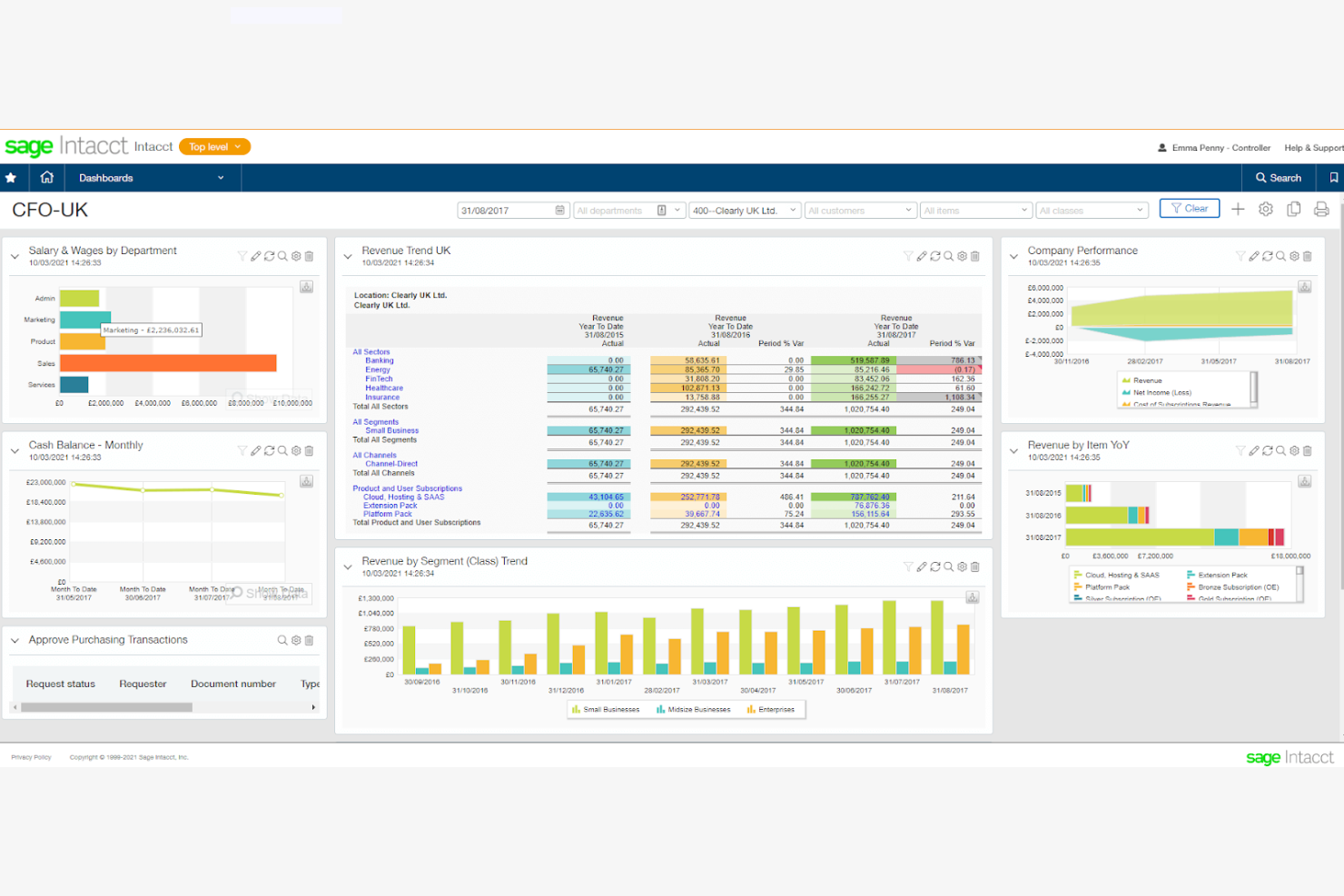
Sage Intacct is a cloud-based financial management software aimed at medium to large businesses, offering solutions for invoice processing, billing, and financial reporting. It helps organizations optimize their accounting processes and gain insights into their financial health.
Why I picked Sage Intacct: Sage Intacct excels in delivering real-time financial reporting, which is crucial for businesses to make informed decisions. Its automated billing processes reduce manual entry and errors, improving efficiency. The software's customizable dashboards allow you to tailor reporting to your business needs. Additionally, Sage Intacct supports multientity management, making it ideal for businesses with complex structures.
Standout features and integrations:
Features include advanced automation for accounts payable and receivable, reducing the time spent on manual tasks. The software offers comprehensive audit trails, ensuring compliance and transparency. Sage Intacct also provides project accounting capabilities, helping you track project costs and profitability.
Integrations include Salesforce, Avalara, ADP, Expensify, BILL, American Express, SAP Concur, MineralTree, and more.
Pros and Cons
Pros:
- Strong audit trails
- Multientity accounting support
- Real-time financial visibility
Cons:
- Complex to implement
- Expensive for small businesses

Best for simple invoicing in the Zoho ecosystem

Zoho Invoice is a cloud-based invoicing software designed for small businesses, offering tools for billing, expense tracking, and client management. It aims to simplify the financial operations of small teams by providing an easy-to-use platform for managing invoices and payments.
Why I picked Zoho Invoice: Zoho Invoice provides a user-friendly interface that helps small businesses manage their invoicing without needing extensive financial knowledge. Its automated reminders ensure that clients pay on time, reducing the need for manual follow-ups. The software's ability to handle multiple currencies makes it ideal for businesses with international clients. Customizable templates allow your invoices to reflect your brand, giving them a professional touch.
Standout features and integrations:
Features include time tracking that helps you accurately bill clients based on hours worked. The recurring invoice feature ensures regular clients receive timely invoices. Expense tracking allows you to monitor and categorize business expenses.
Integrations include Zoho CRM, QuickBooks, PayPal, Stripe, Microsoft 365, Dropbox, Slack, and more.
Pros and Cons
Pros:
- Handles recurring invoices
- Generates automated payment reminders
- Supports multiple currencies
Cons:
- Less suitable for large enterprises
- Limited advanced reporting

Best for customizable invoices

Invoicera is an online invoicing software that provides solutions for invoicing, billing, and workflow management for businesses of all sizes. It focuses on customization, allowing businesses to tailor their invoicing processes to fit specific needs.
Why I picked Invoicera: Invoicera offers extensive customization options for invoices so you can create invoices that match your brand's identity. Its workflow management feature helps your team improve invoicing processes, making it easier to manage multiple clients. The software supports multilingual and multicurrency invoicing to help you reach a global clientele. Additionally, automated invoicing features reduce manual tasks, improving your team's efficiency.
Standout features and integrations:
Features include time tracking, which ensures accurate billing for hourly work. The purchase order management feature helps you keep track of orders and inventory. Invoicera also provides a client portal, giving clients the convenience of viewing and paying invoices online.
Integrations include PayPal, Stripe, Authorize.net, 2Checkout (now Verifone), Skrill, BluePay, and more.
Pros and Cons
Pros:
- Automated invoicing features
- Global tax and currency support
- Extensive workflow customization options
Cons:
- Reporting depth is limited
- Interface can feel complex

Hiveage
Best for global invoicing

Hiveage is a cloud-based invoicing software designed for freelancers and small businesses, focusing on global invoicing and billing. It offers tools for invoicing, expense tracking, and time management that provide a total solution for managing international transactions.
Why I picked Hiveage: Hiveage supports multiple currencies and tax settings, making it ideal for businesses with international clients. It allows you to send invoices in different languages, catering to a global audience. The software's detailed reporting tools give you insights into your financial performance across different markets. Additionally, its recurring billing feature automates the invoicing process for regular clients to ensure timely payments.
Standout features and integrations:
Features include detailed financial reports that help you analyze your business performance. The expense tracking feature makes it easy to categorize and monitor your expenses. Hiveage also offers mileage tracking, which is beneficial if your business involves travel or deliveries.
Integrations include PayPal, Stripe, Authorize.net, Braintree, WePay, Mollie, Razorpay, Coinbase, and more.
Pros and Cons
Pros:
- Strong recurring billing tools
- Clear financial reporting
- Multicurrency and multilingual invoicing
Cons:
- Limited advanced features
- Setup takes time


Stripe Billing is a payment processing software designed for businesses of all sizes, offering tools for recurring billing, invoicing, and subscription management. It helps businesses manage their billing cycles efficiently and automate payment processes.
Why I picked Stripe Billing: Stripe Billing excels in handling recurring payments, making it ideal for subscription-based businesses. Its automated invoicing feature reduces manual effort, allowing your team to focus on other tasks. The software's customizable billing plans enable you to tailor subscriptions to meet your clients' needs. Additionally, Stripe Billing's dunning management helps recover failed payments, ensuring a steady cash flow.
Standout features and integrations:
Features include a customer portal that allows clients to manage their subscriptions and view invoices. The software offers detailed analytics for tracking billing performance and customer engagement. Stripe Billing also supports multicurrency transactions, which is useful for global businesses.
Integrations include Shopify, WooCommerce, Xero, QuickBooks, NetSuite, Salesforce, HubSpot, Squarespace, Adobe Commerce, FreshBooks, and more.
Pros and Cons
Pros:
- Flexible billing logic
- Automated invoicing process
- Excellent subscription management
Cons:
- Can be costly for small businesses
- May need technical knowledge


Wave is a cloud-based software aimed at freelancers and small businesses, offering tools for invoicing, billing, and financial management. It provides a free solution for managing invoices, so it's accessible for businesses with tight budgets.
Why I picked Wave: Wave offers a completely free invoicing platform for entrepreneurs that allows you to manage your billing without incurring additional costs. Its user-friendly interface makes it easy for small business owners to get started. The software includes features such as automatic payment reminders, helping you ensure timely payments from clients. Customizable invoice templates let you maintain a professional image, which is crucial for free invoicing services.
Standout features and integrations:
Features include automatic payment reminders that help you track payments. The software provides detailed financial reporting, giving you insights into your business's financial health. It also offers receipt scanning, making it easy to track and manage expenses.
Integrations include PayPal, Stripe, Shoeboxed, Etsy, Zapier, QuickBooks, FreshBooks, HubSpot, Slack, Mailchimp, and more.
Pros and Cons
Pros:
- Automatic payment reminders
- User-friendly interface
- Completely free invoicing platform
Cons:
- Limited scalability for growing businesses
- Limited customization options
Other B2B Invoicing Software
Here are some additional B2B invoicing software options that didn’t make it onto my shortlist but are still worth checking out:
- Invoiced
For automated AR and collections
- Billdu
For mobile invoicing
- SparkLayer
For e-commerce integration
- Sufio
For Shopify users
- Melio
For payment flexibility
- QuickBooks Online
For accountants
- AvidXchange
For AP automation in mid-market firms
- Square Invoices
For small retail businesses
- Invoicely
For budget-friendly online invoicing


How I Evaluate B2B Invoicing Software
I split my evaluation into baseline criteria—like AR automation and ERP sync—and the differentiators, like AI cash application and client payment portals, that separate good tools from great ones.
Core Functionality (Table Stakes For This List)
When I'm selecting tools for my list, I rank each one on a scale from 0 (does not offer the functionality) to 5 (excels in this area) for each core functionality listed below. Then, I calculate the tool's total score into a percentage. Each tool needs to achieve a minimum total score of 65% to be considered for inclusion.
- B2B Invoice Creation: I check whether you can build invoices with PO references, net payment terms, and multi-currency support—details your business clients expect to see on every document.
- Automated Billing Workflows: Recurring invoices are table stakes, but I also evaluate support for milestone, subscription, and usage-based schedules with configurable approval chains.
- AR & Payment Tracking: Real-time aging reports and automated dunning sequences matter here—I look for tools that give AR managers clear visibility into DSO trends and overdue balances.
- Payment Processing Integration: I evaluate which B2B payment methods each tool supports (ACH, wire, cards, checks) and whether reconciliation happens automatically against open invoices.
- Accounting & ERP Integrations: Bi-directional syncing with platforms like QuickBooks, Xero, or NetSuite is what I look for, so GL postings and bank reconciliation stay current without manual re-entry.
- Tax & Compliance Support: Multi-jurisdiction tax calculations across VAT, GST, and sales tax scenarios are key, along with support for e-invoicing standards like Peppol where mandated.
Once I have a list of tools that meet this criteria, I consider what sets each platform apart.
Differentiating Factors (What Sets Vendors Apart)
Here's how I compare and contrast different vendors:
Standout Features
AI-powered cash application is a major differentiator—I look for tools that auto-match incoming payments to open invoices, even when remittance details arrive separately via email or bank feed. Customer self-service portals also matter. When your clients can view invoices, pull statements, and pay online without emailing your AR team, it cuts back-and-forth dramatically. I also evaluate predictive AR analytics, like DSO forecasting and payment behavior trends, that help controllers make proactive collections decisions.
Beyond Features
Compliance and security certifications like SOC 2 Type II and PCI-DSS rank high on my list, especially when AR teams handle sensitive payment data across multiple entities. I also evaluate integration ecosystem depth, checking for open APIs and native connectors to ERPs and tax engines like Avalara or Vertex—a tool that can't plug into your existing stack creates more manual work than it saves. Pricing transparency matters too. I look for clear tiering by invoice volume or users with no hidden processing fees buried in payment transactions.
How to Choose B2B Invoicing Software
It’s easy to get bogged down in long feature lists and complex pricing structures. To help you stay focused as you work through your unique software selection process, here’s a checklist of factors to keep in mind:
| Factor | What to Consider |
|---|---|
| Scalability | Can the software grow with your business? Consider if it supports increasing invoice volumes and additional users without a hitch. Look for tools that accommodate your future growth plans. |
| Integrations | Does it integrate with your existing systems? Check for compatibility with your accounting, CRM, and other business tools to avoid data silos. Make sure it fits well with your current workflow. |
| Customizability | Can you tailor it to your business needs? Evaluate if you can customize invoice templates, reporting, and workflows to match your processes. Ensure flexibility to adapt as your business evolves. |
| Ease of use | Is the software user-friendly? Test the interface to see if it’s intuitive for your team. Avoid tools that require extensive training or have complex navigation. |
| Implementation and onboarding | How smooth is the setup process? Assess the time and resources needed to get up and running. Look for solutions with clear onboarding guidance, training materials, and support to ease the transition. |
| Cost | Is it within your budget? Compare pricing models, including any hidden fees or additional charges. Ensure the cost aligns with the value and benefits you’ll receive. |
| Security safeguards | Does it protect your data? Verify if the software complies with industry standards for data protection and encryption. Ensure your financial information is secure from breaches. |
| Support availability | Is help readily accessible? Look for vendors that offer 24/7 support through multiple channels like chat, email, or phone. Consider the quality and responsiveness of their customer service team. |
What Is B2B Invoicing Software?
B2B invoicing software is a tool that helps businesses create, send, and manage invoices for their clients. These tools are typically used by accountants, finance teams, and business owners to simplify billing processes and improve cash flow management. Automated invoicing, payment tracking, and multicurrency support help with efficiency and accuracy in handling financial transactions. Overall, these tools save time and reduce errors, making financial operations smoother for businesses.
Features of B2B Invoicing Software
When selecting B2B invoicing solutions, keep an eye out for the following key features:
- Automated invoicing: Automatically generate and send invoices to clients, reducing manual effort and minimizing errors.
- Payment tracking: Monitor payments and outstanding invoices to ensure timely collections and maintain cash flow.
- Multicurrency support: Handle transactions in various currencies, accommodating international clients and vendors.
- Customizable templates: Create professional-looking invoices that reflect your brand’s identity, enhancing brand consistency.
- Recurring billing: Set up recurring invoices for regular clients, saving time and ensuring consistent billing cycles.
- Expense tracking: Keep track of business expenses to manage costs effectively and simplify financial reporting.
- Time tracking: Accurately track billable hours to ensure clients are charged correctly for services rendered.
- Detailed reporting: Access insights into financial performance with detailed reports, aiding in informed decision-making.
- Client portal: Provide clients with access to their invoices and payment history, improving transparency and communication.
- Integration capabilities: Easily connect with other business tools, such as accounting software and CRMs, to line up workflows.
Benefits of B2B Invoicing Software
Implementing B2B invoicing software provides several benefits for your team and your business. Here are a few you can look forward to:
- Time savings: Automated invoicing reduces the time spent on manual billing tasks, allowing your team to focus on more strategic activities.
- Improved accuracy: Features such as payment tracking and time tracking ensure accurate billing and reduce errors in financial transactions.
- Enhanced cash flow: By managing payments and outstanding invoices efficiently, the software helps maintain a steady cash flow for your business.
- Better client communication: A client portal provides clients with easy access to their invoices and payment history, improving transparency and trust.
- Increased flexibility: Multicurrency support and customizable templates allow you to adapt to diverse client needs and maintain brand consistency.
- Data-driven decisions: Detailed reporting offers insights into your financial performance, aiding in more informed and effective decision-making.
- Consistent billing cycles: Recurring billing ensures that regular clients are billed on time, supporting reliable revenue streams.
Costs and Pricing of B2B Invoicing Software
Selecting B2B invoicing software requires an understanding of the various pricing models and plans available. Costs vary based on features, team size, add-ons, and more. The table below summarizes common plans, their average prices, and typical features included in B2B invoicing software solutions:
Plan Comparison Table for B2B Invoicing Software
| Plan Type | Average Price | Common Features |
|---|---|---|
| Free Plan | $0 | Basic invoicing, payment tracking, and limited templates. |
| Personal Plan | $5-$25/user/month | Customizable templates, automated invoicing, and basic reporting. |
| Business Plan | $30-$60/user/month | Recurring billing, multicurrency support, and integration capabilities. |
| Enterprise Plan | $70-$150/user/month | Advanced analytics, multiuser access, and priority support. |
B2B Invoicing Software FAQs
Here are some answers to common questions about B2B invoicing software:
Can B2B invoicing software integrate with my accounting or ERP system?
Yes, most B2B invoicing software can integrate with popular ERP and accounting systems, such as QuickBooks and Xero, through native connectors or an API. This integration helps synchronize your financial processes by automatically syncing invoice data with your accounts. Check the compatibility of your current accounting software with the invoicing tool you’re considering.
Is my data safe with B2B invoicing software?
Yes, reputable B2B invoicing software providers prioritize data security. They use encryption and follow industry standards for electronic invoicing to ensure your data is secure from unauthorized access. Before choosing a tool, review its security measures and compliance with regulations such as GDPR if applicable to your business.
What measurable ROI can I expect from automating invoicing?
You can typically reduce days’ sales outstanding (DSO), cut manual processing costs, and lower error rates by automating invoicing. Many CFOs find that automation cuts invoice processing time by up to 50%, reduces overdue payments, and improves team productivity, all of which impact your bottom line.
How does invoicing software help with regulatory compliance?
B2B invoicing software often includes features to support compliance with tax regulations and e-invoicing mandates. These features automatically apply correct tax rates, store digital audit trails, and generate reports for audits. This helps reduce compliance risks and prepares your finance team for regulatory changes.
How can B2B invoicing software improve cash flow for my business?
Business invoicing software speeds up invoice creation, reduces errors, and automates payment reminders. This helps you get paid faster and lowers the risk of overdue invoices. It also gives you real-time visibility into outstanding receivables, so you can manage cash flow more effectively.
Can I access B2B invoicing software from mobile devices?
Yes, many B2B invoicing software solutions offer mobile access through apps or mobile-optimized websites. This access allows you to manage invoices, track payments, and communicate with clients on the go. If you need mobile functionality, check if the software provides a dedicated mobile app with the features you require.
What’s Next:
If you're in the process of researching B2B invoicing software, connect with a SoftwareSelect advisor for free recommendations.
You fill out a form and have a quick chat where they get into the specifics of your needs. Then you'll get a shortlist of software to review. They'll even support you through the entire buying process, including price negotiations.