
20 SAP Alternatives Picked for 2026

SAP Alternatives Shortlist
Here's my pick of the 10 best software from the 20 tools reviewed.


A strong SAP alternative delivers ERP capabilities, flexible deployment options, and industry-specific features that can match or exceed what SAP offers. If you’re searching for SAP alternatives, you’re likely weighing cost, complexity, and how well a solution fits your business processes.
With so many ERP platforms available, it’s essential to find one that aligns with your reporting needs, compliance requirements, and operational goals—without sacrificing reliability or scalability. This list will help you compare leading SAP ERP alternatives, so you can make an informed decision that supports your finance team and your organization’s growth.
What Is SAP?
SAP is an enterprise resource planning (ERP) software suite that helps organizations manage core business functions like finance, supply chain, procurement, and human resources. Widely used by large and midsize companies, SAP centralizes data and automates processes to support accurate reporting, compliance, and operational efficiency. Finance professionals rely on SAP to handle complex transactions, integrate with other business systems, and maintain control over financial and operational data.
Best SAP Alternatives Summary
This comparison chart summarizes pricing details for my top SAP alternative selections to help you find the best one for your budget and business needs.
| Tool | Best For | Trial Info | Price | ||
|---|---|---|---|---|---|
| 1 | Best with Microsoft 365 integration | Free plan + free trial available | From $80/user/month (billed annually) | Website | |
| 2 | Best for process manufacturing companies | Free demo available | Pricing upon request | Website | |
| 3 | Best for cloud deployment flexibility | Free demo available | Pricing upon request | Website | |
| 4 | Best for workforce management analytics | Free demo available | Pricing upon request | Website | |
| 5 | Best for project-based businesses | Free demo available | Pricing upon request | Website | |
| 6 | Best for industry-specific configurations | Free demo available | Pricing upon request | Website | |
| 7 | Best for complex multinational operations | Free demo available | Pricing upon request | Website | |
| 8 | Best with open-source customization | Free plan + free trial available | From $31.10/user/month (billed annually) | Website | |
| 9 | Best for service-centric organizations | Free demo available | Pricing upon request | Website | |
| 10 | Best for aviation and logistics sectors | Free demo available | Pricing upon request | Website |


Why Trust Our Software Reviews
We’ve been testing and reviewing financial software since 2023. As finance specialists ourselves, we know how critical and difficult it is to make the right decision when selecting software.
We invest in deep research to help our audience make better software purchasing decisions. We’ve tested more than 2,000 tools for different finance use cases and written over 1,000 comprehensive software reviews. Learn how we stay transparent & our software review methodology.
-

Rippling Spend
Visit WebsiteThis is an aggregated rating for this tool including ratings from Crozdesk users and ratings from other sites.4.8 -
LiveFlow
Visit WebsiteThis is an aggregated rating for this tool including ratings from Crozdesk users and ratings from other sites.4.9 -
Float Financial
Visit WebsiteThis is an aggregated rating for this tool including ratings from Crozdesk users and ratings from other sites.4.1


SAP Alternatives Reviews
Below are my detailed summaries of the SAP alternatives that made it onto my shortlist. My reviews offer a detailed look at the features, best use cases, and integrations of each platform to help you find the best one for your organization.

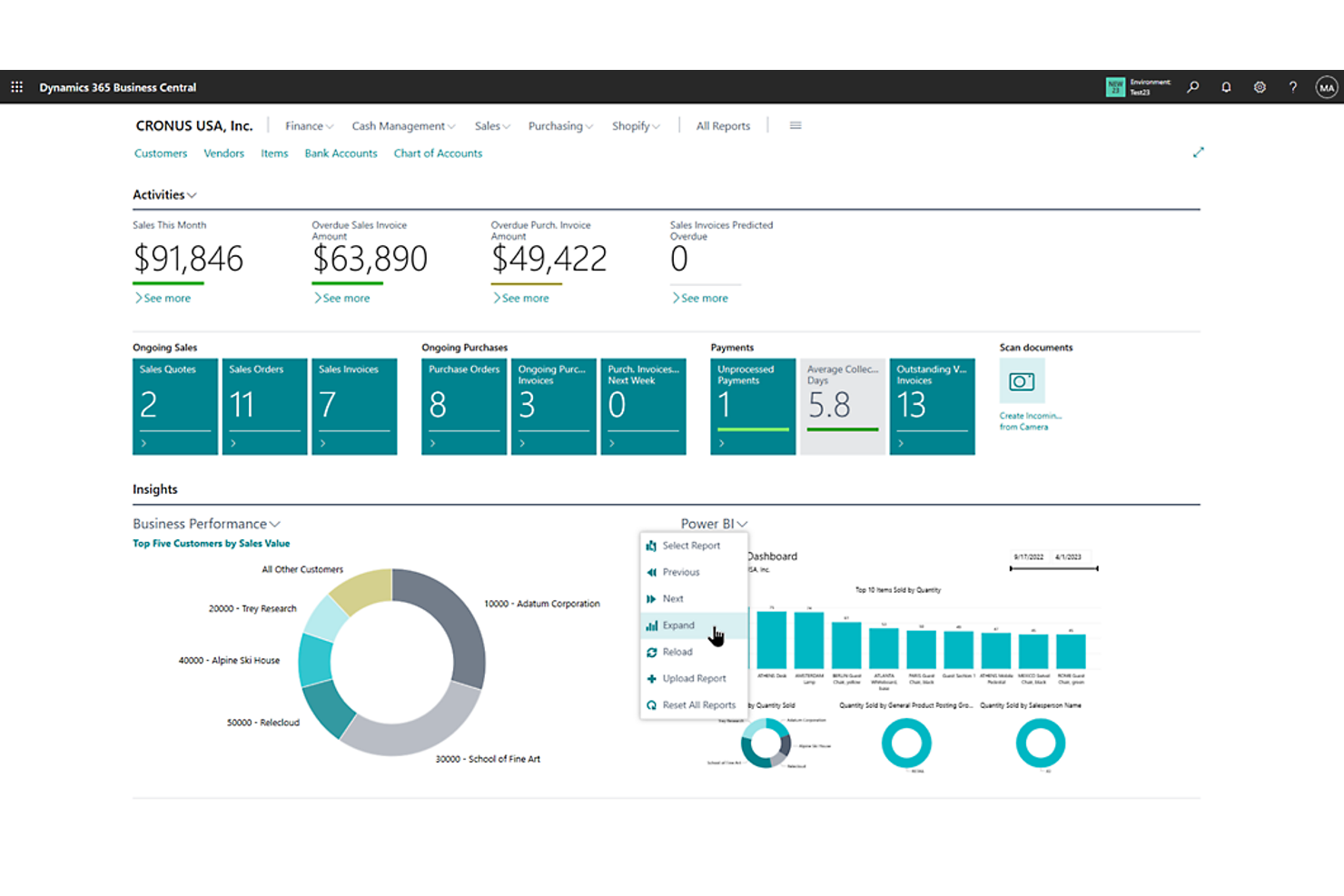
Finance teams looking for tight integration with Microsoft 365 tools may want to consider Microsoft Dynamics 365. This ERP platform is a strong fit for organizations that rely on Microsoft’s productivity suite and want to connect financial, operational, and collaboration workflows. Unlike SAP, Dynamics 365 offers native user-friendly connections to Excel, Teams, and Outlook, making it easier to unify data and processes across familiar Microsoft applications.
Why Microsoft Dynamics 365 Is a Good SAP Alternative
If your business already relies on Microsoft 365, Dynamics 365 offers a unique advantage as an ERP solution. I picked Dynamics 365 as a SAP alternative because it natively connects with Excel, Teams, and Outlook, allowing finance teams to manage data and workflows directly within the tools they use every day. The platform also supports real-time collaboration and document sharing, which helps teams stay aligned on financial processes. These features make Dynamics 365 especially appealing for organizations that want to unify ERP and productivity tools without switching between separate systems.
Microsoft Dynamics 365 Key Features
Some other Dynamics 365 features that finance and operations teams may find useful include:
- Financial Period Close Workspace: Centralizes period-end tasks, checklists, and status tracking for closing activities.
- Inventory and Warehouse Management: Supports real-time inventory management, warehouse automation, and order fulfillment.
- Customer Credit and Collections: Manages credit limits, payment terms, and collection activities within the ERP.
- Built-In Power BI Analytics: Embeds interactive dashboards and reporting tools for financial and operational data analysis.
Microsoft Dynamics 365 Integrations
Integrations include Microsoft 365, Microsoft Teams, Microsoft Power BI, Microsoft Power Platform, Azure, Outlook, and more.
Pros and Cons
Pros:
- Supports modular deployment for phased rollouts
- Offers embedded Power BI analytics dashboards
- Integrates natively with Microsoft 365 applications
Cons:
- Limited industry-specific templates
- Complex licensing structure can confuse buyers

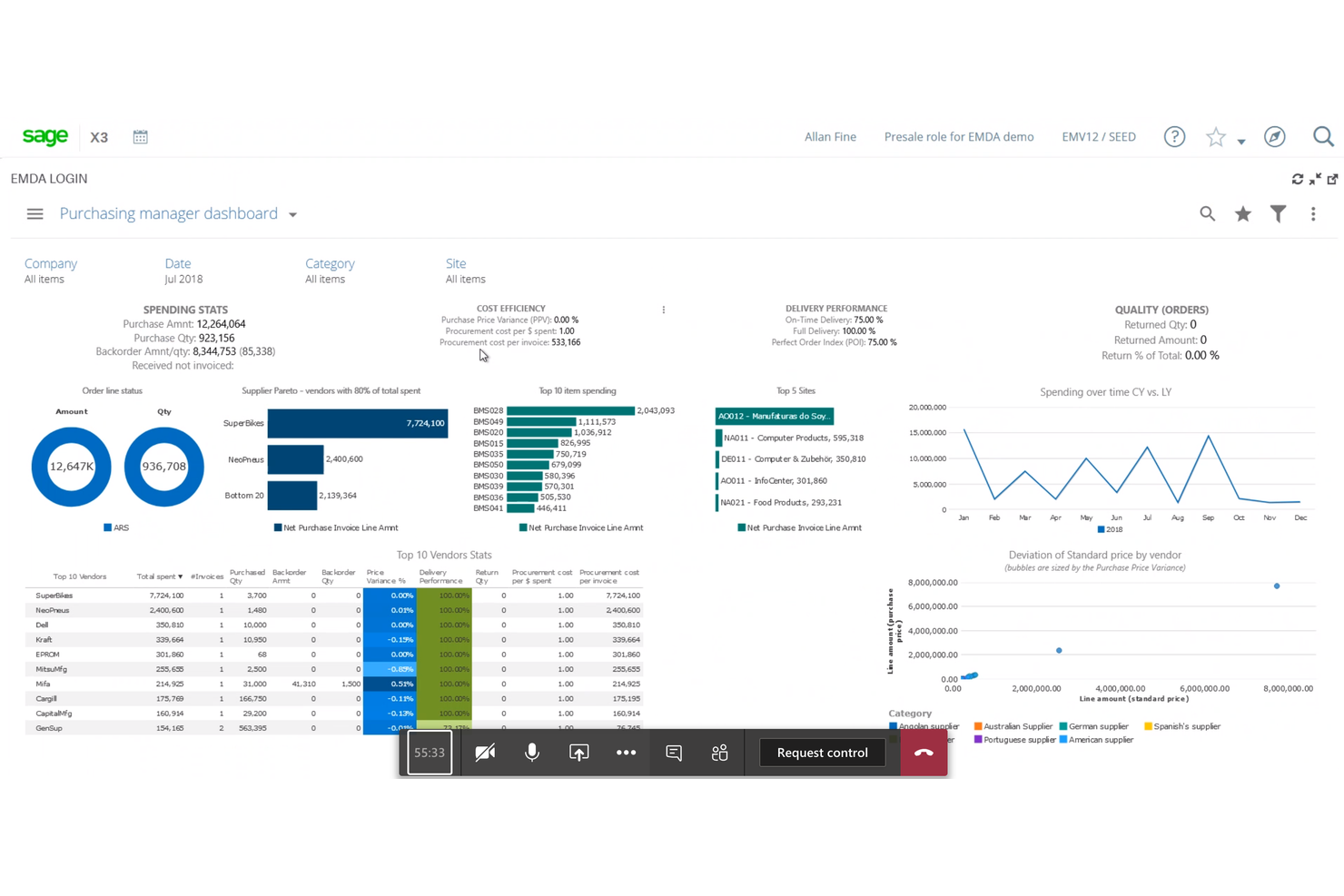
Process manufacturers looking for ERP software that handles complex production and compliance needs often turn to Sage X3. This platform is built for industries like food and beverage, chemicals, and pharmaceuticals, where batch management and traceability are essential. Unlike SAP, Sage X3 offers built-in process manufacturing features that help teams manage formulas, quality control, and regulatory requirements without heavy customization.
Why Sage X3 Is a Good SAP Alternative
If your business operates in process manufacturing, Sage X3 is purpose-built to address your industry’s unique challenges. I picked Sage X3 because it includes native batch management, formula and recipe control, and quality assurance tools that are essential for sectors like food, chemicals, and pharmaceuticals. These features help teams manage production runs, track ingredient traceability, and maintain compliance with industry regulations. With these capabilities available out of the box, Sage X3 reduces the need for costly customizations often required with SAP.
Sage X3 Key Features
In addition to its process manufacturing capabilities, I also found these features worth highlighting:
- Multi-Language and Multi-Currency Support: Enables global operations with built-in localization tools.
- Integrated Financial Management: Connects accounting, budgeting, and reporting within the ERP environment.
- Mobile Access: Lets users manage workflows and approvals from mobile devices.
- Inventory Optimization Tools: Provides real-time inventory tracking and automated replenishment options.
Sage X3 Integrations
Native integrations are not currently listed.
Pros and Cons
Pros:
- Multi-language and multi-currency support
- Real-time inventory and warehouse tracking
- Built-in batch and formula management tools
Cons:
- Implementation often needs consultants
- Reporting tools require additional configuration
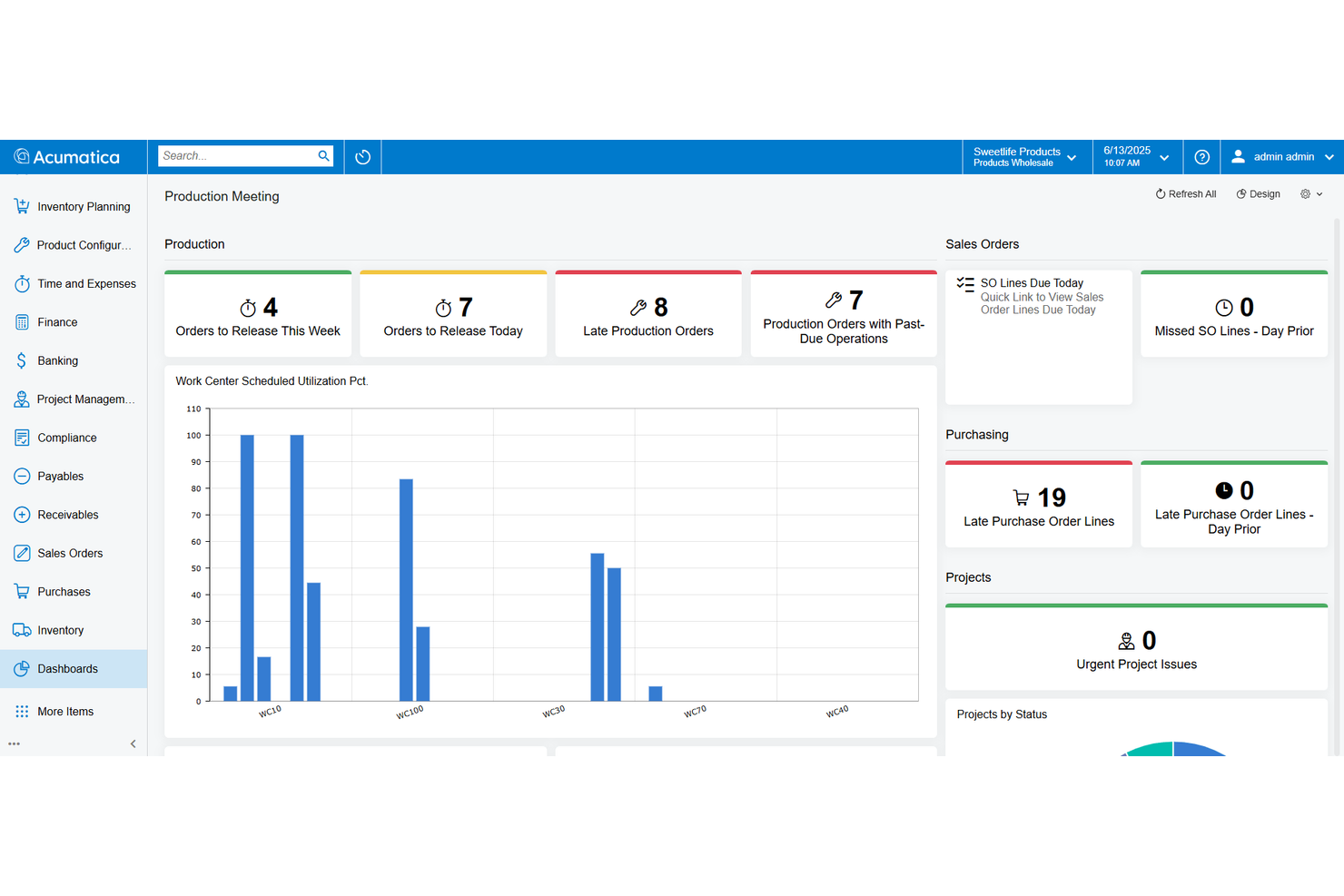
If you’re looking for an ERP that adapts to your cloud strategy, Acumatica offers deployment flexibility that’s hard to match. It’s a strong fit for growing businesses and multi-entity organizations that want to choose between public cloud, private cloud, or on-premises hosting. Unlike SAP, Acumatica lets you control where your data lives and how your system scales as your needs change.
Why Acumatica Is a Good SAP Alternative
Unlike many ERP platforms that lock you into a single hosting model, Acumatica gives you true flexibility in how you deploy your system. I picked Acumatica because you can run it in the public cloud, private cloud, or even on-premises, depending on your IT strategy and compliance needs. The platform also supports migration between deployment types, so you’re not stuck if your business requirements change. This level of control over your ERP environment is something SAP doesn’t offer in the same way.
Acumatica Key Features
In addition to its deployment flexibility, I also found these features worth highlighting:
- Role-Based Dashboards: Lets users customize dashboards to display relevant KPIs and reports for their specific roles.
- Integrated Financial Management: Includes general ledger, accounts payable, accounts receivable, and cash management modules.
- Project Accounting: Tracks project costs, budgets, billing, and profitability within the ERP.
- Built-In CRM Module: Manages customer relationships, sales opportunities, and marketing activities directly in the platform.
Acumatica Integrations
Integrations include Shopify, BigCommerce, Salesforce, Avalara, Microsoft Power BI, HubSpot, and more.
Pros and Cons
Pros:
- Strong project accounting for service industries
- Unlimited-user pricing model
- Flexible deployment options
Cons:
- Lacks advanced visualization options
- Customization requires developer support


For organizations that need advanced workforce analytics alongside ERP capabilities, Workday is worth a close look. This platform is especially relevant for HR, finance, and operations teams that want unified insights into people, payroll, and planning data. Unlike SAP, Workday’s analytics and reporting tools are built specifically to help leaders with the workforce decision-making process, using real-time, organization-wide data.
Why Workday Is a Good SAP Alternative
When workforce management analytics are a top priority, Workday stands out as a strong SAP alternative. I picked Workday because its unified platform brings together HR, payroll, and financial data for deep, real-time workforce analysis. The tool’s configurable dashboards and built-in benchmarking let leaders track headcount, labor costs, and talent trends across the organization. These analytics features make Workday especially valuable for businesses that need to connect people data with financial planning and operational decisions.
Workday Key Features
Some other Workday features that may interest ERP buyers include:
- Adaptive Planning: Delivers integrated budgeting, forecasting, and modeling tools for finance teams.
- Procurement Management: Manages supplier contracts, purchase orders, and spend tracking within the platform.
- Audit and Compliance Controls: Provides automated audit trails and compliance monitoring for financial and HR processes.
- Mobile Self-Service: Allows employees and managers to access HR and finance tasks from mobile devices.
Workday Integrations
Integrations include ADP, Salesforce, Microsoft Teams, ServiceNow, Okta, Slack, Docusign, Deloitte, PwC, and more.
Pros and Cons
Pros:
- Supports mobile access for HR and payroll
- Offers configurable workforce analytics dashboards
- Delivers unified HR and finance data views
Cons:
- Limited on-premise deployment options available
- Lacks deep manufacturing and supply chain modules


Project-driven organizations often choose Deltek when they need ERP software tailored to manage complex projects from end to end. This platform is designed for industries like architecture, engineering, consulting, and government contracting, where project accounting, resource planning, and compliance are central. Unlike SAP, Deltek offers built-in project lifecycle management and industry-specific compliance tools that help teams track profitability and meet client requirements.
Why Deltek Is a Good SAP Alternative
For project-based businesses, Deltek offers ERP capabilities that are purpose-built for managing projects from proposal to closeout. I picked Deltek because it includes project accounting, resource management, and time and expense tracking features that are tightly integrated with project workflows. These tools help teams monitor project profitability, allocate resources efficiently, and ensure compliance with industry standards. Deltek’s focus on project lifecycle management makes it a strong alternative to SAP for organizations where projects drive the business.
Deltek Key Features
Some other features worth noting include:
- Integrated CRM Module: Manages client relationships and tracks business development activities within the ERP.
- Document Management System: Centralizes project documents and supports version control.
- Automated Billing Tools: Generates invoices based on project milestones or time and materials.
- Role-Based Dashboards: Provides tailored views and analytics for different user roles.
Deltek Integrations
Native integrations are not currently listed.
Pros and Cons
Pros:
- Time and expense tracking is integrated
- Includes government contract compliance tools
- Project accounting is built into core workflows
Cons:
- Pricing information is not publicly available
- Reporting customization requires technical expertise


If your business needs ERP software tailored to your industry’s unique requirements, Infor is designed with that in mind. Manufacturers, distributors, and service organizations often choose Infor for its deep library of industry-specific modules and prebuilt workflows. Unlike SAP, Infor delivers out-of-the-box configurations for sectors like manufacturing, healthcare, and retail, helping teams address specialized compliance, process, and reporting needs.
Why Infor Is a Good SAP Alternative
For organizations that need ERP software built around industry-specific processes, Infor offers a level of specialization that SAP often requires heavy customization to match. I picked Infor because it provides preconfigured modules and workflows for sectors like manufacturing, healthcare, and distribution. These industry suites include compliance tracking, sector-specific reporting, and tailored supply chain management tools. This approach helps businesses get up and running faster with features that fit their unique operational needs.
Infor Key Features
In addition to its industry-specific modules, I also found these features worth noting:
- CloudSuite Platform: Delivers multi-tenant cloud deployment with automatic updates and scalability.
- Integrated Business Intelligence: Embeds analytics and reporting tools directly into operational workflows.
- Document Management: Centralizes storage and retrieval of business documents within the ERP system.
- Role-Based Dashboards: Provides customizable dashboards tailored to different user roles and responsibilities.
Infor Integrations
Integrations include Shopify, Salesforce, Microsoft Teams, Zoom, and more.
Pros and Cons
Pros:
- Built-in document management for ERP records
- Industry-specific compliance tracking tools included
- Prebuilt modules for manufacturing and healthcare
Cons:
- Limited global payroll and HR support
- Fewer native integrations than SAP


Oracle ERP Cloud is designed for organizations managing complex, multinational operations and regulatory requirements. It appeals to finance teams in global enterprises that need advanced automation, real-time analytics, and support for multiple currencies and languages. Oracle stands out from SAP by offering flexible cloud deployment and deep integration with the Oracle ecosystem.
Why Oracle Is a Good SAP Alternative
For organizations operating across multiple countries, Oracle ERP Cloud offers specialized tools for managing complex multinational requirements. I picked Oracle as a SAP alternative because it supports multi-currency transactions and global tax compliance, which are essential for international finance teams. The platform also provides advanced automation for consolidating financial data from different regions. These features help businesses maintain accuracy and control in environments with diverse regulatory and operational needs.
Oracle Key Features
Some other Oracle ERP Cloud features that finance teams may find valuable include:
- AI-Driven Forecasting: Uses AI-powered machine learning to improve the accuracy of financial forecasts and scenario planning.
- Procurement Management: Centralizes supplier management, contract tracking, and purchasing workflows within the ERP platform.
- Project Financials: Tracks project budgets, expenses, and billing for organizations with project-based operations.
- Audit and Compliance Tools: Provides built-in controls and automated audit trails to support regulatory compliance and internal governance.
Oracle Integrations
Native integrations are not currently listed.
Pros and Cons
Pros:
- Scales for large, global organizations
- Offers deep financial reporting capabilities
- Handles multi-entity and multi-currency operations
Cons:
- High Implementation costs
- User interface can be complex and unintuitive

Odoo stands out for organizations that want deep control over their ERP environment through open-source customization. It’s a strong fit for IT teams, developers, and businesses with unique workflows or industry-specific requirements that can’t be met by off-the-shelf solutions. Unlike SAP, Odoo’s modular, open-source framework lets you tailor every aspect of your ERP system, from finance to inventory, to match your exact business processes.
Why Odoo Is a Good SAP Alternative
For teams that want to build an ERP and management software around their own processes, Odoo’s open-source customization stands out. I picked Odoo because its modular architecture lets you add, remove, or modify applications for finance, inventory, HR, and more, all at the source code level. The platform also supports custom module development and third-party extensions, so you can address highly specific business needs that SAP’s standardized approach may not cover. This flexibility makes Odoo a strong choice for organizations with unique workflows or regulatory requirements.
Odoo Key Features
In addition to its customization capabilities, I also found these features worth noting:
- Integrated Accounting Suite: Handles invoicing, payments, bank reconciliation, and financial reporting within the ERP.
- Inventory and Warehouse Management: Tracks stock levels, automates reordering, and manages multiple warehouses.
- Project Management Tools: Supports task tracking, timesheets, and project forecasting for cross-functional teams.
- Built-In E-Commerce Platform: Lets you create and manage online stores directly from the ERP system.
Odoo Integrations
Integrations include Shopify, Amazon, eBay, WooCommerce, ShipStation, and more.
Pros and Cons
Pros:
- Active developer community
- Modular apps cover a wide business scope
- Open-source code allows full backend access
Cons:
- Performance slows with large data volumes
- Advanced features often require paid add-ons


Service-focused organizations often turn to Unit4 when they need ERP software that adapts to people-driven processes. This platform is designed for sectors like professional services, higher education, and non-profits, where project management, people planning, and flexible financials are essential. Unlike SAP, Unit4 emphasizes self-driving automation and user-configurable workflows that help teams respond quickly to changing service demands.
Why Unit4 Is a Good SAP Alternative
Unit4 stands out for service-centric organizations that need ERP software built around people and projects rather than products. I picked Unit4 because it offers people planning, project management, and flexible financials that are designed for organizations where services—not inventory—drive the business. Its self-driving automation helps teams automate repetitive tasks and adapt workflows as service needs change. These features make Unit4 a strong SAP alternative for professional services, higher education, and non-profits looking for ERP that fits their unique operational models.
Unit4 Key Features
Some other features worth highlighting include:
- Expense Management Module: Tracks, approves, and audits employee expenses within the ERP.
- Procurement Management: Handles supplier relationships, purchase orders, and contract management.
- Workflow Designer: Lets users build and modify business processes without coding.
- Multi-Currency Support: Manages transactions and reporting across different currencies.
Unit4 Integrations
Integrations include Microsoft Teams, Slack, and an API is available for custom integrations.
Pros and Cons
Pros:
- Includes procurement tools
- Allows no-code process changes
- Supports service-based operations
Cons:
- User interface updates are infrequent
- Reporting tools require technical configuration


Ramco is purpose-built for organizations in the aviation and logistics sectors that need ERP software tailored to complex, asset-intensive operations. The platform offers specialized modules for fleet management, maintenance, and regulatory compliance, making it a strong fit for airlines, MROs, and logistics providers. Unlike SAP, Ramco delivers deep industry-specific functionality that helps teams manage aircraft, cargo, and supply chains in one unified system.
Why Ramco Is a Good SAP Alternative
For aviation and logistics organizations, Ramco offers asset management and ERP capabilities that go far beyond what most general-purpose systems provide. I picked Ramco because it delivers industry-specific modules for fleet management, maintenance, and crew scheduling, which are essential for airlines and logistics providers. The platform also supports regulatory compliance and real-time asset tracking, helping teams manage complex operations with confidence. These features make Ramco a strong SAP alternative for businesses that need ERP software built around the realities of aviation and logistics.
Ramco Key Features
Some other features worth noting include:
- Payroll Management: Processes payroll for global and multi-country operations within the ERP.
- Inventory Optimization: Monitors stock levels and automates replenishment based on demand.
- Mobile Field Service App: Allows field teams to access maintenance and service data on the go.
- Integrated Financials: Connects accounting, billing, and compliance functions in one platform.
Ramco Integrations
Native integrations are not currently listed.
Pros and Cons
Pros:
- Includes multi-country payroll processing
- Built-in crew scheduling for airlines
- Includes aviation maintenance module
Cons:
- Limited third-party support for customizations
- Incomplete or unclear documentation
Other SAP Alternatives
Here are some additional SAP alternatives that didn’t make it onto my shortlist, but are still worth checking out:
- Abas ERP
For discrete manufacturing firms
- Priority
For rapid implementation timelines
- Epicor
For midmarket industrial companies
- SYSPRO
For food and beverage compliance
- Katana
For direct-to-consumer manufacturers
- IFS
For asset-intensive industries
- NetSuite
With global multi-subsidiary management
- MRPeasy
For small-scale production planning
- ERPNext
For open-source customization flexibility
- Plex Smart Manufacturing Platform
For real-time manufacturing data tracking


SAP Alternatives Selection Criteria
When selecting the best SAP alternatives to include in this list, I considered common buyer needs and pain points related to enterprise resource planning (ERP) software products, like managing complex manufacturing workflows and ensuring real-time data visibility across departments. I also used the following framework to keep my evaluation structured and fair:
Core Functionality (25% of total score)
To be considered for inclusion in this list, each solution had to fulfill these common use cases:
- Manage financials and accounting
- Track inventory and supply chain
- Support production planning and scheduling
- Handle procurement and vendor management
- Provide reporting and analytics
Additional Standout Features (25% of total score)
To help further narrow down the competition, I also looked for unique features, such as:
- Industry-specific modules for manufacturing or distribution
- Advanced automation for workflows and approvals
- Built-in compliance management tools
- Mobile access for field and shop floor teams
- Real-time integration with IoT devices or sensors
Usability (10% of total score)
To get a sense of the usability of each system, I considered the following:
- Modern and intuitive user interface
- Logical navigation and menu structure
- Customizable dashboards and views
- Minimal clicks to complete common tasks
- Accessibility for users with different roles
Onboarding (10% of total score)
To evaluate the onboarding experience for each platform, I considered the following:
- Availability of step-by-step product tours
- Access to training videos and documentation
- Pre-built templates for common workflows
- Live webinars or onboarding sessions
- In-app chatbots or guided setup tools
Customer Support (10% of total score)
To assess each software provider’s customer support services, I considered the following:
- 24/7 support availability
- Multiple support channels like chat, phone, and email
- Access to a knowledge base or help center
- Dedicated account managers or customer success teams
- Fast response and resolution times
Value For Money (10% of total score)
To evaluate the value for money of each platform, I considered the following:
- Transparent and predictable pricing structure
- Cost-effective plans for different business sizes
- No hidden fees or surprise charges
- Features included at each pricing tier
- Free trial or demo availability
Customer Reviews (10% of total score)
To get a sense of overall customer satisfaction, I considered the following when reading customer reviews:
- Consistency of positive feedback across platforms
- Reports of reliable system performance
- Feedback on customer support experiences
- User comments on feature usefulness
- Noted challenges or limitations shared by users
Why Look For a SAP Alternative?
While SAP ERP is a good choice of enterprise resource planning (ERP) software, there are a number of reasons why some users seek out alternative software solutions. You might be looking for a SAP competitor because…
- You need industry-specific features for manufacturing or distribution
- SAP’s implementation timeline is too long for your business
- The total cost of ownership is higher than your budget allows
- Your team finds SAP’s interface complex or unintuitive
- You require more flexible integration options with other tools
- Local support or language options are limited in your region
If any of these sound like you, you’ve come to the right place. My list contains several enterprise resource planning (ERP) software options that are better suited for teams facing these challenges with SAP and looking for alternative solutions.
SAP Key Features
Here are some of the key features of SAP, to help you contrast and compare what alternative solutions offer:
- Advanced financial management and accounting modules
- Integrated supply chain and logistics management
- Real-time analytics and business intelligence dashboards
- Global multi-currency and multi-language support
- Human capital management and payroll processing
- Automated procurement and vendor management
- Production planning and shop floor control
- Regulatory compliance and audit trail capabilities
- Customizable workflow automation
- Centralized master data management