

Zero based budgeting can help you regain control over every dollar in your budget—but managing it manually is slow and prone to errors. That’s where zero based budgeting software comes in.
As a financial controller, I’ve dealt with the same headaches: messy spreadsheets, unclear numbers, and too much back-and-forth—which is why I put together this list.
Using my knowledge in financial operations, I tested and reviewed these tools myself to help you skip the trial and error, and find a solution that actually works. Let’s get started.
Why Trust Our Software Recommendations
6,700+
Reviews
20
Industry experts
16+
Evaluation factors
14
Years
Our team has been testing and reviewing software since 2012. As finance leaders ourselves, we know how difficult—and important—it is to choose the right software.
For this guide, we evaluated tools using hands-on testing and independent research, scoring tools using our selection criteria.
Our reviews reflect our human editorial judgment, not a sales pitch.
Zero Based Budgeting Software Comparison Table
This comparison table summarizes pricing details for my top zero based budgeting software selections:
| Tool | Best For | Trial Info | Price | ||
|---|---|---|---|---|---|
| 1 | Best for large enterprise scalability | Free demo available | Pricing upon request | Website | |
| 2 | Best for AI-driven budgeting insights | Free demo available | Pricing upon request | Website | |
| 3 | Best for integrated financial reporting | Free demo available | Pricing upon request | Website | |
| 4 | Best for workforce planning | Free demo available | Pricing upon request | Website | |
| 5 | Best for continuous planning processes | Free demo available | Pricing upon request | Website | |
| 6 | Best for spreadsheet integration | Free demo available | Pricing upon request | Website | |
| 7 | Best for cloud-based budgeting | Free demo available | Pricing upon request | Website | |
| 8 | Best for intuitive user interface | Free demo available | Pricing upon request | Website | |
| 9 | Best for Excel-based planning | Free demo available | Pricing upon request | Website | |
| 10 | Best for data visualization capabilities | Free demo available | Pricing upon request | Website |


Best Zero Based Budgeting Software Reviews
Below are my detailed summaries of the best zero based budgeting software that made it onto my shortlist. My reviews offer an in-depth look at the key features, pros & cons, integrations, and ideal use cases of each tool to help you find the best one for you.
 Best for large enterprise scalability
- Free demo available
- Pricing upon request
Visit WebsiteCustomer Rating:4.5/5
Anaplan supports enterprise planning with dynamic zero based budgeting models. My Evaluation Score
- Zero-Base Build
- 3/5
- Cost Driver Modeling
- 5/5
- ERP/GL Data Integration
- 4/5
- Scenario & Variance Analysis
- 5/5
- Collaborative Budget Ownership
- 5/5
- Expense Justification Workflow
- 2/5
Anaplan is a cloud-based planning platform designed for large enterprises to manage complex financial planning, budgeting, and forecasting. It serves finance teams looking for a scalable solution to handle intricate business processes.
Why I picked Anaplan: Anaplan is ideal for you if you’re working with complex or large-scale operations. It makes it easy to build and tweak financial models so they actually match how your business works and help you gain control of your money. The real-time data updates also mean your team isn’t stuck waiting around—you can make quick, informed decisions as things change. And since it scales easily, it grows right along with your business, which makes it a solid pick for larger teams or enterprises.
Standout features & integrations:
Features include advanced scenario planning to help you explore different business outcomes. The platform also provides real-time collaboration tools to enhance team communication. Additionally, it offers detailed analytics for deeper insights into financial data.
Integrations include Salesforce, Workday, Microsoft Azure, SAP, Oracle, Slack, Tableau, Docusign, ServiceNow, and Google Workspace.
Pros and Cons
Pros:
- Flexible modeling capabilities
- Supports large-scale operations
- Real-time data processing
Cons:
- Steep learning curve
- Requires technical expertise
Learn more about Anaplan: Best for AI-driven budgeting insights
- Free demo available
- Pricing upon request
Visit WebsiteCustomer Rating:4.8/5
Drivetrain aligns plans with strategy using real-time financial modeling tools. My Evaluation Score
- Zero-Base Build
- 4/5
- Cost Driver Modeling
- 4/5
- ERP/GL Data Integration
- 5/5
- Scenario & Variance Analysis
- 5/5
- Collaborative Budget Ownership
- 5/5
- Expense Justification Workflow
- 3/5
Drivetrain is a strategic finance platform aimed at modern businesses, focusing on enhancing financial planning and analysis. It caters to finance teams looking to automate key workflows and improve strategic decision-making.
Why I picked Drivetrain: Drivetrain uses AI to take the heavy lifting out of financial planning and analysis. It helps you build solid cash flow forecasts and revenue plans fast—without getting lost in complex spreadsheets. But what really stands out is how it pulls in real-time data to keep your forecasts up to date. As things change, your plans can change with them, making Drivetrain a smart tool for staying on top of strategy.
Standout features & integrations:
Features include financial consolidation for a unified view of finances. Its cash flow forecasting also helps your team manage liquidity effectively. Additionally, the software’s headcount planning ensures you can plan staffing needs accurately.
Integrations include NetSuite, QuickBooks, Salesforce, Xero, SAP, Microsoft Dynamics, Workday, Slack, and Google Workspace.
Pros and Cons
Pros:
- AI-driven insights
- Real-time data access
- Customizable reporting
Cons:
- Complex setup process
- Few industry-specific templates
Learn more about Drivetrain: Best for integrated financial reporting
- Free demo available
- Pricing upon request
Visit WebsiteCustomer Rating:4.5/5
Prophix automates zero based budgeting with workflow and approval tools. My Evaluation Score
- Zero-Base Build
- 3/5
- Cost Driver Modeling
- 4/5
- ERP/GL Data Integration
- 5/5
- Scenario & Variance Analysis
- 5/5
- Collaborative Budget Ownership
- 4/5
- Expense Justification Workflow
- 4/5
Prophix is a corporate performance management tool designed for mid-sized to large businesses. It helps finance teams with budgeting, planning, and integrated financial reporting.
Why I picked Prophix: Prophix does a great job when it comes to pulling your financial reporting all into one place. It has helpful features like automated reports and customizable dashboards, so your team can build clear, detailed reports without all the manual work. If you’re looking for a tool that brings everything together and gives you a full picture of your finances, Prophix is definitely worth a try.
Standout features & integrations:
Features include built-in workflows to streamline approvals and keep budgeting processes on track. Its scenario planning tools also let you test different financial outcomes so you can plan ahead with confidence.
Integrations include Microsoft Dynamics, Sage, NetSuite, SAP, QuickBooks, Salesforce, Workday, Google Workspace, and Microsoft Office 365.
Pros and Cons
Pros:
- Integrated financial reporting
- Supports collaborative planning
- Reduces manual data entry
Cons:
- Complex initial setup
- Limited mobile access
Learn more about Prophix: Best for workforce planning
- Free demo available
- Pricing upon request
Visit WebsiteCustomer Rating:4.4/5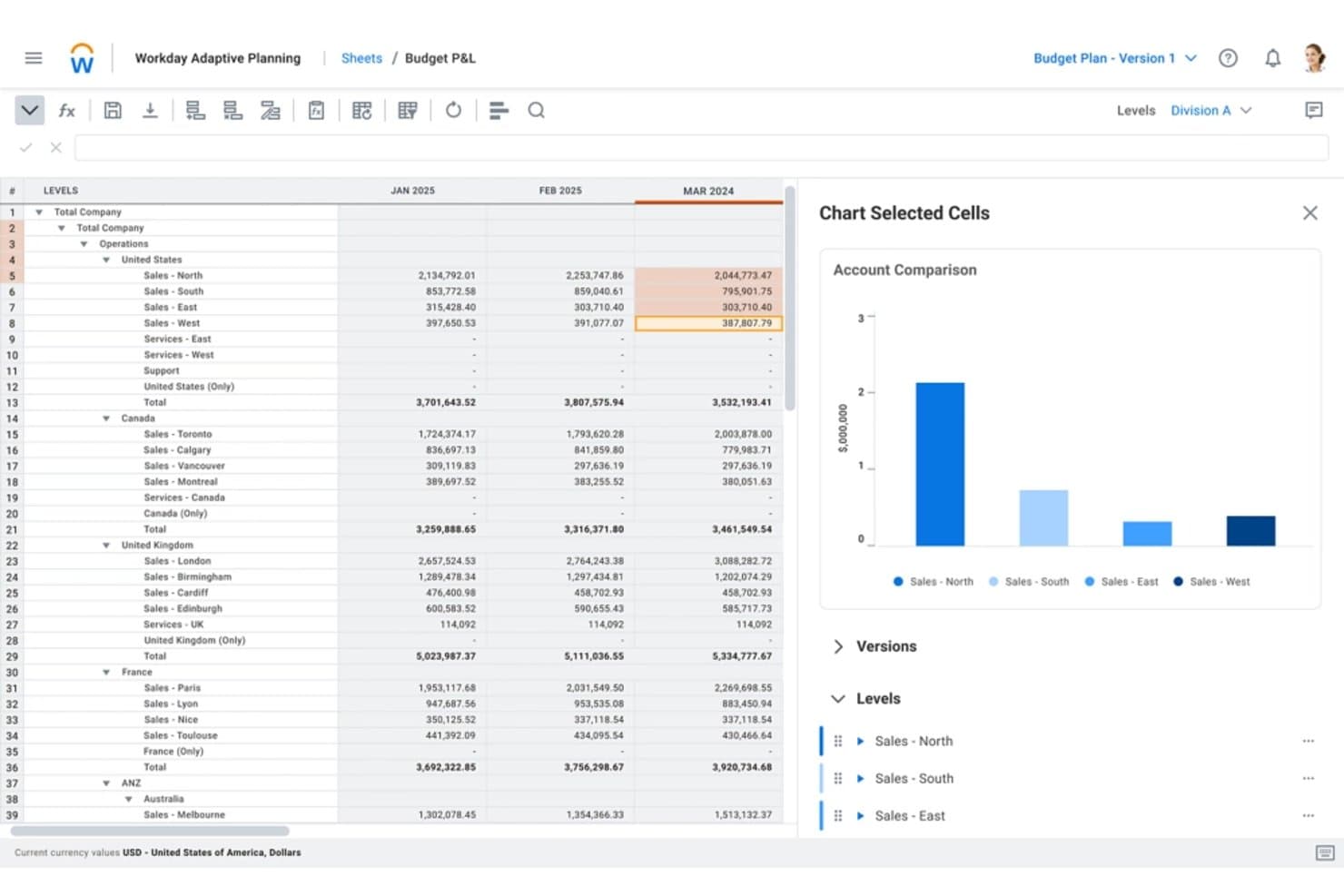
Workday Adaptive Planning tracks regional sales budgets across departments by period. My Evaluation Score
- Zero-Base Build
- 3/5
- Cost Driver Modeling
- 4/5
- ERP/GL Data Integration
- 4/5
- Scenario & Variance Analysis
- 5/5
- Collaborative Budget Ownership
- 4/5
- Expense Justification Workflow
- 2/5
Workday Adaptive Planning is an enterprise FP&A and EPM platform that supports zero-based and driver-based budgeting, workforce planning, scenario modeling, and cross-functional budget collaboration.
Who Is Workday Adaptive Planning Best For?
Workday Adaptive Planning is a strong fit for FP&A teams at mid-to-large enterprises that need to connect financial and workforce planning in a single platform.
Why I Picked Workday Adaptive Planning
Workday Adaptive Planning earns its spot on my shortlist because its workforce planning module does something most FP&A tools can't: it ties headcount decisions directly to cost impact in real time. When I'm building a zero-based budget, I can model driver-based hiring assumptions by cost center and instantly see how each decision affects the bottom line. Layered on top, Adaptive Decision Intelligence surfaces variance narratives automatically, so I can pinpoint exactly where spend deviates and why.
Workday Adaptive Planning Key Features
- Driver-based expense planning: Build expense plans tied to specific business drivers, with built-in rules for allocations across cost centers.
- Unlimited what-if scenarios: Create and share an unrestricted number of scenario models to compare budget outcomes against strategic targets.
- Natural-language data exploration: Query plan data and reports using plain-language questions through the Adaptive Decision Intelligence layer.
- Top-down and bottom-up budgeting: Set executive targets at the top level while collecting operational inputs from cost center managers simultaneously.
Workday Adaptive Planning Integrations
Workday Adaptive Planning supports 4,000+ integrations across 350+ source systems, including Oracle, SAP, NetSuite, Microsoft Dynamics, Sage Intacct, QuickBooks, Xero, Deltek, Epicor, and Workday HCM. Its Integration Cloud supports ERP and HRIS data exchange for budget planning.
Pros and Cons
Pros:
- Supports top-down and bottom-up budget collaboration
- Compares unlimited scenarios against strategic targets
- Models workforce cost impacts in real time
Cons:
- Requires administrator support for complex configurations
- Lacks structured line-item justification workflows
Learn more about Workday Adaptive Planning: Best for continuous planning processes
- Free demo available
- Pricing upon request
Visit WebsiteCustomer Rating:4.2/5
Planful enables detailed budgeting with scenario planning and automation. My Evaluation Score
- Zero-Base Build
- 2/5
- Cost Driver Modeling
- 4/5
- ERP/GL Data Integration
- 4/5
- Scenario & Variance Analysis
- 4/5
- Collaborative Budget Ownership
- 4/5
- Expense Justification Workflow
- 2/5
Planful is a financial planning and analysis platform designed for businesses of all sizes. It assists finance teams with budgeting, forecasting, and continuous planning to improve financial performance.
Why I picked Planful: Planful makes it easy to keep your budgets and forecasts up to date with real-time changes. You can quickly adjust plans, run different scenarios, and stay ahead of whatever’s coming your way. This, combined with the platform’s clean, user-friendly layout, helps make even the more complex tasks and financial goals feel less overwhelming.
Standout features & integrations:
Features include dynamic reporting that provides up-to-date financial insights. It also provides built-in collaboration tools that make it easy for teams across departments to contribute to budgets and forecasts.
Integrations include NetSuite, QuickBooks, Salesforce, Workday, Microsoft Dynamics, SAP, Google Workspace, Microsoft Office 365, and Dropbox.
Pros and Cons
Pros:
- Supports continuous planning
- Flexible financial strategies
- Real-time budget adjustments
Cons:
- Limited customization options
- Few industry-specific templates
Learn more about Planful: 6Best for spreadsheet integration
Cube
- Free demo available
- Pricing upon request
Visit WebsiteCustomer Rating:4.6/5
Cube connects spreadsheets to finance systems for agile budget creation. My Evaluation Score
- Zero-Base Build
- 3/5
- Cost Driver Modeling
- 4/5
- ERP/GL Data Integration
- 4/5
- Scenario & Variance Analysis
- 4/5
- Collaborative Budget Ownership
- 4/5
- Expense Justification Workflow
- 2/5
Cube is a financial planning and analysis tool designed for businesses that rely heavily on spreadsheets. It helps finance teams streamline budgeting, forecasting, and reporting processes.
Why I picked Cube: Cube still feels like a spreadsheet—just smarter. It plugs right into your existing setup, so you can keep your workflows and data just the way you like them. The software also gives you clear visibility into every dollar, allowing you to build your budget from the ground up, track spending in real time, and adjust quickly—all without starting your initiatives over.
Standout features & integrations:
Features include automated data syncing that ensures your spreadsheets are always up-to-date. Its version control also helps you track changes and maintain data integrity, while its enhanced reporting capabilities provide insights into financial performance.
Integrations include Microsoft Excel, Google Sheets, NetSuite, QuickBooks, Xero, Salesforce, SAP, Workday, and Microsoft Dynamics.
Pros and Cons
Pros:
- Seamless spreadsheet integration
- Automated data syncing
- Enhanced reporting capabilities
Cons:
- Complex setup process
- Limited mobile access
Learn more about Cube:

Solver creates detailed, department-specific budgets with data integrations. My Evaluation Score
- Zero-Base Build
- 2/5
- Cost Driver Modeling
- 3/5
- ERP/GL Data Integration
- 4/5
- Scenario & Variance Analysis
- 4/5
- Collaborative Budget Ownership
- 4/5
- Expense Justification Workflow
- 3/5
Solver is a cloud-based corporate performance management tool designed for businesses looking to enhance their budgeting, reporting, and analytics capabilities. It serves finance teams by providing an advanced platform for managing financial processes.
Why I picked Solver: Solver gives your team cloud-based access from anywhere—no more being tied to one computer or office. It’s packed with helpful features like automated reports and detailed analytics, so you can make smarter decisions without digging through spreadsheets. The cloud setup also means your whole team can collaborate in real time, whether they’re remote or in the office. If you're looking for a modern, flexible tool to manage the zero based budgeting process more efficiently, Solver is a strong contender.
Standout features & integrations:
Features include driver-based budgeting, which lets you plan based on key business metrics rather than just historical data. You can also build customized workflows to streamline approvals and keep the budgeting process moving smoothly.
Integrations include Microsoft Dynamics 365, Sage, NetSuite, SAP, QuickBooks, Xero, Acumatica, Salesforce, Workday, and Google Workspace.
Pros and Cons
Pros:
- Cloud-based access
- Automated reporting features
- Flexible financial management
Cons:
- Requires technical expertise
- High learning curve for new users
Learn more about Solver:

Pigment supports driver-based planning with collaborative budget modeling. My Evaluation Score
- Zero-Base Build
- 3/5
- Cost Driver Modeling
- 4/5
- ERP/GL Data Integration
- 5/5
- Scenario & Variance Analysis
- 4/5
- Collaborative Budget Ownership
- 4/5
- Expense Justification Workflow
- 1/5
Pigment is a business planning and forecasting tool aimed at enterprises seeking intuitive data visualization and planning capabilities. It serves finance teams by simplifying complex financial data and enhancing decision-making processes.
Why I picked Pigment: Pigment stands out for how easy it is to use—it’s super intuitive, so your team can jump right in without a big learning curve. You get real-time collaboration and interactive dashboards that make planning and analyzing feel a lot less overwhelming. Additionally, the software can help you build detailed financial models for each bank account with ease, making it a great tool for zero based budgeting.
Standout features & integrations:
Features include interactive dashboards that allow you to customize and visualize data clearly. The platform also provides scenario planning tools to explore various business outcomes.
Integrations include Salesforce, NetSuite, QuickBooks, Xero, SAP, Google Workspace, Microsoft Excel, Slack, and Workday.
Pros and Cons
Pros:
- Real-time collaboration
- Interactive dashboards
- Supports scenario planning
Cons:
- Limited advanced analytics
- Requires initial setup time
Learn more about Pigment: 9Best for Excel-based planning
Vena
- Free demo available
- Pricing upon request
Visit WebsiteCustomer Rating:4.5/5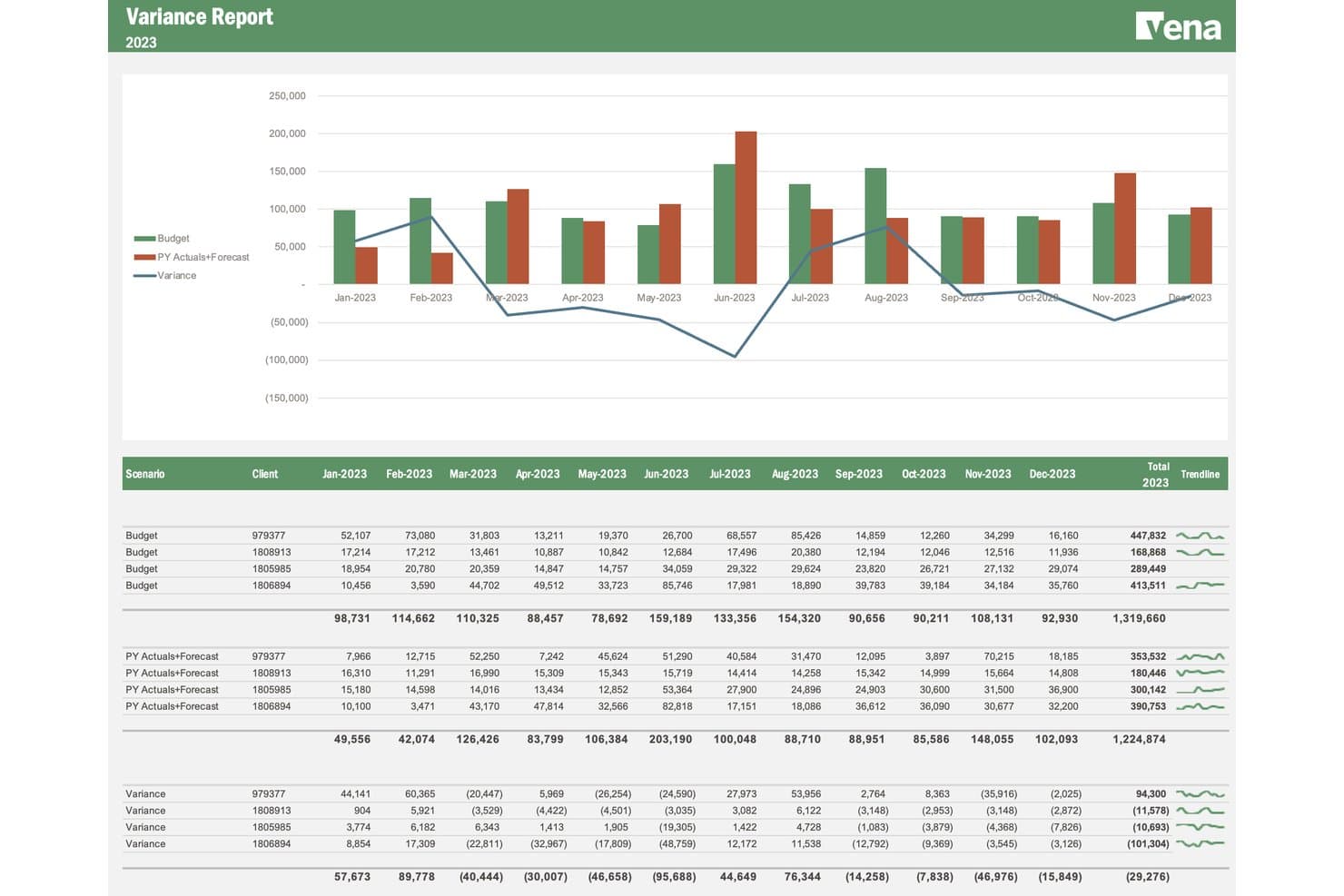
Vena tracks budget vs. actuals variance by client across months. My Evaluation Score
- Zero-Base Build
- 2/5
- Cost Driver Modeling
- 4/5
- ERP/GL Data Integration
- 4/5
- Scenario & Variance Analysis
- 4/5
- Collaborative Budget Ownership
- 4/5
- Expense Justification Workflow
- 2/5
Vena is an Excel-native FP&A platform that supports zero-based budgeting through driver-based planning, collaborative budget templates, workforce planning, and scenario modeling built around a live Excel interface.
Who Is Vena Best For?
Vena is a strong fit for FP&A teams that already live in Excel and want to add structure, workflow, and driver-based modeling without leaving the spreadsheet environment behind.
Why I Picked Vena
I picked Vena as one of the best because it keeps your team inside Excel while adding the structure that zero-based budgeting actually needs. I love that its driver-based planning lets you tie every cost line to a real input, like headcount or unit volume, so you're building from first principles rather than copying last year's numbers. The workforce planning module goes deep here, modeling salaries, taxes, and merit increases at the employee level so personnel costs get rebuilt from scratch each cycle.
Vena Key Features
- Scenario modeling: Build and compare unlimited what-if scenarios side by side, stress-testing assumptions across timing, demand, hiring, and spending variables.
- Contributor license type: Assign department budget owners a dedicated Contributor role so they can submit cost inputs and navigate approval workflows within their own cost centers.
- Vena AI planning agent: Use natural language inside Excel to generate driver-based plans and budgets without manual formula builds.
- ERP and HRIS connectors: Pull actuals and headcount data directly from systems like NetSuite, Workday, and ADP to anchor each budget cycle in live source data.
Vena Integrations
Vena offers native integrations with NetSuite, SAP, Sage Intacct, Microsoft Dynamics 365, Workday, ADP, Salesforce, SharePoint, Snowflake, and Google BigQuery. Bidirectional APIs, flat-file automation, and Microsoft Fabric connectors support custom data flows.
Pros and Cons
Pros:
- Contributor workflows collect bottom-up department inputs
- Driver-based workforce modeling rebuilds personnel costs
- Excel-native budget rebuilding fits finance teams
Cons:
- No dedicated expense justification workflow exists
- Implementations can stretch beyond initial estimates
Learn more about Vena: 10Best for data visualization capabilities
Phocas
- Free demo available
- Pricing upon request
Visit WebsiteCustomer Rating:4.6/5
Phocas builds granular budgets using historical and real-time business data. My Evaluation Score
- Zero-Base Build
- 2/5
- Cost Driver Modeling
- 4/5
- ERP/GL Data Integration
- 4/5
- Scenario & Variance Analysis
- 4/5
- Collaborative Budget Ownership
- 4/5
- Expense Justification Workflow
- 2/5
Phocas is a business intelligence and data analytics tool designed for companies wanting to improve their data-driven decision-making. It helps teams visualize data and track key performance indicators in real-time.
Why I picked Phocas: Phocas makes it easy to turn complex financial data into something you can understand at a glance. Its customizable dashboards and simple reporting tools let your team build clear, visual reports without needing IT support. The interface is also super user-friendly, so you can quickly find what you need and dive into the numbers during your budgeting cycle.
Standout features & integrations:
Features include real-time KPI tracking to keep your team updated on financial metrics. The platform also offers detailed reporting tools to support informed decision-making.
Integrations include Microsoft Dynamics, Sage, Xero, MYOB, NetSuite, SAP, Epicor, QuickBooks, Salesforce, and Google Sheets.
Pros and Cons
Pros:
- Strong data visualization
- Real-time KPI tracking
- Intuitive reporting tools
Cons:
- Limited advanced analytics
- Limited mobile functionality
Learn more about Phocas:
Other Zero Based Budgeting Software
Here are some additional zero based budgeting software options that didn’t make it onto my shortlist, but are still worth checking out:
- 11DatarailsBest for financial analytics
- 12FarseerBest for financial scenario planning
- 13TeamworkBest for project-based financial tools
- 14YNABBest for personal budgeting
- 15MosaicBest for startup organizations
- 16NetSuite Cloud AccountingBest for ERP integration
- 17MoneyPatrolBest for personal finance tracking
Related Reviews
How I Evaluate Zero Based Budgeting Software
I split my evaluation into two layers: the ZBB-specific baseline every tool must clear—think zero-base workflows and expense justification—and the differentiators that separate good from great.
Core Functionality (Table Stakes For This List)
When I'm selecting tools for my list, I rank each one on a scale from 0 (does not offer the functionality) to 5 (excels in this area) for each core functionality listed below. Then, I calculate the tool's total score into a percentage. Each tool needs to achieve a minimum total score of 65% to be considered for inclusion.
- Zero-Base Budget Building: I look for a dedicated ZBB workflow that forces each cost center to build from scratch every cycle, not just a copy-and-adjust approach carried over from last year.
- Cost Driver Modeling: Each tool should let budget owners tie line items to real business drivers like headcount, transaction volumes, or units produced rather than flat dollar entries.
- Expense Justification Workflow: I evaluate whether the platform provides structured justification fields and approval routing so finance leaders can review business cases line by line during builds.
- Collaborative Budget Ownership: Department heads need to submit and defend their own budgets, so I check for role-based access, version control, and clear submission-to-approval handoffs.
- Scenario & Variance Analysis: Side-by-side scenario comparison matters here—I look at how well each tool lets you model trade-offs and then track actual spend against the approved zero-based plan.
- ERP/GL Data Integration: Pulling in actuals, chart-of-account structures, and headcount data from systems like NetSuite, SAP, or Sage Intacct is foundational to rebuilding budgets from zero each period.
Once I have a list of tools that meet the criteria, I consider what sets each platform apart.
Differentiating Factors (What Sets Vendors Apart)
Here's how I compare and contrast different vendors:
Standout Features
Initiative ranking is a big one—I look for tools that score proposed activities by ROI or strategic fit so finance teams can fund what matters most. Rolling forecast integration also stands out, since a zero-based plan loses relevance fast if it can't evolve mid-year. I evaluate workforce planning depth too, especially whether a tool connects position-level headcount and compensation data directly into the zero-base build.
Beyond Features
Implementation timelines matter a lot in this space. ZBB requires significant methodology setup, so I evaluate whether vendors offer guided onboarding, pre-built templates, or dedicated FP&A consultants to shorten time-to-value. I also consider company size fit—a mid-market team running five cost centers has very different needs than a multi-entity enterprise managing dozens across regions. Security and compliance round things out; I check for SOC 2 certification, role-based access controls, and audit trails that support SOX workflows.
How to Choose Zero Based Budgeting Software
It’s easy to get bogged down in long feature lists and complex pricing structures. To help you stay focused as you work through your unique software selection process, here’s a checklist of factors to keep in mind:
| Factor | What to Consider |
| Scalability | Ensure the software can grow with your team. Consider if it supports increasing data volume and users as your business expands. |
| Integrations | Look for seamless integration with existing tools like accounting software, CRM, and ERP systems to streamline data flow and reduce manual entry. |
| Customizability | Check if the tool allows you to customize dashboards, reports, and workflows to fit your specific budgeting processes and preferences. |
| Ease of Use | Evaluate the user interface and navigation. Your team should be able to learn and use the software without extensive training. |
| Budget | Compare pricing plans and ensure they align with your financial constraints. Consider the total cost of ownership, including any hidden fees. |
| Security Safeguards | Confirm that the software offers robust security measures like data encryption and user access controls to protect sensitive financial information. |
| Support | Assess the availability and quality of customer support, including live chat, phone support, and online resources, to assist your team when needed. |
| Reporting | Look for advanced reporting capabilities that allow you to generate detailed financial reports and provide insights into budget performance. |
Trends in Zero Based Budgeting Software
In my research, I sourced countless product updates, press releases, and release logs from different zero based budgeting software vendors. Here are some of the emerging trends I’m keeping an eye on:
- AI-Driven Insights: More tools are using AI to provide predictive analytics and insights to help teams anticipate budget needs and make informed decisions. For example, vendors like Drivetrain are now incorporating AI to enhance financial forecasting.
- Collaborative Budgeting: Tools are increasingly focusing on collaboration features, allowing multiple users to work on business budgets simultaneously. This is vital for teams spread across different locations, ensuring everyone stays aligned on budgeting methods.
- Real-Time Data Updates: Users now expect real-time data to make agile budget adjustments. This trend supports dynamic business environments where quick financial decisions are necessary to achieve your savings goals. This can also aid in cash flow forecasting and more.
- Scenario Planning: More software is offering scenario planning to help teams visualize different financial outcomes. This feature allows businesses to prepare for various potential situations, enhancing strategic planning.
- User-Centric Design: There's a growing emphasis on intuitive interfaces that prioritize user experience, with vendors now focusing on making their tools more accessible and easier to use. In the end, this reduces the overall learning curve, empowers users, and boosts productivity.
What Is Zero Based Budgeting Software?
Zero based budgeting software is a tool designed to help businesses allocate their budget from scratch each period, ensuring every expense is justified. These tools are typically used by financial professionals and budget managers to gain better control over their finances and optimize spending.
Zero based budgeting software often comes with key features like AI-driven insights, real-time data updates, and scenario planning to help with accurate forecasting and decision-making. Overall, they offer businesses a structured way to manage finances and improve cost efficiency.
Features
Here are the core features any great zero based budgeting software should have:
- Real-Time Data Updates: Provides immediate access to financial data for current accounts and emergency funds, enabling quick budget adjustments and informed decision-making.
- Scenario Planning: Allows users to visualize different financial outcomes, helping businesses prepare for various potential situations across spending categories.
- AI-Driven Insights: Offers predictive analytics to anticipate budget needs and enhance financial forecasting.
- Collaborative Budgeting: Enables multiple users to work on budgets simultaneously, ensuring team alignment and efficiency.
- Customizable Dashboards: Lets users tailor their interface to focus on the most relevant financial metrics and reports.
- Expense Tracking: Monitors spending against the budget to prevent overspending and identify cost-saving opportunities.
- Integration Capabilities: Connects with existing financial tools to streamline data flow and reduce manual entry.
- User-Friendly Interface: Simplifies navigation and reduces the learning curve, boosting productivity and user satisfaction.
- Automated Reporting: Generates detailed financial reports with minimal manual effort, saving time and reducing errors.
- Security Safeguards: Protects sensitive financial information through data encryption and access controls.
Benefits
Implementing zero based budgeting software provides several benefits for your team and your business. Here are a few you can look forward to:
- Improved Cost Control: By allocating budgets from scratch, you ensure every expense is justified, preventing unnecessary spending.
- Enhanced Financial Insights: AI-driven analytics and real-time data updates provide valuable insights for better decision-making.
- Increased Collaboration: Collaborative budgeting features allow team members to work together, ensuring everyone is on the same page.
- Flexibility in Planning: Scenario planning helps you adapt to changing financial conditions by preparing for different outcomes.
- Time Savings: Automated reporting reduces the time spent on manual report generation, allowing your team to focus on strategic tasks.
- Customization for Needs: Customizable dashboards let you tailor your view to focus on the most relevant financial information.
- Data Security: Security safeguards protect your financial data, giving you peace of mind about sensitive information.
Costs and Pricing
Selecting zero based budgeting software requires an understanding of the various pricing models and plans available. Costs vary based on features, team size, add-ons, and more. The table below summarizes common plans, their average prices, and typical features included in zero based budgeting software solutions:
Plan Comparison Table for Zero Based Budgeting Software
| Plan Type | Average Price | Common Features |
| Free Plan | $0/user/month | Basic budgeting tools, limited reports, and basic support. |
| Personal Plan | $5-$25/user/month | Personal budgeting, expense tracking, customizable dashboards, and email support. |
| Business Plan | $30-$60/user/month | Advanced reporting, collaboration tools, real-time updates, and chat support. |
| Enterprise Plan | $70-$150/user/month | Full customization, integration capabilities, AI-driven insights, and dedicated support. |
FAQs
Here are some answers to common questions about zero based budgeting software:
What are the limitations of zero based budgeting?
zero based budgeting can be time-consuming as it requires starting from scratch each period. This process demands a lot of manpower to justify every expense. While it provides detailed control, the effort and resources needed can be challenging for some teams.
How effective is zero based budgeting?
zero based budgeting is effective for keeping expenses under control. By starting fresh each period, it ensures that all costs are necessary and justified. This approach gives managers more oversight, but requires diligence in maintaining and reviewing budgets regularly.
What does zero based budgeting require?
zero based budgeting requires a thorough justification of all expenses, both old and new. Unlike traditional methods, this approach involves scrutinizing recurring and new expenditures. Managers need to justify each cost, ensuring that only essential expenses are approved.
How does zero based budgeting software assist in budgeting?
zero based budgeting software simplifies the process by automating repetitive tasks and providing tools for justification and analysis. It helps users track expenses efficiently, ensuring that every dollar is accounted for. The software also offers insights and analytics for better decision-making.
Can zero based budgeting software integrate with other financial tools?
Yes, many zero based budgeting software solutions offer integration capabilities with existing financial tools. This allows for seamless data flow and reduces manual data entry, making the budgeting process more efficient and accurate for your team.
Is zero based budgeting suitable for all types of businesses?
While zero based budgeting offers detailed financial control, it may not be suitable for every business due to its time-intensive nature. It works best for organizations that need stringent budget oversight and have the resources to manage the detailed process.