

Software zur Spesenverwaltung wurde entwickelt, um die Erfassung, Genehmigung und Abrechnung von Ausgaben in Unternehmen zu vereinfachen. Für Fachleute aus Finanzwesen und Buchhaltung kann das richtige Tool manuelle Prozesse reduzieren, die Einhaltung von Richtlinien und Steuervorschriften sicherstellen und für eine bessere Übersicht über die Ausgaben in den verschiedenen Abteilungen sorgen.
Als Experte für digitale Software mit Erfahrung im Finanzmanagement habe ich vielen Finanzteams dabei geholfen, den überwältigenden Prozess der Auswahl der richtigen Plattform zu bewältigen. Ich habe erlebt, wie das falsche Tool mehr Reibung verursachen kann, als es beseitigt – von mangelhaften Integrationen und verspäteten Erstattungen bis hin zu inkonsistenten Daten und Compliance-Risiken. Bei der großen Auswahl auf dem Markt ist nicht immer klar, welche Lösungen Ihre Zeit wert sind.
Deshalb habe ich unzählige Stunden damit verbracht, erstklassige Lösungen zur Spesenverwaltung zu recherchieren, zu testen und zu vergleichen. Diese Liste soll Ihnen helfen, eine sichere und fundierte Entscheidung zu treffen, die die Arbeitsweise Ihres Teams tatsächlich unterstützt.
Warum Sie unseren Software-Empfehlungen vertrauen können
6,700+
Reviews
20
Industry experts
16+
Evaluation factors
14
Years
Unsere Bewertungen spiegeln unser unabhängiges Urteilsvermögen wider – keine Verkaufsstrategie. Erfahren Sie, wie wir transparent bleiben.
Für diesen Leitfaden haben wir Tools mithilfe von praktischen Tests und unabhängiger Recherche bewertet und dabei unsere Bewertungskriterien angewendet.
Unsere Bewertungen spiegeln unser menschliches redaktionelles Urteilsvermögen wider, keine Verkaufsstrategie.
Vergleichstabelle für Software zur Spesenverwaltung
Diese Vergleichstabelle fasst die Preisdetails meiner besten ausgewählten Softwarelösungen zur Spesenverwaltung zusammen:
| Tool | Best For | Trial Info | Price | ||
|---|---|---|---|---|---|
| 1 | Ideal für automatisierte Freigabeworkflows | Kostenlose Demo verfügbar | Ab $8/Nutzer/Monat (jährlich abgerechnet) | Website | |
| 2 | Am besten geeignet für die Verwaltung von Ausgaben globaler Teams | Kostenlose Demo verfügbar | Ab $5/Mitarbeiter/Monat | Website | |
| 3 | Am besten geeignet für Belegerfassung per SMS und Kartensynchronisation | Kostenlose Demo verfügbar | Ab $11.99/aktiver Nutzer/Monat (jährliche Abrechnung) | Website | |
| 4 | Am besten zur Festlegung von Budgetgrenzen | Kostenlose Demo verfügbar | Ab $499/Monat (jährliche Abrechnung) | Website | |
| 5 | Am besten für Dokumentendatenextraktion | 14-tägige kostenlose Testphase | Ab $25,21/Monat (jährliche Abrechnung) | Website | |
| 6 | Beste Buchhaltungssoftware für Kleinunternehmer oder selbstständige Fachkräfte | 30 Tage kostenlos testen + kostenlose Demo verfügbar | Ab $38/Monat | Website | |
| 7 | Am besten geeignet, um das Ausgabenmanagement zu optimieren | Ab $12/Nutzer/Monat | Website | ||
| 8 | Am besten geeignet für Kreditorenbuchhaltung-Automatisierung | Kostenlose Demo verfügbar | Preise auf Anfrage | Website | |
| 9 | Ideal für automatisierte Spesenabrechnung | 30-tägige kostenlose Testversion + kostenloser Plan + kostenlose Demo verfügbar | Ab $15/Nutzer/Monat + plattformbasierte Gebühr | Website | |
| 10 | Am besten für Benutzererfahrung | Kostenlose Version verfügbar | Ab $15/Nutzer/Monat | Website |


Tests der besten Software zur Spesenverwaltung
Entdecken Sie meine ausführlichen Tests, um die Stärken und Schwächen führender Softwarelösungen zur Spesenverwaltung kennenzulernen. Ich gehe detailliert auf deren Funktionen, Vorteile und idealen Einsatzszenarien ein, damit Sie die perfekte Lösung für Ihre geschäftlichen Anforderungen finden.
 Ideal für automatisierte Freigabeworkflows
- Kostenlose Demo verfügbar
- Ab $8/Nutzer/Monat (jährlich abgerechnet)
Visit WebsiteCustomer Rating:4.8/5
Mit Rippling können Sie Ausgabenrichtlinien durchsetzen, um die Unternehmensausgaben zu kontrollieren und einzelne Ausgaben zu genehmigen. Rippling Spend richtet sich an Unternehmen, die eine intuitive Lösung für das Ausgabenmanagement benötigen, welche sich nahtlos in bestehende HR- und Finanzsysteme integriert. Das Tool spricht Personalverantwortliche, Finanzteams und Geschäftsführungen branchenübergreifend an, indem es automatisierte Workflows, anpassbare Richtlinien und Analysen in Echtzeit bietet. Die Plattform begegnet Herausforderungen bei finanzieller Effizienz und Kontrolle durch globale Ausgabenverfolgung und automatisierte Richtlinienkontrolle.
Warum ich Rippling Spend ausgewählt habe
Ich habe Rippling Spend ausgewählt, weil seine automatisierten Freigabeworkflows eine effiziente Lösung für Unternehmen darstellen, die ihre Finanzprozesse optimieren möchten. Die Plattform ermöglicht es Ihnen, fortschrittliche Workflows auf Basis spezifischer Dateninputs zu erstellen, sodass Freigaben zur richtigen Zeit an die richtigen Personen weitergeleitet werden. Mit Funktionen wie individuell anpassbaren Freigaberegeln und Analysen in Echtzeit hilft Rippling Spend Ihrem Team, die Einhaltung von Unternehmensrichtlinien sicherzustellen und den Verwaltungsaufwand zu reduzieren. Das macht die Lösung besonders attraktiv für Organisationen, die ihre operative Effizienz steigern und Ausgaben effektiver verwalten möchten.
Wichtige Funktionen von Rippling Spend
Neben den außergewöhnlichen automatisierten Freigabeworkflows bietet Rippling Spend eine Vielzahl von Funktionen, die das Ausgabenmanagement Ihres Teams verbessern.
- Individuelle Richtlinien: Automatisiert und erzwingt spezifische Ausgabenregeln, die auf die Bedürfnisse Ihres Unternehmens zugeschnitten sind, um Freigabeprozesse zu optimieren.
- Ausgabenverfolgung: Überwacht sämtliche Ausgaben, einschließlich der Nutzung von Firmenkarten und der Gehaltsabrechnung, in einer einzigen Oberfläche und bietet einen umfassenden Überblick über die Unternehmensausgaben.
- Kartenkontrolle: Bietet individuell anpassbare Ausgabenlimits und Steuerungsmöglichkeiten für Firmenkarten, sodass Sie das Ausgabeverhalten proaktiv steuern können.
- Belegmanagement: Fordert und organisiert Belege für Transaktionen mit Firmenkarten automatisch, wodurch die Belegführung und Prüfungsprozesse vereinfacht werden.
Rippling Spend Integrationen
Integrationen umfassen PayPal, 1Password, YubiKey, Carta, Zendesk sowie diverse HR-, Finanz- und IT-Anwendungen.
Pros and Cons
Pros:
- Self-Service-Optionen für Mitarbeitende
- Automatisierte Workflow-Funktionen
- Umfassende Funktionen für verschiedene Geschäftsbereiche
Cons:
- Es kann eine gewisse Einarbeitungszeit erforderlich sein, um alle Funktionen optimal zu nutzen
- Die anfängliche Einrichtung kann zeitaufwändig sein
Learn more about Rippling Spend: Am besten geeignet für die Verwaltung von Ausgaben globaler Teams
- Kostenlose Demo verfügbar
- Ab $5/Mitarbeiter/Monat
Visit WebsiteCustomer Rating:4.9/5
Das Ausgabenmanagement-Dashboard von Deel ermöglicht es Benutzern, Berichte zu erstellen sowie Ausgaben nachzuverfolgen, zu genehmigen und zu verwalten. Für alle, die eine effektive Lösung für das Ausgabenmanagement suchen, bietet Deel einen einzigartigen Ansatz – insbesondere für Unternehmen mit globaler Ausrichtung. Durch die Integration des Ausgabenmanagements in seine Payroll- und HR-Plattform kann Ihr Team Mitarbeiterkosten nachverfolgen und verarbeiten, während gleichzeitig verschiedene lokale Vorschriften eingehalten werden. Dieses Setup vereinfacht nicht nur finanzielle Aufgaben, sondern liefert dank seiner Reporting-Tools auch wertvolle Einblicke, die Ihrem Unternehmen helfen, Ausgaben zu steuern und finanziell flexibel zu bleiben.
Warum ich Deel ausgewählt habe
Ich habe mich für Deel entschieden, weil es außergewöhnliche Möglichkeiten bietet, internationale Teams beim Ausgabenmanagement zu unterstützen, wodurch es sich besonders für Unternehmen auszeichnet, die in mehreren Ländern aktiv sind. Die Plattform von Deel ermöglicht es Ihrem Team, Ausgaben in beliebigen Währungen einzureichen, wobei diese automatisch umgerechnet und nahtlos in der nächsten Gehaltsabrechnung erstattet werden. Diese Funktion, zusammen mit einer zentralen Übersicht aller Ausgabeneinreichungen, gewährleistet die Einhaltung lokaler Vorschriften und senkt den administrativen Aufwand. Durch die Vereinfachung des Ausgabenberichtsprozesses verbessert Deel das Finanzmanagement und die Transparenz und ist so ein wertvolles Tool für Unternehmen, die ihre globale Finanzstruktur klar und organisiert halten möchten.
Deel Schlüsselfunktionen
Neben den globalen Teamfunktionen bietet Deel eine Reihe von Features, die es als Software für das Ausgabenmanagement besonders attraktiv machen.
- Automatisierte Ausgabenerfassung: Diese Funktion ermöglicht es Ihrem Team, Ausgaben automatisch zu erfassen, wodurch manuelle Eingaben reduziert und Fehler minimiert werden.
- Anpassbare Genehmigungsworkflows: Sie können Genehmigungsprozesse individuell auf die Struktur Ihres Unternehmens zuschneiden, sodass Ausgaben effizient geprüft und genehmigt werden.
- Integration mit Buchhaltungssystemen: Deel lässt sich nahtlos in bestehende Buchhaltungssoftware integrieren, was einen reibungslosen Transfer von Finanzdaten ermöglicht und den Verwaltungsaufwand reduziert.
- Echtzeit-Reporting und Analysen: Dieses Feature bietet sofortigen Zugriff auf Finanzberichte und ermöglicht es Ihnen, Ausgabentrends zu überwachen und fundierte Budgetentscheidungen zu treffen.
Deel-Integrationen
Zu den Integrationen gehören Expensify, QuickBooks, Google Workspace, Slack, JIRA, HubSpot, BambooHR, Workday, Xero, Salesforce, Microsoft Teams und Zendesk.
Pros and Cons
Pros:
- Starke globale Compliance-Werkzeuge
- Länderspezifische Ausgabenrichtlinien
- Automatisierte Tagesgeldberechnung
Cons:
- Kann für kleine Teams komplex wirken
- Eingeschränkte Offline-Funktionalität
Learn more about Deel Payroll: Am besten geeignet für Belegerfassung per SMS und Kartensynchronisation
- Kostenlose Demo verfügbar
- Ab $11.99/aktiver Nutzer/Monat (jährliche Abrechnung)
Visit WebsiteCustomer Rating:4.6/5
Erfassen Sie Belege per SMS und stimmen Sie diese automatisch mit Unternehmens-Kartentransaktionen mit Sage Expense Management (früher Fyle) ab. Sage Expense Management (früher Fyle) ist eine Spesenmanagement-Software, die Ihnen hilft, Belege zu erfassen und Ausgaben unmittelbar zu verfolgen. Sie funktioniert direkt mit Ihren bestehenden Kreditkarten und ermöglicht Ihnen das Einreichen von Belegen per SMS, E-Mail oder App, wodurch manuelle Arbeit reduziert und die Transparenz der Unternehmensausgaben verbessert wird.
Warum ich Sage Expense Management ausgewählt habe: Sage Expense Management ist eine Spesenmanagement-Software, die darauf ausgelegt ist, Belege sofort zu erfassen und Ausgaben zeitnah zu verfolgen. Sie arbeitet direkt mit Ihren bestehenden Kreditkarten und lässt Sie Belege per SMS, E-Mail oder App einreichen. Sie können Belege per SMS verfolgen und Ausgaben auf der Karte automatisch abstimmen, was manuelle Arbeit reduziert und Ihnen einen besseren Einblick in die Ausgaben Ihres Unternehmens gibt.
Herausragende Funktionen & Integrationen:
Funktionen umfassen KI-gestützte Ausgabenkodierung, automatische Hinweise auf Richtlinienverstöße sowie Budgetverfolgung auf Abteilungs- oder Projektebene. Sie können zudem Freigabeworkflows passend zu Ihren internen Prozessen konfigurieren, wodurch Rückfragen bei Prüfungen reduziert werden. Sage Expense Management unterstützt die Echtzeit-Abstimmung Ihrer bestehenden Geschäftskreditkarten, sodass Sie Transaktionen abgleichen können, ohne neue Karten ausgeben zu müssen. Außerdem gibt es eine mobile App und zentrale Ablage, damit Ihr Team jederzeit prüfungsbereit bleibt.
Integrationen umfassen NetSuite, Sage Intacct, Xero, QuickBooks Online, QuickBooks Desktop, Sage 300 CRE, TravelPerk, Bamboo HR, Gmail, Outlook und Slack.
Pros and Cons
Pros:
- Echtzeit-Abstimmung der Kreditkartenausgaben
- KI-gestützte Ausgabenkategorisierung
- Belegerfassung per SMS
Cons:
- Begrenzte Anpassung bei komplexen Fällen
- Automatische Ablage kann unterschiedlich schnell erfolgen
Learn more about Sage Expense Management (formerly Fyle): Am besten zur Festlegung von Budgetgrenzen
- Kostenlose Demo verfügbar
- Ab $499/Monat (jährliche Abrechnung)
Visit WebsiteCustomer Rating:4.8/5
Precoro bietet Ihnen ein Echtzeit-Dashboard für Ausgaben, Transaktionen und Freigaben in verschiedenen Abteilungen, bei Lieferanten und Anwendern. Entdecken Sie eine Lösung, die Ihre Einkaufsprozesse vereinfacht und mit Precoro mehr Kontrolle über Ihre Ausgaben ermöglicht. Ideal für Unternehmen jeder Größe, integriert sich diese KI-gestützte Plattform mit beliebten Buchhaltungssystemen wie NetSuite und QuickBooks und bietet Funktionen wie Lieferantenmanagement und Rechnungsfreigabe. Mit Precoro können Sie Ausgaben über verschiedene Projekte und Standorte hinweg verwalten und Ihrem Team die Werkzeuge bieten, die es für mehr Effizienz und Compliance benötigt.
Warum ich Precoro gewählt habe
Ich habe mich für Precoro entschieden, da das System besonders bei der Festlegung von Budgetgrenzen überzeugt – ein entscheidendes Merkmal für das Ausgabenmanagement. Die Plattform ermöglicht es, Budgetbeschränkungen für verschiedene Abteilungen und Projekte einzurichten, sodass die Ausgaben mit den finanziellen Zielsetzungen übereinstimmen. Durch die Echtzeit-Transparenz von Ausgaben lässt sich die Einhaltung überwachen und Sie erhalten Benachrichtigungen, um ein Überschreiten des Budgets zu verhindern. Darüber hinaus sorgen Funktionen wie automatisierte Genehmigungsprozesse und Drei-Wege-Abgleich für eine verbesserte finanzielle Kontrolle, was Precoro zu einer verlässlichen Wahl für die Wahrung finanzieller Disziplin macht.
Wichtige Funktionen von Precoro
Neben der Festlegung von Budgetgrenzen bietet Precoro eine Reihe von Funktionen, die das Ausgabenmanagement optimieren.
- Zentrale Nachverfolgung: Diese Funktion ermöglicht Ihrem Team, alle Ausgaben über eine einzige Plattform zu verfolgen und bietet umfassende Transparenz über die Ausgabenaktivitäten.
- Automatisierte Rückerstattung: Precoro automatisiert den Rückerstattungsprozess, reduziert manuelle Dateneingaben und minimiert Fehler, sodass eine zügige Bearbeitung von Spesenabrechnungen gewährleistet ist.
- Erweiterte Berichtsoptionen: Mit anpassbaren Berichten analysieren Sie Ausgabemuster, identifizieren Einsparpotenziale und treffen fundierte finanzielle Entscheidungen.
- Mobiler Zugriff: Ihr Team kann Ausgaben unterwegs verwalten und die Plattform von jedem Gerät nutzen – das unterstützt Entscheidungen und Freigaben in Echtzeit.
Precoro-Integrationen
Zu den Integrationen gehören QuickBooks Online, NetSuite, Xero, Amazon, Google, Power BI, Slack, HiBob, Keycloak und JumpCloud.
Pros and Cons
Pros:
- Echtzeit-Überwachung von Budgets
- Anpassbare Freigabeworkflows passen sich verschiedenen Geschäftsanforderungen an
- Tools für Abonnementverwaltung
Cons:
- Könnte mehr native Integrationen bieten
- Mitunter Herausforderungen bei der Datenkonfiguration
Learn more about Precoro: 5Am besten für Dokumentendatenextraktion
Dext
- 14-tägige kostenlose Testphase
- Ab $25,21/Monat (jährliche Abrechnung)
Visit WebsiteCustomer Rating:4.5/5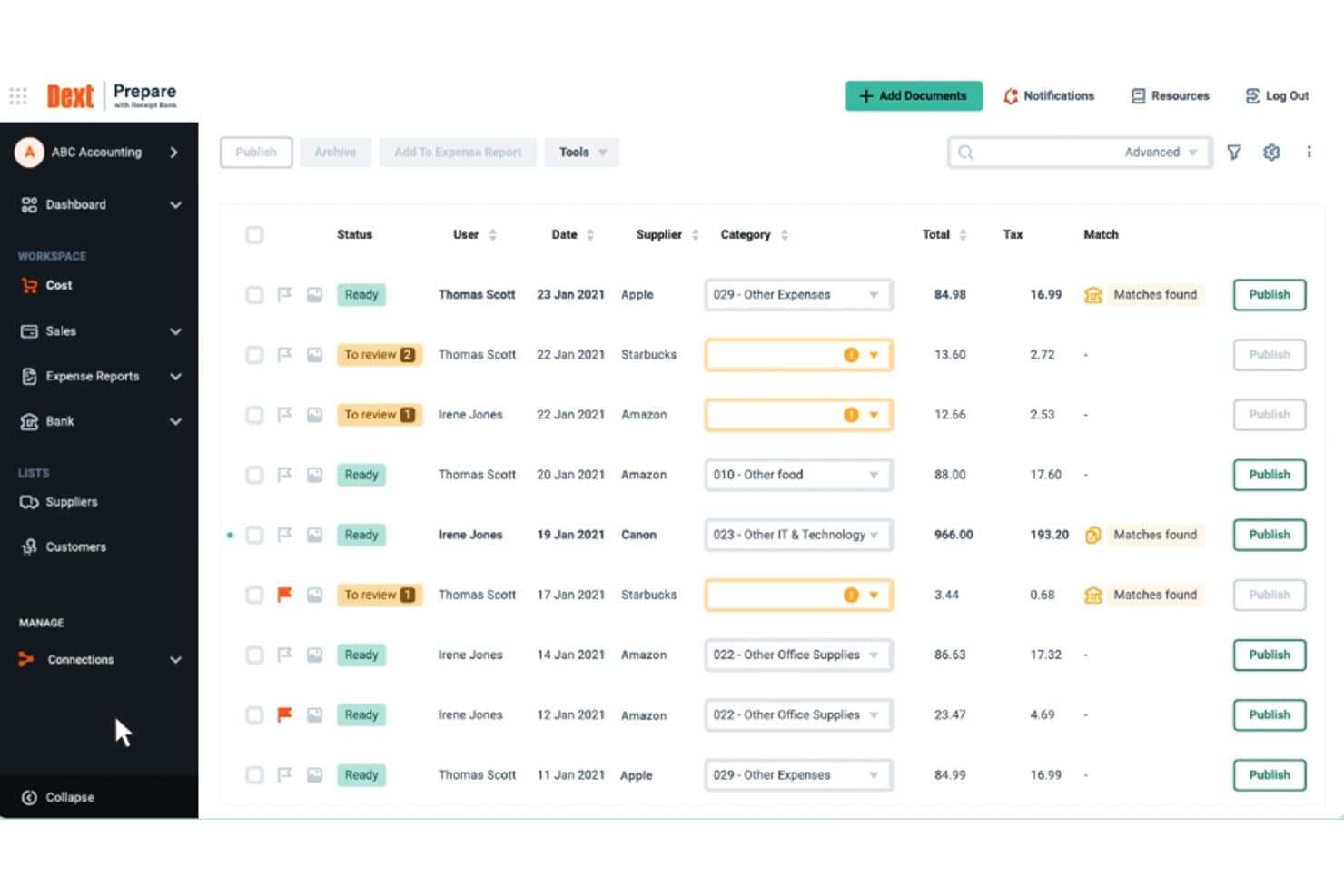
Dext bietet ein strukturiertes Dashboard für das Ausgabenmanagement, in dem Nutzer Kostenbelege mit Lieferanten-, Steuer- und Abrechnungsdetails überprüfen, kategorisieren und veröffentlichen können. Dext ist ein Automatisierungstool für die Vorbuchhaltung, das Belege, Rechnungen und Lieferantendokumente per Mobile-App, E-Mail oder Drag-and-Drop erfasst und dann mittels OCR und KI Finanzdaten extrahiert und mit Ihrer Buchhaltungssoftware synchronisiert.
Für wen ist Dext am besten geeignet?
Dext eignet sich besonders für kleine Unternehmen sowie Buchhaltungs- und Steuerkanzleien, die große Mengen an Belegen und Rechnungen für mehrere Mandanten oder Unternehmen bearbeiten.
Warum ich Dext ausgewählt habe
Ich habe Dext in meine Top-Auswahl aufgenommen, weil die Genauigkeit der Dokumentendatenextraktion wirklich schwer zu übertreffen ist. Es erkennt Lieferantennamen, Steuerdetails und einzelne Positionen aus Belegen, die per WhatsApp, E-Mail oder Handyfoto eingereicht werden – alles ganz ohne manuelle Eingaben. Besonders gut gefällt mir das Extraktions-Feature für Kontoauszüge, das PDF-Kontoauszüge automatisch in strukturierte Transaktionsdaten umwandelt, die direkt an QuickBooks oder Xero übermittelt werden können.
Dext Hauptfunktionen
- Einreichung von Dokumenten aus mehreren Quellen: Nutzer können Belege und Rechnungen per Mobile-App, E-Mail, WhatsApp oder angeschlossenem Cloud-Speicher hochladen.
- Bank- und Kreditkartenintegration: Dext verbindet sich mit über 11.500 Banken, um Transaktionen direkt zu importieren und Abstimmungen zu automatisieren.
- Extraktion von Lieferantenabrechnungen: Die Plattform extrahiert und vergleicht Positionen aus Lieferantenabrechnungen für effiziente Kreditorenprozesse.
- Verwaltung mehrerer Unternehmen: Dext unterstützt das Managen mehrerer Firmen oder Abteilungen mit jeweils separaten Dokumentenströmen unter einem Account.
Dext Integrationen
Dext bietet native Integrationen mit QuickBooks, Xero, Sage, FreeAgent, KashFlow, Twinfield, Reckon, MYOB AccountRight, MYOB Essentials und Gusto. Eine API steht für individuelle Integrationen zur Verfügung.
Pros and Cons
Pros:
- Sehr genaue OCR für komplexe Belege
- Verarbeitet große Dokumentenmengen fehlerfrei
- Extrahiert Einzelpositionen aus Lieferantenrechnungen
Cons:
- Begrenzte Kontrolle über den Freigabeworkflow für Ausgaben
- Keine integrierte Mitarbeitererstattung
Learn more about Dext: Beste Buchhaltungssoftware für Kleinunternehmer oder selbstständige Fachkräfte
- 30 Tage kostenlos testen + kostenlose Demo verfügbar
- Ab $38/Monat
Visit WebsiteCustomer Rating:4/5
Mit QuickBooks können Sie Spesenbelege mit nur wenigen Klicks ins System hochladen. QuickBooks Online ist eine Buchhaltungsplattform, die für Kleinunternehmer und selbstständige Fachkräfte entwickelt wurde. Sie hilft Ihnen, Ausgaben zu verwalten, Rechnungen und Einkäufe nachzuverfolgen und die Liquidität an einem Ort zu überblicken. Indem sie Ihre Finanzen organisiert, vereinfacht sie die Berichterstattung und hält Ihre Aufzeichnungen genau.
Warum ich QuickBooks Online ausgewählt habe:
QuickBooks Online ist ideal, wenn Sie eine preiswerte und effiziente Lösung für Ihre Spesenabrechnungen suchen. Sie können Belege automatisch sortieren, mehrere Transaktionen stapelweise neu zuordnen und Ihre Kategorien übersichtlich halten. Das Dashboard bietet einen klaren Überblick über Ausgaben und Liquidität, sodass Sie klügere finanzielle Entscheidungen treffen können. Außerdem gibt es einen speziellen Tarif für Selbstständige, der es Einzelunternehmern erleichtert, ihre Finanzen im Griff zu behalten.
Vidhi Mehta, eine Buchhalterin mit über acht Jahren Erfahrung, erklärte ihre Begeisterung für die Ausgabenmanagement-Funktionen von QuickBooks. Sie sagte, 'Als ich anfing, die Funktion für wiederkehrende Transaktionen für monatliche Ausgaben zu nutzen, hat das einen großen Unterschied gemacht. Dinge wie Miete, Nebenkosten und Abonnements werden nun automatisch jeden Monat erfasst. Ich muss die gleichen Informationen nicht immer wieder neu eingeben, und es geht nichts mehr verloren.'
Hervorstechende Funktionen & Integrationen:
Funktionen beinhalten das Scannen von Belegen zur automatischen Sortierung von Ausgaben, Liquiditätsüberwachung mit übersichtlichen Dashboards und die Stapelumklassifizierung von Transaktionen zur Zeitersparnis. Diese Funktionen tragen dazu bei, manuelle Arbeit zu reduzieren und die Genauigkeit bei Ihrer Finanzberichterstattung zu gewährleisten.
Integrationen umfassen PayPal, Stripe, Square, Shopify, Gusto, Bill.com, Expensify, Amazon Business, eBay und Etsy.
Pros and Cons
Pros:
- Stapelumklassifizierung spart Zeit
- Dashboard zeigt Liquidität in Echtzeit
- Ausgabenkategorien aktualisieren sich automatisch
Cons:
- Für Einsteiger manchmal unübersichtlich
- Gelegentliche Synchronisationsverzögerungen mit Banken
Learn more about QuickBooks Online: Am besten geeignet, um das Ausgabenmanagement zu optimieren
- Ab $12/Nutzer/Monat
Visit WebsiteCustomer Rating:5/5
Die umfassenden Analysen von Emburse helfen Ihrem Team, sich auf das Wesentliche zu konzentrieren. Emburse ist eine Plattform für Ausgabenmanagement, die Unternehmen dabei unterstützt, Ausgaben zu kontrollieren und zu verfolgen und gleichzeitig manuelle Arbeit zu reduzieren. Sie ist für Teams konzipiert, die die Spesenabrechnung vereinfachen und einen besseren Überblick über Finanzdaten erhalten möchten. Das System bietet Werkzeuge zum Erstellen, Einreichen und Freigeben von Ausgaben von jedem Gerät aus.
Warum ich Emburse ausgewählt habe:
Emburse ist ideal, wenn Sie die Zeit verkürzen möchten, die Ihr Team für das Ausgabenmanagement aufwendet. Sie können virtuelle und physische Karten mit integrierten Ausgabenregeln einrichten, was die Einhaltung von Unternehmensrichtlinien erleichtert. Das Erfassen von Belegen per Mobilgerät und Erinnerungen sorgen dafür, dass alle auf Kurs bleiben, ohne dass Papierkram entsteht. Rollenbasierte Berechtigungen und Genehmigungsprozesse geben Sicherheit, dass Ausgaben überwacht werden. Automatisierte Kategorisierungen erleichtern zudem die Berichterstellung erheblich.
Hervorstechende Funktionen & Integrationen:
Funktionen umfassen Betrugsschutz zum Schutz Ihres Unternehmens, Unterstützung für Apple Wallet und Android Pay für schnelle Zahlungen sowie anpassbare Genehmigungsprozesse, mit denen Sie Regeln an die Struktur Ihres Unternehmens anpassen können. Diese Funktionen sorgen für reibungslosere Abläufe und ermöglichen bessere Kontrolle über Ausgaben.
Integrationen sind u.a. NetSuite, Sage Intacct, QuickBooks, Xero, Salesforce, Chrome River und Certify.
Pros and Cons
Pros:
- Einfache Belegerfassung per Mobilgerät
- Anpassbare Genehmigungsworkflows
- Starke Betrugsschutzmaßnahmen
Cons:
- Preise werden nicht direkt transparent dargestellt
- Evtl. ist eine Schulung für die Einrichtung erforderlich
Learn more about Emburse : Am besten geeignet für Kreditorenbuchhaltung-Automatisierung
- Kostenlose Demo verfügbar
- Preise auf Anfrage
Visit WebsiteCustomer Rating:4.8/5
Airbase bietet eine umfassende Plattform für das Ausgabenmanagement, die die Genehmigung von Ausgaben automatisiert, die Zahlungsabwicklung integriert und eine detaillierte Finanzverfolgung- sowie Analyse für einen optimierten Überblick über die Unternehmenskosten ermöglicht. Airbase ist eine umfassende Plattform für Ausgabenmanagement, die das Spesenmanagement, die Kreditorenbuchhaltung (AP) und die Verwaltung von Unternehmenskreditkarten vereinfacht.
Warum ich Airbase ausgewählt habe: Ich habe Airbase für diese Liste ausgewählt, weil seine leistungsstarken Funktionen zur Automatisierung der Kreditorenbuchhaltung den manuellen Aufwand deutlich reduzieren und die Genauigkeit in den Finanzprozessen erhöhen. Mit seinem umfassenden Werkzeug- und Funktionsangebot bietet es unvergleichliche Konsolidierung und Kontrolle, was es zu einer idealen Wahl für Unternehmen macht, die ihre Kreditorenprozesse automatisieren möchten. Es automatisiert den gesamten Procure-to-Pay-Prozess und lässt sich nahtlos in Buchhaltungssysteme integrieren, sodass alle Finanzdaten synchronisiert und stets aktuell sind.
Hervorzuhebende Funktionen & Integrationen:
Hervorzuhebende Funktionen umfassen KI-gestützte Automatisierung für das Ausgabenmanagement, Berichte in Echtzeit und eine automatische Prüfspur, die Compliance und Kontrolle sicherstellt. Das Belegmanagementsystem und die mobile App verbessern das Nutzererlebnis, indem sie eine unkomplizierte Einreichung und Verfolgung von Ausgaben ermöglichen.
Integrationen sind nativ mit verschiedenen Systemen verfügbar, darunter NetSuite, Sage Intacct, QuickBooks, Microsoft Dynamics, HRIS, Jira, Ironclad, DocuSign, Asana, Slack, TravelPerk, SSO. Über die ERP-Integrations-API werden mehr als 70 ERP-Systeme unterstützt. Zusätzlich bietet es Kreditkartenintegration mit American Express und Silicon Valley Bank Card an.
Pros and Cons
Pros:
- Nahtlose Integration mit wichtigen Buchhaltungssystemen und anderen Geschäftsanwendungen
- Echtzeit-Transparenz aller Unternehmenskosten für bessere finanzielle Kontrolle
- Umfassende Automatisierung der Kreditorenbuchhaltung, die den gesamten Procure-to-Pay-Prozess optimiert
Cons:
- Der große Funktionsumfang der Plattform kann für neue Nutzer eine gewisse Einarbeitung erfordern
- Preisinformationen sind nicht ohne Weiteres erhältlich
 9Ideal für automatisierte Spesenabrechnung
Ramp
- 30-tägige kostenlose Testversion + kostenloser Plan + kostenlose Demo verfügbar
- Ab $15/Nutzer/Monat + plattformbasierte Gebühr
Visit WebsiteCustomer Rating:4.8/5
Ramp bietet ein automatisiertes Buchhaltungs-Dashboard, das Transaktionen kategorisiert, Ausgaben synchronisiert und fehlende Vermerke zur Überprüfung kennzeichnet. Für Unternehmen, die ihre Finanzprozesse optimieren möchten, bietet Ramp eine KI-gestützte Ausgabenmanagement-Lösung, die das Nachverfolgen von Ausgaben sowie die Einhaltung von Richtlinien vereinfacht. Speziell für Organisationen entwickelt, die ihre Spesenabrechnung und Genehmigungsworkflows automatisieren wollen, reduziert Ramp manuelle Aufgaben und steigert die operative Effizienz. Dank Echtzeitanalysen und Integration in Buchhaltungssysteme sorgt Ramp für eine exakte Finanzverwaltung, sodass Ihr Team sich auf strategische Prioritäten konzentrieren kann.
Warum ich Ramp ausgewählt habe
Ich habe Ramp als herausragende Wahl für Ausgabenmanagementsoftware ausgewählt, weil die automatisierten Funktionen für Spesenabrechnungen den manuellen Aufwand – ein zentrales Problem vieler Finanzabteilungen – erheblich reduzieren. Durch die Möglichkeit, Ausgaben automatisch per SMS oder Mobil-App einzureichen und Belege mittels KI-gestützter Texterkennung (OCR) abzugleichen, spart Ramp wertvolle Zeit und minimiert Fehler. Die Plattform bietet Ihrem Team durch Echtzeiteinblicke in die Ausgaben die Möglichkeit, Budgets gezielt anzupassen, während die nahtlose Integration in bestehende Buchhaltungssysteme einen reibungslosen Finanzbericht gewährleistet. Diese Fähigkeiten machen Ramp zur idealen Lösung für Unternehmen, die Effizienz steigern und Ausgabenkontrolle präzise halten möchten.
Wichtige Funktionen von Ramp
Neben den automatisierten Funktionen zur Spesenabrechnung bietet Ramp weitere Features, die den Nutzen beim Management von Geschäftsausgaben erhöhen:
- Kartenmanagement: Unbegrenzte physische und virtuelle Firmenkarten mit detaillierten Steuerungsmöglichkeiten und Echtzeit-Tracking sorgen für Übersicht über alle Transaktionen.
- Genehmigungsworkflows: Anpassbare Genehmigungsregeln sind mit dem HR-Informationssystem (HRIS) verknüpft und ermöglichen Ihrem Team eine effektive Richtliniendurchsetzung sowie die Verschlankung der Genehmigungsprozesse.
- KI-Agenten: Diese autonomen Controller setzen Richtlinien mit hoher Genauigkeit um und bieten kanalübergreifenden Support für Mitarbeiteranfragen, was die Verwaltungslast verringert.
- Analysen & Berichte: Dashboards in Echtzeit sowie KI-gestützte Empfehlungen liefern prüfungssichere Berichte für die Einhaltung von Vorschriften und ermöglichen eine bessere finanzielle Analyse und Entscheidungsfindung.
Ramp-Integrationen
Zu den Integrationen zählen NetSuite, QuickBooks, Xero, Amazon Business, American Airlines AAdvantage Business, DoorDash und Egencia. Außerdem bietet Ramp eine API für individuelle Integrationen an.
Pros and Cons
Pros:
- Automatisierte Spesenabrechnung und Belegabgleich
- Möglichkeit zur Ausgabe mehrerer virtueller Karten mit anpassbaren Kontrollfunktionen
- Umfangreiche Berichtsfunktionen
Cons:
- Könnte mehr erweiterte Buchhaltungsfunktionen bieten
- Fokussiert sich hauptsächlich auf Kreditorenbuchhaltung und Ausgabenmanagement
 10Am besten für Benutzererfahrung
Navan
- Kostenlose Version verfügbar
- Ab $15/Nutzer/Monat
Visit WebsiteCustomer Rating:4.7/5
Navan unterstützt das Ausgabenmanagement und die Reiseplanung, indem es ein detailliertes Dashboard zur Verfügung stellt, um Ausgaben zu verfolgen, Ausgabemuster zu analysieren und Budgets in Echtzeit zu verwalten. Navan ist eine ausgefeilte Lösung für das Ausgabenmanagement, die das Erfassen, Berichten und Abstimmen von Geschäftsausgaben vereinfacht. Sie integriert Reise- und Ausgabenmanagement in einer einzigen Plattform und ist damit ein vielseitiges Werkzeug für Unternehmen, die detaillierte finanzielle Kontrolle und operative Steuerung in Echtzeit benötigen.
Warum ich Navan gewählt habe: Ich habe Navan aufgrund der benutzerfreundlichen Oberfläche und der vielfältigen Integrationsmöglichkeiten ausgewählt, die es von anderen Tools für Ausgabenmanagement abheben. Navan ist bekannt für sein benutzerzentriertes Design, das eine intuitive Nutzererfahrung ermöglicht und dadurch die beste Wahl für Unternehmen ist, die Wert auf Benutzerfreundlichkeit und effiziente Prozessgestaltung legen. Dieser Fokus auf Nutzerfreundlichkeit ist besonders vorteilhaft für Vielreisende und für Finanzteams, die umfangreiche Spesenabrechnungen bearbeiten.
Herausragende Funktionen & Integrationen:
Herausragende Funktionen sind unter anderem Echtzeit-Tracking von Ausgaben, automatisierte Benachrichtigungen zur Einhaltung von Unternehmensrichtlinien und die Möglichkeit, Ausgaben direkt über eine mobile App zu verwalten. Diese Funktionen sorgen dafür, dass Ausgaben effizient und unter Einhaltung der Richtlinien des Unternehmens verwaltet werden – und das ohne ständige manuelle Überwachung. Darüber hinaus unterstützt Navan die Integration mit wichtigen ERP-Systemen wie SAP und Oracle, was die Funktionalität in verschiedenartigen IT-Umgebungen erhöht.
Integrationen stehen nativ mit bedeutenden Plattformen wie SAP, Oracle, Xero, Salesforce, Slack, Okta, Zoom und Microsoft Teams zur Verfügung.
Pros and Cons
Pros:
- Benutzerfreundliche mobile App für das Management unterwegs
- Transparente Echtzeit-Einblicke in Ausgaben
- Integrierte Reisekosten- und Ausgabenmanagement-Funktionen
Cons:
- Die Preisgestaltung ist nicht transparent und muss für bestimmte Funktionen oder Stufen direkt bestätigt werden
- Für den vollen Funktionsumfang von Drittanbieterintegrationen abhängig, was für Unternehmen mit hochgradig angepassten Systemen problematisch sein kann
Learn more about Navan:
Weitere Software zur Spesenverwaltung, die Sie in Betracht ziehen sollten
Nachfolgend finden Sie eine Liste zusätzlicher Softwarelösungen zur Spesenverwaltung, die ich in die engere Auswahl genommen habe. Auch wenn sie es nicht in meine Top-10-Liste geschafft haben, sind sie dennoch einen Blick wert:
- 11XeroAm besten für kleine Unternehmen
- 12Zoho ExpenseAm besten für das automatische Erfassen von Belegen
- 13Sage IntacctAm besten für finanzgetriebene Transparenz bei Spesen
- 14WebexpensesIdéal pour le suivi du kilométrage
- 15RydooAm besten geeignet für Kreditkartenabstimmung
- 16AirwallexAm besten geeignet für die Verwaltung von Mehrwährungskonten
- 17ExpensifyAm besten geeignet für Belegerfassung und -protokollierung
- 18SlashAm besten geeignet für Multi-Entity-Reisen & globale Ausgaben
- 19SAP Concur ExpenseAm besten geeignet für Betrugserkennungsfunktionen
- 20Doxis SpendControlAm besten geeignet für automatisierte Ausgabendatenerfassung
- 21PaylocityAm besten für Ausgabenverfolgung in Echtzeit
- 22NetSuiteAm besten zur Projektverfolgung geeignet
- 23HappayAm besten für automatisierte Datenerfassung
- 24ExpenseOnDemandAm besten für globale Skalierbarkeit
Comment j'évalue les logiciels de gestion des dépenses
J’évalue les logiciels de gestion des dépenses selon deux axes : le socle de base que chaque outil doit remplir — pensez à la reconnaissance de reçus (OCR), les workflows de validation et la synchronisation ERP — et les éléments différenciateurs qui distinguent les meilleures solutions.
Fonctionnalités essentielles (Critères minimums pour cette liste)
Lorsque je sélectionne les outils pour ma liste, j’attribue à chacun une note de 0 (fonctionnalité absente) à 5 (excellente performance) pour chaque fonctionnalité clé ci-dessous. Ensuite, je calcule le score total de l’outil en pourcentage. Chaque outil doit obtenir un score total minimum de 75 % pour être pris en considération.
- Saisie des notes de frais : Je vérifie si les employés peuvent prendre une photo d’un reçu sur mobile et si l’OCR remplit automatiquement les champs marchand, montant et date, plutôt que de devoir les saisir manuellement.
- Workflows de validation : Ici, le routage multi-niveaux est important. Je recherche des règles configurables qui orientent, par exemple, un dîner d’équipe à 500 $ vers le manager direct et un voyage de conférence à 5 000 $ vers un VP.
- Application de la politique : J’évalue la présence d’alertes et de blocages en temps réel — les outils doivent signaler un tarif hôtelier non conforme lors de la saisie, et non après le contrôle du service financier.
- Cartes corporate et remboursement : J’analyse la capacité de l’outil à intégrer les flux de transactions des cartes, à rapprocher automatiquement les opérations et à gérer les versements salariés par virement ACH ou synchronisation avec la paie.
- Intégration aux systèmes comptables : Des connecteurs natifs à des plateformes comme QuickBooks, NetSuite, Sage Intacct et Xero sont essentiels. J’examine le codage du grand livre, la ventilation par centre de coûts et la fiabilité de la synchronisation.
- Reporting & analyses : Les tableaux de bord doivent ventiler les dépenses par service, catégorie et conformité aux politiques. J’évalue si les rapports sont exportables et personnalisables pour la clôture mensuelle.
Une fois que j’ai une liste d’outils répondant à ces critères, j’examine ce qui différencie chaque plateforme.
Facteurs différenciants (Ce qui distingue les fournisseurs)
Voici comment je compare et différencie les différents fournisseurs :
Fonctionnalités remarquables
La catégorisation automatisée par l’IA est un élément différenciateur majeur. Les outils capables d’encoder automatiquement les dépenses dans le bon compte grand livre à partir de schémas historiques font gagner des heures lors de la clôture. J’évalue aussi la capacité d’une plateforme à délivrer des cartes corporate virtuelles ou physiques avec des plafonds prédéfinis, donnant ainsi au service financier une maîtrise en amont des flux financiers. L’intégration à la réservation de voyages entre également en compte, car des plateformes reliant directement la réservation et la note de frais réduisent le travail de rapprochement manuel.
Au-delà des fonctionnalités
La conformité réglementaire et la préparation à l’audit sont cruciales. Je vérifie si un outil conserve les reçus digitaux selon les obligations légales et tient des journaux d’audit horodatés pouvant être présentés lors de contrôles. La transparence tarifaire est aussi importante : j’analyse si le coût par utilisateur reste prévisible à mesure que l’effectif croît ou si des paliers liés au volume créent des surprises. Les certifications de sécurité comme SOC 2 Type II et les contrôles d’accès par rôle complètent mon évaluation, en particulier pour les équipes gérant des données financières sensibles sur plusieurs entités.
So wählen Sie Software zur Spesenverwaltung aus
Bei langen Funktionslisten und komplexen Preisstrukturen verliert man leicht den Überblick. Damit Sie sich bei der individuellen Auswahl Ihrer Software auf das Wesentliche konzentrieren können, finden Sie hier eine Checkliste mit den wichtigsten Faktoren:
| Faktor | Was Sie beachten sollten |
|---|---|
| FaktorSkalierbarkeit | Was Sie beachten solltenWächst die Software mit Ihrem Unternehmen? Berücksichtigen Sie zukünftige Anforderungen und ob das Tool eine steigende Anzahl von Benutzern oder Ausgaben problemlos bewältigen kann. |
| FaktorIntegrationen | Was Sie beachten solltenSynchronisiert sie sich mit Ihren bestehenden Systemen? Stellen Sie sicher, dass sie sich nahtlos mit Ihrer Buchhaltungssoftware, Ihren HR-Tools und anderen von Ihnen verwendeten Plattformen verbinden lässt. |
| FaktorAnpassbarkeit | Was Sie beachten solltenKönnen Sie die Software an Ihre Prozesse anpassen? Achten Sie auf Optionen zur individuellen Gestaltung von Workflows, Berichten und Berechtigungen, damit diese den Anforderungen Ihres Teams entsprechen. |
| FaktorBenutzerfreundlichkeit | Was Sie beachten solltenIst sie für Ihr Team intuitiv verständlich? Eine übersichtliche Benutzeroberfläche verkürzt die Schulungszeit und reduziert Benutzerfehler. Testen Sie die Software mit verschiedenen Teammitgliedern, um ihre Benutzerfreundlichkeit einzuschätzen. |
| FaktorImplementierung und Einarbeitung | Was Sie beachten solltenWie lange dauert es, bis die Software einsatzbereit ist? Bewerten Sie den für die Einrichtung erforderlichen Zeit- und Ressourcenaufwand. Eine schnelle Einarbeitung kann Ihnen wertvolle Zeit sparen. |
| FaktorKosten | Was Sie beachten solltenPasst die Software zu Ihrem Budget? Berücksichtigen Sie nicht nur den Anschaffungspreis, sondern auch laufende Gebühren, mögliche Zusatzfunktionen und das Preis-Leistungs-Verhältnis. |
| FaktorSicherheitsmaßnahmen | Was Sie beachten solltenSind Ihre Daten geschützt? Überprüfen Sie die Sicherheitsmaßnahmen der Software, etwa Verschlüsselung und Zugriffskontrollen, um sensible Daten zu schützen. |
| FaktorCompliance-Anforderungen | Was Sie beachten solltenErfüllt die Software die gesetzlichen Standards? Prüfen Sie die Einhaltung von Branchenvorschriften wie der DSGVO oder anderer lokaler rechtlicher Anforderungen, um mögliche Probleme zu vermeiden. |
Trends bei Software zur Ausgabenverwaltung
Software zur Ausgabenverwaltung entwickelt sich rasant weiter. Hier sind die wichtigsten Trends, die ihre Zukunft prägen:
- Integration von KI für prädiktive Analysen: Künstliche Intelligenz wird in Software zur Ausgabenverwaltung integriert, um prädiktive Analysen bereitzustellen. Dieser Trend ermöglicht eine bessere Budgetprognose und Betrugserkennung. Das ist wichtig, weil Unternehmen dadurch ihre Ausgaben proaktiv verwalten können.
- Echtzeit Ausgabenverfolgung: Die Ausgabenverfolgung in Echtzeit wird zu einer Standardfunktion. Dies ermöglicht sofortige Transparenz und Kontrolle über Ausgaben. Das ist interessant, da dadurch schnellere Entscheidungen getroffen und Richtlinien durchgesetzt werden können.
- Verbesserte mobile Nutzung: Die mobile Nutzung von Lösungen zur Ausgabenverwaltung wurde deutlich verbessert. Benutzer können Ausgaben nun jederzeit und überall einfacher verwalten. Dies ist für die wachsende mobile Belegschaft wichtig, die auf Komfort und Zugänglichkeit angewiesen ist.
- Automatisierte Compliance-Prüfungen: Software zur Ausgabenverwaltung integriert zunehmend automatisierte Compliance-Prüfungen. Dadurch wird sichergestellt, dass Spesenabrechnungen den Unternehmensrichtlinien und externen Vorschriften entsprechen. Das ist fortschrittlich, weil dadurch das Risiko von Verstößen und damit verbundenen Strafen reduziert wird.
- Personalisierte Benutzer-Dashboards: Tools zur Ausgabenverwaltung bieten personalisierte Dashboards an. Diese Dashboards liefern maßgeschneiderte Einblicke und eine benutzerfreundliche Oberfläche. Dieser einzigartige Trend verbessert die Benutzerbindung und den gesamten Prozess der Ausgabenverwaltung.
Was ist Software zur Ausgabenverwaltung?
Software zur Ausgabenverwaltung ist ein Tool, das die Erfassung, Genehmigung und Erstattung von Ausgaben in Unternehmen automatisiert.
Sie hilft dabei, Spesenabrechnungen zu optimieren, manuelle Fehler zu reduzieren und Unternehmensrichtlinien durchzusetzen. Teams verwenden sie zur Verwaltung von Belegen, Mitarbeitererstattungen, Reisekosten und wiederkehrenden Ausgaben – alles in einem Dashboard. Durch die Zentralisierung von Daten und die Automatisierung von Workflows spart sie den Finanzabteilungen Zeit und verbessert die Transparenz über Budgets.
Funktionen
Achten Sie bei der Auswahl von Software zur Ausgabenverwaltung auf Tools, die die Berichterstattung vereinfachen, Unternehmensrichtlinien durchsetzen und die Transparenz über Ausgaben verbessern. Die richtigen Funktionen helfen, den Verwaltungsaufwand zu reduzieren, Fehler zu minimieren und fundiertere finanzielle Entscheidungen zu unterstützen. Zu den wichtigsten Funktionen gehören:
- Belegerfassung: Die digitale Belegerfassung ermöglicht es Mitarbeitern, Belege mit ihren Mobilgeräten zu fotografieren. Dies reduziert den Papieraufwand, beschleunigt die Einreichung und minimiert das Risiko verlorener Dokumente.
- Unterstützung mehrerer Währungen: Für global tätige Belegschaften stellen Funktionen für mehrere Währungen sicher, dass Ausgaben in der korrekten Landeswährung erfasst und erstattet werden. Dies verbessert die Genauigkeit und reduziert manuelle Anpassungen für internationale Teams.
- Fahrleistungsverfolgung: Die automatisierte Fahrleistungsverfolgung berechnet Reiseerstattungen ohne Schätzungen. Sie ist für Mitarbeiter, die häufig reisen, unverzichtbar und gewährleistet eine einheitliche und genaue Berichterstattung.
- Einhaltung von Richtlinien: Integrierte Compliance-Prüfungen kennzeichnen nicht richtlinienkonforme Ausgaben und verhindern betrügerische Ansprüche. So können Unternehmen die Kontrolle behalten und interne Ausgabenrichtlinien einhalten.
- Genehmigungsworkflow: Klare Einreichungs- und Genehmigungsprozesse sorgen dafür, dass Spesenabrechnungen effizient bearbeitet werden. Automatisierte Workflows leiten Anfragen an den zuständigen Vorgesetzten weiter, verbessern die Kontrolle und beschleunigen die Erstattung.
- Integrationsmöglichkeiten: Integrationen mit Buchhaltungssystemen, der Lohnabrechnung und Unternehmenskarten schaffen einen nahtlosen Fluss von Finanzdaten, reduzieren die manuelle Dateneingabe und verbessern die Genauigkeit plattformübergreifend.
- Echtzeitanalysen: Aussagekräftige Dashboards zeigen Ausgabentrends, Aufschlüsselungen nach Kategorien und Compliance-Kennzahlen. Dadurch können Finanzteams datengestützte Budgetentscheidungen treffen.
- Mobiler Zugriff: Für Mobilgeräte optimierte Plattformen ermöglichen es Benutzern, Ausgaben einzureichen, Belege hochzuladen und Genehmigungen von überall aus zu prüfen. Dies reduziert Verzögerungen und erhöht den Komfort für Mitarbeiter.
- Anpassbare Berichte: Maßgeschneiderte Berichtstools helfen Stakeholdern, auf die benötigten Finanzinformationen zuzugreifen – unabhängig davon, ob es um Prüfungen, Budgetplanung oder Überprüfungen auf Abteilungsebene geht.
- Datensicherheit: Starke Sicherheitsmaßnahmen schützen vertrauliche Finanz- und Mitarbeiterinformationen, gewährleisten die Einhaltung von Datenschutzvorschriften und erhalten das Vertrauen in das System.
Gängige KI-Funktionen von Software zur Ausgabenverwaltung
Viele moderne Plattformen zur Ausgabenverwaltung integrieren KI-Funktionen, die Prüfprozesse optimieren und die Genauigkeit verbessern, darunter:
- Automatisiertes Scannen von Belegen: KI extrahiert Händlernamen, Daten, Beträge und Kategorien sofort aus Belegen, wodurch die manuelle Eingabe entfällt und Übermittlungsfehler reduziert werden.
- KI-gestützte Richtliniendurchsetzung: Maschinelles Lernen prüft Ausgaben in Echtzeit gegen die Unternehmensrichtlinien, blockiert nicht konforme Ansprüche und schlägt Korrekturen vor, bevor Berichte eingereicht werden.
- Prädiktive Ausgabeneinblicke: KI analysiert historische Muster, um zukünftige Ausgaben zu prognostizieren, und hilft Finanzverantwortlichen dabei, den Budgetbedarf vorauszusehen und Bereiche mit übermäßigen Ausgaben zu identifizieren.
- Erkennung von Anomalien und Betrug: Intelligente Algorithmen kennzeichnen verdächtige Aktivitäten – wie doppelte Einreichungen oder veränderte Belege – und helfen Unternehmen dabei, Probleme frühzeitig zu erkennen.
- Intelligente Kategorisierung: KI lernt das typische Ausgabeverhalten eines Mitarbeiters und kategorisiert Ausgaben entsprechend automatisch, wodurch der Berichtsprozess beschleunigt und die Genauigkeit des Hauptbuchs verbessert wird.
Vorteile
Software zur Ausgabenverwaltung ist ein leistungsstarkes Werkzeug, das die Verwaltung finanzieller Prozesse in Organisationen grundlegend verändern kann. Durch die Automatisierung und Optimierung von Prozessen bieten diese Systeme eine Reihe von Vorteilen, die zu Kosteneinsparungen, Compliance und einer verbesserten betrieblichen Effizienz führen können.
Hier sind einige Vorteile, die Benutzer und Organisationen von der Implementierung einer Software zur Ausgabenverwaltung erwarten können:
- Optimierte Ausgabenberichterstattung: Vereinfacht den Einreichungsprozess. Software zur Ausgabenverwaltung ermöglicht es Mitarbeitern, Ausgaben einfach einzureichen, häufig über mobile Apps, wodurch der im Vergleich zu manuellen Methoden erforderliche Zeit- und Arbeitsaufwand erheblich reduziert werden kann.
- Echtzeit- Ausgabenverfolgung: Bietet Transparenz bei den Ausgaben. Benutzer können Ausgaben direkt bei ihrer Entstehung überwachen. Dadurch erhalten Unternehmen sofortige Einblicke in ihre finanziellen Abflüsse und können Budgets effektiver verwalten.
- Verbesserte Richtlinieneinhaltung: Setzt Unternehmensrichtlinien für Ausgaben durch. Die Software kann so konfiguriert werden, dass Ausgaben, die nicht den Unternehmensrichtlinien entsprechen, gekennzeichnet oder abgelehnt werden. Dadurch wird das Risiko betrügerischer Ansprüche reduziert und die Einhaltung des Budgets sichergestellt.
- Effizienter Erstattungsprozess: Beschleunigt die Erstattung von Mitarbeiterausgaben. Durch die Automatisierung des Genehmigungsprozesses beschleunigt Software zur Ausgabenverwaltung die Erstattung, steigert die Zufriedenheit der Mitarbeiter und reduziert den Verwaltungsaufwand.
- Datenbasierte Entscheidungsfindung: Unterstützt die strategische Planung. Die Analyse- und Berichtsfunktionen von Software zur Ausgabenverwaltung liefern wertvolle Daten, die strategische Geschäftsentscheidungen unterstützen können, und helfen dabei, Möglichkeiten zur Kosteneinsparung zu erkennen und Ausgabenmuster zu optimieren.
Kosten und Preise
Software zur Ausgabenverwaltung ist für Unternehmen jeder Größe von entscheidender Bedeutung, um ihre Ausgaben effizient zu verfolgen und zu verwalten. Diese Softwarelösungen werden in verschiedenen Tarifen angeboten, um unterschiedlichen geschäftlichen Anforderungen und Budgets gerecht zu werden.
Das Verständnis der Tarifoptionen und ihrer Preise ist für Softwarekäufer, die mit dieser Art von Software noch nicht vertraut sind, von entscheidender Bedeutung, da es ihnen hilft, eine fundierte Entscheidung zu treffen, die ihren finanziellen Möglichkeiten und geschäftlichen Anforderungen entspricht.
Vergleichstabelle der Tarife für Software zur Ausgabenverwaltung
| Tarifart | Durchschnittlicher Preis | Häufige Funktionen |
| Kostenlos | $0 | Grundlegende Ausgabenverfolgung, Scannen von Belegen, Zugriff auf die mobile App und eingeschränkte Berichtsfunktionen |
| Standard | $8 - $15 pro Benutzer/Monat | Erweiterte Ausgabenverfolgung, Integration mit Buchhaltungssoftware, mehrstufige Genehmigungen sowie anpassbare Richtlinien und Kontrollen |
| Professionell | $15 - $30 pro Benutzer/Monat | Alle Funktionen von Standard, Abgleich von Firmenkarten, erweiterte Berichte und Analysen sowie mehr Datenspeicher und Sicherheitsfunktionen |
| Unternehmen | Individuelle Preise | Alle Funktionen von Professionell, VIP-Support, benutzerdefinierte Integrationen und Workflows sowie dedizierte Kontoverwaltung |
Eine Aufschlüsselung der Tarifarten, Kosten und Funktionen von Software zur Ausgabenverwaltung.
Bei der Auswahl des passenden Tarifs sollten Softwarekäufer die spezifischen Anforderungen ihres Unternehmens sowie den erforderlichen Umfang an Support und Anpassungsmöglichkeiten bewerten. Skalierbarkeit und Integrationsmöglichkeiten sind ebenfalls wichtige Faktoren, die mit dem Wachstum des Unternehmens berücksichtigt werden sollten.
Je nach Bedarf können Sie möglicherweise mit einem Tool zur Ausgabenverwaltung im Tarif für kleine Unternehmen beginnen und die Erweiterung zurückstellen, bis Sie sie tatsächlich benötigen.
Häufig gestellte Fragen
Hier finden Sie Antworten auf häufig gestellte Fragen zu Software für das Ausgabenmanagement und ihrer Funktionsweise:
Kann Software für das Ausgabenmanagement bei der Einhaltung steuerlicher Vorschriften helfen?
Ja, viele Plattformen für das Ausgabenmanagement unterstützen die Einhaltung steuerlicher Vorschriften, indem sie die Aufzeichnung von Belegen automatisieren und abzugsfähige Ausgaben kennzeichnen. Achten Sie auf Tools, die Transaktionen kategorisieren, Belege speichern, relevante Steuerberichte exportieren und mit Ihrer Buchhaltungssoftware synchronisieren. Dadurch werden manuelle Fehler reduziert und die Steuererklärung oder eine Prüfung für Ihr Finanzteam einfacher.
Ist cloudbasierte Software für das Ausgabenmanagement sicher?
Ja, seriöse cloudbasierte Software für das Ausgabenmanagement ist in der Regel sehr sicher. Achten Sie auf Anbieter, die Datenverschlüsselung, regelmäßige Sicherheitsprüfungen, rollenbasierte Berechtigungen und Multi-Faktor-Authentifizierung einsetzen. Prüfen Sie stets Compliance-Zertifizierungen wie SOC 2 oder ISO 27001 und fordern Sie vor der Einführung eines Anbieters entsprechende Dokumente an.
Wie verarbeitet Software für das Ausgabenmanagement verschiedene Währungen und internationale Reisekosten?
Die beste Software für das Ausgabenmanagement unterstützt mehrere Währungen und kann Ausgaben anhand aktueller Wechselkurse umrechnen. Sie können Standardwährungen für verschiedene Teams festlegen und Tagessätze für internationale Reisende automatisieren. Dadurch werden die Verwaltung globaler Spesenabrechnungen und Erstattungen sowie die Konsolidierung von Finanzdaten wesentlich einfacher.
Worauf sollte ich bei der Einführung und Benutzerschulung für Software zum Ausgabenmanagement achten?
Achten Sie auf Plattformen, die eine klare schrittweise Einführung, Live- oder aufgezeichnete Schulungen und eine durchsuchbare Wissensdatenbank anbieten. Gute Anbieter stellen für die Implementierung und laufende Unterstützung eigene Kundenbetreuer bereit. Stellen Sie sicher, dass die Softwareschulung auch den technischen Kenntnissen Ihres Teams entspricht und die von Ihnen verwendeten mobilen Geräte, Webanwendungen und Integrationen abdeckt.
Wie können Tools für das Ausgabenmanagement dazu beitragen, Betrug bei Mitarbeiterausgaben zu verhindern?
Software für das Ausgabenmanagement kann Betrug erkennen, indem sie Ausgabenlimits festlegt, das Hochladen von Belegen verlangt und doppelte oder ungewöhnliche Forderungen kennzeichnet. Tools mit künstlicher Intelligenz und Prüfpfaden erkennen riskante Muster schnell. Sie können auch die Regeln und Genehmigungsabläufe nutzen, um die Betrugserkennung zu einem Bestandteil der täglichen Ausgabenprozesse zu machen.
Wie führe ich Software für das Ausgabenmanagement am besten in mehreren Abteilungen oder Tochtergesellschaften ein?
Planen Sie die Einführung in mehreren Phasen, indem Sie mit einer Abteilung beginnen, die Abläufe anpassen und anschließend erweitern. Nutzen Sie dann anpassbare Genehmigungsketten, Kostenstellen und Berechtigungen, um Ihr Organigramm abzubilden. Kommunizieren Sie anschließend klar und stellen Sie Schulungsressourcen für jedes Team bereit. Beobachten Sie außerdem das Feedback, damit die unternehmensweite Einführung reibungslos verläuft.
Kann Software für das Ausgabenmanagement in Unternehmenskreditkarten integriert werden und den Abgleich automatisieren?
Ja, die meisten modernen Plattformen synchronisieren sich mit Geschäftskreditkarten und Bankkonten, um Transaktionen automatisch zu importieren. Das ermöglicht einen schnellen Abgleich, reduziert den manuellen Aufwand und stellt sicher, dass jede Ausgabe einem Beleg und einer Richtlinie zugeordnet wird. Prüfen Sie außerdem, ob vorgefertigte Integrationen mit dem Kartenanbieter Ihres Unternehmens verfügbar sind, um eine umfassende Software für das Ausgabenmanagement mit Kreditkarten zu erhalten.
Woran erkenne ich, dass es Zeit ist, von Tabellenkalkulationen oder einfachen Buchhaltungstools auf spezialisierte Software für das Ausgabenmanagement umzusteigen?
Wenn Sie zu viel Zeit damit verbringen, manuelle Berichte zu prüfen, Belege nachzuverfolgen oder Richtlinienverstöße zu bearbeiten, ist es wahrscheinlich Zeit für einen Wechsel. Wenn das Transaktionsvolumen wächst oder Ihr Team zunehmend remote arbeitet, spart spezielle Software für Ausgaben (oder Software für das Ausgabenmanagement in kleinen Unternehmen) Zeit, reduziert Fehler und verschafft Ihnen einen besseren Überblick über die Unternehmensausgaben.