Programvare for økonomirapportering hjelper team med å automatisere og effektivisere utarbeidelsen av sentrale økonomiske rapporter, inkludert resultatrapporter, balanser og kontantstrømoppstillinger. For økonomidirektører og finansanalytikere i teknologibransjen reduserer det riktige verktøyet manuelt arbeid, støtter etterlevelse av regelverk og leverer nøyaktige data for raskere og mer velinformerte beslutninger.
Som digital programvareekspert med bakgrunn innen økonomistyring har jeg jobbet tett med økonomiteam som står mellom økende forventninger og begrensede systemer. Jeg forstår utfordringen med å hente ut ryddige og konsistente rapporter fra spredte kilder, samt presset som oppstår når ledelsen trenger svar raskt. Enten du utarbeider strategier eller arbeider i dybden med dataene, trenger du programvare som samarbeider med deg, ikke mot deg.
Derfor brukte jeg flere timer på å teste de ledende plattformene og studere tilbakemeldinger fra brukerne. Programvaren for økonomirapportering på denne listen er utviklet for å løse problemene du møter hver dag, fra å korte ned rapporteringssyklusene til å gjøre informasjonen tydeligere, slik at du kan konsentrere deg om å skape resultater.
Hvorfor du kan stole på våre programvareanbefalinger
6,700+
Reviews
20
Industry experts
16+
Evaluation factors
14
Years
Teamet vårt har testet og anmeldt programvare siden 2012. Vi er selv økonomiledere, så vi vet hvor vanskelig og hvor viktig det er å velge riktig programvare.
I denne guiden har vi vurdert verktøyene gjennom praktisk testing og uavhengig research og gitt dem poeng ut fra våre utvelgelseskriterier.
Anmeldelsene våre bygger på vår egen redaksjonelle vurdering. De er ikke et salgsargument.
Sammenligningstabell for programvare for økonomirapportering
For å komme i gang samlet jeg inn prisinformasjon om hvert verktøy. Slik ligger de an prismessig:
| Tool | Best For | Trial Info | Price | ||
|---|---|---|---|---|---|
| 1 | Best for vendor payout data | Free plan available | Pricing upon request | Website | |
| 2 | Best for financial forecasting | Free demo available | Pricing upon request | Website | |
| 3 | Best for enterprise financial reporting | Free demo available | Pricing upon request | Website | |
| 4 | Best with integrated budgeting and invoicing | 14-day free trial | From $10/user/month | Website | |
| 5 | Best for presentation-ready reports | Free trial available | From $38/month | Website | |
| 6 | Best with pre-trained AI for invoice capture | Free demo available | Pricing upon request | Website | |
| 7 | Best for custom AI agents tailored to teams | Free plan available | Pricing upon request | Website | |
| 8 | Best for automated expense management | Free plan available; 30-day free trial | From $15/user/month | Website | |
| 9 | Best for startups | Not available | From $27/month | Website | |
| 10 | Best for large organizations | Free demo available | From $99/month | Website |


Anmeldelser av den beste programvaren for økonomirapportering
Her er de beste verktøyene for rapportering innen økonomistyring på markedet. Jeg går gjennom fordeler og ulemper ved hvert verktøy, funksjonene deres og hvilke bruksområder de passer best til.
 Best for vendor payout data
- Free plan available
- Pricing upon request
Visit WebsiteCustomer Rating:4.5/5
Payout's dashboard offers real-time tracking and management of invoices and payouts. Payouts.com is a specialized platform that supports businesses in automating and managing financial operations like payouts, vendor relationships, and invoicing. It caters particularly to companies in the affiliate marketing, influencer economy, and digital advertising spaces by integrating seamlessly with tracking systems like Tune, Affise, and CJ Affiliate.
Why I picked Payouts: Its payout automation capabilities allow businesses to manage large-scale payments efficiently, ensuring that creators, influencers, and partners are paid on time without errors. By integrating directly with tracking systems such as Tune and Affise, it provides a consolidated view of all transactions, giving you precise financial data to work with. This financial data is supported by real-time dashboards and custom reporting capabilities. Additionally, automatic invoice matching eliminates the need for manual reconciliation. By automating this process, Payouts reduces errors and speeds up the accounts payable workflow.
Standout Features and Integrations
Standout features include advanced data synchronization that ensures your financial systems and the Payouts platform are always aligned, providing real-time accuracy in reporting. The platform also offers efficient one-click payment execution, allowing you to pay anyone, anywhere, with minimal effort. Additionally, Payouts.com supports diverse payment options, including traditional bank transfers, eWallets, and cryptocurrencies.
Integrations include PayPal, Venmo, Payoneer, impact.com, CJ Affiliate, Everflow, Zelle, Priority, Tune, System1, and NetSuite.
Pros and Cons
Pros:
- Supports scaling operations
- Multiple payout methods
- Comprehensive automation of accounts payable processes
Cons:
- May not integrate with all existing systems
- May require time to fully customize
Learn more about Payouts: Best for financial forecasting
- Free demo available
- Pricing upon request
Visit WebsiteCustomer Rating:4.6/5
Phocas allows users to customize their dashboards to gain full visibility into financial metrics and performance. Phocas is a business intelligence and financial analysis software designed to provide organizations with comprehensive data analytics, visualization, and reporting capabilities. It's specifically tailored for businesses seeking to enhance their data-driven decision-making processes as it integrates with various data sources, including ERP systems, CRM software, and other databases.
Why I picked Phocas: I chose Phocas because it offers customizable financial statements, including balance sheets, profit and loss statements, and cash flow reports, which can be tailored to meet the specific needs of any organization. The platform's ability to generate real-time financial reports ensures that businesses always have up-to-date information at their fingertips. Additionally, Phocas offers features for financial forecasting, allowing users to create detailed predictions based on historical data and trend analysis.
Standout Features and Integrations
Standout features include collaborative tools that enable users to share reports and dashboards with team members, data visualization tools to transform complex financial data into intuitive charts, graphs, and dashboards, and an AI feature that allows users to ask questions and receive relevant insights and reports quickly.
Integrations include Oracle, QAD, MAM Software, Khaos Control, SYSPRO, Retail Express, Sympac, Microsoft, Acumatica, Xero, Epicor, IFS, Sage, Accolent, MYOB, Enapps, Kerridge, SAP, Datafile, Netsuite, and more.
Pros and Cons
Pros:
- Forecasting capabilities
- Real-time data and analytics
- Extensive customizations for reports and dashboards
Cons:
- Learning curve for new users wanting to maximize the features
- Set up and configuration can be time consuming
Learn more about Phocas: 3Best for enterprise financial reporting
Vena
- Free demo available
- Pricing upon request
Visit WebsiteCustomer Rating:4.5/5
A P&L variance report in Vena showing monthly, year-to-date, and full-year budget vs. actual performance across departments. For those seeking a reliable financial reporting solution, Vena emerges as a versatile tool designed to streamline your financial processes. It connects seamlessly with various General Ledger and ERP systems, eliminating the hassle of manual spreadsheet work and enhancing the accuracy of your reports. With its user-friendly interface and customizable templates, Vena allows you to focus on strategic analysis and decision-making, making it an ideal choice for businesses across diverse industries.
Why I Picked Vena
I picked Vena for its unique ability to leverage Excel, a tool many finance professionals are already familiar with, to enhance financial reporting processes. Vena integrates seamlessly with various financial systems, automating reporting tasks and reducing manual data entry, which saves significant time. With pre-configured Excel templates, it enables dynamic reporting and financial modeling, making it easier for your team to conduct in-depth analysis and decision-making. By providing a centralized cloud database and collaborative workflows, Vena ensures data accuracy and security, positioning itself as an ideal solution for organizations looking to optimize their financial reporting.
Vena Key Features
In addition to its Excel-powered capabilities, Vena offers a range of features that enhance the financial reporting experience for your team.
- Dynamic Report Creation: This feature allows you to generate real-time reports with customizable layouts, enabling you to focus on specific business metrics that matter most to your organization.
- Data Integration: Vena integrates seamlessly with various data sources, including ERP systems, ensuring that your financial data is always up-to-date and accessible from a single platform.
- Automated Workflows: With automated workflows, you can streamline the process of report distribution and approvals, reducing manual intervention and potential errors.
- Customizable Templates: Vena provides a library of pre-configured templates that you can tailor to meet your unique reporting needs, allowing for consistency and efficiency in financial reporting.
Vena Integrations
Integrations include NetSuite, QuickBooks, various General Ledger systems, ERP systems, and the ability to import data from Excel, CSV files, and cloud storage.
Pros and Cons
Pros:
- Usually quick to implement
- Preconfigured templates and reports
- Leverages familiar Excel interface
Cons:
- No mobile app
- Some compatibility issues with Mac
Learn more about Vena: Best with integrated budgeting and invoicing
- 14-day free trial
- From $10/user/month
Visit WebsiteCustomer Rating:4.6/5
Productive dashboard shows company expenses, unpaid invoices, resource allocation, and monthly financial reports. Productive is a financial reporting and professional services automation platform that brings together budgeting, invoicing, resource planning, scenario modeling, and analytics for finance teams.
Who Is Productive Best For?
Productive is a good fit for finance leaders and operations teams at professional services firms who need unified financial reporting and project management.
Why I Picked Productive
I picked Productive as one of the best because I can manage budgeting and invoicing directly alongside financial reporting. I like that my team can set up project budgets, track actuals, and generate invoices without leaving the platform. In practice, that means we keep all our financial data connected, which helps us avoid manual reconciliation between systems.
Productive Key Features
- Scenario builder: Model revenue forecasts and project outcomes using customizable scenarios.
- Resource planning with AI filtering: Allocate team members to projects based on skills, availability, and workload.
- Custom financial dashboards: Build tailored dashboards to visualize KPIs, margins, and financial performance.
- Profitability tracking: Monitor project and client profitability in real time with detailed analytics.
Productive Integrations
Productive offers native integrations with Xero, QuickBooks Online, Slack, Google Calendar, and HubSpot. It also connects with Zapier and provides an API for custom integrations.
Pros and Cons
Pros:
- AI-powered resource allocation and utilization insights
- Custom financial dashboards for KPI monitoring
- Profitability tracking at project and client level
Cons:
- No built-in audit trail for financial changes
- Limited advanced consolidation for multi-entity groups
Learn more about Productive: Best for presentation-ready reports
- Free trial available
- From $38/month
Visit WebsiteCustomer Rating:4/5
The business overview dashboard in QuickBooks Online provides quick access to key financial metrics and insights. QuickBooks Online is a cloud-based accounting software tailored for small to midsize businesses, offering a wide range of financial management tools such as invoicing, expense tracking, payroll management, and tax preparation.
Why I picked QuickBooks Online: It provides presentation-ready reports that can be tailored to meet the specific needs of stakeholders, which is crucial for precision in financial presentations. These reports are supported by real-time insights available through financial statements and a revenue streams dashboard, offering a dynamic view of the company's financial health. The ability to monitor cash flow trends and create personalized dashboards for key performance indicators (KPIs) also drives informed, data-driven decisions.
Standout Features and Integrations
Standout features include automated invoicing and bill payments, reducing time spent on routine tasks, and tools for collaboration and data management. Other features include project profitability tracking and inventory management, which are vital for businesses handling both products and services.
Integrations include Amazon Business, PayPal, Square, Etsy, eBay, Shopify, Google Sheets, Salesforce, Stripe, HubSpot, and Mailchimp.
Pros and Cons
Pros:
- Compatible with a wide range of apps
- Good for scaling businesses
- Users can tailor financial reports to meet specific business needs
Cons:
- Potential for errors in general ledger due to auto-population issues
- Bank feed rules can lead to errors
Learn more about QuickBooks Online: Best with pre-trained AI for invoice capture
- Free demo available
- Pricing upon request
Visit WebsiteCustomer Rating:4.8/5
DOKKA helps finance teams process invoices faster by extracting key data, validating entries, and syncing with accounting systems. DOKKA is an AI-driven financial document management platform designed for finance teams and CFOs who need to automate invoice capture, simplify workflows, and maintain audit-ready records across complex business environments.
Who Is DOKKA Best For?
DOKKA is a strong fit for finance teams at mid-sized and large organizations that need automated document workflows and ERP integration.
Why I Picked DOKKA
I picked DOKKA as one of the best because its pre-trained AI for invoice capture lets my team extract line-item data from invoices with almost no manual setup. I like that DOKKA recognizes a wide range of invoice formats out of the box, so we can process vendor documents without building custom templates. In practice, that means we get accurate, structured data into our reporting workflows much faster.
DOKKA Key Features
- Automated document management: Store, organize, and retrieve financial documents in a centralized digital workspace.
- Approval workflow automation: Route invoices and documents through customizable multi-step approval processes.
- Audit trail tracking: Maintain a detailed log of all document actions and changes for compliance.
- ERP integration: Connect DOKKA directly to leading ERP systems for real-time data sync.
DOKKA Integrations
DOKKA offers native integrations with SAP, NetSuite, QuickBooks, Priority, Sage, and Zapier. An API is also available for custom integrations.
Pros and Cons
Pros:
- Real-time document collaboration for finance teams
- Multi-entity support for group reporting
- Built-in audit trails for compliance tracking
Cons:
- Approval workflow options can be rigid
- Limited analytics and dashboard customization
Learn more about DOKKA: Best for custom AI agents tailored to teams
- Free plan available
- Pricing upon request
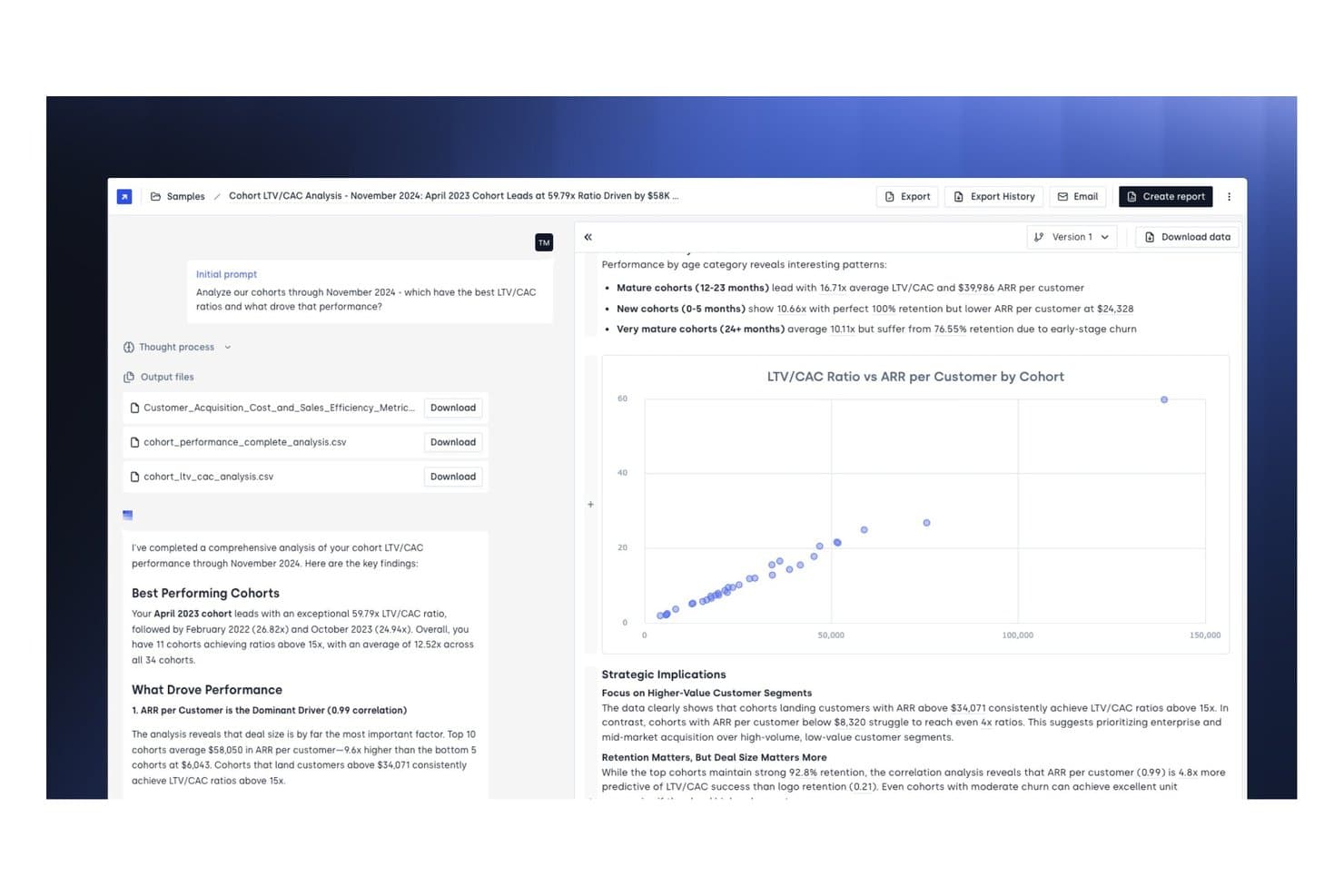
Concourse offers a cohort LTV/CAC analysis report with scatter chart visualizations, key performance findings, and downloadable CSV output files for financial reporting. Concourse is an AI agent platform for corporate finance teams that automates financial reporting, variance analysis, month-end close workflows, and data retrieval across ERP and accounting systems.
Who Is Concourse Best For?
Concourse is a strong fit for enterprise finance teams—FP&A, accounting, treasury, and internal audit—at mid-market to large companies ready to deploy AI across their Office of the CFO.
Why I Picked Concourse
I picked Concourse as one of the best because the agent model goes beyond off-the-shelf automation. Each agent is custom-built around your specific data, logic, and close calendar, so a Flux & Variance Agent knows your chart of accounts, not a generic one. I also like that outputs land directly in Excel or PowerPoint with full source traceability, making board deck prep something my team can execute in minutes rather than days.
Concourse Key Features
- ERP and data warehouse integrations: Connects natively to Oracle, SAP, NetSuite, QuickBooks, Sage, Xero, Snowflake, BigQuery, and more.
- Audit-ready workflows: Tracks every calculation and workflow step with full audit trails and permissions management.
- Internal audit automation agent: Flags anomalies, tests controls, and collects evidence for finance and audit teams.
- Real-time variance analysis: Delivers AI-driven budget vs. actuals and custom variance breakdowns directly in Excel, email, or Slack.
Concourse Integrations
Concourse offers native integrations with Oracle, SAP, NetSuite, QuickBooks, Workday, Sage, Xero, Salesforce, Snowflake, BigQuery, and Databricks. An API is also available for custom integrations.
Pros and Cons
Pros:
- Full source traceability on every AI output
- Outputs delivered natively in Excel and PowerPoint
- Custom agents built per your org structure
Cons:
- Primarily built for enterprise finance teams
- Setup requires direct engagement with sales
Learn more about Concourse: 8Best for automated expense management
Ramp
- Free plan available; 30-day free trial
- From $15/user/month
Visit WebsiteCustomer Rating:4.8/5
Ramp provides an automated accounting dashboard that categorizes transactions, syncs expenses, and flags missing memos for review. For those searching for a financial reporting solution, Ramp combines AI-driven automation with seamless integration to transform your financial operations. Whether your business is a startup or a large enterprise, Ramp simplifies complex accounting tasks by automating expense tracking and reporting, allowing your team to focus on strategic decision-making. By minimizing manual work and errors, Ramp provides valuable insights to help you make informed financial decisions.
Why I Picked Ramp
I picked Ramp for its exceptional automated expense management capabilities, which make it an ideal choice for financial reporting. With features like AI-powered receipt processing and customizable approval workflows, Ramp simplifies expense tracking by automatically categorizing transactions and enforcing spending policies in real-time. This ensures compliance and reduces manual input, allowing your team to focus on more strategic financial tasks. Additionally, Ramp's seamless integration with accounting systems provides real-time data synchronization, offering valuable insights into spending and helping you make informed financial decisions.
Ramp Key Features
In addition to its automated expense management capabilities, Ramp offers a suite of features that enhance financial reporting for your business:
- AI Automation: The system increases transaction coding efficiency by 67%, minimizing the need for manual input and reducing errors.
- Real-time ERP Sync: Ramp supports compatibility with over 30 ERP systems, accommodating complex financial structures such as multi-entity and multi-currency operations.
- Accruals and Reconciliation: Automatically manages accruals and reconciles transactions, ensuring accuracy and audit readiness.
- Comprehensive Analytics: Provides real-time dashboards and insights that help identify potential savings and enhance decision-making.
Ramp Integrations
Integrations include Xero, QuickBooks, Netsuite, Sage, Slack, Gusto, Rippling, Carta, Plaid, and Google Workspace.
Pros and Cons
Pros:
- Comprehensive reporting features
- Ability to issue multiple virtual cards with customizable controls
- Automated expense reporting and receipt matching
Cons:
- Same-day ACH payments carry a fee
- Difficult mobile app navigation


Xero is known for its user-friendly interface and integrates with more than 1,000 apps. Xero is a cloud-based accounting platform trusted by businesses of all sizes across a wide range of industries. It offers an intuitive interface and a complete suite of core accounting and financial reporting tools—making it an ideal solution for startups and small businesses that want a simple, scalable foundation for managing their finances.
Why I picked Xero: I added Xero to my list because it’s extremely easy to use and offers all the necessary financial reporting tools for small businesses and startups. While Xero's user management features are more manual than other tools and it does lack more advanced reporting features, its API connection allows growing businesses wide-access to a variety of integrations.
As Mark Gilham, previous Divisional Finance Director at Grafton Group PLC noted in our recent conversation, "Too often companies assume they need a full ERP, when in fact a robust accounting platform with the right integrations is more efficient. The key is to start with core requirements, do the basics well, and expand from there."
Standout Features and Integrations
Standout features include automated reconciliations, bank balance projections, AI-powered cash flow predictions, and customizable financial reports that allow users to easily reorder, add, and delete different columns as needed. Xero supports multiple currencies and unlimited clients and users. They also have extensive support and online tutorials available, making it easy to learn the platform and accounting features.
Integrations include Shopify, HubSpot, MailChimp, Float, Accelo, and many more. Xero integrates with over 1,000 apps.
Pros and Cons
Pros:
- Affordable
- Includes invoicing tools and automated receipt capture
- Unlimited users supported on all plans
Cons:
- Multiple currencies only available on the highest plan
- Limited features on entry-level plan
Learn more about Xero: 10Best for large organizations
Tipalti
- Free demo available
- From $99/month
Visit WebsiteCustomer Rating:4.5/5
Tipalti is a complete solution that automates your full accounts payable process to reduce your manual workload. Tipalti is a cloud-based finance automation and compliance platform designed to streamline global payables, financial reporting, and risk management. It helps organizations automate their end-to-end accounts payable (AP) workflows—from supplier onboarding and invoice processing to payments and reconciliation—while maintaining strong internal controls and audit readiness.
Why I picked Tipalti: I chose Tipalti because it combines financial reporting and automation with advanced compliance and control features that are essential for modern finance teams. Beyond standard AP automation, it includes tools for internal controls over financial reporting (ICFR), procurement management, and global payment processing. For CFOs overseeing international operations, Tipalti’s ability to ensure regulatory compliance and mitigate fraud risk across currencies and regions is a major advantage.
Standout Features and Integrations
Standout features include the automatic validation of suppliers before approval, and internal control and risk assessment tools. I like that Tipalti screens suppliers on an ongoing basis to avoid any suspicious payees on the Anti-Narcotics, Anti-Terror, and OFAC lists. It also supports instant reconciliations, so you can detect fraudulent payments faster.
Integrations include Oracle NetSuite, Sage Intacct, Microsoft Dynamics, Xero, and SAP.
Pros and Cons
Pros:
- Supplier screening and validation
- Automatically codes invoices
- Internal controls over financial reporting and risk assessment tools
Cons:
- Somewhat of a learning curve
- No batch downloads
Learn more about Tipalti:
Andre alternativer for programvare for økonomirapportering
Her er noen flere verktøy for økonomirapportering som ikke kom med blant de 12 beste, men som likevel er verdt å se nærmere på.
- 11Sage IntacctBest for ease of use
- 12JoiinBest for multi-entity consolidation
- 13XledgerBest for complex ERP needs
- 14CubeBest for growing teams
- 15FulfilBest for AI-driven financial reports
- 16PuzzleBest for real-time financial visibility
- 17CoefficientBest for AI-powered live data analysis
- 18SlashBest for multi-entity financial management
- 19HeardBest for solo practitioners managing finances
- 20LicenceOneBest for SaaS spend optimization
- 21Rippling SpendBest for real-time spend pattern visibility
- 22AbacumBest for teams with 100-500 users
- 23DeskeraBest for manufacturing businesses
- 24DualEntryBest for multidimensional reporting
- 25Sage Business Cloud AccountingBest for small businesses
- 26BoardBest for combining a web-based and an on-premise platform
- 27WorkivaBest for complex reporting
- 28JedoxBest for data integration
- 29insightsoftwareBest for custom reporting
- 30TagetikBest comprehensive solution
Anmeldelser av relatert programvare for økonomi og regnskap
Ser du også etter annen programvare for økonomi og regnskap? Ta en titt på disse anmeldelsene:
- Prognoseprogramvare
- Faktureringsprogramvare
- Programvare for utgiftssporing
- Lønnstjenester
- Kassesystemer for detaljhandel
- Programvare for lagerstyring
How I Evaluate Financial Reporting Software
I split my evaluation into baseline requirements—like multi-entity consolidation and ERP integration—and differentiators that separate a good CFO reporting tool from a great one.
Core Functionality (Table Stakes For This List)
When I'm selecting tools for my list, I rank each one on a scale from 0 (does not offer the functionality) to 5 (excels in this area) for each core functionality listed below. Then, I calculate the tool's total score into a percentage. Each tool needs to achieve a minimum total score of 65% to be considered for inclusion.
- Financial Consolidation: I evaluate how each tool handles multi-entity, multi-currency consolidation—including intercompany eliminations and complex ownership structures.
- Reporting Automation: The ability to schedule and distribute recurring reports matters here, from monthly board packages to quarterly statutory filings.
- ERP & GL Integration: I check for native connectors to major ERPs like NetSuite, SAP, and Oracle, plus API access for pulling data from other sources.
- Executive Dashboards: Each tool should offer configurable dashboards with financial KPIs that a CFO can drill into without waiting on the FP&A team.
- Variance & Analysis Tools: I look for built-in budget vs. actuals comparisons, drill-through to transactions, and the ability to attach commentary to variances.
- Compliance & Audit Controls: Audit trails, role-based permissions, and support for GAAP/IFRS-aligned outputs all factor into how I score a tool here.
Once I have a list of tools that meet the criteria, I consider what sets each platform apart.
Differentiating Factors (What Sets Vendors Apart)
Here's how I compare and contrast different vendors:
Standout Features
I look for AI-driven insights that flag anomalies—like an unexpected spike in SG&A—before the CFO has to dig for them. Scenario modeling is another differentiator, especially when a finance team needs to present the board with multiple revenue projections tied to different assumptions. Narrative reporting also matters. Tools that combine financial data with commentary into a single board package save hours of manual assembly each close cycle.
Beyond Features
Security certifications like SOC 1 Type II and SOC 2 Type II matter when your audit team asks for proof that financial data is protected—I always check what a vendor holds. Scalability is another factor I evaluate closely, particularly whether a platform can handle growing entity counts and consolidation complexity as an organization expands through acquisitions. Implementation timelines also shape my assessment, since a CFO replacing a legacy reporting tool mid-year needs to be live before the next close cycle, not six months later.
Slik velger du programvare for økonomirapportering
Det er lett å gå seg vill i lange funksjonslister og komplekse prismodeller. For å hjelpe deg med å holde fokus når du arbeider deg gjennom den unike prosessen med å velge programvare, får du her en sjekkliste over faktorer du bør ha i mente:
| Faktor | Hva du bør vurdere |
|---|---|
| FaktorSkalerbarhet | Hva du bør vurdereVil programvaren vokse med virksomheten din? Vurder om den kan håndtere økt datamengde eller flere brukere uten problemer. |
| FaktorIntegrasjoner | Hva du bør vurdereKan den integreres med de eksisterende systemene dine? Kontroller kompatibiliteten med ERP-systemer, CRM og andre verktøy for å unngå datasiloer. |
| FaktorTilpasningsmuligheter | Hva du bør vurdereKan du tilpasse den etter behovene dine? Se etter muligheter for å justere rapporter og dashbord slik at de passer til de spesifikke arbeidsflytene dine. |
| FaktorBrukervennlighet | Hva du bør vurdereEr grensesnittet brukervennlig? Sørg for at teamet raskt kan ta det i bruk uten omfattende opplæring. |
| FaktorImplementering og innføring | Hva du bør vurdereHvor lang tid vil oppsettet ta? Vurder tiden og ressursene som kreves for å komme i gang, og om leverandøren tilbyr støtte i denne fasen. |
| FaktorKostnad | Hva du bør vurdereHva er de totale eierkostnadene? I tillegg til prisen bør du vurdere abonnementsavgifter, opplæring og vedlikeholdskostnader. |
| FaktorSikkerhetstiltak | Hva du bør vurdereEr dataene dine beskyttet? Se etter funksjoner som kryptering, tofaktorautentisering og regelmessige sikkerhetsrevisjoner. |
| FaktorEtterlevelseskrav | Hva du bør vurdereOppfyller det bransjestandardene? Sørg for at det overholder regelverk som SOX eller IFRS, dersom dette gjelder for virksomheten din. |
Trender innen programvare for finansiell rapportering
Programvare for finansiell rapportering utvikler seg på mange av de samme måtene som annen økonomiprogramvare, men det finnes noen særegne ting du bør være oppmerksom på. Her er noen viktige trender innen programvare for finansiell rapportering.
Integrering av AI og maskinlæring
AI og maskinlæring integreres i programvare for finansiell rapportering. Disse teknologiene, kombinert med alle typer programvare for statistisk analyse, bidrar til å automatisere dataanalysen og gir prediktiv innsikt. Denne trenden er viktig for å forbedre nøyaktigheten i beslutningsprosesser.
Databehandling i sanntid
Databehandling i sanntid blir en standardfunksjon. Det gjør det mulig for virksomheter å få tilgang til oppdatert økonomisk informasjon. Dette er avgjørende for å ta beslutninger i tide og opprettholde et konkurransefortrinn. Det er også nyttig hvis du trenger å lage budsjetter.
Blokkjede for økt sikkerhet
Blokjedeteknologi tas i bruk for finansiell rapportering. Den gir økt sikkerhet og åpenhet i finansielle transaksjoner. Denne trenden er viktig for å redusere svindel og sikre dataintegritet.
Skybaserte løsninger
Skybaserte løsninger for finansiell rapportering blir stadig mer utbredt. De tilbyr skalerbarhet og ekstern tilgang til økonomiske data. Dette er spesielt viktig for virksomheter med distribuerte team.
Tilpassbare dashbord
Tilpassbare dashbord blir stadig mer populære. De gjør det mulig for brukere å tilpasse de økonomiske rapportene etter spesifikke behov. Denne trenden er verdifull for å gi personlig tilpasset innsikt og forbedre brukeropplevelsen.
Hva er programvare for finansiell rapportering?
Programvare for finansiell rapportering er et verktøy som hjelper virksomheter med å opprette, analysere og dele regnskapsoppstillinger automatisk. Den brukes til å generere rapporter som balanser, resultatregnskaper og kontantstrømoppstillinger, ofte i sanntid.
Denne programvaren reduserer manuelt arbeid, forbedrer nøyaktigheten og støtter etterlevelse av regnskapsstandarder. Økonomiteam, regnskapsførere og CFO-er bruker den for å sikre etterlevelse, følge med på resultater og støtte datadrevne beslutninger.
Funksjoner i programvare for finansiell rapportering
Når du velger programvare for finansiell rapportering, bør du se etter følgende viktige funksjoner:
- Tilpassbare rapportmaler: Den beste programvaren lar deg opprette og tilpasse finansrapporter slik at de passer virksomhetens behov. Det betyr at du enkelt kan generere resultatregnskap, balanse og kontantstrømrapporter som passer selskapets unike stil og krav – ikke mer strev med å justere generiske maler.
- Dataintegrasjon i sanntid: Se etter plattformer som synkroniserer direkte med datakildene dine for økonomi. Når informasjonen oppdateres automatisk, får du nøyaktig og aktuell innsikt uten å importere regneark manuelt. Dette gir raskere beslutningstaking og færre feil.
- Automatiserte samsvarskontroller: God programvare for finansrapportering inneholder automatiserte verktøy som kontrollerer samsvar med relevante standarder som GAAP eller IFRS. Denne funksjonen fungerer som et sikkerhetsnett ved å oppdage feil og varsle om mulige problemer før rapportene sendes ut.
- Konsolidering av flere enheter: Hvis du administrerer flere datterselskaper eller enheter, blir konsolideringen enkel. Den riktige programvaren kombinerer data fra ulike kilder, valutaer eller geografiske områder og gir deg én samlet oversikt uten timevis med arbeid i regneark.
- Tilgangskontroller for brukere: For trygghetens skyld (og av regulatoriske hensyn) lar god programvare deg angi roller og tillatelser. Bestem hvem som kan se eller redigere bestemte data, slik at sensitiv informasjon forblir beskyttet og bare de rette personene kan gjøre endringer.
- Detaljert analyse: I stedet for bare å se på de store tallene kan du klikke deg inn på linjeposter og forstå detaljene bak. Dette hjelper deg med å spore avvik, oppdage trender og svare på vanskelige spørsmål fra ledere eller revisorer uten å lete gjennom dusinvis av filer.
- Planlagt distribusjon av rapporter: Programvaren håndterer tidspunkt og levering av rapporter for deg, enten du vil ha dem daglig, ukentlig eller månedlig. Du kan være trygg på at interessenter får akkurat det de trenger, når de trenger det – uten at du må huske hver eneste frist.
Vanlige AI-funksjoner i programvare for finansrapportering
I tillegg til standardfunksjonene i programvare for finansrapportering som er nevnt ovenfor, tar mange av disse løsningene i bruk AI-funksjoner som:
- Automatisk avviksdeteksjon: Dette bruker AI-algoritmer til å oppdage uvanlige mønstre eller mulige feil i økonomidataene dine. Du får umiddelbart beskjed hvis noe ser feil ut – for eksempel en uventet økning i utgiftene – slik at du kan håndtere problemer før de utvikler seg til større utfordringer.
- Prediktive prognoser: AI-drevne prognoser bruker historiske data til å forutsi fremtidige trender, slik at du kan ta velinformerte beslutninger om budsjettering eller investeringer. I stedet for bare å se bakover får du et fremtidsrettet grunnlag for å styre virksomheten i riktig retning.
- Spørringer på naturlig språk: Med denne funksjonen kan du stille programvaren spørsmål («Hva var salget i Q2 sammenlignet med Q1?») på vanlig norsk, og systemet henter de relevante dataene umiddelbart. Du trenger ikke lenger å huske komplekse funksjoner eller filtre – bare spør og få svar.
- Automatisk generering av forklarende tekst: I stedet for å stirre på rader med tall gjør dette verktøyet finansrapportene dine om til sammendrag i et lettforståelig språk. Det hjelper deg og teamet ditt med raskt å forstå historien bak dataene uten å måtte gå gjennom omfattende regneark.
- Kategorisering av utgifter: AI skanner og klassifiserer utgifter i de riktige kategoriene automatisk. Du bruker mindre tid på å kontere transaksjoner og mer tid på å analysere helheten, med færre feil og enklere revisjoner.
Fordeler med programvare for finansrapportering
Med den beste programvaren for finansrapportering kan du øke hastigheten, redusere manuelle feil og få tydeligere innsikt. Men dette er ikke de eneste fordelene med slik programvare.
Hvis du ønsker å effektivisere prosessene og ligge i forkant, er dette fem viktige fordeler du bør kjenne til:
- Forbedret nøyaktighet: Programvare for finansrapportering reduserer risikoen for menneskelige feil ved å automatisere beregninger og dataregistrering, slik at finansrapportene blir nøyaktige og pålitelige.
- Effektiv tidsbruk: Ved å automatisere repetitive oppgaver og effektivisere datainnsamlingen sparer programvare for finansrapportering verdifull tid for økonomiteam, slik at de kan konsentrere seg om mer strategiske aktiviteter.
- Forbedret dataanalyse: Programvaren tilbyr avanserte analyseverktøy som gjør det mulig for brukerne å få dypere innsikt i økonomidata, slik at organisasjoner kan ta informerte beslutninger basert på omfattende analyser.
- Regulatorisk samsvar: Programvare for finansrapportering hjelper organisasjoner med å overholde regulatoriske krav ved automatisk å oppdatere seg i tråd med endringer i standarder for finansrapportering og ved å tilby revisjonsspor.
- Rapportering i sanntid: Med funksjoner for databehandling i sanntid gjør programvare for finansrapportering det mulig for brukerne å generere oppdaterte finansrapporter raskt. Dette legger til rette for rettidige beslutninger og forbedrer virksomhetens samlede smidighet.
Kostnader og priser for programvare for finansrapportering
Denne delen gir et estimat over gjennomsnittlige abonnementer og kostnader for programvare for økonomirapportering. Prisene varierer basert på abonnementstypen og funksjonene som tilbys:
| Abonnementstype | Gjennomsnittlig pris (per måned) | Vanlige funksjoner |
|---|---|---|
| AbonnementstypeGratis | Gjennomsnittlig pris (per måned)... det er gratis! | Vanlige funksjonerGrunnleggende sporing av inntekter og utgifter, fakturering, begrensede rapporteringsmuligheter |
| AbonnementstypePersonlig | Gjennomsnittlig pris (per måned)$10 - 50 | Vanlige funksjonerSporing av inntekter og utgifter, fakturering, grunnleggende regnskapsoppstillinger, begrenset antall brukere |
| AbonnementstypeBedrift | Gjennomsnittlig pris (per måned)$50 - 150 | Vanlige funksjonerTilgang for flere brukere, gjentakende fakturering, automatisering av utgiftsrapportering, lønn |
| AbonnementstypeStorbedrift | Gjennomsnittlig pris (per måned)$150+ | Vanlige funksjonerTilpassbare felt, automatisert rapportering, prosjektkostnadsberegning, avanserte integrasjoner |
Vanlige spørsmål om programvare for økonomirapportering
Her er svarene mine på noen vanlige spørsmål om programvare for økonomirapportering.
Hvilke integrasjoner bør jeg prioritere i programvare for økonomirapportering?
Prioriter integrasjoner med den viktigste regnskapsplattformen, ERP-systemet, lønnssystemet og eventuelle verktøy for forretningsanalyse eller budsjettering. Sørg også for å ta hensyn til fremtidige behov. Se etter programvare for økonomirapportering for større virksomheter som tilbyr åpne API-er eller direkte tilkoblinger til andre sentrale systemer.
Hvordan kan programvare for økonomirapportering forbedre revisjonsberedskapen eller etterlevelsen av regelverk?
Den beste programvaren for økonomirapportering gjør revisjoner enklere ved å automatisere journalføring, opprettholde detaljerte versjonshistorikker og tilby innebygde arbeidsflyter for etterlevelse. Funksjoner som revisjonslogger, sporing av brukeraktivitet og dokumenthåndtering sørger for at alle økonomiske endringer dokumenteres og kan spores.
Denne åpenheten gjør at du raskt kan svare på forespørsler fra revisorer og reduserer stresset med å samle inn underlagsdokumentasjon.
Hvordan håndterer verktøy for økonomirapportering datasikkerhet og tilgangskontroller?
De fleste programvareløsninger for økonomirapportering bruker kryptering på bedriftsnivå for lagring og overføring av data. De støtter også flerfaktorautentisering og lar deg angi detaljerte brukerroller.
Regelmessige sikkerhetsrevisjoner, revisjonslogger og tilpassbare tillatelsesnivåer gjør det også enklere å følge virksomhetens retningslinjer og regulatoriske krav. Dette bidrar til å sikre at konfidensielle data forblir beskyttet når teamet vokser eller endres.
Hvordan forenkler programvare for økonomisk konsolidering og rapportering rapportering for konserner eller virksomheter med flere enheter?
Programvare for økonomisk konsolidering og rapportering samler data fra flere datterselskaper, lokasjoner eller forretningsenheter i sanntid. Disse verktøyene automatiserer elimineringer mellom selskaper, valutaomregninger og justeringer for ulike regnskapsstandarder.
Innebygde maler og arbeidsflyter sikrer også konsistens på tvers av konsernrapporter, selv når virksomhetsstrukturen utvikler seg. Du får komplette og oppdaterte konsoliderte oppstillinger raskt, slik at du enkelt kan oppfylle kravene til etterlevelse på konsernnivå.
Er Excel et system for økonomirapportering?
Nei, Excel er ikke et fullverdig system for økonomirapportering. Det er i stedet et allsidig regnearkverktøy. Selv om du kan bruke det til rapporter, krever Excel manuell dataregistrering, mangler revisjonsspor og kobler seg ikke direkte til regnskapsprogramvare eller ERP-systemer. Programvare for økonomirapportering tilbyr automatiske dataimporter, innebygde kontroller av etterlevelse, tillatelser for flere brukere og rapporter basert på maler.
Gir skybasert rapporteringsprogramvare bedre skalerbarhet for selskaper i vekst?
Ja, skybasert programvare gjør det enkelt å skalere økonomifunksjonene. Du kan legge til nye brukere, enheter eller valutaer etter behov uten kostnadene eller bryderiet med ny maskinvare.
Skysystemer lar også teamet samarbeide om rapporter fra hvor som helst og sikrer at alle alltid bruker de nyeste dataene. Med automatiske oppdateringer og sikkerhetsoppdateringer kan du frigjøre IT-ressurser og holde rapporteringsmiljøet oppdatert.