O software de relatórios financeiros ajuda as equipas a automatizar e simplificar a criação das principais demonstrações financeiras, incluindo relatórios de resultados, balanços e resumos de fluxos de caixa. Para CFO e analistas financeiros no setor tecnológico, a ferramenta certa reduz o trabalho manual, apoia a conformidade e fornece dados precisos para uma tomada de decisões mais rápida e confiante.
Enquanto especialista em software digital com experiência em gestão financeira, trabalhei em estreita colaboração com equipas financeiras divididas entre expectativas crescentes e sistemas limitados. Compreendo o desafio de obter relatórios completos e consistentes a partir de fontes dispersas, bem como a pressão que surge quando a liderança precisa rapidamente de respostas. Quer esteja a definir a estratégia ou profundamente envolvido nos dados, precisa de software que trabalhe consigo, não contra si.
Foi por isso que passei horas a testar as principais plataformas e a analisar as opiniões dos utilizadores. O software de relatórios financeiros desta lista foi concebido para resolver os problemas que enfrenta diariamente, desde a redução dos ciclos de elaboração de relatórios até à melhoria da clareza, para que possa concentrar-se em alcançar resultados.
Why Trust Our Software Recommendations
6,700+
Reviews
20
Industry experts
16+
Evaluation factors
14
Years
Our team has been testing and reviewing software since 2012. As finance leaders ourselves, we know how difficult—and important—it is to choose the right software.
For this guide, we evaluated tools using hands-on testing and independent research, scoring tools using our selection criteria.
Our reviews reflect our human editorial judgment, not a sales pitch.
Tabela comparativa de software de relatórios financeiros
Para começar, recolhi informações sobre os preços de cada ferramenta. Eis como se comparam em termos de custos:
| Tool | Best For | Trial Info | Price | ||
|---|---|---|---|---|---|
| 1 | Best for vendor payout data | Free plan available | Pricing upon request | Website | |
| 2 | Best for financial forecasting | Free demo available | Pricing upon request | Website | |
| 3 | Best for enterprise financial reporting | Free demo available | Pricing upon request | Website | |
| 4 | Best with integrated budgeting and invoicing | 14-day free trial | From $10/user/month (billed annually) | Website | |
| 5 | Best for presentation-ready reports | Free plan + 30-day trial available | From $38/month | Website | |
| 6 | Best with pre-trained AI for invoice capture | Free demo available | Pricing upon request | Website | |
| 7 | Best for custom AI agents tailored to teams | Free plan available | Pricing upon request | Website | |
| 8 | Best for automated expense management | Free plan available; 30-day free trial | From $15/user/month | Website | |
| 9 | Best for startups | 1-month free trial available | From $27/month | Website | |
| 10 | Best for large organizations | Free demo available | From $99/month | Website |


Avaliações do melhor software de relatórios financeiros
Estas são as melhores ferramentas de software de relatórios de gestão financeira disponíveis no mercado. Vou abordar as vantagens e desvantagens de cada ferramenta, as respetivas funcionalidades e os casos de utilização ideais.
 Best for vendor payout data
- Free plan available
- Pricing upon request
Visit WebsiteCustomer Rating:4.5/5
Payout's dashboard offers real-time tracking and management of invoices and payouts. Payouts.com is a specialized platform that supports businesses in automating and managing financial operations like payouts, vendor relationships, and invoicing. It caters particularly to companies in the affiliate marketing, influencer economy, and digital advertising spaces by integrating seamlessly with tracking systems like Tune, Affise, and CJ Affiliate.
Why I picked Payouts: Its payout automation capabilities allow businesses to manage large-scale payments efficiently, ensuring that creators, influencers, and partners are paid on time without errors. By integrating directly with tracking systems such as Tune and Affise, it provides a consolidated view of all transactions, giving you precise financial data to work with. This financial data is supported by real-time dashboards and custom reporting capabilities. Additionally, automatic invoice matching eliminates the need for manual reconciliation. By automating this process, Payouts reduces errors and speeds up the accounts payable workflow.
Standout Features and Integrations
Standout features include advanced data synchronization that ensures your financial systems and the Payouts platform are always aligned, providing real-time accuracy in reporting. The platform also offers efficient one-click payment execution, allowing you to pay anyone, anywhere, with minimal effort. Additionally, Payouts.com supports diverse payment options, including traditional bank transfers, eWallets, and cryptocurrencies.
Integrations include PayPal, Venmo, Payoneer, impact.com, CJ Affiliate, Everflow, Zelle, Priority, Tune, System1, and NetSuite.
Pros and Cons
Pros:
- Supports scaling operations
- Multiple payout methods
- Comprehensive automation of accounts payable processes
Cons:
- May not integrate with all existing systems
- May require time to fully customize
Learn more about Payouts: Best for financial forecasting
- Free demo available
- Pricing upon request
Visit WebsiteCustomer Rating:4.6/5
Phocas allows users to customize their dashboards to gain full visibility into financial metrics and performance. Phocas is a business intelligence and financial analysis software designed to provide organizations with comprehensive data analytics, visualization, and reporting capabilities. It's specifically tailored for businesses seeking to enhance their data-driven decision-making processes as it integrates with various data sources, including ERP systems, CRM software, and other databases.
Why I picked Phocas: I chose Phocas because it offers customizable financial statements, including balance sheets, profit and loss statements, and cash flow reports, which can be tailored to meet the specific needs of any organization. The platform's ability to generate real-time financial reports ensures that businesses always have up-to-date information at their fingertips. Additionally, Phocas offers features for financial forecasting, allowing users to create detailed predictions based on historical data and trend analysis.
Standout Features and Integrations
Standout features include collaborative tools that enable users to share reports and dashboards with team members, data visualization tools to transform complex financial data into intuitive charts, graphs, and dashboards, and an AI feature that allows users to ask questions and receive relevant insights and reports quickly.
Integrations include Oracle, QAD, MAM Software, Khaos Control, SYSPRO, Retail Express, Sympac, Microsoft, Acumatica, Xero, Epicor, IFS, Sage, Accolent, MYOB, Enapps, Kerridge, SAP, Datafile, Netsuite, and more.
Pros and Cons
Pros:
- Forecasting capabilities
- Real-time data and analytics
- Extensive customizations for reports and dashboards
Cons:
- Learning curve for new users wanting to maximize the features
- Set up and configuration can be time consuming
Learn more about Phocas: 3Best for enterprise financial reporting
Vena
- Free demo available
- Pricing upon request
Visit WebsiteCustomer Rating:4.5/5
A P&L variance report in Vena showing monthly, year-to-date, and full-year budget vs. actual performance across departments. For those seeking a reliable financial reporting solution, Vena emerges as a versatile tool designed to streamline your financial processes. It connects seamlessly with various General Ledger and ERP systems, eliminating the hassle of manual spreadsheet work and enhancing the accuracy of your reports. With its user-friendly interface and customizable templates, Vena allows you to focus on strategic analysis and decision-making, making it an ideal choice for businesses across diverse industries.
Why I Picked Vena
I picked Vena for its unique ability to leverage Excel, a tool many finance professionals are already familiar with, to enhance financial reporting processes. Vena integrates seamlessly with various financial systems, automating reporting tasks and reducing manual data entry, which saves significant time. With pre-configured Excel templates, it enables dynamic reporting and financial modeling, making it easier for your team to conduct in-depth analysis and decision-making. By providing a centralized cloud database and collaborative workflows, Vena ensures data accuracy and security, positioning itself as an ideal solution for organizations looking to optimize their financial reporting.
Vena Key Features
In addition to its Excel-powered capabilities, Vena offers a range of features that enhance the financial reporting experience for your team.
- Dynamic Report Creation: This feature allows you to generate real-time reports with customizable layouts, enabling you to focus on specific business metrics that matter most to your organization.
- Data Integration: Vena integrates seamlessly with various data sources, including ERP systems, ensuring that your financial data is always up-to-date and accessible from a single platform.
- Automated Workflows: With automated workflows, you can streamline the process of report distribution and approvals, reducing manual intervention and potential errors.
- Customizable Templates: Vena provides a library of pre-configured templates that you can tailor to meet your unique reporting needs, allowing for consistency and efficiency in financial reporting.
Vena Integrations
Integrations include NetSuite, QuickBooks, various General Ledger systems, ERP systems, and the ability to import data from Excel, CSV files, and cloud storage.
Pros and Cons
Pros:
- Usually quick to implement
- Preconfigured templates and reports
- Leverages familiar Excel interface
Cons:
- No mobile app
- Some compatibility issues with Mac
Learn more about Vena: Best with integrated budgeting and invoicing
- 14-day free trial
- From $10/user/month (billed annually)
Visit WebsiteCustomer Rating:4.6/5
Productive dashboard shows company expenses, unpaid invoices, resource allocation, and monthly financial reports. Productive is a financial reporting and professional services automation platform that brings together budgeting, invoicing, resource planning, scenario modeling, and analytics for finance teams.
Who Is Productive Best For?
Productive is a good fit for finance leaders and operations teams at professional services firms who need unified financial reporting and project management.
Why I Picked Productive
I picked Productive as one of the best because I can manage budgeting and invoicing directly alongside financial reporting. I like that my team can set up project budgets, track actuals, and generate invoices without leaving the platform. In practice, that means we keep all our financial data connected, which helps us avoid manual reconciliation between systems.
Productive Key Features
- Scenario builder: Model revenue forecasts and project outcomes using customizable scenarios.
- Resource planning with AI filtering: Allocate team members to projects based on skills, availability, and workload.
- Custom financial dashboards: Build tailored dashboards to visualize KPIs, margins, and financial performance.
- Profitability tracking: Monitor project and client profitability in real time with detailed analytics.
Productive Integrations
Productive offers native integrations with Xero, QuickBooks Online, Slack, Google Calendar, and HubSpot. It also connects with Zapier and provides an API for custom integrations.
Pros and Cons
Pros:
- AI-powered resource allocation and utilization insights
- Custom financial dashboards for KPI monitoring
- Profitability tracking at project and client level
Cons:
- No built-in audit trail for financial changes
- Limited advanced consolidation for multi-entity groups
Learn more about Productive: Best for presentation-ready reports
- Free plan + 30-day trial available
- From $38/month
Visit WebsiteCustomer Rating:4/5
The business overview dashboard in QuickBooks Online provides quick access to key financial metrics and insights. QuickBooks Online is a cloud-based accounting software tailored for small to midsize businesses, offering a wide range of financial management tools such as invoicing, expense tracking, payroll management, and tax preparation.
Why I picked QuickBooks Online: It provides presentation-ready reports that can be tailored to meet the specific needs of stakeholders, which is crucial for precision in financial presentations. These reports are supported by real-time insights available through financial statements and a revenue streams dashboard, offering a dynamic view of the company's financial health. The ability to monitor cash flow trends and create personalized dashboards for key performance indicators (KPIs) also drives informed, data-driven decisions.
Standout Features and Integrations
Standout features include automated invoicing and bill payments, reducing time spent on routine tasks, and tools for collaboration and data management. Other features include project profitability tracking and inventory management, which are vital for businesses handling both products and services.
Integrations include Amazon Business, PayPal, Square, Etsy, eBay, Shopify, Google Sheets, Salesforce, Stripe, HubSpot, and Mailchimp.
Pros and Cons
Pros:
- Compatible with a wide range of apps
- Good for scaling businesses
- Users can tailor financial reports to meet specific business needs
Cons:
- Potential for errors in general ledger due to auto-population issues
- Bank feed rules can lead to errors
Learn more about QuickBooks Online: Best with pre-trained AI for invoice capture
- Free demo available
- Pricing upon request
Visit WebsiteCustomer Rating:4.8/5
DOKKA helps finance teams process invoices faster by extracting key data, validating entries, and syncing with accounting systems. DOKKA is an AI-driven financial document management platform designed for finance teams and CFOs who need to automate invoice capture, simplify workflows, and maintain audit-ready records across complex business environments.
Who Is DOKKA Best For?
DOKKA is a strong fit for finance teams at mid-sized and large organizations that need automated document workflows and ERP integration.
Why I Picked DOKKA
I picked DOKKA as one of the best because its pre-trained AI for invoice capture lets my team extract line-item data from invoices with almost no manual setup. I like that DOKKA recognizes a wide range of invoice formats out of the box, so we can process vendor documents without building custom templates. In practice, that means we get accurate, structured data into our reporting workflows much faster.
DOKKA Key Features
- Automated document management: Store, organize, and retrieve financial documents in a centralized digital workspace.
- Approval workflow automation: Route invoices and documents through customizable multi-step approval processes.
- Audit trail tracking: Maintain a detailed log of all document actions and changes for compliance.
- ERP integration: Connect DOKKA directly to leading ERP systems for real-time data sync.
DOKKA Integrations
DOKKA offers native integrations with SAP, NetSuite, QuickBooks, Priority, Sage, and Zapier. An API is also available for custom integrations.
Pros and Cons
Pros:
- Real-time document collaboration for finance teams
- Multi-entity support for group reporting
- Built-in audit trails for compliance tracking
Cons:
- Approval workflow options can be rigid
- Limited analytics and dashboard customization
Learn more about DOKKA: Best for custom AI agents tailored to teams
- Free plan available
- Pricing upon request
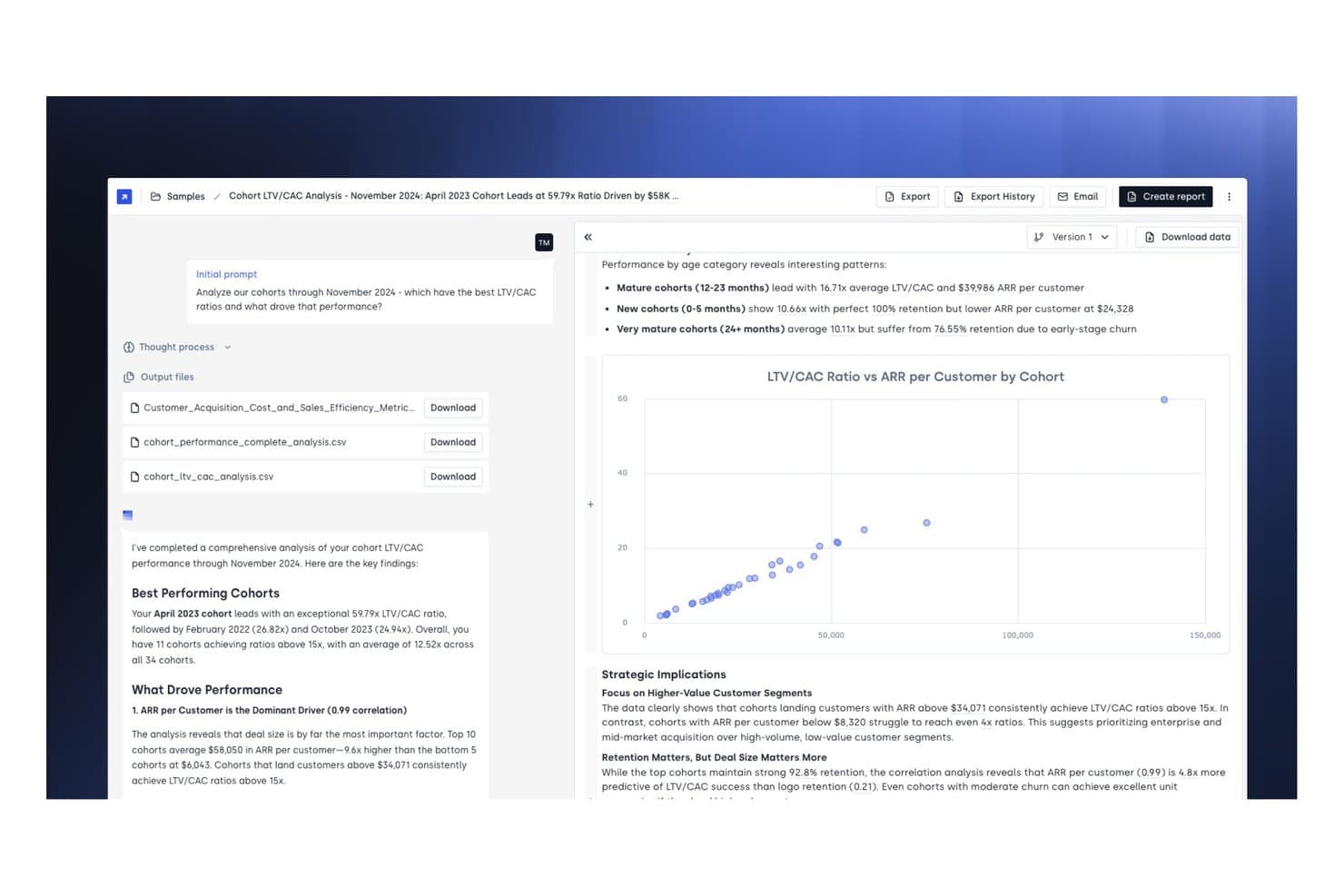
Concourse offers a cohort LTV/CAC analysis report with scatter chart visualizations, key performance findings, and downloadable CSV output files for financial reporting. Concourse is an AI agent platform for corporate finance teams that automates financial reporting, variance analysis, month-end close workflows, and data retrieval across ERP and accounting systems.
Who Is Concourse Best For?
Concourse is a strong fit for enterprise finance teams—FP&A, accounting, treasury, and internal audit—at mid-market to large companies ready to deploy AI across their Office of the CFO.
Why I Picked Concourse
I picked Concourse as one of the best because the agent model goes beyond off-the-shelf automation. Each agent is custom-built around your specific data, logic, and close calendar, so a Flux & Variance Agent knows your chart of accounts, not a generic one. I also like that outputs land directly in Excel or PowerPoint with full source traceability, making board deck prep something my team can execute in minutes rather than days.
Concourse Key Features
- ERP and data warehouse integrations: Connects natively to Oracle, SAP, NetSuite, QuickBooks, Sage, Xero, Snowflake, BigQuery, and more.
- Audit-ready workflows: Tracks every calculation and workflow step with full audit trails and permissions management.
- Internal audit automation agent: Flags anomalies, tests controls, and collects evidence for finance and audit teams.
- Real-time variance analysis: Delivers AI-driven budget vs. actuals and custom variance breakdowns directly in Excel, email, or Slack.
Concourse Integrations
Concourse offers native integrations with Oracle, SAP, NetSuite, QuickBooks, Workday, Sage, Xero, Salesforce, Snowflake, BigQuery, and Databricks. An API is also available for custom integrations.
Pros and Cons
Pros:
- Full source traceability on every AI output
- Outputs delivered natively in Excel and PowerPoint
- Custom agents built per your org structure
Cons:
- Primarily built for enterprise finance teams
- Setup requires direct engagement with sales
Learn more about Concourse: 8Best for automated expense management
Ramp
- Free plan available; 30-day free trial
- From $15/user/month
Visit WebsiteCustomer Rating:4.8/5
Ramp provides an automated accounting dashboard that categorizes transactions, syncs expenses, and flags missing memos for review. For those searching for a financial reporting solution, Ramp combines AI-driven automation with seamless integration to transform your financial operations. Whether your business is a startup or a large enterprise, Ramp simplifies complex accounting tasks by automating expense tracking and reporting, allowing your team to focus on strategic decision-making. By minimizing manual work and errors, Ramp provides valuable insights to help you make informed financial decisions.
Why I Picked Ramp
I picked Ramp for its exceptional automated expense management capabilities, which make it an ideal choice for financial reporting. With features like AI-powered receipt processing and customizable approval workflows, Ramp simplifies expense tracking by automatically categorizing transactions and enforcing spending policies in real-time. This ensures compliance and reduces manual input, allowing your team to focus on more strategic financial tasks. Additionally, Ramp's seamless integration with accounting systems provides real-time data synchronization, offering valuable insights into spending and helping you make informed financial decisions.
Ramp Key Features
In addition to its automated expense management capabilities, Ramp offers a suite of features that enhance financial reporting for your business:
- AI Automation: The system increases transaction coding efficiency by 67%, minimizing the need for manual input and reducing errors.
- Real-time ERP Sync: Ramp supports compatibility with over 30 ERP systems, accommodating complex financial structures such as multi-entity and multi-currency operations.
- Accruals and Reconciliation: Automatically manages accruals and reconciles transactions, ensuring accuracy and audit readiness.
- Comprehensive Analytics: Provides real-time dashboards and insights that help identify potential savings and enhance decision-making.
Ramp Integrations
Integrations include Xero, QuickBooks, Netsuite, Sage, Slack, Gusto, Rippling, Carta, Plaid, and Google Workspace.
Pros and Cons
Pros:
- Comprehensive reporting features
- Ability to issue multiple virtual cards with customizable controls
- Automated expense reporting and receipt matching
Cons:
- Same-day ACH payments carry a fee
- Difficult mobile app navigation


Xero is known for its user-friendly interface and integrates with more than 1,000 apps. Xero is a cloud-based accounting platform trusted by businesses of all sizes across a wide range of industries. It offers an intuitive interface and a complete suite of core accounting and financial reporting tools—making it an ideal solution for startups and small businesses that want a simple, scalable foundation for managing their finances.
Why I picked Xero: I added Xero to my list because it’s extremely easy to use and offers all the necessary financial reporting tools for small businesses and startups. While Xero's user management features are more manual than other tools and it does lack more advanced reporting features, its API connection allows growing businesses wide-access to a variety of integrations.
As Mark Gilham, previous Divisional Finance Director at Grafton Group PLC noted in our recent conversation, "Too often companies assume they need a full ERP, when in fact a robust accounting platform with the right integrations is more efficient. The key is to start with core requirements, do the basics well, and expand from there."
Standout Features and Integrations
Standout features include automated reconciliations, bank balance projections, AI-powered cash flow predictions, and customizable financial reports that allow users to easily reorder, add, and delete different columns as needed. Xero supports multiple currencies and unlimited clients and users. They also have extensive support and online tutorials available, making it easy to learn the platform and accounting features.
Integrations include Shopify, HubSpot, MailChimp, Float, Accelo, and many more. Xero integrates with over 1,000 apps.
Pros and Cons
Pros:
- Affordable
- Includes invoicing tools and automated receipt capture
- Unlimited users supported on all plans
Cons:
- Multiple currencies only available on the highest plan
- Limited features on entry-level plan
Learn more about Xero: 10Best for large organizations
Tipalti
- Free demo available
- From $99/month
Visit WebsiteCustomer Rating:4.5/5
Tipalti is a complete solution that automates your full accounts payable process to reduce your manual workload. Tipalti is a cloud-based finance automation and compliance platform designed to streamline global payables, financial reporting, and risk management. It helps organizations automate their end-to-end accounts payable (AP) workflows—from supplier onboarding and invoice processing to payments and reconciliation—while maintaining strong internal controls and audit readiness.
Why I picked Tipalti: I chose Tipalti because it combines financial reporting and automation with advanced compliance and control features that are essential for modern finance teams. Beyond standard AP automation, it includes tools for internal controls over financial reporting (ICFR), procurement management, and global payment processing. For CFOs overseeing international operations, Tipalti’s ability to ensure regulatory compliance and mitigate fraud risk across currencies and regions is a major advantage.
Standout Features and Integrations
Standout features include the automatic validation of suppliers before approval, and internal control and risk assessment tools. I like that Tipalti screens suppliers on an ongoing basis to avoid any suspicious payees on the Anti-Narcotics, Anti-Terror, and OFAC lists. It also supports instant reconciliations, so you can detect fraudulent payments faster.
Integrations include Oracle NetSuite, Sage Intacct, Microsoft Dynamics, Xero, and SAP.
Pros and Cons
Pros:
- Supplier screening and validation
- Automatically codes invoices
- Internal controls over financial reporting and risk assessment tools
Cons:
- Somewhat of a learning curve
- No batch downloads
Learn more about Tipalti:
Outras opções de software de relatórios financeiros
Eis algumas ferramentas adicionais de relatórios financeiros que não ficaram entre as 12 melhores, mas que vale a pena conhecer.
- 11Sage IntacctBest for ease of use
- 12JoiinBest for multi-entity consolidation
- 13XledgerBest for complex ERP needs
- 14CubeBest for growing teams
- 15FulfilBest for AI-driven financial reports
- 16PuzzleBest for real-time financial visibility
- 17CoefficientBest for AI-powered live data analysis
- 18SlashBest for multi-entity financial management
- 19HeardBest for solo practitioners managing finances
- 20LicenceOneBest for SaaS spend optimization
- 21Rippling SpendBest for real-time spend pattern visibility
- 22AbacumBest for teams with 100-500 users
- 23DeskeraBest for manufacturing businesses
- 24DualEntryBest for multidimensional reporting
- 25Sage Business Cloud AccountingBest for small businesses
- 26BoardBest for combining a web-based and an on-premise platform
- 27WorkivaBest for complex reporting
- 28JedoxBest for data integration
- 29insightsoftwareBest for custom reporting
- 30TagetikBest comprehensive solution
Avaliações relacionadas de software financeiro e de contabilidade
Procura também outro software financeiro e de contabilidade? Consulte estas avaliações:
- Software de previsão
- Software de faturação
- Software de controlo de despesas
- Serviços de processamento salarial
- Sistemas de ponto de venda para retalho
- Software de gestão de inventário
How I Evaluate Financial Reporting Software
I split my evaluation into baseline requirements—like multi-entity consolidation and ERP integration—and differentiators that separate a good CFO reporting tool from a great one.
Core Functionality (Table Stakes For This List)
When I'm selecting tools for my list, I rank each one on a scale from 0 (does not offer the functionality) to 5 (excels in this area) for each core functionality listed below. Then, I calculate the tool's total score into a percentage. Each tool needs to achieve a minimum total score of 65% to be considered for inclusion.
- Financial Consolidation: I evaluate how each tool handles multi-entity, multi-currency consolidation—including intercompany eliminations and complex ownership structures.
- Reporting Automation: The ability to schedule and distribute recurring reports matters here, from monthly board packages to quarterly statutory filings.
- ERP & GL Integration: I check for native connectors to major ERPs like NetSuite, SAP, and Oracle, plus API access for pulling data from other sources.
- Executive Dashboards: Each tool should offer configurable dashboards with financial KPIs that a CFO can drill into without waiting on the FP&A team.
- Variance & Analysis Tools: I look for built-in budget vs. actuals comparisons, drill-through to transactions, and the ability to attach commentary to variances.
- Compliance & Audit Controls: Audit trails, role-based permissions, and support for GAAP/IFRS-aligned outputs all factor into how I score a tool here.
Once I have a list of tools that meet the criteria, I consider what sets each platform apart.
Differentiating Factors (What Sets Vendors Apart)
Here's how I compare and contrast different vendors:
Standout Features
I look for AI-driven insights that flag anomalies—like an unexpected spike in SG&A—before the CFO has to dig for them. Scenario modeling is another differentiator, especially when a finance team needs to present the board with multiple revenue projections tied to different assumptions. Narrative reporting also matters. Tools that combine financial data with commentary into a single board package save hours of manual assembly each close cycle.
Beyond Features
Security certifications like SOC 1 Type II and SOC 2 Type II matter when your audit team asks for proof that financial data is protected—I always check what a vendor holds. Scalability is another factor I evaluate closely, particularly whether a platform can handle growing entity counts and consolidation complexity as an organization expands through acquisitions. Implementation timelines also shape my assessment, since a CFO replacing a legacy reporting tool mid-year needs to be live before the next close cycle, not six months later.
Como escolher software de relatórios financeiros
É fácil ficar atolado em longas listas de funcionalidades e estruturas de preços complexas. Para o ajudar a manter o foco enquanto avança no seu processo específico de seleção de software, eis uma lista de verificação dos fatores a ter em conta:
| Fator | O que considerar |
|---|---|
| FatorEscalabilidade | O que considerarO software acompanhará o crescimento da sua empresa? Considere se consegue lidar com um aumento do volume de dados ou com mais utilizadores sem problemas. |
| FatorIntegrações | O que considerarIntegra-se com os seus sistemas existentes? Verifique a compatibilidade com sistemas ERP, CRM e outras ferramentas para evitar silos de dados. |
| FatorPersonalização | O que considerarPode adaptá-lo às suas necessidades? Procure opções para ajustar relatórios e painéis de controlo de modo a corresponderem aos seus fluxos de trabalho específicos. |
| FatorFacilidade de utilização | O que considerarA interface é intuitiva? Certifique-se de que a sua equipa consegue adotá-lo rapidamente sem formação extensa. |
| FatorImplementação e integração inicial | O que considerarQuanto tempo demorará a configuração? Considere o tempo e os recursos necessários para começar a utilizar o software e se está disponível apoio do fornecedor durante esta fase. |
| FatorCusto | O que considerarQual é o custo total de propriedade? Para além do preço anunciado, considere as taxas de subscrição, os custos de formação e as despesas de manutenção. |
| FatorSalvaguardas de segurança | O que considerarOs seus dados estão protegidos? Procure funcionalidades como encriptação, autenticação de dois fatores e auditorias de segurança regulares. |
| FatorRequisitos de conformidade | O que considerarCumpre as normas do setor? Certifique-se de que cumpre os regulamentos como a SOX ou as IFRS, se aplicável à sua empresa. |
Tendências do software de relatórios financeiros
O software de relatórios financeiros está a evoluir de muitas das mesmas formas que os restantes softwares financeiros, embora existam alguns aspetos específicos a que deve prestar atenção. Eis algumas das principais tendências do software de relatórios financeiros.
Integração de IA e aprendizagem automática
A IA e a aprendizagem automática estão a ser integradas no software de relatórios financeiros. Estas tecnologias, combinadas com qualquer tipo de software de análise estatística, ajudam a automatizar a análise de dados e fornecem informações preditivas. Esta tendência é importante para melhorar a precisão da tomada de decisões.
Processamento de dados em tempo real
O processamento de dados em tempo real está a tornar-se uma funcionalidade padrão. Permite às empresas aceder a informações financeiras atualizadas ao minuto. Isto é crucial para uma tomada de decisões atempada e para manter uma vantagem competitiva. Também é útil se precisar de elaborar orçamentos.
Blockchain para maior segurança
A tecnologia blockchain está a ser adotada para os relatórios financeiros. Oferece maior segurança e transparência nas transações financeiras. Esta tendência é significativa para reduzir a fraude e garantir a integridade dos dados.
Soluções baseadas na nuvem
As soluções de relatórios financeiros baseadas na nuvem estão a ganhar popularidade. Oferecem escalabilidade e acesso remoto aos dados financeiros. Isto é particularmente importante para empresas com equipas distribuídas.
Painéis de controlo personalizáveis
Os painéis de controlo personalizáveis estão a ganhar popularidade. Permitem aos utilizadores adaptar os seus relatórios financeiros às suas necessidades específicas. Esta tendência é valiosa para fornecer informações personalizadas e melhorar a experiência do utilizador.
O que é o software de relatórios financeiros?
O software de relatórios financeiros é uma ferramenta que ajuda as empresas a criar, analisar e partilhar demonstrações financeiras automaticamente. É utilizado para gerar relatórios como balanços, demonstrações de resultados e demonstrações de fluxos de caixa, frequentemente em tempo real.
Este software reduz o trabalho manual, melhora a precisão e apoia a conformidade com as normas contabilísticas. As equipas financeiras, os contabilistas e os CFO utilizam-no para garantir a conformidade, acompanhar o desempenho e apoiar a tomada de decisões baseada em dados.
Funcionalidades do software de relatórios financeiros
Ao selecionar software de relatórios financeiros, esteja atento às seguintes funcionalidades essenciais:
- Modelos de relatórios personalizáveis: O melhor software permite-lhe criar e adaptar relatórios financeiros para corresponderem às necessidades da sua empresa. Isto significa que pode gerar facilmente demonstrações de resultados, balanços e relatórios de fluxos de caixa que se adequem ao estilo e aos requisitos únicos da sua empresa — sem ter de se esforçar para ajustar modelos genéricos.
- Integração de dados em tempo real: Procure plataformas que sincronizem diretamente com as suas fontes de dados financeiros. Quando as informações são atualizadas automaticamente, obtém dados precisos e atuais sem ter de importar folhas de cálculo manualmente. Isto acelera a tomada de decisões e reduz os erros.
- Verificações automatizadas de conformidade: Um bom software de relatórios financeiros inclui ferramentas automatizadas para verificar a conformidade com normas relevantes, como GAAP ou IFRS. Esta funcionalidade funciona como uma rede de segurança, detetando erros e assinalando potenciais problemas antes de os seus relatórios serem enviados.
- Consolidação de múltiplas entidades: Se gere várias subsidiárias ou unidades, a consolidação torna-se simples. O software adequado combina dados de diferentes fontes, moedas ou regiões geográficas, proporcionando-lhe uma visão unificada sem horas de trabalho com folhas de cálculo.
- Controlos de acesso dos utilizadores: Para sua tranquilidade (e por motivos regulamentares), um bom software permite-lhe definir funções e permissões. Decida quem pode consultar ou editar determinados dados, para que as informações sensíveis permaneçam protegidas e apenas as pessoas certas possam efetuar alterações.
- Análise detalhada: Para além de consultar apenas os números gerais, pode clicar nos itens individuais e compreender os detalhes subjacentes. Isto ajuda-o a identificar variações, detetar tendências e responder a perguntas difíceis de executivos ou auditores sem ter de procurar em dezenas de ficheiros.
- Distribuição programada de relatórios: O software trata do agendamento e do envio dos relatórios por si, quer os pretenda diariamente, semanalmente ou mensalmente. Pode ficar descansado, sabendo que as partes interessadas recebem exatamente aquilo de que precisam, quando precisam — sem ter de se lembrar de todos os prazos.
Funcionalidades comuns de IA do software de relatórios financeiros
Para além das funcionalidades padrão do software de relatórios financeiros apresentadas acima, muitas destas soluções estão a incorporar IA com funcionalidades como:
- Deteção automatizada de anomalias: Utiliza algoritmos de IA para identificar padrões invulgares ou potenciais erros nos seus dados financeiros. Receberá uma notificação imediata se algo parecer incorreto — como um aumento inesperado nas despesas — para poder resolver os problemas antes de estes se transformarem em problemas maiores.
- Previsões preditivas: As previsões baseadas em IA utilizam dados históricos para prever tendências futuras, ajudando-o a tomar decisões informadas em matéria de orçamentação ou investimento. Em vez de olhar apenas para o passado, obtém uma vantagem orientada para o futuro que lhe permite conduzir a sua empresa na direção certa.
- Consultas em linguagem natural: Com esta funcionalidade, pode fazer perguntas ao seu software («Quais foram as vendas no T2 em comparação com o T1?») em linguagem corrente, e o sistema obtém imediatamente os dados relevantes. Já não precisa de memorizar funções ou filtros complexos — basta perguntar e obter respostas.
- Geração automatizada de narrativas: Em vez de ficar a olhar para filas de números, esta ferramenta transforma os seus relatórios financeiros em resumos numa linguagem simples. Isto ajuda-o, a si e à sua equipa, a compreender rapidamente a história por detrás dos dados sem ter de analisar folhas de cálculo complexas.
- Classificação de despesas: A IA analisa e classifica automaticamente os gastos nas categorias corretas. Passa menos tempo a codificar transações e mais tempo a analisar o panorama geral, com menos erros e auditorias mais simples.
Vantagens do software de relatórios financeiros
Com o melhor software de relatórios financeiros, pode aumentar a rapidez, reduzir os erros manuais e obter informações mais claras. Mas estas não são as únicas vantagens deste software.
Se pretende simplificar os processos e manter-se na vanguarda, eis cinco vantagens fundamentais que vale a pena conhecer:
- Maior precisão: O software de relatórios financeiros reduz o risco de erro humano ao automatizar os cálculos e a introdução de dados, garantindo que os relatórios financeiros são precisos e fiáveis.
- Eficiência temporal: Ao automatizar tarefas repetitivas e simplificar a recolha de dados, o software de relatórios financeiros poupa tempo valioso às equipas financeiras, permitindo-lhes concentrarem-se em atividades mais estratégicas.
- Análise de dados melhorada: O software disponibiliza ferramentas analíticas avançadas que permitem aos utilizadores obter informações mais aprofundadas sobre os dados financeiros, ajudando as organizações a tomar decisões informadas com base numa análise abrangente.
- Conformidade regulamentar: O software de relatórios financeiros ajuda as organizações a manterem-se em conformidade com os requisitos regulamentares, atualizando-se automaticamente para refletir alterações nas normas de relato financeiro e fornecendo registos de auditoria.
- Relatórios em tempo real: Com capacidades de processamento de dados em tempo real, o software de relatórios financeiros permite aos utilizadores gerar rapidamente relatórios financeiros atualizados, facilitando a tomada atempada de decisões e melhorando a agilidade geral da empresa.
Custos e preços do software de relatórios financeiros
Esta secção fornece uma estimativa dos planos e custos médios do software de relatórios financeiros. O preço varia consoante o tipo de plano e as funcionalidades oferecidas:
| Tipo de plano | Preço médio (por mês) | Funcionalidades comuns |
|---|---|---|
| Tipo de planoGratuito | Preço médio (por mês)... é gratuito! | Funcionalidades comunsControlo básico de receitas/despesas, faturação, capacidades de elaboração de relatórios limitadas |
| Tipo de planoPessoal | Preço médio (por mês)$10 - 50 | Funcionalidades comunsControlo de receitas/despesas, faturação, demonstrações financeiras básicas, número limitado de utilizadores |
| Tipo de planoEmpresarial | Preço médio (por mês)$50 - 150 | Funcionalidades comunsAcesso multiutilizador, faturação recorrente, automatização dos relatórios de despesas, processamento salarial |
| Tipo de planoEmpresarial de grande dimensão | Preço médio (por mês)$150+ | Funcionalidades comunsCampos personalizáveis, relatórios automatizados, custeio de projetos, integrações avançadas |