

Managing cash flow is a challenging responsibility you handle as a CFO. Maintaining a clear view of incoming and outgoing cash, anticipating shortfalls, and planning for unexpected expenses requires accurate, up-to-date information. Cash flow software centralizes this work by connecting your financial data, generating reliable forecasts, and providing a clearer picture of your liquidity.
In this guide, I’ve used my financial and software experience to review a range of top cash-flow tools and evaluate them based on the factors most essential to finance teams. My goal is to help you understand how each option supports forecasting, scenario planning, and day-to-day cash management so that you can choose the right platform for your organization’s needs.
Why Trust Our Software Recommendations
6,700+
Reviews
20
Industry experts
16+
Evaluation factors
14
Years
Our team has been testing and reviewing software since 2012. As finance leaders ourselves, we know how difficult—and important—it is to choose the right software.
For this guide, we evaluated tools using hands-on testing and independent research, scoring tools using our selection criteria.
Our reviews reflect our human editorial judgment, not a sales pitch.
Best Cash Flow Software Summary
This comparison chart summarizes pricing details for my top cash flow software selections to help you find the best one for your budget and business needs.
| Tool | Best For | Trial Info | Price | ||
|---|---|---|---|---|---|
| 1 | Best for custom AI agents tailored to teams | Free plan available | Pricing upon request | Website | |
| 2 | Best for deep accounting integrations | Free plan + free demo available | From $16/user/month (billed annually) | Website | |
| 3 | Best for automating cash management | Free demo available | Pricing upon request | Website | |
| 4 | Best for visual planning | Free demo available | From $15/month (billed annually) | Website | |
| 5 | Best for prediction and tracking | 30-day free trial available | From $2.50/month | Website | |
| 6 | Best for enterprise-level projections | Free demo available | Pricing upon request | Website | |
| 7 | Best for scalable planning solutions | Free demo available | Pricing upon request | Website | |
| 8 | Best for flexible management and analytics | Free demo available | Price upon request | Website | |
| 9 | Best for AI-powered cash management | Free demo available | Pricing upon request | Website | |
| 10 | Best for Excel-native integrated financial planning | Free demo available | Pricing upon request | Website |


Best Cash Flow Software Review
Below are my detailed summaries of the best cash flow software on my shortlist. My reviews offer a thorough look at the key features, pros & cons, integrations, and ideal use cases of each tool, helping you find the best one for you.
 Best for custom AI agents tailored to teams
- Free plan available
- Pricing upon request
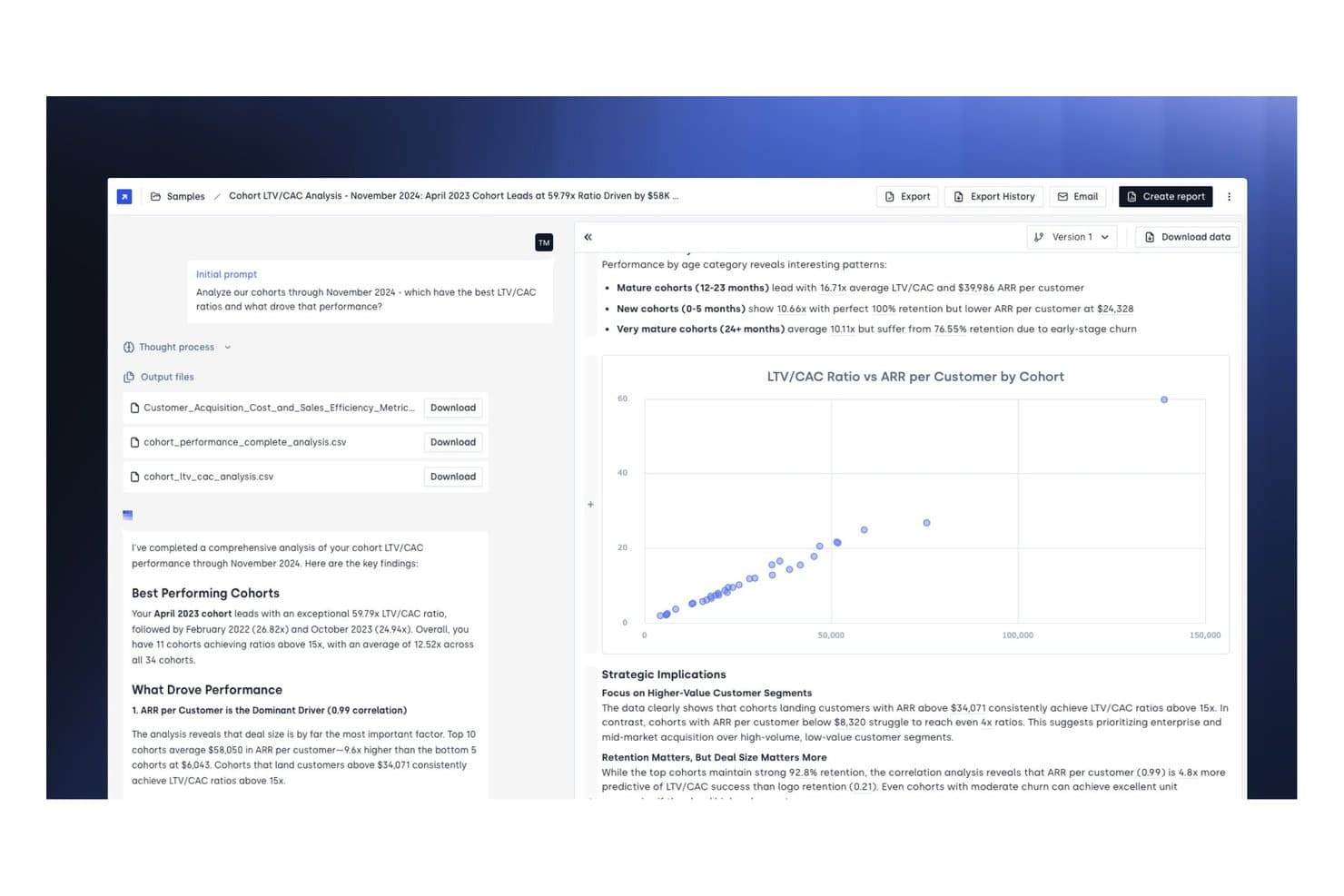
Concourse offers cohort LTV/CAC analysis with detailed performance metrics, scatter chart visualizations, and strategic insights to help teams evaluate customer acquisition efficiency. Concourse is an AI agent platform built for enterprise finance teams that handles cash flow forecasting, treasury liquidity management, variance analysis, and AR/AP tracking through fully customizable, auditable agents.
Who Is Concourse Best For?
Concourse suits mid-market and enterprise finance teams—particularly CFOs, FP&A leads, and treasurers—who need AI-driven workflows without rebuilding their existing tech stack.
Why I Picked Concourse
I've included Concourse in my top picks because no other tool on this list lets you build cash flow agents around your own business logic rather than a vendor's fixed template. I use the Forecast Agent for rolling liquidity projections and the Flux & Variance Agent to auto-draft variance commentary, and every output traces back to its source SQL so I can defend the numbers. The persistent context layer retains my team's definitions and forecasting drivers across every run.
Concourse Key Features
- Model orchestration: Runs multiple AI models and deterministic code to ensure calculation accuracy and efficient processing.
- Auditable outputs: Traces every workflow and number back to its data source, preserving a full audit trail.
- Role-based permissions: Lets you control user access and data scope at both the agent and dataset level.
- Multi-surface delivery: Shares analysis and reports directly in Excel, Slack, Teams, PowerPoint, Sheets, ChatGPT, and email.
Concourse Integrations
Concourse offers native integrations with Oracle, SAP, NetSuite, QuickBooks, Workday, Sage, Xero, Salesforce, Snowflake, BigQuery, and Databricks. An API is also available for custom integrations.
Pros and Cons
Pros:
- Auto-generates variance commentary from actuals
- Auditable outputs trace every number to source
- Custom agents built around your business logic
Cons:
- Limited publicly available user reviews
- Requires technical setup for agent configuration
Learn more about Concourse: Best for deep accounting integrations
- Free plan + free demo available
- From $16/user/month (billed annually)
Visit WebsiteCustomer Rating:4.6/5
Fathom offers financial reporting and cash flow insights for growing businesses. Fathom is a financial analysis and management reporting tool designed for small to medium-sized businesses and accounting professionals. It provides detailed insights into financial performance and liquidity through cash flow forecasting.
Why I picked Fathom: Fathom brings together fast, three-way cash flow forecasting, flexible management reporting, and multi-entity consolidation in a single tool. This is great for businesses that need insight across entities and scenarios. Its tight integrations with top accounting platforms also ensure you’re working with live data, rather than outdated spreadsheets.
Standout features & integrations:
Features include budget variance analysis to track financial goals, customizable management reports for tailored insights, and KPI tracking to monitor business performance.
Integrations include QuickBooks Online & Desktop, Xero, MYOB (cloud & desktop), Excel import, Google Sheets, and more via Zapier for extended connectivity.
Pros and Cons
Pros:
- Intuitive dashboard
- Customizable reports
- Easy integration with accounting platforms
Cons:
- Some advanced features require learning
- Not ideal for very large enterprises
Learn more about Fathom: Best for automating cash management
- Free demo available
- Pricing upon request
Visit WebsiteCustomer Rating:4.8/5
Drivetrain automates cash flow tracking and improves financial efficiency for businesses. Drivetrain is a financial management tool designed to automate and optimize cash management processes for businesses. It provides solutions to simplify cash flow statements and enhance efficiency.
Why I picked Drivetrain: Drivetrain is perfect for autonomous FP&A (Financial Planning and Analysis). It automates manual steps in data consolidation, modelling, and forecasting so that finance teams can focus on decision-making. Its deep integration network and AI-driven modelling give it an edge for teams scaling up or handling complex cash-flow requirements.
Standout features & integrations:
Features include automated cash flow tracking to minimize manual tasks, optimization tools to identify inefficiencies, and real-time analytics for financial insights.
Integrations include 800+ native connectors spanning ERPs, CRMs, HRIS, and other business systems.
Pros and Cons
Pros:
- Supports financial decision-making
- Provides real-time analytics
- Automates cash flow tasks
Cons:
- May need training for effective use
- Requires initial setup time
Learn more about Drivetrain: Best for visual planning
- Free demo available
- From $15/month (billed annually)
Visit WebsiteCustomer Rating:4.5/5
LivePlan helps small businesses create visual cash flow plans and financial forecasts. LivePlan is a business planning and cash flow management software designed for entrepreneurs and small business owners. It helps create visual cash flow plans and detailed reports to support financial decision-making.
Why I picked LivePlan: LivePlan combines business planning and forecasting into a single tool that pulls live accounting data from QuickBooks Online or Xero. Its intuitive interface makes complex financials easier to understand, while the scenario planning and cash flow forecasting features help business owners stay ahead of cash flow issues and make growth decisions.
Standout features & integrations:
Features include a drag-and-drop interface for effortless plan creation. This dashboard offers a clear view of financial health and forecasting tools that let you experiment with different scenarios.
Integrations include QuickBooks Online, Xero, and Excel.
Pros and Cons
Pros:
- Provides a clear financial health view
- Intuitive drag-and-drop interface
- Supports detailed financial reporting
Cons:
- Focuses mainly on SMB use cases
- Limited advanced forecasting options
Learn more about LivePlan: 5Best for prediction and tracking
Xero
- 30-day free trial available
- From $2.50/month
Visit WebsiteCustomer Rating:4.4/5
Xero helps small businesses manage and predict cash flow with real-time insights. Xero is an accounting software solution tailored for small businesses, providing cash flow forecasting and tracking to support financial management. It allows companies to manage their finances and make informed decisions.
Why I picked Xero: Xero is an all-in-one accounting platform that provides a real-time view of cash flow and financial health, and integrates with a wide range of apps to automate workflows. Its cash-flow forecasting features are built right into the platform, making it simple for small and growing companies to stay ahead of cash-shortage risks with minimal setup.
Standout features & integrations:
Features include a dashboard that offers a clear financial overview, invoicing tools to manage payments, and real-time financial reporting from connected bank accounts.
Integrations include PayPal, Stripe, Square, HubSpot, Shopify, Gusto, Expensify, Vend, and Mailchimp.
Pros and Cons
Pros:
- Customizable reports
- Supports multiple currencies
- Real-time financial updates
Cons:
- Advanced features need learning
- Limited offline functionality
Learn more about Xero: Best for enterprise-level projections
- Free demo available
- Pricing upon request
Visit WebsiteCustomer Rating:4.4/5
Workday Adaptive Planning supports enterprise budgeting and forecasting for smarter decisions. Workday Adaptive Planning is a financial planning and analysis tool designed for large enterprises. It helps with cash flow projections, budgeting, and forecasting to support strategic financial decisions.
Why I picked Workday Adaptive Planning: Workday Adaptive Planning is an enterprise-grade planning platform that brings operational, workforce, and financial planning into one place. The tool’s flexible modelling engine, real-time data integration, and scenario capability allow companies to respond to change and align multiple departments with the overall strategy. With its ability to scale and integrate, it stands out for organizations seeking beyond standard cash-flow forecasting.
Standout features & integrations:
Features include advanced modeling for complex scenarios, a dashboard for financial insights, and collaborative planning to enhance team coordination.
Integrations include ERP/GL systems (e.g., SAP ERP, Oracle E‑Business Suite, Microsoft Dynamics 365), CRM systems, HCM/headcount platforms, and cloud data warehouses.
Pros and Cons
Pros:
- Customizable dashboards
- Collaborative planning features
- Supports complex financial modeling
Cons:
- Complex role permissions structure
- Requires consistent cloud connectivity
Learn more about Workday Adaptive Planning: Best for scalable planning solutions
- Free demo available
- Pricing upon request
Visit WebsiteCustomer Rating:4.2/5
Planful provides scalable cash flow planning with real-time insights for growth. Planful is a financial planning and analysis platform designed for growing enterprises. It offers scalable cash flow planning solutions that adapt to the needs of expanding businesses.
Why I picked Planful: Planful offers a scalable financial performance platform that brings budgeting, forecasting, and cash-flow planning together in a single application. Its intuitive drag-and-drop interface, combined with broad system support, makes it a strong fit for organizations seeking greater planning maturity and fewer siloed tools.
Standout features & integrations:
Features include dynamic planning to adjust forecasts, real-time reporting for immediate insights, and collaborative tools to enhance team efforts in financial planning.
Integrations include QuickBooks, Sage Intacct, Xero, NetSuite, Microsoft Dynamics, SAP, Oracle, Salesforce, Workday, and FreshBooks.
Pros and Cons
Pros:
- Adaptable to changing business needs
- Real-time financial insights
- Offers dynamic planning tools
Cons:
- Limited flexibility in lower tiers
- May require training for new users
Learn more about Planful: Best for flexible management and analytics
- Free demo available
- Price upon request

Cube offers flexible cash flow management and analytics for smarter financial planning. Cube is a financial planning and analysis platform designed for finance teams and mid-sized businesses. It offers flexible cash flow management and advanced analytics to support financial decision-making.
Why I picked Cube: Cube unifies disparate financial and operational data into a single planning engine that supports driver-based modelling, scenario planning, and cash flow reporting. Its integration toolkit enables finance teams to plug in existing systems, making it an adaptable solution for mid-market organizations.
Standout features & integrations:
Features include real-time data updates to keep your information current, custom reporting for tailored financial insights, and advanced analytics to support complex decision-making.
Integrations include NetSuite, Sage Intacct, Salesforce, plus custom integrations via Cube’s API.
Pros and Cons
Pros:
- Real-time data updates
- Customizable reporting options
- Supports detailed financial analysis
Cons:
- Limited prebuilt report templates
- Initial setup can be complex
Learn more about Cube Software:

HighRadius improves cash flow management with AI automation for enterprise finance teams. HighRadius is a financial technology platform aimed at enterprises seeking to improve cash flow management using AI-driven tools. It serves finance teams by automating processes and providing insights for better control over cash flow.
Why I picked HighRadius: HighRadius handles not only forecasting but also the broader cash-cycle and treasury automation, such as working capital and payments. For organizations that need enterprise-scale cash flow visibility and automation across the financial operations chain, HighRadius offers a comprehensive solution.
Standout features & integrations:
Features include AI-driven cash flow predictions to enhance decision-making, automation tools to reduce manual tasks, and analytics for an informative overview of financial health.
Integrations include SAP, Oracle, Microsoft Dynamics, QuickBooks, NetSuite, Salesforce, Workday, Sage, Xero, and Google Workspace.
Pros and Cons
Pros:
- Enhances cash flow control
- Supports strategic financial planning
- AI-driven cash flow predictions
Cons:
- May require dedicated IT support
- Requires initial setup time
Learn more about HighRadius: Best for Excel-native integrated financial planning
- Free demo available
- Pricing upon request

Vena Solutions supports integrated financial planning and cash flow management. Vena Solutions is a financial planning and analysis tool aimed at mid-sized to large enterprises. It facilitates integrated financial planning and cash flow management, helping organizations improve their financial processes and decision-making.
Why I picked Vena Solutions: Vena Solutions bridges familiar Excel-based workflows with a scalable FP&A engine built for modern finance teams. With real-time data connectivity, audit-ready processes, and a helpful integration framework, it delivers full cash flow and financial planning capabilities in a single platform. Its emphasis on collaboration, streamlined reporting, and scalability for mid-to-large organizations ensures it is more than just a forecasting tool.
Standout features & integrations:
Features include scenario modeling to plan for different financial outcomes, workflow management to enhance team collaboration, and a familiar Excel interface for ease of use.
Integrations include ERP, GL, HRIS, and CRM systems such as Oracle ERP, NetSuite, SAP, Salesforce, HubSpot, and Microsoft Dynamics 365, plus native Excel and Microsoft 365 support (Excel, Power BI, PowerPoint) via the Vena platform.
Pros and Cons
Pros:
- Enhances cross-department collaboration
- Scalable for large enterprises
- Excel-based interface
Cons:
- May need dedicated IT support
- High cost for small teams
Learn more about Vena Solutions:
Other Cash Flow Software
Here are some additional cash flow software options that didn’t make it onto my shortlist, but are still worth checking out:
- 11Cash Flow FrogBest for small businesses
- 12MosaicBest for collaborative forecasting
- 13Float.comBest for real-time forecasting
- 14CentageBest for mid-market forecasting needs
- 15ProphixBest for reporting
- 16CausalBest for scenario-based modeling
- 17AbacumBest for collaborative FP&A and insights
- 18SageBest for multi-branch and multi-currency cash management
- 19AgicapBest for real-time tracking
Related Reviews
How I Evaluate Cash Flow Software
Whether a tool can pull live bank balances and run a 13-week forecast is table stakes—I evaluate vendors on two levels: core cash flow functionality and the differentiators that matter most.
Core Functionality (Table Stakes For This List)
When I'm selecting tools for my list, I rank each one on a scale from 0 (does not offer the functionality) to 5 (excels in this area) for each core functionality listed below. Then, I calculate the tool's total score into a percentage. Each tool needs to achieve a minimum total score of 65% to be considered for inclusion.
- Cash Flow Forecasting: I check whether a tool supports both short-term (13-week) and long-term forecasting horizons, and whether it offers direct, indirect, or driver-based methods.
- Bank & Financial Data Integration: Each tool's native connectors to banks, ERPs, and accounting systems matter—I look for automated syncs rather than manual CSV uploads.
- Scenario Planning & Modeling: I evaluate how many what-if scenarios you can build and compare side by side, like modeling the cash impact of a delayed product launch.
- Cash Position Reporting & Dashboards: Real-time visibility into cash across accounts, entities, and currencies is key—I look at how granular the drill-down gets.
- AR/AP Cash Flow Tracking: The tool should pull receivables and payables data to project when cash actually lands or leaves, not just when invoices are issued.
- Variance & Actuals Analysis: I look for automated comparisons of forecasted vs. actual cash flow, with the ability to drill into specific categories driving the gap.
Once I have a list of tools that meet this criteria, I consider what sets each platform apart.
Differentiating Factors (What Sets Vendors Apart)
Here's how I compare and contrast different vendors:
Standout Features
AI-powered forecasting is a major differentiator—I look for tools that learn from historical payment patterns and seasonality to sharpen predictions over time. Multi-entity consolidation also matters, especially for teams managing cash across subsidiaries and currencies. I evaluate whether a platform lets you roll up group-level views without exporting data into spreadsheets. Collaborative workflows round it out; tools that let FP&A teams tag department heads for input or route forecasts for approval keep the process moving.
Beyond Features
ERP and accounting stack integration is one of the first things I check. A tool that natively connects to your ERP—whether that's NetSuite, SAP, or Xero—saves your team from manual data wrangling every close cycle. I also evaluate how quickly a platform gets you to a usable forecast; some vendors offer pre-built templates that cut weeks off implementation. Security matters too, especially for publicly traded companies—I look for SOC 2 Type II compliance, role-based access controls, and audit trails that hold up under scrutiny.
How to Choose Cash Flow Software
It’s easy to get bogged down in long feature lists and complex pricing structures. To help you stay focused as you work through your unique software selection process, here’s a checklist of factors to keep in mind:
| Factor | What to Consider |
| Scalability | Assess if the software can grow with your business. Consider current usage and future needs. Look for tools that offer flexible plans or the ability to add modules as you expand. |
| Integrations | Ensure the software connects with your existing systems. Check compatibility with your accounting software and other essential tools. Avoid tools that require manual data transfers. |
| Customizability | Determine how much you can tailor the software to fit your workflows. Look for options to adjust dashboards, reports, and alerts to match your team's needs. |
| Ease of use | Evaluate the user interface and navigation. The tool should be intuitive and require minimal training. Consider conducting a trial run with your team to gauge usability. |
| Implementation and onboarding | Examine the setup process and resources available. Seek platforms with guided onboarding, tutorials, and dedicated support during implementation. Avoid lengthy, complex setups. |
| Cost | Compare pricing against your budget. Consider both upfront costs and ongoing fees. Look for hidden charges and ensure the plan includes necessary features without add-ons. |
| Security safeguards | Verify the software's data protection measures. Ensure it complies with relevant standards and offers encryption, access controls, and regular updates to safeguard your information. |
What Is Cash Flow Software?
Cash flow software is a tool designed to help businesses manage and track their cash inflows and outflows. Financial professionals, such as CFOs and accountants, generally use these tools to gain insights into their financial health and make informed decisions. Forecasting, real-time tracking, and integration capabilities help with planning, accuracy, and efficiency. Overall, these tools provide valuable support in maintaining a healthy cash flow and ensuring financial stability.
Features
When selecting cash flow software, keep an eye out for the following key features:
- Forecasting: Provides future cash flow projections to help plan financial strategies and anticipate cash needs.
- Real-time tracking: Monitors cash inflows and outflows instantly, ensuring up-to-date financial information.
- Integration capabilities: Connects with existing accounting and financial systems for data transfer and consistency.
- Scenario planning: Allows users to test different financial scenarios to prepare for various potential outcomes.
- Customizable dashboards: Offers tailored views of financial data to suit individual user needs and preferences.
- Automated alerts: Sends notifications for important financial events, helping users stay informed and proactive.
- Multi-currency support: Manages cash flow across different currencies, useful for businesses operating internationally.
- Security safeguards: Protects sensitive financial data with encryption and access controls to ensure information security.
- User-friendly interface: Provides an intuitive layout that minimizes the learning curve and enhances user experience.
- Collaborative tools: Facilitate teamwork by allowing multiple users to work together on financial planning and analysis.
Benefits
Implementing cash flow software provides several benefits for your team and your business. Here are a few you can look forward to:
- Greater forecast confidence: Automated data pulls reduce manual errors and help produce more reliable forward-looking cash-flow projections.
- Faster month-end and planning cycles: Integrated data and built-in modelling cut down on spreadsheet work and speed up reporting and budgeting tasks.
- Clearer short-term liquidity insight: Cash-flow tools highlight upcoming cash constraints or surpluses so teams can act earlier and manage working capital better.
- More strategic decision support: Scenario modelling helps leaders compare hiring, investment, or spending decisions with a clear view of cash impact.
- Stronger cross-department alignment: Finance can centralize information from sales, operations, and HR into one planning environment, improving collaboration without relying on disconnected spreadsheets.
Ability to scale processes as the business grows: Multi-entity, multi-currency, and driver-based planning capabilities support more complexity as organizations expand. - Early warning for financial risks: Variance monitoring and trend analysis help finance teams identify issues before they become cash-flow problems.
Costs & Pricing
Selecting cash flow software requires an understanding of the various pricing models and plans available. Costs vary based on features, team size, add-ons, and more. The table below summarizes common plans, their average prices, and typical features included in cash flow software solutions:
Plan Comparison Table for Cash Flow Software
| Plan Type | Average Price | Common Features |
| Entry-Level | $20–$53/month | Basic forecasting, simple dashboards, and core accounting integrations. |
| Mid-Market Plans | $53–$280/month or custom pricing | Multi-entity reporting, advanced dashboards, and broader CRM or HRIS integrations. |
| Enterprise Plan | From $1,750/month or custom pricing | Driver-based modeling, enterprise integrations, consolidations, and role-based controls. |
Cash Flow Software FAQs
Here are some answers to common questions about cash flow software:
What is the main purpose of cash flow software?
Cash flow software helps businesses track, manage, and forecast cash inflows and outflows, including cash in and overall cash balance. It provides real-time visibility into financial health, allowing you to make informed business decisions. By automating cash flow data and reducing manual data entry, your team can streamline routine work and plan for future cash flow needs.
How does cash flow software integrate with other tools?
Most cash flow software integrates with accounting and financial tools like QuickBooks, Xero, and other accounting software. These connections support cloud-based workflows and allow teams to drill down into dashboards and Excel exports as needed. Before purchasing, check whether the platform supports the systems your stakeholders already rely on to ensure smooth cash flow management.
Can small businesses benefit from cash flow software?
Yes, small businesses can benefit from cash flow software. It helps manage limited resources efficiently by improving visibility into cash availability and cash flow forecasting. Even basic plans provide tools for tracking and projecting future cash flow, which supports healthier financial planning and reduces the risk of shortages.
What should I consider when choosing cash flow software?
Consider your business size, the complexity of your financial processes, and integration needs. Look for options that are easy to use and offer scalable, cloud-based features as your operations grow. Evaluate whether the tool supports the accounting platforms you use today, offers clear dashboards, and helps your team adapt quickly without adding unnecessary complexity for stakeholders.
What’s Next:
If you're researching cash flow software, connect with a SoftwareSelect advisor for free recommendations.
You fill out a form and have a quick chat where they get into the specifics of your needs. Then you'll get a shortlist of software to review. They'll even support you through the entire buying process, including price negotiations.