

25 Best ERP Systems For Custom Manufacturing In 2026

10 Best ERP Systems For Custom Manufacturing Shortlist


An ERP system integrates all facets of an operation, including product planning, development, manufacturing, sales, and marketing. This software can help businesses tackle problems like production delays, mismanagement, and a lack of useful real-time data. However, choosing the right ERP system for custom manufacturing is tough with so many options.
You need to streamline operations, manage inventory, and improve production efficiency, but figuring out which tool fits best is challenging. I've got you! Drawing from my extensive experience testing and reviewing ERP systems and software solutions, I'll guide you through the best options. Here are my top picks for ERP software for custom manufacturing.
Why Trust Our ERP Software Reviews
We’ve been testing and reviewing ERP software since 2023. As financial operators ourselves, we know how critical and difficult it is to make the right decision when selecting software.
We invest in deep research to help our audience make better software purchasing decisions. We’ve tested more than 2,000 tools for different finance use cases and written over 1,000 comprehensive software reviews. Learn how we stay transparent & our ERP software review methodology.
Table of Contents
Best ERP Systems For Custom Manufacturing Software Summary
This comparison chart summarizes pricing details for my top selections of ERP Software for custom manufacturing to help you find the best software for your budget and business needs.
| Tool | Best For | Trial Info | Price | ||
|---|---|---|---|---|---|
| 1 | Best with embedded AI for process automation | Free demo available | Pricing upon request | Website | |
| 2 | Best for real-time production tracking | 30-day free trial | From $50/user/month | Website | |
| 3 | Best for small manufacturers needing precise, on-time deliveries | Free trial available | From $49/user/month (up to 10 users) | Website | |
| 4 | Best for style-color-size matrix management | Free demo available | Pricing upon request | Website | |
| 5 | Best for live data connectivity in manufacturing | Free demo available | Pricing upon request | Website | |
| 6 | Best for cloud-based ERP with comprehensive manufacturing management | Free demo available | Pricing upon request | Website | |
| 7 | Best for low-code custom ERP solutions | 15-day free trial + free demo available | From $8/user/month (billed annually) | Website | |
| 8 | Best for dynamic BOM management | Free demo available | Pricing upon request | Website | |
| 9 | Best for custom manufacturers needing integrated engineering and production | Free demo available | Pricing upon request | Website | |
| 10 | Best for open-source ERP with extensive app integration | Free demo available | $9.10/month | Website |

-

Creatio CRM
Visit WebsiteThis is an aggregated rating for this tool including ratings from Crozdesk users and ratings from other sites.4.7 -
DealHub AI
Visit WebsiteThis is an aggregated rating for this tool including ratings from Crozdesk users and ratings from other sites.4.7 -
LiveFlow
Visit WebsiteThis is an aggregated rating for this tool including ratings from Crozdesk users and ratings from other sites.4.9


Best ERP System For Custom Manufacturing Reviews
This in-depth analysis provides overviews of each ERP system for custom manufacturing. We will review each tool’s pros and cons, features, and best use cases to determine the best manufacturing ERP for your custom manufacturing operations.

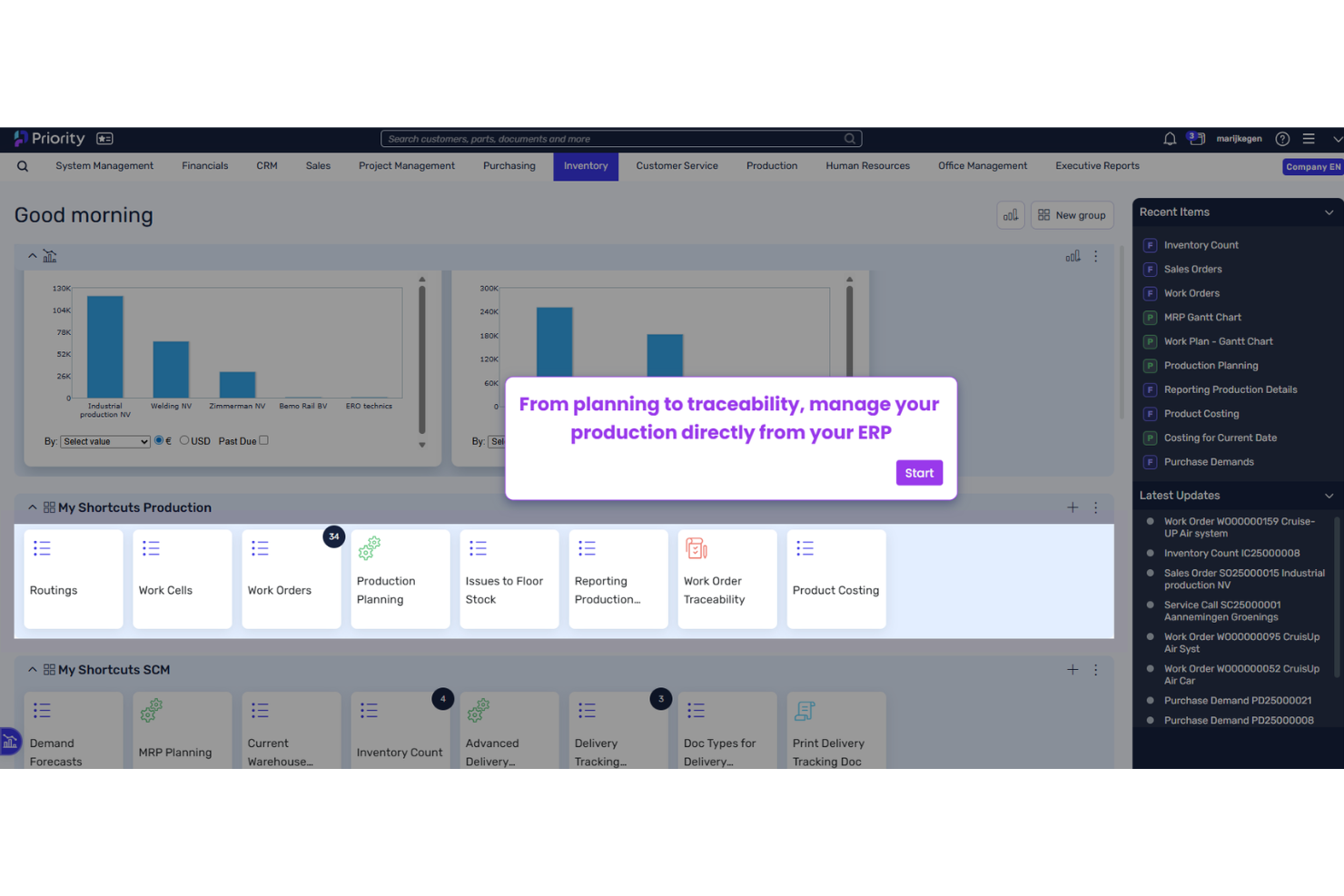
Priority is a cloud-based ERP platform built for mid-sized product-centric businesses, combining manufacturing management, MRP, BOM, supply chain, financials, and embedded AI across make-to-order, engineer-to-order, and configure-to-order production environments.
Who Is Priority Best For?
Priority is well-suited for mid-market manufacturers in industries like electronics, industrial equipment, and medical devices that run complex, order-driven production.
Why I Picked Priority
Priority's aiERP is one of the most deeply integrated AI implementations in a mid-market ERP. The aiERP Companion lets you describe a process in plain language, like "alert me when inventory drops below minimum," and the system builds the automation rule, which is useful in custom manufacturing where planners manage MRP exceptions. I also like the machine learning-based demand forecasting, which trains predictive models on historical data to surface inventory shortages and supply risks before they hit the shop floor.
Priority Key Features
- Multi-level BOM management: Build and manage complex, multi-level bills of materials with revision control and engineering change order (ECO) tracking.
- MRP planning engine: Run forward and backward scheduling with ATP calculations, sales-order-to-work-order pegging, and safety stock optimization.
- Serial and lot traceability: Track materials and components across the full production lifecycle with lot genealogy and expiration date management.
- Shop floor mobile access: Record job completions, labor time, and inventory transactions directly from handheld devices on the production floor.
Pros and Cons
Pros:
- Native support for serial and lot tracking
- Flexible in-house configuration for workflows and reports
- Strong shop floor data collection capabilities
Cons:
- Customization may require technical expertise for advanced needs
- Limited out-of-the-box advanced analytics


Cetec ERP is a cloud-based, full-suite ERP built for small and mid-sized manufacturers, covering production management, shop floor tracking, MRP, quality, inventory, purchasing, CRM, and financials in a single platform.
Who Is Cetec ERP Best For?
Cetec ERP is a strong fit for small and mid-sized manufacturers running make-to-order, engineer-to-order, or high-mix/low-volume production environments.
Why I Picked Cetec ERP
Cetec ERP earns its spot on my shortlist because of how tightly its real-time production tracking ties into actual shop floor activity. I like that workers can clock in and out of work orders directly via barcode scanning, so job costing updates live as labor and materials are consumed. That means I can see exactly where a job stands—what's in queue, what's running, and what's complete—without chasing down supervisors or waiting on manual updates.
Cetec ERP Key Features
- BOM management: Build and manage multi-level bills of materials with revision control and engineering change tracking.
- MRP: Generate purchase orders and work orders automatically based on real-time material demand.
- Quality control: Log inspection results, NCRs, and CARs directly against specific jobs and part numbers.
- Lot and serial traceability: Track lot and serial numbers from receiving through shipment across every production step.
Pros and Cons
Pros:
- Workflows and reports can be adapted to business needs
- Supports multiple manufacturing modes – discrete, process, and mixed mode production
- Real-time production tracking
Cons:
- System can slow with very large data sets
- Integration scope is limited
New Product Updates from Cetec ERP

Cetec ERP Enhances AP Matching, Inventory Costs, MRP, & Financial Reporting
Cetec ERP introduces two-way voucher matching, automated receipt cost adjustments, improved MRP shortage analysis, and enhanced financial reporting. These updates improve accounting accuracy, inventory control, and production planning workflows. For more information, visit Cetec ERP’s official site.
 .
.
MRPeasy
Best for small manufacturers needing precise, on-time deliveries

MRPeasy is a cloud-based ERP and MRP system built for small manufacturers, covering production planning, inventory, sales order management, procurement, workforce tracking, and financials in one platform.
Who Is MRPeasy Best For?
MRPeasy is a strong fit for small manufacturing businesses—typically 10 to 200 employees—that need to manage custom production orders without the complexity of enterprise ERP systems.
Why I Picked MRPeasy
I've included MRPeasy in my top picks because its MRP scheduling engine calculates material availability and production capacity together, so the system generates a realistic expected delivery date the moment a sales order comes in. I like that production managers can then track that date against actual shop floor progress using Gantt-based scheduling with finite capacity. If a bottleneck shifts a job, the system flags the affected order immediately rather than letting a missed date go unnoticed until it's too late.
MRPeasy Key Features
- Multi-level bill of materials: Build BOMs with configurable product parameters to support custom variants and complex assemblies.
- Lot and serial number traceability: Track individual components and finished goods across every production stage for full traceability.
- Subcontracting management: Create purchase orders for outsourced operations and track subcontractor progress within the production workflow.
- Shop floor reporting: Workers log job start times, completions, and quantities directly in the system for real-time production visibility.
Pros and Cons
Pros:
- Accurate production planning
- Real-time inventory management
- User-friendly interface
Cons:
- Requires annual billing
- Limited to small manufacturers
New Product Updates from MRPeasy
MRPeasy Adds Estimated Weight Calculation for Items
MRPeasy introduces an estimated weight calculation feature, enhancing efficiency. For more information, visit MRPeasy's official site.
 .
.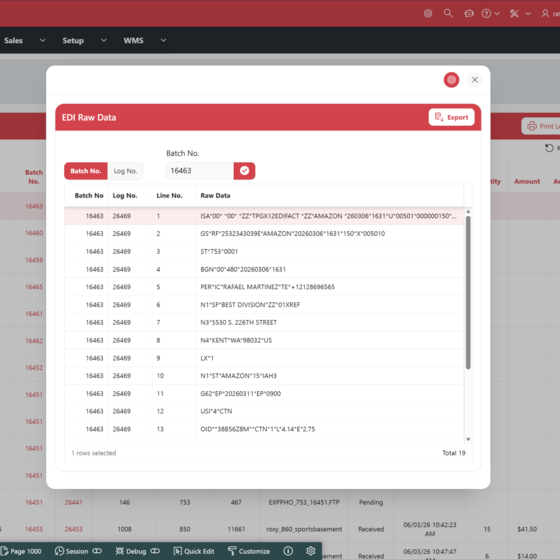

A2000 is a cloud-based ERP built specifically for apparel, footwear, and accessories manufacturers, covering product lifecycle management, style-color-size inventory, production, supply chain, EDI, and financials in one unified system.
Who Is A2000 Software Best For?
A2000 is a strong fit for small to mid-sized apparel, footwear, and accessories brands that need an ERP built around fashion industry workflows.
Why I Picked A2000 Software
A2000 earns its spot on my shortlist because style-color-size matrix management is genuinely built into its core data model, not bolted on as an afterthought. You can set up your inventory structure by season, style family, style, color, and size, then drill up or down across that hierarchy in real time. I also like that a single SKU variation—say, one dress style across 12 colors and 6 sizes—gets tracked accurately without manual workarounds. Pair that with native EDI for automated POs, ASNs, and invoices, and you've got a tight loop between inventory accuracy and retail compliance in one system.
A2000 Software Key Features
- Product lifecycle management (PLM): Track styles from initial design and spec sheets through sourcing, costing, and production within a single system.
- Warehouse management system (WMS): Manage receiving, transfers, inventory adjustments, and fulfillment with built-in warehouse automation tools.
- Material requirements planning (MRP): Plan raw material needs against production orders to align purchasing with actual manufacturing demand.
- Business analytics and reporting: Build custom reports at the individual, team, or department level using A2000's built-in analytics tool with no data volume limits.
Pros and Cons
Pros:
- Strong support for multi-warehouse and multi-location operations
- Comprehensive financial management with unified accounting
- Real-time data access enhances operational visibility
Cons:
- Interface may feel dated to some users
- Lacks extensive customization options for niche needs

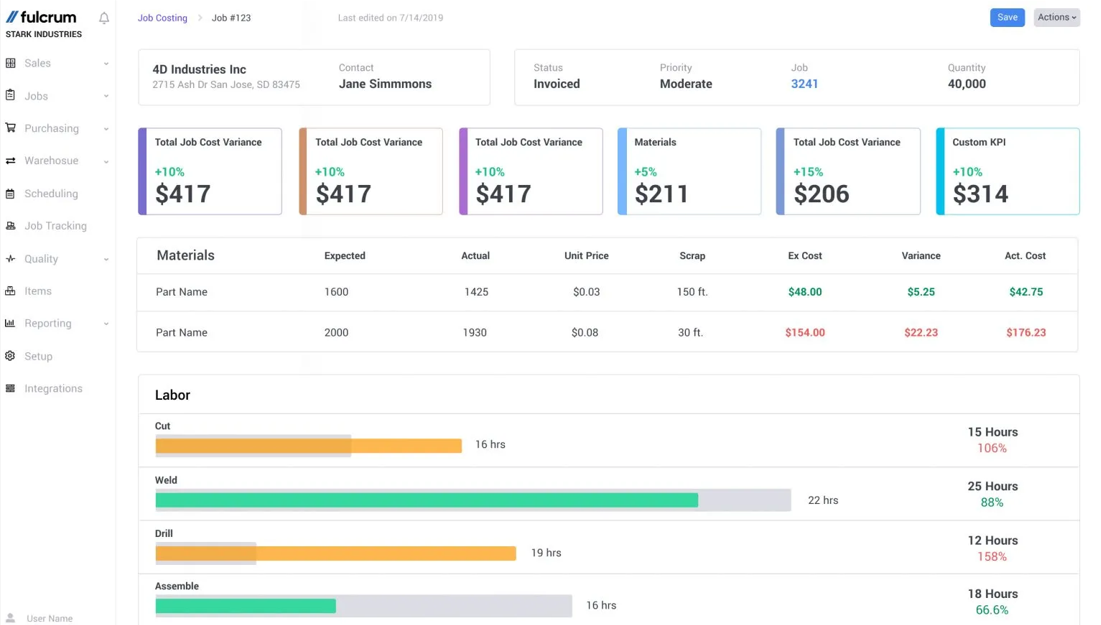
Fulcrum is a field data collection and mobile inspection platform that covers quality control, AI-guided inspections, geospatial data capture, and two-way integrations with enterprise systems for manufacturing and field operations teams.
Who Is Fulcrum Best For?
Fulcrum works well for operations and quality teams in asset-intensive industries who need mobile inspection workflows and real-time field data collection across multiple sites.
Why I Picked Fulcrum
I've included Fulcrum in my top picks because of how well its two-way, API-based data connectivity ties field inspection activity to back-office systems in real time. In a custom manufacturing context, that means quality issues flagged on the shop floor surface immediately in the platforms your team already uses—one Halton Company customer cited system-wide improvements happening in 30 to 60 days instead of six months. I also like Fulcrum Insights, which lets you query incoming field data in plain language and get instant maps, trend charts, and status updates without pulling in a data analyst.
Fulcrum Key Features
- Offline data capture: Record inspection data on any device without internet, with automatic sync when connectivity resumes.
- AI-guided inspections: Step technicians through structured inspection workflows with AI image capture that flags defects on the spot.
- Conditional logic forms: Build dynamic forms that show or hide fields based on prior answers to keep field data clean.
- Geospatial mapping: Plot field records on interactive maps to track asset locations and inspection coverage across sites.
Pros and Cons
Pros:
- Manufacturing process visibility
- Advanced scheduling tools
- Real-time data updates
Cons:
- May require extensive setup
- Pricing information is not transparent
Best for cloud-based ERP with comprehensive manufacturing management

Acumatica is a cloud-native ERP platform with a dedicated Manufacturing Edition that covers production management, BOM, MRP, advanced planning, job costing, and shop floor control for make-to-order and engineer-to-order environments.
Who Is Acumatica Best For?
Acumatica is a strong fit for mid-market manufacturers in industries like electronics, fabrication, and industrial equipment that run complex, project-driven, or configure-to-order production.
Why I Picked Acumatica
I've included Acumatica in my top picks because it's one of the few cloud-native ERPs that covers the full spectrum of custom manufacturing modes in a single platform. What I find particularly compelling is the native engineering change control with revision approval workflows built directly into the product design module. For a job shop or ETO environment, that means engineering updates flow into BOMs and production orders without manual hand-offs between disconnected systems. The rules-based product configurator also stands out for CTO environments, letting your team generate accurate quotes and production orders from a defined set of configurable options without building one-off BOMs from scratch every time.
Acumatica Key Features
- Advanced planning and scheduling (APS): Schedules production orders using finite capacity constraints across work centers and machines.
- Material requirements planning (MRP): Generates time-phased supply recommendations based on open demand and production orders.
- Shop floor control: Captures real-time labor, material, and machine data from the production floor via mobile or terminal.
- Job costing: Tracks estimated vs. actual costs at the production order level, including labor, materials, and overhead.
Pros and Cons
Pros:
- Advanced planning and scheduling
- Cloud-based accessibility
- The platform is modular
Cons:
- Initial setup complexity
- Search functionality can be confusing


Zoho Creator is a low-code application development platform that lets you build custom manufacturing ERP solutions from the ground up, covering production planning, inventory, supply chain, order management, and shop floor operations.
Who Is Zoho Creator Best For?
Zoho Creator is a strong fit for small to mid-sized manufacturers who need a tailored ERP but don't have the budget or resources for enterprise custom development.
Why I Picked Zoho Creator
I've included Zoho Creator in my top picks because it's one of the few platforms where you can build a manufacturing ERP that fits your exact production model without writing code from scratch. I like that Zoho Creator ships with prebuilt manufacturing app templates covering production planning, inventory, and order tracking, so you're not starting from a blank canvas. The drag-and-drop workflow builder also lets my team map out custom approval chains and shop floor processes without developer support.
Zoho Creator Key Features
- AI-assisted app building: Zia generates forms, workflows, and logic from natural language prompts to speed up ERP development.
- Custom dashboards and reports: Build real-time dashboards that track inventory levels, production status, and order fulfillment in one view.
- Role-based access control: Assign granular permissions to limit data access by department, location, or user role.
- Mobile app deployment: Publish your custom ERP as a native mobile app so shop floor workers can log data and check tasks from anywhere.
Pros and Cons
Pros:
- Extensive integrations
- High customization
- Low-code development
Cons:
- Limited offline access
- Slight learning curve


Total ETO is an ERP/MRP platform built specifically for engineer-to-order (ETO) manufacturers, covering sales, engineering, procurement, shop floor management, and accounting in a single system designed around custom, project-based production.
Who Is Total ETO Best For?
Total ETO is a strong fit for small to mid-sized manufacturers building custom machinery, equipment, or systems on a project-by-project basis.
Why I Picked Total ETO
I picked Total ETO as one of the best because its dynamic BOM functionality is built for how ETO manufacturers work. Unlike static BOMs in general-purpose ERPs, Total ETO lets engineers structure their BOM in a nested hierarchy of sub-assemblies and release parts to procurement in stages—even while design is still in progress. That means your purchasing team can get a head start on long-lead components before engineering wraps up. If design changes come through after a partial release, Total ETO automatically notifies procurement of what needs to be revised or cancelled, so nothing falls through the cracks.
Total ETO Key Features
- CAD integration: Connect directly with SOLIDWORKS and Autodesk Inventor to pull design data into the project without manual re-entry.
- Project-based inventory reservation: Reserve parts in stock against a specific project and see real-time availability across open jobs.
- Non-conformance report (NCR) tracking: Log, assign, and resolve quality issues from the shop floor, engineering, or purchasing within the same system.
- Payment milestone triggering: Sales order milestones automatically trigger AR invoicing so no billing events get missed.
Pros and Cons
Pros:
- Real-time data access enhances reporting efficiency
- Smooth integration with CAD systems
- Dynamic BOM management
Cons:
- Interface is outdated
- No free trial for new users

Best for custom manufacturers needing integrated engineering and production

Genius ERP is a manufacturing ERP built specifically for small to mid-sized custom manufacturers, covering engineering integration, shop floor management, production planning, job costing, inventory, and financials across a wide range of custom manufacturing industries.
Who Is Genius ERP Best For?
Genius ERP is a strong fit for small to mid-sized manufacturers working in job shop, make-to-order, or engineer-to-order environments.
Why I Picked Genius ERP
I've included Genius ERP in my top picks because no other ERP on this list bridges engineering and production the way it does. The CAD2BOM feature converts SolidWorks or Inventor designs into fully itemized BOMs and RFQs in a single click, eliminating the manual re-entry that causes errors and delays between engineering and the shop floor. I also like the progressive BOM release, which lets production start on long-lead items while engineering is still finalizing later stages of the design. For engineer-to-order shops managing complex, multi-phase jobs, that connection between design and production is where Genius ERP clearly separates itself.
Genius ERP Key Features
- Job costing: Track labor, materials, and overhead costs in real time against each individual job to monitor actual vs. estimated spend.
- DBR scheduling: Uses drum-buffer-rope logic to build production schedules that account for capacity constraints and variable lead times.
- Shop floor data collection: Capture live job status, labor hours, and machine activity directly from the shop floor.
- Quote and estimation: Build detailed quotes with costing breakdowns tied directly to BOM structure and historical job data.
Pros and Cons
Pros:
- Industry-specific solutions
- Real-time production insights
- Strong engineering integrations
Cons:
- Limited to North American market
- Pricing not readily available


Odoo is a modular, open-source ERP platform that covers manufacturing, inventory, purchasing, quality control, and PLM within a single connected system.
Who Is Odoo Best For?
Odoo is a good fit for small to mid-sized manufacturers that want a fully customizable ERP without the licensing costs of traditional enterprise platforms.
Why I Picked Odoo
Odoo earns its spot as one of the best on my shortlist because its open-source architecture gives custom manufacturers flexibility I don't see in closed platforms. I can modify the codebase directly to match non-standard production workflows and build routing logic that reflects how my shop floor actually operates. The Odoo App Store extends the platform with thousands of third-party modules, so I can layer in niche functionality—like specialized MES connectors or industry-specific quality checks—without rebuilding from scratch.
Odoo Key Features
- Multi-level bills of materials: Build nested BoMs that reflect complex product configurations, including variants, subassemblies, and optional components.
- Shop floor control: Track work orders in real-time from a tablet-friendly interface, with time tracking and step-by-step instructions per operation.
- Lot and serial number traceability: Trace components and finished goods upstream and downstream across production, inventory, and delivery.
- Engineering change orders: Manage design revisions through PLM with version control applied directly to BoMs and routings.
Pros and Cons
Pros:
- Open-source platform
- Extensive app integration
- Highly customizable
Cons:
- Some sales and marketing tools must be purchased separately
- Slight learning curve
Other ERP Systems For Custom Manufacturing
Below is a list of additional ERP systems for custom manufacturing that we shortlisted, While they didn’t make the top 10, they’re still valuable and worth further research.
- Epicor Kinetic
For leveraging advanced tech for manufacturing efficiency
- Infor
For industry-specific, preconfigured ERP solutions
- Bista
For customizable ERP with real-time reporting
- Abas ERP
For mid-sized manufacturers seeking flexibility and easy upgrades
- DBA Manufacturing
For demand-driven planning to reduce lead times
- TotalETO
For engineer-to-order manufacturers needing dynamic BOMs
- Proshop ERP
For shop floor control
- SYSPRO
For supply chain management
- WhereFour
For traceability and compliance
- ERPAG
For small to mid-sized manufacturers
- SAP S/4HANA
For advanced analytics and reporting
- JobBOSS
For job costing and scheduling
- Sage X3 ERP
For scalability and flexibility
- Kantana Manufacturing ERP
For visual production planning
- Plex Manufacturing Cloud
For real-time production monitoring


ERP Systems for Custom Manufacturing Selection Criteria
Selecting an ERP system for custom manufacturing involves evaluating the software's functionality and its ability to meet specific use cases that are crucial for custom manufacturing operations. By carefully considering these criteria, I aim to identify software that not only meets standard requirements, but also provides additional value through innovative features, exceptional usability, and comprehensive support. Each criterion's score is tallied to determine a final star rating for each software tool, ensuring a comprehensive and fair evaluation.
Core ERP Systems For Custom Manufacturing Functionality: 25% of total weighting score
- Production Planning and Scheduling
- Inventory Management
- Quality Control
- Order Management
- Supply Chain Management
Additional Standout Features: 25% of total weighting score
- Integration with IoT devices for real-time monitoring
- Advanced analytics and reporting capabilities
- Customizable dashboards and user interfaces
- Mobile access for on-the-go management
- AI-driven predictive maintenance
Usability: 10% of total weighting score
- Intuitive drag-and-drop scheduling tools
- User-friendly navigation and interface design
- Role-based access control that is easy to configure
- Customizable workflows and processes
- Clear and concise visualizations of data
Onboarding: 10% of total weighting score
- Availability of comprehensive training videos and tutorials
- Interactive product tours and walkthroughs
- Pre-built templates for quick setup
- Access to live webinars and Q&A sessions
- Chatbots and 24/7 support for immediate assistance
Customer Support: 10% of total weighting score
- Availability of 24/7 customer support
- Multiple support channels (phone, email, live chat)
- Dedicated account managers for personalized assistance
- Comprehensive knowledge base and FAQs
- Fast response times and effective issue resolution
Value For Money: 10% of total weighting score
- Competitive pricing compared to similar products
- Transparent pricing models with no hidden fees
- Flexible subscription plans and payment options
- Discounts for long-term commitments or bulk purchases
- Clear ROI and cost-benefit analysis
Customer Reviews: 10% of total weighting score
- High overall satisfaction ratings
- Positive feedback on ease of use and functionality
- Consistent praise for customer support and service
- Testimonials highlighting successful implementations
- Reviews indicating strong industry-specific capabilities
By personally trying and researching these tools, I have identified the key criteria that ensure an ERP system for custom manufacturing meets the specific needs of its users, addressing their pain points and enhancing their operational efficiency.
How To Choose an ERP System For Custom Manufacturing
As you work through your own unique software selection process, keep the following points and key features in mind:
- Scalability and Flexibility: Custom manufacturing businesses often experience fluctuations in production volume and may expand their operations over time. An ERP system must be scalable to accommodate growth and flexible enough to adapt to changing business needs. For instance, if your company plans to introduce new product lines or expand into new markets, the ERP should support these changes without requiring a complete overhaul.
- Integration Capabilities: Custom manufacturing involves various specialized software tools such as CAD systems, IoT devices, and CRM platforms. The chosen ERP must integrate with these existing tools to ensure smooth data flow and operational efficiency. For example, if your manufacturing process relies heavily on CAD software for design, the ERP should be able to import and manage CAD data without manual intervention. This integration minimizes errors and optimizes the production process.
- Industry-Specific Features: Custom manufacturing has unique requirements that generic ERP systems may not address. Look for ERP solutions that offer industry-specific modules such as advanced production scheduling, quality control, and inventory management. For instance, some ERP software provides specialized features tailored to custom manufacturing, such as the CAD2BOM integration and smart production planning, which help manage complex production workflows and ensure product quality.
- User-Friendliness and Training: An ERP system is only as good as its users' ability to operate it effectively. Choose an ERP that is user-friendly and offers comprehensive training programs. This ensures that your staff can quickly adapt to the new system and utilize its features to their full potential. For example, many software systems include user training in their implementation plans, conducting training alongside user acceptance testing (UAT) to ensure that employees are comfortable with the system before it goes live.
- Cost and ROI: The total cost of ownership (TCO) of an ERP system includes not just the initial purchase price but also implementation, customization, training, and ongoing maintenance costs. Evaluate the ROI by considering how the ERP will improve efficiency, profitability, reduce errors, and support business growth. For instance, while advanced options include extensive features and scalability, they come with high initial and ongoing costs. On the other hand, mid-range ERPs provide a balance between functionality and affordability, making them cost-effective and suitable for mid-sized custom manufacturing companies.
Trends in ERP Systems for Custom Manufacturing
ERP systems for custom manufacturing are evolving rapidly. Here are the key trends shaping the industry this year.
- Increased Use of AI and Machine Learning: AI and machine learning are transforming ERP systems by providing predictive analytics and process automation. These technologies help manufacturers optimize operations and reduce costs. Their ability to predict maintenance needs and manage supply chains is game-changing.
- Cloud-Based ERP Solutions: Cloud-based ERP solutions are becoming more popular due to their flexibility and scalability. They allow manufacturers to access real-time data from anywhere. This trend supports remote work and enhances collaboration across different locations.
- Integration of IoT Devices: The integration of IoT devices with ERP systems is on the rise. IoT devices provide real-time data on equipment performance and inventory levels. This integration enhances visibility and control over manufacturing processes.
- Enhanced Cybersecurity Measures: With increasing cyber threats, ERP systems are incorporating advanced cybersecurity measures. These measures include data encryption and multi-factor authentication. Enhanced cybersecurity ensures the protection of sensitive manufacturing data.
- Customizable ERP Solutions: Manufacturers are seeking more customizable ERP solutions to meet specific needs. Customizable ERPs allow for tailored workflows and reports. This trend reflects the demand for flexibility and precision in manufacturing processes.
The ERP landscape for custom manufacturing continues to innovate, driving efficiency and adaptability. As you consider an ERP software provider, watch for emerging trends from leading ERP providers that could introduce new features helping you streamline operations, manage procurement, protect your data from cybersecurity threats, and improve your analytics for better forecasting and optimization.
What is an ERP System for Custom Manufacturing?
ERP system for custom manufacturing is Enterprise Resource Planning software designed to manage and integrate the unique processes of custom manufacturing businesses. It is used by manufacturers to streamline operations, improve efficiency, and enhance visibility across various departments. Common users include production managers, inventory controllers, and financial officers who need to coordinate complex workflows, manage inventory, and ensure timely delivery of custom products.
The components of ERP systems for custom manufacturing include robust inventory management, scheduling, CAD-ERP integration, customer relationship management (CRM), and executive information systems. Inventory management ensures materials are available when needed while scheduling optimizes machine and labor use. CAD-ERP integration reduces manual data entry by linking design and production processes. CRM enhances customer service by consolidating customer interactions, and executive information systems provide real-time data for informed decision-making.
Features of ERP Systems for Custom Manufacturing
Enterprise Resource Planning (ERP) systems are essential tools for custom manufacturers, helping to streamline operations, improve efficiency, and enhance customer satisfaction. Custom manufacturing involves unique challenges, such as handling bespoke orders, managing complex supply chains, and ensuring precise production schedules. Therefore, selecting the right ERP system with the appropriate features is crucial for success.
- Detailed Inventory Management: This feature ensures that you have the right materials on hand at the right time, which is critical for maintaining smooth production flows and avoiding costly delays.
- Advanced Scheduling: Effective scheduling capabilities allow you to balance machine and labor schedules, optimizing production efficiency and ensuring timely delivery of custom orders.
- CAD-ERP Integration: Integrating your CAD software with your ERP system eliminates manual data entry, reduces errors, and ensures that your engineering and production teams are always on the same page.
- Customer Relationship Management (CRM): A built-in CRM module helps you manage customer interactions, track orders, and improve customer service, which is vital for maintaining strong client relationships.
- Job Management Tools: These tools enable you to manage multiple custom projects simultaneously, track progress, and ensure that all jobs are completed on time and within budget.
- Templates: The ability to create and reuse templates for repeat orders can significantly speed up the order management and production process, enhancing overall efficiency.
- QR and Barcode Scanning: This feature allows you to track production stages, manage inventory, and ensure that all products are correctly labeled and accounted for.
- Executive Information System: Real-time data consolidation and detailed reporting capabilities provide you with the business intelligence needed to make informed decisions and improve overall business performance.
- Role-Based Permissions: A flexible permissions system ensures that employees have access only to the data and operations relevant to their roles, enhancing security and operational efficiency.
- GPS Tracking: If your business involves delivering products, GPS tracking can help optimize delivery routes, monitor vehicle locations, and avoid delays, ensuring timely delivery to customers.
Implementing an ERP system with these features can transform your custom manufacturing operations, making them more efficient, productive, and customer-focused. By selecting an ERP system tailored to your specific needs, you can overcome the unique challenges of custom manufacturing and achieve greater business success.
Benefits of an ERP System for Custom Manufacturing
Implementing an ERP system in custom manufacturing offers numerous advantages. These systems aid in business management and manufacturing operations, enhance productivity, and provide critical insights, making them essential for businesses looking to stay competitive in the industry.
- Improved Efficiency: ERP systems automate and streamline manufacturing processes, reducing manual tasks and errors. This leads to faster production cycles and more efficient use of resources.
- Enhanced Visibility: With real-time data access, ERP systems provide comprehensive visibility into all aspects of the manufacturing process. This transparency helps in making informed decisions and quickly addressing any issues that arise.
- Better Inventory Management: ERPs help manage inventory levels accurately, reducing excess stock and preventing shortages. This ensures that materials are available when needed, optimizing the production process and reducing costs.
- Scalability: ERP systems are scalable, allowing businesses to expand their operations without significant additional costs. As your business grows, the ERP system can adapt to new requirements and increased production demands.
- Data-Driven Insights: Advanced analytics and reporting tools in ERP systems provide valuable insights into business performance. These insights help in identifying trends, improving processes, and making strategic decisions.
ERP systems for custom manufacturing offer critical benefits that enhance operational efficiency and business growth. By adopting these systems, manufacturers can stay competitive and respond effectively to industry demands.
Costs and Pricing of ERP Systems for Custom Manufacturing
When considering an ERP system for custom manufacturing, it's crucial to understand the various pricing plans available. ERP solutions typically offer a range of plans to accommodate different business sizes and needs, from small startups to large enterprises. Here's an overview of the common plan types, their average prices, and the features they usually include.
ERP Systems for Custom Manufacturing Plan Comparison Table
| Plan Type | Average Price | Common Features |
| Free | $0/user/month | Basic inventory management, order processing, and limited reporting |
| Basic | $30/user/month | Inventory management, order management, basic CRM, and standard reporting |
| Standard | $60/user/month | Advanced inventory, production scheduling, project management, and real-time data access |
| Professional | $100/user/month | Full CRM, advanced analytics, customizable workflows, and IoT integration |
| Enterprise | $150/user/month | All features of professional, AI/ML integration, enhanced security, and dedicated support |
Choosing the right ERP plan depends on your business size, complexity, and specific needs. Consider each plan's features and pricing to determine which option best aligns with your manufacturing requirements.
ERP System for Custom Manufacturing FAQs
Here are some commonly asked questions about ERP systems for custom manufacturing.
How can ERP improve production efficiency?
ERP systems automate routine tasks, streamline workflows, and provide real-time data, reducing manual errors and speeding up production processes.
Is an ERP system scalable?
Yes, ERP systems are designed to scale your business, accommodating increased production demands and expanding operations efficiently.
How long does ERP implementation take?
Implementation can take several months, depending on the complexity of your operations and the level of customization required.
Can ERP systems integrate with other software?
Yes, most ERP systems offer integrations with popular software like QuickBooks, Salesforce, and various e-commerce platforms.
What are the costs associated with ERP systems?
Costs vary widely, typically ranging from $30 to $150 per user per month, depending on the plan and features chosen.
How do ERP systems enhance data security?
ERP systems include advanced security measures like data encryption, multi-factor authentication, and regular security updates to protect sensitive information.
Can small businesses benefit from ERP systems?
Yes, small businesses can benefit from improved efficiency, better inventory management, and enhanced visibility into their operations.
What’s Next?
Ready to compound your abilities as a finance professional? Subscribe to our free newsletter.