
17 Beste Buchhaltungssoftware für kleine Unternehmen im Test für 2026

10 Bestes Buchhaltungsprogramm für kleine Unternehmen: Shortlist
Here's my pick of the 10 best software from the 17 tools reviewed.


Es gibt scheinbar unzählige Buchhaltungslösungen, sodass es schwierig sein kann herauszufinden, welche für Sie am besten geeignet ist. Sie möchten Einnahmen und Ausgaben verfolgen, Finanzberichte erstellen und genaue Finanzdaten für bessere Entscheidungen pflegen, aber müssen erst herausfinden, welches Tool am besten passt. Keine Sorge, ich helfe Ihnen weiter! In diesem Beitrag mache ich es Ihnen einfach, indem ich meine Erfahrung als Unternehmer nutze und Dutzende verschiedene Tools ausprobiert habe, um Ihnen diese Shortlist der besten Buchhaltungssoftware für kleine Unternehmen zu präsentieren.
Was ist Buchhaltungssoftware für kleine Unternehmen?
Buchhaltungssoftware für kleine Unternehmen ist ein Tool, das dazu dient, Buchhaltung, allgemeine Finanzverwaltung und die Erstellung von Finanzberichten für kleine Unternehmen zu unterstützen. Typischerweise enthält Buchhaltungssoftware für kleine Unternehmen Funktionen wie Rechnungsstellung, Lohnbuchhaltung, Lagerverwaltung und Steuererklärungsvorbereitung, die alle automationsfähig sind, um Zeit zu sparen und Fehler zu reduzieren.
Die Hauptvorteile von Buchhaltungssoftware für kleine Unternehmen sind eine gesteigerte Effizienz im Finanzmanagement, verbesserte Genauigkeit in der Buchhaltung, vereinfachte Steuererstellung und bessere Finanzübersicht.
-

LiveFlow
Visit WebsiteThis is an aggregated rating for this tool including ratings from Crozdesk users and ratings from other sites.4.9 -
Float Financial
Visit WebsiteThis is an aggregated rating for this tool including ratings from Crozdesk users and ratings from other sites.4.1 -
Rippling Spend
Visit WebsiteThis is an aggregated rating for this tool including ratings from Crozdesk users and ratings from other sites.4.8


Überblick über die beste Buchhaltungssoftware für kleine Unternehmen
In den nachfolgenden Übersichtsteilen diskutiere ich den optimalen Anwendungsfall, wichtige Funktionen und einige Vor- und Nachteile jeder Software.
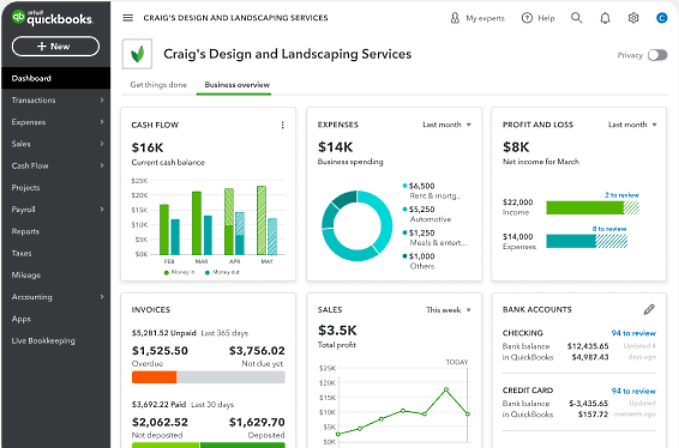
QuickBooks Online is a scalable accounting software that can accommodate the needs of small businesses as they grow and expand their operations. It's also the most widely used accounting software among small business owners.
Why I picked QuickBooks: I like QuickBooks Online because it’s accounting software that’s specifically designed for users with no previous accounting experience, so anyone can use it. You can use QuickBooks to track your income, expenses, and profits so you know how your business is doing.
This software will adapt to the accounting needs of your business as it grows.
QuickBooks Online Standout Features and Integrations
Standout Features include user-friendly tools to create standard financial statements and your own customized reports. Within Quickbooks, you can create and send invoices to customers, pay bills, automate recurring transactions, and reconcile your business bank accounts.
I really like how Quickbooks automatically organizes your business expenses into the correct tax category throughout the year, so you aren’t in a rush to get everything in order when it’s time to file. You can even sync Quickbooks to the GPS on your phone to track your mileage.
Plus, if you skip the free trial and buy a subscription, Quickbooks gives you free expert setup and 50% off your first three months.
Integrations include Shopify, Square, Gusto, Amazon Business and PayPal, and more than 750 other business applications.
Pros and Cons
Pros:
- Connects to banks and credit cards with ease
- No accounting knowledge needed
- Easy to learn with extensive training materials and online chat support
Cons:
- Above-average price point compared to alternatives
- Limited number of users
New Product Updates from QuickBooks Online
QuickBooks Online Checking Account
QuickBooks Online now lets you open a QuickBooks Checking account and make instant deposits with zero fees, all from within your bookkeeping workflow. Visit QuickBooks Online's website for more details.
 for more details.
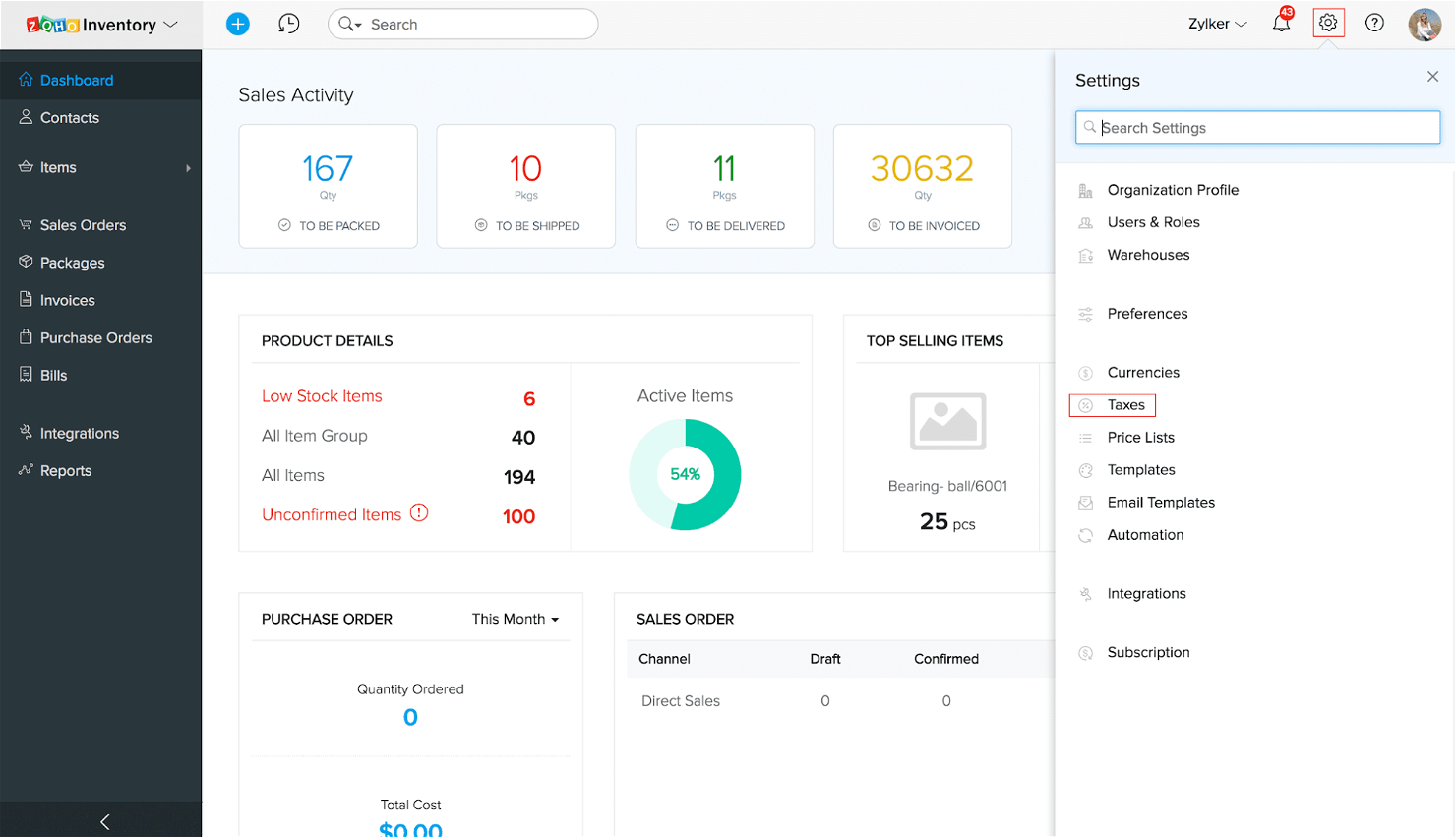
A cloud-based accounting tool, Zoho Books is great for reducing administrative work, allowing for customized sales tax rates for businesses with multiple locations.
Plus, you can access your financial data at any time with their mobile app.
Why I picked Zoho Books: I chose Zoho Books primarily because of its ability to automate several tasks related to sales taxes. Zoho Books can integrate with Avalara to automatically update sales tax rates and applicable exemptions across several locations.
Zoho Books Standout Features and Integrations
Standout Features include its sales tax capabilities, the ability to create automations for repetitive accounting tasks, and its customizable reports that provide insight into your business's financial health.
In my opinion, its financial reporting features really make Zoho Books worth the money. Not only is it easy to track the big metrics like sales revenue and operating expenses, but you can also dig into your cash flows, product returns, and inventory turnover.
Lastly, Zoho Books has several tools for sending payment reminders and categorizing transactions.
Integrations include Avalara, Square, PayPal, Stripe, and more than 50 other apps.
Pros and Cons
Pros:
- Full-featured mobile app
- Free plan for businesses with less than $50,000 in annual revenue
- Sales tax rates are customizable and automatically updated
Cons:
- Steep learning curve
- Limited integrations with other apps

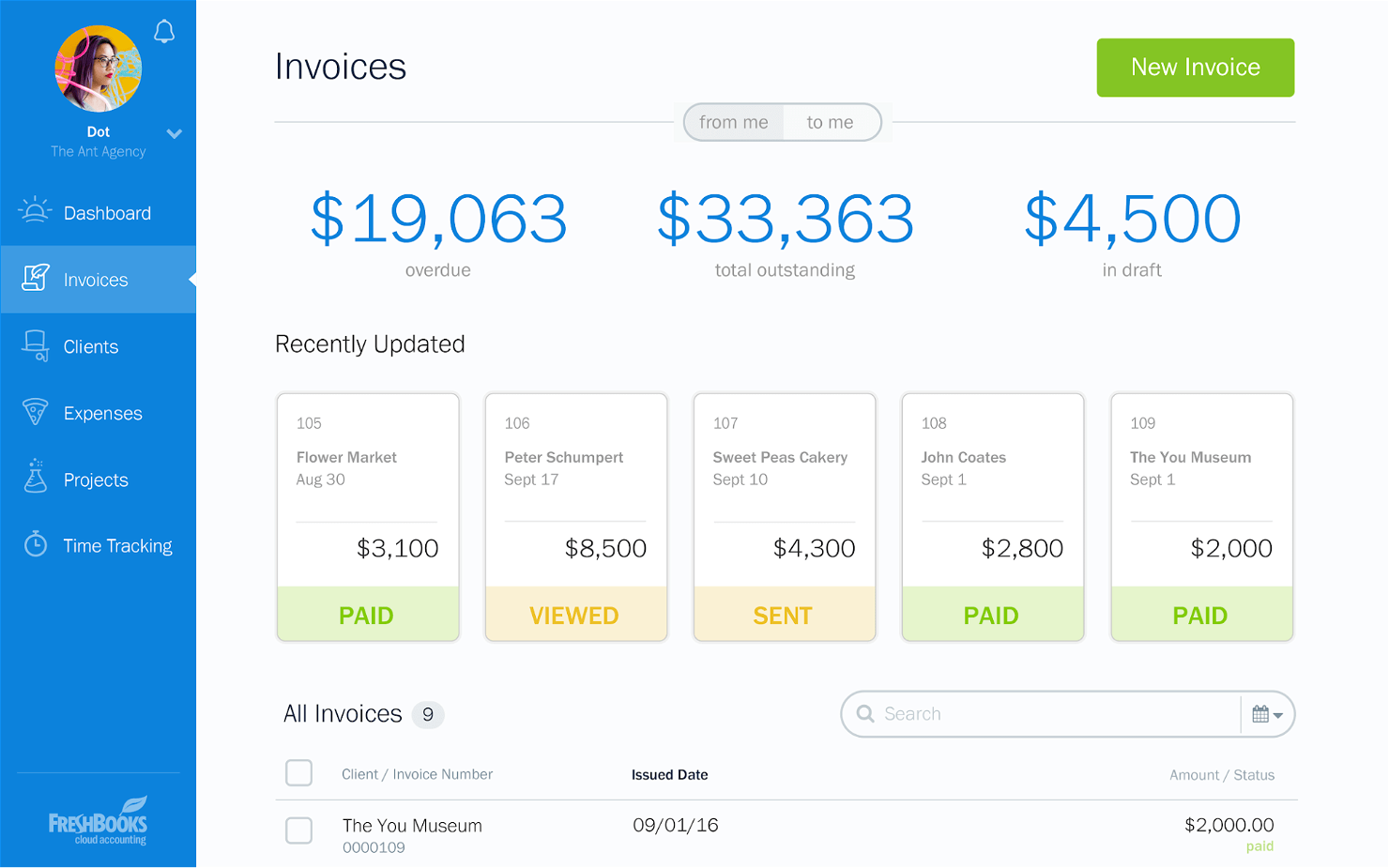
FreshBooks is a cloud-based accounting and invoicing software that helps freelancers and small businesses easily track time, invoice clients, and manage expenses.
Why I picked Freshbooks: I really like the automated invoicing features, but FreshBooks’ financial reporting capabilities are really nice too. They allow you to easily track your business’s financial performance right from your main dashboard.
The software can generate all of the standard financial statements—balance sheet, statement of profit and loss, cash flow statement—so you can make informed business decisions.
Freshbooks Standout Features and Integrations
Standout Features include automated invoicing features to schedule invoices to be sent out at specified intervals. The library of customizable invoice templates lets you add logos, custom colors and fonts, and personalized messages.
The time-tracking capabilities allow you to track billable hours and use that data to quickly generate more accurate invoices. FreshBooks also offers automatic payment reminders so invoices get paid on time.
Integrations include Trello, Asana, Etsy, Square, Stripe, Indeed, and Toggl, among others.
Pros and Cons
Pros:
- Live customer support
- Pricing is based on the number of clients
- Custom invoicing features
Cons:
- Fewer integrations than similar software
- Mobile app has limited functionality
New Product Updates from FreshBooks

Faster Payouts and Smarter Payroll With FreshBooks
FreshBooks introduces Instant Payouts, Buy Now, Pay Later through Affirm, and smarter payment defaults to improve cash flow and payment flexibility. These updates help businesses access funds faster while giving clients more convenient ways to pay. For more information, visit FreshBooks' official site.
 .
.
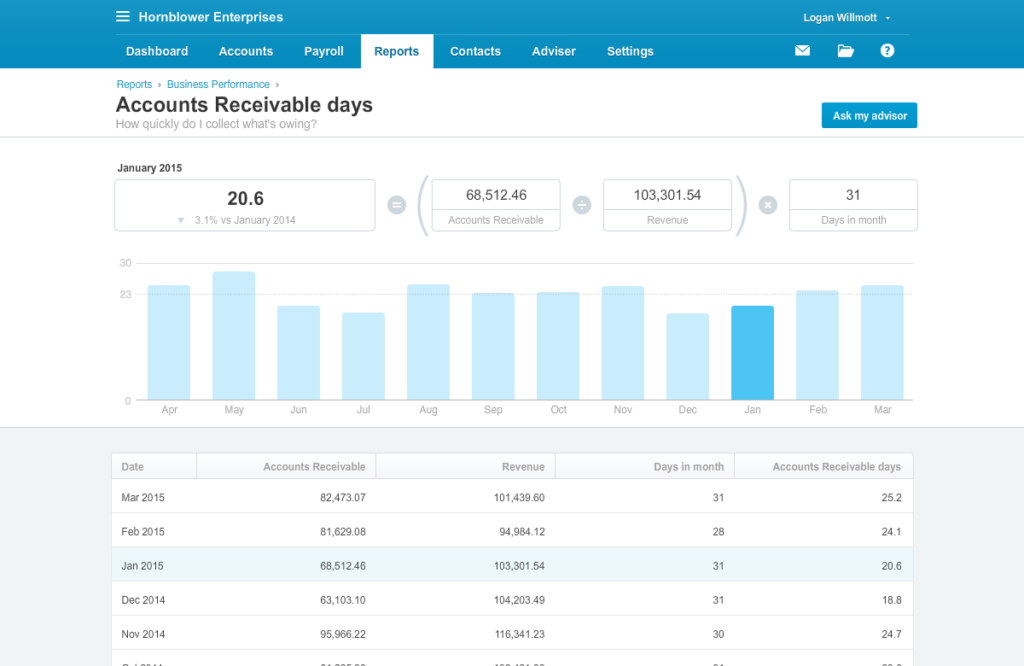
Xero is a low-cost cloud-based accounting tool that’s perfect for sole proprietors and freelancers. Designed for small and medium-sized businesses, Xero is accessible on desktop or mobile, making it a great option for remote teams and business owners on the go.
Why I picked Xero: I chose Xero as the best value for its affordable pricing plans: Starter, Growing, and Established. The Starter plan starts at $13 per month and is suitable for very small businesses. The Growing plan costs $37 per month and offers more features, while the Established plan is $70 per month and is best for larger businesses. All three include a free trial period.
Xero Standout Features and Integrations
Standout Features include the ability to sync your business checking and credit card accounts with Xero. This allows you to automate your cash account reconciliations and ensure you’re capturing all of your business expenses.
Another feature that stood out to me was Xero’s security. Its encryption tools and two-factor authentication help to protect sensitive financial data and prevent unauthorized access.
Plus, its user-friendly interface makes it easy to navigate and use.
Integrations include Salesforce, Trello, Paypal, Stripe, Shopify, and over 800 other popular apps.
Pros and Cons
Pros:
- Efficient receipt scanning and data capture tool
- Integration with Gusto for comprehensive payroll services
- Affordable basic plan suitable for small businesses and independent contractors
Cons:
- Limited customer support
- Fees for ACH payments
New Product Updates from Xero

Xero Unveils New Analytics Features
Xero introduces new analytics dashboards and reporting features. These updates help small businesses better understand performance, trends, and financial health at a glance. For more information, visit Xero's official site.
 .
.
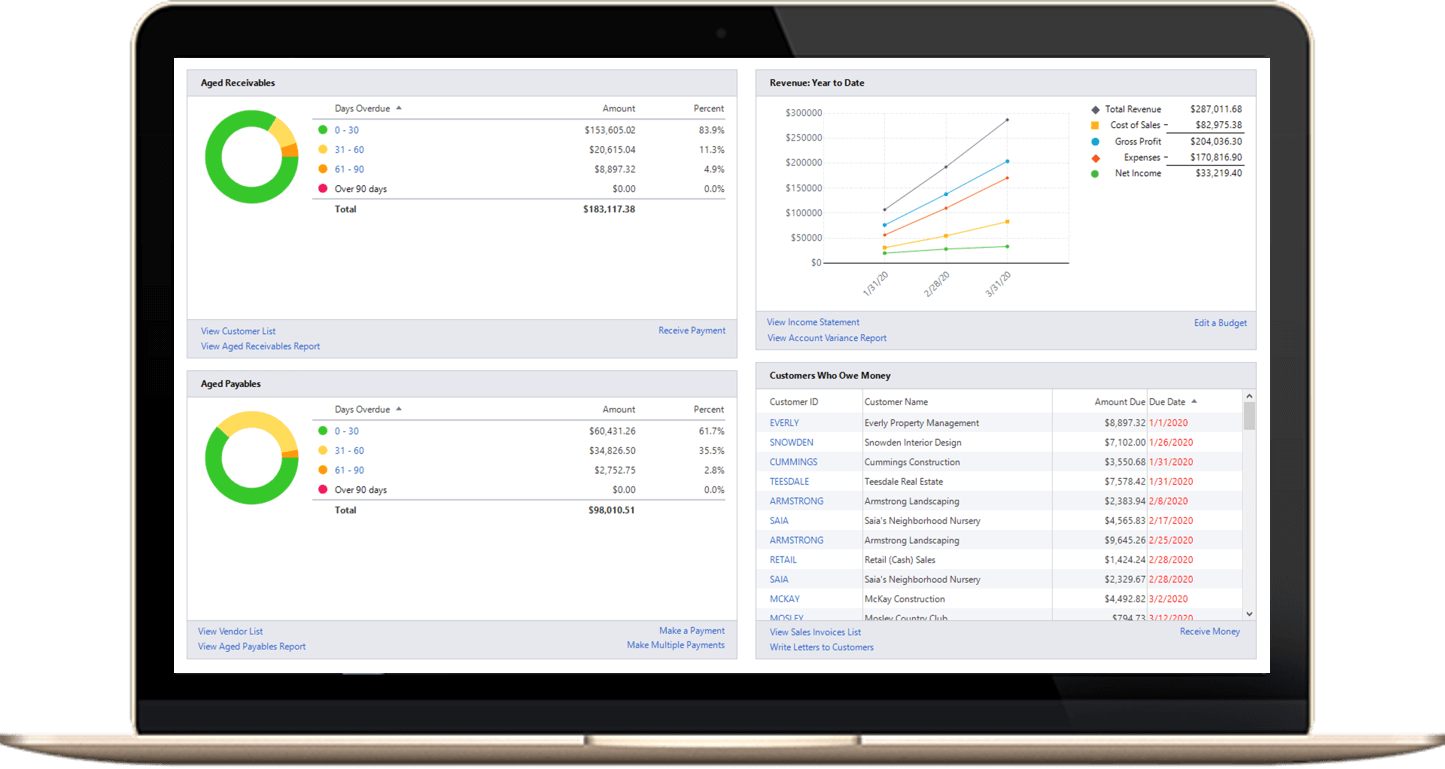
Sage 50cloud has impressive inventory management features, allowing you to keep track of stock levels, establish reorder points, and create custom reports to help you make informed purchasing decisions.
Why I picked Sage 50cloud: I chose Sage 50cloud as the best for inventory management because of specialized features such as viewing quantities on hand when creating invoices and receiving alerts for low or no stock.
I also liked that Sage 50cloud lets you upgrade to the enterprise-level tier for a reasonable price, giving your business room to grow.
Sage 50cloud Standout Features and Integrations
Standout Features include cash flow and invoicing management, payments and banking automation, and advanced inventory tracking with low stock alerts.
In my opinion, Sage 50cloud really stands out in terms of flexibility. You can customize the software to meet the specific needs of your business, whether you need to manage inventory, process payroll, or create custom reports.
Integrations include third-party integrations with Microsoft 365, PayPal, Shopify, AutoEntry, and more. Additional customizations through the Sage suite of business software.
Pros and Cons
Pros:
- Integration with Microsoft 365 (Outlook, Teams, and more)
- Advanced inventory management
- More customizations than most small business accounting software
Cons:
- Higher cost than alternatives
- Most pricing plans cap out at five users

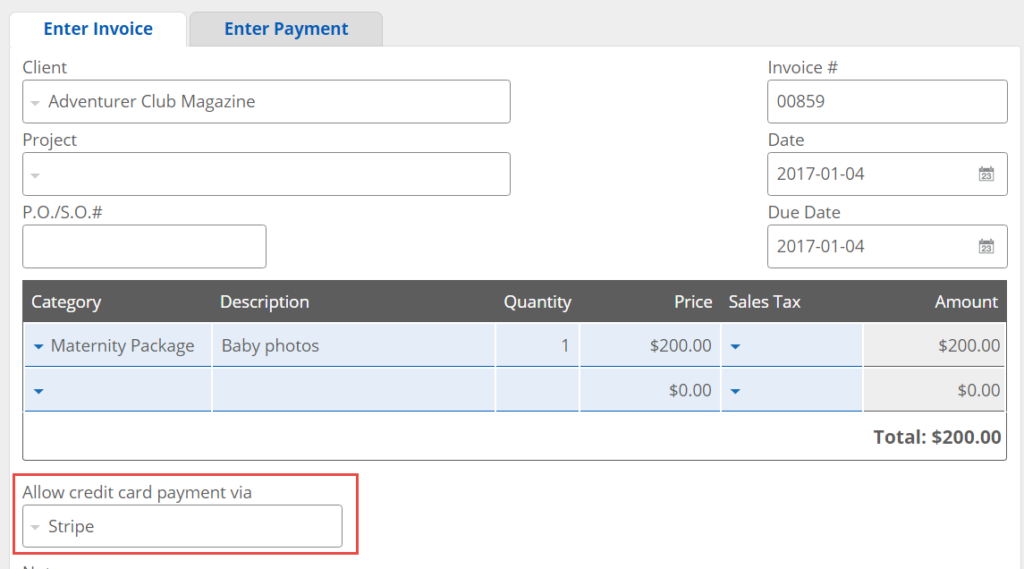
Kashoo accounting software is a great solution for small businesses with users with a wide range of computer skills. Kashoo offers a minimalist interface so users can navigate it quickly. The clean design approach is available on the mobile app as well.
Why I picked Kashoo: I chose Kashoo for best for quick onboarding for its combination of simple design, ease of use, and customer service. The platform can scale depending on the type of user (owner vs. accountant) or needs of your business.
Kashoo Standout Features and Integrations
Standout Features include import of business bank accounts and credit cards to convert into accounting entries and reports. Also, the ability to pay expenses via ACH or paper check.
I like that Kashoo gives you a step-by-step onboarding guide and a support team that’s always available, making it excellent for businesses without prior accounting experience. Customer service provides multiple support channels like email, phone, and live chat. This helps users manage their finances effectively and efficiently, getting the support they need when they need it.
Integrations include Stripe, Square, Shopify, and PayPal. It also offers integration with Zapier to connect with additional applications.
Pros and Cons
Pros:
- Excellent customer support and onboarding experience
- Mobile app for managing finances on-the-go
- Clean and intuitive design
Cons:
- No option for multi-currency invoicing
- Limited integrations compared to some other options

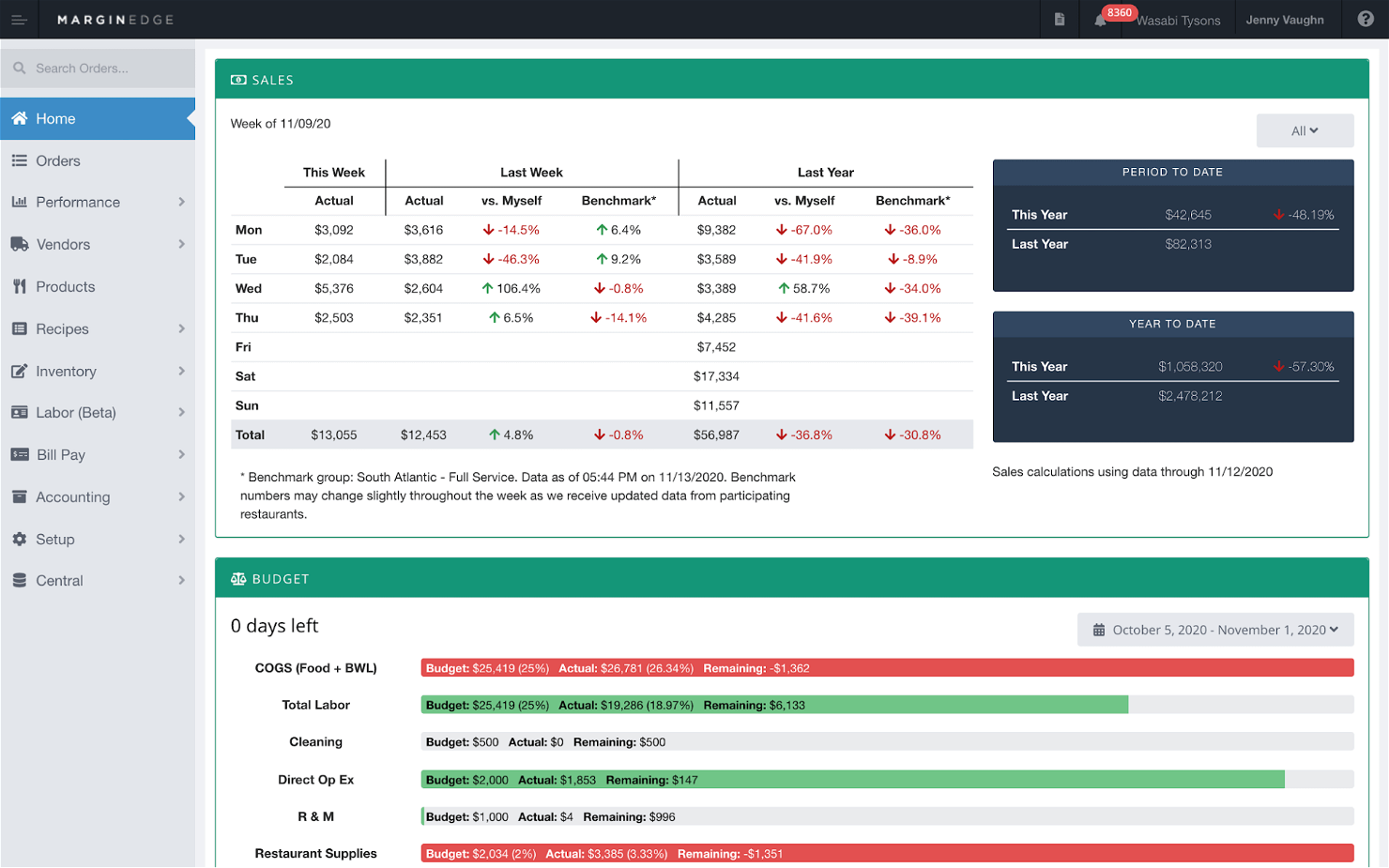
MarginEdge is a restaurant management software that helps streamline operations and improve profitability for restaurant owners. One potential downside of MarginEdge is its pricing, which is a better fit for an established restaurant chain with two or more locations than for a food truck operator.
Why I picked MarginEdge: I chose MarginEdge for restaurant operators because its inventory management is tailored to recipe management. You’ll gain insights such as how much to buy and what the optimal cost point is.
MarginEdge's user-friendly interface and intuitive design make it easy for restaurant staff to learn and use the software. Furthermore, the software provides restaurant owners with detailed recipe cost analysis, along with several other distinctive features, enabling them to gain valuable financial insights.
MarginEdge Standout Features and Integrations
Standout Features include full recipe management to build a menu, track ingredients, set pricing, and reduce food waste. Additional tools include time tracking of labor and digital issuing and paying of invoices.
Another feature that stood out to me was MarginEdge’s invoice automation capabilities. Its OCR technology scans your invoices and puts key invoice details where they belong, reducing manual data entry and human error.
The software also provides real-time data analytics, allowing restaurant owners to track inventory and sales and make data-driven decisions.
Integrations include QuickBooks, Sage, and over 60 POS systems (Aldelo, Clover, SpotOn, and more).
Pros and Cons
Pros:
- Tracks the productivity of various back-of-house operations
- Full tracking of food waste helps optimize inventory
- Daily reconciliation of revenues and expenses
Cons:
- Better for restaurants than small businesses needing general accounting software
- Cost may be too high for small operators

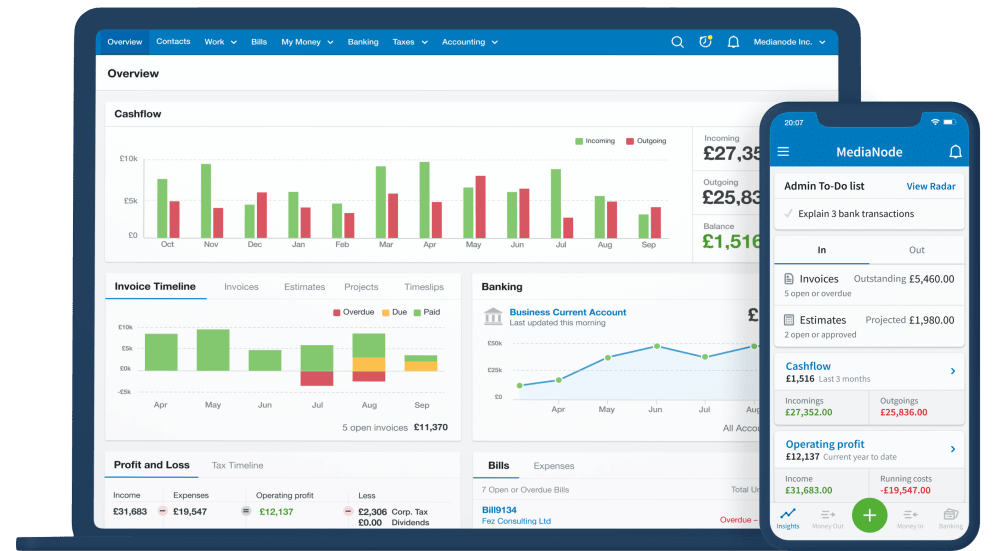
FreeAgent includes a comprehensive set of tools for managing invoices, expenses, bank transactions, and tax returns, all in one place. The software provides a user-friendly interface that guides users to navigate and access essential features.
Why I picked FreeAgent: I chose FreeAgent as best for freelancers because it addresses their key needs: creation of estimates, tracking of billable time, overview of existing projects, and shipping of invoices.
FreeAgent is designed for freelancers with features such as invoicing and expense tracking and integration with popular payment platforms like PayPal and Stripe. The software also integrates with various third-party applications, providing users with more flexibility and options.
FreeAgent Standout Features and Integrations
Standout Features invoicing, expense tracking, project management, integration with popular payment platforms, and tax estimation.
I really liked how FreeAgent’s project management tools simplify time tracking and expense reporting. Tagging time and expenses to specific projects makes it easy for freelancers to manage and bill for their work.
The software also provides insights into the financial health of the business, including cash flow and profit and loss reports.
Integrations include payment platforms (Paypal, Stripe) and project management tools (Slack, Trello).
Pros and Cons
Pros:
- Integration with popular payment platforms and project management tools
- No set-up fees
- Unlimited number of users, clients, and projects
Cons:
- Limited customization of invoices
- Customer service is based in the UK

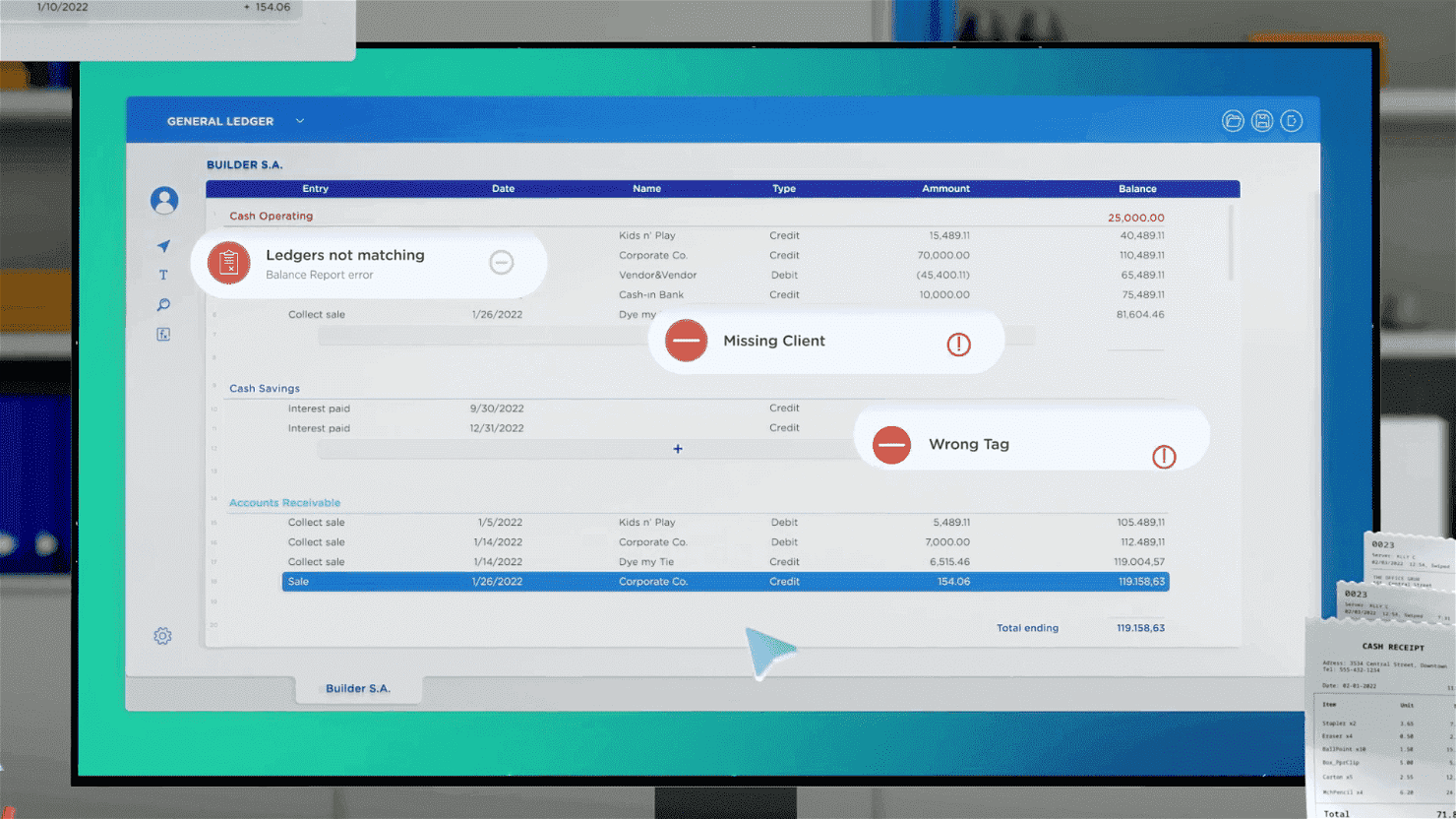
Digits is an AI-powered accounting software that processes and automates accounting tasks. It uses machine learning algorithms to analyze financial data, detect fraud, and provide insights.
Why I picked Digits: I chose Digits for its AI accounting features because it goes beyond data processing. The software helps you identify trends, make predictions, and put data into context.
With drag-and-drop reporting and visualization features, users can create customized reports and visualizations to illustrate trends and highlight anomalies.
Digits automatically captures and categorizes financial transactions, sales data, and customer behavior to generate insights for informed decision-making.
Digits Standout Features and Integrations
Standout Features include AI-powered features like cash flow tracking, drag-and-drop reporting, and visualization. It identifies anomalies and trends and provides insights for decision-making.
Additionally, Digits adds logos to transactions for easier vendor identification, identifies changes in recurring expenses to prevent overpayment and fraud, and reduces errors by analyzing bank statements, invoices, and payment receipts to match them to corresponding accounts.
I also really like Digits’ modern, smooth interface.
Integrations include QuickBooks, Xero, NetSuite, Stripe, PayPal, and Square.
Pros and Cons
Pros:
- Automation options
- Real-time cash flow tracking and detailed financial reporting
- AI helps identify anomalies, trends, and insights
Cons:
- No time-tracking or payroll processing features
- Somewhat of a newcomer in the market

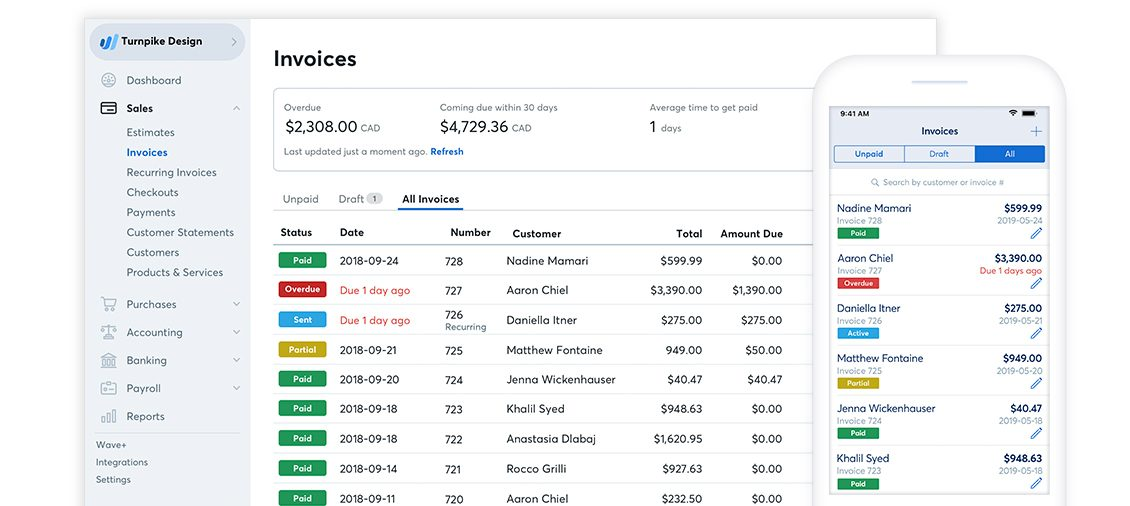
Wave is a cloud-based accounting software that can help small businesses manage their finances efficiently. Wave is completely free to use, making it a good fit for small businesses with limited budgets.
Why I picked Wave: I chose Wave as the best free option because it can handle all your big accounting tasks despite being a free tool.
Wave's user-friendly interface provides step-by-step guidance for tasks like setting up an account, managing expenses, invoicing, and reconciling bank transactions.
Wave Standout Features and Integrations
Standout Features include generation of the three essential accounting reports (income statement, balance sheet, and cash flow statement) and tax payment and filing in 14 states.
I liked that Wave also gives you features like payroll management and receipt scanning to help streamline financial tasks. The software has integrations with other software tools like payment processors and project management software.
Integrations include third-party integrations via Zapier and other apps within Wave.
Pros and Cons
Pros:
- Automated tax filing (in some states)
- No limits on users, invoices, or connected bank accounts
- Free accounting and invoicing
Cons:
- Higher payment processing fees
- Few integrations
Table of Contents
- Was ist Buchhaltungssoftware für kleine Unternehmen?
- Überblick über die beste Buchhaltungssoftware für kleine Unternehmen
- So habe ich die beste Buchhaltungssoftware für kleine Unternehmen ausgewählt
- Auswahlkriterien für die beste Buchhaltungssoftware für kleine Unternehmen
- Kernfunktionen
- Wichtige Funktionen
- Benutzerfreundlichkeit
- Preis-Leistungs-Verhältnis
- Integrationen
- Zusammenfassung
| Tool | Best For | Trial Info | Price | ||
|---|---|---|---|---|---|
| 1 | Best for growing small businesses | 30-day free trial + free demo available | From $38/month | Website | |
| 2 | Best for preparing state sales taxes | Free trial + free plan + free demo available | From $20/organization/month (billed annually) | Website | |
| 3 | Best for invoice management | 30-day free trial + free demo available | From $23/month | Website | |
| 4 | Best value for money | 30-day free trial available | From $3.75/month | Website | |
| 5 | Best for inventory management | Free demo available | From $61.92/month (one user only) | Website | |
| 6 | Best for quick onboarding | 14-day free trial | Plans start at $324/year | Website | |
| 7 | Best for restaurant operators | Free demo available | From $330/location/month | Website | |
| 8 | Best for freelancers | 30-day free trial | From $13.50/month (billed annually) | Website | |
| 9 | Best for AI accounting features | Free trial available | $35/month | Website | |
| 10 | Best free small business accounting software | Free plan available | From $16/user/month | Website |
Weitere Buchhaltungssoftware für kleine Unternehmen
Hier sind noch einige weitere großartige Optionen, die es nicht auf die Hauptliste der besten Buchhaltungssoftware für kleine Unternehmen geschafft haben:
- Neat
For tracking receipts
- GnuCash
For open-source accounting
- Manager
Free accounting for Linux operating system
- Odoo ERP
For unlimited number of users
- AccountEdge
For full-featured desktop accounting
- Plooto
For end-to-end accounts payable management
- LessAccounting
For templated workflows


Related Reviews
If you still haven’t found what you’re looking for here, check out these other tools that we’ve tested and evaluated:
So habe ich die beste Buchhaltungssoftware für kleine Unternehmen ausgewählt
Um die Top-12-Liste zu erstellen, habe ich meine Auswahl anhand folgender Kriterien bewertet und verfeinert, um die Leistung jeder Plattform zu vergleichen. Außerdem habe ich meine eigenen Branchenerfahrungen einfließen lassen, um Funktionen zu identifizieren, die besonders viel Mehrwert bieten.
Auswahlkriterien für die beste Buchhaltungssoftware für kleine Unternehmen
Werfen wir einen Blick auf die wichtigsten Kriterien, die ich herangezogen habe, um meine Liste der besten Buchhaltungssoftware für kleine Unternehmen zu erstellen:
Kernfunktionen
Ich habe nach Buchhaltungssoftware für kleine Unternehmen gesucht, die Eigentümern und Manager:innen hilft, Buchhaltungs- und Finanzberichterstattungsprozesse zu automatisieren, unter anderem:
- Verwaltung des Hauptbuchs und des Kontenplans
- Durchführung allgemeiner Buchhaltungs- und grundlegender Buchführungsprozesse
- Erstellung eines standardisierten Satzes von Finanzberichten und interner Berichte
- Nachverfolgung und Kategorisierung der Kosten für Arbeit, Materialien und andere Betriebsausgaben
- Analyse und Zusammenfassung von Finanzdaten zur Unterstützung der Zielsetzungs- und Entscheidungsprozesse des Managements
Wesentliche Funktionen
Die wichtigsten Funktionen, nach denen ich gesucht habe, sind:
- Transparenz des Cashflows: Überwachung von Ein- und Auszahlungen
- Funktionen für Finanzberichte: Automatisierung und Anpassung von Finanzberichten für interne und externe Stakeholder
- Ausgabenverfolgung: Geschäftsausgaben problemlos erfassen und kategorisieren
- Rechnungsstellung und Fakturierung: Rechnungen erstellen und versenden sowie Zahlungsstatus überwachen
- Bank-Integrationen: Integration mit Finanzinstituten zur automatischen Abstimmung von Bankkonten
- Mobiler Zugriff: Zugriff und Verwaltung der Buchhaltungsdaten aus der Ferne
- Sicherheit und Datensicherung: Verbesserung der Datensicherheit durch Benutzerrollen und Zugriffsrechte
Benutzerfreundlichkeit
Kleinunternehmer tragen viele Hüte, daher lag mein Fokus bei der Bewertung der Tools auf Benutzerfreundlichkeit und exzellentem Kundenservice.
Insbesondere habe ich geachtet auf:
- Übersichtliche, einfache Benutzeroberfläche
- Anpassbare Workflows und Automatisierungen
- Verfügbarkeit von mobilen Apps und enthaltene Funktionen
- Kontaktmöglichkeiten und Servicezeiten des technischen Kundensupports
Preis-Leistungs-Verhältnis
Die in diesem Artikel genannten Buchhaltungsprogramme für kleine Unternehmen kosten zwischen kostenlos (Wave) und $275 pro Monat (Zoho Books).
Die meisten Software-Lösungen bewegen sich preislich zwischen $13 und $91.45 pro Monat, wobei beliebte Tarife meist bei etwa $30 bis $70 pro Monat liegen.
Einige Softwarelösungen bieten kostenlose Testversionen oder vergünstigte Tarife für Einstiegszeiträume an.
Andere Softwarelösungen stellen kostenfreie Pläne für berechtigte Institutionen wie gemeinnützige Organisationen oder bestimmte Kleinunternehmen zur Verfügung.
Integrationen
Die genannten Buchhaltungsprogramme für kleine Unternehmen bieten eine Vielzahl an Integrationen mit diversen Geschäftsanwendungen und Plattformen.
Mein Ziel war es, Tools zu finden, die mit möglichst vielen wichtigen Tools verbunden werden können. Zu diesen Integrationen zählen gängige Dienste wie Zahlungsanbieter, E-Commerce-Plattformen, Lohnabrechnungssoftware, Bankinstitute, CRM-Systeme und mehr.
Häufig gestellte Fragen
In diesem FAQ-Bereich beantworten wir einige der Fragen, die Sie möglicherweise zu Buchhaltungssoftware für kleine Unternehmen haben oder wie Sie herausfinden, welche Option für Ihr Unternehmen am besten geeignet ist.
Warum sollte ich Buchhaltungssoftware verwenden?
Können kleine Unternehmen ihre Buchhaltung selbst erledigen?
Fazit
Auch wenn jede Option in diesem Leitfaden einzigartige Funktionen bietet, wäre jede eine solide Wahl.
Wenn die von Ihnen gewählte Software Ihren spezifischen geschäftlichen Anforderungen entspricht und für Ihr Team funktioniert, haben Sie eine gute Wahl getroffen.
Für weitere Einblicke und Ratschläge zu Buchhaltung und Finanzen melden Sie sich für unseren Newsletter an, um die neuesten Tipps und Ressourcen von Finanzexperten zu erhalten.